
Basic configuration of a switch in packet tracer
Basic configuration of a switch in packet tracer LAB - 6
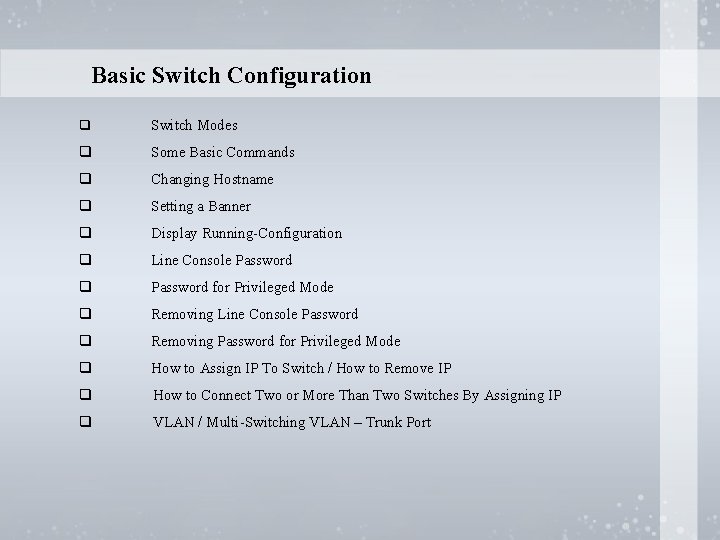
Basic Switch Configuration q Switch Modes q Some Basic Commands q Changing Hostname q Setting a Banner q Display Running-Configuration q Line Console Password q Password for Privileged Mode q Removing Line Console Password q Removing Password for Privileged Mode q How to Assign IP To Switch / How to Remove IP q How to Connect Two or More Than Two Switches By Assigning IP q VLAN / Multi-Switching VLAN – Trunk Port
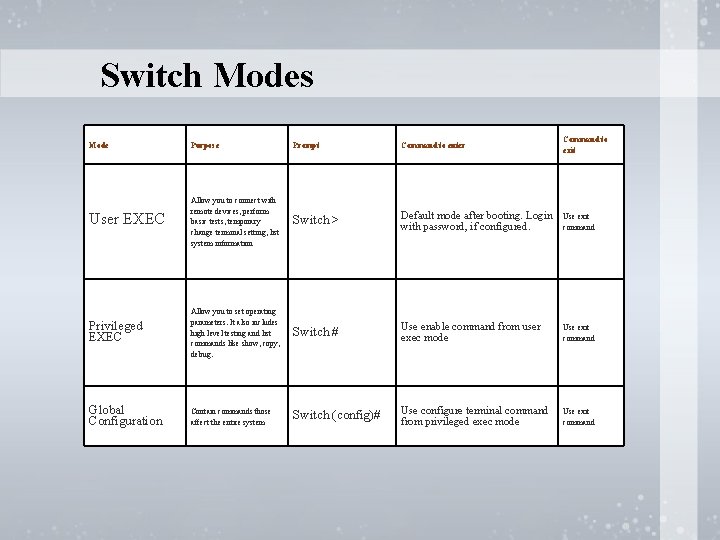
Switch Modes Mode Purpose Prompt Command to enter Command to exit User EXEC Allow you to connect with remote devices, perform basic tests, temporary change terminal setting, list system information Switch > Default mode after booting. Login with password, if configured. Use exit command Privileged EXEC Allow you to set operating parameters. It also includes high level testing and list commands like show, copy, debug. Switch # Use enable command from user exec mode Use exit command Global Configuration Contain commands those affect the entire system Switch (config)# Use configure terminal command from privileged exec mode Use exit command
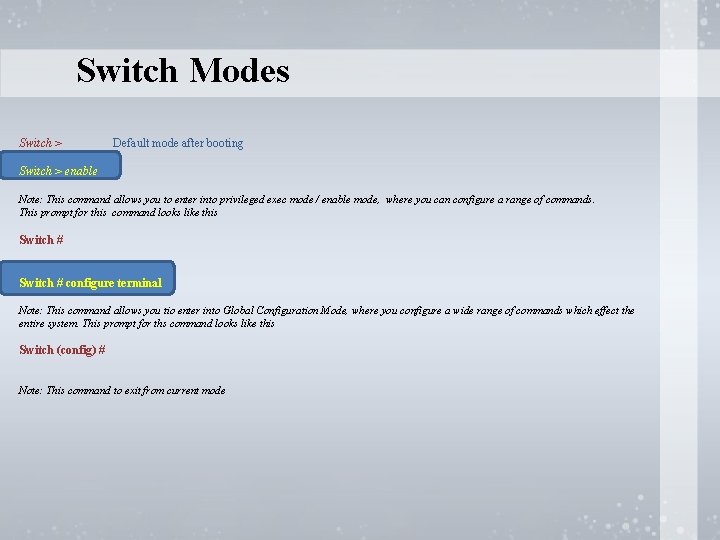
Switch Modes Switch > Default mode after booting Switch > enable Note: This command allows you to enter into privileged exec mode / enable mode, where you can configure a range of commands. This prompt for this command looks like this Switch # configure terminal Note: This command allows you tio enter into Global Configuration Mode, where you configure a wide range of commands which effect the entire system. This prompt for ths command looks like this Switch (config) # Note: This command to exit from current mode
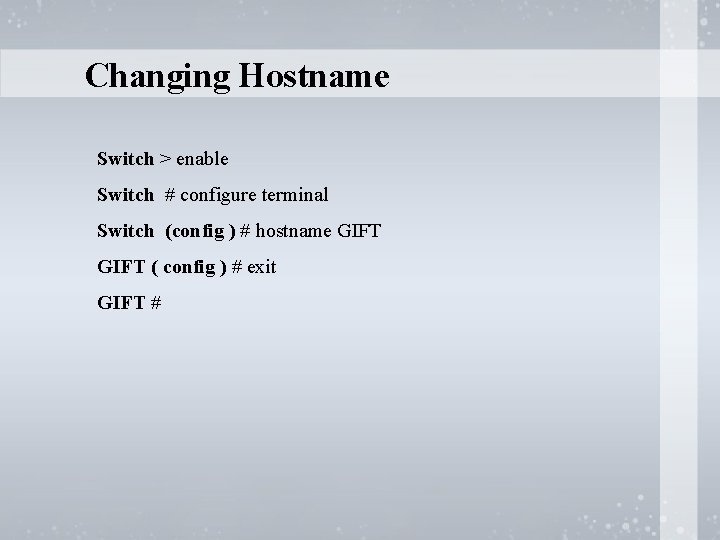
Changing Hostname Switch > enable Switch # configure terminal Switch (config ) # hostname GIFT ( config ) # exit GIFT #
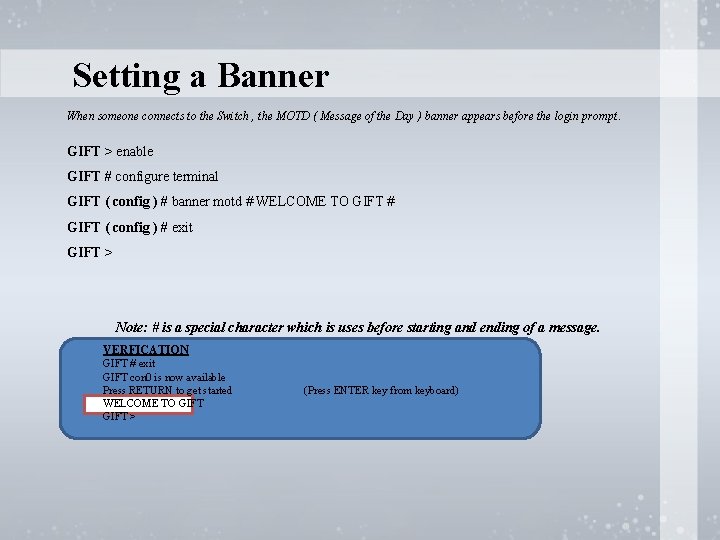
Setting a Banner When someone connects to the Switch , the MOTD ( Message of the Day ) banner appears before the login prompt. GIFT > enable GIFT # configure terminal GIFT ( config ) # banner motd # WELCOME TO GIFT # GIFT ( config ) # exit GIFT > Note: # is a special character which is uses before starting and ending of a message. VERFICATION GIFT # exit GIFT con 0 is now available Press RETURN to get started WELCOME TO GIFT > (Press ENTER key from keyboard)
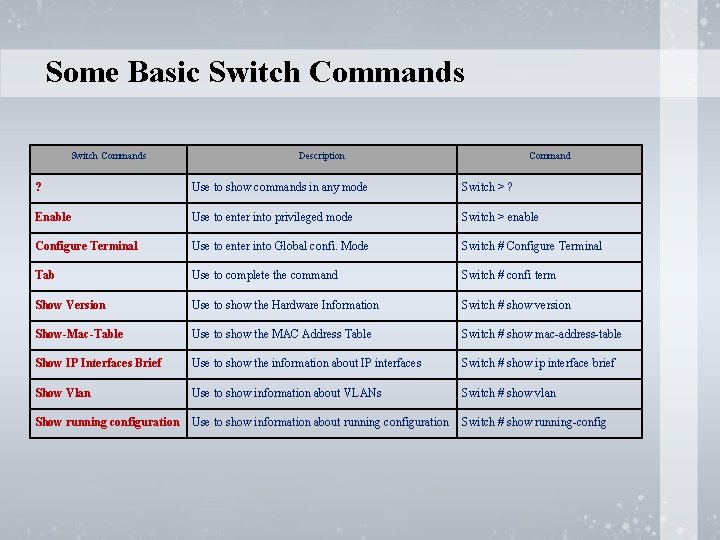
Some Basic Switch Commands Description Command ? Use to show commands in any mode Switch > ? Enable Use to enter into privileged mode Switch > enable Configure Terminal Use to enter into Global confi. Mode Switch # Configure Terminal Tab Use to complete the command Switch # confi term Show Version Use to show the Hardware Information Switch # show version Show-Mac-Table Use to show the MAC Address Table Switch # show mac-address-table Show IP Interfaces Brief Use to show the information about IP interfaces Switch # show ip interface brief Show Vlan Use to show information about VLANs Switch # show vlan Show running configuration Use to show information about running configuration Switch # show running-config
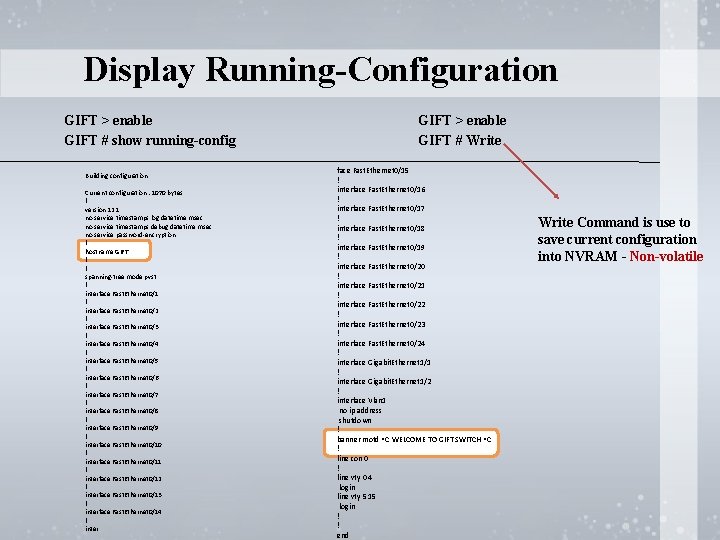
Display Running-Configuration GIFT > enable GIFT # show running-config Building configuration. . . Current configuration : 1070 bytes ! version 12. 1 no service timestamps log datetime msec no service timestamps debug datetime msec no service password-encryption ! hostname GIFT ! ! spanning-tree mode pvst ! interface Fast. Ethernet 0/1 ! interface Fast. Ethernet 0/2 ! interface Fast. Ethernet 0/3 ! interface Fast. Ethernet 0/4 ! interface Fast. Ethernet 0/5 ! interface Fast. Ethernet 0/6 ! interface Fast. Ethernet 0/7 ! interface Fast. Ethernet 0/8 ! interface Fast. Ethernet 0/9 ! interface Fast. Ethernet 0/10 ! interface Fast. Ethernet 0/11 ! interface Fast. Ethernet 0/12 ! interface Fast. Ethernet 0/13 ! interface Fast. Ethernet 0/14 ! inter GIFT > enable GIFT # Write face Fast. Ethernet 0/15 ! interface Fast. Ethernet 0/16 ! interface Fast. Ethernet 0/17 ! interface Fast. Ethernet 0/18 ! interface Fast. Ethernet 0/19 ! interface Fast. Ethernet 0/20 ! interface Fast. Ethernet 0/21 ! interface Fast. Ethernet 0/22 ! interface Fast. Ethernet 0/23 ! interface Fast. Ethernet 0/24 ! interface Gigabit. Ethernet 1/1 ! interface Gigabit. Ethernet 1/2 ! interface Vlan 1 no ip address shutdown ! banner motd ^C WELCOME TO GIFT SWITCH ^C ! line con 0 ! line vty 0 4 login line vty 5 15 login ! ! end Write Command is use to save current configuration into NVRAM - Non-volatile
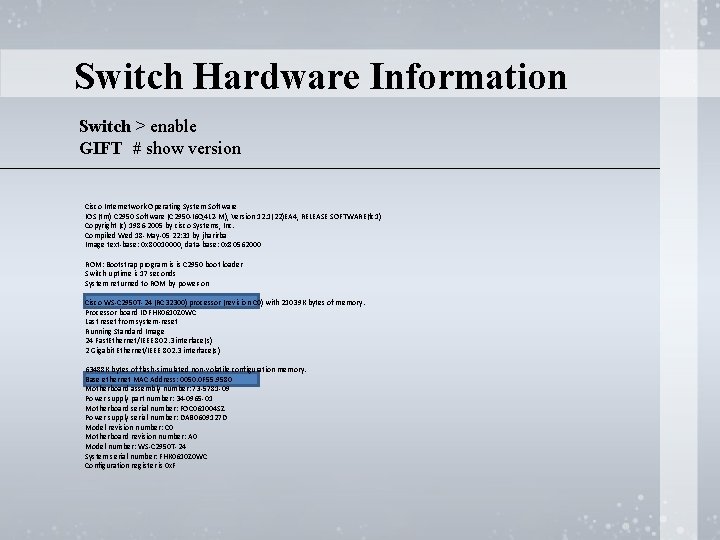
Switch Hardware Information Switch > enable GIFT # show version Cisco Internetwork Operating System Software IOS (tm) C 2950 Software (C 2950 -I 6 Q 4 L 2 -M), Version 12. 1(22)EA 4, RELEASE SOFTWARE(fc 1) Copyright (c) 1986 -2005 by cisco Systems, Inc. Compiled Wed 18 -May-05 22: 31 by jharirba Image text-base: 0 x 80010000, data-base: 0 x 80562000 ROM: Bootstrap program is is C 2950 boot loader Switch uptime is 17 seconds System returned to ROM by power-on Cisco WS-C 2950 T-24 (RC 32300) processor (revision C 0) with 21039 K bytes of memory. Processor board ID FHK 0610 Z 0 WC Last reset from system-reset Running Standard Image 24 Fast. Ethernet/IEEE 802. 3 interface(s) 2 Gigabit Ethernet/IEEE 802. 3 interface(s) 63488 K bytes of flash-simulated non-volatile configuration memory. Base ethernet MAC Address: 0050. 0 F 55. 9580 Motherboard assembly number: 73 -5781 -09 Power supply part number: 34 -0965 -01 Motherboard serial number: FOC 061004 SZ Power supply serial number: DAB 0609127 D Model revision number: C 0 Motherboard revision number: A 0 Model number: WS-C 2950 T-24 System serial number: FHK 0610 Z 0 WC Configuration register is 0 x. F
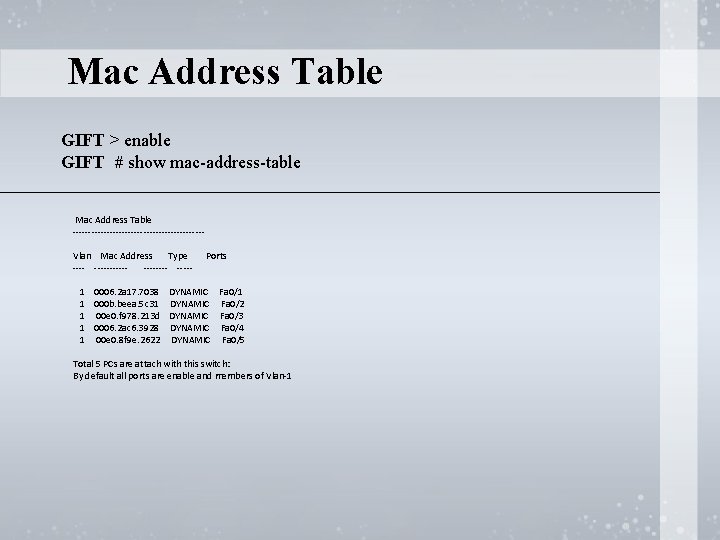
Mac Address Table GIFT > enable GIFT # show mac-address-table Mac Address Table ---------------------Vlan Mac Address Type ----------- Ports 1 0006. 2 a 17. 7038 DYNAMIC Fa 0/1 1 000 b. beea. 5 c 31 DYNAMIC Fa 0/2 1 00 e 0. f 978. 213 d DYNAMIC Fa 0/3 1 0006. 2 ac 6. 3928 DYNAMIC Fa 0/4 1 00 e 0. 8 f 9 e. 2622 DYNAMIC Fa 0/5 Total 5 PCs are attach with this switch: By default all ports are enable and members of Vlan-1
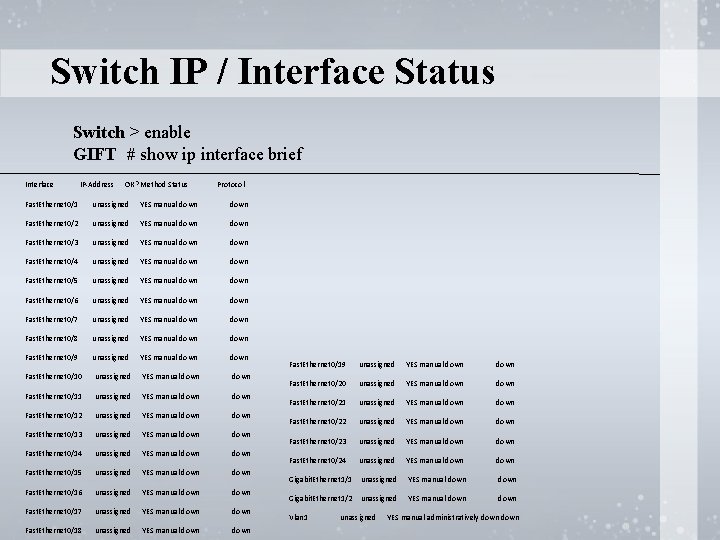
Switch IP / Interface Status Switch > enable GIFT # show ip interface brief Interface IP-Address OK? Method Status Protocol Fast. Ethernet 0/1 unassigned YES manual down Fast. Ethernet 0/2 unassigned YES manual down Fast. Ethernet 0/3 unassigned YES manual down Fast. Ethernet 0/4 unassigned YES manual down Fast. Ethernet 0/5 unassigned YES manual down Fast. Ethernet 0/6 unassigned YES manual down Fast. Ethernet 0/7 unassigned YES manual down Fast. Ethernet 0/8 unassigned YES manual down Fast. Ethernet 0/9 unassigned YES manual down Fast. Ethernet 0/10 unassigned YES manual down Fast. Ethernet 0/11 unassigned YES manual down Fast. Ethernet 0/12 unassigned YES manual down Fast. Ethernet 0/13 unassigned YES manual down Fast. Ethernet 0/14 unassigned YES manual down Fast. Ethernet 0/15 unassigned YES manual down Fast. Ethernet 0/16 unassigned YES manual down Fast. Ethernet 0/17 unassigned YES manual down Fast. Ethernet 0/18 unassigned YES manual down Fast. Ethernet 0/19 unassigned YES manual down Fast. Ethernet 0/20 unassigned YES manual down Fast. Ethernet 0/21 unassigned YES manual down Fast. Ethernet 0/22 unassigned YES manual down Fast. Ethernet 0/23 unassigned YES manual down Fast. Ethernet 0/24 unassigned YES manual down Gigabit. Ethernet 1/1 unassigned YES manual down Gigabit. Ethernet 1/2 unassigned YES manual down Vlan 1 unassigned YES manual administratively down
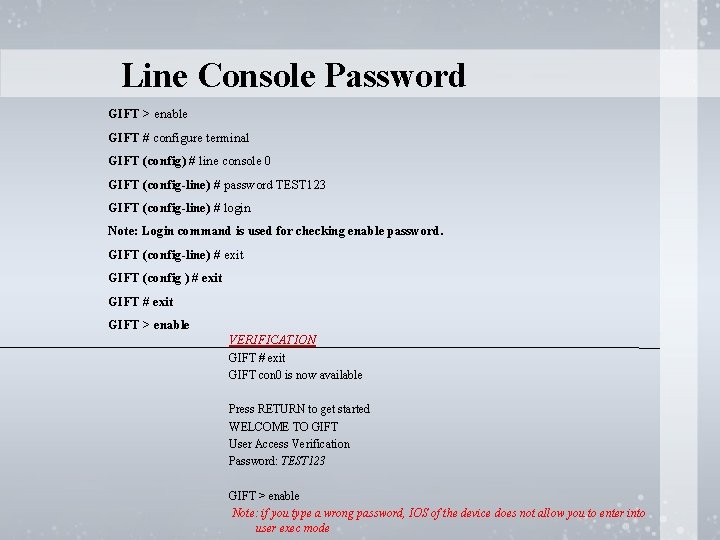
Line Console Password GIFT > enable GIFT # configure terminal GIFT (config) # line console 0 GIFT (config-line) # password TEST 123 GIFT (config-line) # login Note: Login command is used for checking enable password. GIFT (config-line) # exit GIFT (config ) # exit GIFT > enable VERIFICATION GIFT # exit GIFT con 0 is now available Press RETURN to get started WELCOME TO GIFT User Access Verification Password: TEST 123 GIFT > enable Note: if you type a wrong password, IOS of the device does not allow you to enter into user exec mode
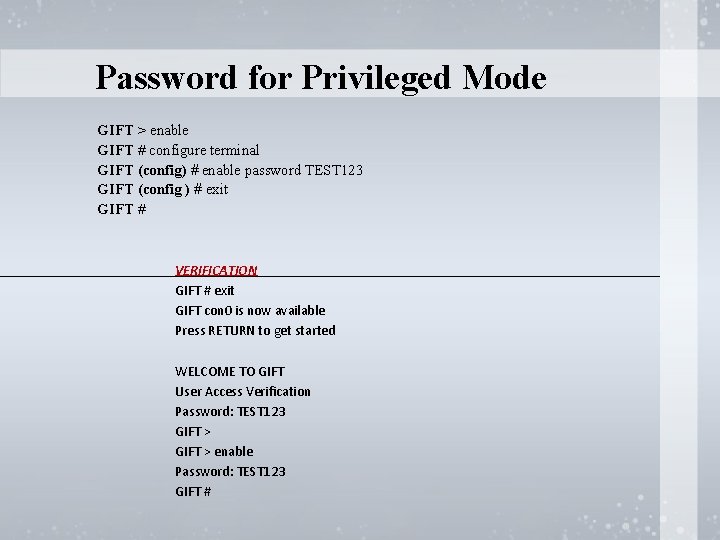
Password for Privileged Mode GIFT > enable GIFT # configure terminal GIFT (config) # enable password TEST 123 GIFT (config ) # exit GIFT # VERIFICATION GIFT # exit GIFT con 0 is now available Press RETURN to get started WELCOME TO GIFT User Access Verification Password: TEST 123 GIFT > enable Password: TEST 123 GIFT #
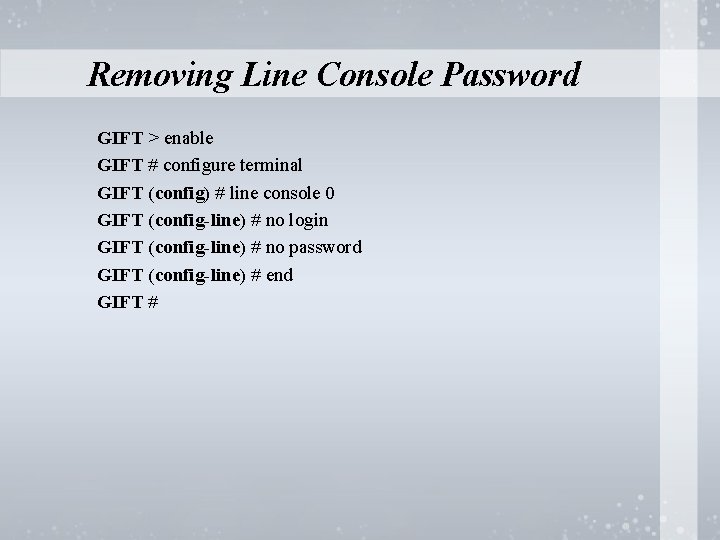
Removing Line Console Password GIFT > enable GIFT # configure terminal GIFT (config) # line console 0 GIFT (config-line) # no login GIFT (config-line) # no password GIFT (config-line) # end GIFT #
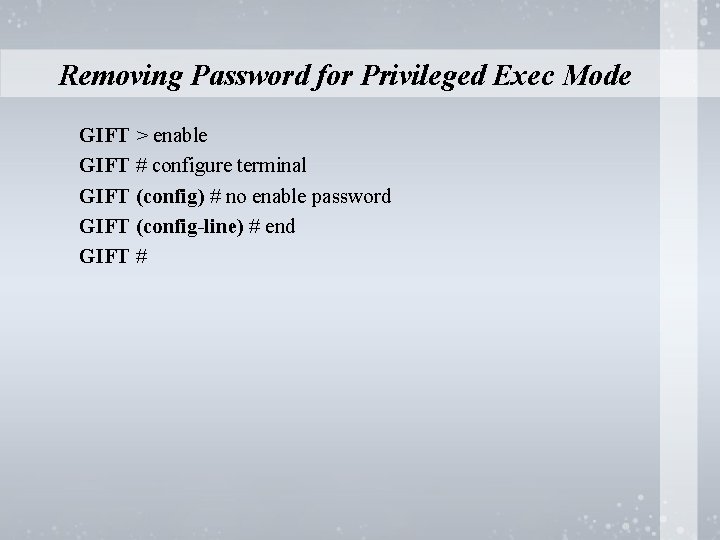
Removing Password for Privileged Exec Mode GIFT > enable GIFT # configure terminal GIFT (config) # no enable password GIFT (config-line) # end GIFT #
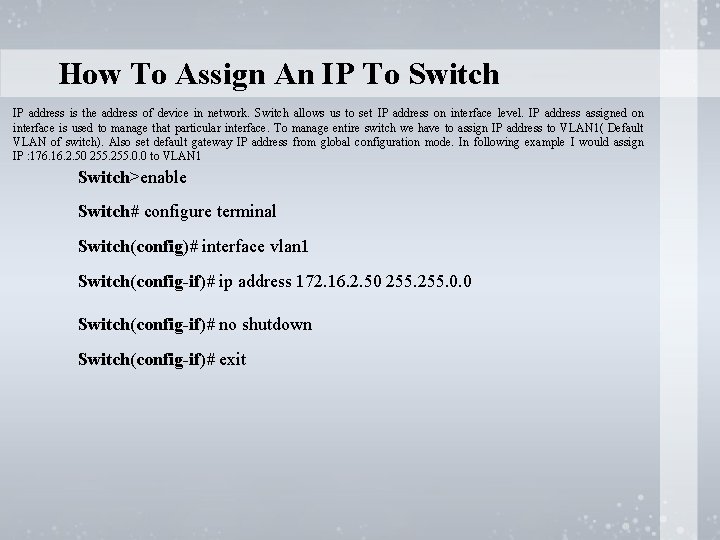
How To Assign An IP To Switch IP address is the address of device in network. Switch allows us to set IP address on interface level. IP address assigned on interface is used to manage that particular interface. To manage entire switch we have to assign IP address to VLAN 1( Default VLAN of switch). Also set default gateway IP address from global configuration mode. In following example I would assign IP : 176. 16. 2. 50 255. 0. 0 to VLAN 1 Switch>enable Switch# configure terminal Switch(config)# interface vlan 1 Switch(config-if)# ip address 172. 16. 2. 50 255. 0. 0 Switch(config-if)# no shutdown Switch(config-if)# exit
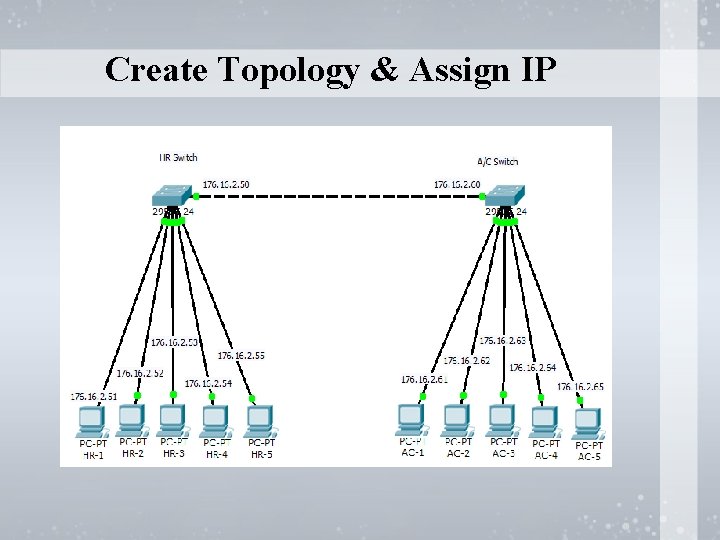
Create Topology & Assign IP
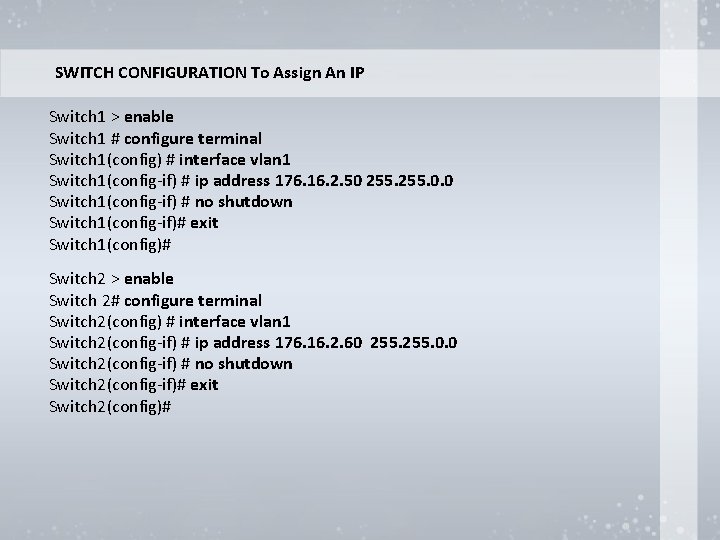
SWITCH CONFIGURATION To Assign An IP Pc # 1 176. 16. 2. 51 255. 0. 0 Switch 1 > enable. Pc # 2 176. 16. 2. 52 255. 0. 0 Switch 1 # configure terminal #3 176. 16. 2. 53 255. 0. 0 Switch 1(config) #Pc interface vlan 1 Switch 1(config-if) # ip address 176. 16. 2. 50 255. 0. 0 Pc # 4 176. 16. 2. 54 255. 0. 0 Switch 1(config-if) # no shutdown Switch 1(config-if)# Pc # 5 exit 176. 16. 2. 55 255. 0. 0 Switch 1(config)# Pc # 1 176. 16. 2. 61 255. 0. 0 Switch 2 > enable Pc # 2 176. 16. 2. 62 255. 0. 0 Switch 2# configure terminal Switch 2(config) #Pc interface vlan 1 #3 176. 16. 2. 63 255. 0. 0 Switch 2(config-if) # ip address 176. 16. 2. 60 255. 0. 0 Pc # 4 176. 16. 2. 64 255. 0. 0 Switch 2(config-if) # no shutdown Switch 2(config-if)# exit Switch 2(config)#
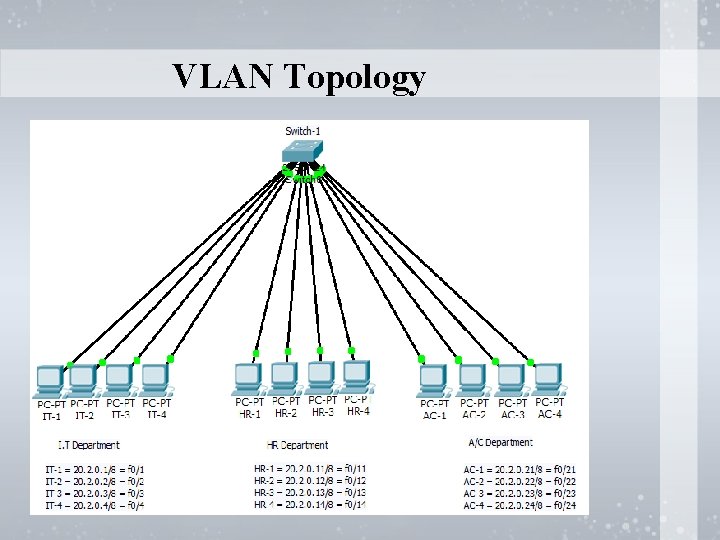
VLAN Topology
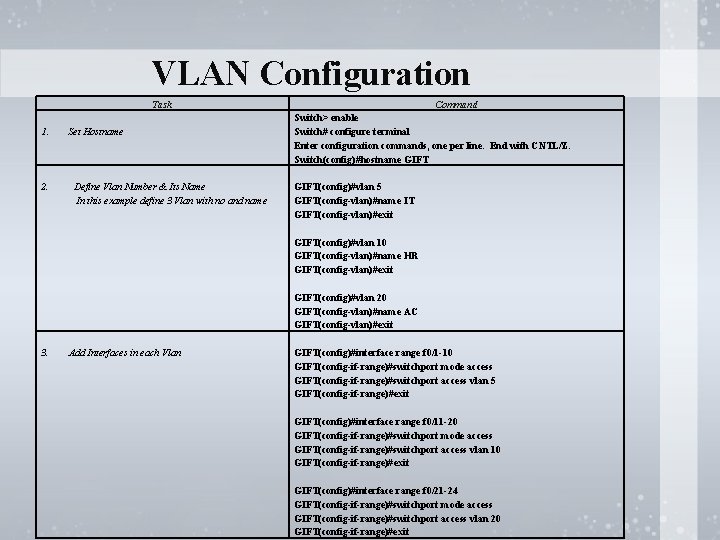
VLAN Configuration Task 1. 2. Set Hostname Define Vlan Number & Its Name In this example define 3 Vlan with no and name Command Switch> enable Switch# configure terminal Enter configuration commands, one per line. End with CNTL/Z. Switch(config)#hostname GIFT(config)#vlan 5 GIFT(config-vlan)#name IT GIFT(config-vlan)#exit GIFT(config)#vlan 10 GIFT(config-vlan)#name HR GIFT(config-vlan)#exit GIFT(config)#vlan 20 GIFT(config-vlan)#name AC GIFT(config-vlan)#exit 3. Add Interfaces in each Vlan GIFT(config)#interface range f 0/1 -10 GIFT(config-if-range)#switchport mode access GIFT(config-if-range)#switchport access vlan 5 GIFT(config-if-range)#exit GIFT(config)#interface range f 0/11 -20 GIFT(config-if-range)#switchport mode access GIFT(config-if-range)#switchport access vlan 10 GIFT(config-if-range)#exit GIFT(config)#interface range f 0/21 -24 GIFT(config-if-range)#switchport mode access GIFT(config-if-range)#switchport access vlan 20 GIFT(config-if-range)#exit
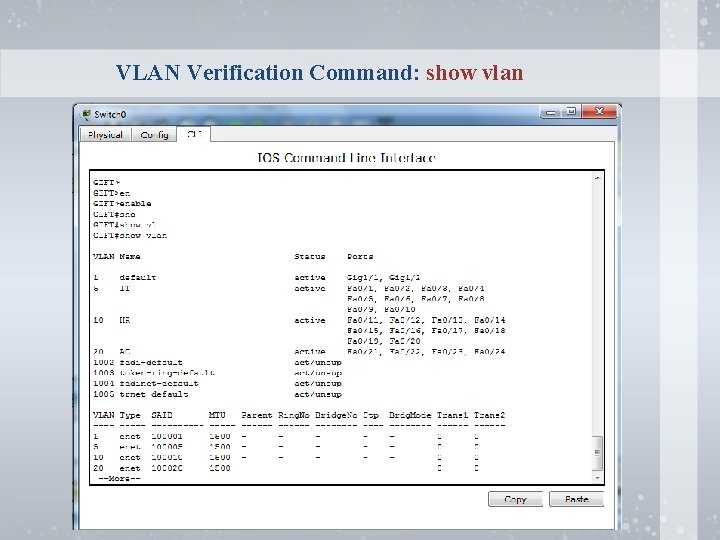
VLAN Verification Command: show vlan
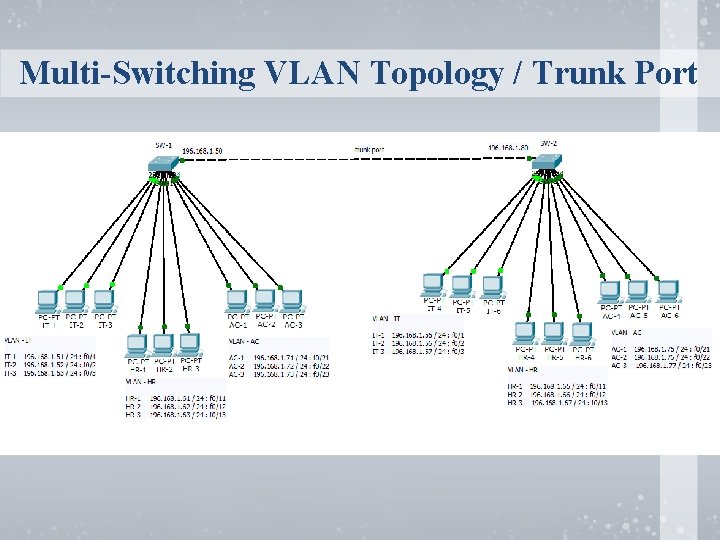
Multi-Switching VLAN Topology / Trunk Port
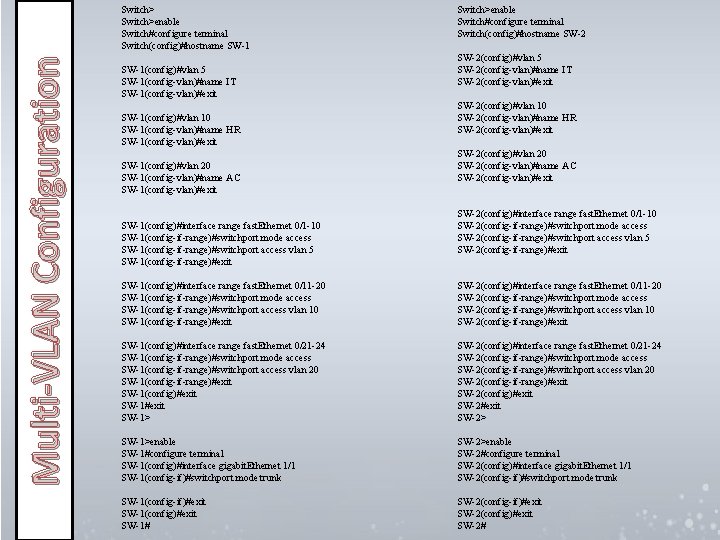
Multi-VLAN Configuration Switch>enable Switch#configure terminal Switch(config)#hostname SW-1(config)#vlan 5 SW-1(config-vlan)#name IT SW-1(config-vlan)#exit SW-1(config)#vlan 10 SW-1(config-vlan)#name HR SW-1(config-vlan)#exit SW-1(config)#vlan 20 SW-1(config-vlan)#name AC SW-1(config-vlan)#exit SW-1(config)#interface range fast. Ethernet 0/1 -10 SW-1(config-if-range)#switchport mode access SW-1(config-if-range)#switchport access vlan 5 SW-1(config-if-range)#exit Switch>enable Switch#configure terminal Switch(config)#hostname SW-2(config)#vlan 5 SW-2(config-vlan)#name IT SW-2(config-vlan)#exit SW-2(config)#vlan 10 SW-2(config-vlan)#name HR SW-2(config-vlan)#exit SW-2(config)#vlan 20 SW-2(config-vlan)#name AC SW-2(config-vlan)#exit SW-2(config)#interface range fast. Ethernet 0/1 -10 SW-2(config-if-range)#switchport mode access SW-2(config-if-range)#switchport access vlan 5 SW-2(config-if-range)#exit SW-1(config)#interface range fast. Ethernet 0/11 -20 SW-1(config-if-range)#switchport mode access SW-1(config-if-range)#switchport access vlan 10 SW-1(config-if-range)#exit SW-2(config)#interface range fast. Ethernet 0/11 -20 SW-2(config-if-range)#switchport mode access SW-2(config-if-range)#switchport access vlan 10 SW-2(config-if-range)#exit SW-1(config)#interface range fast. Ethernet 0/21 -24 SW-1(config-if-range)#switchport mode access SW-1(config-if-range)#switchport access vlan 20 SW-1(config-if-range)#exit SW-1(config)#exit SW-1> SW-2(config)#interface range fast. Ethernet 0/21 -24 SW-2(config-if-range)#switchport mode access SW-2(config-if-range)#switchport access vlan 20 SW-2(config-if-range)#exit SW-2(config)#exit SW-2> SW-1>enable SW-1#configure terminal SW-1(config)#interface gigabit. Ethernet 1/1 SW-1(config-if)#switchport mode trunk SW-2>enable SW-2#configure terminal SW-2(config)#interface gigabit. Ethernet 1/1 SW-2(config-if)#switchport mode trunk SW-1(config-if)#exit SW-1(config)#exit SW-1# SW-2(config-if)#exit SW-2(config)#exit SW-2#
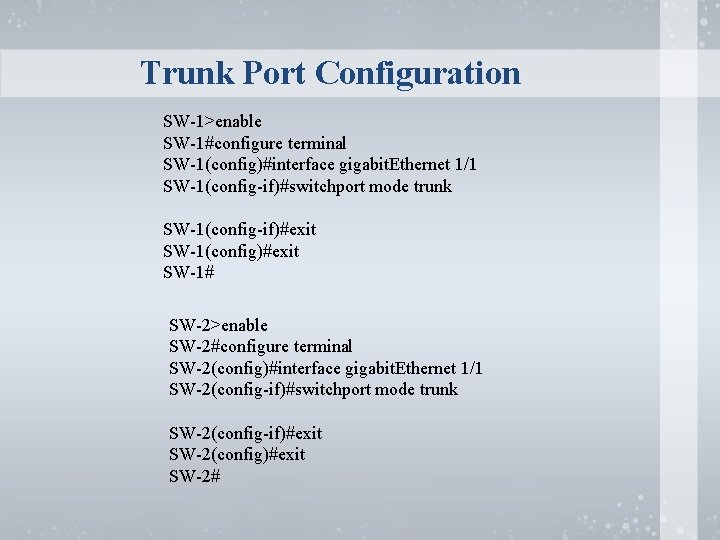
Trunk Port Configuration SW-1>enable SW-1#configure terminal SW-1(config)#interface gigabit. Ethernet 1/1 SW-1(config-if)#switchport mode trunk SW-1(config-if)#exit SW-1(config)#exit SW-1# SW-2>enable SW-2#configure terminal SW-2(config)#interface gigabit. Ethernet 1/1 SW-2(config-if)#switchport mode trunk SW-2(config-if)#exit SW-2(config)#exit SW-2#
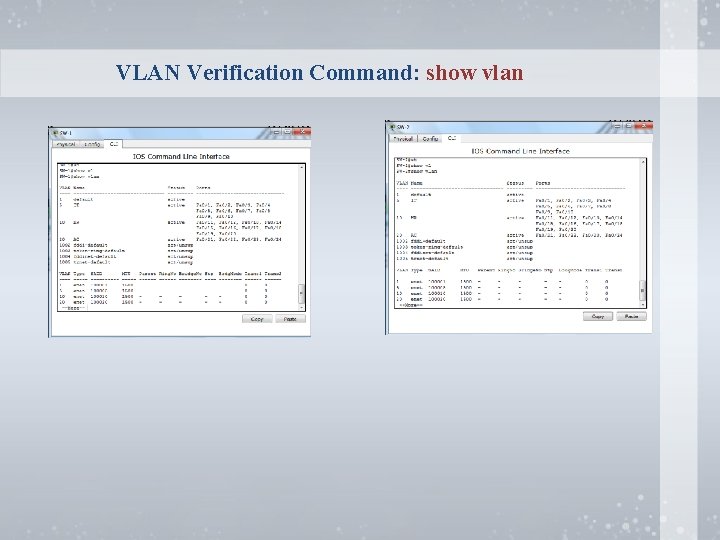
VLAN Verification Command: show vlan
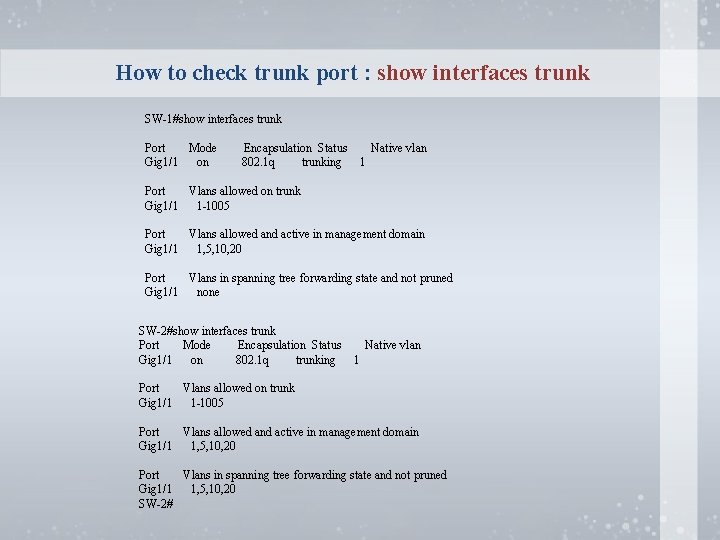
How to check trunk port : show interfaces trunk SW-1#show interfaces trunk Port Mode Gig 1/1 on Encapsulation Status 802. 1 q trunking Native vlan 1 Port Vlans allowed on trunk Gig 1/1 1 -1005 Port Vlans allowed and active in management domain Gig 1/1 1, 5, 10, 20 Port Vlans in spanning tree forwarding state and not pruned Gig 1/1 none SW-2#show interfaces trunk Port Mode Encapsulation Status Gig 1/1 on 802. 1 q trunking Native vlan 1 Port Vlans allowed on trunk Gig 1/1 1 -1005 Port Vlans allowed and active in management domain Gig 1/1 1, 5, 10, 20 Port Vlans in spanning tree forwarding state and not pruned Gig 1/1 1, 5, 10, 20 SW-2#
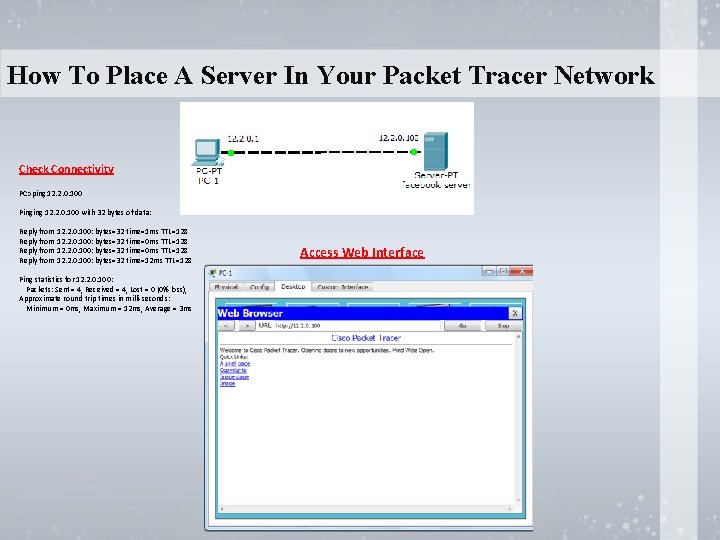
How To Place A Server In Your Packet Tracer Network Check Connectivity PC>ping 12. 2. 0. 100 Pinging 12. 2. 0. 100 with 32 bytes of data: Reply from 12. 2. 0. 100: bytes=32 time=1 ms TTL=128 Reply from 12. 2. 0. 100: bytes=32 time=0 ms TTL=128 Reply from 12. 2. 0. 100: bytes=32 time=12 ms TTL=128 Ping statistics for 12. 2. 0. 100: Packets: Sent = 4, Received = 4, Lost = 0 (0% loss), Approximate round trip times in milli-seconds: Minimum = 0 ms, Maximum = 12 ms, Average = 3 ms Access Web Interface
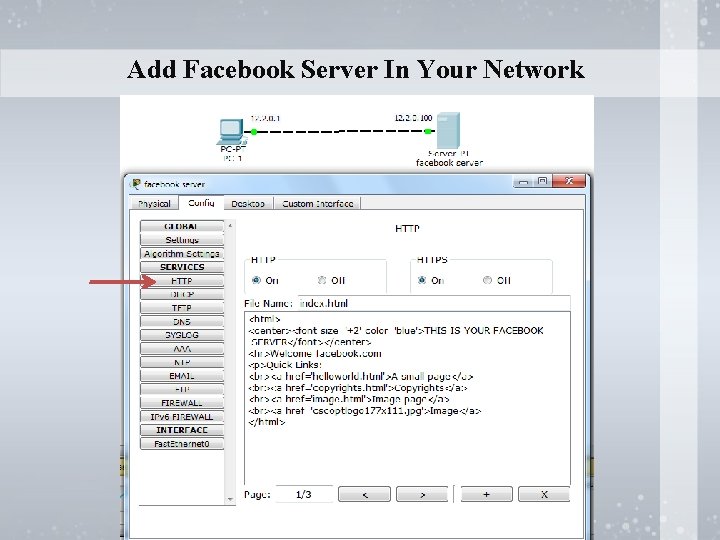
Add Facebook Server In Your Network
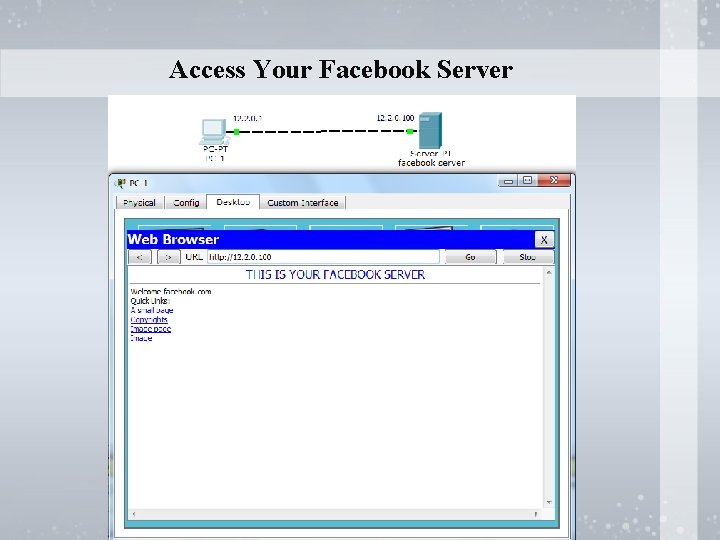
Access Your Facebook Server

FAROOQ AHMAD – IT SERVICES DEPARTMENT – GIFT UNIVERSITY Microsoft Certified professional – MCP Microsoft Certified Solution Associate – MCSA Microsoft Certified Solution Expert – MCSE Cisco Certified Network Associate (CCNA) (Routing & Switching) – Training from Corvit Lahore
- Slides: 30