
BASEBAND 52125216 INTEGRATION Prerequisite Category Netconf XML Script
BASEBAND 5212&5216 INTEGRATION
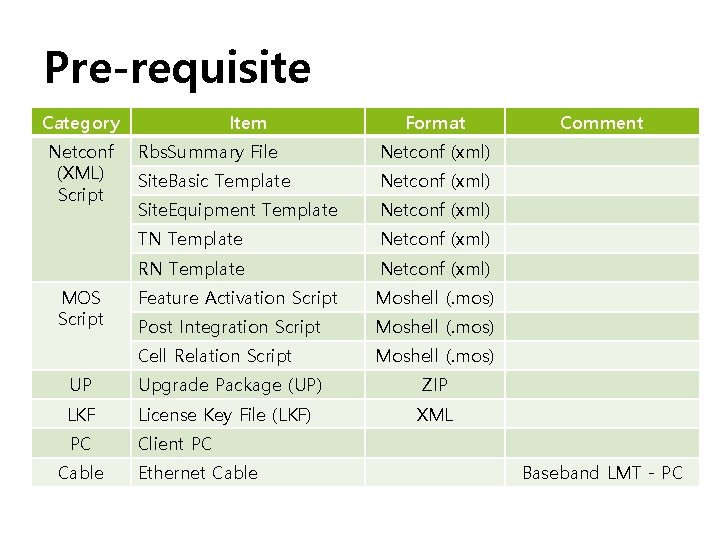
Pre-requisite Category Netconf (XML) Script MOS Script Item Format Rbs. Summary File Netconf (xml) Site. Basic Template Netconf (xml) Site. Equipment Template Netconf (xml) TN Template Netconf (xml) RN Template Netconf (xml) Feature Activation Script Moshell (. mos) Post Integration Script Moshell (. mos) Cell Relation Script Moshell (. mos) UP Upgrade Package (UP) ZIP LKF License Key File (LKF) XML PC Client PC Cable Ethernet Cable Comment Baseband LMT - PC
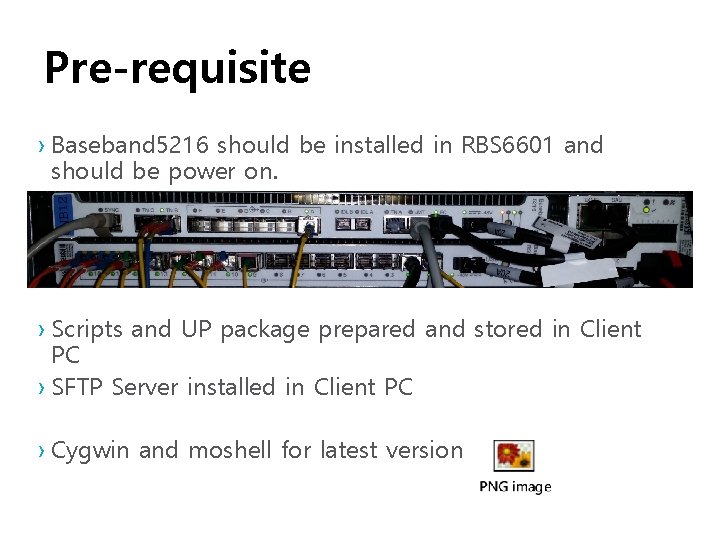
Pre-requisite › Baseband 5216 should be installed in RBS 6601 and should be power on. › Scripts and UP package prepared and stored in Client PC › SFTP Server installed in Client PC › Cygwin and moshell for latest version
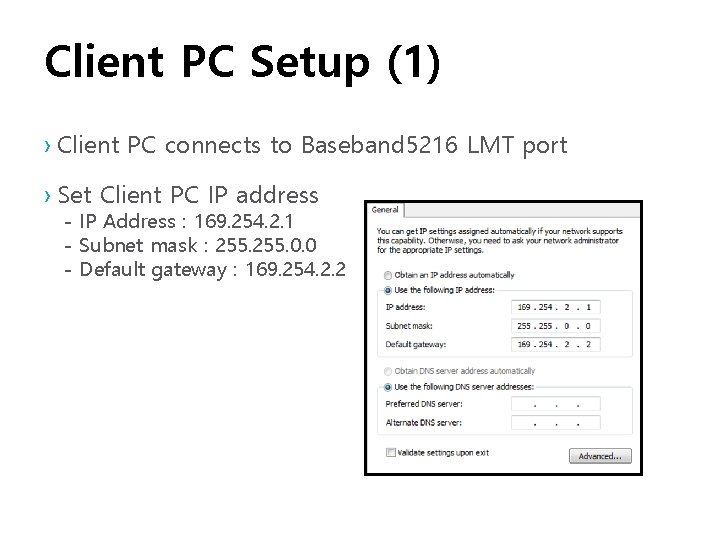
Client PC Setup (1) › Client PC connects to Baseband 5216 LMT port › Set Client PC IP address - IP Address : 169. 254. 2. 1 - Subnet mask : 255. 0. 0 - Default gateway : 169. 254. 2. 2
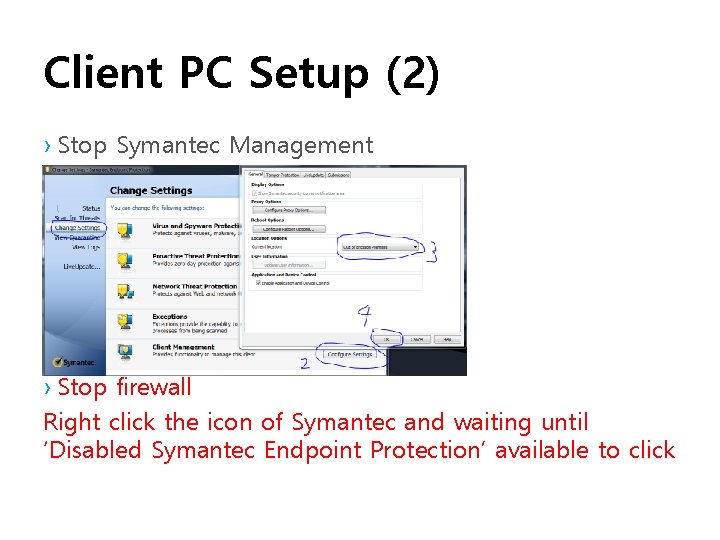
Client PC Setup (2) › Stop Symantec Management › Stop firewall Right click the icon of Symantec and waiting until ‘Disabled Symantec Endpoint Protection’ available to click
Client PC Setup (3) › Client PC SFTP Server Setting - IP Address : 169. 254. 2. 1 - Username : ftp - Password : ftp › Save integration files (XML, UP, MOS) to SFTP HOME Directory › Turn on SFTP Server
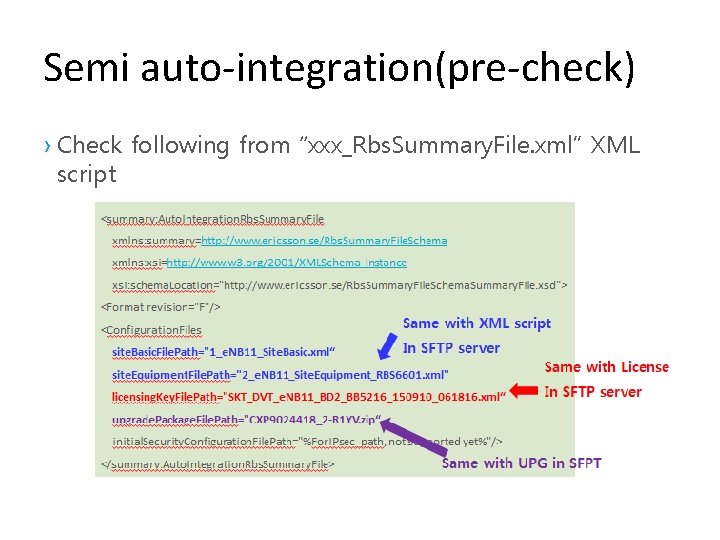
Semi auto-integration(pre-check) › Check following from “xxx_Rbs. Summary. File. xml” XML script
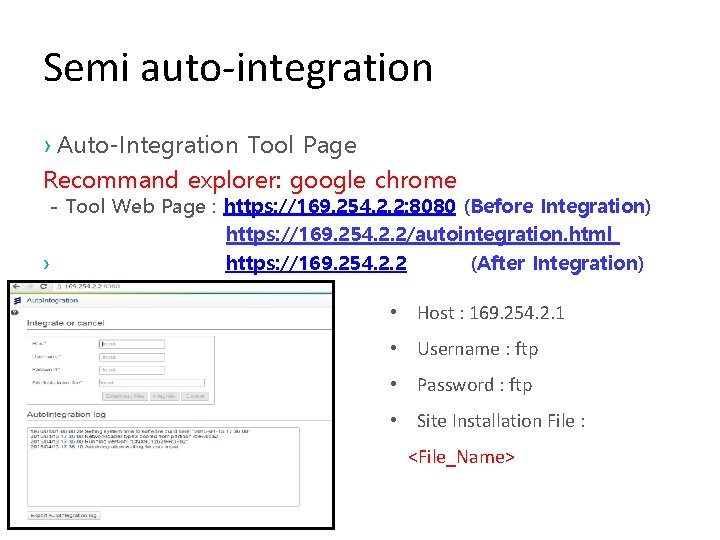
Semi auto-integration › Auto-Integration Tool Page Recommand explorer: google chrome - Tool Web Page : https: //169. 254. 2. 2: 8080 (Before Integration) https: //169. 254. 2. 2/autointegration. html › https: //169. 254. 2. 2 (After Integration) • Host : 169. 254. 2. 1 • Username : ftp • Password : ftp • Site Installation File : <File_Name>
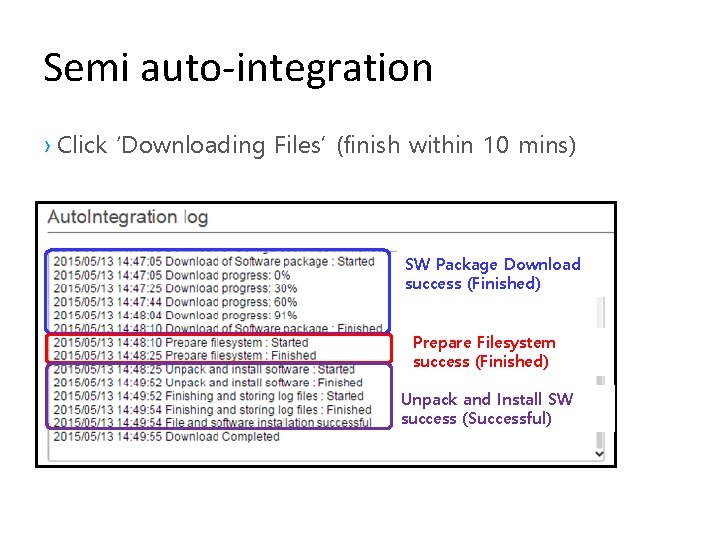
Semi auto-integration › Click ‘Downloading Files’ (finish within 10 mins) SW Package Download success (Finished) Prepare Filesystem success (Finished) Unpack and Install SW success (Successful)
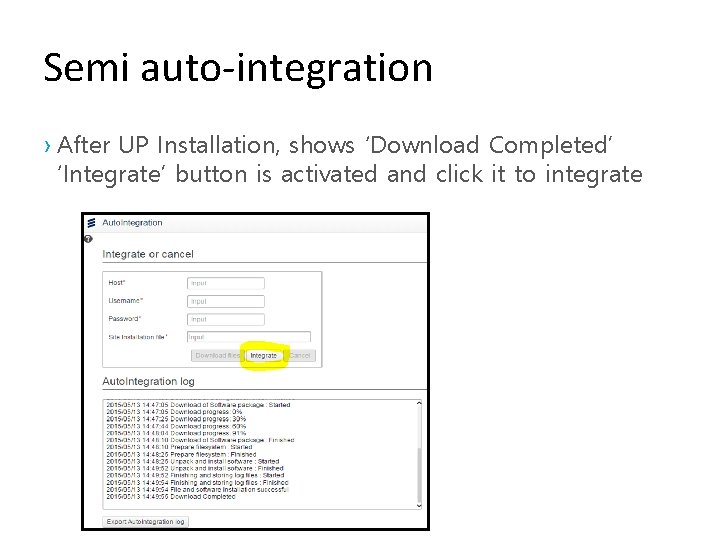
Semi auto-integration › After UP Installation, shows ‘Download Completed’ ‘Integrate’ button is activated and click it to integrate
Semi auto-integration › After press “Integrate” button Node will Restart and start integrate Configuration File › In case error happens during integration, integration should be stopped and board will restore to factory setting. ESI log could be collected for integration failure. › If integration finishes with no error no progress message in Auto. Integration Log › Wait until TN port LED is ON and access node with moshell to run scripts.
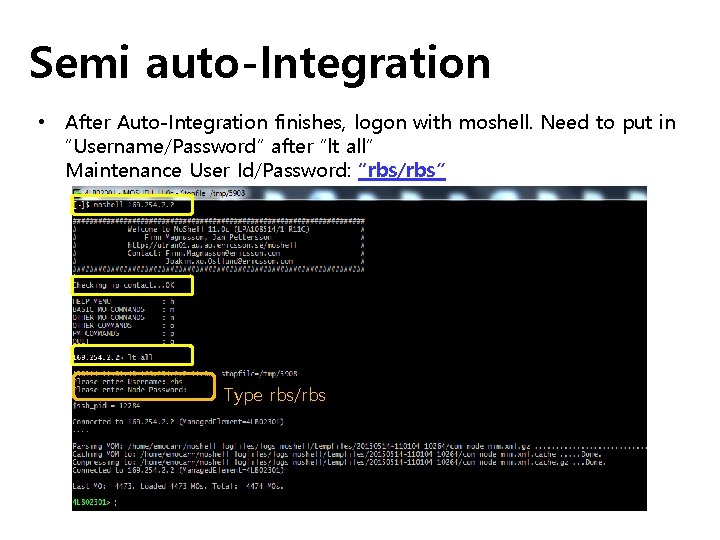
Semi auto-Integration • After Auto-Integration finishes, logon with moshell. Need to put in “Username/Password” after “lt all” Maintenance User Id/Password: “rbs/rbs” Type rbs/rbs

Run TN/RN Script • Open an Terminal and run following TN/RN script running commands • File path should be put in correctly. ssh -o Pub. Key. Authentication=no -o User. Known. Hosts. File=/dev/null -o Forward. X 11=no -p 830 rbs@169. 254. 2. 2 –s <TN XML Script File Name> ssh -o Pub. Key. Authentication=no -o User. Known. Hosts. File=/dev/null -o Forward. X 11=no -p 830 rbs@169. 254. 2. 2 –s <RN XML Script File Name> • Command Example ssh -o Pub. Key. Authentication=no -o User. Known. Hosts. File=/dev/null -o Forward. X 11=no -p 830 rbs@169. 254. 2. 2 -s netconf < 3_e. NB 12_TN_netconfv 2. xml ssh -o Pub. Key. Authentication=no -o User. Known. Hosts. File=/dev/null -o Forward. X 11=no -p 830 rbs@169. 254. 2. 2 -s netconf < 4_e. NB 12_RBS 6601_RN_netconfv 2. xml Contact DT responsible in case error happens with script running.
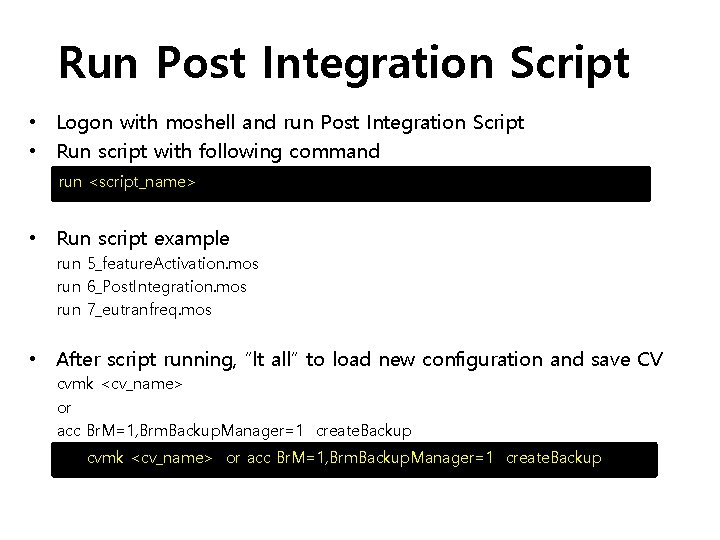
Run Post Integration Script • Logon with moshell and run Post Integration Script • Run script with following command run <script_name> • Run script example run 5_feature. Activation. mos run 6_Post. Integration. mos run 7_eutranfreq. mos • After script running, “lt all” to load new configuration and save CV cvmk <cv_name> or acc Br. M=1, Brm. Backup. Manager=1 create. Backup
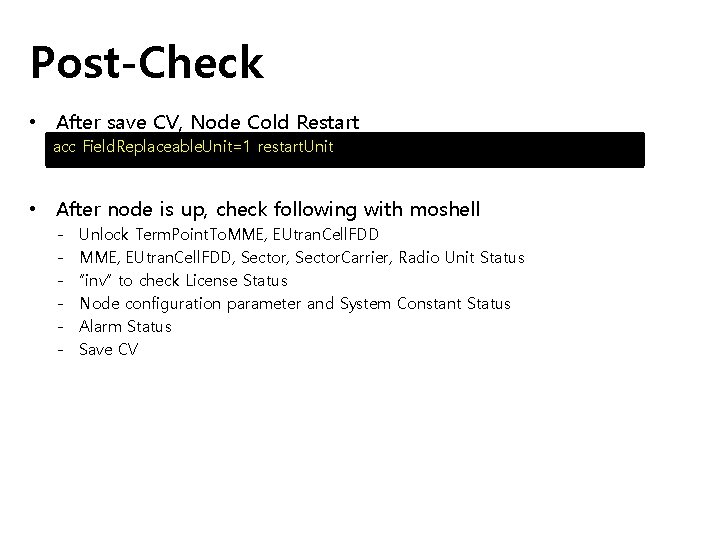
Post-Check • After save CV, Node Cold Restart acc Field. Replaceable. Unit=1 restart. Unit • After node is up, check following with moshell - Unlock Term. Point. To. MME, EUtran. Cell. FDD, Sector. Carrier, Radio Unit Status “inv” to check License Status Node configuration parameter and System Constant Status Alarm Status Save CV
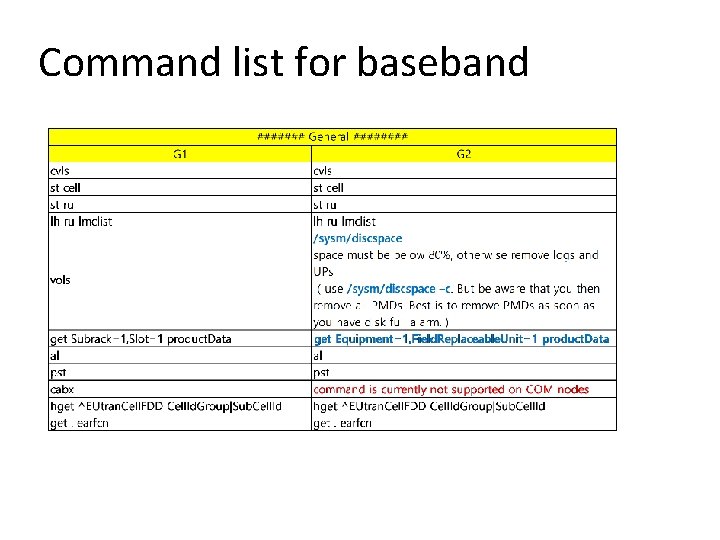
Command list for baseband
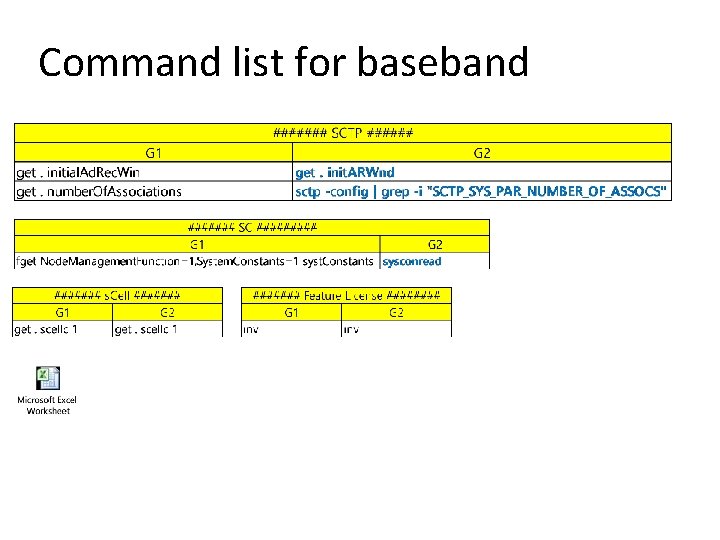
Command list for baseband
- Slides: 17