
Background Information Text Chapter 8 To execute Processes
Background Information Text Chapter 8 • To execute: – Processes must be in main memory, because – The CPU can directly access only main memory and registers • Speed – – Register access requires a single CPU cycle Accessing main memory can take multiple cycles Accessing disk can take milliseconds Cache sits between main memory and CPU registers • There is only one Main memory and it holds portions of the logical memory space of many processes. • Memory management hardware assists in the translation of logical to physical memory addresses. • Memory protection: The hardware traps if a user-mode Process attempts to access memory assigned to another process or the Operating System.
Memory Management Issues Goal: Effective Allocation of memory among processes 1. How and when are logical (compile time) memory references bound to absolute physical addresses? 2. How can processes maximize memory use? • • • How many processes can be in memory? Which memory pages are assigned to which processes? Can programs exceed the size of physical memory? Do entire programs need to be in memory to run? Can memory be shared among processes? 3. How are processes protected from each other? 4. System characteristics: How much main memory is available? How fast is it relative to the CPU speed? Relative to the disk speed? What memory management hardware assistance is available?

Logical vs. Physical Address Space • Definitions – Memory Management Unit (MMU): Device the maps logical program memory image addresses to physical (main-memory) addresses – Logical addresses – created when the program is compiled – Physical addresses – the addresses used when the program runs • Binding time: – The time at which logical addresses are assigned physical addresses
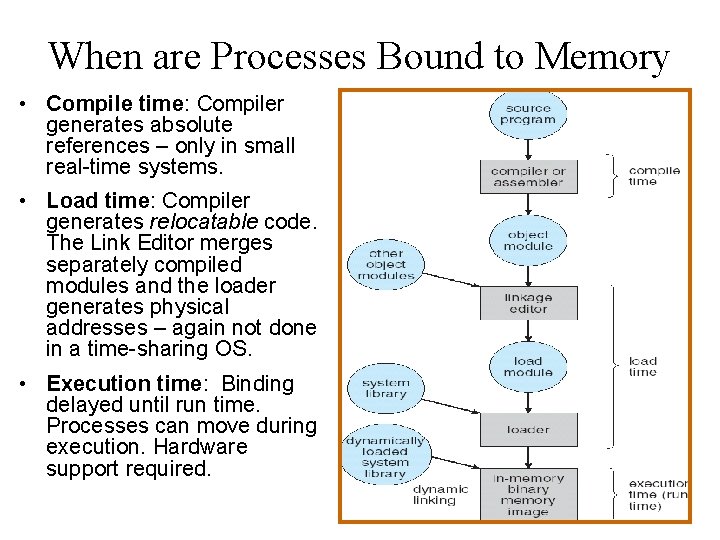
When are Processes Bound to Memory • Compile time: Compiler generates absolute references – only in small real-time systems. • Load time: Compiler generates relocatable code. The Link Editor merges separately compiled modules and the loader generates physical addresses – again not done in a time-sharing OS. • Execution time: Binding delayed until run time. Processes can move during execution. Hardware support required.

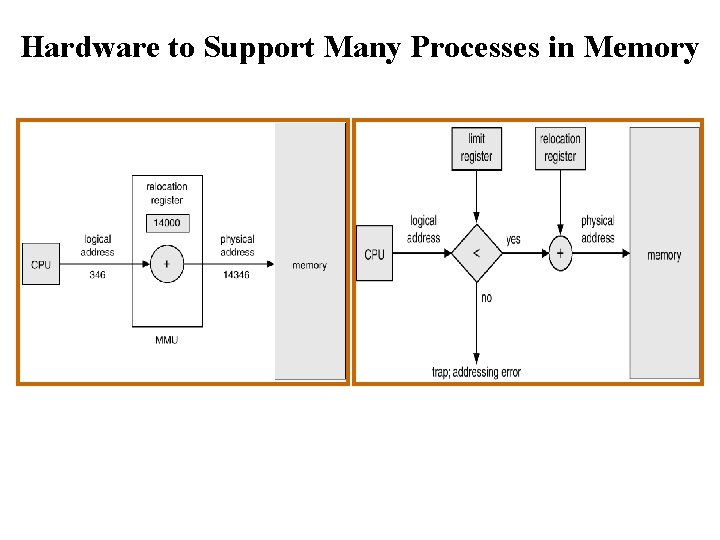
A Simple Memory Mapping Scheme • base and limit registers in the MMU define the physical address space • The MMU adds the content of the relocation (base) register to each memory reference • No reference can go beyond the limit register or below the base register. • Works only when memory for a process is contiguous.
Hardware to Support Many Processes in Memory

MMU Relocation Register Protection • Program accesses a memory location • Trap – When accessing a location that is out of range – Action: terminate the process

Improving Memory Utilization Swapping with OS support • Backing store: a fast disk partition large enough to accommodate direct access copies of all memory images • Swap operation: Temporarily roll out lower priority process and roll in another process on the swap queue • Issues: seek time and transfer time • Modified versions of swapping are found on many systems (i. e. , UNIX, Linux, and Windows) Swapping
Dynamic Library Loading • Definitions: – Library functions: those which are common to many applications – Dynamic loading: when a process calls a library function in a dynamically loaded library, the calling code checks to see if the library containing the callee has been loaded. If not, it is loaded into the process’s memory space then called. • Advantages – Unused functions are never loaded – Minimize memory use if large functions handle infrequent events – Operating system support is not required. Compiler can generate the code to do the dynamic loading. • Disadvantage: – Library functions are not shared among processes
Dynamic Linking • Assumption: A run-time (shared) library exists, but might not be in memory – Set of functions shared by many processes – Linked at execution time • Stub – A piece of code that calls the OS to locate the memory-resident library function – The stub replaces itself with the library function address then transfers to that address. The next call to this function will be directly to the function’s address • Operating System Support – Load the function if it is not in memory – Return address of function

Contiguous Memory Allocation Each Process is stored in one contiguous block • Memory is partitioned into two areas – The kernel and interrupt handler are usually in low memory – User processes are in high memory • Single-partition allocation – MMU relocation base and limit registers enforce memory protection – The size of the operating system doesn’t impact user programs • Multiple-partition allocation – Processes allocated into spare ‘Holes’ (available areas of memory) – Operating system maintains allocated and free memory OS OS process 5 process 9 process 8 process 2 process 10 process 2

Algorithms for Contiguous Allocations • Issues: How to maintain the free list; what is the search algorithm complexity? • Algorithms (Comment worst-fit generally performs worst) – First-fit: Allocate the first hole that is big enough. – Best-fit: Use smallest hole that is big enough; Leaves small leftover holes – Worst-fit: Allocate the largest hole; Leaves large leftover holes • Fragmentation – External: memory holes limit possible allocations – Internal: allocated memory is larger than needed – As it turns out, a lot of memory lost to fragmentation • Compaction Algorithm – Shuffle memory contents to place all free memory together. – Issues • Memory binding must be dynamic • Time consuming, handling physical I/O during the remapping
Paging Definition: A page is a fixed-sized block of logical memory, generally a power of 2 in length between 512 and 8, 192 bytes Definition: A frame is a fixed-sized block of physical memory. Each frame holds a single page Definition: A Page table maps pages to frames • Operating System responsibilities – Maintain the page table – Find free frames for the pages needed to start or continue execution of a process • Benefit: Logical address space of a process can be noncontiguous and allocated as needed • Issue: Internal fragmentation
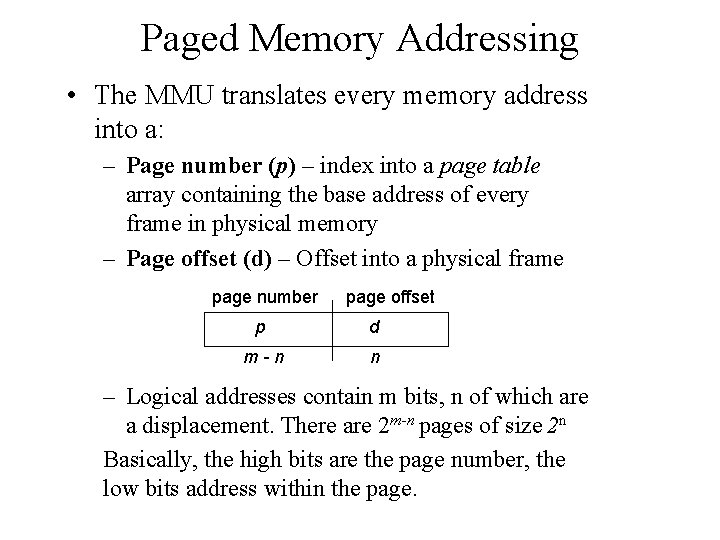
Paged Memory Addressing • The MMU translates every memory address into a: – Page number (p) – index into a page table array containing the base address of every frame in physical memory – Page offset (d) – Offset into a physical frame page number page offset p d m-n n – Logical addresses contain m bits, n of which are a displacement. There are 2 m-n pages of size 2 n Basically, the high bits are the page number, the low bits address within the page.
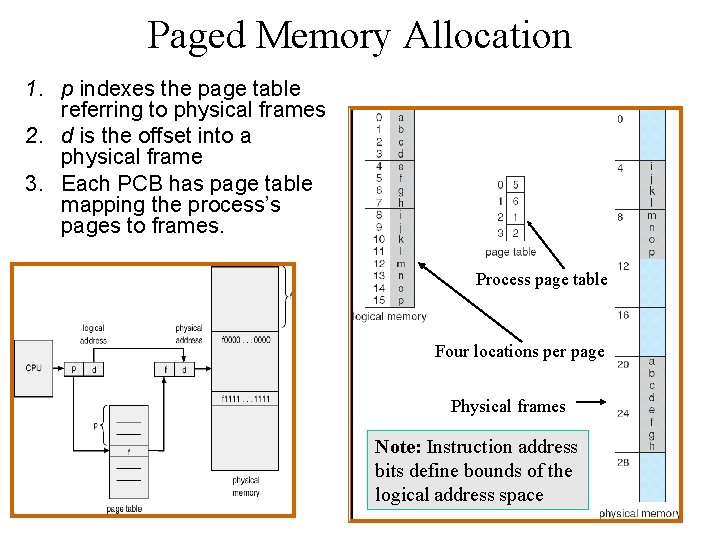
Paged Memory Allocation 1. p indexes the page table referring to physical frames 2. d is the offset into a physical frame 3. Each PCB has page table mapping the process’s pages to frames. Process page table Four locations per page Physical frames Note: Instruction address bits define bounds of the logical address space
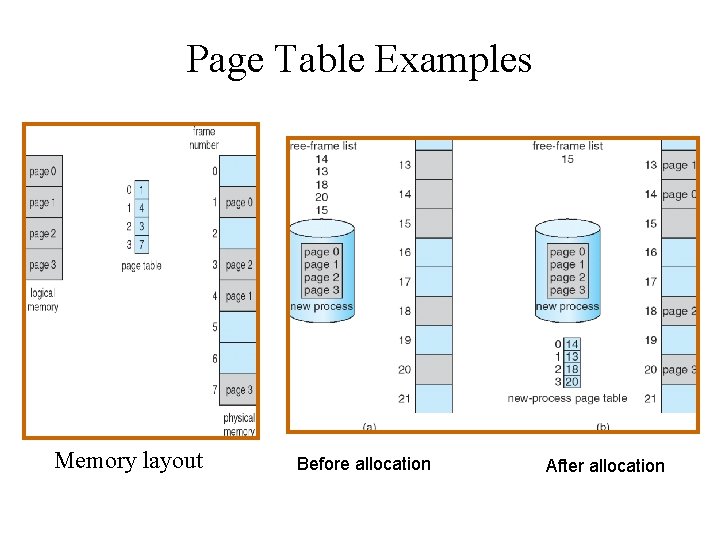
Page Table Examples Memory layout Before allocation After allocation
Page Table Implementation Page tables may be large and every memory reference by a program uses the page table. • Hardware Assist (in the MMU) – Page-table base register (PTBR) Address of current process’s page table – Page-table length register (PRLR) Length of current process’s page table • Issue: – Every memory access requires two trips to memory which could slow the processor speed by half: – (1) read page table; (2) access memory reference
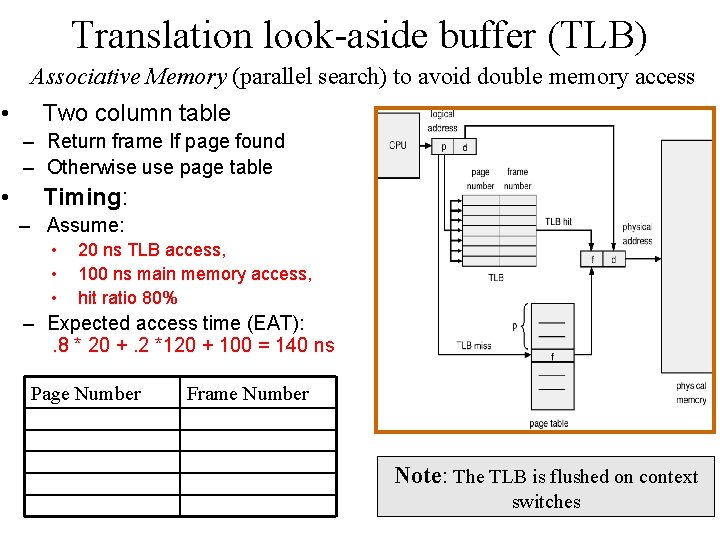
Translation look-aside buffer (TLB) Associative Memory (parallel search) to avoid double memory access • Two column table – Return frame If page found – Otherwise use page table • Timing: – Assume: • • • 20 ns TLB access, 100 ns main memory access, hit ratio 80% – Expected access time (EAT): . 8 * 20 +. 2 *120 + 100 = 140 ns Page Number Frame Number Note: The TLB is flushed on context switches
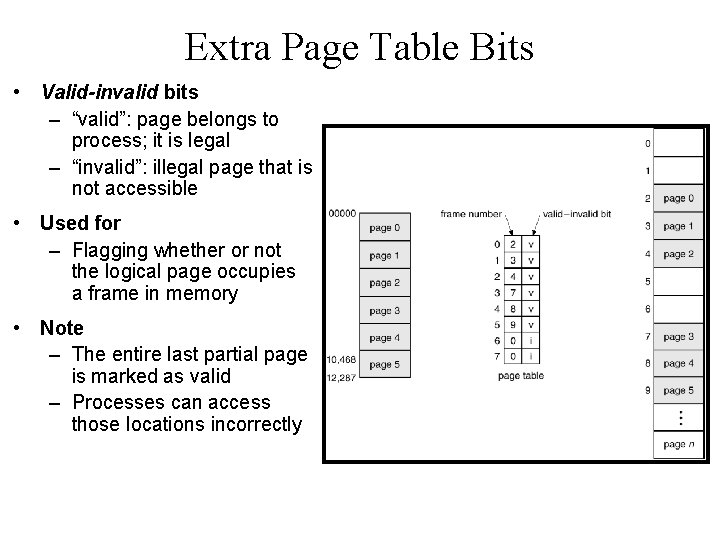
Extra Page Table Bits • Valid-invalid bits – “valid”: page belongs to process; it is legal – “invalid”: illegal page that is not accessible • Used for – Flagging whether or not the logical page occupies a frame in memory • Note – The entire last partial page is marked as valid – Processes can access those locations incorrectly
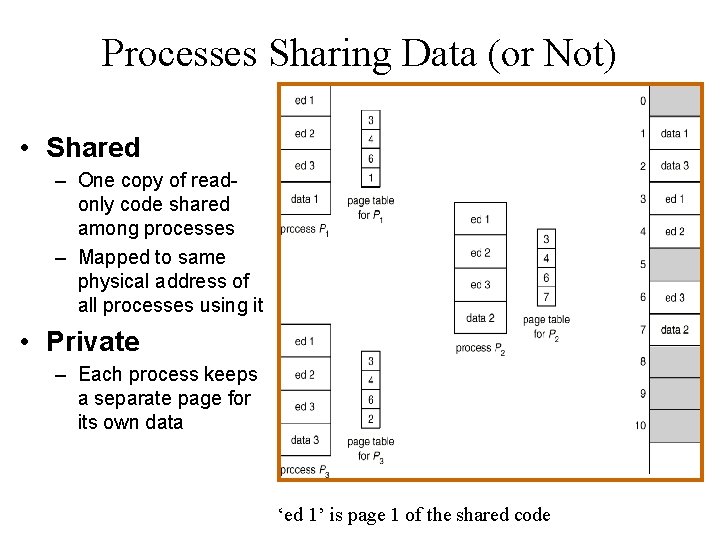
Processes Sharing Data (or Not) • Shared – One copy of readonly code shared among processes – Mapped to same physical address of all processes using it • Private – Each process keeps a separate page for its own data ‘ed 1’ is page 1 of the shared code

Hierarchical Page Tables • Single level Page Offset 20 12 How many pages? How big is a page? • Hierarchical Two level Outer page Inner page Offset 10 10 12 • Notes: – Tree structure – One memory accesses for each level required to find the actual physical location – Part of the page table could be on disk
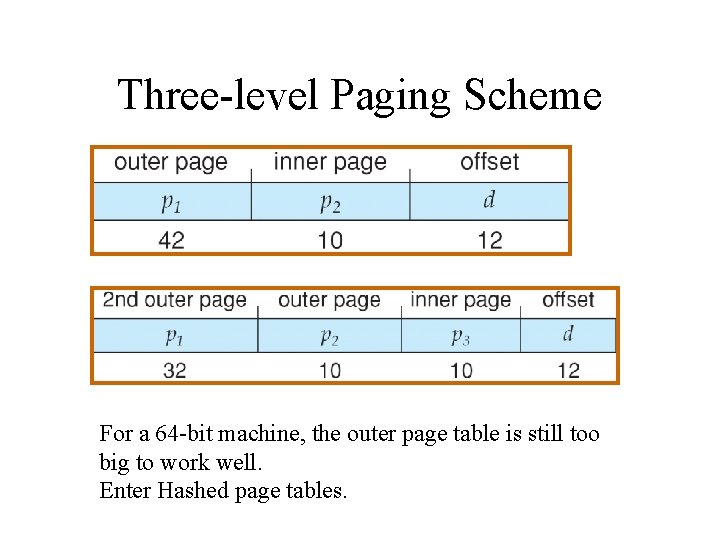
Three-level Paging Scheme For a 64 -bit machine, the outer page table is still too big to work well. Enter Hashed page tables.
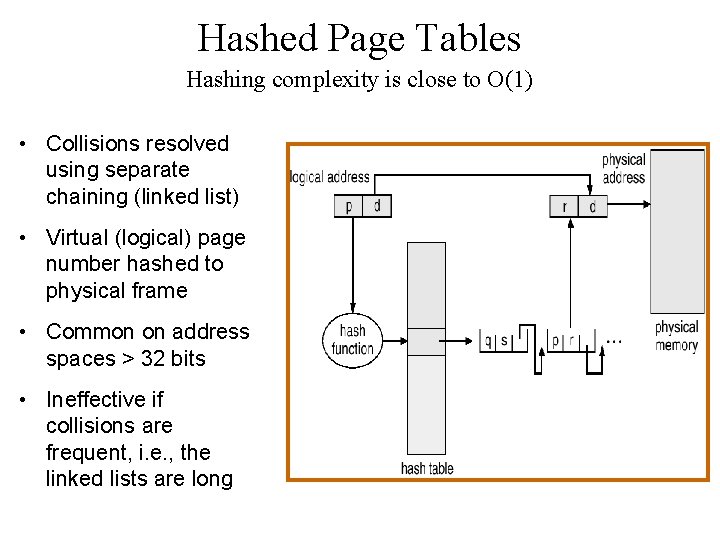
Hashed Page Tables Hashing complexity is close to O(1) • Collisions resolved using separate chaining (linked list) • Virtual (logical) page number hashed to physical frame • Common on address spaces > 32 bits • Ineffective if collisions are frequent, i. e. , the linked lists are long
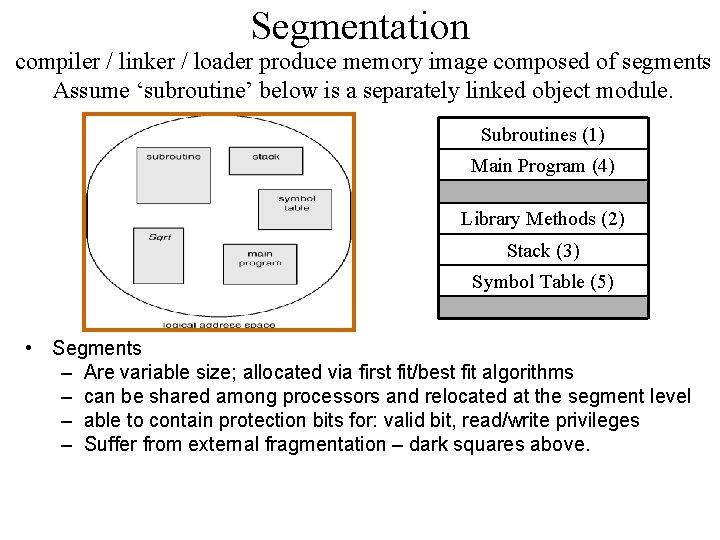
Segmentation compiler / linker / loader produce memory image composed of segments Assume ‘subroutine’ below is a separately linked object module. Subroutines (1) Main Program (4) Library Methods (2) Stack (3) Symbol Table (5) • Segments – Are variable size; allocated via first fit/best fit algorithms – can be shared among processors and relocated at the segment level – able to contain protection bits for: valid bit, read/write privileges – Suffer from external fragmentation – dark squares above.
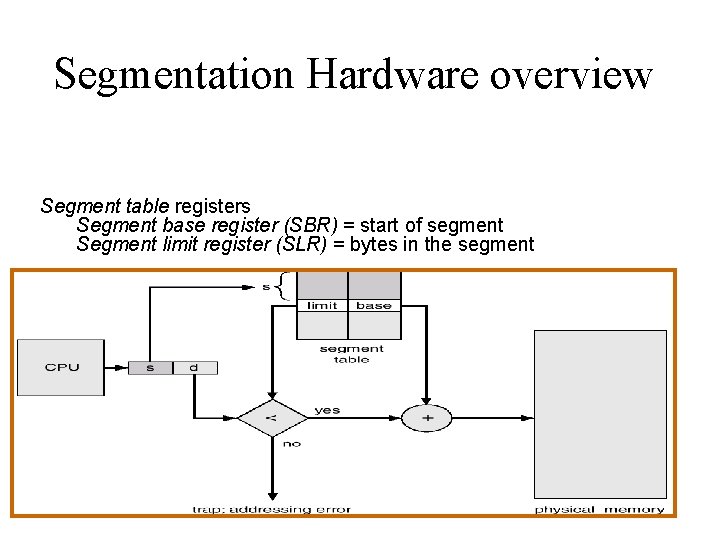
Segmentation Hardware overview Segment table registers Segment base register (SBR) = start of segment Segment limit register (SLR) = bytes in the segment

1 process example

2 process example (See slide 20 for the paged version of the shared ‘editor’ example)

Segmentation with Paging On the Intel architecture: • A logical address is ‘segment based’ and translated to a linear address by the segmentation unit. • A linear address is basically a logical address in a nonsegmented paged system. • The linear address runs through the paging unit similar to the way we have been discussing.
Virtual Memory Text Chapter 9 • Concepts – Programs access logical memory – 0 to bus size (64 bits in today’s machines. ) – Operating system memory management and hardware coordinate to establish a logical to physical mapping – OS Virtual memory contains memory images of all running processes. – Memory mapped files – a mechanism to associate disk blocks with frames in physical memory • Advantages – The whole program doesn't need to be in memory • The system can execute programs larger than memory • Improved memory utilization: more processes running concurrently – Processes can share blocks of memory • Resident library routines

Logical Memory Examples Virtual memory contains logical memory images of both programs on disk.
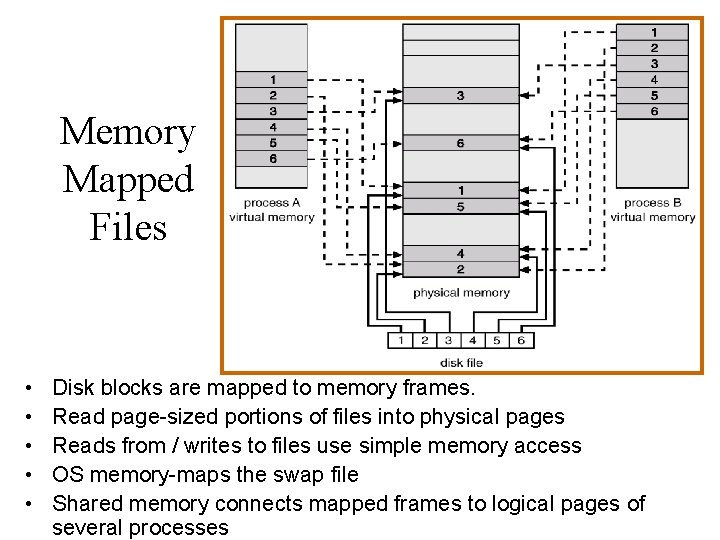
Memory Mapped Files • • • Disk blocks are mapped to memory frames. Read page-sized portions of files into physical pages Reads from / writes to files use simple memory access OS memory-maps the swap file Shared memory connects mapped frames to logical pages of several processes
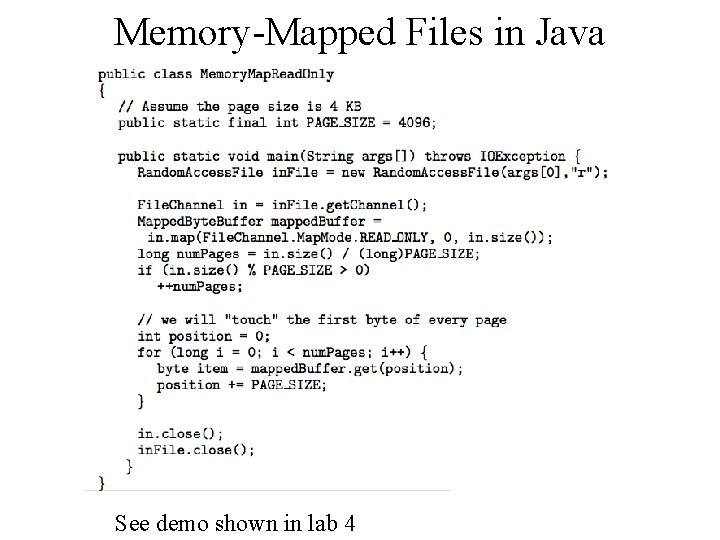
Memory-Mapped Files in Java See demo shown in lab 4
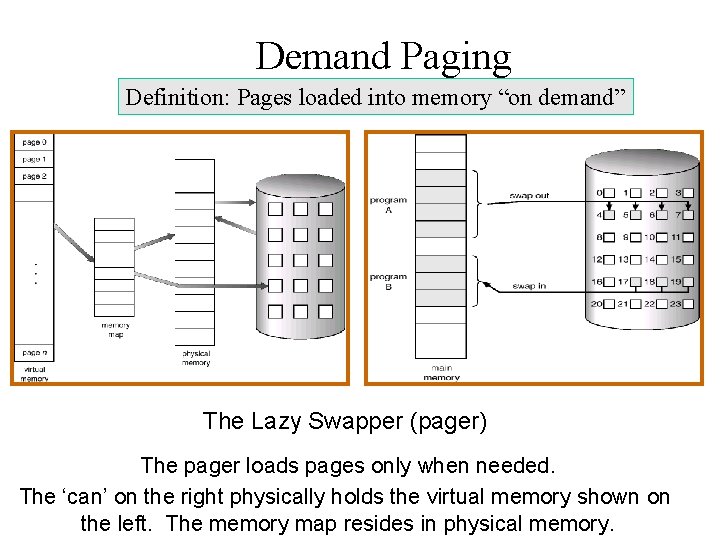
Demand Paging Definition: Pages loaded into memory “on demand” The Lazy Swapper (pager) The pager loads pages only when needed. The ‘can’ on the right physically holds the virtual memory shown on the left. The memory map resides in physical memory.
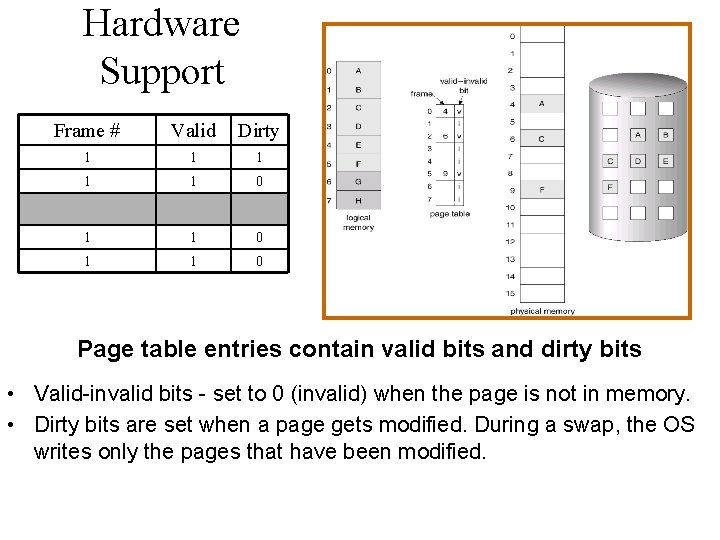
Hardware Support Frame # Valid Dirty 1 1 1 0 . . 1 1 0 Page table entries contain valid bits and dirty bits • Valid-invalid bits - set to 0 (invalid) when the page is not in memory. • Dirty bits are set when a page gets modified. During a swap, the OS writes only the pages that have been modified.
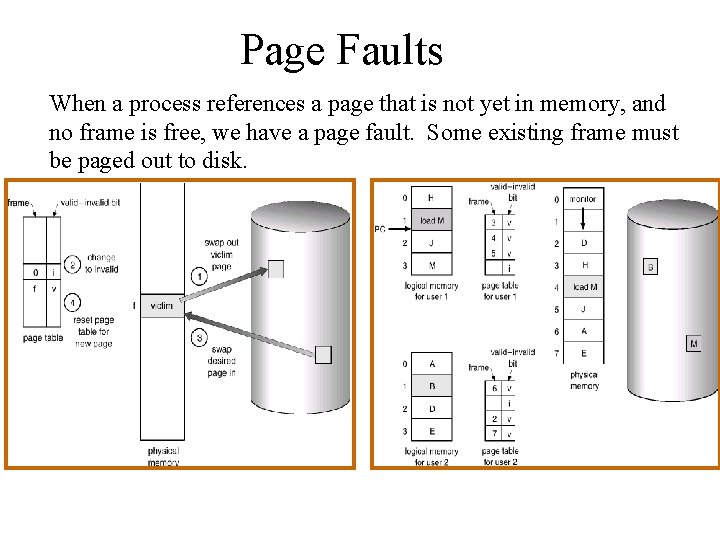
Page Faults When a process references a page that is not yet in memory, and no frame is free, we have a page fault. Some existing frame must be paged out to disk.
- Slides: 35