
Backend and Runtime CSCOE 1622 Jarrett Billingsley Class
Backend and Runtime CS/COE 1622 Jarrett Billingsley
Class Announcements ● today is kind of an intro to the second half of the course ● how was the exaaaam? ● status of Things: o I have my implementation of project 3 done § I had to clean things up from last year § so now I have to update the instructions o the grader will start grading your 2 nd project this week o and after giving you project 3, I'll grade your exam § this time of the semester is always the worst part for me �� 2

Welcome to the Backend! 3

Through the looking glass ● a compiler translates from a source language to a target language. o well, now we're done with the source language. ● once the AST has been constructed and semantically analyzed… o we have a "correct" program! ● from here on out, we're assuming that we're working with an AST that represents a correct program. o later we'll come back and look at intermediate representation (IR), which lets us abstract away even the AST itself. 4
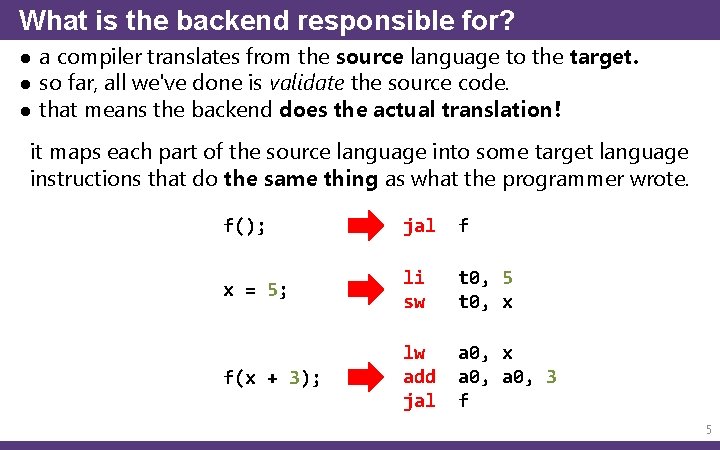
What is the backend responsible for? ● a compiler translates from the source language to the target. ● so far, all we've done is validate the source code. ● that means the backend does the actual translation! it maps each part of the source language into some target language instructions that do the same thing as what the programmer wrote. f(); jal f x = 5; li sw t 0, 5 t 0, x f(x + 3); lw add jal a 0, x a 0, 3 f 5
Correctness ● the goal of an HLL is to provide a solid base of abstractions on which you can build software better than you could do in assembly. ● above all, a compiler's number one priority is to produce a correct translation of the source code. o if a compiler mistranslates code, you've lost all the supposed guarantees that the HLL provides. ● bugs in compilers can be incredibly serious. o a compiler that fails to catch certain mistakes, or which produces incorrect code, can produce executables which leave millions of computers vulnerable to attacks, in the worst cases. ● so, what does "correct" code look like? 6
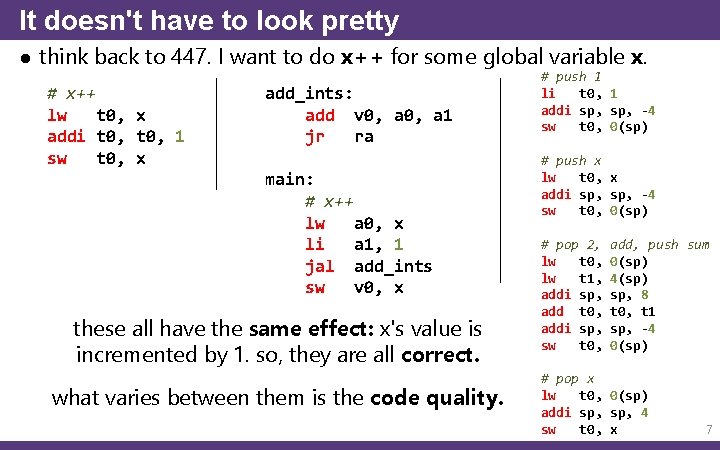
It doesn't have to look pretty ● think back to 447. I want to do x++ for some global variable x. # x++ lw t 0, x addi t 0, 1 sw t 0, x add_ints: add v 0, a 1 jr ra main: # x++ lw a 0, x li a 1, 1 jal add_ints sw v 0, x these all have the same effect: x's value is incremented by 1. so, they are all correct. what varies between them is the code quality. # push 1 li t 0, 1 addi sp, -4 sw t 0, 0(sp) # push x lw t 0, x addi sp, -4 sw t 0, 0(sp) # pop 2, lw t 0, lw t 1, addi sp, add t 0, addi sp, sw t 0, add, push sum 0(sp) 4(sp) sp, 8 t 0, t 1 sp, -4 0(sp) # pop x lw t 0, 0(sp) addi sp, 4 sw t 0, x 7
Output code quality ● the code our compiler outputs can be measured in a few ways: o speed: how fast the output code runs § in the same span of time, a fast program can do more useful work than a slow program can. o size: how many bytes the output code takes up § if e. g. your target is a microcontroller with 4 Ki. B of ROM… § your output code has to be as small as possible to fit. ● despite the last slide, smaller code is not necessarily faster code… o so compilers often give you the choice of which to optimize for. o but optimizing code to be faster or smaller is an optional task, and is not required for correct output. 8
Goals and non-goals ● in the old days, the code quality of most compilers was… lacking. o much more like third example on that slide than like the first. ● higher code quality requires a more sophisticated backend. o these algorithms were impractical on the slow computers those early compilers ran on, or literally hadn't been invented yet. ● but more complex algorithms means a higher chance of messing them up and making a compiler that produces incorrect code! ● so our goal in this class will be to make a correct compiler. o the code it produces may be big, slow, and ugly, but it's okay for teaching purposes. ● towards the end we'll start to look at improving code quality… o but you won't be implementing that. it's some heavy stuff. 9
Runtime 10

From compile-time to runtime ● the compiler is just the first part of enforcing the HLL's abstractions. ● depending on how well the source language's semantics match the target's, we can have a little or a lot to do at runtime. C ≅ dynamic dispatch Java reflection class loading CPU garbage collection exceptions 11
Does that mean we need a VM? ● well, not necessarily… ● there can be many source language features which the target language does not support, which can be even small things. o think about it: does MIPS have an if-else instruction? § no. so those have to be built out of simpler instructions. ● if the target language is a CPU, chances are all it can do is: o move numbers around o do arithmetic and logical operations on numbers o choose which steps to go to o uhhhhhhhhhh that's it! ● so there are like, three parts to this? o the code generation o the ABI (application binary interface) o and the runtime library 12
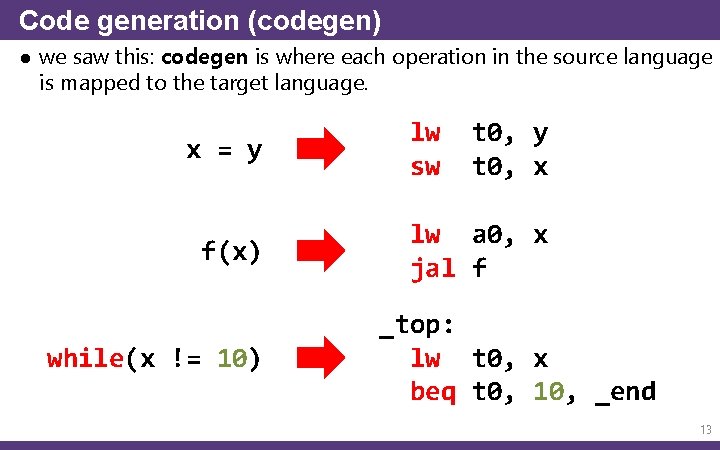
Code generation (codegen) ● we saw this: codegen is where each operation in the source language is mapped to the target language. x = y f(x) while(x != 10) lw sw t 0, y t 0, x lw a 0, x jal f _top: lw t 0, x beq t 0, 10, _end 13
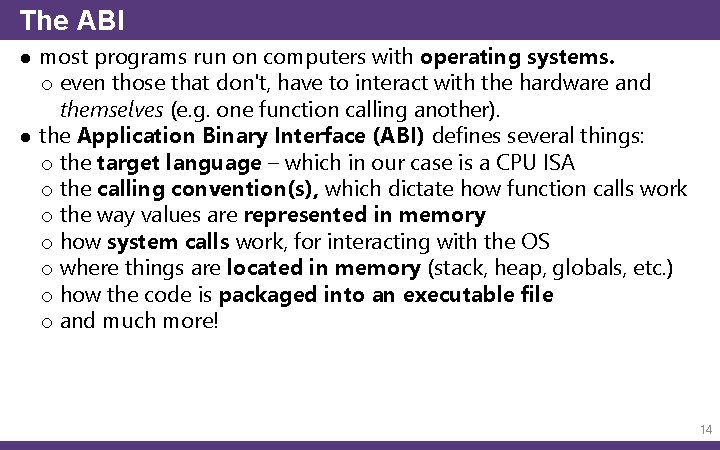
The ABI ● most programs run on computers with operating systems. o even those that don't, have to interact with the hardware and themselves (e. g. one function calling another). ● the Application Binary Interface (ABI) defines several things: o the target language – which in our case is a CPU ISA o the calling convention(s), which dictate how function calls work o the way values are represented in memory o how system calls work, for interacting with the OS o where things are located in memory (stack, heap, globals, etc. ) o how the code is packaged into an executable file o and much more! 14
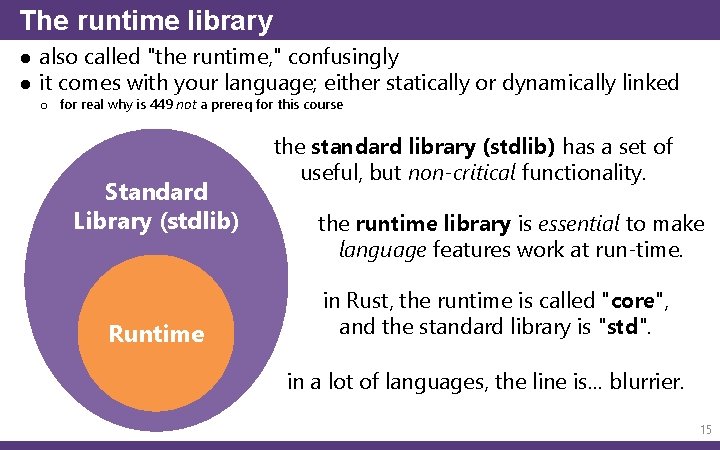
The runtime library ● also called "the runtime, " confusingly ● it comes with your language; either statically or dynamically linked o for real why is 449 not a prereq for this course Standard Library (stdlib) Runtime the standard library (stdlib) has a set of useful, but non-critical functionality. the runtime library is essential to make language features work at run-time. in Rust, the runtime is called "core", and the standard library is "std". in a lot of languages, the line is… blurrier. 15
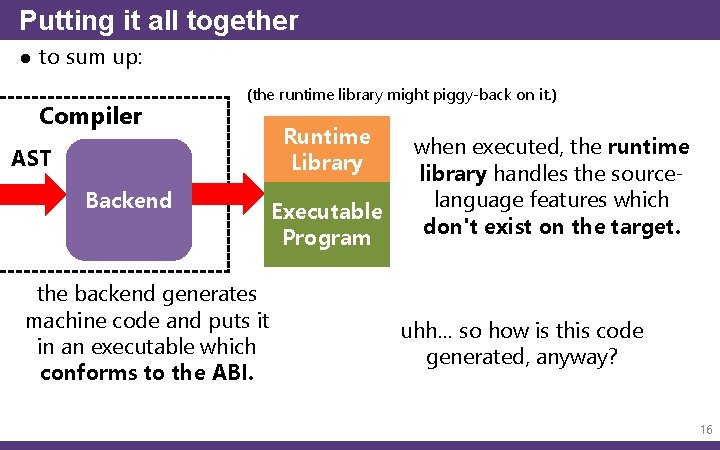
Putting it all together ● to sum up: Compiler (the runtime library might piggy-back on it. ) AST Backend the backend generates machine code and puts it in an executable which conforms to the ABI. Runtime Library Executable Program when executed, the runtime library handles the sourcelanguage features which don't exist on the target. uhh… so how is this code generated, anyway? 16
Codegen 17
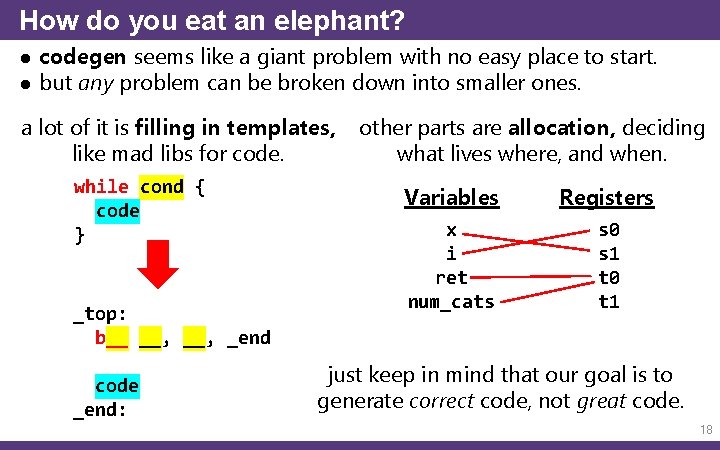
How do you eat an elephant? ● codegen seems like a giant problem with no easy place to start. ● but any problem can be broken down into smaller ones. a lot of it is filling in templates, like mad libs for code. while cond { code } _top: b__ __, _end code _end: other parts are allocation, deciding what lives where, and when. Variables Registers x i ret num_cats s 0 s 1 t 0 t 1 just keep in mind that our goal is to generate correct code, not great code. 18
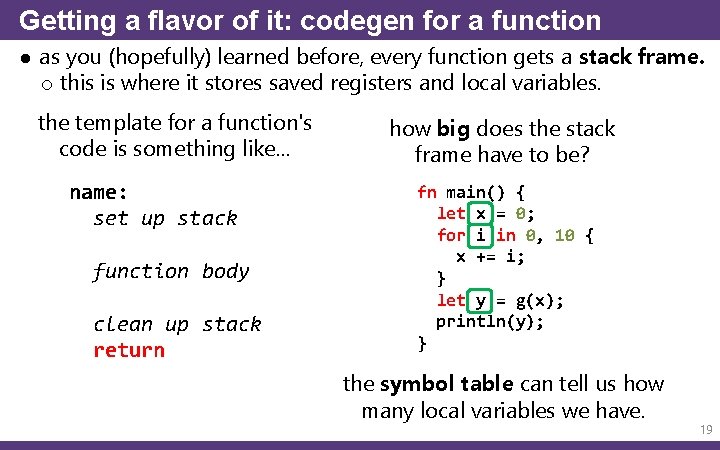
Getting a flavor of it: codegen for a function ● as you (hopefully) learned before, every function gets a stack frame. o this is where it stores saved registers and local variables. the template for a function's code is something like… name: set up stack function body clean up stack return how big does the stack frame have to be? fn main() { let x = 0; for i in 0, 10 { x += i; } let y = g(x); println(y); } the symbol table can tell us how many local variables we have. 19
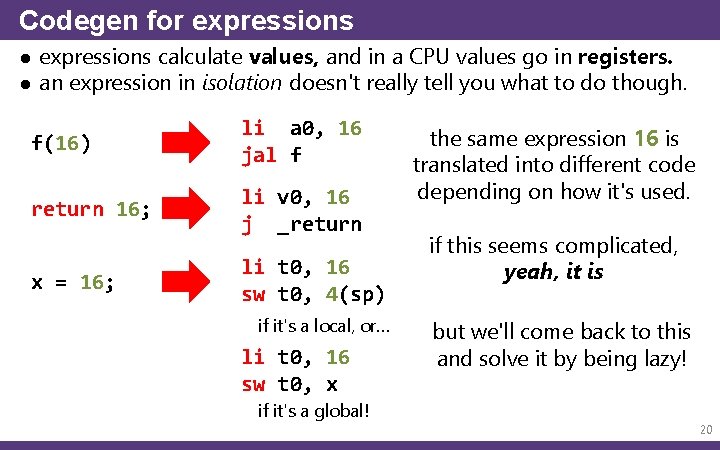
Codegen for expressions ● expressions calculate values, and in a CPU values go in registers. ● an expression in isolation doesn't really tell you what to do though. f(16) li a 0, 16 jal f return 16; li v 0, 16 j _return x = 16; li t 0, 16 sw t 0, 4(sp) if it's a local, or… li t 0, 16 sw t 0, x if it's a global! the same expression 16 is translated into different code depending on how it's used. if this seems complicated, yeah, it is but we'll come back to this and solve it by being lazy! 20
Codegen for statements ● lots of statements do control flow, meaning the output code is gonna have labels and jumps and branches (ew). o fortunately, the templates for these are pretty straightforward and set in stone – there's only one real "right" way to do an if-else. ● sequential statements (like { blocks }) are no problem. o you just translate each statement one after another, and concatenate the code together. (yes, seriously!) ● even nested statements are simple thanks to the AST. o with the power of recursion, it all works out. trust recursion. ● but I think that's enough of an introduction to codegen. ● let's assume we have it working. does that mean we now have a working program? are we done with compiler? ? o well… 21
Linking and Executables 22
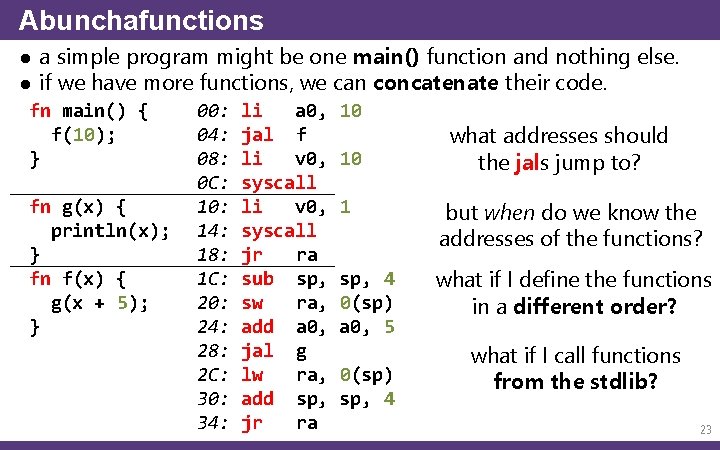
Abunchafunctions ● a simple program might be one main() function and nothing else. ● if we have more functions, we can concatenate their code. fn main() { f(10); } fn g(x) { println(x); } fn f(x) { g(x + 5); } 00: 04: 08: 0 C: 10: 14: 18: 1 C: 20: 24: 28: 2 C: 30: 34: li a 0, jal f li v 0, syscall jr ra sub sp, sw ra, add a 0, jal g lw ra, add sp, jr ra 10 10 what addresses should the jals jump to? 1 but when do we know the addresses of the functions? sp, 4 0(sp) a 0, 5 what if I define the functions in a different order? 0(sp) sp, 4 what if I call functions from the stdlib? 23
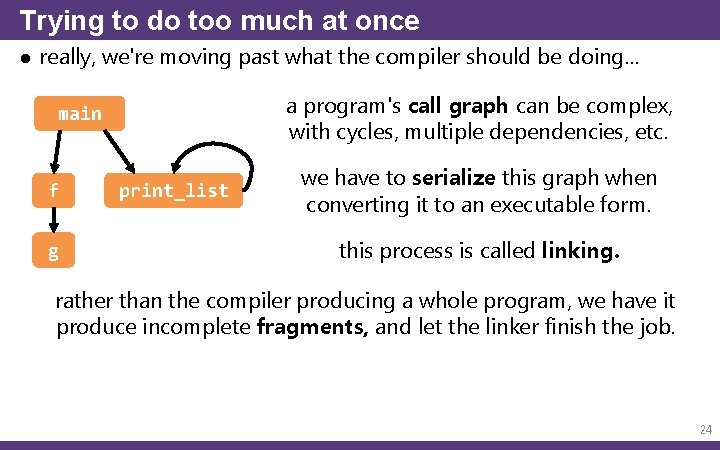
Trying to do too much at once ● really, we're moving past what the compiler should be doing… a program's call graph can be complex, with cycles, multiple dependencies, etc. main f g print_list we have to serialize this graph when converting it to an executable form. this process is called linking. rather than the compiler producing a whole program, we have it produce incomplete fragments, and let the linker finish the job. 24
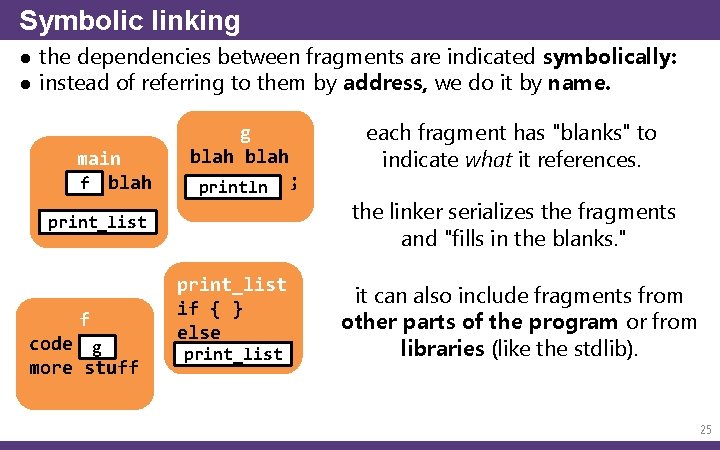
Symbolic linking ● the dependencies between fragments are indicated symbolically: ● instead of referring to them by address, we do it by name. main f blah g blah println print_list f code g more stuff print_list if { } else print_list ; each fragment has "blanks" to indicate what it references. the linker serializes the fragments and "fills in the blanks. " it can also include fragments from other parts of the program or from libraries (like the stdlib). 25
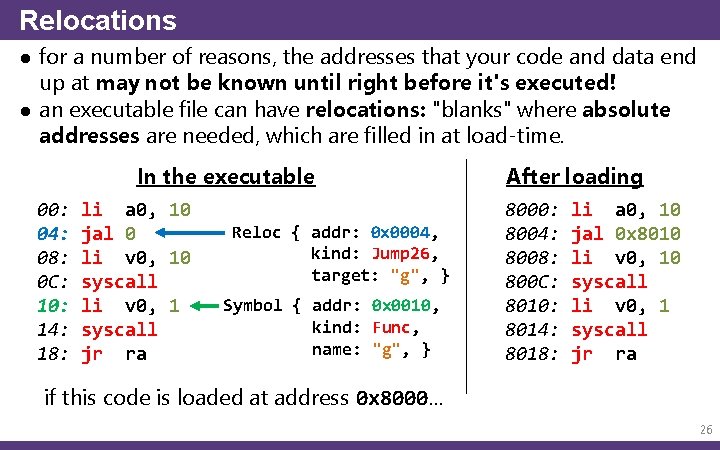
Relocations ● for a number of reasons, the addresses that your code and data end up at may not be known until right before it's executed! ● an executable file can have relocations: "blanks" where absolute addresses are needed, which are filled in at load-time. In the executable 00: 04: 08: 0 C: 10: 14: 18: li a 0, 10 jal 0 li v 0, 10 syscall li v 0, 1 syscall jr ra Reloc { addr: 0 x 0004, kind: Jump 26, target: "g", } Symbol { addr: 0 x 0010, kind: Func, name: "g", } After loading 8000: 8004: 8008: 800 C: 8010: 8014: 8018: li a 0, 10 jal 0 x 8010 li v 0, 10 syscall li v 0, 1 syscall jr ra if this code is loaded at address 0 x 8000… 26
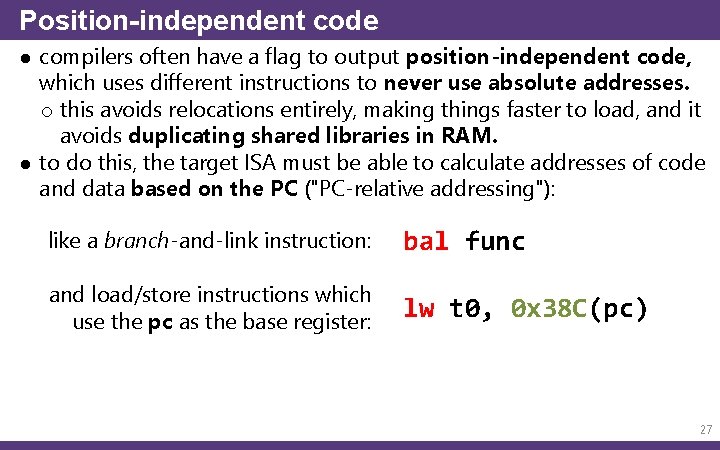
Position-independent code ● compilers often have a flag to output position-independent code, which uses different instructions to never use absolute addresses. o this avoids relocations entirely, making things faster to load, and it avoids duplicating shared libraries in RAM. ● to do this, the target ISA must be able to calculate addresses of code and data based on the PC ("PC-relative addressing"): like a branch-and-link instruction: bal func and load/store instructions which use the pc as the base register: lw t 0, 0 x 38 C(pc) 27
Debugging info ● converting to the target language is a lossy operation. o a bunch of info about the source program is lost! ● to make debugging possible, the compiler can also output info like: o what source file and line each instruction corresponds to o the names and locations of functions, globals, and locals o the types of storage locations o the structure of custom types (structs/classes) o the arrangement of stack frames for each function ● this way, when you run your program in a debugger, you can: o step through it line-by-line o inspect the contents of variables, arrays, etc. o have the debugger display that stuff in a human-readable way ● this info is usually HUGE, so it's optional and typically removed in "release" versions. 28
Executable formats ● we can't dump a bunch of instructions out and expect them to run. ● an executable format is like a seed, or an…………. egg o it has the code and all the metadata needed to support it. ● the OS ABIs define these formats, but they basically all look like this: header a header that identifies the type of the file symbols a symbol table (names, kinds, addresses) relocs relocation records . text. data and then multiple sections for things like code (. text), globals (. data), constants (. rodata), etc. . debug and optional debug info sections 29
Object files, executables, and libraries ● typically this format is used to represent three kinds of files: hello. exe object files: incomplete pieces which might correspond to a single source file or module. linking them together can produce… an executable, which has an entry point (the first function to be run when loaded), or… a library (either static or dynamically linked), which… doesn't have an entry point. hello. dll instead, it exports functions to be used by other files. 30
So what will we do? ? ● well, this is a compilers course, not a linkers course… ● rather than output machine code, our compiler will output assembly language code. you know, just text. o see, MARS – the MIPS emulator – has a linker built into it. o so we'll let it "finish the job" and do the linking for us. ● this might sound like a cop-out, but lots of compilers work this way! o not just toy compilers. gcc does this, if you ask it to. ● many compilers output object files full of machine code so they can skip the assembly step and just go straight to linking… o but that's a compilation speed optimization, not a requirement. 31
- Slides: 31