
Azure VMware Solution End to End Networking Amit

- Slides: 20
Azure VMware Solution – End to End Networking Amit Aneja Senior Program Manager, Microsoft
Agenda Azure Terminology Azure VMware Solution (AVS) Network Connectivity Networking in an AVS Software Defined Data Center (SDDC) AVS Integration with Azure Services Summary
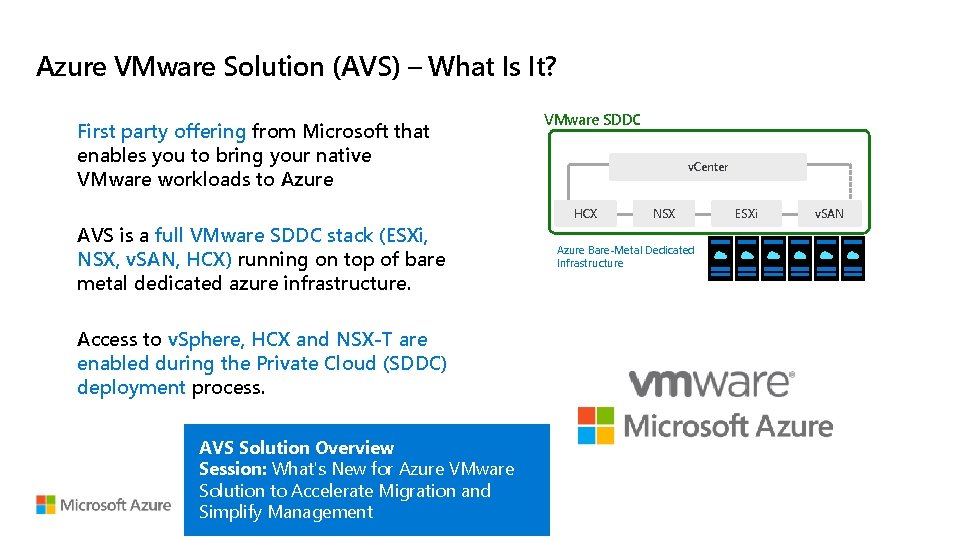
Azure VMware Solution (AVS) – What Is It? First party offering from Microsoft that enables you to bring your native VMware workloads to Azure AVS is a full VMware SDDC stack (ESXi, NSX, v. SAN, HCX) running on top of bare metal dedicated azure infrastructure. Access to v. Sphere, HCX and NSX-T are enabled during the Private Cloud (SDDC) deployment process. AVS Solution Overview Session: What's New for Azure VMware Solution to Accelerate Migration and Simplify Management VMware SDDC v. Center HCX NSX and HCX NSX Azure Bare-Metal Dedicated Infrastructure ESXi v. SAN
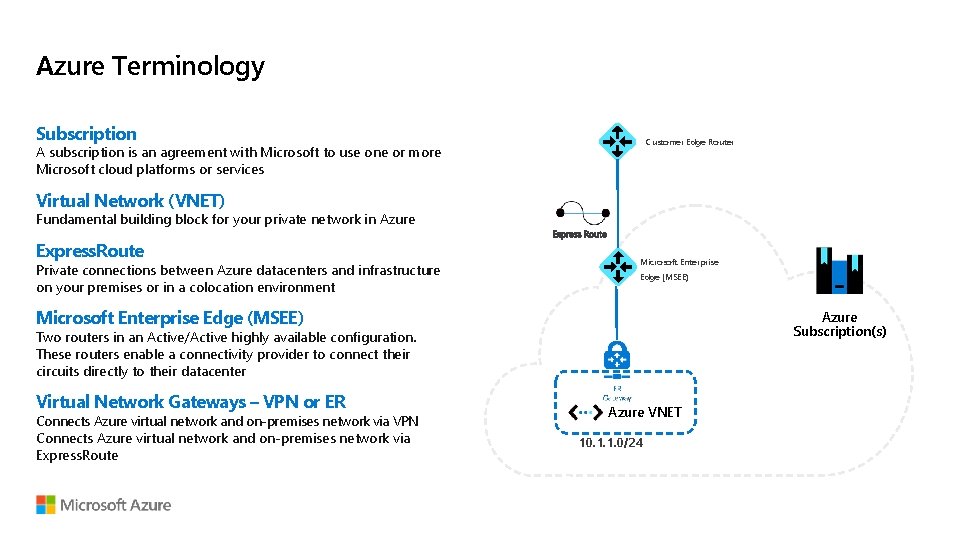
Azure Terminology Subscription Customer Edge Router A subscription is an agreement with Microsoft to use one or more Microsoft cloud platforms or services Virtual Network (VNET) Fundamental building block for your private network in Azure Express. Route Private connections between Azure datacenters and infrastructure on your premises or in a colocation environment Microsoft Enterprise Edge (MSEE) Azure Subscription(s) Two routers in an Active/Active highly available configuration. These routers enable a connectivity provider to connect their circuits directly to their datacenter Virtual Network Gateways – VPN or ER Connects Azure virtual network and on-premises network via VPN Connects Azure virtual network and on-premises network via Express. Route Azure VNET 10. 1. 1. 0/24
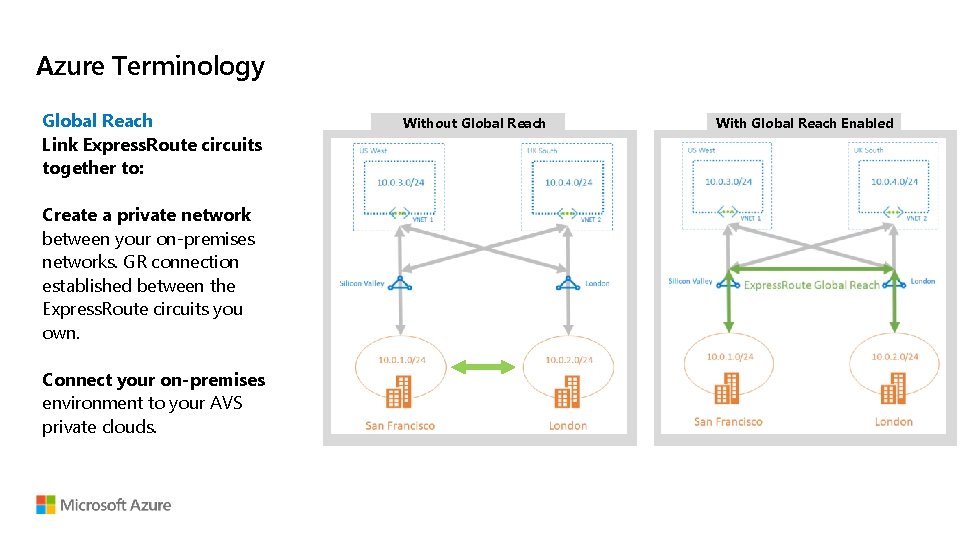
Azure Terminology Global Reach Link Express. Route circuits together to: Create a private network between your on-premises networks. GR connection established between the Express. Route circuits you own. Connect your on-premises environment to your AVS private clouds. Without Global Reach With Global Reach Enabled
Azure VMware Solution (AVS) Network Connectivity
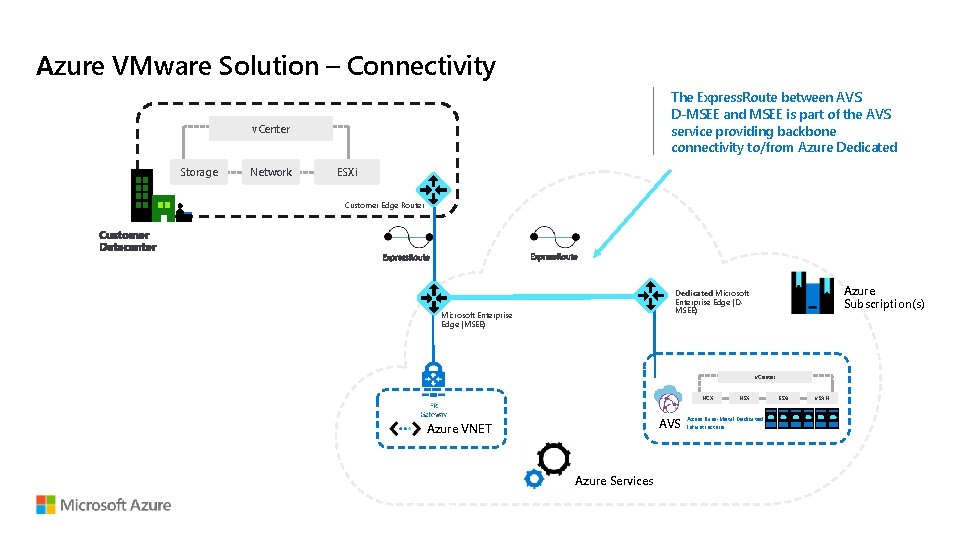
Azure VMware Solution – Connectivity The Express. Route between AVS D-MSEE and MSEE is part of the AVS service providing backbone connectivity to/from Azure Dedicated v. Center Storage Network ESXi Customer Edge Router Azure Subscription(s) Dedicated Microsoft Enterprise Edge (DMSEE) Microsoft Enterprise Edge (MSEE) v. Center HCX AVS Azure VNET Azure Services NSX Azure Bare-Metal Dedicated Infrastructure ESXi v. SAN
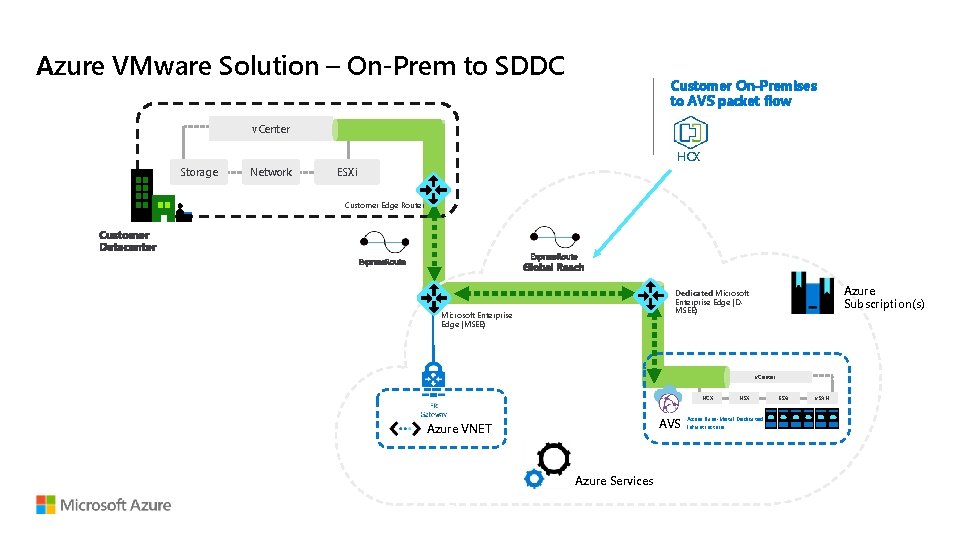
Azure VMware Solution – On-Prem to SDDC Customer On-Premises to AVS packet flow v. Center HCX Storage Network ESXi Customer Edge Router Azure Subscription(s) Dedicated Microsoft Enterprise Edge (DMSEE) Microsoft Enterprise Edge (MSEE) v. Center HCX AVS Azure VNET Azure Services NSX Azure Bare-Metal Dedicated Infrastructure ESXi v. SAN
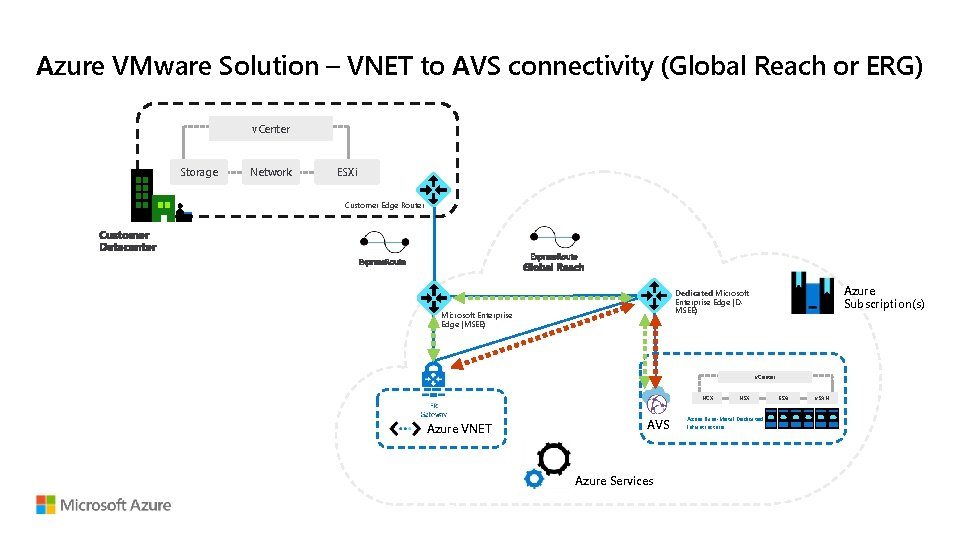
Azure VMware Solution – VNET to AVS connectivity (Global Reach or ERG) v. Center Storage Network ESXi Customer Edge Router Azure Subscription(s) Dedicated Microsoft Enterprise Edge (DMSEE) Microsoft Enterprise Edge (MSEE) v. Center HCX Azure VNET AVS Azure Services NSX Azure Bare-Metal Dedicated Infrastructure ESXi v. SAN
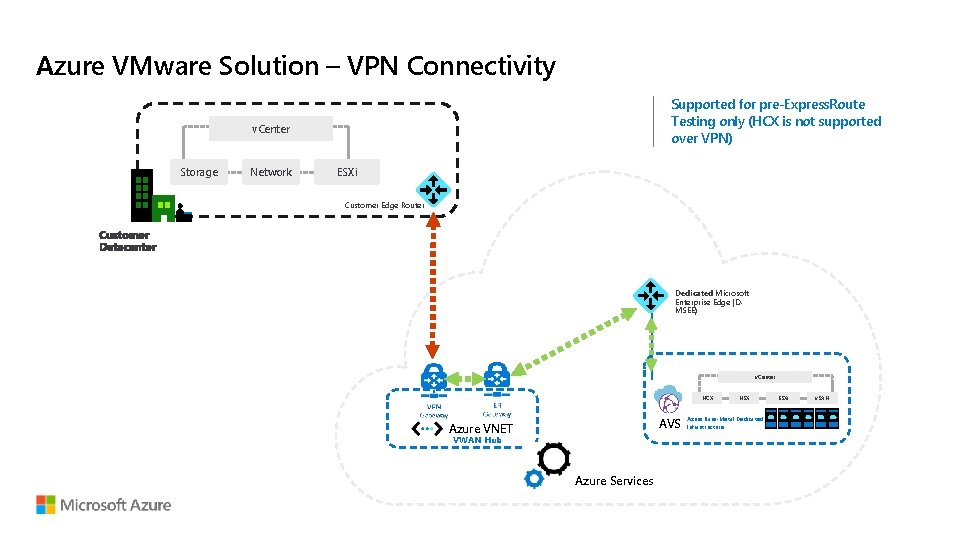
Azure VMware Solution – VPN Connectivity Supported for pre-Express. Route Testing only (HCX is not supported over VPN) v. Center Storage Network ESXi Customer Edge Router Dedicated Microsoft Enterprise Edge (DMSEE) v. Center HCX AVS Azure VNET VWAN Hub Azure Services NSX Azure Bare-Metal Dedicated Infrastructure ESXi v. SAN
Networking in an AVS SDDC (Software Defined Data Center)
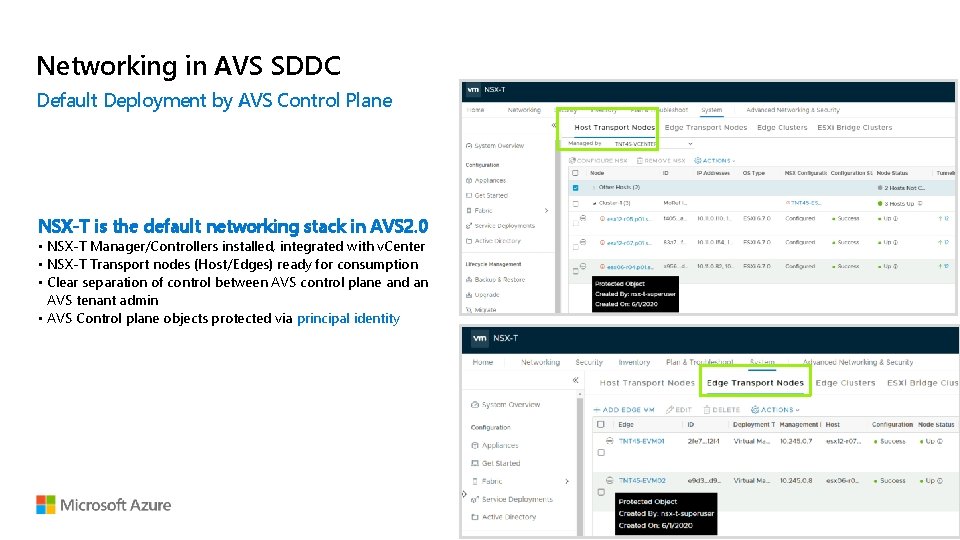
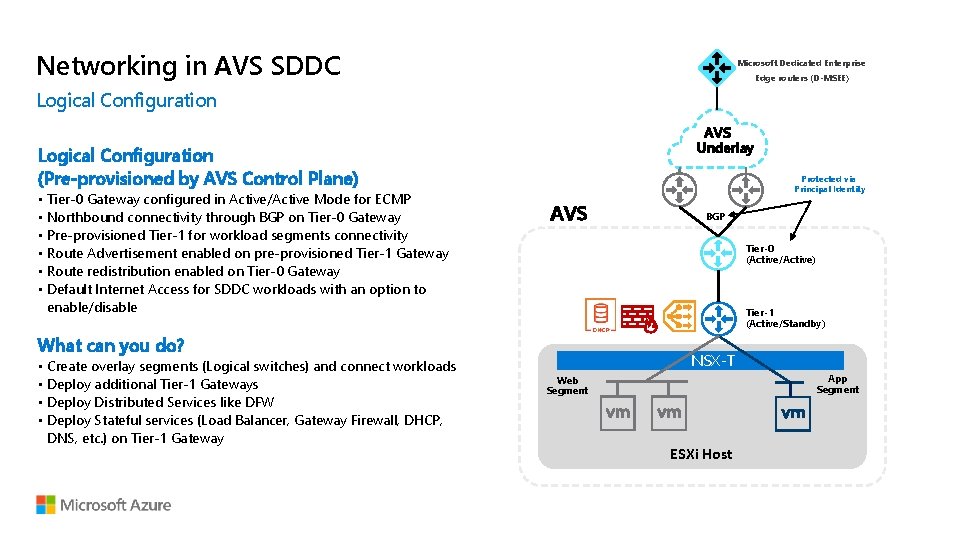
Networking in AVS SDDC Default Deployment by AVS Control Plane NSX-T is the default networking stack in AVS 2. 0 • NSX-T Manager/Controllers installed, integrated with v. Center • NSX-T Transport nodes (Host/Edges) ready for consumption • Clear separation of control between AVS control plane and an AVS tenant admin • AVS Control plane objects protected via principal identity ESXi Host
Networking in AVS SDDC Microsoft Dedicated Enterprise Edge routers (D-MSEE) Logical Configuration AVS Underlay Logical Configuration (Pre-provisioned by AVS Control Plane) • Tier-0 Gateway configured in Active/Active Mode for ECMP • Northbound connectivity through BGP on Tier-0 Gateway • Pre-provisioned Tier-1 for workload segments connectivity • Route Advertisement enabled on pre-provisioned Tier-1 Gateway • Route redistribution enabled on Tier-0 Gateway • Default Internet Access for SDDC workloads with an option to enable/disable Protected via Principal Identity AVS Tier-0 (Active/Active) Tier-1 (Active/Standby) What can you do? • Create overlay segments (Logical switches) and connect workloads • Deploy additional Tier-1 Gateways • Deploy Distributed Services like DFW • Deploy Stateful services (Load Balancer, Gateway Firewall, DHCP, DNS, etc. ) on Tier-1 Gateway BGP NSX-T App Segment Web Segment ESXi Host
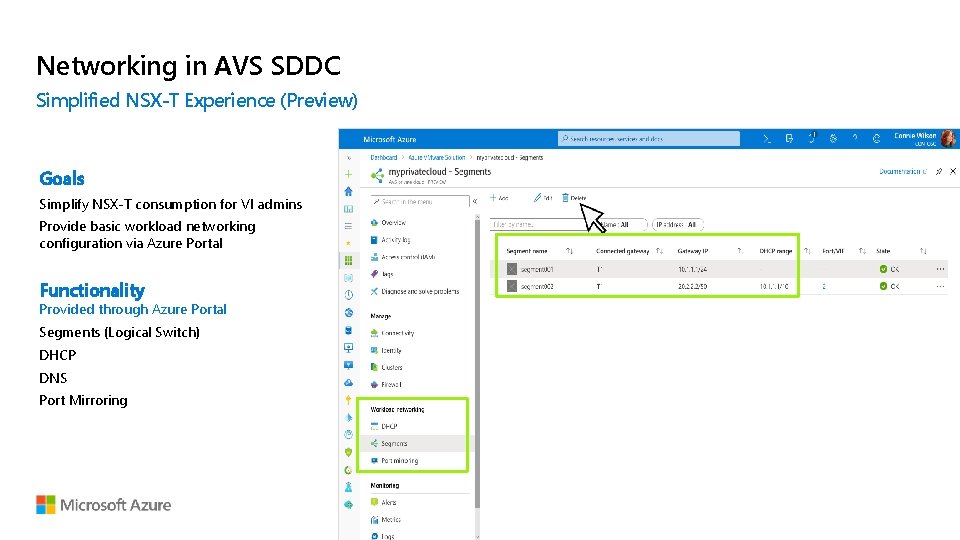
Networking in AVS SDDC Simplified NSX-T Experience (Preview) Goals Simplify NSX-T consumption for VI admins Provide basic workload networking configuration via Azure Portal Functionality Provided through Azure Portal Segments (Logical Switch) DHCP DNS Port Mirroring
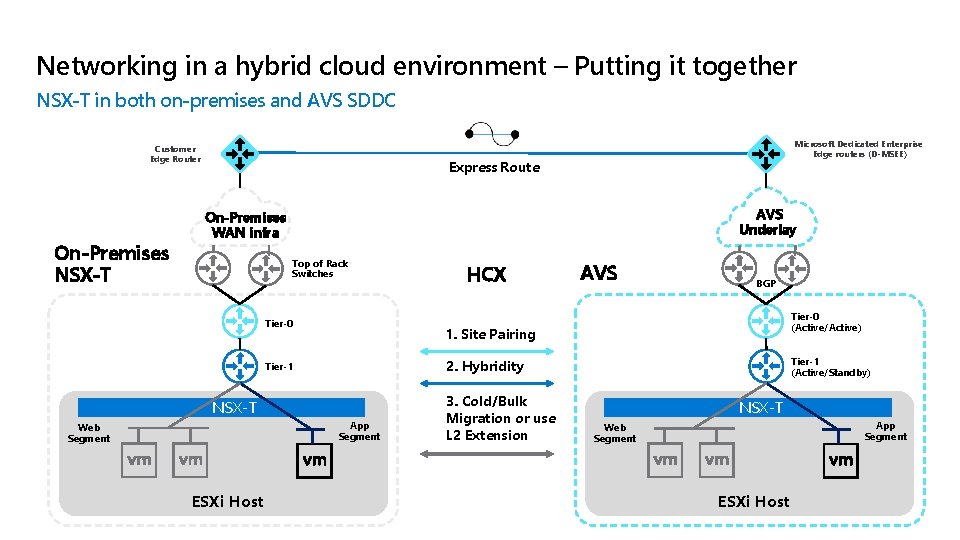
Networking in a hybrid cloud environment – Putting it together NSX-T in both on-premises and AVS SDDC Customer Edge Router On-Premises NSX-T Microsoft Dedicated Enterprise Edge routers (D-MSEE) Express Route AVS Underlay On-Premises WAN infra Top of Rack Switches Tier-0 BGP Tier-0 (Active/Active) Tier-1 (Active/Standby) 2. Hybridity NSX-T App Segment ESXi Host AVS 1. Site Pairing Tier-1 Web Segment HCX 3. Cold/Bulk Migration or use L 2 Extension NSX-T App Segment Web Segment ESXi Host
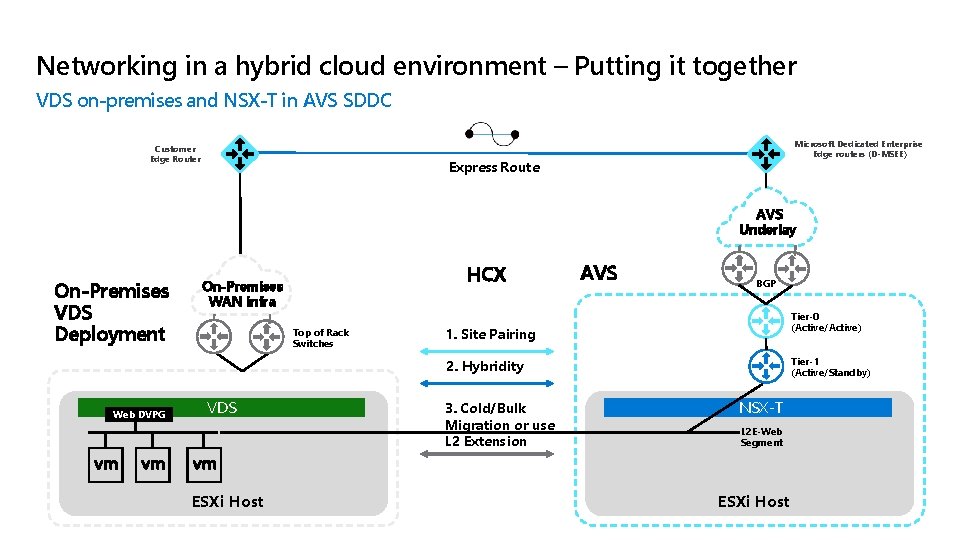
Networking in a hybrid cloud environment – Putting it together VDS on-premises and NSX-T in AVS SDDC Customer Edge Router Microsoft Dedicated Enterprise Edge routers (D-MSEE) Express Route AVS Underlay On-Premises VDS Deployment HCX On-Premises WAN infra Top of Rack Switches AVS BGP Tier-0 (Active/Active) 1. Site Pairing Tier-1 (Active/Standby) 2. Hybridity Web DVPG VDS ESXi Host 3. Cold/Bulk Migration or use L 2 Extension NSX-T L 2 E-Web Segment ESXi Host
AVS Integration with Azure Services
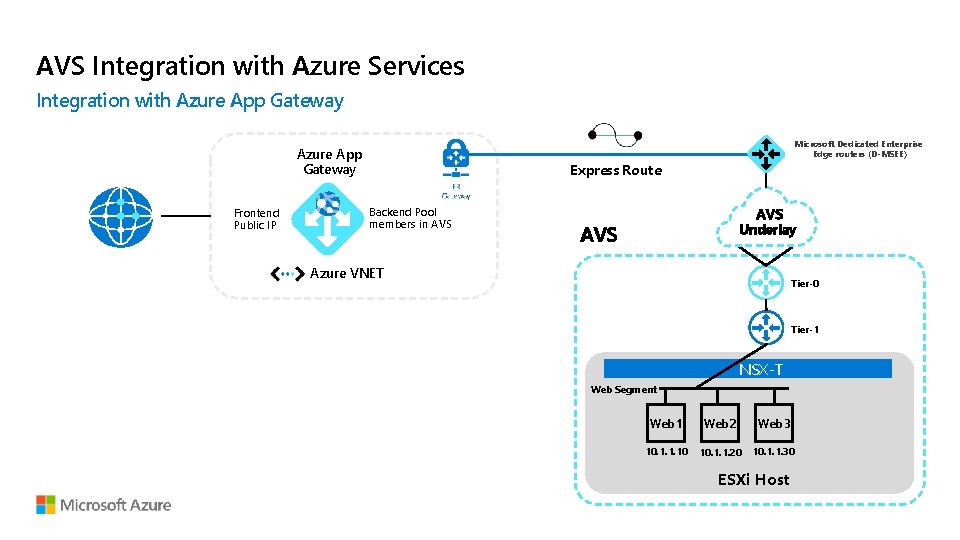
AVS Integration with Azure Services Integration with Azure App Gateway Microsoft Dedicated Enterprise Edge routers (D-MSEE) Azure App Gateway Frontend Public IP Express Route Backend Pool members in AVS Underlay AVS Azure VNET Tier-0 Tier-1 NSX-T Web Segment Web 1 Web 2 Web 3 10. 1. 1. 10 10. 1. 1. 20 10. 1. 1. 30 ESXi Host
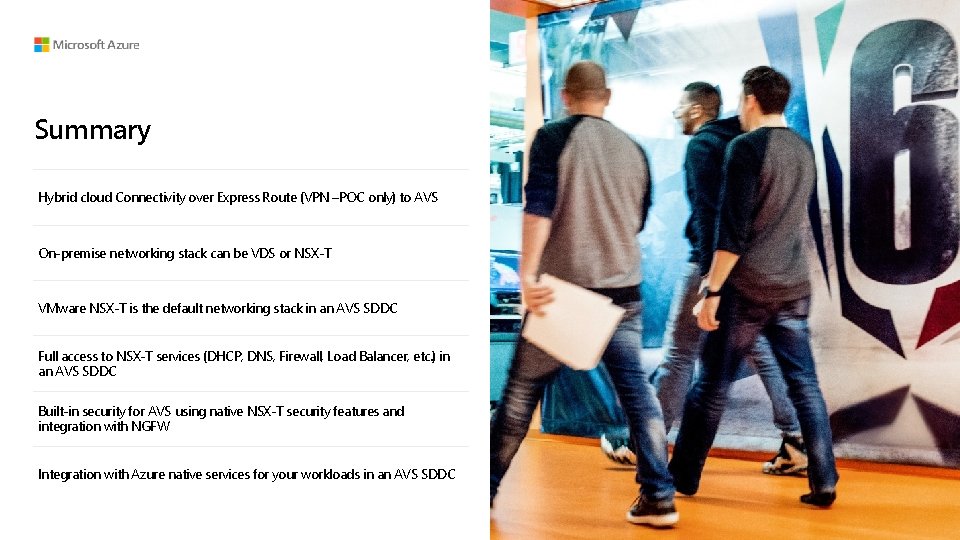
Summary Hybrid cloud Connectivity over Express Route (VPN –POC only) to AVS On-premise networking stack can be VDS or NSX-T VMware NSX-T is the default networking stack in an AVS SDDC Full access to NSX-T services (DHCP, DNS, Firewall, Load Balancer, etc. ) in an AVS SDDC Built-in security for AVS using native NSX-T security features and integration with NGFW Integration with Azure native services for your workloads in an AVS SDDC
Thank you. © Copyright Microsoft Corporation. All rights reserved.