
Avira Endpoint Security Introduction of Avira Management Center

- Slides: 69
Avira Endpoint Security
Introduction of Avira Management Center (AMC) www. avira. com
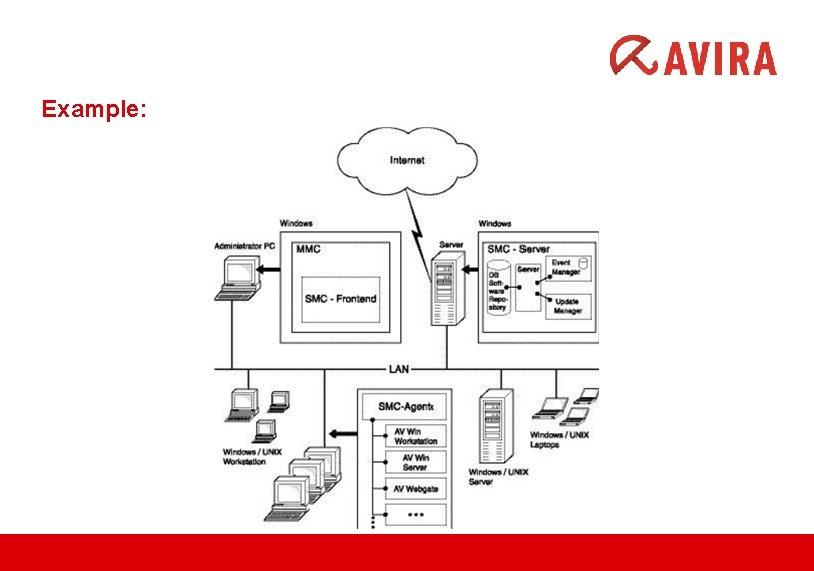
Avira Management Center (AMC) The Avira Management Center (AMC) enables the remote installation and administration of Avira products on the network. The AMC consists of three components: AMC Server: This is the main application which runs on a central server on the network and consists of three services: – Server – Event Manager – Internet Update Manager * This server also contains an integrated database for event administration. AMC Agent: A service performed on the computers on the network which establishes the connection between the main application (SMC Server) and the Avira products on the computers. AMC Frontend: A graphical user interface which can, for example, be installed on the administrator’s computer and which facilitates the effective administration of Avira SMC services and components.
Example:
Functionality: The AMC Server operates with the aid of three services, each performing different tasks, which communicate with each other via an SSL-encrypted TCP/IP connection. It manages: v computers integrated into the Security Environment of AMC, v Avira products installed on the computers, v software packages supported by AMC. Avira software packages are stored in the Software Repository of the SMC and can be remotely installed on computers in the Security Environment. An Avira product can inherit the configuration settings from its group, if installed via SMC. The Event Manager receives events (e. g. virus alerts), saves them in a database and forwards them for display and generation of reports in the SMC Frontend. The Avira Update Manager (AUM) carries out updates to the managed Avira products, the software packages in the SMC repository, and the SMC components.
The AMC Agent, which is installed on the computers in the Security Environment, forwards the commands, tasks and configurations of the main application AMC Server to the Avira products on the computers. The AMC Agent can relay events and messages from the Avira products to the AMC Server to be displayed in the AMC Frontend. The AMC Frontend is a snap-in for the Microsoft Management Console (MMC). v This graphical user interface clearly displays all information.
Features : All computers (Windows and Linux workstations and servers) in the Security Environment of the company network can be managed and monitored using the Avira AMC. The computers are arranged in the Security Environment in a freely configurable tree structure with hierarchical groups. The most important features and functions of AMC: 1. Configuration of a secure network environment v Graphical user interface for the configuration and operation of AMC (snap-in for Microsoft Management Console) v Silent setup of AMC Agents via the network v Remote installation, configuration, updating and uninstallation of the Avira security software on all network computers v Central repository for Avira products for installation on the network v User management for adding and monitoring users and access rights to computers or groups
v Backup of server files v SSL-encrypted communication protocol v Support for computers with dynamically allocated IP addresses (DHCP) 2. Control of Avira security products via the network v Central administration of product-specific actions (scan, update, etc. ) via configurable commands and tasks v Sharing files/licenses and Remote execution of programs from the share directory of the AMC Server v Pull mechanism to reduce the network load on very large networks v Saving of pending operations and tasks (installation, configuration, commands) for computers to which access is temporarily unavailable, and for pull Agents 3. Updating of Avira software via the network v Central and automatic updating of supported software packages and of AMC components with Avira Update Manager v Monitoring products’ status v Central control of the update function for installed Avira products with Avira Update Manager or via a scheduled task v Testing the updates before they are committed to the share directory
4. Monitoring the activity of Avira products via the network v Event Manager to send network warnings and email notifications for specific events v Configurable reports for Avira products on the network v Central view for all events and reports issued by Avira products on the network
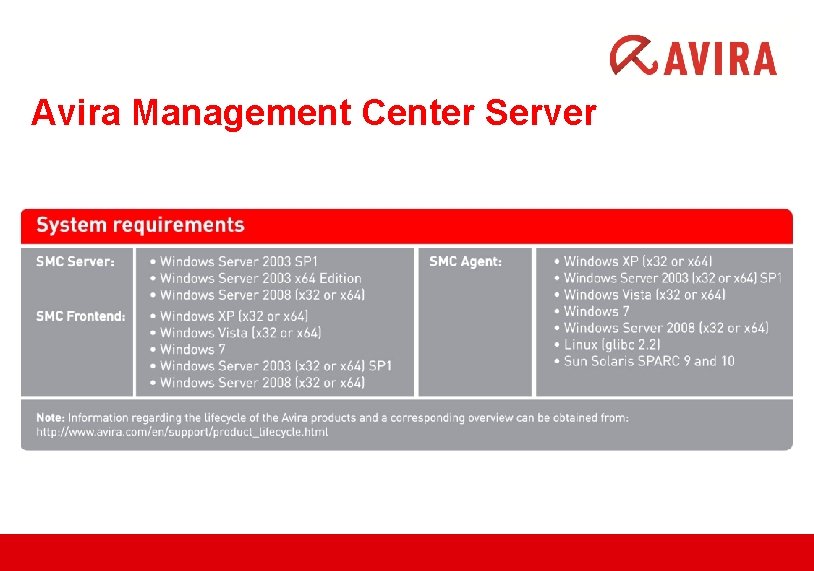
Avira Management Center Server
INSTALLATION OF THE AMC SERVER www. avira. com
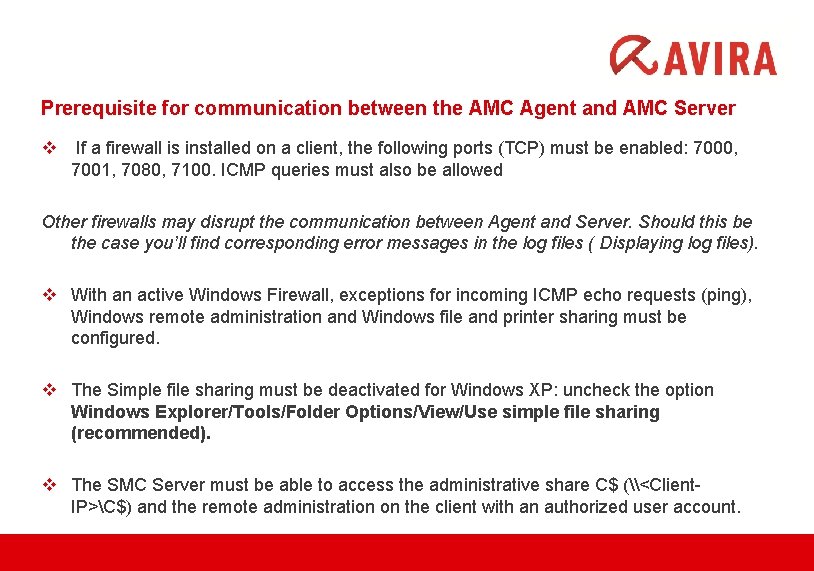
Prerequisite for communication between the AMC Agent and AMC Server v If a firewall is installed on a client, the following ports (TCP) must be enabled: 7000, 7001, 7080, 7100. ICMP queries must also be allowed Other firewalls may disrupt the communication between Agent and Server. Should this be the case you’ll find corresponding error messages in the log files ( Displaying log files). v With an active Windows Firewall, exceptions for incoming ICMP echo requests (ping), Windows remote administration and Windows file and printer sharing must be configured. v The Simple file sharing must be deactivated for Windows XP: uncheck the option Windows Explorer/Tools/Folder Options/View/Use simple file sharing (recommended). v The SMC Server must be able to access the administrative share C$ (\<Client. IP>C$) and the remote administration on the client with an authorized user account.
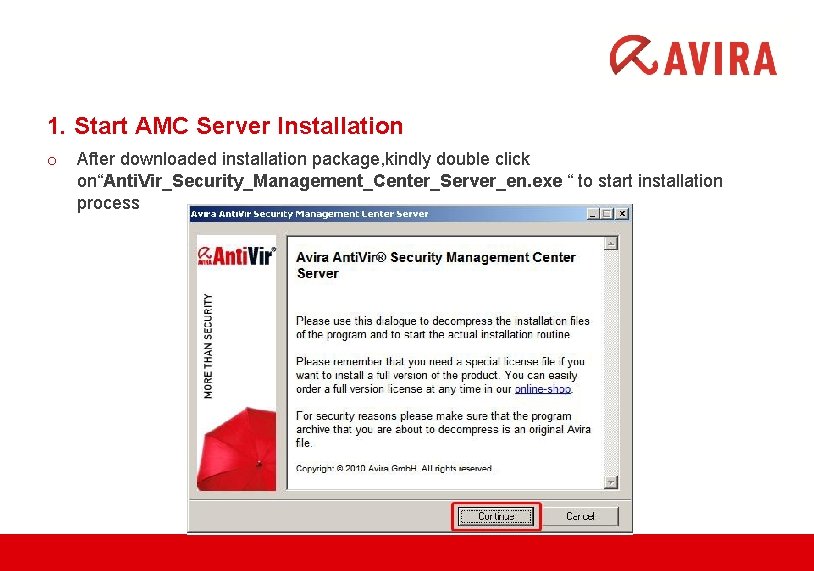
1. Start AMC Server Installation o After downloaded installation package, kindly double click on“Anti. Vir_Security_Management_Center_Server_en. exe “ to start installation process
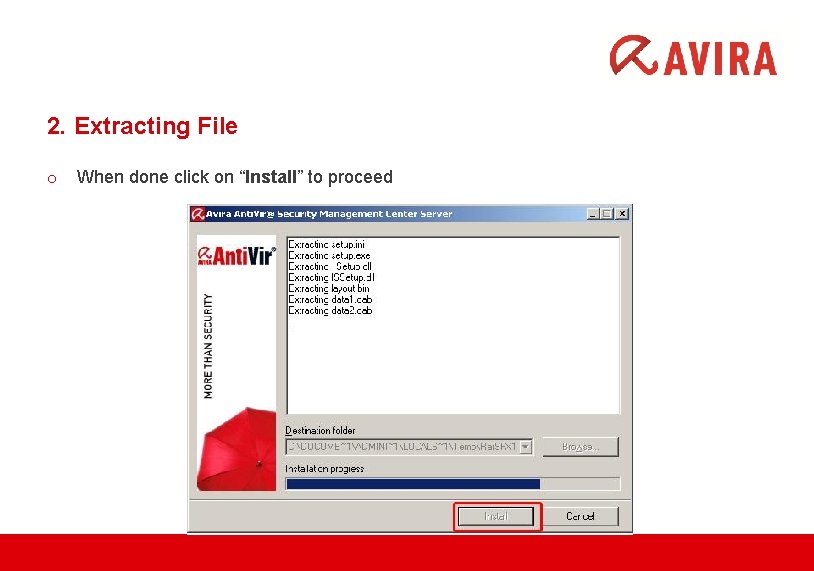
2. Extracting File o When done click on “Install” to proceed
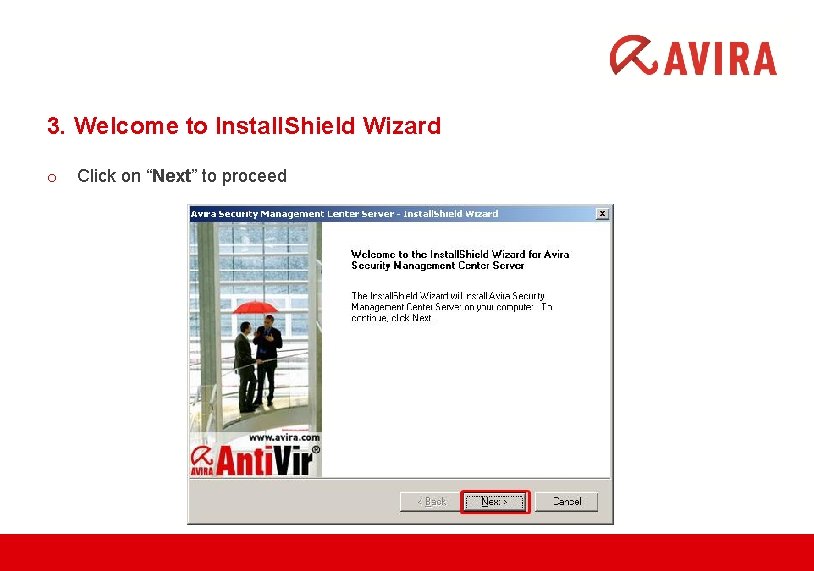
3. Welcome to Install. Shield Wizard o Click on “Next” to proceed
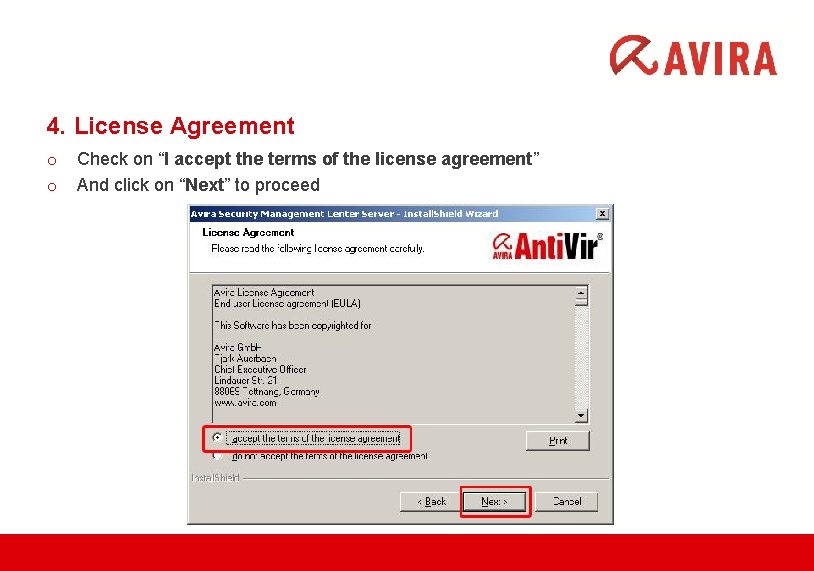
4. License Agreement o o Check on “I accept the terms of the license agreement” And click on “Next” to proceed
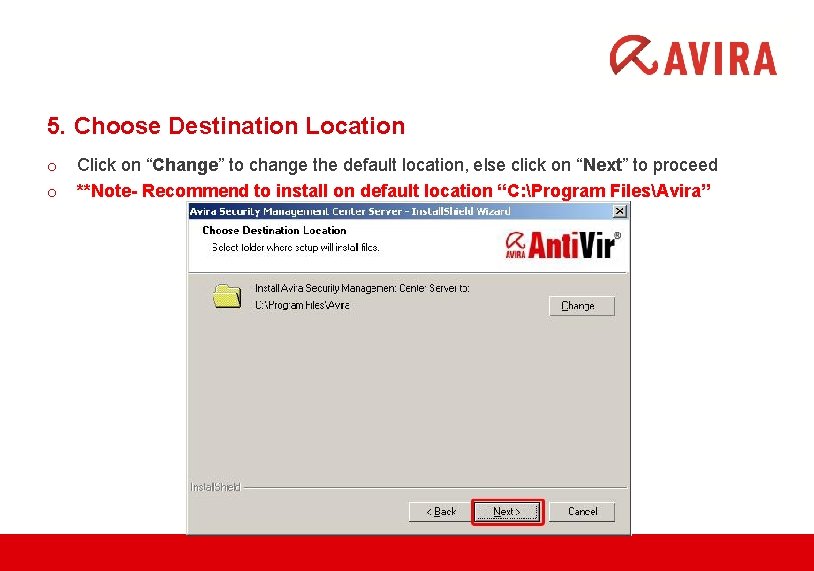
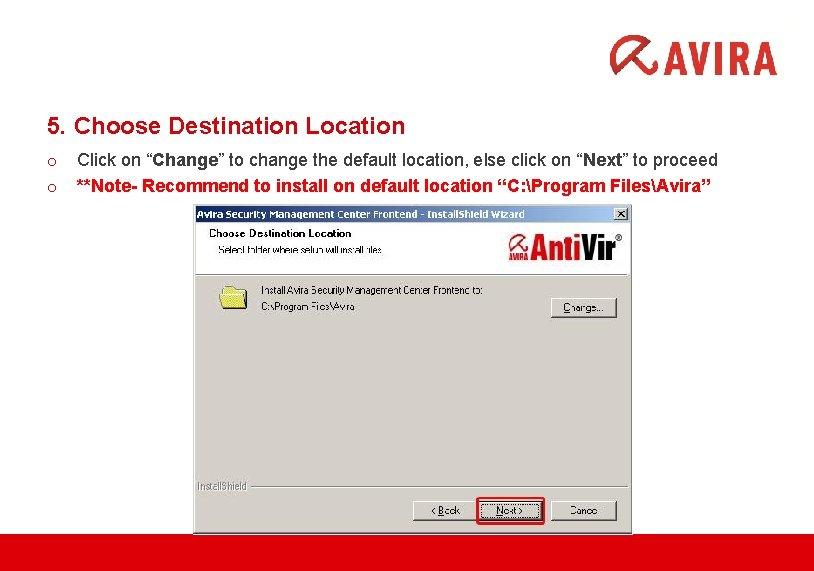
5. Choose Destination Location o o Click on “Change” to change the default location, else click on “Next” to proceed **Note- Recommend to install on default location “C: Program FilesAvira”
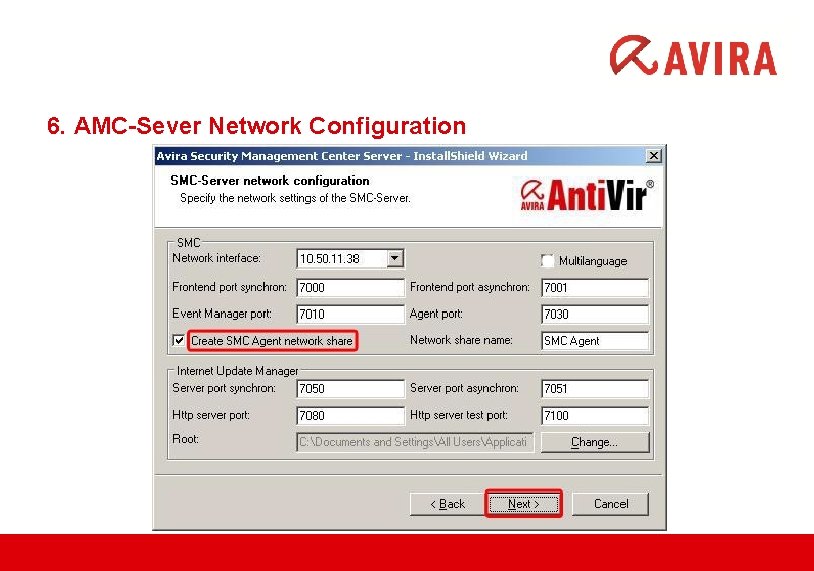
6. AMC-Sever Network Configuration
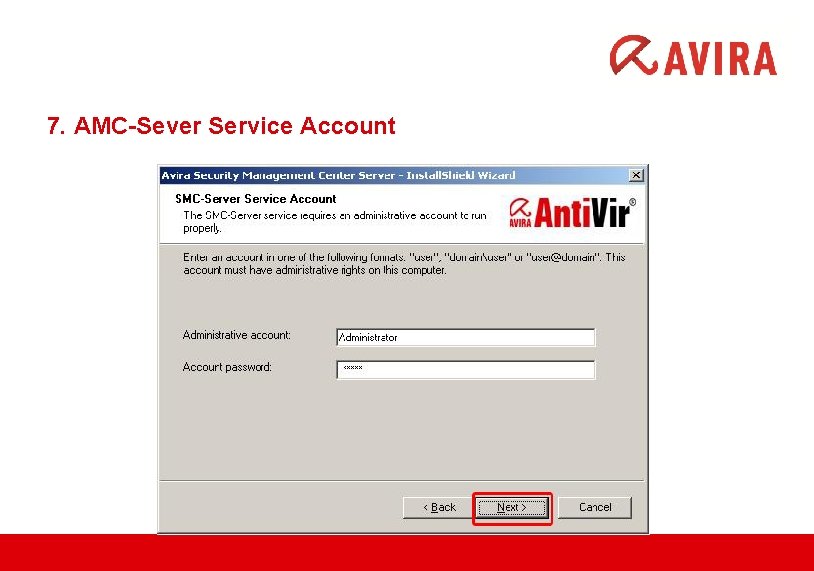
7. AMC-Sever Service Account
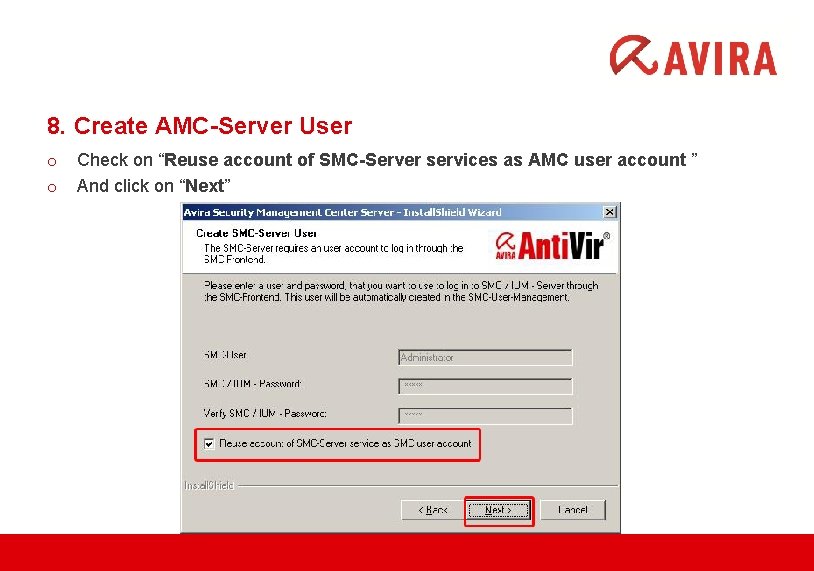
8. Create AMC-Server User o o Check on “Reuse account of SMC-Server services as AMC user account ” And click on “Next”
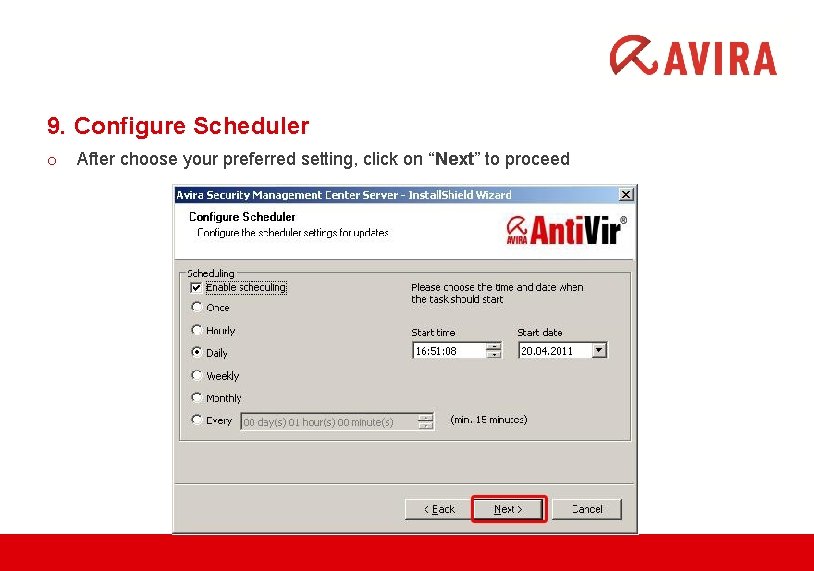
9. Configure Scheduler o After choose your preferred setting, click on “Next” to proceed
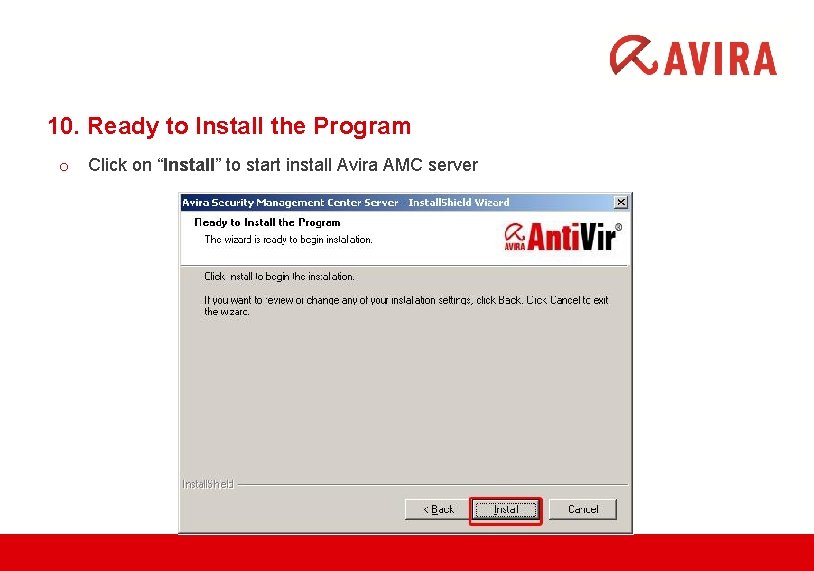
10. Ready to Install the Program o Click on “Install” to start install Avira AMC server
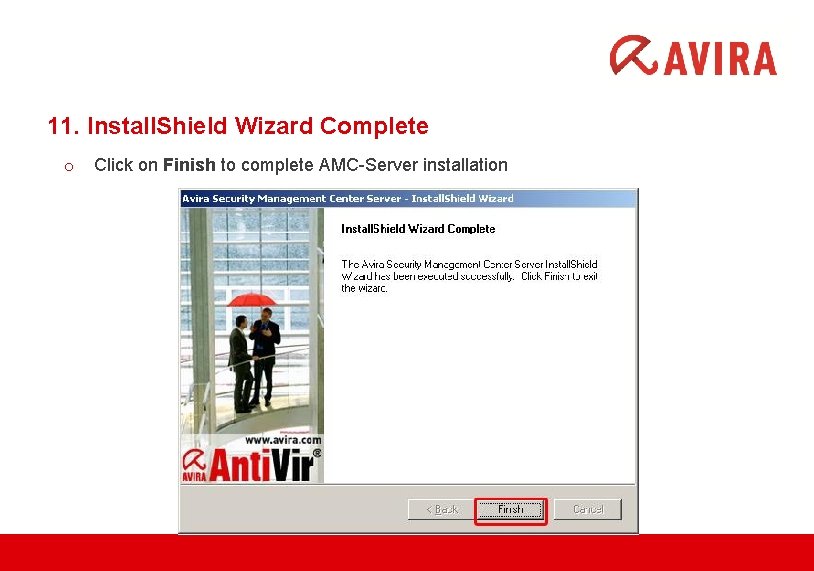
11. Install. Shield Wizard Complete o Click on Finish to complete AMC-Server installation
INSTALLATION OF THE AVIRA MANAGEMENT CENTER (AMC) FRONTEND www. avira. com
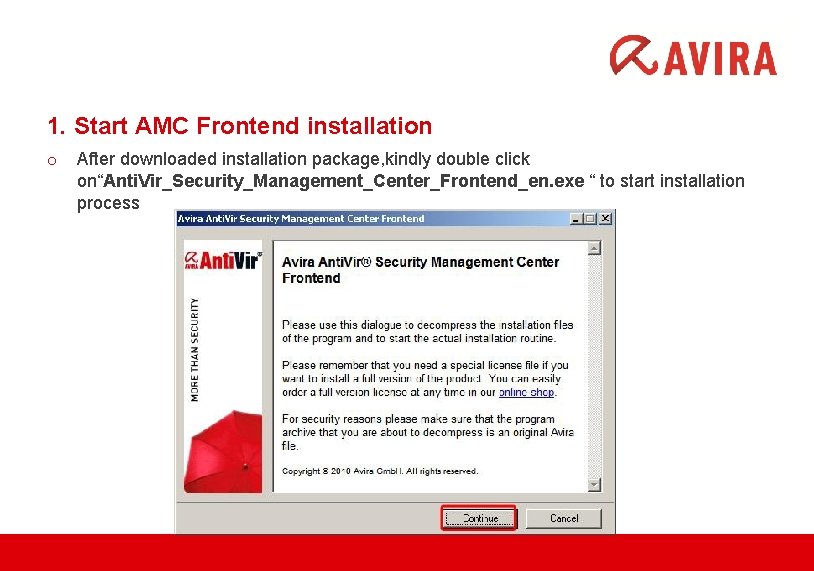
1. Start AMC Frontend installation o After downloaded installation package, kindly double click on“Anti. Vir_Security_Management_Center_Frontend_en. exe “ to start installation process
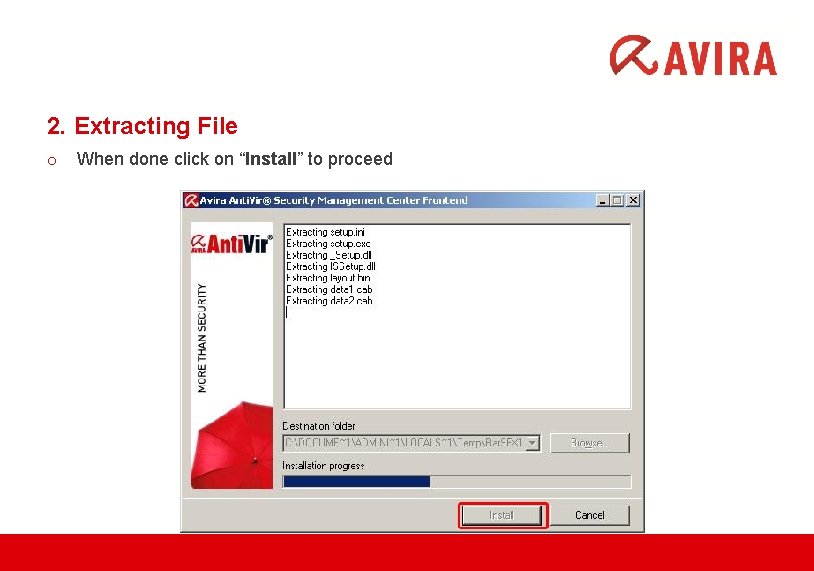
2. Extracting File o When done click on “Install” to proceed
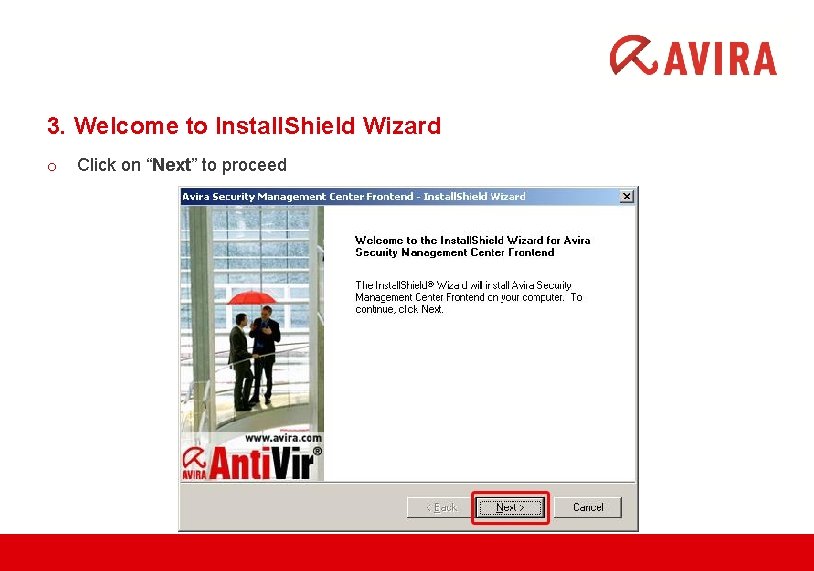
3. Welcome to Install. Shield Wizard o Click on “Next” to proceed
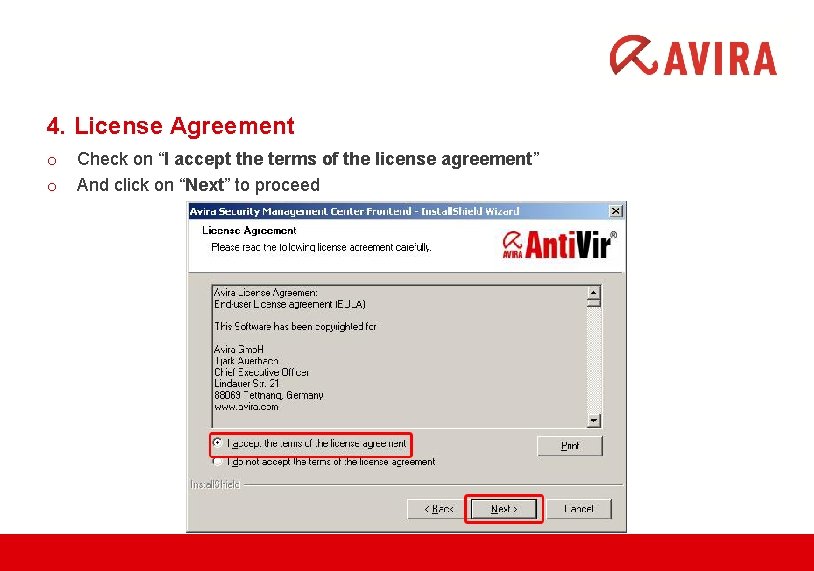
4. License Agreement o o Check on “I accept the terms of the license agreement” And click on “Next” to proceed
5. Choose Destination Location o o Click on “Change” to change the default location, else click on “Next” to proceed **Note- Recommend to install on default location “C: Program FilesAvira”
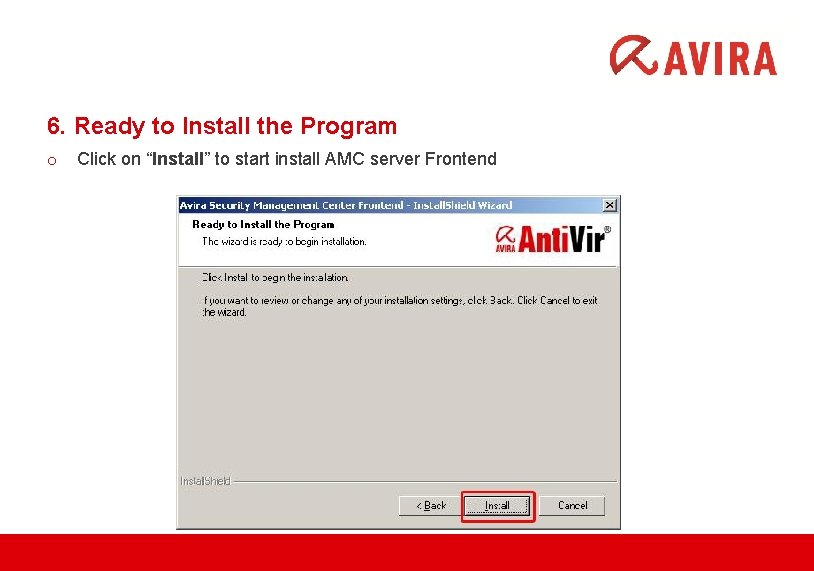
6. Ready to Install the Program o Click on “Install” to start install AMC server Frontend
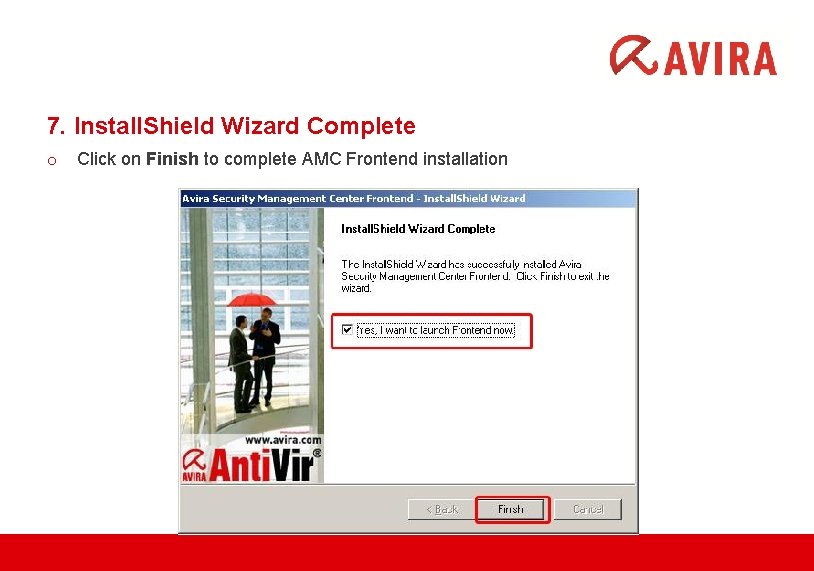
7. Install. Shield Wizard Complete o Click on Finish to complete AMC Frontend installation
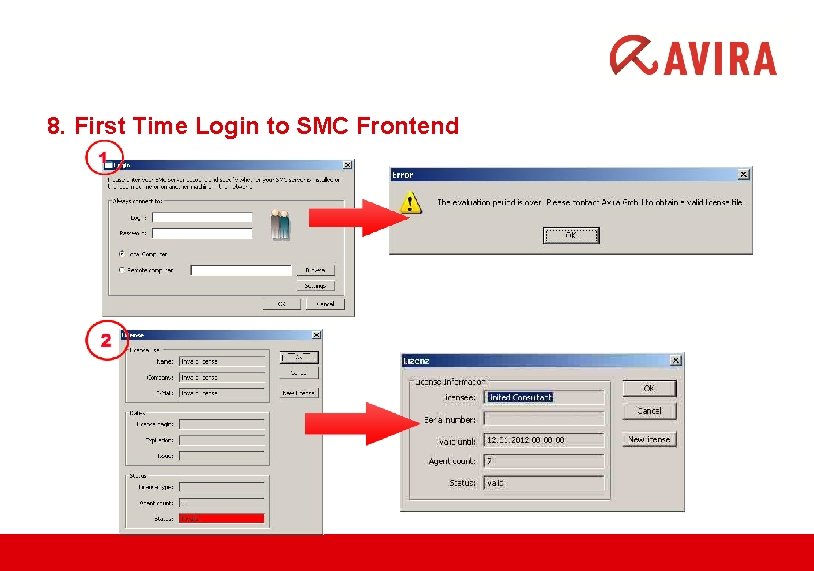
8. First Time Login to SMC Frontend
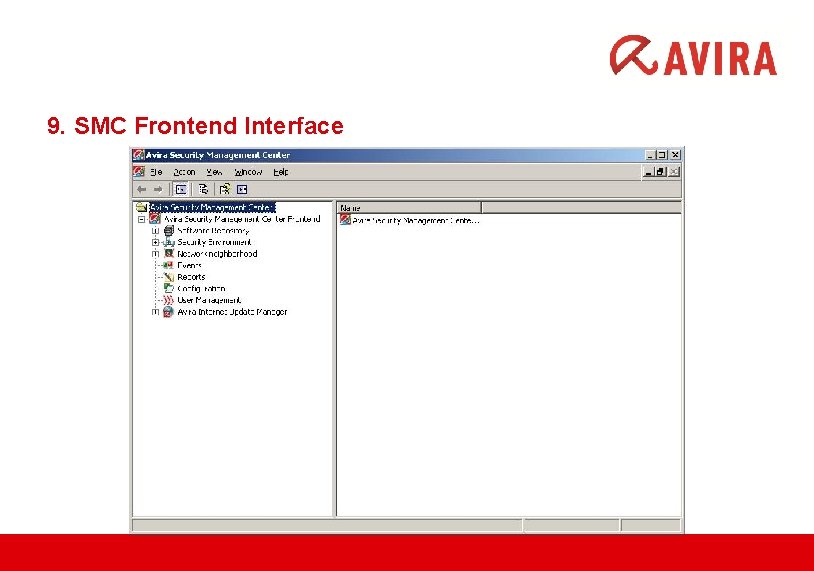
9. SMC Frontend Interface
ADDING SOFTWARE PACKAGE www. avira. com
What is Avira Software Repository? o The central database of the AMC Server for storing Avira products. o Avira software packages are stored in the Software Repository of the AMC and can be remotely installed on computers in the Security Environment. An Avira product can inherit the configuration settings from its group, if installed via AMC.
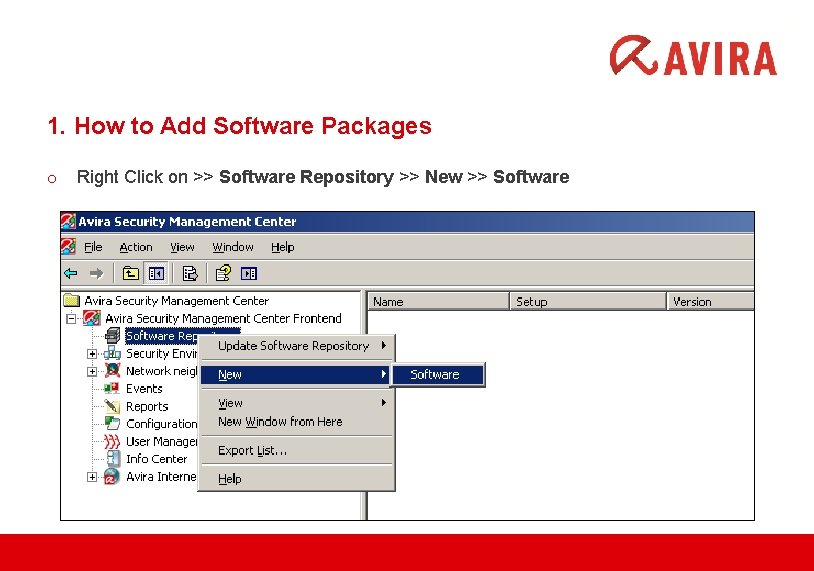
1. How to Add Software Packages o Right Click on >> Software Repository >> New >> Software
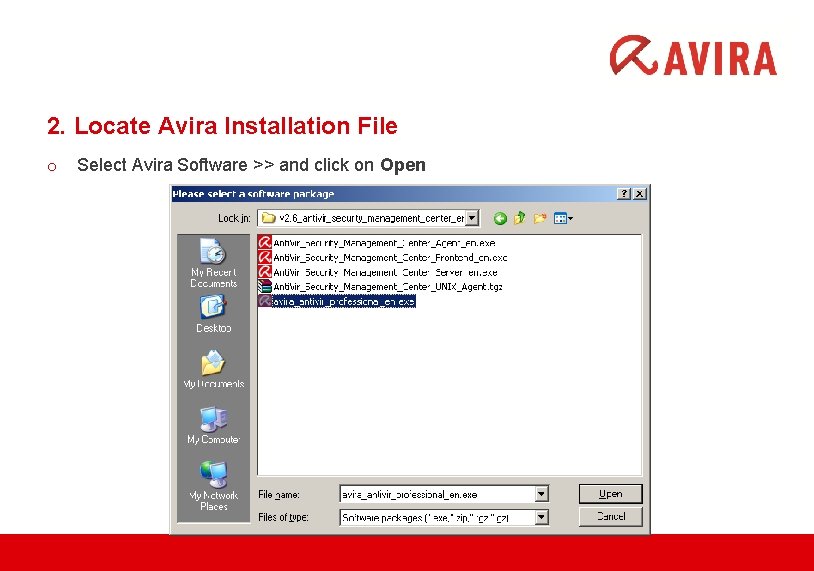
2. Locate Avira Installation File o Select Avira Software >> and click on Open
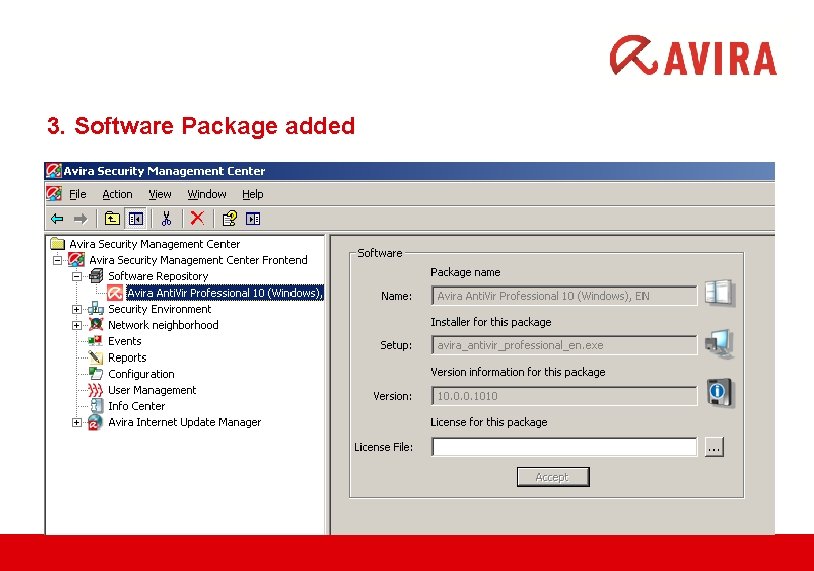
3. Software Package added
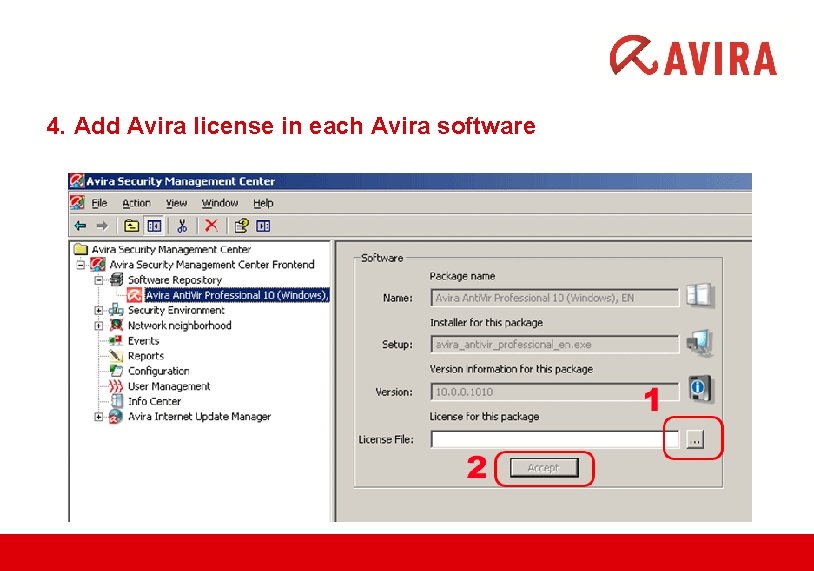
4. Add Avira license in each Avira software
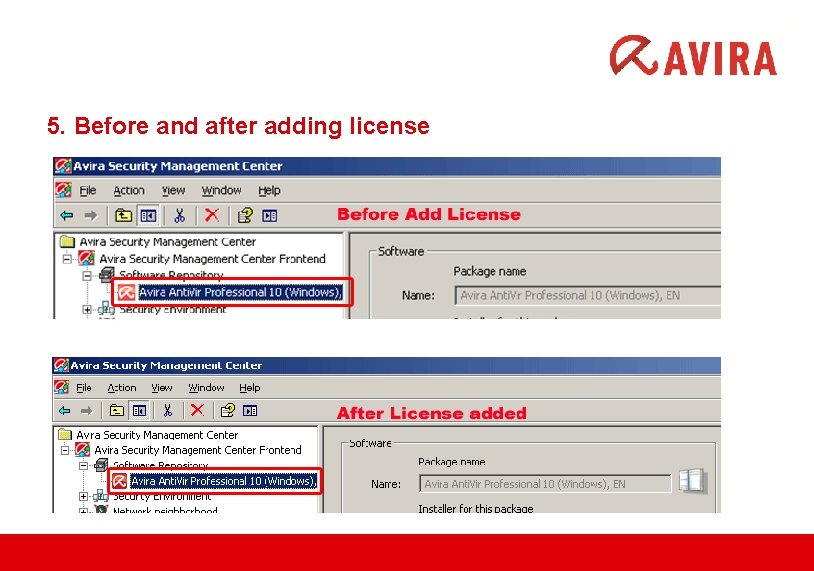
5. Before and after adding license
ADDING NEW COMPUTER Via AMC www. avira. com
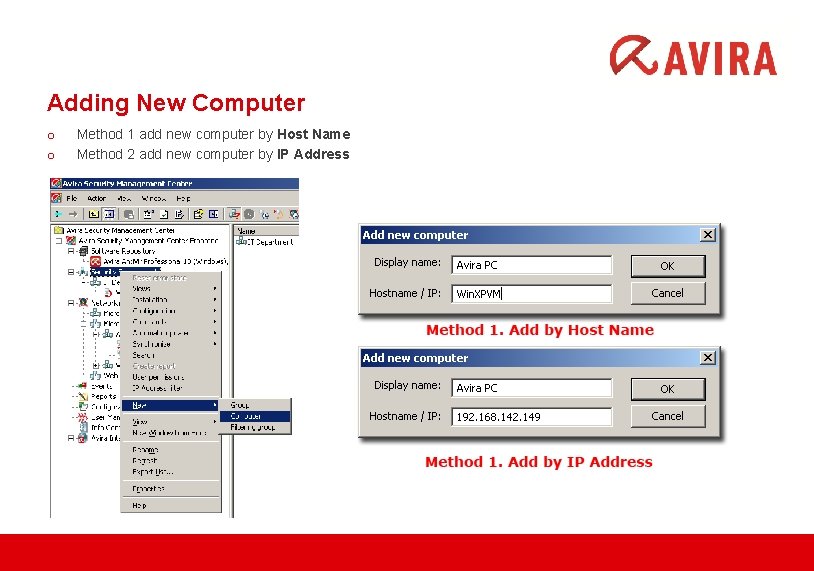
Adding New Computer o o Method 1 add new computer by Host Name Method 2 add new computer by IP Address
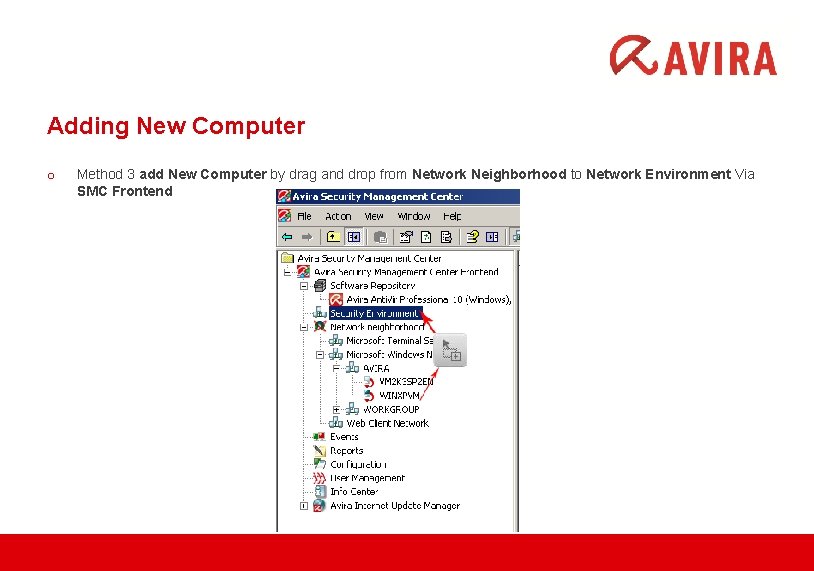
Adding New Computer o Method 3 add New Computer by drag and drop from Network Neighborhood to Network Environment Via SMC Frontend
DEPLOYMENT THROUGH AMC FRONTEND www. avira. com
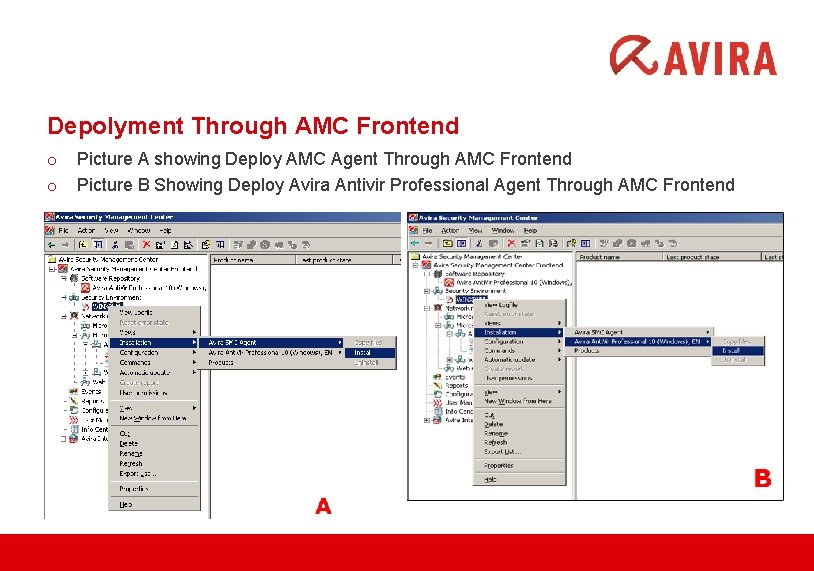
Depolyment Through AMC Frontend o o Picture A showing Deploy AMC Agent Through AMC Frontend Picture B Showing Deploy Avira Antivir Professional Agent Through AMC Frontend
CONFIGURATION of AMC I. Priority Server II. Action on Detection III. Scheduler (Update & Scan) IV. Password Protection V. User Management www. avira. com
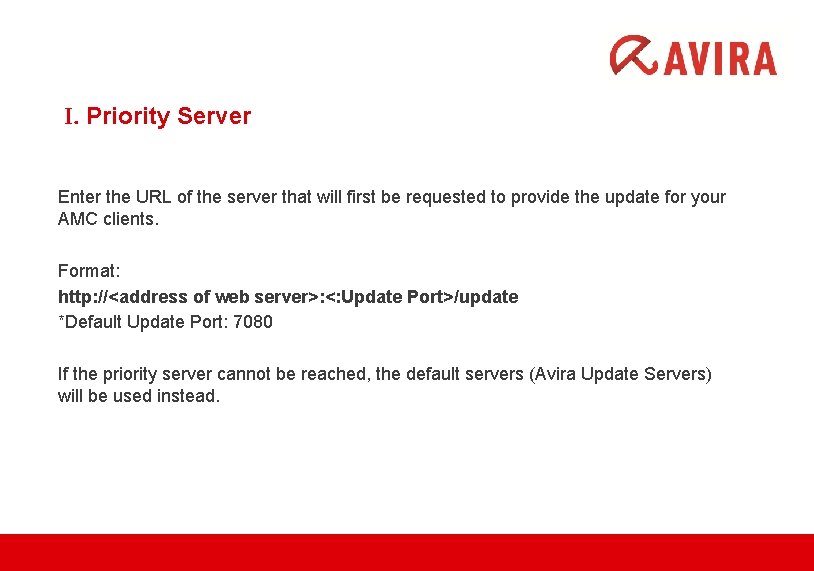
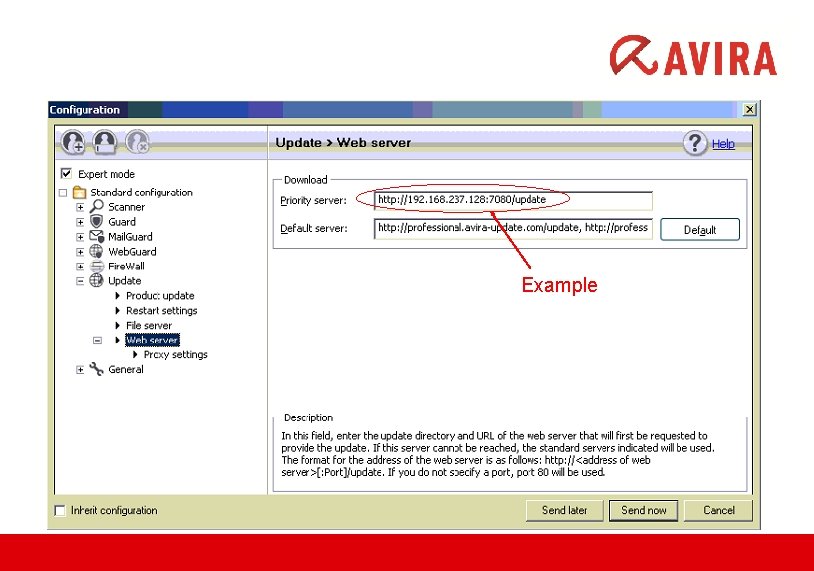
I. Priority Server Enter the URL of the server that will first be requested to provide the update for your AMC clients. Format: http: //<address of web server>: <: Update Port>/update *Default Update Port: 7080 If the priority server cannot be reached, the default servers (Avira Update Servers) will be used instead.
Example
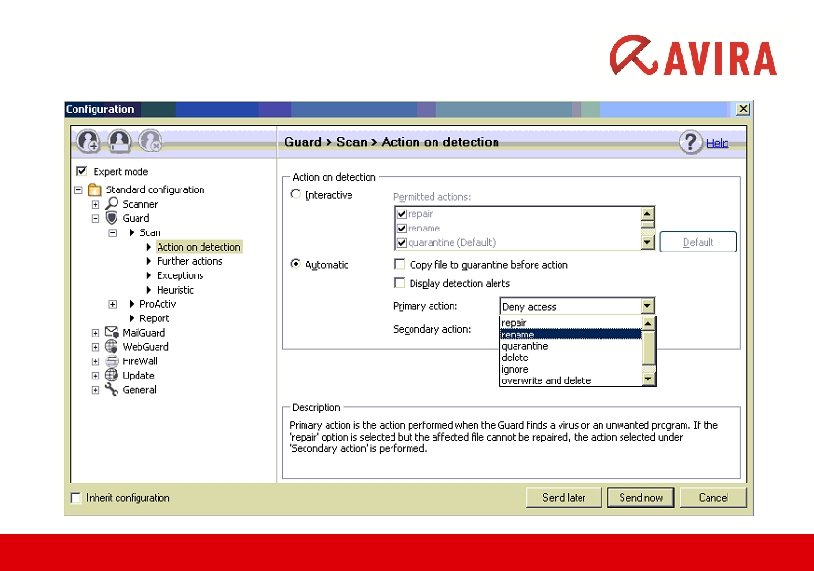
II. Action and Detection With AMC, you can define how Anti. Vir program reacts to a detected virus or unwanted program. TWO Detection Mode: - Interactive - Automatic ( Repair / Move to quarantine / Delete / Overwrite and delete / Rename /. . . )
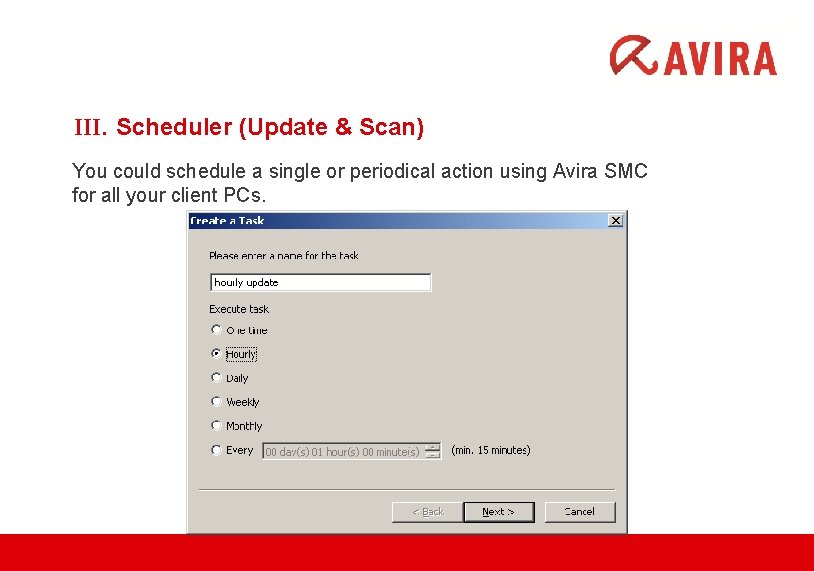
III. Scheduler (Update & Scan) You could schedule a single or periodical action using Avira SMC for all your client PCs.
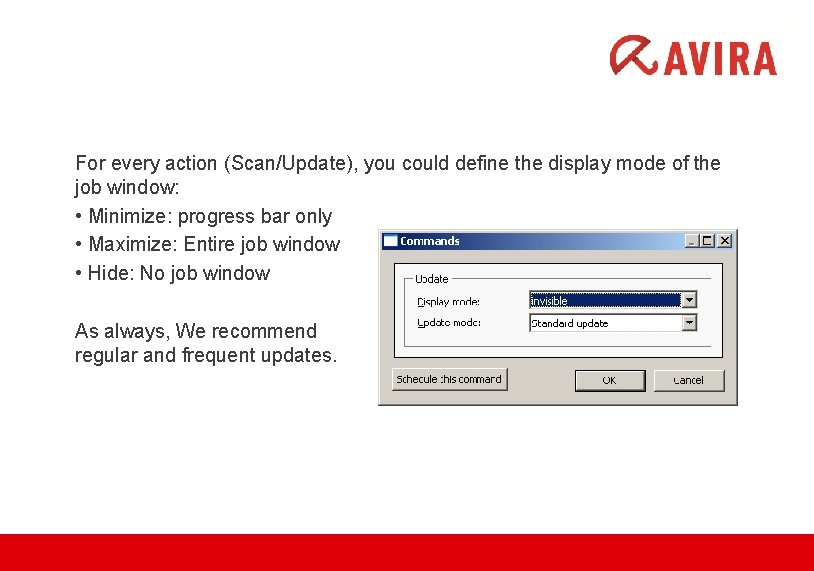
For every action (Scan/Update), you could define the display mode of the job window: • Minimize: progress bar only • Maximize: Entire job window • Hide: No job window As always, We recommend regular and frequent updates.
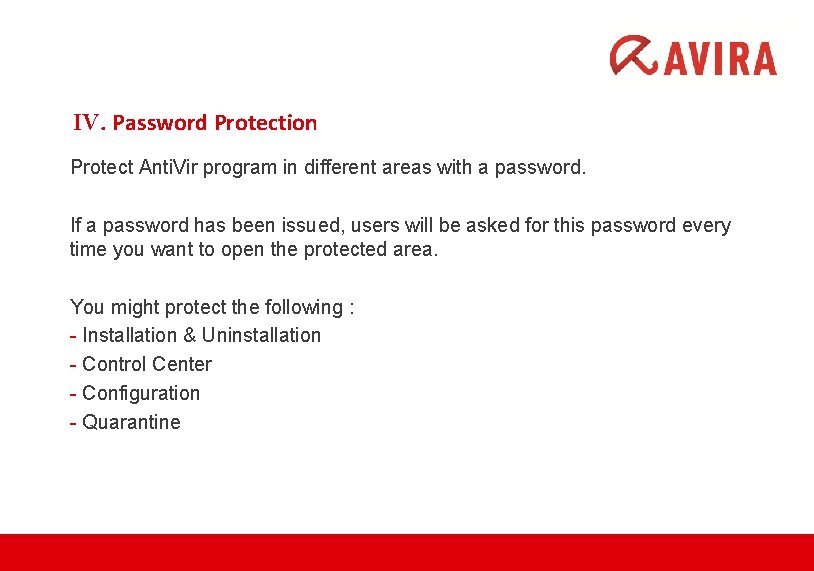
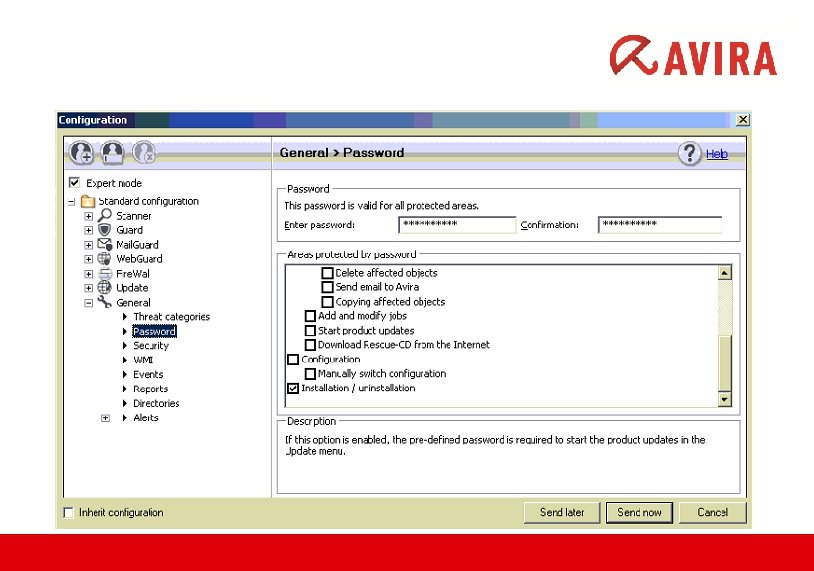
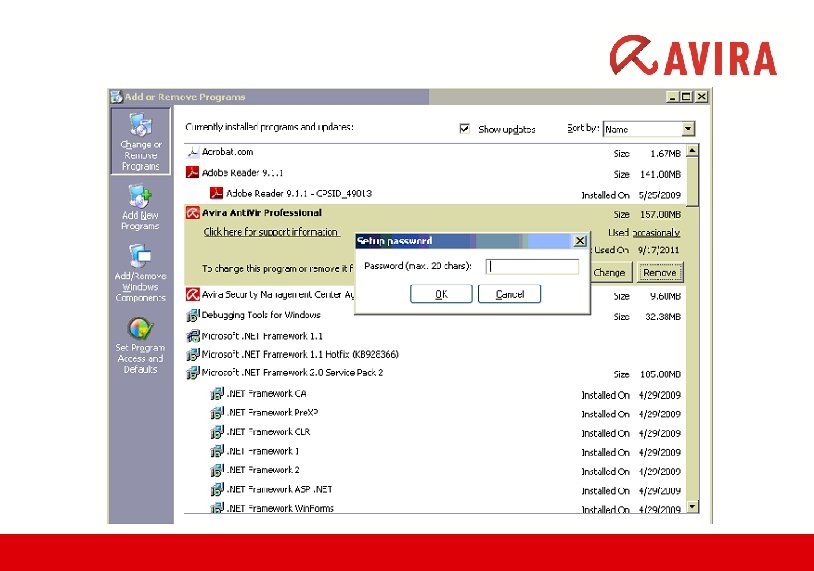
IV. Password Protection Protect Anti. Vir program in different areas with a password. If a password has been issued, users will be asked for this password every time you want to open the protected area. You might protect the following : - Installation & Uninstallation - Control Center - Configuration - Quarantine
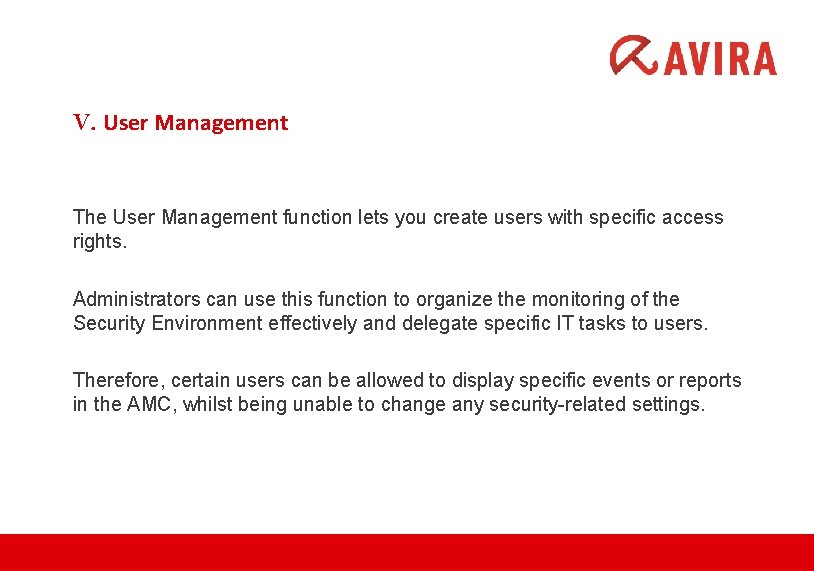
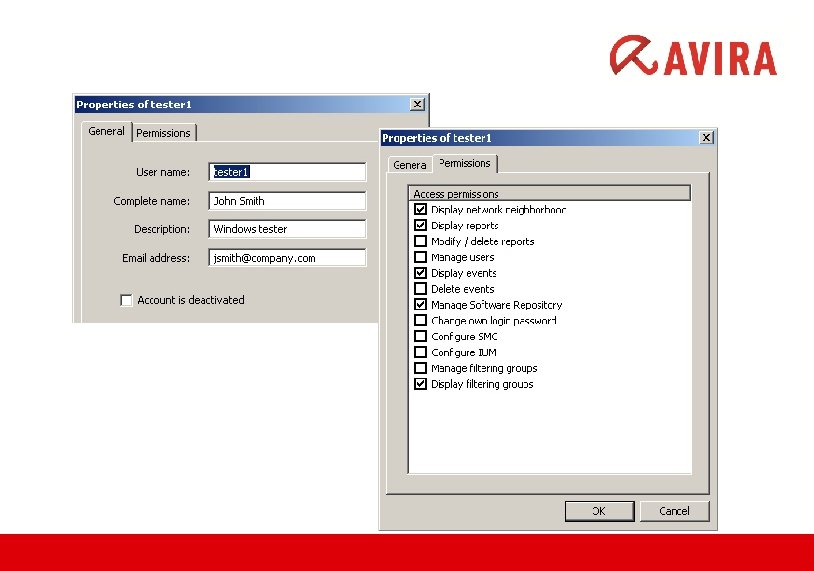
V. User Management The User Management function lets you create users with specific access rights. Administrators can use this function to organize the monitoring of the Security Environment effectively and delegate specific IT tasks to users. Therefore, certain users can be allowed to display specific events or reports in the AMC, whilst being unable to change any security-related settings.
Reports www. avira. com
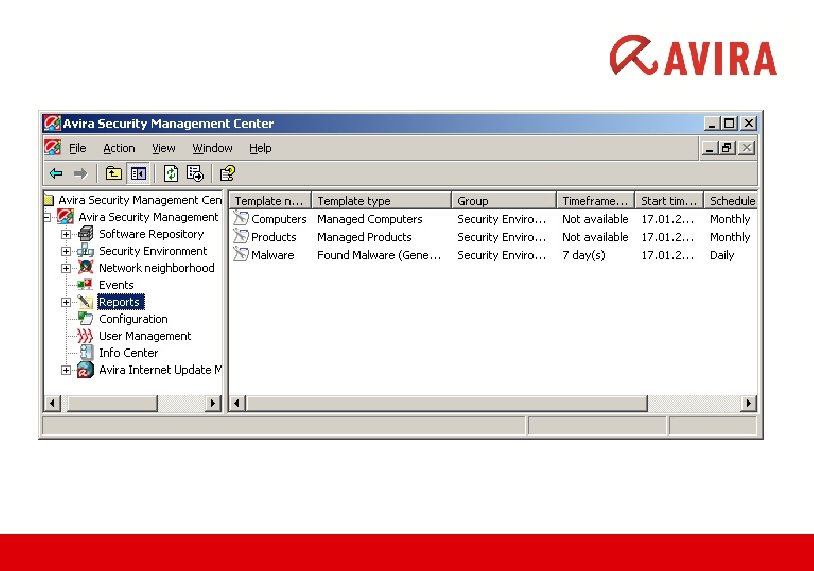
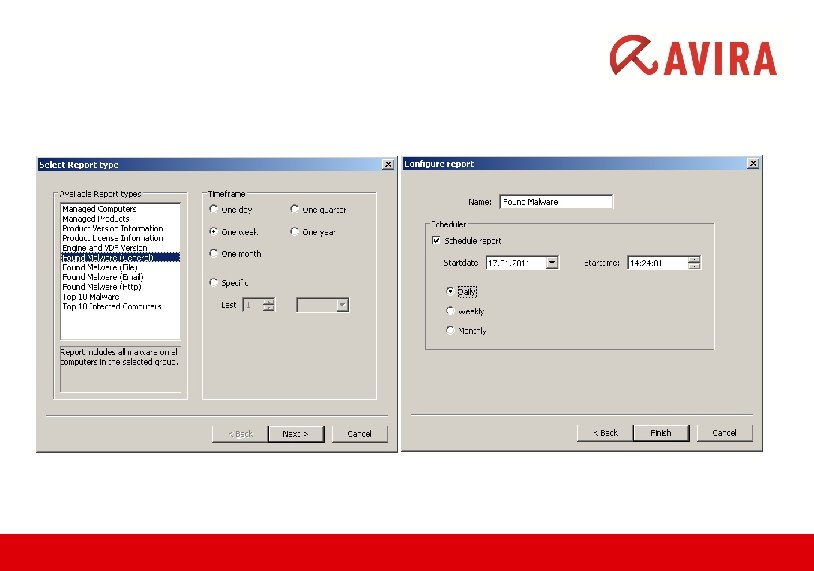
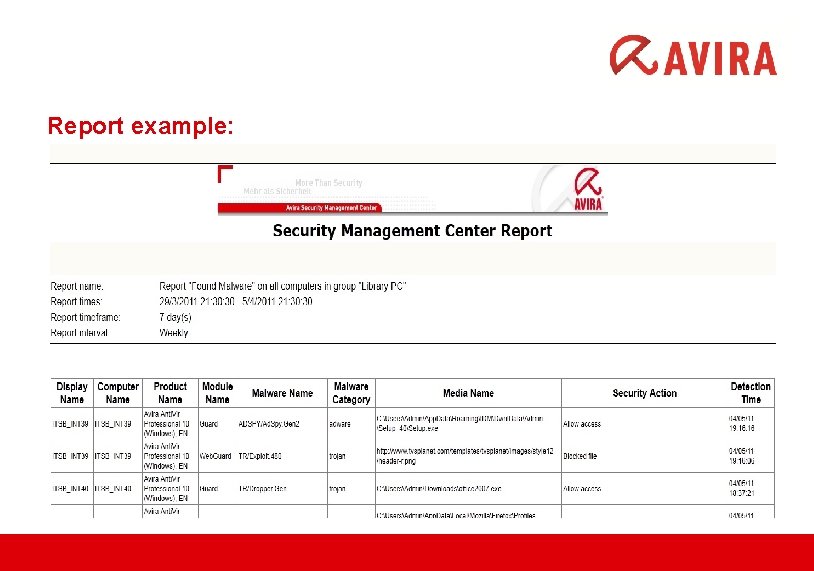
Reporting Access reports and regularly retrieve the status of the installed software and overviews of past events and messages on the computers in the Security Environment. You can let the AMC Agent create reports for individual computers or computer groups in the Security Environment.
Report example:
DISTRIBUTING A NEW LICENSE via AVIRA SMC www. avira. com
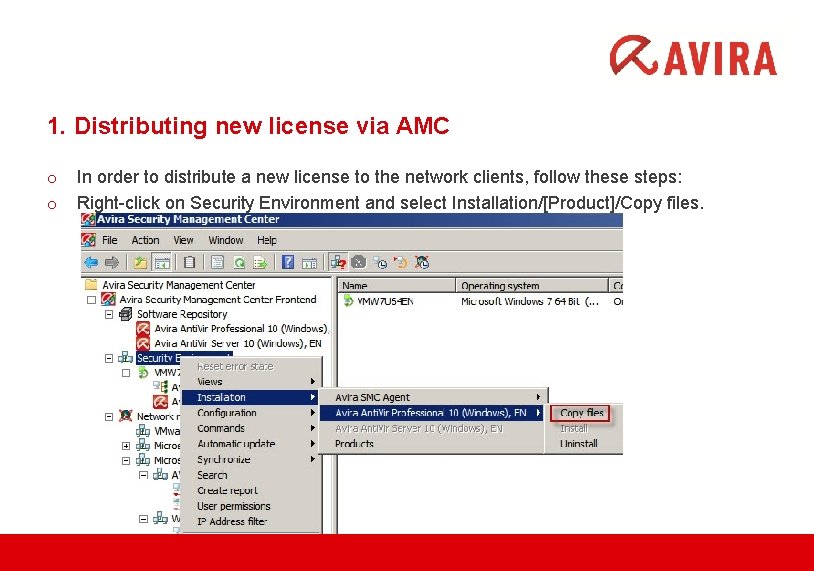
1. Distributing new license via AMC o o In order to distribute a new license to the network clients, follow these steps: Right-click on Security Environment and select Installation/[Product]/Copy files.
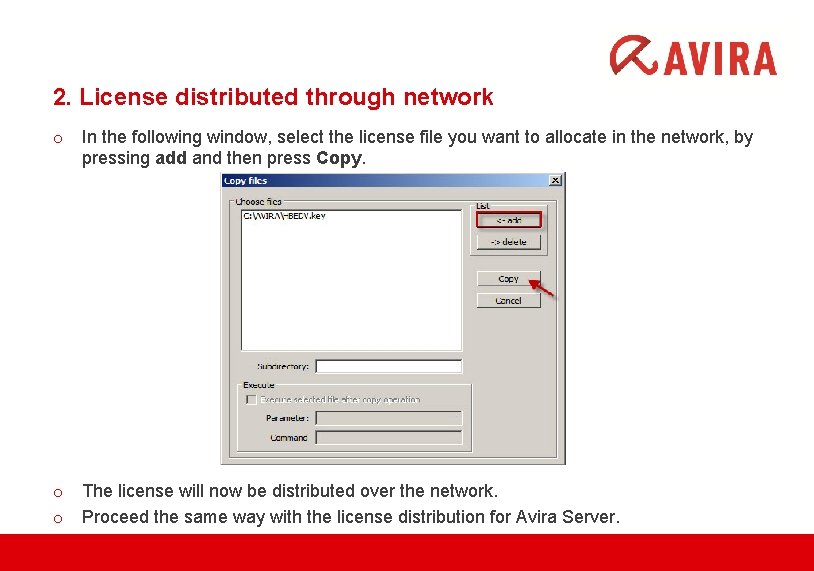
2. License distributed through network o In the following window, select the license file you want to allocate in the network, by pressing add and then press Copy. o o The license will now be distributed over the network. Proceed the same way with the license distribution for Avira Server.
Avira Support www. avira. com
AVIRA Support Services Communication via phone and email Email: support. my@avira. com Phone: 03 - 2282 4527 Support on working days from Mon-Fri; 9 am-6 pm Helpdesk located in Malaysia
Troubleshooting • Avira Knowledgebase Center http: //www. avira. com/en/support-for-home-knowledgebase-search • Avira Forum http: //forum. avira. com/wbb/ • Avira Virus Portal http: //analysis. avira. com/samples/ • Avira Download Center http: //www. avira. com/en/support-download
QUESTIONS ?