
Aug 2017 doc IEEE 802 11 20150625 r
![Aug, 2017 doc. : IEEE 802. 11 -2015/0625 r 5 References [1] http: //www.](https://slidetodoc.com/presentation_image_h2/d22498665f3cfd69aa043a61a9eb8631/image-29.jpg "Aug, 2017 doc. : IEEE 802. 11 -2015/0625 r 5 References [1] http: //www.")
![Aug, 2017 doc. : IEEE 802. 11 -2015/0625 r 5 References [10] 11 -14](https://slidetodoc.com/presentation_image_h2/d22498665f3cfd69aa043a61a9eb8631/image-30.jpg "Aug, 2017 doc. : IEEE 802. 11 -2015/0625 r 5 References [10] 11 -14")
- Slides: 30
Aug, 2017 doc. : IEEE 802. 11 -2015/0625 r 5 IEEE 802. 11 TGay Use Cases Date: 2017 -07 Authors: Submission
Aug, 2017 Authors (Continued): Submission doc. : IEEE 802. 11 -2015/0625 r 5
Aug, 2017 doc. : IEEE 802. 11 -2015/0625 r 5 Abstract This document discusses the use cases for 11 ay which are in line with requirements within 11 ay proposed PAR/CSD documents. Submission
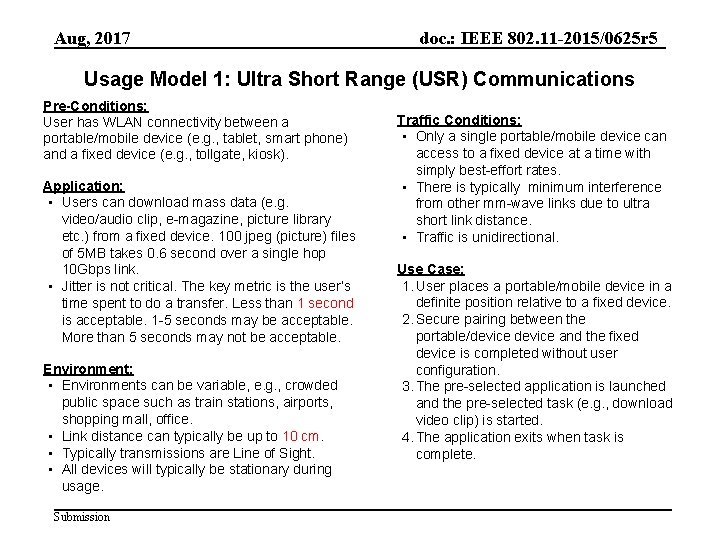
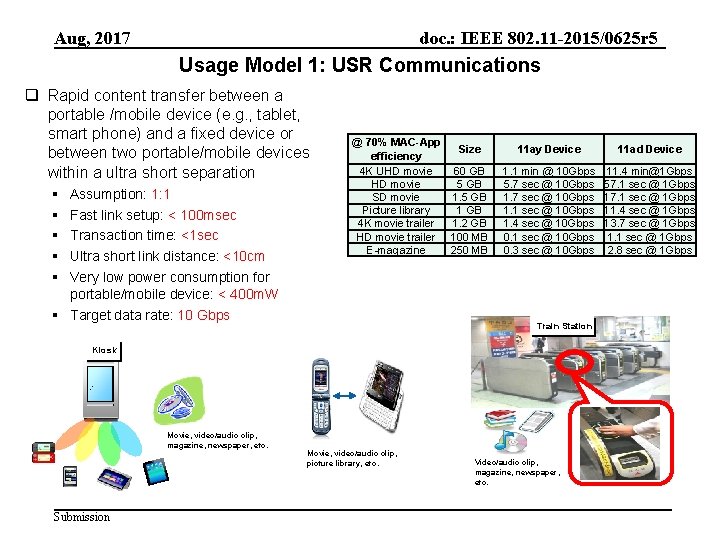
Aug, 2017 doc. : IEEE 802. 11 -2015/0625 r 5 Usage Model 1: Ultra Short Range (USR) Communications Pre-Conditions: User has WLAN connectivity between a portable/mobile device (e. g. , tablet, smart phone) and a fixed device (e. g. , tollgate, kiosk). Application: • Users can download mass data (e. g. video/audio clip, e-magazine, picture library etc. ) from a fixed device. 100 jpeg (picture) files of 5 MB takes 0. 6 second over a single hop 10 Gbps link. • Jitter is not critical. The key metric is the user’s time spent to do a transfer. Less than 1 second is acceptable. 1 -5 seconds may be acceptable. More than 5 seconds may not be acceptable. Environment: • Environments can be variable, e. g. , crowded public space such as train stations, airports, shopping mall, office. • Link distance can typically be up to 10 cm. • Typically transmissions are Line of Sight. • All devices will typically be stationary during usage. Submission Traffic Conditions: • Only a single portable/mobile device can access to a fixed device at a time with simply best-effort rates. • There is typically minimum interference from other mm-wave links due to ultra short link distance. • Traffic is unidirectional. Use Case: 1. User places a portable/mobile device in a definite position relative to a fixed device. 2. Secure pairing between the portable/device and the fixed device is completed without user configuration. 3. The pre-selected application is launched and the pre-selected task (e. g. , download video clip) is started. 4. The application exits when task is complete.
Aug, 2017 doc. : IEEE 802. 11 -2015/0625 r 5 Usage Model 1: USR Communications q Rapid content transfer between a portable /mobile device (e. g. , tablet, smart phone) and a fixed device or between two portable/mobile devices within a ultra short separation § § § Assumption: 1: 1 Fast link setup: < 100 msec Transaction time: <1 sec Ultra short link distance: <10 cm Very low power consumption for portable/mobile device: < 400 m. W § Target data rate: 10 Gbps @ 70% MAC-App Size efficiency 4 K UHD movie 60 GB HD movie 5 GB SD movie 1. 5 GB Picture library 1 GB 4 K movie trailer 1. 2 GB HD movie trailer 100 MB E-magazine 250 MB 11 ay Device 11 ad Device 1. 1 min @ 10 Gbps 5. 7 sec @ 10 Gbps 1. 1 sec @ 10 Gbps 1. 4 sec @ 10 Gbps 0. 1 sec @ 10 Gbps 0. 3 sec @ 10 Gbps 11. 4 min@1 Gbps 57. 1 sec @ 1 Gbps 11. 4 sec @ 1 Gbps 13. 7 sec @ 1 Gbps 1. 1 sec @ 1 Gbps 2. 8 sec @ 1 Gbps Train Station Kiosk Movie, video/audio clip, magazine, newspaper, etc. Submission Movie, video/audio clip, picture library, etc. Video/audio clip, magazine, newspaper, etc.
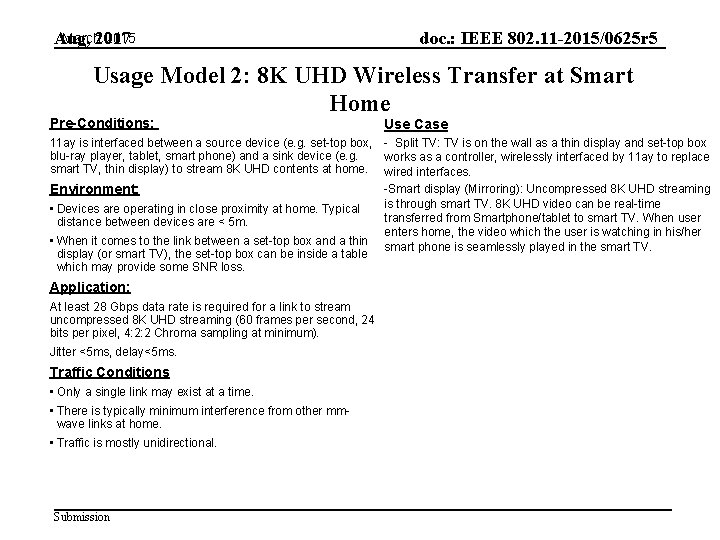
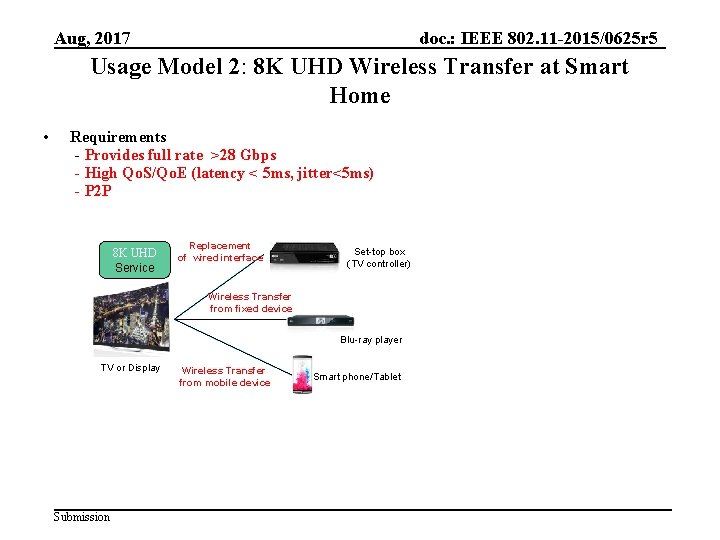
March 2017 2015 Aug, doc. : IEEE 802. 11 -2015/0625 r 5 Usage Model 2: 8 K UHD Wireless Transfer at Smart Home Pre-Conditions: Use Case 11 ay is interfaced between a source device (e. g. set-top box, - Split TV: TV is on the wall as a thin display and set-top box blu-ray player, tablet, smart phone) and a sink device (e. g. works as a controller, wirelessly interfaced by 11 ay to replace smart TV, thin display) to stream 8 K UHD contents at home. wired interfaces. -Smart display (Mirroring): Uncompressed 8 K UHD streaming Environment: is through smart TV. 8 K UHD video can be real-time • Devices are operating in close proximity at home. Typical transferred from Smartphone/tablet to smart TV. When user distance between devices are < 5 m. enters home, the video which the user is watching in his/her • When it comes to the link between a set-top box and a thin smart phone is seamlessly played in the smart TV. display (or smart TV), the set-top box can be inside a table which may provide some SNR loss. Application: At least 28 Gbps data rate is required for a link to stream uncompressed 8 K UHD streaming (60 frames per second, 24 bits per pixel, 4: 2: 2 Chroma sampling at minimum). Jitter <5 ms, delay<5 ms. Traffic Conditions • Only a single link may exist at a time. • There is typically minimum interference from other mmwave links at home. • Traffic is mostly unidirectional. Submission
Aug, 2017 doc. : IEEE 802. 11 -2015/0625 r 5 Usage Model 2: 8 K UHD Wireless Transfer at Smart Home • Requirements - Provides full rate >28 Gbps - High Qo. S/Qo. E (latency < 5 ms, jitter<5 ms) - P 2 P 8 K UHD Service Replacement of wired interface Set-top box (TV controller) Wireless Transfer from fixed device Blu-ray player TV or Display Submission Wireless Transfer from mobile device Smart phone/Tablet
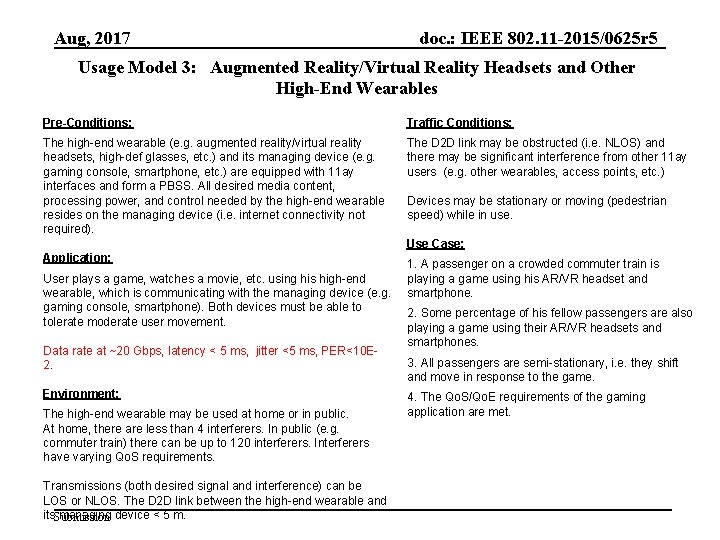
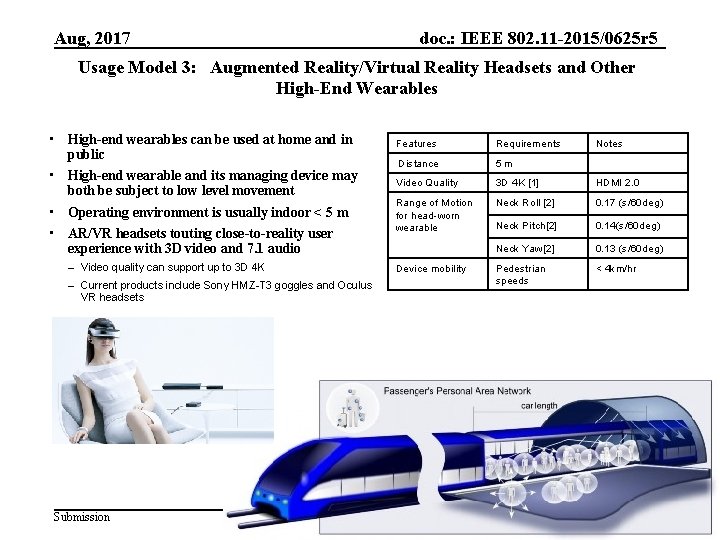
Aug, 2017 doc. : IEEE 802. 11 -2015/0625 r 5 Usage Model 3: Augmented Reality/Virtual Reality Headsets and Other High-End Wearables Pre-Conditions: Traffic Conditions: The high-end wearable (e. g. augmented reality/virtual reality headsets, high-def glasses, etc. ) and its managing device (e. g. gaming console, smartphone, etc. ) are equipped with 11 ay interfaces and form a PBSS. All desired media content, processing power, and control needed by the high-end wearable resides on the managing device (i. e. internet connectivity not required). The D 2 D link may be obstructed (i. e. NLOS) and there may be significant interference from other 11 ay users (e. g. other wearables, access points, etc. ) Devices may be stationary or moving (pedestrian speed) while in use. Use Case: Application: User plays a game, watches a movie, etc. using his high-end wearable, which is communicating with the managing device (e. g. gaming console, smartphone). Both devices must be able to tolerate moderate user movement. Data rate at ~20 Gbps, latency < 5 ms, jitter <5 ms, PER<10 E 2. Environment: The high-end wearable may be used at home or in public. At home, there are less than 4 interferers. In public (e. g. commuter train) there can be up to 120 interferers. Interferers have varying Qo. S requirements. Transmissions (both desired signal and interference) can be LOS or NLOS. The D 2 D link between the high-end wearable and its. Submission managing device < 5 m. 1. A passenger on a crowded commuter train is playing a game using his AR/VR headset and smartphone. 2. Some percentage of his fellow passengers are also playing a game using their AR/VR headsets and smartphones. 3. All passengers are semi-stationary, i. e. they shift and move in response to the game. 4. The Qo. S/Qo. E requirements of the gaming application are met.
Aug, 2017 doc. : IEEE 802. 11 -2015/0625 r 5 Usage Model 3: Augmented Reality/Virtual Reality Headsets and Other High-End Wearables • High-end wearables can be used at home and in public • High-end wearable and its managing device may both be subject to low level movement • Operating environment is usually indoor < 5 m • AR/VR headsets touting close-to-reality user experience with 3 D video and 7. 1 audio – Video quality can support up to 3 D 4 K – Current products include Sony HMZ-T 3 goggles and Oculus VR headsets Submission Features Requirements Distance 5 m Video Quality 3 D 4 K [1] HDMI 2. 0 Range of Motion for head-worn wearable Neck Roll [2] 0. 17 (s/60 deg) Neck Pitch[2] 0. 14(s/60 deg) Neck Yaw[2] 0. 13 (s/60 deg) Pedestrian speeds < 4 km/hr Device mobility Notes
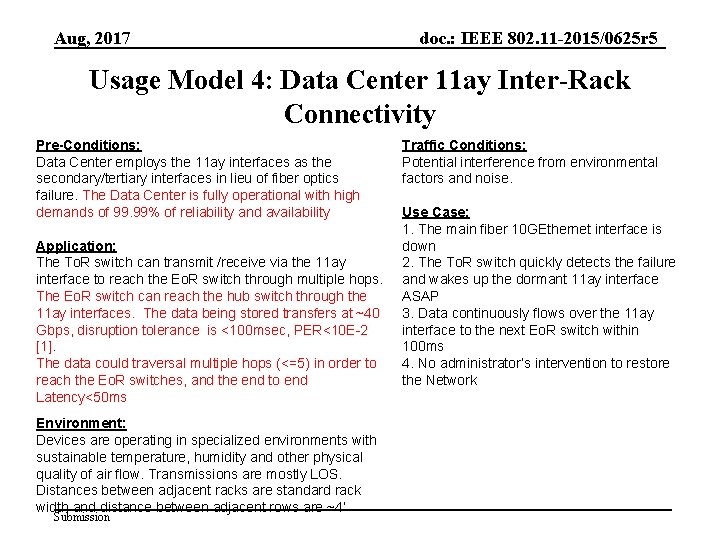
Aug, 2017 doc. : IEEE 802. 11 -2015/0625 r 5 Usage Model 4: Data Center 11 ay Inter-Rack Connectivity Pre-Conditions: Data Center employs the 11 ay interfaces as the secondary/tertiary interfaces in lieu of fiber optics failure. The Data Center is fully operational with high demands of 99. 99% of reliability and availability Application: The To. R switch can transmit /receive via the 11 ay interface to reach the Eo. R switch through multiple hops. The Eo. R switch can reach the hub switch through the 11 ay interfaces. The data being stored transfers at ~40 Gbps, disruption tolerance is <100 msec, PER<10 E-2 [1]. The data could traversal multiple hops (<=5) in order to reach the Eo. R switches, and the end to end Latency<50 ms Environment: Devices are operating in specialized environments with sustainable temperature, humidity and other physical quality of air flow. Transmissions are mostly LOS. Distances between adjacent racks are standard rack width and distance between adjacent rows are ~4’ Submission Traffic Conditions: Potential interference from environmental factors and noise. Use Case: 1. The main fiber 10 GEthernet interface is down 2. The To. R switch quickly detects the failure and wakes up the dormant 11 ay interface ASAP 3. Data continuously flows over the 11 ay interface to the next Eo. R switch within 100 ms 4. No administrator’s intervention to restore the Network
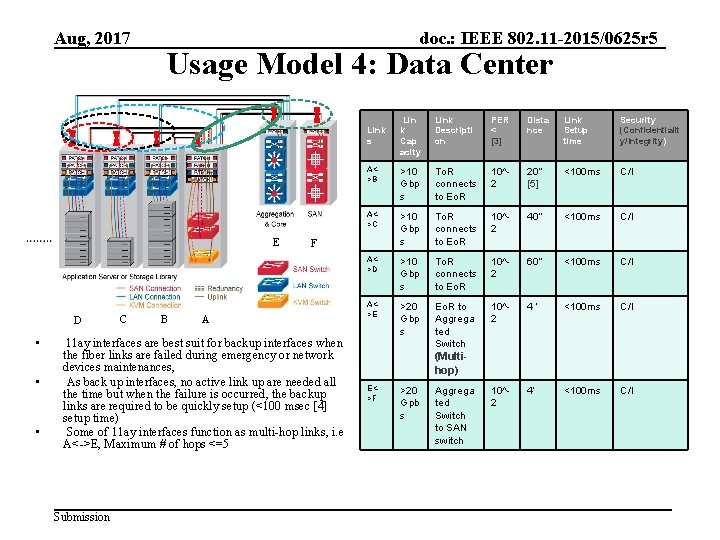
Aug, 2017 doc. : IEEE 802. 11 -2015/0625 r 5 Usage Model 4: Data Center Lin k Cap acity Link Descripti on PER < [3] Dista nce Link Setup time Security (Confidentialit y/Integrity) A<>B >10 Gbp s To. R connects to Eo. R 10^2 20’’ [5] <100 ms C/I A<>C >10 Gbp s To. R connects to Eo. R 10^2 40’’ <100 ms C/I A<>D >10 Gbp s To. R connects to Eo. R 10^2 60’’ <100 ms C/I A<>E >20 Gbp s Eo. R to Aggrega ted Switch (Multihop) 10^2 4‘ <100 ms C/I E<>F >20 Gpb s Aggrega ted Switch to SAN switch 10^2 4’ <100 ms C/I Link s E D • • • C B F A 11 ay interfaces are best suit for backup interfaces when the fiber links are failed during emergency or network devices maintenances, As back up interfaces, no active link up are needed all the time but when the failure is occurred, the backup links are required to be quickly setup (<100 msec [4] setup time) Some of 11 ay interfaces function as multi-hop links, i. e A<->E, Maximum # of hops <=5 Submission
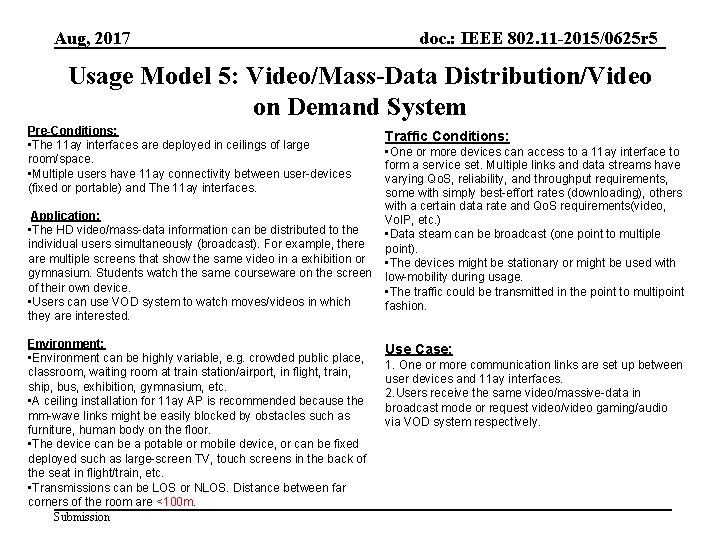
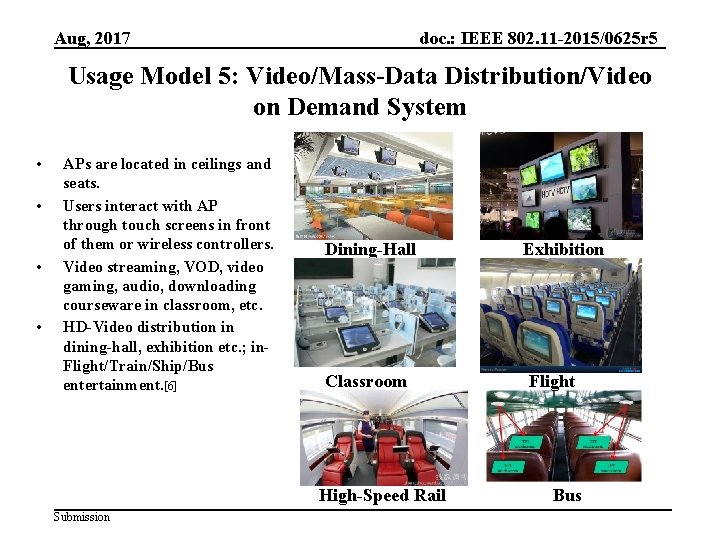
Aug, 2017 doc. : IEEE 802. 11 -2015/0625 r 5 Usage Model 5: Video/Mass-Data Distribution/Video on Demand System Pre-Conditions: • The 11 ay interfaces are deployed in ceilings of large room/space. • Multiple users have 11 ay connectivity between user-devices (fixed or portable) and The 11 ay interfaces. Application: • The HD video/mass-data information can be distributed to the individual users simultaneously (broadcast). For example, there are multiple screens that show the same video in a exhibition or gymnasium. Students watch the same courseware on the screen of their own device. • Users can use VOD system to watch moves/videos in which they are interested. Environment: • Environment can be highly variable, e. g. crowded public place, classroom, waiting room at train station/airport, in flight, train, ship, bus, exhibition, gymnasium, etc. • A ceiling installation for 11 ay AP is recommended because the mm-wave links might be easily blocked by obstacles such as furniture, human body on the floor. • The device can be a potable or mobile device, or can be fixed deployed such as large-screen TV, touch screens in the back of the seat in flight/train, etc. • Transmissions can be LOS or NLOS. Distance between far corners of the room are <100 m. Submission Traffic Conditions: • One or more devices can access to a 11 ay interface to form a service set. Multiple links and data streams have varying Qo. S, reliability, and throughput requirements, some with simply best-effort rates (downloading), others with a certain data rate and Qo. S requirements(video, Vo. IP, etc. ) • Data steam can be broadcast (one point to multiple point). • The devices might be stationary or might be used with low-mobility during usage. • The traffic could be transmitted in the point to multipoint fashion. Use Case: 1. One or more communication links are set up between user devices and 11 ay interfaces. 2. Users receive the same video/massive-data in broadcast mode or request video/video gaming/audio via VOD system respectively.
Aug, 2017 doc. : IEEE 802. 11 -2015/0625 r 5 Usage Model 5: Video/Mass-Data Distribution/Video on Demand System • • APs are located in ceilings and seats. Users interact with AP through touch screens in front of them or wireless controllers. Video streaming, VOD, video gaming, audio, downloading courseware in classroom, etc. HD-Video distribution in dining-hall, exhibition etc. ; in. Flight/Train/Ship/Bus entertainment. [6] Dining-Hall Classroom High-Speed Rail Submission Exhibition Flight Bus
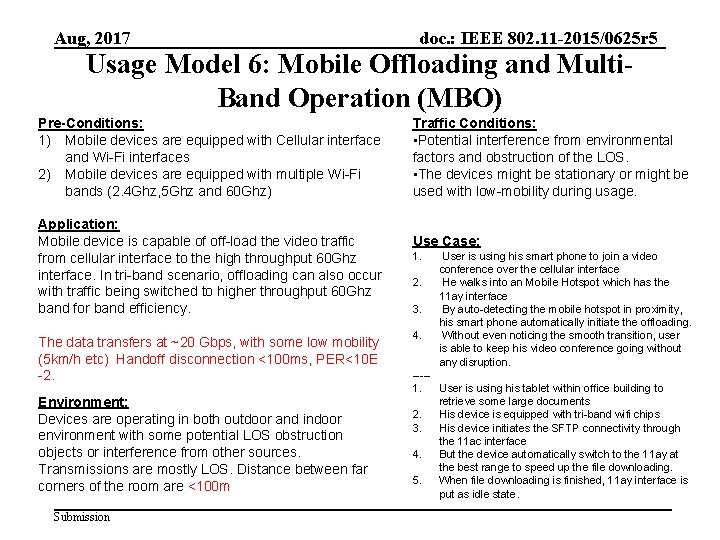
Aug, 2017 doc. : IEEE 802. 11 -2015/0625 r 5 Usage Model 6: Mobile Offloading and Multi. Band Operation (MBO) Pre-Conditions: 1) Mobile devices are equipped with Cellular interface and Wi-Fi interfaces 2) Mobile devices are equipped with multiple Wi-Fi bands (2. 4 Ghz, 5 Ghz and 60 Ghz) Application: Mobile device is capable of off-load the video traffic from cellular interface to the high throughput 60 Ghz interface. In tri-band scenario, offloading can also occur with traffic being switched to higher throughput 60 Ghz band for band efficiency. The data transfers at ~20 Gbps, with some low mobility (5 km/h etc) Handoff disconnection <100 ms, PER<10 E -2. Environment: Devices are operating in both outdoor and indoor environment with some potential LOS obstruction objects or interference from other sources. Transmissions are mostly LOS. Distance between far corners of the room are <100 m Submission Traffic Conditions: • Potential interference from environmental factors and obstruction of the LOS. • The devices might be stationary or might be used with low-mobility during usage. Use Case: 1. 2. 3. 4. User is using his smart phone to join a video conference over the cellular interface He walks into an Mobile Hotspot which has the 11 ay interface By auto-detecting the mobile hotspot in proximity, his smart phone automatically initiate the offloading. Without even noticing the smooth transition, user is able to keep his video conference going without any disruption. ----1. User is using his tablet within office building to retrieve some large documents 2. His device is equipped with tri-band wifi chips 3. His device initiates the SFTP connectivity through the 11 ac interface 4. But the device automatically switch to the 11 ay at the best range to speed up the file downloading. 5. When file downloading is finished, 11 ay interface is put as idle state.
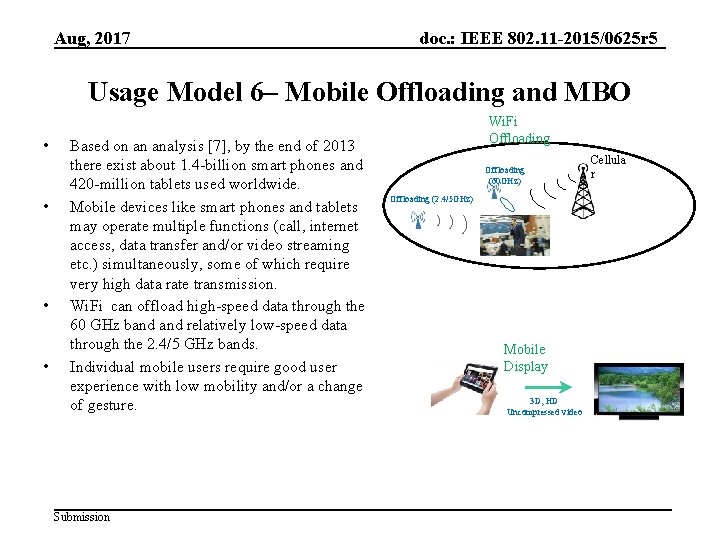
Aug, 2017 doc. : IEEE 802. 11 -2015/0625 r 5 Usage Model 6– Mobile Offloading and MBO • • Based on an analysis [7], by the end of 2013 there exist about 1. 4 -billion smart phones and 420 -million tablets used worldwide. Mobile devices like smart phones and tablets may operate multiple functions (call, internet access, data transfer and/or video streaming etc. ) simultaneously, some of which require very high data rate transmission. Wi. Fi can offload high-speed data through the 60 GHz band relatively low-speed data through the 2. 4/5 GHz bands. Individual mobile users require good user experience with low mobility and/or a change of gesture. Submission Wi. Fi Offloading (60 GHz) Offloading (2. 4/5 GHz) Mobile Display 3 D, HD Uncompressed video Cellula r
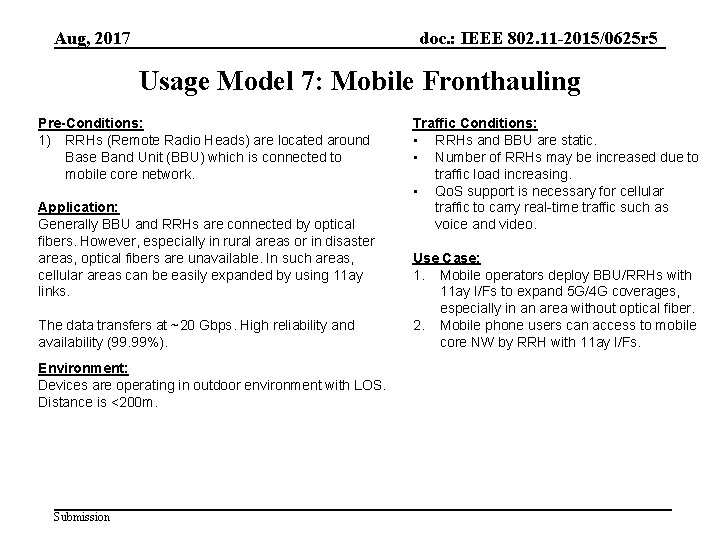
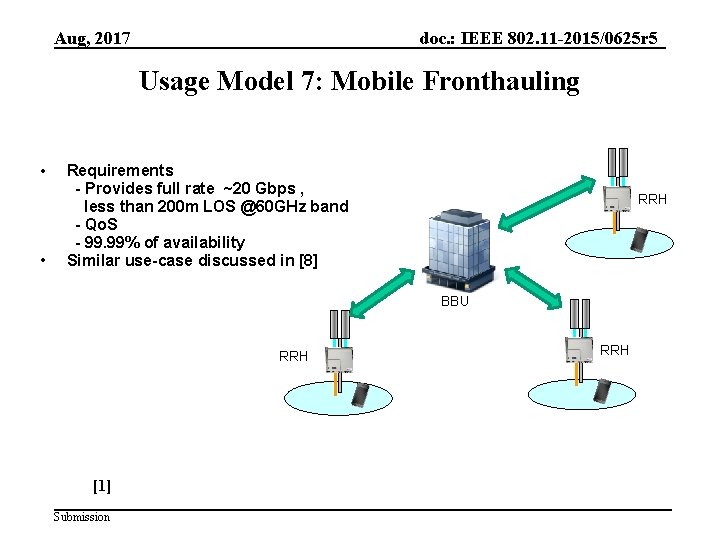
Aug, 2017 doc. : IEEE 802. 11 -2015/0625 r 5 Usage Model 7: Mobile Fronthauling Pre-Conditions: 1) RRHs (Remote Radio Heads) are located around Base Band Unit (BBU) which is connected to mobile core network. Application: Generally BBU and RRHs are connected by optical fibers. However, especially in rural areas or in disaster areas, optical fibers are unavailable. In such areas, cellular areas can be easily expanded by using 11 ay links. The data transfers at ~20 Gbps. High reliability and availability (99. 99%). Environment: Devices are operating in outdoor environment with LOS. Distance is <200 m. Submission Traffic Conditions: • RRHs and BBU are static. • Number of RRHs may be increased due to traffic load increasing. • Qo. S support is necessary for cellular traffic to carry real-time traffic such as voice and video. Use Case: 1. Mobile operators deploy BBU/RRHs with 11 ay I/Fs to expand 5 G/4 G coverages, especially in an area without optical fiber. 2. Mobile phone users can access to mobile core NW by RRH with 11 ay I/Fs.
Aug, 2017 doc. : IEEE 802. 11 -2015/0625 r 5 Usage Model 7: Mobile Fronthauling • • Requirements - Provides full rate ~20 Gbps , less than 200 m LOS @60 GHz band - Qo. S - 99. 99% of availability Similar use-case discussed in [8] RRH BBU RRH [1] Submission RRH
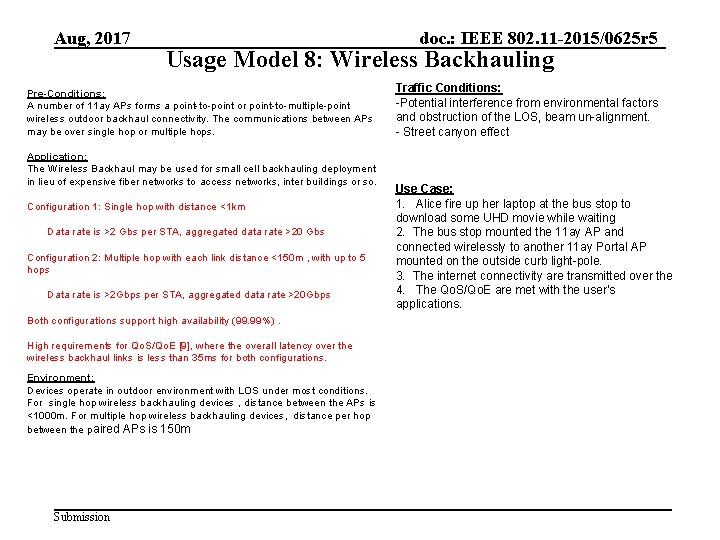
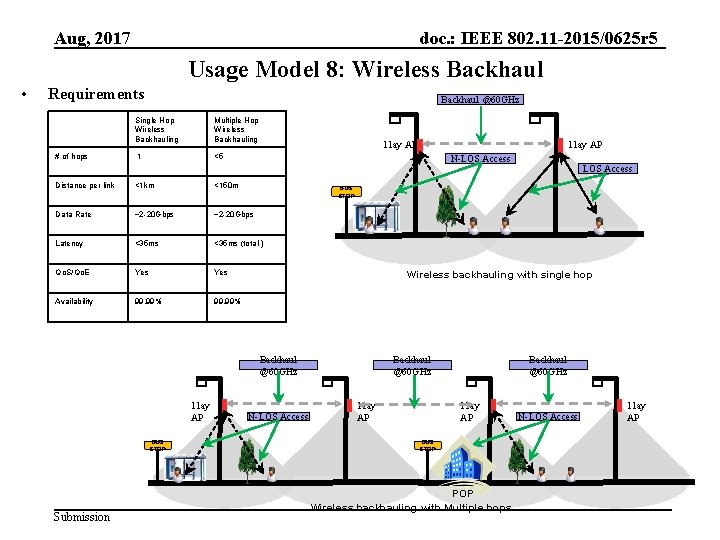
Aug, 2017 Usage Model 8: Wireless Backhauling Pre-Conditions: A number of 11 ay APs forms a point-to-point or point-to-multiple-point wireless outdoor backhaul connectivity. The communications between APs may be over single hop or multiple hops. Application: The Wireless Backhaul may be used for small cell backhauling deployment in lieu of expensive fiber networks to access networks, inter buildings or so. Configuration 1: Single hop with distance <1 km Data rate is >2 Gbs per STA, aggregated data rate >20 Gbs Configuration 2: Multiple hop with each link distance <150 m , with up to 5 hops Data rate is >2 Gbps per STA, aggregated data rate >20 Gbps Both configurations support high availability (99. 99%). High requirements for Qo. S/Qo. E [9], where the overall latency over the wireless backhaul links is less than 35 ms for both configurations. Environment: Devices operate in outdoor environment with LOS under most conditions. For single hop wireless backhauling devices , distance between the APs is <1000 m. For multiple hop wireless backhauling devices, distance per hop between the paired APs is 150 m Submission doc. : IEEE 802. 11 -2015/0625 r 5 Traffic Conditions: -Potential interference from environmental factors and obstruction of the LOS, beam un-alignment. - Street canyon effect Use Case: 1. Alice fire up her laptop at the bus stop to download some UHD movie while waiting 2. The bus stop mounted the 11 ay AP and connected wirelessly to another 11 ay Portal AP mounted on the outside curb light-pole. 3. The internet connectivity are transmitted over the 4. The Qo. S/Qo. E are met with the user’s applications.
Aug, 2017 doc. : IEEE 802. 11 -2015/0625 r 5 Usage Model 8: Wireless Backhaul • Requirements Backhaul @60 GHz Single Hop Wireless Backhauling Multiple Hop Wireless Backhauling # of hops 1 <5 Distance per link <1 km <150 m Data Rate ~2 -20 Gbps Latency <35 ms (total ) Qo. S/Qo. E Yes Availability 99. 99% 11 ay AP BUS STOP Submission LOS Access BUS STOP Wireless backhauling with single hop Backhaul @60 GHz 11 ay AP N-LOS Access Backhaul @60 GHz 11 ay AP BUS STOP POP Wireless backhauling with Multiple hops N-LOS Access 11 ay AP
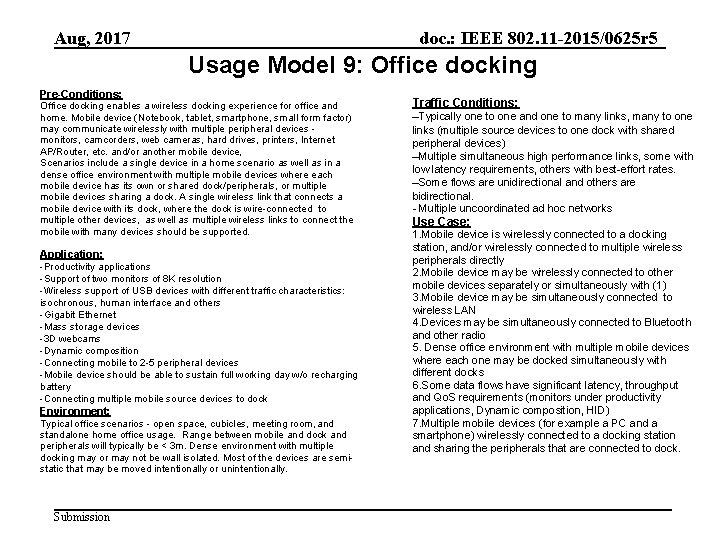
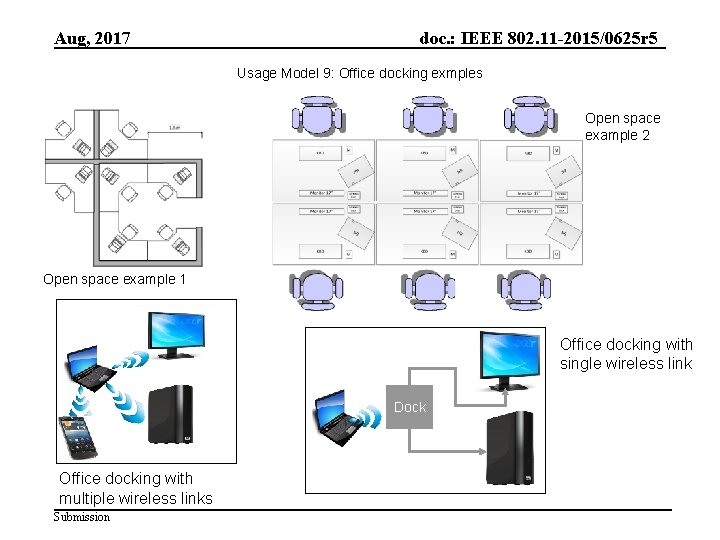
Aug, 2017 doc. : IEEE 802. 11 -2015/0625 r 5 Usage Model 9: Office docking Pre-Conditions: Office docking enables a wireless docking experience for office and home. Mobile device (Notebook, tablet, smartphone, small form factor) may communicate wirelessly with multiple peripheral devices monitors, camcorders, web cameras, hard drives, printers, Internet AP/Router, etc. and/or another mobile device, Scenarios include a single device in a home scenario as well as in a dense office environment with multiple mobile devices where each mobile device has its own or shared dock/peripherals, or multiple mobile devices sharing a dock. A single wireless link that connects a mobile device with its dock, where the dock is wire-connected to multiple other devices, as well as multiple wireless links to connect the mobile with many devices should be supported. Application: -Productivity applications -Support of two monitors of 8 K resolution -Wireless support of USB devices with different traffic characteristics: isochronous, human interface and others -Gigabit Ethernet -Mass storage devices -3 D webcams -Dynamic composition -Connecting mobile to 2 -5 peripheral devices -Mobile device should be able to sustain full working day w/o recharging battery -Connecting multiple mobile source devices to dock Environment: Typical office scenarios - open space, cubicles, meeting room, and standalone home office usage. Range between mobile and dock and peripherals will typically be < 3 m. Dense environment with multiple docking may or may not be wall isolated. Most of the devices are semistatic that may be moved intentionally or unintentionally. Submission Traffic Conditions: ‒Typically one to one and one to many links, many to one links (multiple source devices to one dock with shared peripheral devices) ‒Multiple simultaneous high performance links, some with low latency requirements, others with best-effort rates. ‒Some flows are unidirectional and others are bidirectional. - Multiple uncoordinated ad hoc networks Use Case: 1. Mobile device is wirelessly connected to a docking station, and/or wirelessly connected to multiple wireless peripherals directly 2. Mobile device may be wirelessly connected to other mobile devices separately or simultaneously with (1) 3. Mobile device may be simultaneously connected to wireless LAN 4. Devices may be simultaneously connected to Bluetooth and other radio 5. Dense office environment with multiple mobile devices where each one may be docked simultaneously with different docks 6. Some data flows have significant latency, throughput and Qo. S requirements (monitors under productivity applications, Dynamic composition, HID) 7. Multiple mobile devices (for example a PC and a smartphone) wirelessly connected to a docking station and sharing the peripherals that are connected to dock.
Aug, 2017 doc. : IEEE 802. 11 -2015/0625 r 5 Usage Model 9: Office docking exmples Open space example 2 Open space example 1 Office docking with single wireless link Dock Office docking with multiple wireless links Submission
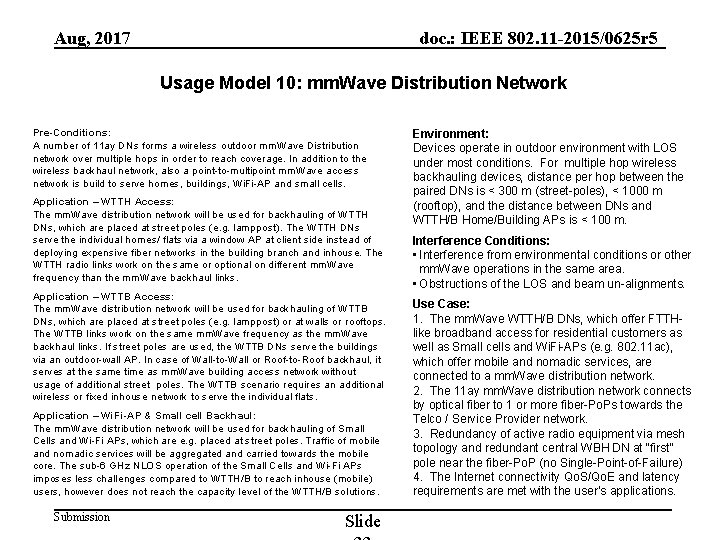
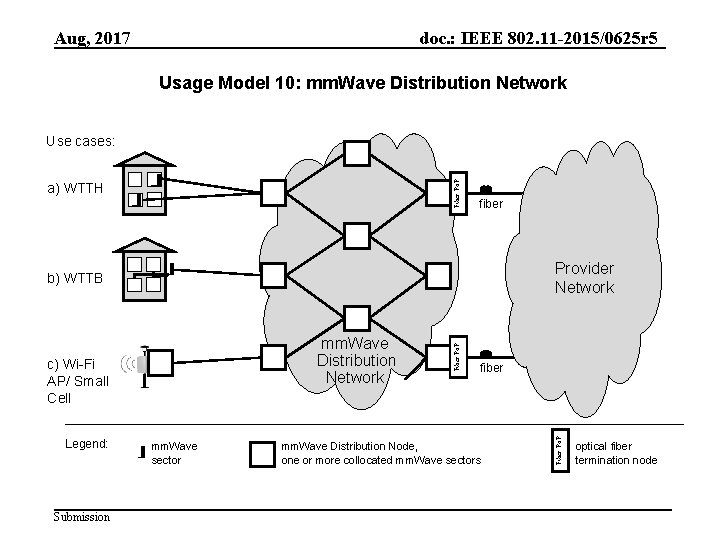
Aug, 2017 doc. : IEEE 802. 11 -2015/0625 r 5 Usage Model 10: mm. Wave Distribution Network Pre-Conditions: A number of 11 ay DNs forms a wireless outdoor mm. Wave Distribution network over multiple hops in order to reach coverage. In addition to the wireless backhaul network, also a point-to-multipoint mm. Wave access network is build to serve homes, buildings, Wi. Fi-AP and small cells. Application – WTTH Access: The mm. Wave distribution network will be used for backhauling of WTTH DNs, which are placed at street poles (e. g. lamppost). The WTTH DNs serve the individual homes/ flats via a window AP at client side instead of deploying expensive fiber networks in the building branch and inhouse. The WTTH radio links work on the same or optional on different mm. Wave frequency than the mm. Wave backhaul links. Application – WTTB Access: The mm. Wave distribution network will be used for backhauling of WTTB DNs, which are placed at street poles (e. g. lamppost) or at walls or rooftops. The WTTB links work on the same mm. Wave frequency as the mm. Wave backhaul links. If street poles are used, the WTTB DNs serve the buildings via an outdoor-wall AP. In case of Wall-to-Wall or Roof-to-Roof backhaul, it serves at the same time as mm. Wave building access network without usage of additional street poles. The WTTB scenario requires an additional wireless or fixed inhouse network to serve the individual flats. Application – Wi. Fi-AP & Small cell Backhaul: The mm. Wave distribution network will be used for backhauling of Small Cells and Wi-Fi APs, which are e. g. placed at street poles. Traffic of mobile and nomadic services will be aggregated and carried towards the mobile core. The sub-6 GHz NLOS operation of the Small Cells and Wi-Fi APs imposes less challenges compared to WTTH/B to reach inhouse (mobile) users, however does not reach the capacity level of the WTTH/B solutions. Submission Slide Environment: Devices operate in outdoor environment with LOS under most conditions. For multiple hop wireless backhauling devices, distance per hop between the paired DNs is < 300 m (street-poles), < 1000 m (rooftop), and the distance between DNs and WTTH/B Home/Building APs is < 100 m. Interference Conditions: • Interference from environmental conditions or other mm. Wave operations in the same area. • Obstructions of the LOS and beam un-alignments. Use Case: 1. The mm. Wave WTTH/B DNs, which offer FTTHlike broadband access for residential customers as well as Small cells and Wi. Fi-APs (e. g. 802. 11 ac), which offer mobile and nomadic services, are connected to a mm. Wave distribution network. 2. The 11 ay mm. Wave distribution network connects by optical fiber to 1 or more fiber-Po. Ps towards the Telco / Service Provider network. 3. Redundancy of active radio equipment via mesh topology and redundant central WBH DN at “first” pole near the fiber-Po. P (no Single-Point-of-Failure) 4. The Internet connectivity Qo. S/Qo. E and latency requirements are met with the user’s applications.
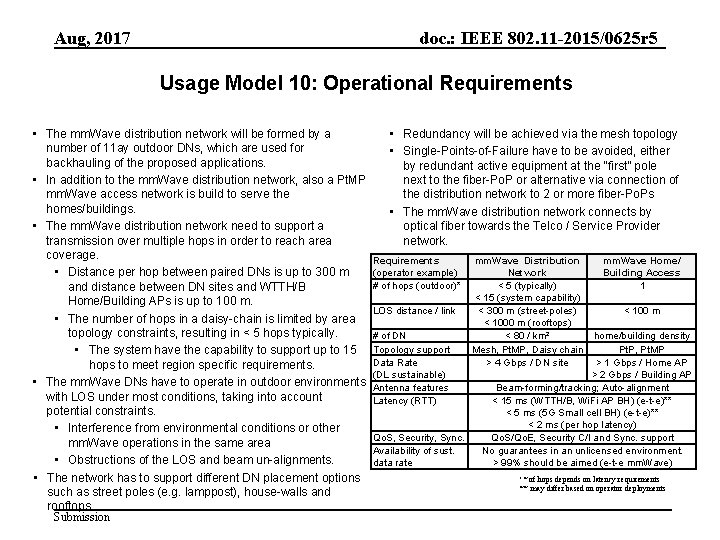
Aug, 2017 doc. : IEEE 802. 11 -2015/0625 r 5 Usage Model 10: Operational Requirements • The mm. Wave distribution network will be formed by a number of 11 ay outdoor DNs, which are used for backhauling of the proposed applications. • In addition to the mm. Wave distribution network, also a Pt. MP mm. Wave access network is build to serve the homes/buildings. • The mm. Wave distribution network need to support a transmission over multiple hops in order to reach area coverage. • Distance per hop between paired DNs is up to 300 m and distance between DN sites and WTTH/B Home/Building APs is up to 100 m. • The number of hops in a daisy-chain is limited by area topology constraints, resulting in < 5 hops typically. • The system have the capability to support up to 15 hops to meet region specific requirements. • The mm. Wave DNs have to operate in outdoor environments with LOS under most conditions, taking into account potential constraints. • Interference from environmental conditions or other mm. Wave operations in the same area • Obstructions of the LOS and beam un-alignments. • The network has to support different DN placement options such as street poles (e. g. lamppost), house-walls and rooftops. Submission • Redundancy will be achieved via the mesh topology • Single-Points-of-Failure have to be avoided, either by redundant active equipment at the “first” pole next to the fiber-Po. P or alternative via connection of the distribution network to 2 or more fiber-Po. Ps • The mm. Wave distribution network connects by optical fiber towards the Telco / Service Provider network. Requirements (operator example) # of hops (outdoor)* LOS distance / link # of DN Topology support Data Rate (DL sustainable) Antenna features Latency (RTT) Qo. S, Security, Sync. Availability of sust. data rate mm. Wave Distribution Network < 5 (typically) < 15 (system capability) < 300 m (street-poles) < 1000 m (rooftops) < 80 / km² Mesh, Pt. MP, Daisy chain > 4 Gbps / DN site mm. Wave Home/ Building Access 1 < 100 m home/building density Pt. P, Pt. MP > 1 Gbps / Home AP > 2 Gbps / Building AP Beam-forming/tracking; Auto-alignment < 15 ms (WTTH/B, Wi. Fi AP BH) (e-t-e)** < 5 ms (5 G Small cell BH) (e-t-e)** < 2 ms (per hop latency) Qo. S/Qo. E, Security C/I and Sync. support No guarantees in an unlicensed environment. > 99% should be aimed (e-t-e mm. Wave) ‘ * of hops depends on latency requirements ** may differ based on operator deployments
Aug, 2017 doc. : IEEE 802. 11 -2015/0625 r 5 Usage Model 10: mm. Wave Distribution Network Fiber Po. P Use cases: a) WTTH fiber Provider Network c) Wi-Fi AP/ Small Cell Legend: Submission mm. Wave sector fiber mm. Wave Distribution Node, one or more collocated mm. Wave sectors Fiber Po. P mm. Wave Distribution Network Fiber Po. P b) WTTB optical fiber termination node
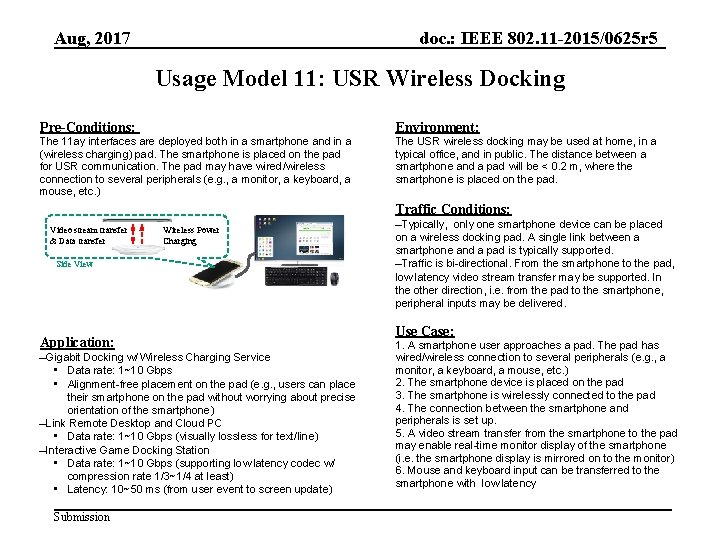
Aug, 2017 doc. : IEEE 802. 11 -2015/0625 r 5 Usage Model 11: USR Wireless Docking Pre-Conditions: Environment: The 11 ay interfaces are deployed both in a smartphone and in a (wireless charging) pad. The smartphone is placed on the pad for USR communication. The pad may have wired/wireless connection to several peripherals (e. g. , a monitor, a keyboard, a mouse, etc. ) The USR wireless docking may be used at home, in a typical office, and in public. The distance between a smartphone and a pad will be < 0. 2 m, where the smartphone is placed on the pad. Traffic Conditions: Video stream transfer & Data transfer Wireless Power Charging Side View Application: ‒Gigabit Docking w/ Wireless Charging Service • Data rate: 1~10 Gbps • Alignment-free placement on the pad (e. g. , users can place their smartphone on the pad without worrying about precise orientation of the smartphone) ‒Link Remote Desktop and Cloud PC • Data rate: 1~10 Gbps (visually lossless for text/line) ‒Interactive Game Docking Station • Data rate: 1~10 Gbps (supporting low latency codec w/ compression rate 1/3~1/4 at least) • Latency: 10~50 ms (from user event to screen update) Submission ‒Typically, only one smartphone device can be placed on a wireless docking pad. A single link between a smartphone and a pad is typically supported. ‒Traffic is bi-directional. From the smartphone to the pad, low latency video stream transfer may be supported. In the other direction, i. e. from the pad to the smartphone, peripheral inputs may be delivered. Use Case: 1. A smartphone user approaches a pad. The pad has wired/wireless connection to several peripherals (e. g. , a monitor, a keyboard, a mouse, etc. ) 2. The smartphone device is placed on the pad 3. The smartphone is wirelessly connected to the pad 4. The connection between the smartphone and peripherals is set up. 5. A video stream transfer from the smartphone to the pad may enable real-time monitor display of the smartphone (i. e. the smartphone display is mirrored on to the monitor) 6. Mouse and keyboard input can be transferred to the smartphone with low latency
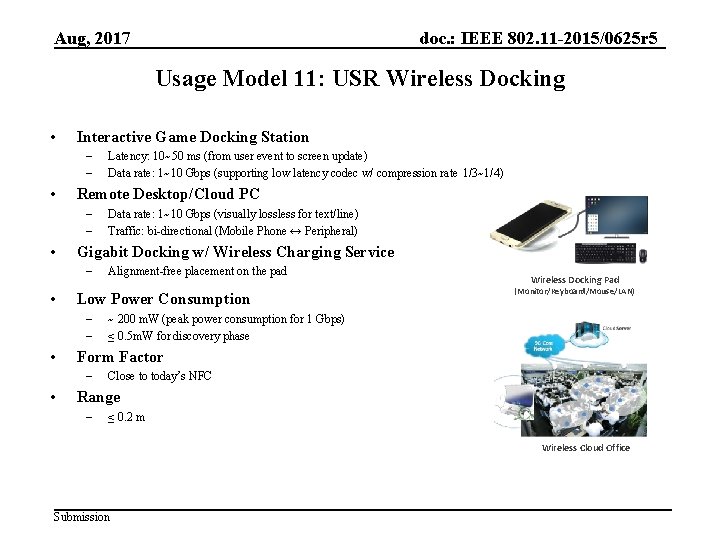
Aug, 2017 doc. : IEEE 802. 11 -2015/0625 r 5 Usage Model 11: USR Wireless Docking • Interactive Game Docking Station – – • Remote Desktop/Cloud PC – – • Wireless Docking Pad (Monitor/Keyboard/Mouse/LAN) ~ 200 m. W (peak power consumption for 1 Gbps) ≤ 0. 5 m. W for discovery phase Form Factor – • Alignment-free placement on the pad Low Power Consumption – – • Data rate: 1~10 Gbps (visually lossless for text/line) Traffic: bi-directional (Mobile Phone ↔ Peripheral) Gigabit Docking w/ Wireless Charging Service – • Latency: 10~50 ms (from user event to screen update) Data rate: 1~10 Gbps (supporting low latency codec w/ compression rate 1/3~1/4) Close to today’s NFC Range – ≤ 0. 2 m Wireless Cloud Office Submission
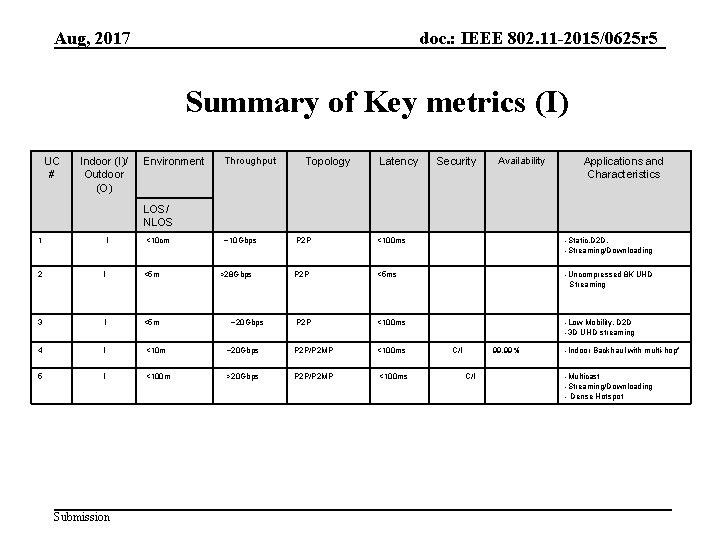
Aug, 2017 doc. : IEEE 802. 11 -2015/0625 r 5 Summary of Key metrics (I) UC # Indoor (I)/ Outdoor (O) Environment Throughput Topology Latency Security Availability Applications and Characteristics LOS/ NLOS 1 I <10 cm ~10 Gbps <100 ms -Static, D 2 D, -Streaming/Downloading P 2 P <5 ms -Uncompressed 8 K UHD Streaming P 2 P <100 ms -Low Mobility, D 2 D -3 D UHD streaming 2 I <5 m 3 I <5 m 4 I <10 m ~20 Gbps P 2 P/P 2 MP <100 ms 5 I <100 m >20 Gbps P 2 P/P 2 MP <100 ms Submission >28 Gbps P 2 P ~20 Gbps C/I 99. 99% C/I -Indoor Backhaul with multi-hop* -Multicast -Streaming/Downloading - Dense Hotspot
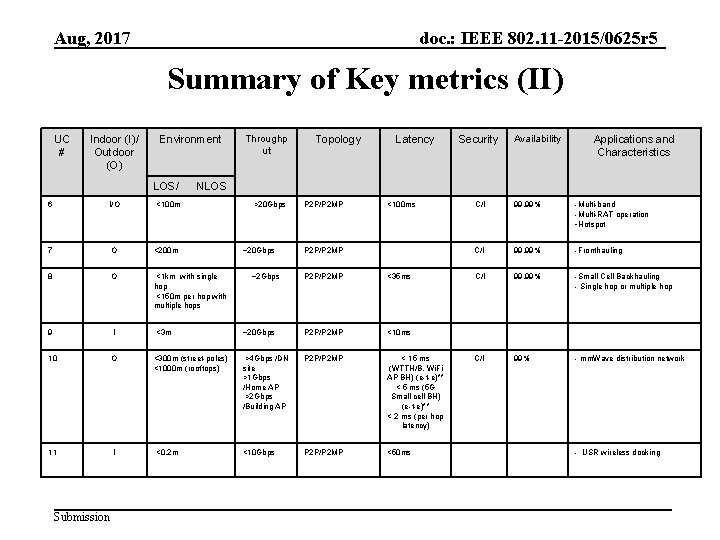
Aug, 2017 doc. : IEEE 802. 11 -2015/0625 r 5 Summary of Key metrics (II) UC # Indoor (I)/ Outdoor (O) Environment LOS/ Topology Latency Security Availability Applications and Characteristics NLOS 6 I/O <100 m 7 O <200 m 8 O <1 km with single hop <150 m per hop with multiple hops 9 I <3 m 10 O 11 I Submission Throughp ut >20 Gbps ~2 Gbps P 2 P/P 2 MP <100 ms P 2 P/P 2 MP <35 ms ~20 Gbps P 2 P/P 2 MP <10 ms <300 m (street-poles) <1000 m (rooftops) >4 Gbps /DN site >1 Gbps /Home AP >2 Gbps /Building AP P 2 P/P 2 MP < 15 ms (WTTH/B, Wi. Fi AP BH) (e-t-e)** < 5 ms (5 G Small cell BH) (e-t-e)** < 2 ms (per hop latency) <0. 2 m <10 Gbps P 2 P/P 2 MP <50 ms C/I 99. 99% -Multi-band -Multi-RAT operation -Hotspot C/I 99. 99% -Fronthauling C/I 99. 99% -Small Cell Backhauling - Single hop or multiple hop C/I 99% - mm. Wave distribution network - USR wireless docking
Aug, 2017 doc. : IEEE 802. 11 -2015/0625 r 5 References [1] http: //www. forbes. com/fdc/welcome_mjx. shtml. [2] http: //www. wpi. edu/Pubs/ETD/Available/etd-050112 -072212/unrestricted/Fitzpatrick. pdf Table 1: Serve Moto Speeds Obtained from output Link speeds [3] The PER is based on requirements of 11 ad, sub-clause 21. 3. 3. 8 [4] The average CISCO Catalyst switch over time is between 35 msec to 280 msec, http: //www. cisco. com/c/en/us/products/collateral/switches/catalyst-6500 -seriesswitches/prod_white_paper 0900 aecd 801 c 5 cd 7. html [5] IEC 60297 mechanical structures for electronic equipment with 19’’ cabinet plus some spacing [6] https: //mentor. ieee. org/802. 11/dcn/14/11 -14 -0606 -00 -0 wng-next-generation-802 -11 ad. pptx [7] http: //www. businessinsider. com/smartphone-and-tablet-penetration-2013 -10 [8] 15 -14 -0304 -11 -003 d-applications-requirement-document-ard. docx [9] 3 GPP TR 36. 932 V 12. 1. 0 (2013 -03): Scenarios and requirements for small cell enhancements for E-UTRA and E -UTRAN Submission 29
Aug, 2017 doc. : IEEE 802. 11 -2015/0625 r 5 References [10] 11 -14 -1185 -00 -11 ay-usage-scenarios [11] 11 -14 -1166 -01 -11 ay-use-cases [12] 11 -14 -1160 -00 -11 ay-ultra-short-range-usr-communications-usage-models-for-11 ay [13] 11 -14 -1249 -01 -11 ay-backhaul-support-in-ng-60 [14] 11 -14 -1151 -05 -11 ay-proposed-par [15] 11 -14 -1152 -06 -11 ay-proposed-csd [16] 11 -15 -0345 -00 -8 K-UHD-Wireless-Transfer-Usage-Model-for-11 ay [17] 11 -15 -0830 -00 -00 ay-docking-usage-model [18] 11 -16 -0666 -00 -00 ay-usr-wireless-docking-usage-mode [19] 11 -17 -1019 -02 -00 ay-mmwave-mesh-network-usage-mode Submission