
Assessment and Accountability Monthly Call August 2018 Agenda
Assessment and Accountability Monthly Call August 2018
Agenda I. III. IV. V. Month-by-Month Checklist Accountability Assessment Administration Assessment Updates Support and Communication
Month‐by‐Month Checklist The 2018– 2019 Assessment and Accountability Month-by-Month Checklist • identifies key dates and deadlines for statewide assessment programs and accountability processes for next school year; • provides action steps to ensure readiness for administering statewide assessments; and • recommends resources for district and school staff. The checklist includes information on the following areas: • Communication and Support • Accessibility and Accommodations • Assessment Preparation and Administration • Accountability • Reports NEW: The 2018‐ 2019 Assessment Month‐by‐Month Checklist is located in the Assessment Library.
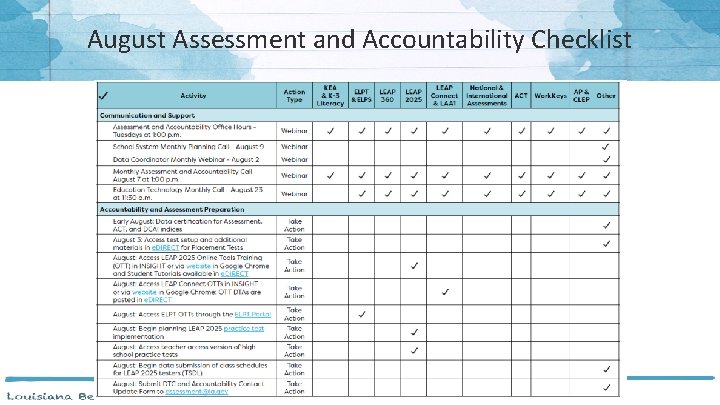
August Assessment and Accountability Checklist
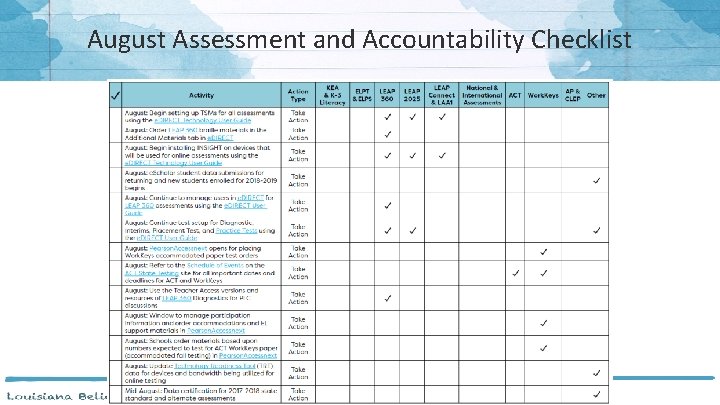
August Assessment and Accountability Checklist
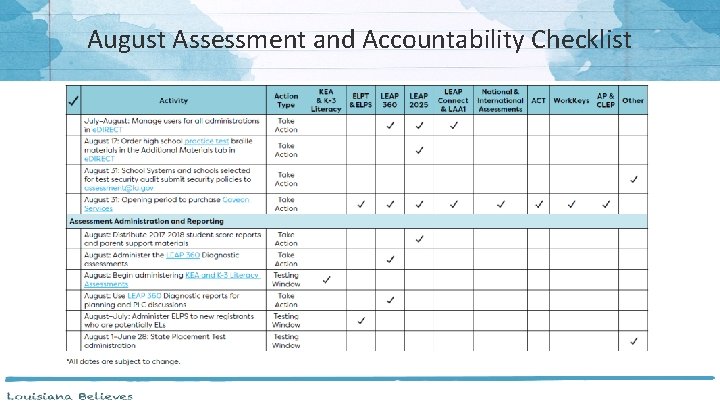
August Assessment and Accountability Checklist
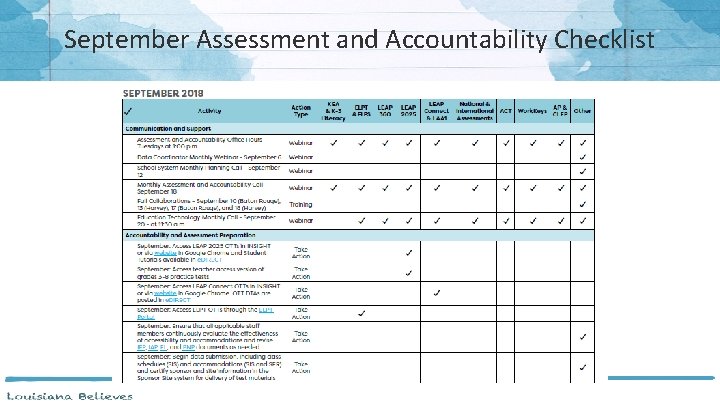
September Assessment and Accountability Checklist
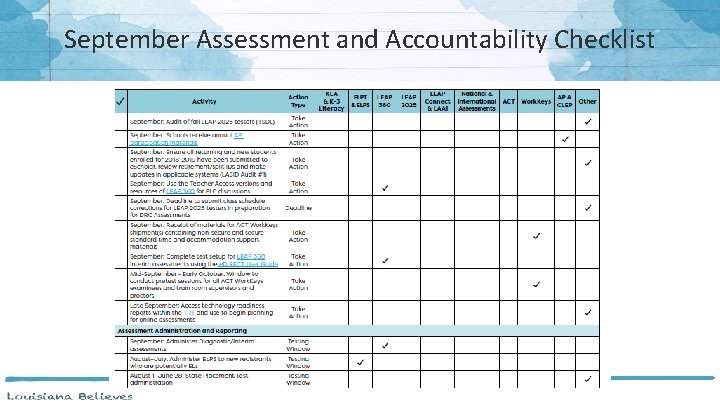
September Assessment and Accountability Checklist

Accountability
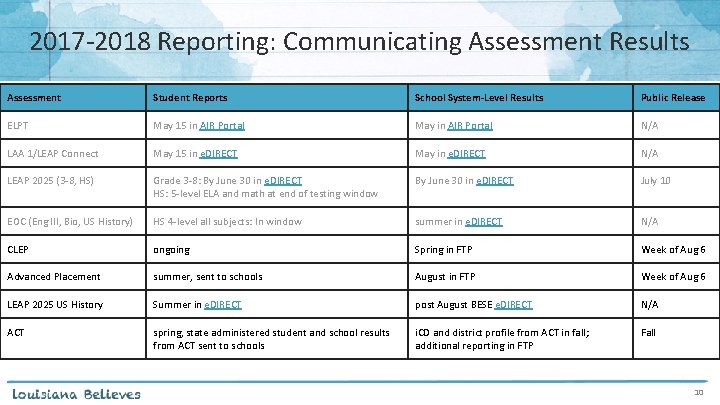
2017‐ 2018 Reporting: Communicating Assessment Results Assessment Student Reports School System-Level Results Public Release ELPT May 15 in AIR Portal May in AIR Portal N/A LAA 1/LEAP Connect May 15 in e. DIRECT May in e. DIRECT N/A LEAP 2025 (3‐ 8, HS) Grade 3‐ 8: By June 30 in e. DIRECT HS: 5‐level ELA and math at end of testing window By June 30 in e. DIRECT July 10 EOC (Eng III, Bio, US History) HS 4‐level all subjects: In window summer in e. DIRECT N/A CLEP ongoing Spring in FTP Week of Aug 6 Advanced Placement summer, sent to schools August in FTP Week of Aug 6 LEAP 2025 US History Summer in e. DIRECT post August BESE e. DIRECT N/A ACT spring, state administered student and school results from ACT sent to schools i. CD and district profile from ACT in fall; additional reporting in FTP Fall 10
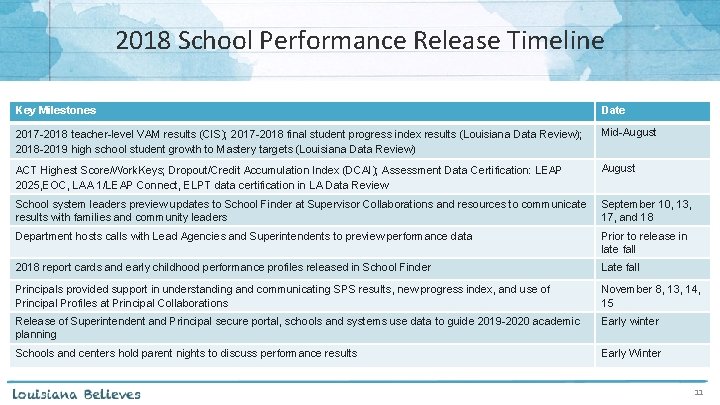
2018 School Performance Release Timeline Key Milestones Date 2017 -2018 teacher-level VAM results (CIS); 2017 -2018 final student progress index results (Louisiana Data Review); 2018 -2019 high school student growth to Mastery targets (Louisiana Data Review) Mid-August ACT Highest Score/Work. Keys; Dropout/Credit Accumulation Index (DCAI); Assessment Data Certification: LEAP 2025, EOC, LAA 1/LEAP Connect, ELPT data certification in LA Data Review August School system leaders preview updates to School Finder at Supervisor Collaborations and resources to communicate results with families and community leaders September 10, 13, 17, and 18 Department hosts calls with Lead Agencies and Superintendents to preview performance data Prior to release in late fall 2018 report cards and early childhood performance profiles released in School Finder Late fall Principals provided support in understanding and communicating SPS results, new progress index, and use of Principal Profiles at Principal Collaborations November 8, 13, 14, 15 Release of Superintendent and Principal secure portal, schools and systems use data to guide 2019 -2020 academic planning Early winter Schools and centers hold parent nights to discuss performance results Early Winter 11
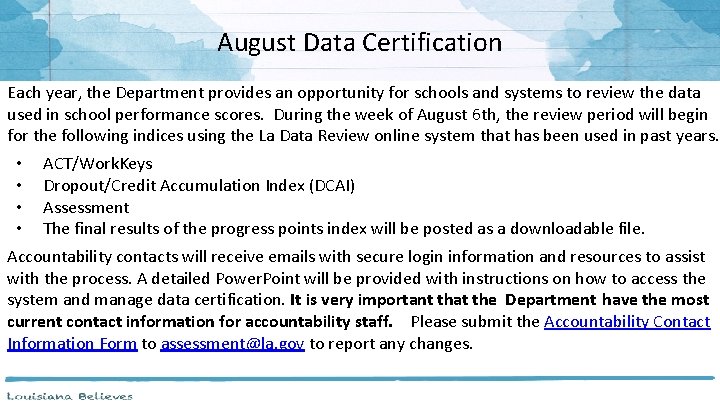
August Data Certification Each year, the Department provides an opportunity for schools and systems to review the data used in school performance scores. During the week of August 6 th, the review period will begin for the following indices using the La Data Review online system that has been used in past years. • • ACT/Work. Keys Dropout/Credit Accumulation Index (DCAI) Assessment The final results of the progress points index will be posted as a downloadable file. Accountability contacts will receive emails with secure login information and resources to assist with the process. A detailed Power. Point will be provided with instructions on how to access the system and manage data certification. It is very important that the Department have the most current contact information for accountability staff. Please submit the Accountability Contact Information Form to assessment@la. gov to report any changes.
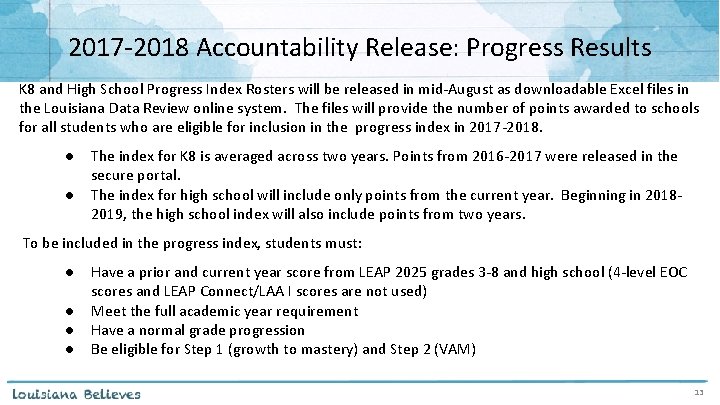
2017‐ 2018 Accountability Release: Progress Results K 8 and High School Progress Index Rosters will be released in mid‐August as downloadable Excel files in the Louisiana Data Review online system. The files will provide the number of points awarded to schools for all students who are eligible for inclusion in the progress index in 2017‐ 2018. ● ● The index for K 8 is averaged across two years. Points from 2016‐ 2017 were released in the secure portal. The index for high school will include only points from the current year. Beginning in 2018‐ 2019, the high school index will also include points from two years. To be included in the progress index, students must: ● ● Have a prior and current year score from LEAP 2025 grades 3‐ 8 and high school (4‐level EOC scores and LEAP Connect/LAA I scores are not used) Meet the full academic year requirement Have a normal grade progression Be eligible for Step 1 (growth to mastery) and Step 2 (VAM) 13
English Language Proficiency Progress in 2018‐ 2019 School Performance Scores As required under ESSA, Louisiana will include a measure of progress to English language proficiency for English learners in the accountability formula. Every EL’s improvement in English language proficiency will count in equal weight to all other assessments in the Assessment Index. Over the last five months, the Department has engaged a work group made up of experts in EL instruction and educators from the schools and school systems serving a majority of the state’s EL students. Based on the recommendations of this work group, the Department will propose a specific methodology for measuring and rewarding ELP progress within the Assessment Index for BESE consideration in October. For each ELPT tester, the recommended progress measure will consider: 1. Is the student on a trajectory to exit EL status within the expected time frame (based on his/her initial grade and proficiency)? 2. Did the student demonstrate improvement in English proficiency from the previous school year? Because the state transitioned to a new ELP assessment in 2017‐ 2018, the Department will recommend that 2018‐ 2019 is a learning year, with ELP progress included in report cards for the first time in 2019‐ 2010. 14
2018 School Performance Score Resources: For Teachers Audience Teachers Resources ● ● Using Measures of Student Progress to Strengthen Practice and Increase Learning Deliberately Addressing Student Growth to Mastery or Growth Additional guidance for teachers on how to use student growth data to make adjustments to instruction (coming this fall) Release Timeline ● ● ● Teacher Leader Summit Teacher Leader newsletter Training at the September Teacher Leader Collaborations 15
2018 School Performance Score Resources: For School and System Leaders Audience School System Leaders, Lead Agencies and Principals Resources ● ● ● ‐ ‐ ‐ ● ● Accountability Policy Update : guidance on 2017‐ 2018 accountability updates Early Childhood performance updates and improvement strategies: Summit Sessions E 008, E 009, E 010, E 017, E 019, E 021, E 023, E 024, E 040, E 046, E 057, E 068, E 017 Communications Toolkit (coming this fall) Customizable presentation for communicating this year’s district and school performance scores, and Comprehensive and Targeted Intervention designations Social media and website graphics celebrating school growth and Top Gains schools Louisiana Accountability System info card for families Media Support Guide with sample news releases and talking points for reporters Animated videos explaining school performance scores, including the new “Student Progress” Index Louisiana School Finder flyer : info on how to access School Finder and should be sent home with the printed report card Superintendent and Principal Secure Portal FAQ (coming this fall) School Performance Score Calculator Release Timeline ● ● Teacher Leader Summit September and October school system planning calls LDOE weekly newsletter Training at the September and November Collaborations 16
Principal and Superintendent Secure Reporting Portal The Principal and Superintendent Secure Reporting Portal is an interactive data exploration tool that provides school and school system leaders with access to important information about school systems, schools, teachers, and student performance. To reflect staff changes for the 2018‐ 2019 school year, updates are required to the site. Because of privacy laws, 2017‐ 2018 teacher level VAM results have been temporarily removed from the site. The results will be added back in early September and will reflect 2016‐ 2017 results for teachers currently working in each school and school system. Principal and Superintendents can verify their access to the secure reporting site by visiting CVR. Email systemsupport@la. gov with questions.
Secure Portal User Request Form For new Principals and Superintendents who need access to the Principal and Superintendent Secure Reporting Portal, a user request form has been placed on the DM FTP in the Secure Portal Update folder. ‐ File Name: Secure Portal User Request Form Data management FTP coordinators should retrieve the file and provide to superintendents for updating. Once the updates have been completed, the file should be renamed using the naming guidelines below and uploaded in the same location as the original: ‐ File Name: (LEACode)_(LEA Name)_Secure Portal User Request Form_Completed EXAMPLE: 001_Acadia_Secure Portal User Request Form_Completed Superintendents will also need to send an email to systemsupport@la. gov confirming the user requests and providing his/her consent to the Department to grant access to those users.
Accountability Resources Accountability Library: website with important resources for accountability contacts such as data certification support and webinars SPS Calculator: provided in the accountability library to help schools and systems estimate their school performance scores Grades 4 to 8 Progress Index FAQ: updated to provide details related to student growth targets and the data used to determine them 2018 Accountability Updates Power. Point: provides policy and process for calculating school performance scores http: //louisianaschools. com: links to School Finder, which provides data for all schools in Louisiana

Assessment Administration

Technology Readiness
Online Tools Training The Online Tools Training (OTT) should be utilized in order to become familiar with the online testing tools (e. g. , highlighter, magnification, etc. ) used for the operational test. Additionally the OTT: • may be reviewed as many times as desired; • is not to be considered representative of an actual test; and • is available once INSIGHT is installed or by link using Google Chrome browser.
TSM Version 9 and TSM Central Office For the 2018‐ 19 school year, districts and schools can still use the Version 9. 2 TSM. Any district wishing to pilot the new Central Office TSM should email assessment@la. gov. Benefits of Central Office: • It provides easy monitoring of your TSM devices and testing devices. • It opens directly from e. DIRECT allowing you to easily access other functions. • It simplifies the process of testing with more than one DRC testing program. The full list of benefits on Central Office can be found here.
Training Accounts Each LEA has a Sample School (777) in e. DIRECT to use for training purposes only. • This is located under the Diagnostic/Interim administration. • Ten sample students have been added to each 777 site and should be used to practice creating test sessions.
Technology Resources Assessment Technology Specifications 2018‐ 2019 Device Toolkit Menu Directions e. DIRECT Refresher LEAP 2025 Technology Enhanced Item Types Online Scheduling Guidance Statewide Assessments FAQ about Technology Technical Assistance for ELPT Assessments Technical Assistance for LEAP 2025 and LEAP Connect Assessments Technical Troubleshooting Tips e. DIRECT User Guide Technology User Guide

Test Security
Test Security Audits In order for LEAs to be in compliance with Bulletin 118, LEAs must develop a test security policy. All LEAs should have their test security plans accessible and available at all times. For 2018– 2019, the Department will only require the following types of LEAs to submit a test security policy: • New LEAs participating in statewide assessments • LEAs that experienced a break of one or more years in participation in statewide assessments • LEAs involved in the monitoring/audit process • LEAs that voluntarily submit a test security policy All submitted policies will be reviewed using the checklist available here. The Department will review test security policies and provide feedback. August 31, 2018 is the deadline to submit test security policies to assessment@la. gov.
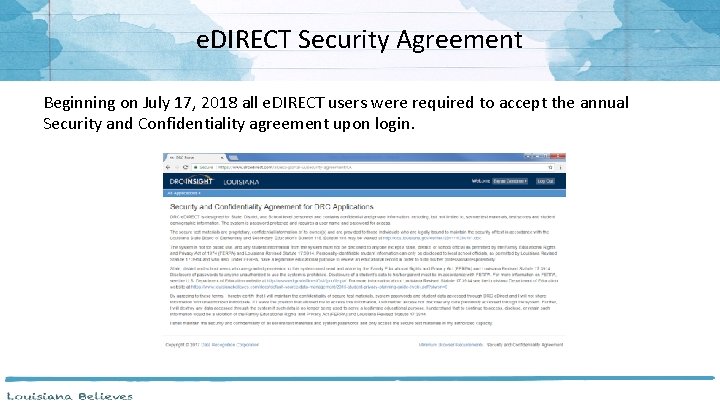
e. DIRECT Security Agreement Beginning on July 17, 2018 all e. DIRECT users were required to accept the annual Security and Confidentiality agreement upon login.
Nonsummative Test Security Non Summative Test Security Reminders • All LEAP 360 system components are considered copyrighted materials and therefore belong to the originator and shall not be considered LEA property. All applicable copyright laws shall be enforced and adhered to under the terms of this agreement. • The content may NOT be used or published in part or in whole outside of the prescribed purposes set forth by the Louisiana Department of Education (LDOE). Assessment items and passages can only be used in the assessment delivery platform operated by DRC. Accommodated Materials Reminder • Secure documents must be kept in a locked, secure area before and after testing. It must be returned immediately to the School Test Coordinator after the scheduled testing has ended for the day. When testing is completed, the School Test Coordinator must return the materials to the District Test Coordinator.
Caveon Test Security Services In order to help districts and schools improve test security, the LDOE has negotiated an agreement with Caveon, the nation’s leading test security experts, to provide the following services: Monitoring • Provides two Caveon monitors on campus on one day of testing • Provides districts with accurate information of every testing room at the school Investigations • Provides districts with professional investigators to investigate and report on any testing irregularity that occurred in the district Training • Provides districts with active online training modules created by Caveon A full explanation of the services and the fee schedules can be found here. Districts and schools can purchase these services by contacting Caveon directly.
Test Security Resources Caveon Test Security Services Investigation Template Online Test Security DTC Training for TA and STC Paper Test Security DTC Training Paper Test Security Training for STC and TA Permission To Test in Alternate Enviornment Security Plan Checklist Test Monitor Note Taking Guide Testing Irregularity Form
KEA and K– 3 Assessments
KEA and K‐ 3 Literacy Assessments • • • Public schools must administer a kindergarten‐readiness screener and a K‐ 3 Literacy screener within the first 30 days of school. – A KEA must be given to all first‐time kindergarten students. Two KEA assessment options are approved: DRDP and TS Gold. – A K‐ 3 Literacy screener must be administered to all kindergarten, 1 st, 2 nd, and 3 rd grade students. Three assessment options are approved: DIBELS Next, STEEP, and STEP. Data Managers should connect with their Assessment team to determine how the data will be entered in their local systems. Once entered, data managers will submit KEA and K‐ 3 Literacy screener results with the SIS October 1 MFP Collection. The 2018‐ 2019 Guidance on the Kindergarten Entry Assessment and K‐ 3 Literacy Screening Assessment can be found here.
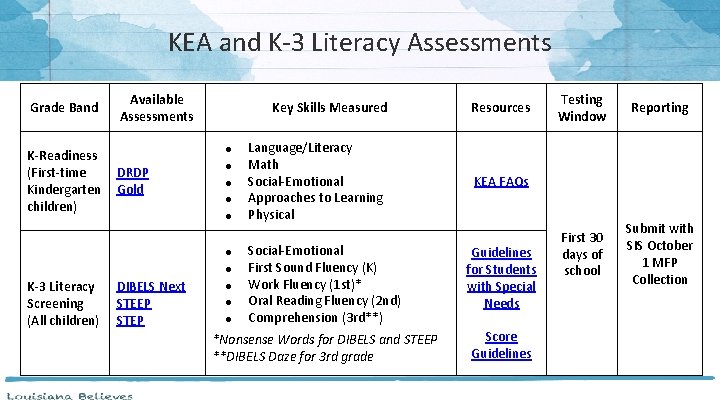
KEA and K‐ 3 Literacy Assessments Grade Band K-Readiness (First‐time Kindergarten children) Available Assessments Key Skills Measured ● DRDP Gold ● ● Guidelines for Students with Special Needs *Nonsense Words for DIBELS and STEEP **DIBELS Daze for 3 rd grade Score Guidelines ● DIBELS Next STEEP STEP ● ● ● Testing Window Reporting First 30 days of school Submit with SIS October 1 MFP Collection KEA FAQs Social‐Emotional First Sound Fluency (K) Work Fluency (1 st)* Oral Reading Fluency (2 nd) Comprehension (3 rd**) ● K-3 Literacy Screening (All children) Language/Literacy Math Social‐Emotional Approaches to Learning Physical Resources
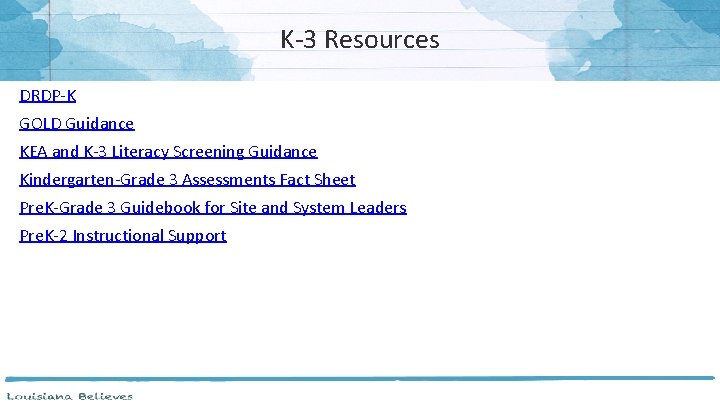
K‐ 3 Resources DRDP‐K GOLD Guidance KEA and K‐ 3 Literacy Screening Guidance Kindergarten‐Grade 3 Assessments Fact Sheet Pre. K‐Grade 3 Guidebook for Site and System Leaders Pre. K‐ 2 Instructional Support

LEAP 2025
LEAP 2025 Overview The Louisiana Education Assessment Program (LEAP) 2025 assesses standards in grades 3 through high school in ELA, math, science, and social studies. All students except those qualifying for the LEAP Connect must be tested regardless of enrollment date. The following students must participate in the test administration: • • • all public school students, including students in charter and lab schools students enrolled in nonpublic schools through the scholarship program students enrolled in tuition donation rebate programs are required to take LEAP 2025 Mathematics and English Language Arts (ELA) tests LEAP 2025 testing must be administered as scheduled by the LDOE and BESE. The 2018‐ 2019 Assessment Calendar is located in the Assessment Library.
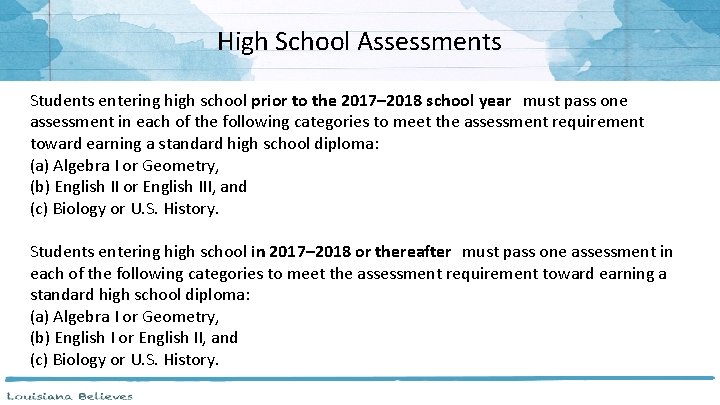
High School Assessments Students entering high school prior to the 2017– 2018 school year must pass one assessment in each of the following categories to meet the assessment requirement toward earning a standard high school diploma: (a) Algebra I or Geometry, (b) English II or English III, and (c) Biology or U. S. History. Students entering high school in 2017– 2018 or thereafter must pass one assessment in each of the following categories to meet the assessment requirement toward earning a standard high school diploma: (a) Algebra I or Geometry, (b) English I or English II, and (c) Biology or U. S. History.
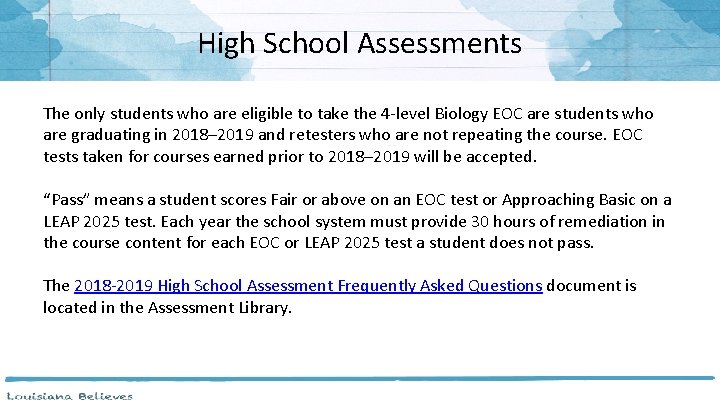
High School Assessments The only students who are eligible to take the 4‐level Biology EOC are students who are graduating in 2018– 2019 and retesters who are not repeating the course. EOC tests taken for courses earned prior to 2018– 2019 will be accepted. “Pass” means a student scores Fair or above on an EOC test or Approaching Basic on a LEAP 2025 test. Each year the school system must provide 30 hours of remediation in the course content for each EOC or LEAP 2025 test a student does not pass. The 2018‐ 2019 High School Assessment Frequently Asked Questions document is located in the Assessment Library.
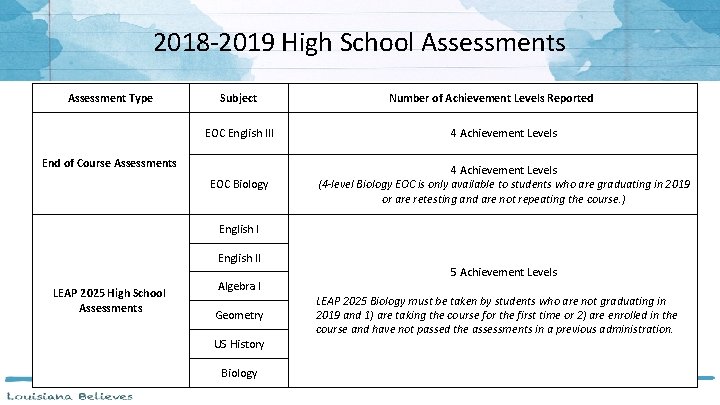
2018‐ 2019 High School Assessments Assessment Type Subject Number of Achievement Levels Reported EOC English III 4 Achievement Levels EOC Biology 4 Achievement Levels (4 -level Biology EOC is only available to students who are graduating in 2019 or are retesting and are not repeating the course. ) End of Course Assessments English II LEAP 2025 High School Assessments Algebra I Geometry US History Biology 5 Achievement Levels LEAP 2025 Biology must be taken by students who are not graduating in 2019 and 1) are taking the course for the first time or 2) are enrolled in the course and have not passed the assessments in a previous administration.
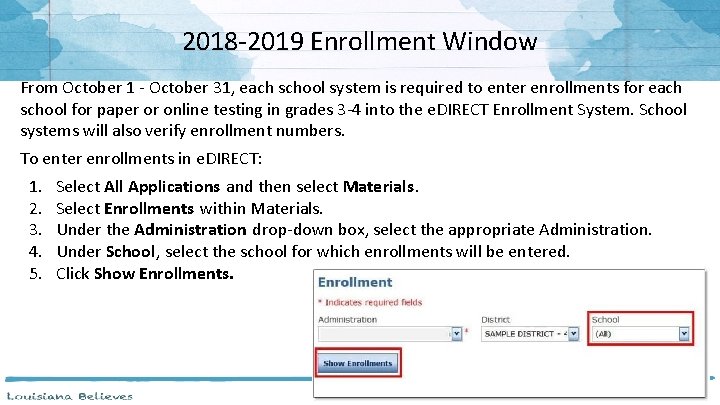
2018‐ 2019 Enrollment Window From October 1 ‐ October 31, each school system is required to enter enrollments for each school for paper or online testing in grades 3‐ 4 into the e. DIRECT Enrollment System. School systems will also verify enrollment numbers. To enter enrollments in e. DIRECT: 1. 2. 3. 4. 5. Select All Applications and then select Materials. Select Enrollments within Materials. Under the Administration drop‐down box, select the appropriate Administration. Under School, select the school for which enrollments will be entered. Click Show Enrollments.
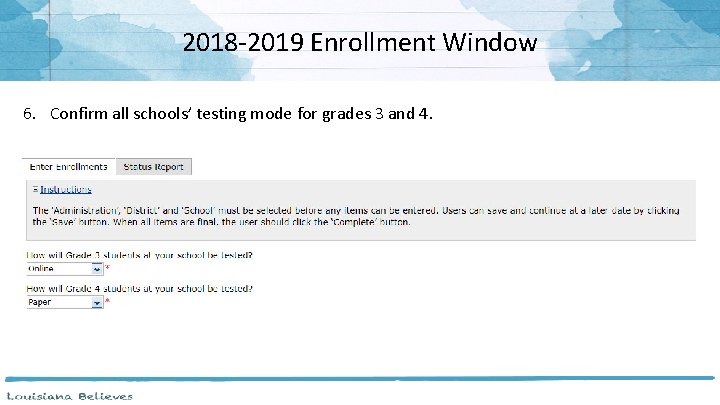
2018‐ 2019 Enrollment Window 6. Confirm all schools’ testing mode for grades 3 and 4.
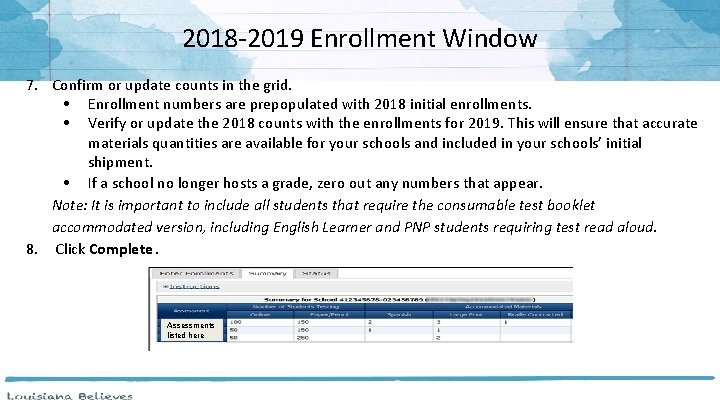
2018‐ 2019 Enrollment Window 7. Confirm or update counts in the grid. • Enrollment numbers are prepopulated with 2018 initial enrollments. • Verify or update the 2018 counts with the enrollments for 2019. This will ensure that accurate materials quantities are available for your schools and included in your schools’ initial shipment. • If a school no longer hosts a grade, zero out any numbers that appear. Note: It is important to include all students that require the consumable test booklet accommodated version, including English Learner and PNP students requiring test read aloud. 8. Click Complete. Assessments listed here
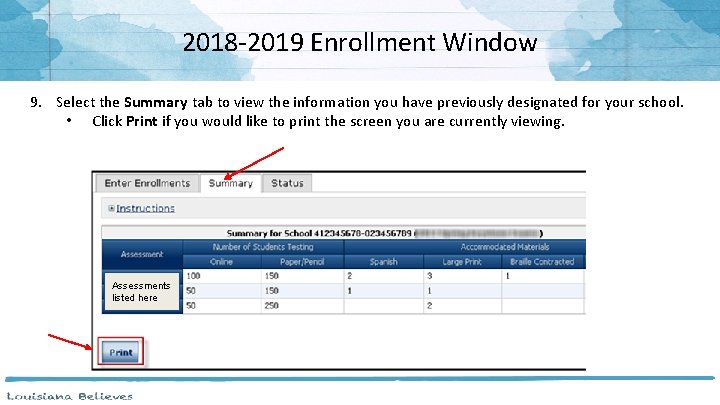
2018‐ 2019 Enrollment Window 9. Select the Summary tab to view the information you have previously designated for your school. • Click Print if you would like to print the screen you are currently viewing. Assessments listed here
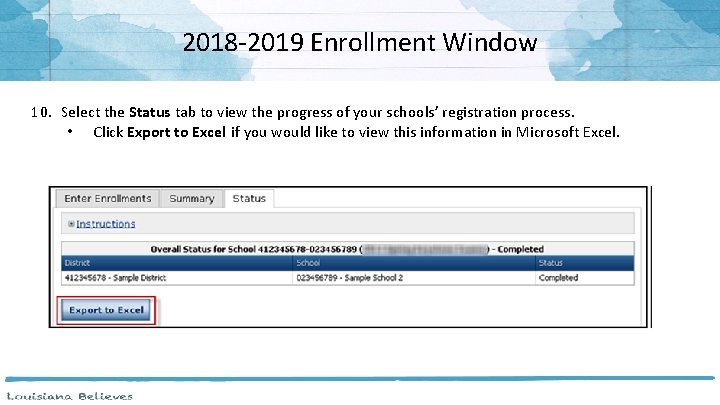
2018‐ 2019 Enrollment Window 10. Select the Status tab to view the progress of your schools’ registration process. • Click Export to Excel if you would like to view this information in Microsoft Excel.
Assessment Development Educator Review Committees The Department is now recruiting for ELA Item Content and Bias Review Committees. ● Committees convent in September for grades 3 and 4 and October for grades 5‐ 10 ● Selected participants will review newly developed ELA test items. To apply to be a participant, any interested educator need to complete an interest survey themselves, and may complete surveys for more than one committee. Interest Survey Links: ● ELA grades 3 and 4 ● ELA grades 5‐ 8, English I and English II Email michelle. mcadams@la. gov or kathleen. judy@la. gov with questions. 46
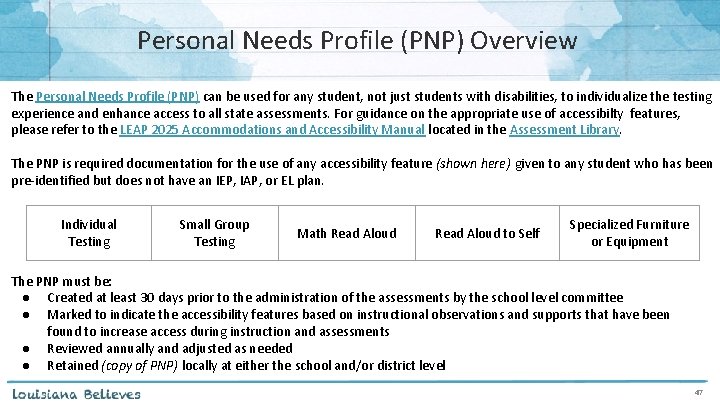
Personal Needs Profile (PNP) Overview The Personal Needs Profile (PNP) can be used for any student, not just students with disabilities, to individualize the testing experience and enhance access to all state assessments. For guidance on the appropriate use of accessibilty features, please refer to the LEAP 2025 Accommodations and Accessibility Manual located in the Assessment Library. The PNP is required documentation for the use of any accessibility feature (shown here) given to any student who has been pre‐identified but does not have an IEP, IAP, or EL plan. Individual Testing Small Group Testing Math Read Aloud to Self Specialized Furniture or Equipment The PNP must be: ● Created at least 30 days prior to the administration of the assessments by the school level committee ● Marked to indicate the accessibility features based on instructional observations and supports that have been found to increase access during instruction and assessments ● Reviewed annually and adjusted as needed ● Retained (copy of PNP) locally at either the school and/or district level 47
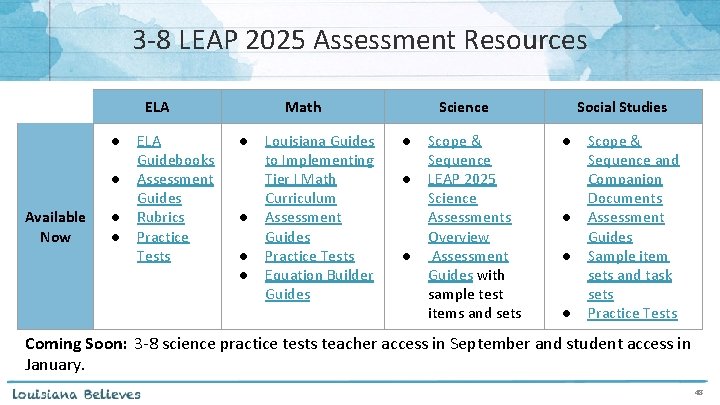
3‐ 8 LEAP 2025 Assessment Resources ELA ● ● Available Now ● ● ELA Guidebooks Assessment Guides Rubrics Practice Tests Math ● ● Louisiana Guides to Implementing Tier I Math Curriculum Assessment Guides Practice Tests Equation Builder Guides Science ● ● ● Scope & Sequence LEAP 2025 Science Assessments Overview Assessment Guides with sample test items and sets Social Studies ● ● Scope & Sequence and Companion Documents Assessment Guides Sample item sets and task sets Practice Tests Coming Soon: 3‐ 8 science practice tests teacher access in September and student access in January. 48
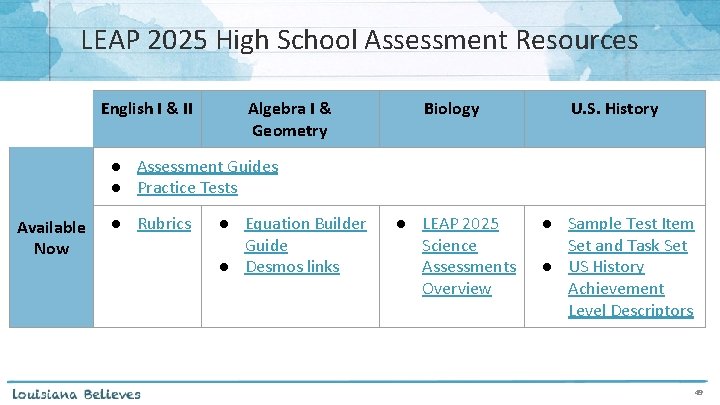
LEAP 2025 High School Assessment Resources English I & II Algebra I & Geometry Biology U. S. History ● LEAP 2025 Science Assessments Overview ● Sample Test Item Set and Task Set ● US History Achievement Level Descriptors ● Assessment Guides ● Practice Tests Available Now ● Rubrics ● Equation Builder Guide ● Desmos links 49

State Placement Test
State Placement Test • School systems are required to administer the state placement test, available August 6, for students seeking to transfer to a public school in grades 5 or 9 from any in-state nonpublic school , approved home study program , or out-of-state school. • The computer‐based test is designed to measure students’ knowledge and skills in ELA and math pursuant to Louisiana Student Standards in grades 4 and 8, and is consistent with the LEAP 2025 test. • DTCs will be responsible for managing the state placement test administration in e. DIRECT. All functionality of testing systems and test security will be the same as LEAP 2025 assessments. • School systems must notify the Department at least 30 days in advance of any school system planned testing day to ensure scoring and reporting are completed within normal turn‐around times. • BESE will consider policy at their August meeting to align promotion/placement policies for transfer students (out‐of‐state, non‐public, and approved home study) to that of non‐transfer students. 33

ACT and Work. Keys
ACT General Overview All 11 th grade students and any 12 th grade students with no ACT score on record must take the ACT test before graduation. • The 2018‐ 2019 ACT will be available in both paper and online formats to all districts. • LDOE provides districts with ACT Match and No Match lists in November and March to assist with identifying the students needing the ACT. • LDOE will pay for all 11 th grade students and any 12 th grader testing for the first time. • Accommodations must be approved by ACT in order to be college reportable. • Districts and schools will use the two ACT systems, Pearson. Accessnext. TM (PANext) and Test Accessibility and Accommodation (TAA), to prepare for test administration. – PANext is used to place additional orders and enroll students and can be accessed by both the DTC and STC. – TAA is used to apply for ACT approved accommodations and only accessible to STCs. The ACT State Testing website will have all information regarding testing, training, and access to PANext. The site is still being updated to reflect information for 2018‐ 2019.
What’s New for Work. Keys There a few changes for the 2018‐ 19 Work. Keys assessment: ● ● ACT has discontinued the Work. Keys 1. 0 assessment titles (Reading for Information, Locating Information, and Applied Mathematics) and are no longer available to anyone UEB Braille without Nemeth code will be available for Applied Math USB drives will replace DVDs for pre‐recorded audio For districts and schools testing on realm(s) owned by the district (non‐LDOE realms), ACT will share the results directly with the LDOE if the ACT (other realm) Addendum has been signed and submitted to the LDOE thereby reducing the burden of the LEA to provide information during 2019’s data certification process
Work. Keys Reminders • The Work. Keys testing windows are below. – Online window: October 2, 2018 – April 12, 2019 – Fall paper accommodated window: October 2 – 16, 2018 – Spring paper accommodated window: March 13 – 27, 2019 • Bulletin 118 was updated in March 2018, and the administration of Work. Keys must adhere to the new policy: – Students shall be subject to a 30‐day wait period before retesting on Work. Keys assessments, during which time LEAs shall provide remediation. – District must provide student results for all Work. Keys tests taken by every student every year, as outlined by DOE, to ensure all results are considered.
Work. Keys Reminders • • The Fall Work. Keys Schedule of Events is available on the ACT State Testing website under the “ACT Taken on Paper” Louisiana heading. These documents contain important dates and information needed for Work. Key administration. The only time Pearson. Accessnext. TM is used for Work. Keys is to order accommodated test materials for both the fall and spring Work. Keys accommodated testing windows Aug. 6 ‐ 24: Manage participation, shipping dates, and place orders for Work. Keys initial accommodated materials in Pearson. Accessnext. TM Work. Keys Accommodated (paper) Tests are only for students with an IEP, IAP, or an EL plan. Giving accommodated test materials to students without accommodations is a testing violation. The ACT®Work. Keys® Administration Manual for State Tests pages 3‐ 8 give detailed information on assigning accommodations for Work. Keys. For districts or schools that administer the Work. Keys assessment on non‐LDOE realms, there is a new ACT (other realm) Addendum that can be signed and returned to LDEdata@la. gov which allows ACT to share the Work. Keys data from non‐LDOE realms directly with the LDOE.
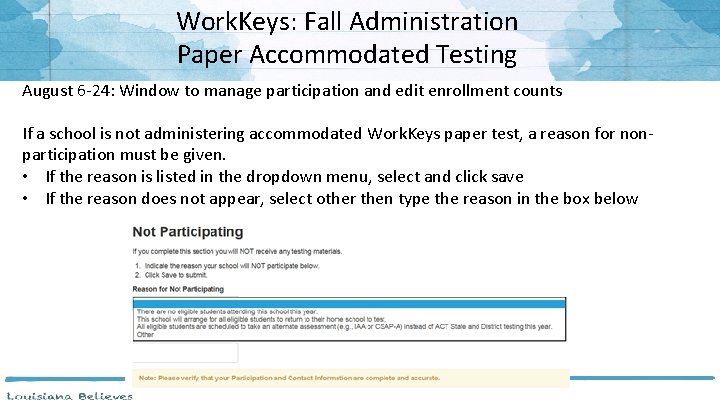
Work. Keys: Fall Administration Paper Accommodated Testing August 6‐ 24: Window to manage participation and edit enrollment counts If a school is not administering accommodated Work. Keys paper test, a reason for non‐ participation must be given. • If the reason is listed in the dropdown menu, select and click save • If the reason does not appear, select other then type the reason in the box below
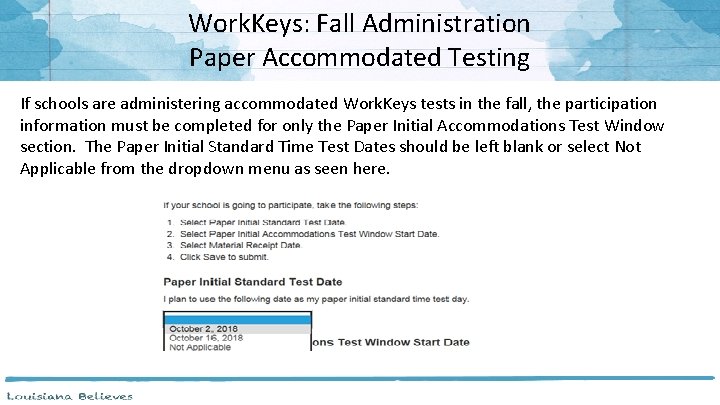
Work. Keys: Fall Administration Paper Accommodated Testing If schools are administering accommodated Work. Keys tests in the fall, the participation information must be completed for only the Paper Initial Accommodations Test Window section. The Paper Initial Standard Time Test Dates should be left blank or select Not Applicable from the dropdown menu as seen here.
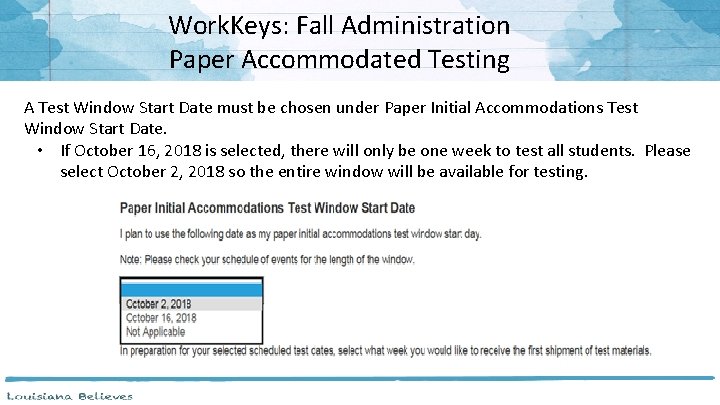
Work. Keys: Fall Administration Paper Accommodated Testing A Test Window Start Date must be chosen under Paper Initial Accommodations Test Window Start Date. • If October 16, 2018 is selected, there will only be one week to test all students. Please select October 2, 2018 so the entire window will be available for testing.
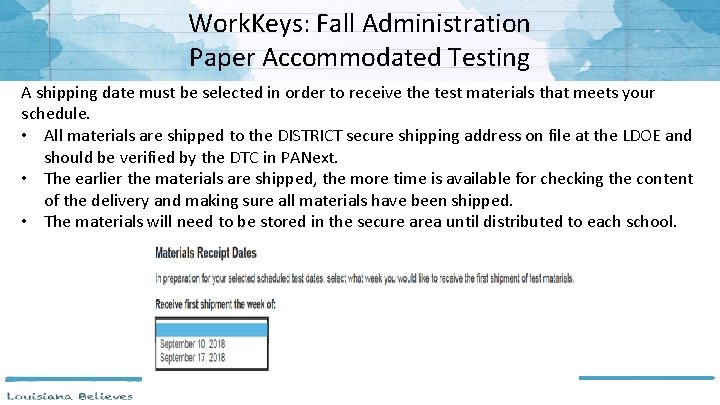
Work. Keys: Fall Administration Paper Accommodated Testing A shipping date must be selected in order to receive the test materials that meets your schedule. • All materials are shipped to the DISTRICT secure shipping address on file at the LDOE and should be verified by the DTC in PANext. • The earlier the materials are shipped, the more time is available for checking the content of the delivery and making sure all materials have been shipped. • The materials will need to be stored in the secure area until distributed to each school.
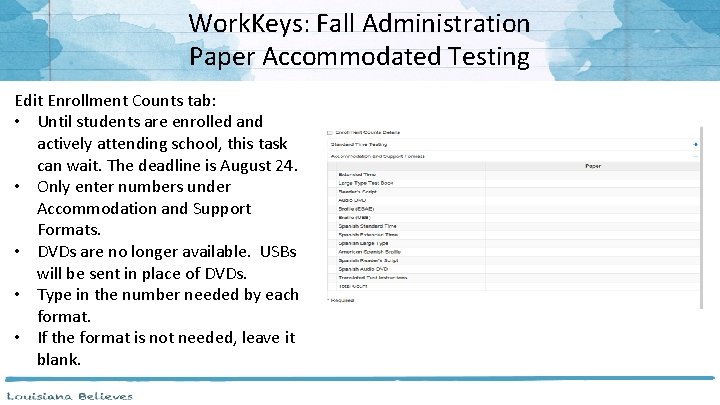
Work. Keys: Fall Administration Paper Accommodated Testing Edit Enrollment Counts tab: • Until students are enrolled and actively attending school, this task can wait. The deadline is August 24. • Only enter numbers under Accommodation and Support Formats. • DVDs are no longer available. USBs will be sent in place of DVDs. • Type in the number needed by each format. • If the format is not needed, leave it blank.
ACT Online In 2018‐ 2019, ACT will be available in both the paper and online format. • Online testing window: March 12‐ 14, 19‐ 21 Districts and schools may chose to test all, some, or no students online. • Online testing requires technical checks to ensure that the ACT tests are compatible and security measures can be met. • DTCs and district technical support personnel will work together to run all required diagnostics in the fall to determine if online testing is an option. Please refer to the Technical Requirements for the ACT Test Online to determine if the ACT can be administered online. Accommodated tests will still be administered on paper only. However, if the only accommodation needed is extended time, the online test may be administered. • Accommodations must be entered in the TAA system at the school level. • Only school level personnel has access to TAA.
ACT and Work. Keys Resources • • • The ACT website has resources to help educators and administrators learn more about ACT score reports, including webinars, tutorials, and workshops. The Fall Work. Keys Schedule of Events is available on the ACT State Testing website under the ACT Taken on Paper‐Louisiana heading. These documents contain important dates and information needed for Work. Key administration. The ACT Work. Keys Score Reports Available in Online Reports Portal document tells you what score reports are available in the portal. The ACT State Testing site has information about score reports, including how to understand use the test results, under Interpretation in the ACT and ACT Work. Keys sections. Customer Support: It is important to state “Louisiana State Testing”, and use code 19. ACT Standard Time Testing ACT Accommodations Work. Keys 800‐ 553‐ 6244 x 2800 800‐ 553‐ 6244 x 1788 800‐Work. Key (967‐ 5539) www. act. org/stateanddistrict/contactus ACTState. Accoms@act. org workkeys@act. org

LEAP Connect/LAA 1
LEAP Connect Resources • • • LEAP Connect Assessment Guide: a guide for teachers to understand the test design, levels of complexity, structure, and sample items Online Tools Training: provides students and teachers opportunities to become familiar with the tools available in the online testing platform; available in INSIGHT or here using the Chrome browser; Parent Guide to LEAP Connect: a guide for parents to understand the LEAP Connect assessment. ELA Guidebooks 2. 0 Diverse Learner Guide: Contains information about using the ELA Guidebooks with diverse learners. The Louisiana Connectors for Students with Significant Disabilities, which are aligned with Louisiana Student Standards, presents the Louisiana Connectors and represent the most salient grade‐level, core academic content in English language arts and mathematics. Essential Elements Cards, which are a primer for differentiating instruction for students with significant disabilities, break down the instructional task into knowledge and skills, suggested instructional strategies, and possible supports and scaffolds for student learning. Case Studies provide models for how teachers and specialists may best modify objectives, assessments, activities, and materials for students with significant cognitive disabilities based on LDOE’s available resources. Parent Guide to LEAP Connect Score Reports: a guide for parents to understand the LEAP Connect student reports Also available in Arabic, Spanish, and Vietnamese. specialeducation@la. gov: email address for content and resources related the LA Connectors. 65

ELPS
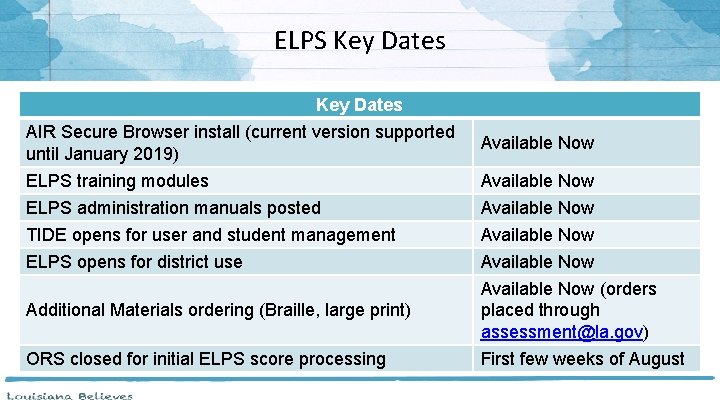
ELPS Key Dates AIR Secure Browser install (current version supported until January 2019) Available Now ELPS training modules Available Now ELPS administration manuals posted Available Now TIDE opens for user and student management Available Now ELPS opens for district use Available Now Additional Materials ordering (Braille, large print) Available Now (orders placed through assessment@la. gov) ORS closed for initial ELPS score processing First few weeks of August
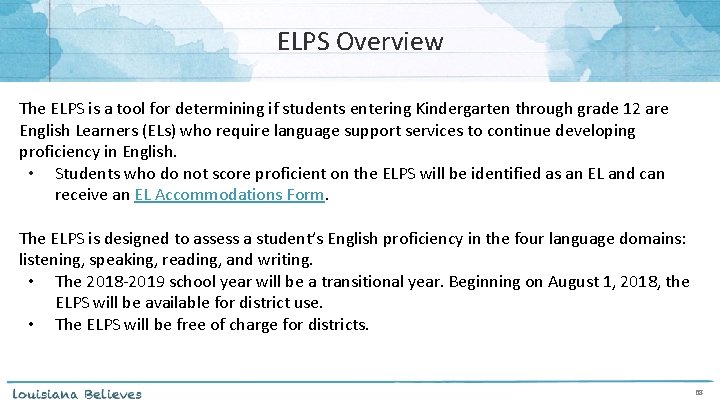
ELPS Overview The ELPS is a tool for determining if students entering Kindergarten through grade 12 are English Learners (ELs) who require language support services to continue developing proficiency in English. • Students who do not score proficient on the ELPS will be identified as an EL and can receive an EL Accommodations Form. The ELPS is designed to assess a student’s English proficiency in the four language domains: listening, speaking, reading, and writing. • The 2018‐ 2019 school year will be a transitional year. Beginning on August 1, 2018, the ELPS will be available for district use. • The ELPS will be free of charge for districts. 68
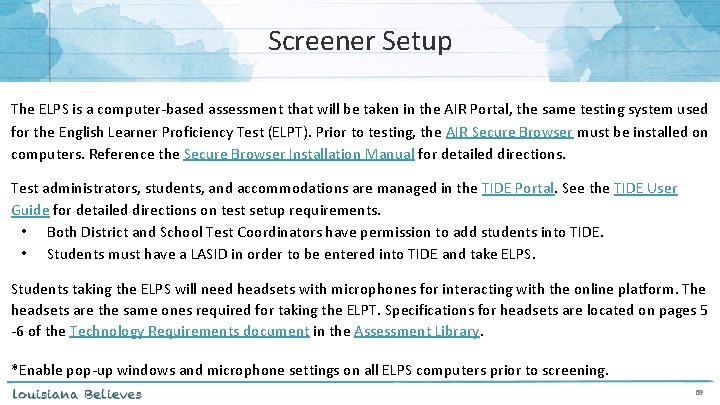
Screener Setup The ELPS is a computer‐based assessment that will be taken in the AIR Portal, the same testing system used for the English Learner Proficiency Test (ELPT). Prior to testing, the AIR Secure Browser must be installed on computers. Reference the Secure Browser Installation Manual for detailed directions. Test administrators, students, and accommodations are managed in the TIDE Portal. See the TIDE User Guide for detailed directions on test setup requirements. • Both District and School Test Coordinators have permission to add students into TIDE. • Students must have a LASID in order to be entered into TIDE and take ELPS. Students taking the ELPS will need headsets with microphones for interacting with the online platform. The headsets are the same ones required for taking the ELPT. Specifications for headsets are located on pages 5 ‐ 6 of the Technology Requirements document in the Assessment Library. *Enable pop‐up windows and microphone settings on all ELPS computers prior to screening. 69
ELPS Administration Systems Overview All ELPS systems can be accessed in the ELPT Portal under ELPS. TIDE • • Stores student demographic information and test settings Used to manage user accounts for all systems Test Delivery System (TDS) • • Used by TAs to administer tests and monitor students (Test Administrator Interface) Used by students to take ELPS (AIR Secure Browser) ORS • Used to view and download student assessment reports Data Entry Interface (DEI) • Used by TAs to enter responses for students using accommodated forms of ELPS. 70
ELPS Administration Documents All ELPS administration documents can be found in the ELPT Portal under ELPS. TIDE User Guide Provides directions for registering students for assessments, establishing test settings and accommodations, associating students with districts, schools, and rosters, and creating and approving testing appeals TA User Guide Directions to help users navigate the Test Delivery System (TDS) including the Student Interface and the Test Administrator Interface, and help support Test Administrators manage and administer ELPS TAM Provides specific instructions for the administration of the ELPS. Details include information on test security, logistical requirements, and the Test Administrator directions to students. 71
ELPS Administration Documents All ELPS administration documents can be found in the ELPT Portal under ELPS Step Two Speaking Scoring Document Used to assist school and school system personnel with the immediate (“on the fly”) scoring of the first operational Speaking task Online Reporting System (ORS) Manual Provides information on how to use the Online Reporting System (ORS) to view student performance and participation data. Accessibility and Accommodations Manual Used to guide the selection and administration of appropriate universal features, designated features, and accommodations for individual students to produce valid assessment results Data Entry Interface (DEI) Manual Provides specific instructions for using the DEI which allows authorized users to enter student assessment data, such as item responses and scores. Entering student data is required for the ELPS Braille forms 72
ELPS Technology Documents All ELPS technology manuals can be found in the ELPT Portal under Technology Coordinators. Secure Browser Installation Manual Provides instructions for installing the secure browsers on computers and devices used for online assessments System Requirements for Online Testing Used to verify that all devices to be used for testing meet the minimum technology specifications Technical Specifications Manual for Online Testing Used to verify that your school’s network and Internet are properly configured for testing. 73
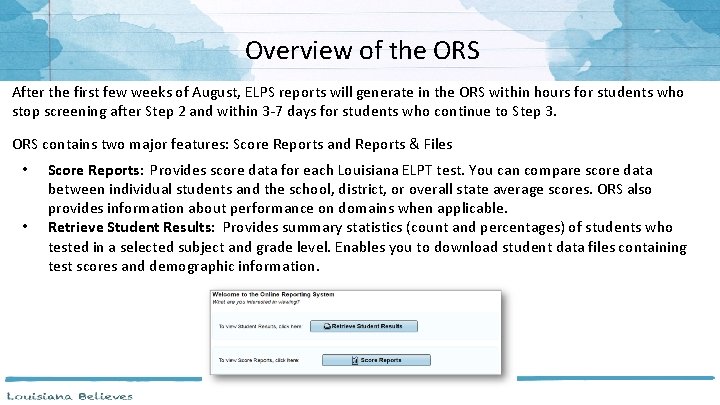
Overview of the ORS After the first few weeks of August, ELPS reports will generate in the ORS within hours for students who stop screening after Step 2 and within 3‐ 7 days for students who continue to Step 3. ORS contains two major features: Score Reports and Reports & Files • • Score Reports: Provides score data for each Louisiana ELPT test. You can compare score data between individual students and the school, district, or overall state average scores. ORS also provides information about performance on domains when applicable. Retrieve Student Results: Provides summary statistics (count and percentages) of students who tested in a selected subject and grade level. Enables you to download student data files containing test scores and demographic information.
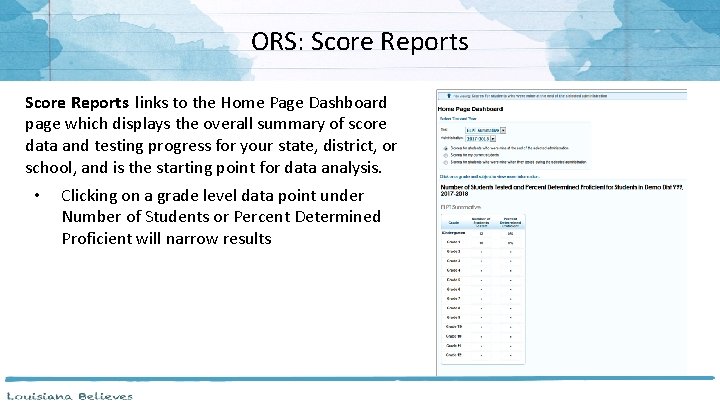
ORS: Score Reports links to the Home Page Dashboard page which displays the overall summary of score data and testing progress for your state, district, or school, and is the starting point for data analysis. • Clicking on a grade level data point under Number of Students or Percent Determined Proficient will narrow results
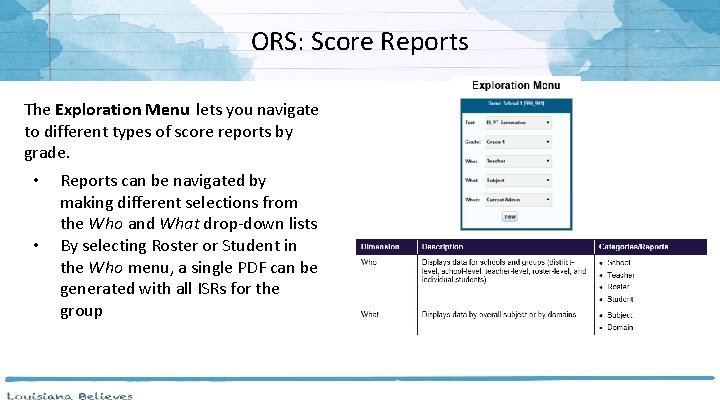
ORS: Score Reports The Exploration Menu lets you navigate to different types of score reports by grade. • • Reports can be navigated by making different selections from the Who and What drop‐down lists By selecting Roster or Student in the Who menu, a single PDF can be generated with all ISRs for the group
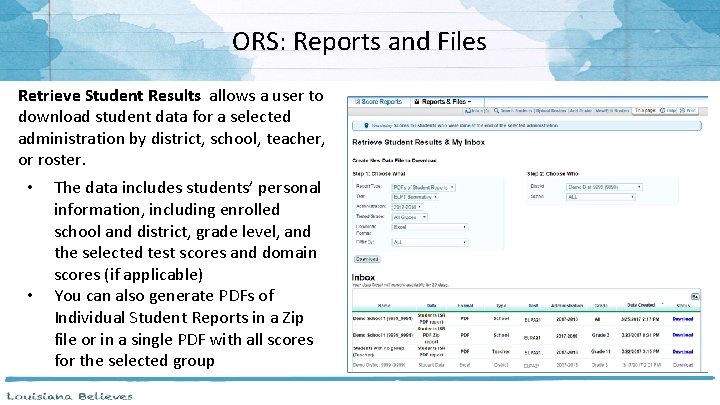
ORS: Reports and Files Retrieve Student Results allows a user to download student data for a selected administration by district, school, teacher, or roster. • • The data includes students’ personal information, including enrolled school and district, grade level, and the selected test scores and domain scores (if applicable) You can also generate PDFs of Individual Student Reports in a Zip file or in a single PDF with all scores for the selected group
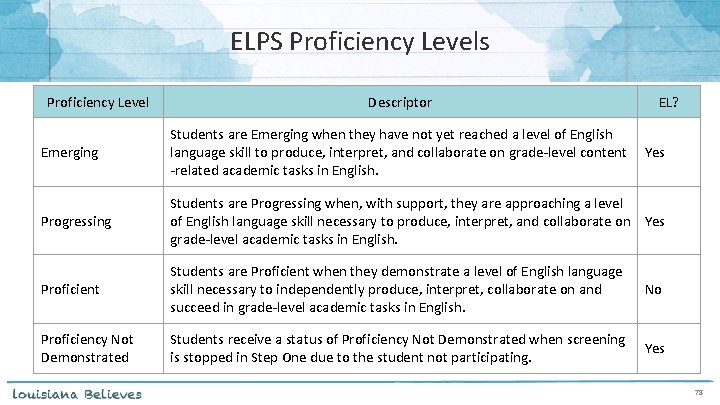
ELPS Proficiency Levels Proficiency Level Descriptor EL? Emerging Students are Emerging when they have not yet reached a level of English language skill to produce, interpret, and collaborate on grade‐level content ‐related academic tasks in English. Progressing Students are Progressing when, with support, they are approaching a level of English language skill necessary to produce, interpret, and collaborate on Yes grade‐level academic tasks in English. Proficient Students are Proficient when they demonstrate a level of English language skill necessary to independently produce, interpret, collaborate on and succeed in grade‐level academic tasks in English. No Proficiency Not Demonstrated Students receive a status of Proficiency Not Demonstrated when screening is stopped in Step One due to the student not participating. Yes 78
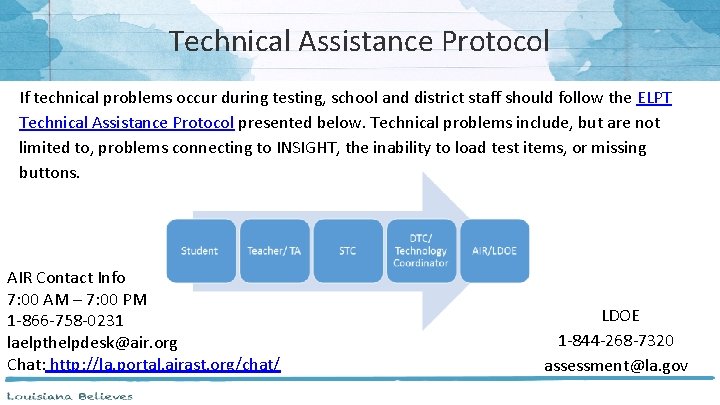
Technical Assistance Protocol If technical problems occur during testing, school and district staff should follow the ELPT Technical Assistance Protocol presented below. Technical problems include, but are not limited to, problems connecting to INSIGHT, the inability to load test items, or missing buttons. AIR Contact Info 7: 00 AM – 7: 00 PM 1‐ 866‐ 758‐ 0231 laelpthelpdesk@air. org Chat: http: //la. portal. airast. org/chat/ LDOE 1‐ 844‐ 268‐ 7320 assessment@la. gov
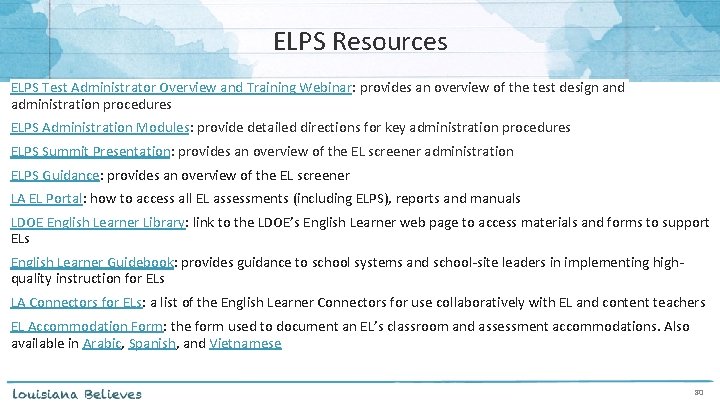
ELPS Resources ELPS Test Administrator Overview and Training Webinar: provides an overview of the test design and administration procedures ELPS Administration Modules: provide detailed directions for key administration procedures ELPS Summit Presentation: provides an overview of the EL screener administration ELPS Guidance: provides an overview of the EL screener LA EL Portal: how to access all EL assessments (including ELPS), reports and manuals LDOE English Learner Library: link to the LDOE’s English Learner web page to access materials and forms to support ELs English Learner Guidebook: provides guidance to school systems and school‐site leaders in implementing high‐ quality instruction for ELs LA Connectors for ELs: a list of the English Learner Connectors for use collaboratively with EL and content teachers EL Accommodation Form: the form used to document an EL’s classroom and assessment accommodations. Also available in Arabic, Spanish, and Vietnamese 80

ELPT
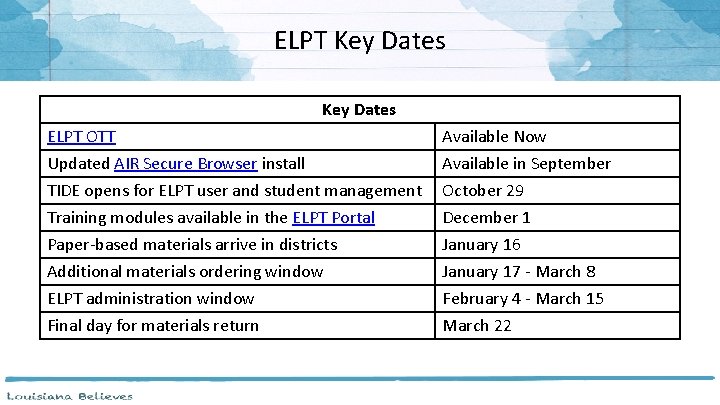
ELPT Key Dates ELPT OTT Available Now Updated AIR Secure Browser install Available in September TIDE opens for ELPT user and student management October 29 Training modules available in the ELPT Portal December 1 Paper‐based materials arrive in districts January 16 Additional materials ordering window January 17 ‐ March 8 ELPT administration window February 4 ‐ March 15 Final day for materials return March 22
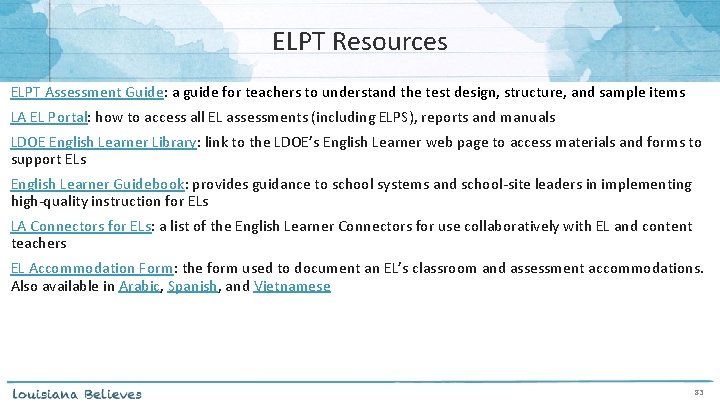
ELPT Resources ELPT Assessment Guide: a guide for teachers to understand the test design, structure, and sample items LA EL Portal: how to access all EL assessments (including ELPS), reports and manuals LDOE English Learner Library: link to the LDOE’s English Learner web page to access materials and forms to support ELs English Learner Guidebook: provides guidance to school systems and school‐site leaders in implementing high‐quality instruction for ELs LA Connectors for ELs: a list of the English Learner Connectors for use collaboratively with EL and content teachers EL Accommodation Form: the form used to document an EL’s classroom and assessment accommodations. Also available in Arabic, Spanish, and Vietnamese 83

LEAP 360
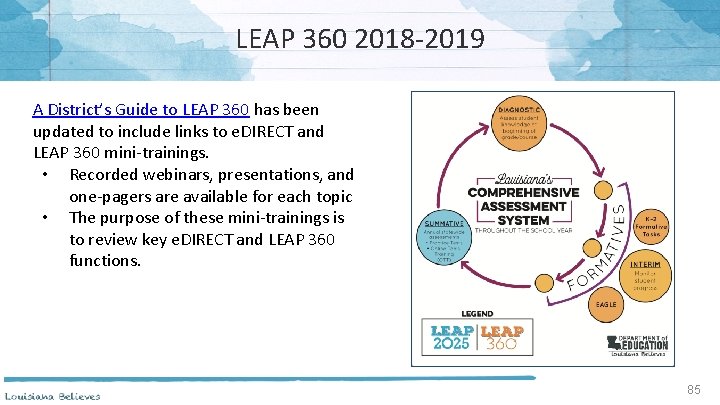
LEAP 360 2018‐ 2019 A District’s Guide to LEAP 360 has been updated to include links to e. DIRECT and LEAP 360 mini‐trainings. • Recorded webinars, presentations, and one‐pagers are available for each topic • The purpose of these mini‐trainings is to review key e. DIRECT and LEAP 360 functions. 85
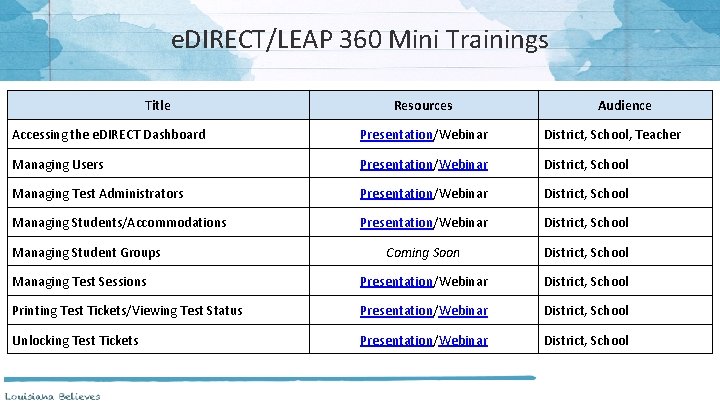
e. DIRECT/LEAP 360 Mini Trainings Title Resources Audience Accessing the e. DIRECT Dashboard Presentation/Webinar District, School, Teacher Managing Users Presentation/Webinar District, School Managing Test Administrators Presentation/Webinar District, School Managing Students/Accommodations Presentation/Webinar District, School Coming Soon District, School Managing Test Sessions Presentation/Webinar District, School Printing Test Tickets/Viewing Test Status Presentation/Webinar District, School Unlocking Test Tickets Presentation/Webinar District, School Managing Student Groups
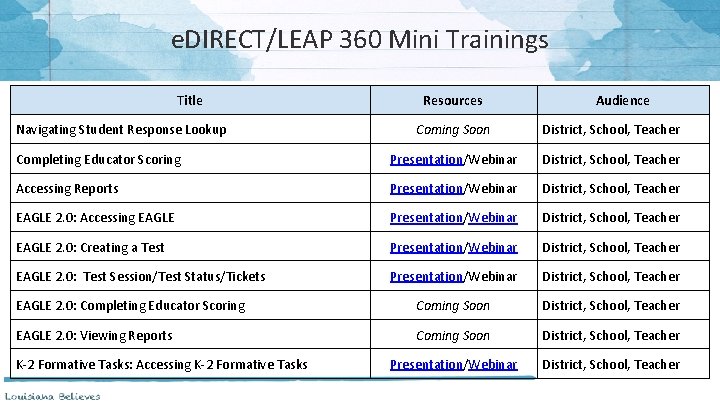
e. DIRECT/LEAP 360 Mini Trainings Title Navigating Student Response Lookup Resources Audience Coming Soon District, School, Teacher Completing Educator Scoring Presentation/Webinar District, School, Teacher Accessing Reports Presentation/Webinar District, School, Teacher EAGLE 2. 0: Accessing EAGLE Presentation/Webinar District, School, Teacher EAGLE 2. 0: Creating a Test Presentation/Webinar District, School, Teacher EAGLE 2. 0: Test Session/Test Status/Tickets Presentation/Webinar District, School, Teacher EAGLE 2. 0: Completing Educator Scoring Coming Soon District, School, Teacher EAGLE 2. 0: Viewing Reports Coming Soon District, School, Teacher Presentation/Webinar District, School, Teacher K‐ 2 Formative Tasks: Accessing K‐ 2 Formative Tasks
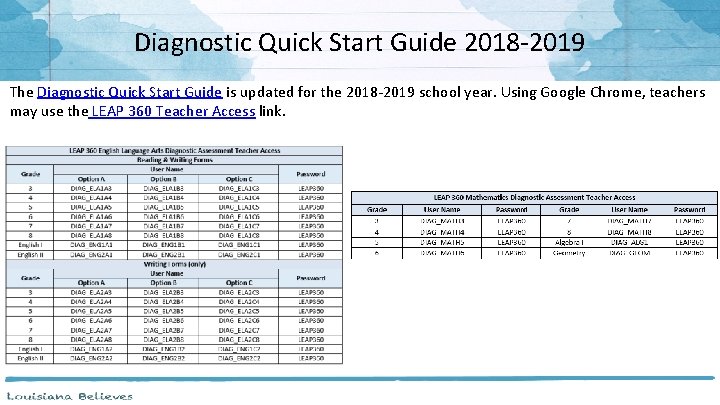
Diagnostic Quick Start Guide 2018‐ 2019 The Diagnostic Quick Start Guide is updated for the 2018‐ 2019 school year. Using Google Chrome, teachers may use the LEAP 360 Teacher Access link.
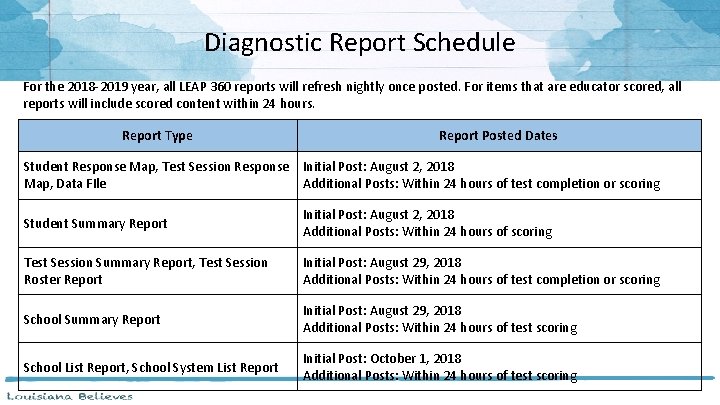
Diagnostic Report Schedule For the 2018‐ 2019 year, all LEAP 360 reports will refresh nightly once posted. For items that are educator scored, all reports will include scored content within 24 hours. Report Type Report Posted Dates Student Response Map, Test Session Response Initial Post: August 2, 2018 Map, Data FIle Additional Posts: Within 24 hours of test completion or scoring Student Summary Report Initial Post: August 2, 2018 Additional Posts: Within 24 hours of scoring Test Session Summary Report, Test Session Roster Report Initial Post: August 29, 2018 Additional Posts: Within 24 hours of test completion or scoring School Summary Report Initial Post: August 29, 2018 Additional Posts: Within 24 hours of test scoring School List Report, School System List Report Initial Post: October 1, 2018 Additional Posts: Within 24 hours of test scoring
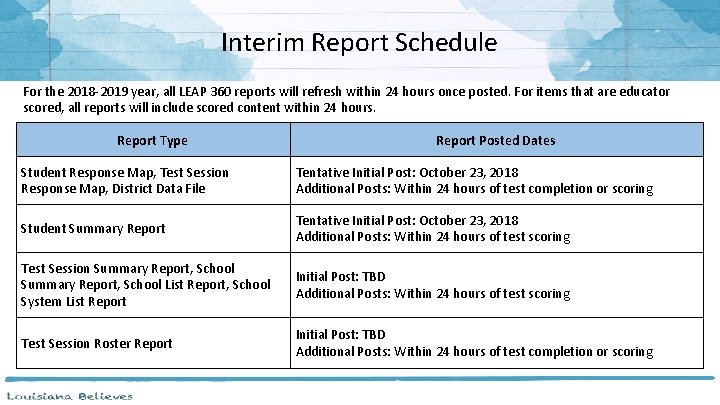
Interim Report Schedule For the 2018‐ 2019 year, all LEAP 360 reports will refresh within 24 hours once posted. For items that are educator scored, all reports will include scored content within 24 hours. Report Type Report Posted Dates Student Response Map, Test Session Response Map, District Data File Tentative Initial Post: October 23, 2018 Additional Posts: Within 24 hours of test completion or scoring Student Summary Report Tentative Initial Post: October 23, 2018 Additional Posts: Within 24 hours of test scoring Test Session Summary Report, School List Report, School System List Report Initial Post: TBD Additional Posts: Within 24 hours of test scoring Test Session Roster Report Initial Post: TBD Additional Posts: Within 24 hours of test completion or scoring
LEAP 360 Resources The following resources are available to help teachers understand, access, and use the LEAP 360 assessment tools: ● LEAP 360 webpage ● Diagnostic Quick Start Guide ● A Teacher’s Guide to LEAP 360 ● A District’s Guide to LEAP 360 ● Parent Guide to LEAP 360 ● Teacher Study Guides (available in e. DIRECT) ● Webinars and Mini‐trainings available in A District’s Guide to LEAP 360 91
LEAP 360 Teacher Webinars To kick‐off the second year of LEAP 360, two webinars are being offered for teachers. The webinars will focus on LEAP 360 enhancements and updates for 2018‐ 2019. The webinars will be held Monday, August 13 and Wednesday, August 15 from 3: 30‐ 4: 30 PM. Webinar Information: Link: https: //ldoe. zoom. us/j/144986320 Phone: 1 669 900 6833 Meeting ID: 144 986 320 92

Assessment Updates
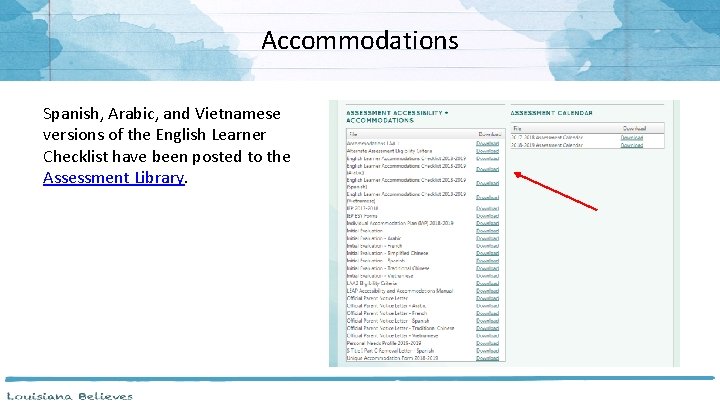
Accommodations Spanish, Arabic, and Vietnamese versions of the English Learner Checklist have been posted to the Assessment Library.
IEP Reminder Starting August 2, 2018, SER will have an “Evaluation Results” feature. This will be added to the evaluation screen in SER. This will capture cognitive and adaptive assessment results from a student’s evaluation. • For students with disabilities who will participate in the LEAP Connect alternate assessment in Spring 2019, the LEA MUST add cognitive and adaptive assessment data to the evaluation in SER before January 4, 2019. • For all other students with disabilities who take LEAP 2025, the LEA must add this information during the student’s next evaluation. • LEA’s will receive this information from LDOE through the IDEA Count Validation Reports (available via DM FTP in DATA VALIDATION folder).
New for Students with Calculator Accommodation Students with the documented (IEP, IAP) accommodation for calculator use will now have access to the appropriate grade‐level calculator in the online test platform in non‐calculator sessions. It is still recommended that these students be provided with a handheld calculator as this is likely the calculator they are most familiar with.
Innovative Assessment Pilot The Department’s proposal to pilot an innovative English assessment is the first to be approved by the U. S. Department of Education. Key features of Louisiana's innovative assessment pilot include: ● Combining English and social studies tests to streamline state testing; ● Measuring what students have learned via passages from books that students have read; ● Assessing students through several brief assessments throughout the year; and ● Preserving local control as to which books and which assessments their students will take. The five initial partner school systems include Ouachita Parish, St. John the Baptist Parish, and St. Tammany Parish, as well as KIPP Public Charter Schools and Collegiate Academies in Orleans Parish. 97
Assessment Calendar The 2018‐ 2019 Assessment Calendar has been updated to include: • • • National and International assessments AP and CLEP dates Work. Keys window correction The 2018‐ 2019 Assessment Calendar is posted in the Assessment Library.
Data Sharing Agreements Pursuant to R. S. 17: 3914, school systems must have a contract or data sharing agreement in place with private vendors that deliver services in order to share personally identifiable student data. View updated 2018‐ 2019 MOUs and addenda HERE. To verify which agreements school systems have already opted into, please review the tracking chart HERE. The tracking chart is updated weekly as additional addenda are submitted to LDOE. Please email ldedata@la. gov with questions.
Data Systems: 2018‐ 19 School Year Forward to Sponsor Site Coordinators: The Sponsor Site System (SPS) is open for finalizing online updates to district and school information including Administrators Name, Website Links, Clubs/Sports, and Dropoff/Pickup times. Other requests for updates/changes to district and school information must be made via electronic forms that must be reviewed/approved by the Department. SPS data is used in the monthly refresh of School Finder (in the ABOUT OUR SCHOOL section) The deadline for certifying Sponsor and Site information is September 28. Please email systemsupport@la. gov with questions.
Data Systems: 2018‐ 19 School Year Forward to Data Managers: Through Friday, September 28, school systems should continue uploading their initial 2018‐ 19 student enrollment information to the Louisiana Secure ID System (e. Scholar). ‐ All students expected to be enrolled at the beginning of the 2018‐ 19 school year should be submitted to e. Scholar for a Louisiana Secure ID (LASID) match. ‐ After this period, districts should only send records of active students that are either new to the district or have a change in information. e. Scholar training will be held at 1: 00 pm on Thursday, August 2 with a repeat session on Tuesday, August 21. Webinar Link: https: //ldoe. zoom. us/j/807129966 Phone: 1‐ 408‐ 638‐ 0968 Meeting ID: 807 129 966 Email systemsupport@la. gov with questions.
Data Systems: 2018‐ 19 School Year Forward to Data Managers: The Data Coordinator’s monthly webinar will be held on Thursday, August 9. This webinar will include a review of data collection timelines, system data reporting instructions, and other data related information. Webinar Link: https: //ldoe. zoom. us/j/976397929 Phone: 1‐ 408‐ 638‐ 0968 Meeting ID: 976 397 929 Email systemsupport@la. gov with questions.

Support and Communication
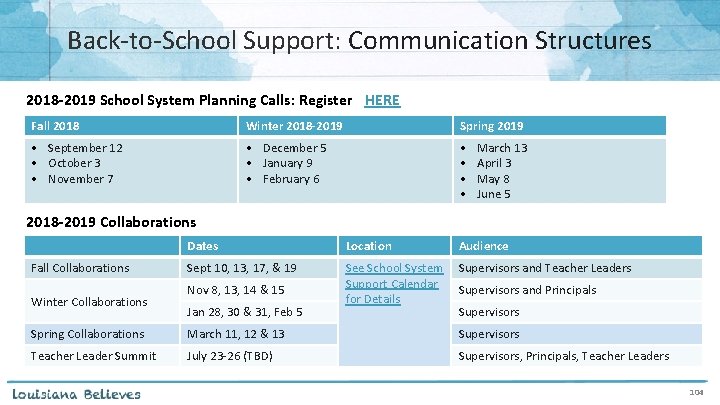
Back‐to‐School Support: Communication Structures 2018 -2019 School System Planning Calls: Register HERE Fall 2018 Winter 2018 -2019 Spring 2019 • September 12 • October 3 • November 7 • December 5 • January 9 • February 6 • • March 13 April 3 May 8 June 5 2018 -2019 Collaborations Fall Collaborations Winter Collaborations Dates Location Audience Sept 10, 13, 17, & 19 See School System Support Calendar for Details Supervisors and Teacher Leaders Nov 8, 13, 14 & 15 Jan 28, 30 & 31, Feb 5 Supervisors and Principals Supervisors Spring Collaborations March 11, 12 & 13 Supervisors Teacher Leader Summit July 23‐ 26 (TBD) Supervisors, Principals, Teacher Leaders 104
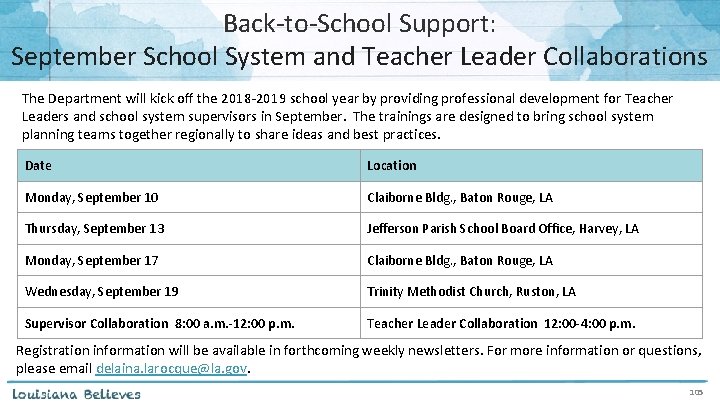
Back‐to‐School Support: September School System and Teacher Leader Collaborations The Department will kick off the 2018‐ 2019 school year by providing professional development for Teacher Leaders and school system supervisors in September. The trainings are designed to bring school system planning teams together regionally to share ideas and best practices. Date Location Monday, September 10 Claiborne Bldg. , Baton Rouge, LA Thursday, September 13 Jefferson Parish School Board Office, Harvey, LA Monday, September 17 Claiborne Bldg. , Baton Rouge, LA Wednesday, September 19 Trinity Methodist Church, Ruston, LA Supervisor Collaboration 8: 00 a. m. -12: 00 p. m. Teacher Leader Collaboration 12: 00 -4: 00 p. m. Registration information will be available in forthcoming weekly newsletters. For more information or questions, please email delaina. larocque@la. gov. 105
DTC and Accountability Contact Update If during the academic year the person appointed as district test coordinator changes, the district superintendent must notify the LDOE. The notification must be in writing and must be submitted within 15 days of the change in appointment. Due to the secure nature of the data accessed by accountability contacts and district test coordinators, changes have been made to the submission process for any updates to DTC and accountability contacts: ● ● Superintendent signature now required The DTC and Accountability Contact Update Form must be submitted from the superintendent’s district email account. The revised DTC and Accountability Contact Update Form is located under the Resources + Forms section in the Assessment Library.
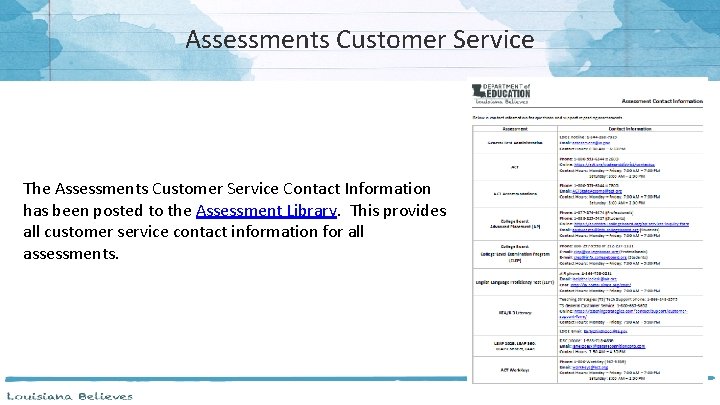
Assessments Customer Service The Assessments Customer Service Contact Information has been posted to the Assessment Library. This provides all customer service contact information for all assessments.
District Support The Assessment team offers multiple avenues of support to districts, schools, and teachers seeking information or assistance about assessment administration and accountability. Weekly Newsletters Assessment and accountability information and deadlines are released each week in the district newsletter. Weekly Assessment & Accountability Calls Each Tuesday at 1: 00 PM these webinars are held to provide training, updates, and important information to DTCs and Accountability Contacts. Assessment Library and Accountability Library The Assessment Library contains resources for DTCs including the Assessment Schedule and the Assessment and Accountability Month‐by‐Month Checklist. The Accountability Library contains resources for accountability contacts including the School Performance Score (SPS) calculators as well as information on data certification and federal accountability.
District Support Monthly Educational Technology Calls Each month a webinar is held for district technology personnel to provide training, updates, and important information related to technology readiness and digital literacy. Assessment@ All stakeholders are encouraged to email assessment and accountability questions and/or concerns to assessment@la. gov. Assessment Hotline For immediate assistance regarding assessment and accountability, district‐level staff may call the Assessment Hotline at 1‐ 844‐ 268‐ 7320. Ed. Tech@ All stakeholders are encouraged to email technology readiness questions and/or concerns to edtech@la. gov.
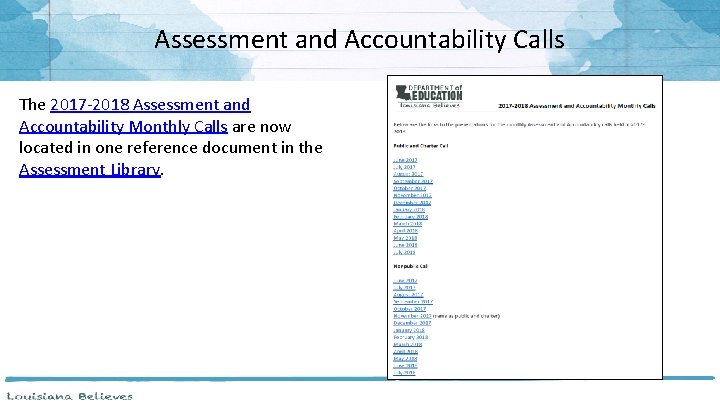
Assessment and Accountability Calls The 2017‐ 2018 Assessment and Accountability Monthly Calls are now located in one reference document in the Assessment Library.

Next Steps
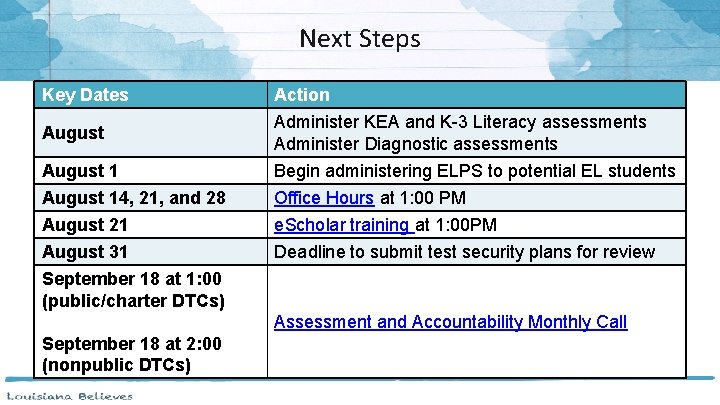
Next Steps Key Dates Action August Administer KEA and K-3 Literacy assessments Administer Diagnostic assessments August 1 Begin administering ELPS to potential EL students August 14, 21, and 28 Office Hours at 1: 00 PM August 21 e. Scholar training at 1: 00 PM August 31 Deadline to submit test security plans for review September 18 at 1: 00 (public/charter DTCs) Assessment and Accountability Monthly Call September 18 at 2: 00 (nonpublic DTCs)
- Slides: 112