
Assembly Language for x 86 Processors 6 th
Assembly Language for x 86 Processors 6 th Edition Kip Irvine Chapter 2: x 86 Processor Architecture Prepared By: Mr. Muhammad Hanif Lecturer Information Technology MBBS Campus Dadu University of Sindh
Chapter Overview • • • General Concepts IA-32 Processor Architecture IA-32 Memory Management Components of an IA-32 Microcomputer Input-Output System 2
General Concepts • • Basic microcomputer design Instruction execution cycle Reading from memory How programs run? 3
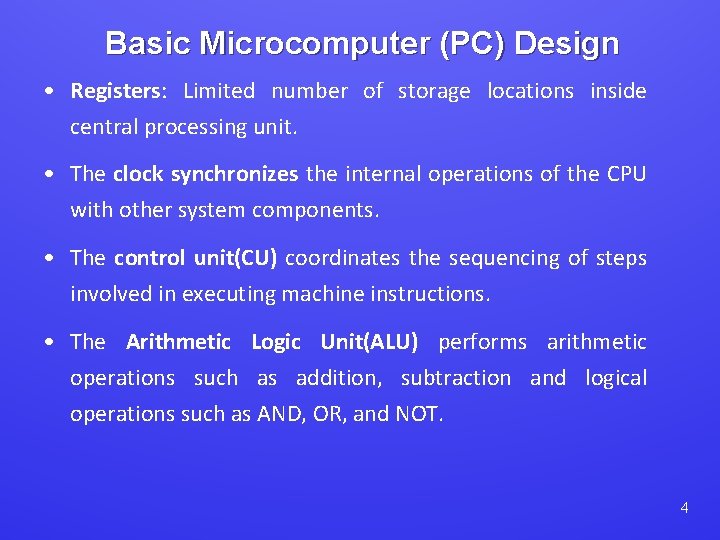
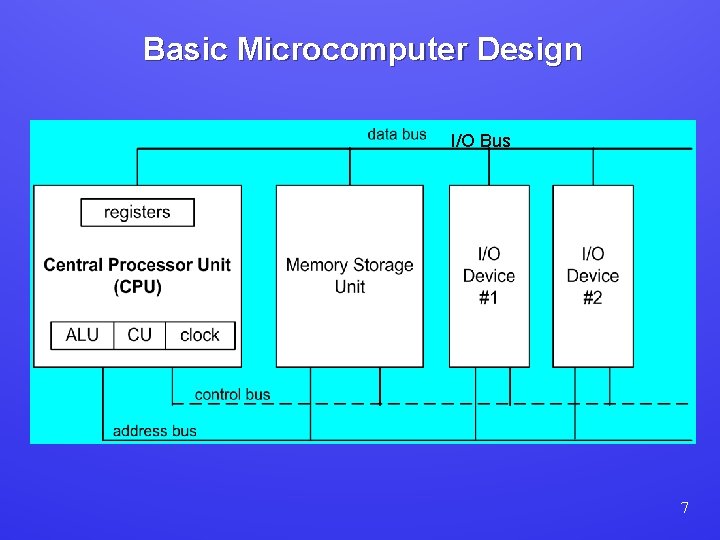
Basic Microcomputer (PC) Design • Registers: Limited number of storage locations inside central processing unit. • The clock synchronizes the internal operations of the CPU with other system components. • The control unit(CU) coordinates the sequencing of steps involved in executing machine instructions. • The Arithmetic Logic Unit(ALU) performs arithmetic operations such as addition, subtraction and logical operations such as AND, OR, and NOT. 4

Basic Microcomputer (PC) Design • CPU is attached to the rest of the computer via pins, attached to CPU socket in the computer’s motherboard. • Mostly, pins are connected to data, control and address bus. • Memory Storage: Holds the program while its running. • Storage Units: Holds data coming from/going to memory. 5
Basic Microcomputer (PC) Design • Bus: Group of parallel wires, transfers data from one part of computer to another. • A computer system has usually four types of busses: 1. Data Bus: Transfers instruction & data between CPU and memory. 2. Control Bus: Synchronize actions of all devices attached to the system bus (Data, Control and Address Bus). 3. I/O Bus: Transfers data between CPU and I/O. 4. Address Bus: Holds addresses of instructions. 6
Basic Microcomputer Design I/O Bus 7
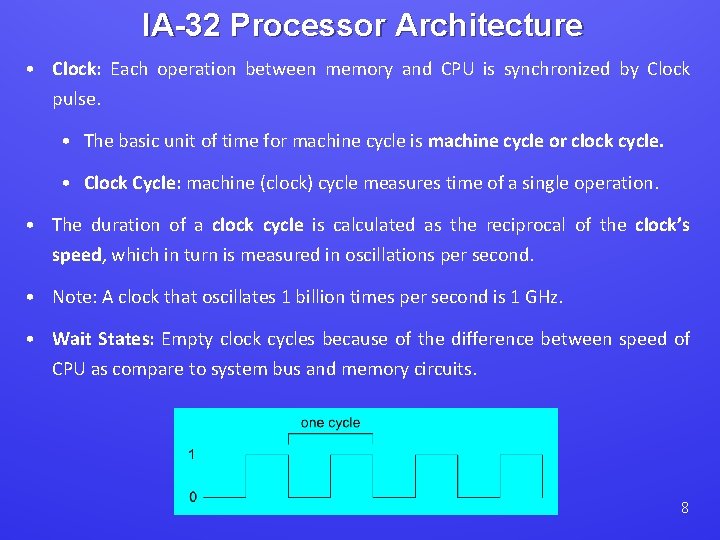
IA-32 Processor Architecture • Clock: Each operation between memory and CPU is synchronized by Clock pulse. • The basic unit of time for machine cycle is machine cycle or clock cycle. • Clock Cycle: machine (clock) cycle measures time of a single operation. • The duration of a clock cycle is calculated as the reciprocal of the clock’s speed, which in turn is measured in oscillations per second. • Note: A clock that oscillates 1 billion times per second is 1 GHz. • Wait States: Empty clock cycles because of the difference between speed of CPU as compare to system bus and memory circuits. 8
INSTRUCTION EXECUTION CYCLE 9
Instruction Execution Cycle • Execution of single machine instruction can be divided into a sequence of individual operations called machine execution cycle. • Before execution program is loaded into memory. • Instruction Pointer register contain the address of next instruction. • There are three basic operations: • 1. Fetch 2. Decode 3. Fetch Operands • Two more steps are required when the instruction uses a memory operand: • 4. Execute 5. Store Output Operand 10
Instruction Execution Cycle 1. Fetch • Control Unit fetches new instruction from instruction queue and increments the IP (Instruction Pointer). IP is also know as Program Counter. : Holds groups • Instruction Queue: Holds instructions about to be executed. 2. Decode • The control unit decode (understand) the purpose of instructions. Instructions will be sent to ALU with their operations according to decoded instructions. 3. Fetch Operands • Control Unit uses a read operation to retrieve the operand from memory and copy it into internal registers. 11
Instruction Execution Cycle 4. Execute: • ALU executes instructions using registers and send the output to named registers and / memory. ALU updates the status of usage of processor. 5. Store Output Operand: • Control Unit uses a write operation to store the data. 12
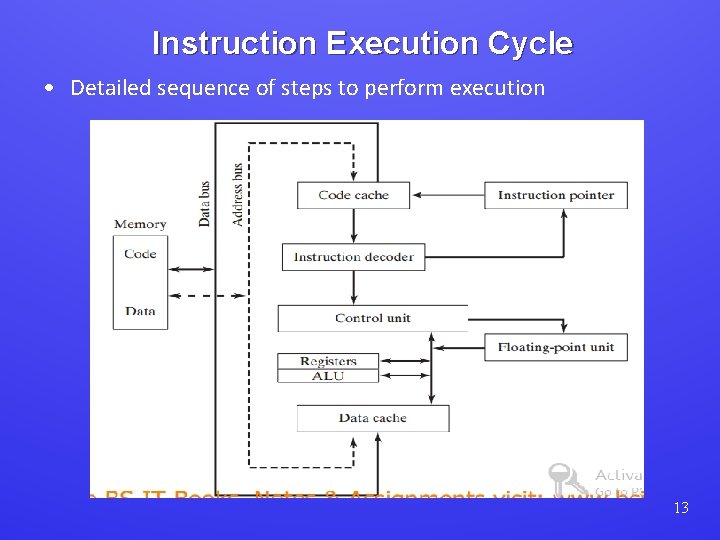
Instruction Execution Cycle • Detailed sequence of steps to perform execution 13
Instruction Execution Cycle • To read instruction from memory, an address is placed in address bus. • Memory controller places the requested code on the data bus, making the code available inside the code cache. • The Instruction Pointer (IP) value determines which instruction will be executed next. • Instruction is analyzed by the instruction decoder and appropriate signals are sent to control unit. • Control Unit coordinate with ALU and Floating Point Unit (FPU) 14

READING FROM MEMORY 15
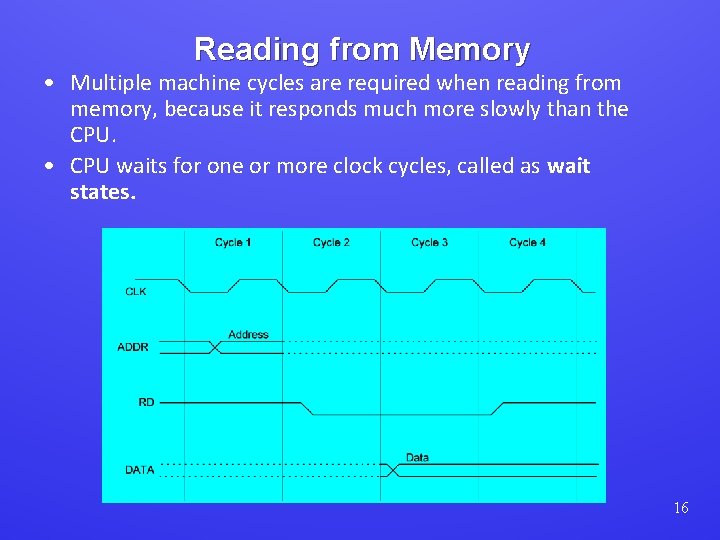
Reading from Memory • Multiple machine cycles are required when reading from memory, because it responds much more slowly than the CPU. • CPU waits for one or more clock cycles, called as wait states. 16
Reading from Memory • The steps required to render instruction or data from memory, controlled by internal clock of processor: • Cycle 01: Bits of memory operand are placed on Address Bus (ADDR). • Cycle 02: Read Line (RD) set low (0) to notify memory that a value is to be read. • Cycle 03: The CPU waits one cycle, giving time to memory for response. During this memory controller places the operand on data bus (DATA). • Read Line (RD) goes to 1, indicating that the data is on the data bus. 17
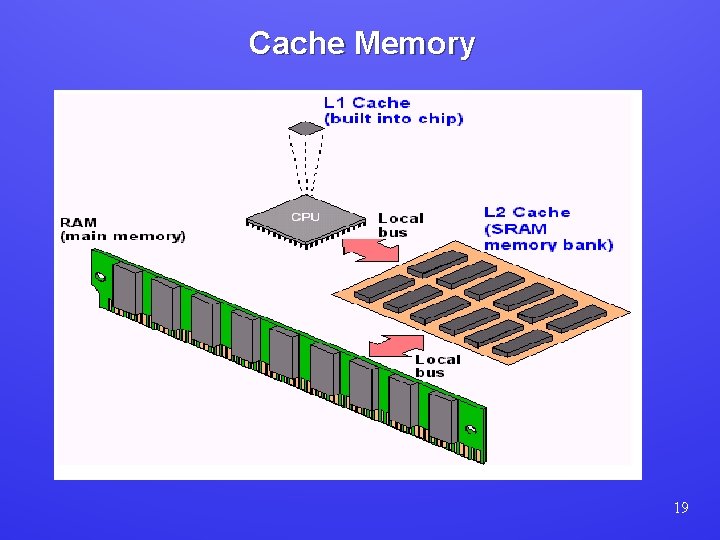
Cache Memory • High-speed expensive memory inside and outside the CPU, hold the recently used instructions and data. • Level-1 cache: inside the CPU • Level-2 cache: outside the CPU • Program make a copy of used data in cache, for re-use it firstly check in cache, then memory. • Cache hit: When data to be read is already in cache memory • Cache miss: When data to be read is not in cache memory. 18
Cache Memory 19
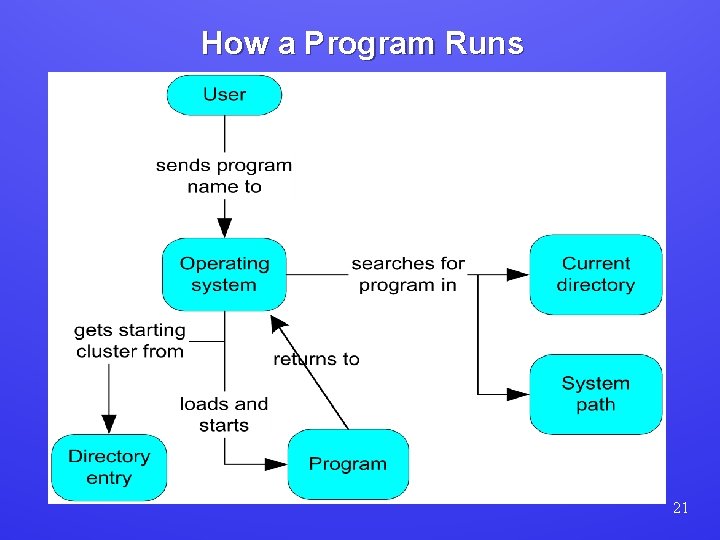
How a Program Runs • User start request for any program. • OS searches in current directory and other directories (System path), show error if file doesn’t exists. • If file found, then OS retrieves file size, location and basic information. • OS determines next available memory location and load the file in memory and additional information of file size, location etc to descriptive table. • OS begin execution of program’s first instruction, now its called as process. (Assigned with Process ID). • Process runs according to instructions and OS manages resources. • When process ends, it is removed from memory. • Note: Click on Control+Alter+Delete and see the processes. 20
How a Program Runs 21
Multitasking • Multitasking: Capability of microprocessor to run multiple tasks at a same time. • Task: A program (process) or thread of execution. • Process: Having its own memory area and may contain multiple threads. • Thread: Shares its memory with other threads belonging to the same process. • Note: CPU can execute only one task at a time. • Scheduler: (A part of OS) allocates slices of CPU time (Time slice) to each task. 22
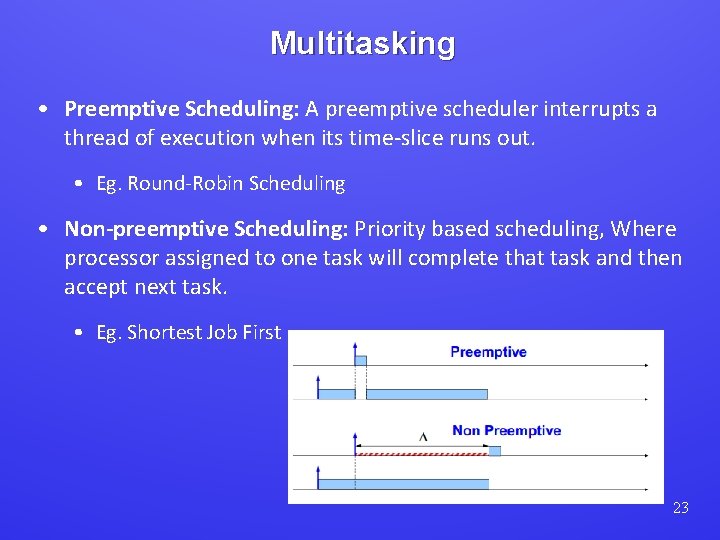
Multitasking • Preemptive Scheduling: A preemptive scheduler interrupts a thread of execution when its time-slice runs out. • Eg. Round-Robin Scheduling • Non-preemptive Scheduling: Priority based scheduling, Where processor assigned to one task will complete that task and then accept next task. • Eg. Shortest Job First 23
What's Next • • • General Concepts IA-32 Processor Architecture IA-32 Memory Management Components of an IA-32 Microcomputer Input-Output System 24
IA-32 Processor Architecture • • Modes of operation Basic execution environment Floating-point unit Intel Microprocessor history 25
Modes of Operation 1. Protected mode • It allows system software to use features such as virtual memory, paging and safe multi-tasking designed to increase an operating system's control over application software. • In which all instructions and features are available. • Program are given separate memory areas named segments, and it is restricted to only address within given segments of 640 KB. • Released in intel 8086 • Virtual-8086: (Special case of protected Mode) • Allows the execution of real mode applications, while the processor is running a protected mode operating system. • Real mode applications are incapable of running directly in protected mode. • Windows XP can execute multiple separate virtual-8086 sessions at the same time. 26
Modes of Operation 2. Real-Address Mode: • Real mode is program operation in which an instruction can address any space within the 1 megabyte of RAM. • Released with intel 80286 3. System Management Mode: • It helps OS to manage special tasks and suspends all other processes, such as power management, system security and hardware control. • It allows the processor to execute code from a separate portion of memory known as SMRAM. • This portion of memory is only accessible by the processor and not the operating system or other programs. • These functions are usually implemented by computer manufacturers who customize the processor for a particular system setup. 27 • First introduced with Intel 386 SL
- Slides: 27