
ARSITEKTUR SISTEM KOMPUTER 1 Buku Pegangan 1 Computer
ARSITEKTUR SISTEM KOMPUTER 1
Buku Pegangan 1. Computer Architecture, a Quantitative Approach, 2 nd Edition, John L. Hennessy, David A Patterson, Morgan Kaufmann Publisher Inc. , 1996 2. Computer Organization, fourth edition, V. Carl Hamacher. Zvonko G. Vranesic-Safwat G. Zaky, Mc Graw Hill International Edition, 1996 3. William Stallings, Organisasi dan Arsitektur Komputer Jilid 1 dan 1, Prenhallindo, Jakarta 4. Handout Organisasi dan Arsitektur, UGM Yogyakarta 2
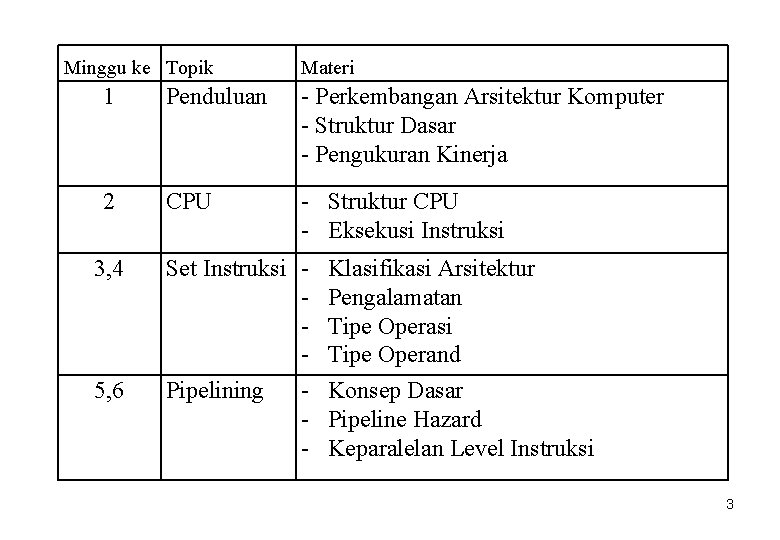
Minggu ke Topik Materi 1 Penduluan - Perkembangan Arsitektur Komputer - Struktur Dasar - Pengukuran Kinerja 2 CPU - Struktur CPU - Eksekusi Instruksi 3, 4 Set Instruksi - 5, 6 Pipelining Klasifikasi Arsitektur Pengalamatan Tipe Operasi Tipe Operand - Konsep Dasar - Pipeline Hazard - Keparalelan Level Instruksi 3
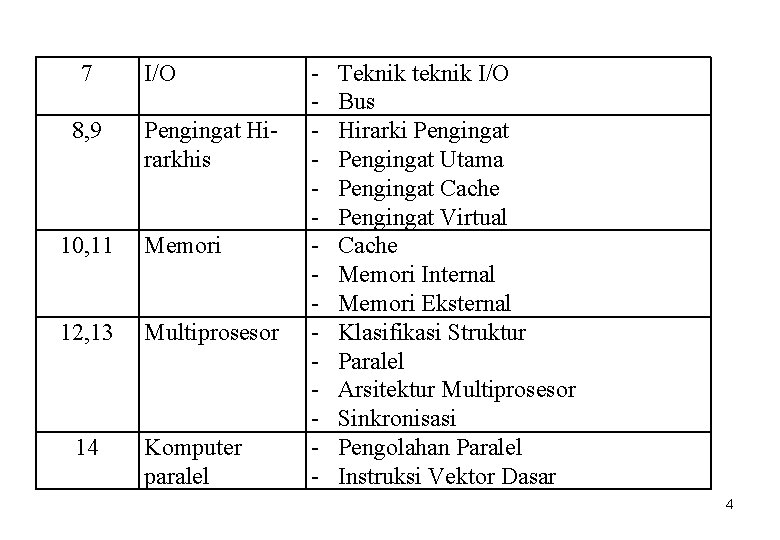
7 8, 9 I/O Pengingat Hirarkhis 10, 11 Memori 12, 13 Multiprosesor 14 Komputer paralel - Teknik teknik I/O Bus Hirarki Pengingat Utama Pengingat Cache Pengingat Virtual Cache Memori Internal Memori Eksternal Klasifikasi Struktur Paralel Arsitektur Multiprosesor Sinkronisasi Pengolahan Paralel Instruksi Vektor Dasar 4
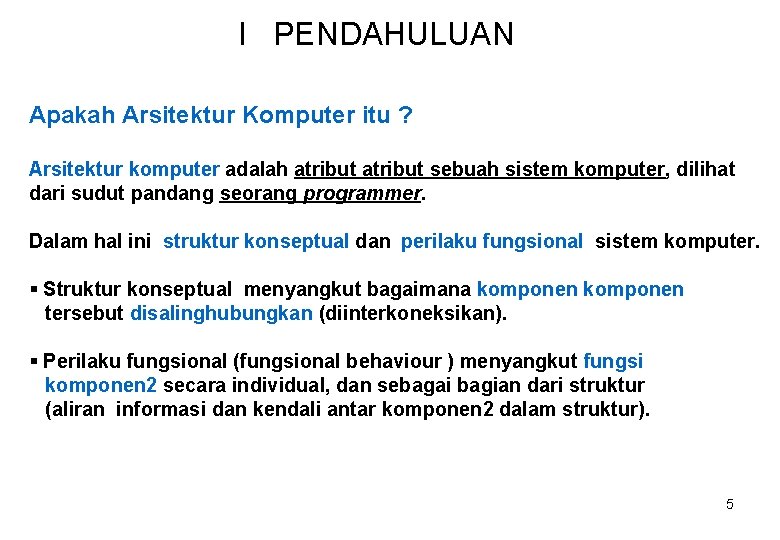
I PENDAHULUAN Apakah Arsitektur Komputer itu ? Arsitektur komputer adalah atribut sebuah sistem komputer, dilihat dari sudut pandang seorang programmer. Dalam hal ini struktur konseptual dan perilaku fungsional sistem komputer. § Struktur konseptual menyangkut bagaimana komponen tersebut disalinghubungkan (diinterkoneksikan). § Perilaku fungsional (fungsional behaviour ) menyangkut fungsi komponen 2 secara individual, dan sebagai bagian dari struktur (aliran informasi dan kendali antar komponen 2 dalam struktur). 5
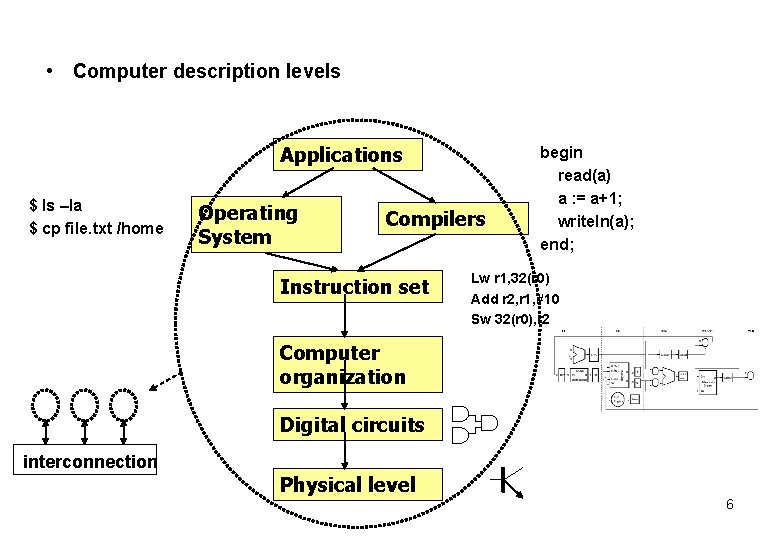
• Computer description levels Applications $ ls –la $ cp file. txt /home Operating System Compilers Instruction set begin read(a) a : = a+1; writeln(a); end; Lw r 1, 32(r 0) Add r 2, r 1, #10 Sw 32(r 0), r 2 Computer organization Digital circuits interconnection Physical level 6
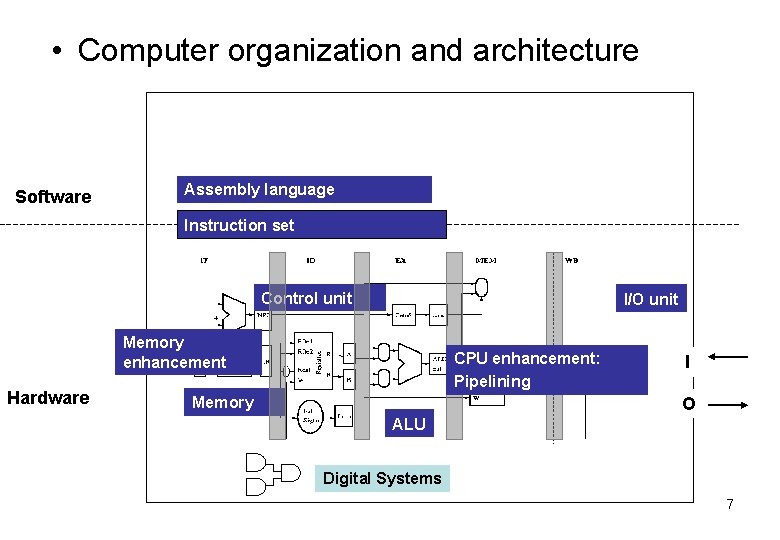
• Computer organization and architecture Software Assembly language Instruction set Control unit I/O unit Memory enhancement Hardware CPU enhancement: Pipelining Memory I O ALU Digital Systems 7
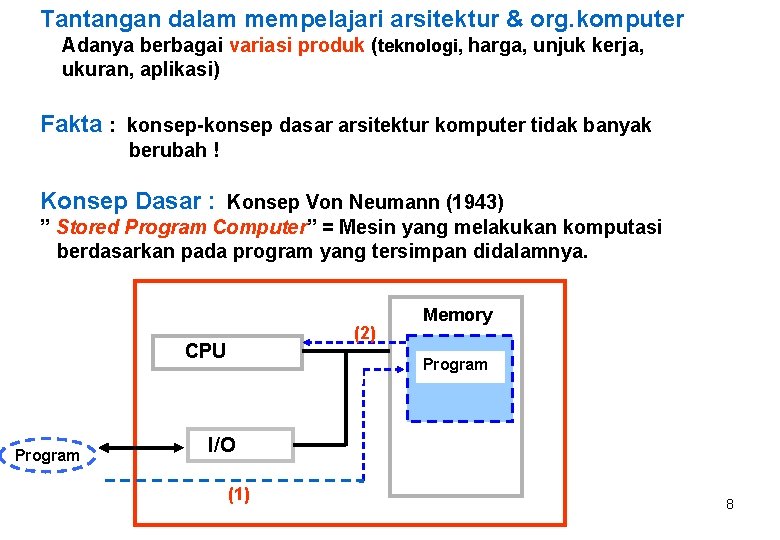
Tantangan dalam mempelajari arsitektur & org. komputer Adanya berbagai variasi produk (teknologi, harga, unjuk kerja, ukuran, aplikasi) Fakta : konsep-konsep dasar arsitektur komputer tidak banyak berubah ! Konsep Dasar : Konsep Von Neumann (1943) ” Stored Program Computer” = Mesin yang melakukan komputasi berdasarkan pada program yang tersimpan didalamnya. (2) CPU Memory Program I/O (1) 8
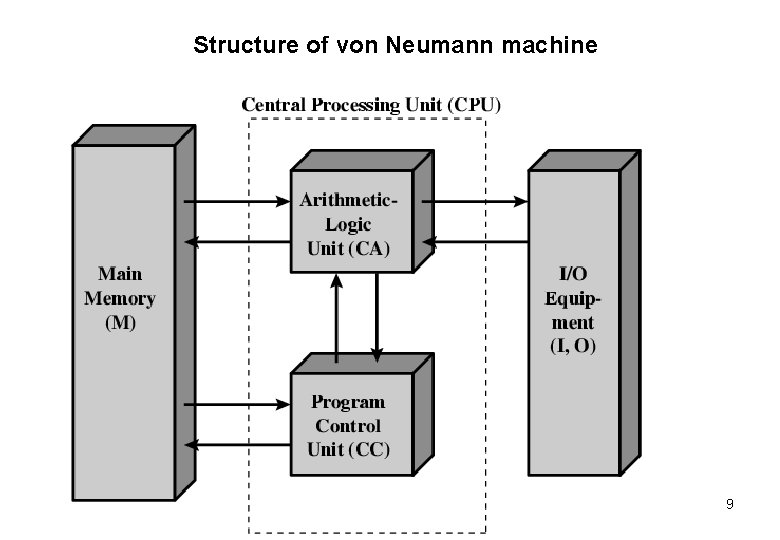
Structure of von Neumann machine 9
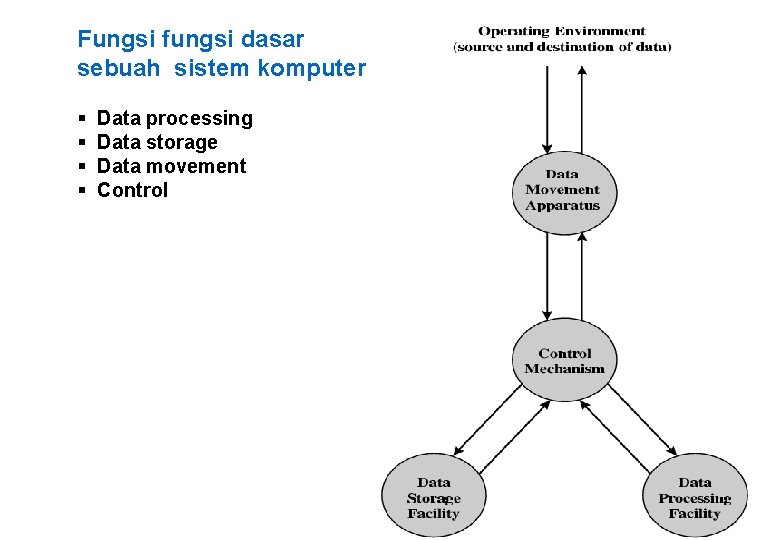
Fungsi fungsi dasar sebuah sistem komputer § § Data processing Data storage Data movement Control 10
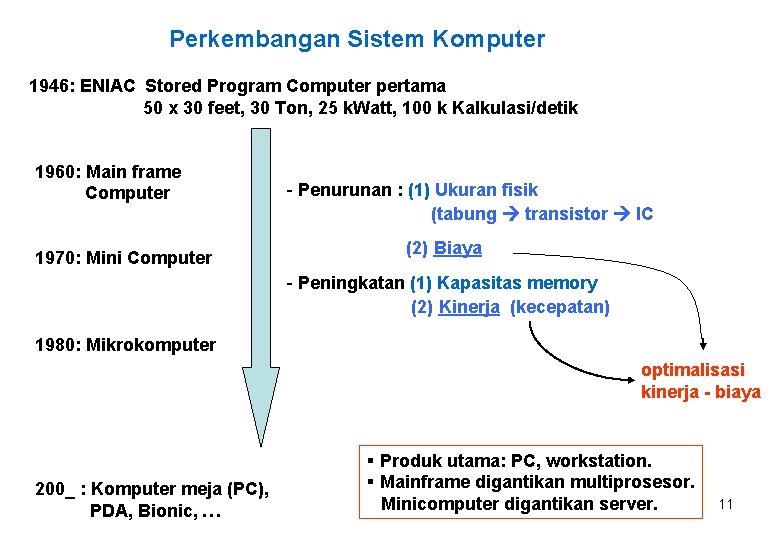
Perkembangan Sistem Komputer 1946: ENIAC Stored Program Computer pertama 50 x 30 feet, 30 Ton, 25 k. Watt, 100 k Kalkulasi/detik 1960: Main frame Computer 1970: Mini Computer - Penurunan : (1) Ukuran fisik (tabung transistor IC (2) Biaya - Peningkatan (1) Kapasitas memory (2) Kinerja (kecepatan) 1980: Mikrokomputer optimalisasi kinerja - biaya 200_ : Komputer meja (PC), PDA, Bionic, … § Produk utama: PC, workstation. § Mainframe digantikan multiprosesor. Minicomputer digantikan server. 11
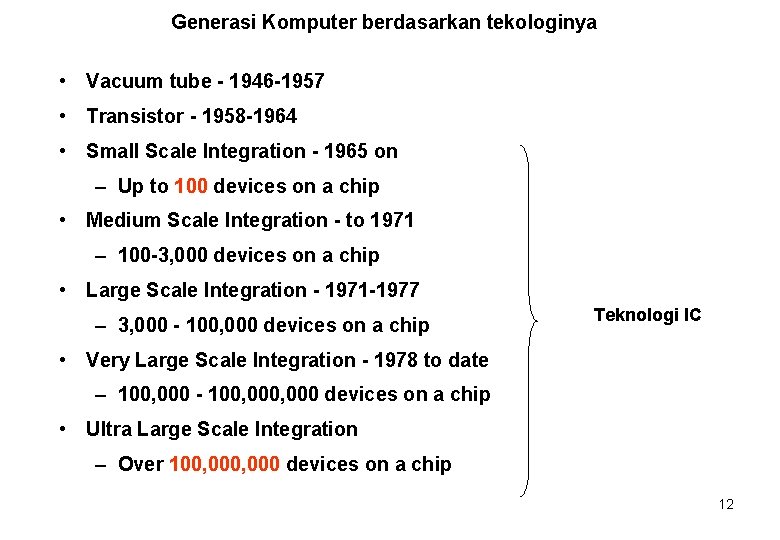
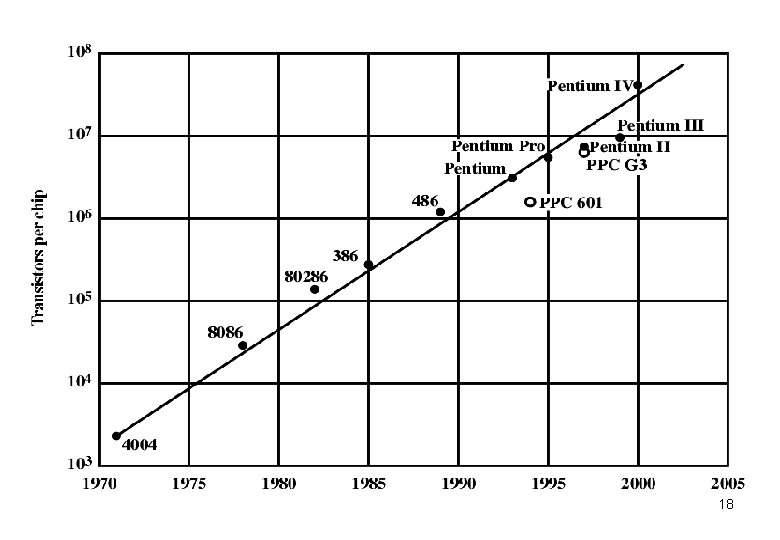
Generasi Komputer berdasarkan tekologinya • Vacuum tube - 1946 -1957 • Transistor - 1958 -1964 • Small Scale Integration - 1965 on – Up to 100 devices on a chip • Medium Scale Integration - to 1971 – 100 -3, 000 devices on a chip • Large Scale Integration - 1971 -1977 – 3, 000 - 100, 000 devices on a chip Teknologi IC • Very Large Scale Integration - 1978 to date – 100, 000 - 100, 000 devices on a chip • Ultra Large Scale Integration – Over 100, 000 devices on a chip 12
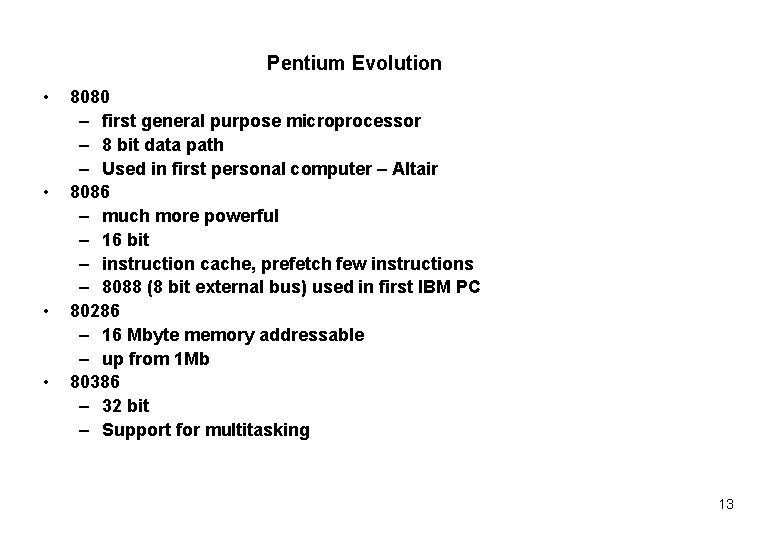
Pentium Evolution • • 8080 – first general purpose microprocessor – 8 bit data path – Used in first personal computer – Altair 8086 – much more powerful – 16 bit – instruction cache, prefetch few instructions – 8088 (8 bit external bus) used in first IBM PC 80286 – 16 Mbyte memory addressable – up from 1 Mb 80386 – 32 bit – Support for multitasking 13
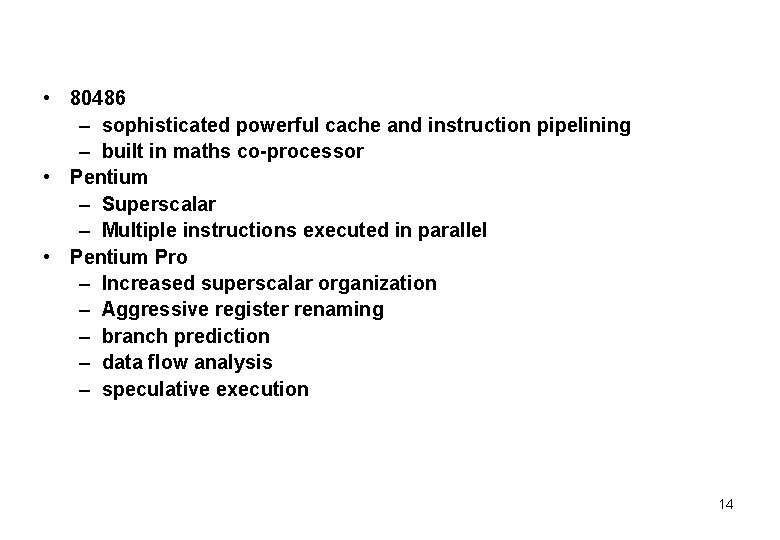
• 80486 – sophisticated powerful cache and instruction pipelining – built in maths co-processor • Pentium – Superscalar – Multiple instructions executed in parallel • Pentium Pro – Increased superscalar organization – Aggressive register renaming – branch prediction – data flow analysis – speculative execution 14
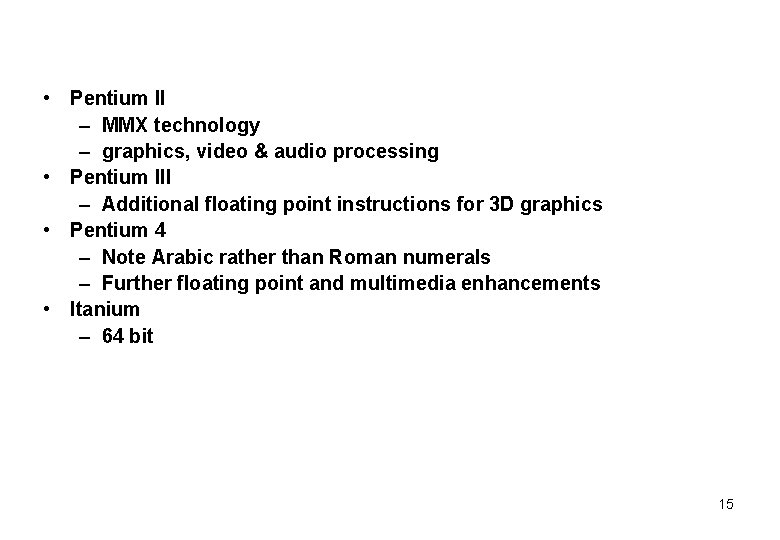
• Pentium II – MMX technology – graphics, video & audio processing • Pentium III – Additional floating point instructions for 3 D graphics • Pentium 4 – Note Arabic rather than Roman numerals – Further floating point and multimedia enhancements • Itanium – 64 bit 15
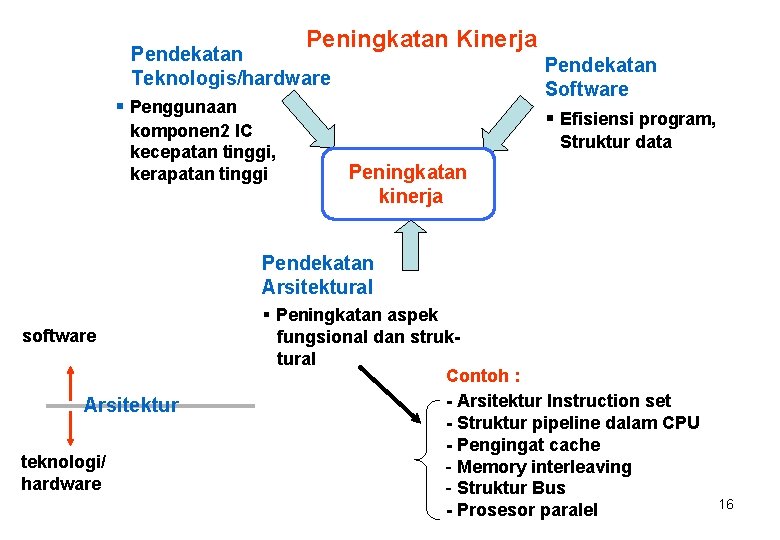
Peningkatan Kinerja Pendekatan Teknologis/hardware Pendekatan Software § Efisiensi program, § Penggunaan komponen 2 IC kecepatan tinggi, kerapatan tinggi Struktur data Peningkatan kinerja Pendekatan Arsitektural software Arsitektur teknologi/ hardware § Peningkatan aspek fungsional dan struktural Contoh : - Arsitektur Instruction set - Struktur pipeline dalam CPU - Pengingat cache - Memory interleaving - Struktur Bus - Prosesor paralel 16
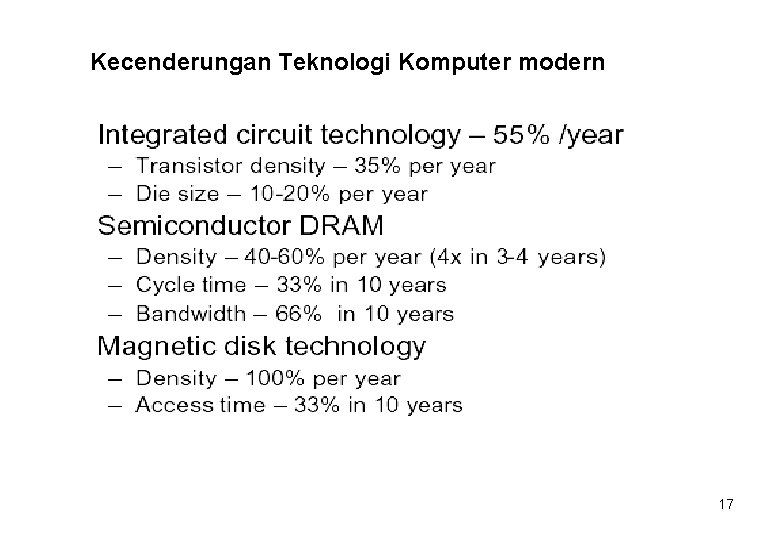
Kecenderungan Teknologi Komputer modern 17
18
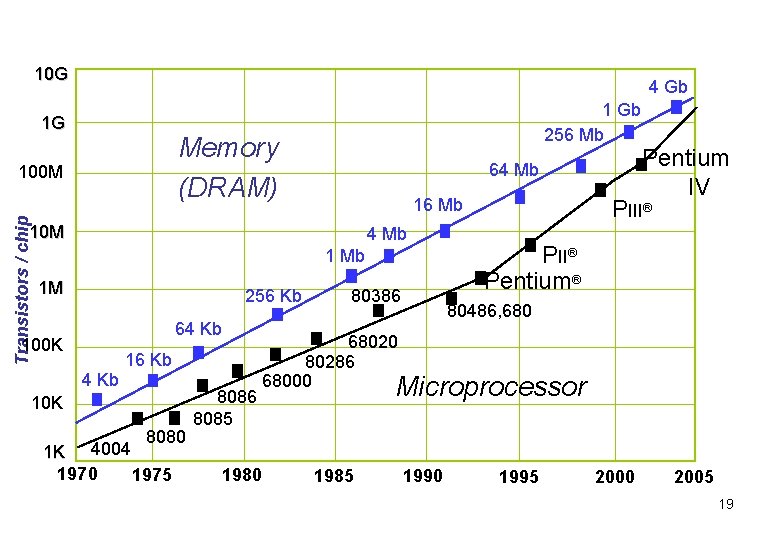
10 G 4 Gb 1 G Memory (DRAM) 100 M Transistors / chip 1 Gb 256 Mb 64 Mb 16 Mb 10 M 4 Mb 1 M 256 Kb 64 Kb 100 K 4 Kb 16 Kb 10 K 8080 4004 1 K 1970 1975 8086 8085 80386 Pentium IV PIII® Pentium® 80486, 68020 80286 68000 Microprocessor 1980 1985 1990 1995 2000 2005 19
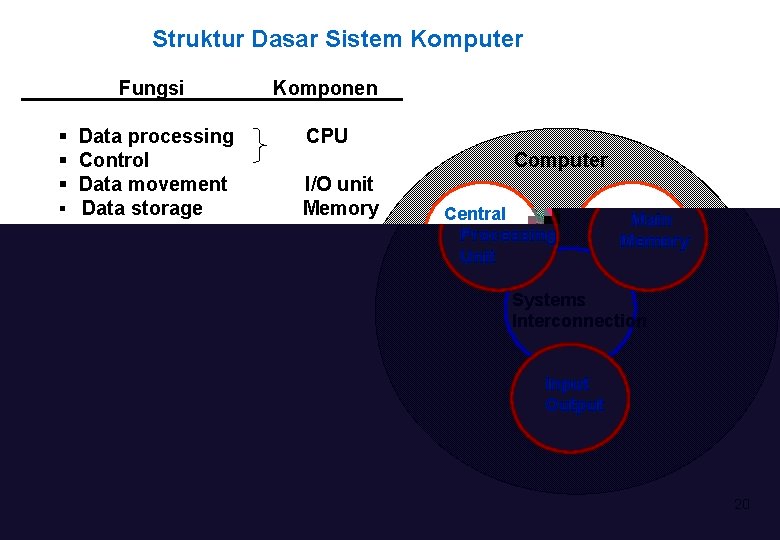
Struktur Dasar Sistem Komputer Fungsi Komponen § Data processing § Control § Data movement § Data storage CPU Computer I/O unit Memory Central Processing Unit Main Memory Systems Interconnection Input Output 20
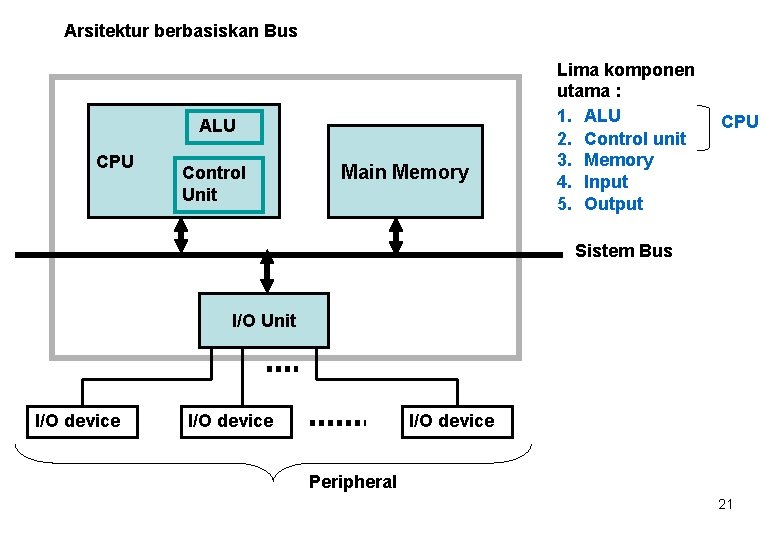
Arsitektur berbasiskan Bus ALU CPU Control Unit Main Memory Lima komponen utama : 1. ALU 2. Control unit 3. Memory 4. Input 5. Output CPU Sistem Bus I/O Unit I/O device Peripheral 21
CPU Bagian sistem komputer yang bertugas mengeksekusi program. Komponen utama CPU: (1) ALU (Arithmetic and Logic Unit) Mengerjakan operasi aritmatik dan operasi Aritmatik: add, subtract, multiply, divide, . . . Logika : AND, OR, NOT, Shift, . . . terhadap data. (2) Control unit Mengendalikan seluruh operasi didalam komputer, dengan - Menginterpretasikan instruksi (yang terdapat dalam program), - Membangkitkan sinyal kendali untuk mengendalikan aktifitas komponen sistem komputer (untuk melaksanakan/eksekusi instruksi). 22
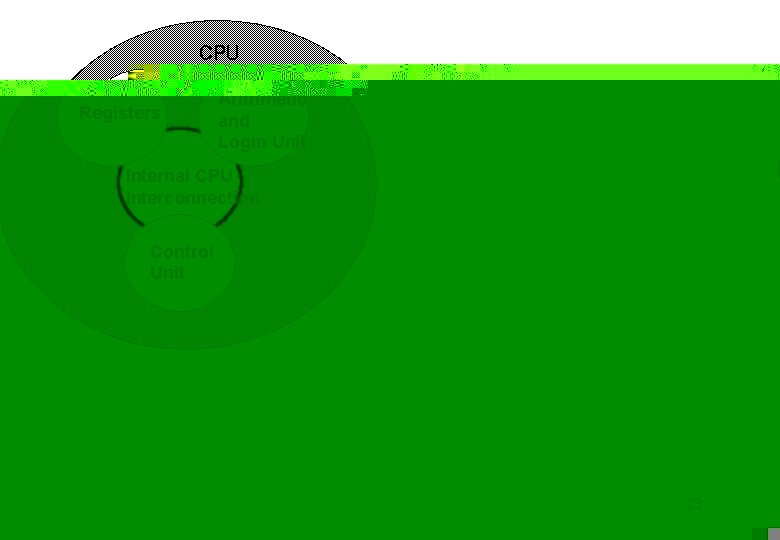
CPU Registers Arithmetic and Login Unit Internal CPU Interconnection Control Unit 23
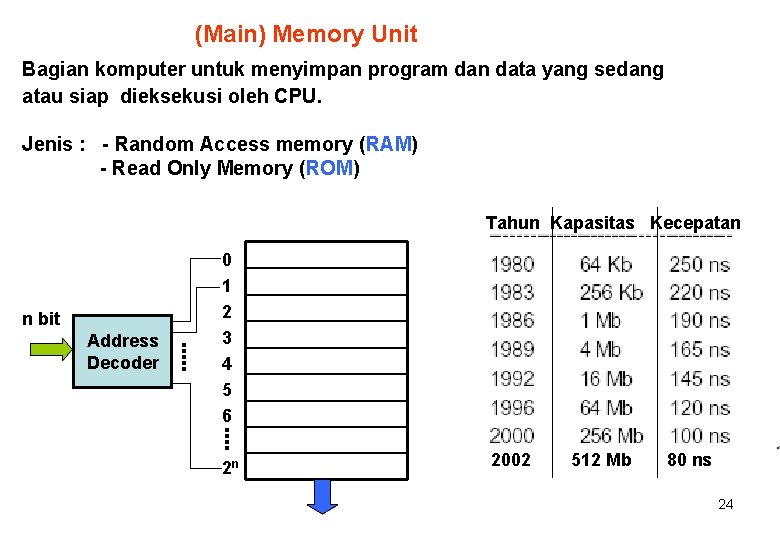
(Main) Memory Unit Bagian komputer untuk menyimpan program dan data yang sedang atau siap dieksekusi oleh CPU. Jenis : - Random Access memory (RAM) - Read Only Memory (ROM) Tahun Kapasitas Kecepatan n bit Address Decoder 0 1 2 3 4 5 6 2 n 2002 512 Mb 80 ns 24
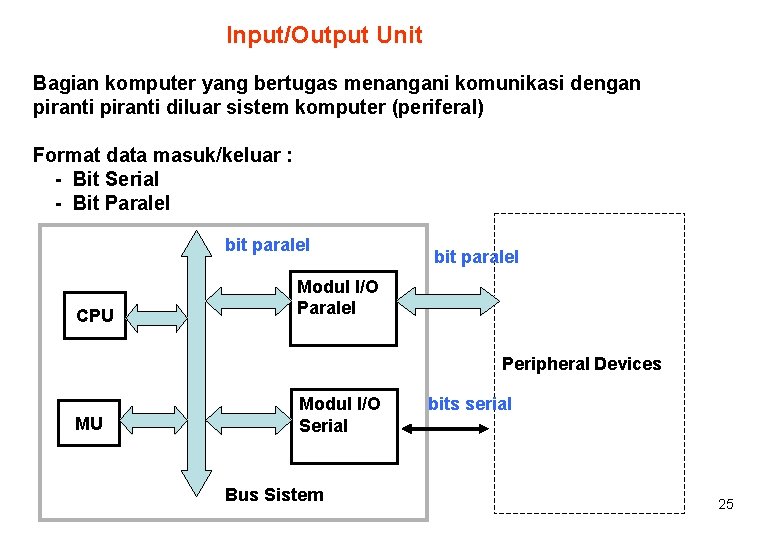
Input/Output Unit Bagian komputer yang bertugas menangani komunikasi dengan piranti diluar sistem komputer (periferal) Format data masuk/keluar : - Bit Serial - Bit Paralel bit paralel CPU bit paralel Modul I/O Paralel Peripheral Devices MU Modul I/O Serial Bus Sistem bits serial 25
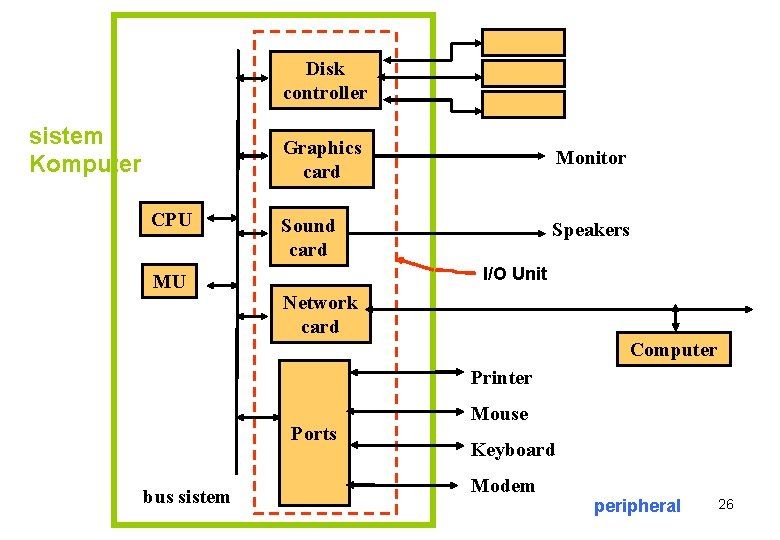
Disk controller sistem Komputer CPU MU Graphics card Monitor Sound card Speakers I/O Unit Network card Computer Printer Ports bus sistem Mouse Keyboard Modem peripheral 26
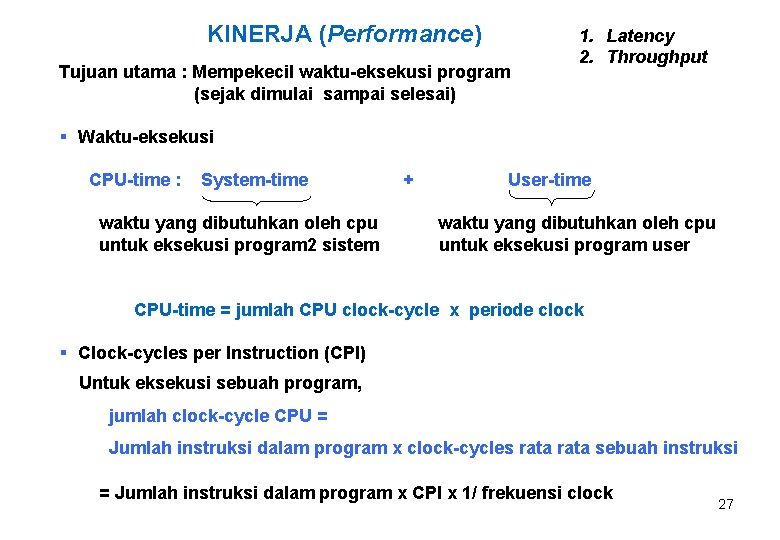
KINERJA (Performance) Tujuan utama : Mempekecil waktu-eksekusi program (sejak dimulai sampai selesai) 1. Latency 2. Throughput § Waktu-eksekusi CPU-time : System-time waktu yang dibutuhkan oleh cpu untuk eksekusi program 2 sistem + User-time waktu yang dibutuhkan oleh cpu untuk eksekusi program user CPU-time = jumlah CPU clock-cycle x periode clock § Clock-cycles per Instruction (CPI) Untuk eksekusi sebuah program, jumlah clock-cycle CPU = Jumlah instruksi dalam program x clock-cycles rata sebuah instruksi = Jumlah instruksi dalam program x CPI x 1/ frekuensi clock 27
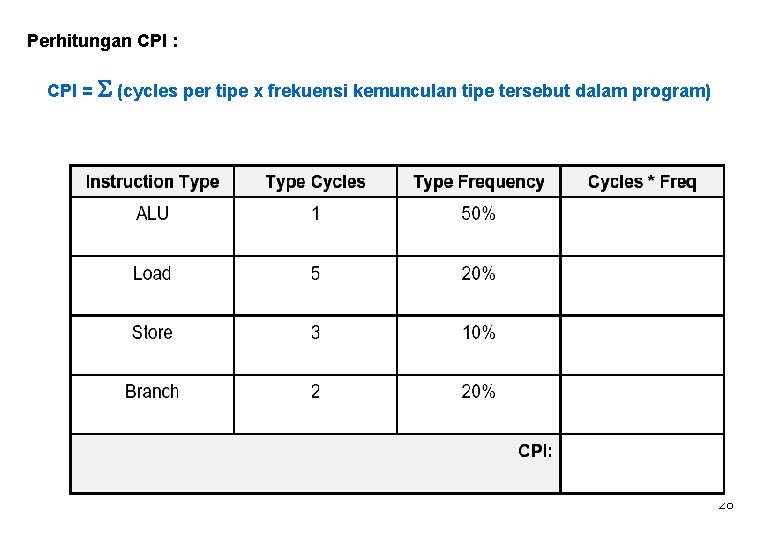
Perhitungan CPI : CPI = S (cycles per tipe x frekuensi kemunculan tipe tersebut dalam program) 28
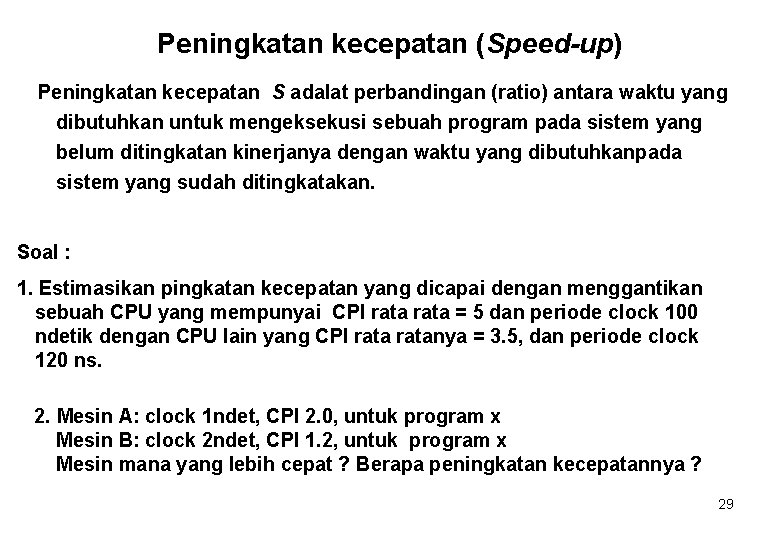
Peningkatan kecepatan (Speed-up) Peningkatan kecepatan S adalat perbandingan (ratio) antara waktu yang dibutuhkan untuk mengeksekusi sebuah program pada sistem yang belum ditingkatan kinerjanya dengan waktu yang dibutuhkanpada sistem yang sudah ditingkatakan. Soal : 1. Estimasikan pingkatan kecepatan yang dicapai dengan menggantikan sebuah CPU yang mempunyai CPI rata = 5 dan periode clock 100 ndetik dengan CPU lain yang CPI ratanya = 3. 5, dan periode clock 120 ns. 2. Mesin A: clock 1 ndet, CPI 2. 0, untuk program x Mesin B: clock 2 ndet, CPI 1. 2, untuk program x Mesin mana yang lebih cepat ? Berapa peningkatan kecepatannya ? 29
- Slides: 29