
Armour Mobile Steve Rogers Senior Account Mgr Armour
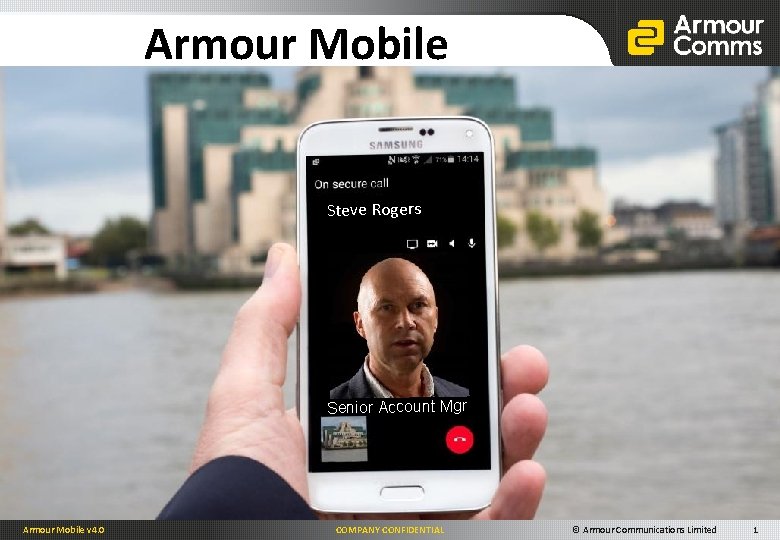
Armour Mobile Steve Rogers Senior Account Mgr Armour Mobile v 4. 0 COMPANY CONFIDENTIAL © Armour Communications Limited 1
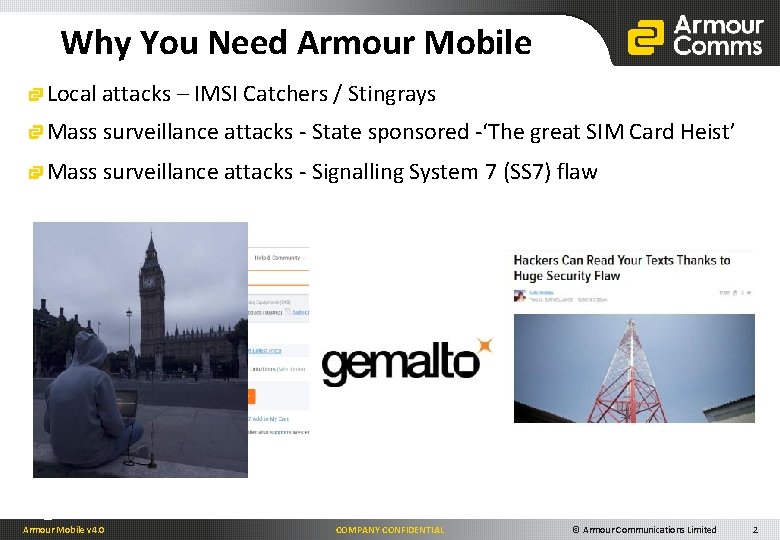
Why You Need Armour Mobile Local attacks – IMSI Catchers / Stingrays Mass surveillance attacks - State sponsored -‘The great SIM Card Heist’ Mass surveillance attacks - Signalling System 7 (SS 7) flaw Armour Mobile v 4. 0 COMPANY CONFIDENTIAL © Armour Communications Limited 2
The Armour Solution Secure Voice –An easy-to-use, downloadable software application which is interoperable across everyday smartphones and tablets, for mobile-to-mobile and mobile-to-landline communications and conferencing. Secure Messaging – Share critical information with trusted contacts. With added benefits such as visibility of available online contacts, message threads, delivery and read indication, forwarding messages to multiple recipient in your Contacts list, sending secure messages couldn’t be easier Secure Video – Secure Full Motion Video (FMV) and video conferencing allows crucial information to be shared in time -critical situations, allowing decision makers to respond quickly and efficiently. Secure Conferencing – Easily set up video or audio conferencing on the fly, for multi-user communication. Set up multiple Conference Rooms for weekly meeting and save the log in credentials Secure File Attachments – Attach images, files and voice memos in our messaging service. A quick and easy method to securely send files from your smartphone or tablet. Secure Group Messaging – Allows exchange of messages, files etc. within a group. Ideal for convenient notification of conference calls and also allows concurrent messaging during conference calls, or Message Forwarding to broadcast to a large group. Message Burn – Set how long a message will remain on a recipients device before ‘burning’ (deleting). Set ‘per message’ or for ALL messages to a particular Contact recipient Private Communities – Allows customers to set up cryptographically segregated communities in the Armour Cloud, or separate internal user groups for ‘On-Premises’ installations Armour Mobile v 4. 0 COMPANY CONFIDENTIAL © Armour Communications Limited 3
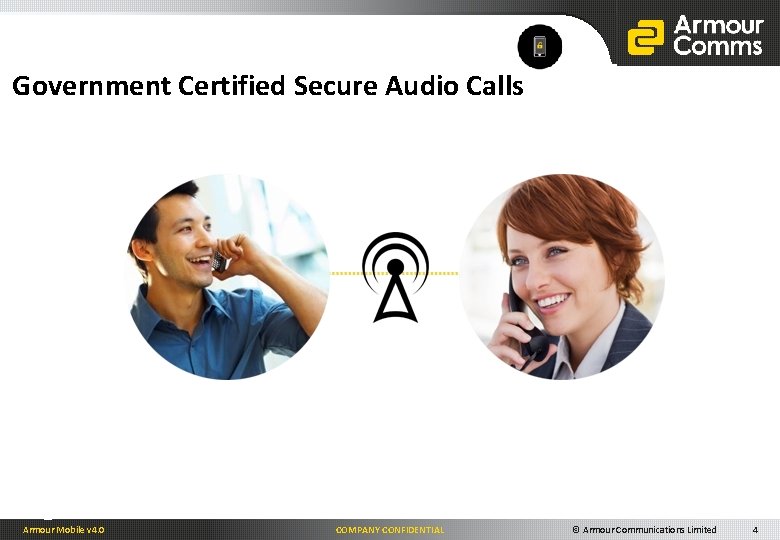
Government Certified Secure Audio Calls Armour Mobile v 4. 0 COMPANY CONFIDENTIAL © Armour Communications Limited 4
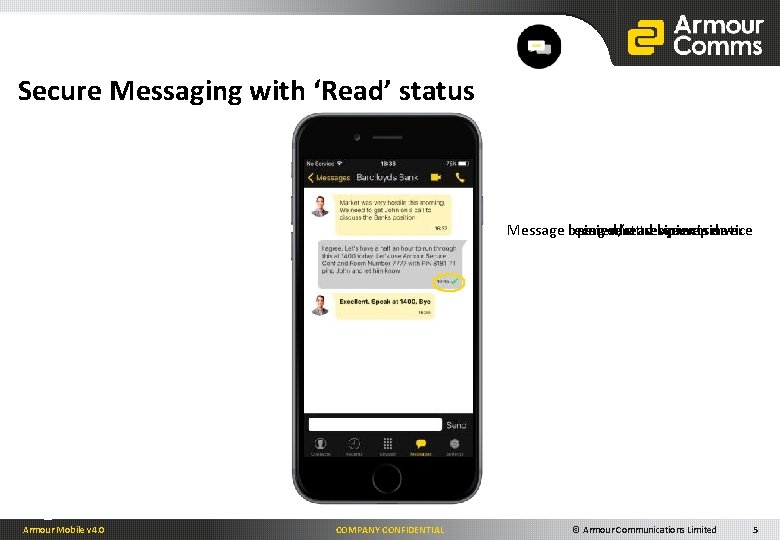
Secure Messaging with ‘Read’ status Message opened/read by recipient Message received at recipients device Message received at server Message being sent to secure server Armour Mobile v 4. 0 COMPANY CONFIDENTIAL © Armour Communications Limited 5
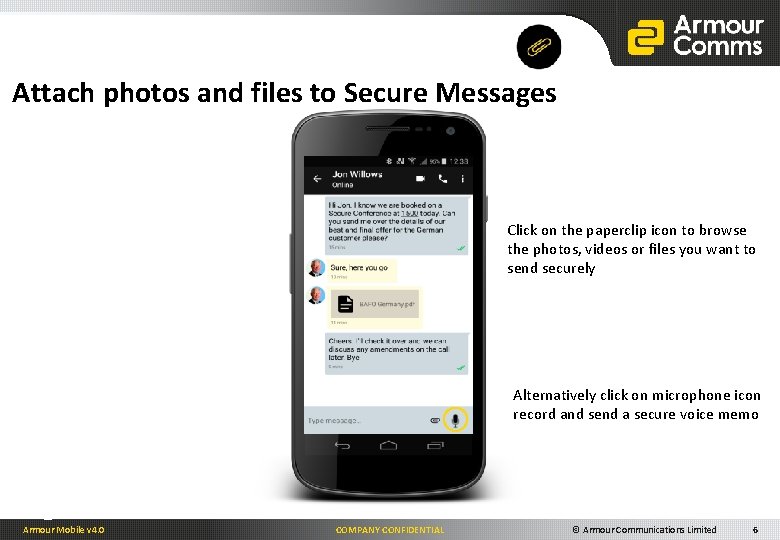
Attach photos and files to Secure Messages Click on the paperclip icon to browse the photos, videos or files you want to send securely Alternatively click on microphone icon record and send a secure voice memo Armour Mobile v 4. 0 COMPANY CONFIDENTIAL © Armour Communications Limited 6
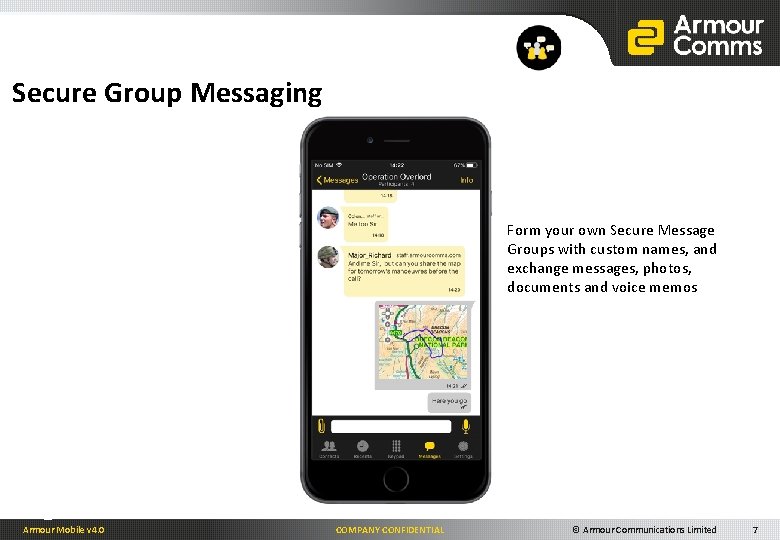
Secure Group Messaging Form your own Secure Message Groups with custom names, and exchange messages, photos, documents and voice memos Armour Mobile v 4. 0 COMPANY CONFIDENTIAL © Armour Communications Limited 7
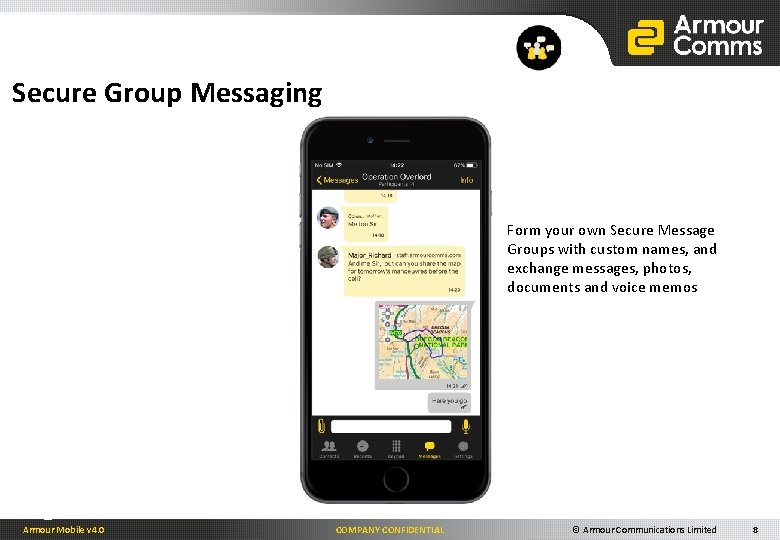
Secure Group Messaging Form your own Secure Message Groups with custom names, and exchange messages, photos, documents and voice memos Armour Mobile v 4. 0 COMPANY CONFIDENTIAL © Armour Communications Limited 8
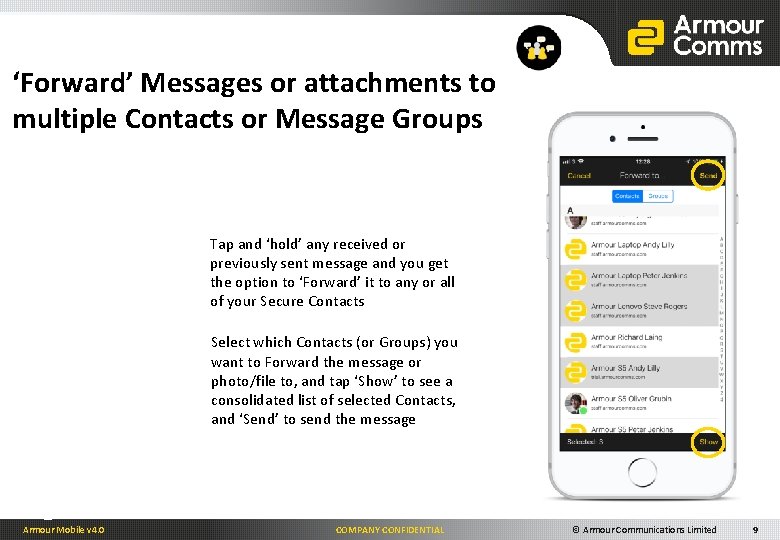
‘Forward’ Messages or attachments to multiple Contacts or Message Groups Tap and ‘hold’ any received or previously sent message and you get the option to ‘Forward’ it to any or all of your Secure Contacts Select which Contacts (or Groups) you want to Forward the message or photo/file to, and tap ‘Show’ to see a consolidated list of selected Contacts, and ‘Send’ to send the message Armour Mobile v 4. 0 COMPANY CONFIDENTIAL © Armour Communications Limited 9
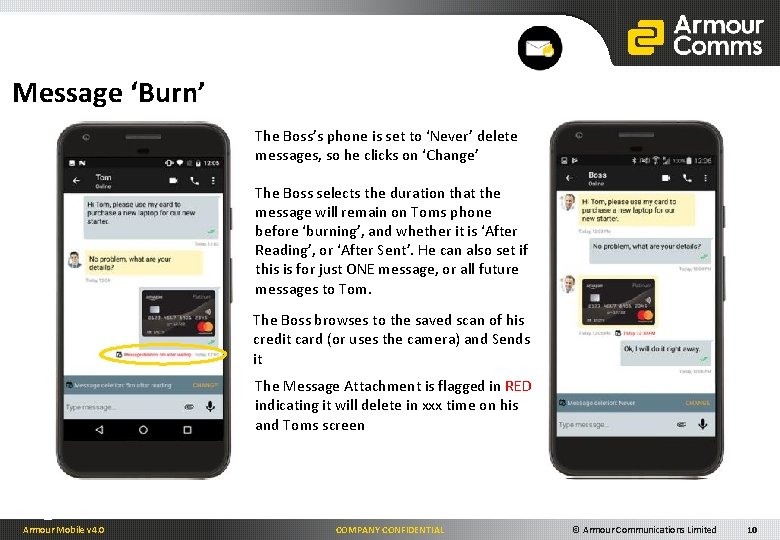
Message ‘Burn’ The Boss’s phone is set to ‘Never’ delete messages, so he clicks on ‘Change’ The Boss selects the duration that the message will remain on Toms phone before ‘burning’, and whether it is ‘After Reading’, or ‘After Sent’. He can also set if this is for just ONE message, or all future messages to Tom. The Boss browses to the saved scan of his credit card (or uses the camera) and Sends it The Message Attachment is flagged in RED indicating it will delete in xxx time on his and Toms screen Armour Mobile v 4. 0 COMPANY CONFIDENTIAL © Armour Communications Limited 10
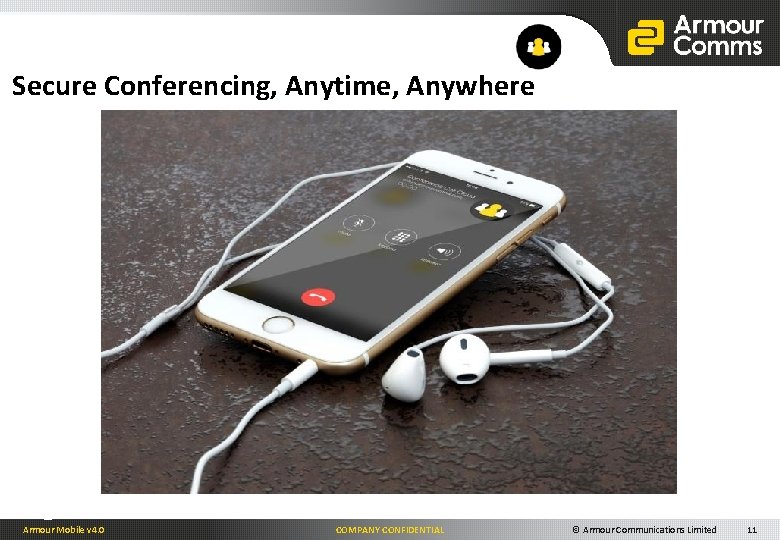
Secure Conferencing, Anytime, Anywhere Armour Mobile v 4. 0 COMPANY CONFIDENTIAL © Armour Communications Limited 11
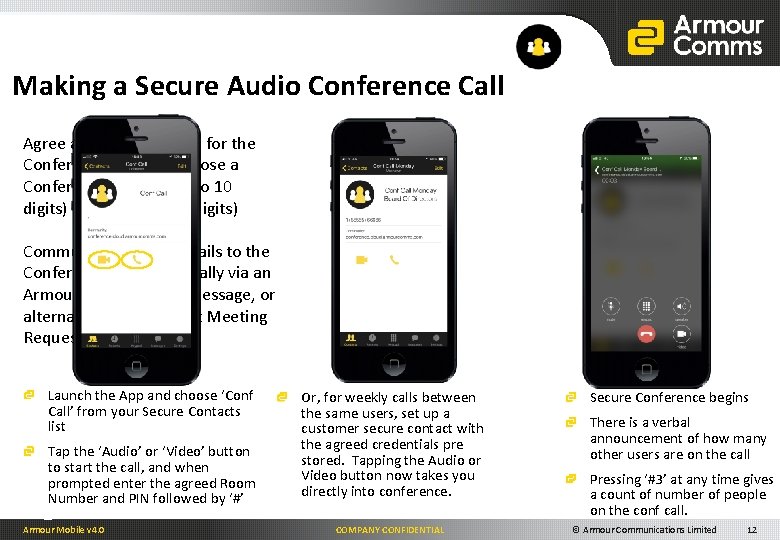
Making a Secure Audio Conference Call Agree a convenient time for the Conference Call and choose a Conference Number (4 to 10 digits) and PIN (4 to 10 digits) Communicate these details to the Conference invitees, ideally via an Armour Secure Group Message, or alternatively via Outlook Meeting Request or email. Launch the App and choose ‘Conf Call’ from your Secure Contacts list Tap the ‘Audio’ or ‘Video’ button to start the call, and when prompted enter the agreed Room Number and PIN followed by ‘#’ Armour Mobile v 4. 0 Or, for weekly calls between the same users, set up a customer secure contact with the agreed credentials pre stored. Tapping the Audio or Video button now takes you directly into conference. COMPANY CONFIDENTIAL Secure Conference begins There is a verbal announcement of how many other users are on the call Pressing ‘#3’ at any time gives a count of number of people on the conf call. © Armour Communications Limited 12
Platform / Client Support Armour Mobile Armour Desktop Armour Mobile v 4. 0 COMPANY CONFIDENTIAL © Armour Communications Limited 13
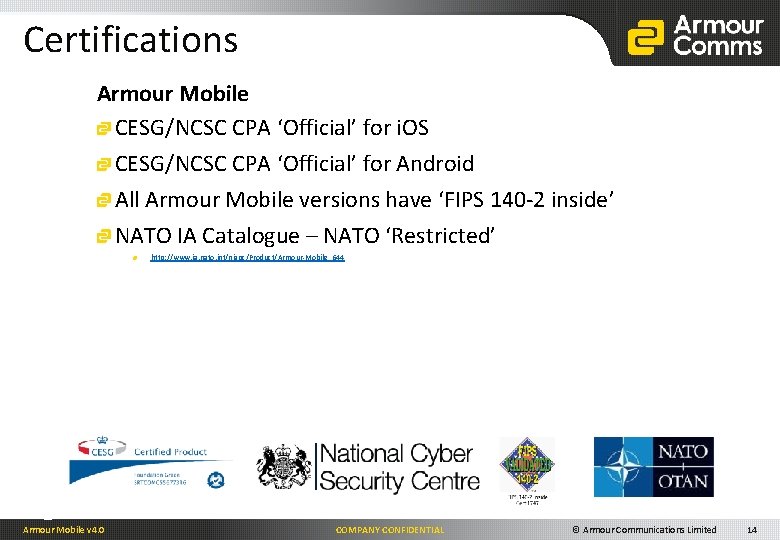
Certifications Armour Mobile CESG/NCSC CPA ‘Official’ for i. OS CESG/NCSC CPA ‘Official’ for Android All Armour Mobile versions have ‘FIPS 140 -2 inside’ NATO IA Catalogue – NATO ‘Restricted’ http: //www. ia. nato. int/niapc/Product/Armour-Mobile_644 Armour Mobile v 4. 0 COMPANY CONFIDENTIAL © Armour Communications Limited 14
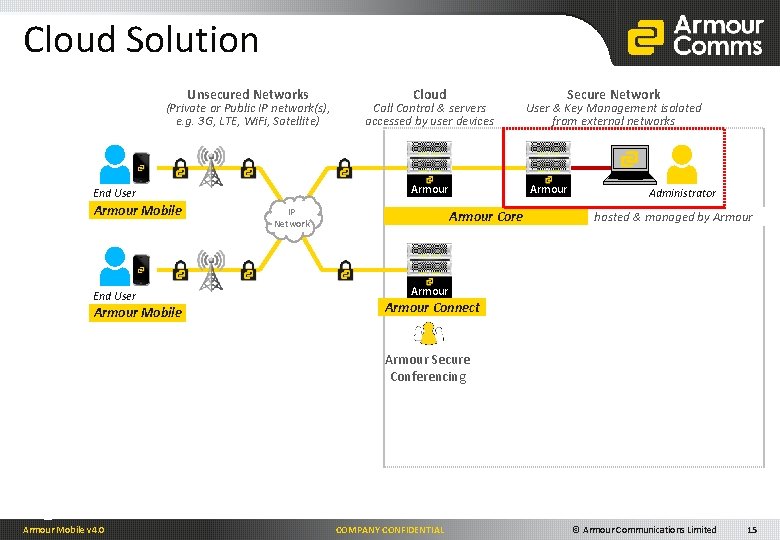
Cloud Solution Unsecured Networks (Private or Public IP network(s), e. g. 3 G, LTE, Wi. Fi, Satellite) End User Armour Mobile Call Control & servers accessed by user devices Armour End User Armour Mobile Cloud IP Network Secure Network User & Key Management isolated from external networks Armour Core Administrator hosted & managed by Armour Connect Armour Secure Conferencing Armour Mobile v 4. 0 COMPANY CONFIDENTIAL © Armour Communications Limited 15
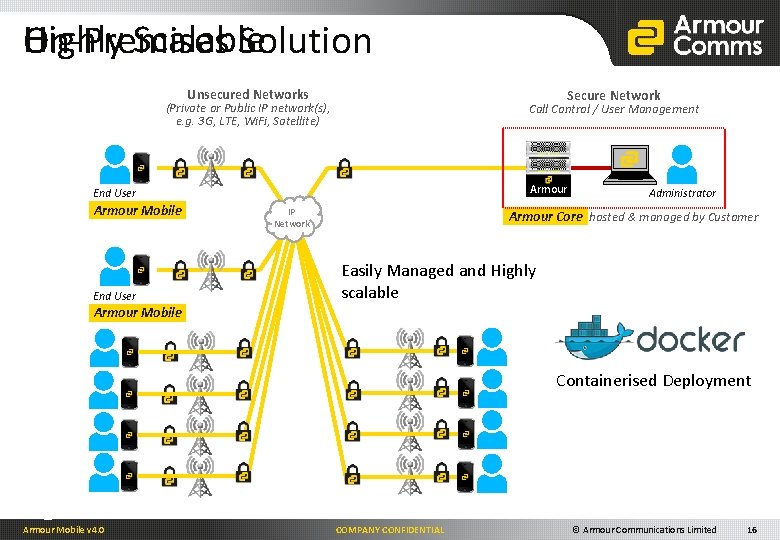
Highly Scalable On-Premises Solution Unsecured Networks Secure Network (Private or Public IP network(s), e. g. 3 G, LTE, Wi. Fi, Satellite) Call Control / User Management Armour End User Armour Mobile End User IP Network Administrator Armour Core hosted & managed by Customer Easily Managed and Highly scalable Armour Mobile Containerised Deployment Armour Mobile v 4. 0 COMPANY CONFIDENTIAL © Armour Communications Limited 16
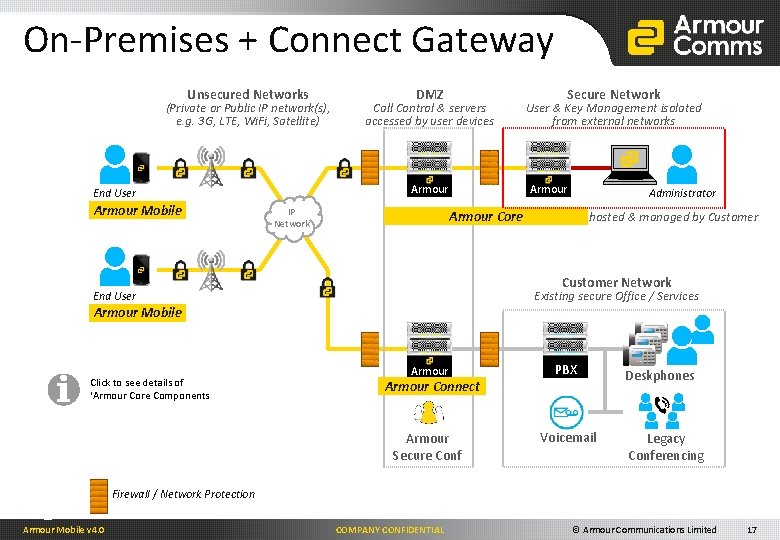
On-Premises + Connect Gateway Unsecured Networks (Private or Public IP network(s), e. g. 3 G, LTE, Wi. Fi, Satellite) Call Control & servers accessed by user devices Armour End User Armour Mobile DMZ IP Network Secure Network User & Key Management isolated from external networks Armour Administrator Armour Core hosted & managed by Customer Network Existing secure Office / Services End User Armour Mobile Click to see details of ‘Armour Core Components Armour PBX Armour Secure Conf Voicemail Armour Connect Deskphones Legacy Conferencing Firewall / Network Protection Armour Mobile v 4. 0 COMPANY CONFIDENTIAL © Armour Communications Limited 17
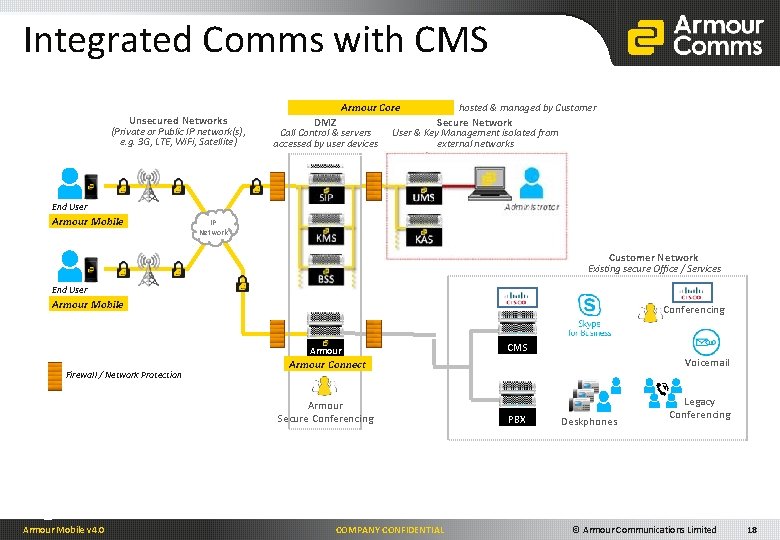
Integrated Comms with CMS Unsecured Networks (Private or Public IP network(s), e. g. 3 G, LTE, Wi. Fi, Satellite) DMZ Call Control & servers accessed by user devices Armour End User Armour Mobile Armour Core hosted & managed by Customer Secure Network User & Key Management isolated from external networks Armour Administrator IP Network Customer Network Existing secure Office / Services End User Armour Mobile Conferencing Armour Firewall / Network Protection Voicemail Armour Connect Armour Secure Conferencing Armour Mobile v 4. 0 CMS COMPANY CONFIDENTIAL PBX Deskphones Legacy Conferencing © Armour Communications Limited 18
Collaboration Armour Mobile v 4. 0 COMPANY CONFIDENTIAL © Armour Communications Limited 19
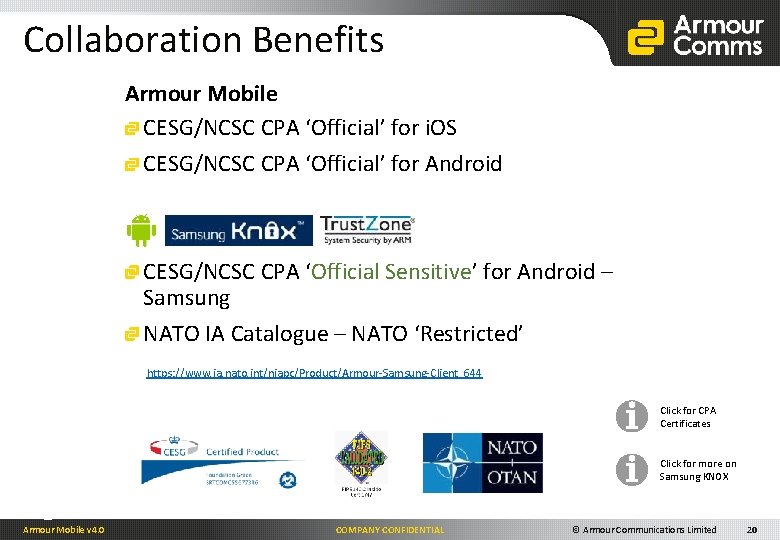
Collaboration Benefits Armour Mobile CESG/NCSC CPA ‘Official’ for i. OS CESG/NCSC CPA ‘Official’ for Android CESG/NCSC CPA ‘Official Sensitive’ for Android – Samsung NATO IA Catalogue – NATO ‘Restricted’ https: //www. ia. nato. int/niapc/Product/Armour-Samsung-Client_644 Click for CPA Certificates Click for more on Samsung KNOX Armour Mobile v 4. 0 COMPANY CONFIDENTIAL © Armour Communications Limited 20
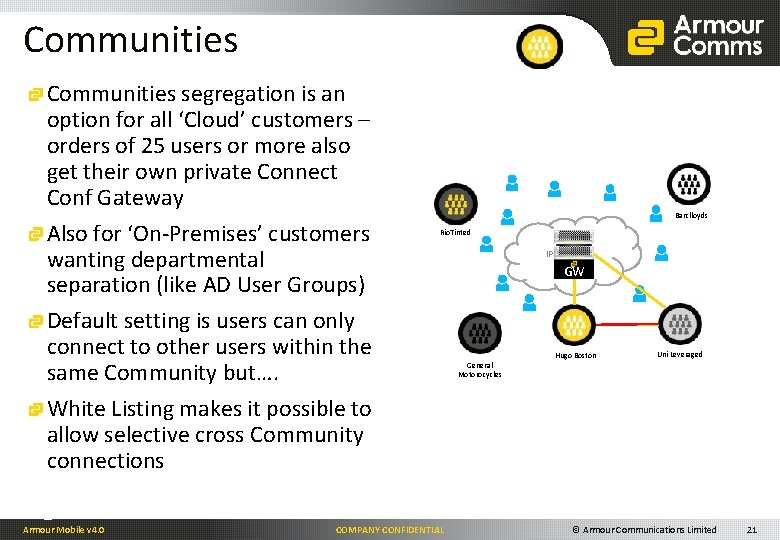
Communities segregation is an option for all ‘Cloud’ customers – orders of 25 users or more also get their own private Connect Conf Gateway Also for ‘On-Premises’ customers wanting departmental separation (like AD User Groups) Default setting is users can only connect to other users within the same Community but…. White Listing makes it possible to allow selective cross Community connections Armour Mobile v 4. 0 Barclloyds Rio. Tinted COMPANY CONFIDENTIAL IP Network GW General Motorocycles Hugo Boston Uni Leveraged © Armour Communications Limited 21
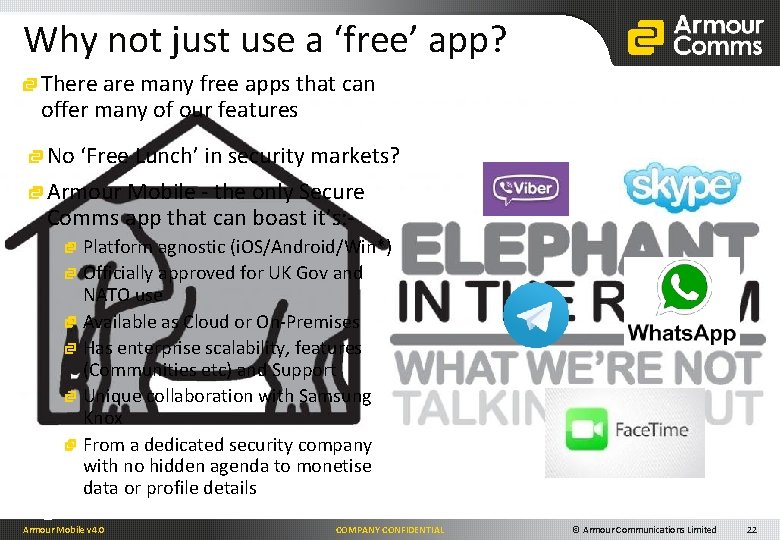
Why not just use a ‘free’ app? There are many free apps that can offer many of our features No ‘Free Lunch’ in security markets? Armour Mobile - the only Secure Comms app that can boast it’s: Platform agnostic (i. OS/Android/Win*) Officially approved for UK Gov and NATO use Available as Cloud or On-Premises Has enterprise scalability, features (Communities etc) and Support Unique collaboration with Samsung Knox From a dedicated security company with no hidden agenda to monetise data or profile details Armour Mobile v 4. 0 COMPANY CONFIDENTIAL © Armour Communications Limited 22
Finishing quote "A few years ago, users of Internet services began to realise that when an online service is free, you’re not the customer. You’re the product. " Tim Cook - Sept 2015 Armour Mobile v 4. 0 COMPANY CONFIDENTIAL © Armour Communications Limited 23
Thank You steve. rogers@armourcomms. com Armour Mobile v 4. 0 COMPANY CONFIDENTIAL © Armour Communications Limited 24
Secure Provisioning Government tested and approved over the air provisioning for the Armour Mobile App Armour Mobile v 4. 0 COMPANY CONFIDENTIAL © Armour Communications Limited 25
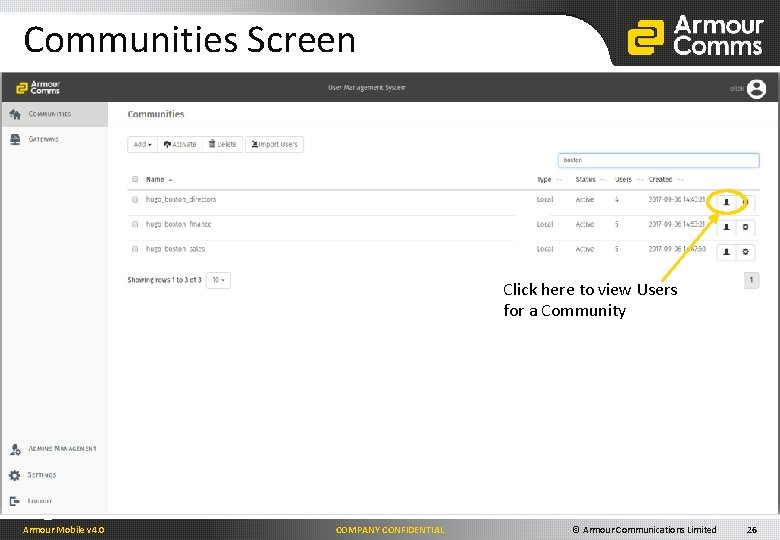
Communities Screen Click here to view Users for a Community Armour Mobile v 4. 0 COMPANY CONFIDENTIAL © Armour Communications Limited 26
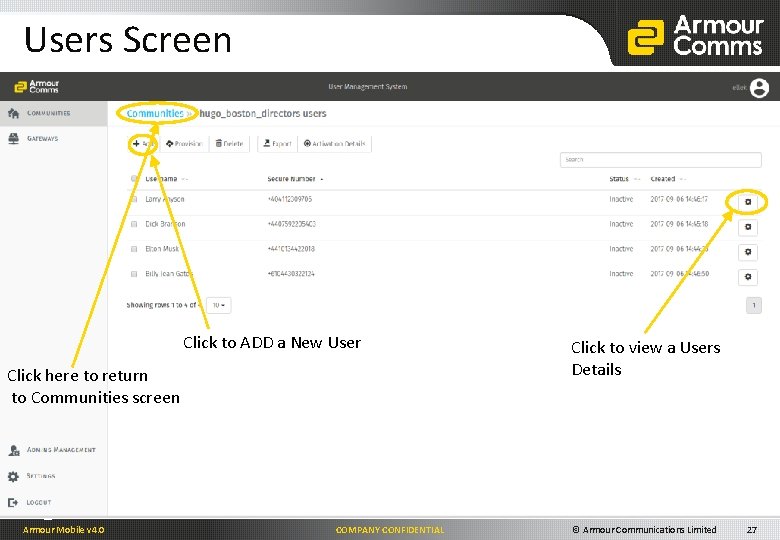
Users Screen Click to ADD a New User Click here to return to Communities screen Armour Mobile v 4. 0 COMPANY CONFIDENTIAL Click to view a Users Details © Armour Communications Limited 27
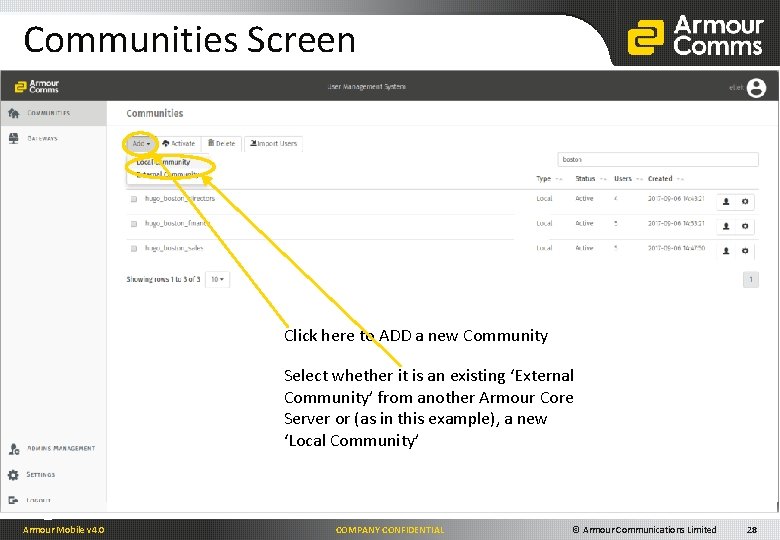
Communities Screen Click here to ADD a new Community Select whether it is an existing ‘External Community’ from another Armour Core Server or (as in this example), a new ‘Local Community’ Armour Mobile v 4. 0 COMPANY CONFIDENTIAL © Armour Communications Limited 28
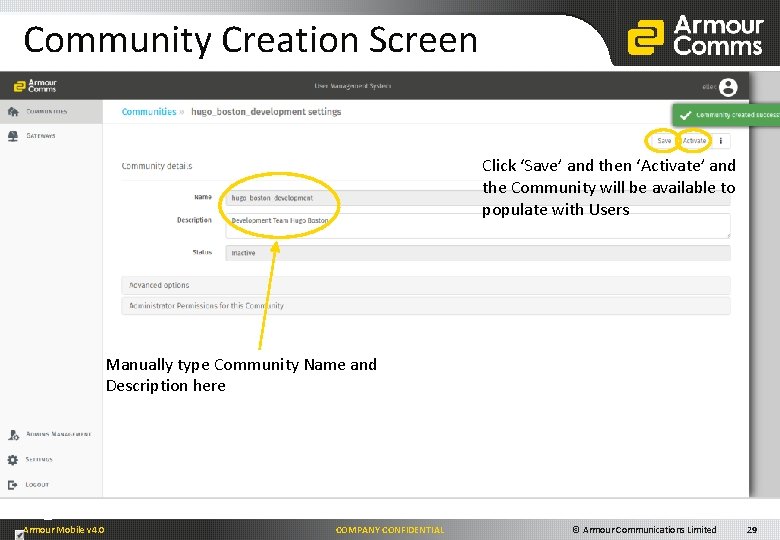
Community Creation Screen Click ‘Save’ and then ‘Activate’ and the Community will be available to populate with Users Manually type Community Name and Description here Armour Mobile v 4. 0 COMPANY CONFIDENTIAL © Armour Communications Limited 29
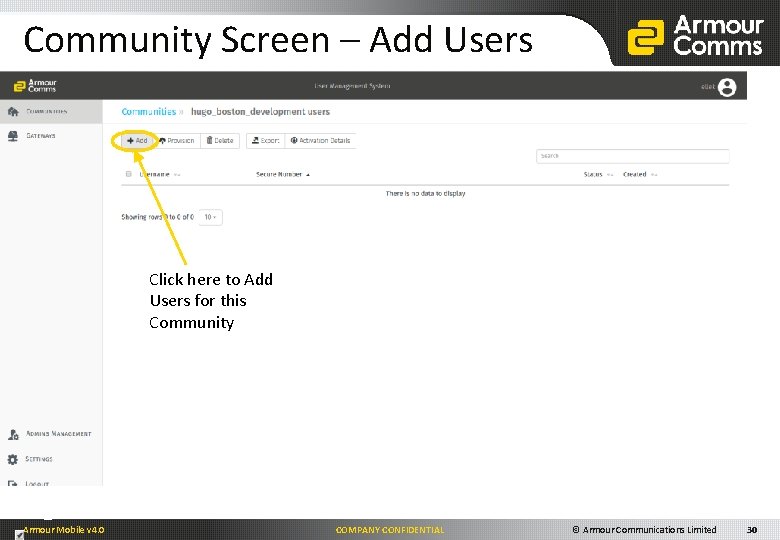
Community Screen – Add Users Click here to Add Users for this Community Select ‘Users’ to view a list of Users within this Community Armour Mobile v 4. 0 COMPANY CONFIDENTIAL © Armour Communications Limited 30
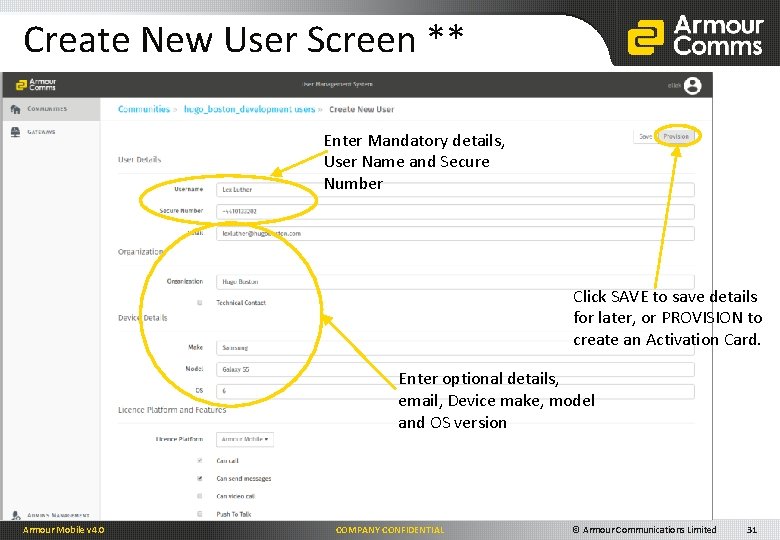
Create New User Screen ** Enter Mandatory details, User Name and Secure Number Click SAVE to save details for later, or PROVISION to create an Activation Card. Enter optional details, email, Device make, model and OS version Armour Mobile v 4. 0 COMPANY CONFIDENTIAL © Armour Communications Limited 31
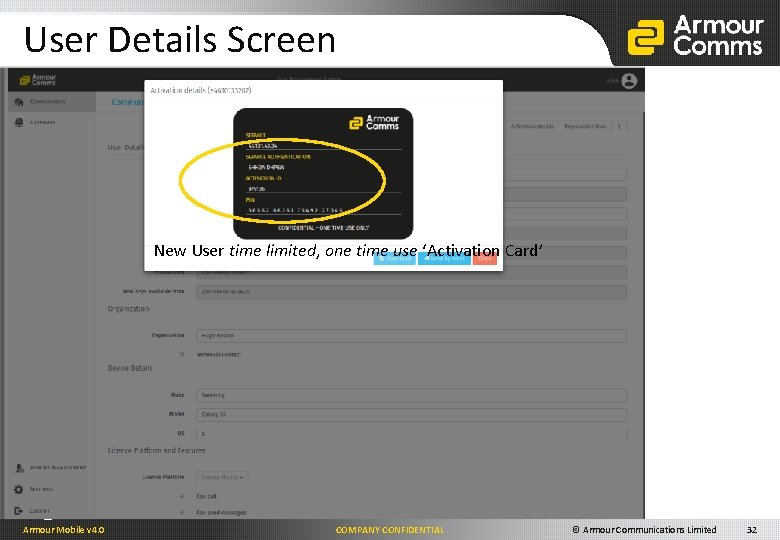
User Details Screen New User time limited, one time use ‘Activation Card’ Armour Mobile v 4. 0 COMPANY CONFIDENTIAL © Armour Communications Limited 32
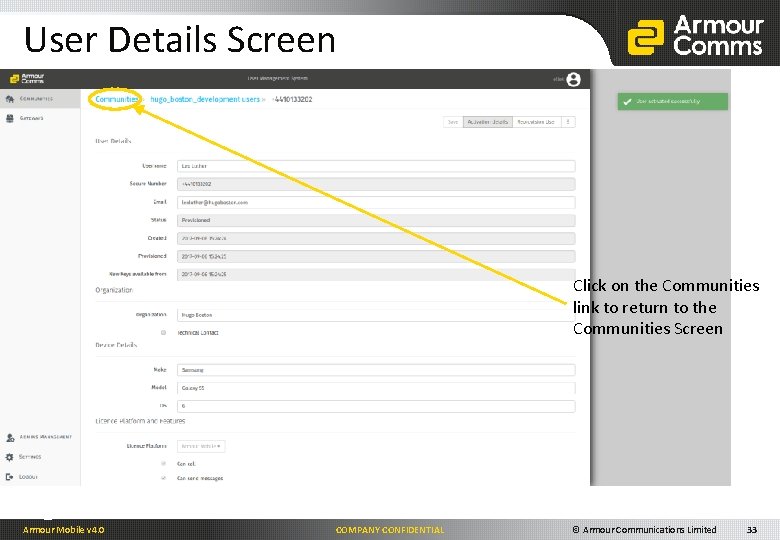
User Details Screen Click on the Communities link to return to the Communities Screen Armour Mobile v 4. 0 COMPANY CONFIDENTIAL © Armour Communications Limited 33
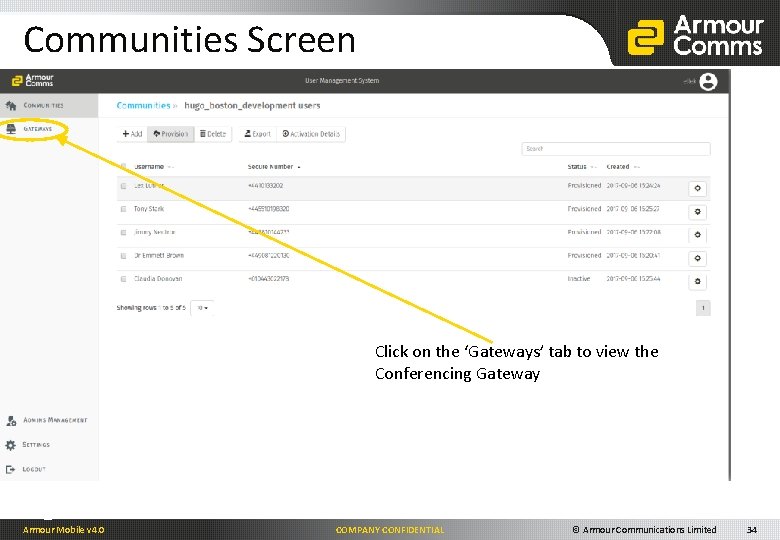
Communities Screen Click on the ‘Gateways’ tab to view the Conferencing Gateway Armour Mobile v 4. 0 COMPANY CONFIDENTIAL © Armour Communications Limited 34
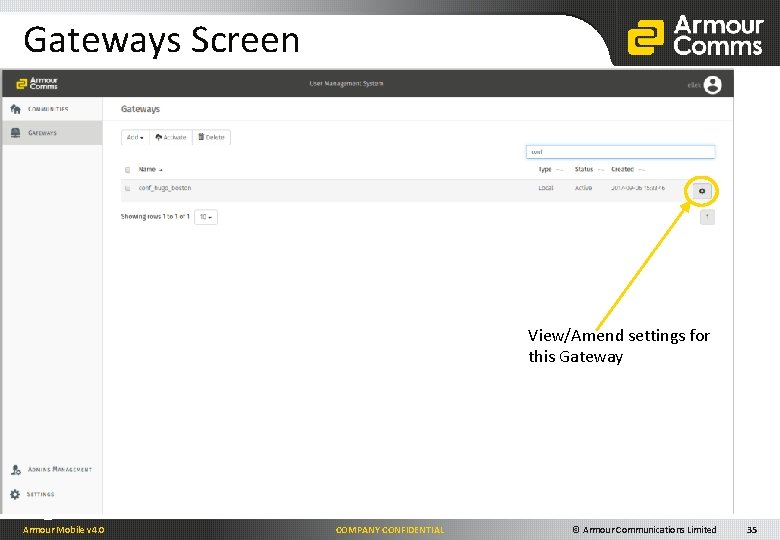
Gateways Screen View/Amend settings for this Gateway Armour Mobile v 4. 0 COMPANY CONFIDENTIAL © Armour Communications Limited 35
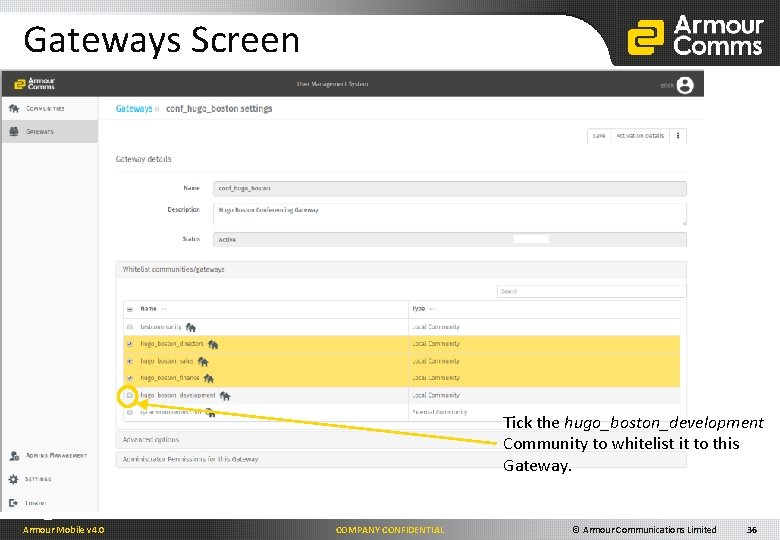
Gateways Screen Tick the hugo_boston_development Community to whitelist it to this Gateway. Armour Mobile v 4. 0 COMPANY CONFIDENTIAL © Armour Communications Limited 36
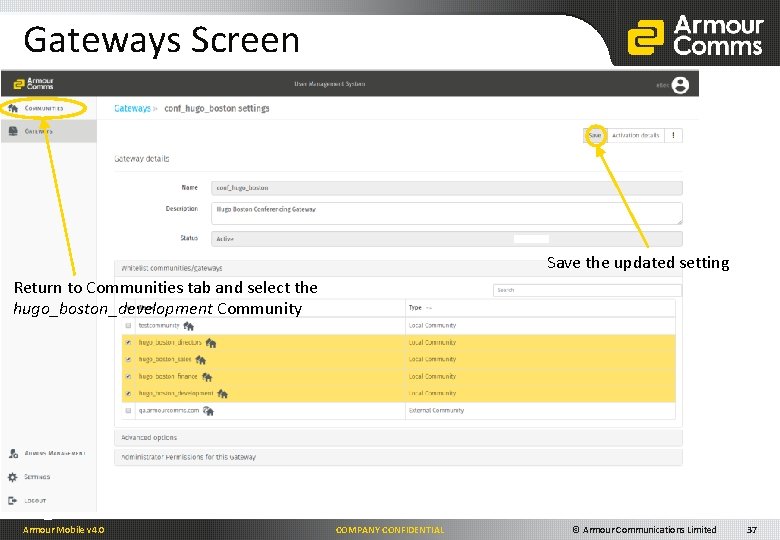
Gateways Screen Save the updated setting Return to Communities tab and select the hugo_boston_development Community Armour Mobile v 4. 0 COMPANY CONFIDENTIAL © Armour Communications Limited 37
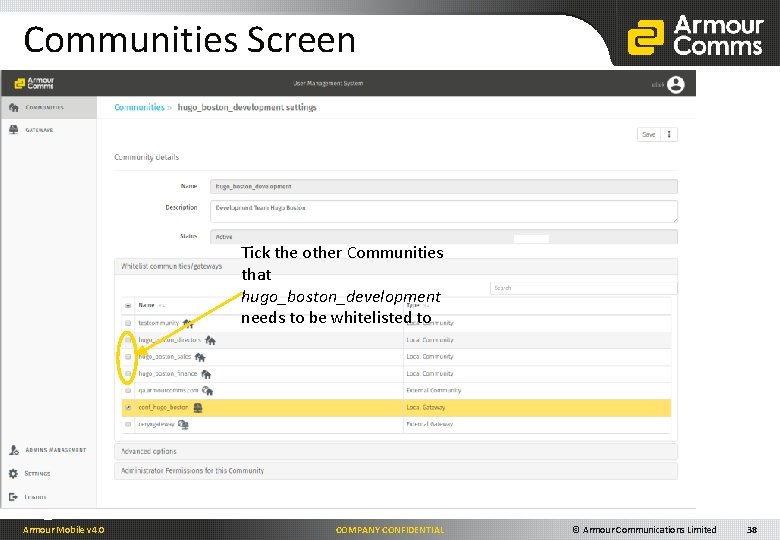
Communities Screen Tick the other Communities that hugo_boston_development needs to be whitelisted to Armour Mobile v 4. 0 COMPANY CONFIDENTIAL © Armour Communications Limited 38
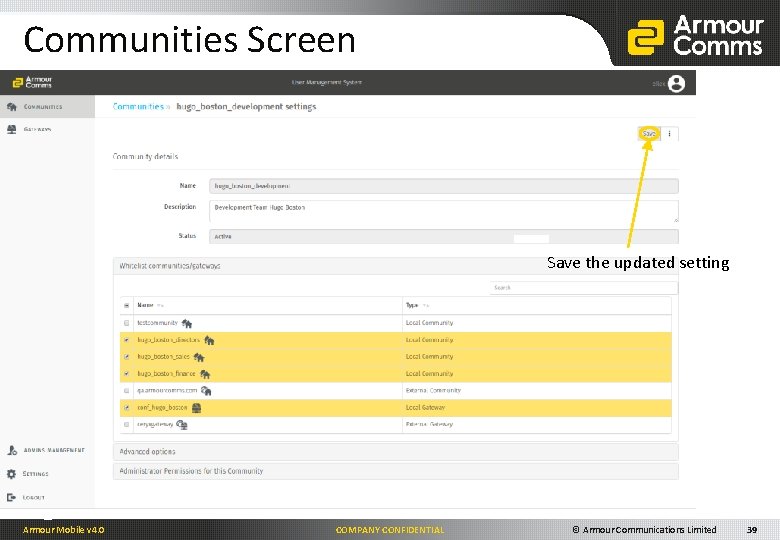
Communities Screen Save the updated setting Armour Mobile v 4. 0 COMPANY CONFIDENTIAL © Armour Communications Limited 39
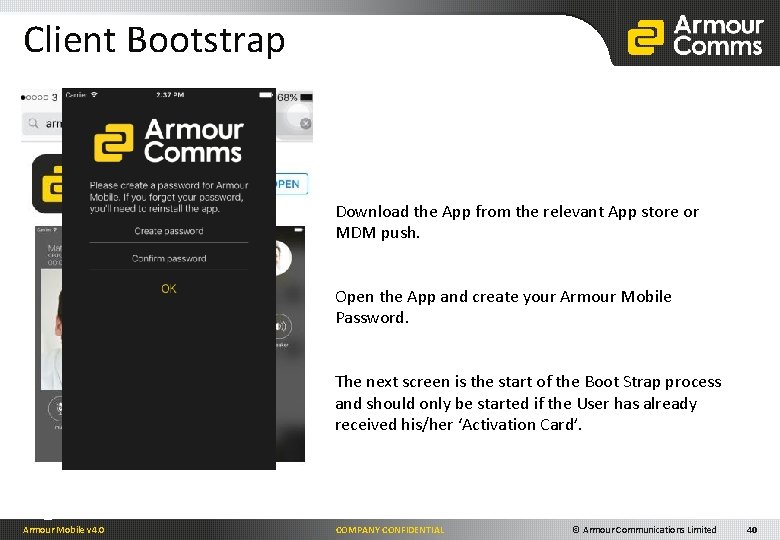
Client Bootstrap Download the App from the relevant App store or MDM push. Open the App and create your Armour Mobile Password. The next screen is the start of the Boot Strap process and should only be started if the User has already received his/her ‘Activation Card’. Armour Mobile v 4. 0 COMPANY CONFIDENTIAL © Armour Communications Limited 40
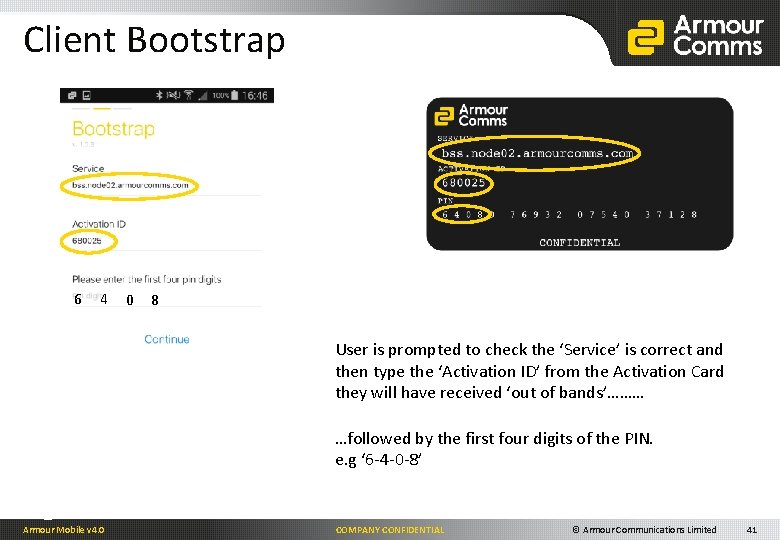
Client Bootstrap 6 4 0 8 User is prompted to check the ‘Service’ is correct and then type the ‘Activation ID’ from the Activation Card they will have received ‘out of bands’……… …followed by the first four digits of the PIN. e. g ‘ 6 -4 -0 -8’ Armour Mobile v 4. 0 COMPANY CONFIDENTIAL © Armour Communications Limited 41
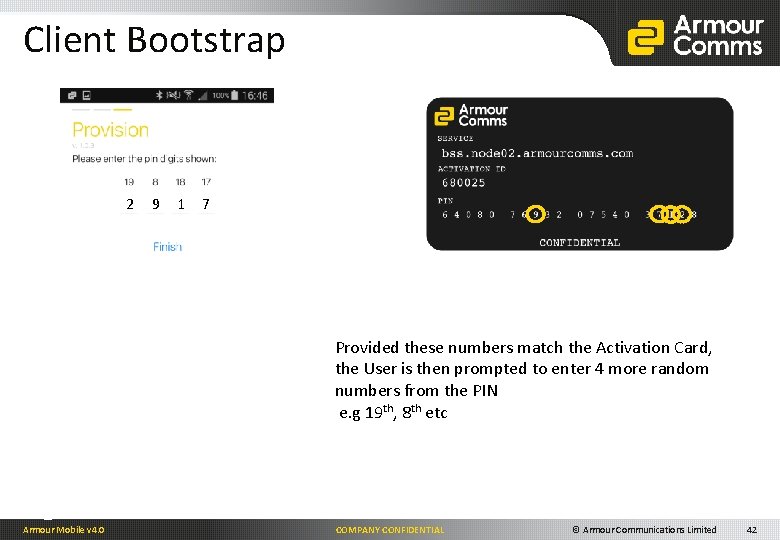
Client Bootstrap 2 9 1 7 Provided these numbers match the Activation Card, the User is then prompted to enter 4 more random numbers from the PIN e. g 19 th, 8 th etc Armour Mobile v 4. 0 COMPANY CONFIDENTIAL © Armour Communications Limited 42
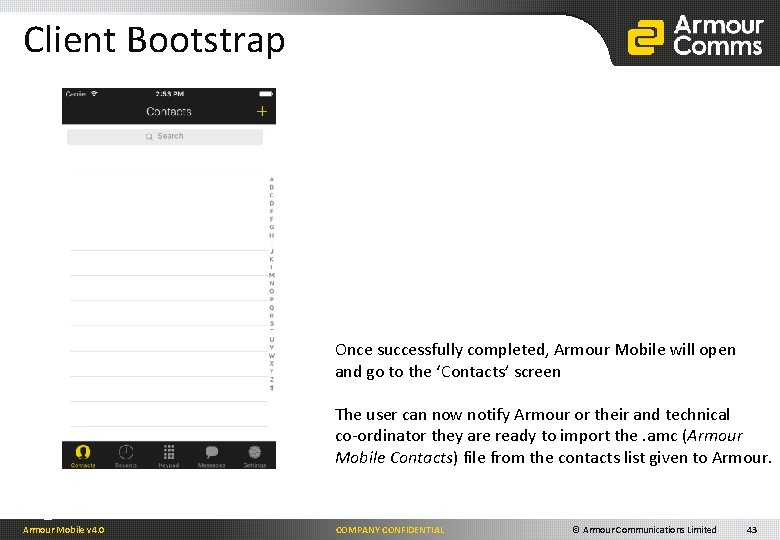
Client Bootstrap Once successfully completed, Armour Mobile will open and go to the ‘Contacts’ screen The user can now notify Armour or their and technical co-ordinator they are ready to import the. amc (Armour Mobile Contacts) file from the contacts list given to Armour Mobile v 4. 0 COMPANY CONFIDENTIAL © Armour Communications Limited 43
Thank You steve. rogers@armourcomms. com Armour Mobile v 4. 0 COMPANY CONFIDENTIAL © Armour Communications Limited 44
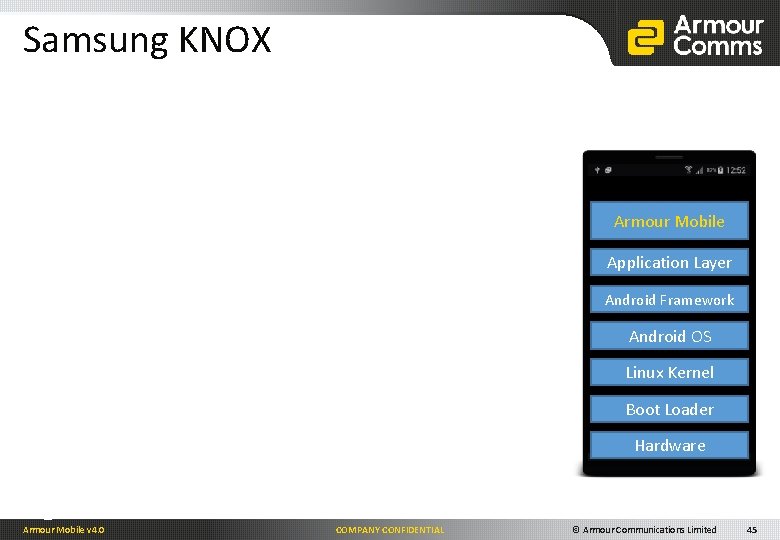
Samsung KNOX On secure video call Armour Mobile Application Layer Android Framework Android OS Linux Kernel Boot Loader Hardware Armour Mobile v 4. 0 COMPANY CONFIDENTIAL © Armour Communications Limited 45
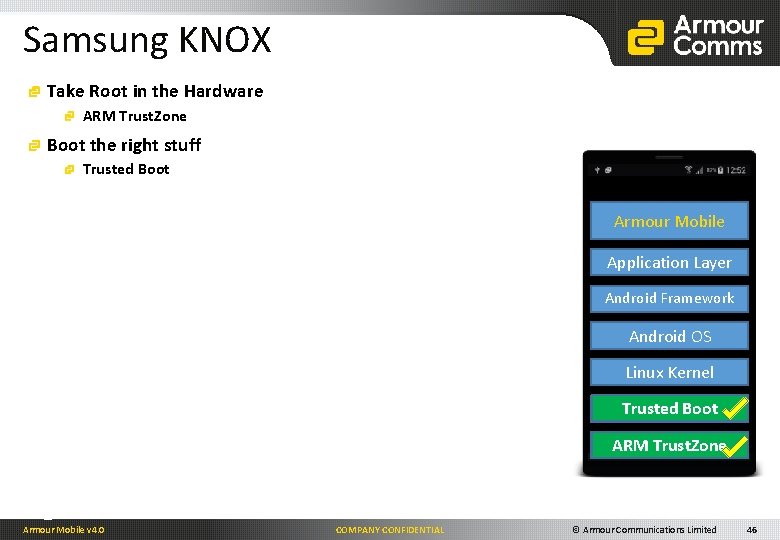
Samsung KNOX Take Root in the Hardware ARM Trust. Zone Boot the right stuff Trusted Boot On secure video call Armour Mobile Application Layer Android Framework Android OS Linux Kernel Trusted Boot Loader ARM Trust. Zone Hardware Armour Mobile v 4. 0 COMPANY CONFIDENTIAL © Armour Communications Limited 46
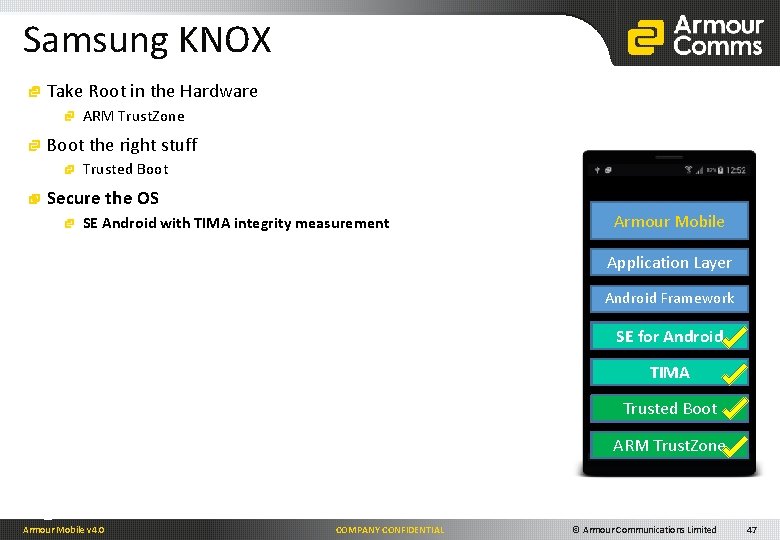
Samsung KNOX Take Root in the Hardware ARM Trust. Zone Boot the right stuff Trusted Boot On secure video call Secure the OS SE Android with TIMA integrity measurement Armour Mobile Application Layer Android Framework Android OS SEAndroid OS for Android Linux Kernel TIMA Trusted Boot Loader ARM Trust. Zone Hardware Armour Mobile v 4. 0 COMPANY CONFIDENTIAL © Armour Communications Limited 47
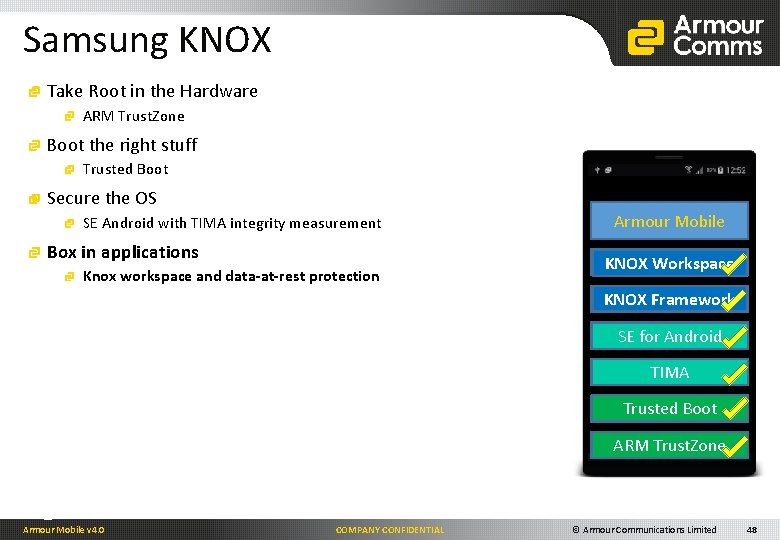
Samsung KNOX Take Root in the Hardware ARM Trust. Zone Boot the right stuff Trusted Boot On secure video call Secure the OS SE Android with TIMA integrity measurement Box in applications Knox workspace and data-at-rest protection Armour Mobile Application Layer KNOX Workspace KNOX Framework Android Frameork Android OS SE for Android Linux Kernel TIMA Trusted Boot Loader ARM Trust. Zone Hardware Armour Mobile v 4. 0 COMPANY CONFIDENTIAL © Armour Communications Limited 48
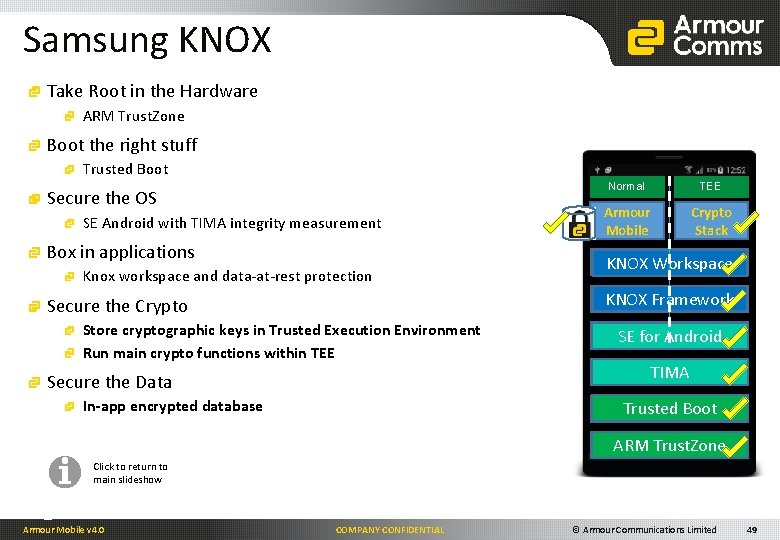
Samsung KNOX Take Root in the Hardware ARM Trust. Zone Boot the right stuff Trusted Boot On. Normal secure video call Secure the OS SE Android with TIMA integrity measurement Box in applications Knox workspace and data-at-rest protection Armour Mobile TEE Crypto Stack Application Layer KNOX Workspace KNOX Framework Secure the Crypto Store cryptographic keys in Trusted Execution Environment Run main crypto functions within TEE Secure the Data In-app encrypted database Android OS SE for Android Linux Kernel TIMA Trusted Boot Loader ARM Trust. Zone Hardware Click to return to main slideshow Armour Mobile v 4. 0 COMPANY CONFIDENTIAL © Armour Communications Limited 49
Armour Core Components SIP – SIP server Handles device registration and call signalling between Armour Mobile devices May also include associated functionality such as STUN/TURN, Media Proxying, etc. KMS – Key Management Server Delivers keys (and key updates) to authenticated Armour Mobile devices Keys are pre-encrypted to mitigate attacks on the KMS MDB– Database Server Stores data for each of the component servers. There is one MDB for each separate server deployed BSS – Bootstrap Server Click to return to main slideshow Provisions Armour Mobile devices with their configuration and initial key material Authenticates devices using out-of-band user material GW – Gateway Provides cryptographic termination of Armour Mobile media and connectivity to standard PBX within a secure environment and Armours own video and audio secure conferencing capability Generates key material and other sensitive system information within a high security domain protected from unauthorised external access PNS – Push Notification Server Interface with Apples servers and facilitates the ‘waking up’ of Armour Mobile when forcibly killed by i. OS. As of i. OS v 8, all Apps that need to run in background require a ‘push server’ XMPP – Rich Messaging Server Manages the sending and receiving of messages and attachments (photos/files/videos) securely. Also handles the sent/received/read status receipts of messages UMS – User Management System Allows designated Administrators to configure Armour Core components, set up user ‘communities’ and manage individual devices and users KAS – Key Authority Server Armour Mobile v 4. 0 COMPANY CONFIDENTIAL For other component options please contact Armour Communications © Armour Communications Limited 50
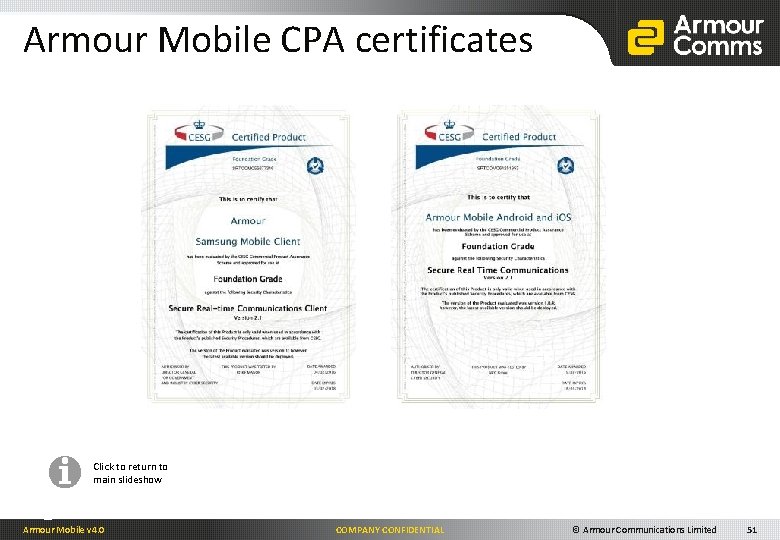
Armour Mobile CPA certificates Click to return to main slideshow Armour Mobile v 4. 0 COMPANY CONFIDENTIAL © Armour Communications Limited 51
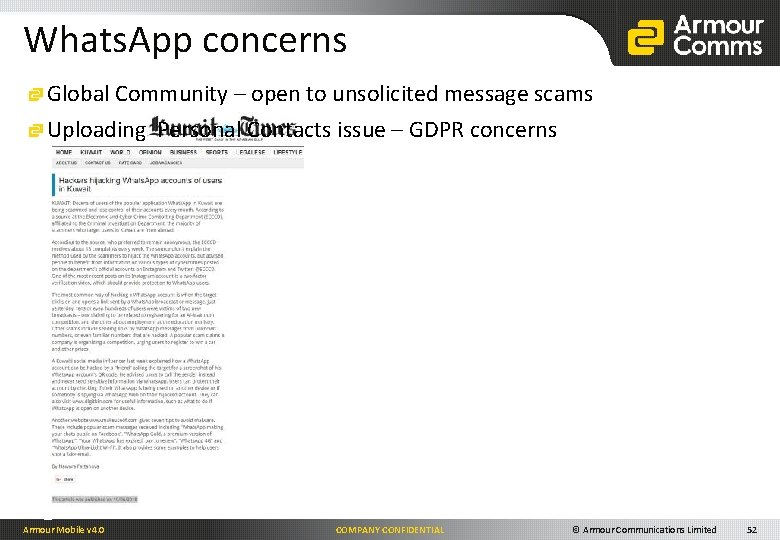
Whats. App concerns Global Community – open to unsolicited message scams Uploading Personal Contacts issue – GDPR concerns Armour Mobile v 4. 0 COMPANY CONFIDENTIAL © Armour Communications Limited 52
- Slides: 52