
ARM Instruction Set Computer Organization and Assembly Languages
ARM Instruction Set Computer Organization and Assembly Languages Yung-Yu Chuang with slides by Peng-Sheng Chen
Introduction • The ARM processor is easy to program at the assembly level. (It is a RISC) • We will learn ARM assembly programming at the user level and run it on a GBA emulator.
ARM programmer model • The state of an ARM system is determined by the content of visible registers and memory. • A user-mode program can see 15 32 -bit generalpurpose registers (R 0 -R 14), program counter (PC) and CPSR. • Instruction set defines the operations that can change the state.
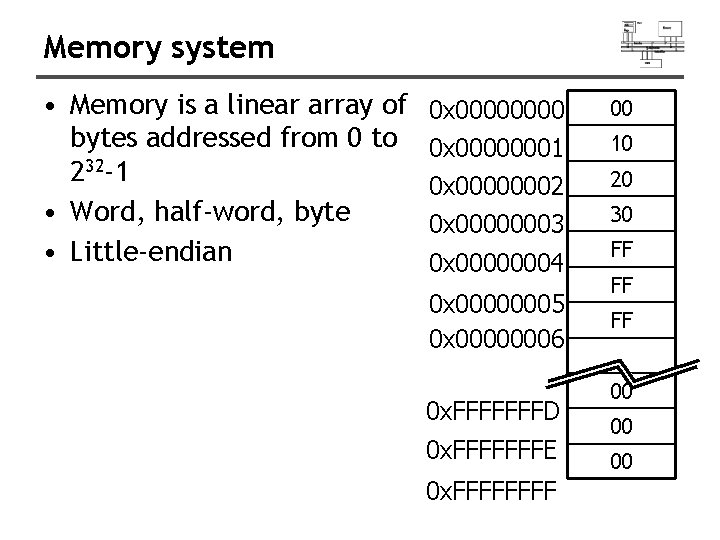
Memory system • Memory is a linear array of bytes addressed from 0 to 232 -1 • Word, half-word, byte • Little-endian 0 x 0000 00 0 x 00000001 10 0 x 00000002 20 0 x 00000003 30 0 x 00000004 0 x 00000005 0 x 00000006 0 x. FFFFFFFD 0 x. FFFFFFFE 0 x. FFFF FF 00 00 00
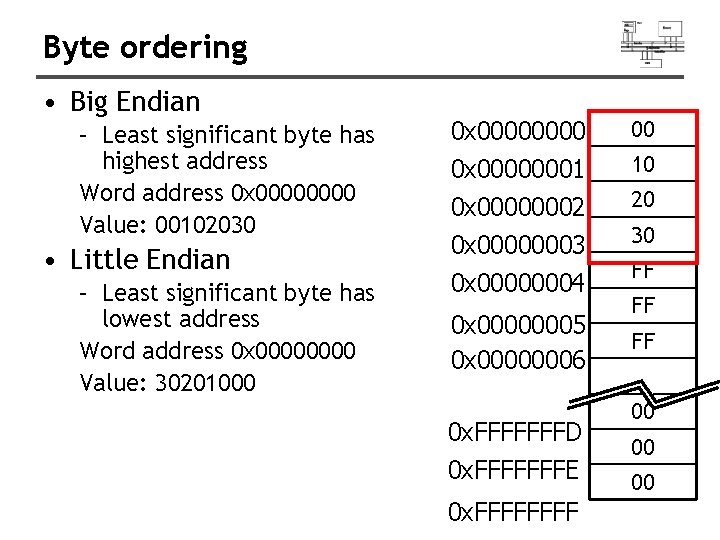
Byte ordering • Big Endian – Least significant byte has highest address Word address 0 x 0000 Value: 00102030 • Little Endian – Least significant byte has lowest address Word address 0 x 0000 Value: 30201000 0 x 00000001 10 0 x 00000002 20 0 x 00000003 30 0 x 00000004 0 x 00000005 0 x 00000006 0 x. FFFFFFFD 0 x. FFFFFFFE 0 x. FFFF FF 00 00 00
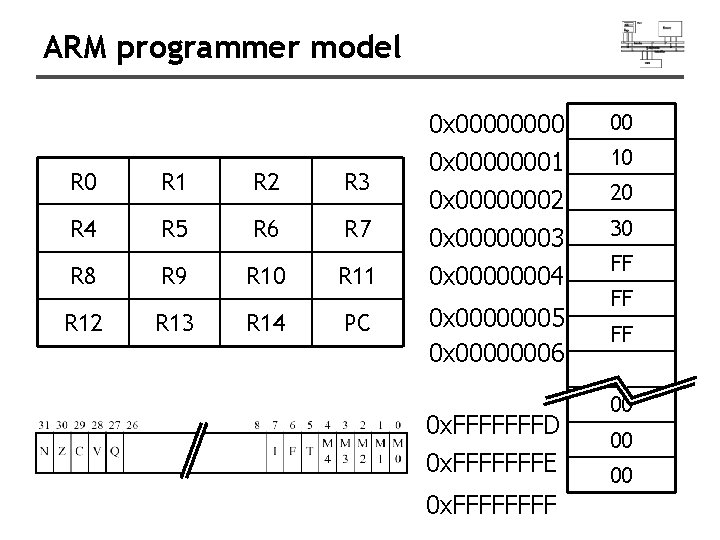
ARM programmer model R 0 R 1 R 2 R 3 R 4 R 5 R 6 R 7 0 x 0000 00 0 x 00000001 10 0 x 00000002 20 0 x 00000003 30 R 8 R 9 R 10 R 11 0 x 00000004 R 12 R 13 R 14 PC 0 x 00000005 0 x 00000006 0 x. FFFFFFFD 0 x. FFFFFFFE 0 x. FFFF FF 00 00 00
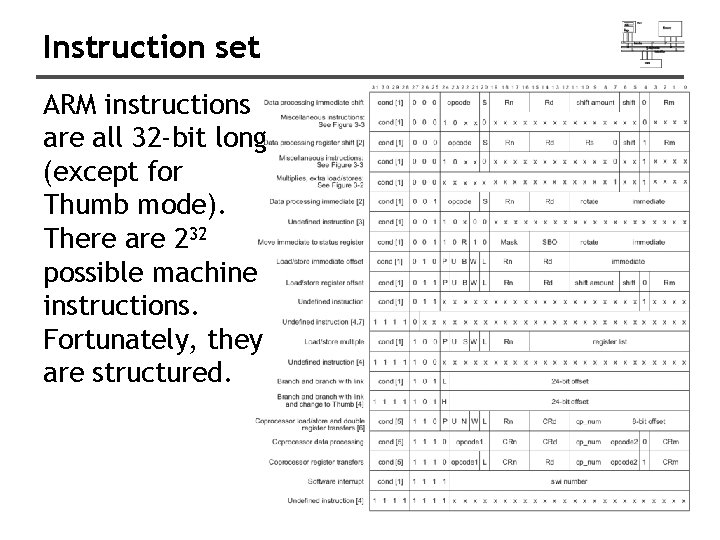
Instruction set ARM instructions are all 32 -bit long (except for Thumb mode). There are 232 possible machine instructions. Fortunately, they are structured.
Features of ARM instruction set • • • Load-store architecture 3 -address instructions Conditional execution of every instruction Possible to load/store multiple registers at once Possible to combine shift and ALU operations in a single instruction
Instruction set • Data processing • Data movement • Flow control
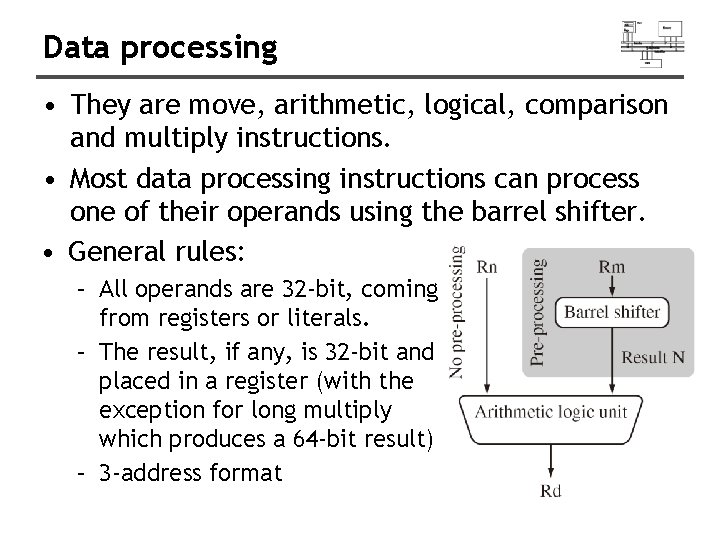
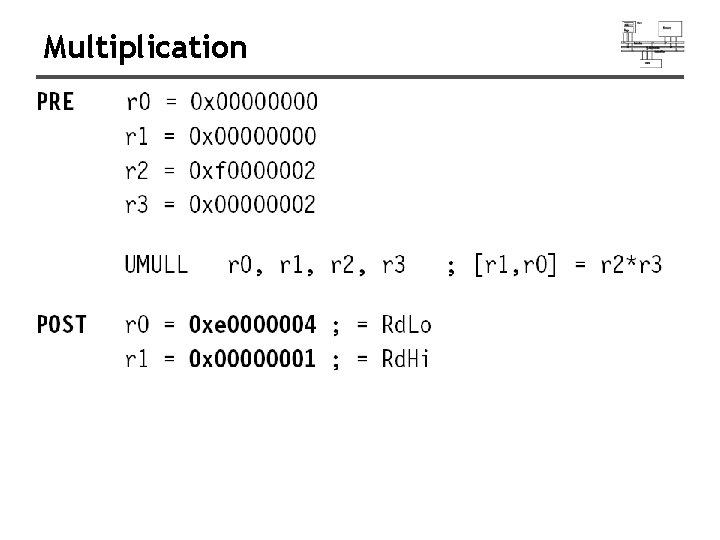
Data processing • They are move, arithmetic, logical, comparison and multiply instructions. • Most data processing instructions can process one of their operands using the barrel shifter. • General rules: – All operands are 32 -bit, coming from registers or literals. – The result, if any, is 32 -bit and placed in a register (with the exception for long multiply which produces a 64 -bit result) – 3 -address format
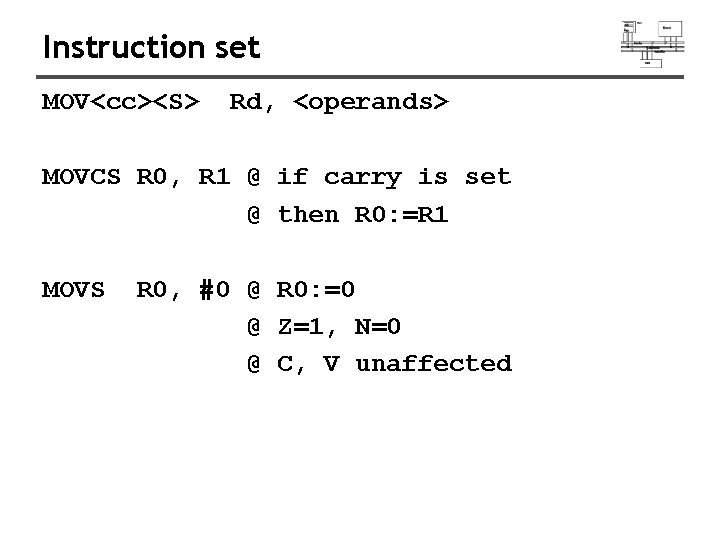
Instruction set MOV<cc><S> Rd, <operands> MOVCS R 0, R 1 @ if carry is set @ then R 0: =R 1 MOVS R 0, #0 @ R 0: =0 @ Z=1, N=0 @ C, V unaffected
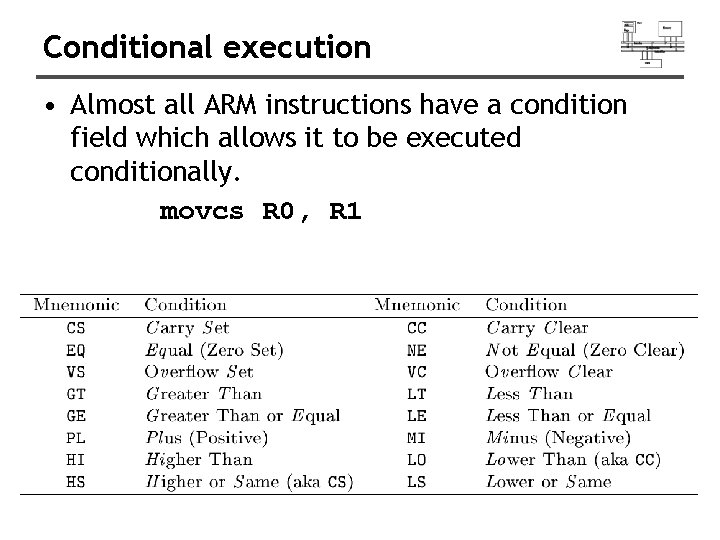
Conditional execution • Almost all ARM instructions have a condition field which allows it to be executed conditionally. movcs R 0, R 1
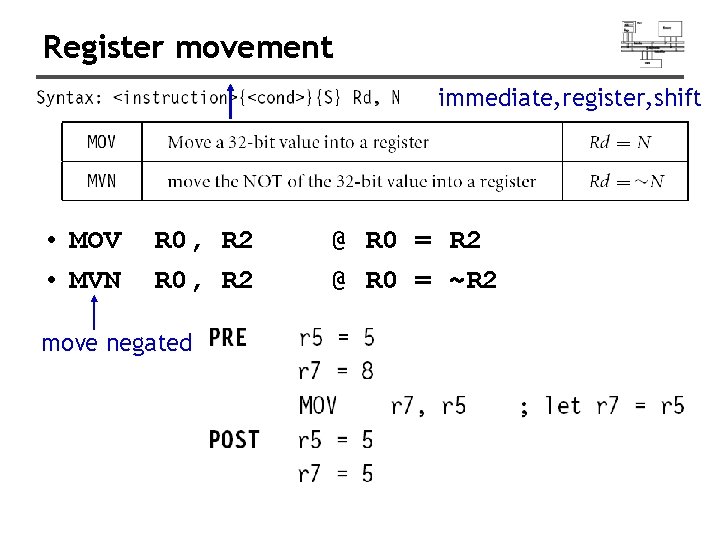
Register movement immediate, register, shift • MOV • MVN R 0, R 2 move negated @ R 0 = R 2 @ R 0 = ~R 2
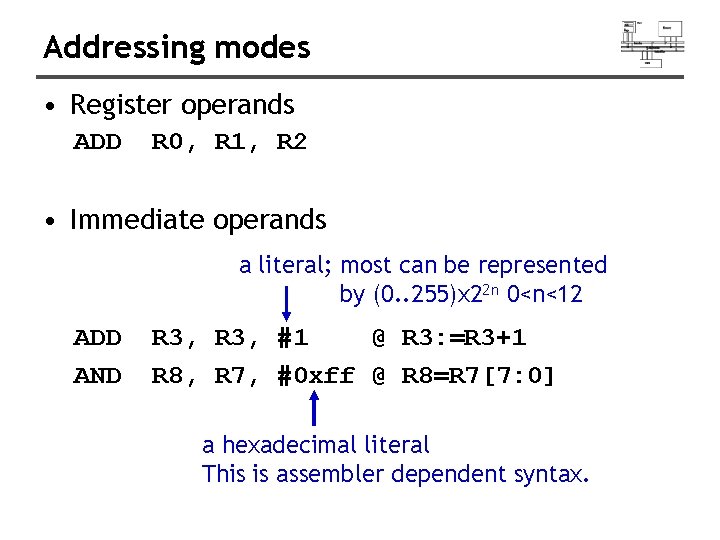
Addressing modes • Register operands ADD R 0, R 1, R 2 • Immediate operands a literal; most can be represented by (0. . 255)x 22 n 0<n<12 ADD AND R 3, #1 @ R 3: =R 3+1 R 8, R 7, #0 xff @ R 8=R 7[7: 0] a hexadecimal literal This is assembler dependent syntax.
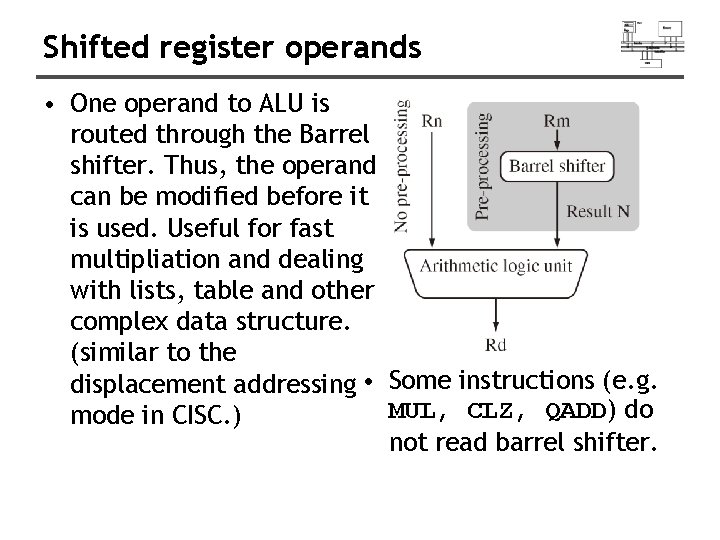
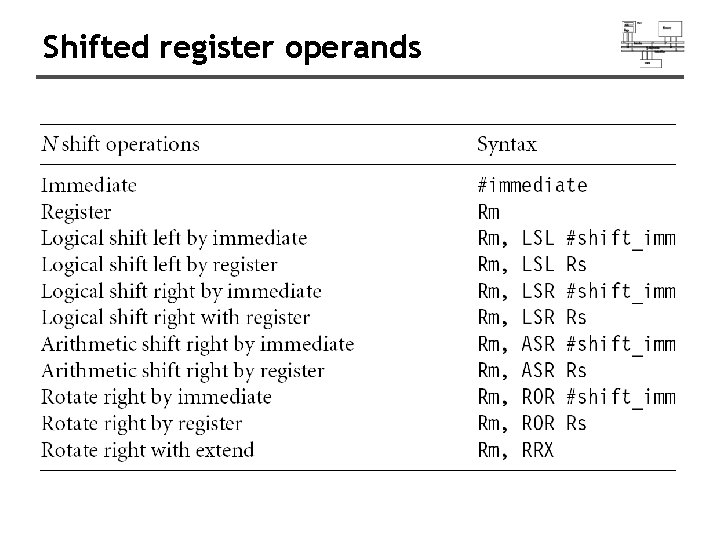
Shifted register operands • One operand to ALU is routed through the Barrel shifter. Thus, the operand can be modified before it is used. Useful for fast multipliation and dealing with lists, table and other complex data structure. (similar to the displacement addressing • Some instructions (e. g. MUL, CLZ, QADD) do mode in CISC. ) not read barrel shifter.
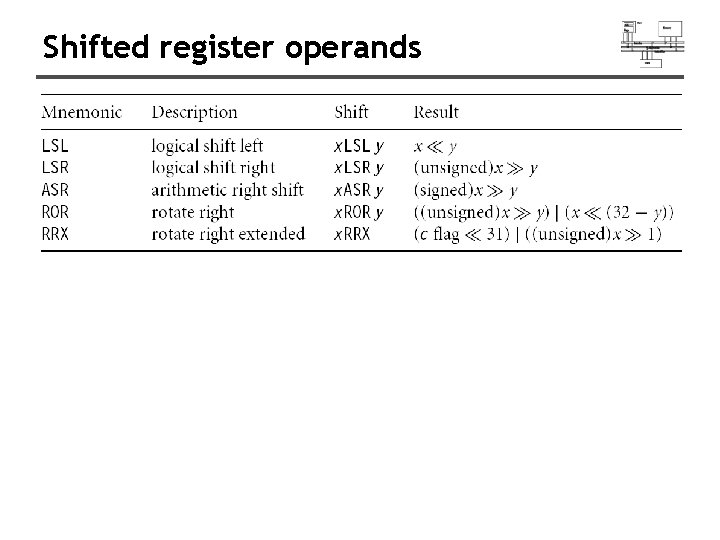
Shifted register operands
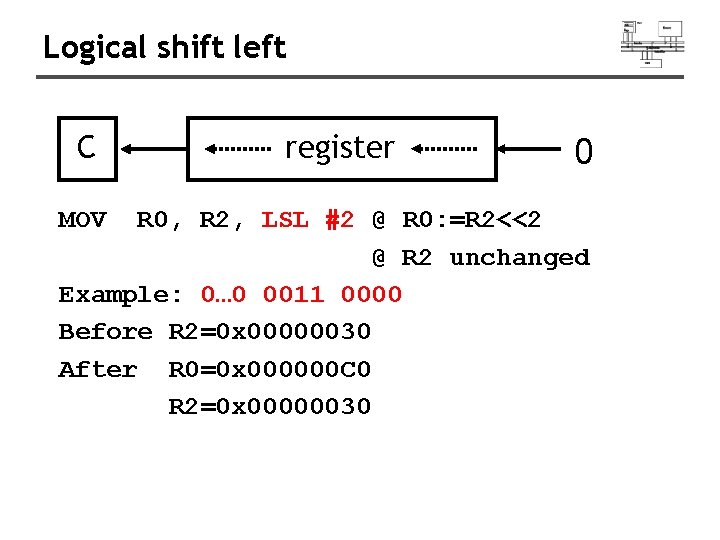
Logical shift left C MOV register 0 R 0, R 2, LSL #2 @ R 0: =R 2<<2 @ R 2 unchanged Example: 0… 0 0011 0000 Before R 2=0 x 00000030 After R 0=0 x 000000 C 0 R 2=0 x 00000030
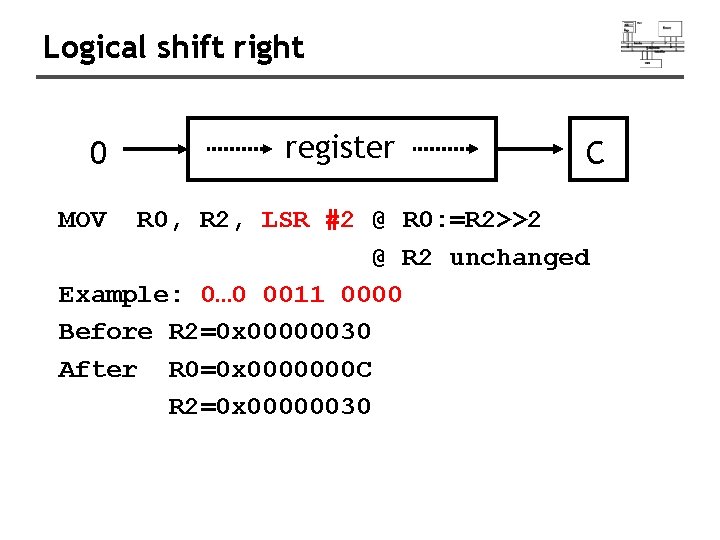
Logical shift right 0 MOV register C R 0, R 2, LSR #2 @ R 0: =R 2>>2 @ R 2 unchanged Example: 0… 0 0011 0000 Before R 2=0 x 00000030 After R 0=0 x 0000000 C R 2=0 x 00000030
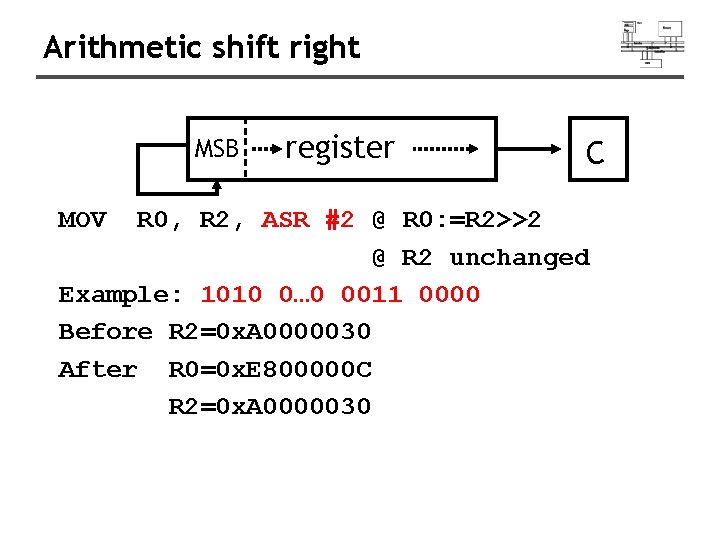
Arithmetic shift right MSB MOV register C R 0, R 2, ASR #2 @ R 0: =R 2>>2 @ R 2 unchanged Example: 1010 0… 0 0011 0000 Before R 2=0 x. A 0000030 After R 0=0 x. E 800000 C R 2=0 x. A 0000030
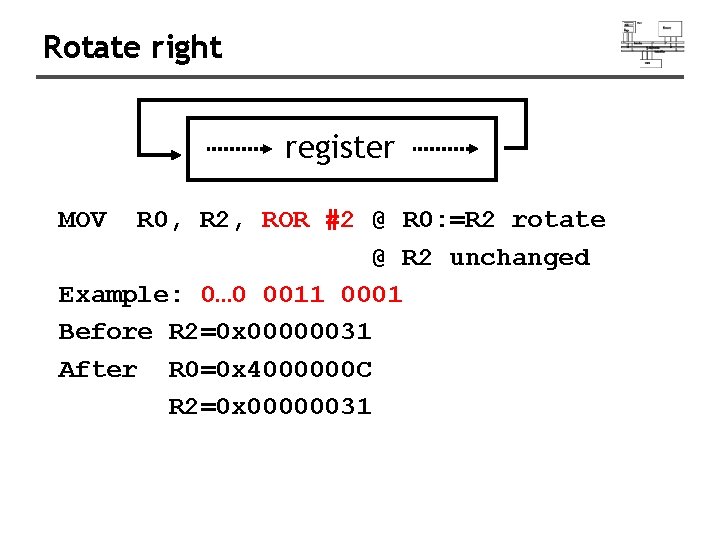
Rotate right register MOV R 0, R 2, ROR #2 @ R 0: =R 2 rotate @ R 2 unchanged Example: 0… 0 0011 0001 Before R 2=0 x 00000031 After R 0=0 x 4000000 C R 2=0 x 00000031
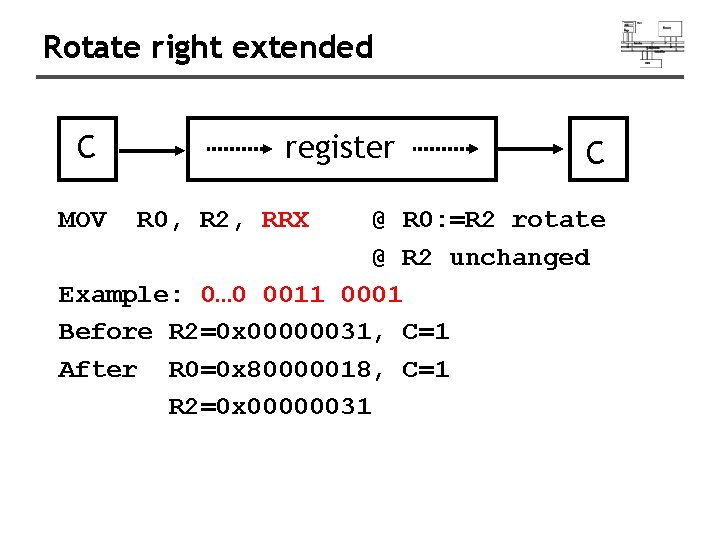
Rotate right extended C MOV register R 0, R 2, RRX C @ R 0: =R 2 rotate @ R 2 unchanged Example: 0… 0 0011 0001 Before R 2=0 x 00000031, C=1 After R 0=0 x 80000018, C=1 R 2=0 x 00000031
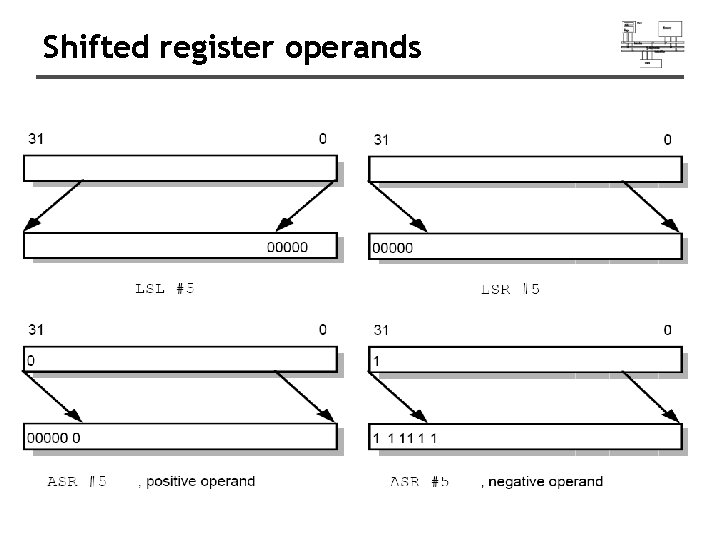
Shifted register operands
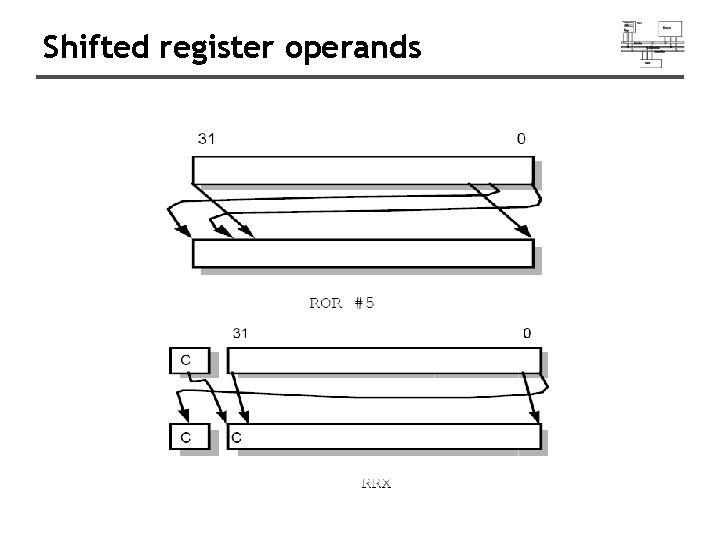
Shifted register operands
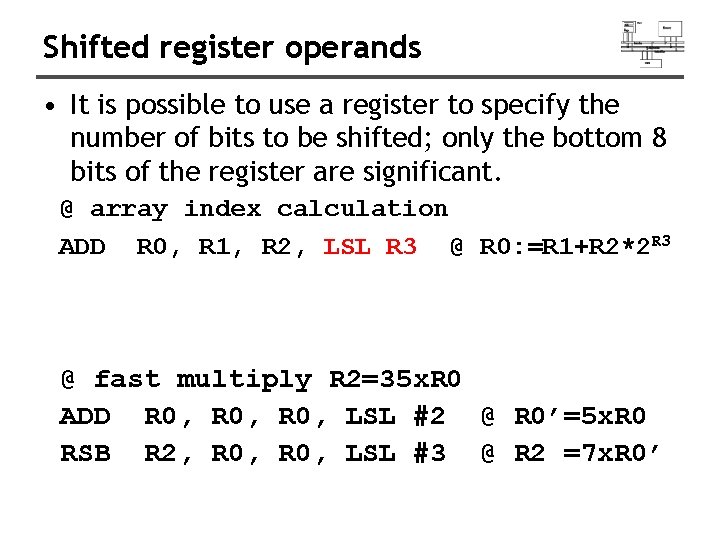
Shifted register operands • It is possible to use a register to specify the number of bits to be shifted; only the bottom 8 bits of the register are significant. @ array index calculation ADD R 0, R 1, R 2, LSL R 3 @ R 0: =R 1+R 2*2 R 3 @ fast multiply R 2=35 x. R 0 ADD R 0, LSL #2 @ R 0’=5 x. R 0 RSB R 2, R 0, LSL #3 @ R 2 =7 x. R 0’
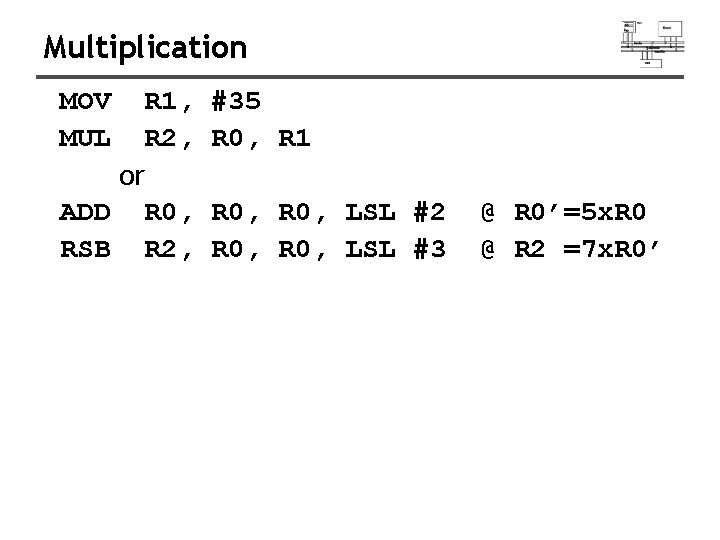
Multiplication MOV MUL R 1, R 2, or ADD R 0, RSB R 2, #35 R 0, R 1 R 0, LSL #2 R 0, LSL #3 @ R 0’=5 x. R 0 @ R 2 =7 x. R 0’
Shifted register operands
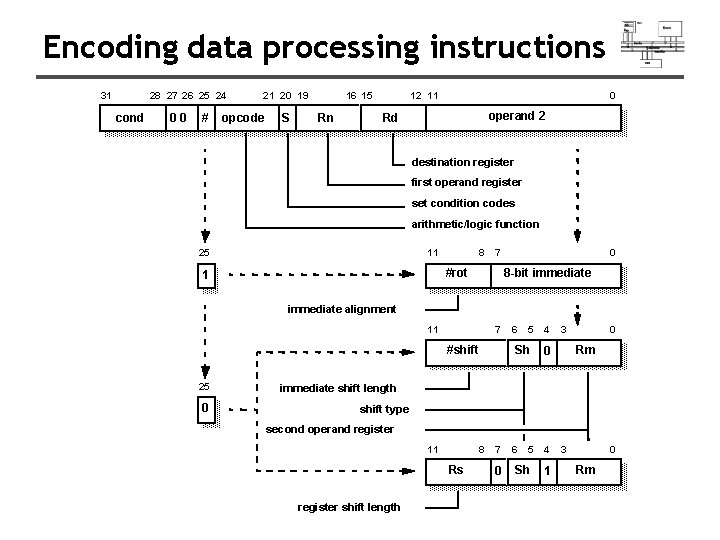
Encoding data processing instructions 31 28 27 26 25 24 cond 00 # 21 20 19 opcode S 16 15 Rn 12 11 0 operand 2 Rd destination register first operand register set condition codes arithmetic/logic function 25 11 8 7 #rot 1 0 8 -bit immediate alignment 11 7 #shift 25 0 6 5 4 Sh 3 0 Rm 0 immediate shift length shift type second operand register 11 8 7 Rs register shift length 0 6 5 4 Sh 1 3 0 Rm
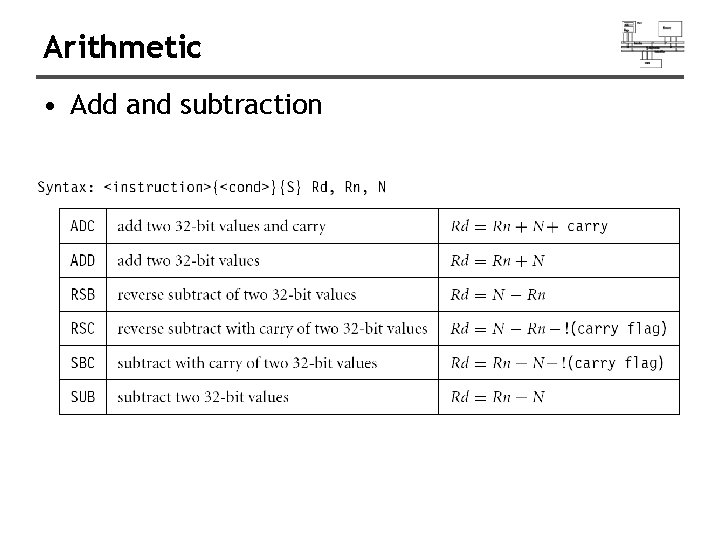
Arithmetic • Add and subtraction
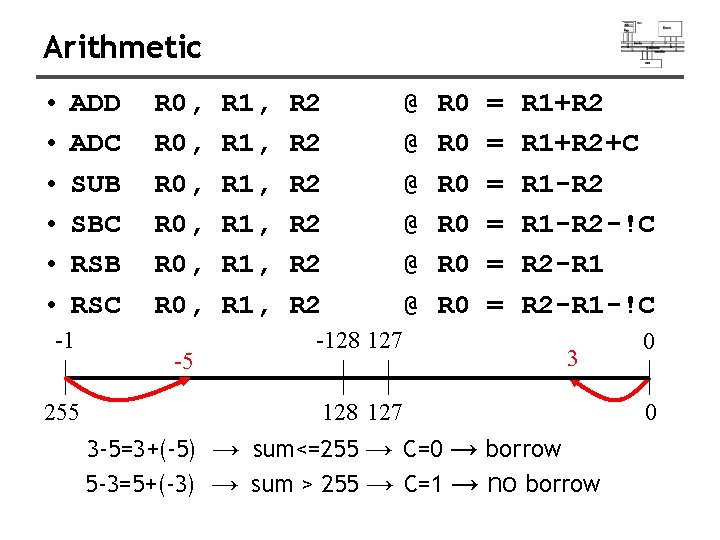
Arithmetic • • • ADD ADC SUB SBC RSB RSC -1 255 R 0, R 0, -5 R 1, R 1, R 2 R 2 R 2 @ @ @ -128 127 R 0 R 0 R 0 = = = R 1+R 2+C R 1 -R 2 -!C R 2 -R 1 -!C 3 128 127 3 -5=3+(-5) → sum<=255 → C=0 → borrow 5 -3=5+(-3) → sum > 255 → C=1 → no borrow 0 0
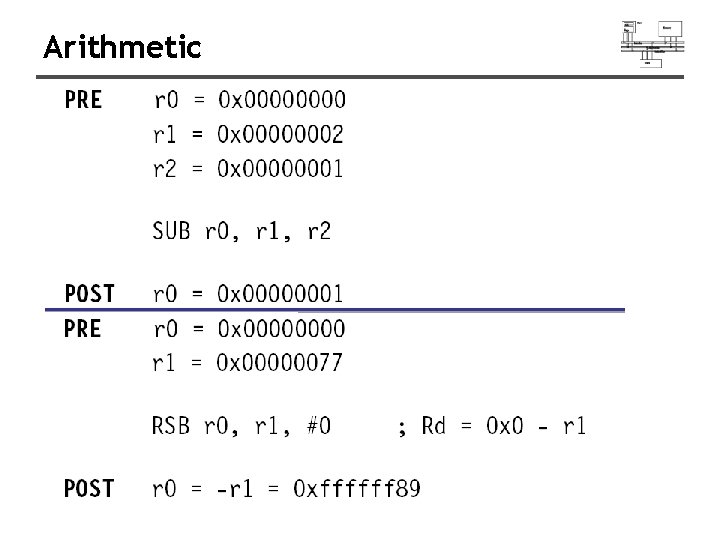
Arithmetic
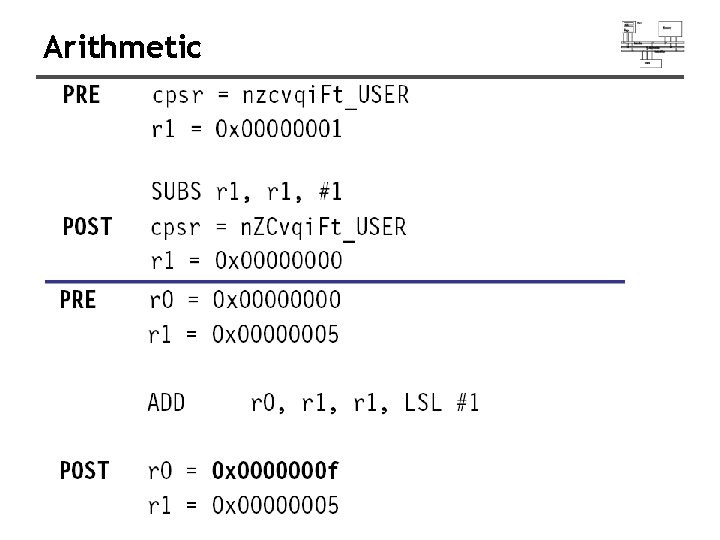
Arithmetic
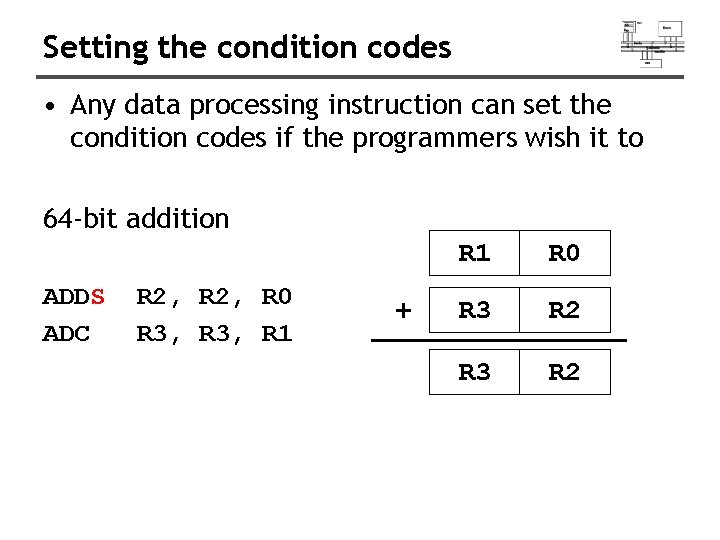
Setting the condition codes • Any data processing instruction can set the condition codes if the programmers wish it to 64 -bit addition ADDS ADC R 2, R 0 R 3, R 1 + R 1 R 0 R 3 R 2
Logical
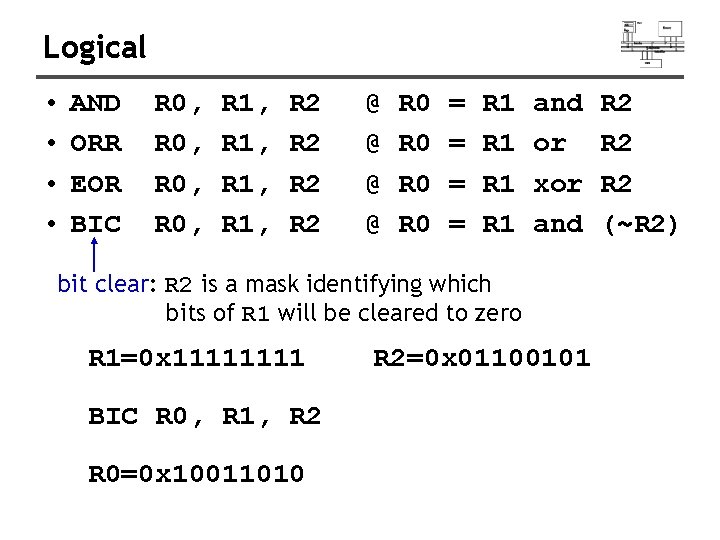
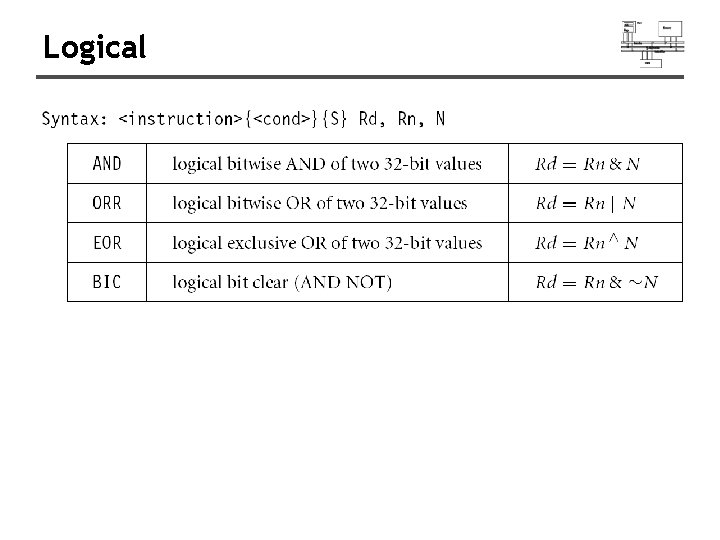
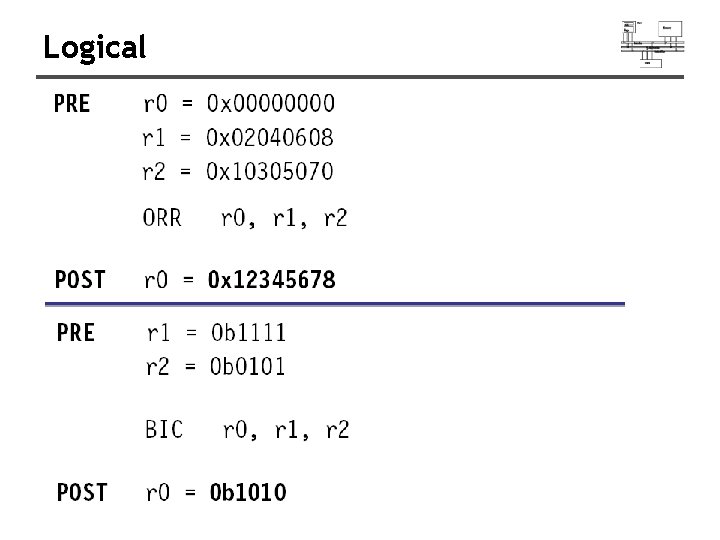
Logical • • AND ORR EOR BIC R 0, R 1, R 2 R 2 @ @ R 0 R 0 = = R 1 R 1 and or xor and bit clear: R 2 is a mask identifying which bits of R 1 will be cleared to zero R 1=0 x 1111 BIC R 0, R 1, R 2 R 0=0 x 10011010 R 2=0 x 01100101 R 2 R 2 (~R 2)
Logical
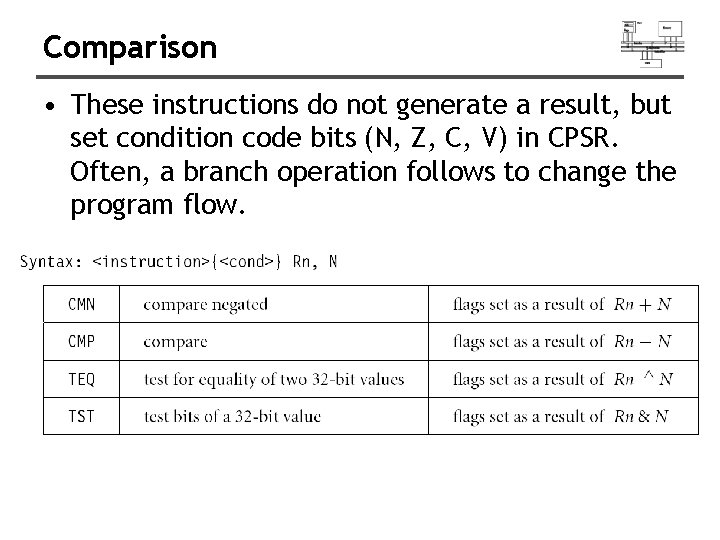
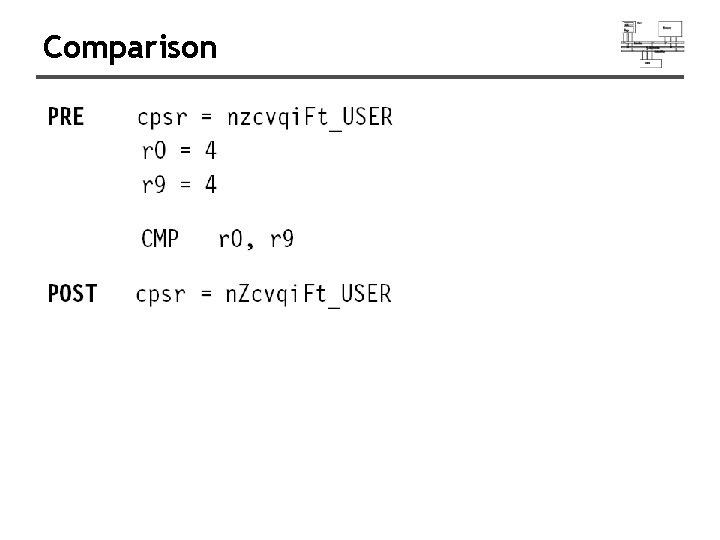
Comparison • These instructions do not generate a result, but set condition code bits (N, Z, C, V) in CPSR. Often, a branch operation follows to change the program flow.
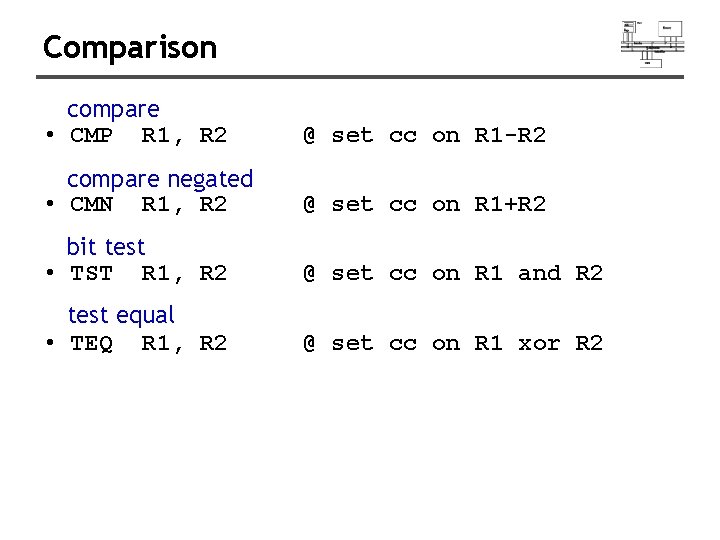
Comparison compare • CMP R 1, R 2 @ set cc on R 1 -R 2 compare negated • CMN R 1, R 2 @ set cc on R 1+R 2 bit test • TST R 1, R 2 @ set cc on R 1 and R 2 test equal • TEQ R 1, R 2 @ set cc on R 1 xor R 2
Comparison
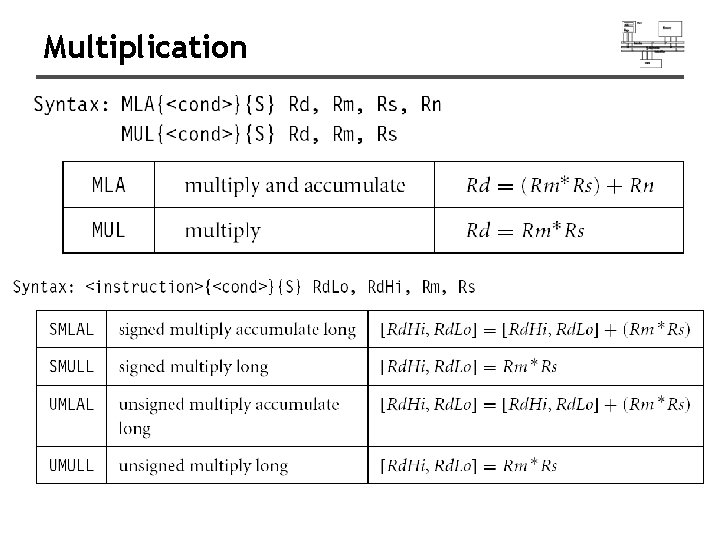
Multiplication
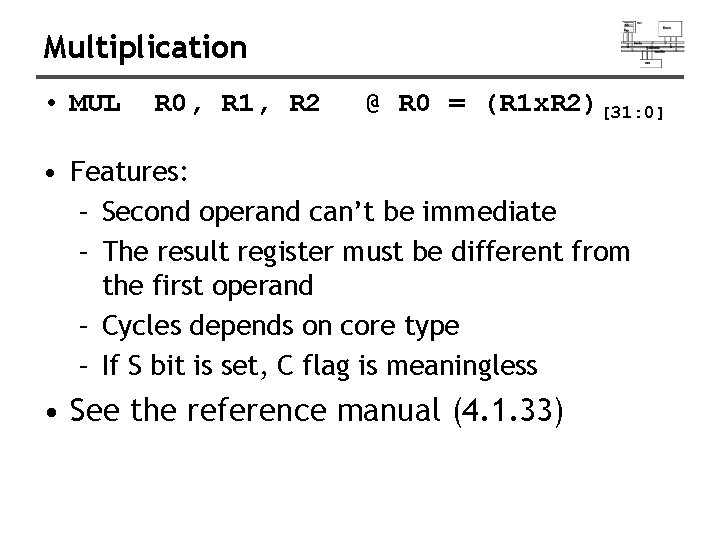
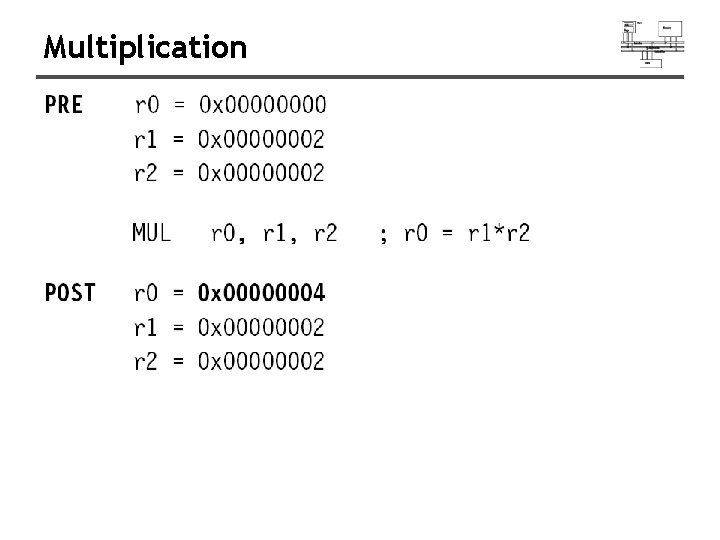
Multiplication • MUL R 0, R 1, R 2 @ R 0 = (R 1 x. R 2)[31: 0] • Features: – Second operand can’t be immediate – The result register must be different from the first operand – Cycles depends on core type – If S bit is set, C flag is meaningless • See the reference manual (4. 1. 33)
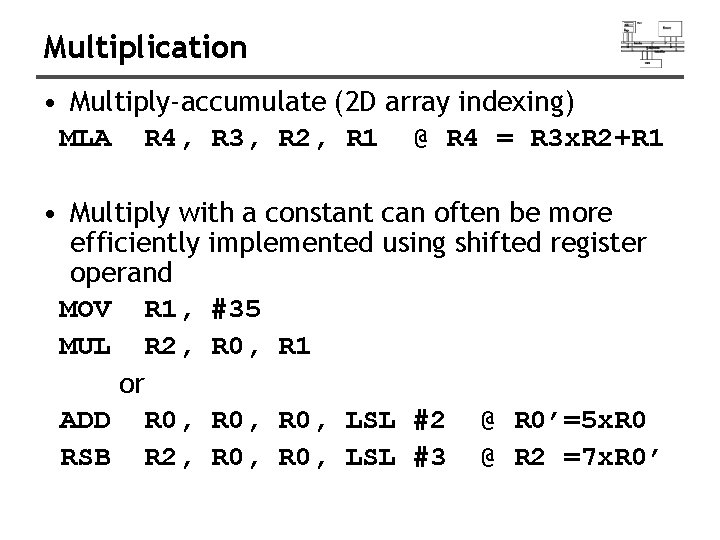
Multiplication • Multiply-accumulate (2 D array indexing) MLA R 4, R 3, R 2, R 1 @ R 4 = R 3 x. R 2+R 1 • Multiply with a constant can often be more efficiently implemented using shifted register operand MOV R 1, #35 MUL R 2, R 0, R 1 or ADD R 0, LSL #2 @ R 0’=5 x. R 0 RSB R 2, R 0, LSL #3 @ R 2 =7 x. R 0’
Multiplication
Multiplication
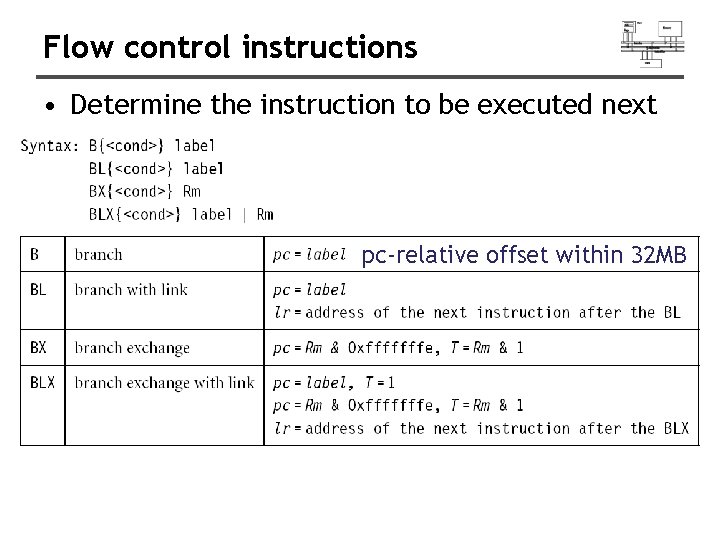
Flow control instructions • Determine the instruction to be executed next pc-relative offset within 32 MB
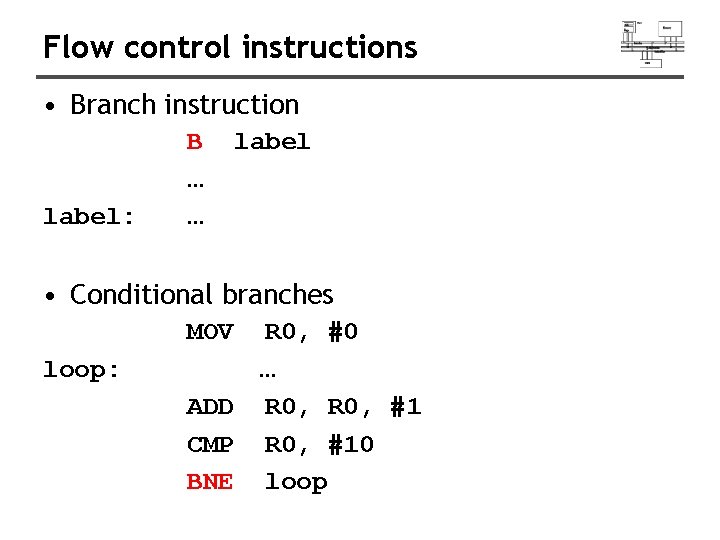
Flow control instructions • Branch instruction label: B … … label • Conditional branches MOV loop: R 0, #0 … ADD R 0, #1 CMP R 0, #10 BNE loop
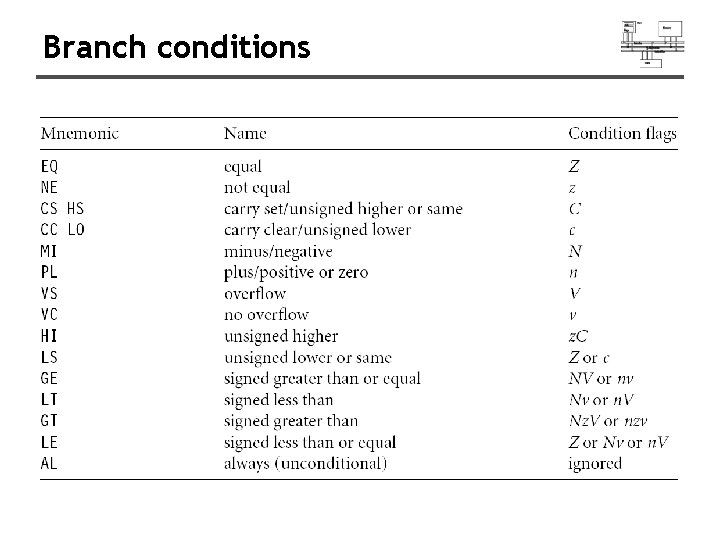
Branch conditions
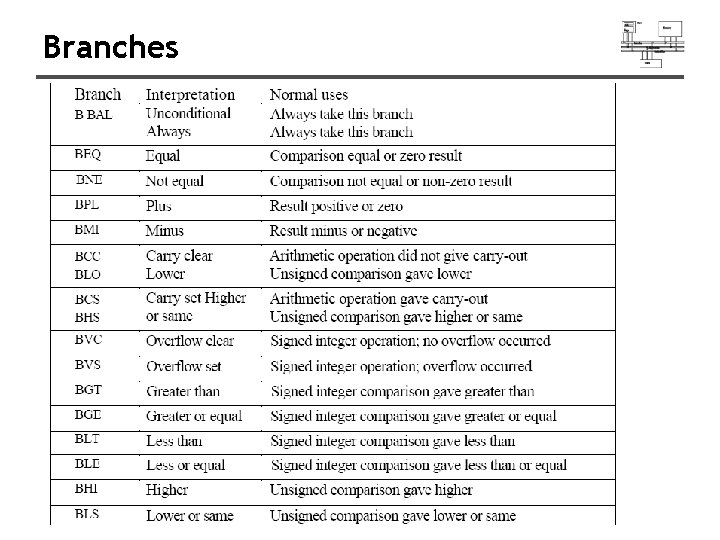
Branches
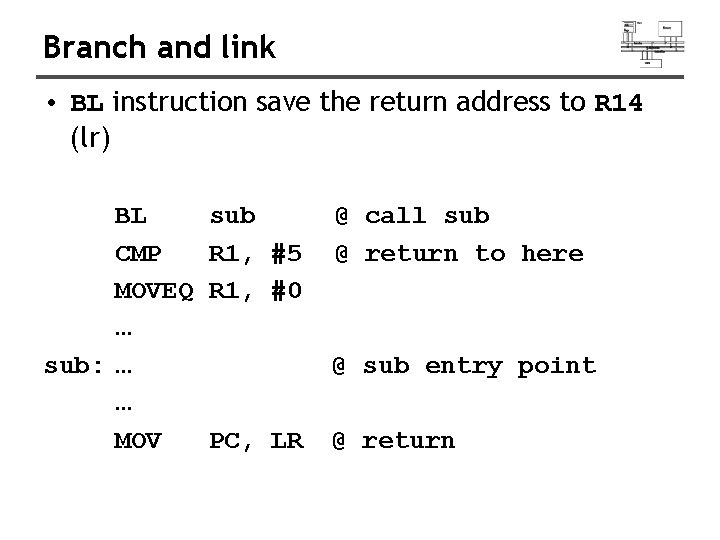
Branch and link • BL instruction save the return address to R 14 (lr) BL CMP MOVEQ … sub: … … MOV sub R 1, #5 R 1, #0 @ call sub @ return to here @ sub entry point PC, LR @ return
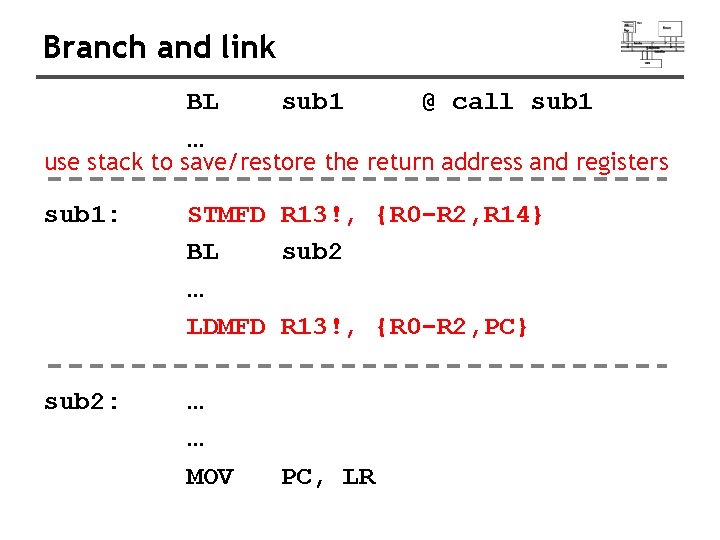
Branch and link BL … sub 1 @ call sub 1 use stack to save/restore the return address and registers sub 1: STMFD R 13!, {R 0 -R 2, R 14} BL sub 2 … LDMFD R 13!, {R 0 -R 2, PC} sub 2: … … MOV PC, LR
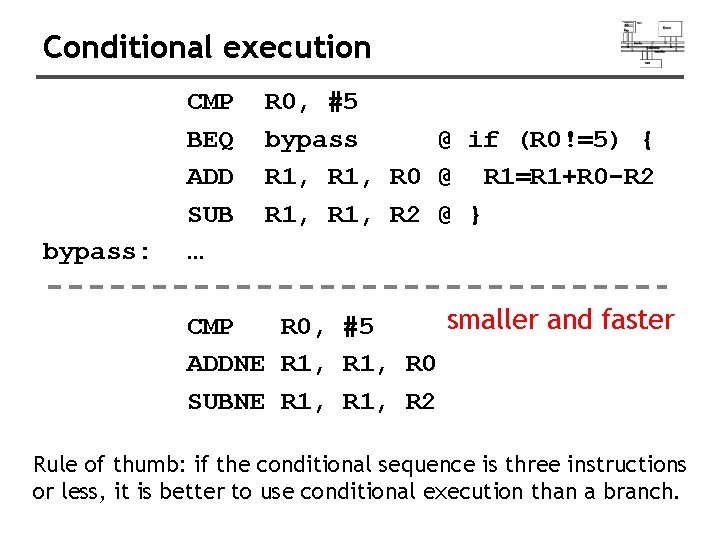
Conditional execution bypass: CMP BEQ ADD SUB … R 0, #5 bypass @ if (R 0!=5) { R 1, R 0 @ R 1=R 1+R 0 -R 2 R 1, R 2 @ } smaller and faster CMP R 0, #5 ADDNE R 1, R 0 SUBNE R 1, R 2 Rule of thumb: if the conditional sequence is three instructions or less, it is better to use conditional execution than a branch.
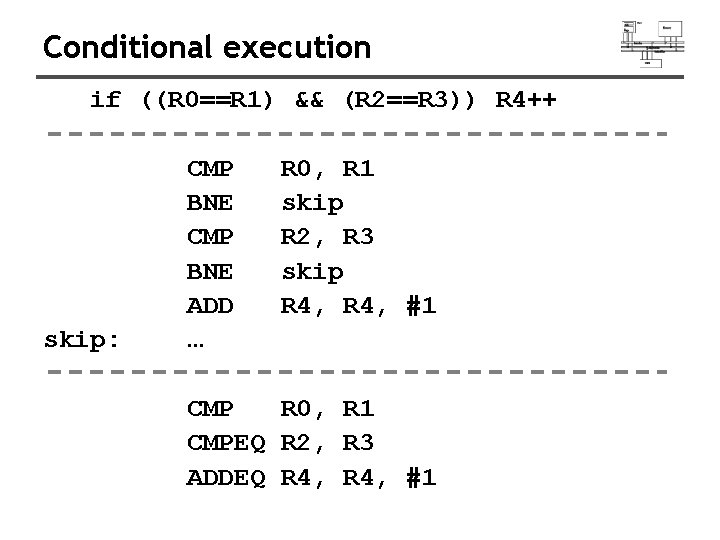
Conditional execution if ((R 0==R 1) && (R 2==R 3)) R 4++ skip: CMP BNE ADD … R 0, R 1 skip R 2, R 3 skip R 4, #1 CMP R 0, R 1 CMPEQ R 2, R 3 ADDEQ R 4, #1
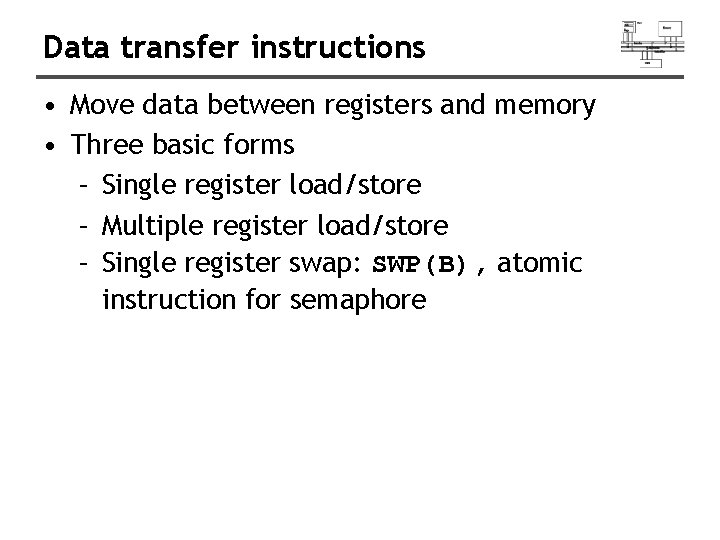
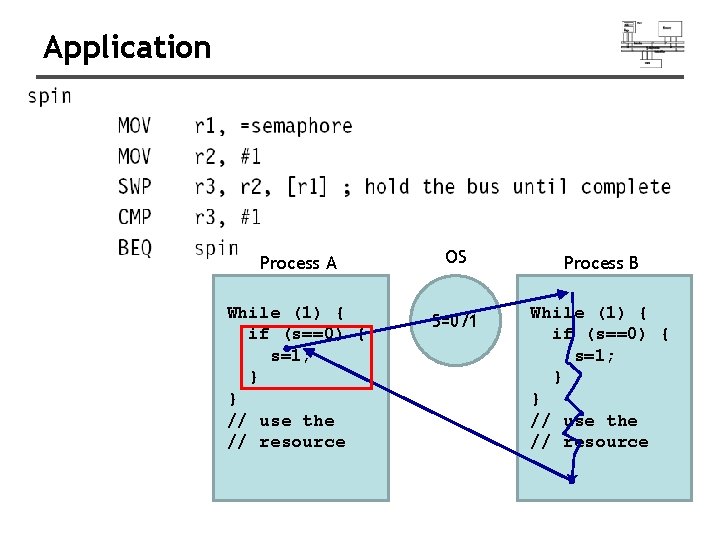
Data transfer instructions • Move data between registers and memory • Three basic forms – Single register load/store – Multiple register load/store – Single register swap: SWP(B), atomic instruction for semaphore
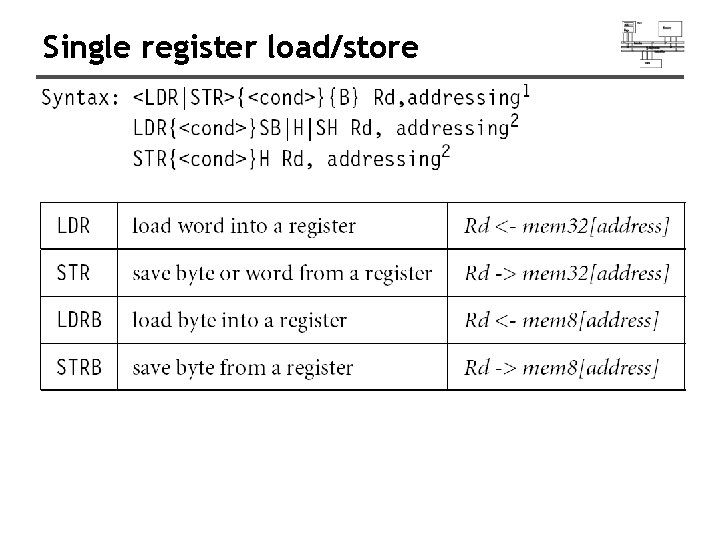
Single register load/store
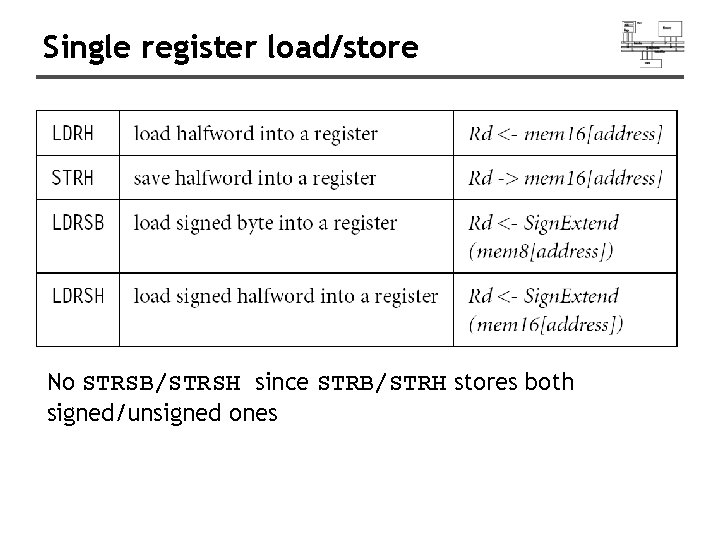
Single register load/store No STRSB/STRSH since STRB/STRH stores both signed/unsigned ones
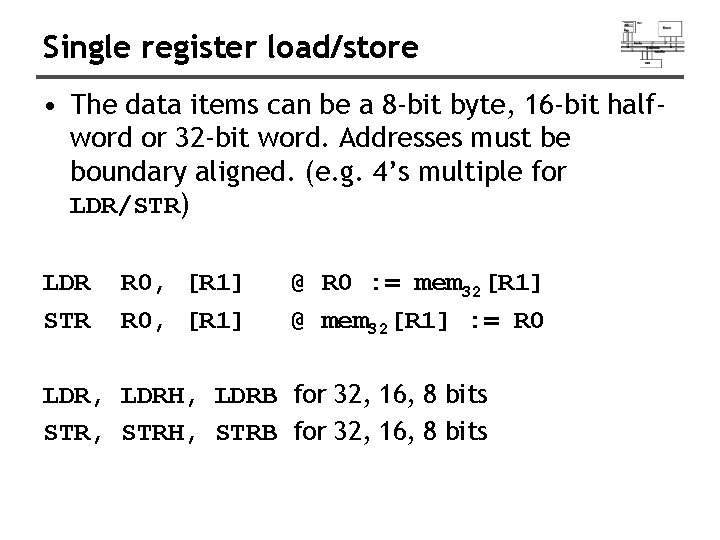
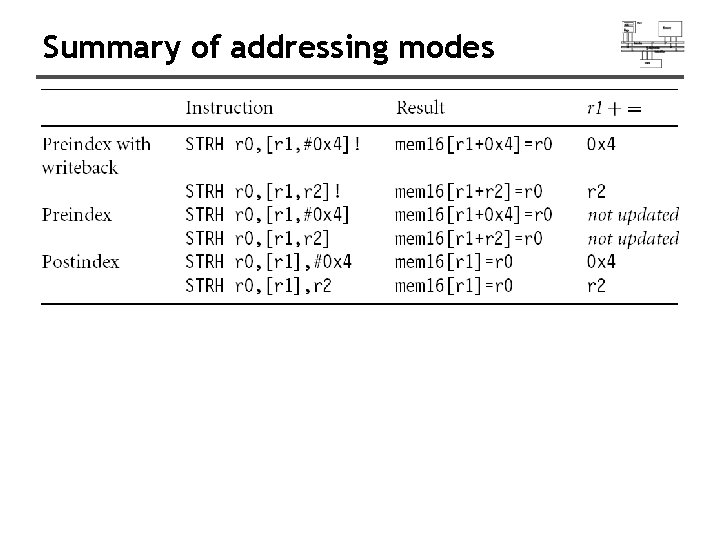
Single register load/store • The data items can be a 8 -bit byte, 16 -bit halfword or 32 -bit word. Addresses must be boundary aligned. (e. g. 4’s multiple for LDR/STR) LDR STR R 0, [R 1] @ R 0 : = mem 32[R 1] @ mem 32[R 1] : = R 0 LDR, LDRH, LDRB for 32, 16, 8 bits STR, STRH, STRB for 32, 16, 8 bits
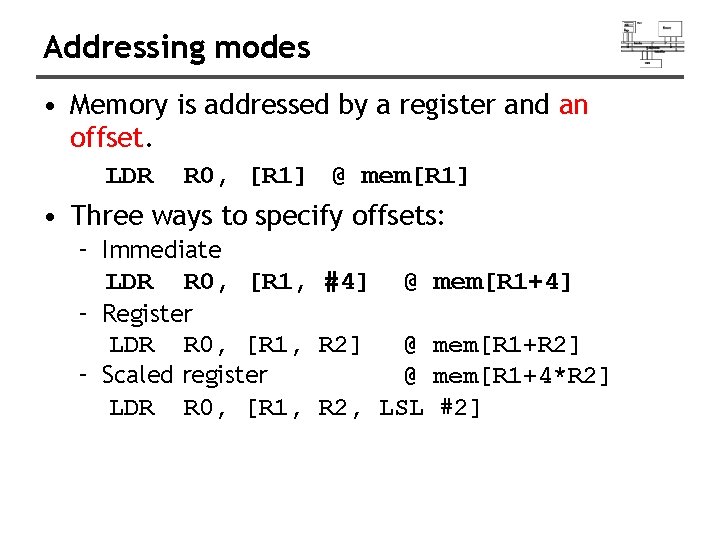
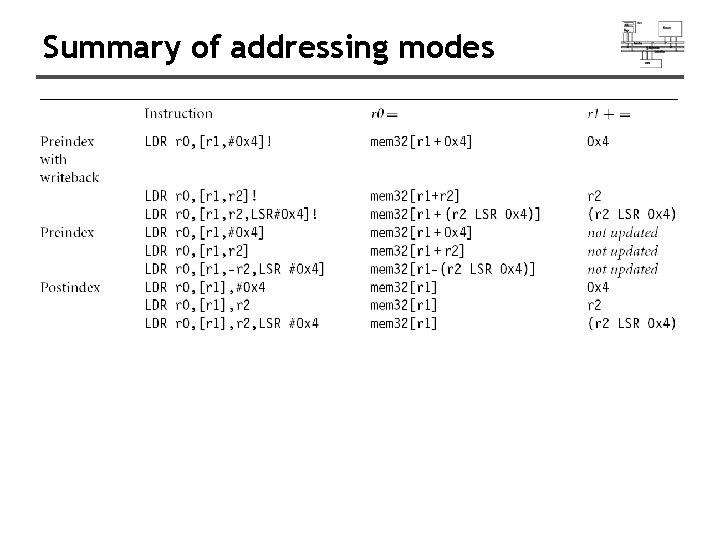
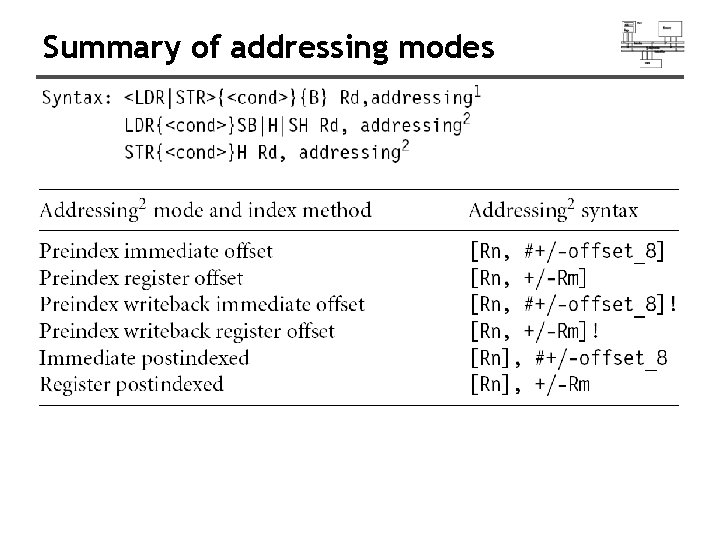
Addressing modes • Memory is addressed by a register and an offset. LDR R 0, [R 1] @ mem[R 1] • Three ways to specify offsets: – Immediate LDR R 0, [R 1, #4] @ – Register LDR R 0, [R 1, R 2] @ – Scaled register @ LDR R 0, [R 1, R 2, LSL mem[R 1+4] mem[R 1+R 2] mem[R 1+4*R 2] #2]
![Addressing modes • Pre-index addressing (LDR R 0, [R 1, #4]) without a writeback](http://slidetodoc.com/presentation_image_h2/dbbe97a445454f3da27af4cd136f3118/image-57.jpg "Addressing modes • Pre-index addressing (LDR R 0, [R 1, #4]) without a writeback")
Addressing modes • Pre-index addressing (LDR R 0, [R 1, #4]) without a writeback • Auto-indexing addressing (LDR R 0, [R 1, #4]!) Pre-index with writeback calculation before accessing with a writeback • Post-index addressing (LDR R 0, [R 1], #4) calculation after accessing with a writeback
![Pre-index addressing LDR R 0, [R 1, #4] LDR R 0, [R 1, R](http://slidetodoc.com/presentation_image_h2/dbbe97a445454f3da27af4cd136f3118/image-58.jpg "Pre-index addressing LDR R 0, [R 1, #4] LDR R 0, [R 1, R")
Pre-index addressing LDR R 0, [R 1, #4] LDR R 0, [R 1, R 1 @ R 0=mem[R 1+4] @ R 1 unchanged ] + R 0
![Auto-indexing addressing LDR R 0, [R 1, #4]! @ R 0=mem[R 1+4] @ R](http://slidetodoc.com/presentation_image_h2/dbbe97a445454f3da27af4cd136f3118/image-59.jpg "Auto-indexing addressing LDR R 0, [R 1, #4]! @ R 0=mem[R 1+4] @ R")
Auto-indexing addressing LDR R 0, [R 1, #4]! @ R 0=mem[R 1+4] @ R 1=R 1+4 No extra time; Fast; LDR R 0, [R 1, R 1 ]! + R 0
![Post-index addressing LDR R 0, R 1, #4 @ R 0=mem[R 1] @ R](http://slidetodoc.com/presentation_image_h2/dbbe97a445454f3da27af4cd136f3118/image-60.jpg "Post-index addressing LDR R 0, R 1, #4 @ R 0=mem[R 1] @ R")
Post-index addressing LDR R 0, R 1, #4 @ R 0=mem[R 1] @ R 1=R 1+4 LDR R 0, [R 1], R 0 R 1 +
![Comparisons • Pre-indexed addressing LDR R 0, [R 1, R 2] @ R 0=mem[R](http://slidetodoc.com/presentation_image_h2/dbbe97a445454f3da27af4cd136f3118/image-61.jpg "Comparisons • Pre-indexed addressing LDR R 0, [R 1, R 2] @ R 0=mem[R")
Comparisons • Pre-indexed addressing LDR R 0, [R 1, R 2] @ R 0=mem[R 1+R 2] @ R 1 unchanged • Auto-indexing addressing LDR R 0, [R 1, R 2]! @ R 0=mem[R 1+R 2] @ R 1=R 1+R 2 • Post-indexed addressing LDR R 0, [R 1], R 2 @ R 0=mem[R 1] @ R 1=R 1+R 2
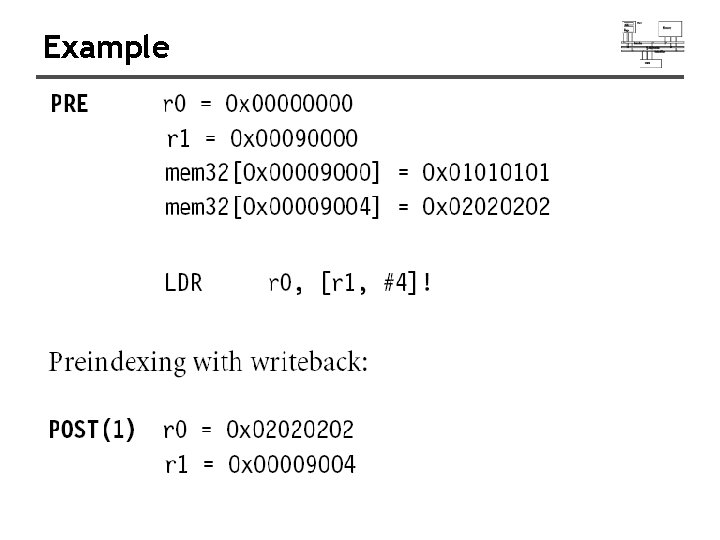
Example
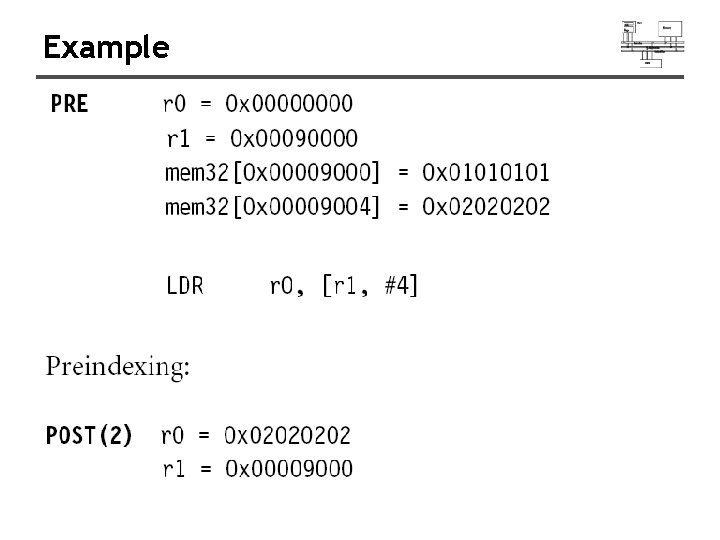
Example
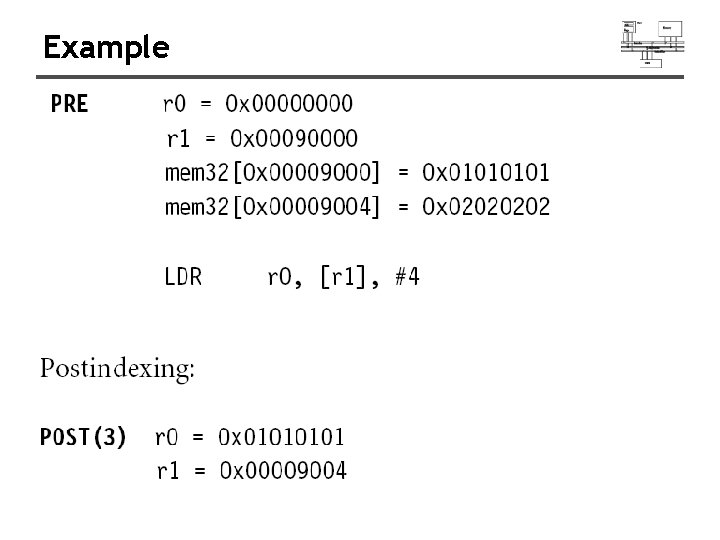
Example
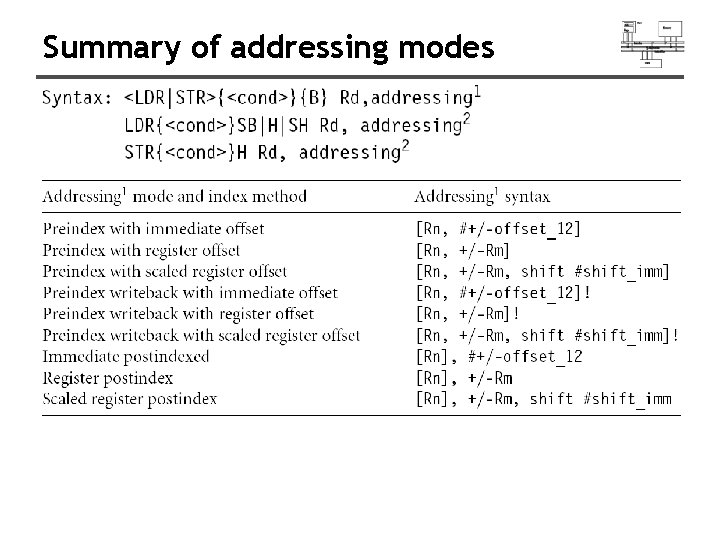
Summary of addressing modes
Summary of addressing modes
Summary of addressing modes
Summary of addressing modes
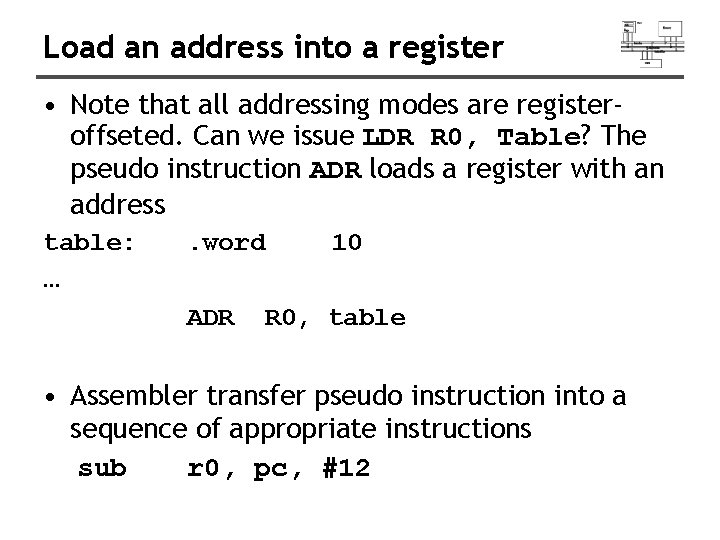
Load an address into a register • Note that all addressing modes are registeroffseted. Can we issue LDR R 0, Table? The pseudo instruction ADR loads a register with an address table: … . word ADR 10 R 0, table • Assembler transfer pseudo instruction into a sequence of appropriate instructions sub r 0, pc, #12
![Application loop: ADR R 1, table LDR R 0, [R 1] R 1 ADD](http://slidetodoc.com/presentation_image_h2/dbbe97a445454f3da27af4cd136f3118/image-70.jpg "Application loop: ADR R 1, table LDR R 0, [R 1] R 1 ADD")
Application loop: ADR R 1, table LDR R 0, [R 1] R 1 ADD R 1, #4 @ operations on R 0 … ADR R 1, table LDR R 0, [R 1], #4 @ operations on R 0 …
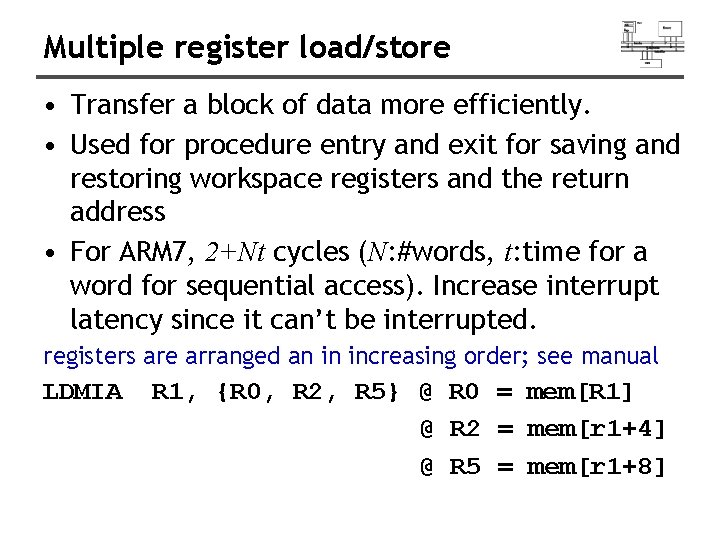
Multiple register load/store • Transfer a block of data more efficiently. • Used for procedure entry and exit for saving and restoring workspace registers and the return address • For ARM 7, 2+Nt cycles (N: #words, t: time for a word for sequential access). Increase interrupt latency since it can’t be interrupted. registers are arranged an in increasing order; see manual LDMIA R 1, {R 0, R 2, R 5} @ R 0 = mem[R 1] @ R 2 = mem[r 1+4] @ R 5 = mem[r 1+8]
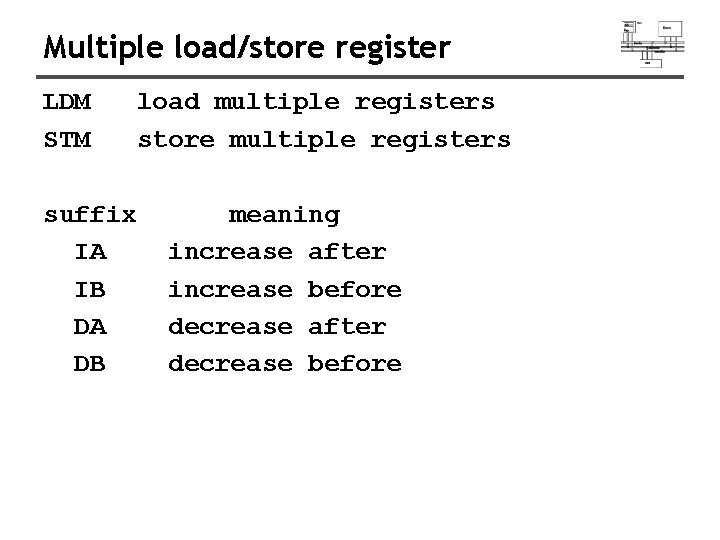
Multiple load/store register LDM STM suffix IA IB DA DB load multiple registers store multiple registers meaning increase after increase before decrease after decrease before
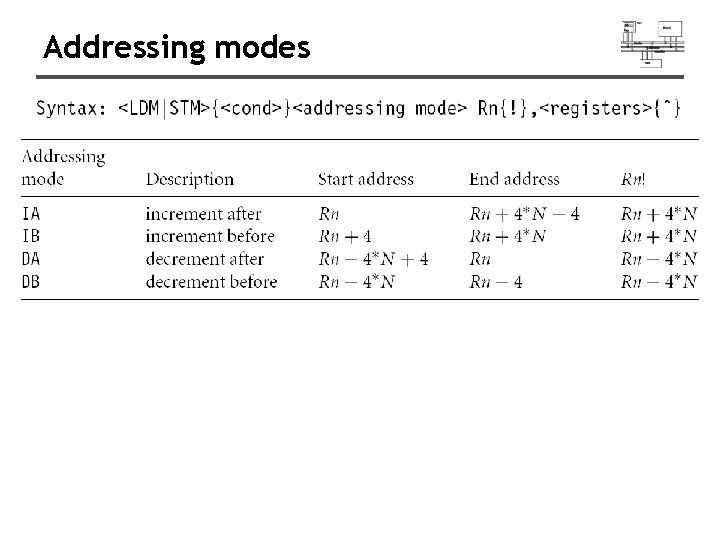
Addressing modes
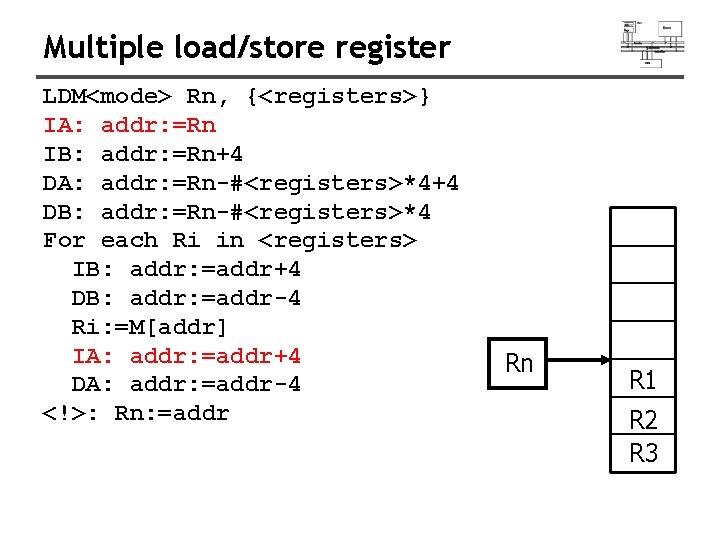
Multiple load/store register LDM<mode> Rn, {<registers>} IA: addr: =Rn IB: addr: =Rn+4 DA: addr: =Rn-#<registers>*4+4 DB: addr: =Rn-#<registers>*4 For each Ri in <registers> IB: addr: =addr+4 DB: addr: =addr-4 Ri: =M[addr] IA: addr: =addr+4 DA: addr: =addr-4 <!>: Rn: =addr Rn R 1 R 2 R 3
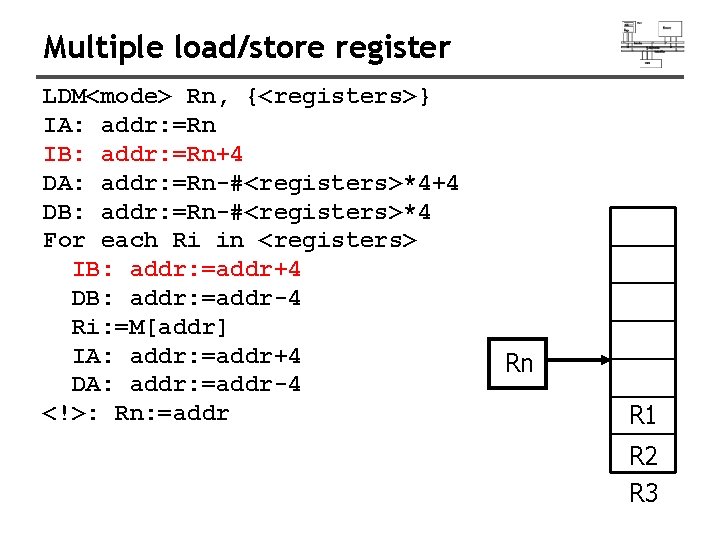
Multiple load/store register LDM<mode> Rn, {<registers>} IA: addr: =Rn IB: addr: =Rn+4 DA: addr: =Rn-#<registers>*4+4 DB: addr: =Rn-#<registers>*4 For each Ri in <registers> IB: addr: =addr+4 DB: addr: =addr-4 Ri: =M[addr] IA: addr: =addr+4 DA: addr: =addr-4 <!>: Rn: =addr Rn R 1 R 2 R 3
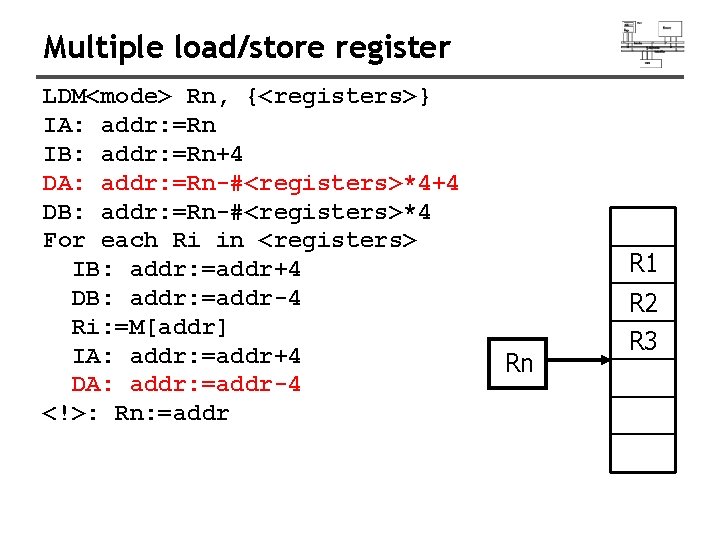
Multiple load/store register LDM<mode> Rn, {<registers>} IA: addr: =Rn IB: addr: =Rn+4 DA: addr: =Rn-#<registers>*4+4 DB: addr: =Rn-#<registers>*4 For each Ri in <registers> IB: addr: =addr+4 DB: addr: =addr-4 Ri: =M[addr] IA: addr: =addr+4 DA: addr: =addr-4 <!>: Rn: =addr R 1 R 2 Rn R 3
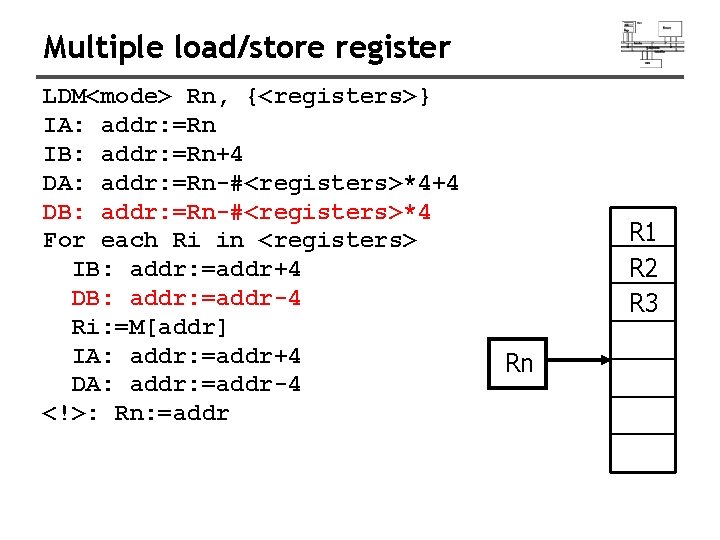
Multiple load/store register LDM<mode> Rn, {<registers>} IA: addr: =Rn IB: addr: =Rn+4 DA: addr: =Rn-#<registers>*4+4 DB: addr: =Rn-#<registers>*4 For each Ri in <registers> IB: addr: =addr+4 DB: addr: =addr-4 Ri: =M[addr] IA: addr: =addr+4 DA: addr: =addr-4 <!>: Rn: =addr R 1 R 2 R 3 Rn
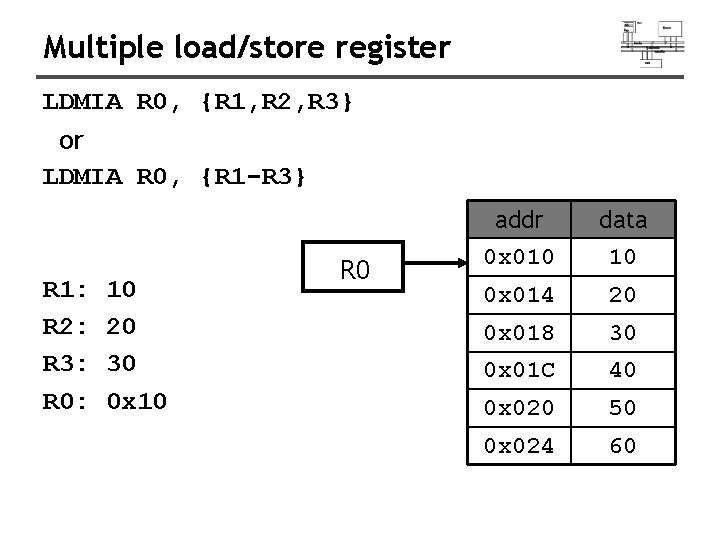
Multiple load/store register LDMIA R 0, {R 1, R 2, R 3} or LDMIA R 0, {R 1 -R 3} R 1: R 2: R 3: R 0: 10 20 30 0 x 10 R 0 addr 0 x 010 data 10 0 x 014 20 0 x 018 30 0 x 01 C 40 0 x 020 50 0 x 024 60
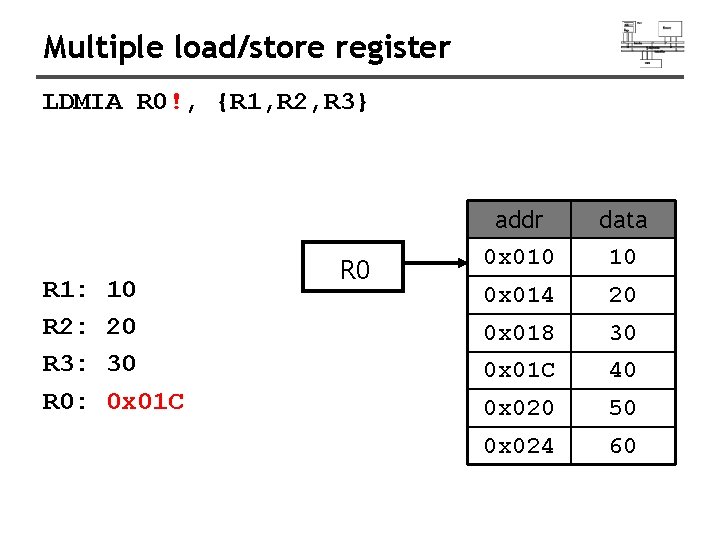
Multiple load/store register LDMIA R 0!, {R 1, R 2, R 3} R 1: R 2: R 3: R 0: 10 20 30 0 x 01 C R 0 addr 0 x 010 data 10 0 x 014 20 0 x 018 30 0 x 01 C 40 0 x 020 50 0 x 024 60
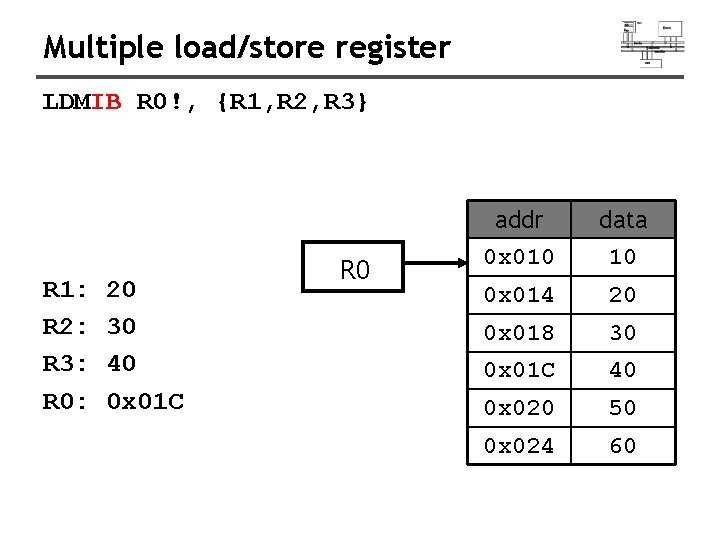
Multiple load/store register LDMIB R 0!, {R 1, R 2, R 3} R 1: R 2: R 3: R 0: 20 30 40 0 x 01 C R 0 addr 0 x 010 data 10 0 x 014 20 0 x 018 30 0 x 01 C 40 0 x 020 50 0 x 024 60
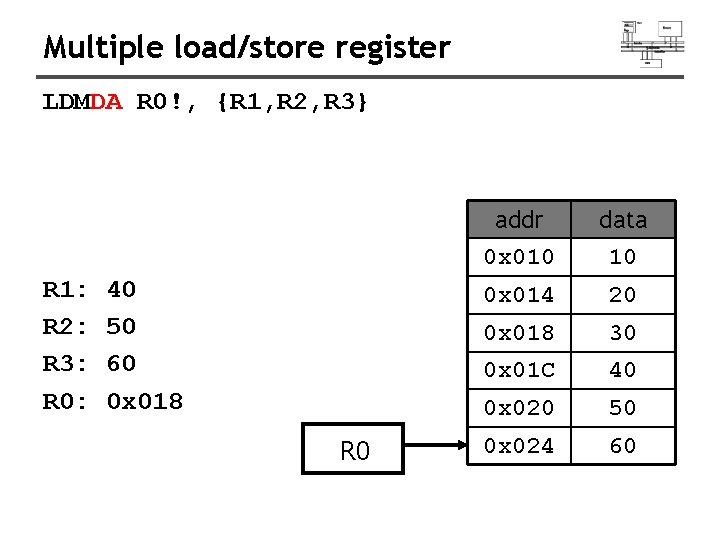
Multiple load/store register LDMDA R 0!, {R 1, R 2, R 3} R 1: R 2: R 3: R 0: 40 50 60 0 x 018 R 0 addr 0 x 010 data 10 0 x 014 20 0 x 018 30 0 x 01 C 40 0 x 020 50 0 x 024 60
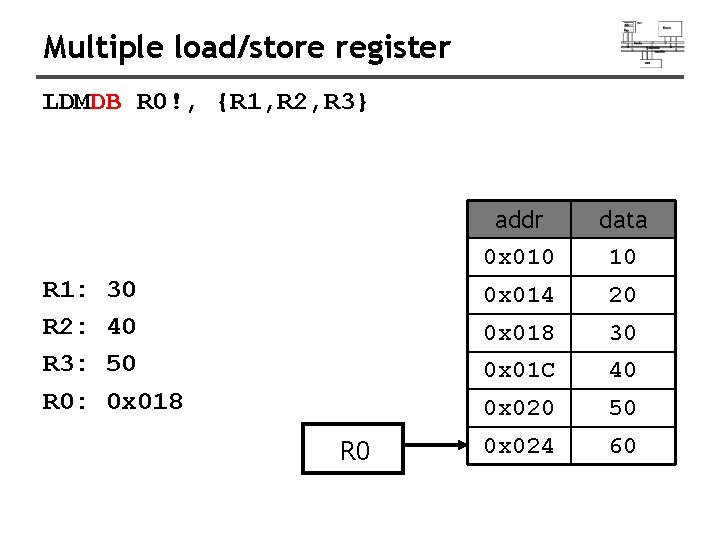
Multiple load/store register LDMDB R 0!, {R 1, R 2, R 3} R 1: R 2: R 3: R 0: 30 40 50 0 x 018 R 0 addr 0 x 010 data 10 0 x 014 20 0 x 018 30 0 x 01 C 40 0 x 020 50 0 x 024 60
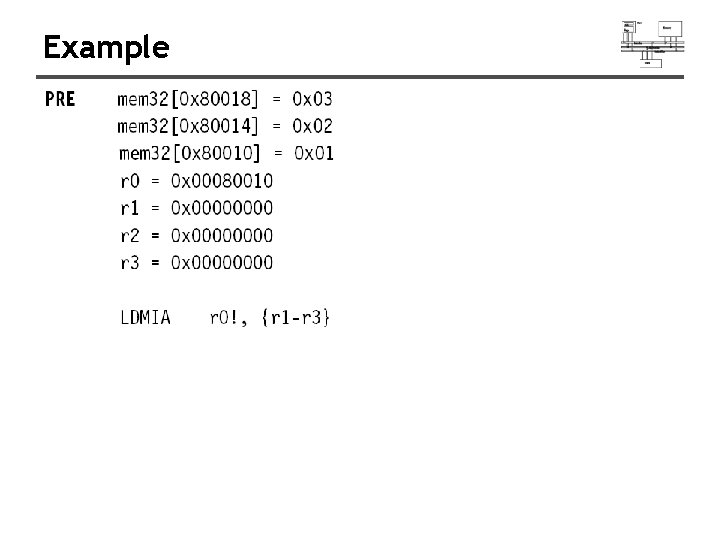
Example
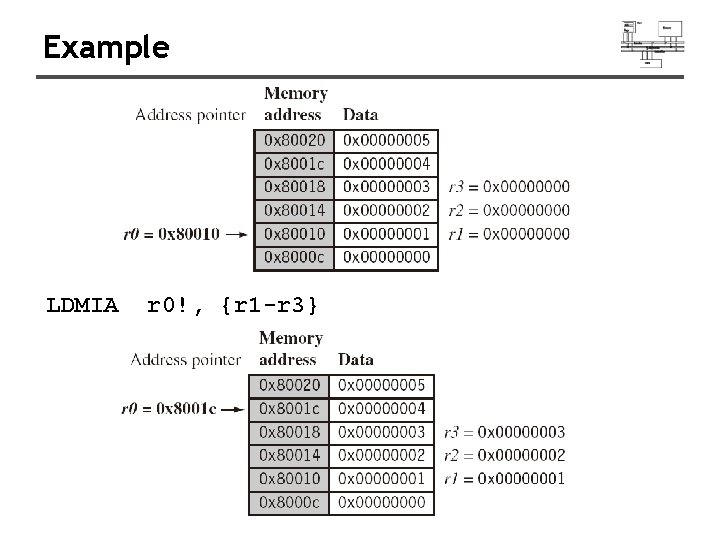
Example LDMIA r 0!, {r 1 -r 3}
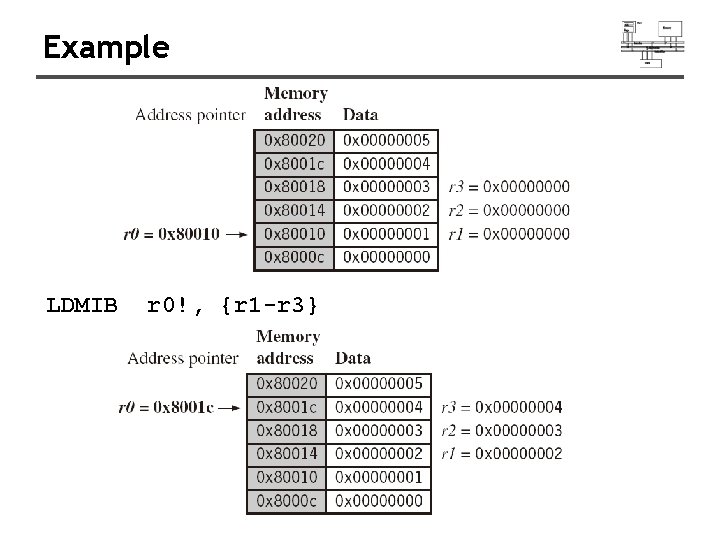
Example LDMIB r 0!, {r 1 -r 3}
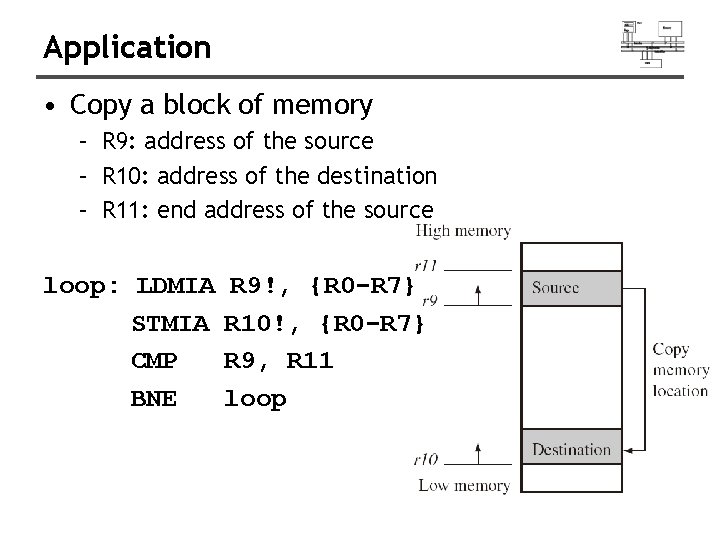
Application • Copy a block of memory – R 9: address of the source – R 10: address of the destination – R 11: end address of the source loop: LDMIA STMIA CMP BNE R 9!, {R 0 -R 7} R 10!, {R 0 -R 7} R 9, R 11 loop
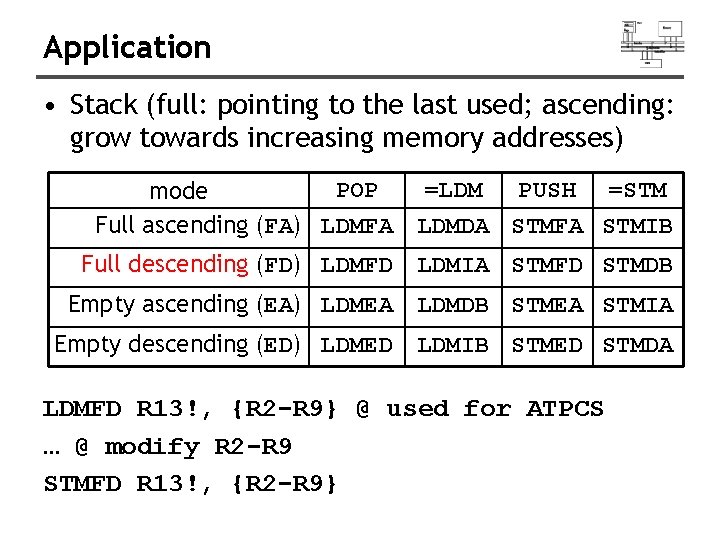
Application • Stack (full: pointing to the last used; ascending: grow towards increasing memory addresses) POP mode Full ascending (FA) LDMFA =LDM PUSH =STM LDMDA STMFA STMIB Full descending (FD) LDMFD LDMIA STMFD STMDB Empty ascending (EA) LDMEA LDMDB STMEA STMIA Empty descending (ED) LDMED LDMIB STMED STMDA LDMFD R 13!, {R 2 -R 9} @ used for ATPCS … @ modify R 2 -R 9 STMFD R 13!, {R 2 -R 9}
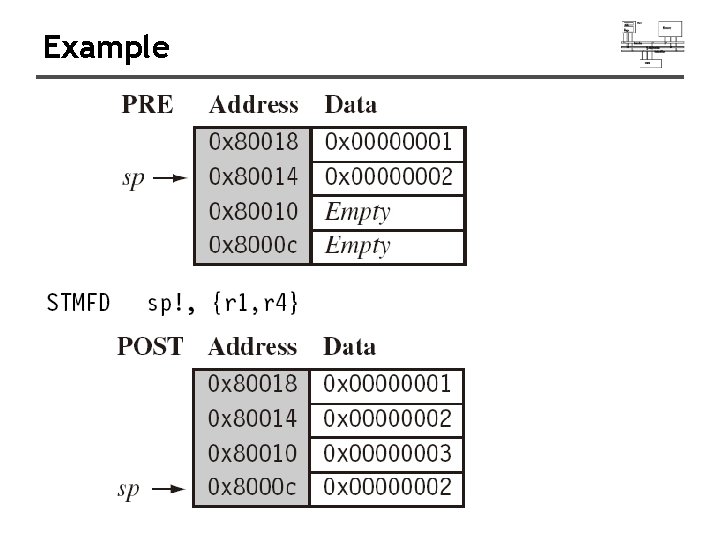
Example
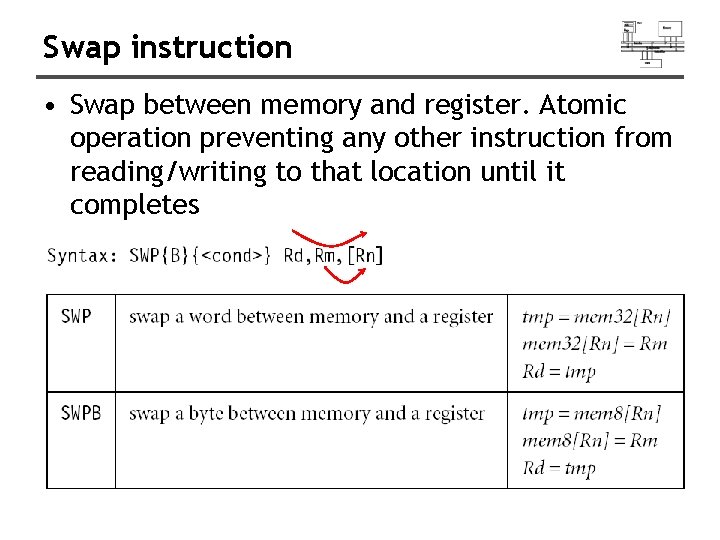
Swap instruction • Swap between memory and register. Atomic operation preventing any other instruction from reading/writing to that location until it completes
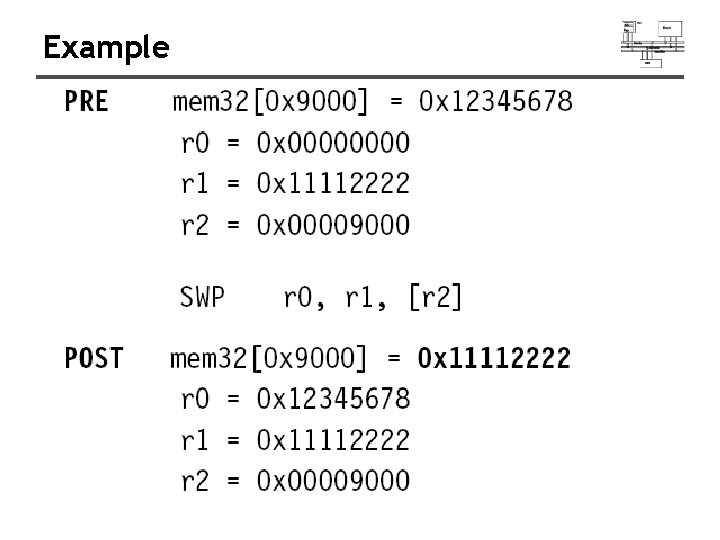
Example
Application Process A OS Process B While (1) { if (s==0) { s=1; } } // use the // resource S=0/1 While (1) { if (s==0) { s=1; } } // use the // resource
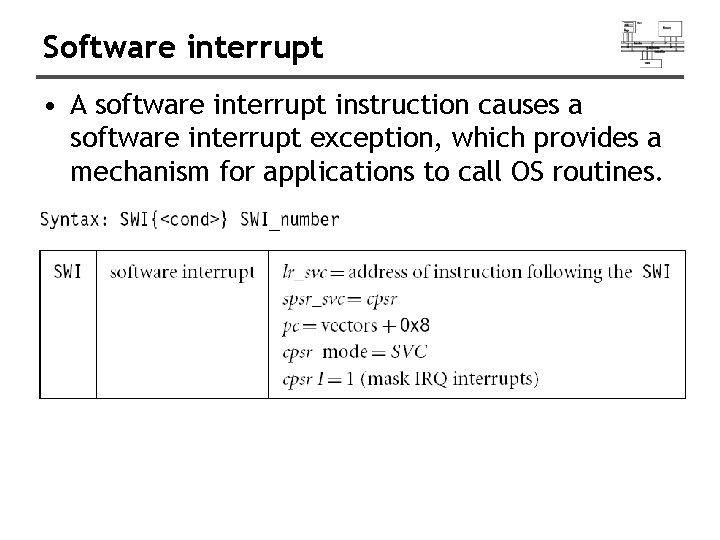
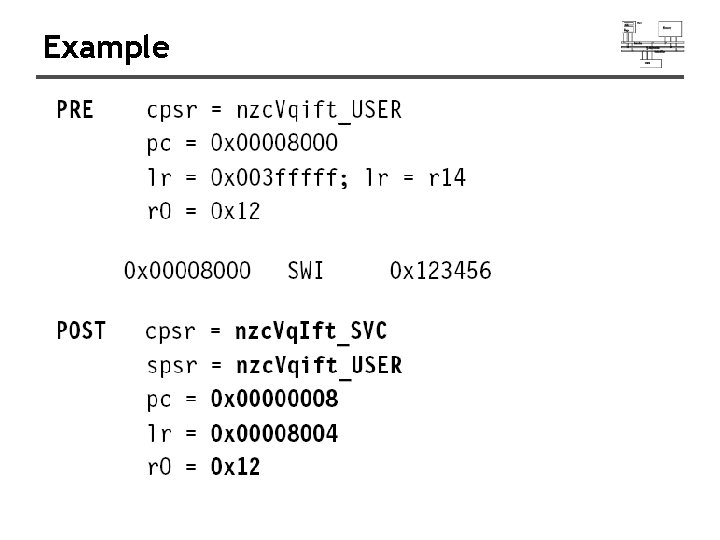
Software interrupt • A software interrupt instruction causes a software interrupt exception, which provides a mechanism for applications to call OS routines.
Example
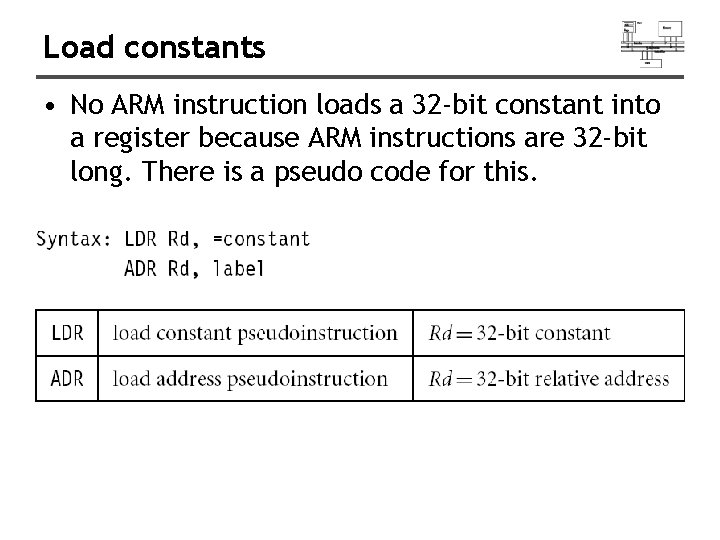
Load constants • No ARM instruction loads a 32 -bit constant into a register because ARM instructions are 32 -bit long. There is a pseudo code for this.
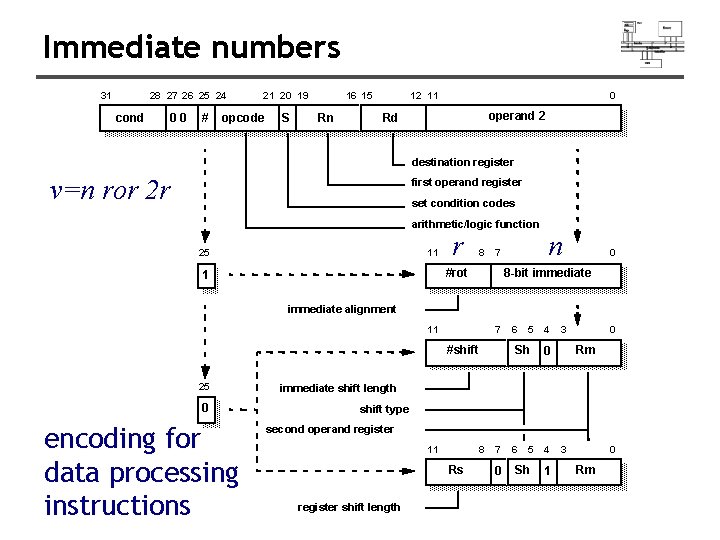
Immediate numbers 31 28 27 26 25 24 cond 00 # 21 20 19 opcode S 16 15 Rn 12 11 0 operand 2 Rd destination register v=n ror 2 r first operand register set condition codes arithmetic/logic function 25 11 r 8 7 #rot 1 n 0 8 -bit immediate alignment 11 7 #shift 25 0 encoding for data processing instructions 6 5 4 Sh 3 0 Rm 0 immediate shift length shift type second operand register 11 8 7 Rs register shift length 0 6 5 4 Sh 1 3 0 Rm
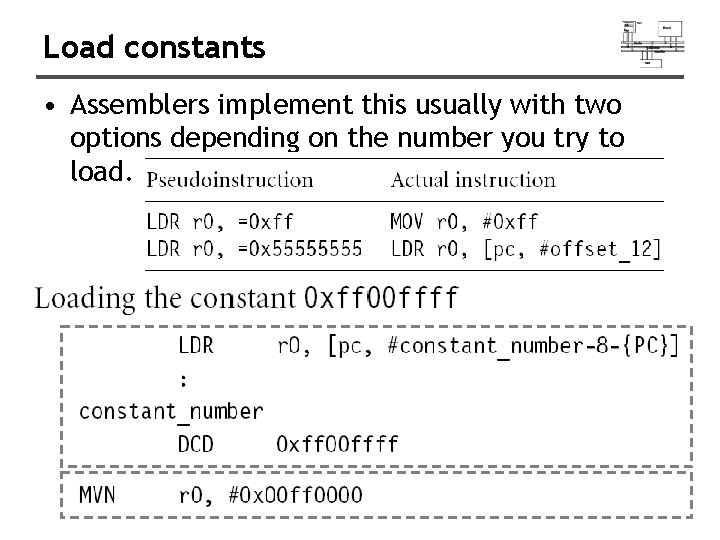
Load constants • Assemblers implement this usually with two options depending on the number you try to load.
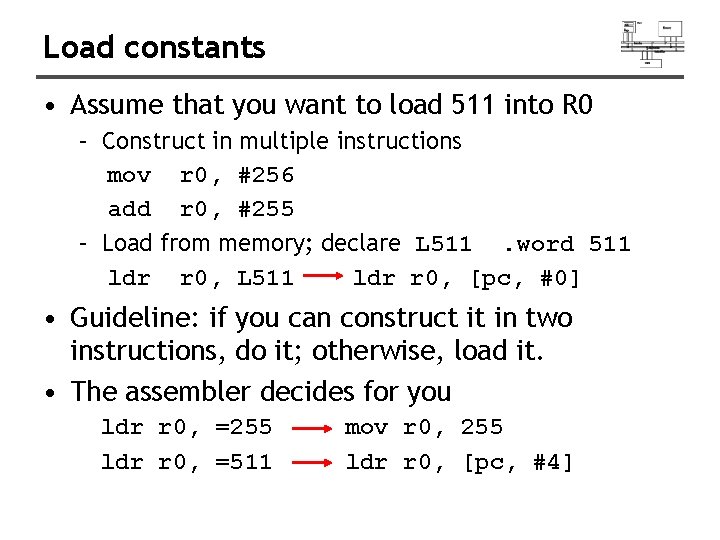
Load constants • Assume that you want to load 511 into R 0 – Construct in multiple instructions mov r 0, #256 add r 0, #255 – Load from memory; declare L 511. word 511 ldr r 0, L 511 ldr r 0, [pc, #0] • Guideline: if you can construct it in two instructions, do it; otherwise, load it. • The assembler decides for you ldr r 0, =255 ldr r 0, =511 mov r 0, 255 ldr r 0, [pc, #4]
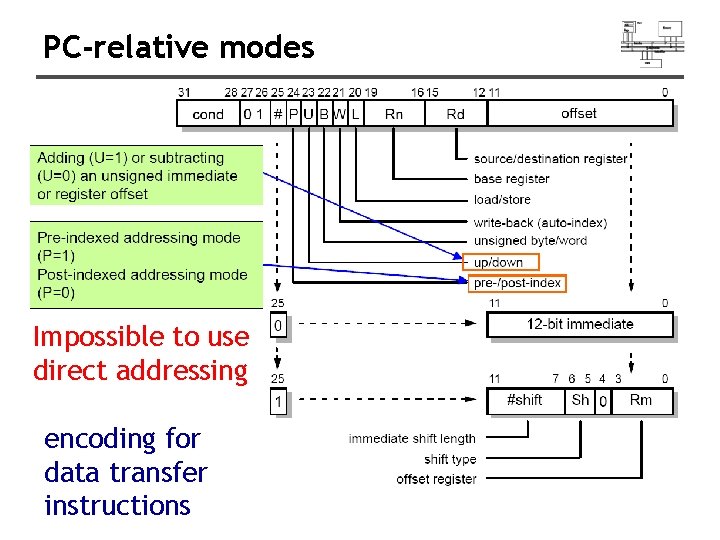
PC-relative modes Impossible to use direct addressing encoding for data transfer instructions
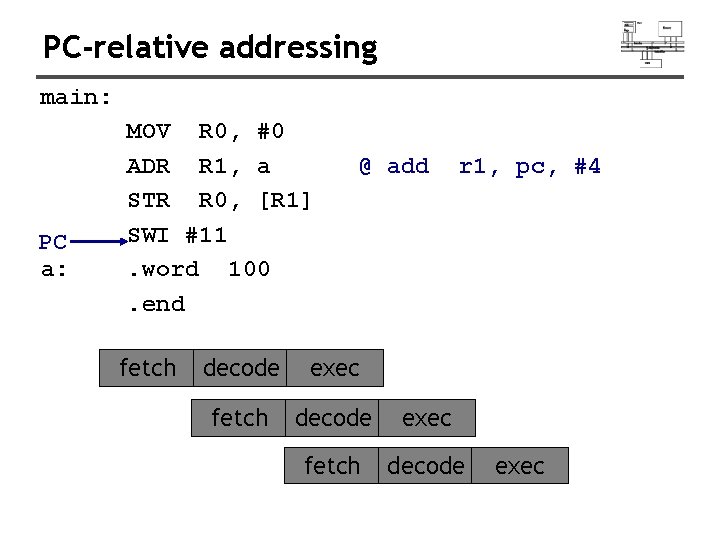
PC-relative addressing main: PC a: MOV R 0, #0 ADR R 1, a STR R 0, [R 1] SWI #11. word 100. end fetch @ add r 1, pc, #4 decode exec fetch decode exec
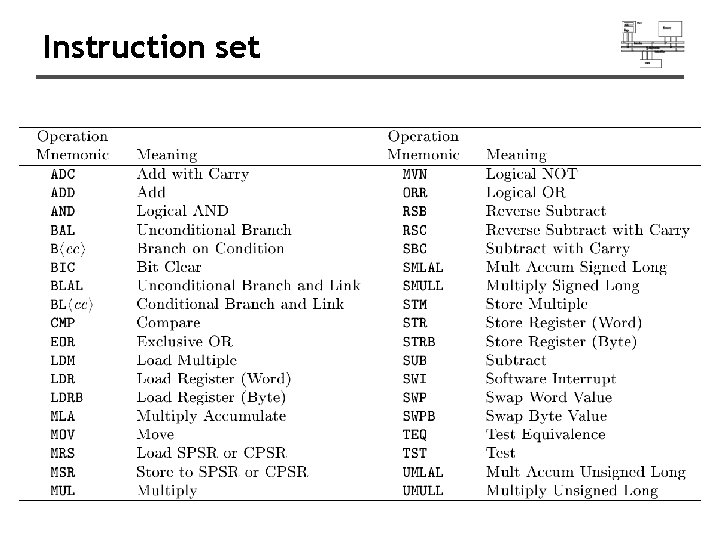
Instruction set
- Slides: 100