
ARIBA NETWORK TAX INVOICING GUIDE MEXICO BP PO
ARIBA NETWORK | TAX INVOICING GUIDE MEXICO BP P&O GLOBAL SUPPLIERS – NON LOCAL SUPPLIERS PUBLIC
Tax Invoicing Process in Ariba Network Ø Setting up your Ariba Account Ø Local Content for Mexico ØWhere to go for help? © 2019 SAP SE or an SAP affiliate company. All rights reserved. ǀ PUBLIC 2

SETTING UP YOUR ARIBA ACCOUNT © 2019 SAP SE or an SAP affiliate company. All rights reserved. ǀ PUBLIC 3

Ariba Network Information To help with creating your account, these are the Ariba Network account types you can sign up to: • Ariba Standard Account: This is a no fee solution that requires the use of an interactive email to process documents against the PO. The PO can only be accessed via the most current email – so suppliers are required to manage these emails carefully. • Ariba Enterprise Account: This is a fee-based solution with Ariba that allows you to use the portal to interact with your PO and provides additional reporting functionality. You may wish to connect to an existing Enterprise Account you utilise with other customers. Important Note: Suppliers who wish to upgrade or connect to an Ariba Enterprise account will be charged a fee by Ariba directly. Failure to pay these fees may result in suspension of your account. As this relationship is between yourselves and Ariba directly, BP cannot support payment/ account suspension queries. Please ensure you are prepared to pay Ariba fees if you create/ link to an Ariba Enterprise account. We recommend you sign up to a Standard account. © 2019 SAP SE or an SAP affiliate company. All rights reserved. ǀ PUBLIC 4

Ariba Network Information When BP releases your Purchase Orders you will receive an interactive email from ordersender-prod@ansmtp. ariba. com. This interactive email must be saved and filed carefully for future invoicing. To action this PO and set up your Ariba Network Account please here for the Ariba Network Standard Account Training. The Ariba Network Standard Account Training will guide you through account set, PO confirmation and Invoicing. Please see the next slide for Mexico required support documentation when submitting your invoice. © 2019 SAP SE or an SAP affiliate company. All rights reserved. ǀ PUBLIC 5
LOCAL CONTENT REQUIREMENT FOR MEXICO REGION © 2019 SAP SE or an SAP affiliate company. All rights reserved. ǀ PUBLIC 6

Local Content: Prepare Invoice Attachment • Attachments are required for service invoices. You are required to upload one PDF which includes the following documents in the following order: 1. Local Content Information § 2. The next slide explains how to prepare the Local Content Information. Supporting Documentation § This is mandatory for all services. Please review the BP P&O Global Invoice Requirements document for examples of accepted supporting documents evidencing delivery (e. g. signed field ticket). • Invoices which do not include these documents will be rejected. • There are multiple ‘merge PDF’ tools available via an internet search. © 2019 SAP SE or an SAP affiliate company. All rights reserved. ǀ PUBLIC 7
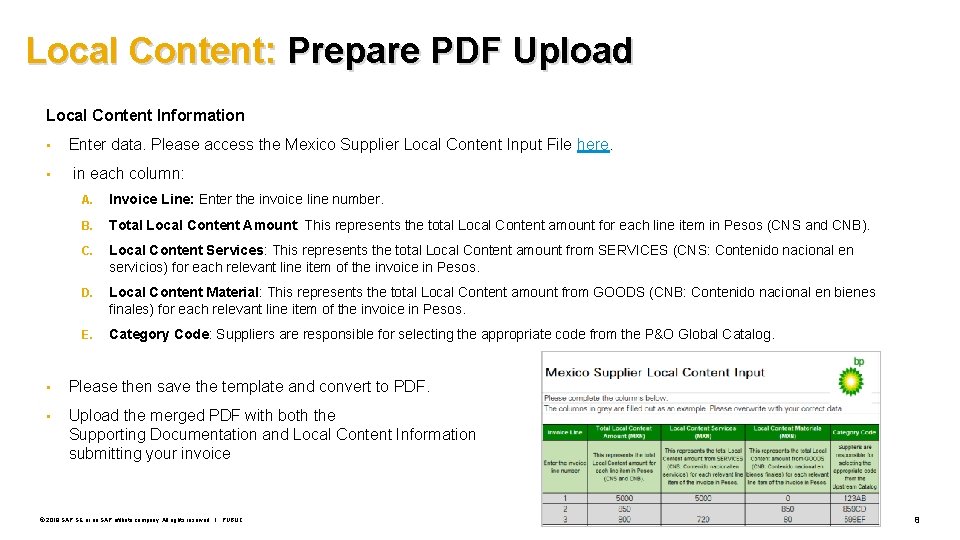
Local Content: Prepare PDF Upload Local Content Information • • Enter data. Please access the Mexico Supplier Local Content Input File here. in each column: A. Invoice Line: Enter the invoice line number. B. Total Local Content Amount: This represents the total Local Content amount for each line item in Pesos (CNS and CNB). C. Local Content Services: This represents the total Local Content amount from SERVICES (CNS: Contenido nacional en servicios) for each relevant line item of the invoice in Pesos. D. Local Content Material: This represents the total Local Content amount from GOODS (CNB: Contenido nacional en bienes finales) for each relevant line item of the invoice in Pesos. E. Category Code: Suppliers are responsible for selecting the appropriate code from the P&O Global Catalog. • Please then save the template and convert to PDF. • Upload the merged PDF with both the Supporting Documentation and Local Content Information submitting your invoice © 2019 SAP SE or an SAP affiliate company. All rights reserved. ǀ PUBLIC when 8

WHERE TO GO FOR SUPPORT © 2019 SAP SE or an SAP affiliate company. All rights reserved. ǀ PUBLIC 9
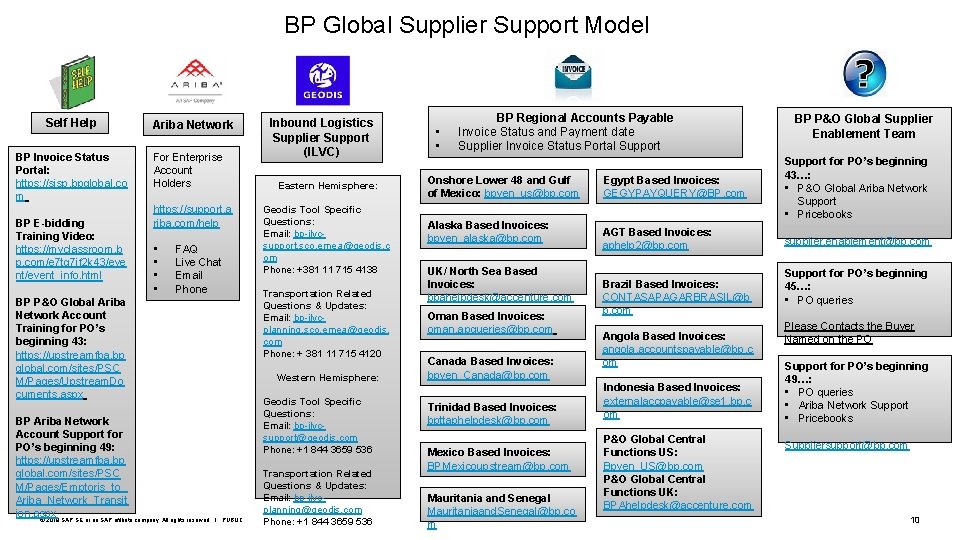
BP Global Supplier Support Model Self Help BP Invoice Status Portal: https: //sisp. bpglobal. co m BP E-bidding Training Video: https: //myclassroom. b p. com/e 7 tg 7 if 2 k 43/eve nt/event_info. html Ariba Network For Enterprise Account Holders https: //support. a riba. com/help • • FAQ Live Chat Email Phone BP P&O Global Ariba Network Account Training for PO’s beginning 43: https: //upstreamfba. bp global. com/sites/PSC M/Pages/Upstream. Do cuments. aspx BP Ariba Network Account Support for PO’s beginning 49: https: //upstreamfba. bp global. com/sites/PSC M/Pages/Emptoris_to_ Ariba_Network_Transit ion. aspx © 2019 SAP SE or an SAP affiliate company. All rights reserved. Inbound Logistics Supplier Support (ILVC) Eastern Hemisphere: Geodis Tool Specific Questions: Email: bp-ilvcsupport. sco. emea@geodis. c om Phone: +381 11 715 4138 Transportation Related Questions & Updates: Email: bp-ilvcplanning. sco. emea@geodis. com Phone: + 381 11 715 4120 Western Hemisphere: Geodis Tool Specific Questions: Email: bp-ilvcsupport@geodis. com Phone: +1 844 3659 536 ǀ PUBLIC Transportation Related Questions & Updates: Email: bp-ilvcplanning@geodis. com Phone: +1 844 3659 536 • • BP Regional Accounts Payable Invoice Status and Payment date Supplier Invoice Status Portal Support Onshore Lower 48 and Gulf of Mexico: bpven_us@bp. com Alaska Based Invoices: bpven_alaska@bp. com UK/ North Sea Based Invoices: bpahelpdesk@accenture. com Oman Based Invoices: oman. apqueries@bp. com Canada Based Invoices: bpven_Canada@bp. com Trinidad Based Invoices: bpttaphelpdesk@bp. com Mexico Based Invoices: BPMexicoupstream@bp. com Mauritania and Senegal Mauritaniaand. Senegal@bp. co m BP P&O Global Supplier Enablement Team Egypt Based Invoices: GEGYPAYQUERY@BP. com Support for PO’s beginning 43…: • P&O Global Ariba Network Support • Pricebooks AGT Based Invoices: aphelp 2@bp. com supplier. enablement@bp. com Brazil Based Invoices: CONTASAPAGARBRASIL@b p. com Angola Based Invoices: angola. accountspayable@bp. c om Indonesia Based Invoices: externalaccpayable@se 1. bp. c om P&O Global Central Functions US: Bpven_US@bp. com P&O Global Central Functions UK: BPAhelpdesk@accenture. com Support for PO’s beginning 45…: • PO queries Please Contacts the Buyer Named on the PO Support for PO’s beginning 49…: • PO queries • Ariba Network Support • Pricebooks Suppliersupport@bp. com 10
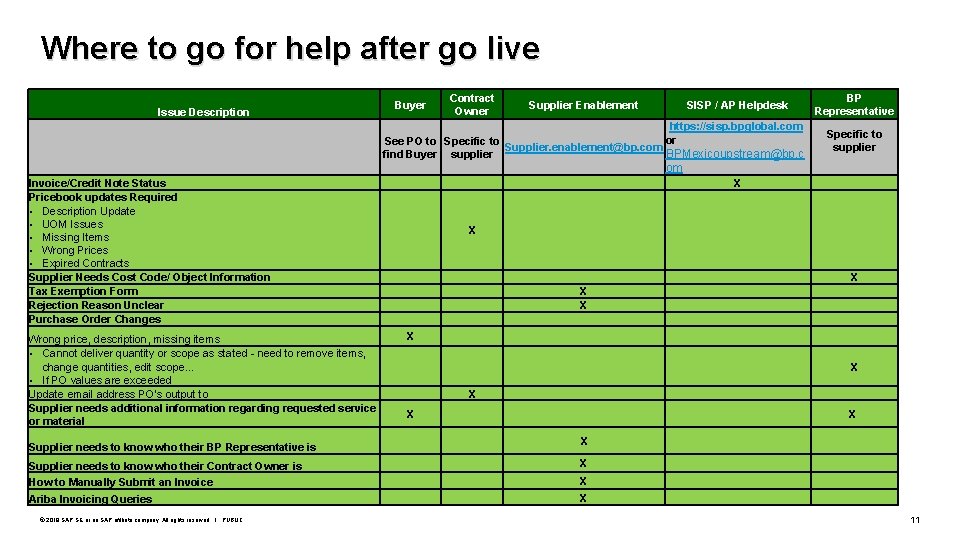
Where to go for help after go live Issue Description Buyer Contract Owner Supplier Enablement SISP / AP Helpdesk https: //sisp. bpglobal. com or See PO to Specific to Supplier. enablement@bp. com BPMexicoupstream@bp. c find Buyer supplier BP Representative Specific to supplier om X Invoice/Credit Note Status Pricebook updates Required • Description Update • UOM Issues • Missing Items • Wrong Prices • Expired Contracts Supplier Needs Cost Code/ Object Information Tax Exemption Form Rejection Reason Unclear Purchase Order Changes Wrong price, description, missing items • Cannot deliver quantity or scope as stated - need to remove items, change quantities, edit scope… • If PO values are exceeded Update email address PO’s output to Supplier needs additional information regarding requested service or material Supplier needs to know who their BP Representative is X X X X X Supplier needs to know who their Contract Owner is X How to Manually Submit an Invoice X Ariba Invoicing Queries X © 2019 SAP SE or an SAP affiliate company. All rights reserved. ǀ PUBLIC 11
THANK YOU PARTICIPATION AND SUPPORT! QUESTIONS? © 2019 SAP SE or an SAP affiliate company. All rights reserved. ǀ PUBLIC 12
Follow us www. sap. com/contactsap © 2018 SAP SE or an SAP affiliate company. All rights reserved. No part of this publication may be reproduced or transmitted in any form or for any purpose without the express permission of SAP SE or an SAP affiliate company. The information contained herein may be changed without prior notice. Some software products marketed by SAP SE and its distributors contain proprietary software components of other software vendors. National product specifications may vary. These materials are provided by SAP SE or an SAP affiliate company for informational purposes only, without representation or warranty of any kind, and SAP or its affiliated companies shall not be liable for errors or omissions with respect to the materials. The only warranties for SAP affiliate company products and services are those that are set forth in the express warranty statements accompanying such products and services, if any. Nothing herein should be construed as constituting an additional warranty. In particular, SAP SE or its affiliated companies have no obligation to pursue any course of business outlined in this document or any related presentation, or to develop or release any functionality mentioned therein. This document, or any related presentation, and SAP SE’s or its affiliated companies’ strategy and possible future developments, products, and/or platforms, directions, and functionality are all subject to change and may be changed by SAP SE or its affiliated companies at any time for any reason without notice. The information in this document is not a commitment, promise, or legal obligation to deliver any material, code, or functionality. All forward-looking statements are subject to various risks and uncertainties that could cause actual results to differ materially from expectations. Readers are cautioned not to place undue reliance on these forward-looking statements, and they should not be relied upon in making purchasing decisions. SAP and other SAP products and services mentioned herein as well as their respective logos are trademarks or registered trademarks of SAP SE (or an SAP affiliate company) in Germany and other countries. All other product and service names mentioned are the trademarks of their respective companies. See www. sap. com/copyright for additional trademark information and notices.
- Slides: 13