
Application Layer E MAIL EMail One of the
- Slides: 28
Application Layer E MAIL
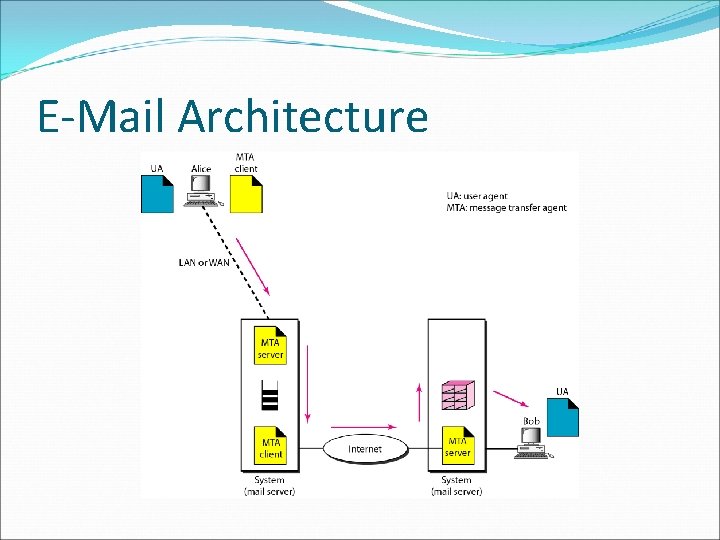
E-Mail One of the most popular Internet services is electronic mail (e-mail). Today, electronic mail is much more complex. It allows a message to include text, audio, and video. General architecture of an e-mail system including the three main components: user agent, message transfer agent, and message access agent.
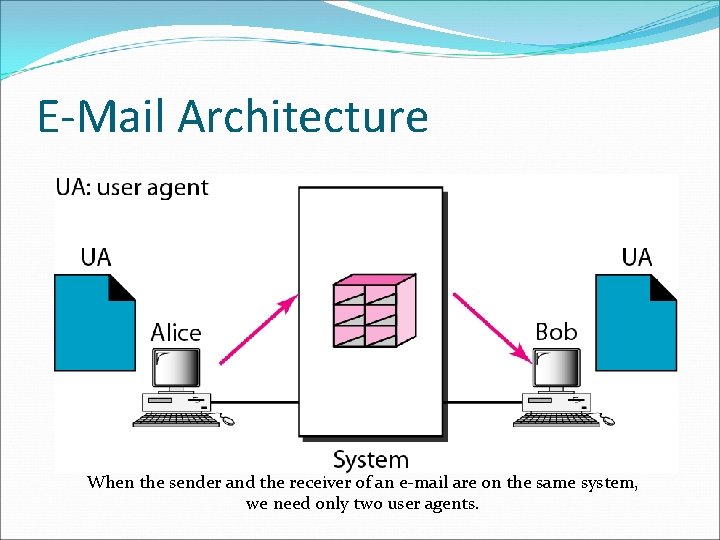
E-Mail Architecture First Scenario In the first scenario, the sender and the receiver of the e-mail are users (or application programs) on the same system; they are directly connected to a shared system. The administrator has created one mailbox for each user where the received messages are stored. A mailbox is part of a local hard drive, a special file with permission restrictions. Only the owner of the mailbox has access to it.
E-Mail Architecture When the sender and the receiver of an e-mail are on the same system, we need only two user agents.
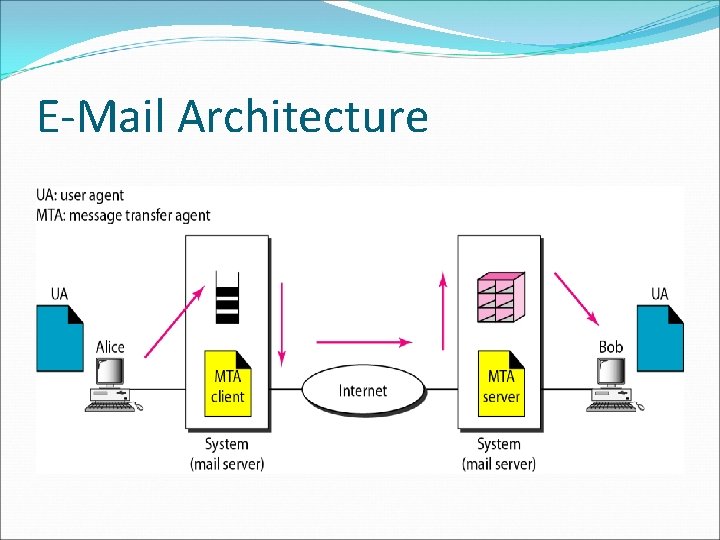
E-Mail Architecture Second Scenario In the second scenario, the sender and the receiver of the e -mail are users (or application programs) on two different systems. The message needs to be sent over the Internet. Here we need user agents (VAs) and message transfer agents (MTAs)
E-Mail Architecture
E-Mail Architecture Here two message transfer agents are needed: one client and one server. Like most client/server programs on the Internet, the server needs to run all the time because it does not know when a client will ask for a connection. The client, on the other hand, can be alerted by the system when there is a message in the queue to be sent.
E-Mail Architecture Third Scenario In the third scenario, Bob, as in the second scenario, is directly connected to his system. Alice, however, is separated from her system. Either Alice is connected to the system via a point-to-point WAN, such as a dial-up modem, a DSL, or a cable modem. Bob uses his user agent to retrieve the message and reads it. Note that we need two pairs of MTA client/server programs.
E-Mail Architecture
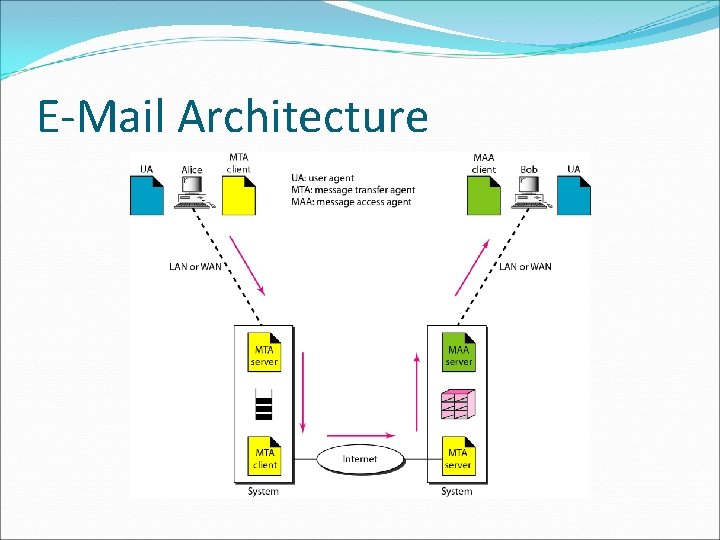
E-Mail Architecture Fourth Scenario In the fourth and most common scenario, Bob is also connected to his mail server by a WAN or a LAN. After the message has arrived at Bob's mail server, Bob needs to retrieve it. Here, we need another set of client/server agents, which we call message access agents (MAAs).
E-Mail Architecture
E-Mail Architecture When both sender and receiver are connected to the mail server via a LAN or a WAN we need two VAs, two pairs of MTAs (client and server), and a pair of MAAs (client and server). This is the most common situation today.
User Agent The first component of an electronic mail system is the user agent. It provides service to the user to make the process of sending and receiving a message easier. It is a computer program used to access and manage a user's email.
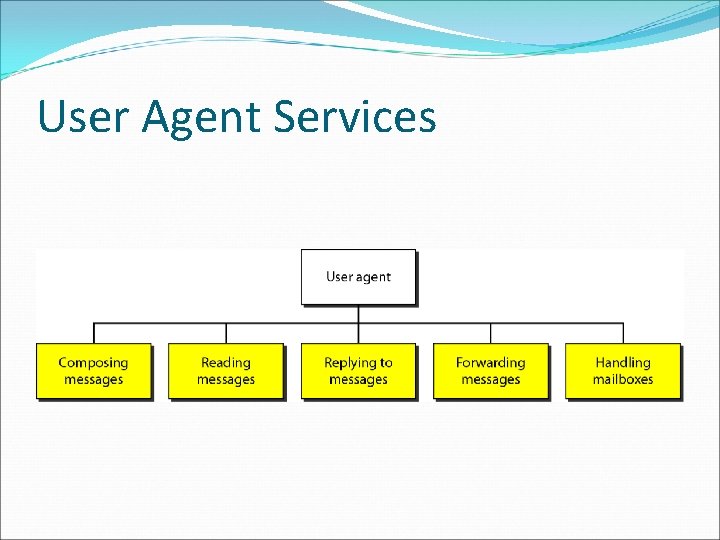
User Agent Popular locally installed email clients include Microsoft Outlook, Mozilla's Thunderbird, Apple Inc. 's Mail. Popular web-based email clients include: Gmail, Outlook. com , Yahoo! Mail. A user agent is a software package (program) that composes, reads, replies to, and forwards messages. A user agent helps the user compose the e-mail message to be sent out.
User Agent Services
User Agent Types There are two types of user agents: command-driven and GUI-based. Command-Driven user agents belong to the early days of electronic mail. They are still present as the underlying user agents in servers. A command-driven user agent normally accepts a onecharacter command from the keyboard to perform its task.
User Agent Types Some examples of command-driven user agents are mail, pine, and elm. Modern user agents are GUI-based. They contain graphical-user interface (GUI) components that allow the user to interact with the software by using both the keyboard and the mouse. Some examples of GUI based user agents are Eudora, Outlook, and Netscape.
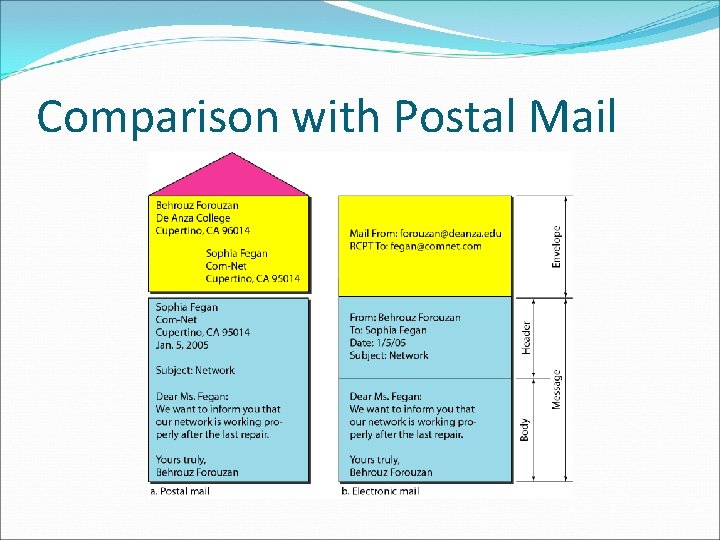
Sending Mail To send mail, the user, through the UA, creates mail that looks very similar to postal mail. It has an envelope and a message. The envelope usually contains the sender and the receiver addresses. The message contains the header and the body.
Comparison with Postal Mail
Receiving Mail If a user has mail, the UA informs the user with a notice. If the user is ready to read the mail. A list is displayed in which each line contains a summary of the information about a particular message in the mailbox. The user can select any of the messages and display its contents on the screen.
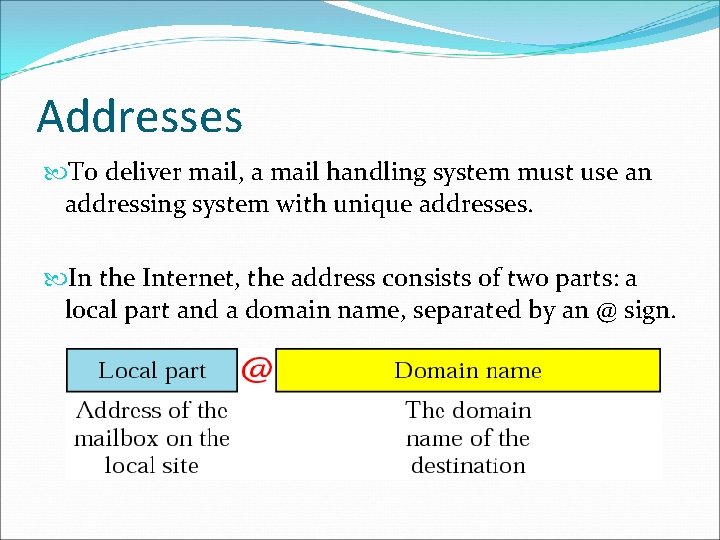
Addresses To deliver mail, a mail handling system must use an addressing system with unique addresses. In the Internet, the address consists of two parts: a local part and a domain name, separated by an @ sign.
Addresses The local part defines the name of a special file, called the user mailbox, where all the mail received for a user is stored for retrieval by the message access agent. The second part of the address is the domain name. An organization usually selects one or more hosts to receive and send e-mail; the hosts are sometimes called mail servers or exchangers.
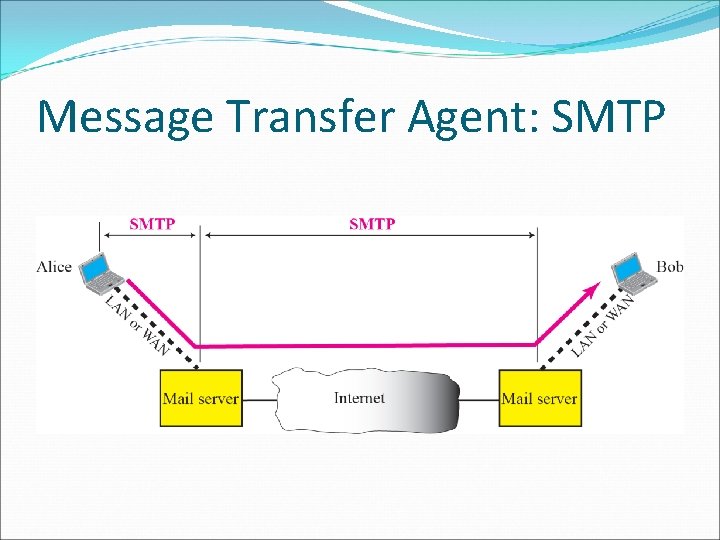
Message Transfer Agent: SMTP The actual mail transfer is done through message transfer agents. To send mail, a system must have the client MTA, and to receive mail, a system must have a server MTA. The formal protocol that defines the MTA client and server in the Internet is called the Simple Mail Transfer Protocol (SMTP).
Message Transfer Agent: SMTP
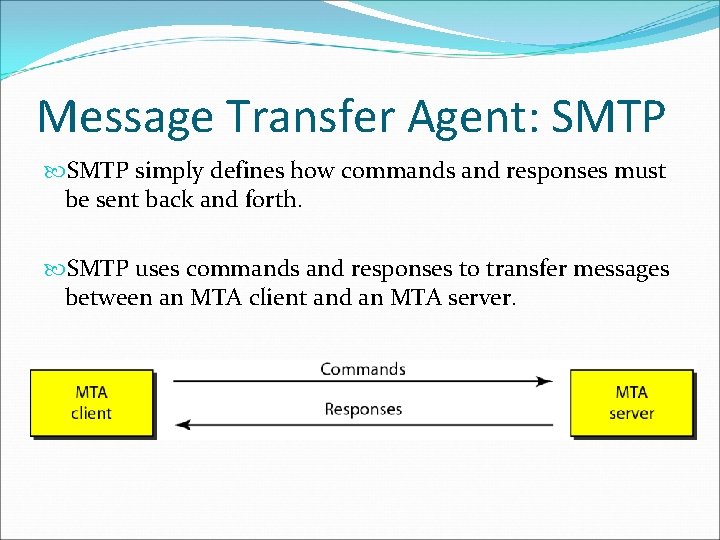
Message Transfer Agent: SMTP simply defines how commands and responses must be sent back and forth. SMTP uses commands and responses to transfer messages between an MTA client and an MTA server.
Commands
Response
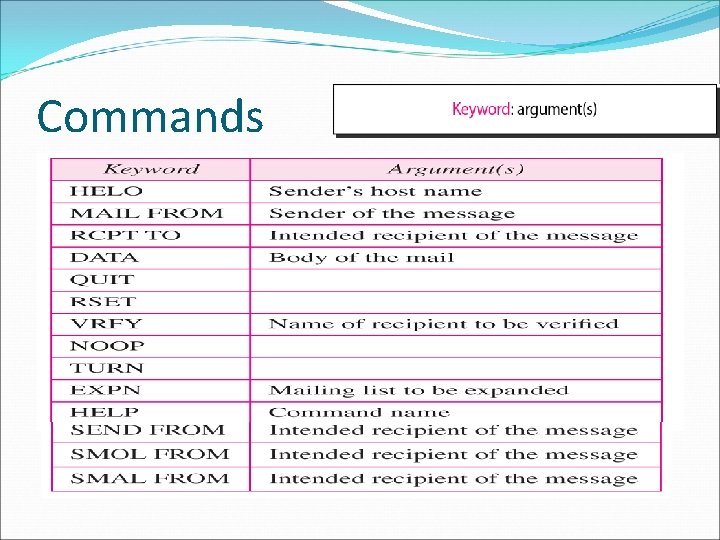
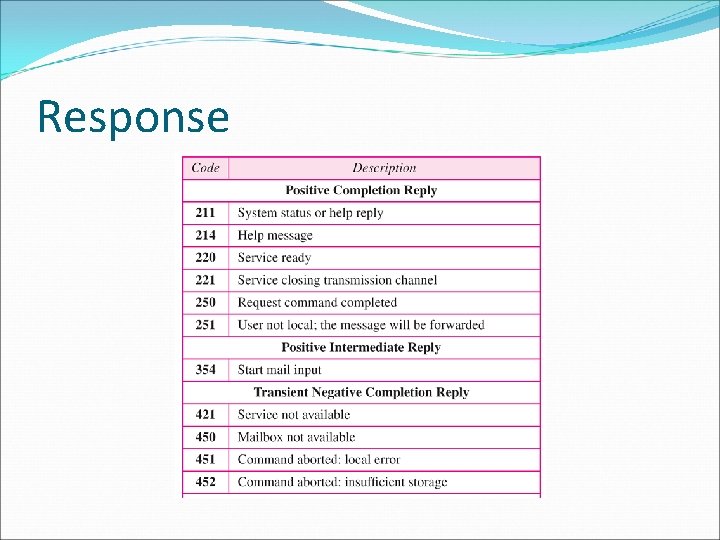
SMTP: Commands & Responses Commands are sent from the client to the server. It consists of a keyword followed by zero or more arguments. SMTP defines 14 commands. Responses are sent from the server to the client. A response is a three digit code that may be followed by additional textual information