
Application Guide For Mesh AP MAP3120 How to
- Slides: 17
Application Guide For Mesh AP – MAP-3120 How to optimize the backhaul performance? F/W: 3. 1. 4 www. planet. com. tw
Preface l This guide help to configure the MAP-3120 to have the optimal setting from Web l The concepts also can apply to MAP-3100 and the previous model MAP-2000/MAP-2100 www. planet. com. tw Page 2 of 17
Topics Network Hypothesis l Backhaul Concepts l How to check the connections l How to maintain the connections l www. planet. com. tw Page 3 of 17
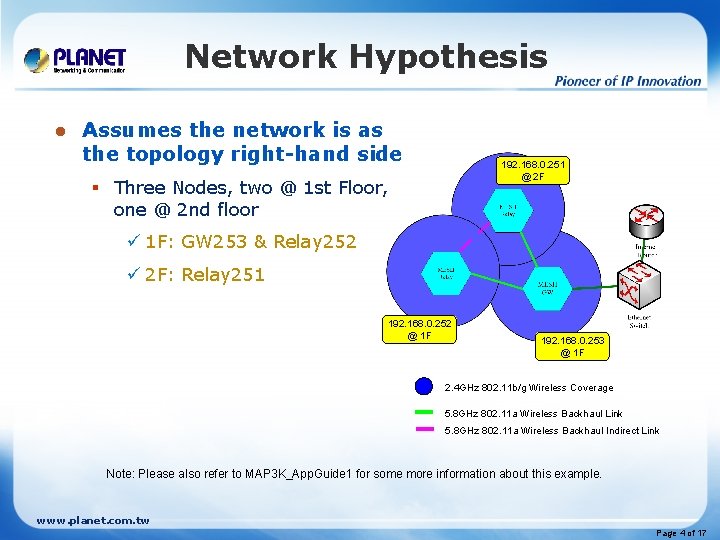
Network Hypothesis l Assumes the network is as the topology right-hand side 192. 168. 0. 251 @ 2 F § Three Nodes, two @ 1 st Floor, one @ 2 nd floor ü 1 F: GW 253 & Relay 252 ü 2 F: Relay 251 192. 168. 0. 252 @ 1 F 192. 168. 0. 253 @ 1 F 2. 4 GHz 802. 11 b/g Wireless Coverage 5. 8 GHz 802. 11 a Wireless Backhaul Link 5. 8 GHz 802. 11 a Wireless Backhaul Indirect Link Note: Please also refer to MAP 3 K_App. Guide 1 for some more information about this example. www. planet. com. tw Page 4 of 17
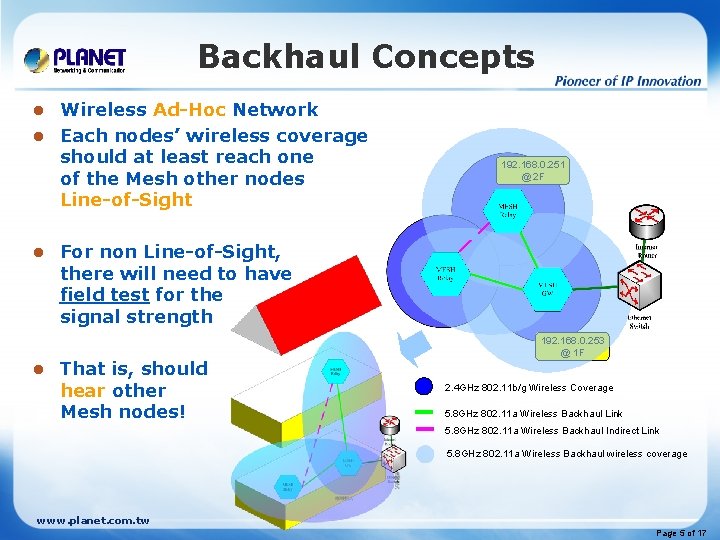
Backhaul Concepts Wireless Ad-Hoc Network l Each nodes’ wireless coverage should at least reach one of the Mesh other nodes Line-of-Sight l l l 192. 168. 0. 251 @ 2 F For non Line-of-Sight, there will need to have field test for the signal strength That is, should hear other Mesh nodes! 192. 168. 0. 253 @ 1 F 2. 4 GHz 802. 11 b/g Wireless Coverage 5. 8 GHz 802. 11 a Wireless Backhaul Link 5. 8 GHz 802. 11 a Wireless Backhaul Indirect Link 5. 8 GHz 802. 11 a Wireless Backhaul wireless coverage www. planet. com. tw Page 5 of 17
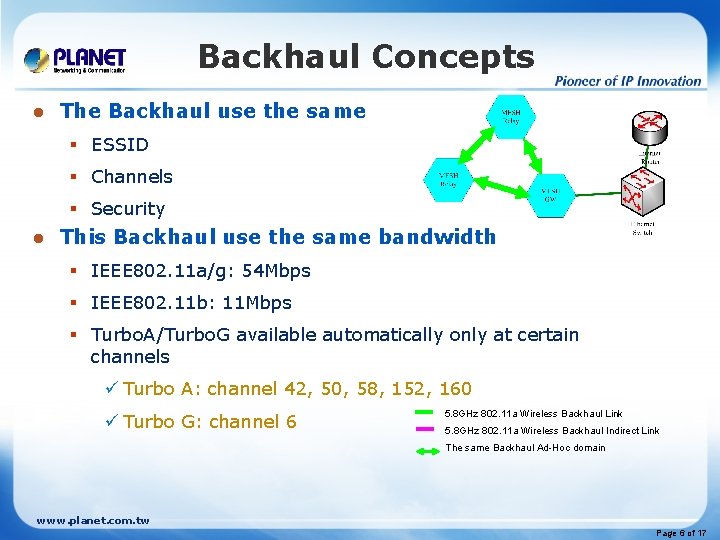
Backhaul Concepts l The Backhaul use the same § ESSID § Channels § Security l This Backhaul use the same bandwidth § IEEE 802. 11 a/g: 54 Mbps § IEEE 802. 11 b: 11 Mbps § Turbo. A/Turbo. G available automatically only at certain channels ü Turbo A: channel 42, 50, 58, 152, 160 ü Turbo G: channel 6 5. 8 GHz 802. 11 a Wireless Backhaul Link 5. 8 GHz 802. 11 a Wireless Backhaul Indirect Link The same Backhaul Ad-Hoc domain www. planet. com. tw Page 6 of 17
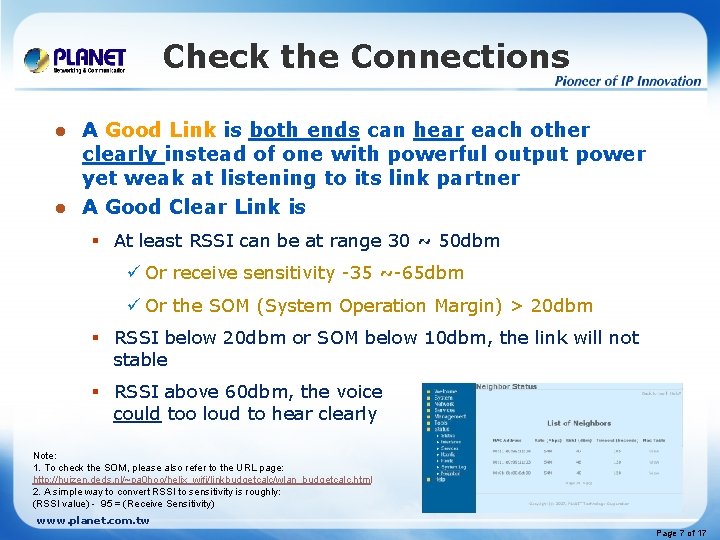
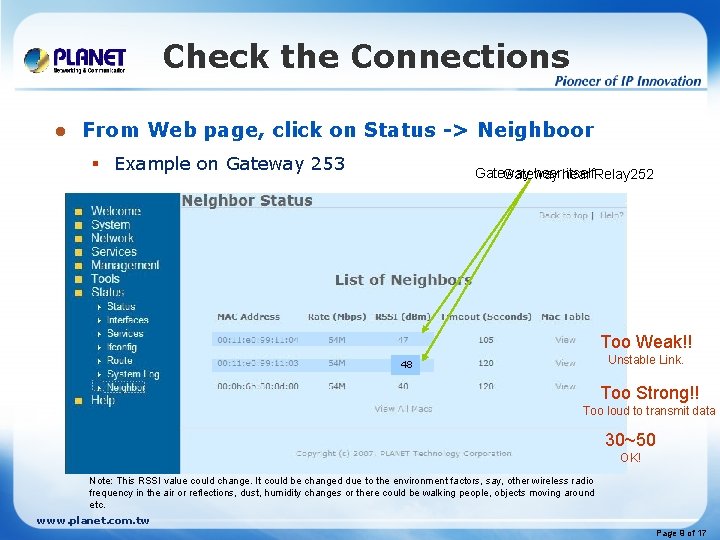
Check the Connections A Good Link is both ends can hear each other clearly instead of one with powerful output power yet weak at listening to its link partner l A Good Clear Link is l § At least RSSI can be at range 30 ~ 50 dbm ü Or receive sensitivity -35 ~-65 dbm ü Or the SOM (System Operation Margin) > 20 dbm § RSSI below 20 dbm or SOM below 10 dbm, the link will not stable § RSSI above 60 dbm, the voice could too loud to hear clearly Note: 1. To check the SOM, please also refer to the URL page: http: //huizen. deds. nl/~pa 0 hoo/helix_wifi/linkbudgetcalc/wlan_budgetcalc. html 2. A simple way to convert RSSI to sensitivity is roughly: (RSSI value) - 95 = (Receive Sensitivity) www. planet. com. tw Page 7 of 17
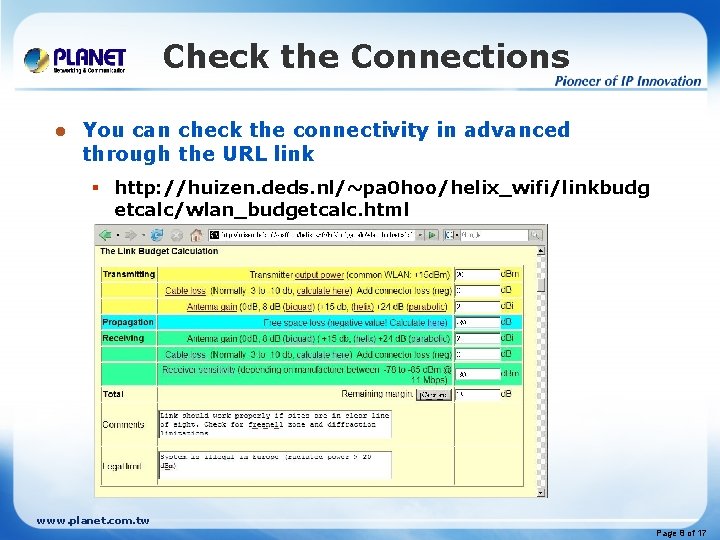
Check the Connections l You can check the connectivity in advanced through the URL link § http: //huizen. deds. nl/~pa 0 hoo/helix_wifi/linkbudg etcalc/wlan_budgetcalc. html www. planet. com. tw Page 8 of 17
Check the Connections l From Web page, click on Status -> Neighboor § Example on Gateway 253 Gateway hear itself. Relay 252 Gateway Too Weak!! Unstable Link. 19 60 48 Too Strong!! Too loud to transmit data 30~50 OK! Note: This RSSI value could change. It could be changed due to the environment factors, say, other wireless radio frequency in the air or reflections, dust, humidity changes or there could be walking people, objects moving around etc. www. planet. com. tw Page 9 of 17
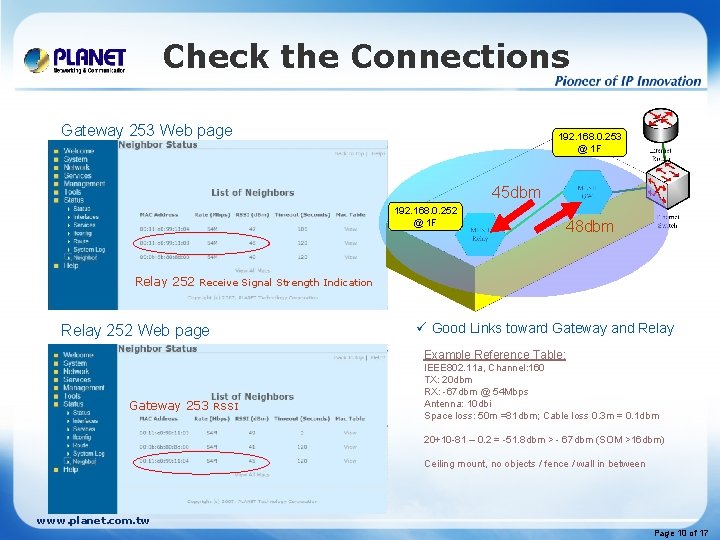
Check the Connections Gateway 253 Web page 192. 168. 0. 253 @ 1 F 45 dbm 192. 168. 0. 252 @ 1 F 48 dbm Relay 252 Receive Signal Strength Indication Relay 252 Web page ü Good Links toward Gateway and Relay Example Reference Table: Gateway 253 RSSI IEEE 802. 11 a, Channel: 160 TX: 20 dbm RX: -67 dbm @ 54 Mbps Antenna: 10 dbi Space loss: 50 m =81 dbm; Cable loss 0. 3 m = 0. 1 dbm 20+10 -81 – 0. 2 = -51. 8 dbm > - 67 dbm (SOM >16 dbm) Ceiling mount, no objects / fence / wall in between www. planet. com. tw Page 10 of 17
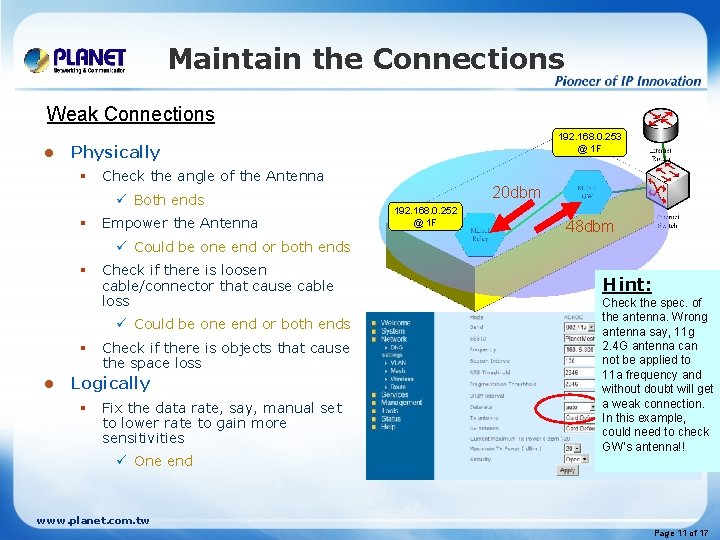
Maintain the Connections Weak Connections l 192. 168. 0. 253 @ 1 F Physically § Check the angle of the Antenna ü Both ends § Empower the Antenna 20 dbm 192. 168. 0. 252 @ 1 F 48 dbm ü Could be one end or both ends § Check if there is loosen cable/connector that cause cable loss ü Could be one end or both ends § l Check if there is objects that cause the space loss Logically § Fix the data rate, say, manual set to lower rate to gain more sensitivities ü One end Hint: Check the spec. of the antenna. Wrong antenna say, 11 g 2. 4 G antenna can not be applied to 11 a frequency and without doubt will get a weak connection. In this example, could need to check GW’s antenna!! www. planet. com. tw Page 11 of 17
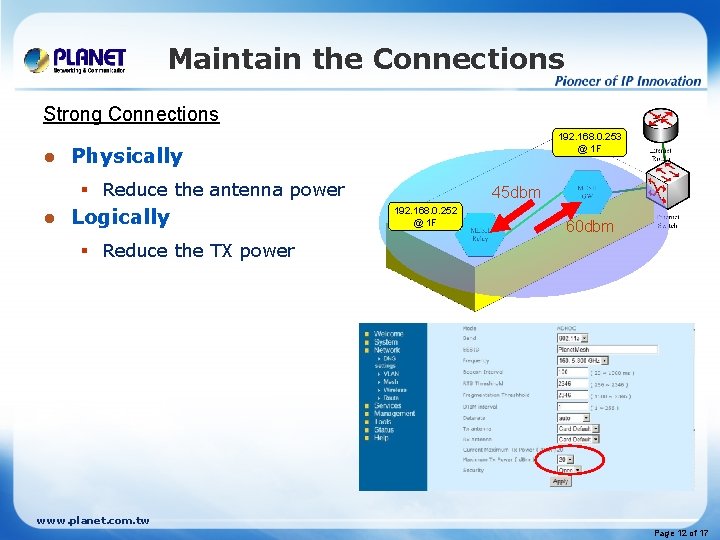
Maintain the Connections Strong Connections l 192. 168. 0. 253 @ 1 F Physically § Reduce the antenna power l Logically 45 dbm 192. 168. 0. 252 @ 1 F 60 dbm § Reduce the TX power www. planet. com. tw Page 12 of 17
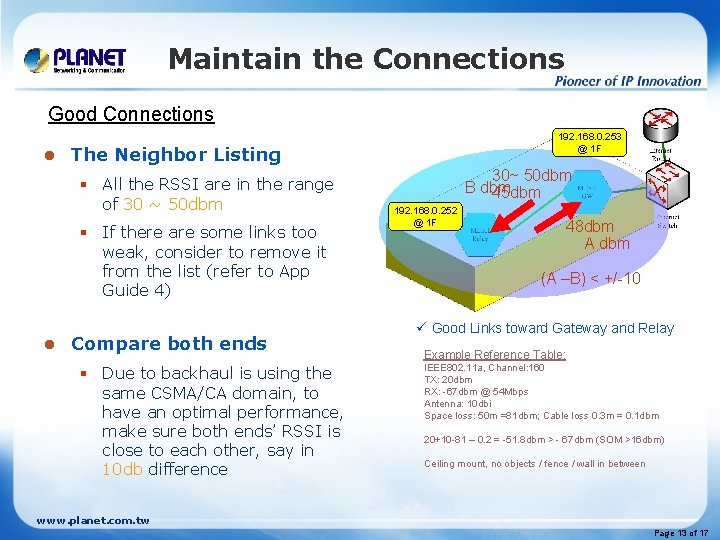
Maintain the Connections Good Connections l The Neighbor Listing § All the RSSI are in the range of 30 ~ 50 dbm § If there are some links too weak, consider to remove it from the list (refer to App Guide 4) l 192. 168. 0. 253 @ 1 F Compare both ends § Due to backhaul is using the same CSMA/CA domain, to have an optimal performance, make sure both ends’ RSSI is close to each other, say in 10 db difference 30~ 50 dbm B dbm 45 dbm 192. 168. 0. 252 @ 1 F 48 dbm A dbm (A –B) < +/-10 ü Good Links toward Gateway and Relay Example Reference Table: IEEE 802. 11 a, Channel: 160 TX: 20 dbm RX: -67 dbm @ 54 Mbps Antenna: 10 dbi Space loss: 50 m =81 dbm; Cable loss 0. 3 m = 0. 1 dbm 20+10 -81 – 0. 2 = -51. 8 dbm > - 67 dbm (SOM >16 dbm) Ceiling mount, no objects / fence / wall in between www. planet. com. tw Page 13 of 17
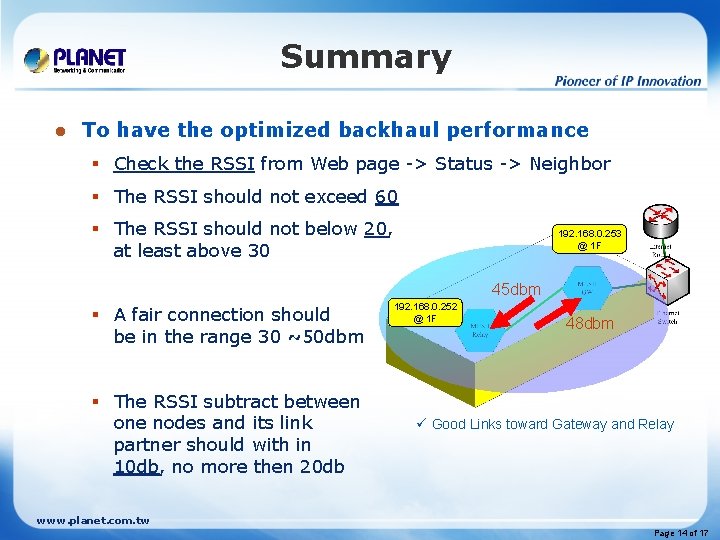
Summary l To have the optimized backhaul performance § Check the RSSI from Web page -> Status -> Neighbor § The RSSI should not exceed 60 § The RSSI should not below 20, at least above 30 192. 168. 0. 253 @ 1 F 45 dbm § A fair connection should be in the range 30 ~50 dbm § The RSSI subtract between one nodes and its link partner should with in 10 db, no more then 20 db 192. 168. 0. 252 @ 1 F 48 dbm ü Good Links toward Gateway and Relay www. planet. com. tw Page 14 of 17
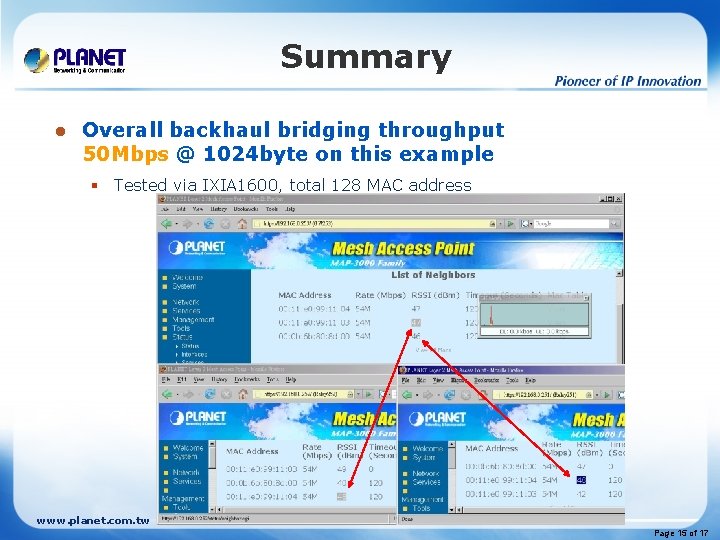
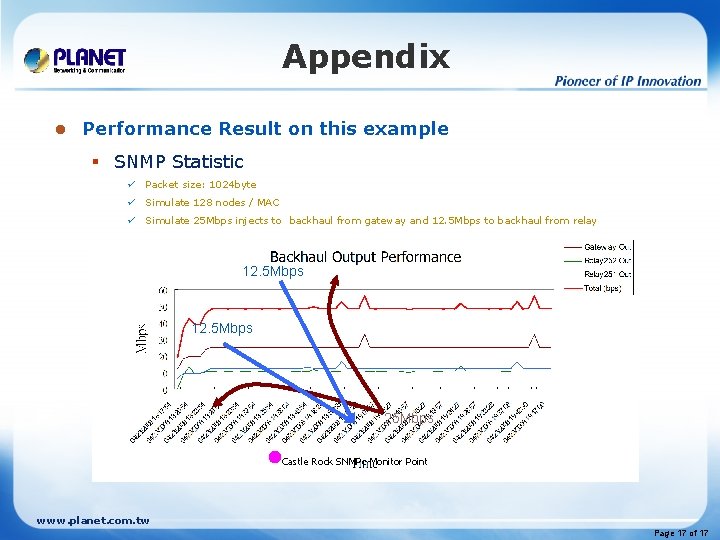
Summary l Overall backhaul bridging throughput 50 Mbps @ 1024 byte on this example § Tested via IXIA 1600, total 128 MAC address www. planet. com. tw Page 15 of 17
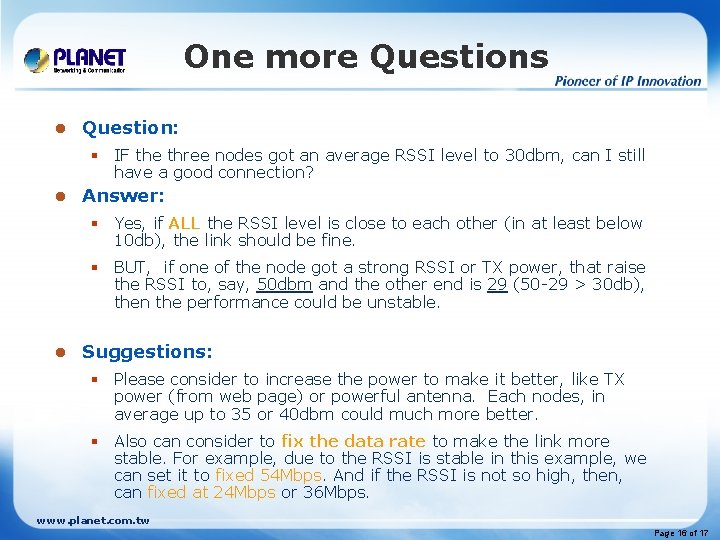
One more Questions l Question: § IF the three nodes got an average RSSI level to 30 dbm, can I still have a good connection? l Answer: § Yes, if ALL the RSSI level is close to each other (in at least below 10 db), the link should be fine. § BUT, if one of the node got a strong RSSI or TX power, that raise the RSSI to, say, 50 dbm and the other end is 29 (50 -29 > 30 db), then the performance could be unstable. l Suggestions: § Please consider to increase the power to make it better, like TX power (from web page) or powerful antenna. Each nodes, in average up to 35 or 40 dbm could much more better. § Also can consider to fix the data rate to make the link more stable. For example, due to the RSSI is stable in this example, we can set it to fixed 54 Mbps. And if the RSSI is not so high, then, can fixed at 24 Mbps or 36 Mbps. www. planet. com. tw Page 16 of 17
Appendix l Performance Result on this example § SNMP Statistic ü Packet size: 1024 byte ü Simulate 128 nodes / MAC ü Simulate 25 Mbps injects to backhaul from gateway and 12. 5 Mbps to backhaul from relay 12. 5 Mbps 25 Mbps Castle Rock SNMPc Monitor Point www. planet. com. tw Page 17 of 17