
Appendix C Advanced logical database design Transparencies Pearson
Appendix C Advanced logical database design Transparencies © Pearson Education Limited, 2004 1
Appendix C - Objectives n n How to merge local logical data models into a global logical data model of the organization. How to ensure that the resultant global model is a true and accurate representation of the data requirements of the organization (or part of the organization) being modeled. © Pearson Education Limited, 2004 2
Advanced logical database design n This part of methodology is about what to do when creating a reasonably complex database system with several user views and you have chosen to manage these user views (wholly or partly) using the view integration approach. © Pearson Education Limited, 2004 3
Advanced logical database design n Assumes you have created local data models each representing one or more user views using Steps 1 and 2 of the database design methodology. © Pearson Education Limited, 2004 4
Advanced logical database design n n Stay. Home case study describes 5 user views including: Director, Manager, Supervisor, Assistant, and Buyer. Following analysis of the requirements for each user view, we decided to manage these user views using a mixture of the centralized and view integration approaches. © Pearson Education Limited, 2004 5
Advanced logical database design n We used the centralized approach to merge the requirements for the n n Manager, Supervisor, and Assistant user views into a collection of user views called Branch. Director and Buyer user views into a collection of user views called Business. © Pearson Education Limited, 2004 6
Advanced logical database design n n We now use the local logical data models for the Branch and Business user views to demonstrate how to use the view integration approach to merge data models. Described in Step 2. 6, which is a continuation of Step 2. © Pearson Education Limited, 2004 7
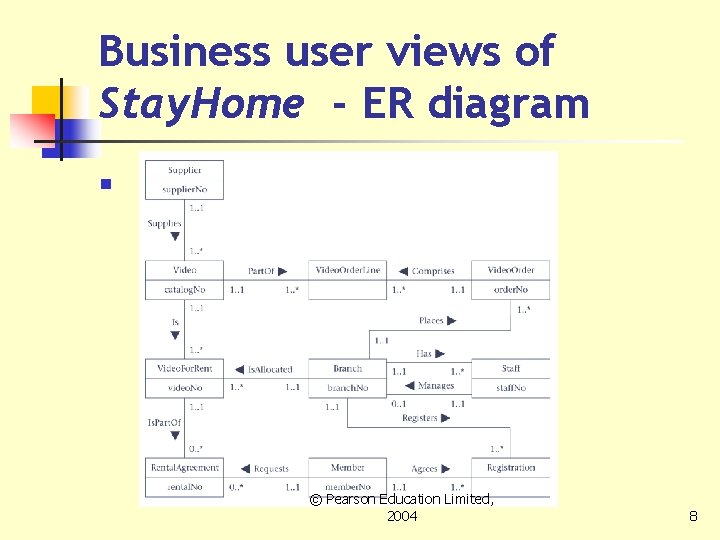
Business user views of Stay. Home - ER diagram n © Pearson Education Limited, 2004 8
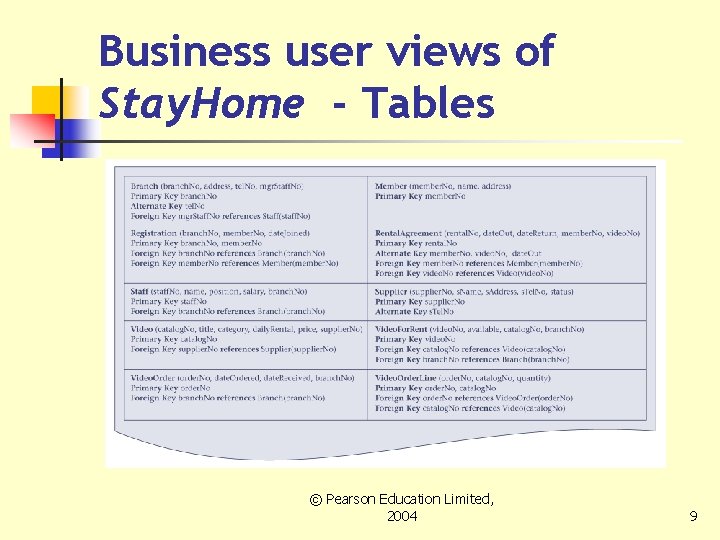
Business user views of Stay. Home - Tables © Pearson Education Limited, 2004 9
Step 2. 6 Build and check global logical data model n To combine the individual local logical data models into a single global logical data model that represent the data requirements of the organization (or part of the organization) that is being modeled. © Pearson Education Limited, 2004 10
Step 2. 6 Build and check global logical data model - Tasks n n Step 2. 6. 1 Merge local logical data models into global model Step 2. 6. 2 Check global logical data model Step 2. 6. 3 Check for future growth Step 2. 6. 4 Review global logical data model with users © Pearson Education Limited, 2004 11
Step 2. 6. 1 Merge local logical data models into global model n Some typical tasks of this approach are: n n n Review the names and contents of entities/tables and their primary keys. Review the names and contents of relationships/foreign keys. Merge entities/tables from the local data models. Include (without merging) entities/tables unique to each local data model. Merge relationships/foreign keys from the Pearson Education Limited, local data© models. 2004 12
Step 2. 6. 1 Merge local logical data models into global model n Some typical tasks of this approach (continued) are: n n n Include (without merging) relationships/foreign keys unique to each local data model. Check for missing entities/tables and relationships/foreign keys. Check integrity constraints. Draw the global ER/table diagram. Update the documentation. © Pearson Education Limited, 2004 13
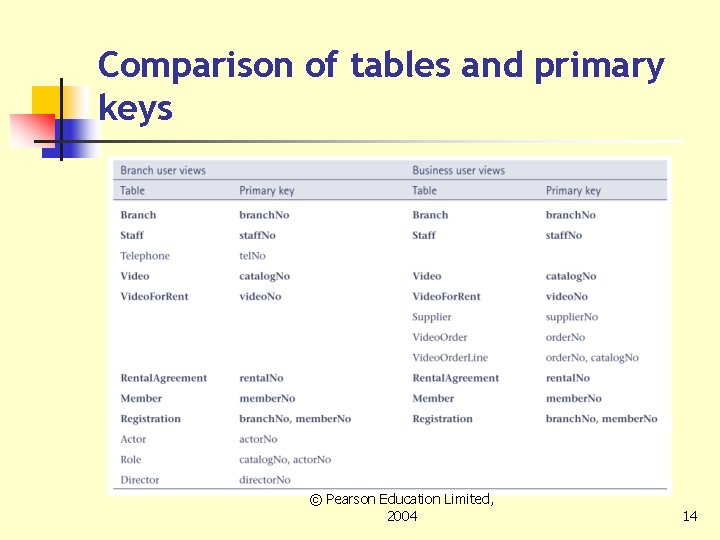
Comparison of tables and primary keys © Pearson Education Limited, 2004 14
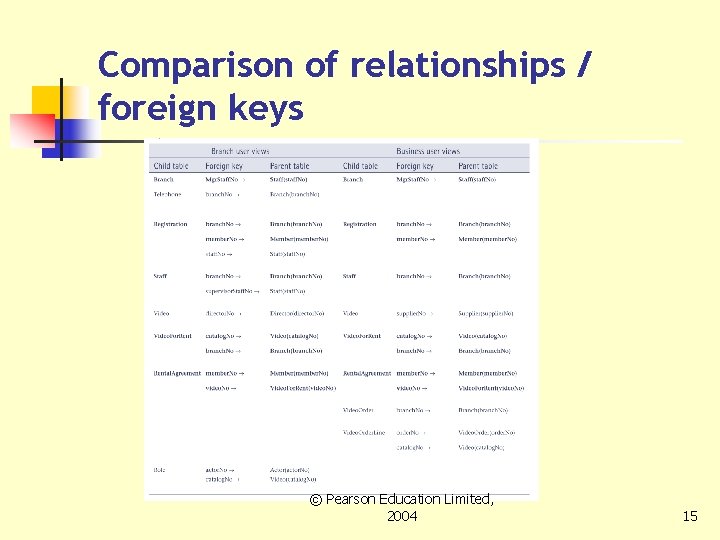
Comparison of relationships / foreign keys © Pearson Education Limited, 2004 15
Merge entities/tables from the local data models - Tasks n n n Merge entities/tables with the same name and the same primary key. Merge entities/tables with the same name using different primary keys. Merge entities/tables with different names using the same or different primary keys. © Pearson Education Limited, 2004 16
Include (without merging) entities/tables unique to each local data model n n Previous tasks should identify all entities/tables that are the same. All remaining entities/tables are included in the global model without change. © Pearson Education Limited, 2004 17
Merge relationships/foreign keys from the local data models n n Examine the name and purpose of each relationship/foreign keys in the data models. Before merging it’s important to resolve any conflicts between the relationships such as differences in multiplicity constraints. © Pearson Education Limited, 2004 18
Include (without merging) relationships/foreign keys unique to each local data model n All remaining relationships/foreign keys are included in the global model without change. © Pearson Education Limited, 2004 19
Check for missing entities/tables and relationships/foreign keys n Activities include: n n n Use corporate data model, if exists. Ask users of a specific user view to pay attention to the entities/tables and relationships/foreign keys that also exist in other user views. Examine the attributes/columns of each entity/table and look for references to entities/tables in other local data models. © Pearson Education Limited, 2004 20
Check foreign keys n n During this step, entities/tables and relationships may have been merged, primary keys changed, and new relationships identified. Check that the foreign keys in child tables are still correct, and make any necessary modifications that are required © Pearson Education Limited, 2004 21
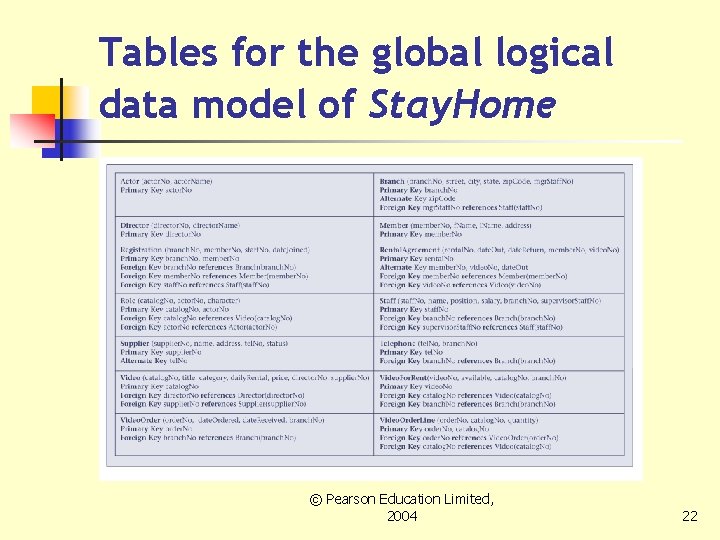
Tables for the global logical data model of Stay. Home © Pearson Education Limited, 2004 22
Check integrity constraints and business rules n Check that the integrity constraints and business rules for the global logical data model do not conflict with those originally specified for each user view. © Pearson Education Limited, 2004 23
Check integrity constraints and business rules n n If any new relationships have been identified and new foreign keys have been created, ensure that appropriate referential integrity constraints are specified. Any conflicts must be resolved in consultation with the users. © Pearson Education Limited, 2004 24
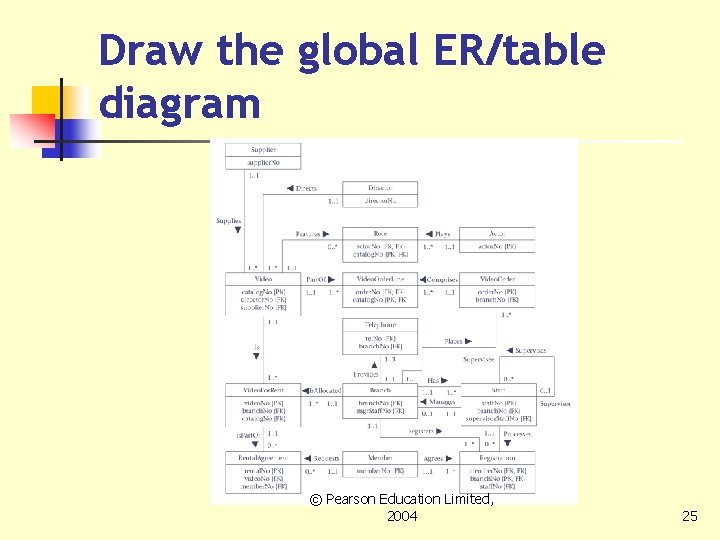
Draw the global ER/table diagram © Pearson Education Limited, 2004 25
Update the documentation n Update the documentation to reflect any changes made during the development of the global data model. © Pearson Education Limited, 2004 26
Step 2. 6. 2 Check global logical data model n To check the tables created from the global logical data model are appropriately structured using normalization and support the required transactions, if necessary. © Pearson Education Limited, 2004 27
Step 2. 6. 3 Check for future growth n To determine whethere any significant changes likely in the foreseeable future and to assess whether the global logical data model can accommodate these changes. © Pearson Education Limited, 2004 28
Step 2. 6. 4 Review global logical data model with users n To ensure that the global logical data model is a true representation of the data requirements of an organization. © Pearson Education Limited, 2004 29
- Slides: 29