
Apollo Graphql 2020 04 19 What is Apollo

- Slides: 21
Apollo Graphql 2020 -04 -19
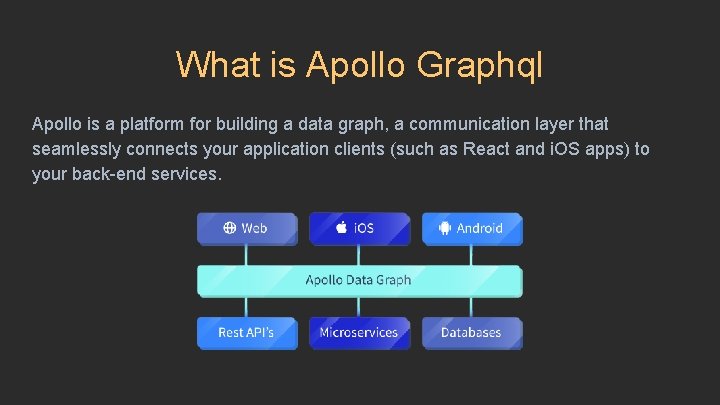
What is Apollo Graphql Apollo is a platform for building a data graph, a communication layer that seamlessly connects your application clients (such as React and i. OS apps) to your back-end services.
Who made Apollo? From https: //www. apollographql. com/
Why Meteor developers made Apollo? Meteor is a full-stack web application framework written in Java. Script. By default, it gives developers a connection to a Mongo database. Apollo was created by (former? ) members of the Meteor development team. The idea to build a Graph. QL library (/libraries) came out of a desire among the Meteor community to hook the wonderful infrastructure of the Meteor stack into databases that were not called “Mongo. DB”.
A small personal anecdote I used Meteor for nearly all of my development work with Meteor until I tried using Apollo. Many Meteor developers decided it was easier to use Apollo with React than with Meteor’s own templating engine (the one called Blaze), so I followed suit. At that point, I wasn’t using Meteor’s default data layer and I wasn’t using Blaze, so I stopped using Meteor all together! Apollo was intended to be the library which kept people who needed to use non-Mongo databases on the Meteor platform, but its release ultimately pushed me into the world of React with Webpack as a buildtool!
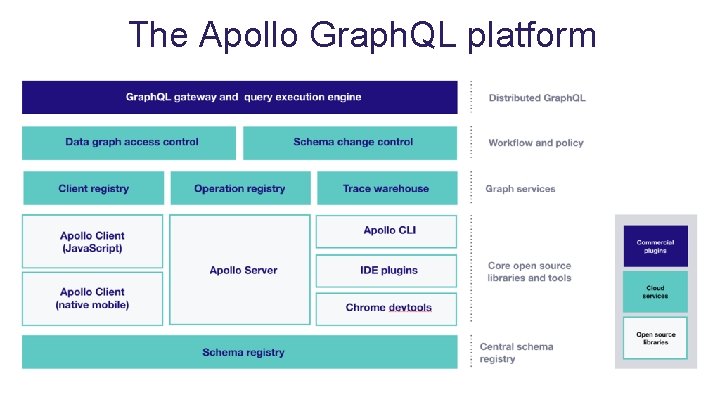
The Apollo Graph. QL platform
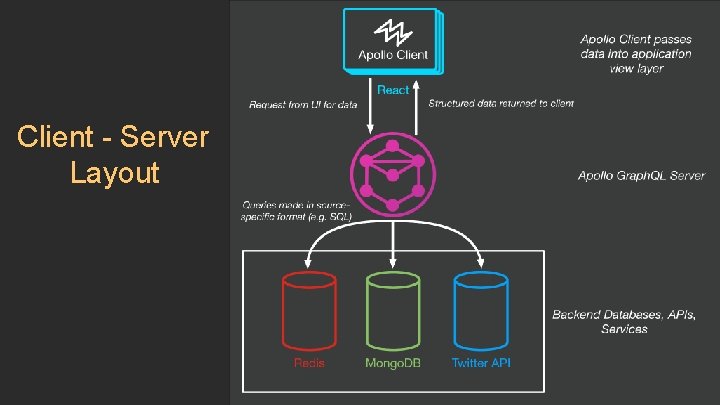
Client - Server Layout
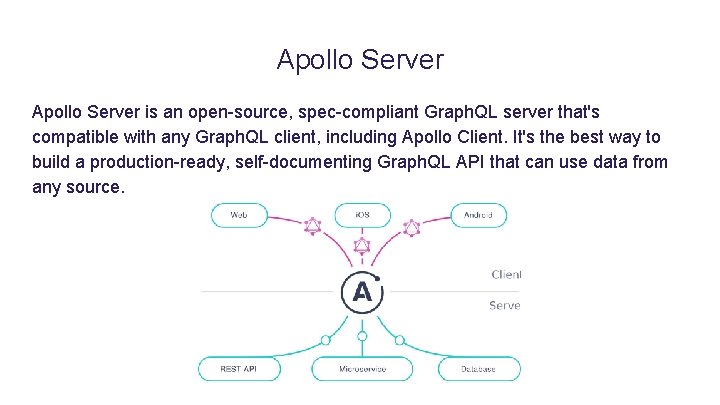
Apollo Server is an open-source, spec-compliant Graph. QL server that's compatible with any Graph. QL client, including Apollo Client. It's the best way to build a production-ready, self-documenting Graph. QL API that can use data from any source.
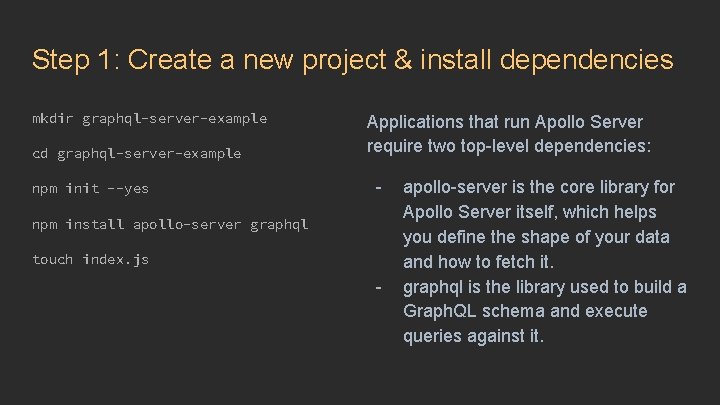
Step 1: Create a new project & install dependencies mkdir graphql-server-example cd graphql-server-example npm init --yes Applications that run Apollo Server require two top-level dependencies: - npm install apollo-server graphql touch index. js - apollo-server is the core library for Apollo Server itself, which helps you define the shape of your data and how to fetch it. graphql is the library used to build a Graph. QL schema and execute queries against it.
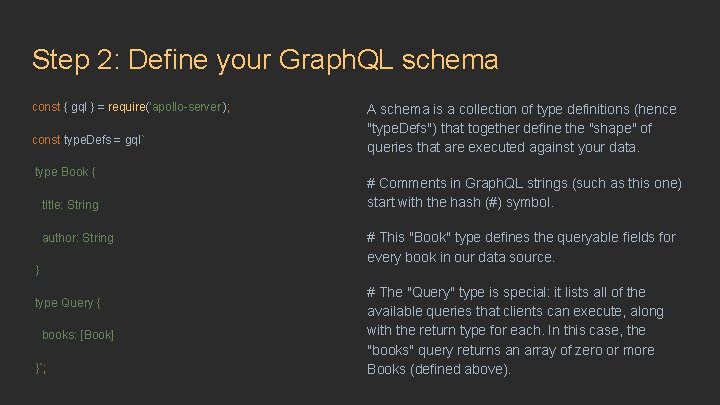
Step 2: Define your Graph. QL schema const { gql } = require('apollo-server'); const type. Defs = gql` type Book { title: String author: String } type Query { books: [Book] }`; A schema is a collection of type definitions (hence "type. Defs") that together define the "shape" of queries that are executed against your data. # Comments in Graph. QL strings (such as this one) start with the hash (#) symbol. # This "Book" type defines the queryable fields for every book in our data source. # The "Query" type is special: it lists all of the available queries that clients can execute, along with the return type for each. In this case, the "books" query returns an array of zero or more Books (defined above).
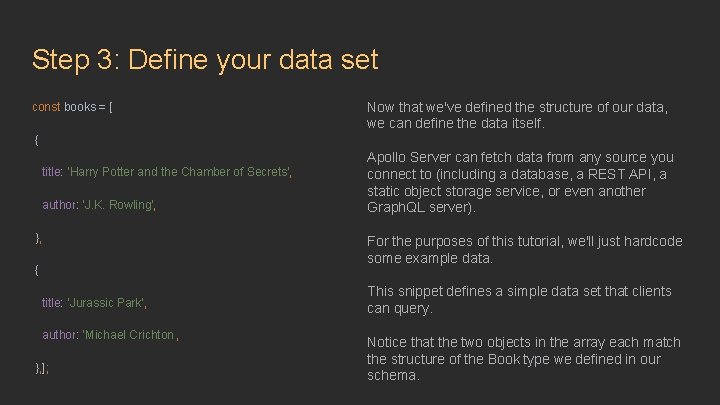
Step 3: Define your data set const books = [ Now that we've defined the structure of our data, we can define the data itself. { title: 'Harry Potter and the Chamber of Secrets', author: 'J. K. Rowling', }, { title: 'Jurassic Park', author: 'Michael Crichton', }, ]; Apollo Server can fetch data from any source you connect to (including a database, a REST API, a static object storage service, or even another Graph. QL server). For the purposes of this tutorial, we'll just hardcode some example data. This snippet defines a simple data set that clients can query. Notice that the two objects in the array each match the structure of the Book type we defined in our schema.
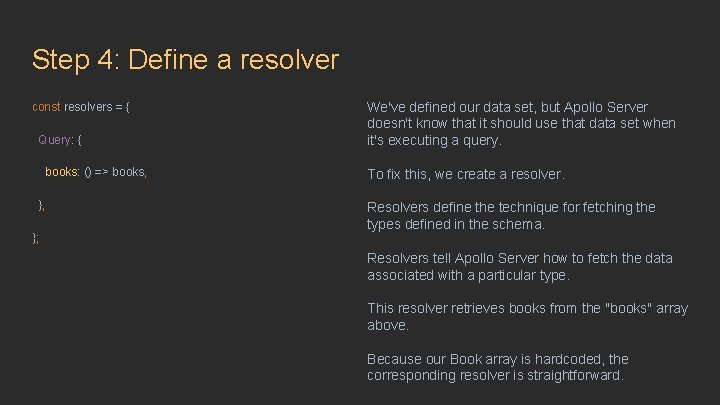
Step 4: Define a resolver const resolvers = { Query: { books: () => books, }, }; We've defined our data set, but Apollo Server doesn't know that it should use that data set when it's executing a query. To fix this, we create a resolver. Resolvers define the technique for fetching the types defined in the schema. Resolvers tell Apollo Server how to fetch the data associated with a particular type. This resolver retrieves books from the "books" array above. Because our Book array is hardcoded, the corresponding resolver is straightforward.
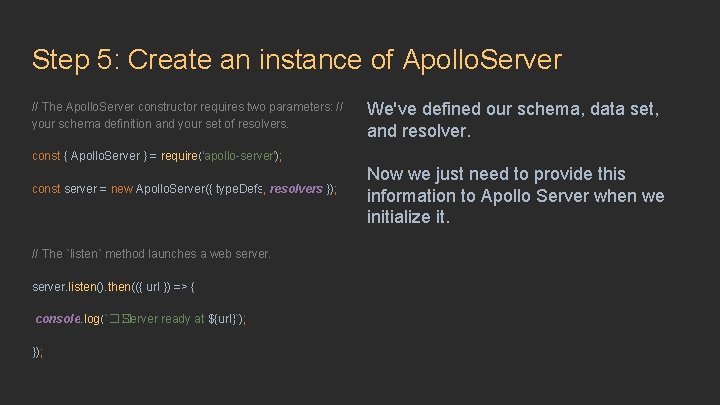
Step 5: Create an instance of Apollo. Server // The Apollo. Server constructor requires two parameters: // your schema definition and your set of resolvers. We've defined our schema, data set, and resolver. const { Apollo. Server } = require('apollo-server'); const server = new Apollo. Server({ type. Defs, resolvers }); // The `listen` method launches a web server. listen(). then(({ url }) => { console. log(`�� Server ready at ${url}`); }); Now we just need to provide this information to Apollo Server when we initialize it.
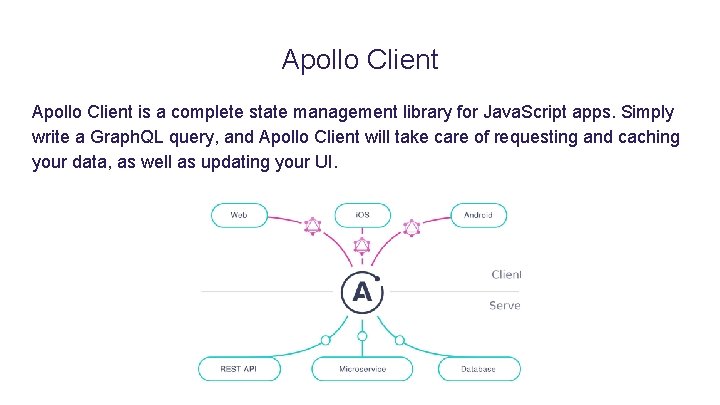
Apollo Client is a complete state management library for Java. Script apps. Simply write a Graph. QL query, and Apollo Client will take care of requesting and caching your data, as well as updating your UI.
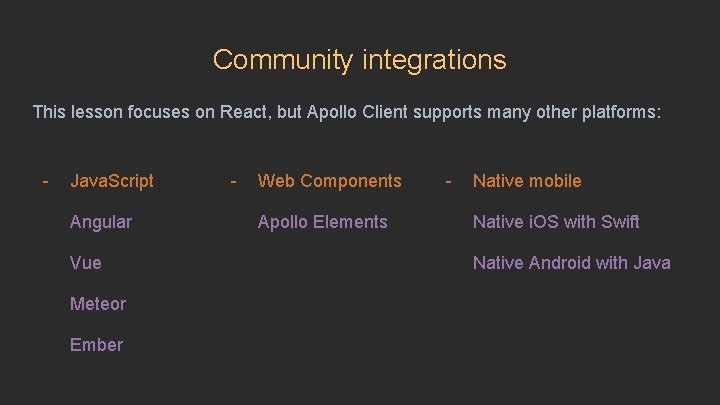
Community integrations This lesson focuses on React, but Apollo Client supports many other platforms: - Java. Script Angular Vue Meteor Ember - Web Components Apollo Elements - Native mobile Native i. OS with Swift Native Android with Java
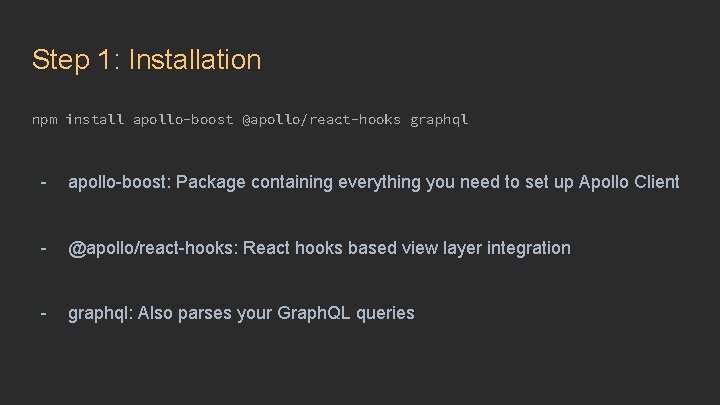
Step 1: Installation npm install apollo-boost @apollo/react-hooks graphql - apollo-boost: Package containing everything you need to set up Apollo Client - @apollo/react-hooks: React hooks based view layer integration - graphql: Also parses your Graph. QL queries
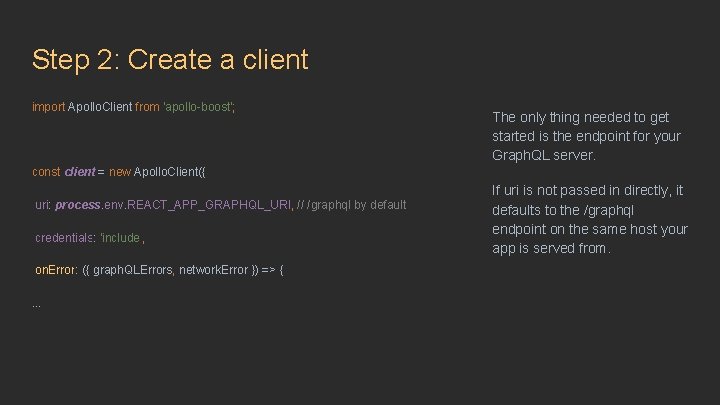
Step 2: Create a client import Apollo. Client from 'apollo-boost'; The only thing needed to get started is the endpoint for your Graph. QL server. const client = new Apollo. Client({ uri: process. env. REACT_APP_GRAPHQL_URI, // /graphql by default credentials: 'include', on. Error: ({ graph. QLErrors, network. Error }) => {. . . If uri is not passed in directly, it defaults to the /graphql endpoint on the same host your app is served from.
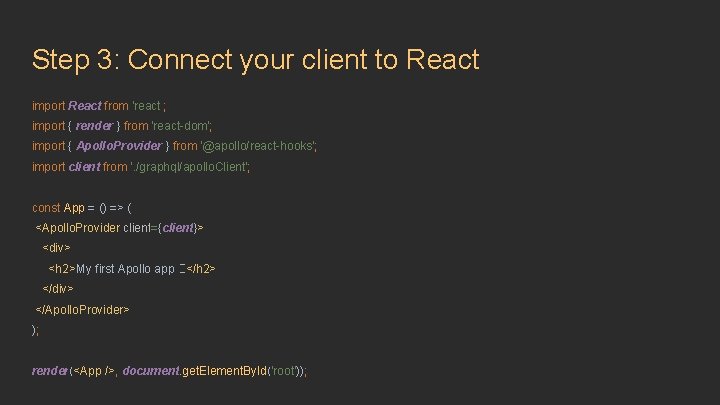
Step 3: Connect your client to React import React from 'react'; import { render } from 'react-dom'; import { Apollo. Provider } from '@apollo/react-hooks'; import client from '. /graphql/apollo. Client'; const App = () => ( <Apollo. Provider client={client}> <div> <h 2>My first Apollo app �� </h 2> </div> </Apollo. Provider> ); render(<App />, document. get. Element. By. Id('root'));
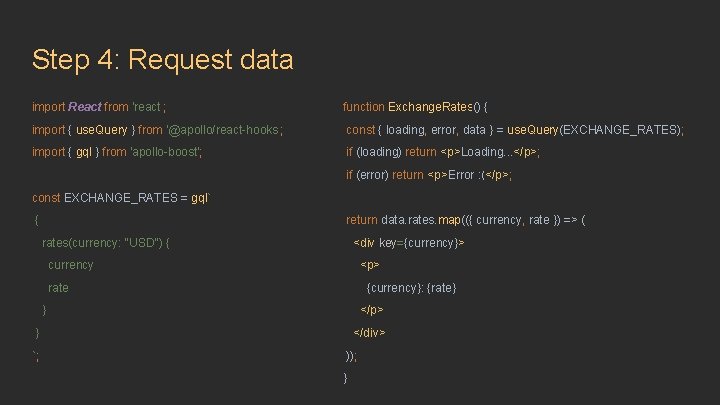
Step 4: Request data import React from 'react'; function Exchange. Rates() { import { use. Query } from '@apollo/react-hooks'; const { loading, error, data } = use. Query(EXCHANGE_RATES); import { gql } from 'apollo-boost'; if (loading) return <p>Loading. . . </p>; if (error) return <p>Error : (</p>; const EXCHANGE_RATES = gql` { return data. rates. map(({ currency, rate }) => ( rates(currency: "USD") { <div key={currency}> currency <p> rate {currency}: {rate} } </p> } `; </div> )); }
External links ● ● ● https: //www. apollographql. com/docs/react/data/queries/#usequery-api https: //developer. mozilla. org/en-US/docs/Web/API/Request/credentials https: //www. apollographql. com/docs/react/integrations/#web-components https: //codesandbox. io/s/48 p 1 r 2 roz 4 https: //blog. meteor. com/the-meteor-chef-an-introduction-to-apollo-b 1904955289 e
Thank you!