
APCSP PERFORMANCE TASKS GBEA 2018 Pam Whitlock Pam

APCSP PERFORMANCE TASKS GBEA 2018 Pam Whitlock
Pam Whitlock Chattahoochee High School Johns Creek, GA
Performance Tasks ■ Create Task: – 24% of AP score – Students write a program (any language, any topic) and submit a video of the program running, written responses to prompts and program code. – 12 hours of class time – Link to updated Grading Rubric ■ Explore Task: – 16% of AP Score – Students select a computing innovation, create a digital artifact about the innovation and submit written responses to prompts. – 8 hours of class time – Link to Updated Grading Rubric ■ Links to all Performance Task materials

Overall Tips: ■ ■ ■ Use keywords in written responses Use binary rubrics throughout the year PDFs instead of docs Make videos of code running Practice any skill required…pdf, video, copy & paste code segments, add ovals and rectangles, etc. ■ Practice all WR prompts and give feedback prior to the students working on the real tasks.
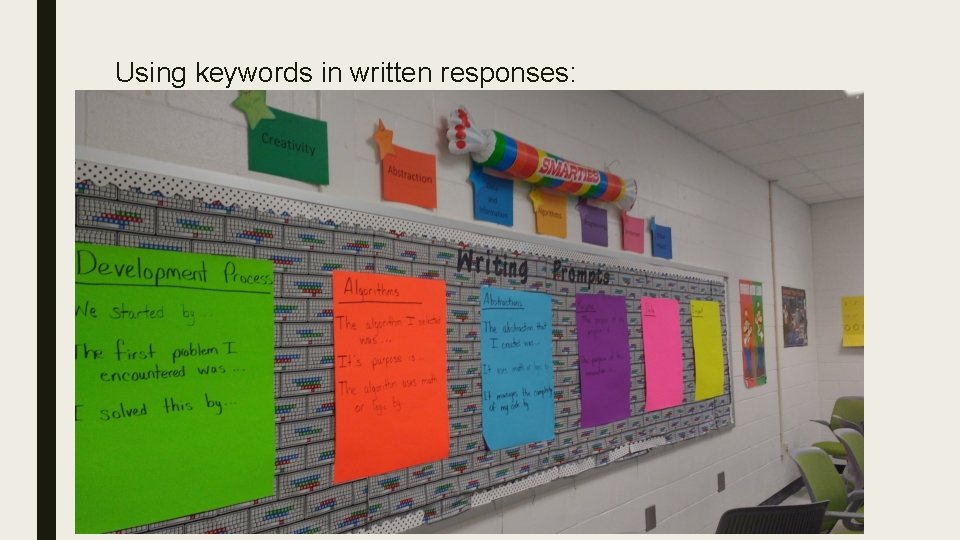
Using keywords in written responses:

Create Task scoring insights by row ■ Row 1: Double check that video works, especially if purpose is included as a narration. ■ Row 2: MUST describe the process (incremental & iterative) and mention using feedback/testing/reflection to modify the program ■ Row 3: Must identify two distinct points. Be extremely specific, both in the description of the development point and in the resolution. Saying “I fixed it” will not earn them the point. ■ Row 3: Students should not focus on a design decision (what music to use for the background, what font style, etc. ) Stick to code issues ■ Row 4: Algorithm(s) must be explicitly identified, either in written response or clearly marked with an oval in the program code.
Create task scoring insights by row… ■ Row 5: Algorithm must use math or logic. WR must explain how the algorithm work AND its purpose in the program. ■ Row 6: This is the most difficult point to get. The selected algorithm must include two embedded algorithms. One of those must use math or logic. ■ An algorithm is more than one instruction. ■ Row 7: Loops, variables, event handlers (on. Click) are not scored as abstractions because they are existing control structures. ■ Abstractions must be student created (functions, custom blocks, lists, libraries) ■ Abstraction must be clearly identified either in WR or marked with a rectangle in the program code. ■ Row 8: Management of complexity is best related to calling the abstraction or use anytime/anywhere rather than statements like “makes simpler”, “makes shorter”, “makes easier to read”
Create Task scoring insights… ■ WR is more important than super complex code. ■ Have students start by designing algorithmic complexity ■ Any language or platform will score well. The key is in the written responses. ■ Have students create a checklist of required items as an assignment before you start the real task. Take the best checklist and distribute to class. ■ You can not solve coding problems or give any kind of feedback on the real tasks. ■ Students are not supposed to get feedback or help from anyone other than a collaborative partner (on code…not video or written responses) ■ The work days do not have to be consecutive. You could take an official day off and review guidelines with whole class.
Explore Task scoring insights by row: ■ Row 1: Pick a good computing innovation. Students should avoid theoretical concepts and pick a product/app/website/software. EX: virtual reality vs Holo. Lens – Artifact must identify the innovation – Artifact must explain (textually or non-textually) the intended purpose, effect or function of the innovation…not a feature of the innovation. – WR: describes the intended purpose, function or effect and explains how the artifact illustrates, represents or explains the intended purpose, function or effect. ■ Row 2: Innovation must be a computing innovation. States fact about the intended purpose or function.
Explore Task scoring insights by row… ■ Row 3 & 4: – An effect is the result of the intended use of the innovation. – Not pros & cons or a list of features. – Being “hacked” is NOT a harmful effect. ■ Row 5: Tie one of the effects to a larger group to describe an impact on society, economy or culture. ■ Row 6: Students MUST identify a specific type of data. See scoring notes for examples. ■ Row 7: This is where students can discuss the potential for hacking and loss of private information.
Explore task scoring insights… ■ Row 8: References – Minimum of 3 sources – Each source must be cited with inline citations – Inline citations must match the list of sources ■ Note: The easiest form of inline citations to score are numbered citations at the end of the sentence [2]. Superscript or subscript citations are easily missed. 2
If you are teaching APCSA or APCSP, you can follow my lesson plans at… cswithwhitlock. com And, you can see pictures of activities on Twitter --- @pamwhitlock 1
- Slides: 12