
Animation Digital Multimedia 2 nd edition Nigel Chapman
- Slides: 20
Animation Digital Multimedia, 2 nd edition Nigel Chapman & Jenny Chapman Chapter 8 This presentation © 2004, Mac. Avon Media Productions
8 242 Animation • The creation of moving pictures one frame at a time • • Literally 'to bring to life' e. g. make a sequence of drawings on paper, in which a character's position changes slightly in each drawing Photograph drawings in sequence, using movie camera that advances one frame at a time Play back resulting film – character will move © 2004, Mac. Avon Media Productions
8 243– 244 Traditional Methods • Drawings/paintings on paper • • • 1440 drawings for every minute of film Cel Painted or scratched film Cut-outs Clay animation (Claymation) etc © 2004, Mac. Avon Media Productions
8 245– 246 Captured Animation • • Computer + video camera + traditional technique Frame grabbing – record each frame to disk Save as Quick. Time &c, edit non-linearly like video Can also use scanner or digital still camera, or create each frame in a graphics program (e. g. Painter) © 2004, Mac. Avon Media Productions
8 249– 250 Digital Cel • Use layers (e. g. in Photoshop) like sheets of acetate in traditional cel animation • • e. g. static background on one layer, moving simple object on a layer in front of it. Make the object move by repositioning the layer More complex cases, just need to change those layers where movement or other change occurs between frames © 2004, Mac. Avon Media Productions
8 250 Sprite Animation • • Store a single copy of all static elements and moving objects (sprites) and a description of how the objects move Each sprite can be a collection of images called sprite faces, which can be substituted in sequence to produce composite motion • e. g. walk cycle © 2004, Mac. Avon Media Productions
8 251– 252 Key Frame Animation • Traditional: key frames drawn by chief animators at important points in the animation • • In-between frames drawn by less skilled animators Computer-based: key frames drawn explicitly • In-between frames interpolated by software © 2004, Mac. Avon Media Productions
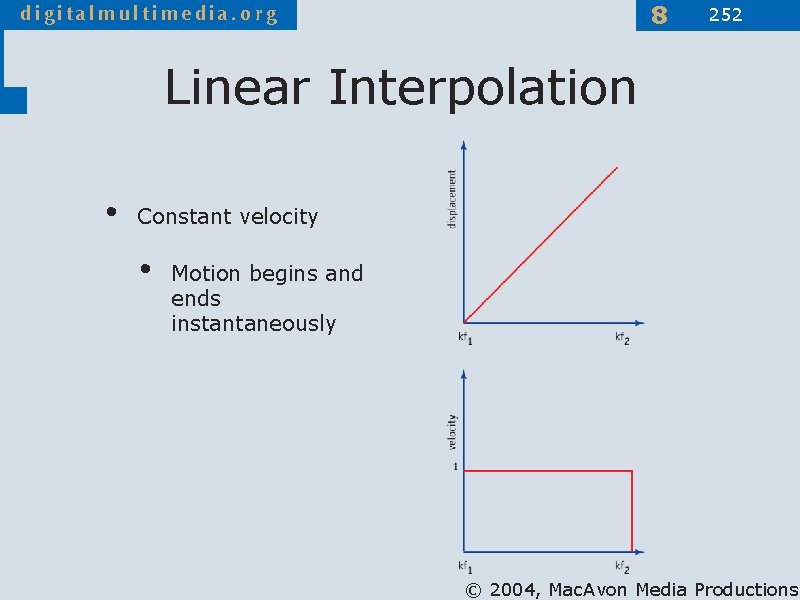
8 252 Linear Interpolation • Constant velocity • Motion begins and ends instantaneously © 2004, Mac. Avon Media Productions
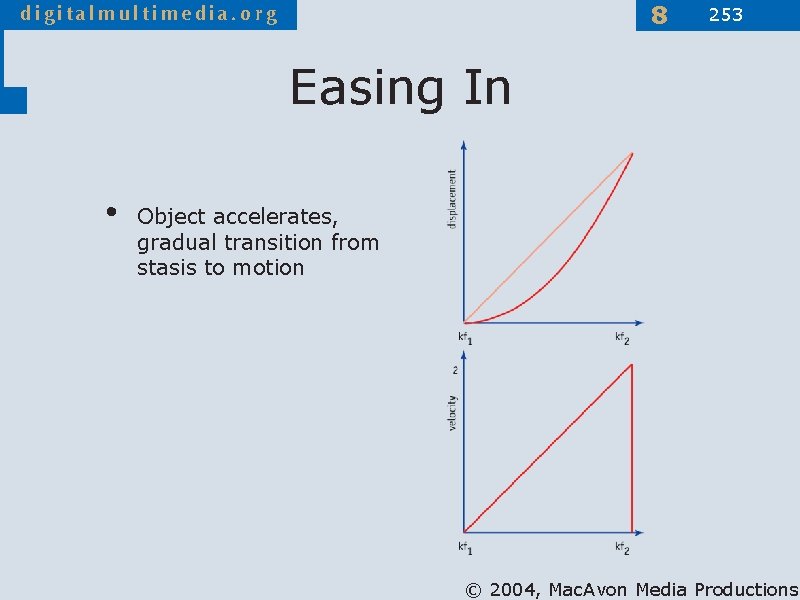
8 253 Easing In • Object accelerates, gradual transition from stasis to motion © 2004, Mac. Avon Media Productions
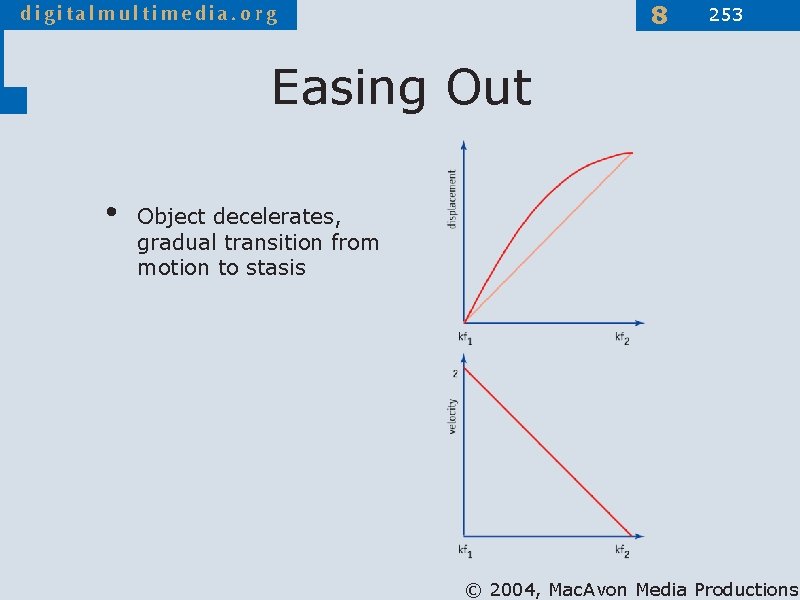
8 253 Easing Out • Object decelerates, gradual transition from motion to stasis © 2004, Mac. Avon Media Productions
8 247– 249 Animated GIFs • Sequence of images can be stored in a single GIF file, and displayed one after another by a Web browser or other software • • No browser plug-in required Can specify looping, delay between frames 256 colour palette No sound © 2004, Mac. Avon Media Productions
8 254 SWF • • • Popular Web animation format Usually generated by Macromedia Flash Vector animation format • • Motion represented as numerical operations on vector data Can also include bitmapped images (e. g. as backgrounds) © 2004, Mac. Avon Media Productions
8 254– 256 Flash • Timeline – graphical representation of sequence of frames • • • Key frames – drawn/copied from previous and transformed Simple frames – hold on previous key frame Stage – sub-window in which frames are created by drawing with vector tools • Can also import bitmaps as objects, add text © 2004, Mac. Avon Media Productions
8 256– 257 Symbols • Reusable objects stored in a library • • Graphic symbols Button symbols (for interactivity) Movie clip symbols (self-contained animations within a movie) Create instances by dragging on to stage • If symbol is edited, all its instances updated © 2004, Mac. Avon Media Productions
8 256 Motion Tweening • Motion tweening • • Object is placed in a key frame Create Motion Tween • • • Object is turned into a symbol Add key frame at end of tweened sequence and move or transform object Motion in intermediate frames is interpolated (tweened) © 2004, Mac. Avon Media Productions
8 257 Shape Tweening • Also called morphing • • Shapes of graphical objects are transformed in between key frames Have to generate the interpolated frames, so resulting SWF is bigger than when motion tweening is used © 2004, Mac. Avon Media Productions
8 261– 266 Motion Graphics • • • Like time-based graphic design Move, transform, alter layers of a bitmapped image between frames Apply time-varying filters and effects • • After. Effects supports linear and Bézier interpolation in both space and time (rate of change) Can have new effects that only make sense in time, e. g. shatter, particle effects © 2004, Mac. Avon Media Productions
8 266– 267 3 -D Animation • • • "Easy to describe but much harder to do" Properties of 3 -D models (shape, size, position, rotation, surface characteristics, etc), light sources and cameras are numerically defined Animate a scene by changing the numbers, rendering a new frame, changing further … Can make objects move, or move the camera Requires 3 -D visualization and animation skills and great amount of processing power © 2004, Mac. Avon Media Productions
8 268 Inverse Kinematics • • • Useful for animating jointed structures, especially limbs of human or animal figures Model must obey kinematic constraints • e. g. if upper arm moves, lower arm and hand must move with it Inverse kinematics follows chain in reverse (easier for the animator) • e. g position the hand, then compute motion of the rest of the arm move to accommodate it © 2004, Mac. Avon Media Productions
8 269– 271 Virtual Reality • Strictly, an immersive sensory experience of a synthetic world • • Head-mounted displays, data gloves, haptic interfaces, etc More modestly, 3 -D graphic that can be explored • • Draggable panorama, objects that can be moved round, etc VRML, Quick. Time VR © 2004, Mac. Avon Media Productions