
Android Developer Fundamentals V 2 Build your first
Android Developer Fundamentals V 2 Build your first app Lesson 1 Android. Developer. Fundamentals V 2 Your first Android app Thisworkis islicensedundera a Creative. Commons. Attribution 4. 0 International. License. . 1
1. 1 Your first Android app Android Developer Fundamentals V 2 Your first Android app This work is licensed under a Creative Commons Attribution 4. 0 International License. 2
Contents ● Android Studio ● Creating "Hello World" app in Android Studio ● Basic app development workflow with Android Studio ● Running apps on virtual and physical devices Create your first Android Developer Fundamentals V 2 Android app This work is licensed under a Creative Commons Attribution 4. 0 International License. 3
Prerequisites ● Java Programming Language ● Object-oriented programming ● XML - properties / attributes ● Using an IDE for development and debugging Android Developer Fundamentals V 2 Your first Android app This work is licensed under a Creative Commons Attribution 4. 0 International License. 4
Android Studio Android Developer Fundamentals V 2 Your first Android app This work is licensed under a Creative Commons Attribution 4. 0 International License. 5
What is Android Studio? ● ● ● ● Android integrated development environment (IDE) Project and Activity templates Layout editor Testing tools Gradle-based build Log console and debugger Emulators Android Developer Fundamentals V 2 Your first Android app This work is licensed under a Creative Commons Attribution 4. 0 International License. 6
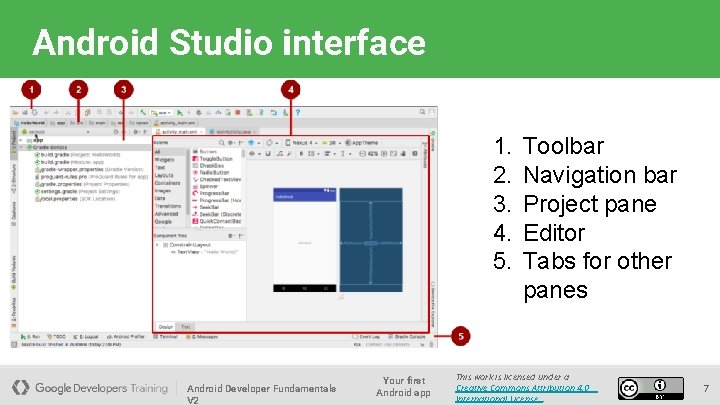
Android Studio interface 1. 2. 3. 4. 5. Android Developer Fundamentals V 2 Your first Android app Toolbar Navigation bar Project pane Editor Tabs for other panes This work is licensed under a Creative Commons Attribution 4. 0 International License. 7

Creating your first Android app Android Developer Fundamentals V 2 Your first Android app This work is licensed under a Creative Commons Attribution 4. 0 International License. 8
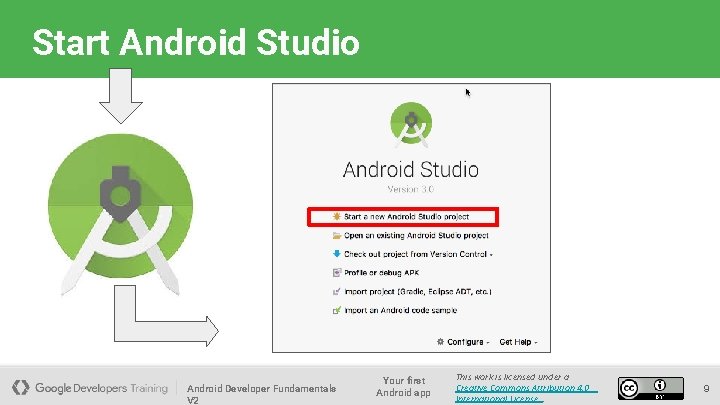
Start Android Studio Android Developer Fundamentals V 2 Your first Android app This work is licensed under a Creative Commons Attribution 4. 0 International License. 9
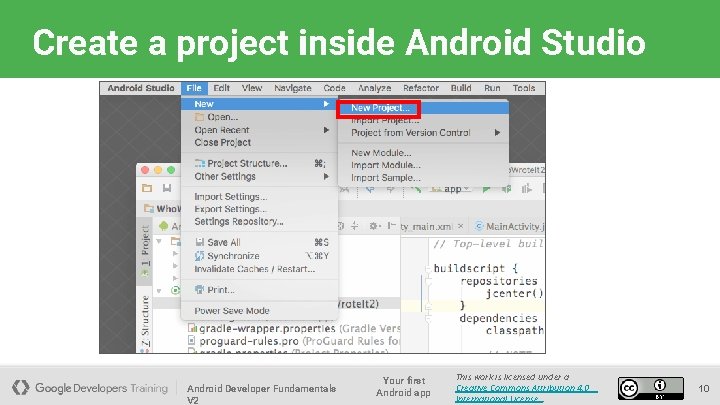
Create a project inside Android Studio Android Developer Fundamentals V 2 Your first Android app This work is licensed under a Creative Commons Attribution 4. 0 International License. 10
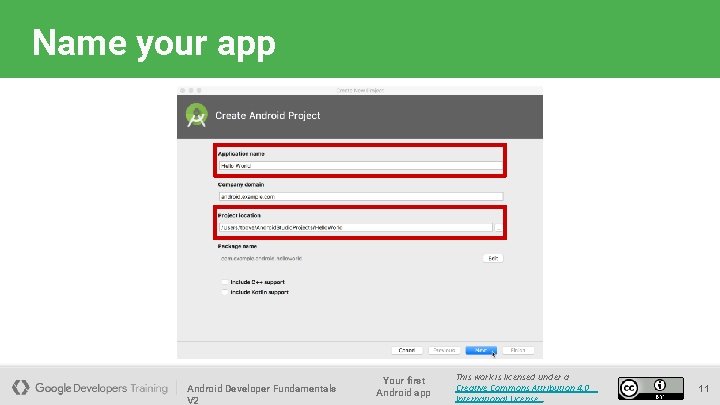
Name your app Android Developer Fundamentals V 2 Your first Android app This work is licensed under a Creative Commons Attribution 4. 0 International License. 11
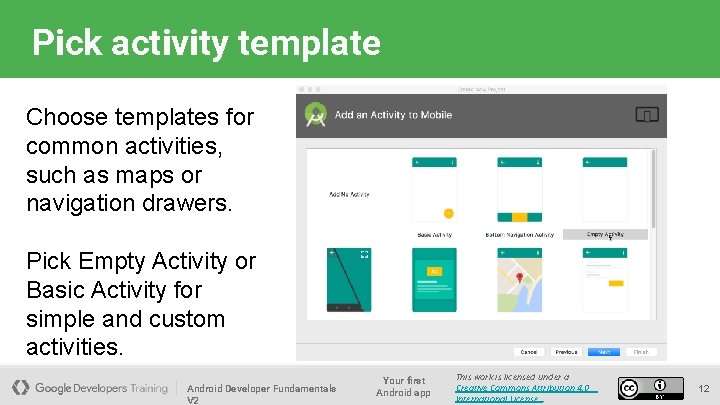
Pick activity template Choose templates for common activities, such as maps or navigation drawers. Pick Empty Activity or Basic Activity for simple and custom activities. Android Developer Fundamentals V 2 Your first Android app This work is licensed under a Creative Commons Attribution 4. 0 International License. 12
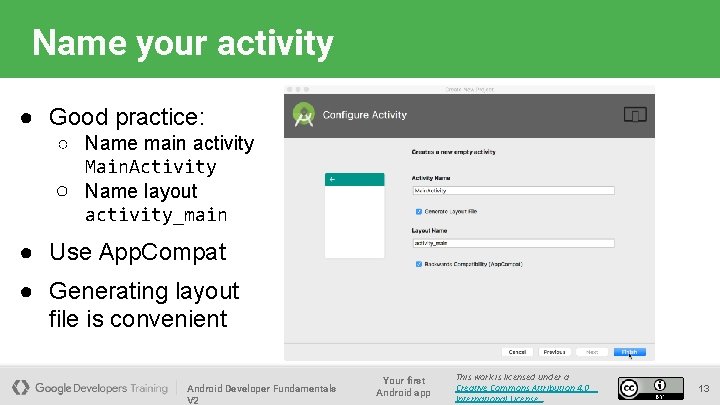
Name your activity ● Good practice: ○ Name main activity Main. Activity ○ Name layout activity_main ● Use App. Compat ● Generating layout file is convenient Android Developer Fundamentals V 2 Your first Android app This work is licensed under a Creative Commons Attribution 4. 0 International License. 13
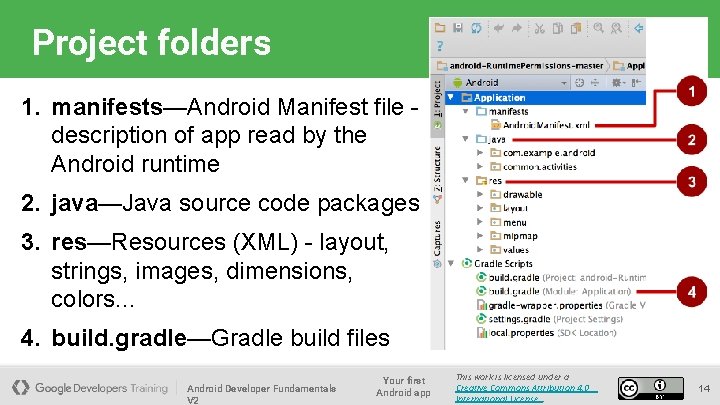
Project folders 1. manifests—Android Manifest file description of app read by the Android runtime 2. java—Java source code packages 3. res—Resources (XML) - layout, strings, images, dimensions, colors. . . 4. build. gradle—Gradle build files Android Developer Fundamentals V 2 Your first Android app This work is licensed under a Creative Commons Attribution 4. 0 International License. 14
Gradle build system ● Modern build subsystem in Android Studio ● Three build. gradle: ○ project ○ module ○ settings ● Typically not necessary to know low-level Gradle details ● Learn more about gradle at https: //gradle. org/ Android Developer Fundamentals V 2 Your first Android app This work is licensed under a Creative Commons Attribution 4. 0 International License. 15
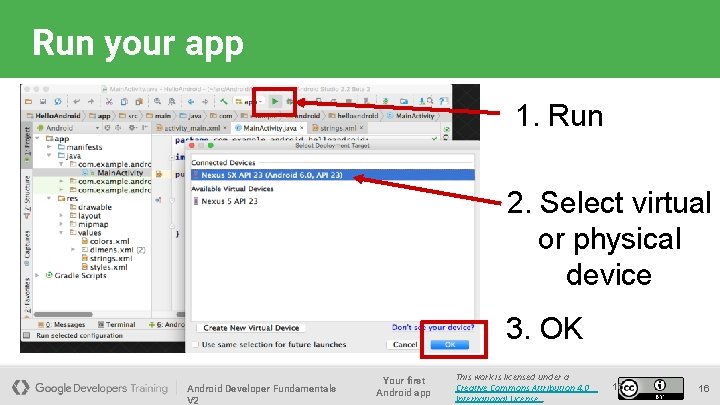
Run your app 1. Run 2. Select virtual or physical device 3. OK Android Developer Fundamentals V 2 Your first Android app This work is licensed under a Creative Commons Attribution 4. 0 International License. 16 16
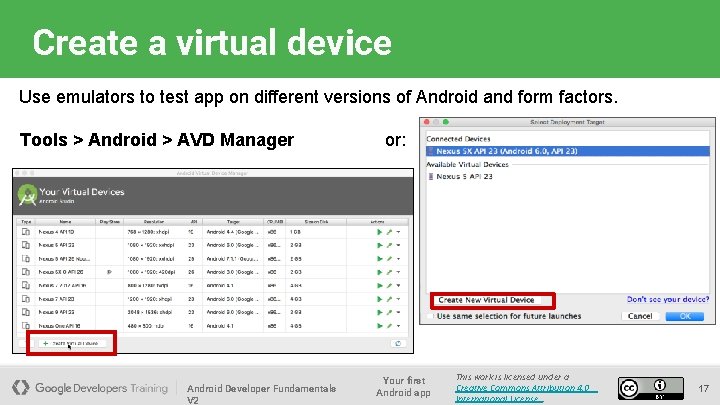
Create a virtual device Use emulators to test app on different versions of Android and form factors. Tools > Android > AVD Manager Android Developer Fundamentals V 2 or: Your first Android app This work is licensed under a Creative Commons Attribution 4. 0 International License. 17
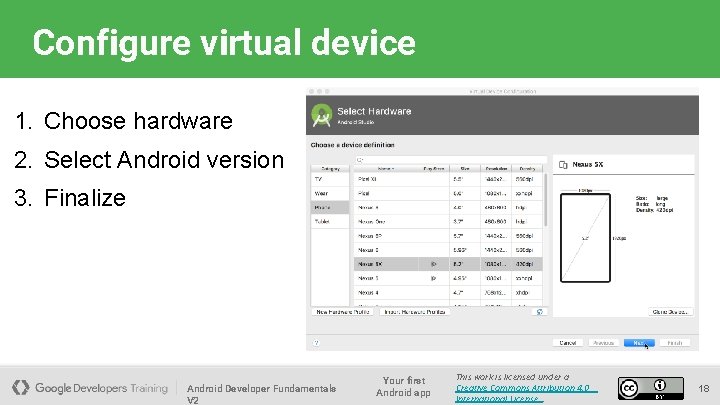
Configure virtual device 1. Choose hardware 2. Select Android version 3. Finalize Android Developer Fundamentals V 2 Your first Android app This work is licensed under a Creative Commons Attribution 4. 0 International License. 18
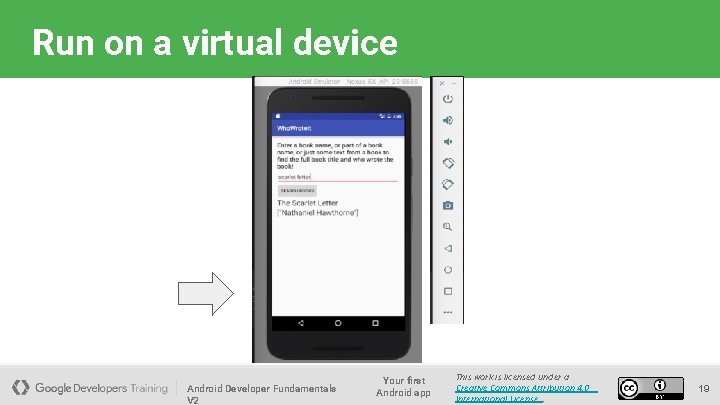
Run on a virtual device Android Developer Fundamentals V 2 Your first Android app This work is licensed under a Creative Commons Attribution 4. 0 International License. 19
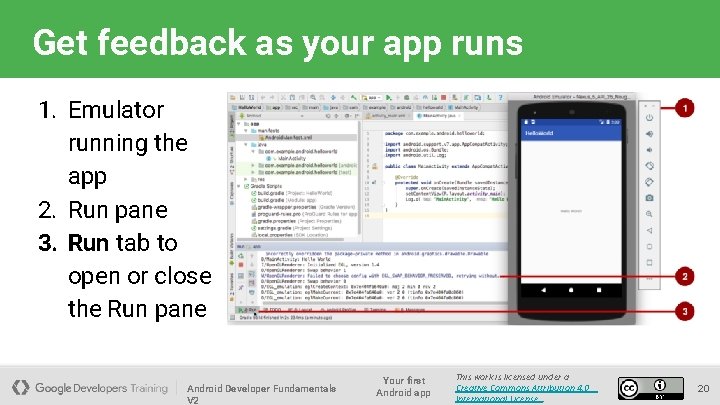
Get feedback as your app runs 1. Emulator running the app 2. Run pane 3. Run tab to open or close the Run pane Android Developer Fundamentals V 2 Your first Android app This work is licensed under a Creative Commons Attribution 4. 0 International License. 20
Adding logging to your app ● As the app runs, the Logcat pane shows information ● Add logging statements to your app that will show up in the Logcat pane ● Set filters in Logcat pane to see what's important to you ● Search using tags Android Developer Fundamentals V 2 Your first Android app This work is licensed under a Creative Commons Attribution 4. 0 International License. 21
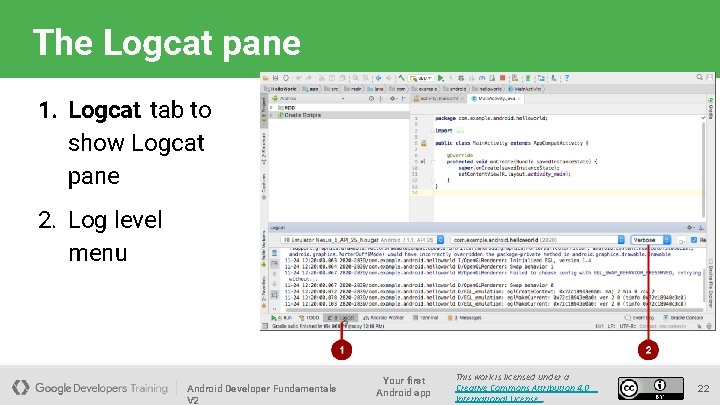
The Logcat pane 1. Logcat tab to show Logcat pane 2. Log level menu Android Developer Fundamentals V 2 Your first Android app This work is licensed under a Creative Commons Attribution 4. 0 International License. 22
END Android Developer Fundamentals V 2 This work is licensed under a Creative Commons Attribution-Non. Commercial 4. 0 International License 23
- Slides: 23