
Android applications and basic components Emil Atanasov Main
Android applications and basic components Emil Atanasov
Main components • • • Android. Manifest. xml Activity Service Broadcast Receiver Content Provider

This lecture’s idea • Get acquainted with the fundamental building blocks of an Android application • Don’t go into details (too much) • There will be a lecture for each of the separate components
Broadcast Receiver • Component, which reacts to Intents • Mechanism for communication between applications and interaction with the system • Can be declared both statically and dynamically o in Android. Manifest. xml o in the Java source code • Most important method - void on. Receive(Context cur. Context, Intent broadcast. Msg) • Has a timeout of 10 seconds, before being considered candidate for “killing”, so do not use for time-consuming operations • Broadcast. Receivers and Services
Content Provider • • • High-level abstraction for keeping and accessing data The right way to provide data between multiple applications Not tied to a specific implementation Examples of built-in providers - Contacts, Images. . . Can be used via Content. Resolvers objects Every Content. Provider exposes a public URI: o content: //edu. fmi. courses. android. studentsprovider/mem ber/132 o content: //edu. fmi. courses. android. studentsprovider/mem ber/new/15
Resources • What can be resource in Android? o UI layouts o images o strings o animations o raw data o settings and properties o others • Different resources based on a number of environment settings, including screen size, screen orientation, locale, device properties, etc. • Easy internationalization and modal behavior app • Differences between different Android versions
Activity • The main component the user interacts with in Android and the main building block of pretty much all Android apps • Presents a visual UI for one focused endeavor • Created by the Android system, as a result of handling an Intent for starting an Activity • Can go through four different states, depending on the interaction with the user o active (in foreground) o paused (not running, still visible) o stopped (not visible) o shut down (destroyed) • Can be forcibly “killed” by the system if resources are scarce
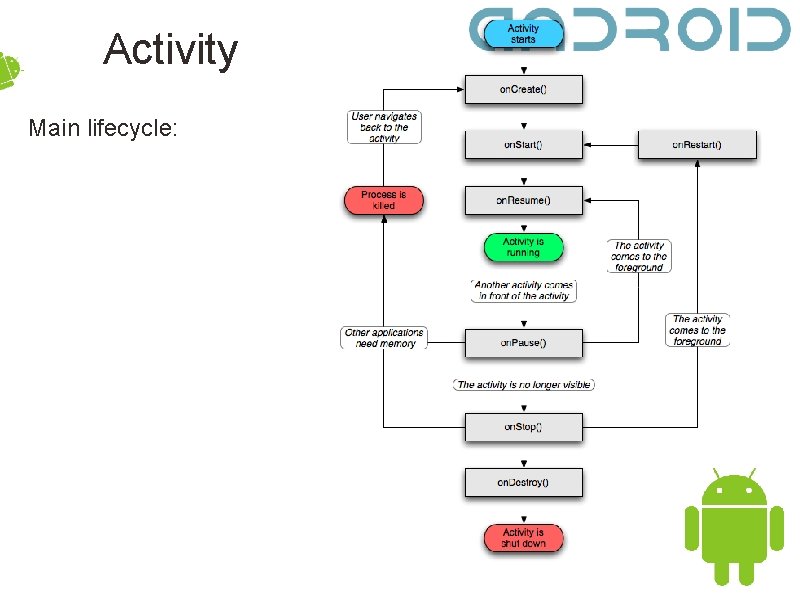
Activity Main lifecycle:
Service • Can be described as an Activity without the UI • Used for doing longer-running operations in the background or supplying functionality for other components and applications • By default runs in the UI thread, so you should explicitly use threads for the time-consuming tasks • Should be declared in the Android. Manifest. xml • Can run in a different process • Has different lifecycle than the Activity • How can I start a Service? o Context. start. Service() o Context. bind. Service() o differences
Android. Manifest. xml • Structure • Conventions o no hard rules about how the XML should be styled, only recommended practices • Basic elements o <manifest>, <application> - obligatory o <activity>, <service>, <receiver>, <uses-permission> used in nearly every application
Android. Manifest. xml • Defines the unique name of the application with the package name of the project • Declares all major components of the application • Allows the Android system to understand when to invoke/use what part of the application • Defines additional properties of the application, like application themes, labels, supported screen sizes, etc. • Android Market does filtering based on the properties defined in the Android. Manifest. xml o If the manifest declares that the application doesn’t support large screens, devices with large screens won’t be able to see the application in the Market
Android. Manifest. xml • Defines the permissions that the application wants to use (using Internet, accessing the user location, etc. ) • Declares what permissions are required, in order to restrict free access to protected components of the application • Signifies the minimum Android version, on which the application can run o An application can be compiled with 2. 2, but still be able to run on devices with Android 1. 6 (eventually with some restrictions) • Defines the external libraries that can be used • * Instrumentation classes - used for TDD, related only with the development phase
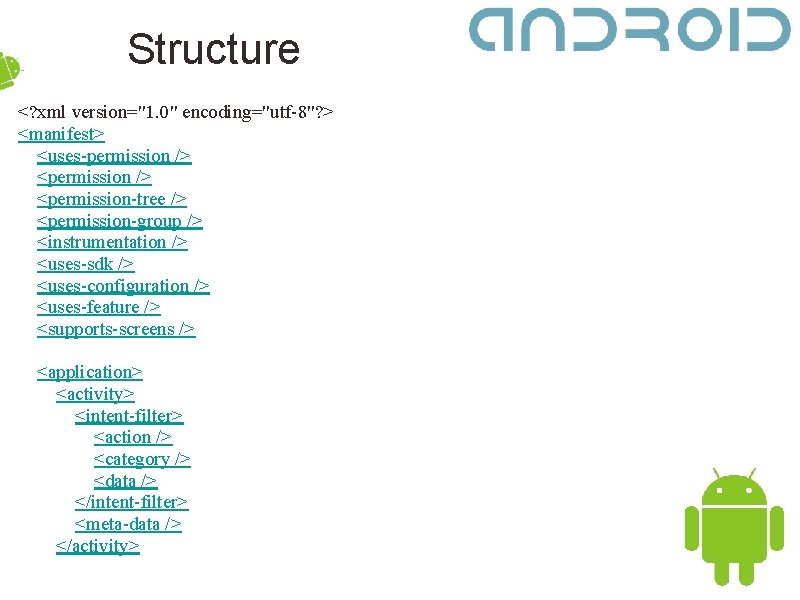
Structure <? xml version="1. 0" encoding="utf-8"? > <manifest> <uses-permission /> <permission-tree /> <permission-group /> <instrumentation /> <uses-sdk /> <uses-configuration /> <uses-feature /> <supports-screens /> <application> <activity> <intent-filter> <action /> <category /> <data /> </intent-filter> <meta-data /> </activity>
Conventions • All properties in the Android XMLs are declared as tag attributes • Some attributes are inheritable o If you declare theme for the <application> tag, it will also be inherited from its children • Specifying Java classes as components of the application happens here o For example, you can declare that your Hello. World. Activity class is an <activity> that can be started when a specific Intent broadcast is sent • Equal elements can be arranged in no specific order
Intent Filters • The basic components of the application are usually invoked, when an Intent broadcast is sent • Intent - object, identifying the action, that it’s meant to trigger • Besides action, it can also have categories and data (not obligatory) • Android tries to find the most suitable Intent. Filter, by matching the aforementioned three characteristics (there are different rules for getting a match for all of them) • Every component can have more than one Intent. Filter
Permissions • General mechanism for enforcing restrictions on the specific operations that one process or application can perform • Can be applied for both pre-defined protected system features and developer-created application-specific ones. • <user-permissions> - used for getting access to protected features. • <permission> - used for restricting access to protected features.
Libraries • <uses-library> - tag in the Android. Manifest. xml • Example for library components: the Google APIs add-on for the Android SDK • Mostly used for external libraries in Java/Android, already doing something that you want done in your app
Projects • No general restrictions for your ideas • The best ones can be published in the Android Market • Document your proposal and send it to us for approval (shouldn’t be a problem) • Do it before 27. X. 2010, please • All the others will be given one of our sample proposals
Teams and their projects • The projects must: – be written for Android – have documentation – be thoroughly known, on both design and implementation level, from all team-members • Teams and their projects should be defined in the next two weeks
Questions? • Have you installed Eclipse? • Any problems with setting up the plug-in? • How about getting all the different SDKs?
- Slides: 20