
Analyze Phase X Sifting X Sifting Welcome to
- Slides: 54
Analyze Phase “X” Sifting
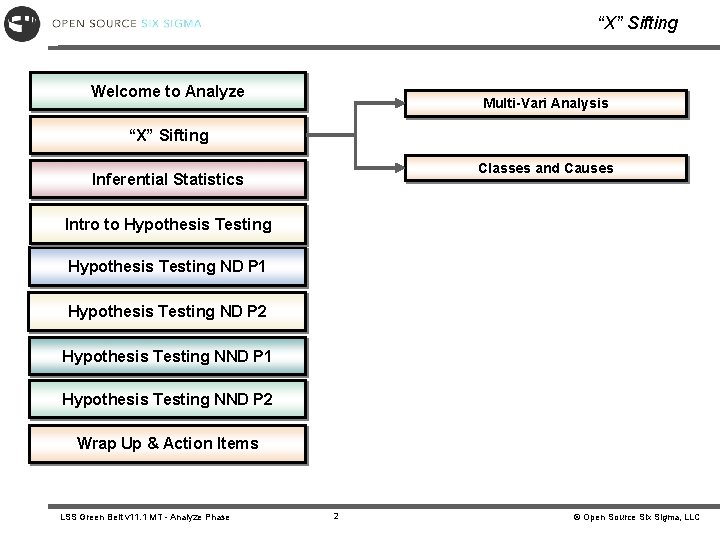
“X” Sifting Welcome to Analyze Multi-Vari Analysis “X” Sifting Classes and Causes Inferential Statistics Intro to Hypothesis Testing ND P 1 Hypothesis Testing ND P 2 Hypothesis Testing NND P 1 Hypothesis Testing NND P 2 Wrap Up & Action Items LSS Green Belt v 11. 1 MT - Analyze Phase 2 © Open Source Six Sigma, LLC
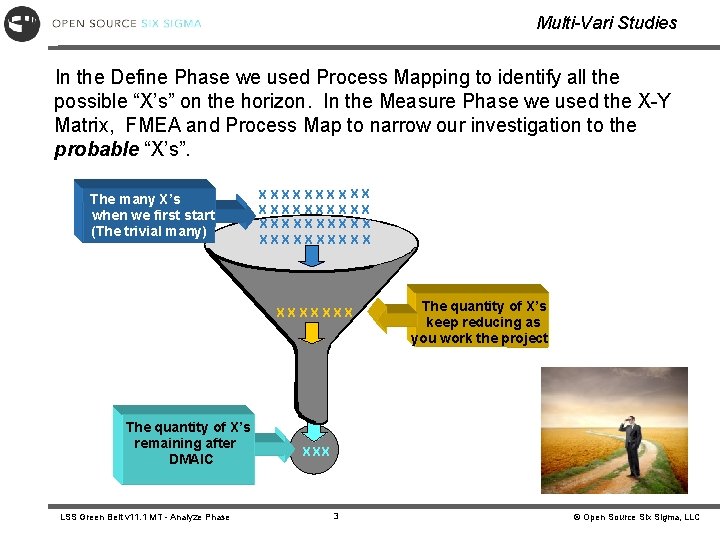
Multi-Vari Studies In the Define Phase we used Process Mapping to identify all the possible “X’s” on the horizon. In the Measure Phase we used the X-Y Matrix, FMEA and Process Map to narrow our investigation to the probable “X’s”. Themany. X’s Xs when we firststart (Thetrivialmany) XXXXXXXXXX XXXXX X X XX XX XX X Thequantityofof. X’s Xs The when remaining we apply after leverage DMAIC (The vital few) LSS Green Belt v 11. 1 MT - Analyze Phase Thequantityof of. X’s Xs keep after we reducing think as you about work. Y=f(X) the project +e XXX 3 © Open Source Six Sigma, LLC
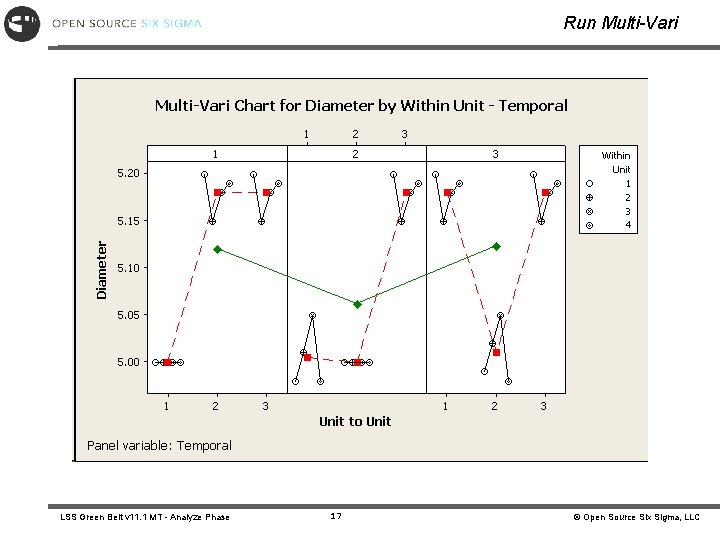
Multi-Vari Definition Multi-Vari Studies – a tool that graphically displays patterns of variation. Multi-Vari Studies are used to identify possible X’s or families of variation. These families of variation can hide within a subgroup, between subgroups, or over time. • The Multi-Vari Chart helps in screening factors by using graphical techniques to logically subgroup discrete X’s (Independent Variables) plotted against a continuous Y (Dependent). By looking at the pattern of the graphed points, conclusions are drawn from about the largest family of variation. • Multi-Vari Chart can also be used to assess capability, stability and graphical relationships between X’s and Y’s. LSS Green Belt v 11. 1 MT - Analyze Phase 4 © Open Source Six Sigma, LLC
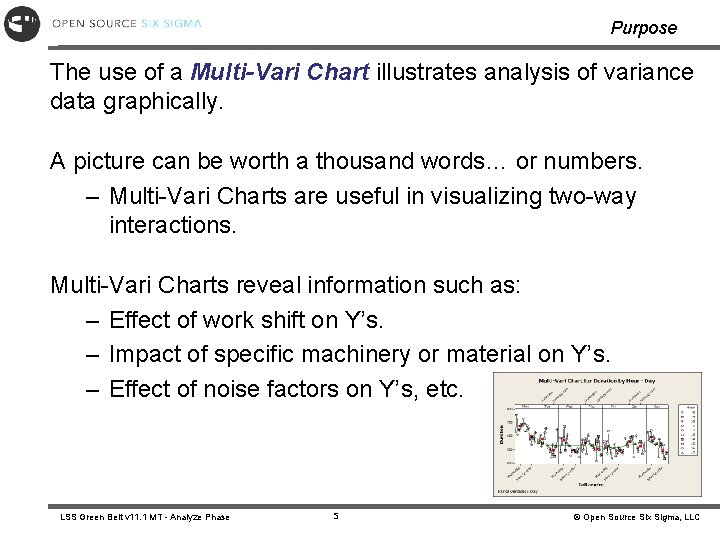
Purpose The use of a Multi-Vari Chart illustrates analysis of variance data graphically. A picture can be worth a thousand words… or numbers. – Multi-Vari Charts are useful in visualizing two-way interactions. Multi-Vari Charts reveal information such as: – Effect of work shift on Y’s. – Impact of specific machinery or material on Y’s. – Effect of noise factors on Y’s, etc. LSS Green Belt v 11. 1 MT - Analyze Phase 5 © Open Source Six Sigma, LLC
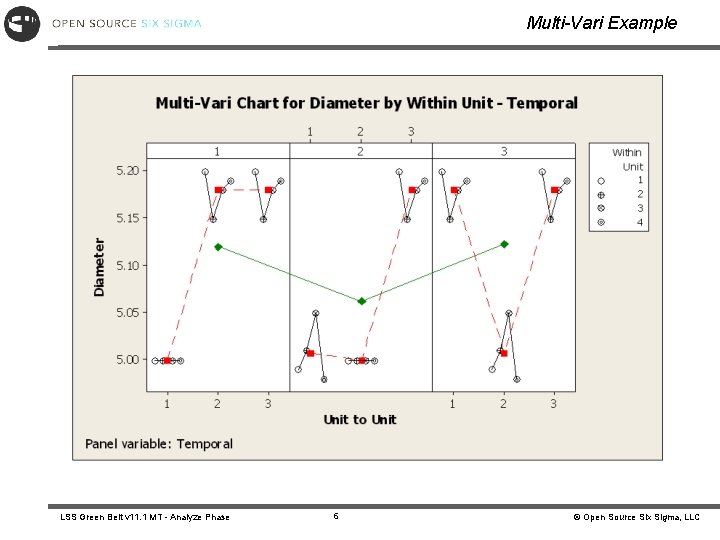
Multi-Vari Example LSS Green Belt v 11. 1 MT - Analyze Phase 6 © Open Source Six Sigma, LLC
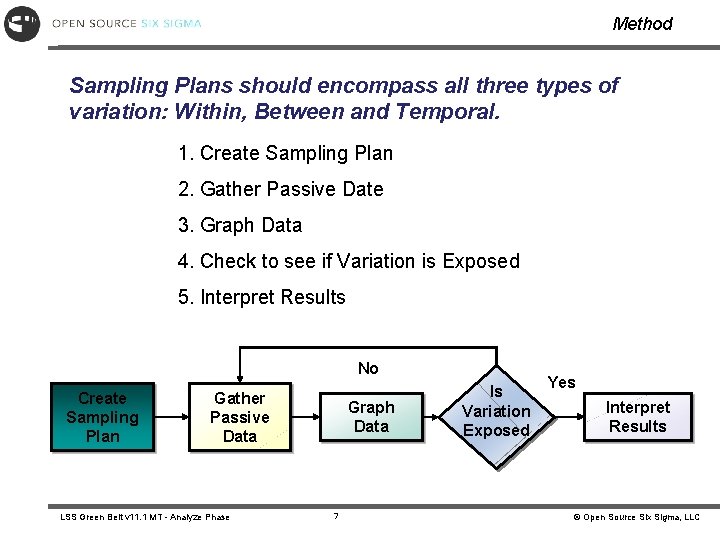
Method Sampling Plans should encompass all three types of variation: Within, Between and Temporal. 1. Create Sampling Plan 2. Gather Passive Date 3. Graph Data 4. Check to see if Variation is Exposed 5. Interpret Results No Create Sampling Plan Gather Passive Data LSS Green Belt v 11. 1 MT - Analyze Phase Graph Data 7 Is Variation Exposed Yes Interpret Results © Open Source Six Sigma, LLC
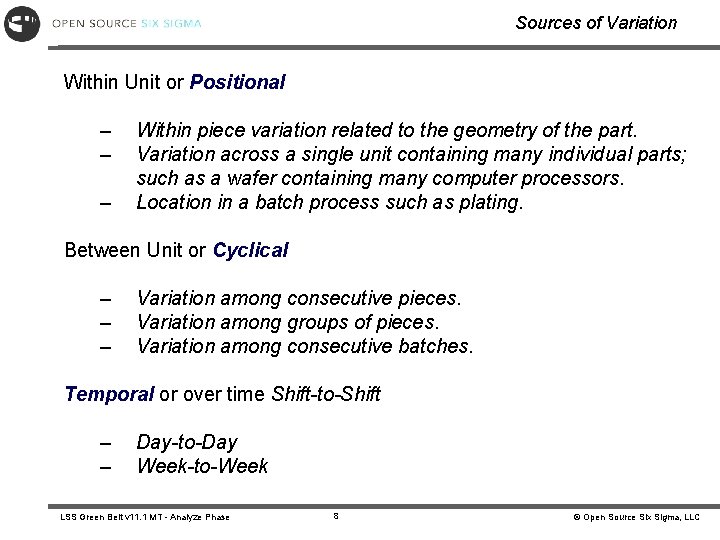
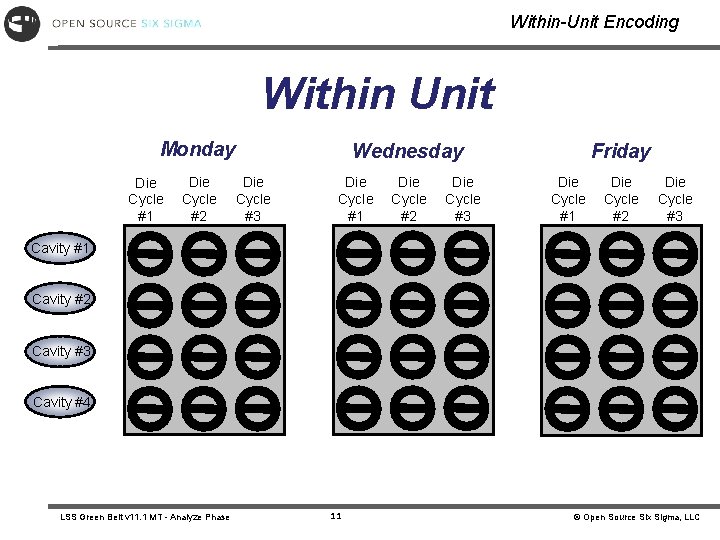
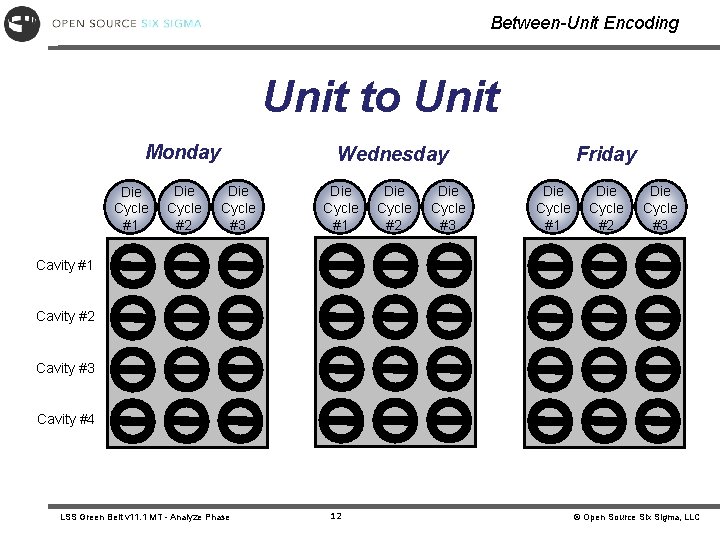
Sources of Variation Within Unit or Positional – – – Within piece variation related to the geometry of the part. Variation across a single unit containing many individual parts; such as a wafer containing many computer processors. Location in a batch process such as plating. Between Unit or Cyclical – – – Variation among consecutive pieces. Variation among groups of pieces. Variation among consecutive batches. Temporal or over time Shift-to-Shift – – Day-to-Day Week-to-Week LSS Green Belt v 11. 1 MT - Analyze Phase 8 © Open Source Six Sigma, LLC
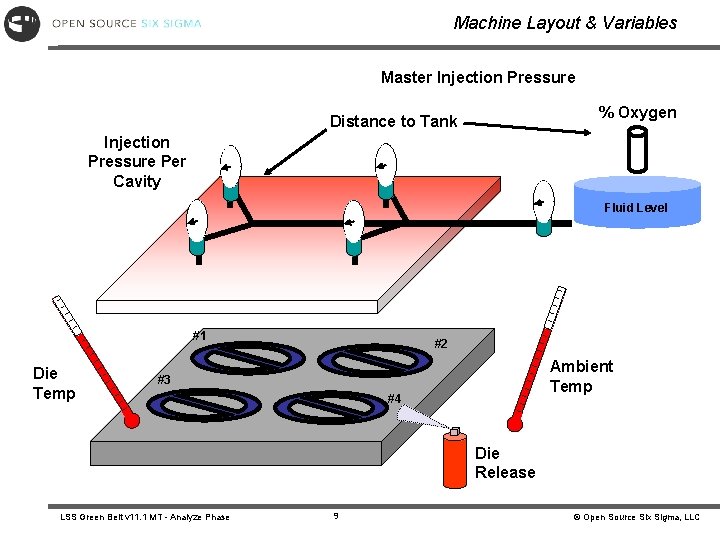
Machine Layout & Variables Master Injection Pressure % Oxygen Distance to Tank Injection Pressure Per Cavity Fluid Level #1 Die Temp #2 Ambient Temp #3 #4 Die Release LSS Green Belt v 11. 1 MT - Analyze Phase 9 © Open Source Six Sigma, LLC
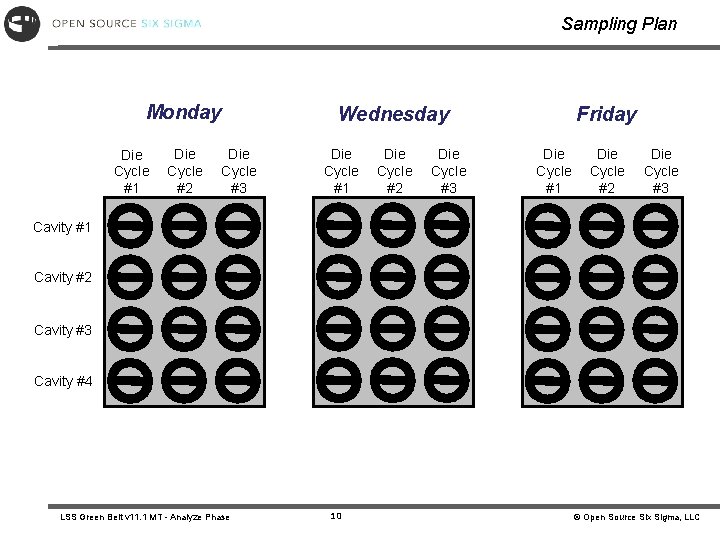
Sampling Plan Monday Die Cycle #1 Die Cycle #2 Wednesday Die Cycle #3 Die Cycle #1 Die Cycle #2 Die Cycle #3 Friday Die Cycle #1 Die Cycle #2 Die Cycle #3 Cavity #1 Cavity #2 Cavity #3 Cavity #4 LSS Green Belt v 11. 1 MT - Analyze Phase 10 © Open Source Six Sigma, LLC
Within-Unit Encoding Within Unit Monday Die Cycle #1 Die Cycle #2 Wednesday Die Cycle #3 Die Cycle #1 Die Cycle #2 Die Cycle #3 Friday Die Cycle #1 Die Cycle #2 Die Cycle #3 Cavity #1 Cavity #2 Cavity #3 Cavity #4 LSS Green Belt v 11. 1 MT - Analyze Phase 11 © Open Source Six Sigma, LLC
Between-Unit Encoding Unit to Unit Monday Die Cycle #1 Die Cycle #2 Wednesday Die Cycle #3 Die Cycle #1 Die Cycle #2 Die Cycle #3 Friday Die Cycle #1 Die Cycle #2 Die Cycle #3 Cavity #1 Cavity #2 Cavity #3 Cavity #4 LSS Green Belt v 11. 1 MT - Analyze Phase 12 © Open Source Six Sigma, LLC
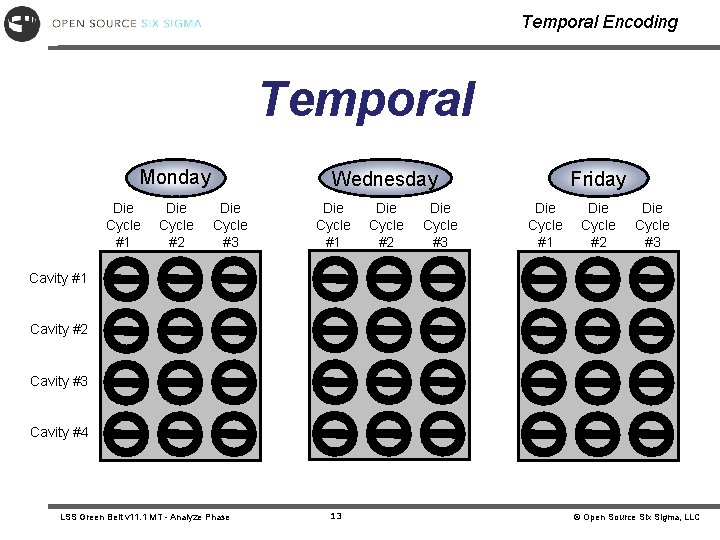
Temporal Encoding Temporal Monday Die Cycle #1 Die Cycle #2 Wednesday Die Cycle #3 Die Cycle #1 Die Cycle #2 Die Cycle #3 Friday Die Cycle #1 Die Cycle #2 Die Cycle #3 Cavity #1 Cavity #2 Cavity #3 Cavity #4 LSS Green Belt v 11. 1 MT - Analyze Phase 13 © Open Source Six Sigma, LLC
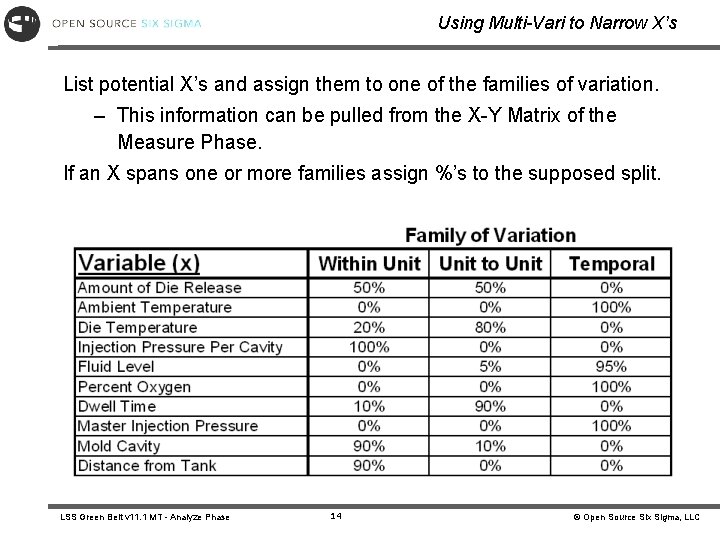
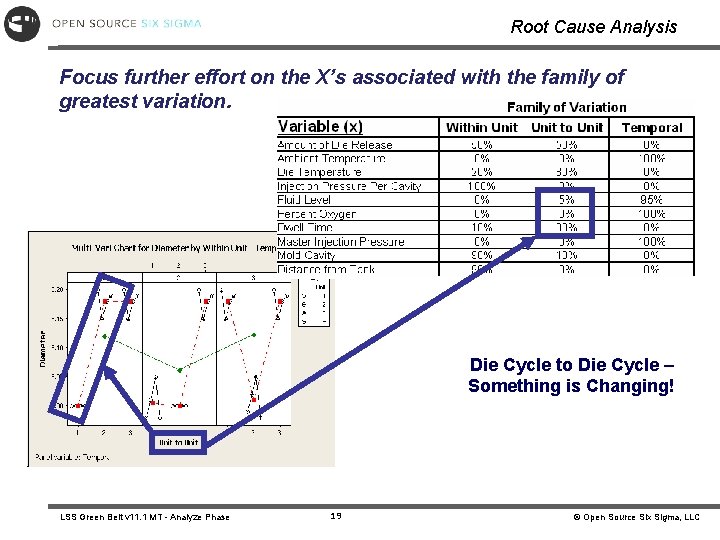
Using Multi-Vari to Narrow X’s List potential X’s and assign them to one of the families of variation. – This information can be pulled from the X-Y Matrix of the Measure Phase. If an X spans one or more families assign %’s to the supposed split. LSS Green Belt v 11. 1 MT - Analyze Phase 14 © Open Source Six Sigma, LLC
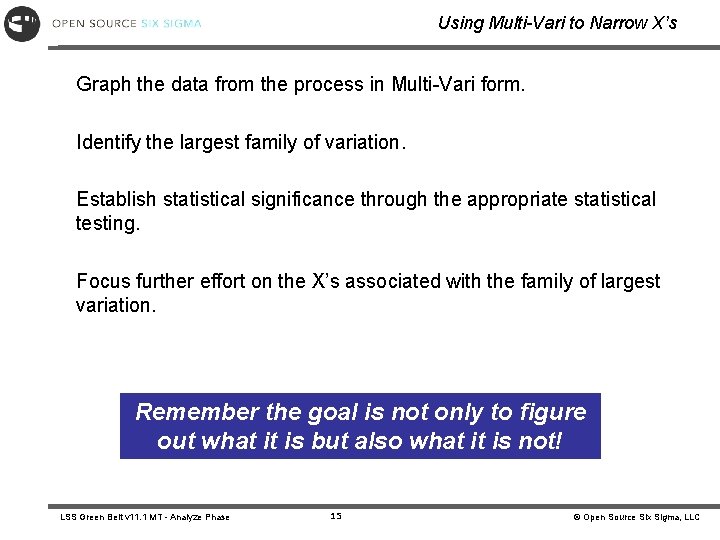
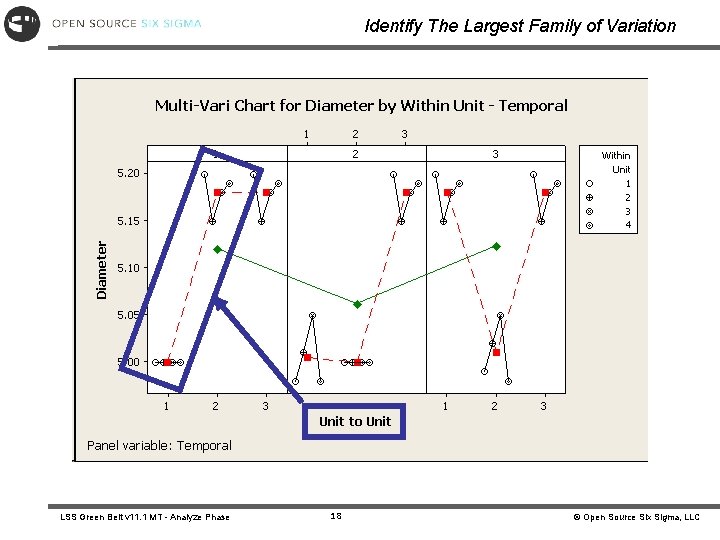
Using Multi-Vari to Narrow X’s Graph the data from the process in Multi-Vari form. Identify the largest family of variation. Establish statistical significance through the appropriate statistical testing. Focus further effort on the X’s associated with the family of largest variation. Remember the goal is not only to figure out what it is but also what it is not! LSS Green Belt v 11. 1 MT - Analyze Phase 15 © Open Source Six Sigma, LLC
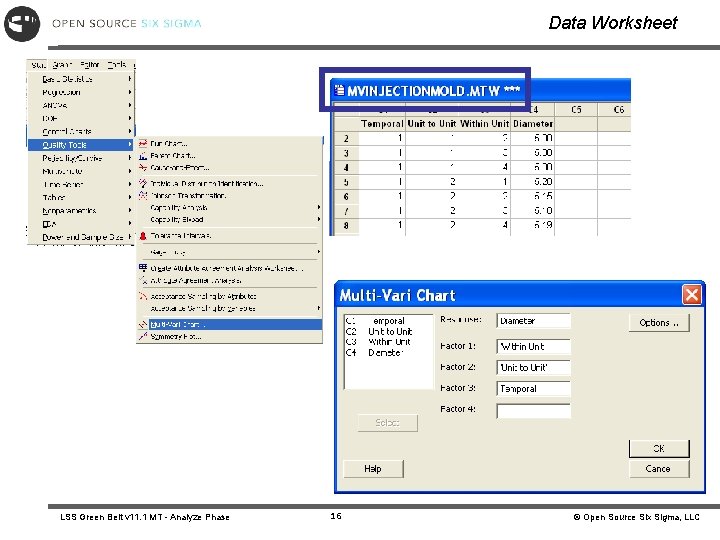
Data Worksheet LSS Green Belt v 11. 1 MT - Analyze Phase 16 © Open Source Six Sigma, LLC
Run Multi-Vari LSS Green Belt v 11. 1 MT - Analyze Phase 17 © Open Source Six Sigma, LLC
Identify The Largest Family of Variation LSS Green Belt v 11. 1 MT - Analyze Phase 18 © Open Source Six Sigma, LLC
Root Cause Analysis Focus further effort on the X’s associated with the family of greatest variation. Die Cycle to Die Cycle – Something is Changing! LSS Green Belt v 11. 1 MT - Analyze Phase 19 © Open Source Six Sigma, LLC
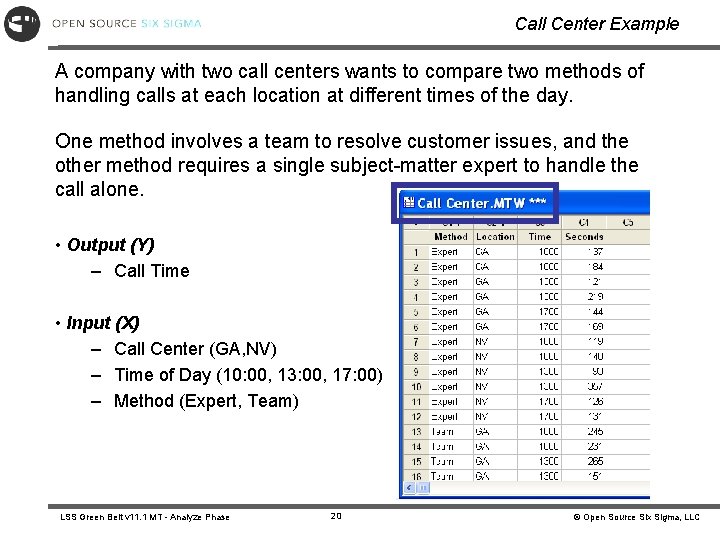
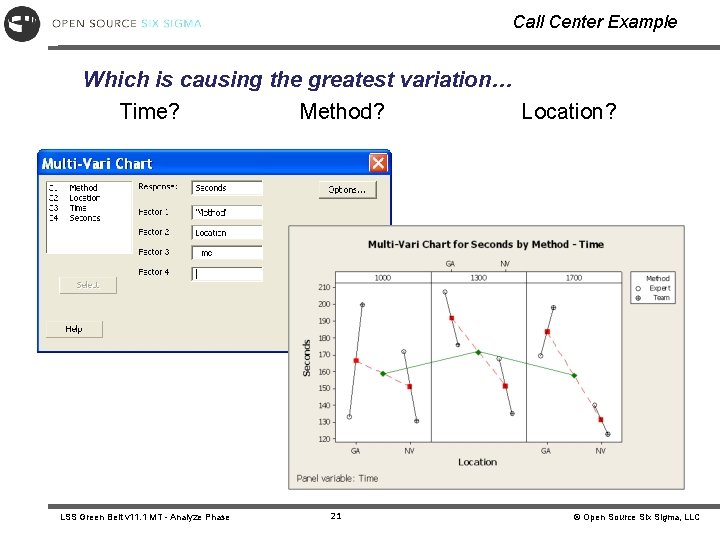
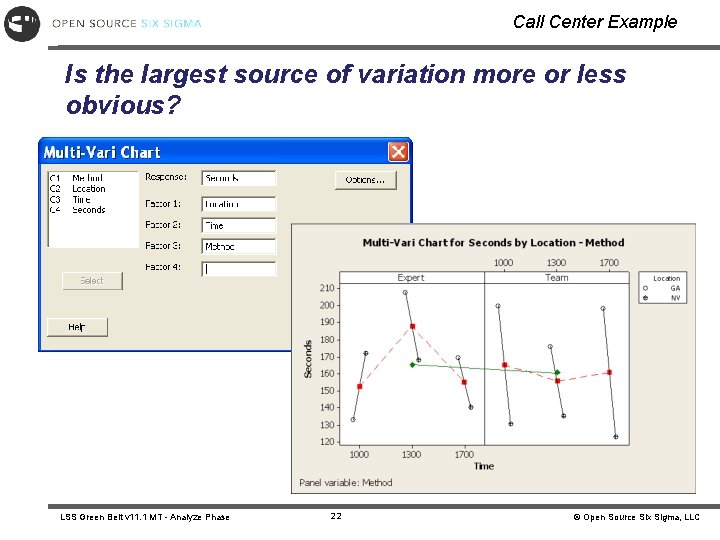
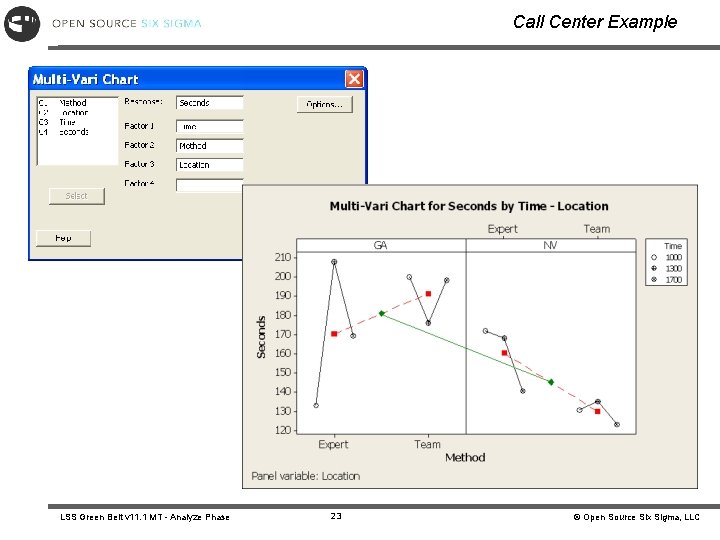
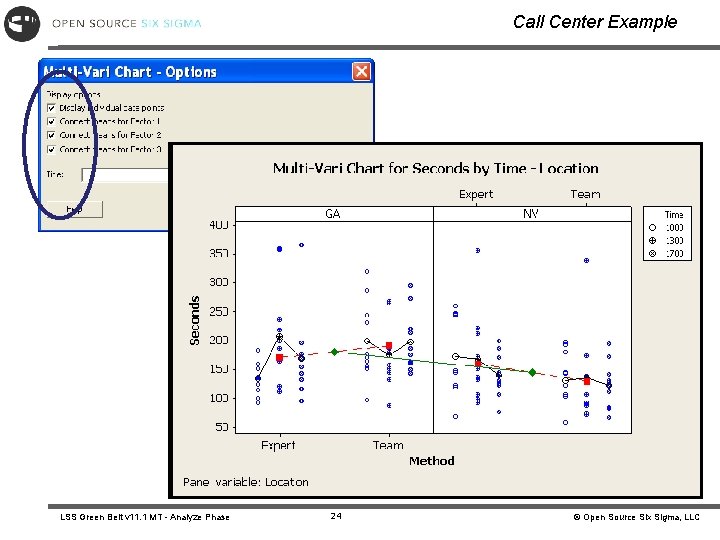
Call Center Example A company with two call centers wants to compare two methods of handling calls at each location at different times of the day. One method involves a team to resolve customer issues, and the other method requires a single subject-matter expert to handle the call alone. • Output (Y) – Call Time • Input (X) – Call Center (GA, NV) – Time of Day (10: 00, 13: 00, 17: 00) – Method (Expert, Team) LSS Green Belt v 11. 1 MT - Analyze Phase 20 © Open Source Six Sigma, LLC
Call Center Example Which is causing the greatest variation… Time? Method? Location? LSS Green Belt v 11. 1 MT - Analyze Phase 21 © Open Source Six Sigma, LLC
Call Center Example Is the largest source of variation more or less obvious? LSS Green Belt v 11. 1 MT - Analyze Phase 22 © Open Source Six Sigma, LLC
Call Center Example LSS Green Belt v 11. 1 MT - Analyze Phase 23 © Open Source Six Sigma, LLC
Call Center Example LSS Green Belt v 11. 1 MT - Analyze Phase 24 © Open Source Six Sigma, LLC
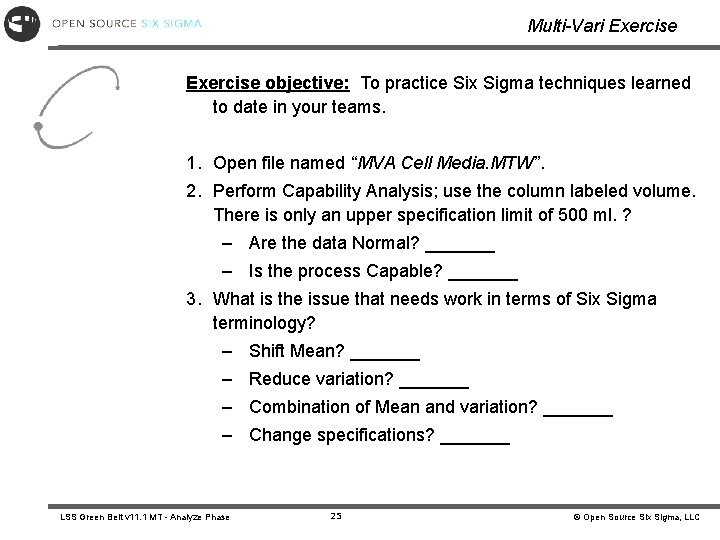
Multi-Vari Exercise objective: To practice Six Sigma techniques learned to date in your teams. 1. Open file named “MVA Cell Media. MTW”. 2. Perform Capability Analysis; use the column labeled volume. There is only an upper specification limit of 500 ml. ? – Are the data Normal? _______ – Is the process Capable? _______ 3. What is the issue that needs work in terms of Six Sigma terminology? – Shift Mean? _______ – Reduce variation? _______ – Combination of Mean and variation? _______ – Change specifications? _______ LSS Green Belt v 11. 1 MT - Analyze Phase 25 © Open Source Six Sigma, LLC
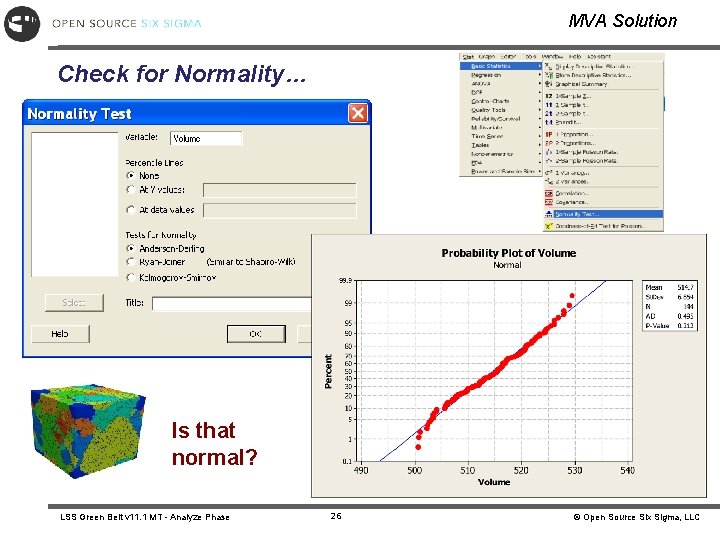
MVA Solution Check for Normality… Is that normal? LSS Green Belt v 11. 1 MT - Analyze Phase 26 © Open Source Six Sigma, LLC
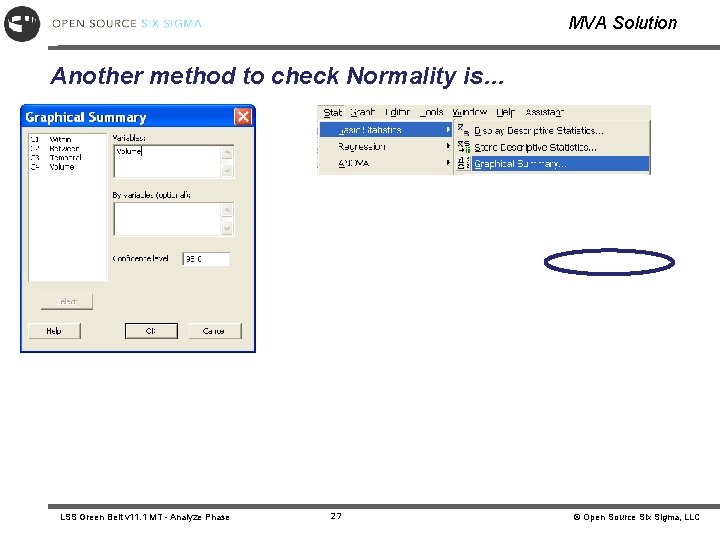
MVA Solution Another method to check Normality is… LSS Green Belt v 11. 1 MT - Analyze Phase 27 © Open Source Six Sigma, LLC
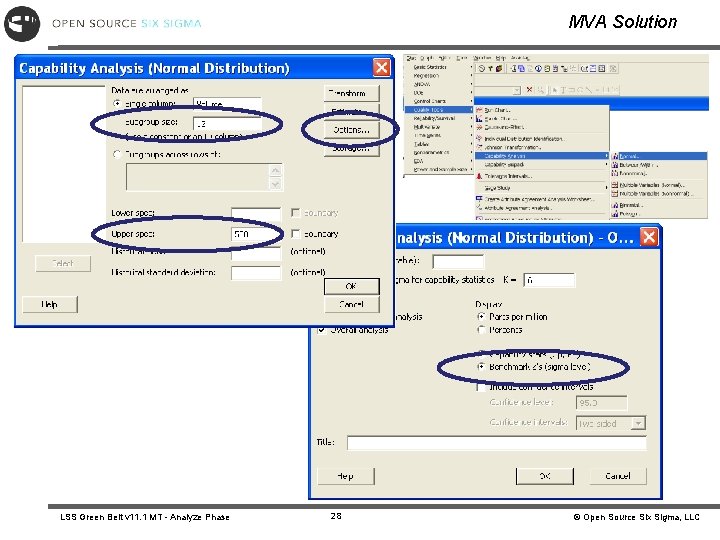
MVA Solution LSS Green Belt v 11. 1 MT - Analyze Phase 28 © Open Source Six Sigma, LLC
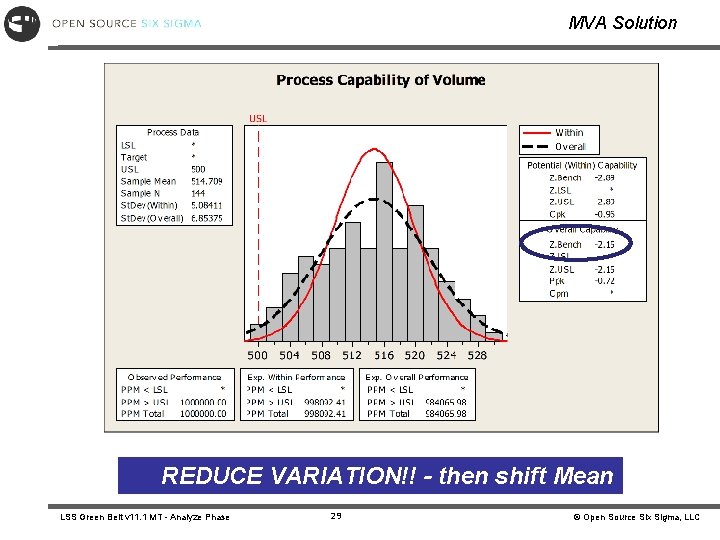
MVA Solution REDUCE VARIATION!! - then shift Mean LSS Green Belt v 11. 1 MT - Analyze Phase 29 © Open Source Six Sigma, LLC
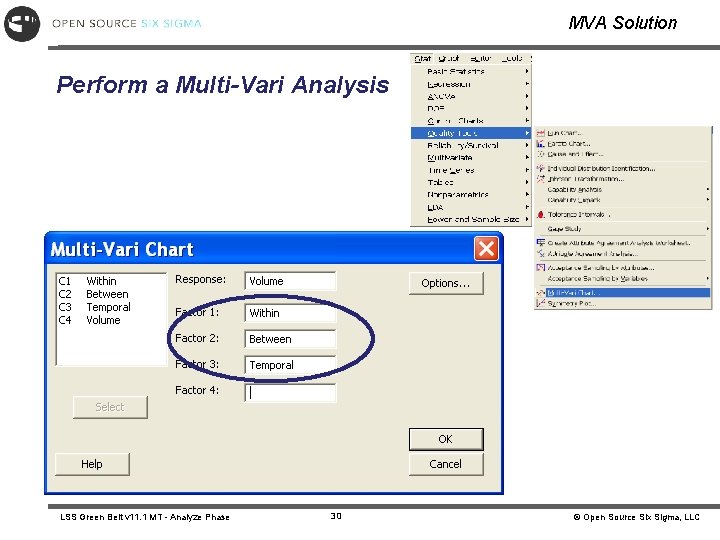
MVA Solution Perform a Multi-Vari Analysis LSS Green Belt v 11. 1 MT - Analyze Phase 30 © Open Source Six Sigma, LLC
MVA Solution What is the largest source of variation? LSS Green Belt v 11. 1 MT - Analyze Phase 31 © Open Source Six Sigma, LLC
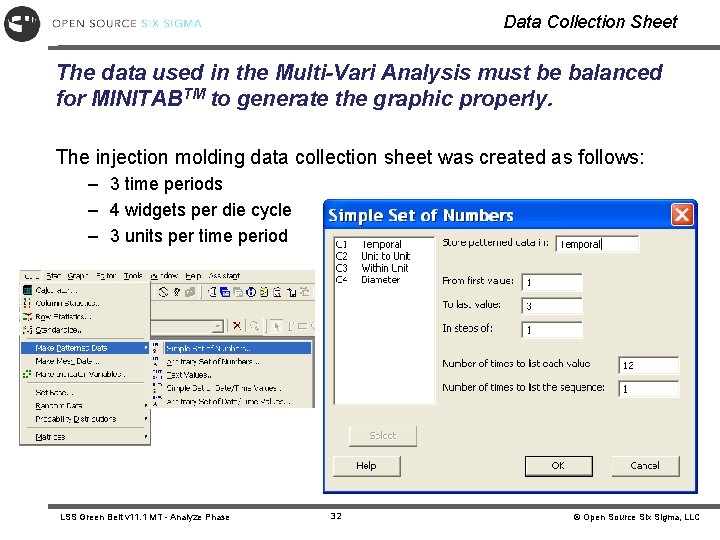
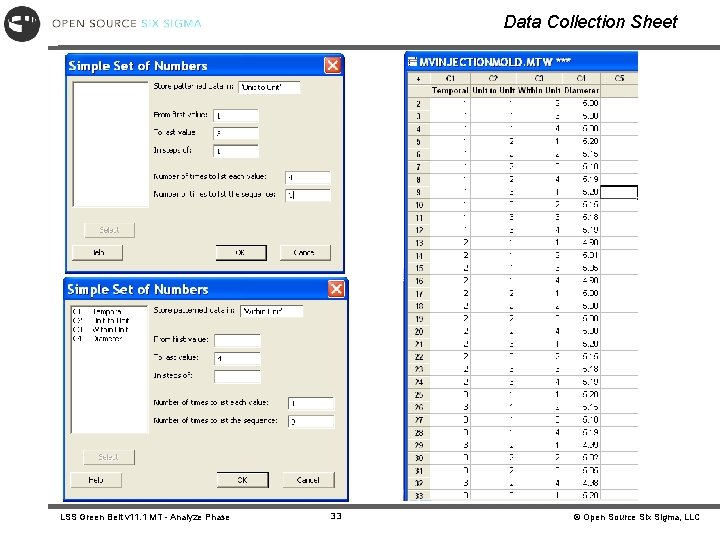
Data Collection Sheet The data used in the Multi-Vari Analysis must be balanced for MINITABTM to generate the graphic properly. The injection molding data collection sheet was created as follows: – 3 time periods – 4 widgets per die cycle – 3 units per time period LSS Green Belt v 11. 1 MT - Analyze Phase 32 © Open Source Six Sigma, LLC
Data Collection Sheet LSS Green Belt v 11. 1 MT - Analyze Phase 33 © Open Source Six Sigma, LLC
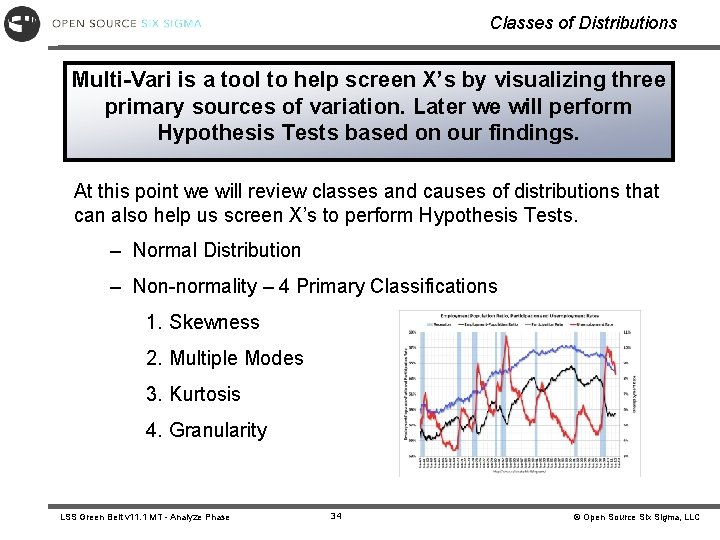
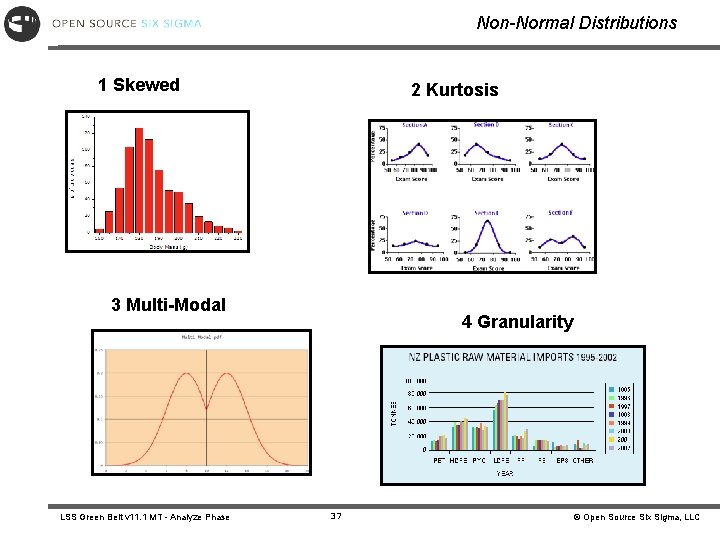
Classes of Distributions Multi-Vari is a tool to help screen X’s by visualizing three primary sources of variation. Later we will perform Hypothesis Tests based on our findings. At this point we will review classes and causes of distributions that can also help us screen X’s to perform Hypothesis Tests. – Normal Distribution – Non-normality – 4 Primary Classifications 1. Skewness 2. Multiple Modes 3. Kurtosis 4. Granularity LSS Green Belt v 11. 1 MT - Analyze Phase 34 © Open Source Six Sigma, LLC
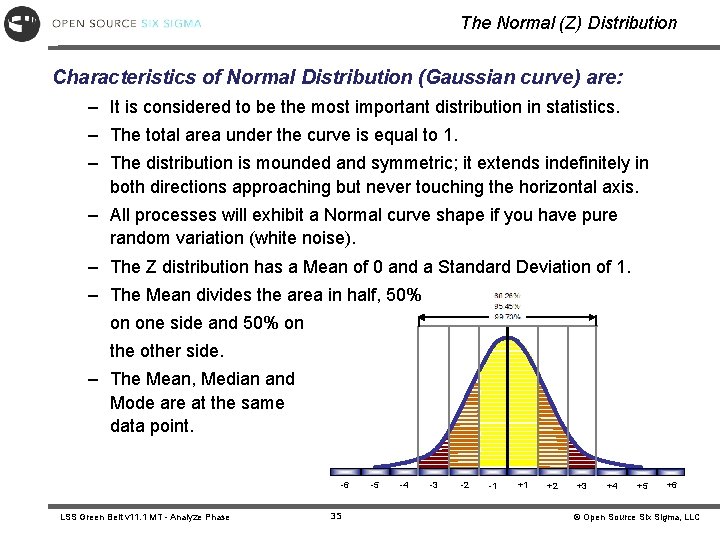
The Normal (Z) Distribution Characteristics of Normal Distribution (Gaussian curve) are: – It is considered to be the most important distribution in statistics. – The total area under the curve is equal to 1. – The distribution is mounded and symmetric; it extends indefinitely in both directions approaching but never touching the horizontal axis. – All processes will exhibit a Normal curve shape if you have pure random variation (white noise). – The Z distribution has a Mean of 0 and a Standard Deviation of 1. – The Mean divides the area in half, 50% on one side and 50% on the other side. – The Mean, Median and Mode are at the same data point. -6 LSS Green Belt v 11. 1 MT - Analyze Phase 35 -5 -4 -3 -2 -1 +1 +2 +3 +4 +5 +6 © Open Source Six Sigma, LLC
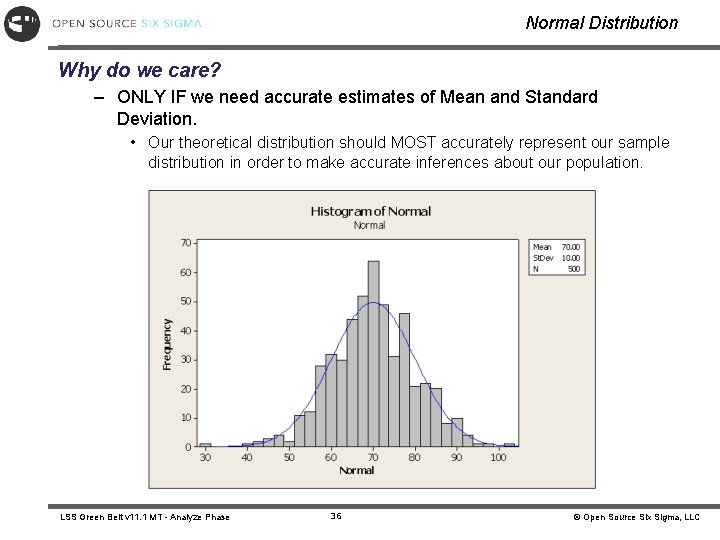
Normal Distribution Why do we care? – ONLY IF we need accurate estimates of Mean and Standard Deviation. • Our theoretical distribution should MOST accurately represent our sample distribution in order to make accurate inferences about our population. LSS Green Belt v 11. 1 MT - Analyze Phase 36 © Open Source Six Sigma, LLC
Non-Normal Distributions 1 Skewed 2 Kurtosis 3 Multi-Modal LSS Green Belt v 11. 1 MT - Analyze Phase 4 Granularity 37 © Open Source Six Sigma, LLC
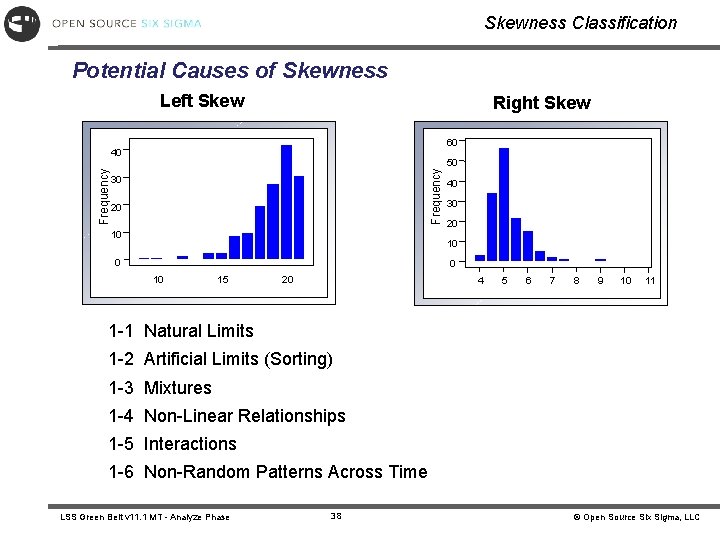
Skewness Classification Potential Causes of Skewness Left Skew Right Skew 60 Frequency 40 30 20 10 50 40 30 20 10 0 0 10 15 20 4 5 6 7 8 9 10 11 1 -1 Natural Limits 1 -2 Artificial Limits (Sorting) 1 -3 Mixtures 1 -4 Non-Linear Relationships 1 -5 Interactions 1 -6 Non-Random Patterns Across Time LSS Green Belt v 11. 1 MT - Analyze Phase 38 © Open Source Six Sigma, LLC
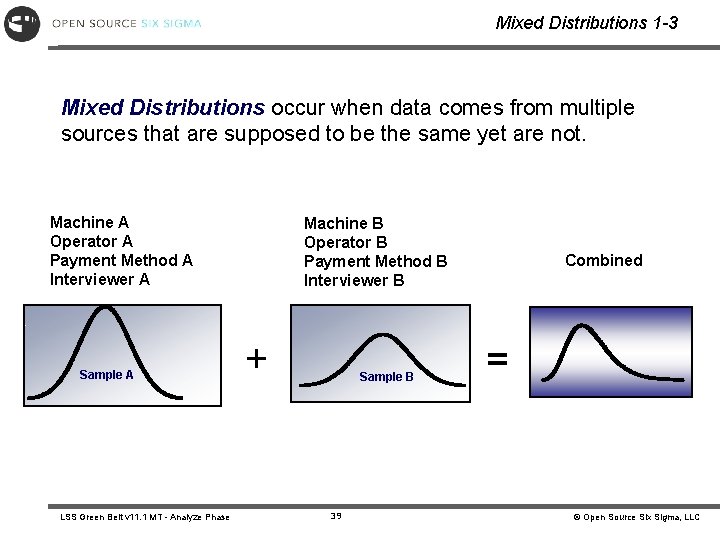
Mixed Distributions 1 -3 Mixed Distributions occur when data comes from multiple sources that are supposed to be the same yet are not. Machine A Operator A Payment Method A Interviewer A Sample A LSS Green Belt v 11. 1 MT - Analyze Phase Machine B Operator B Payment Method B Interviewer B + Sample B 39 Combined = © Open Source Six Sigma, LLC
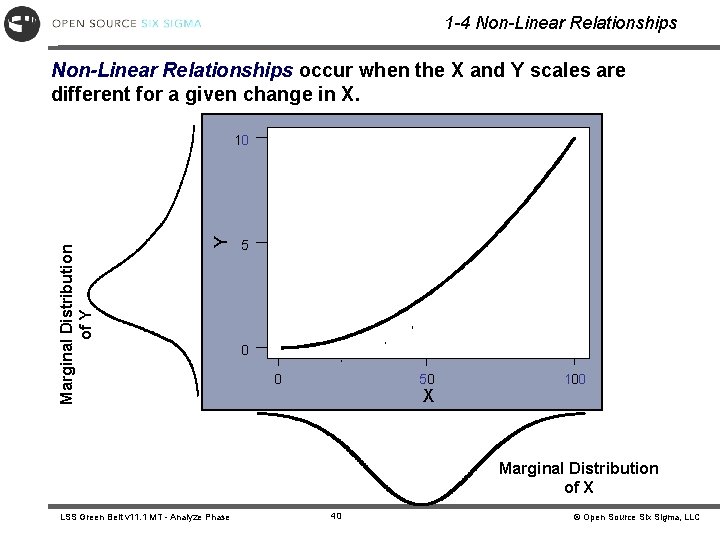
1 -4 Non-Linear Relationships occur when the X and Y scales are different for a given change in X. Y Marginal Distribution of Y 10 5 0 0 50 X 100 Marginal Distribution of X LSS Green Belt v 11. 1 MT - Analyze Phase 40 © Open Source Six Sigma, LLC
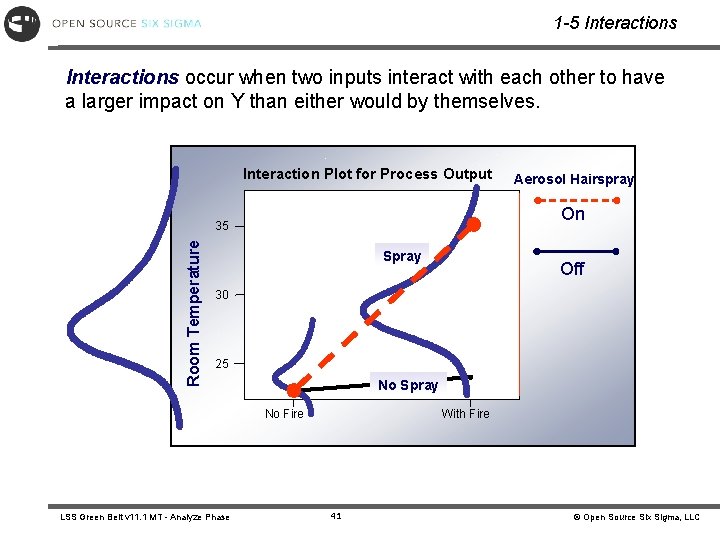
1 -5 Interactions occur when two inputs interact with each other to have a larger impact on Y than either would by themselves. Interaction Plot for Process Output On 35 Room Temperature Aerosol Hairspray Spray Off 30 25 No Spray No Fire LSS Green Belt v 11. 1 MT - Analyze Phase With Fire 41 © Open Source Six Sigma, LLC
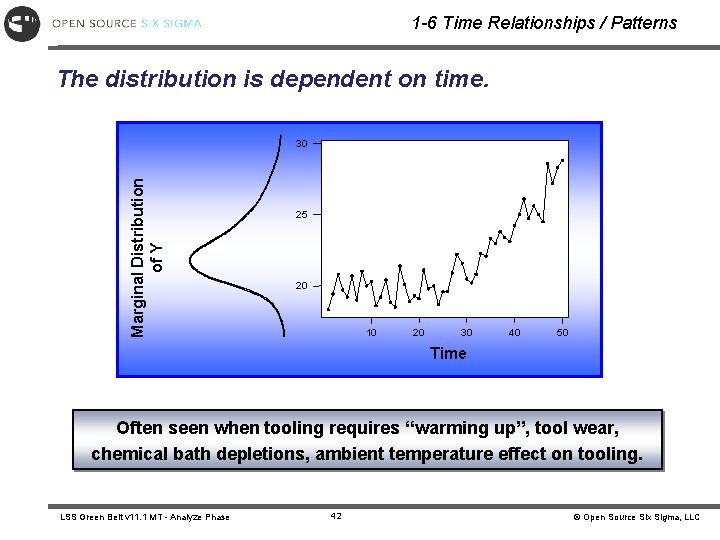
1 -6 Time Relationships / Patterns The distribution is dependent on time. Marginal Distribution of Y 30 25 20 10 20 30 40 50 Time Often seen when tooling requires “warming up”, tool wear, chemical bath depletions, ambient temperature effect on tooling. LSS Green Belt v 11. 1 MT - Analyze Phase 42 © Open Source Six Sigma, LLC
Non-Normal Right (Positive) Skewed Moment coefficient of Skewness will be close to zero for symmetric distributions, negative for left Skewed and positive for right Skewed. LSS Green Belt v 11. 1 MT - Analyze Phase 43 © Open Source Six Sigma, LLC
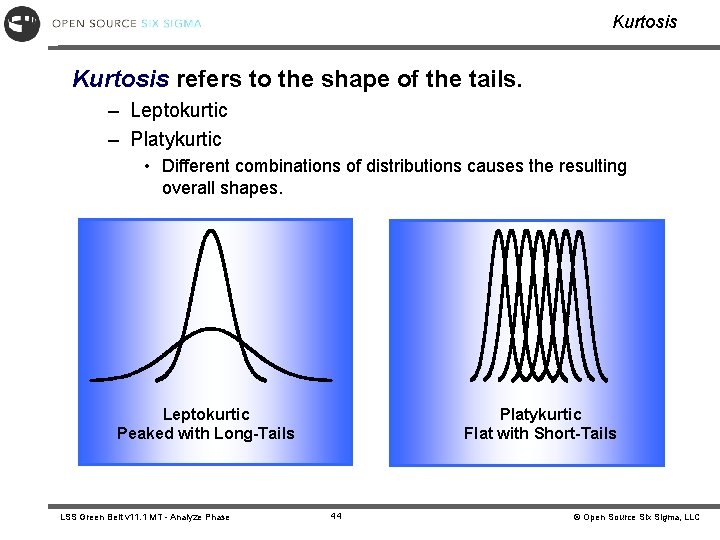
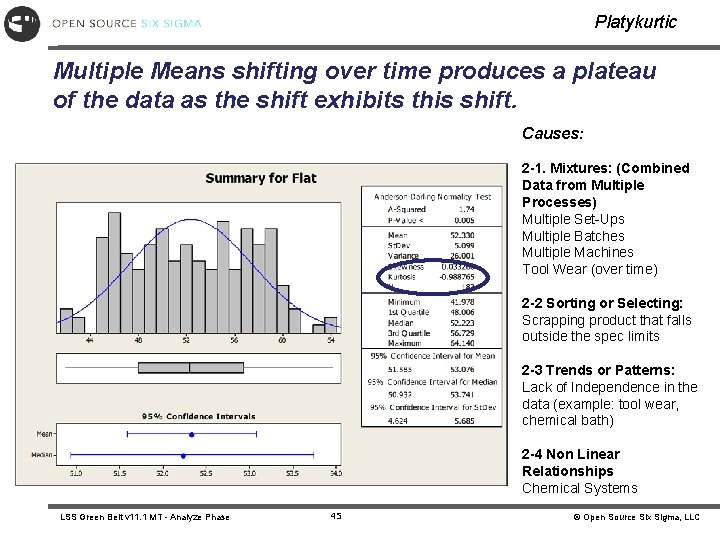
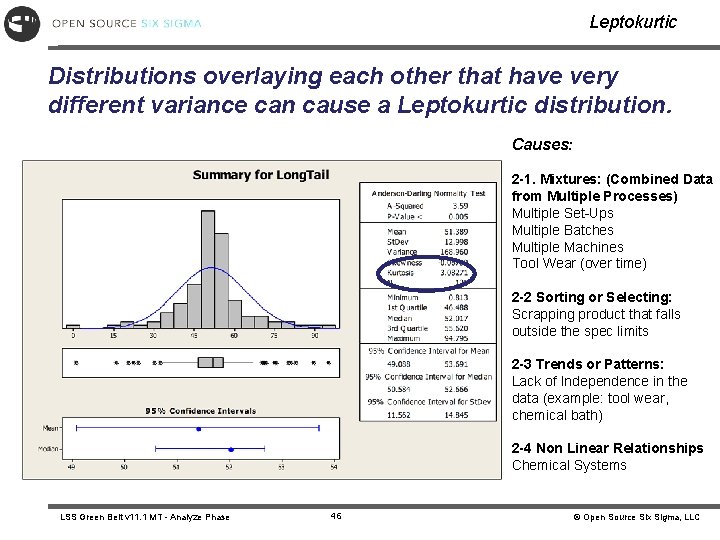
Kurtosis refers to the shape of the tails. – Leptokurtic – Platykurtic • Different combinations of distributions causes the resulting overall shapes. Leptokurtic Peaked with Long-Tails LSS Green Belt v 11. 1 MT - Analyze Phase Platykurtic Flat with Short-Tails 44 © Open Source Six Sigma, LLC
Platykurtic Multiple Means shifting over time produces a plateau of the data as the shift exhibits this shift. Causes: 2 -1. Mixtures: (Combined Data from Multiple Processes) Multiple Set-Ups Multiple Batches Multiple Machines Tool Wear (over time) 2 -2 Sorting or Selecting: Scrapping product that falls outside the spec limits 2 -3 Trends or Patterns: Lack of Independence in the data (example: tool wear, chemical bath) 2 -4 Non Linear Relationships Chemical Systems LSS Green Belt v 11. 1 MT - Analyze Phase 45 © Open Source Six Sigma, LLC
Leptokurtic Distributions overlaying each other that have very different variance can cause a Leptokurtic distribution. Causes: 2 -1. Mixtures: (Combined Data from Multiple Processes) Multiple Set-Ups Multiple Batches Multiple Machines Tool Wear (over time) 2 -2 Sorting or Selecting: Scrapping product that falls outside the spec limits 2 -3 Trends or Patterns: Lack of Independence in the data (example: tool wear, chemical bath) 2 -4 Non Linear Relationships Chemical Systems LSS Green Belt v 11. 1 MT - Analyze Phase 46 © Open Source Six Sigma, LLC
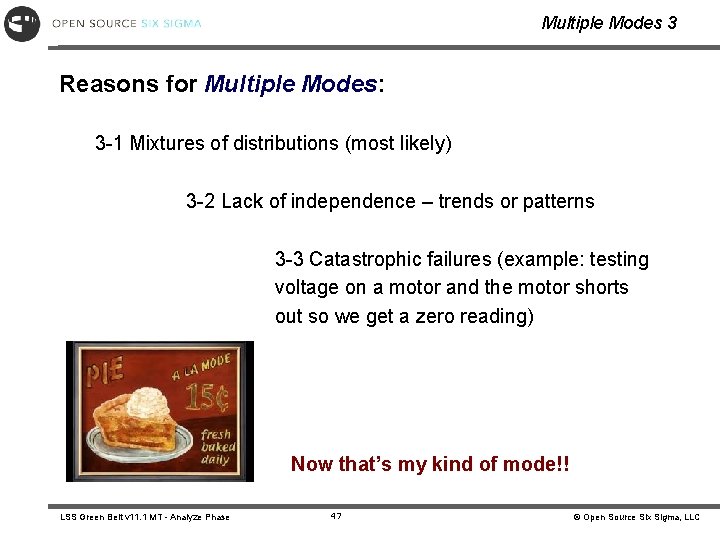
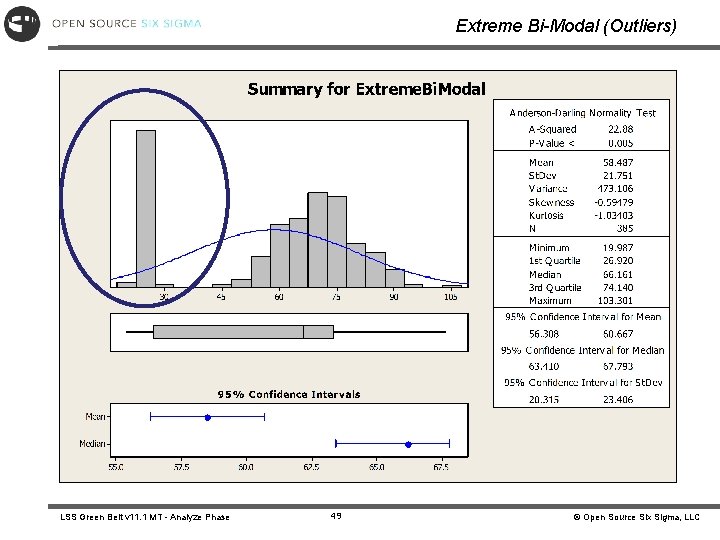
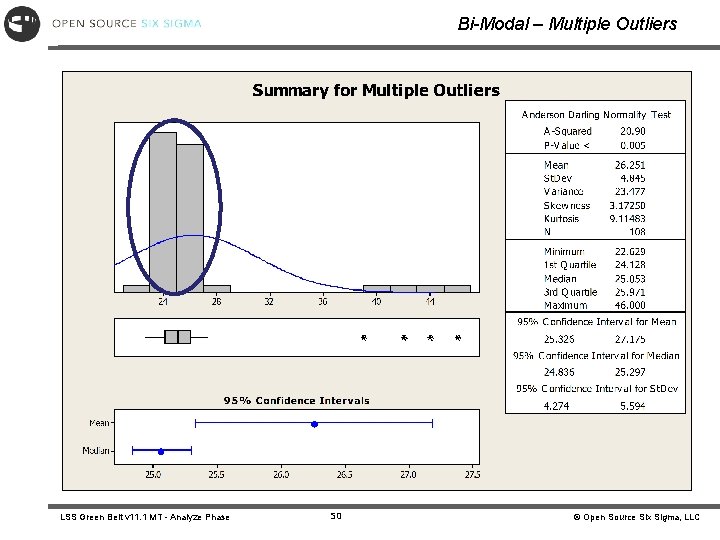
Multiple Modes 3 Reasons for Multiple Modes: 3 -1 Mixtures of distributions (most likely) 3 -2 Lack of independence – trends or patterns 3 -3 Catastrophic failures (example: testing voltage on a motor and the motor shorts out so we get a zero reading) Now that’s my kind of mode!! LSS Green Belt v 11. 1 MT - Analyze Phase 47 © Open Source Six Sigma, LLC
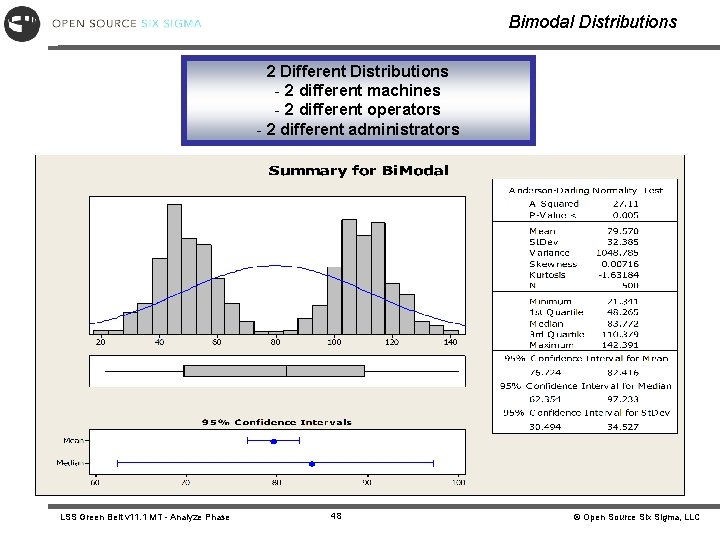
Bimodal Distributions 2 Different Distributions - 2 different machines - 2 different operators - 2 different administrators LSS Green Belt v 11. 1 MT - Analyze Phase 48 © Open Source Six Sigma, LLC
Extreme Bi-Modal (Outliers) LSS Green Belt v 11. 1 MT - Analyze Phase 49 © Open Source Six Sigma, LLC
Bi-Modal – Multiple Outliers LSS Green Belt v 11. 1 MT - Analyze Phase 50 © Open Source Six Sigma, LLC
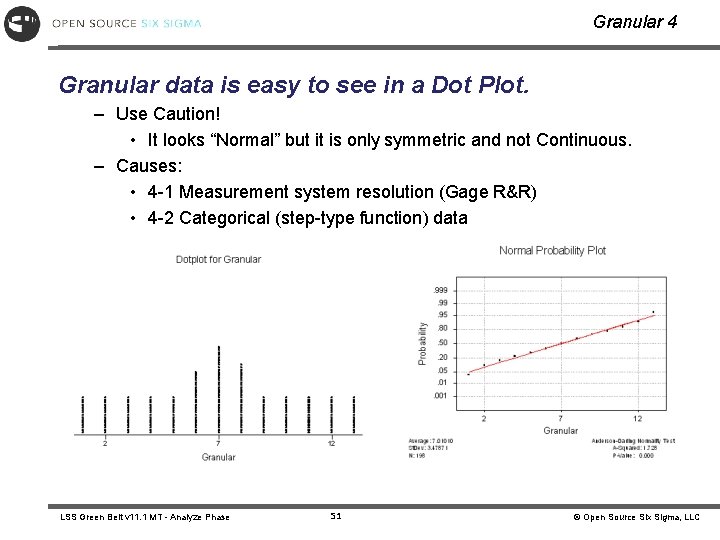
Granular 4 Granular data is easy to see in a Dot Plot. – Use Caution! • It looks “Normal” but it is only symmetric and not Continuous. – Causes: • 4 -1 Measurement system resolution (Gage R&R) • 4 -2 Categorical (step-type function) data LSS Green Belt v 11. 1 MT - Analyze Phase 51 © Open Source Six Sigma, LLC
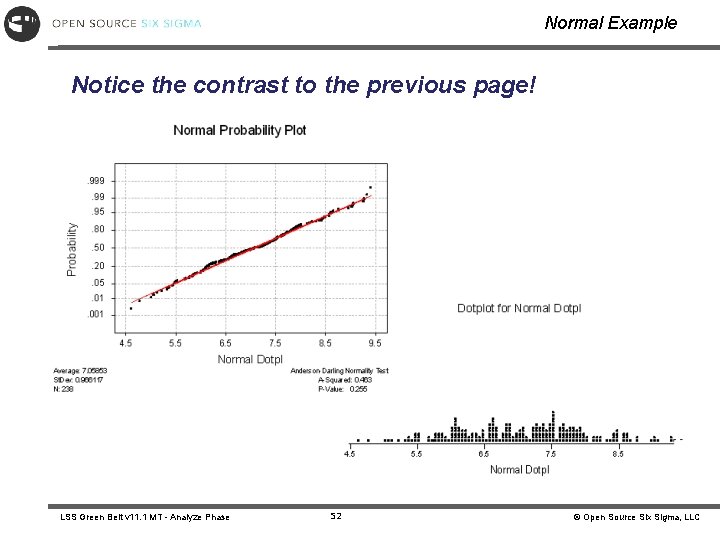
Normal Example Notice the contrast to the previous page! LSS Green Belt v 11. 1 MT - Analyze Phase 52 © Open Source Six Sigma, LLC
Conclusions Regarding Distributions Non-normal Distributions are not BAD!!! Non-normal Distributions can give more Root Cause information than Normal data (the nature of why…) Understanding what the data is telling us is KEY!!! What do you want to know ? ? ? Find the key…. LSS Green Belt v 11. 1 MT - Analyze Phase 53 © Open Source Six Sigma, LLC
Summary At this point you should be able to: • Perform a Multi-Vari Analysis • Create and interpret a Multi-Vari Graph • Identify when a Multi-Vari Analysis is applicable • Interpret how Skewed data looks • Explain how data distributions become Non-normal when they are really Normal LSS Green Belt v 11. 1 MT - Analyze Phase 54 © Open Source Six Sigma, LLC