
Analysis of Variance ANOVA Chapter 11 Statistics for
- Slides: 33
Analysis of Variance (ANOVA) Chapter 11 Statistics for Managers Using Microsoft Excel® 7 e Copyright © 2014 Pearson Education, Inc. Chap 11 -1
Learning Objectives In this chapter, you learn: n n n The basic concepts of experimental design How to use one-way analysis of variance to test for differences among the means of several groups How to perform multiple comparisons in a one-way analysis of variance Statistics for Managers Using Microsoft Excel® 7 e Copyright © 2014 Pearson Education, Inc. Chap 11 -2
General ANOVA Setting n n Investigator controls one or more factors of interest n Each factor contains two or more levels n Levels can be numerical or categorical n Different levels produce different groups n Think of each group as a sample from a different population Observe effects on the dependent variable n Are the groups the same? Statistics for Managers Using Microsoft Excel® 7 e Copyright © 2014 Pearson Education, Inc. Chap 11 -3
Completely Randomized Design n Experimental units (subjects) are assigned randomly to groups n n There is one factor or independent variable n n Each group is assumed homogeneous With two or more levels Analyzed by one-factor analysis of variance (ANOVA) Statistics for Managers Using Microsoft Excel® 7 e Copyright © 2014 Pearson Education, Inc. Chap 11 -4
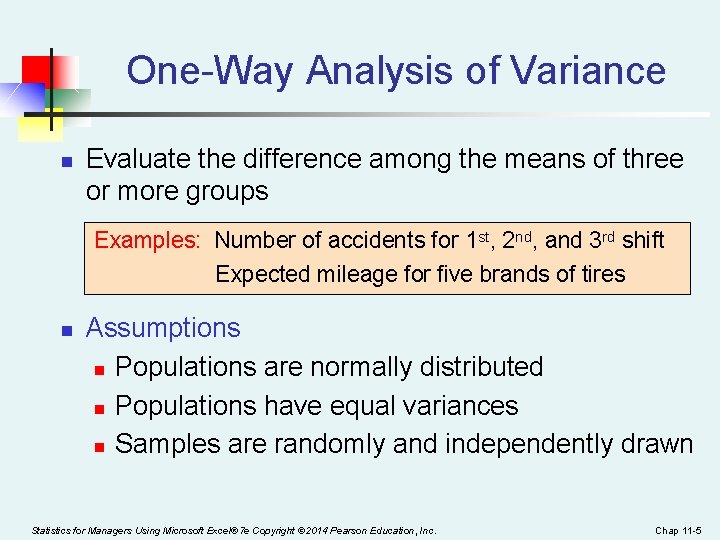
One-Way Analysis of Variance n Evaluate the difference among the means of three or more groups Examples: Number of accidents for 1 st, 2 nd, and 3 rd shift Expected mileage for five brands of tires n Assumptions n Populations are normally distributed n Populations have equal variances n Samples are randomly and independently drawn Statistics for Managers Using Microsoft Excel® 7 e Copyright © 2014 Pearson Education, Inc. Chap 11 -5
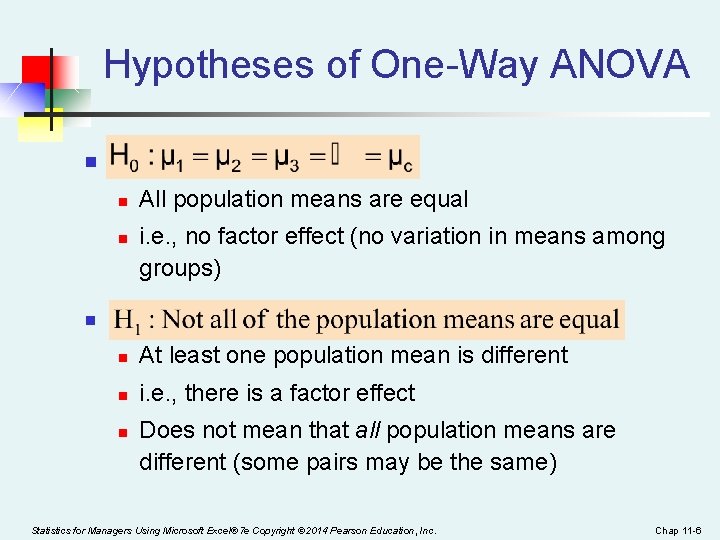
Hypotheses of One-Way ANOVA n n n All population means are equal i. e. , no factor effect (no variation in means among groups) n n At least one population mean is different n i. e. , there is a factor effect n Does not mean that all population means are different (some pairs may be the same) Statistics for Managers Using Microsoft Excel® 7 e Copyright © 2014 Pearson Education, Inc. Chap 11 -6
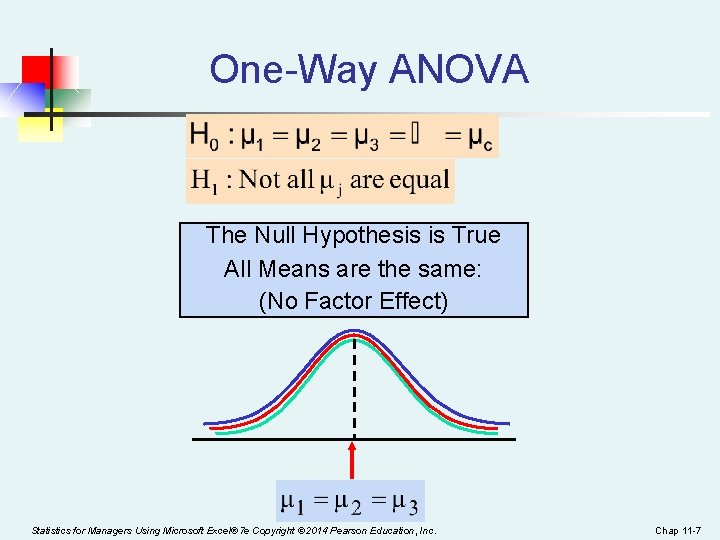
One-Way ANOVA The Null Hypothesis is True All Means are the same: (No Factor Effect) Statistics for Managers Using Microsoft Excel® 7 e Copyright © 2014 Pearson Education, Inc. Chap 11 -7
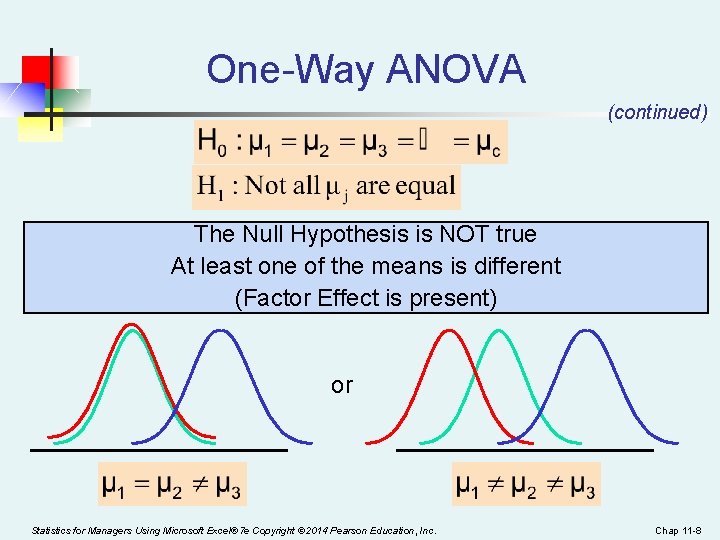
One-Way ANOVA (continued) The Null Hypothesis is NOT true At least one of the means is different (Factor Effect is present) or Statistics for Managers Using Microsoft Excel® 7 e Copyright © 2014 Pearson Education, Inc. Chap 11 -8
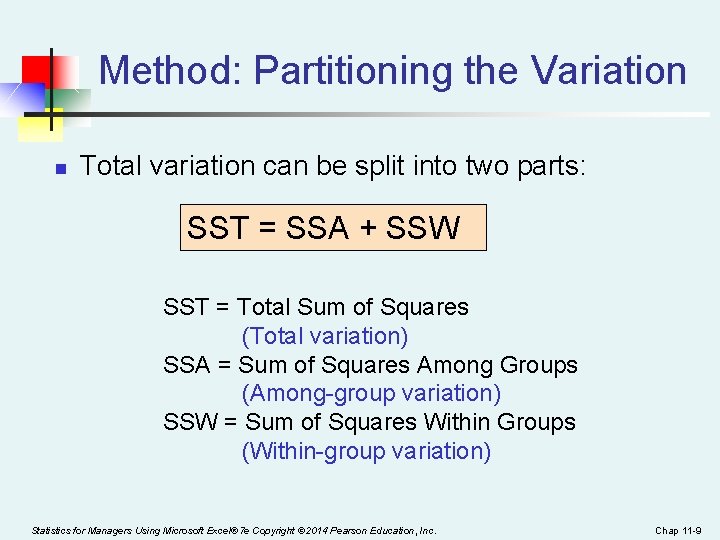
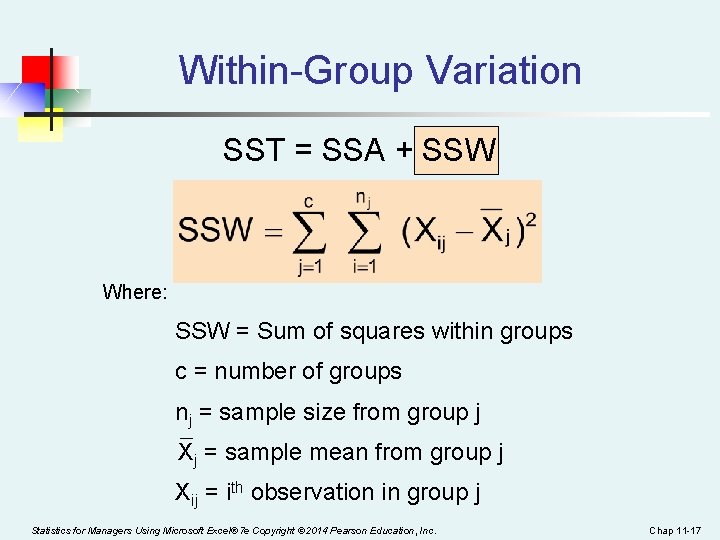
Method: Partitioning the Variation n Total variation can be split into two parts: SST = SSA + SSW SST = Total Sum of Squares (Total variation) SSA = Sum of Squares Among Groups (Among-group variation) SSW = Sum of Squares Within Groups (Within-group variation) Statistics for Managers Using Microsoft Excel® 7 e Copyright © 2014 Pearson Education, Inc. Chap 11 -9
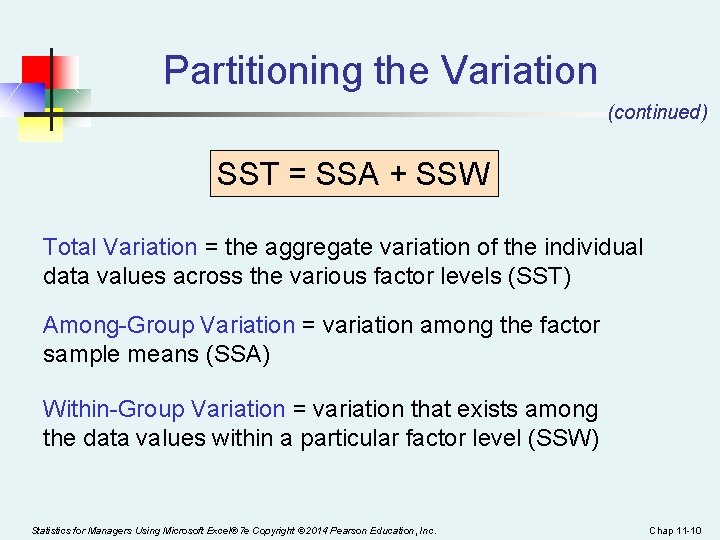
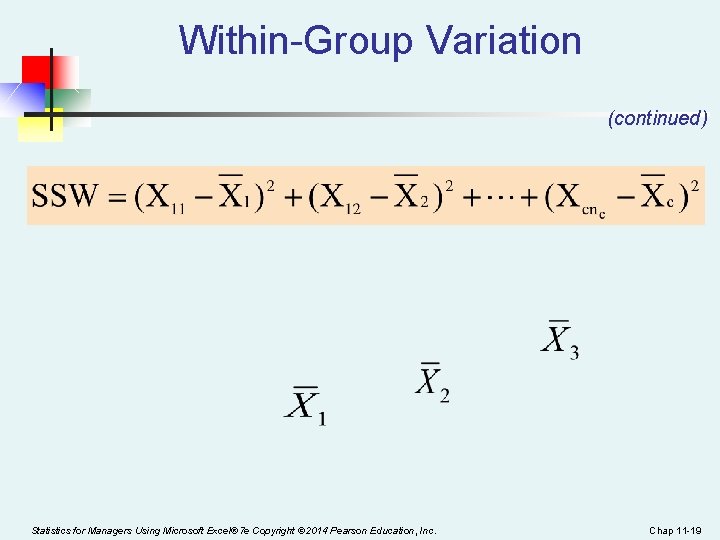
Partitioning the Variation (continued) SST = SSA + SSW Total Variation = the aggregate variation of the individual data values across the various factor levels (SST) Among-Group Variation = variation among the factor sample means (SSA) Within-Group Variation = variation that exists among the data values within a particular factor level (SSW) Statistics for Managers Using Microsoft Excel® 7 e Copyright © 2014 Pearson Education, Inc. Chap 11 -10
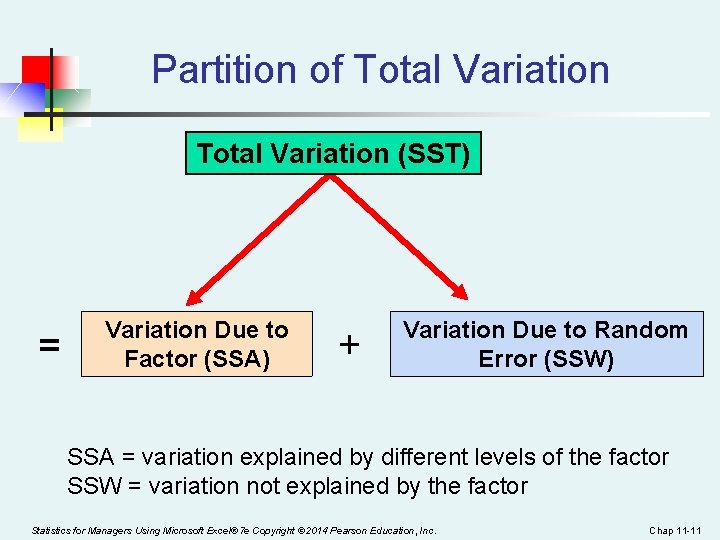
Partition of Total Variation (SST) = Variation Due to Factor (SSA) + Variation Due to Random Error (SSW) SSA = variation explained by different levels of the factor SSW = variation not explained by the factor Statistics for Managers Using Microsoft Excel® 7 e Copyright © 2014 Pearson Education, Inc. Chap 11 -11
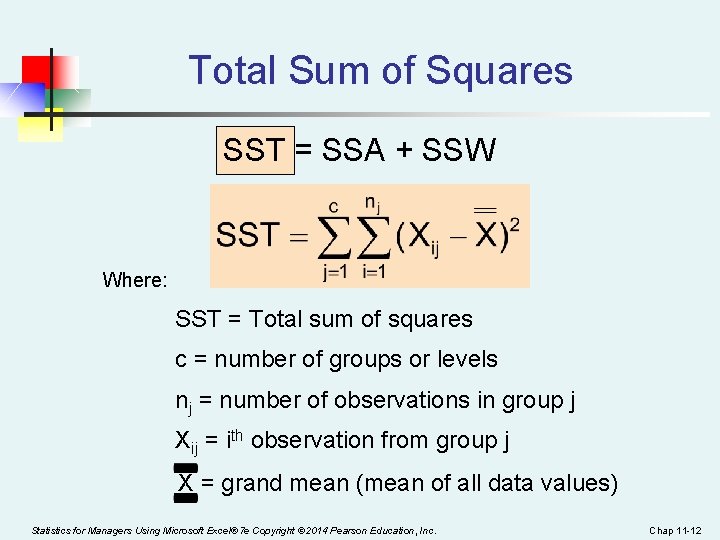
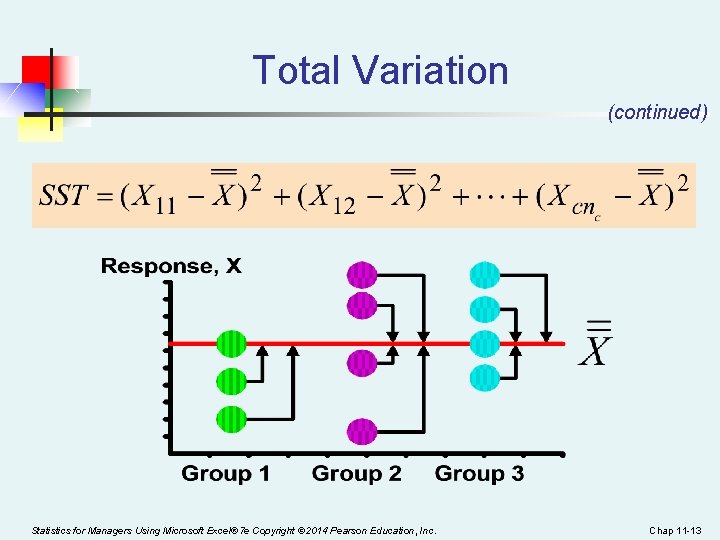
Total Sum of Squares SST = SSA + SSW Where: SST = Total sum of squares c = number of groups or levels nj = number of observations in group j Xij = ith observation from group j X = grand mean (mean of all data values) Statistics for Managers Using Microsoft Excel® 7 e Copyright © 2014 Pearson Education, Inc. Chap 11 -12
Total Variation (continued) Statistics for Managers Using Microsoft Excel® 7 e Copyright © 2014 Pearson Education, Inc. Chap 11 -13
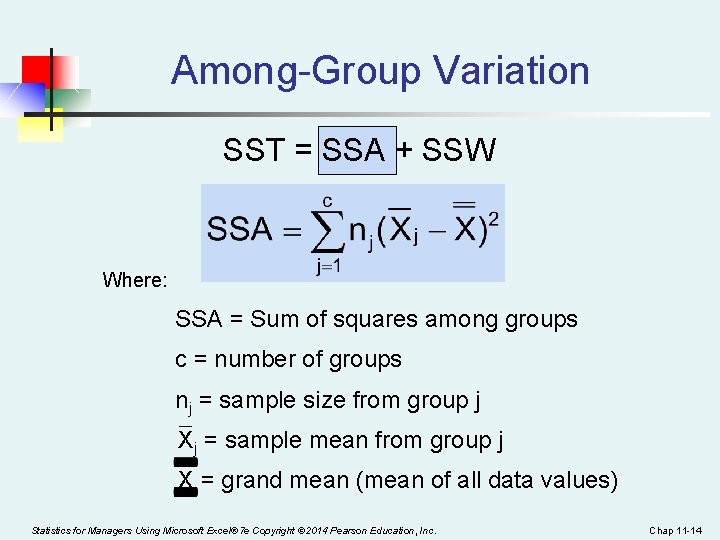
Among-Group Variation SST = SSA + SSW Where: SSA = Sum of squares among groups c = number of groups nj = sample size from group j Xj = sample mean from group j X = grand mean (mean of all data values) Statistics for Managers Using Microsoft Excel® 7 e Copyright © 2014 Pearson Education, Inc. Chap 11 -14
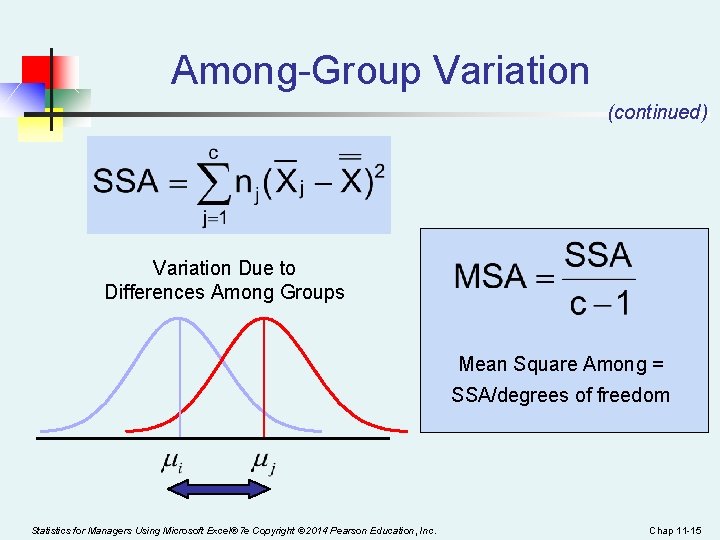
Among-Group Variation (continued) Variation Due to Differences Among Groups Mean Square Among = SSA/degrees of freedom Statistics for Managers Using Microsoft Excel® 7 e Copyright © 2014 Pearson Education, Inc. Chap 11 -15
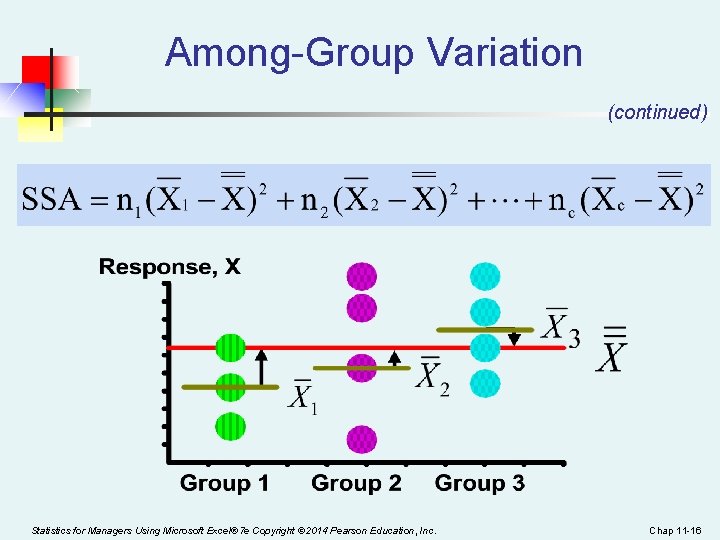
Among-Group Variation (continued) Statistics for Managers Using Microsoft Excel® 7 e Copyright © 2014 Pearson Education, Inc. Chap 11 -16
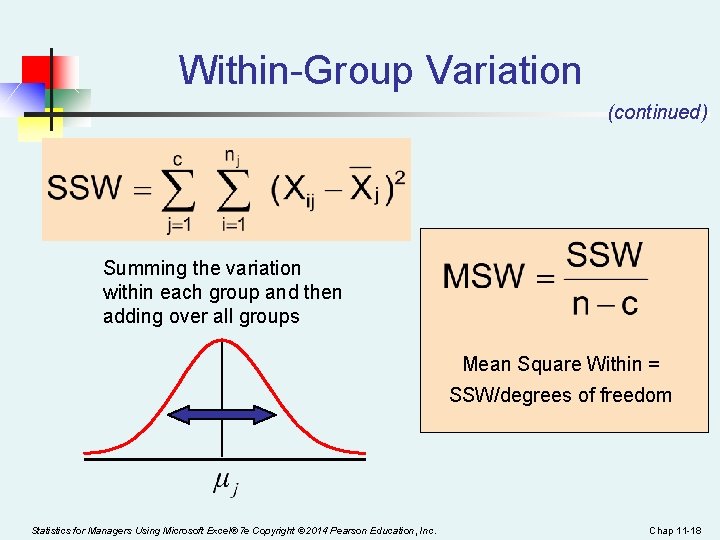
Within-Group Variation SST = SSA + SSW Where: SSW = Sum of squares within groups c = number of groups nj = sample size from group j Xj = sample mean from group j Xij = ith observation in group j Statistics for Managers Using Microsoft Excel® 7 e Copyright © 2014 Pearson Education, Inc. Chap 11 -17
Within-Group Variation (continued) Summing the variation within each group and then adding over all groups Mean Square Within = SSW/degrees of freedom Statistics for Managers Using Microsoft Excel® 7 e Copyright © 2014 Pearson Education, Inc. Chap 11 -18
Within-Group Variation (continued) Statistics for Managers Using Microsoft Excel® 7 e Copyright © 2014 Pearson Education, Inc. Chap 11 -19
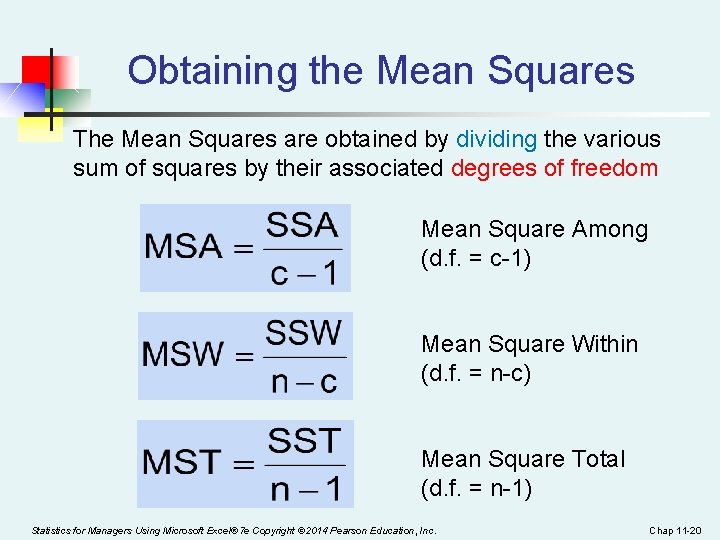
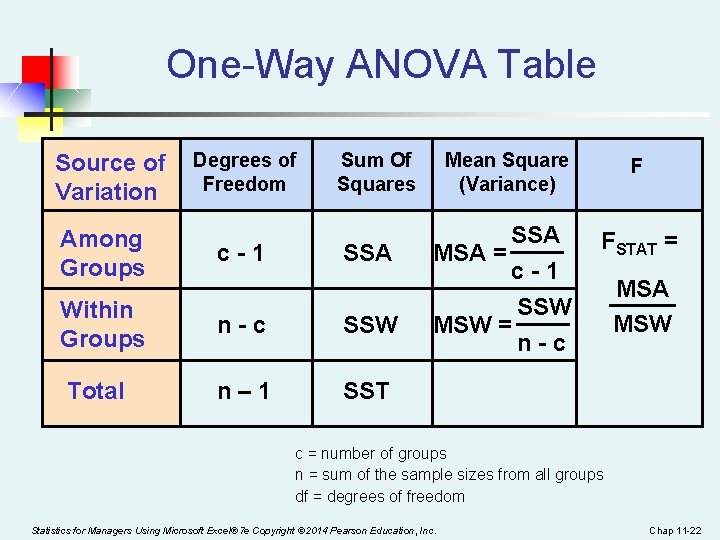
Obtaining the Mean Squares The Mean Squares are obtained by dividing the various sum of squares by their associated degrees of freedom Mean Square Among (d. f. = c-1) Mean Square Within (d. f. = n-c) Mean Square Total (d. f. = n-1) Statistics for Managers Using Microsoft Excel® 7 e Copyright © 2014 Pearson Education, Inc. Chap 11 -20
Examples n ## 11. 1, 11. 2 ab Statistics for Managers Using Microsoft Excel® 7 e Copyright © 2014 Pearson Education, Inc. Chap 11 -21
One-Way ANOVA Table Source of Variation Degrees of Freedom Sum Of Squares Among Groups c-1 Within Groups n-c SSW Total n– 1 SST SSA Mean Square (Variance) F SSA MSA = c-1 SSW MSW = n-c FSTAT = MSA MSW c = number of groups n = sum of the sample sizes from all groups df = degrees of freedom Statistics for Managers Using Microsoft Excel® 7 e Copyright © 2014 Pearson Education, Inc. Chap 11 -22
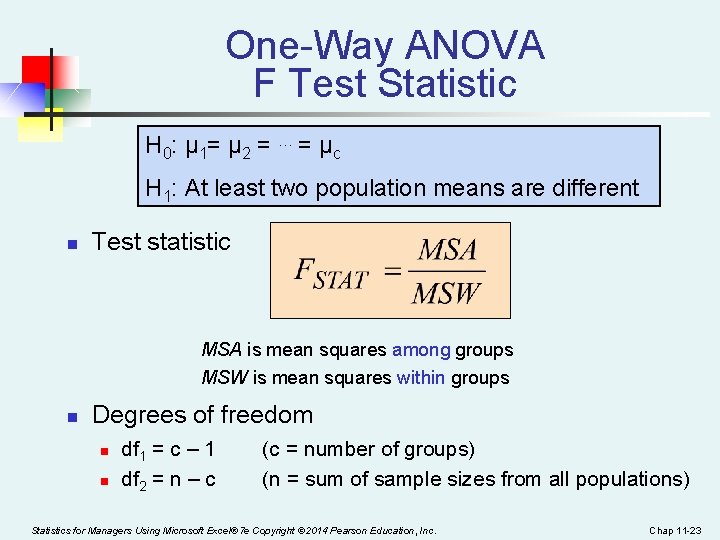
One-Way ANOVA F Test Statistic H 0: μ 1= μ 2 = … = μ c H 1: At least two population means are different n Test statistic MSA is mean squares among groups MSW is mean squares within groups n Degrees of freedom n n df 1 = c – 1 df 2 = n – c (c = number of groups) (n = sum of sample sizes from all populations) Statistics for Managers Using Microsoft Excel® 7 e Copyright © 2014 Pearson Education, Inc. Chap 11 -23
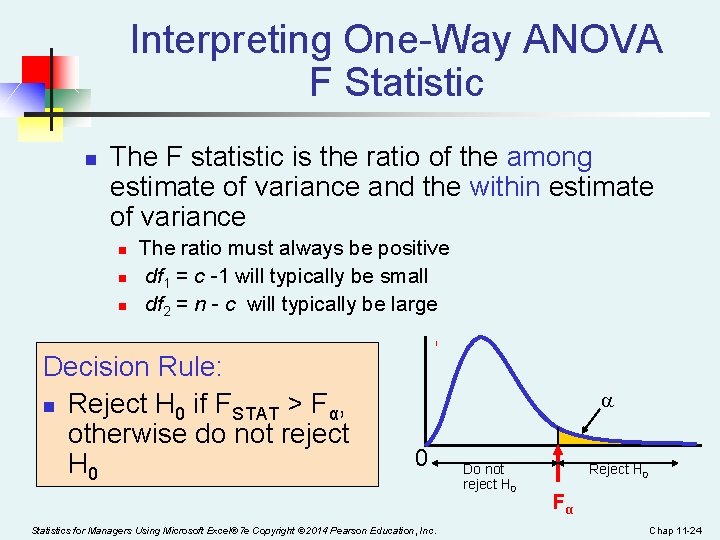
Interpreting One-Way ANOVA F Statistic n The F statistic is the ratio of the among estimate of variance and the within estimate of variance n n n The ratio must always be positive df 1 = c -1 will typically be small df 2 = n - c will typically be large Decision Rule: n Reject H 0 if FSTAT > Fα, otherwise do not reject H 0 0 Statistics for Managers Using Microsoft Excel® 7 e Copyright © 2014 Pearson Education, Inc. Do not reject H 0 Reject H 0 Fα Chap 11 -24
Examples n n Page 401, ## 11. 1 -11. 3 Page 401, ## 11. 5 -11. 6 ab Statistics for Managers Using Microsoft Excel® 7 e Copyright © 2014 Pearson Education, Inc. Chap 11 -25
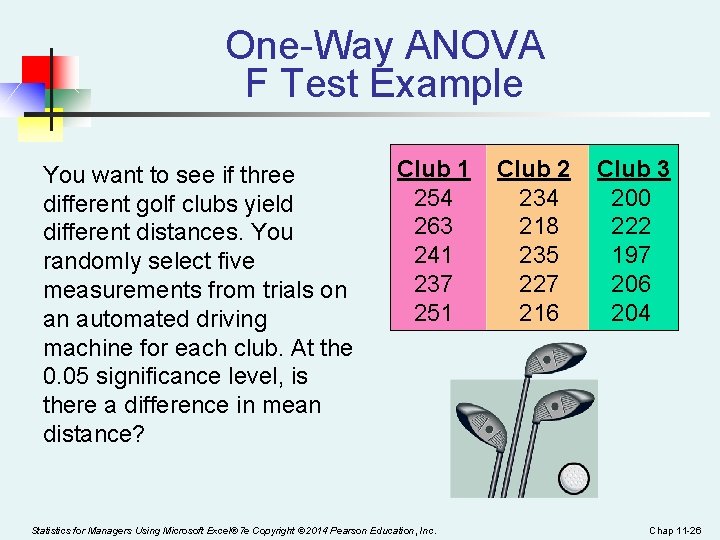
One-Way ANOVA F Test Example You want to see if three different golf clubs yield different distances. You randomly select five measurements from trials on an automated driving machine for each club. At the 0. 05 significance level, is there a difference in mean distance? Club 1 254 263 241 237 251 Statistics for Managers Using Microsoft Excel® 7 e Copyright © 2014 Pearson Education, Inc. Club 2 234 218 235 227 216 Club 3 200 222 197 206 204 Chap 11 -26
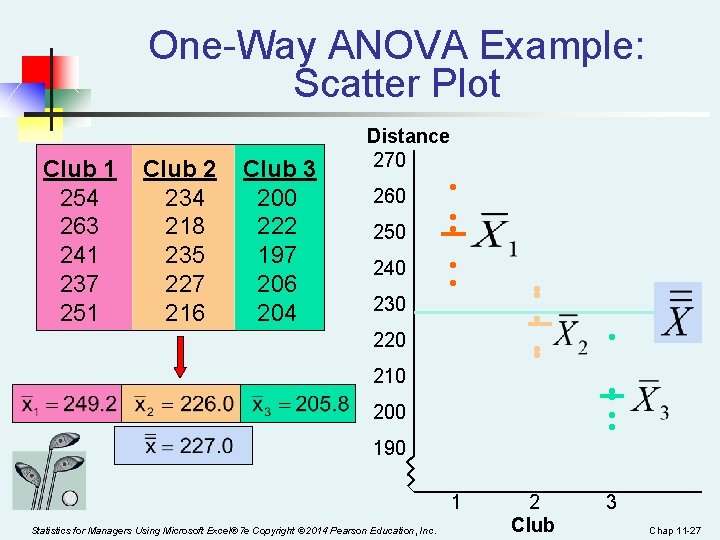
One-Way ANOVA Example: Scatter Plot Club 1 254 263 241 237 251 Club 2 234 218 235 227 216 Club 3 200 222 197 206 204 Distance 270 260 250 240 230 • • • 220 210 • • • • 200 190 1 Statistics for Managers Using Microsoft Excel® 7 e Copyright © 2014 Pearson Education, Inc. • 2 Club 3 Chap 11 -27
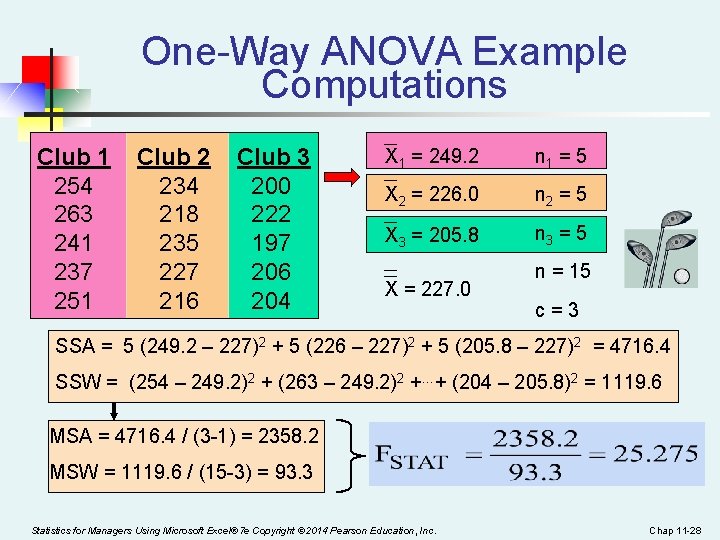
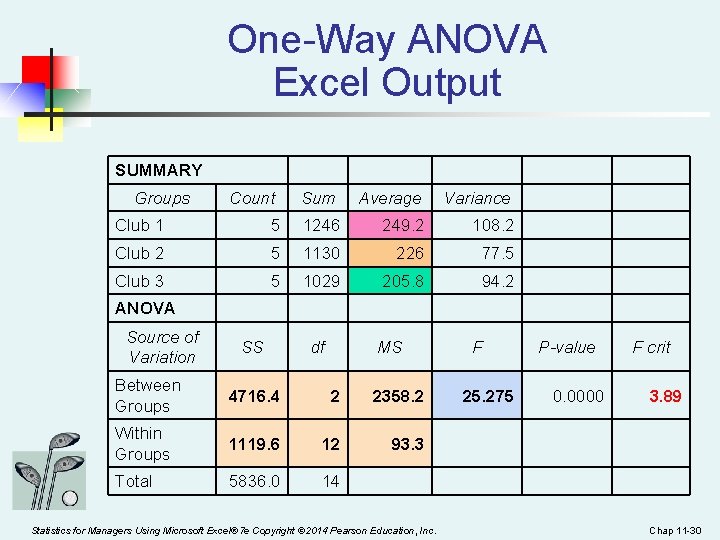
One-Way ANOVA Example Computations Club 1 254 263 241 237 251 Club 2 234 218 235 227 216 Club 3 200 222 197 206 204 X 1 = 249. 2 n 1 = 5 X 2 = 226. 0 n 2 = 5 X 3 = 205. 8 n 3 = 5 X = 227. 0 n = 15 c=3 SSA = 5 (249. 2 – 227)2 + 5 (226 – 227)2 + 5 (205. 8 – 227)2 = 4716. 4 SSW = (254 – 249. 2)2 + (263 – 249. 2)2 +…+ (204 – 205. 8)2 = 1119. 6 MSA = 4716. 4 / (3 -1) = 2358. 2 MSW = 1119. 6 / (15 -3) = 93. 3 Statistics for Managers Using Microsoft Excel® 7 e Copyright © 2014 Pearson Education, Inc. Chap 11 -28
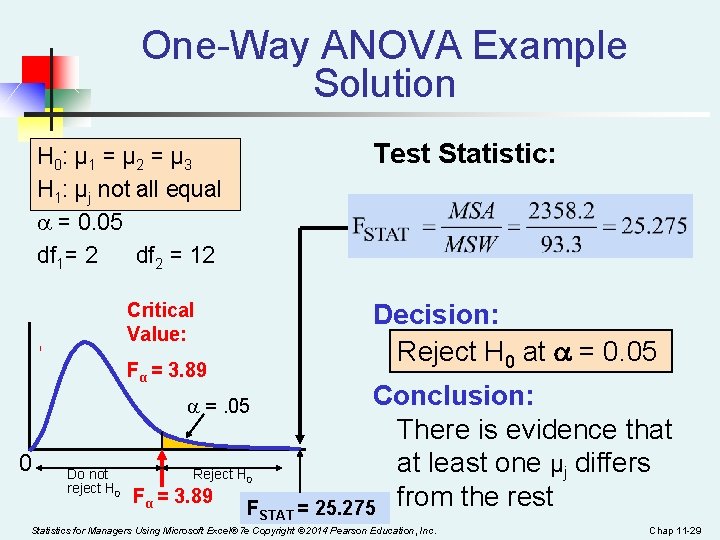
One-Way ANOVA Example Solution Test Statistic: H 0: μ 1 = μ 2 = μ 3 H 1: μj not all equal = 0. 05 df 1= 2 df 2 = 12 Decision: Reject H 0 at = 0. 05 Critical Value: Fα = 3. 89 =. 05 0 Do not reject H 0 Reject H 0 Fα = 3. 89 FSTAT Conclusion: There is evidence that at least one μj differs = 25. 275 from the rest Statistics for Managers Using Microsoft Excel® 7 e Copyright © 2014 Pearson Education, Inc. Chap 11 -29
One-Way ANOVA Excel Output SUMMARY Groups Count Sum Average Variance Club 1 5 1246 249. 2 108. 2 Club 2 5 1130 226 77. 5 Club 3 5 1029 205. 8 94. 2 ANOVA Source of Variation SS df MS Between Groups 4716. 4 2 2358. 2 Within Groups 1119. 6 12 93. 3 Total 5836. 0 14 Statistics for Managers Using Microsoft Excel® 7 e Copyright © 2014 Pearson Education, Inc. F 25. 275 P-value 0. 0000 F crit 3. 89 Chap 11 -30
Examples n n Page 402, #11. 12 Page 403, ## 11. 13, 11. 14 (using the Excel data analysis toolpak) Statistics for Managers Using Microsoft Excel® 7 e Copyright © 2014 Pearson Education, Inc. Chap 11 -31
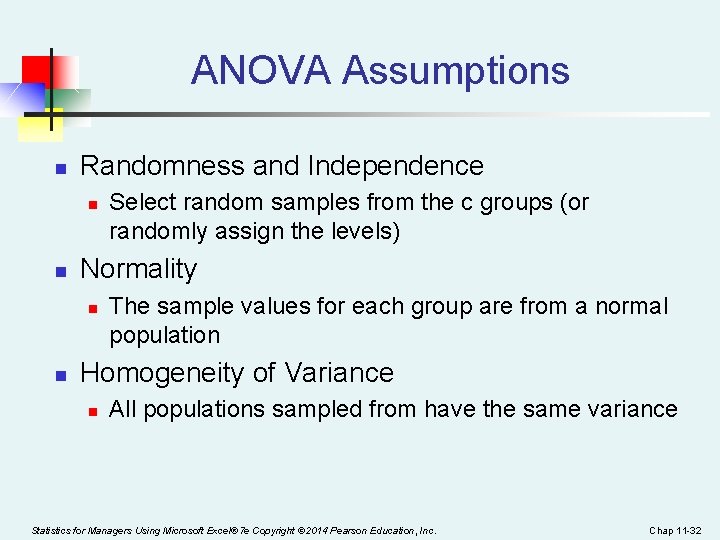
ANOVA Assumptions n Randomness and Independence n n Normality n n Select random samples from the c groups (or randomly assign the levels) The sample values for each group are from a normal population Homogeneity of Variance n All populations sampled from have the same variance Statistics for Managers Using Microsoft Excel® 7 e Copyright © 2014 Pearson Education, Inc. Chap 11 -32
Chapter Summary In this chapter we discussed n The one-way analysis of variance n n n The logic of ANOVA assumptions F test for difference in c means Statistics for Managers Using Microsoft Excel® 7 e Copyright © 2014 Pearson Education, Inc. Chap 11 -33