
An Overview of VWLC MLC and Subcapacity Pricing
An Overview of VWLC, MLC, and Subcapacity Pricing Technology and Issues Control your software bill and manage your system’s performance with confidence! © 2014 Software. On. Z © 2010 Software. On. Z
Setting the Stage © 2014 Software. On. Z
General Terminology • Technical terms and abbreviations used in this document. – MSU: (Million Service Units) : reference unit for Software billing. – IMSU (or ACTMSU): instantaneous MSU consumption – R 4 H: Rolling 4 Hours – CPC Capacity: z/Server full capacity – Soft-Capping / WLM • WLM, PR/SM and enforcement the Soft-Capping limit – DC: Defined Capacity – Hardware Management Console (HMC) © 2014 Software. On. Z
MIPS vs. MSUs • MIPS: an acronym for Millions of Instructions Per Second. – No longer in vogue • MSU: million service units is a measurement of the amount of processing work that can be performed in an hour. – One “service unit” originally related to an actual hardware performance measurement, but that is no longer the case. – A service unit is an imprecise measurement • E. g. , “tubes of toothpaste. ” • IBM publishes MSU ratings for every mainframe model. © 2014 Software. On. Z

Licensing vs. Pricing • It is important to understand the difference between licensing and pricing. – If you execute IBM z. Series software on a CPC, you must have a license to do so. • A license for an IBM monthly license charge product is specific to the product and a CPC with a particular serial number. • The license is sold in terms of MSUs. • If you are executing a product on a 1500 MSU CPC, you must have a 1500 MSU license, specifying the serial number of that CPC. – The price for a product, that is, how much you pay IBM each month, depends on the pricing metric that is used for that product. • Examples of pricing metrics include PSLC and VWLC. © 2014 Software. On. Z
IPLA • IPLA software products have an up-front license fee and an optional annual maintenance charge. – These products are licensed under the International Program License Agreement (IPLA). – z. Series IPLA products include some data management tools, CICS tools, IMS tools, application development tools, Web. Sphere products, and Tivoli products. – Many IPLA products that run on z/OS can be licensed at a sub-capacity level. – Sub-capacity charging for these products is available to customers who are already using sub-capacity pricing on that CPC. © 2014 Software. On. Z

MLC Products • Monthly License Charge (MLC) Products – Monthly license charges apply to many IBM software products – Some of the most common include z/OS, DB 2, CICS, IMS, and MQSeries • There are others. – Pricing and terms and conditions for MLC products are based on the pricing metric you select. – Pricing metrics can roughly be grouped into two categories: • Full capacity • Sub-capacity © 2014 Software. On. Z
Full vs. Sub Capacity • Full capacity based pricing metrics – Under a full capacity-based metric, all software charges are determined by the capacity of the CPC in which the product runs. – Parallel Sysplex License Charges (PSLC) and z. Series Entry License Charges (z. ELC) are examples of full capacity based metrics. • Sub-capacity capable pricing metrics – Under a sub-capacity metric, software charges for certain products are based on the utilization capacity of the LPARs in which the product runs. – Workload License Charges (WLC) [including v. WLC and AWLC] and Entry Workload License Charges (EWLC) are examples of sub-capacity capable pricing metrics. • More details available at: http: //www-03. ibm. com/systems/z/resources/swprice/mlc/wlc. html © 2014 Software. On. Z
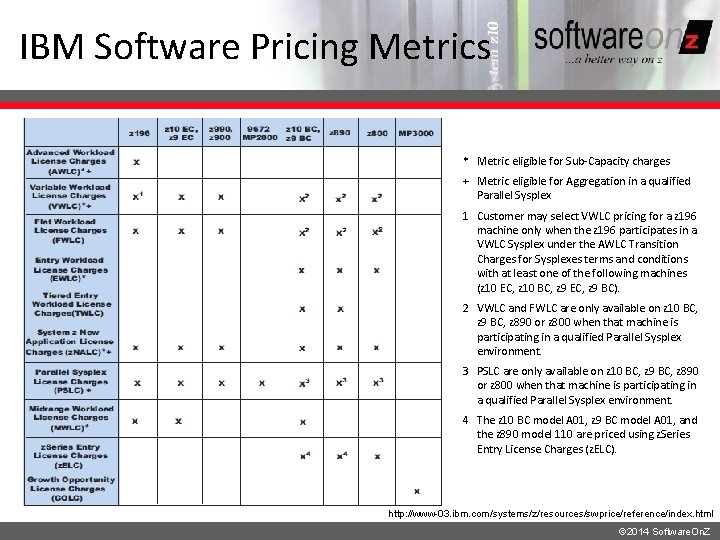
IBM Software Pricing Metrics * Metric eligible for Sub-Capacity charges + Metric eligible for Aggregation in a qualified Parallel Sysplex 1 Customer may select VWLC pricing for a z 196 machine only when the z 196 participates in a VWLC Sysplex under the AWLC Transition Charges for Sysplexes terms and conditions with at least one of the following machines (z 10 EC, z 10 BC, z 9 EC, z 9 BC). 2 VWLC and FWLC are only available on z 10 BC, z 9 BC, z 890 or z 800 when that machine is participating in a qualified Parallel Sysplex environment. 3 PSLC are only available on z 10 BC, z 9 BC, z 890 or z 800 when that machine is participating in a qualified Parallel Sysplex environment. 4 The z 10 BC model A 01, z 9 BC model A 01, and the z 890 model 110 are priced using z. Series Entry License Charges (z. ELC). http: //www-03. ibm. com/systems/z/resources/swprice/reference/index. html © 2014 Software. On. Z
Sub-Capacity Pricing Advantages • Your charges for products that use sub-capacity pricing are based on how much the LPARs in which the products run utilize system resources, rather than on the full capacity of the CPC. – You can purchase hardware capacity for future needs without incurring an immediate increase in your software bill. • If your usage decreases when business is slow, your software bill decreases with it. – If your usage is seasonal, your monthly software bills are lower during periods of lower usage. • You pay for capacity on a rolling four-hour (R 4 H) average, not on maximum capacity reached. Short usage spikes will be averaged out in calculating your usage. Longer spikes will affect the rolling four-hour average utilization in proportion to their duration and magnitude. © 2014 Software. On. Z
Be Aware… • Sub-capacity pricing can, in some cases, lower your overall software bill while increasing some components of your bill. – Perhaps some of your software products have higher costs with sub-capacity pricing, but the overall software bill is lower. – Or, maybe you have a seasonal usage pattern, so your bill might be higher in some months with sub -capacity pricing, but your total annual bill for all eligible products is lower. © 2014 Software. On. Z

Let’s Dig a Little Deeper and Take a Look at VWLC ! There are four components of VWLC – we’ll look at each of them… © 2014 Software. On. Z © 2010 Software. On. Z
Part 1 of v. WLC R 4 H © 2014 Software. On. Z © 2010 Software. On. Z
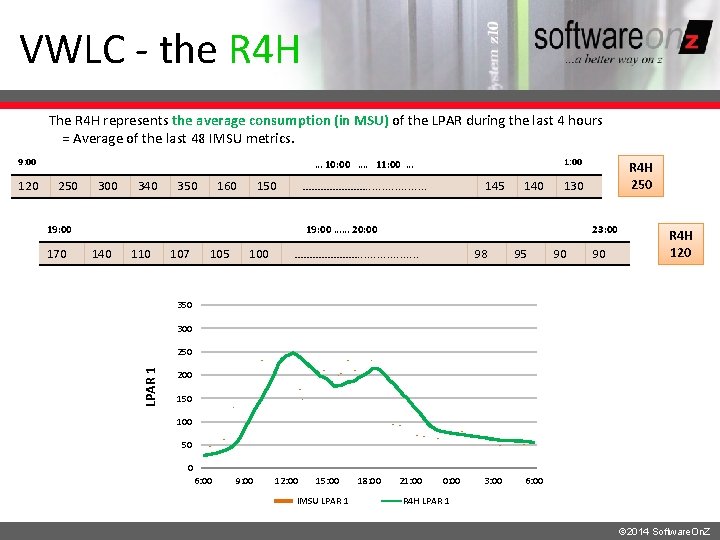
VWLC - the R 4 H The R 4 H represents the average consumption (in MSU) of the LPAR during the last 4 hours = Average of the last 48 IMSU metrics. 9: 00 250 300 340 350 160 150 …………………. . . . . 19: 00 170 145 140 110 107 105 100 R 4 H 250 130 19: 00 …… 20: 00 23: 00 …………………. . . . . 98 95 90 90 R 4 H 120 350 300 250 LPAR 1 120 1: 00 … 10: 00 …. 11: 00 … 200 150 100 50 0 6: 00 9: 00 12: 00 15: 00 IMSU LPAR 1 18: 00 21: 00 0: 00 3: 00 6: 00 R 4 H LPAR 1 © 2014 Software. On. Z
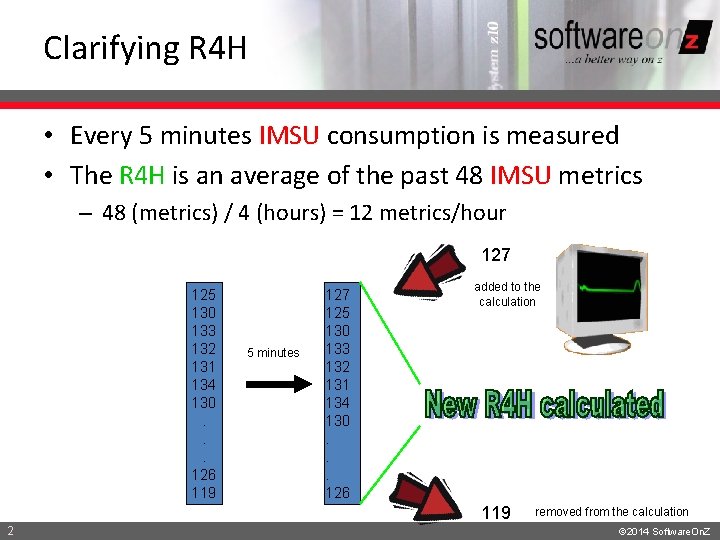
Clarifying R 4 H • Every 5 minutes IMSU consumption is measured • The R 4 H is an average of the past 48 IMSU metrics – 48 (metrics) / 4 (hours) = 12 metrics/hour 127 125 130 133 132 131 134 130. . . 126 119 5 minutes 127 125 130 133 132 131 134 130. . . 126 added to the calculation 119 2 removed from the calculation © 2014 Software. On. Z
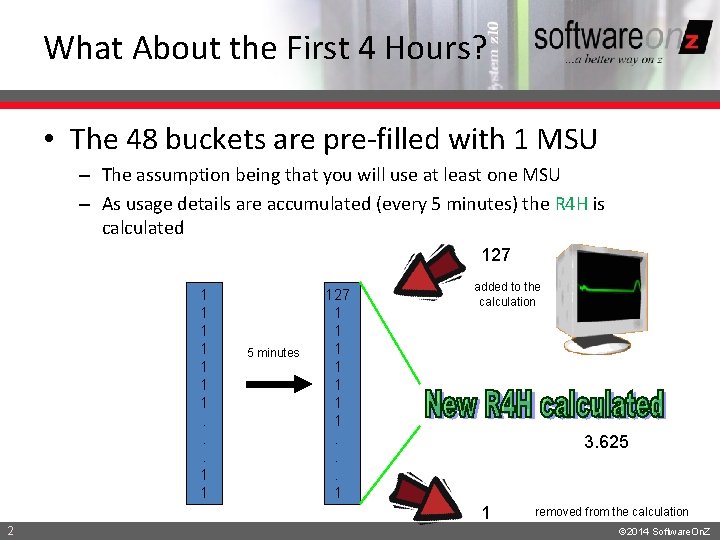
What About the First 4 Hours? • The 48 buckets are pre-filled with 1 MSU – The assumption being that you will use at least one MSU – As usage details are accumulated (every 5 minutes) the R 4 H is calculated 127 1 1 1 1. . . 1 1 5 minutes 127 1 1 1 1. . . 1 added to the calculation 3. 625 1 2 removed from the calculation © 2014 Software. On. Z
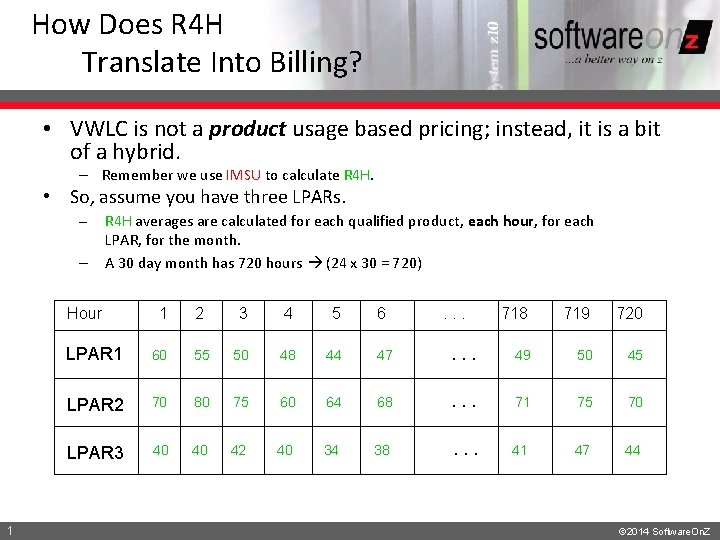
How Does R 4 H Translate Into Billing? • VWLC is not a product usage based pricing; instead, it is a bit of a hybrid. – Remember we use IMSU to calculate R 4 H. • So, assume you have three LPARs. – – R 4 H averages are calculated for each qualified product, each hour, for each LPAR, for the month. A 30 day month has 720 hours (24 x 30 = 720) Hour 1 1 2 3 4 5 6 . . . 718 719 720 LPAR 1 60 55 50 48 44 47 . . . 49 50 45 LPAR 2 70 80 75 60 64 68 . . . 71 75 70 LPAR 3 40 40 42 40 34 38 . . . 41 47 44 © 2014 Software. On. Z
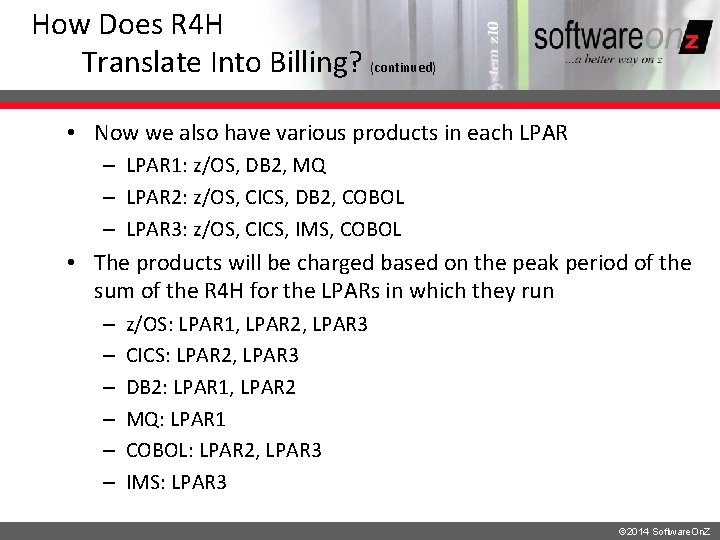
How Does R 4 H Translate Into Billing? (continued) • Now we also have various products in each LPAR – LPAR 1: z/OS, DB 2, MQ – LPAR 2: z/OS, CICS, DB 2, COBOL – LPAR 3: z/OS, CICS, IMS, COBOL • The products will be charged based on the peak period of the sum of the R 4 H for the LPARs in which they run – – – z/OS: LPAR 1, LPAR 2, LPAR 3 CICS: LPAR 2, LPAR 3 DB 2: LPAR 1, LPAR 2 MQ: LPAR 1 COBOL: LPAR 2, LPAR 3 IMS: LPAR 3 © 2014 Software. On. Z
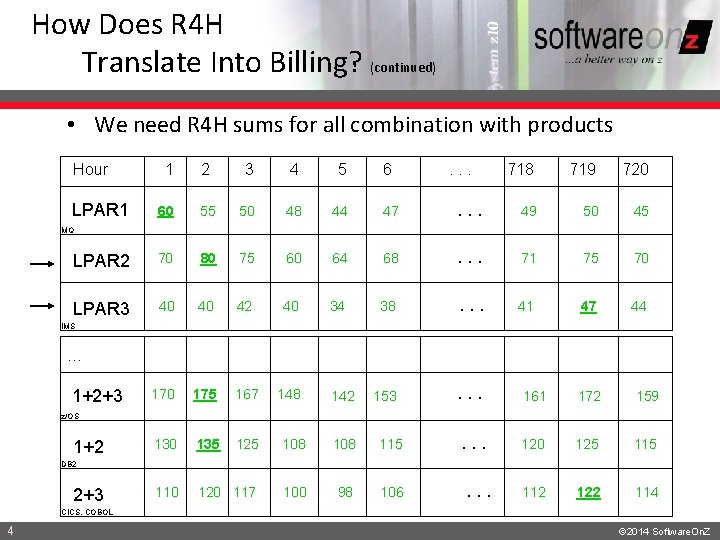
How Does R 4 H Translate Into Billing? (continued) • We need R 4 H sums for all combination with products Hour 2 3 4 5 6 60 55 50 48 44 47 LPAR 2 70 80 75 60 64 LPAR 3 40 40 42 40 34 170 175 167 148 130 135 125 108 115 110 120 117 100 98 106 LPAR 1 1 . . . 718 719 720 . . . 49 50 45 68 . . . 71 75 70 38 . . . 41 47 44 153 . . . 161 172 159 . . . 120 125 112 122 114 MQ IMS … 1+2+3 142 z/OS 1+2 DB 2 2+3 . . . CICS, COBOL 4 © 2014 Software. On. Z
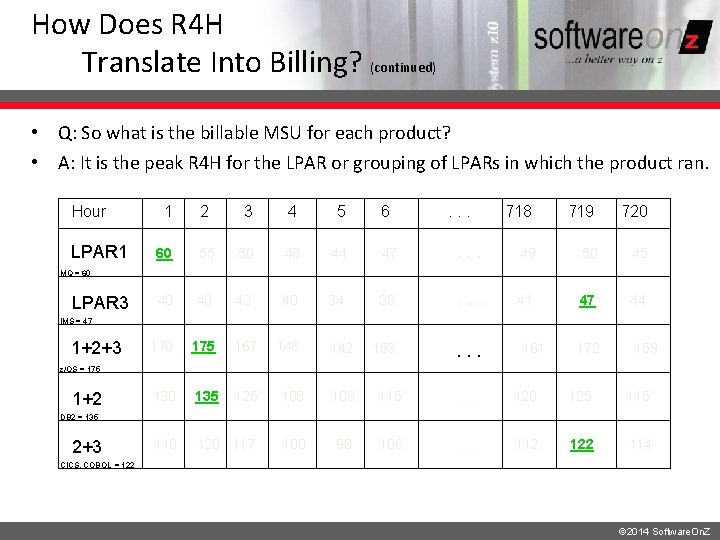
How Does R 4 H Translate Into Billing? (continued) • Q: So what is the billable MSU for each product? • A: It is the peak R 4 H for the LPAR or grouping of LPARs in which the product ran. Hour LPAR 1 1 2 3 4 5 6 . . . 718 719 720 60 55 50 48 44 47 . . . 49 50 45 40 40 42 40 34 38 . . . 41 47 44 170 175 167 148 153 . . . 130 135 125 108 115 . . . 120 125 110 120 117 100 98 106 . . . 112 122 114 MQ = 60 LPAR 3 IMS = 47 1+2+3 142 161 172 159 z/OS = 175 1+2 DB 2 = 135 2+3 CICS, COBOL = 122 © 2014 Software. On. Z

Part 2 of v. WLC DC © 2014 Software. On. Z
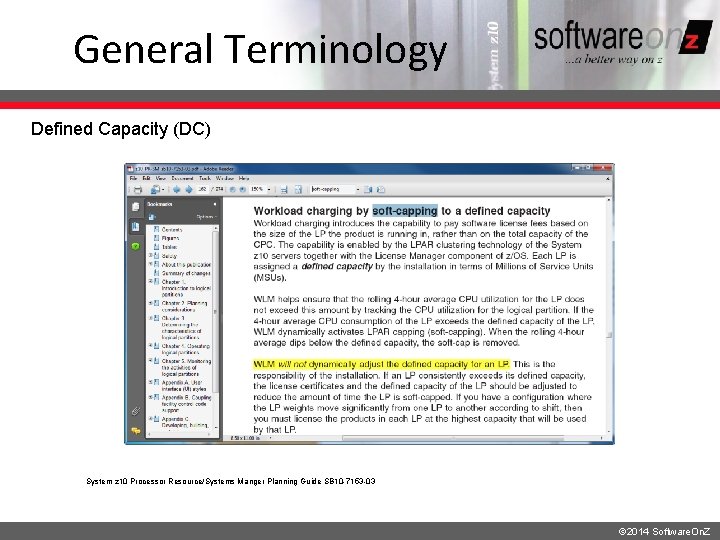
General Terminology Defined Capacity (DC) System z 10 Processor Resource/Systems Manger Planning Guide SB 10 -7153 -03 © 2014 Software. On. Z
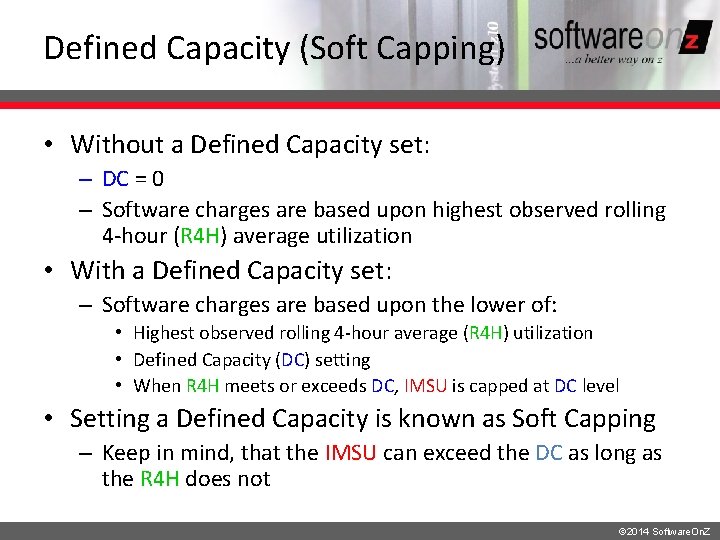
Defined Capacity (Soft Capping) • Without a Defined Capacity set: – DC = 0 – Software charges are based upon highest observed rolling 4 -hour (R 4 H) average utilization • With a Defined Capacity set: – Software charges are based upon the lower of: • Highest observed rolling 4 -hour average (R 4 H) utilization • Defined Capacity (DC) setting • When R 4 H meets or exceeds DC, IMSU is capped at DC level • Setting a Defined Capacity is known as Soft Capping – Keep in mind, that the IMSU can exceed the DC as long as the R 4 H does not © 2014 Software. On. Z
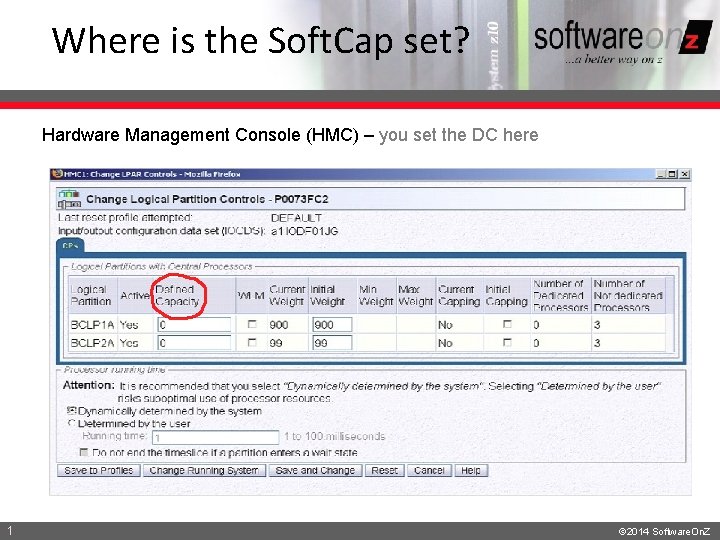
Where is the Soft. Cap set? Hardware Management Console (HMC) – you set the DC here 1 © 2014 Software. On. Z
Part 3 of v. WLC IMSU © 2014 Software. On. Z
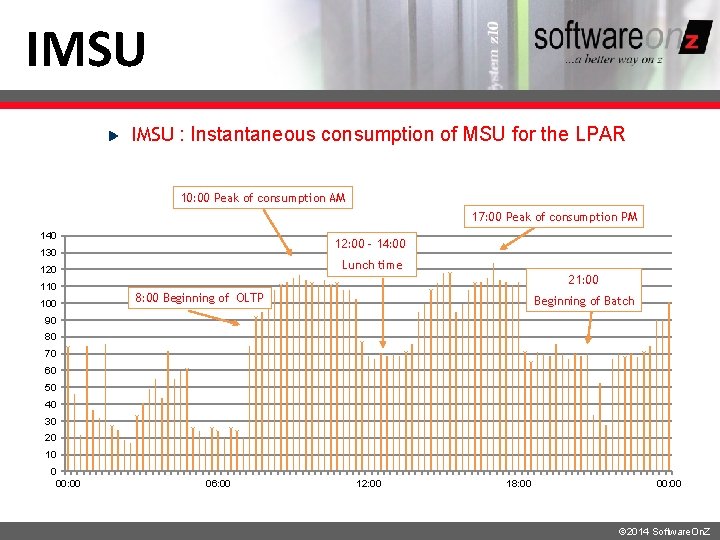
IMSU : Instantaneous consumption of MSU for the LPAR 10: 00 Peak of consumption AM 17: 00 Peak of consumption PM 140 12: 00 – 14: 00 130 Lunch time 120 110 100 21: 00 8: 00 Beginning of OLTP Beginning of Batch 90 80 70 60 50 40 30 20 10 0 00: 00 06: 00 12: 00 18: 00 00: 00 © 2014 Software. On. Z
Part 4 of v. WLC SCRT © 2014 Software. On. Z © 2010 Software. On. Z
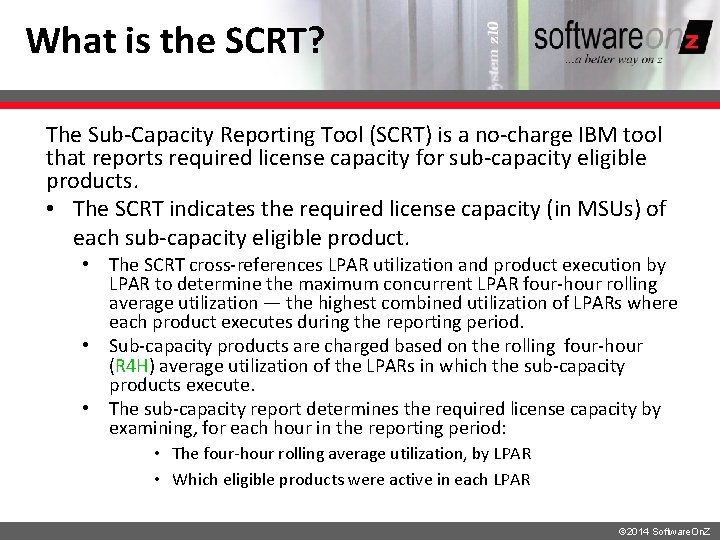
What is the SCRT? The Sub-Capacity Reporting Tool (SCRT) is a no-charge IBM tool that reports required license capacity for sub-capacity eligible products. • The SCRT indicates the required license capacity (in MSUs) of each sub-capacity eligible product. • The SCRT cross-references LPAR utilization and product execution by LPAR to determine the maximum concurrent LPAR four-hour rolling average utilization — the highest combined utilization of LPARs where each product executes during the reporting period. • Sub-capacity products are charged based on the rolling four-hour (R 4 H) average utilization of the LPARs in which the sub-capacity products execute. • The sub-capacity report determines the required license capacity by examining, for each hour in the reporting period: • The four-hour rolling average utilization, by LPAR • Which eligible products were active in each LPAR © 2014 Software. On. Z
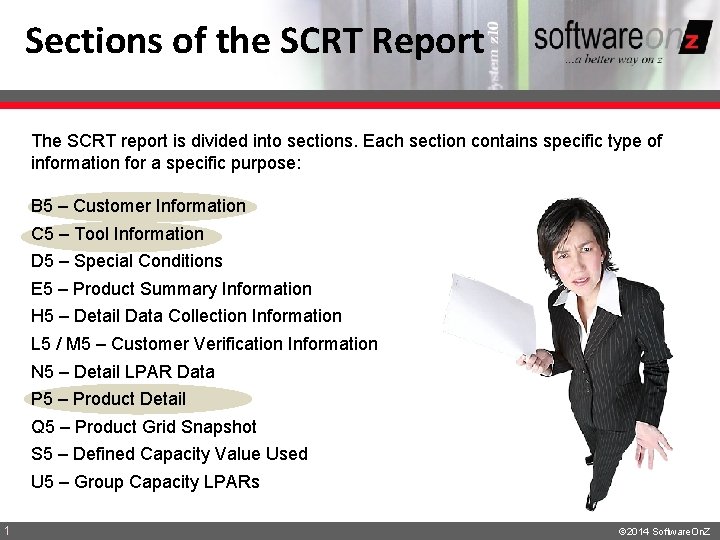
Sections of the SCRT Report The SCRT report is divided into sections. Each section contains specific type of information for a specific purpose: B 5 – Customer Information C 5 – Tool Information D 5 – Special Conditions E 5 – Product Summary Information H 5 – Detail Data Collection Information L 5 / M 5 – Customer Verification Information N 5 – Detail LPAR Data P 5 – Product Detail Q 5 – Product Grid Snapshot S 5 – Defined Capacity Value Used U 5 – Group Capacity LPARs 1 © 2014 Software. On. Z
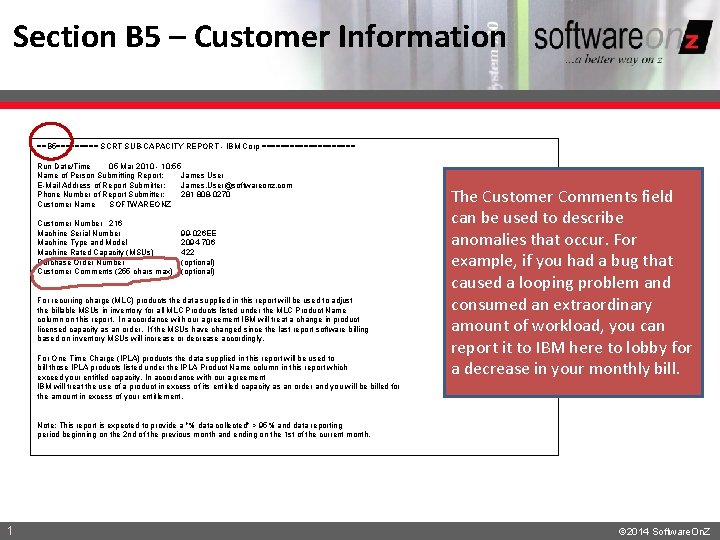
Section B 5 – Customer Information ==B 5===== SCRT SUB-CAPACITY REPORT - IBM Corp ========== Run Date/Time 05 Mar 2010 - 10: 55 Name of Person Submitting Report: James User E-Mail Address of Report Submitter: James. User@softwareonz. com Phone Number of Report Submitter: 281 808 -0270 Customer Name SOFTWAREONZ Customer Number 216 Machine Serial Number Machine Type and Model Machine Rated Capacity (MSUs) Purchase Order Number Customer Comments (255 chars max) 99 -026 EE 2094 -706 422 (optional) For recurring charge (MLC) products the data supplied in this report will be used to adjust the billable MSUs in inventory for all MLC Products listed under the MLC Product Name column on this report. In accordance with our agreement IBM will treat a change in product licensed capacity as an order. If the MSUs have changed since the last report software billing based on inventory MSUs will increase or decrease accordingly. For One Time Charge (IPLA) products the data supplied in this report will be used to bill those IPLA products listed under the IPLA Product Name column in this report which exceed your entitled capacity. In accordance with our agreement IBM will treat the use of a product in excess of its entitled capacity as an order and you will be billed for the amount in excess of your entitlement. The Customer Comments field can be used to describe anomalies that occur. For example, if you had a bug that caused a looping problem and consumed an extraordinary amount of workload, you can report it to IBM here to lobby for a decrease in your monthly bill. Note: This report is expected to provide a "% data collected" > 95% and data reporting period beginning on the 2 nd of the previous month and ending on the 1 st of the current month. 1 © 2014 Software. On. Z
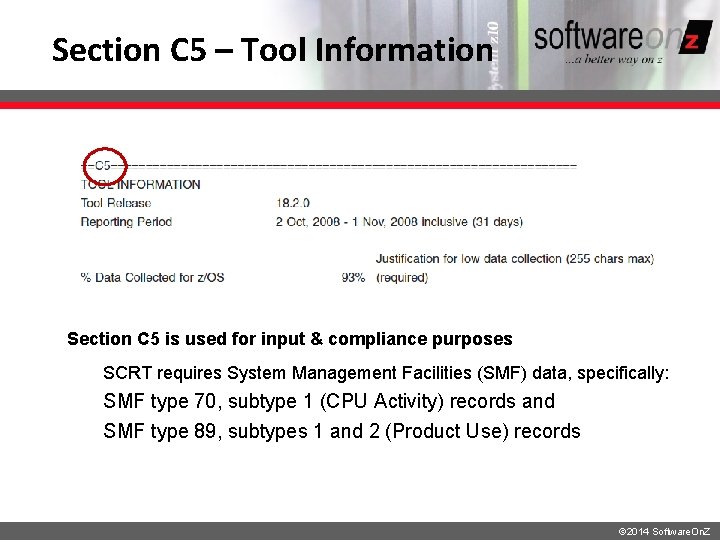
Section C 5 – Tool Information Section C 5 is used for input & compliance purposes SCRT requires System Management Facilities (SMF) data, specifically: SMF type 70, subtype 1 (CPU Activity) records and SMF type 89, subtypes 1 and 2 (Product Use) records © 2014 Software. On. Z
Percent Data Collected The Percent Data Collected, a field in the sub-capacity report, is calculated as the actual hours of data divided by expected hours of data. The number of expected hours varies depending on whether a month has 28, 30 or 31 days. If your percentage collected is less than 95%, you must indicate why this is the case in the field labeled Justification for Low Data Collection (up to 255 characters): • Indicates where you must explain why the data collection for the matching operating system was less than 95%. • You must either provide your explanation by editing the sub-capacity report using a spreadsheet application or you must provide your explanation through the license management support (LMS) application. • The placeholder will appear in this column whenever you must explain why the data collection for the matching operating system was less than 95%. • Your explanation must replace the placeholder. • No explanation is required when the placeholder does not appear. © 2014 Software. On. Z
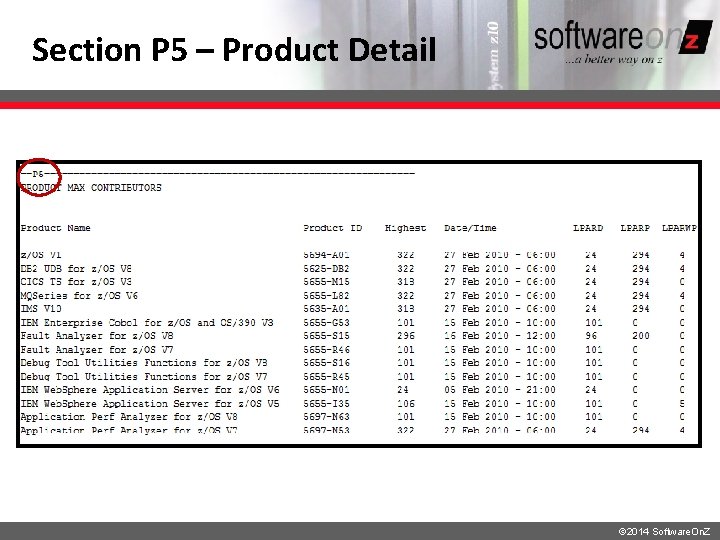
Section P 5 – Product Detail © 2014 Software. On. Z
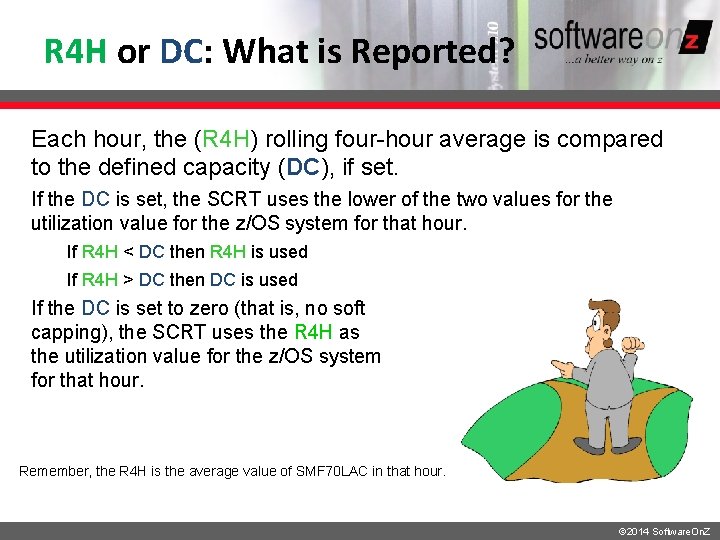
R 4 H or DC: What is Reported? Each hour, the (R 4 H) rolling four-hour average is compared to the defined capacity (DC), if set. If the DC is set, the SCRT uses the lower of the two values for the utilization value for the z/OS system for that hour. If R 4 H < DC then R 4 H is used If R 4 H > DC then DC is used If the DC is set to zero (that is, no soft capping), the SCRT uses the R 4 H as the utilization value for the z/OS system for that hour. Remember, the R 4 H is the average value of SMF 70 LAC in that hour. © 2014 Software. On. Z
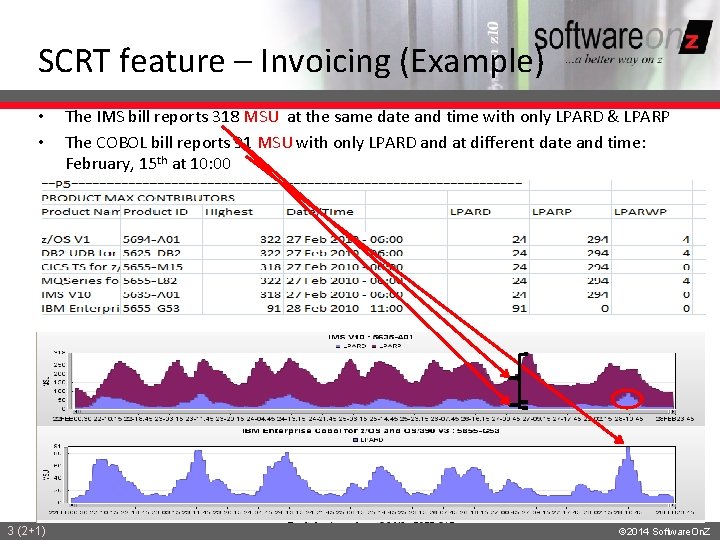
SCRT feature – Invoicing (Example) • • 3 (2+1) The IMS bill reports 318 MSU at the same date and time with only LPARD & LPARP The COBOL bill reports 91 MSU with only LPARD and at different date and time: February, 15 th at 10: 00 © 2014 Software. On. Z
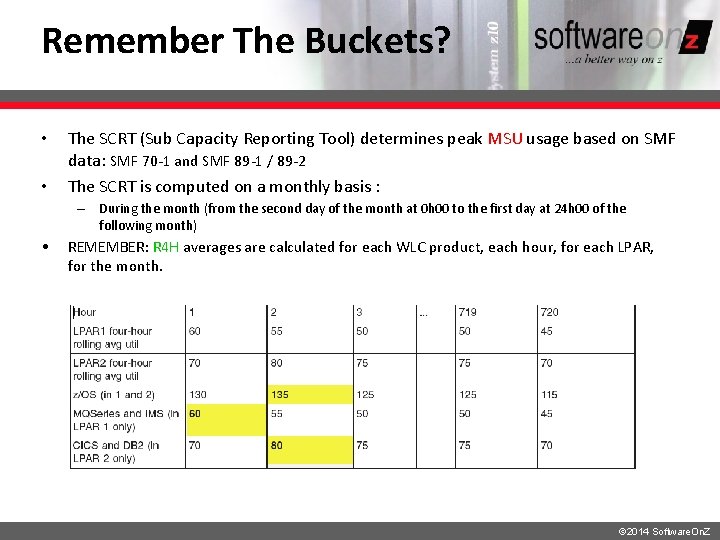
Remember The Buckets? • • The SCRT (Sub Capacity Reporting Tool) determines peak MSU usage based on SMF data: SMF 70 -1 and SMF 89 -1 / 89 -2 The SCRT is computed on a monthly basis : – During the month (from the second day of the month at 0 h 00 to the first day at 24 h 00 of the following month) • REMEMBER: R 4 H averages are calculated for each WLC product, each hour, for each LPAR, for the month. © 2014 Software. On. Z
What About Those SMF Records? • SMF 70 -1 • Reports CPU activity for CPU / LPAR • SMF 89 -1 / 89 -2 • Report software product usage and are used to calculate reduced sub-capacity software pricing • Not all products cut 89 records • NO 89 record products must be specified to the SCRT • If 89 records are not cut by the product (e. g. COBOL) then it will be charged for the absolute peak R 4 H (or DC) for the month • If 89 records a cut by the product, then it will be charged only for the time it was operational © 2014 Software. On. Z
Let’s Look at an Example: DC = 100 © 2014 Software. On. Z © 2010 Software. On. Z
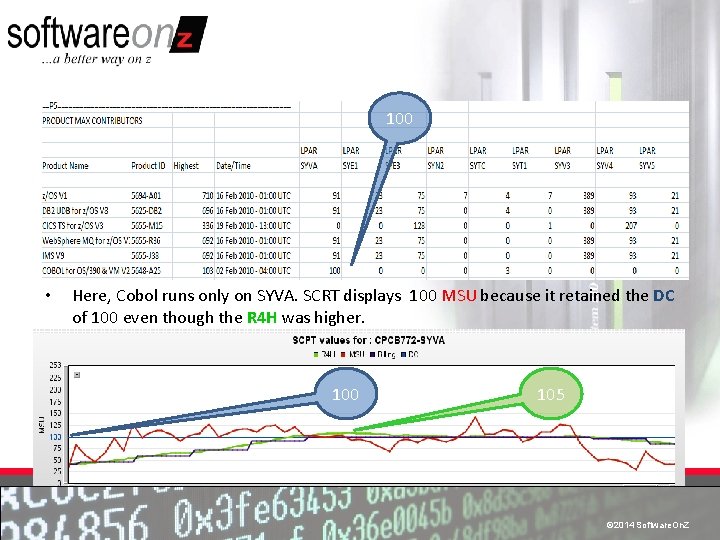
100 • Here, Cobol runs only on SYVA. SCRT displays 100 MSU because it retained the DC of 100 even though the R 4 H was higher. 100 105 © 2014 Software. On. Z © 2010 Software. On. Z
What About Using Group Capacity Limit (GCL) ? © 2014 Software. On. Z © 2010 Software. On. Z
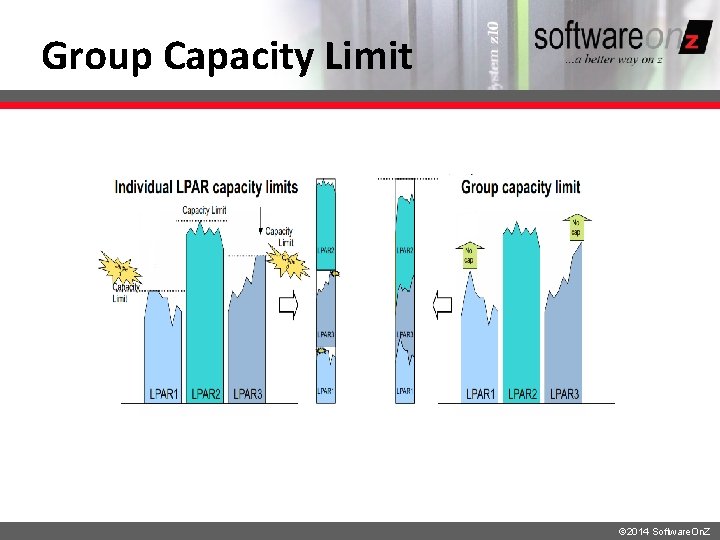
What is Group Capacity Limit? • Group Capacity Limit (GCL) – Setting a capacity limit, or throttle, on not just a single LPAR, but on a group of LPARs • Can be any subset of LPARs in the box • Or even the whole box • You can think of GCL as setting a single DC (sort of) for more than one LPAR © 2014 Software. On. Z
Group Capacity Limit © 2014 Software. On. Z
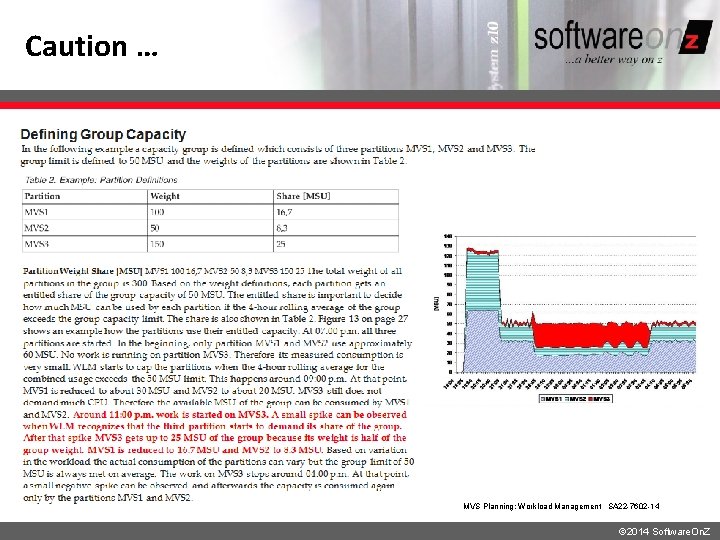
Caution … MVS Planning: Workload Management SA 22 -7602 -14 © 2014 Software. On. Z
Conclusion © 2014 Software. On. Z © 2010 Software. On. Z
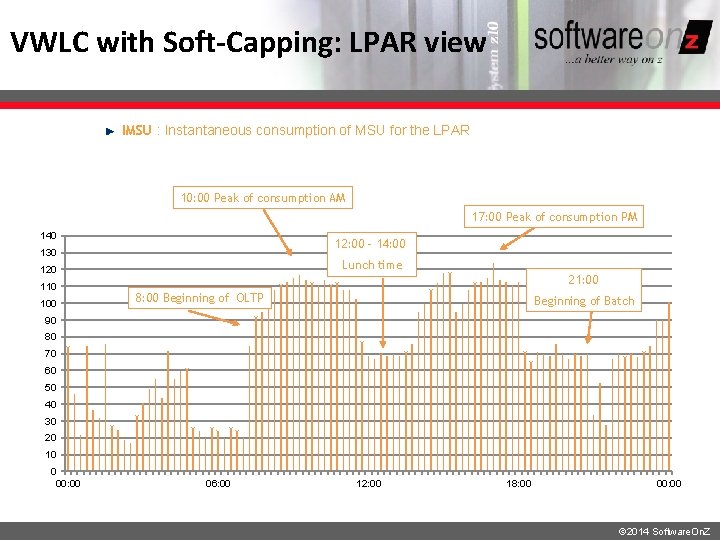
VWLC with Soft-Capping: LPAR view IMSU : Instantaneous consumption of MSU for the LPAR 10: 00 Peak of consumption AM 17: 00 Peak of consumption PM 140 12: 00 – 14: 00 130 Lunch time 120 110 100 21: 00 8: 00 Beginning of OLTP Beginning of Batch 90 80 70 60 50 40 30 20 10 0 00: 00 06: 00 12: 00 18: 00 00: 00 © 2014 Software. On. Z
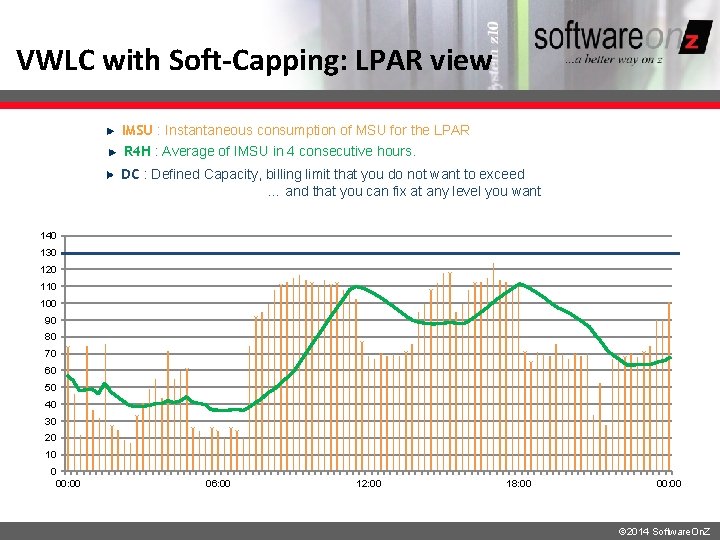
VWLC with Soft-Capping: LPAR view IMSU : Instantaneous consumption of MSU for the LPAR R 4 H : Average of IMSU in 4 consecutive hours. DC : Defined Capacity, billing limit that you do not want to exceed … and that you can fix at any level you want 140 130 120 110 100 90 80 70 60 50 40 30 20 10 0 00: 00 06: 00 12: 00 18: 00 00: 00 © 2014 Software. On. Z
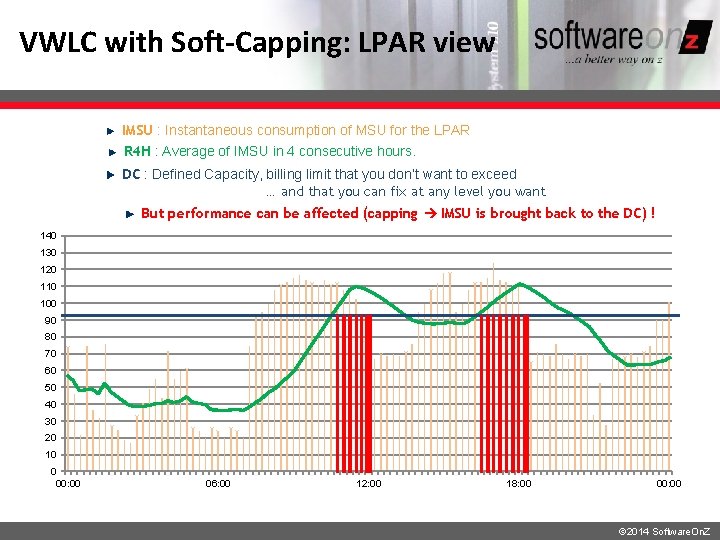
VWLC with Soft-Capping: LPAR view IMSU : Instantaneous consumption of MSU for the LPAR R 4 H : Average of IMSU in 4 consecutive hours. DC : Defined Capacity, billing limit that you don’t want to exceed … and that you can fix at any level you want But performance can be affected (capping IMSU is brought back to the DC) ! 140 130 120 110 100 90 80 70 60 50 40 30 20 10 0 00: 00 06: 00 12: 00 18: 00 00: 00 © 2014 Software. On. Z
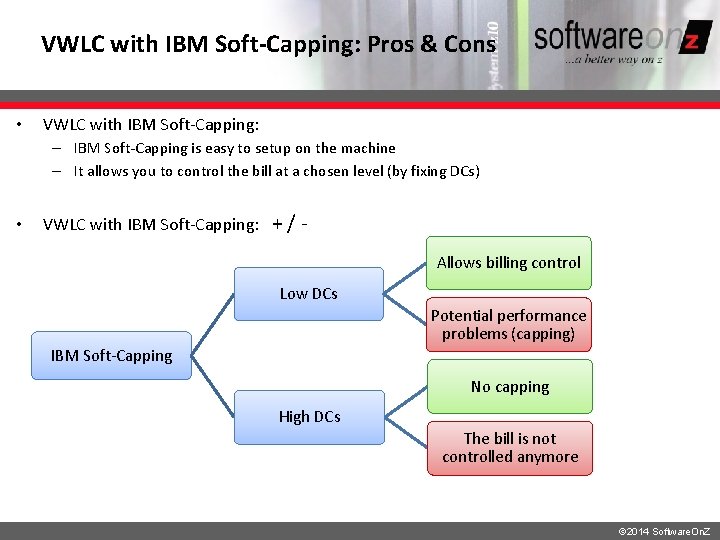
VWLC with IBM Soft-Capping: Pros & Cons • VWLC with IBM Soft-Capping: – IBM Soft-Capping is easy to setup on the machine – It allows you to control the bill at a chosen level (by fixing DCs) • VWLC with IBM Soft-Capping: +/Allows billing control Low DCs Potential performance problems (capping) IBM Soft-Capping No capping High DCs The bill is not controlled anymore © 2014 Software. On. Z
Summary • Pricing models and calculations can be confusing but… • Subcapacity pricing can save you money! • There are more nuances to managing VWLC than can be adequately covered in an introductory presentation of this nature (for example, oo. COD) • Specifying a DC can reduce your software bill but… • What values should be used (per LPAR)? • Does it need to be modified based on your workload? • How can this be accomplished? © 2014 Software. On. Z
- Slides: 49