
An Introduction to Programming with C Sixth Edition
- Slides: 65
An Introduction to Programming with C++ Sixth Edition Chapter 7 The Repetition Structure
Objectives • Differentiate between a pretest loop and a posttest loop • Include a pretest loop in pseudocode • Include a pretest loop in a flowchart • Code a pretest loop using the C++ while statement • Utilize counter and accumulator variables • Code a pretest loop using the C++ for statement An Introduction to Programming with C++, Sixth Edition 2
Repeating Program Instructions • The repetition structure, or loop, processes one or more instructions repeatedly • Every loop contains a Boolean condition that controls whether the instructions are repeated • A looping condition says whether to continue looping through instructions • A loop exit condition says whether to stop looping through the instructions • Every looping condition can be expressed as a loop exit condition (its opposite) An Introduction to Programming with C++, Sixth Edition 3
Repeating Program Instructions (cont’d. ) • C++ uses looping conditions in repetition structures • A repetition structure can be pretest or posttest • In a pretest loop, the condition is evaluated before the instructions in the loop are processed • In a posttest loop, the condition is evaluated after the instructions in the loop are processed • In both cases, the condition is evaluated with each repetition An Introduction to Programming with C++, Sixth Edition 4
Repeating Program Instructions (cont’d. ) • The instructions in a posttest loop will always be processed at least once • Instructions in a pretest loop may not be processed if the condition initially evaluates to false • The repeatable instructions in a loop are called the loop body • The condition in a loop must evaluate to a Boolean value An Introduction to Programming with C++, Sixth Edition 5
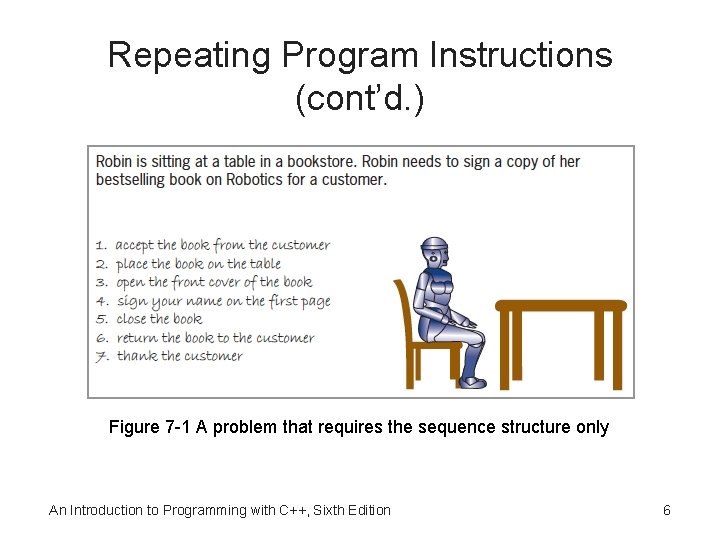
Repeating Program Instructions (cont’d. ) Figure 7 -1 A problem that requires the sequence structure only An Introduction to Programming with C++, Sixth Edition 6
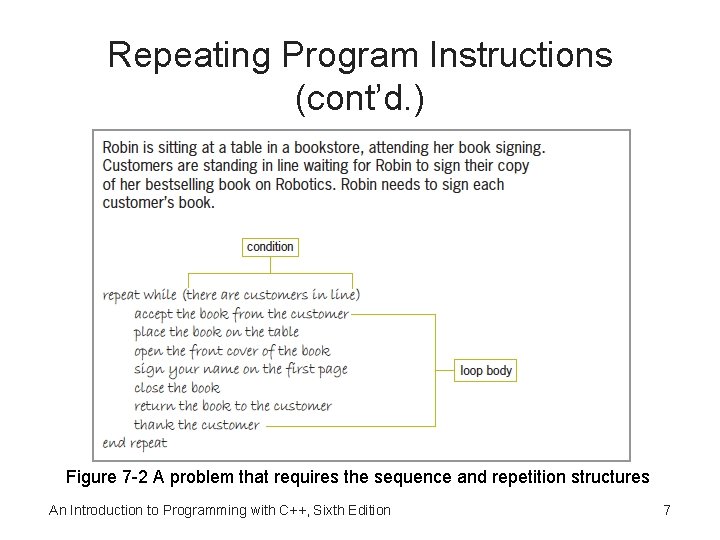
Repeating Program Instructions (cont’d. ) Figure 7 -2 A problem that requires the sequence and repetition structures An Introduction to Programming with C++, Sixth Edition 7
Using a Pretest Loop to Solve a Real. World Problem • Most loops have a condition and a loop body • Some loops require the user to enter a special sentinel value to end the loop • Sentinel values should be easily distinguishable from the valid data recognized by the program • When a loop’s condition evaluates to true, the instructions in the loop body are processed • Otherwise, the instructions are skipped and processing continues with the first instruction after the loop An Introduction to Programming with C++, Sixth Edition 8
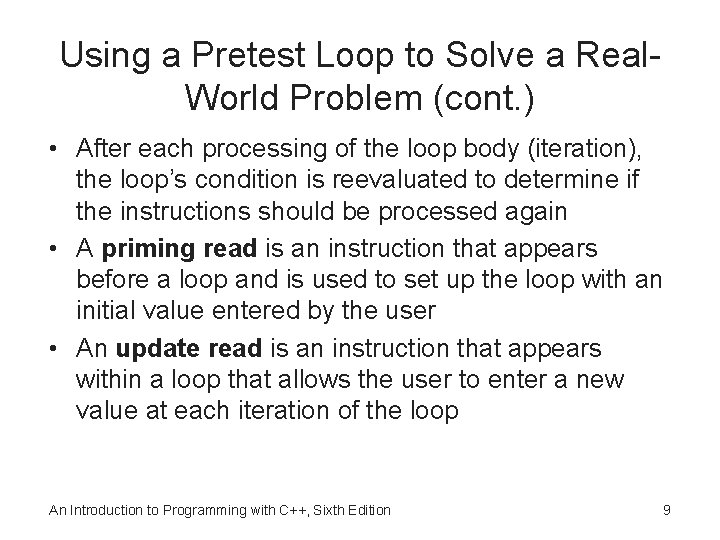
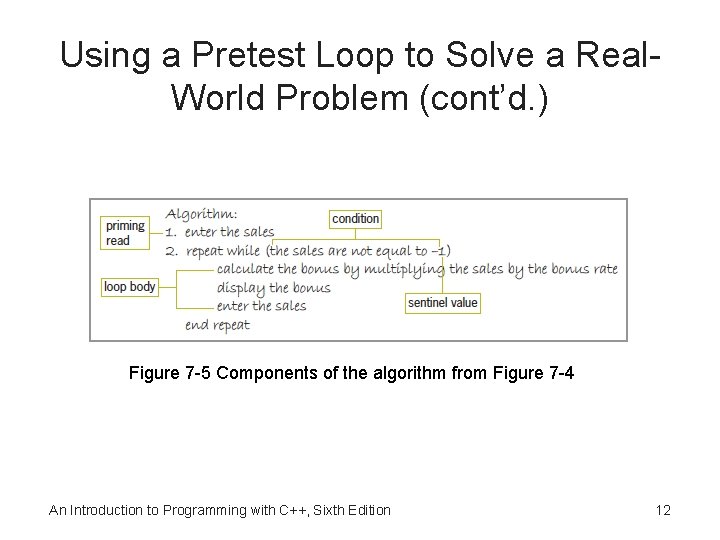
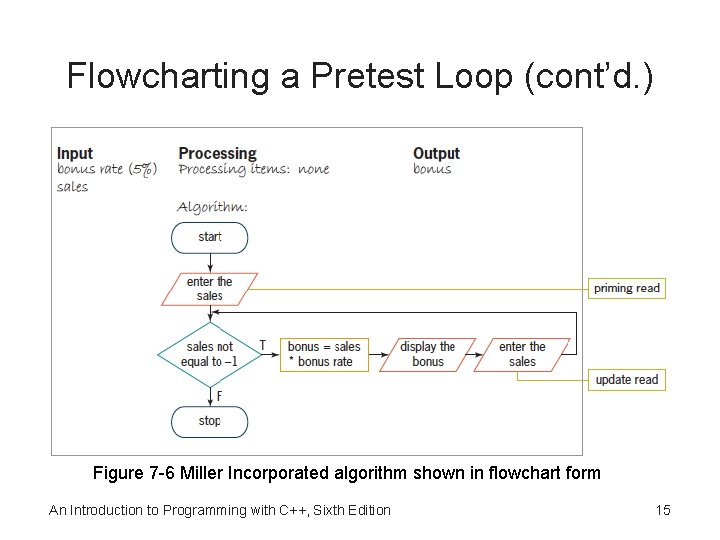
Using a Pretest Loop to Solve a Real. World Problem (cont. ) • After each processing of the loop body (iteration), the loop’s condition is reevaluated to determine if the instructions should be processed again • A priming read is an instruction that appears before a loop and is used to set up the loop with an initial value entered by the user • An update read is an instruction that appears within a loop that allows the user to enter a new value at each iteration of the loop An Introduction to Programming with C++, Sixth Edition 9
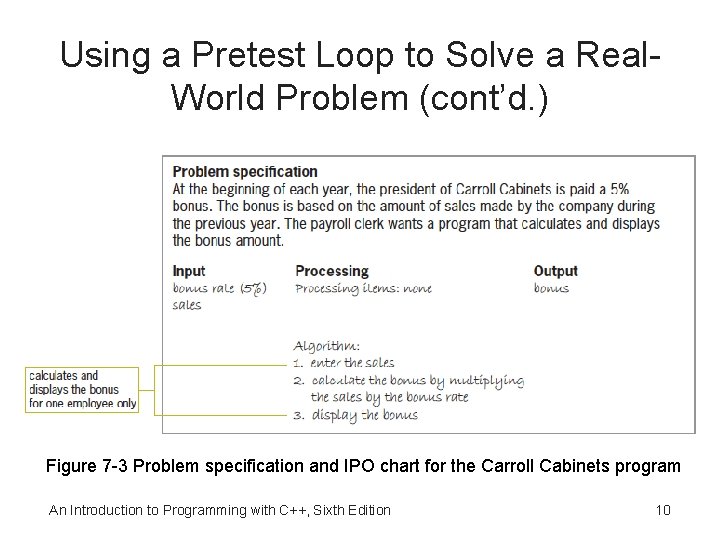
Using a Pretest Loop to Solve a Real. World Problem (cont’d. ) Figure 7 -3 Problem specification and IPO chart for the Carroll Cabinets program An Introduction to Programming with C++, Sixth Edition 10
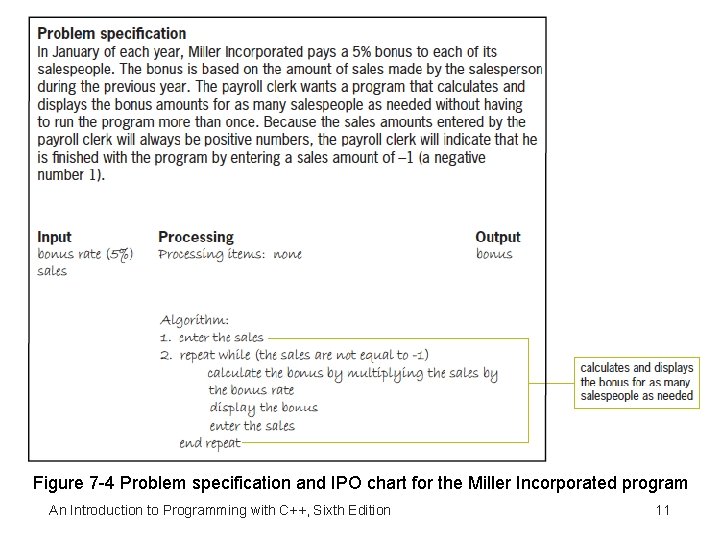
Figure 7 -4 Problem specification and IPO chart for the Miller Incorporated program An Introduction to Programming with C++, Sixth Edition 11
Using a Pretest Loop to Solve a Real. World Problem (cont’d. ) Figure 7 -5 Components of the algorithm from Figure 7 -4 An Introduction to Programming with C++, Sixth Edition 12
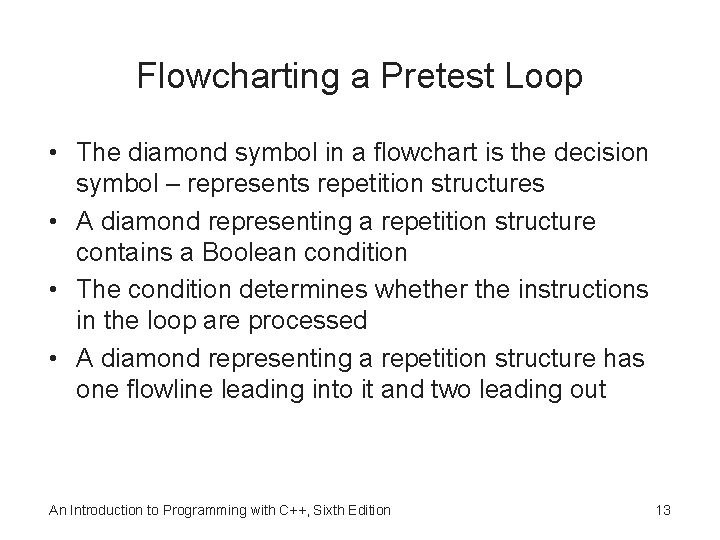
Flowcharting a Pretest Loop • The diamond symbol in a flowchart is the decision symbol – represents repetition structures • A diamond representing a repetition structure contains a Boolean condition • The condition determines whether the instructions in the loop are processed • A diamond representing a repetition structure has one flowline leading into it and two leading out An Introduction to Programming with C++, Sixth Edition 13
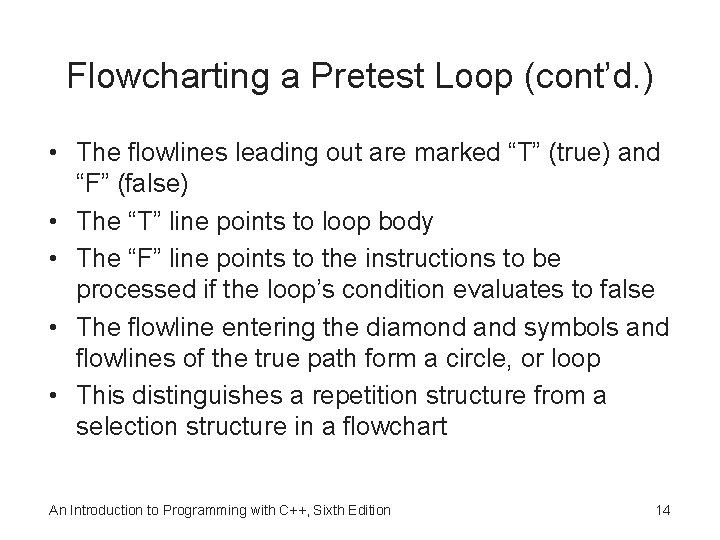
Flowcharting a Pretest Loop (cont’d. ) • The flowlines leading out are marked “T” (true) and “F” (false) • The “T” line points to loop body • The “F” line points to the instructions to be processed if the loop’s condition evaluates to false • The flowline entering the diamond and symbols and flowlines of the true path form a circle, or loop • This distinguishes a repetition structure from a selection structure in a flowchart An Introduction to Programming with C++, Sixth Edition 14
Flowcharting a Pretest Loop (cont’d. ) Figure 7 -6 Miller Incorporated algorithm shown in flowchart form An Introduction to Programming with C++, Sixth Edition 15
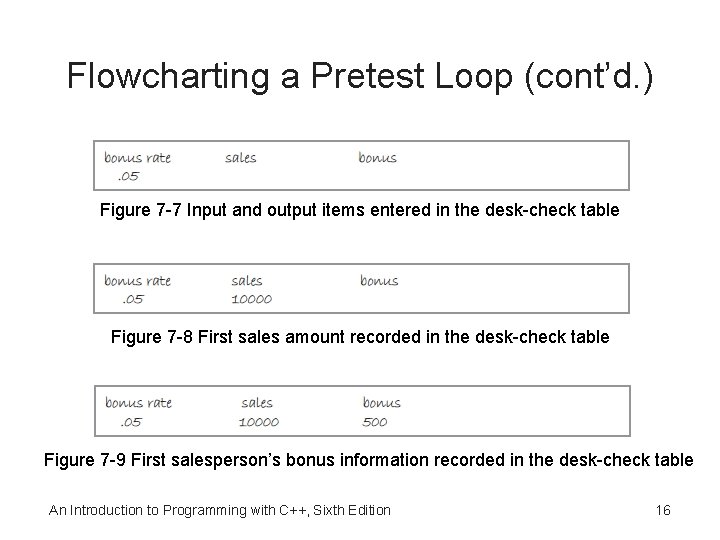
Flowcharting a Pretest Loop (cont’d. ) Figure 7 -7 Input and output items entered in the desk-check table Figure 7 -8 First sales amount recorded in the desk-check table Figure 7 -9 First salesperson’s bonus information recorded in the desk-check table An Introduction to Programming with C++, Sixth Edition 16
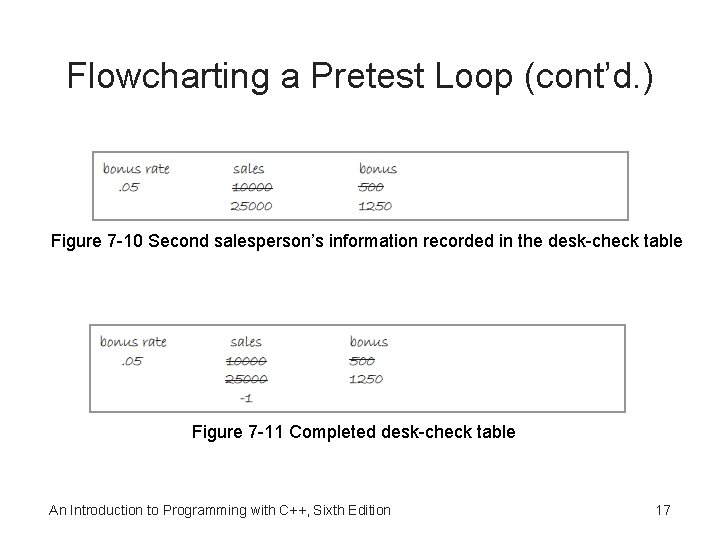
Flowcharting a Pretest Loop (cont’d. ) Figure 7 -10 Second salesperson’s information recorded in the desk-check table Figure 7 -11 Completed desk-check table An Introduction to Programming with C++, Sixth Edition 17
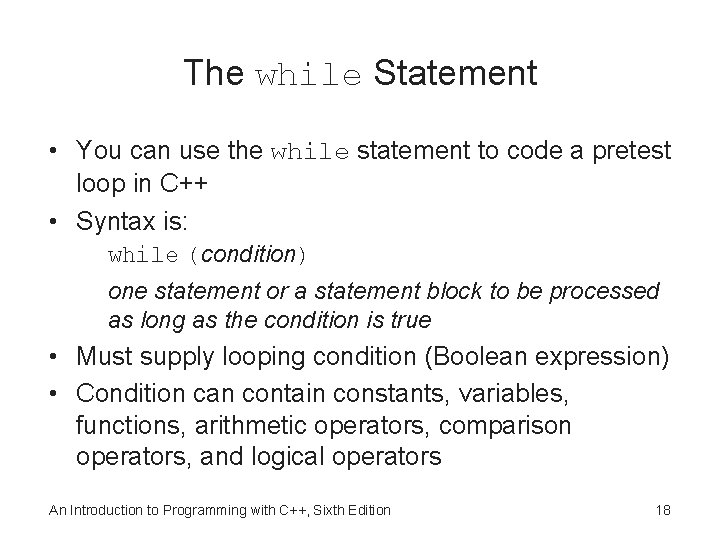
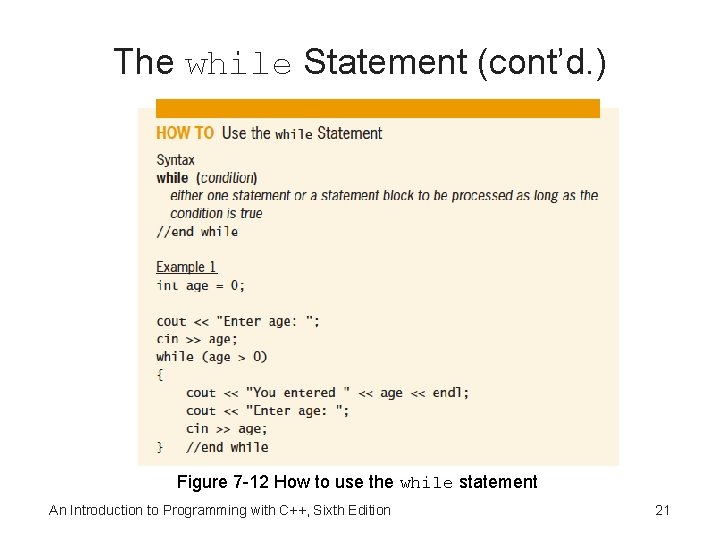
The while Statement • You can use the while statement to code a pretest loop in C++ • Syntax is: while (condition) one statement or a statement block to be processed as long as the condition is true • Must supply looping condition (Boolean expression) • Condition can contain constants, variables, functions, arithmetic operators, comparison operators, and logical operators An Introduction to Programming with C++, Sixth Edition 18
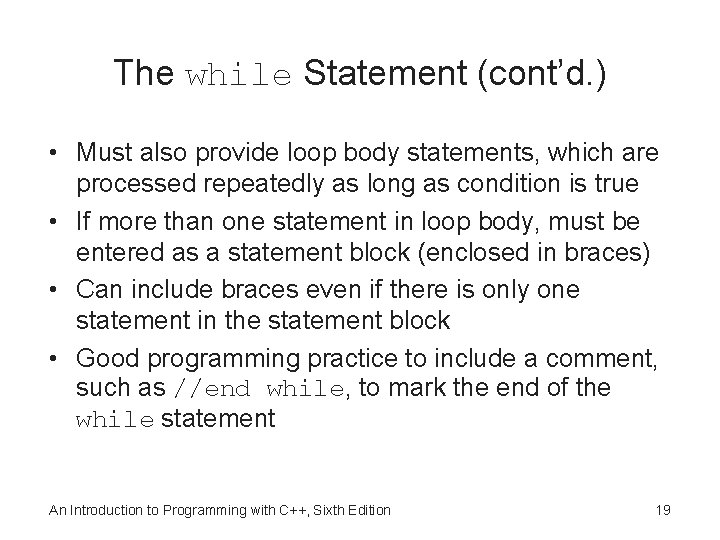
The while Statement (cont’d. ) • Must also provide loop body statements, which are processed repeatedly as long as condition is true • If more than one statement in loop body, must be entered as a statement block (enclosed in braces) • Can include braces even if there is only one statement in the statement block • Good programming practice to include a comment, such as //end while, to mark the end of the while statement An Introduction to Programming with C++, Sixth Edition 19
The while Statement (cont’d. ) • A loop whose instructions are processed indefinitely is called an infinite loop or endless loop • You can usually stop a program that has entered an infinite loop by pressing Ctrl+c An Introduction to Programming with C++, Sixth Edition 20
The while Statement (cont’d. ) Figure 7 -12 How to use the while statement An Introduction to Programming with C++, Sixth Edition 21
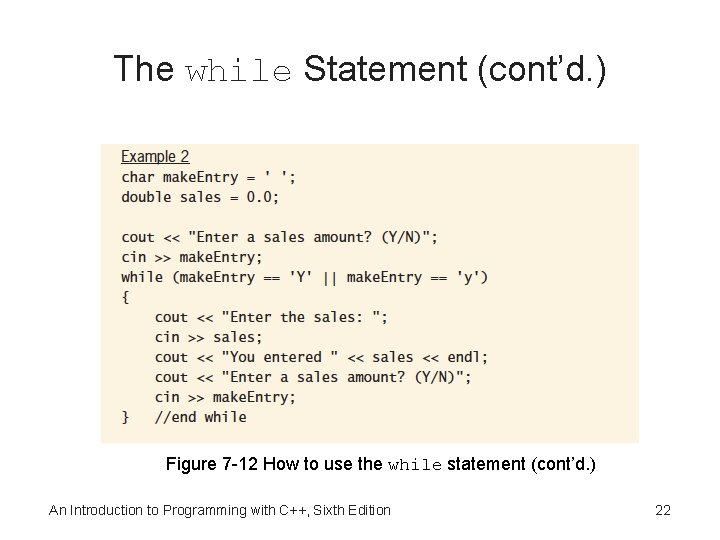
The while Statement (cont’d. ) Figure 7 -12 How to use the while statement (cont’d. ) An Introduction to Programming with C++, Sixth Edition 22
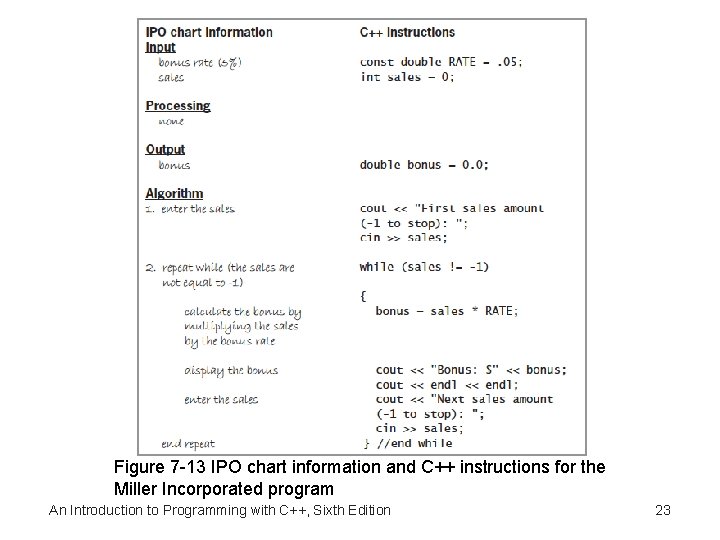
Figure 7 -13 IPO chart information and C++ instructions for the Miller Incorporated program An Introduction to Programming with C++, Sixth Edition 23
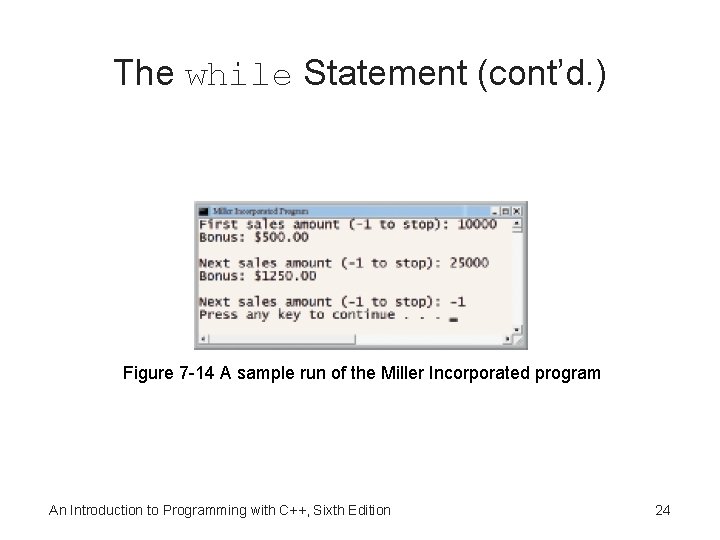
The while Statement (cont’d. ) Figure 7 -14 A sample run of the Miller Incorporated program An Introduction to Programming with C++, Sixth Edition 24
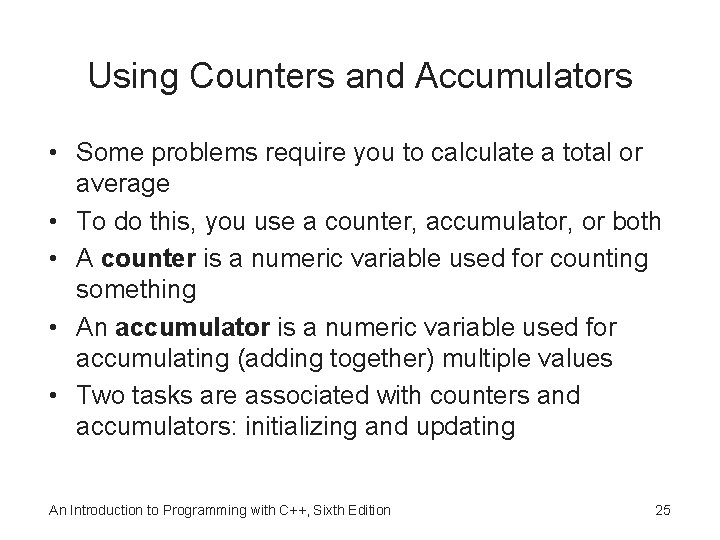
Using Counters and Accumulators • Some problems require you to calculate a total or average • To do this, you use a counter, accumulator, or both • A counter is a numeric variable used for counting something • An accumulator is a numeric variable used for accumulating (adding together) multiple values • Two tasks are associated with counters and accumulators: initializing and updating An Introduction to Programming with C++, Sixth Edition 25
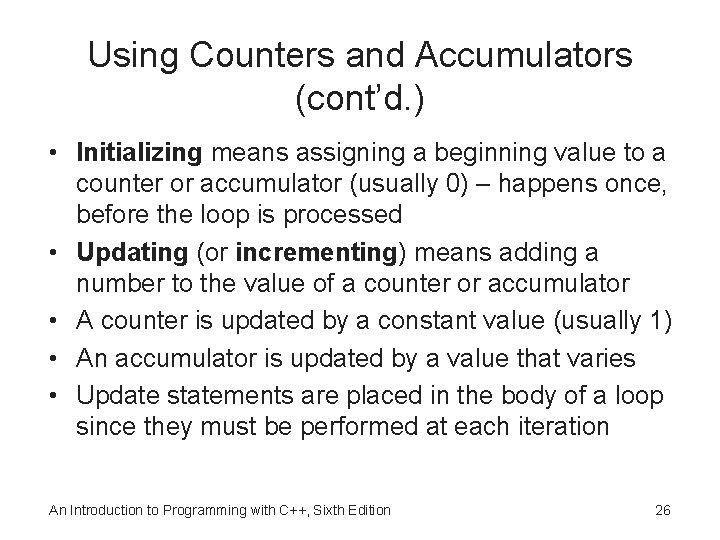
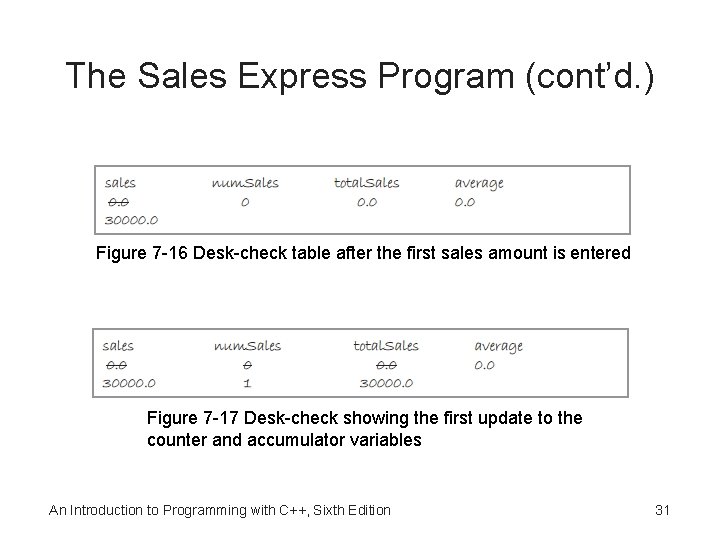
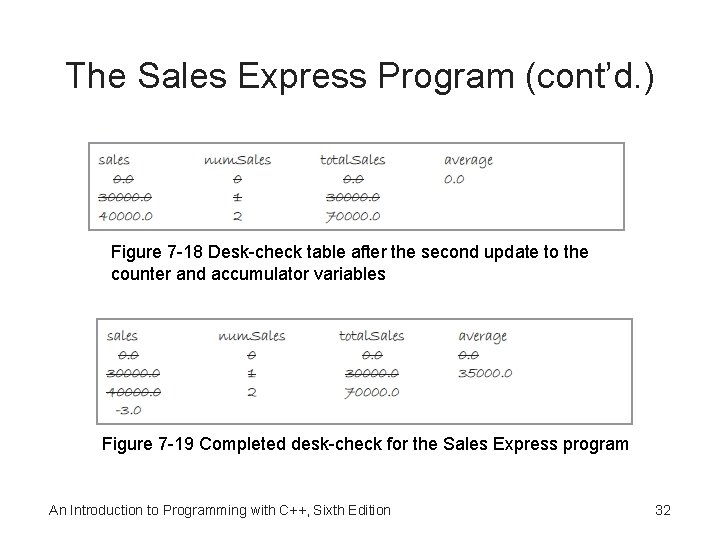
Using Counters and Accumulators (cont’d. ) • Initializing means assigning a beginning value to a counter or accumulator (usually 0) – happens once, before the loop is processed • Updating (or incrementing) means adding a number to the value of a counter or accumulator • A counter is updated by a constant value (usually 1) • An accumulator is updated by a value that varies • Update statements are placed in the body of a loop since they must be performed at each iteration An Introduction to Programming with C++, Sixth Edition 26
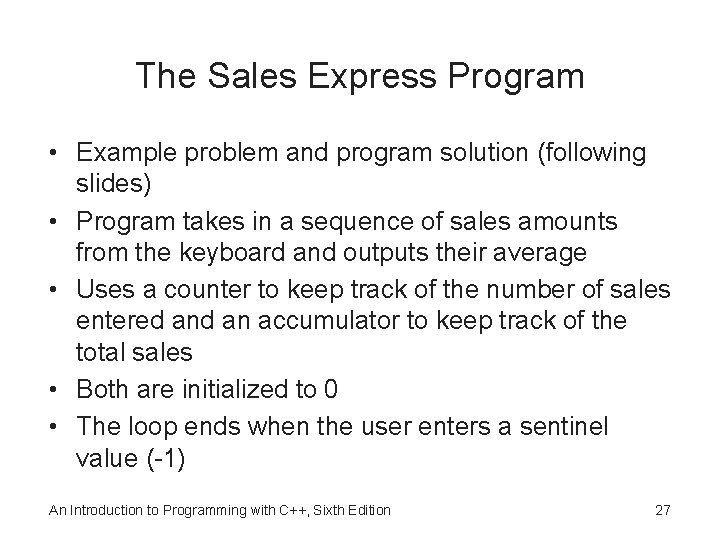
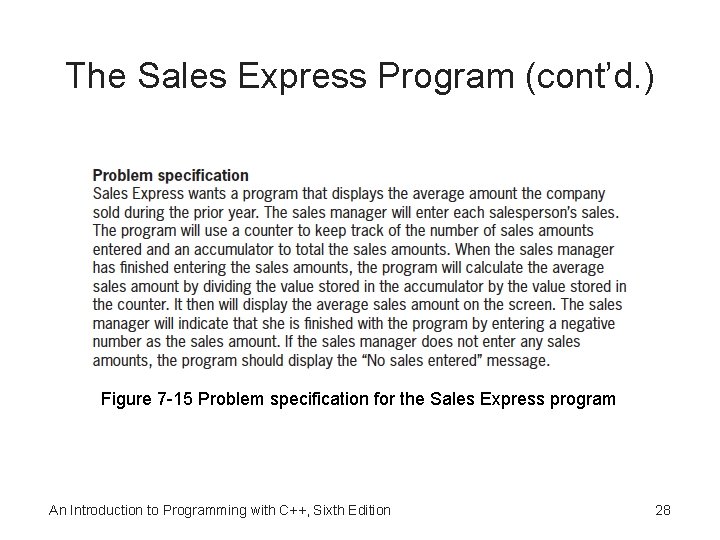
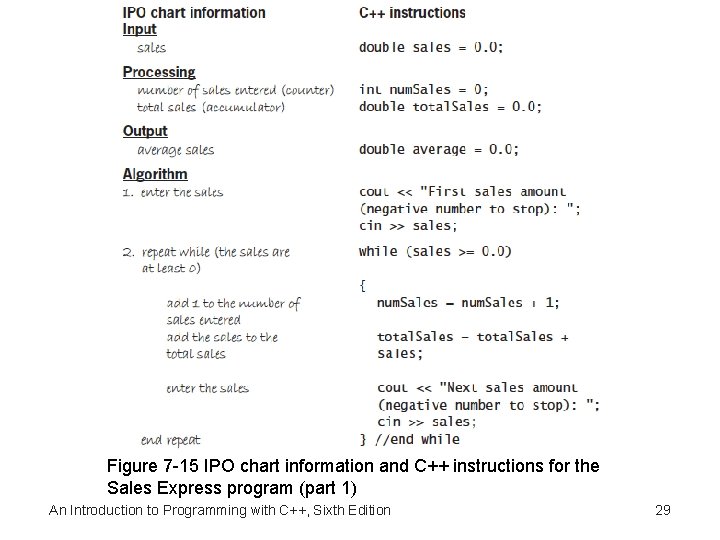
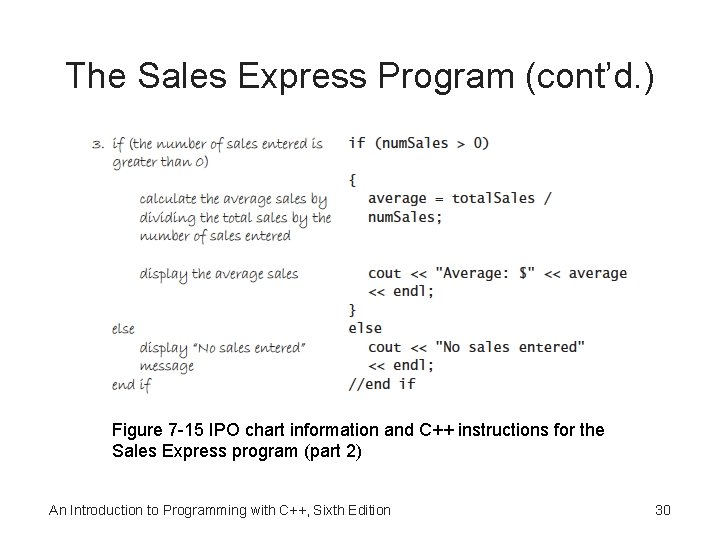
The Sales Express Program • Example problem and program solution (following slides) • Program takes in a sequence of sales amounts from the keyboard and outputs their average • Uses a counter to keep track of the number of sales entered an accumulator to keep track of the total sales • Both are initialized to 0 • The loop ends when the user enters a sentinel value (-1) An Introduction to Programming with C++, Sixth Edition 27
The Sales Express Program (cont’d. ) Figure 7 -15 Problem specification for the Sales Express program An Introduction to Programming with C++, Sixth Edition 28
Figure 7 -15 IPO chart information and C++ instructions for the Sales Express program (part 1) An Introduction to Programming with C++, Sixth Edition 29
The Sales Express Program (cont’d. ) Figure 7 -15 IPO chart information and C++ instructions for the Sales Express program (part 2) An Introduction to Programming with C++, Sixth Edition 30
The Sales Express Program (cont’d. ) Figure 7 -16 Desk-check table after the first sales amount is entered Figure 7 -17 Desk-check showing the first update to the counter and accumulator variables An Introduction to Programming with C++, Sixth Edition 31
The Sales Express Program (cont’d. ) Figure 7 -18 Desk-check table after the second update to the counter and accumulator variables Figure 7 -19 Completed desk-check for the Sales Express program An Introduction to Programming with C++, Sixth Edition 32
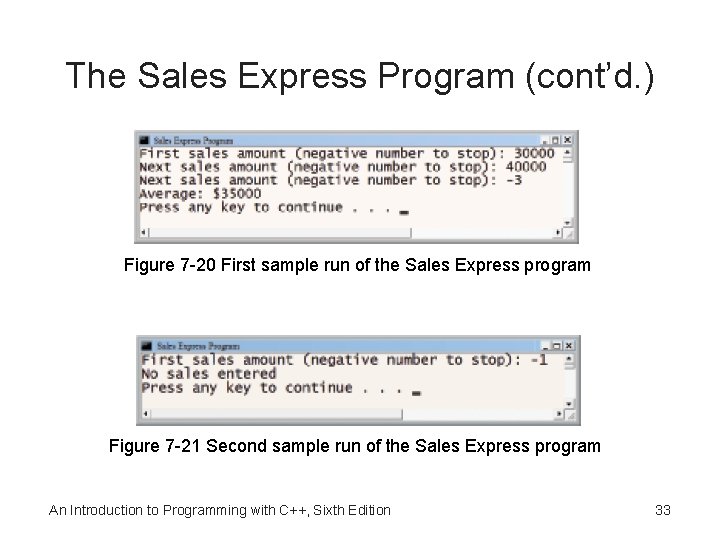
The Sales Express Program (cont’d. ) Figure 7 -20 First sample run of the Sales Express program Figure 7 -21 Second sample run of the Sales Express program An Introduction to Programming with C++, Sixth Edition 33
Counter-Controlled Pretest Loops • Loops can be controlled using a counter rather than a sentinel value • These are called counter-controlled loops • Example problem and program solution (following slides) • Counter-controlled loop is used that totals the quarterly sales from three regions • Loop repeats three times, once for each region, using a counter to keep track An Introduction to Programming with C++, Sixth Edition 34
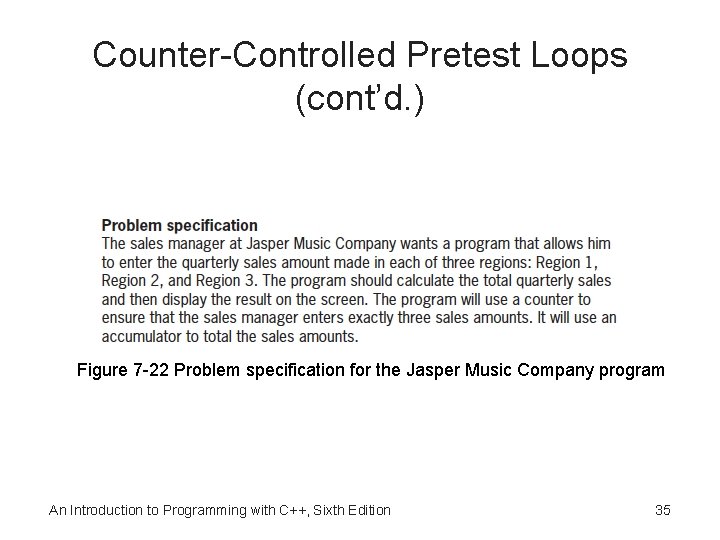
Counter-Controlled Pretest Loops (cont’d. ) Figure 7 -22 Problem specification for the Jasper Music Company program An Introduction to Programming with C++, Sixth Edition 35
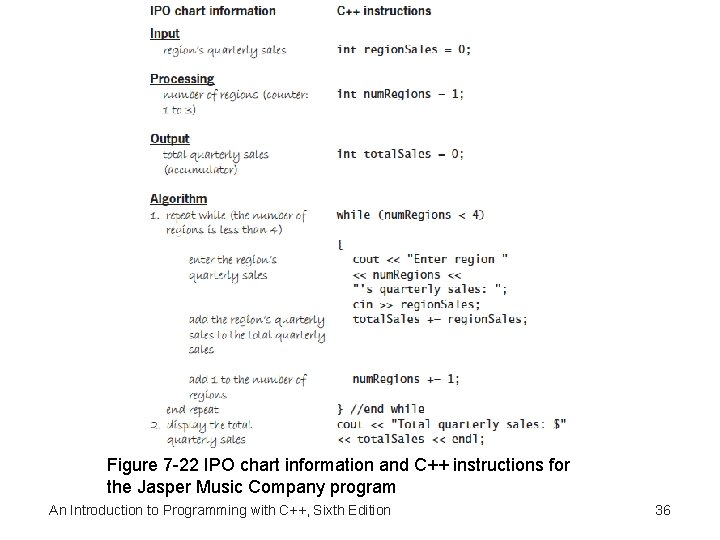
Figure 7 -22 IPO chart information and C++ instructions for the Jasper Music Company program An Introduction to Programming with C++, Sixth Edition 36
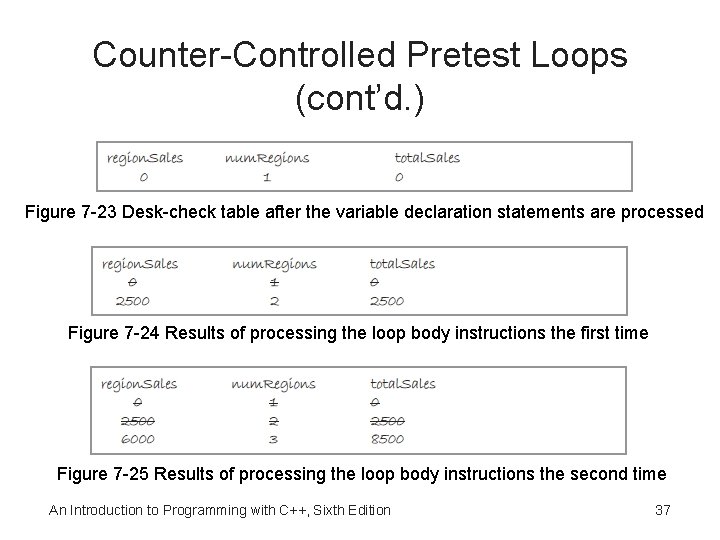
Counter-Controlled Pretest Loops (cont’d. ) Figure 7 -23 Desk-check table after the variable declaration statements are processed Figure 7 -24 Results of processing the loop body instructions the first time Figure 7 -25 Results of processing the loop body instructions the second time An Introduction to Programming with C++, Sixth Edition 37
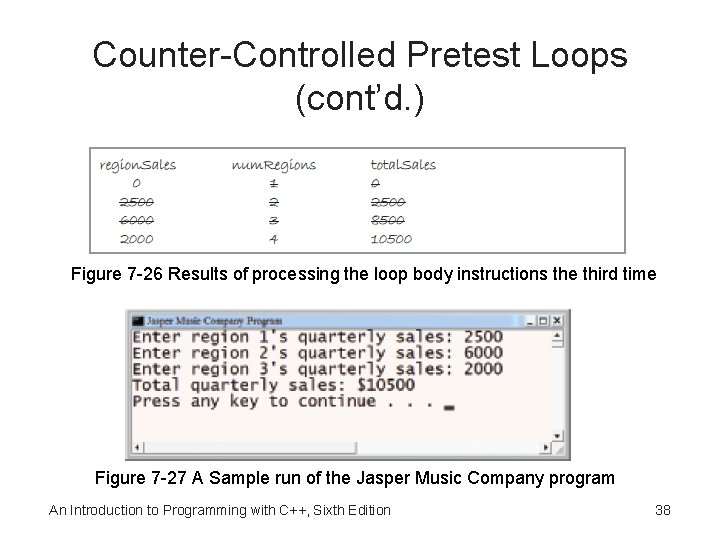
Counter-Controlled Pretest Loops (cont’d. ) Figure 7 -26 Results of processing the loop body instructions the third time Figure 7 -27 A Sample run of the Jasper Music Company program An Introduction to Programming with C++, Sixth Edition 38
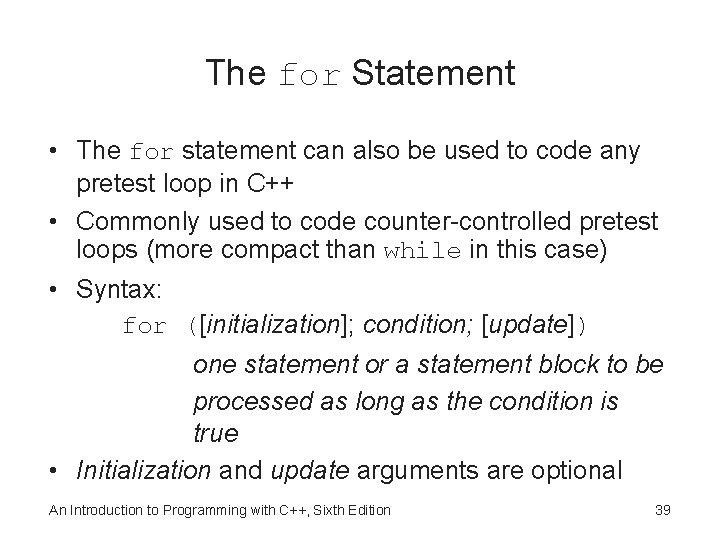
The for Statement • The for statement can also be used to code any pretest loop in C++ • Commonly used to code counter-controlled pretest loops (more compact than while in this case) • Syntax: for ([initialization]; condition; [update]) one statement or a statement block to be processed as long as the condition is true • Initialization and update arguments are optional An Introduction to Programming with C++, Sixth Edition 39
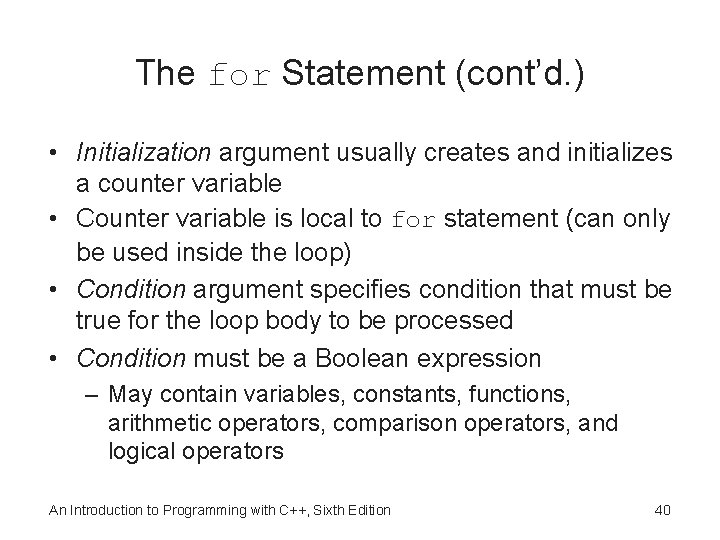
The for Statement (cont’d. ) • Initialization argument usually creates and initializes a counter variable • Counter variable is local to for statement (can only be used inside the loop) • Condition argument specifies condition that must be true for the loop body to be processed • Condition must be a Boolean expression – May contain variables, constants, functions, arithmetic operators, comparison operators, and logical operators An Introduction to Programming with C++, Sixth Edition 40
The for Statement (cont’d. ) • Loop ends when condition evaluates to false • Update argument usually contains an expression that updates the counter variable • Loop body follows the for clause – Must be placed in braces if it contains more than one statement – Braces can be used even if the loop body contains only one statement • Good programming practice to place a comment, such as //end for, to mark the end of a for loop An Introduction to Programming with C++, Sixth Edition 41
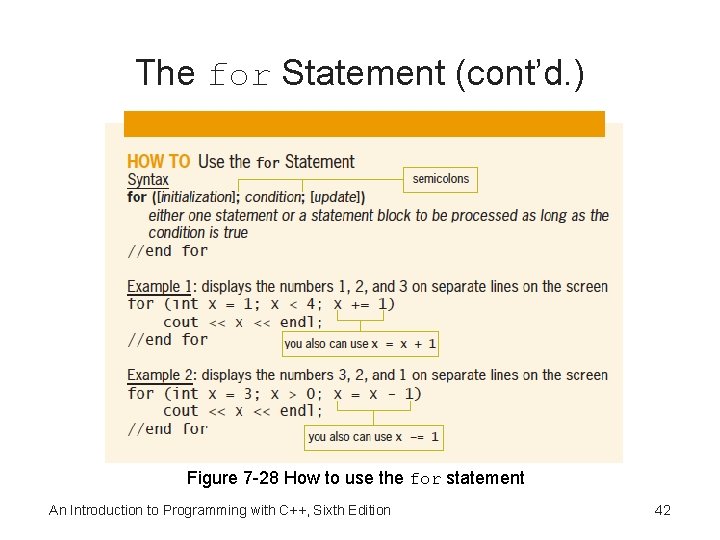
The for Statement (cont’d. ) Figure 7 -28 How to use the for statement An Introduction to Programming with C++, Sixth Edition 42
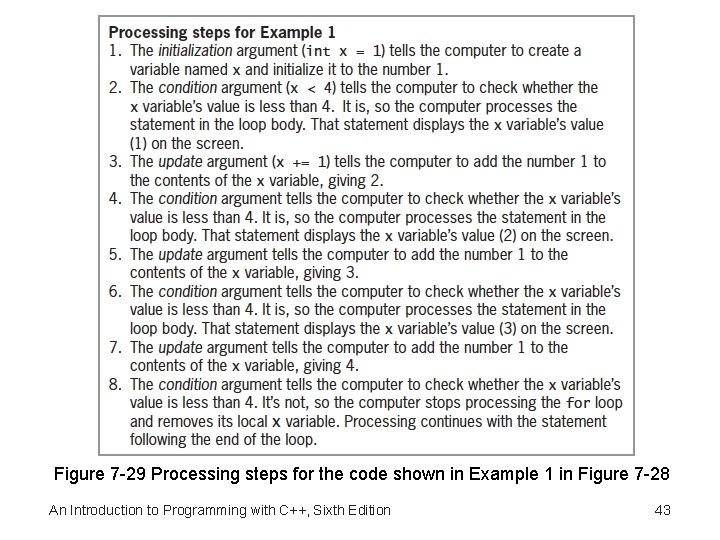
Figure 7 -29 Processing steps for the code shown in Example 1 in Figure 7 -28 An Introduction to Programming with C++, Sixth Edition 43
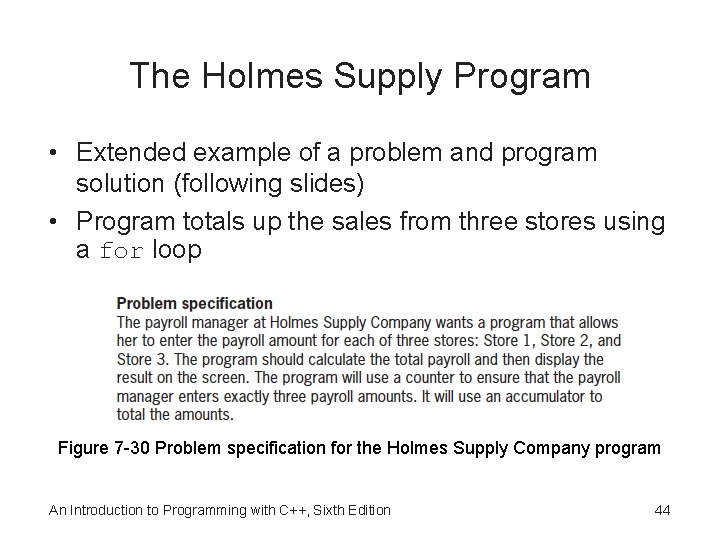
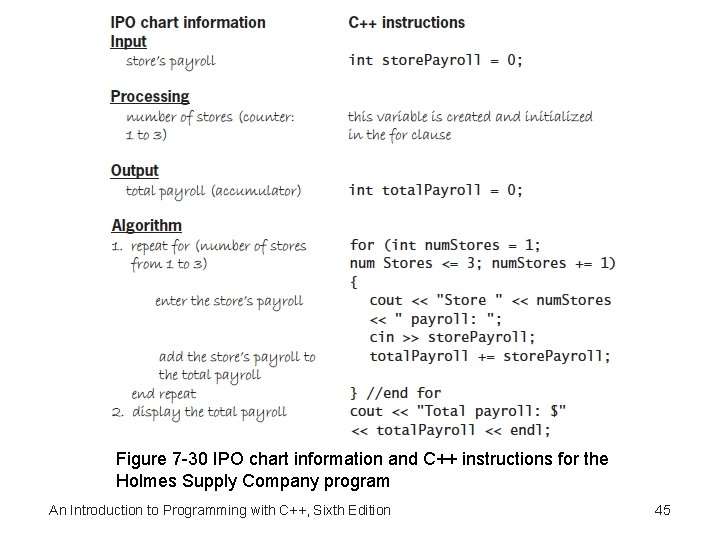
The Holmes Supply Program • Extended example of a problem and program solution (following slides) • Program totals up the sales from three stores using a for loop Figure 7 -30 Problem specification for the Holmes Supply Company program An Introduction to Programming with C++, Sixth Edition 44
Figure 7 -30 IPO chart information and C++ instructions for the Holmes Supply Company program An Introduction to Programming with C++, Sixth Edition 45
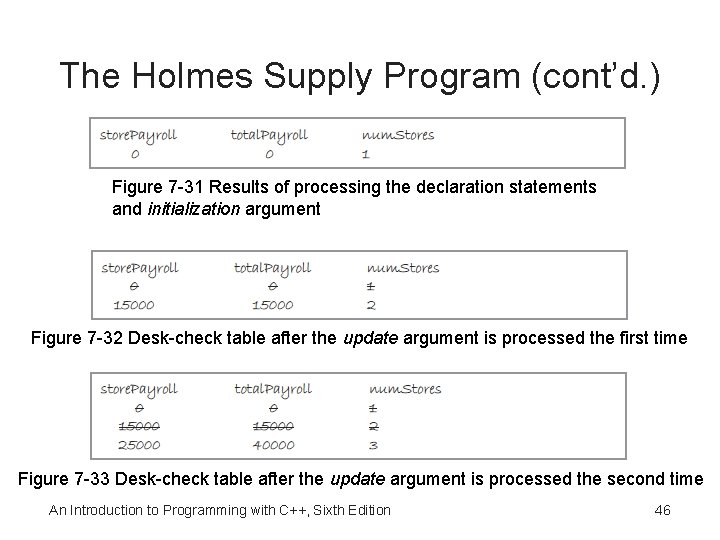
The Holmes Supply Program (cont’d. ) Figure 7 -31 Results of processing the declaration statements and initialization argument Figure 7 -32 Desk-check table after the update argument is processed the first time Figure 7 -33 Desk-check table after the update argument is processed the second time An Introduction to Programming with C++, Sixth Edition 46
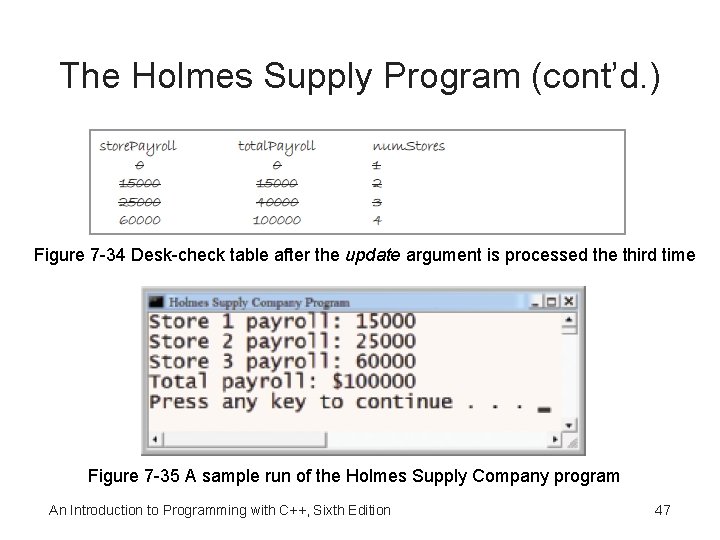
The Holmes Supply Program (cont’d. ) Figure 7 -34 Desk-check table after the update argument is processed the third time Figure 7 -35 A sample run of the Holmes Supply Company program An Introduction to Programming with C++, Sixth Edition 47
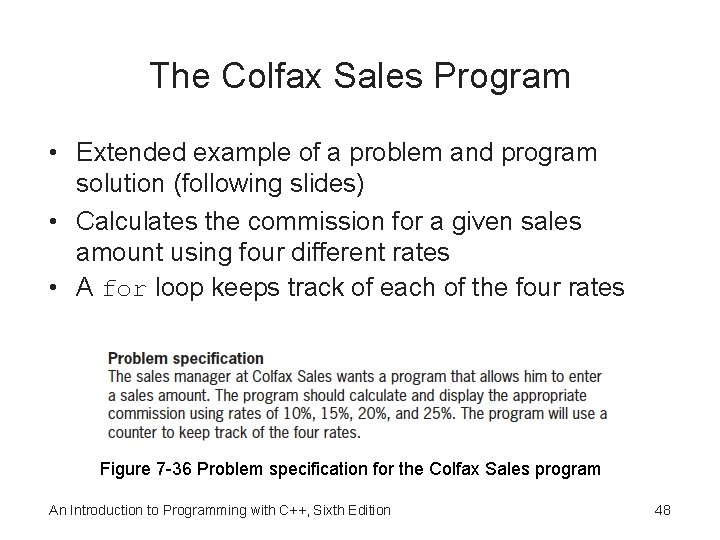
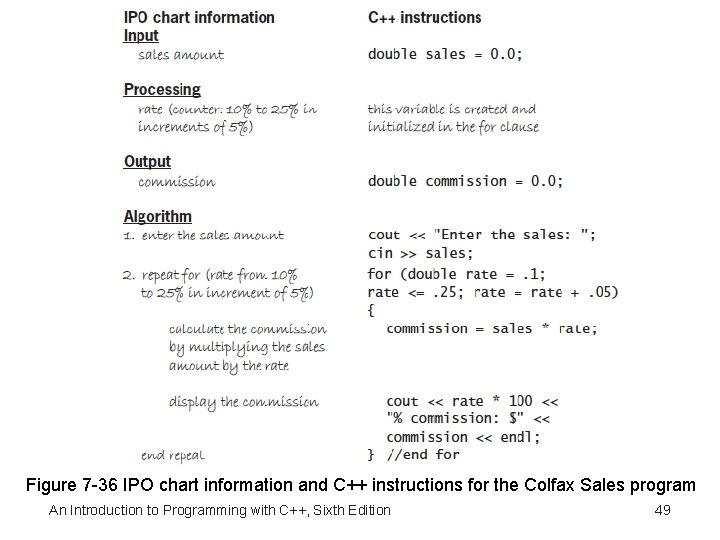
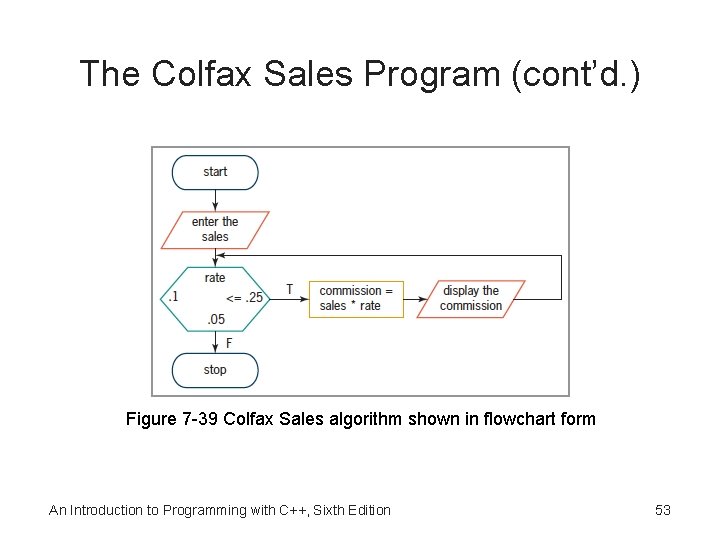
The Colfax Sales Program • Extended example of a problem and program solution (following slides) • Calculates the commission for a given sales amount using four different rates • A for loop keeps track of each of the four rates Figure 7 -36 Problem specification for the Colfax Sales program An Introduction to Programming with C++, Sixth Edition 48
Figure 7 -36 IPO chart information and C++ instructions for the Colfax Sales program An Introduction to Programming with C++, Sixth Edition 49
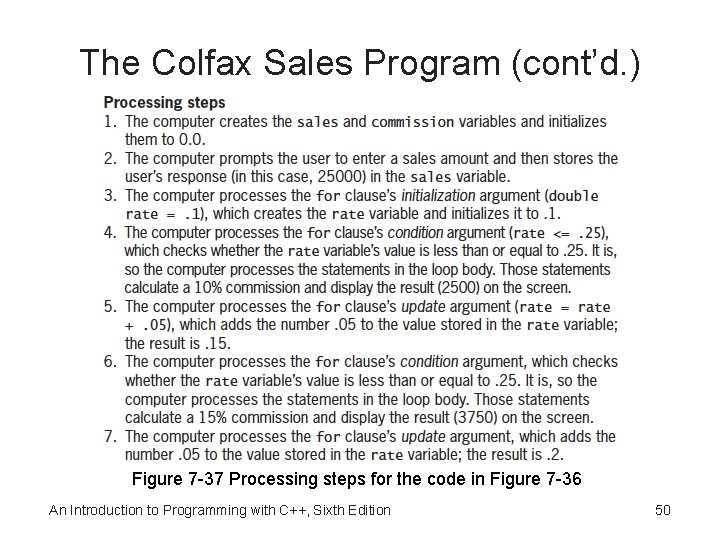
The Colfax Sales Program (cont’d. ) Figure 7 -37 Processing steps for the code in Figure 7 -36 An Introduction to Programming with C++, Sixth Edition 50
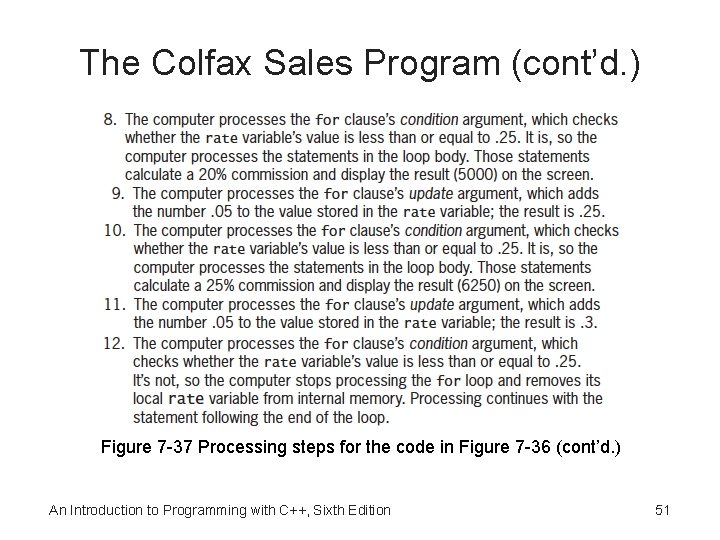
The Colfax Sales Program (cont’d. ) Figure 7 -37 Processing steps for the code in Figure 7 -36 (cont’d. ) An Introduction to Programming with C++, Sixth Edition 51
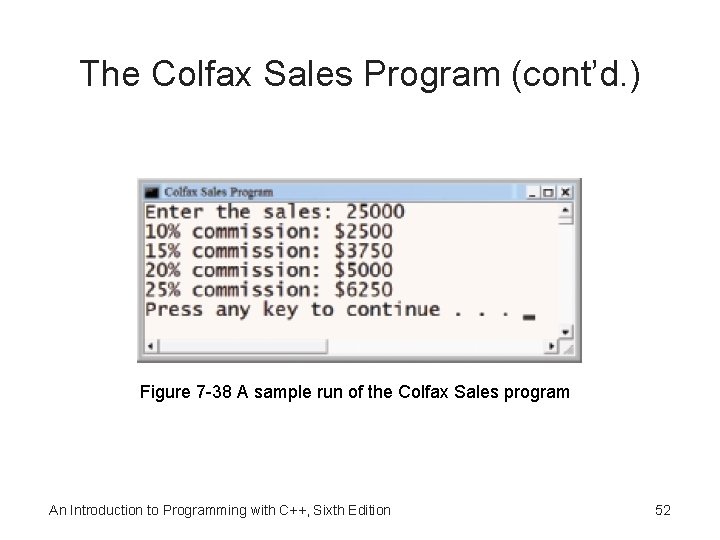
The Colfax Sales Program (cont’d. ) Figure 7 -38 A sample run of the Colfax Sales program An Introduction to Programming with C++, Sixth Edition 52
The Colfax Sales Program (cont’d. ) Figure 7 -39 Colfax Sales algorithm shown in flowchart form An Introduction to Programming with C++, Sixth Edition 53
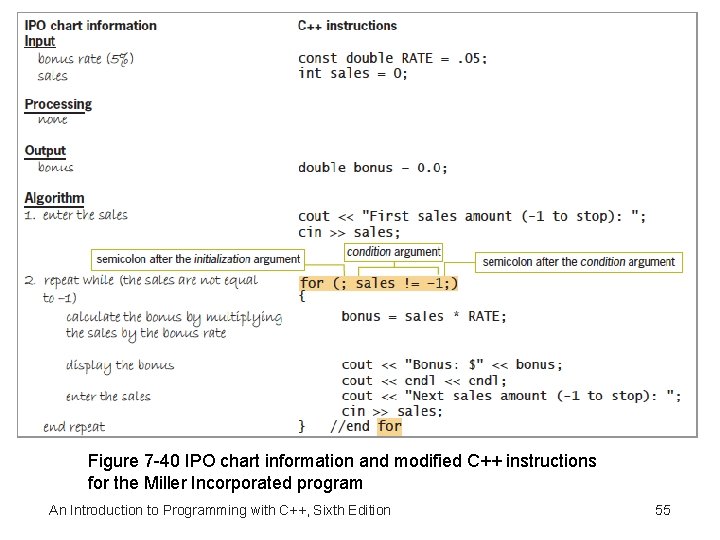
Another Version of the Miller Incorporated Program • Alternative version of the Miller Incorporated program (following slides) • Uses a for loop instead of a while loop An Introduction to Programming with C++, Sixth Edition 54
Figure 7 -40 IPO chart information and modified C++ instructions for the Miller Incorporated program An Introduction to Programming with C++, Sixth Edition 55
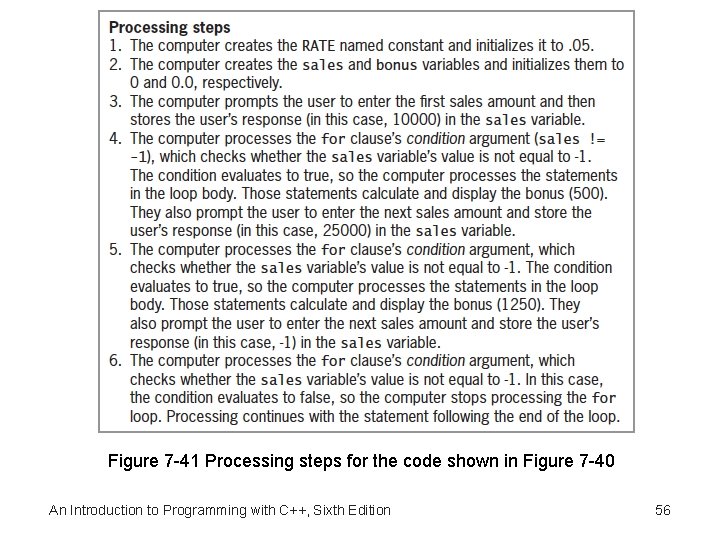
Figure 7 -41 Processing steps for the code shown in Figure 7 -40 An Introduction to Programming with C++, Sixth Edition 56
Summary • Use the repetition structure (or loop) to repeatedly process one or more instructions • Loop repeats as long as looping condition is true (or until loop exit condition has been met) • A repetition structure can be pretest or posttest • In a pretest loop, the loop condition is evaluated before instructions in loop body are processed • In a posttest loop, the evaluation occurs after instructions in loop body are processed An Introduction to Programming with C++, Sixth Edition 57
Summary (cont’d. ) • Condition appears at the beginning of a pretest loop – must be a Boolean expression • If condition evaluates to true, the instructions in the loop body are processed; otherwise, the loop body instructions are skipped • Some loops require the user to enter a special sentinel value to end the loop • Sentinel values should be easily distinguishable from valid data recognized by the program • Other loops are terminated by using a counter An Introduction to Programming with C++, Sixth Edition 58
Summary (cont’d. ) • Input instruction that appears above a pretest loop’s condition is the priming read – Sets up the loop by getting first value from user • Input instruction that appears within the loop is the update read – Gets the remaining values (if any) from user • In most flowcharts, diamond (decision symbol) is used to represent a repetition structure’s condition An Introduction to Programming with C++, Sixth Edition 59
Summary (cont’d. ) • Counters and accumulators are used in repetition structures to calculate totals and averages • All counters and accumulators must be initialized and updated • Counters are updated by a constant value • Accumulators are updated by a variable amount • You can use either the while statement or the for statement to code a pretest loop in C++ An Introduction to Programming with C++, Sixth Edition 60
Lab 7 -1: Stop and Analyze • Study the program in Figure 7 -42 and answer the questions • The program calculates the average outside temperature An Introduction to Programming with C++, Sixth Edition 61
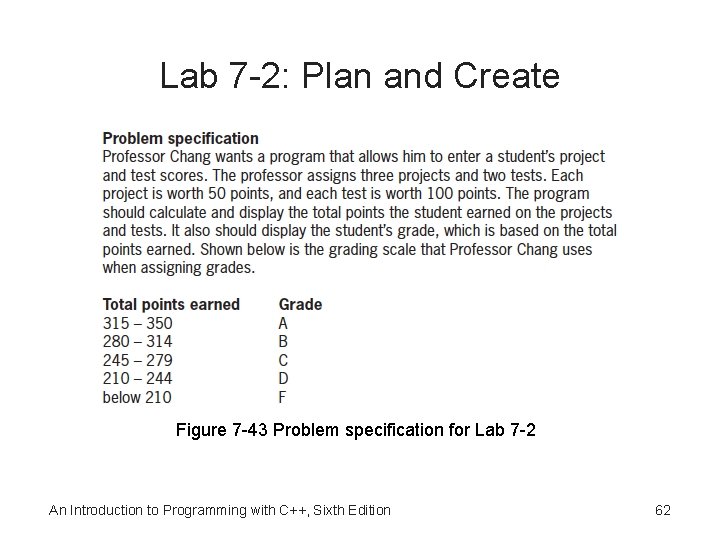
Lab 7 -2: Plan and Create Figure 7 -43 Problem specification for Lab 7 -2 An Introduction to Programming with C++, Sixth Edition 62
Lab 7 -3: Modify • Modify the program in Lab 7 -2 to display the total number of scores entered • Test the program using scores 45, 40, 41, 96, 89, and sentinel value -1 • Test the program again using scores 25, 500 (a mistake, instead of 50), 38, -500 (to correct the mistake), 50, 64, 78, and -1 • Does the program display the correct total points earned and grade? • How many scores does the program say were entered? An Introduction to Programming with C++, Sixth Edition 63
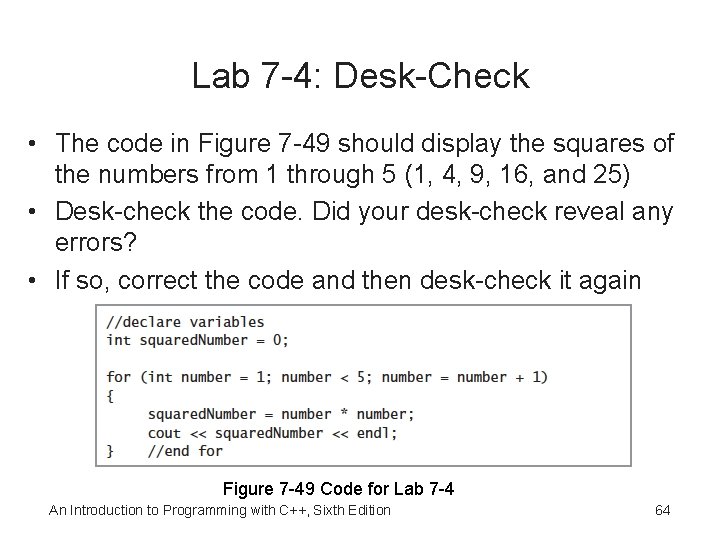
Lab 7 -4: Desk-Check • The code in Figure 7 -49 should display the squares of the numbers from 1 through 5 (1, 4, 9, 16, and 25) • Desk-check the code. Did your desk-check reveal any errors? • If so, correct the code and then desk-check it again Figure 7 -49 Code for Lab 7 -4 An Introduction to Programming with C++, Sixth Edition 64
Lab 7 -5: Debug • Follow the instructions for starting C++ and opening the Lab 7 -5. cpp file • Run the program and enter 15. 45 when prompted • The program goes into an infinite loop • Type Ctrl+c to end the program • Debug the program An Introduction to Programming with C++, Sixth Edition 65