
An Introduction to Programming Using Alice 2 2















- Slides: 57
An Introduction to Programming Using Alice 2. 2, Second Edition Chapter 3 Events
Objectives After finishing this chapter, you should be able to: • Provide a brief definition of each the following terms: – Graphical User Interface (GUI), command-driven interface, event-driven software, event listener, event trigger, event handler, dimension, quantification, orientation, point of view, absolute direction, objectrelative direction, object-relative position, Cartesian coordinates, ordered pair, Euclidean 3 -space, BDE event format, side effects, tilt, zoom, pan, and framing An Introduction to Programming Using Alice 2. 2, Second Edition 2
Objectives (cont’d. ) • Describe what is meant by event-driven programming, including how event listeners, event triggers, and event handlers work together to make events function • Describe what is meant by an object’s point of view, and list and describe the six object-relative directions and six object-relative positions in Euclidean 3 space An Introduction to Programming Using Alice 2. 2, Second Edition 3
Objectives (cont’d. ) • Describe basic camera operations, including move, pan, tilt, and zoom, and how to implement these in Alice • Create Alice events to allow the user to manipulate objects moving in three dimensional space An Introduction to Programming Using Alice 2. 2, Second Edition 4
Event-Driven Software • Software in which the flow of the program depends on the occurrence of events outside the software • Event listener – Combination of hardware and software that repeatedly checks the computer system for an event trigger • Event trigger – Can be any activity or condition selected by the programmer An Introduction to Programming Using Alice 2. 2, Second Edition 5
Event-Driven Software (cont’d. ) • Event handler – Method that is activated when the event trigger occurs • Event handler is called into action: – When the event listener detects an event trigger An Introduction to Programming Using Alice 2. 2, Second Edition 6
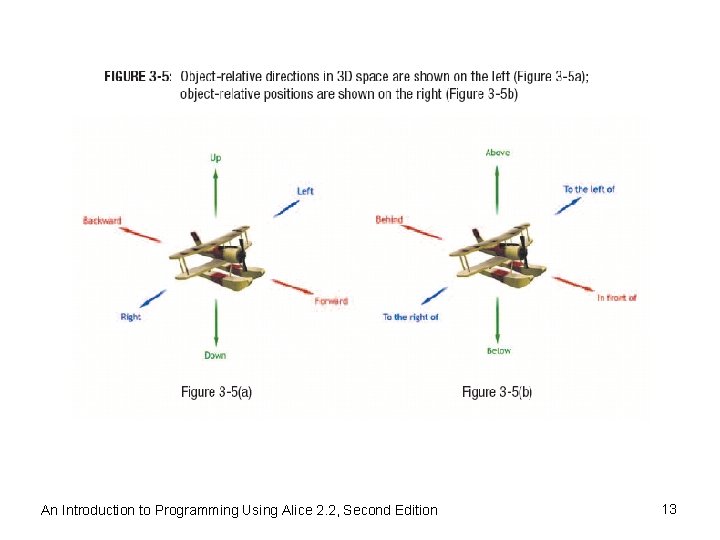
Three-Dimensional Space • Dimension – A way of measuring something • Quantification – Assigning a value on a continuous scale to some property • Orientation – The direction an object is facing • Point of view of an object – Location and orientation together An Introduction to Programming Using Alice 2. 2, Second Edition 7
An Introduction to Programming Using Alice 2. 2, Second Edition 8
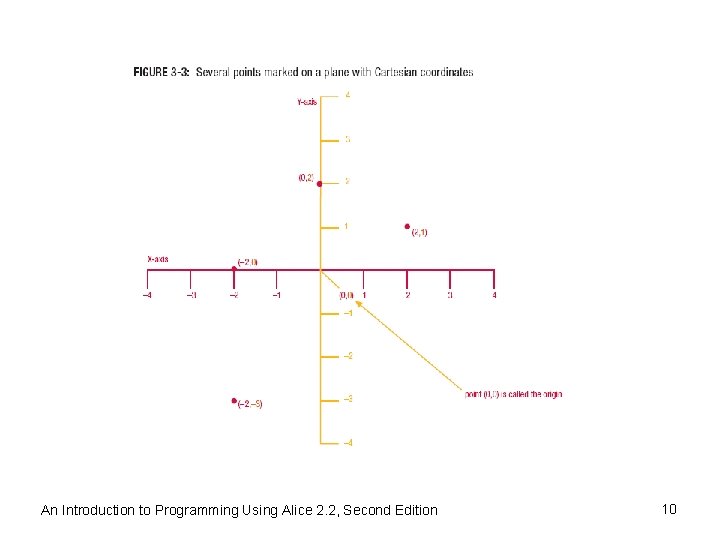
Three-Dimensional Space (cont’d. ) • Absolute direction – In relation to a scale of measurement • Object-relative direction – From the point of view of another object • Cartesian coordinates – Have an X-axis and a Y-axis • Ordered pair – Any pair in which one dimension is always listed first, and another dimension is always listed second An Introduction to Programming Using Alice 2. 2, Second Edition 9
An Introduction to Programming Using Alice 2. 2, Second Edition 10
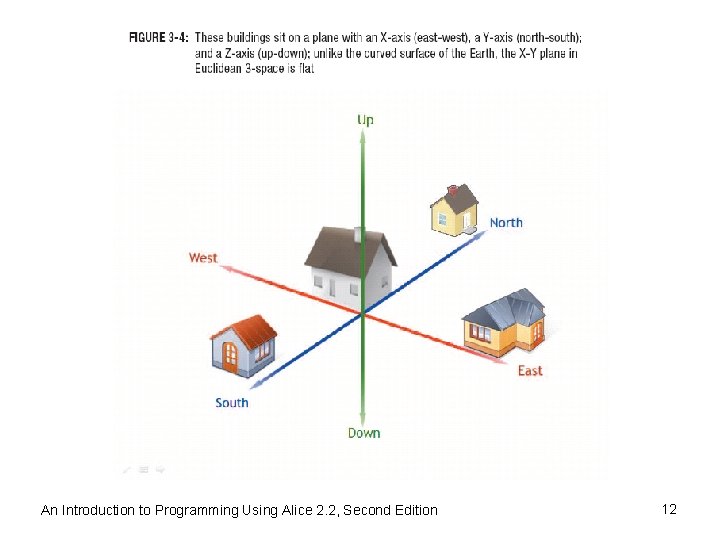
Three-Dimensional Space (cont’d. ) • Moving up or down off a flat plane – Requires a third axis and a third number to indicate how far a point is above or below the plane • Euclidean 3 -space – A three-dimensional space • In Alice’s Euclidean 3 -space, there are: – Six object-relative directions, one opposing pair of directions for each axis – Six object-relative positions An Introduction to Programming Using Alice 2. 2, Second Edition 11
An Introduction to Programming Using Alice 2. 2, Second Edition 12
An Introduction to Programming Using Alice 2. 2, Second Edition 13
Tutorial 3 A – Events in Alice • Exploring events – Start the Alice software and open the amusement. Park example world – Play the world and use the arrow keys to move the camera around to look at the various parts of the amusement park An Introduction to Programming Using Alice 2. 2, Second Edition 14
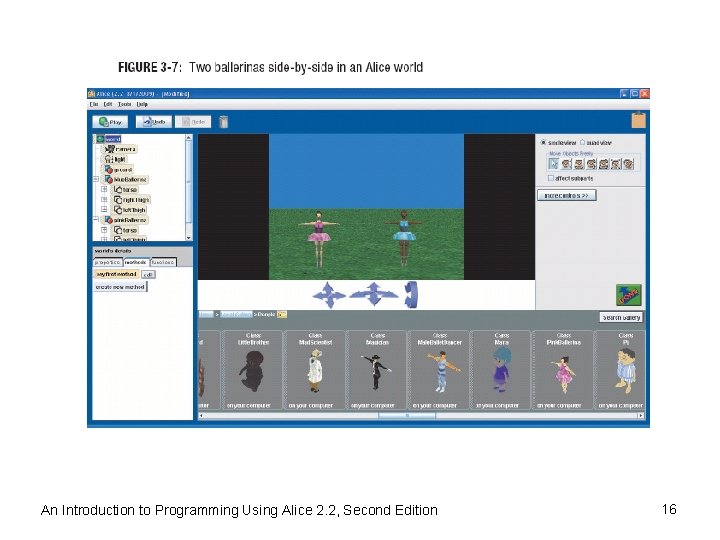
Tutorial 3 A – Events in Alice (cont’d. ) • Creating a sample world for event exploration – Exit Alice and restart the Alice software with a blank world using the grass template – Click the green ADD OBJECTS button and add a blue. Ballerina and a pink. Ballerina to the world from the People folder in the Local Gallery – Move the ballerinas apart from each other and turn them to face the camera – Click the DONE button to exit Scene Editor mode An Introduction to Programming Using Alice 2. 2, Second Edition 15
An Introduction to Programming Using Alice 2. 2, Second Edition 16
Tutorial 3 A – Events in Alice (cont’d. ) • Creating a sample world for event exploration (cont’d. ) – Click the world tile in the Object tree, and then click the methods tab in the Details area – Now click the create new method button, and when the dialog box appears, name the method both. Spin, and then click OK – Click and drag a Do together tile from the bottom of the Editor area into the instruction zone to replace the phrase Do Nothing in the world. both spin method – Click the blue. Ballerina tile in the Object tree and then the methods tab in the Details area An Introduction to Programming Using Alice 2. 2, Second Edition 17
Tutorial 3 A – Events in Alice (cont’d. ) • Creating a sample world for event exploration (cont’d. ) – Drag and drop a blue. Ballerina turn method tile from the Details area into the do together tile in the world. both spin method – Choose left and 1 revolution as values for the direction and amount parameters – Click the pink. Ballerina tile in the Object tree and drag and drop a pink. Ballerina turn tile into the world. both. Spin method below the blue. Ballerina turn tile An Introduction to Programming Using Alice 2. 2, Second Edition 18
Tutorial 3 A – Events in Alice (cont’d. ) • Creating a sample world for event exploration (cont’d. ) – Choose left and 1 revolution as values for the direction and amount parameters – Click the pink. Ballerina tile in the Object tree and drag and drop a pink. Ballerina turn tile into the world. both. Spin method below the blue. Ballerina turn tile – Choose the same values, left and 1 revolution, for the direction and amount parameters An Introduction to Programming Using Alice 2. 2, Second Edition 19
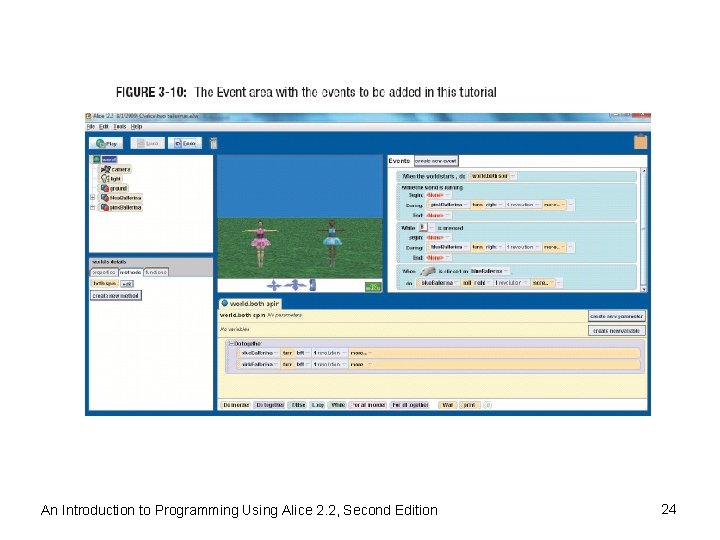
Tutorial 3 A – Events in Alice (cont’d. ) • Creating a sample world for event exploration (cont’d. ) – Make sure that world is selected in the Object tree and that the methods tab is selected in the Details area – Drag the both. Spin tile from the methods tab into the Events area and drop it in place of the world. my first method in the default event An Introduction to Programming Using Alice 2. 2, Second Edition 20
Tutorial 3 A – Events in Alice (cont’d. ) • Creating a sample world for event exploration (cont’d. ) – Drag the world. my first method tile from the methods tab and drop it in the trash can – Play the world – Save the world using the name two ballerinas An Introduction to Programming Using Alice 2. 2, Second Edition 21
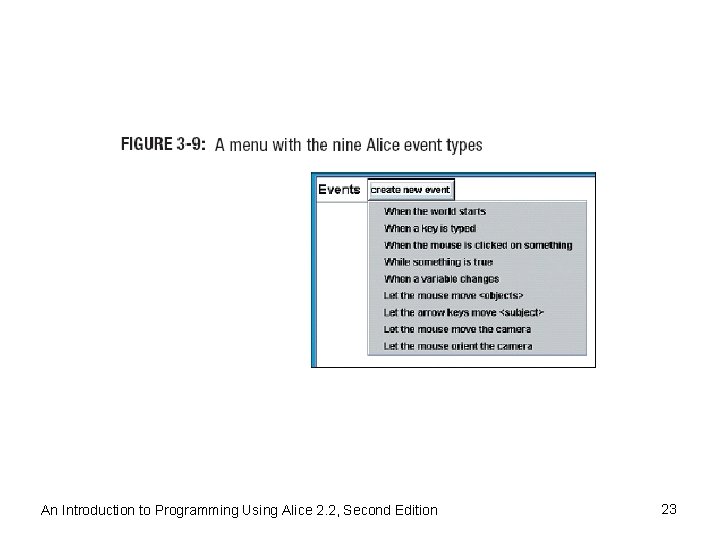
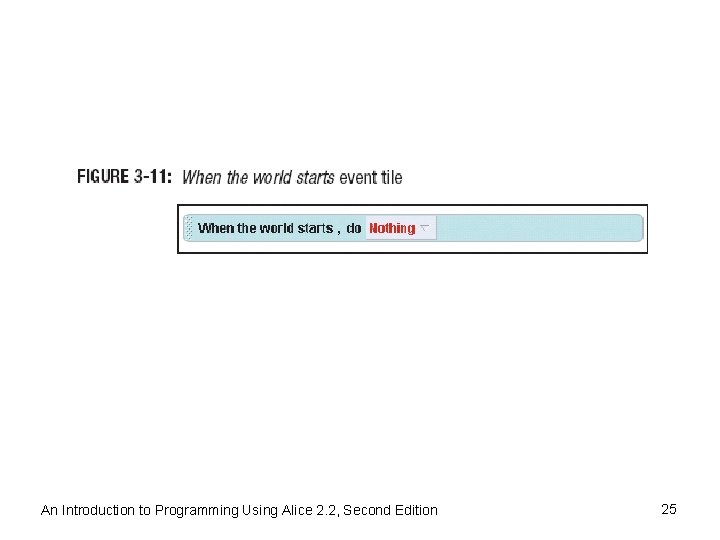
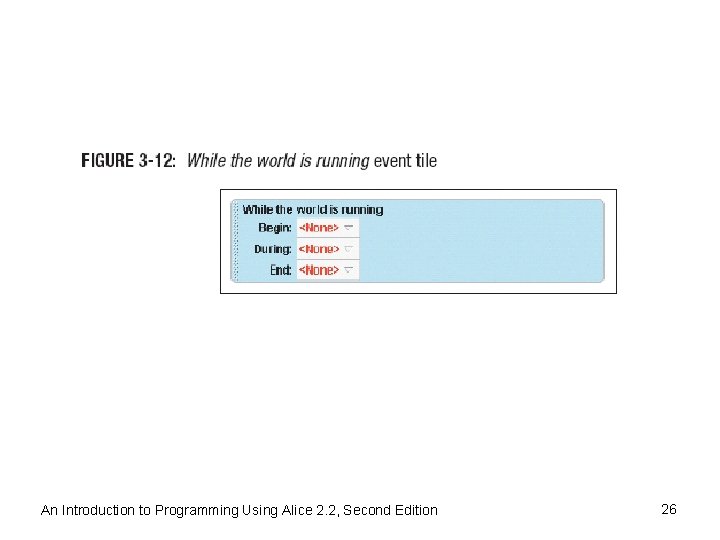
Tutorial 3 A – Events in Alice (cont’d. ) • Alice event types – A list of the nine event types in Alice appears • Whenever the create new event button is clicked – Experiment with a few of the event types • Click the create new event button, and then click When the world starts • You can change the form of the When the world starts event to make a method run continuously while the world is playing; to do so, right-click the new event tile • Click change to, then click While the world is running An Introduction to Programming Using Alice 2. 2, Second Edition 22
An Introduction to Programming Using Alice 2. 2, Second Edition 23
An Introduction to Programming Using Alice 2. 2, Second Edition 24
An Introduction to Programming Using Alice 2. 2, Second Edition 25
An Introduction to Programming Using Alice 2. 2, Second Edition 26
Tutorial 3 A – Events in Alice (cont’d. ) • Alice event types (cont’d. ) – Experiment with a few of the event types (cont’d. ) • You are going to make the pink ballerina spin to her right while the world is running • Click the pink. Ballerina tile in the Object tree, drag a pink. Ballerina turn tile from the methods tab, and drop it into the event tile in place of None following the phrase During • Choose the values left and 1 revolution for the direction and amount parameters An Introduction to Programming Using Alice 2. 2, Second Edition 27
Tutorial 3 A – Events in Alice (cont’d. ) • Alice event types (cont’d. ) – Experiment with a few of the event types (cont’d. ) • Play the world again • Change the direction of the spin to right in the while the world is running method and then run the world again • Now what happens? An Introduction to Programming Using Alice 2. 2, Second Edition 28
Tutorial 3 A – Events in Alice (cont’d. ) • The When a key is typed event – Will cause a method to run whenever a particular key is pressed – Click the create new event button again, and this time click When a key is typed from the menu that appears – Click the any key box – Select letters from the menu and then the letter B for blue as the trigger key for this event – Click the blue. Ballerina tile in the Object tree and then click the methods tab in the Details area An Introduction to Programming Using Alice 2. 2, Second Edition 29
Tutorial 3 A – Events in Alice (cont’d. ) • The When a key is typed event (cont’d. ) – Drag a blue. Ballerina turn method tile from the Details area and drop it into the event tile in place of Nothing – Choose right and 1 revolution as values for the direction and amount parameters – Play the Alice world – Wait at least one second until the opening move is complete, and then try the B key a few times An Introduction to Programming Using Alice 2. 2, Second Edition 30
Tutorial 3 A – Events in Alice (cont’d. ) • The While a key is pressed event – Right-click the When B is pressed event tile's blue background, select change to, and then click While a key is pressed – Drag and drop a blue. Ballerina turn tile into place after During with the values right and 1 revolution as parameters – Play the world again An Introduction to Programming Using Alice 2. 2, Second Edition 31
Tutorial 3 A – Events in Alice (cont’d. ) • The When the Mouse Is Clicked on Anything event – Click the create new event button, and select When the mouse is clicked on something – Click the word anything in the new event tile – Select blue. Ballerina, the entire blue. Ballerina as the target object – Make sure that the: • blue. Ballerina is selected in the Object tree • methods tab is selected in the Details area An Introduction to Programming Using Alice 2. 2, Second Edition 32
Tutorial 3 A – Events in Alice (cont’d. ) • The When the Mouse Is Clicked on Anything event (cont’d. ) – Drag the blue. Ballerina roll tile from the methods tab and drop it to replace Nothing in the event tile – Choose the values right and 1 revolution for the direction and amount parameters – Play the world and try the new method An Introduction to Programming Using Alice 2. 2, Second Edition 33
Tutorial 3 A – Events in Alice (cont’d. ) • Additional notes about mouse events – You can change the When the mouse is clicked on anything event to be While the mouse is pressed on anything, with the BDE format – Let the mouse move <objects> event type • Lets users change the position of an object while a world is running An Introduction to Programming Using Alice 2. 2, Second Edition 34
Tutorial 3 B – Building Camera Controls with Events • Open an existing world – Start the Alice software – Open the lake. Skater. Demo. Start world from the Examples tab – Once the world loads: • You can see the world window with three sets of blue arrows below it to manipulate the camera An Introduction to Programming Using Alice 2. 2, Second Edition 35
An Introduction to Programming Using Alice 2. 2, Second Edition 36
Tutorial 3 B – Building Camera Controls with Events (cont’d. ) • Open an existing world (cont’d. ) – Alice events designed to let us manipulate the camera once a world is running: • Let the mouse orient the camera • Let the mouse move the camera • Let the arrow keys move the camera An Introduction to Programming Using Alice 2. 2, Second Edition 37
Tutorial 3 B – Building Camera Controls with Events (cont’d. ) • The Let the Mouse Orient the Camera event – Click the create new event button, and you will see the list of the nine event types in Alice – Select Let the mouse orient the camera, the last item in the list – This event calls a special hidden event handler that will let the user pan the camera with the mouse when an Alice world is running – Play the world and try panning left An Introduction to Programming Using Alice 2. 2, Second Edition 38
Tutorial 3 B – Building Camera Controls with Events (cont’d. ) • The Let the Mouse Move the Camera event – Click the create new event button, and this time click the second-to-last item in the list, Let the mouse move the camera – This event allows the user to pan the camera left and right and move the camera backward and forward – Play the world and then test the new event by dragging the mouse An Introduction to Programming Using Alice 2. 2, Second Edition 39
Tutorial 3 B – Building Camera Controls with Events (cont’d. ) • The Let the Arrow Keys Move the Camera Event – Click the create new event button, and look at the list that appears – Select Let the arrow keys move <subject> – The default value for the subject parameter is the camera – This was the event used to let the user control the camera in the amusement. Park world in Tutorial 3 A – Try it now in this world, and then you are finished with this tutorial An Introduction to Programming Using Alice 2. 2, Second Edition 40
Tutorial 3 C – Building a Flying Machine in Alice • Software specifications – It should contain a flying machine in a somewhat realistic environment – The flying machine should be able to move in threedimensional space – There should be user controls to turn the object up, down, left, and right while the flying machine is in motion – The user should be able to find the flying machine if it moves off camera An Introduction to Programming Using Alice 2. 2, Second Edition 41
Tutorial 3 C – Building a Flying Machine in Alice (cont’d. ) • Refining specifications – Start the Alice software and open a blank world with the grass template – Next, click the ADD OBJECTS button to look at the Alice galleries – Scroll through the Vehicles folder – Let's pick the seaplane, and use the water template – Close the object gallery and note the revision to the first specification, as follows: 1. Create a water world with a seaplane in it An Introduction to Programming Using Alice 2. 2, Second Edition 42
Tutorial 3 C – Building a Flying Machine in Alice (cont’d. ) • Refining specifications (cont’d. ) – The revised first specification: • Create a water world with a seaplane in it: – Select the water template – Add a seaplane to the world – Add a few more items - such as an island or two, and a sailboat – Our revised second specification is: • Create an event - while the world is running: do seaplane move forward one meter An Introduction to Programming Using Alice 2. 2, Second Edition 43
Tutorial 3 C – Building a Flying Machine in Alice (cont’d. ) • Refining specifications (cont’d. ) – Our specification should say: • Create an event: While the world is running do: seaplane move forward one meter, style = abruptly – We need to build the following controls: • • Left arrow to turn left Right arrow to turn right Down arrow to turn down Up arrow to turn up An Introduction to Programming Using Alice 2. 2, Second Edition 44
Tutorial 3 C – Building a Flying Machine in Alice (cont’d. ) • Refining specifications (cont’d. ) – Control event specifications: • Create four turn control events: – When the left arrow key is pressed, turn left 1/8 revolution – When the right arrow key is pressed, turn right 1/8 revolution – When the up arrow key is pressed, turn backward 1/8 revolution – When the down arrow key is pressed, turn forward 1/8 revolution An Introduction to Programming Using Alice 2. 2, Second Edition 45
Tutorial 3 C – Building a Flying Machine in Alice (cont’d. ) • Refining specifications (cont’d. ) – The find the seaplane event specification now looks like this: • Create an event: When the spacebar is • Code the world–specification 1, create a world with a seaplane – Start the Alice software – When the Welcome to Alice! dialog box appears, select the water world from the Templates tab An Introduction to Programming Using Alice 2. 2, Second Edition 46
Tutorial 3 C – Building a Flying Machine in Alice (cont’d. ) • Code the world–specification 1, create a world with a seaplane (cont’d. ) – Once the blank water world opens, click the ADD OBJECTS button, and add a seaplane to the world from the Vehicles folder in the Local Gallery – Also add a sailboat from this gallery and position it somewhere on the water away from the seaplane – Next, add an island or two from the Environment Gallery and position the island(s) in the world – When you are finished setting up the world, click the DONE button An Introduction to Programming Using Alice 2. 2, Second Edition 47
Tutorial 3 C – Building a Flying Machine in Alice (cont’d. ) • Code the world–specification 2, animate the seaplane – Click the create new event button and choose When the world starts for the event type – When the new event appears in the Events area, right -click it – Select change to, then select While the world is running – Make sure that the seaplane is selected in the Object tree and that the methods tab is selected An Introduction to Programming Using Alice 2. 2, Second Edition 48
Tutorial 3 C – Building a Flying Machine in Alice (cont’d. ) • Code the world–specification 2, animate the seaplane (cont’d. ) – Drag and drop a seaplane move tile into the event in place of None following the phrase During – Choose the values forward and 1 meter for the direction and amount parameters – Click the word more, and then select style from the menu that appears – Change the style to abruptly so that the seaplane will move more smoothly An Introduction to Programming Using Alice 2. 2, Second Edition 49
Tutorial 3 C – Building a Flying Machine in Alice (cont’d. ) • Code the world–specification 3, add turn controls – Click the create new event button, and select When a key is typed as the event type – Change the any key parameter to left arrow key – Make sure that the seaplane is selected in the Object tree and that the methods tab is selected in the Details area – Drag and drop a seaplane turn method tile into the new event in place of Nothing following the word Do, and choose the value left for the direction parameter An Introduction to Programming Using Alice 2. 2, Second Edition 50
Tutorial 3 C – Building a Flying Machine in Alice (cont’d. ) • Code the world–specification 3, add turn controls (cont’d. ) – For the amount parameter, select other – Type 1/8 and then click Okay – In a similar manner, create three more events to provide controls to turn right, up, and down An Introduction to Programming Using Alice 2. 2, Second Edition 51
Tutorial 3 C – Building a Flying Machine in Alice (cont’d. ) • Code the world–specification 4, add a find control – Start by clicking the create new event button, and select When a key is typed as the event type – When the new event appears, click the any key parameter and select space from the menu that appears – Make sure that the camera is selected in the Object tree and that the methods tab is selected in the Details area An Introduction to Programming Using Alice 2. 2, Second Edition 52
Tutorial 3 C – Building a Flying Machine in Alice (cont’d. ) • Code the world–specification 4, add a find control (cont’d. ) – Drag and drop a camera point at method tile into your new event in place of Nothing, and select seaplane, the entire seaplane – Save the world with the name seaplane before continuing An Introduction to Programming Using Alice 2. 2, Second Edition 53
Tutorial 3 C – Building a Flying Machine in Alice (cont’d. ) • Test the world – Does the flying machine look like a flying machine in a somewhat realistic environment? – Is it able to move in three-dimensional space? – Are there user controls to turn the object up, down, left, and right while the object is in motion? – Do each of these work properly? – Can the user find the flying machine if it moves off camera? An Introduction to Programming Using Alice 2. 2, Second Edition 54
Tutorial 3 C – Building a Flying Machine in Alice (cont’d. ) • Debug the world – This might be the hardest part of the entire exercise – Isolate the problem and fix it – Usually the problem lies in the code related to the failed specification, but not always An Introduction to Programming Using Alice 2. 2, Second Edition 55
Summary • Modern personal computer – Uses event-driven software for its Graphical User Interface (GUI) • Event – Occurs when an event listener detects an event trigger and responds by running an event handler • Event listener – Combination of hardware and software that repeatedly checks the computer system for the event trigger An Introduction to Programming Using Alice 2. 2, Second Edition 56
Summary (cont’d. ) • Event trigger – Can be any activity or condition that causes an event to occur • Event handler – Method that is activated when the event trigger occurs • Dimension – A way of measuring something • Only one dimension – Needed to measure the location of a point on a straight line An Introduction to Programming Using Alice 2. 2, Second Edition 57