
Alteon Web Switch Administration Guide 12 p 18

Alteon Web Switch Administration Guide
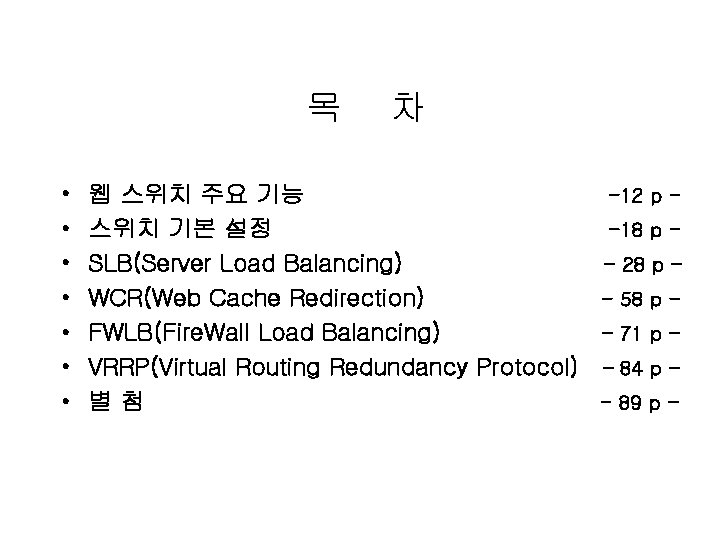
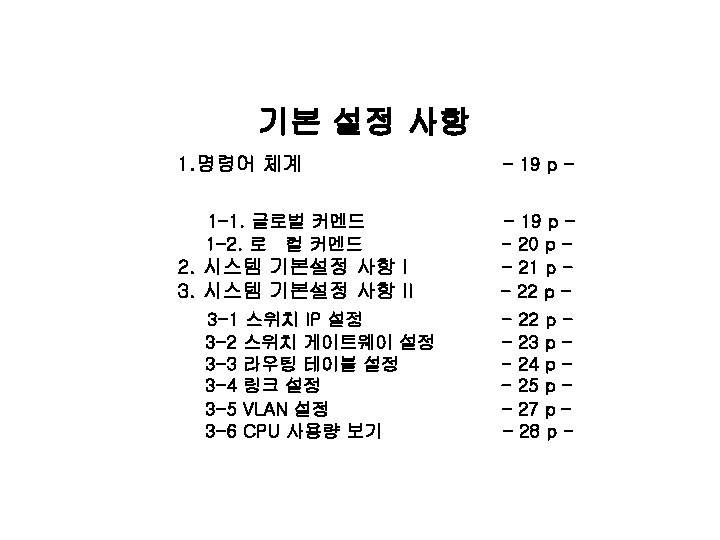
목 • • 차 웹 스위치 주요 기능 -12 p 스위치 기본 설정 -18 p SLB(Server Load Balancing) - 28 p WCR(Web Cache Redirection) - 58 p FWLB(Fire. Wall Load Balancing) - 71 p VRRP(Virtual Routing Redundancy Protocol) – 84 p 별첨 - 89 p -
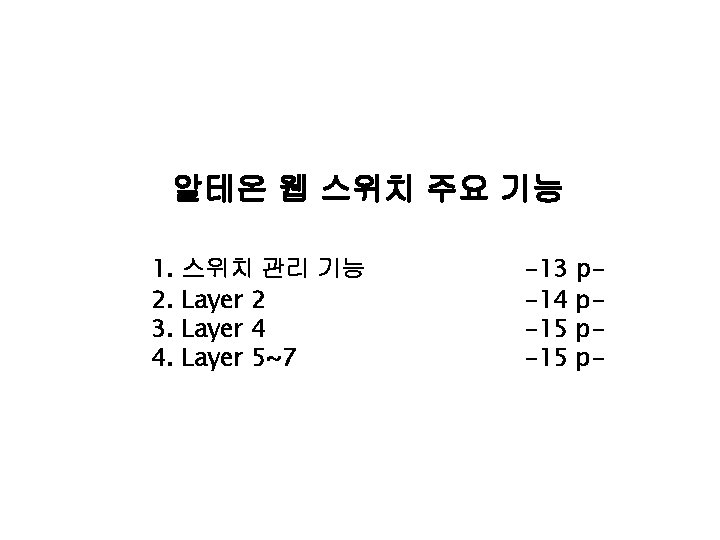
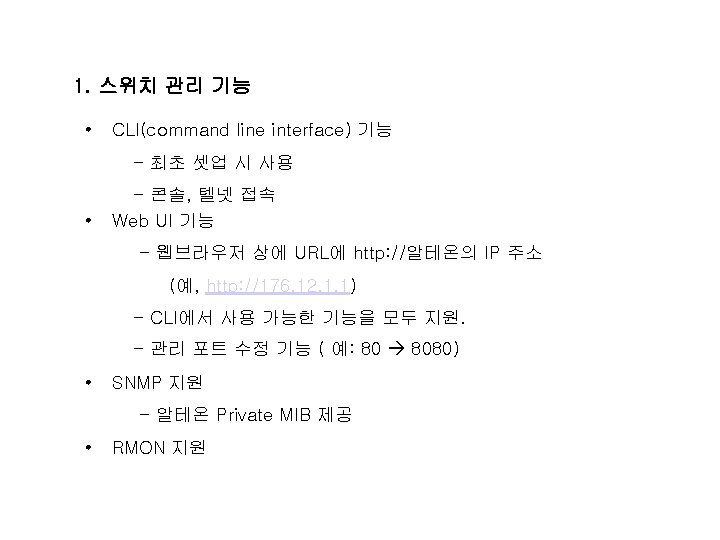
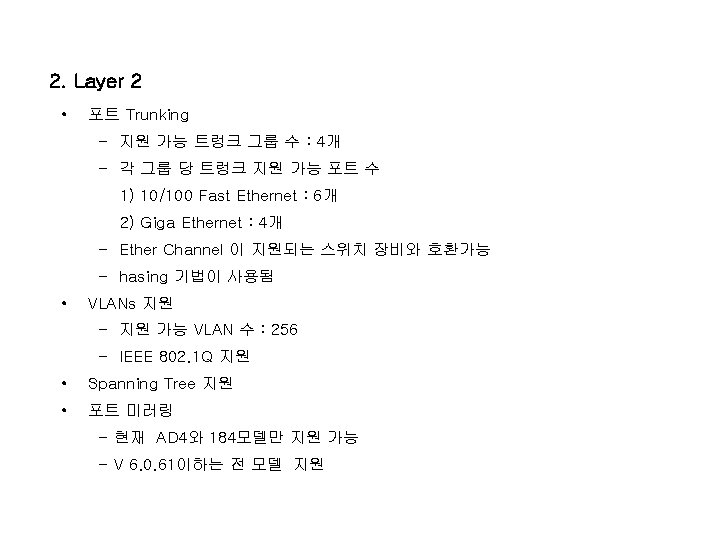
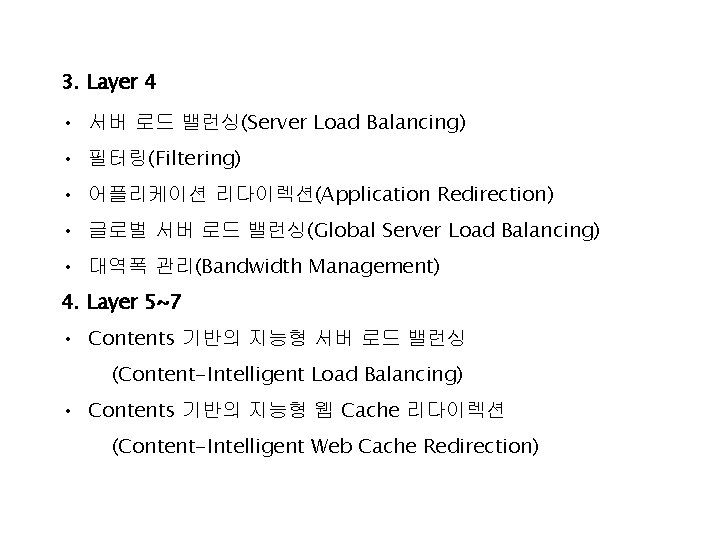
3. Layer 4 • 서버 로드 밸런싱(Server Load Balancing) • 필터링(Filtering) • 어플리케이션 리다이렉션(Application Redirection) • 글로벌 서버 로드 밸런싱(Global Server Load Balancing) • 대역폭 관리(Bandwidth Management) 4. Layer 5~7 • Contents 기반의 지능형 서버 로드 밸런싱 (Content-Intelligent Load Balancing) • Contents 기반의 지능형 웹 Cache 리다이렉션 (Content-Intelligent Web Cache Redirection)
![1 -2 로컬 커멘드 [메인 메뉴] info - Information Menu stats - Statistics Menu](http://slidetodoc.com/presentation_image/59d16e598e33fe15cd7fbde359e56cf1/image-11.jpg "1 -2 로컬 커멘드 [메인 메뉴] info - Information Menu stats - Statistics Menu")
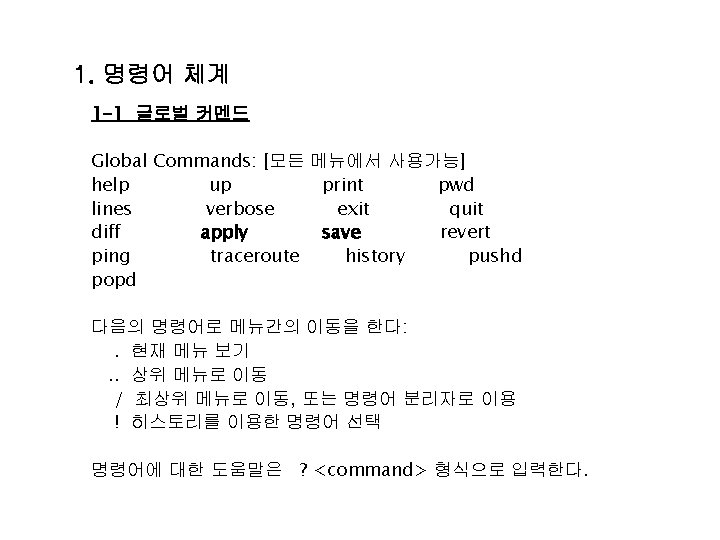
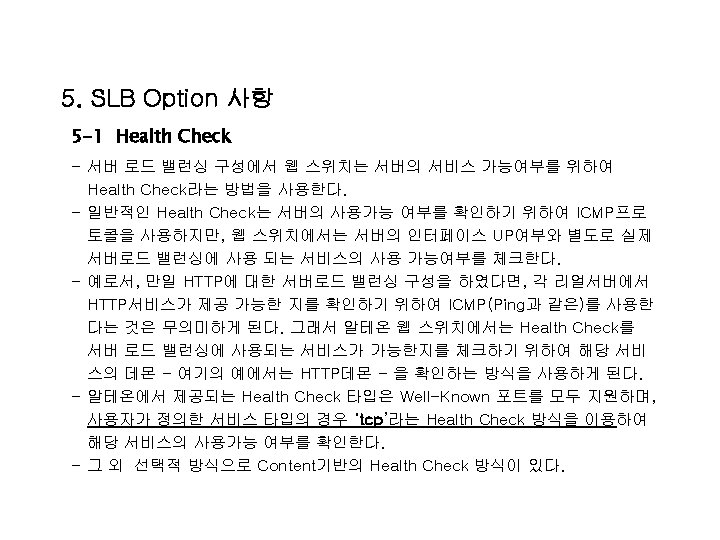
1 -2 로컬 커멘드 [메인 메뉴] info - Information Menu stats - Statistics Menu cfg - Configuration Menu oper - Operations Command Menu boot - Boot Options Menu maint - Maintenance Menu diff - Show pending config changes [global command] apply - Apply pending config changes [global command] save - Save updated config to FLASH [global command] revert - Revert pending or applied changes [global command] exit - Exit [global command, always available] - 각 메뉴에서만 사용 가능한 명령어
![2. 시스템 기본 설정 사항 I 2 -1 메뉴 : /cfg/sys • [System Menu]](http://slidetodoc.com/presentation_image/59d16e598e33fe15cd7fbde359e56cf1/image-12.jpg "2. 시스템 기본 설정 사항 I 2 -1 메뉴 : /cfg/sys • [System Menu]")
2. 시스템 기본 설정 사항 I 2 -1 메뉴 : /cfg/sys • [System Menu] • radius - RADIUS Authentication Menu • ntp - NTP Server Menu • date - Set system date • time - Set system time • idle - Set timeout for idle CLI sessions • snmp - Set SNMP access control • wport - Set Web server port number • bannr - Set login banner • mnet - Set management network • mmask - Set management netmask • smtp - Set SMTP host • tnet - Enable/disable Telnet access • bootp - Enable/disable use of BOOTP • http - Enable/disable HTTP (Web) access • user - User Access Control Menu (passwords) • cur - Display current system-wide parameters 현재 • >> System# 일자 설정 시간 설정 CLI 모드 시간 설정 웹 UI사용 시 포트 텔넷 허용 옵션 bootp 허용 옵션 웹 UI 허용 옵션 설정 사항을 보여준다
![3. 시스템 기본 설정 사항 II @ 메뉴 : /cfg/ip • • [IP Menu]](http://slidetodoc.com/presentation_image/59d16e598e33fe15cd7fbde359e56cf1/image-13.jpg "3. 시스템 기본 설정 사항 II @ 메뉴 : /cfg/ip • • [IP Menu]")
3. 시스템 기본 설정 사항 II @ 메뉴 : /cfg/ip • • [IP Menu] if - Interface Menu 스위치IP 설정 메뉴, 254개 까지 지원 gw - Default Gateway Menu 스위치의 게이트웨이 설정, 4개 까지 지원 route - Static Route Menu 정적 라우팅 설정 메 뉴 • frwd - Forwarding Menu VLAN 설정 시 IP 포워딩을 위한 메 뉴 • rip 1 - Routing Information Protocol menu • bgp - Border Gateway Protocol menu • port - IP Port Menu • dns - Domain Name System Menu • log - Set IP address of syslog host • log 2 - Set IP address of second syslog host • logfac - Set facility of syslog host • log 2 fac - Set facility of second syslog host • rearp - Set re-ARP period in minutes • metrc - Set default gateway metric : 게이트 웨이 로드 밸런싱 정책 설정 • 1) strict : 1번 게이트웨이를 기본적으로 사용하고, 1번이 불가한 경우 2번 사용 • 2) roundrobin : 설정 된 게이트 웨이를 순차적으로 사용 • cur - Display current IP configuration >> IP#
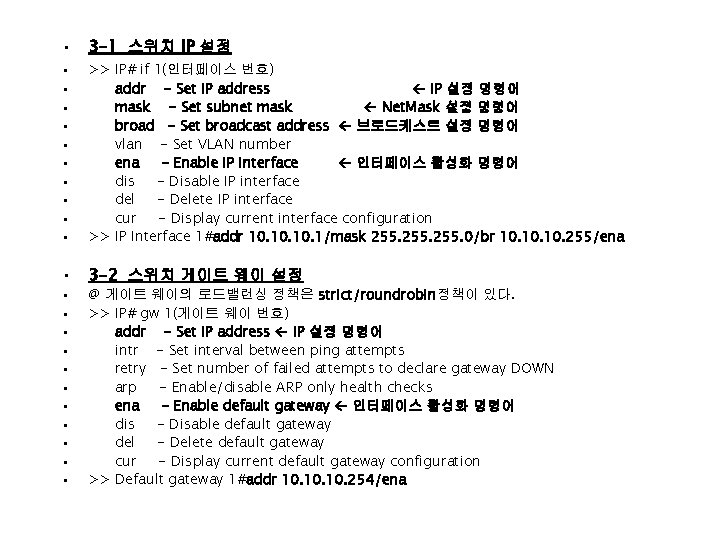
• 3 -1 스위치 IP 설정 • 3 -2 스위치 게이트 웨이 설정 • • • • • • >> IP# if 1(인터페이스 번호) addr - Set IP address IP 설정 명령어 mask - Set subnet mask Net. Mask 설정 명령어 broad - Set broadcast address 브로드케스트 설정 명령어 vlan - Set VLAN number ena - Enable IP interface 인터페이스 활성화 명령어 dis - Disable IP interface del - Delete IP interface cur - Display current interface configuration >> IP Interface 1#addr 10. 10. 1/mask 255. 0/br 10. 10. 255/ena @ 게이트 웨이의 로드밸런싱 정책은 strict/roundrobin정책이 있다. >> IP# gw 1(게이트 웨이 번호) addr - Set IP address IP 설정 명령어 intr - Set interval between ping attempts retry - Set number of failed attempts to declare gateway DOWN arp - Enable/disable ARP only health checks ena - Enable default gateway 인터페이스 활성화 명령어 dis - Disable default gateway del - Delete default gateway cur - Display current default gateway configuration >> Default gateway 1#addr 10. 10. 254/ena
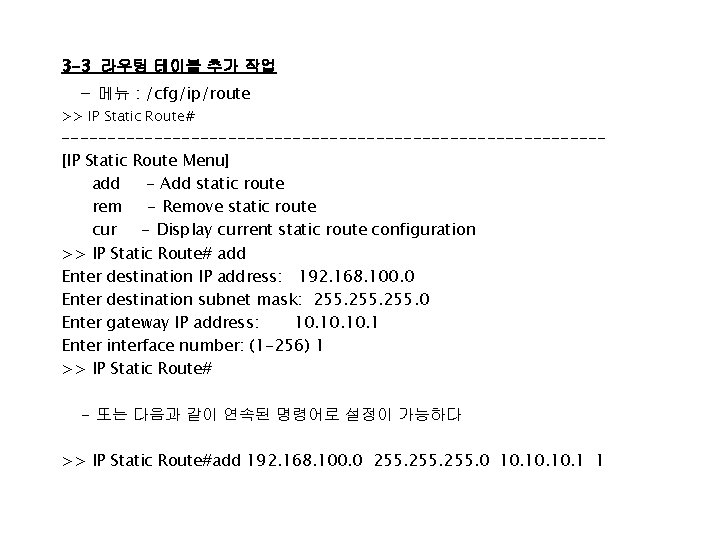
3 -3 라우팅 테이블 추가 작업 - 메뉴 : /cfg/ip/route >> IP Static Route# -----------------------------[IP Static Route Menu] add - Add static route rem - Remove static route cur - Display current static route configuration >> IP Static Route# add Enter destination IP address: 192. 168. 100. 0 Enter destination subnet mask: 255. 0 Enter gateway IP address: 10. 10. 1 Enter interface number: (1 -256) 1 >> IP Static Route# - 또는 다음과 같이 연속된 명령어로 설정이 가능하다 >> IP Static Route#add 192. 168. 100. 0 255. 0 10. 10. 1 1
![3 -4 포트 링크 설정 메뉴 - 메뉴 : /cfg/po 1[포트 번호] [Port 1](http://slidetodoc.com/presentation_image/59d16e598e33fe15cd7fbde359e56cf1/image-16.jpg "3 -4 포트 링크 설정 메뉴 - 메뉴 : /cfg/po 1[포트 번호] [Port 1")
3 -4 포트 링크 설정 메뉴 - 메뉴 : /cfg/po 1[포트 번호] [Port 1 Menu] fast - Fast Phy Menu 10/100 설정 메뉴 gig - Gig Phy Menu Giga 설정 메뉴 pref - Set preferred phy back - Set backup phy pvid - Set default port VLAN id name - Set port name cont - Set default port BW Contract tag - Enable/disable VLAN tagging for port iponly - Enable/disable allowing only IP related frames ena - Enable port dis - Disable port cur - Display current port configuration >> Port 1# fast ------------------------------[Fast Link Menu] speed - Set link speed 스피드 설정 mode - Set full or half duplex mode 모드 설정 fctl - Set flow control auto - Set autonegotiation Auto nego 설정 cur - Display current fast link configuration >> Port 1#
![3 -4 -1 100 M full-duplex 설정 방법 [Fast Link Menu] speed - Set](http://slidetodoc.com/presentation_image/59d16e598e33fe15cd7fbde359e56cf1/image-17.jpg "3 -4 -1 100 M full-duplex 설정 방법 [Fast Link Menu] speed - Set")
3 -4 -1 100 M full-duplex 설정 방법 [Fast Link Menu] speed - Set link speed 스피드 설정 mode - Set full or half duplex mode 모드 설정 fctl - Set flow control auto - Set autonegotiation Auto nego 설정 cur - Display current fast link configuration >> Port 1#speed 100 >> Port 1#mode full >> Port 1#auto off 3 -4 -2 Auto nego 설정 방법 [Fast Link Menu] speed - Set link speed mode - Set full or half duplex mode fctl - Set flow control auto - Set autonegotiation cur - Display current fast link configuration >> Port 1#speed any >> Port 1#mode any >> Port 1#auto on
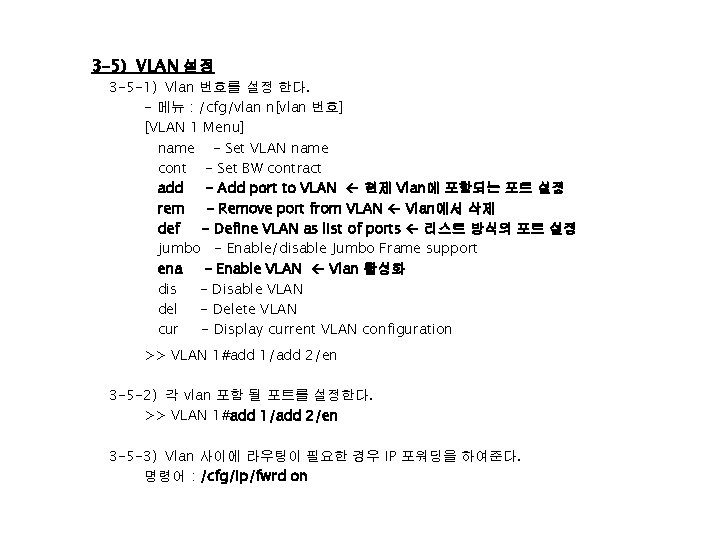
3 -5) VLAN 설정 3 -5 -1) Vlan 번호를 설정 한다. - 메뉴 : /cfg/vlan n[vlan 번호] [VLAN 1 Menu] name - Set VLAN name cont - Set BW contract add - Add port to VLAN 현제 Vlan에 포함되는 포트 설정 rem - Remove port from VLAN Vlan에서 삭제 def - Define VLAN as list of ports 리스트 방식의 포트 설정 jumbo - Enable/disable Jumbo Frame support ena - Enable VLAN Vlan 활성화 dis - Disable VLAN del - Delete VLAN cur - Display current VLAN configuration >> VLAN 1#add 1/add 2/en 3 -5 -2) 각 vlan 포함 될 포트를 설정한다. >> VLAN 1#add 1/add 2/en 3 -5 -3) Vlan 사이에 라우팅이 필요한 경우 IP 포워딩을 하여준다. 명령어 : /cfg/ip/fwrd on
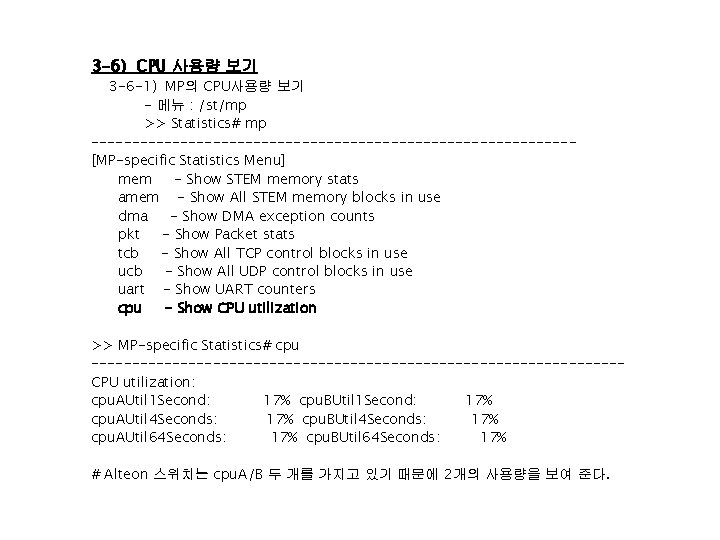
3 -6) CPU 사용량 보기 3 -6 -1) MP의 CPU사용량 보기 - 메뉴 : /st/mp >> Statistics# mp ------------------------------[MP-specific Statistics Menu] mem - Show STEM memory stats amem - Show All STEM memory blocks in use dma - Show DMA exception counts pkt - Show Packet stats tcb - Show All TCP control blocks in use ucb - Show All UDP control blocks in use uart - Show UART counters cpu - Show CPU utilization >> MP-specific Statistics# cpu ---------------------------------CPU utilization: cpu. AUtil 1 Second: 17% cpu. BUtil 1 Second: 17% cpu. AUtil 4 Seconds: 17% cpu. BUtil 4 Seconds: 17% cpu. AUtil 64 Seconds: 17% cpu. BUtil 64 Seconds: 17% # Alteon 스위치는 cpu. A/B 두 개를 가지고 있기 때문에 2개의 사용량을 보여 준다.
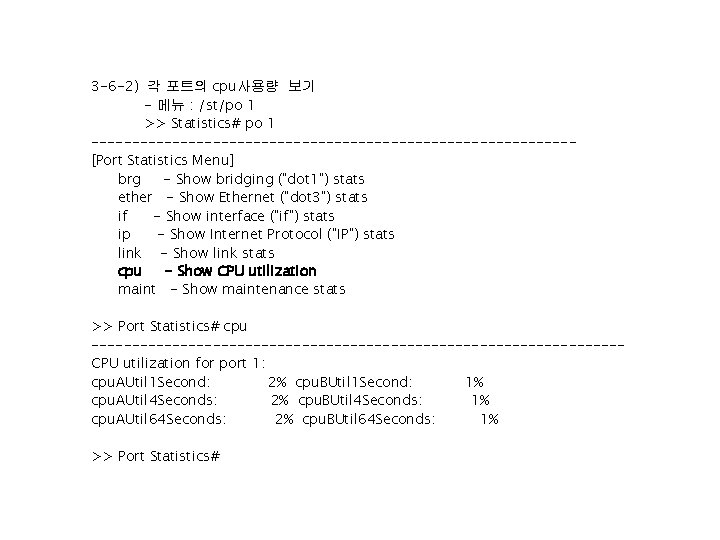
3 -6 -2) 각 포트의 cpu사용량 보기 - 메뉴 : /st/po 1 >> Statistics# po 1 ------------------------------[Port Statistics Menu] brg - Show bridging ("dot 1") stats ether - Show Ethernet ("dot 3") stats if - Show interface ("if") stats ip - Show Internet Protocol ("IP") stats link - Show link stats cpu - Show CPU utilization maint - Show maintenance stats >> Port Statistics# cpu ---------------------------------CPU utilization for port 1: cpu. AUtil 1 Second: 2% cpu. BUtil 1 Second: 1% cpu. AUtil 4 Seconds: 2% cpu. BUtil 4 Seconds: 1% cpu. AUtil 64 Seconds: 2% cpu. BUtil 64 Seconds: 1% >> Port Statistics#
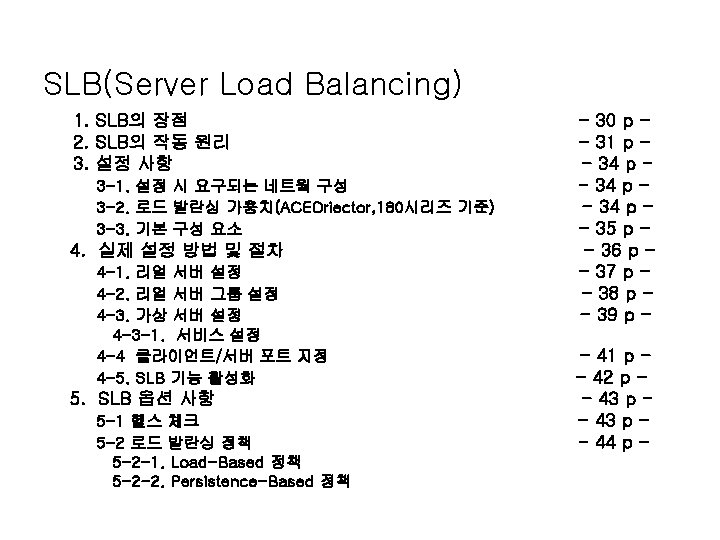
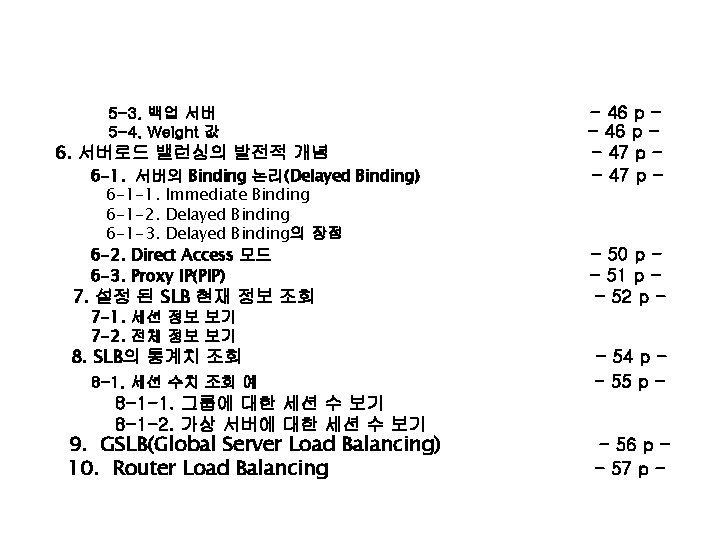
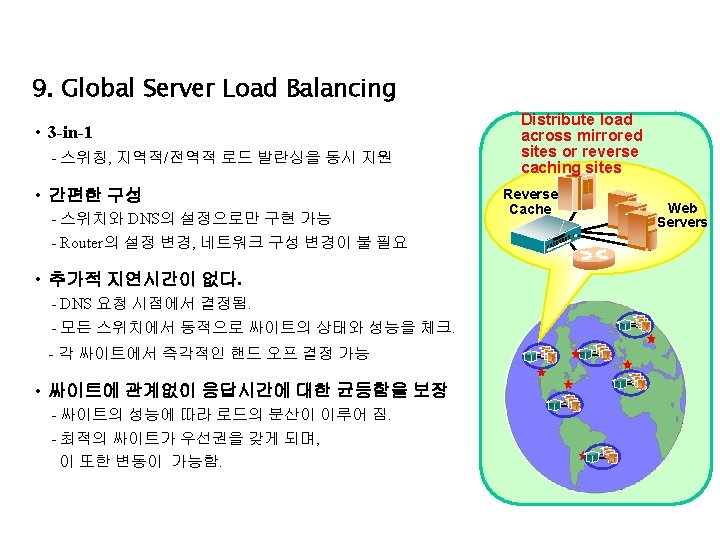
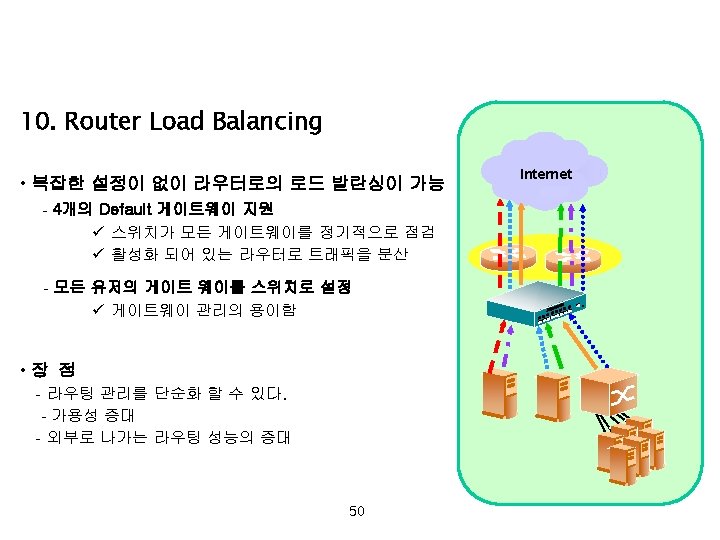
5 -3. 백업 서버 5 -4. Weight 값 6. 서버로드 밸런싱의 발전적 개념 6 -1. 서버의 Binding 논리(Delayed Binding) 6 -1 -1. Immediate Binding 6 -1 -2. Delayed Binding 6 -1 -3. Delayed Binding의 장점 6 -2. Direct Access 모드 6 -3. Proxy IP(PIP) 7. 설정 된 SLB 현재 정보 조회 7 -1. 세션 정보 보기 7 -2. 전체 정보 보기 8. SLB의 통계치 조회 8 -1. 세션 수치 조회 예 - 46 p - 47 p - - 50 p - 51 p - 52 p - 54 p - 55 p - 8 -1 -1. 그룹에 대한 세션 수 보기 8 -1 -2. 가상 서버에 대한 세션 수 보기 9. GSLB(Global Server Load Balancing) 10. Router Load Balancing - 56 p - 57 p -
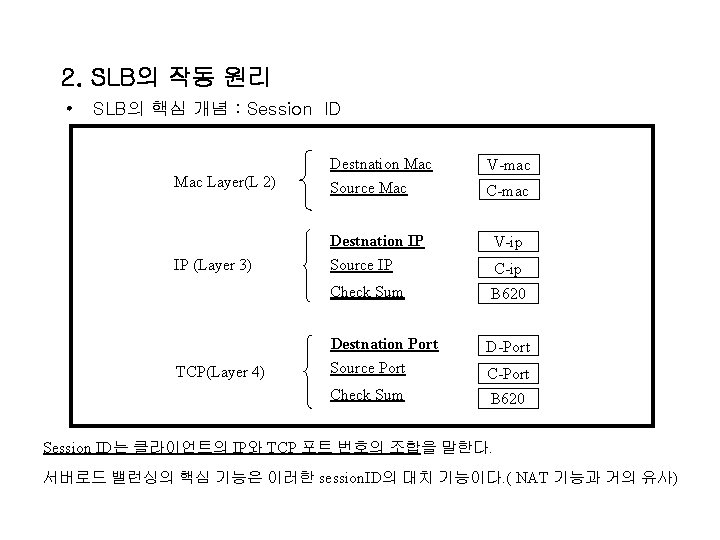
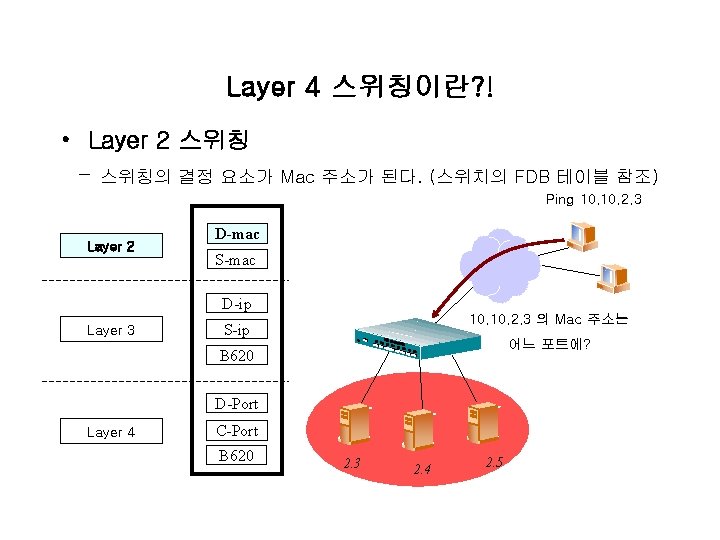
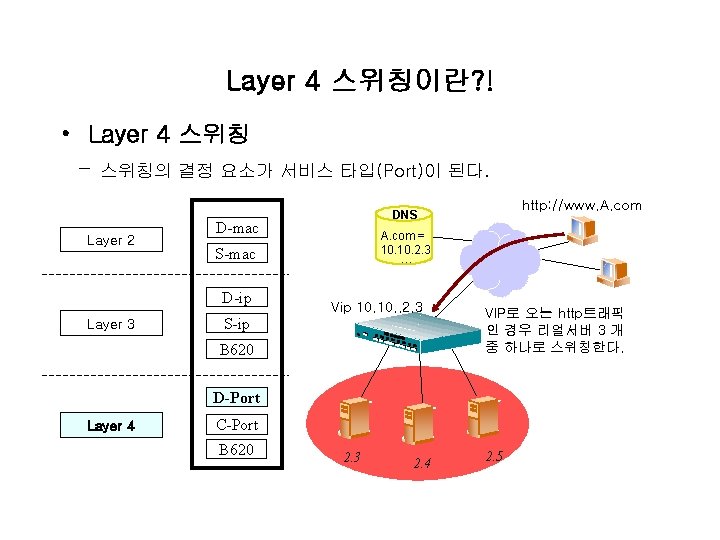
2. SLB의 작동 원리 • SLB의 핵심 개념 : Session ID Mac Layer(L 2) Destnation Mac Source Mac V-ip IP (Layer 3) Destnation IP Source IP Check Sum B 620 Destnation Port Source Port D-Port Check Sum B 620 TCP(Layer 4) V-mac C-ip C-Port Session ID는 클라이언트의 IP와 TCP 포트 번호의 조합을 말한다. 서버로드 밸런싱의 핵심 기능은 이러한 session. ID의 대치 기능이다. ( NAT 기능과 거의 유사)
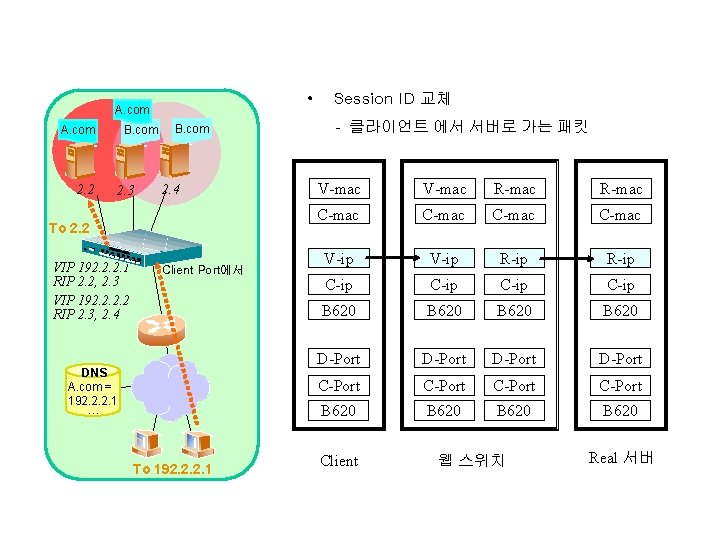
• A. com 2. 2 B. com 2. 3 B. com 2. 4 To 2. 2 VIP 192. 2. 2. 1 RIP 2. 2, 2. 3 VIP 192. 2 RIP 2. 3, 2. 4 Client Port에서 DNS A. com = 192. 2. 2. 1 … To 192. 2. 2. 1 Session ID 교체 - 클라이언트 에서 서버로 가는 패킷 V-mac R-mac C-mac V-ip R-ip C-ip B 620 D-Port C-Port B 620 Client 웹 스위치 Real 서버
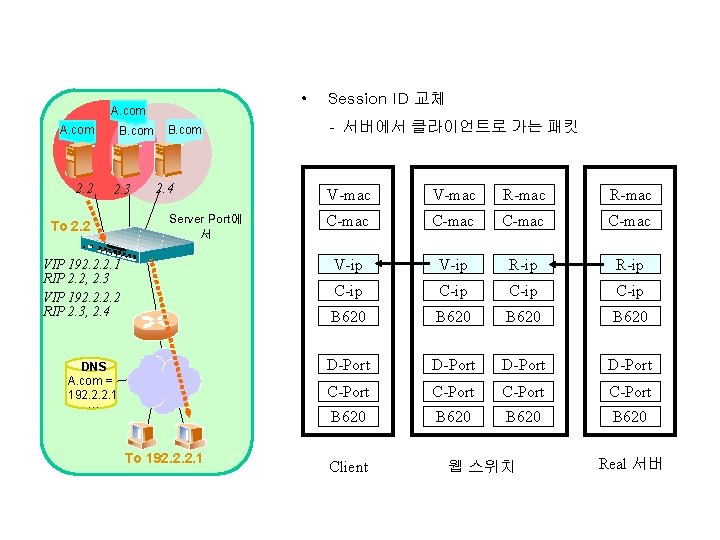
• A. com 2. 2 B. com 2. 3 To 2. 2 B. com 2. 4 Server Port에 서 VIP 192. 2. 2. 1 RIP 2. 2, 2. 3 VIP 192. 2 RIP 2. 3, 2. 4 DNS A. com = 192. 2. 2. 1 … To 192. 2. 2. 1 Session ID 교체 - 서버에서 클라이언트로 가는 패킷 V-mac R-mac C-mac V-ip R-ip C-ip B 620 D-Port C-Port B 620 Client 웹 스위치 Real 서버

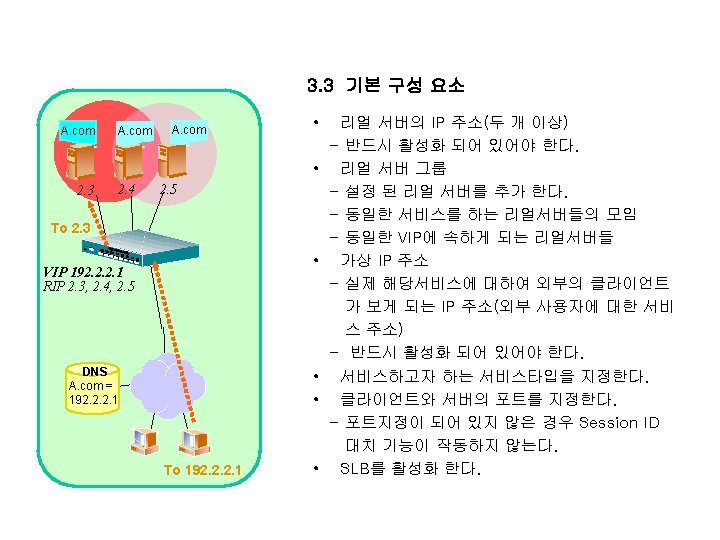
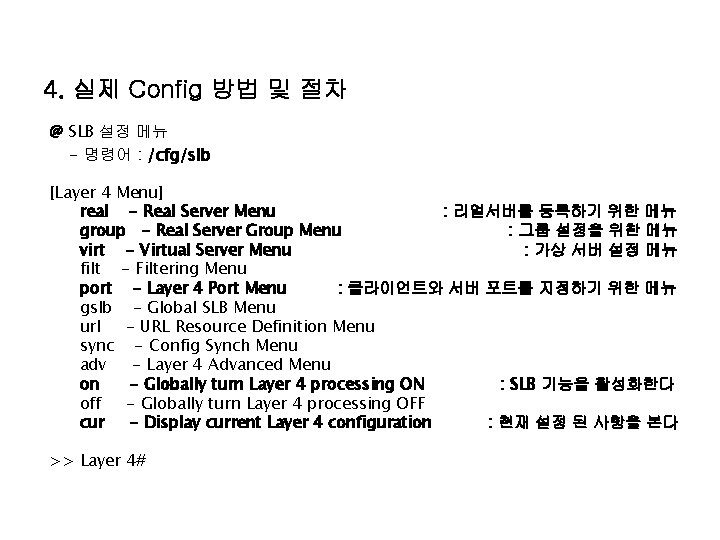
4. 실제 Config 방법 및 절차 @ SLB 설정 메뉴 - 명령어 : /cfg/slb [Layer 4 Menu] real - Real Server Menu : 리얼서버를 등록하기 위한 메뉴 group - Real Server Group Menu : 그룹 설정을 위한 메뉴 virt - Virtual Server Menu : 가상 서버 설정 메뉴 filt - Filtering Menu port - Layer 4 Port Menu : 클라이언트와 서버 포트를 지정하기 위한 메뉴 gslb - Global SLB Menu url - URL Resource Definition Menu sync - Config Synch Menu adv - Layer 4 Advanced Menu on - Globally turn Layer 4 processing ON : SLB 기능을 활성화한다 off - Globally turn Layer 4 processing OFF cur - Display current Layer 4 configuration : 현재 설정 된 사항을 본다 >> Layer 4#
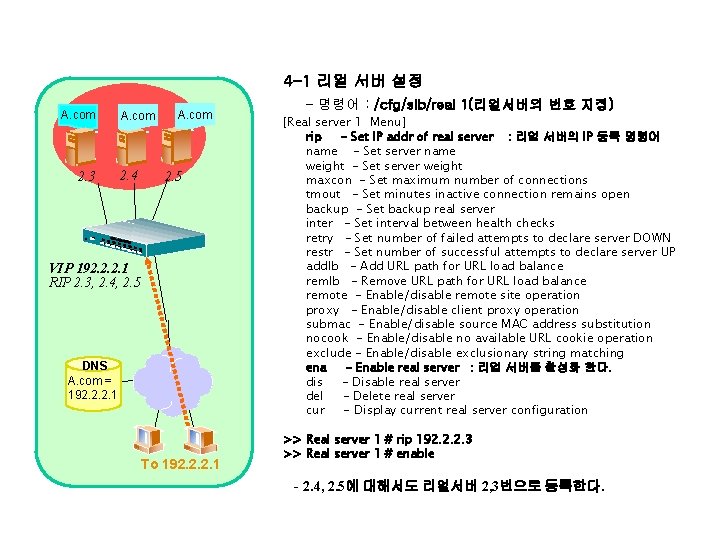
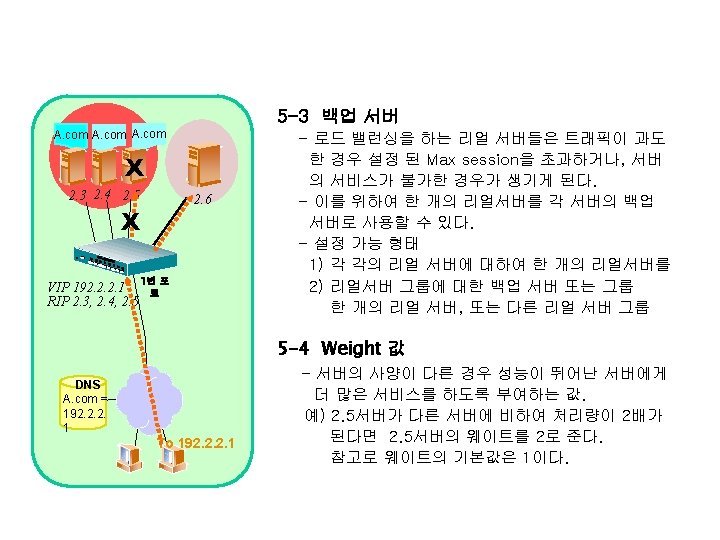
4 -1 리얼 서버 설정 A. com 2. 3 A. com 2. 4 A. com 2. 5 VIP 192. 2. 2. 1 RIP 2. 3, 2. 4, 2. 5 DNS A. com = 192. 2. 2. 1 To 192. 2. 2. 1 - 명령어 : /cfg/slb/real 1(리얼서버의 번호 지정) [Real server 1 Menu] rip - Set IP addr of real server : 리얼 서버의 IP 등록 명령어 name - Set server name weight - Set server weight maxcon - Set maximum number of connections tmout - Set minutes inactive connection remains open backup - Set backup real server inter - Set interval between health checks retry - Set number of failed attempts to declare server DOWN restr - Set number of successful attempts to declare server UP addlb - Add URL path for URL load balance remlb - Remove URL path for URL load balance remote - Enable/disable remote site operation proxy - Enable/disable client proxy operation submac - Enable/disable source MAC address substitution nocook - Enable/disable no available URL cookie operation exclude - Enable/disable exclusionary string matching ena - Enable real server : 리얼 서버를 활성화 한다. dis - Disable real server del - Delete real server cur - Display current real server configuration >> Real server 1 # rip 192. 2. 2. 3 >> Real server 1 # enable - 2. 4, 2. 5에 대해서도 리얼서버 2, 3번으로 등록한다.
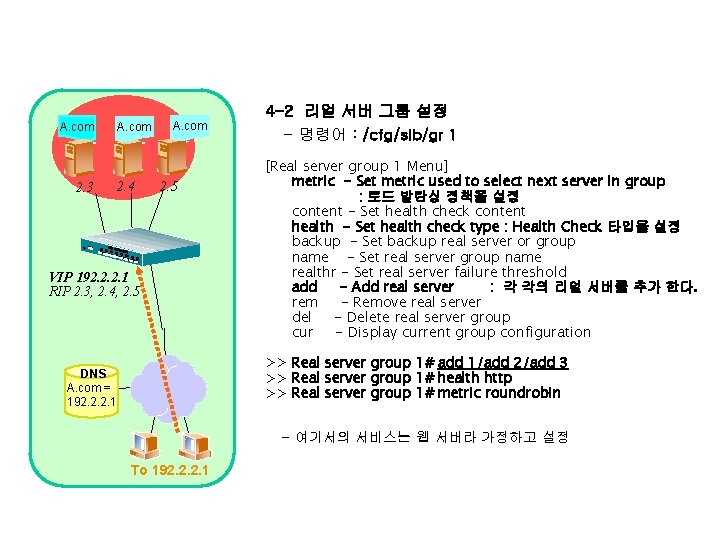
A. com 2. 3 A. com 2. 4 A. com 2. 5 VIP 192. 2. 2. 1 RIP 2. 3, 2. 4, 2. 5 4 -2 리얼 서버 그룹 설정 - 명령어 : /cfg/slb/gr 1 [Real server group 1 Menu] metric - Set metric used to select next server in group : 로드 발란싱 정책을 설정 content - Set health check content health - Set health check type : Health Check 타입을 설정 backup - Set backup real server or group name - Set real server group name realthr - Set real server failure threshold add - Add real server : 각 각의 리얼 서버를 추가 한다. rem - Remove real server del - Delete real server group cur - Display current group configuration >> Real server group 1# add 1/add 2/add 3 >> Real server group 1# health http >> Real server group 1# metric roundrobin DNS A. com = 192. 2. 2. 1 - 여기서의 서비스는 웹 서버라 가정하고 설정 To 192. 2. 2. 1
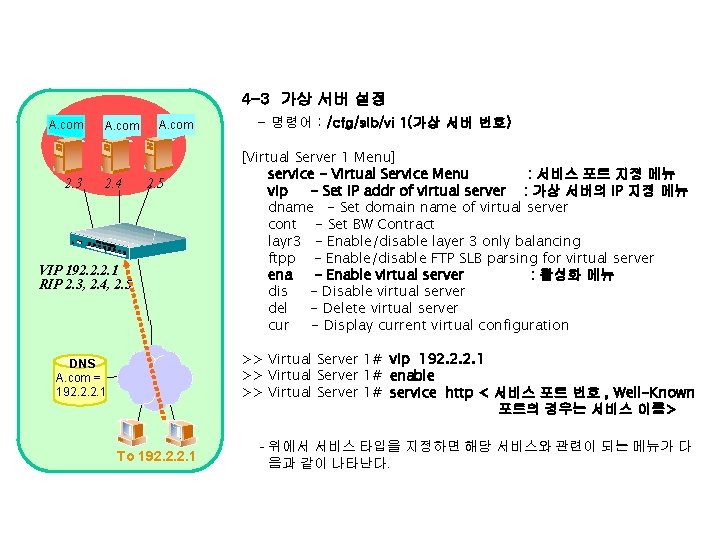
4 -3 가상 서버 설정 A. com 2. 3 A. com 2. 4 A. com 2. 5 VIP 192. 2. 2. 1 RIP 2. 3, 2. 4, 2. 5 - 명령어 : /cfg/slb/vi 1(가상 서버 번호) [Virtual Server 1 Menu] service - Virtual Service Menu : 서비스 포트 지정 메뉴 vip - Set IP addr of virtual server : 가상 서버의 IP 지정 메뉴 dname - Set domain name of virtual server cont - Set BW Contract layr 3 - Enable/disable layer 3 only balancing ftpp - Enable/disable FTP SLB parsing for virtual server ena - Enable virtual server : 활성화 메뉴 dis - Disable virtual server del - Delete virtual server cur - Display current virtual configuration >> Virtual Server 1# vip 192. 2. 2. 1 >> Virtual Server 1# enable >> Virtual Server 1# service http < 서비스 포트 번호 , Well-Known 포트의 경우는 서비스 이름> DNS A. com = 192. 2. 2. 1 To 192. 2. 2. 1 - 위에서 서비스 타입을 지정하면 해당 서비스와 관련이 되는 메뉴가 다 음과 같이 나타난다.
![4 -3 -1 가상 서버의 서비스 설정 [Virtual Server 1 http Service Menu] group](http://slidetodoc.com/presentation_image/59d16e598e33fe15cd7fbde359e56cf1/image-33.jpg "4 -3 -1 가상 서버의 서비스 설정 [Virtual Server 1 http Service Menu] group")
4 -3 -1 가상 서버의 서비스 설정 [Virtual Server 1 http Service Menu] group - Set real server group number : 서비스하고자 하는 그룹의 번호 지정 메뉴 rport - Set real port : 실제 서버에서 서비스하는 서비스 포트를 지 정 hname - Set hostname httpslb - Set HTTP SLB processing cont - Set BW contract for this virtual service pbind - Set persistent binding type udp - Enable/disable UDP balancing frag - Enable/disable remapping UDP server fragments nonat - Enable/disable only substituting MAC addresses del - Delete virtual service cur - Display current virtual service configuration >> Virtual Server 1 http Service# group 1 - 만일 설정 된 그룹이 여러개 있는 경우 해당 서비스를 해주는 그룹이 어떤 것인지 지정한다. >> Virtual Server 1 http Service# rport 8080 - 만일 실제 리얼 서버의 서비스 포트가 가상서버의 서비스 포트와 다른 경우 지정한다. 예를 들어 HTTP 서비스를 하는데 실제 리얼서버에서 설정 된 http에 대한 서비스 포트 (Listener) 가 8080인 경우 rport메뉴에 리얼 서버의 실 서비스 포트를 지정한다.
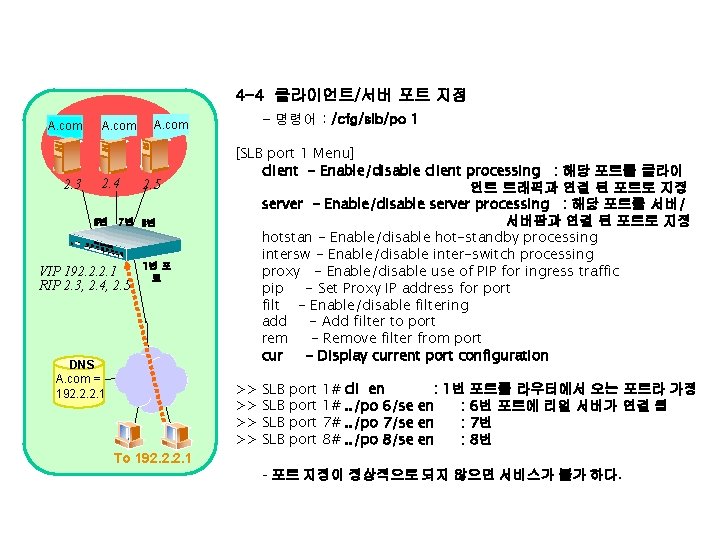
4 -4 클라이언트/서버 포트 지정 A. com 2. 3 A. com 2. 4 2. 5 6번 7번 8번 VIP 192. 2. 2. 1 RIP 2. 3, 2. 4, 2. 5 - 명령어 : /cfg/slb/po 1 A. com 1번 포 트 DNS A. com = 192. 2. 2. 1 [SLB port 1 Menu] client - Enable/disable client processing : 해당 포트를 클라이 언트 트래픽과 연결 된 포트로 지정 server - Enable/disable server processing : 해당 포트를 서버/ 서버팜과 연결 된 포트로 지정 hotstan - Enable/disable hot-standby processing intersw - Enable/disable inter-switch processing proxy - Enable/disable use of PIP for ingress traffic pip - Set Proxy IP address for port filt - Enable/disable filtering add - Add filter to port rem - Remove filter from port cur - Display current port configuration >> >> SLB SLB port 1# 1# 7# 8# cli en : 1번 포트를 라우터에서 오는 포트라 가정. . /po 6/se en : 6번 포트에 리얼 서버가 연결 됨. . /po 7/se en : 7번. . /po 8/se en : 8번 To 192. 2. 2. 1 - 포트 지정이 정상적으로 되지 않으면 서비스가 불가 하다.
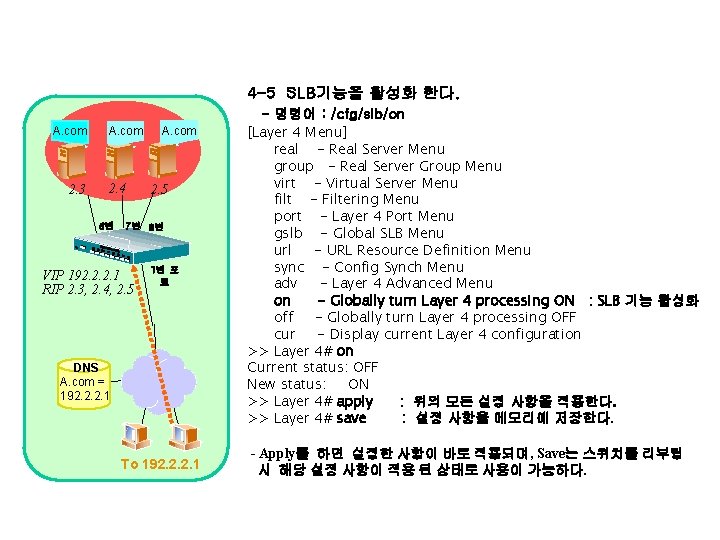
4 -5 SLB기능을 활성화 한다. A. com 2. 3 A. com 2. 4 6번 A. com 2. 5 7번 8번 VIP 192. 2. 2. 1 RIP 2. 3, 2. 4, 2. 5 1번 포 트 DNS A. com = 192. 2. 2. 1 To 192. 2. 2. 1 - 명령어 : /cfg/slb/on [Layer 4 Menu] real - Real Server Menu group - Real Server Group Menu virt - Virtual Server Menu filt - Filtering Menu port - Layer 4 Port Menu gslb - Global SLB Menu url - URL Resource Definition Menu sync - Config Synch Menu adv - Layer 4 Advanced Menu on - Globally turn Layer 4 processing ON : SLB 기능 활성화 off - Globally turn Layer 4 processing OFF cur - Display current Layer 4 configuration >> Layer 4# on Current status: OFF New status: ON >> Layer 4# apply : 위의 모든 설정 사항을 적용한다. >> Layer 4# save : 설정 사항을 메모리에 저장한다. - Apply를 하면 설정한 사항이 바로 적용되며, Save는 스위치를 리부팅 시 해당 설정 사항이 적용 된 상태로 사용이 가능하다.
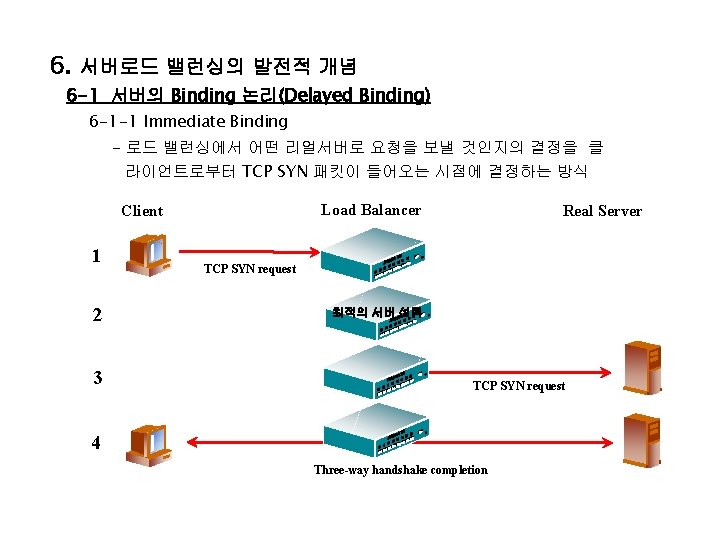
6. 서버로드 밸런싱의 발전적 개념 6 -1 서버의 Binding 논리(Delayed Binding) 6 -1 -1 Immediate Binding - 로드 밸런싱에서 어떤 리얼서버로 요청을 보낼 것인지의 결정을 클 라이언트로부터 TCP SYN 패킷이 들어오는 시점에 결정하는 방식 Load Balancer Client 1 2 3 Real Server TCP SYN request 최적의 서버 선택 TCP SYN request 4 Three-way handshake completion
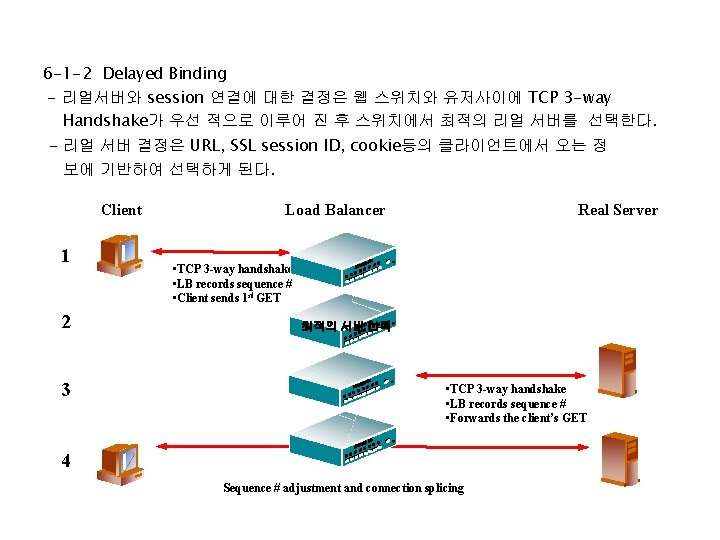
6 -1 -2 Delayed Binding - 리얼서버와 session 연결에 대한 결정은 웹 스위치와 유저사이에 TCP 3 -way Handshake가 우선 적으로 이루어 진 후 스위치에서 최적의 리얼 서버를 선택한다. - 리얼 서버 결정은 URL, SSL session ID, cookie등의 클라이언트에서 오는 정 보에 기반하여 선택하게 된다. Client 1 2 3 Load Balancer Real Server • TCP 3 -way handshake • LB records sequence # • Client sends 1 st GET 최적의 서버 선택 • TCP 3 -way handshake • LB records sequence # • Forwards the client’s GET 4 Sequence # adjustment and connection splicing
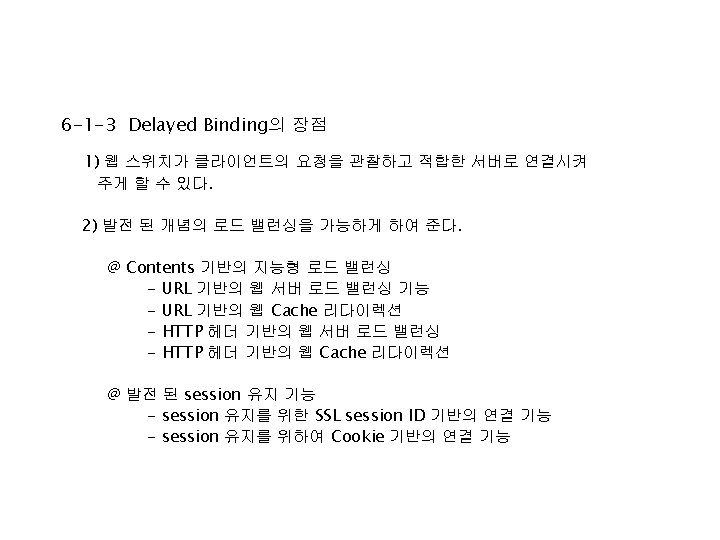
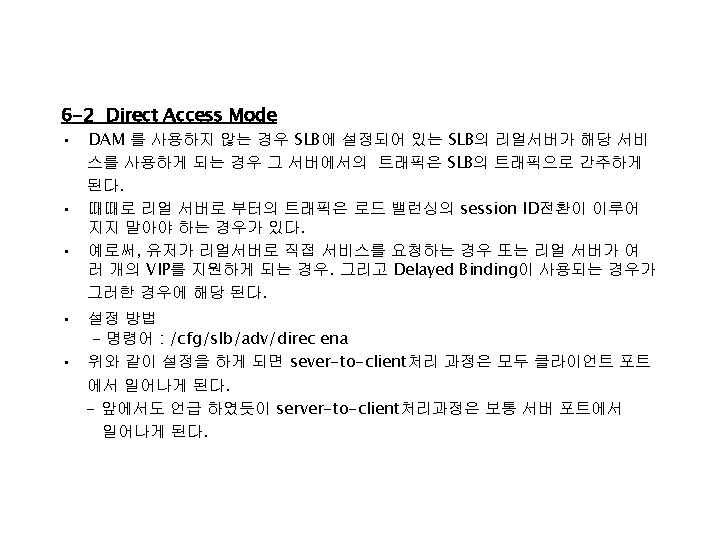
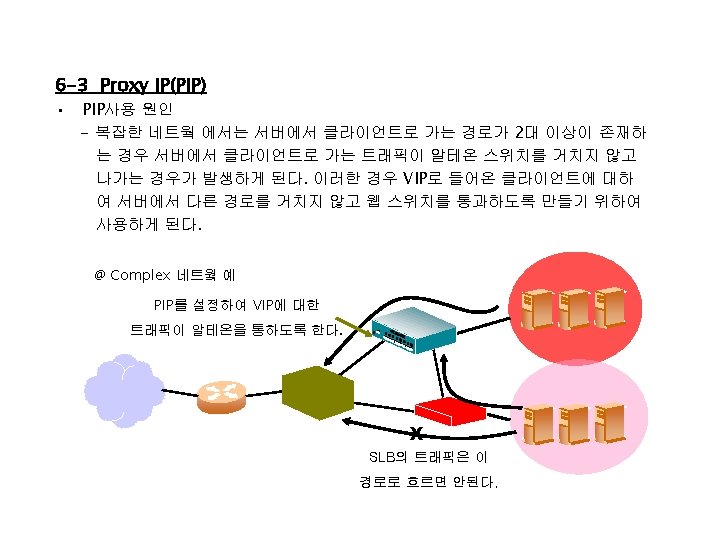
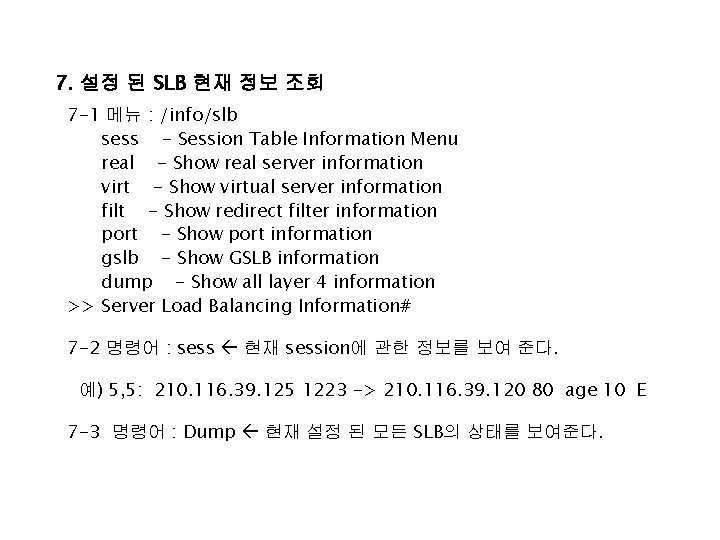
7. 설정 된 SLB 현재 정보 조회 7 -1 메뉴 : /info/slb sess - Session Table Information Menu real - Show real server information virt - Show virtual server information filt - Show redirect filter information port - Show port information gslb - Show GSLB information dump - Show all layer 4 information >> Server Load Balancing Information# 7 -2 명령어 : sess 현재 session에 관한 정보를 보여 준다. 예) 5, 5: 210. 116. 39. 125 1223 -> 210. 116. 39. 120 80 age 10 E 7 -3 명령어 : Dump 현재 설정 된 모든 SLB의 상태를 보여준다.
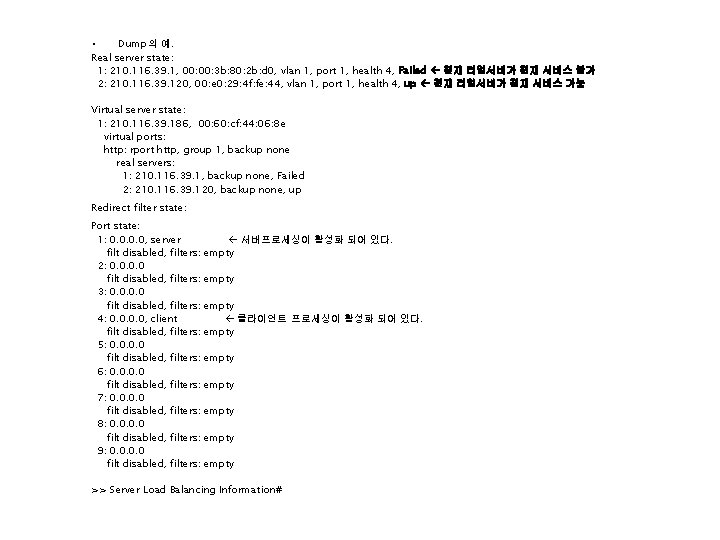
• Dump의 예. Real server state: 1: 210. 116. 39. 1, 00: 3 b: 80: 2 b: d 0, vlan 1, port 1, health 4, Failed 현재 리얼서버가 현재 서비스 불가 2: 210. 116. 39. 120, 00: e 0: 29: 4 f: fe: 44, vlan 1, port 1, health 4, up 현재 리얼서버가 현재 서비스 가능 Virtual server state: 1: 210. 116. 39. 186, 00: 60: cf: 44: 06: 8 e virtual ports: http: rport http, group 1, backup none real servers: 1: 210. 116. 39. 1, backup none, Failed 2: 210. 116. 39. 120, backup none, up Redirect filter state: Port state: 1: 0. 0, server filt disabled, filters: 2: 0. 0 filt disabled, filters: 3: 0. 0 filt disabled, filters: 4: 0. 0, client filt disabled, filters: 5: 0. 0 filt disabled, filters: 6: 0. 0 filt disabled, filters: 7: 0. 0 filt disabled, filters: 8: 0. 0 filt disabled, filters: 9: 0. 0 filt disabled, filters: 서버프로세싱이 활성화 되어 있다. empty 클라이언트 프로세싱이 활성화 되어 있다. empty empty >> Server Load Balancing Information#
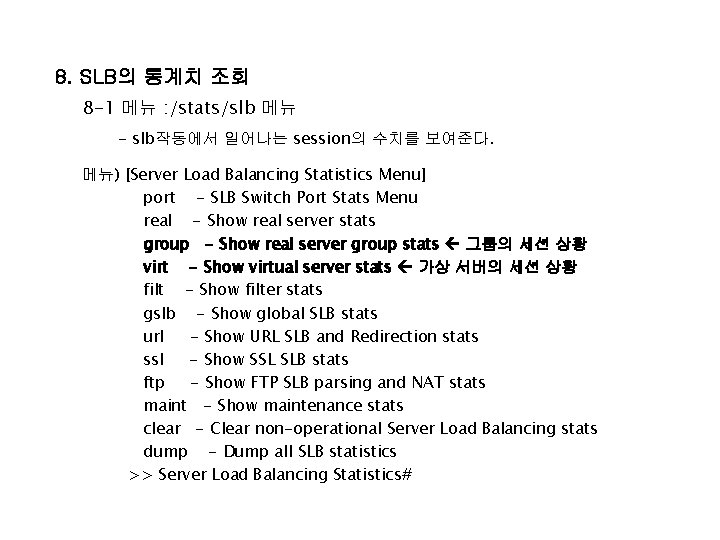
8. SLB의 통계치 조회 8 -1 메뉴 : /stats/slb 메뉴 - slb작동에서 일어나는 session의 수치를 보여준다. 메뉴) [Server Load Balancing Statistics Menu] port - SLB Switch Port Stats Menu real - Show real server stats group - Show real server group stats 그룹의 세션 상황 virt - Show virtual server stats 가상 서버의 세션 상황 filt - Show filter stats gslb - Show global SLB stats url - Show URL SLB and Redirection stats ssl - Show SSL SLB stats ftp - Show FTP SLB parsing and NAT stats maint - Show maintenance stats clear - Clear non-operational Server Load Balancing stats dump - Dump all SLB statistics >> Server Load Balancing Statistics#
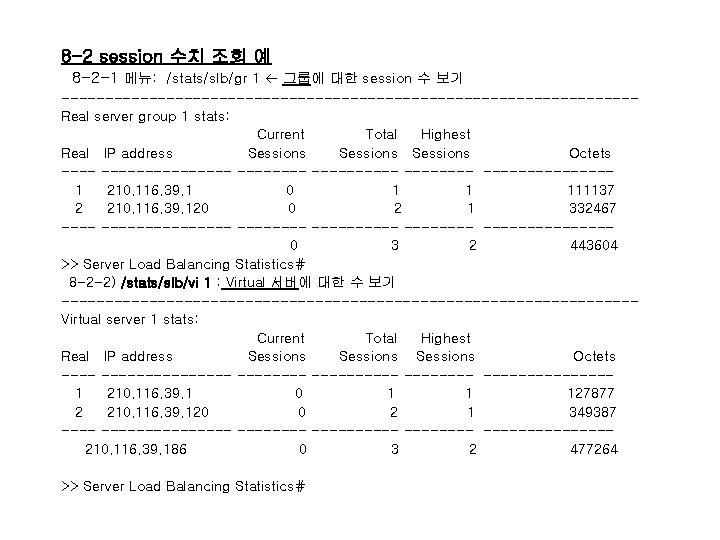
8 -2 session 수치 조회 예 8 -2 -1 메뉴: /stats/slb/gr 1 그룹에 대한 session 수 보기 ---------------------------------Real server group 1 stats: Current Total Highest Real IP address Sessions Octets ---------- --------------1 210. 116. 39. 1 0 1 1 111137 2 210. 116. 39. 120 0 2 1 332467 ---------- --------------0 3 2 443604 >> Server Load Balancing Statistics# 8 -2 -2) /stats/slb/vi 1 : Virtual 서버에 대한 수 보기 ---------------------------------Virtual server 1 stats: Current Total Highest Real IP address Sessions Octets ---------- --------------1 210. 116. 39. 1 0 1 1 127877 2 210. 116. 39. 120 0 2 1 349387 ---------- --------------210. 116. 39. 186 0 3 2 477264 >> Server Load Balancing Statistics#
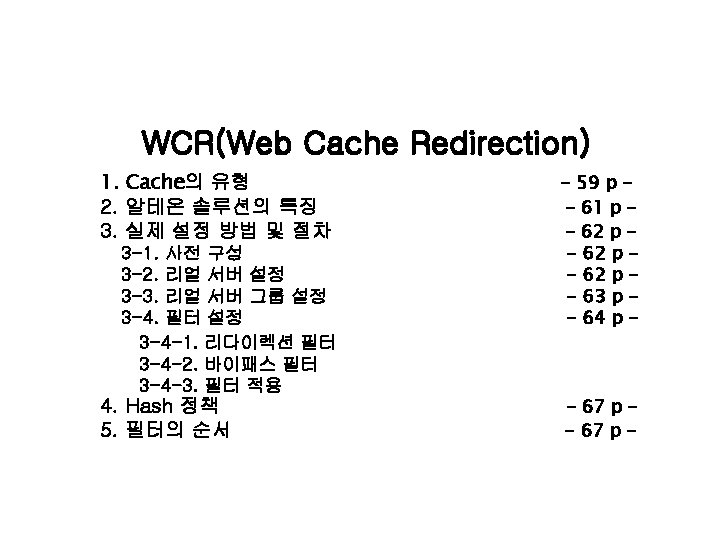
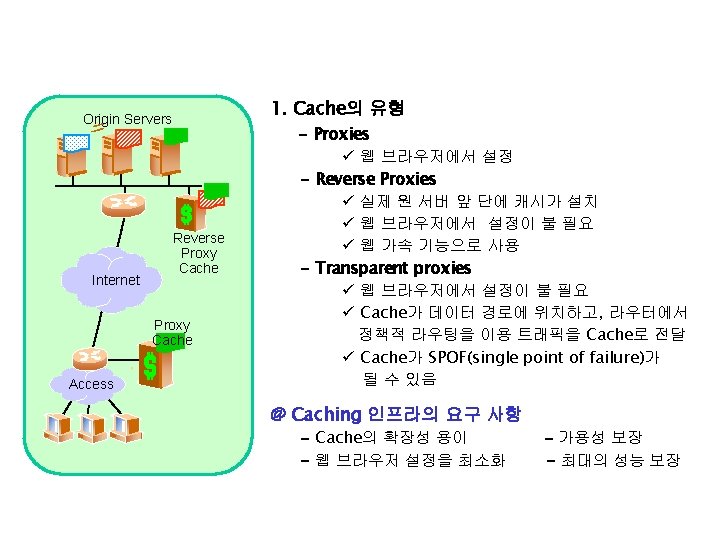
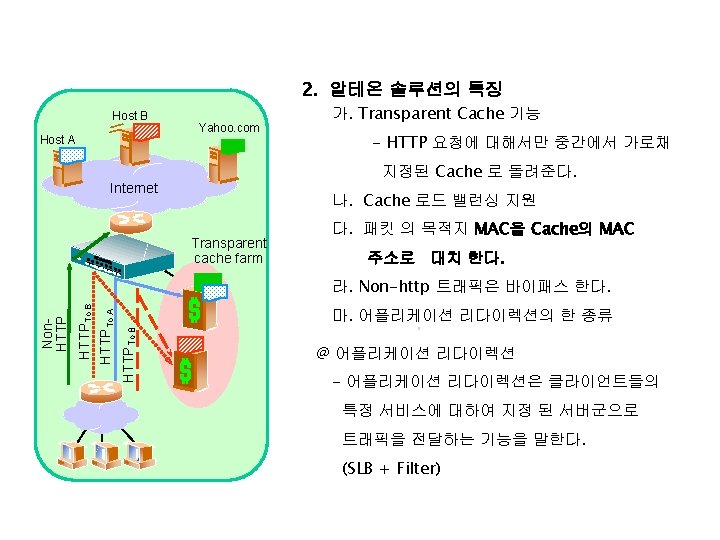
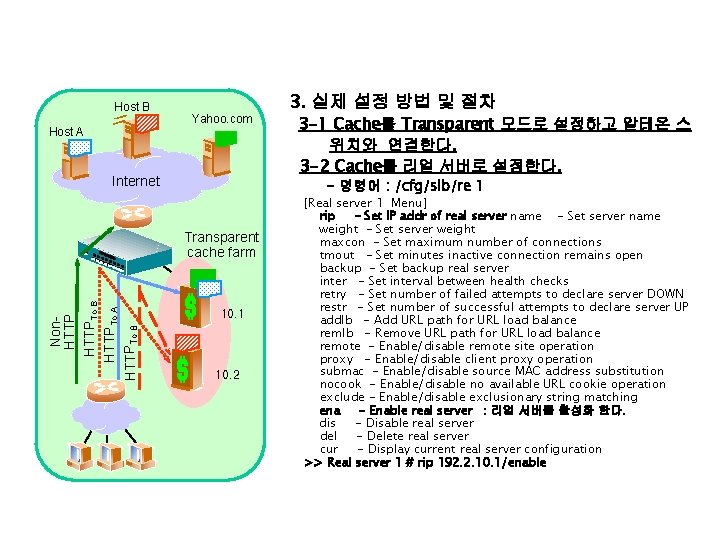
Host B Host A Yahoo. com Internet 3 -1 Cache를 Transparent 모드로 설정하고 알테온 스 위치와 연결한다. 3 -2 Cache를 리얼 서버로 설정한다. - 명령어 : /cfg/slb/re 1 Transparent cache farm Non. HTTPTo B HTTPTo A HTTPTo B 3. 실제 설정 방법 및 절차 10. 1 10. 2 [Real server 1 Menu] rip - Set IP addr of real server name - Set server name weight - Set server weight maxcon - Set maximum number of connections tmout - Set minutes inactive connection remains open backup - Set backup real server inter - Set interval between health checks retry - Set number of failed attempts to declare server DOWN restr - Set number of successful attempts to declare server UP addlb - Add URL path for URL load balance remlb - Remove URL path for URL load balance remote - Enable/disable remote site operation proxy - Enable/disable client proxy operation submac - Enable/disable source MAC address substitution nocook - Enable/disable no available URL cookie operation exclude - Enable/disable exclusionary string matching ena - Enable real server : 리얼 서버를 활성화 한다. dis - Disable real server del - Delete real server cur - Display current real server configuration >> Real server 1 # rip 192. 2. 10. 1/enable
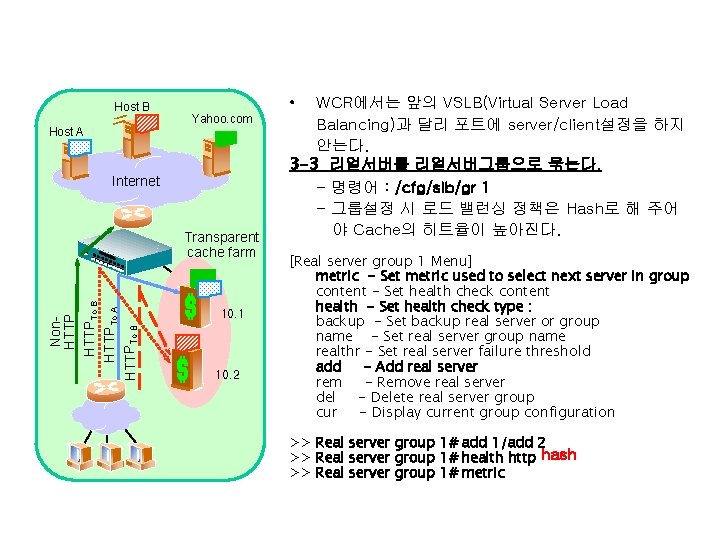
Host B Host A • Yahoo. com Internet Non. HTTPTo B HTTPTo A HTTPTo B Transparent cache farm 10. 1 10. 2 WCR에서는 앞의 VSLB(Virtual Server Load Balancing)과 달리 포트에 server/client설정을 하지 안는다. 3 -3 리얼서버를 리얼서버그룹으로 묶는다. - 명령어 : /cfg/slb/gr 1 - 그룹설정 시 로드 밸런싱 정책은 Hash로 해 주어 야 Cache의 히트율이 높아진다. [Real server group 1 Menu] metric - Set metric used to select next server in group content - Set health check content health - Set health check type : backup - Set backup real server or group name - Set real server group name realthr - Set real server failure threshold add - Add real server rem - Remove real server del - Delete real server group cur - Display current group configuration >> Real server group 1# add 1/add 2 >> Real server group 1# health http hash >> Real server group 1# metric
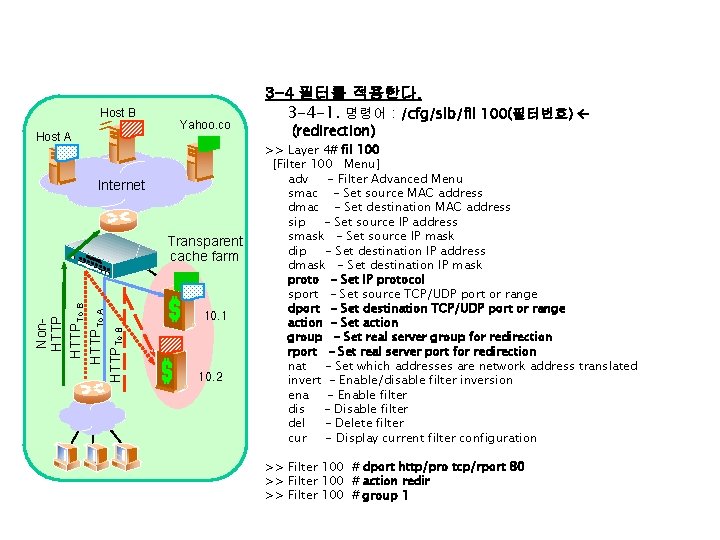
Host B Host A Yahoo. co m Internet Non. HTTPTo B HTTPTo A HTTPTo B Transparent cache farm 10. 1 10. 2 3 -4 필터를 적용한다. 3 -4 -1. 명령어 : /cfg/slb/fil 100(필터번호) (redirection) >> Layer 4# fil 100 [Filter 100 Menu] adv - Filter Advanced Menu smac - Set source MAC address dmac - Set destination MAC address sip - Set source IP address smask - Set source IP mask dip - Set destination IP address dmask - Set destination IP mask proto - Set IP protocol sport - Set source TCP/UDP port or range dport - Set destination TCP/UDP port or range action - Set action group - Set real server group for redirection rport - Set real server port for redirection nat - Set which addresses are network address translated invert - Enable/disable filter inversion ena - Enable filter dis - Disable filter del - Delete filter cur - Display current filter configuration >> Filter 100 # dport http/pro tcp/rport 80 >> Filter 100 # action redir >> Filter 100 # group 1
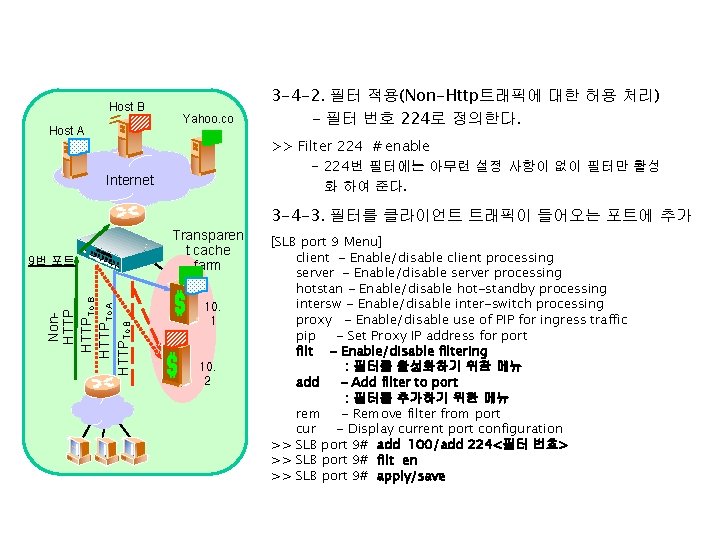
Host B Host A Yahoo. co m Internet Non. HTTPTo B HTTPTo A HTTPTo B 9번 포트 Transparen t cache farm 10. 1 10. 2 3 -4 -2. 필터 적용(Non-Http트래픽에 대한 허용 처리) - 필터 번호 224로 정의한다. >> Filter 224 # enable - 224번 필터에는 아무런 설정 사항이 없이 필터만 활성 화 하여 준다. 3 -4 -3. 필터를 클라이언트 트래픽이 들어오는 포트에 추가 [SLB port 9 Menu] client - Enable/disable client processing server - Enable/disable server processing hotstan - Enable/disable hot-standby processing intersw - Enable/disable inter-switch processing proxy - Enable/disable use of PIP for ingress traffic pip - Set Proxy IP address for port filt - Enable/disable filtering : 필터를 활성화하기 위한 메뉴 add - Add filter to port : 필터를 추가하기 위한 메뉴 rem - Remove filter from port cur - Display current port configuration >> SLB port 9# add 100/add 224<필터 번호> >> SLB port 9# filt en >> SLB port 9# apply/save
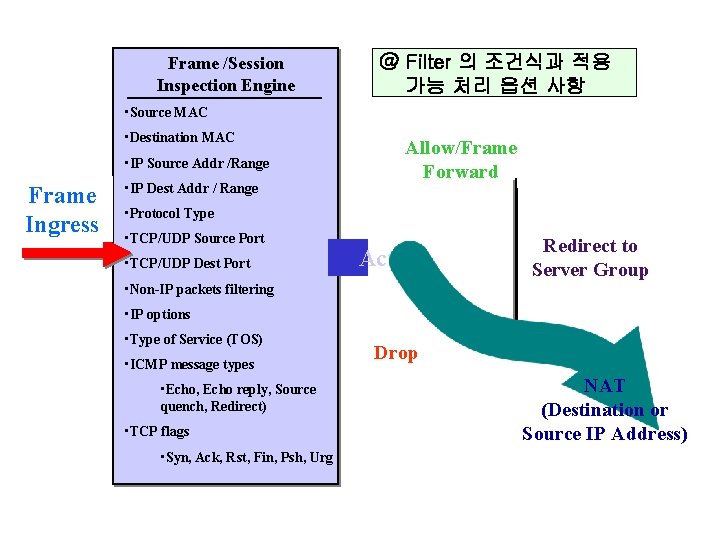
Frame /Session Inspection Engine @ Filter 의 조건식과 적용 가능 처리 옵션 사항 • Source MAC • Destination MAC • IP Source Addr /Range Frame Ingress • IP Dest Addr / Range Allow/Frame Forward • Protocol Type • TCP/UDP Source Port • TCP/UDP Dest Port Action Redirect to Server Group • Non-IP packets filtering • IP options • Type of Service (TOS) • ICMP message types • Echo, Echo reply, Source quench, Redirect) • TCP flags • Syn, Ack, Rst, Fin, Psh, Urg Drop NAT (Destination or Source IP Address)
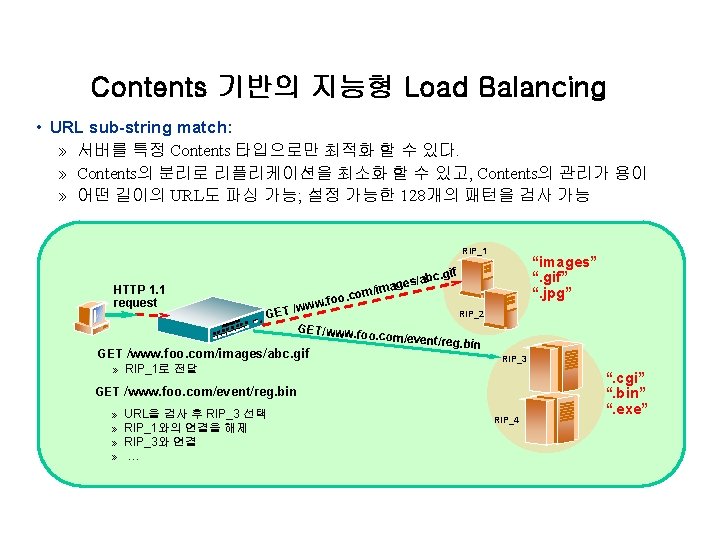
Contents 기반의 지능형 Load Balancing • URL sub-string match: » 서버를 특정 Contents 타입으로만 최적화 할 수 있다. » Contents의 분리로 리플리케이션을 최소화 할 수 있고, Contents의 관리가 용이 » 어떤 길이의 URL도 파싱 가능; 설정 가능한 128개의 패턴을 검사 가능 RIP_1 HTTP 1. 1 request age GET m/im oo. co . f /www GET/www. fo o GET /www. foo. com/images/abc. gif » RIP_1로 전달 “images” “. gif” “. jpg” . gif s/abc RIP_2 . com/event/re g. bin RIP_3 GET /www. foo. com/event/reg. bin » » URL을 검사 후 RIP_3 선택 RIP_1와의 연결을 해제 RIP_3와 연결 … RIP_4 “. cgi” “. bin” “. exe”
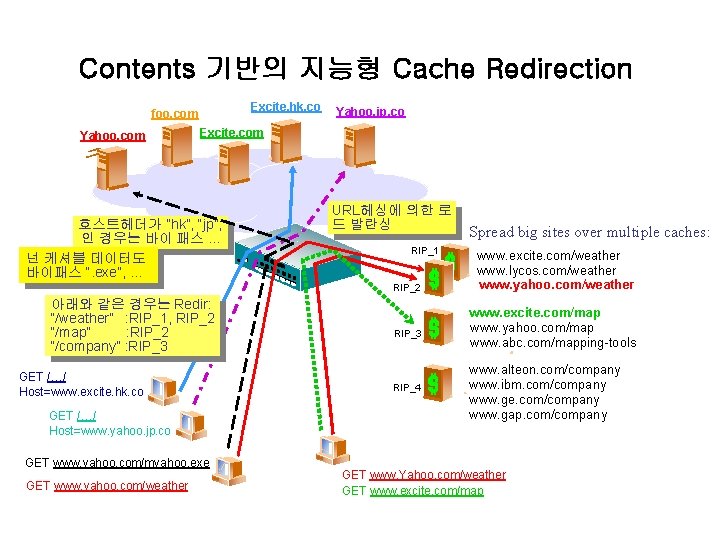
Contents 기반의 지능형 Cache Redirection Excite. hk. co foo. com Yahoo. jp. co Excite. com 호스트헤더가 ”hk”, “jp”, 인 경우는 바이 패스 … 넌 케셔블 데이터도 바이패스 “. exe”, … URL헤싱에 의한 로 드 발란싱 RIP_1 RIP_2 아래와 같은 경우는 Redir: “/weather” : RIP_1, RIP_2 “/map” : RIP_2 “/company” : RIP_3 GET /…/ Host=www. excite. hk. co GET /…/ Host=www. yahoo. jp. co GET www. yahoo. com/myahoo. exe GET www. yahoo. com/weather RIP_3 RIP_4 Spread big sites over multiple caches: www. excite. com/weather www. lycos. com/weather www. yahoo. com/weather www. excite. com/map www. yahoo. com/map www. abc. com/mapping-tools www. alteon. com/company www. ibm. com/company www. ge. com/company www. gap. com/company GET www. Yahoo. com/weather GET www. excite. com/map
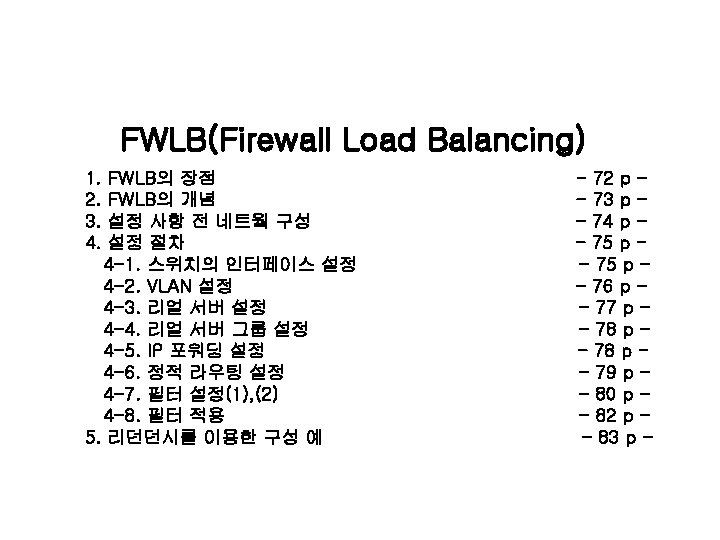
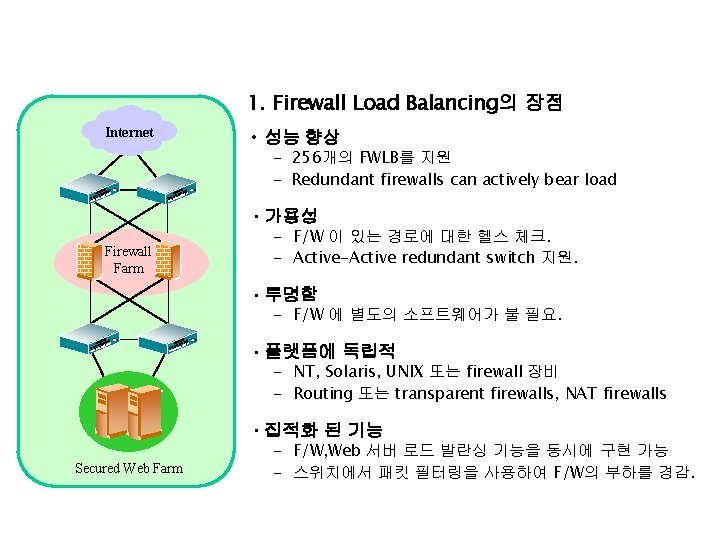
1. Firewall Load Balancing의 장점 Internet • 성능 향상 - 256개의 FWLB를 지원 - Redundant firewalls can actively bear load • 가용성 Firewall Farm - F/W 이 있는 경로에 대한 헬스 체크. - Active-Active redundant switch 지원. • 투명함 - F/W 에 별도의 소프트웨어가 불 필요. • 플랫폼에 독립적 - NT, Solaris, UNIX 또는 firewall 장비 - Routing 또는 transparent firewalls, NAT firewalls • 집적화 된 기능 Secured Web Farm - F/W, Web 서버 로드 발란싱 기능을 동시에 구현 가능 - 스위치에서 패킷 필터링을 사용하여 F/W의 부하를 경감.
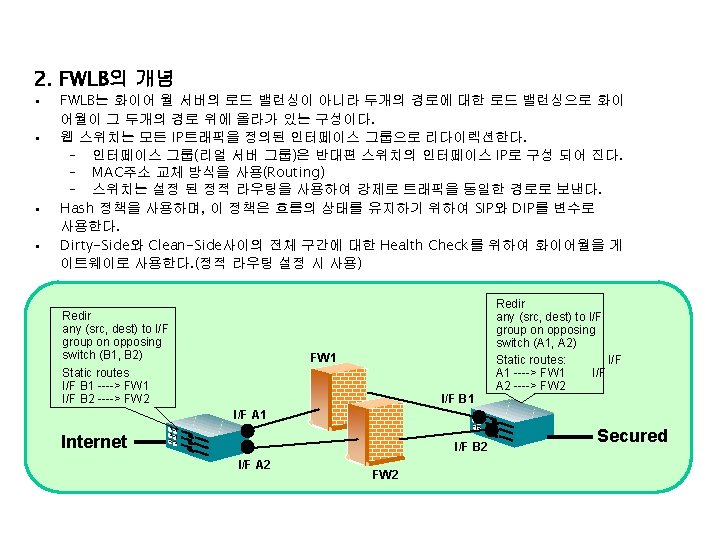
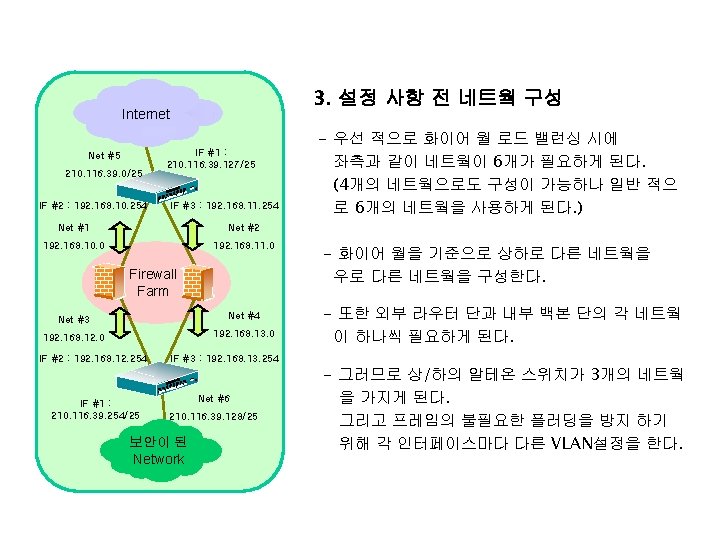
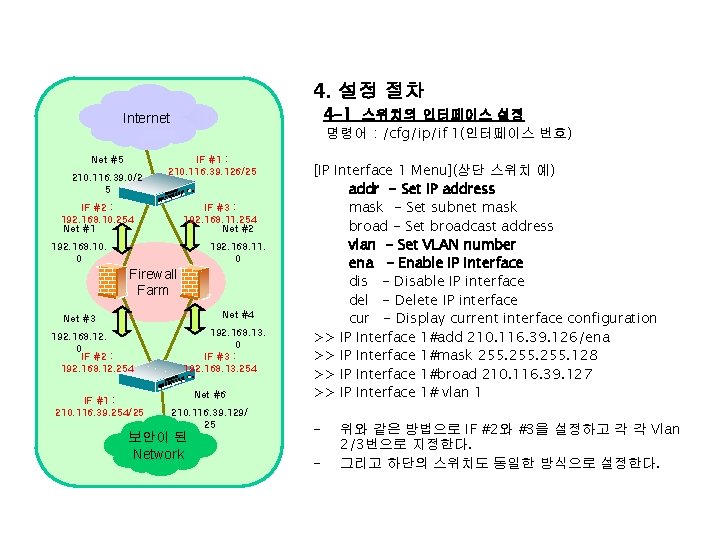
4. 설정 절차 4 -1 스위치의 인터페이스 설정 Internet Net #5 210. 116. 39. 0/2 5 명령어 : /cfg/ip/if 1(인터페이스 번호) IF #1 : 210. 116. 39. 126/25 IF #2 : 192. 168. 10. 254 Net #1 IF #3 : 192. 168. 11. 254 Net #2 192. 168. 10. 0 192. 168. 11. 0 Firewall Farm Net #4 Net #3 192. 168. 12. 0 IF #2 : 192. 168. 12. 254 IF #1 : 210. 116. 39. 254/25 192. 168. 13. 0 IF #3 : 192. 168. 13. 254 Net #6 210. 116. 39. 129/ 25 보안이 된 Network [IP Interface 1 Menu](상단 스위치 예) addr - Set IP address mask - Set subnet mask broad - Set broadcast address vlan - Set VLAN number ena - Enable IP interface dis - Disable IP interface del - Delete IP interface cur - Display current interface configuration >> IP Interface 1#add 210. 116. 39. 126/ena >> IP Interface 1#mask 255. 128 >> IP Interface 1#broad 210. 116. 39. 127 >> IP Interface 1# vlan 1 - 위와 같은 방법으로 IF #2와 #3을 설정하고 각 각 Vlan 2/3번으로 지정한다. 그리고 하단의 스위치도 동일한 방식으로 설정한다.
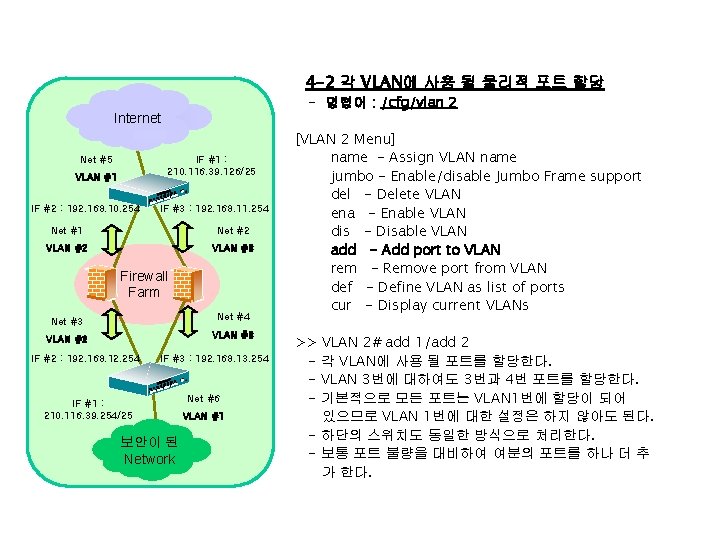
4 -2 각 VLAN에 사용 될 물리적 포트 할당 - 명령어 : /cfg/vlan 2 Internet Net #5 IF #1 : 210. 116. 39. 126/25 VLAN #1 IF #2 : 192. 168. 10. 254 IF #3 : 192. 168. 11. 254 Net #1 Net #2 VLAN #3 Firewall Farm Net #3 Net #4 VLAN #2 VLAN #3 IF #2 : 192. 168. 12. 254 IF #3 : 192. 168. 13. 254 IF #1 : 210. 116. 39. 254/25 보안이 된 Network Net #6 VLAN #1 [VLAN 2 Menu] name - Assign VLAN name jumbo - Enable/disable Jumbo Frame support del - Delete VLAN ena - Enable VLAN dis - Disable VLAN add - Add port to VLAN rem - Remove port from VLAN def - Define VLAN as list of ports cur - Display current VLANs >> VLAN 2# add 1/add 2 - 각 VLAN에 사용 될 포트를 할당한다. - VLAN 3번에 대하여도 3번과 4번 포트를 할당한다. - 기본적으로 모든 포트는 VLAN 1번에 할당이 되어 있으므로 VLAN 1번에 대한 설정은 하지 않아도 된다. - 하단의 스위치도 동일한 방식으로 처리한다. - 보통 포트 불량을 대비하여 여분의 포트를 하나 더 추 가 한다.
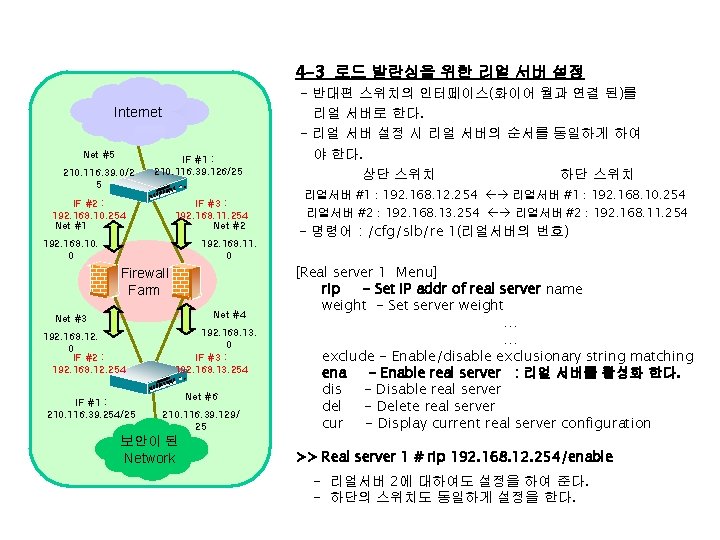
4 -3 로드 발란싱을 위한 리얼 서버 설정 Internet Net #5 210. 116. 39. 0/2 5 IF #1 : 210. 116. 39. 126/25 IF #2 : 192. 168. 10. 254 Net #1 IF #3 : 192. 168. 11. 254 Net #2 192. 168. 10. 0 192. 168. 11. 0 Firewall Farm Net #4 Net #3 192. 168. 12. 0 IF #2 : 192. 168. 12. 254 IF #1 : 210. 116. 39. 254/25 192. 168. 13. 0 IF #3 : 192. 168. 13. 254 Net #6 210. 116. 39. 129/ 25 보안이 된 Network - 반대편 스위치의 인터페이스(화이어 월과 연결 된)를 리얼 서버로 한다. - 리얼 서버 설정 시 리얼 서버의 순서를 동일하게 하여 야 한다. 상단 스위치 하단 스위치 리얼서버 #1 : 192. 168. 12. 254 리얼서버 #1 : 192. 168. 10. 254 리얼서버 #2 : 192. 168. 13. 254 리얼서버 #2 : 192. 168. 11. 254 - 명령어 : /cfg/slb/re 1(리얼서버의 번호) [Real server 1 Menu] rip - Set IP addr of real server name weight - Set server weight … … exclude - Enable/disable exclusionary string matching ena - Enable real server : 리얼 서버를 활성화 한다. dis - Disable real server del - Delete real server cur - Display current real server configuration >> Real server 1 # rip 192. 168. 12. 254/enable - 리얼서버 2에 대하여도 설정을 하여 준다. - 하단의 스위치도 동일하게 설정을 한다.
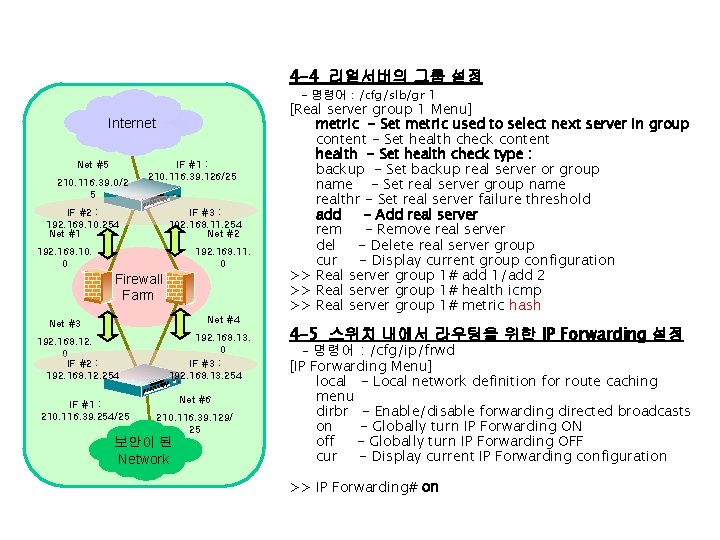
4 -4 리얼서버의 그룹 설정 - 명령어 : /cfg/slb/gr 1 Internet Net #5 210. 116. 39. 0/2 5 IF #1 : 210. 116. 39. 126/25 IF #2 : 192. 168. 10. 254 Net #1 IF #3 : 192. 168. 11. 254 Net #2 192. 168. 10. 0 192. 168. 11. 0 Firewall Farm Net #4 Net #3 192. 168. 12. 0 IF #2 : 192. 168. 12. 254 IF #1 : 210. 116. 39. 254/25 192. 168. 13. 0 IF #3 : 192. 168. 13. 254 Net #6 210. 116. 39. 129/ 25 보안이 된 Network [Real server group 1 Menu] metric - Set metric used to select next server in group content - Set health check content health - Set health check type : backup - Set backup real server or group name - Set real server group name realthr - Set real server failure threshold add - Add real server rem - Remove real server del - Delete real server group cur - Display current group configuration >> Real server group 1# add 1/add 2 >> Real server group 1# health icmp >> Real server group 1# metric hash 4 -5 스위치 내에서 라우팅을 위한 IP Forwarding 설정 - 명령어 : /cfg/ip/frwd [IP Forwarding Menu] local - Local network definition for route caching menu dirbr - Enable/disable forwarding directed broadcasts on - Globally turn IP Forwarding ON off - Globally turn IP Forwarding OFF cur - Display current IP Forwarding configuration >> IP Forwarding# on
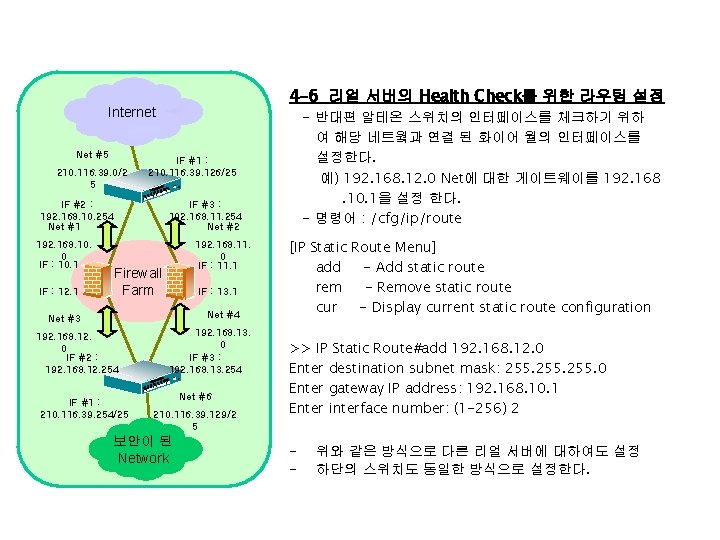
4 -6 리얼 서버의 Health Check를 위한 라우팅 설정 Internet Net #5 210. 116. 39. 0/2 5 IF #1 : 210. 116. 39. 126/25 IF #2 : 192. 168. 10. 254 Net #1 192. 168. 10. 0 IF : 10. 1 IF : 12. 1 - 반대편 알테온 스위치의 인터페이스를 체크하기 위하 여 해당 네트웤과 연결 된 화이어 월의 인터페이스를 설정한다. 예) 192. 168. 12. 0 Net에 대한 게이트웨이를 192. 168. 10. 1을 설정 한다. - 명령어 : /cfg/ip/route IF #3 : 192. 168. 11. 254 Net #2 192. 168. 11. 0 IF : 11. 1 Firewall Farm IF : 13. 1 Net #4 Net #3 192. 168. 12. 0 IF #2 : 192. 168. 12. 254 IF #1 : 210. 116. 39. 254/25 192. 168. 13. 0 IF #3 : 192. 168. 13. 254 Net #6 210. 116. 39. 129/2 5 보안이 된 Network [IP Static Route Menu] add - Add static route rem - Remove static route cur - Display current static route configuration >> IP Static Route#add 192. 168. 12. 0 Enter destination subnet mask: 255. 0 Enter gateway IP address: 192. 168. 10. 1 Enter interface number: (1 -256) 2 - 위와 같은 방식으로 다른 리얼 서버에 대하여도 설정 하단의 스위치도 동일한 방식으로 설정한다.
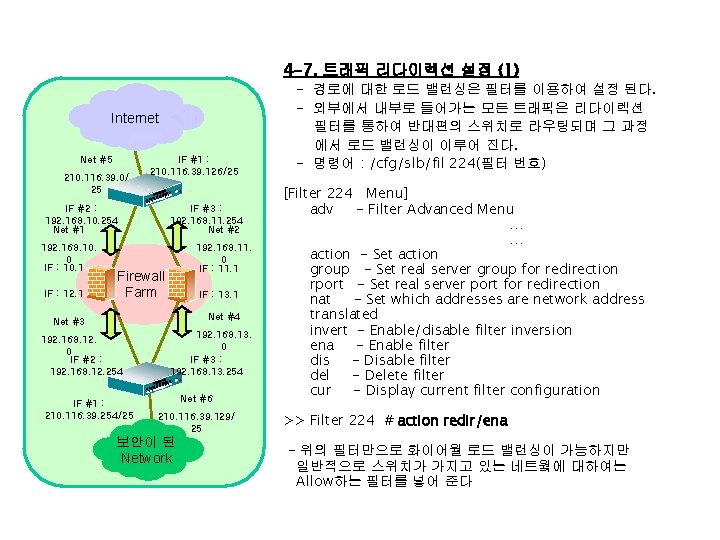
4 -7. 트래픽 리다이렉션 설정 (1) Internet Net #5 210. 116. 39. 0/ 25 IF #1 : 210. 116. 39. 126/25 IF #2 : 192. 168. 10. 254 Net #1 192. 168. 10. 0 IF : 10. 1 IF : 12. 1 IF #3 : 192. 168. 11. 254 Net #2 192. 168. 11. 0 IF : 11. 1 Firewall Farm IF : 13. 1 Net #4 Net #3 192. 168. 12. 0 IF #2 : 192. 168. 12. 254 IF #1 : 210. 116. 39. 254/25 192. 168. 13. 0 IF #3 : 192. 168. 13. 254 Net #6 210. 116. 39. 129/ 25 보안이 된 Network - 경로에 대한 로드 밸런싱은 필터를 이용하여 설정 된다. - 외부에서 내부로 들어가는 모든 트래픽은 리다이렉션 필터를 통하여 반대편의 스위치로 라우팅되며 그 과정 에서 로드 밸런싱이 이루어 진다. - 명령어 : /cfg/slb/fil 224(필터 번호) [Filter 224 Menu] adv - Filter Advanced Menu … … action - Set action group - Set real server group for redirection rport - Set real server port for redirection nat - Set which addresses are network address translated invert - Enable/disable filter inversion ena - Enable filter dis - Disable filter del - Delete filter cur - Display current filter configuration >> Filter 224 # action redir/ena - 위의 필터만으로 화이어월 로드 밸런싱이 가능하지만 일반적으로 스위치가 가지고 있는 네트웤에 대하여는 Allow하는 필터를 넣어 준다
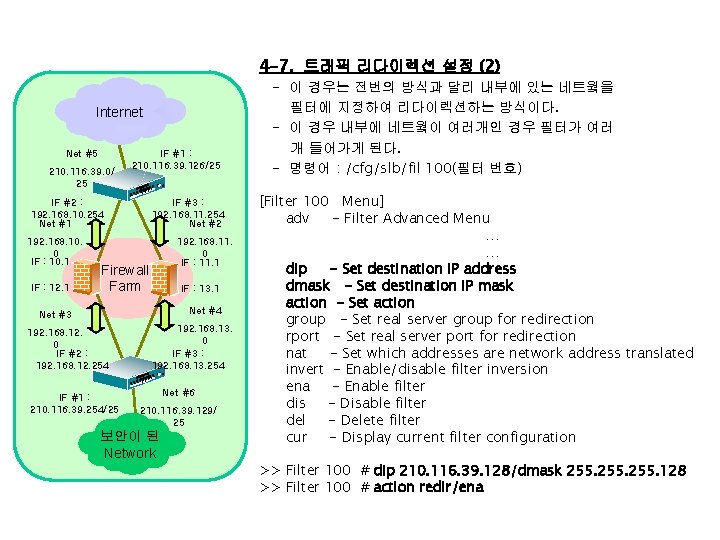
4 -7. 트래픽 리다이렉션 설정 (2) Internet Net #5 210. 116. 39. 0/ 25 IF #1 : 210. 116. 39. 126/25 IF #2 : 192. 168. 10. 254 Net #1 192. 168. 10. 0 IF : 10. 1 IF : 12. 1 IF #3 : 192. 168. 11. 254 Net #2 192. 168. 11. 0 IF : 11. 1 Firewall Farm IF : 13. 1 Net #4 Net #3 192. 168. 12. 0 IF #2 : 192. 168. 12. 254 IF #1 : 210. 116. 39. 254/25 192. 168. 13. 0 IF #3 : 192. 168. 13. 254 Net #6 210. 116. 39. 129/ 25 보안이 된 Network - 이 경우는 전번의 방식과 달리 내부에 있는 네트웤을 필터에 지정하여 리다이렉션하는 방식이다. - 이 경우 내부에 네트웤이 여러개인 경우 필터가 여러 개 들어가게 된다. - 명령어 : /cfg/slb/fil 100(필터 번호) [Filter 100 Menu] adv - Filter Advanced Menu … … dip - Set destination IP address dmask - Set destination IP mask action - Set action group - Set real server group for redirection rport - Set real server port for redirection nat - Set which addresses are network address translated invert - Enable/disable filter inversion ena - Enable filter dis - Disable filter del - Delete filter cur - Display current filter configuration >> Filter 100 # dip 210. 116. 39. 128/dmask 255. 128 >> Filter 100 # action redir/ena
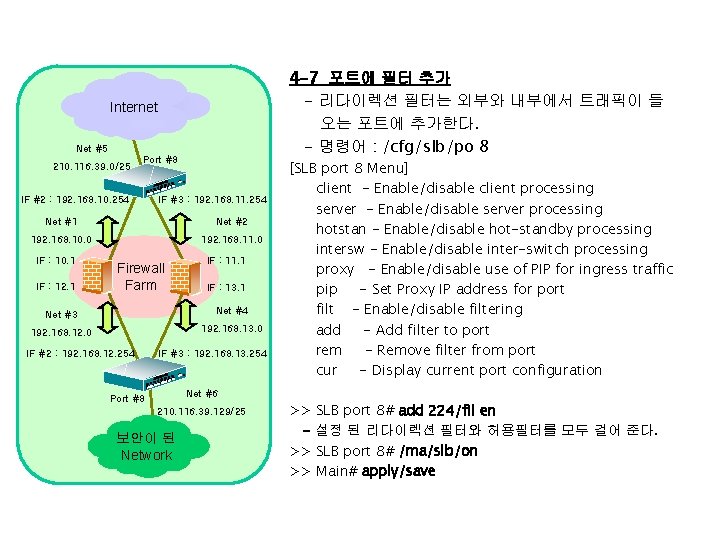
4 -7 포트에 필터 추가 - 리다이렉션 필터는 외부와 내부에서 트래픽이 들 오는 포트에 추가한다. - 명령어 : /cfg/slb/po 8 Internet Net #5 210. 116. 39. 0/25 Port #8 IF #2 : 192. 168. 10. 254 IF #3 : 192. 168. 11. 254 Net #1 Net #2 192. 168. 10. 0 192. 168. 11. 0 IF : 10. 1 IF : 12. 1 Firewall Farm IF : 11. 1 IF : 13. 1 Net #3 Net #4 192. 168. 12. 0 192. 168. 13. 0 IF #2 : 192. 168. 12. 254 IF #3 : 192. 168. 13. 254 [SLB port 8 Menu] client - Enable/disable client processing server - Enable/disable server processing hotstan - Enable/disable hot-standby processing intersw - Enable/disable inter-switch processing proxy - Enable/disable use of PIP for ingress traffic pip - Set Proxy IP address for port filt - Enable/disable filtering add - Add filter to port rem - Remove filter from port cur - Display current port configuration Net #6 Port #8 210. 116. 39. 129/25 보안이 된 Network >> SLB port 8# add 224/fil en - 설정 된 리다이렉션 필터와 허용필터를 모두 걸어 준다. >> SLB port 8# /ma/slb/on >> Main# apply/save
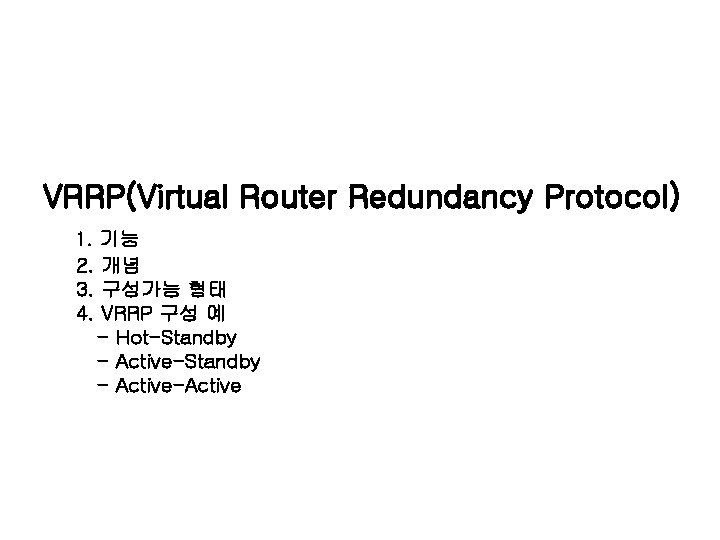
VRRP(Virtual Router Redundancy Protocol) 1. 기능 2. 개념 3. 구성가능 형태 4. VRRP 구성 예 - Hot-Standby - Active-Active
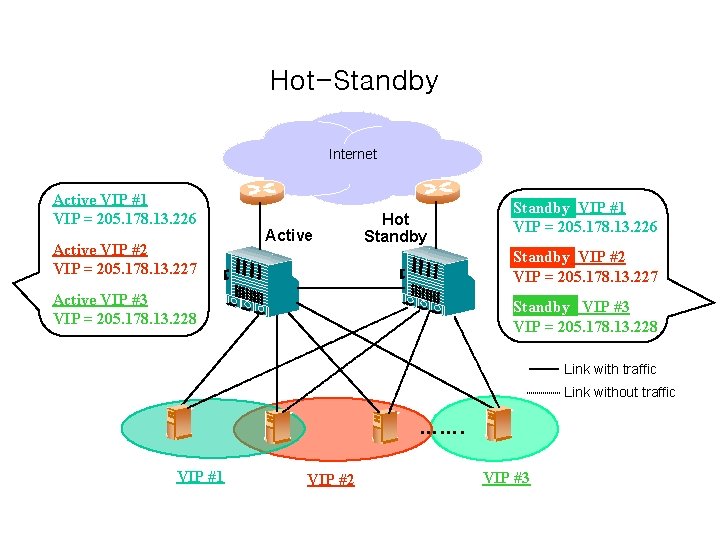
Hot-Standby Internet Active VIP #1 VIP = 205. 178. 13. 226 Active VIP #2 VIP = 205. 178. 13. 227 Active Hot Standby VIP #1 VIP = 205. 178. 13. 226 Standby VIP #2 VIP = 205. 178. 13. 227 Active VIP #3 VIP = 205. 178. 13. 228 Standby VIP #3 VIP = 205. 178. 13. 228 Link with traffic Link without traffic ……. VIP #1 VIP #2 VIP #3
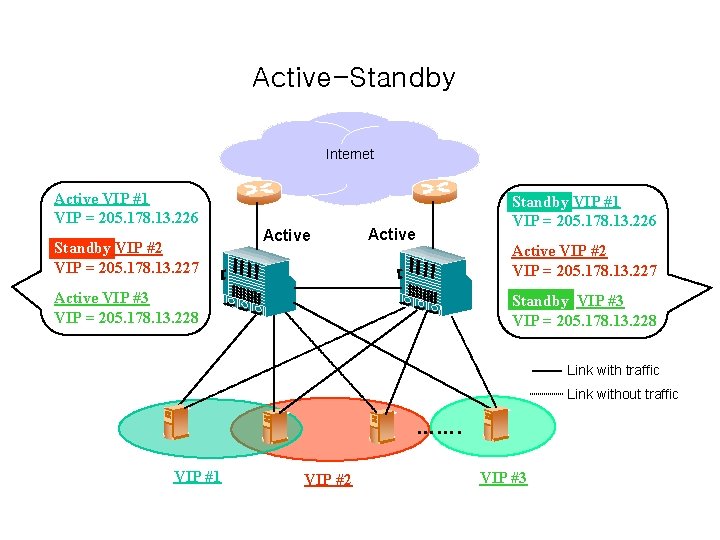
Active-Standby Internet Active VIP #1 VIP = 205. 178. 13. 226 Standby VIP #2 VIP = 205. 178. 13. 227 Active Standby VIP #1 VIP = 205. 178. 13. 226 Active VIP #2 VIP = 205. 178. 13. 227 Active VIP #3 VIP = 205. 178. 13. 228 Standby VIP #3 VIP = 205. 178. 13. 228 Link with traffic Link without traffic ……. VIP #1 VIP #2 VIP #3
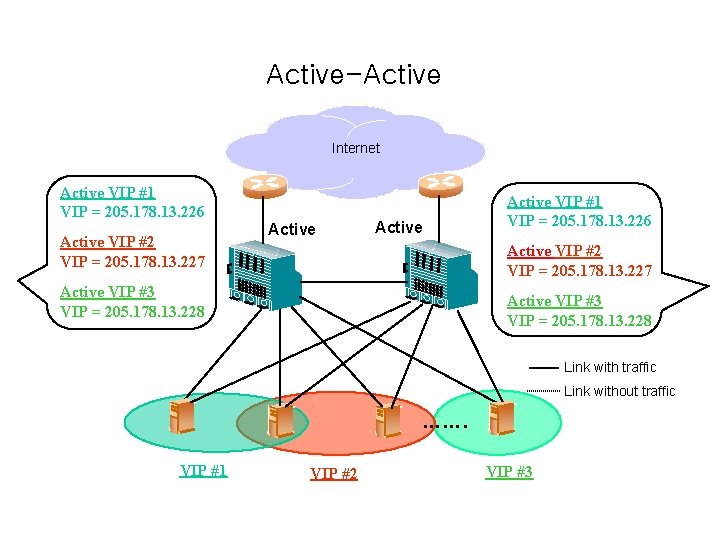
Active-Active Internet Active VIP #1 VIP = 205. 178. 13. 226 Active VIP #2 VIP = 205. 178. 13. 227 Active VIP #3 VIP = 205. 178. 13. 228 Link with traffic Link without traffic ……. VIP #1 VIP #2 VIP #3
- Slides: 81