
All Seasons CLIMATE COMFORT Heating Daikin Altherma LTCB
All Seasons °CLIMATE COMFORT Heating Daikin Altherma LT-CB 7. Troubleshooting Air Conditioning Applied Systems Refrigeration TOP SECRET INTERNAL USE ONLY PUBLIC
TOP SECRET INTERNAL USE ONLY PUBLIC 7. Troubleshooting 1. Use of service manual (retrieve error codes, repair) 2. Service tools 1. 2. 3. 4. D-checker Configurator Inverter analyser Other service tools 3. Common mistakes 4. Contact All Seasons °CLIMATE COMFORT Name: November 2020 2
TOP SECRET INTERNAL USE ONLY PUBLIC 7. 1. Use of service manual (retrieve error codes, repair) New style service manual for first line engineer 1. Introduction (general operation of the unit + how to use this book) 2. Troubleshooting 1. 2. 3. 4. How to retrieve error codes Error code based troubleshooting Symptom based troubleshooting Component checklist 3. Repair 1. General repair procedures 2. Unit specific procedures (parts replacement) 4. Maintenance All Seasons °CLIMATE COMFORT Name: November 2020 3
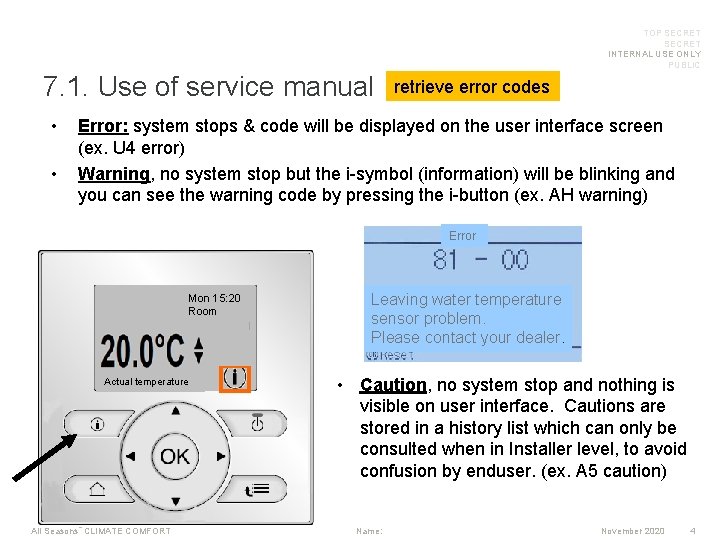
TOP SECRET INTERNAL USE ONLY PUBLIC 7. 1. Use of service manual • • retrieve error codes Error: system stops & code will be displayed on the user interface screen (ex. U 4 error) Warning, no system stop but the i-symbol (information) will be blinking and you can see the warning code by pressing the i-button (ex. AH warning) Error Mon 15: 20 Room Actual temperature All Seasons °CLIMATE COMFORT Leaving water temperature sensor problem. Please contact your dealer. • Caution, no system stop and nothing is visible on user interface. Cautions are stored in a history list which can only be consulted when in Installer level, to avoid confusion by enduser. (ex. A 5 caution) Name: November 2020 4
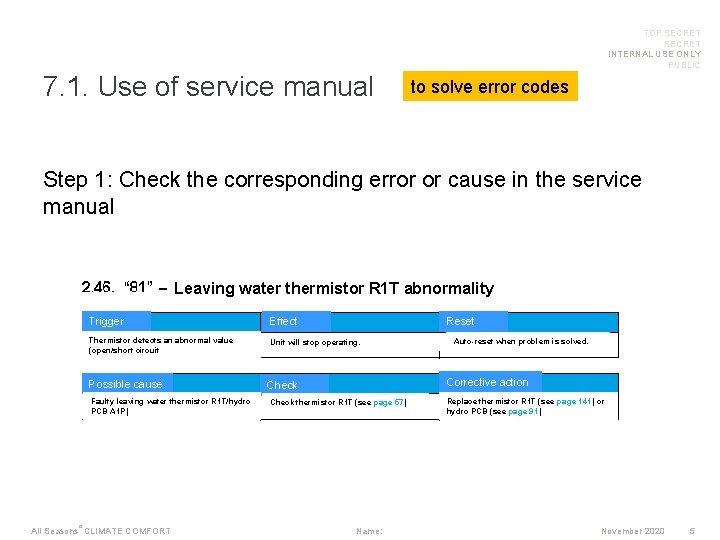
TOP SECRET INTERNAL USE ONLY PUBLIC 7. 1. Use of service manual to solve error codes Step 1: Check the corresponding error or cause in the service manual Leaving water thermistor R 1 T abnormality Trigger Effect Thermistor detects an abnormal value (open/short circuit Unit will stop operating. Possible cause Faulty leaving water thermistor R 1 T/hydro PCB A 1 P) All Seasons °CLIMATE COMFORT Reset Auto-reset when problem is solved. Corrective action Check thermistor R 1 T (see page 57) Name: Replace thermistor R 1 T (see page 141) or hydro PCB (see page 91) November 2020 5
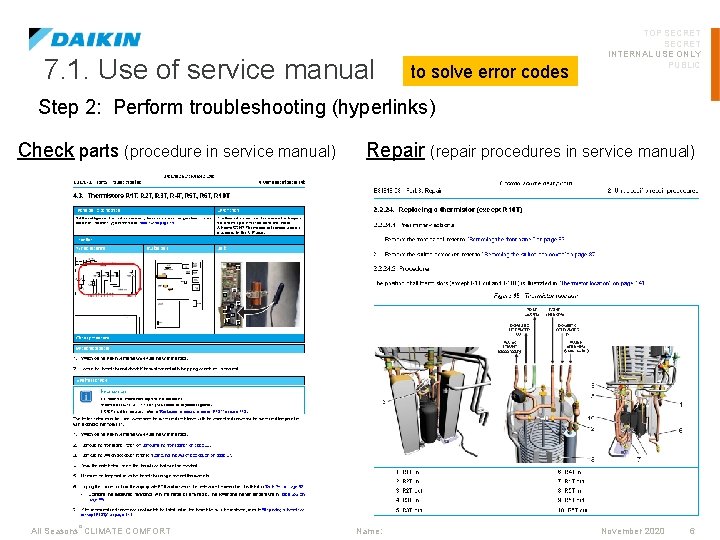
7. 1. Use of service manual to solve error codes TOP SECRET INTERNAL USE ONLY PUBLIC Step 2: Perform troubleshooting (hyperlinks) Check parts (procedure in service manual) All Seasons °CLIMATE COMFORT Repair (repair procedures in service manual) Name: November 2020 6

TOP SECRET INTERNAL USE ONLY PUBLIC 7. 2. Service tools: D-Checker WHY? D-Checker is a service tool to read out & record operating parameters from below units: - (multi)Split Sky-air ZEAS Convenipack: AC 17 model R 410 a Booster Daikin Altherma LT (small OU & big OU), Hybrid & GSHP All Seasons °CLIMATE COMFORT Name: November 2020 7

7. 2. Service tools: D-Checker WHAT? TOP SECRET INTERNAL USE ONLY PUBLIC ! Use the connector that matches the unit you’ll be using it on: 5 -pin connector to connect to outdoor unit (multi-split, sky-air) or indoor (Daikin Altherma LT-C*) 7 -pin connector to connect to split outdoor unit . Partnumber 999495 P Additional adapter cable to connect to Daikin Altherma LT-B* indoor unit USB-A/B to provide power Partnumber 999491 P Software can be found on Extranet All Seasons °CLIMATE COMFORT Name: November 2020 8
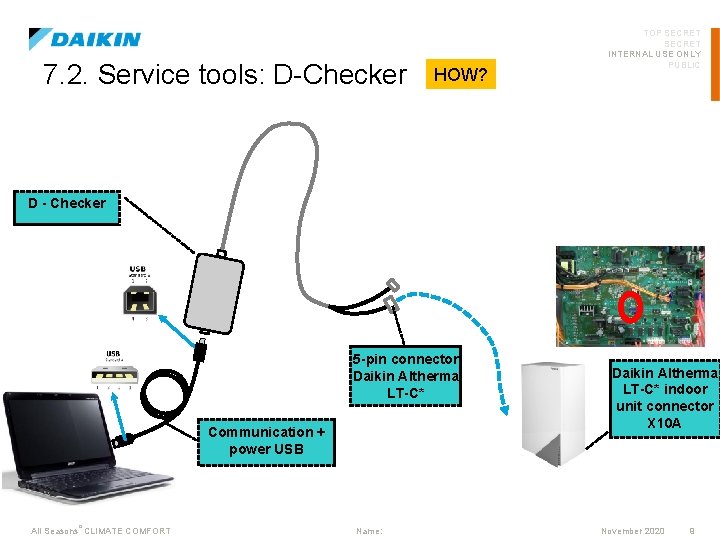
7. 2. Service tools: D-Checker HOW? TOP SECRET INTERNAL USE ONLY PUBLIC D - Checker 5 -pin connector Daikin Altherma LT-C* Communication + power USB All Seasons °CLIMATE COMFORT Name: Daikin Altherma LT-C* indoor unit connector X 10 A November 2020 9
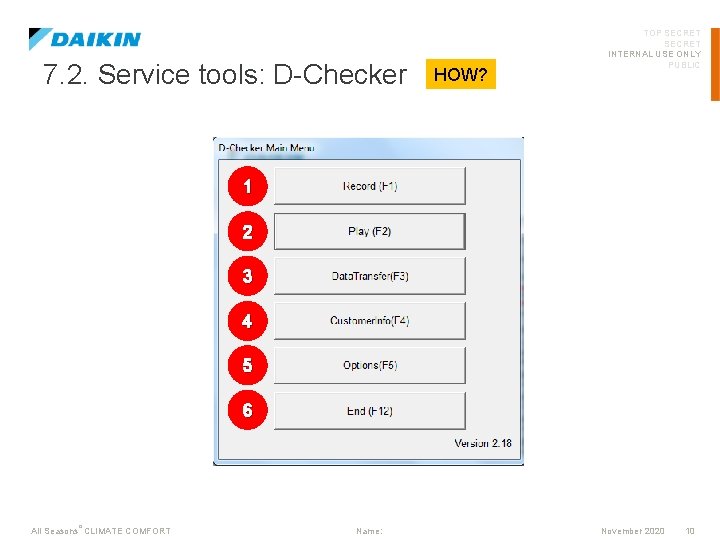
7. 2. Service tools: D-Checker HOW? TOP SECRET INTERNAL USE ONLY PUBLIC 1 2 3 4 5 6 All Seasons °CLIMATE COMFORT Name: November 2020 10
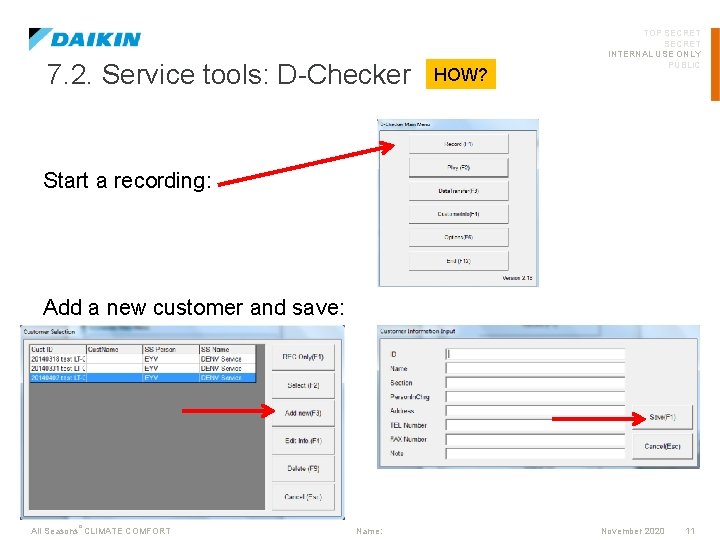
7. 2. Service tools: D-Checker HOW? TOP SECRET INTERNAL USE ONLY PUBLIC Start a recording: Add a new customer and save: All Seasons °CLIMATE COMFORT Name: November 2020 11
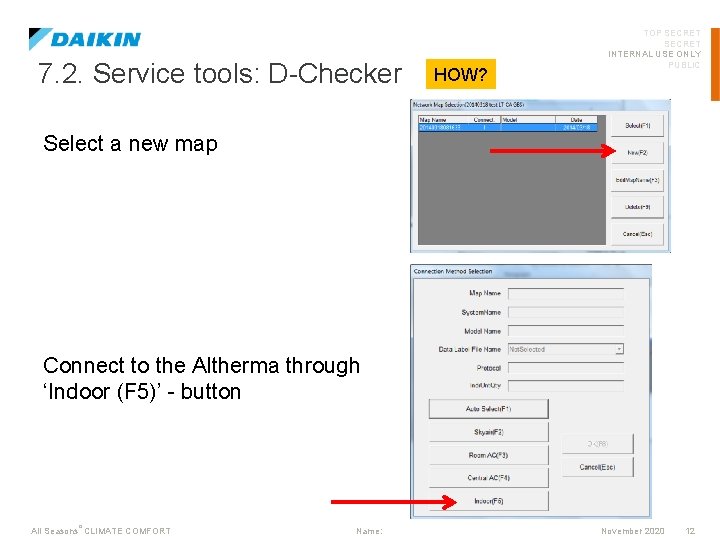
7. 2. Service tools: D-Checker HOW? TOP SECRET INTERNAL USE ONLY PUBLIC Select a new map Connect to the Altherma through ‘Indoor (F 5)’ - button All Seasons °CLIMATE COMFORT Name: November 2020 12
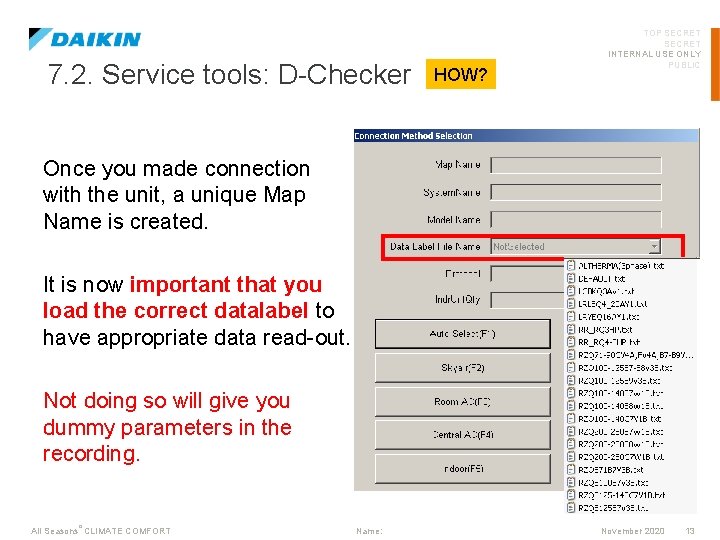
7. 2. Service tools: D-Checker HOW? TOP SECRET INTERNAL USE ONLY PUBLIC Once you made connection with the unit, a unique Map Name is created. It is now important that you load the correct datalabel to have appropriate data read-out. Not doing so will give you dummy parameters in the recording. All Seasons °CLIMATE COMFORT Name: November 2020 13

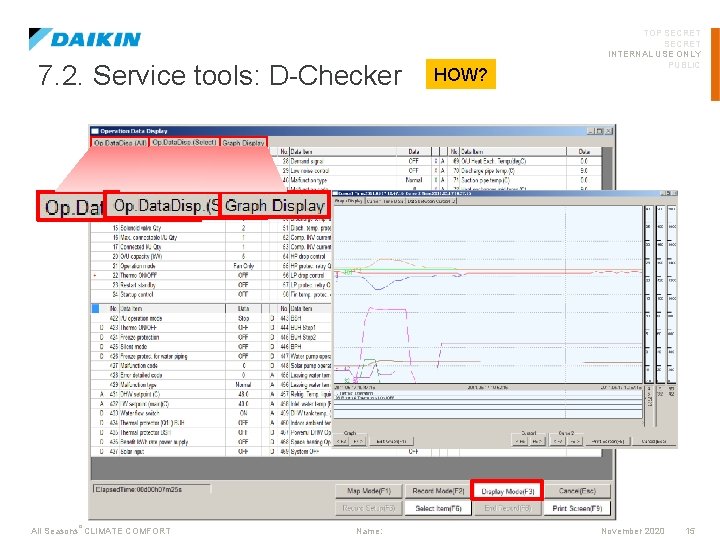
7. 2. Service tools: D-Checker HOW? TOP SECRET INTERNAL USE ONLY PUBLIC Start/End the recording through ‘Record Mode (F 2)’. Then consult your recording in ‘Display Model (F 3)’ All Seasons °CLIMATE COMFORT Name: November 2020 14
7. 2. Service tools: D-Checker All Seasons °CLIMATE COMFORT Name: HOW? TOP SECRET INTERNAL USE ONLY PUBLIC November 2020 15
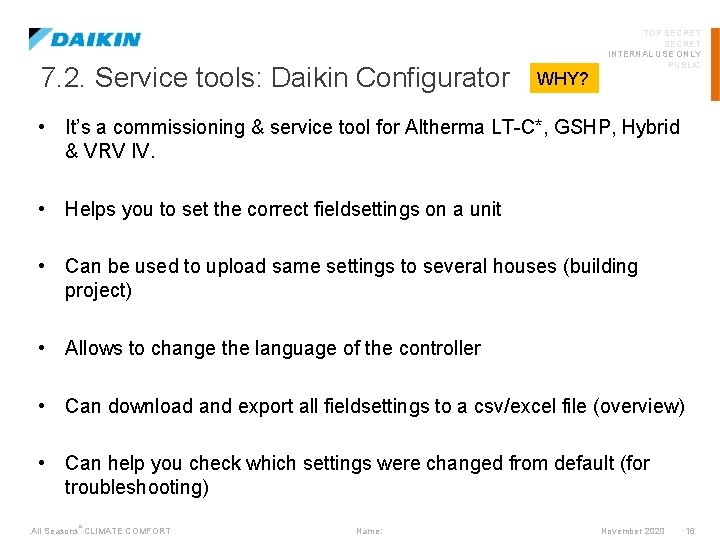
7. 2. Service tools: Daikin Configurator WHY? TOP SECRET INTERNAL USE ONLY PUBLIC • It’s a commissioning & service tool for Altherma LT-C*, GSHP, Hybrid & VRV IV. • Helps you to set the correct fieldsettings on a unit • Can be used to upload same settings to several houses (building project) • Allows to change the language of the controller • Can download and export all fieldsettings to a csv/excel file (overview) • Can help you check which settings were changed from default (for troubleshooting) All Seasons °CLIMATE COMFORT Name: November 2020 16
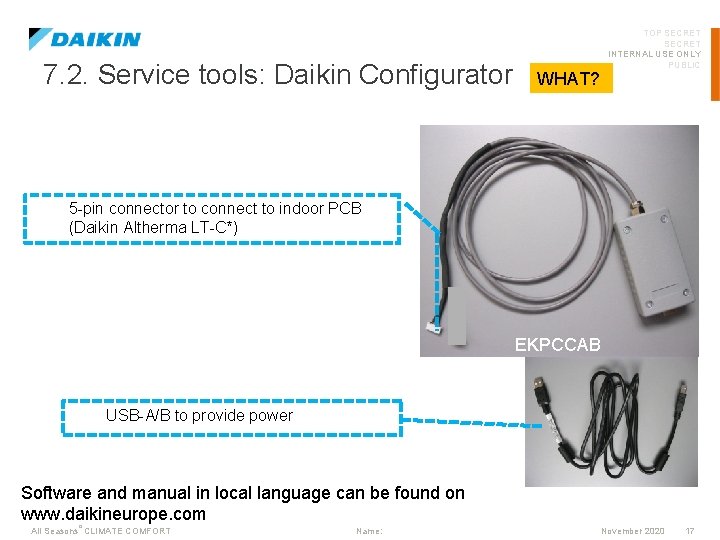
7. 2. Service tools: Daikin Configurator TOP SECRET INTERNAL USE ONLY PUBLIC WHAT? 5 -pin connector to connect to indoor PCB (Daikin Altherma LT-C*) EKPCCAB USB-A/B to provide power Software and manual in local language can be found on www. daikineurope. com All Seasons °CLIMATE COMFORT Name: November 2020 17
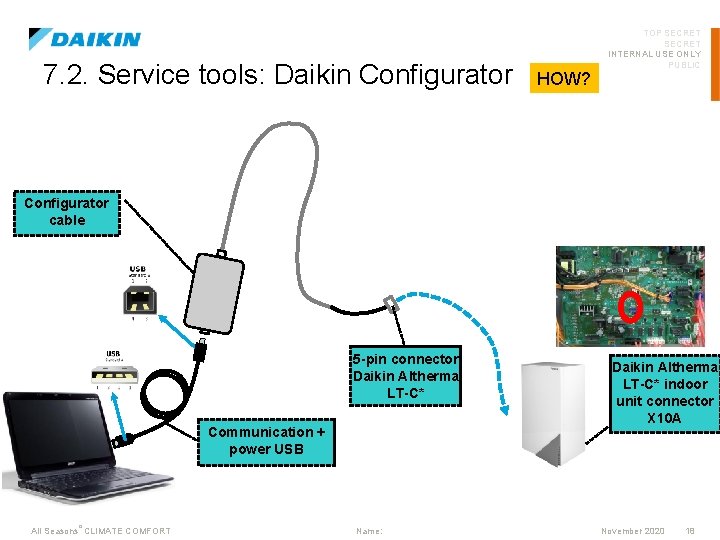
7. 2. Service tools: Daikin Configurator HOW? TOP SECRET INTERNAL USE ONLY PUBLIC Configurator cable 5 -pin connector Daikin Altherma LT-C* Communication + power USB All Seasons °CLIMATE COMFORT Name: Daikin Altherma LT-C* indoor unit connector X 10 A November 2020 18
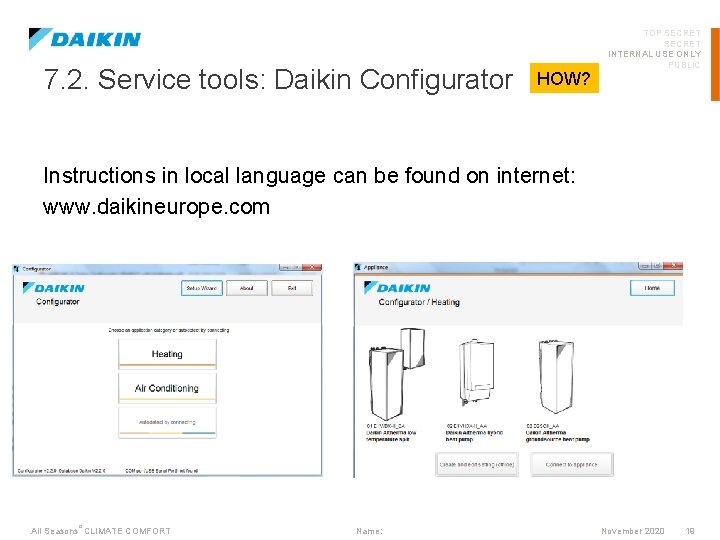
7. 2. Service tools: Daikin Configurator HOW? TOP SECRET INTERNAL USE ONLY PUBLIC Instructions in local language can be found on internet: www. daikineurope. com All Seasons °CLIMATE COMFORT Name: November 2020 19
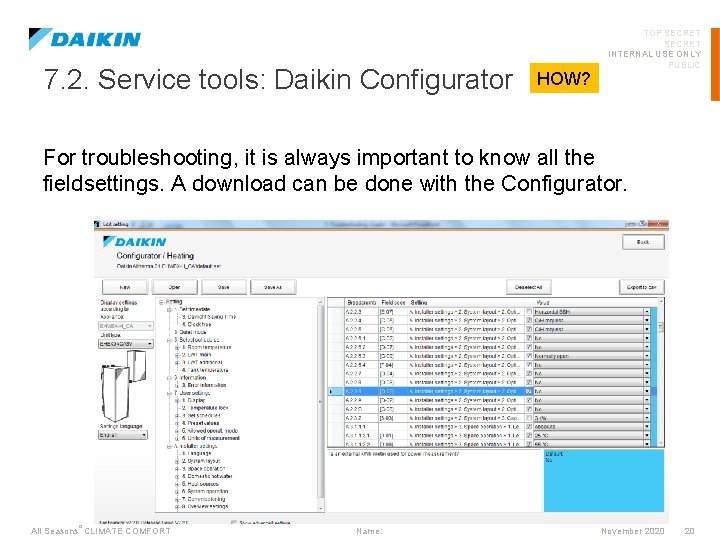
7. 2. Service tools: Daikin Configurator HOW? TOP SECRET INTERNAL USE ONLY PUBLIC For troubleshooting, it is always important to know all the fieldsettings. A download can be done with the Configurator. All Seasons °CLIMATE COMFORT Name: November 2020 20
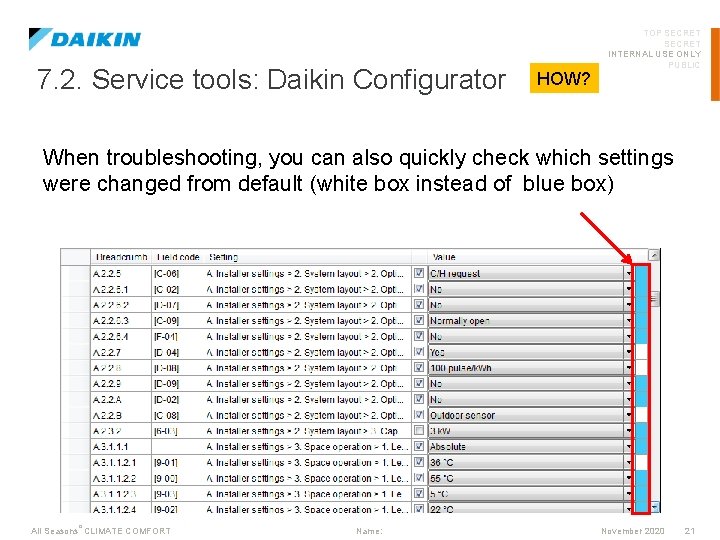
7. 2. Service tools: Daikin Configurator HOW? TOP SECRET INTERNAL USE ONLY PUBLIC When troubleshooting, you can also quickly check which settings were changed from default (white box instead of blue box) All Seasons °CLIMATE COMFORT Name: November 2020 21
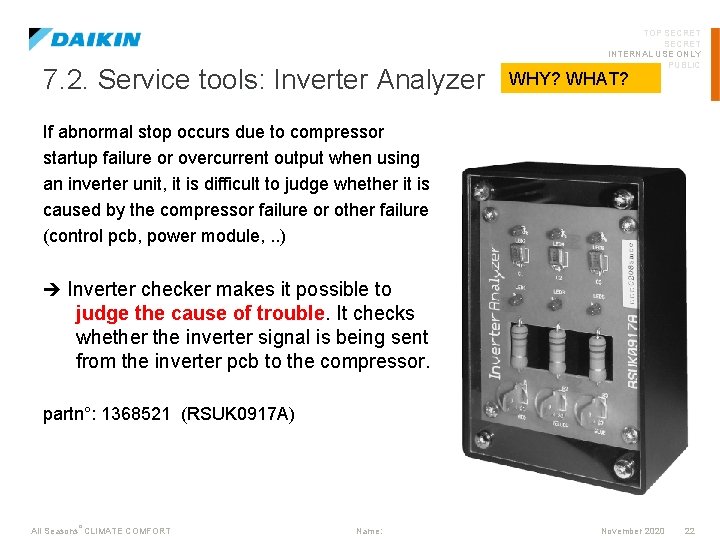
7. 2. Service tools: Inverter Analyzer TOP SECRET INTERNAL USE ONLY PUBLIC WHY? WHAT? If abnormal stop occurs due to compressor startup failure or overcurrent output when using an inverter unit, it is difficult to judge whether it is caused by the compressor failure or other failure (control pcb, power module, . . ) Inverter checker makes it possible to judge the cause of trouble. It checks whether the inverter signal is being sent from the inverter pcb to the compressor. partn°: 1368521 (RSUK 0917 A) All Seasons °CLIMATE COMFORT Name: November 2020 22
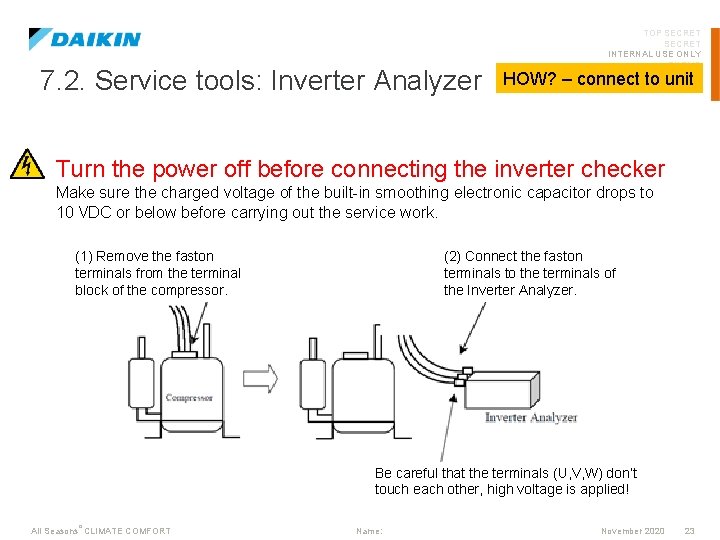
7. 2. Service tools: Inverter Analyzer TOP SECRET INTERNAL USE ONLY PUBLIC HOW? – connect to unit Turn the power off before connecting the inverter checker Make sure the charged voltage of the built-in smoothing electronic capacitor drops to 10 VDC or below before carrying out the service work. (1) Remove the faston terminals from the terminal block of the compressor. (2) Connect the faston terminals to the terminals of the Inverter Analyzer. Be careful that the terminals (U, V, W) don’t touch each other, high voltage is applied! All Seasons °CLIMATE COMFORT Name: November 2020 23
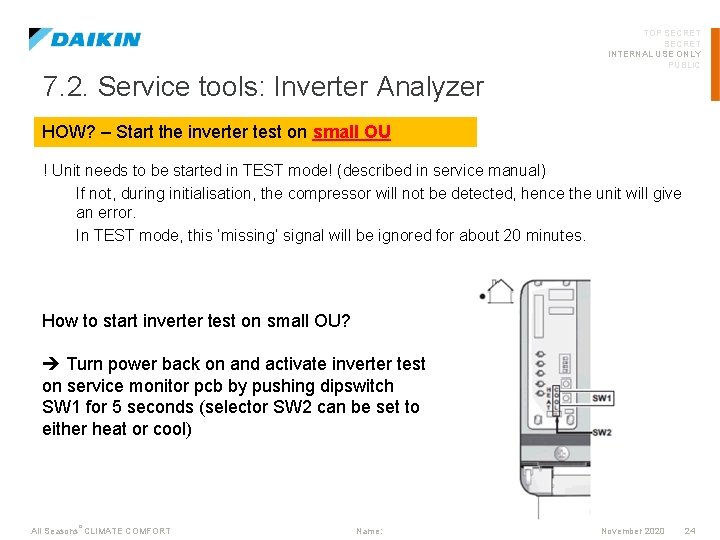
TOP SECRET INTERNAL USE ONLY PUBLIC 7. 2. Service tools: Inverter Analyzer HOW? – Start the inverter test on small OU ! Unit needs to be started in TEST mode! (described in service manual) If not, during initialisation, the compressor will not be detected, hence the unit will give an error. In TEST mode, this ‘missing’ signal will be ignored for about 20 minutes. How to start inverter test on small OU? Turn power back on and activate inverter test on service monitor pcb by pushing dipswitch SW 1 for 5 seconds (selector SW 2 can be set to either heat or cool) All Seasons °CLIMATE COMFORT Name: November 2020 24
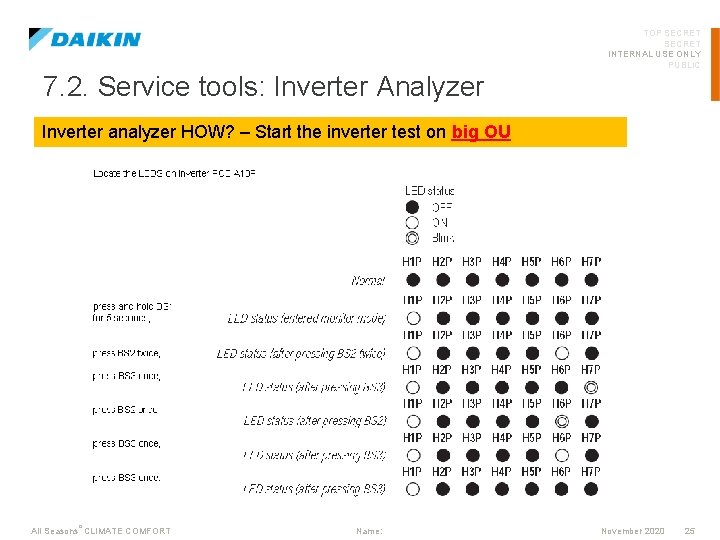
TOP SECRET INTERNAL USE ONLY PUBLIC 7. 2. Service tools: Inverter Analyzer Inverter analyzer HOW? – Start the inverter test on big OU All Seasons °CLIMATE COMFORT Name: November 2020 25
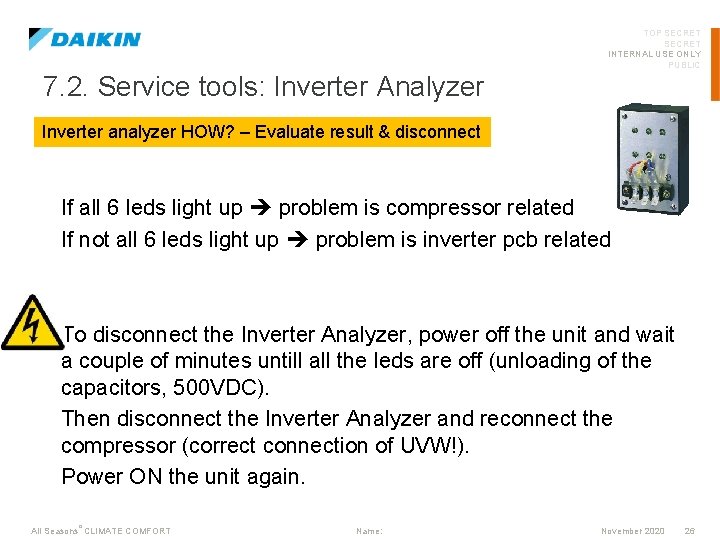
TOP SECRET INTERNAL USE ONLY PUBLIC 7. 2. Service tools: Inverter Analyzer Inverter analyzer HOW? – Evaluate result & disconnect If all 6 leds light up problem is compressor related If not all 6 leds light up problem is inverter pcb related To disconnect the Inverter Analyzer, power off the unit and wait a couple of minutes untill all the leds are off (unloading of the capacitors, 500 VDC). Then disconnect the Inverter Analyzer and reconnect the compressor (correct connection of UVW!). Power ON the unit again. All Seasons °CLIMATE COMFORT Name: November 2020 26
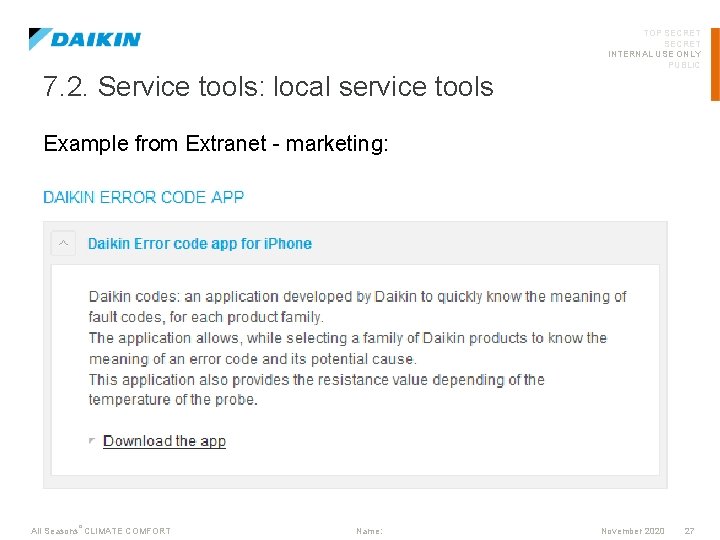
TOP SECRET INTERNAL USE ONLY PUBLIC 7. 2. Service tools: local service tools Example from Extranet - marketing: All Seasons °CLIMATE COMFORT Name: November 2020 27
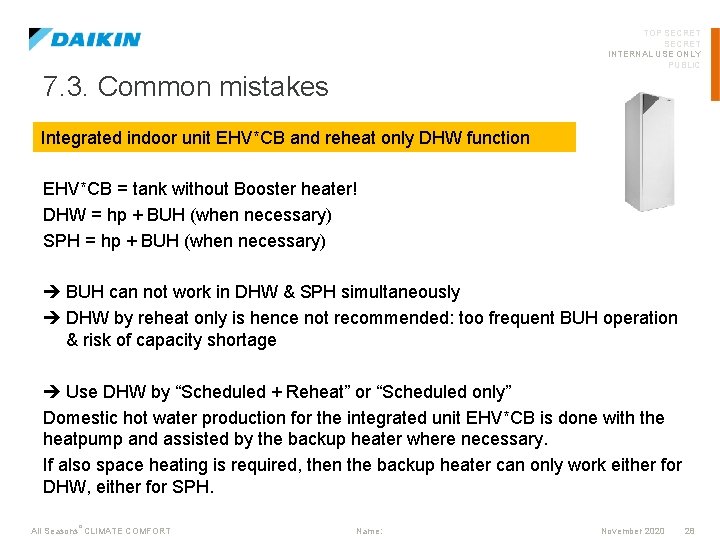
TOP SECRET INTERNAL USE ONLY PUBLIC 7. 3. Common mistakes Integrated indoor unit EHV*CB and reheat only DHW function EHV*CB = tank without Booster heater! DHW = hp + BUH (when necessary) SPH = hp + BUH (when necessary) BUH can not work in DHW & SPH simultaneously DHW by reheat only is hence not recommended: too frequent BUH operation & risk of capacity shortage Use DHW by “Scheduled + Reheat” or “Scheduled only” Domestic hot water production for the integrated unit EHV*CB is done with the heatpump and assisted by the backup heater where necessary. If also space heating is required, then the backup heater can only work either for DHW, either for SPH. All Seasons °CLIMATE COMFORT Name: November 2020 28
TOP SECRET INTERNAL USE ONLY PUBLIC 7. 3. Common mistakes Frequent AH warning In case disinfection function is not executed correctly, AH warning will appear. This means that the disinfection temperature was not kept for the required time within a certain timeframe. This might happen if: 1) There was a large DHW tapping just before the start of the disinfection function (tank is very cold at start of disinfection function) 2) There was a large DHW tapping during disinfection function (tank is cooled down again during disinfection) 3) BUH or BSH is disabled by setting or not connected (these heaters are necessary to reach high disinfection temperature) 4) Fuse All Seasons °CLIMATE COMFORT Name: November 2020 29
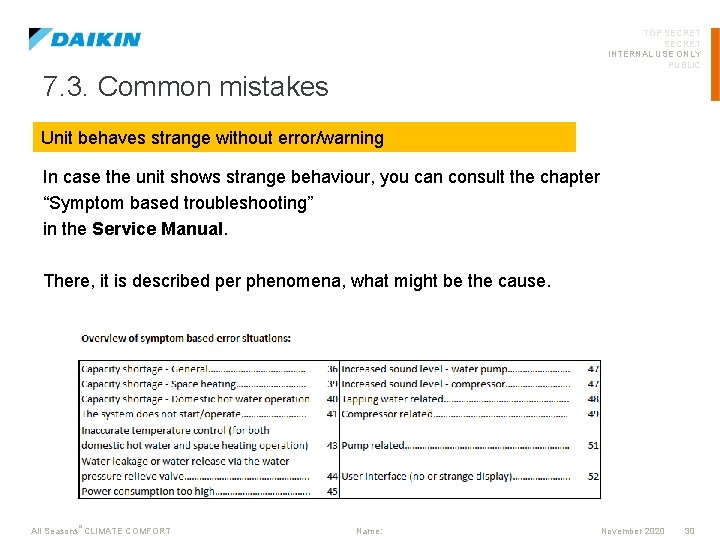
TOP SECRET INTERNAL USE ONLY PUBLIC 7. 3. Common mistakes Unit behaves strange without error/warning In case the unit shows strange behaviour, you can consult the chapter “Symptom based troubleshooting” in the Service Manual. There, it is described per phenomena, what might be the cause. All Seasons °CLIMATE COMFORT Name: November 2020 30
TOP SECRET INTERNAL USE ONLY PUBLIC 7. 3. Common mistakes Error codes In case the unit indicates an error code, you can consult the chapter “Error codes” in the Service Manual. There, it is described per phenomena, what the error means, with hyperlinks to the check procedure & replacement procedure. All Seasons °CLIMATE COMFORT Name: November 2020 31
TOP SECRET INTERNAL USE ONLY PUBLIC 7. 3. Common mistakes Product combinations (indoor-outdoor-tank-accessories) In case you want to know which products are combineable, you can always check the Sales documentation. If you cannot find your combination in the combination table, it means it has not been tested and we cannot guarantee good operation. All Seasons °CLIMATE COMFORT Name: November 2020 32
TOP SECRET INTERNAL USE ONLY PUBLIC 7. 4. Contact • Technical support: • • Email: Call: 00 xx xxxxx • Spare Parts support • • Email: Call: 00 xx xxxxx • Warranty support • • Email: Call: 00 xx xxxxx All Seasons °CLIMATE COMFORT Name: November 2020 33
TOP SECRET INTERNAL USE ONLY PUBLIC 7. 4. Contact: required info before contacting 1. Full modelname 2. Software versions of user interface & hydro pcb 3. Download (configurator) of settings + schedules 4. Picture of nameplate 1. 2. Serial number Date of production 5. List of actions (history) that were already done by installer Replacement of parts, software update, check of service manual, … 6. Troubleshoot request? D-checker data to verify your claim! 7. Additional data request? Reason why you need this data. All Seasons °CLIMATE COMFORT Name: November 2020 34
- Slides: 34