
All Fusion 2 E EJB Option Success Story
All. Fusion® 2 E EJB Option Success Story Darryl Millington Hawk. Bridge Pty Ltd Hampton, Victoria, Australia Session 2 H
Session Abstract § The All. Fusion 2 E EJB Option provides the capability to expose business logic from new and existing All. Fusion 2 E data models. § This presentation will cover the experiences of one customer in using the All. Fusion 2 E EJB Option and the lessons learned along the way. § Answers to questions such as how to process record sets, database transactions and commitment control, decoupling business logic, decide which development strategy to use, automatic login, and much more.
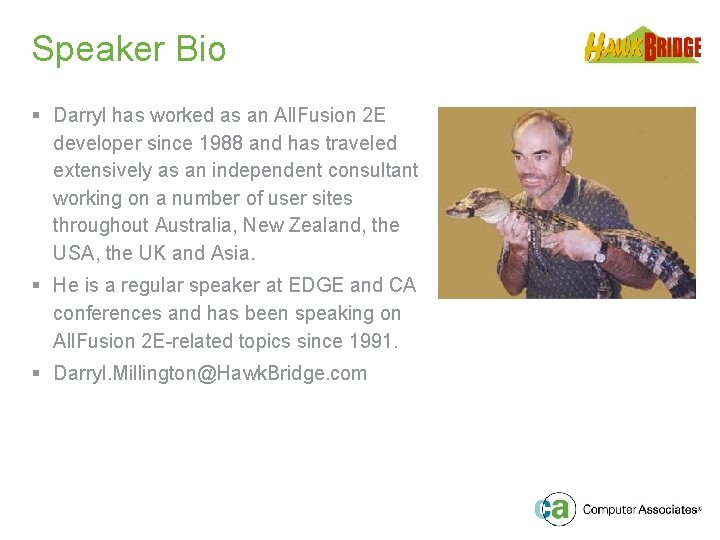
Speaker Bio § Darryl has worked as an All. Fusion 2 E developer since 1988 and has traveled extensively as an independent consultant working on a number of user sites throughout Australia, New Zealand, the USA, the UK and Asia. § He is a regular speaker at EDGE and CA conferences and has been speaking on All. Fusion 2 E-related topics since 1991. § Darryl. Millington@Hawk. Bridge. com
About Hawk. Bridge § Focused on enabling clients to create business advantage through use of quality systems to enhance business capabilities § Fostered strong relationships with Computer Associates § Consultancy and Application Development § Education and Mentoring § Application Support and Delivery § Freedom Productivity and Enablement Tools: Freedom/ERwin Freedom/Plex Freedom/Visio Freedom/EJB § http: //www. Hawk. Bridge. com Freedom/Help Freedom/CGI Freedom/Doc Freedom/Array
Agenda § § § The Project EJB Option Overview Componentisation Issues Decoupling Strategy Copy Business Logic Strategy Development Environment Structure Record Set Processing Database Transactions User EJB Generator Modifications Session Summary Question & Answer
The Project - Client § IACM in Macau SAR, China - The official provisional municipal council of Macau - Macau is a Special Administrative Region of China - Recently handed back to China by the Portuguese - Requires web based interface for 100+ existing government services which run on IBM i. Series http: //www. iacm. gov. mo
The Project – Development Team § IACM - Backend IBM i. Series and All. Fusion 2 E development - 12+ years experience in All. Fusion 2 E and IBM i. Series - Traditional 5250 host based applications - No experience in modern technologies (ie. Java) - Based in Macau http: //www. iacm. gov. mo
The Project – Development Team § Mega. Info - Project Management and Prime Contractor - No experience in All. Fusion 2 E or IBM i. Series - Limited experienced in delivering web based applications using modern technologies - Based in Macau http: //www. megadatatech. com
The Project – Development Team § UCAP - Front end Java and presentation layer development - No experience in All. Fusion 2 E or IBM i. Series - Experienced in delivering web based applications - Based in Shilong Town, Dongguan http: //www. ucap. com. cn

The Project – Development Team § Hawk. Bridge - All. Fusion 2 E EJB Option interface layer design, installation and training - Experienced in All. Fusion 2 E and IBM i. Series - Experienced in modern technologies - Based in Melbourne, Australia http: //www. Hawk. Bridge. com
Agenda þ § § § § § The Project EJB Option Overview Componentisation Issues Decoupling Strategy Copy Business Logic Strategy Development Environment Structure Record Set Processing Database Transactions User EJB Generator Modifications Session Summary Question & Answer
EJB Option Overview All. Fusion 2 E Data Model Generate EJB . java Application Server Build & Deploy EJB All. Fusion Joe Project . pcml
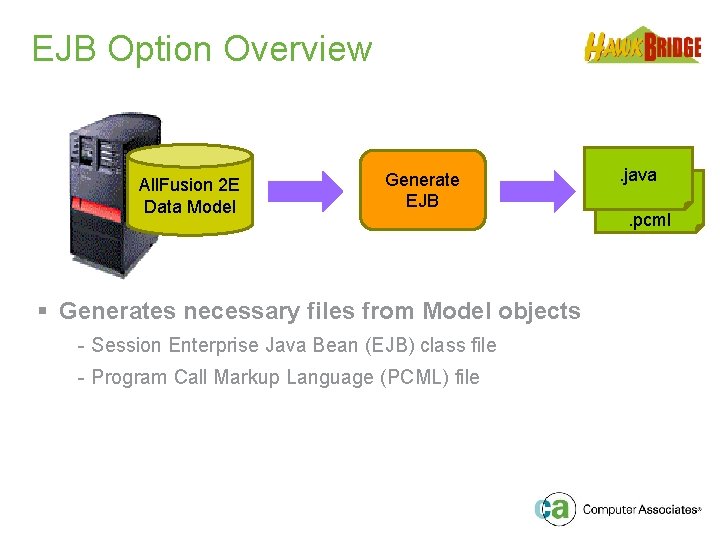
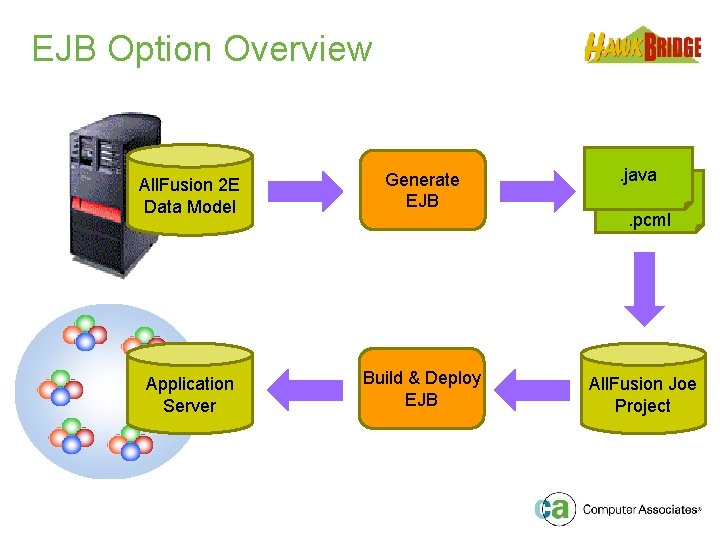
EJB Option Overview All. Fusion 2 E Data Model Generate EJB § Generates necessary files from Model objects - Session Enterprise Java Bean (EJB) class file - Program Call Markup Language (PCML) file . java. pcml
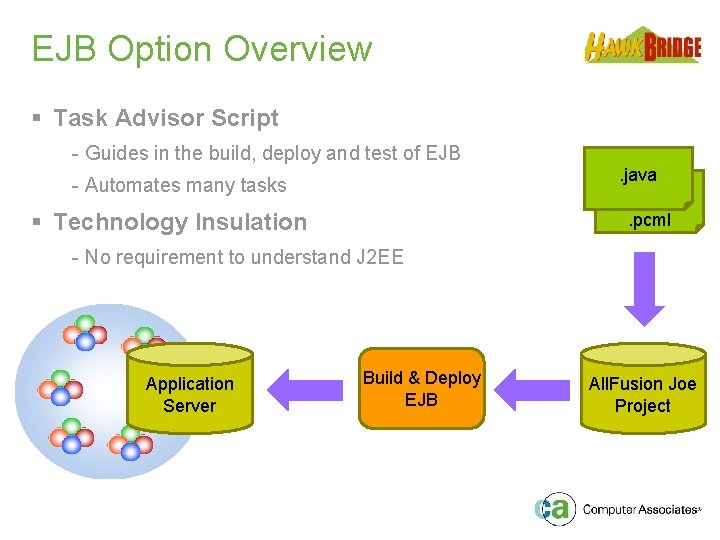
EJB Option Overview § Task Advisor Script - Guides in the build, deploy and test of EJB. java - Automates many tasks § Technology Insulation . pcml - No requirement to understand J 2 EE Application Server Build & Deploy EJB All. Fusion Joe Project
Agenda þ þ § § § § § The Project EJB Option Overview Componentisation Issues Decoupling Strategy Copy Business Logic Strategy Development Environment Structure Record Set Processing Database Transactions User EJB Generator Modifications Session Summary Question & Answer
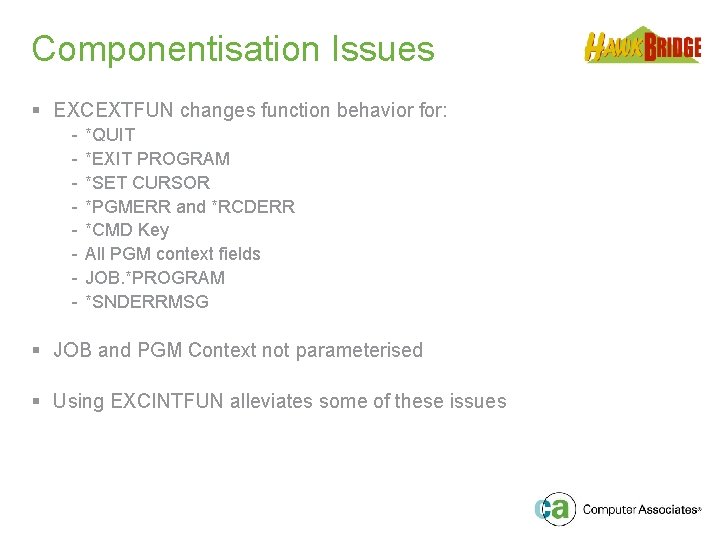
Componentisation Issues § EXCEXTFUN changes function behavior for: - *QUIT *EXIT PROGRAM *SET CURSOR *PGMERR and *RCDERR *CMD Key All PGM context fields JOB. *PROGRAM *SNDERRMSG § JOB and PGM Context not parameterised § Using EXCINTFUN alleviates some of these issues
Agenda þ þ þ § § § § The Project EJB Option Overview Componentisation Issues Decoupling Strategy Copy Business Logic Strategy Development Environment Structure Record Set Processing Database Transactions User EJB Generator Modifications Session Summary Question & Answer
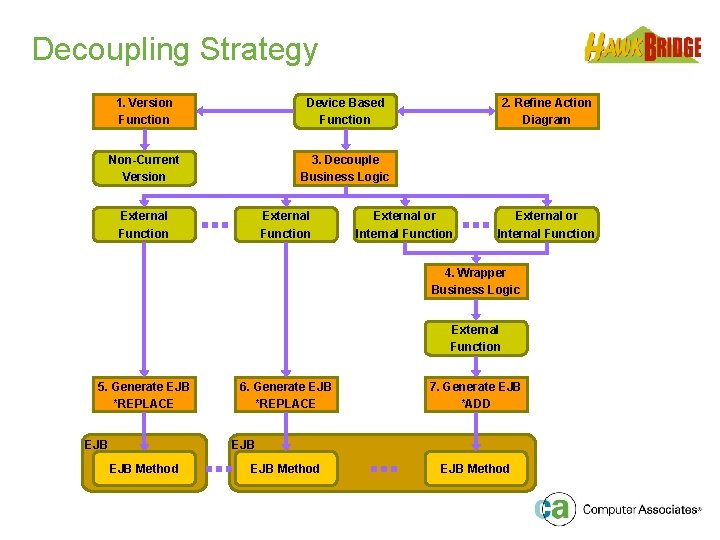
Decoupling Strategy 1. Version Function Device Based Function Non-Current Version 3. Decouple Business Logic External Function 2. Refine Action Diagram External or Internal Function 4. Wrapper Business Logic External Function 5. Generate EJB *REPLACE EJB 6. Generate EJB *REPLACE 7. Generate EJB *ADD EJB Method
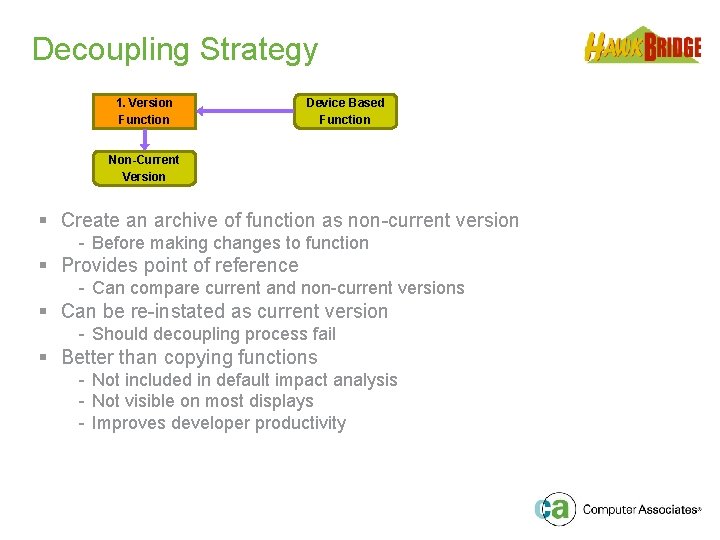
Decoupling Strategy 1. Version Function Device Based Function Non-Current Version § Create an archive of function as non-current version - Before making changes to function § Provides point of reference - Can compare current and non-current versions § Can be re-instated as current version - Should decoupling process fail § Better than copying functions - Not included in default impact analysis - Not visible on most displays - Improves developer productivity
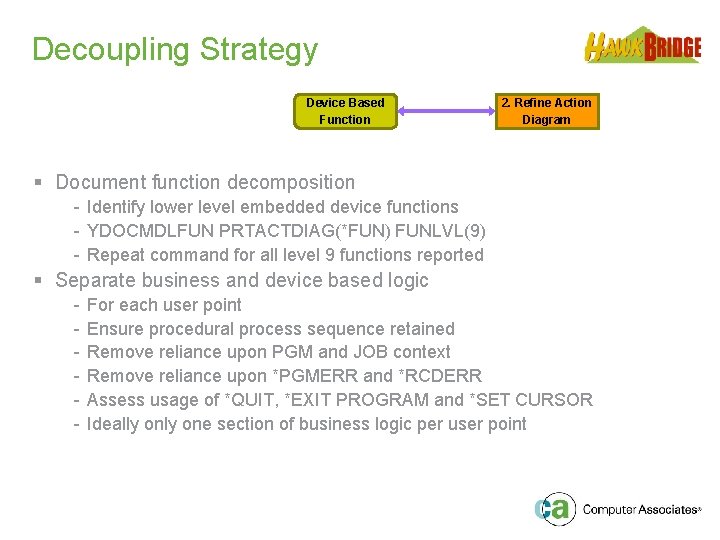
Decoupling Strategy Device Based Function 2. Refine Action Diagram § Document function decomposition - Identify lower level embedded device functions - YDOCMDLFUN PRTACTDIAG(*FUN) FUNLVL(9) - Repeat command for all level 9 functions reported § Separate business and device based logic - For each user point Ensure procedural process sequence retained Remove reliance upon PGM and JOB context Remove reliance upon *PGMERR and *RCDERR Assess usage of *QUIT, *EXIT PROGRAM and *SET CURSOR Ideally one section of business logic per user point
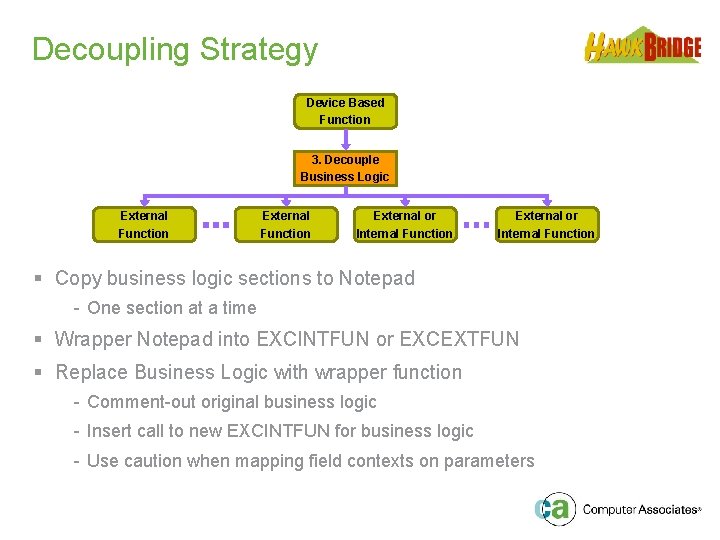
Decoupling Strategy Device Based Function 3. Decouple Business Logic External Function External or Internal Function § Copy business logic sections to Notepad - One section at a time § Wrapper Notepad into EXCINTFUN or EXCEXTFUN § Replace Business Logic with wrapper function - Comment-out original business logic - Insert call to new EXCINTFUN for business logic - Use caution when mapping field contexts on parameters
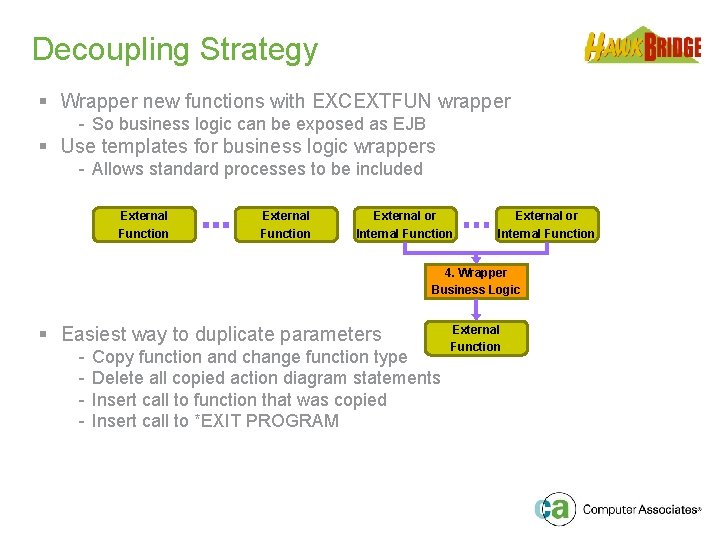
Decoupling Strategy § Wrapper new functions with EXCEXTFUN wrapper - So business logic can be exposed as EJB § Use templates for business logic wrappers - Allows standard processes to be included External Function External or Internal Function 4. Wrapper Business Logic § Easiest way to duplicate parameters - Copy function and change function type Delete all copied action diagram statements Insert call to function that was copied Insert call to *EXIT PROGRAM External Function
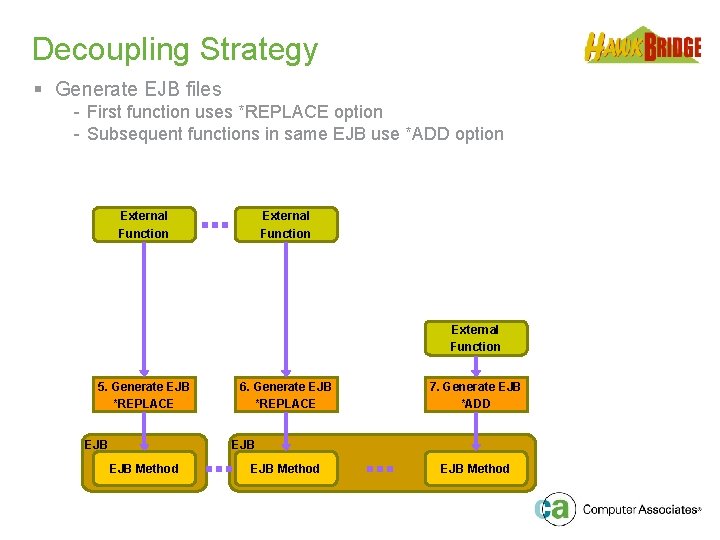
Decoupling Strategy § Generate EJB files - First function uses *REPLACE option - Subsequent functions in same EJB use *ADD option External Function 5. Generate EJB *REPLACE EJB 6. Generate EJB *REPLACE 7. Generate EJB *ADD EJB Method
Agenda þ þ § § § § The Project EJB Option Overview Componentisation Issues Decoupling Strategy Copy Business Logic Strategy Development Environment Structure Record Set Processing Database Transactions User EJB Generator Modifications Session Summary Question & Answer
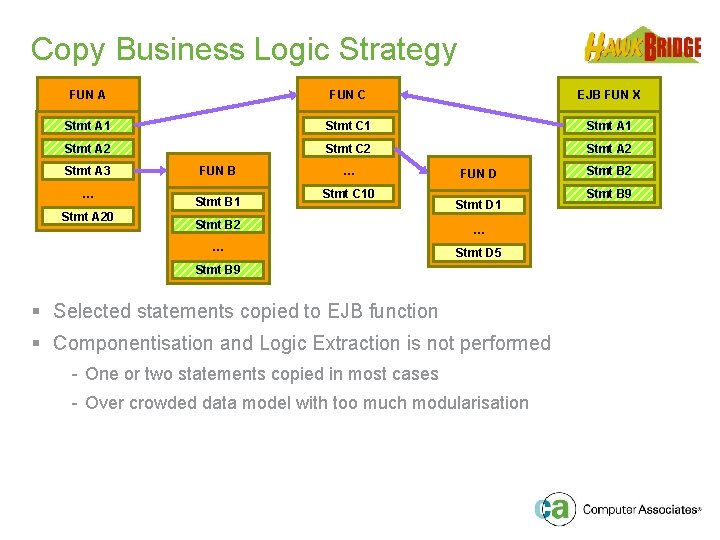
Copy Business Logic Strategy FUN A FUN C EJB FUN X Stmt A 1 Stmt C 1 Stmt A 2 Stmt C 2 Stmt A 3 … Stmt A 20 FUN B Stmt B 1 … Stmt C 10 FUN D Stmt D 1 Stmt B 2 … … Stmt D 5 Stmt B 9 § Selected statements copied to EJB function § Componentisation and Logic Extraction is not performed - One or two statements copied in most cases - Over crowded data model with too much modularisation Stmt B 2 Stmt B 9
Agenda þ þ þ § § § The Project EJB Option Overview Componentisation Issues Decoupling Strategy Copy Business Logic Strategy Development Environment Structure Record Set Processing Database Transactions User EJB Generator Modifications Session Summary Question & Answer
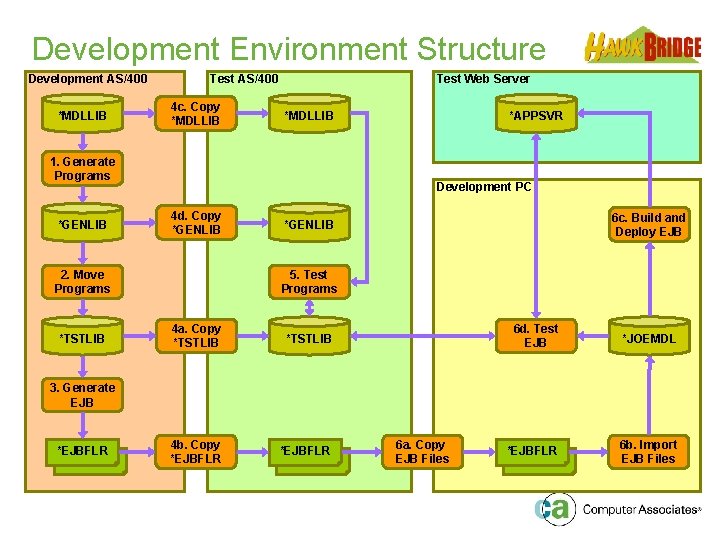
Development Environment Structure Development AS/400 *MDLLIB Test AS/400 4 c. Copy *MDLLIB Test Web Server *MDLLIB 1. Generate Programs *GENLIB Development PC 4 d. Copy *GENLIB 2. Move Programs *TSTLIB *APPSVR 6 c. Build and Deploy EJB *GENLIB 5. Test Programs 4 a. Copy *TSTLIB 4 b. Copy *EJBFLR 6 d. Test EJB *JOEMDL *EJBFLR 6 b. Import EJB Files 3. Generate EJB *EJBFLR 6 a. Copy EJB Files
Agenda þ þ þ § § § The Project EJB Option Overview Componentisation Issues Decoupling Strategy Copy Business Logic Strategy Development Environment Structure Record Set Processing Database Transactions User EJB Generator Modifications Session Summary Question & Answer
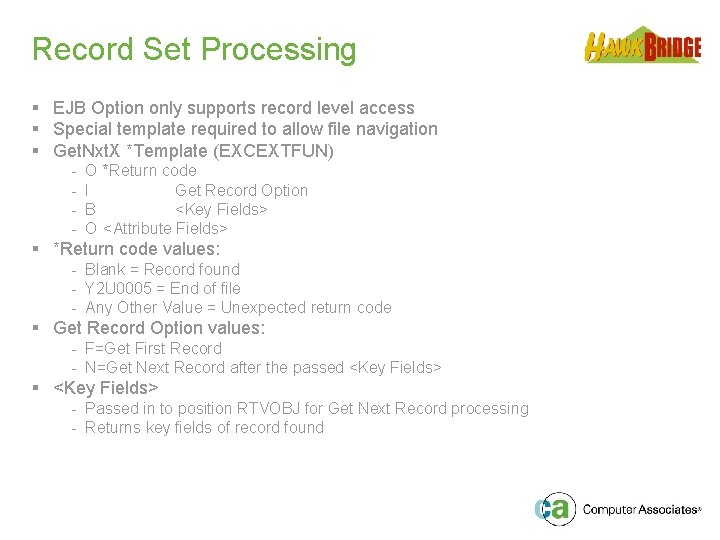
Record Set Processing § EJB Option only supports record level access § Special template required to allow file navigation § Get. Nxt. X *Template (EXCEXTFUN) - O *Return code I Get Record Option B <Key Fields> O <Attribute Fields> § *Return code values: - Blank = Record found - Y 2 U 0005 = End of file - Any Other Value = Unexpected return code § Get Record Option values: - F=Get First Record - N=Get Next Record after the passed <Key Fields> § <Key Fields> - Passed in to position RTVOBJ for Get Next Record processing - Returns key fields of record found
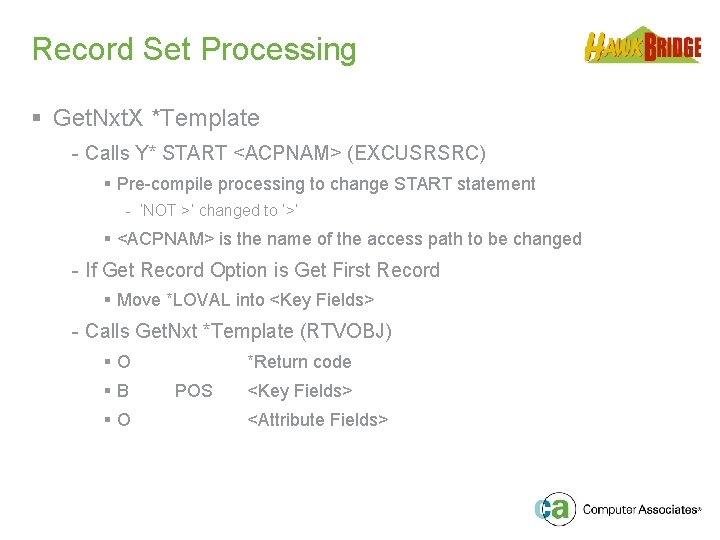
Record Set Processing § Get. Nxt. X *Template - Calls Y* START <ACPNAM> (EXCUSRSRC) § Pre-compile processing to change START statement - ‘NOT >’ changed to ‘>’ § <ACPNAM> is the name of the access path to be changed - If Get Record Option is Get First Record § Move *LOVAL into <Key Fields> - Calls Get. Nxt *Template (RTVOBJ) §O §B §O *Return code POS <Key Fields> <Attribute Fields>
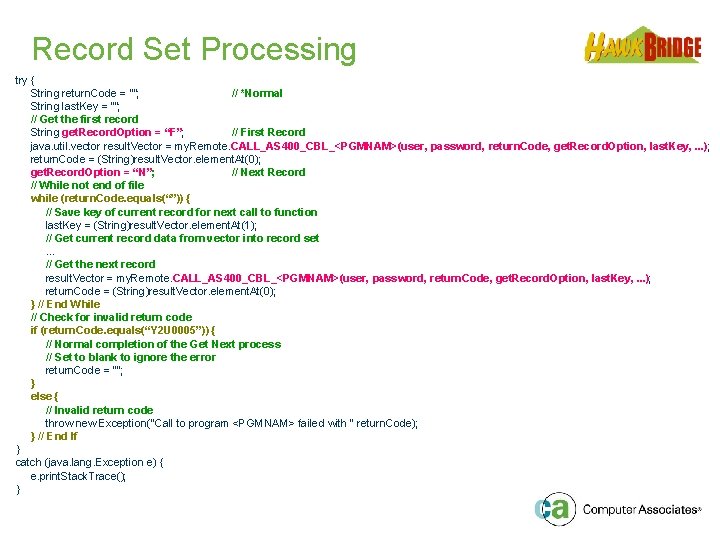
Record Set Processing try { String return. Code = “”; // *Normal String last. Key = “”; // Get the first record String get. Record. Option = “F”; // First Record java. util. vector result. Vector = my. Remote. CALL_AS 400_CBL_<PGMNAM>(user, password, return. Code, get. Record. Option, last. Key, . . . ); return. Code = (String)result. Vector. element. At(0); get. Record. Option = “N”; // Next Record // While not end of file while (return. Code. equals(“”)) { // Save key of current record for next call to function last. Key = (String)result. Vector. element. At(1); // Get current record data from vector into record set. . . // Get the next record result. Vector = my. Remote. CALL_AS 400_CBL_<PGMNAM>(user, password, return. Code, get. Record. Option, last. Key, . . . ); return. Code = (String)result. Vector. element. At(0); } // End While // Check for invalid return code if (return. Code. equals(“Y 2 U 0005”)) { // Normal completion of the Get Next process // Set to blank to ignore the error return. Code = “”; } else { // Invalid return code throw new Exception("Call to program <PGMNAM> failed with " return. Code); } // End If } catch (java. lang. Exception e) { e. print. Stack. Trace(); }
Agenda þ þ þ þ § § The Project EJB Option Overview Componentisation Issues Decoupling Strategy Copy Business Logic Strategy Development Environment Structure Record Set Processing Database Transactions User EJB Generator Modifications Session Summary Question & Answer
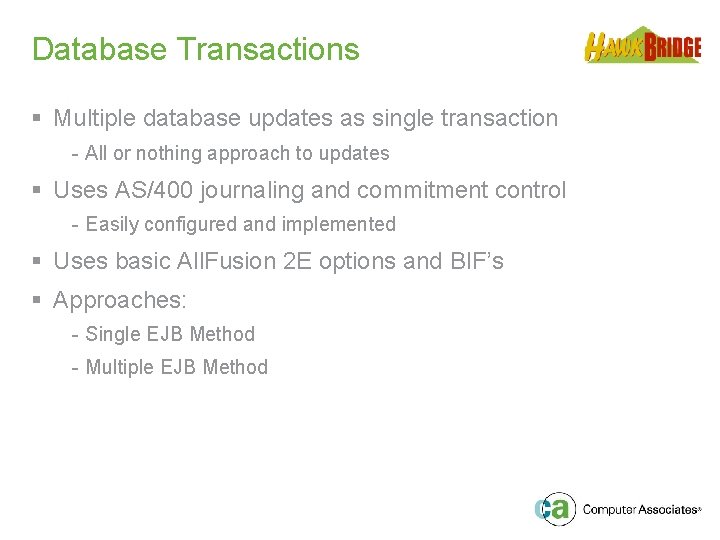
Database Transactions § Multiple database updates as single transaction - All or nothing approach to updates § Uses AS/400 journaling and commitment control - Easily configured and implemented § Uses basic All. Fusion 2 E options and BIF’s § Approaches: - Single EJB Method - Multiple EJB Method
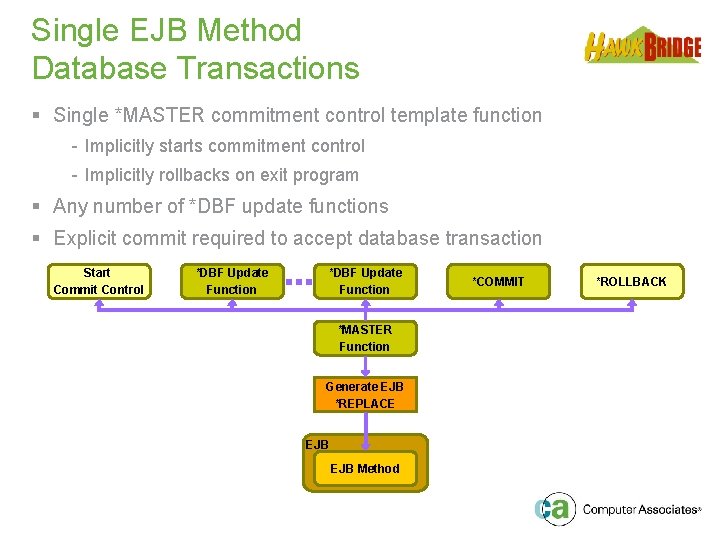
Single EJB Method Database Transactions § Single *MASTER commitment control template function - Implicitly starts commitment control - Implicitly rollbacks on exit program § Any number of *DBF update functions § Explicit commit required to accept database transaction Start Commit Control *DBF Update Function *MASTER Function Generate EJB *REPLACE EJB Method *COMMIT *ROLLBACK
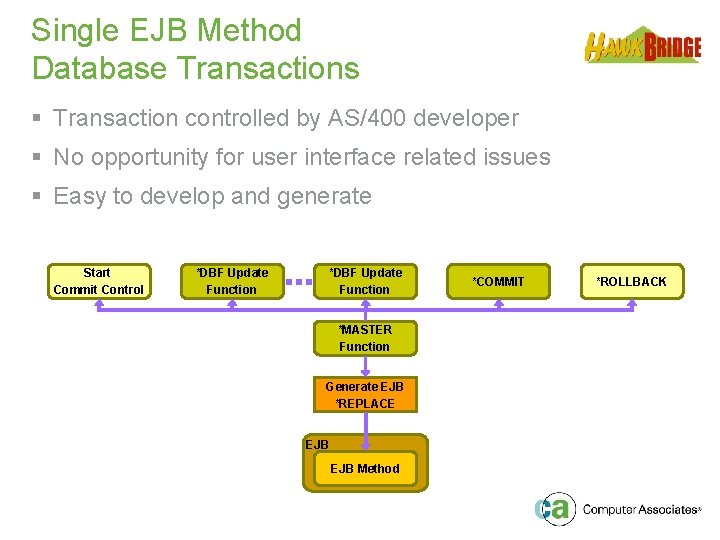
Single EJB Method Database Transactions § Transaction controlled by AS/400 developer § No opportunity for user interface related issues § Easy to develop and generate Start Commit Control *DBF Update Function *MASTER Function Generate EJB *REPLACE EJB Method *COMMIT *ROLLBACK
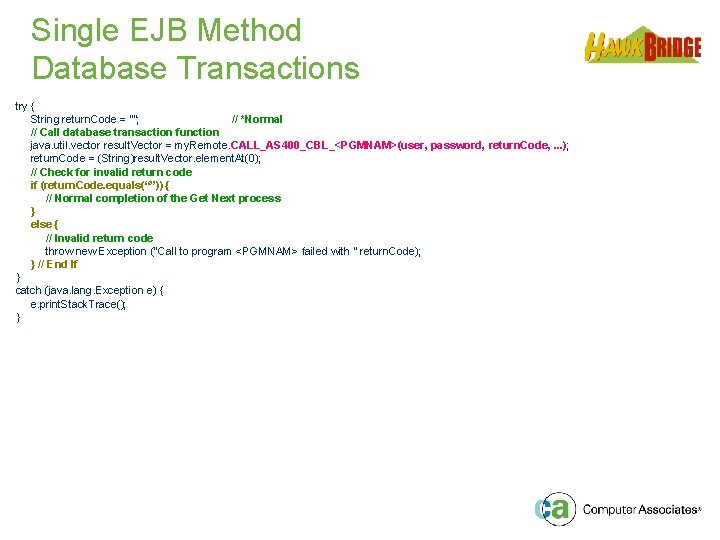
Single EJB Method Database Transactions try { String return. Code = “”; // *Normal // Call database transaction function java. util. vector result. Vector = my. Remote. CALL_AS 400_CBL_<PGMNAM>(user, password, return. Code, . . . ); return. Code = (String)result. Vector. element. At(0); // Check for invalid return code if (return. Code. equals(“”)) { // Normal completion of the Get Next process } else { // Invalid return code throw new Exception ("Call to program <PGMNAM> failed with " return. Code); } // End If } catch (java. lang. Exception e) { e. print. Stack. Trace(); }
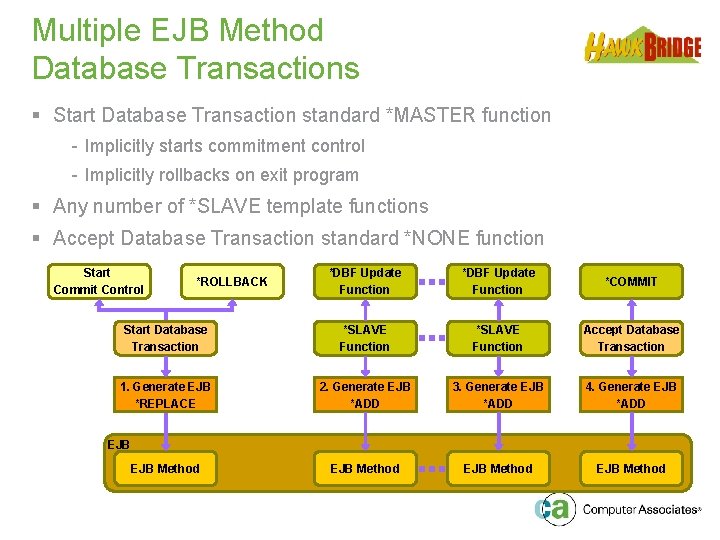
Multiple EJB Method Database Transactions § Start Database Transaction standard *MASTER function - Implicitly starts commitment control - Implicitly rollbacks on exit program § Any number of *SLAVE template functions § Accept Database Transaction standard *NONE function Start Commit Control *DBF Update Function *COMMIT Start Database Transaction *SLAVE Function Accept Database Transaction 1. Generate EJB *REPLACE 2. Generate EJB *ADD 3. Generate EJB *ADD 4. Generate EJB *ADD EJB Method *ROLLBACK EJB Method
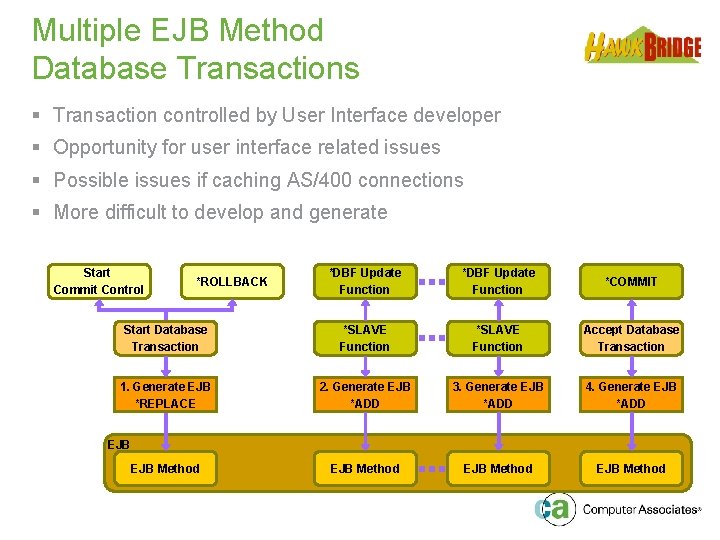
Multiple EJB Method Database Transactions § Transaction controlled by User Interface developer § Opportunity for user interface related issues § Possible issues if caching AS/400 connections § More difficult to develop and generate Start Commit Control *DBF Update Function *COMMIT Start Database Transaction *SLAVE Function Accept Database Transaction 1. Generate EJB *REPLACE 2. Generate EJB *ADD 3. Generate EJB *ADD 4. Generate EJB *ADD EJB Method *ROLLBACK EJB Method
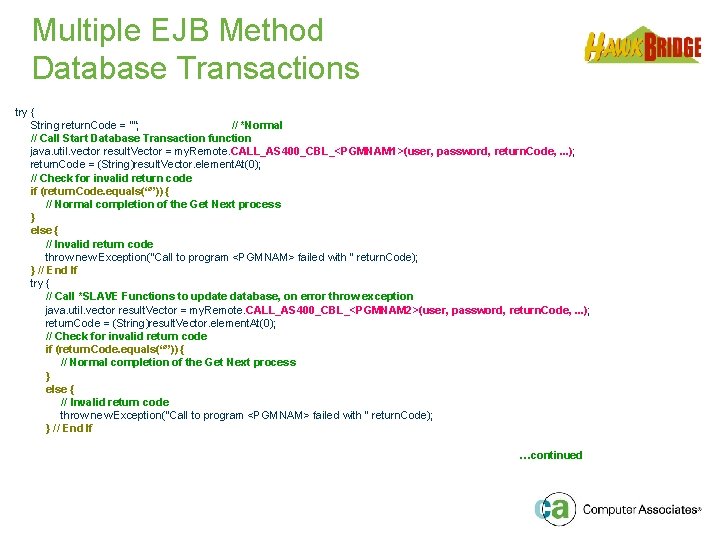
Multiple EJB Method Database Transactions try { String return. Code = “”; // *Normal // Call Start Database Transaction function java. util. vector result. Vector = my. Remote. CALL_AS 400_CBL_<PGMNAM 1>(user, password, return. Code, . . . ); return. Code = (String)result. Vector. element. At(0); // Check for invalid return code if (return. Code. equals(“”)) { // Normal completion of the Get Next process } else { // Invalid return code throw new Exception("Call to program <PGMNAM> failed with " return. Code); } // End If try { // Call *SLAVE Functions to update database, on error throw exception java. util. vector result. Vector = my. Remote. CALL_AS 400_CBL_<PGMNAM 2>(user, password, return. Code, . . . ); return. Code = (String)result. Vector. element. At(0); // Check for invalid return code if (return. Code. equals(“”)) { // Normal completion of the Get Next process } else { // Invalid return code throw new Exception("Call to program <PGMNAM> failed with " return. Code); } // End If …continued
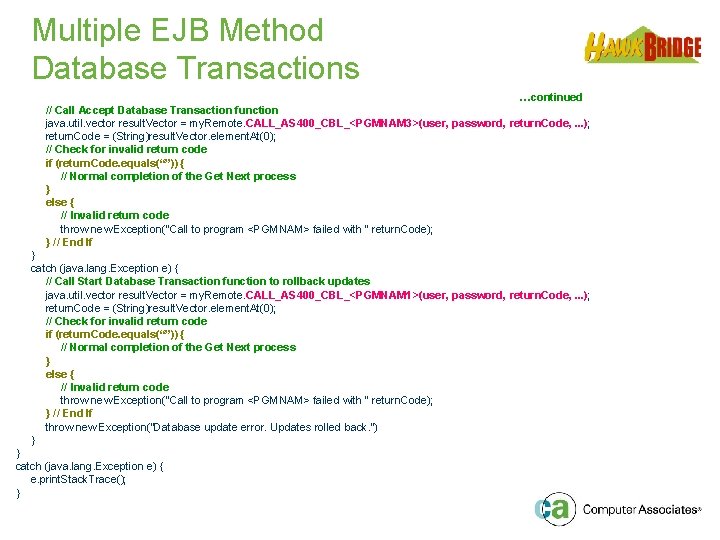
Multiple EJB Method Database Transactions …continued // Call Accept Database Transaction function java. util. vector result. Vector = my. Remote. CALL_AS 400_CBL_<PGMNAM 3>(user, password, return. Code, . . . ); return. Code = (String)result. Vector. element. At(0); // Check for invalid return code if (return. Code. equals(“”)) { // Normal completion of the Get Next process } else { // Invalid return code throw new Exception("Call to program <PGMNAM> failed with " return. Code); } // End If } catch (java. lang. Exception e) { // Call Start Database Transaction function to rollback updates java. util. vector result. Vector = my. Remote. CALL_AS 400_CBL_<PGMNAM 1>(user, password, return. Code, . . . ); return. Code = (String)result. Vector. element. At(0); // Check for invalid return code if (return. Code. equals(“”)) { // Normal completion of the Get Next process } else { // Invalid return code throw new Exception("Call to program <PGMNAM> failed with " return. Code); } // End If throw new Exception(“Database update error. Updates rolled back. ”) } } catch (java. lang. Exception e) { e. print. Stack. Trace(); }
Agenda The Project þ EJB Option Overview þ Componentisation Issues þ Decoupling Strategy þ Copy Business Logic Strategy þ Development Environment Structure þ Record Set Processing þ Database Transactions § User EJB Generator Modifications § Session Summary § Question & Answer þ
User EJB Generator Modifications § Needed to support multiple AS/400 systems § User logged on using web profile and password - Then each AS/400 system used different user and passwords - AS/400 systems, users and passwords stored on UI server § Use of global public methods for: - System Name via get. AS 400 System. Name() - User Profile via get. AS 400 User. Profile() - Password via get. AS 400 Password() § EJB Generator is soft-coded in YMLSSYNRFP - Enables modification of generated PCML and Java § Changes made: - User and Password no longer passed on ‘CALL_. . . ’ - Hard-coded system name replaced § Considering changes for caching AS 400 connections
Agenda The Project þ EJB Option Overview þ Componentisation Issues þ Decoupling Strategy þ Copy Business Logic Strategy þ Development Environment Structure þ Record Set Processing þ Database Transactions þ User EJB Generator Modifications § Session Summary § Question & Answer þ
Session Summary § All. Fusion 2 E EJB Option provides easy to use interface for J 2 EE platform § Backend All. Fusion 2 E developers do not need to understand Java or J 2 EE § Frontend User Interface developers do not need to understand All. Fusion 2 E § Business Logic and Data remains on a tried and trusted AS/400 server shared with other interfaces § Hawk. Bridge have assisted clients from Proof of Concept to Application Deployment using EJB Option to quickly and efficiently transform existing business applications
Questions & Answers
- Slides: 45