
ALGORITMA PEMROGRAMAN 2 PROCESSING Lesson 4 Array Objectives
ALGORITMA PEMROGRAMAN 2 PROCESSING Lesson 4 - Array

Objectives Whats is an array? Declaring an array? Initialization Array operations – using “for” loop with an array Array of objects
Array, why do we care? The car example from the previous chapter on object-oriented programming. You may remember we developing a program that contained multiple instances of a class, that is, two object. Car my. Car 1; Car my. Car 2;
Array, why do we care? How could I take this further and write a program with 100 car objects? We could try some ways, perhaps, with some clever copying and pasting, you might write a program with the following begining: Car my. Car 1; Car my. Car 2; Car my. Car 3; . . Car my. Car 100;
Array, why do we care? An array will allow us to take these 100 lines of code and put them into one line. Instead of having 100 variables, an array is one thing that contains a list of variables. Any time a program requires multiple instances of similiar data, it might be time to use an array. For example, an array can be used to store the scores of four players in a game, a selection of 10 colors in a design program, or list of fish objects in an aquarium simulation.
What is an array? From the Chapter 4, you may recall that a variable is a named pointer to a location in memory where data is stored. In other words, variables allow programs to keep track of information over a period of time. An array is exactly the same, only instead of pointing to one singular piece of information, an array points to multiple pieces. See figure 9. 1
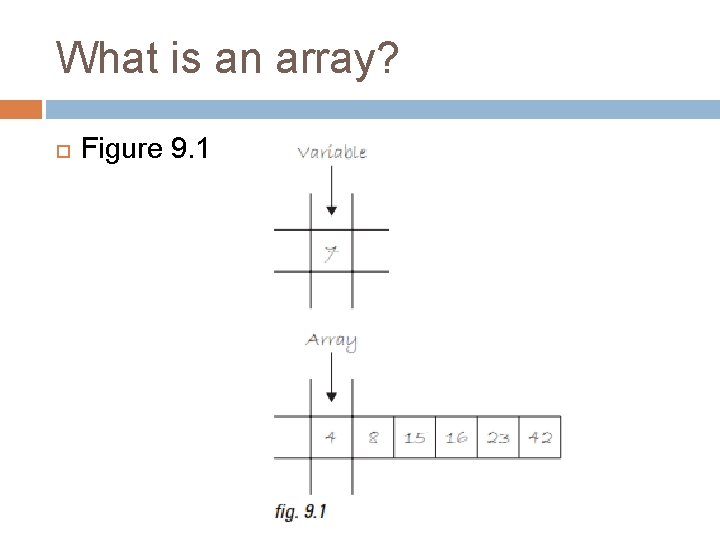
What is an array? Figure 9. 1
What is an array? You can think of an array as a list of variables. A list, it should be noted, is useful for two important reasons. a. Number one, the list keeps track of the elements in the list themselves. b. Number two, the list keeps track of the order of those elements (which element is the first in the list, the second, the third, etc). This is a crucial point since in many programs, the order of information is just as important as the information itself.
What is an array? In an array, each element of the list has a unique index, an integer value that designates its position in the list (element #1, element #2, etc). In all cases, the name of the array refers to the list as a whole, while each element is accessed via its position. You colud see in Figure 9. 2, the indicates range from 0 to 9. The array has a total of 10 elements, but the first element number is 0 and the last element is 9.
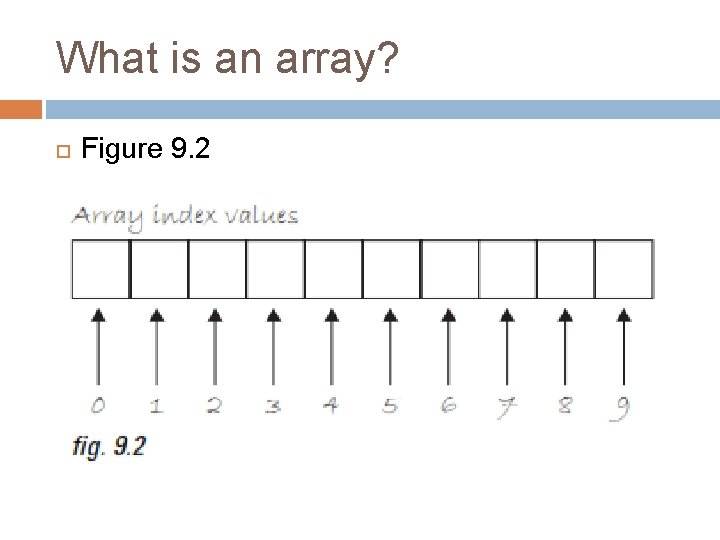
What is an array? Figure 9. 2
Declaring and Creating Array In Chapter Variables, we learned that all variables must have a name and a data type. Arrays are no different. The declaration statement, however, does look different. We denote the use of an array by placing empty square brackets (“[]”) after the type declaration.
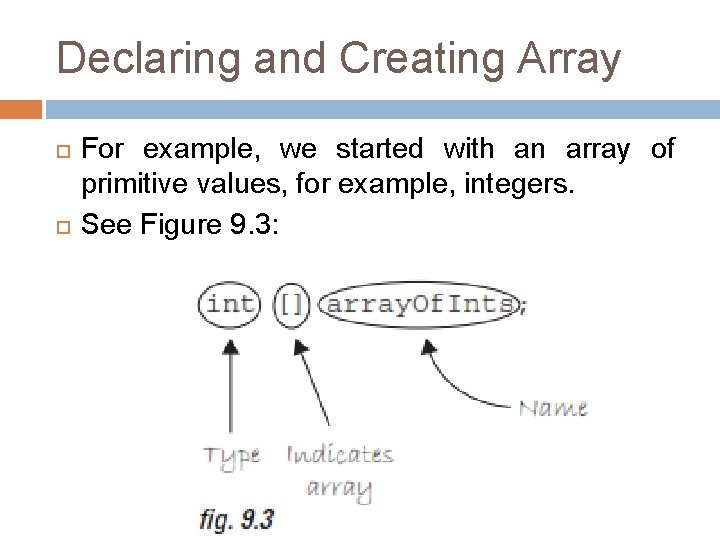
Declaring and Creating Array For example, we started with an array of primitive values, for example, integers. See Figure 9. 3:
Declaring and Creating Array The declaration in Figure 9. 3 indicates that “array. Of. Ints” will store a list of integers. The array name “array. Of. Ints” can be absolutely anything you want it to be (we only include the word “array” here to illustrate what we are learning). One fundamental property of arrays, however, is that they are of fixed. One we define the size for an array it can never change.
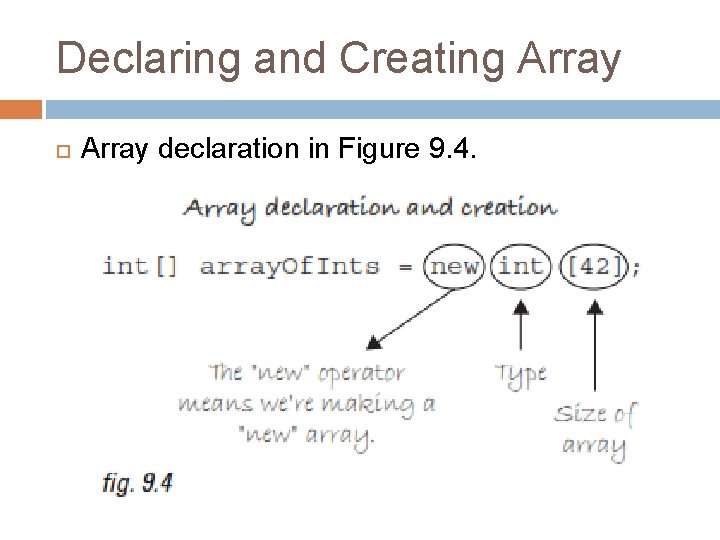
Declaring and Creating Array declaration in Figure 9. 4.
Declaring and Creating Array The Array declaration in Figure 9. 4 allow us to specify the array size: how many elements we want the array to hold (or, technically, how much memory in the computer we are asking for store our beloved data). We write this statement as follows: the new operator, followed by the data type, followed by the size of the array enclosed in bracket. This size must be an integer.
Declaring and Creating Array Example 9 -1: Additional array declaration and creation examples! a. Float [] scores = new float [4]; b. Human [] people = new Human [100]; c. Int num = 50; Car [] cars = new Car[num]; d. Spaceship[] ships = new Spaceship[num*2 + 3]; //using an expression to specify size
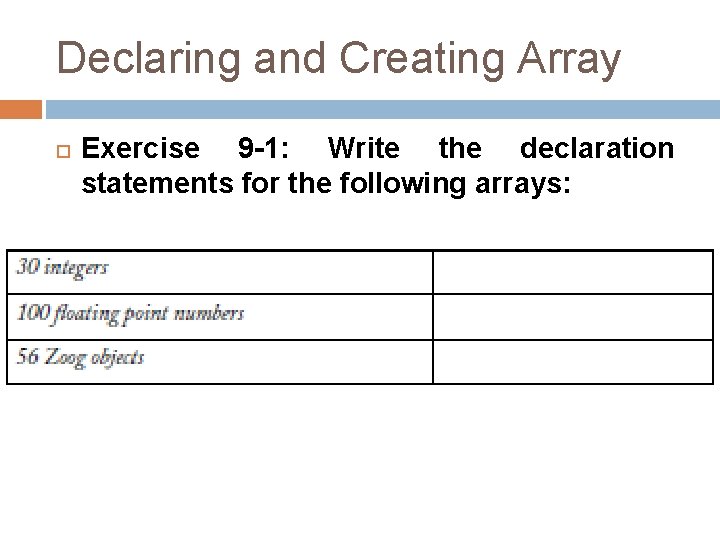
Declaring and Creating Array Exercise 9 -1: Write the declaration statements for the following arrays:
![Declaring and Creating Array Answer of Exercise 9 -1: Int [] a = new](http://slidetodoc.com/presentation_image_h/c7109829102e3f3d4d1b867fe5fea239/image-18.jpg "Declaring and Creating Array Answer of Exercise 9 -1: Int [] a = new")
Declaring and Creating Array Answer of Exercise 9 -1: Int [] a = new int [30]; Float [] numb = new float [100]; Zoog_ [] Zoog. O = new Zoog_[56];
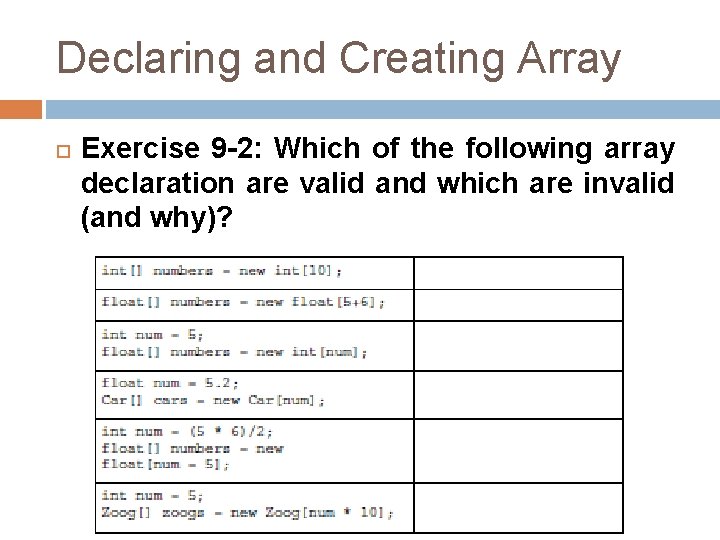
Declaring and Creating Array Exercise 9 -2: Which of the following array declaration are valid and which are invalid (and why)?
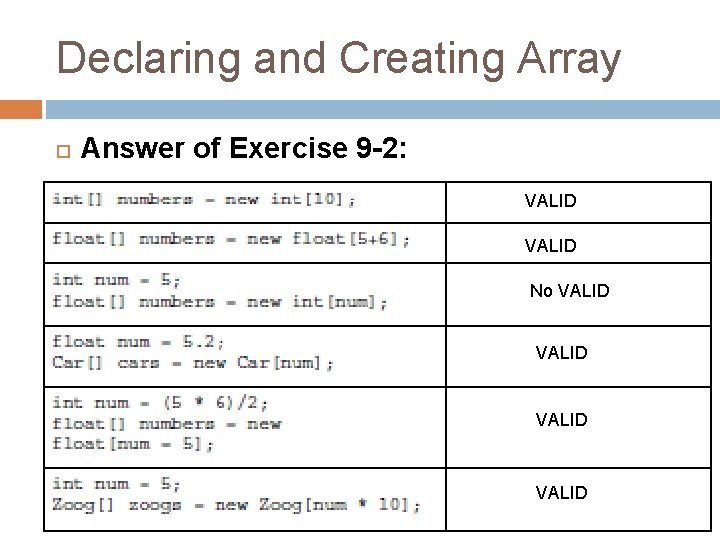
Declaring and Creating Array Answer of Exercise 9 -2: VALID No VALID
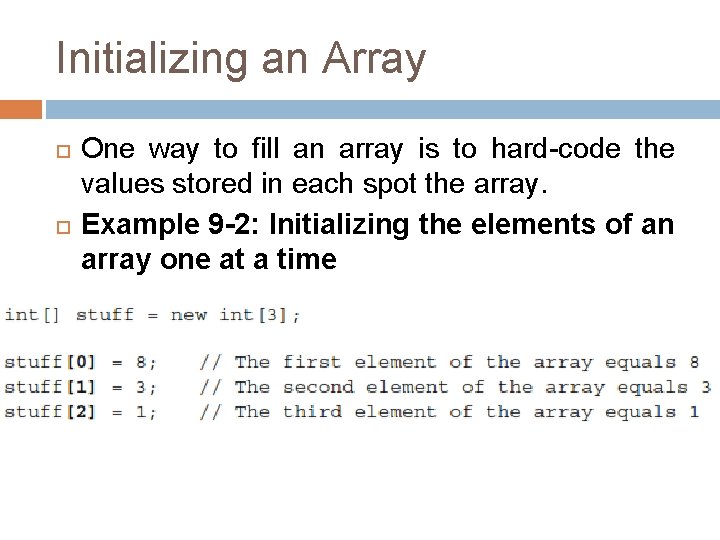
Initializing an Array One way to fill an array is to hard-code the values stored in each spot the array. Example 9 -2: Initializing the elements of an array one at a time
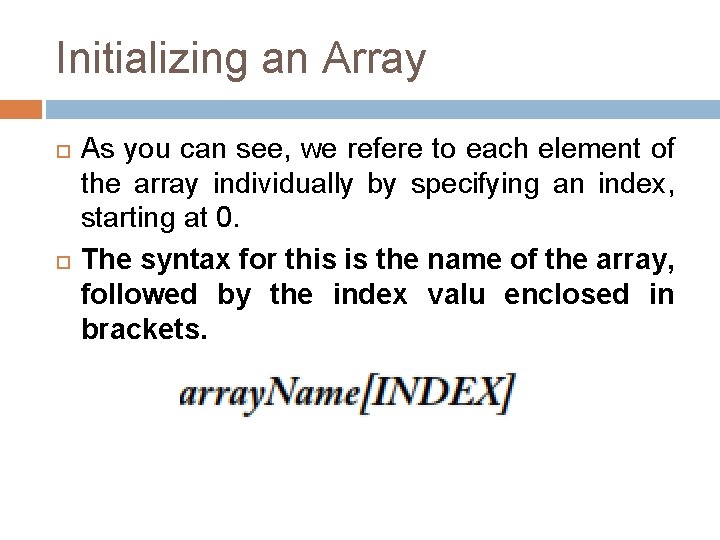
Initializing an Array As you can see, we refere to each element of the array individually by specifying an index, starting at 0. The syntax for this is the name of the array, followed by the index valu enclosed in brackets.
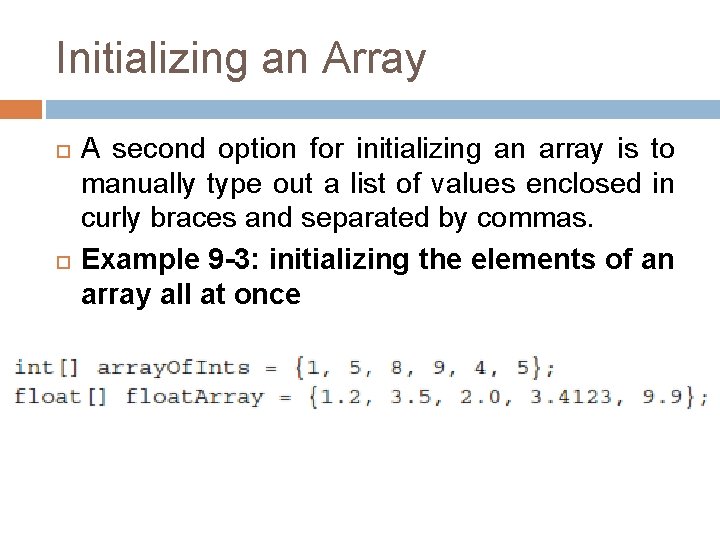
Initializing an Array A second option for initializing an array is to manually type out a list of values enclosed in curly braces and separated by commas. Example 9 -3: initializing the elements of an array all at once
Array Operations (A) (B) Consider, for a moment, the following problem: Create an array of 1000 floating point numbers. Initialize every element of that array with a random number bertween 0 and 10.
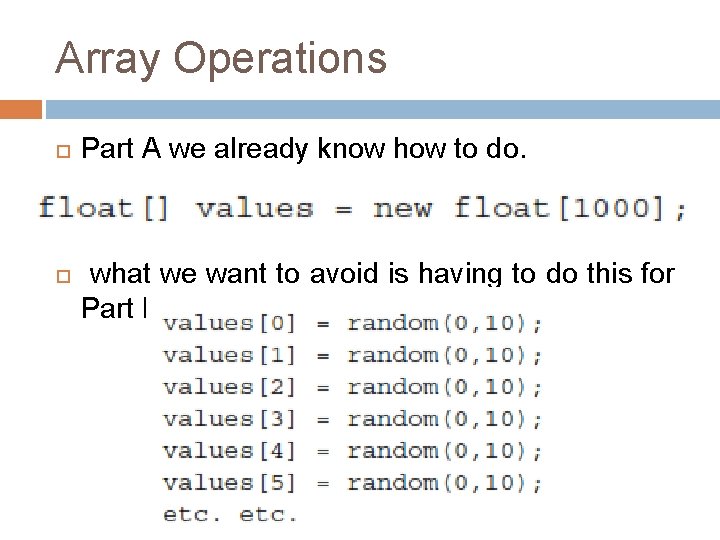
Array Operations Part A we already know how to do. what we want to avoid is having to do this for Part B:
Array Operations Let’s describe in English what we want to program: For every number n from 0 to 99, initialize the n the element stored in array as a random value between 0 and 10.
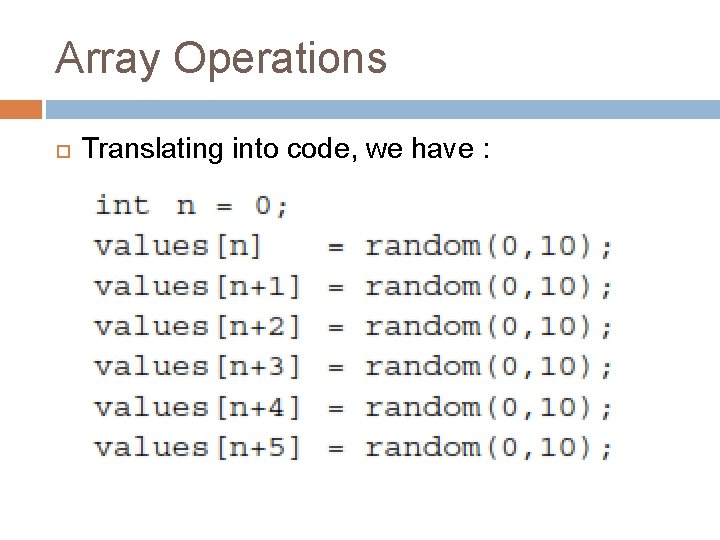
Array Operations Translating into code, we have :
Array Operations Unfortunately, the situation has not improved. We have, nonetheles, taken a big leap forward. By using a variable (n) to describe an index in the array, we can now employ a while loop to initialize every n element.
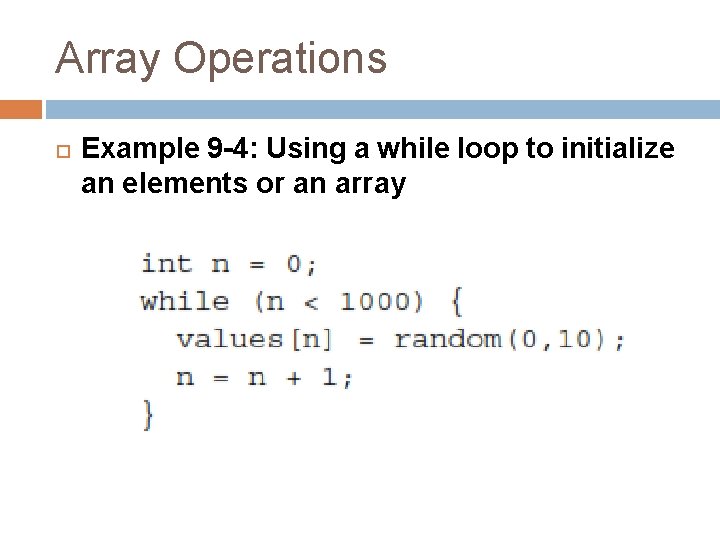
Array Operations Example 9 -4: Using a while loop to initialize an elements or an array
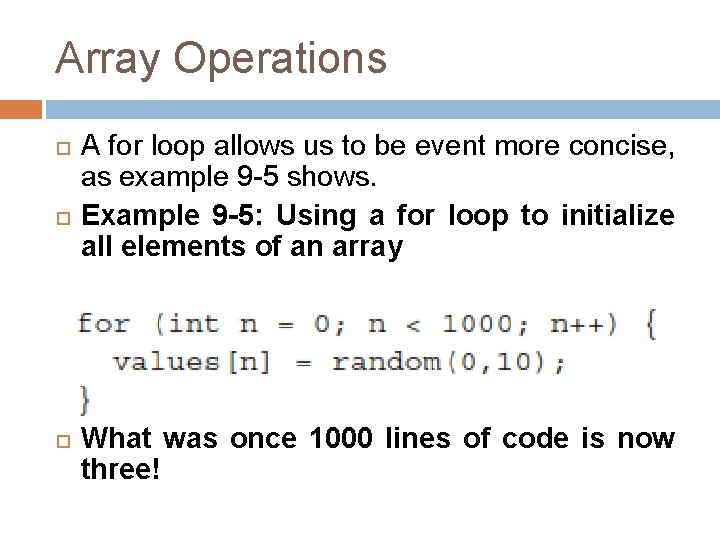
Array Operations A for loop allows us to be event more concise, as example 9 -5 shows. Example 9 -5: Using a for loop to initialize all elements of an array What was once 1000 lines of code is now three!
Array Operations We can exploit the same technique for any type of aray operation we might like to do beyond simply initializing the elements.
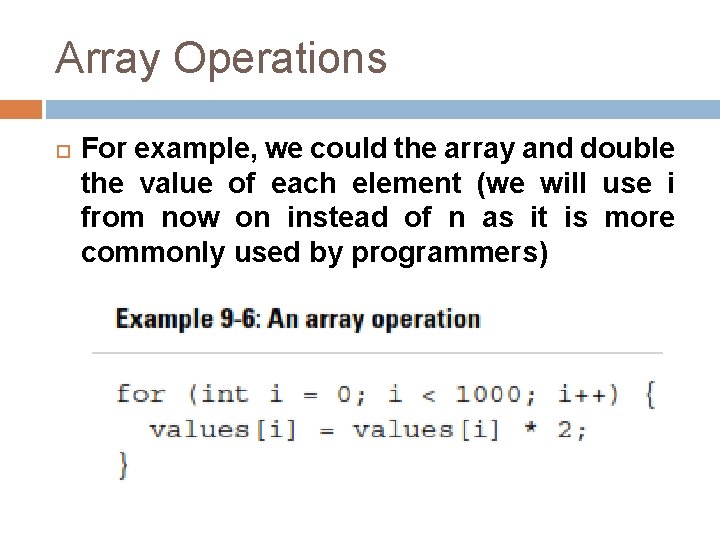
Array Operations For example, we could the array and double the value of each element (we will use i from now on instead of n as it is more commonly used by programmers)
Array Operations There is one problem with Example 9 -6: the use of the hard-coded value 1000. Striving to be better programmers, we should always question the existence of a hardcoded number. In this case, what if we wanted to change the array to have 2000 elements? If our program was very long with many array operations, we would have to make this change everywhere whroughout our code.
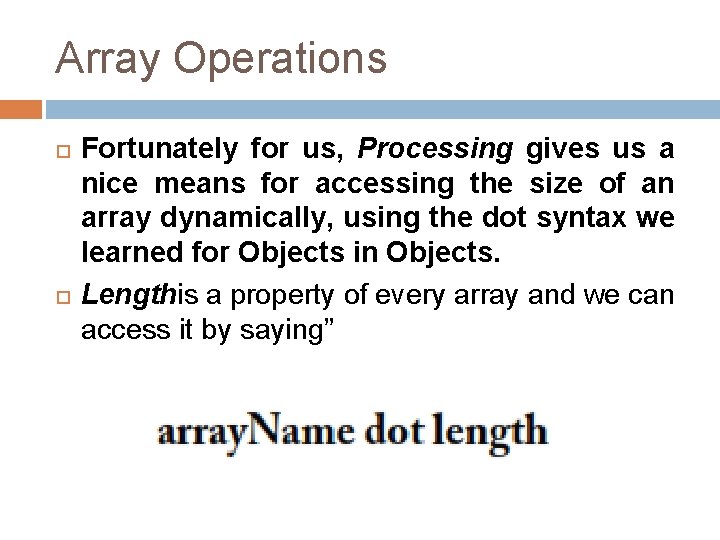
Array Operations Fortunately for us, Processing gives us a nice means for accessing the size of an array dynamically, using the dot syntax we learned for Objects in Objects. Lengthis a property of every array and we can access it by saying”
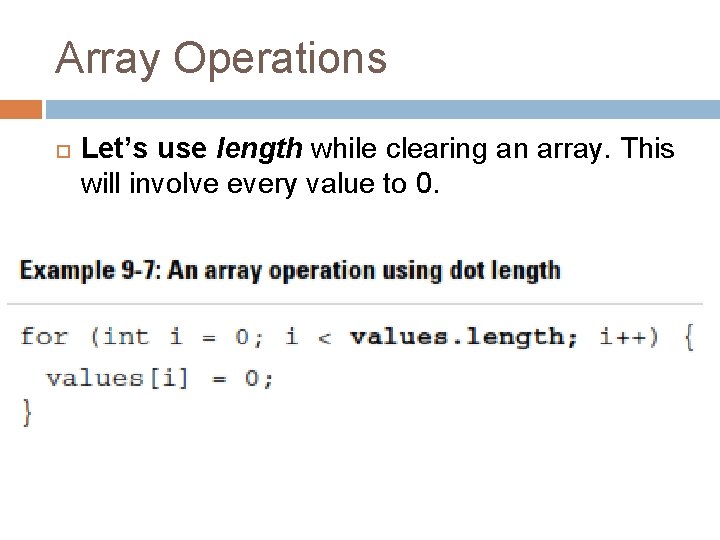
Array Operations Let’s use length while clearing an array. This will involve every value to 0.
Array Operations Exercise 9 -6: Assuming an array of 10 integers, thats is Write code to perform the following array operation (Note that the number of clues vary, just because a [. . . , . . . ] is not explicity written in does not mean there should be brackets!
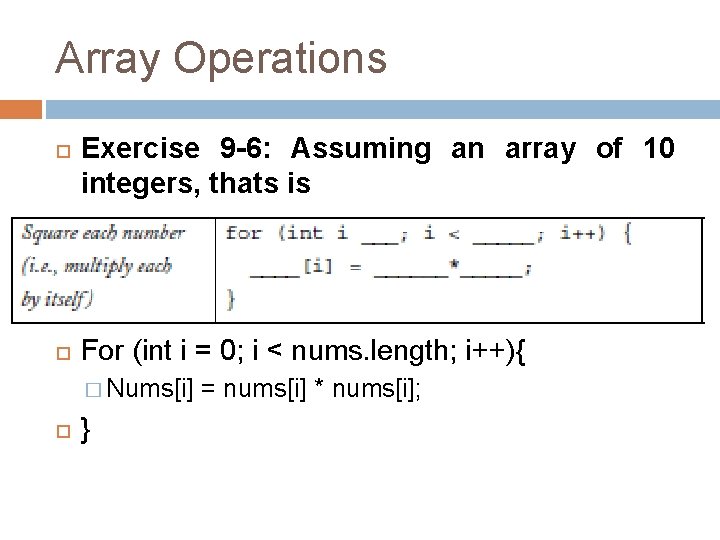
Array Operations Exercise 9 -6: Assuming an array of 10 integers, thats is For (int i = 0; i < nums. length; i++){ � Nums[i] } = nums[i] * nums[i];
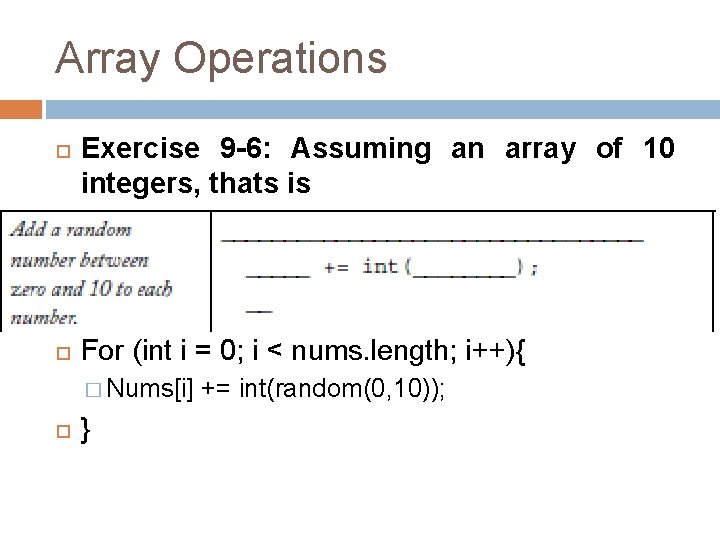
Array Operations Exercise 9 -6: Assuming an array of 10 integers, thats is For (int i = 0; i < nums. length; i++){ � Nums[i] } += int(random(0, 10));
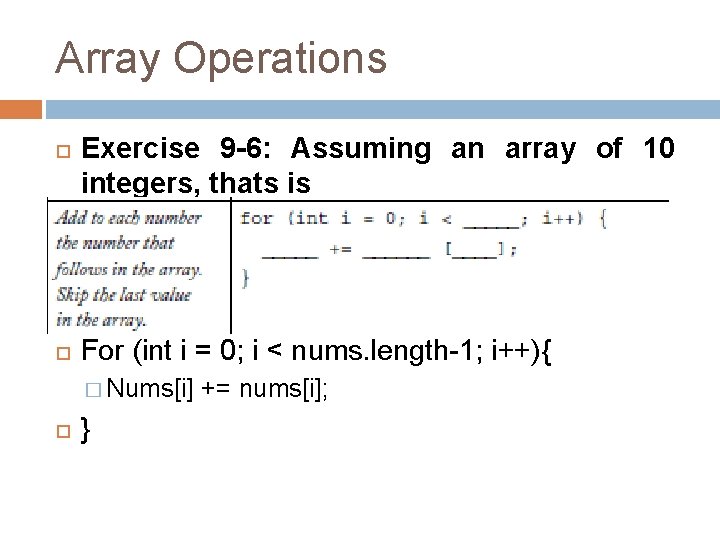
Array Operations Exercise 9 -6: Assuming an array of 10 integers, thats is For (int i = 0; i < nums. length-1; i++){ � Nums[i] } += nums[i];
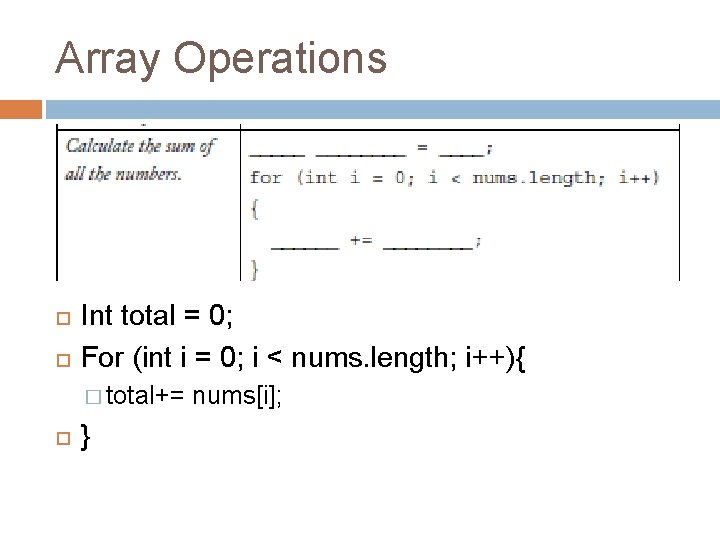
Array Operations Int total = 0; For (int i = 0; i < nums. length; i++){ � total+= } nums[i];
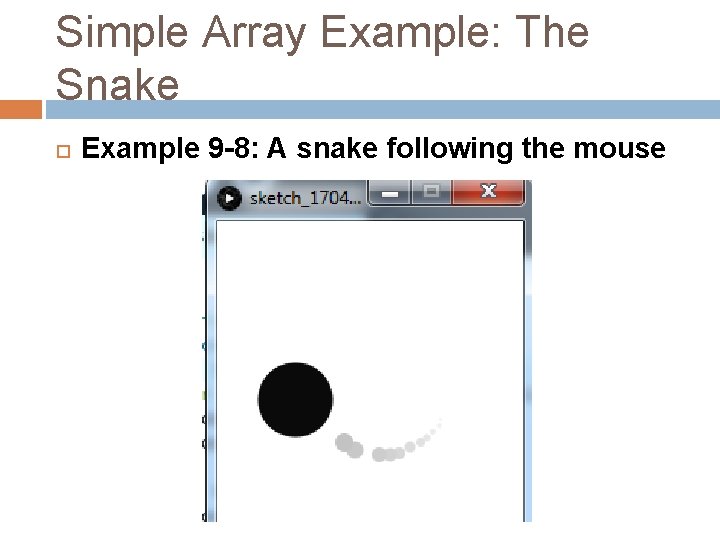
Simple Array Example: The Snake Example 9 -8: A snake following the mouse
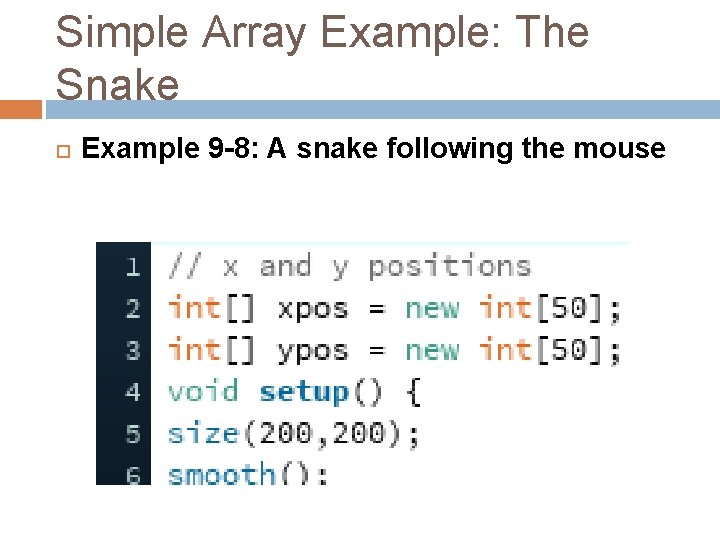
Simple Array Example: The Snake Example 9 -8: A snake following the mouse
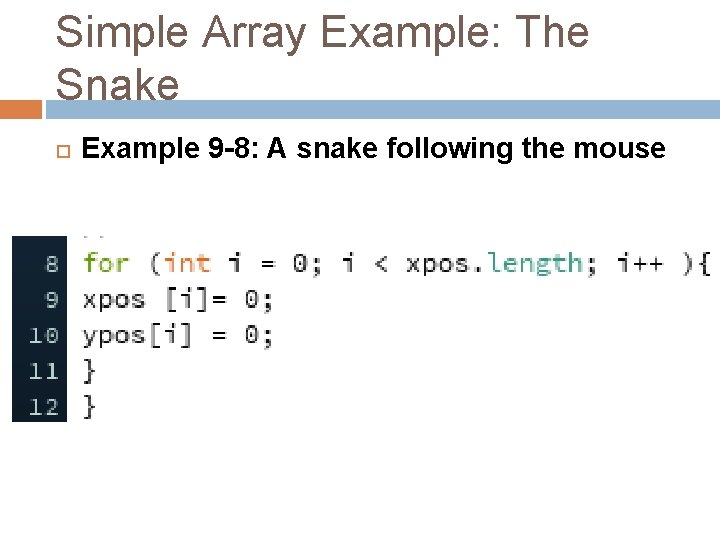
Simple Array Example: The Snake Example 9 -8: A snake following the mouse
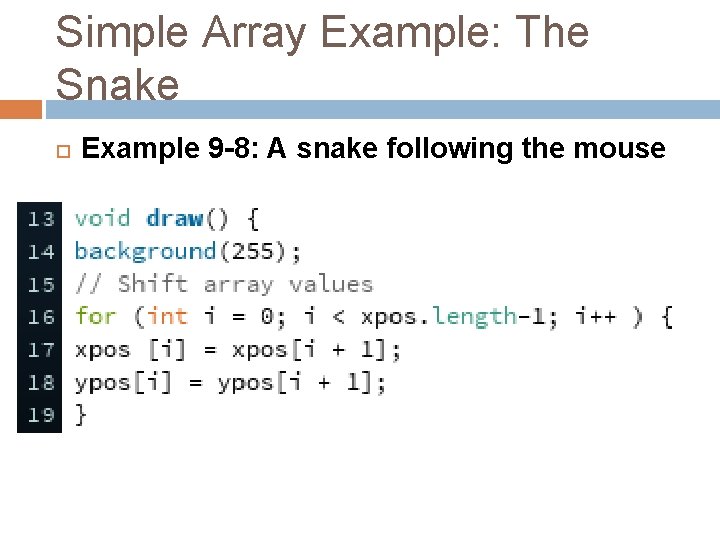
Simple Array Example: The Snake Example 9 -8: A snake following the mouse
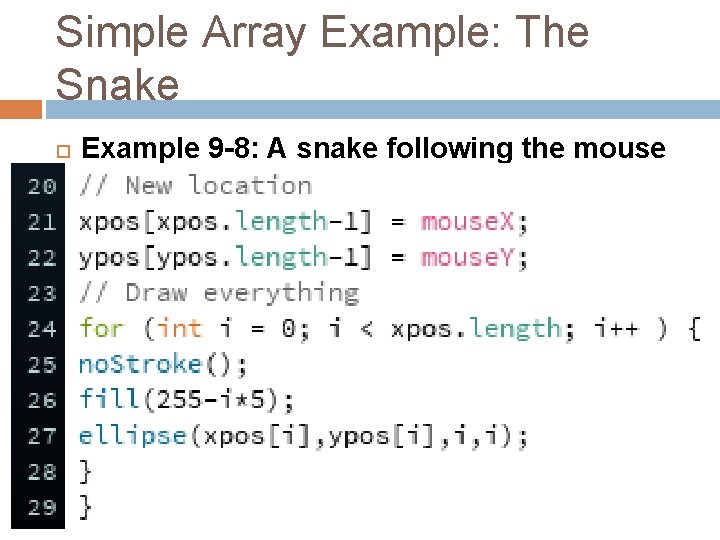
Simple Array Example: The Snake Example 9 -8: A snake following the mouse
End Of File. . .
- Slides: 46