
AGILENT 34401 A MULTIMETER Produced by GMI Engineering

AGILENT 34401 A MULTIMETER Produced by GMI Engineering & Management Institute & Agilent Technologies
Agilent 34401 A Multimeter 6 1/2 digit, high performance digital multimeter F AC/DC voltage measurements F AC/DC current measurements F 2 and 4 wire resistance measurements F Frequency and Period measurements F Math functions F
Safety Tips Protect Yourself: Avoid contact with Voltage or Current Source. 1) Use shrouded test leads and alligator clips. 2) Connect leads to multimeter first. 3) Do all normal connect/disconnect at source. 4) Familiarize yourself with the manual.
Safety Tips Protect Instrument 1) Inductive Devices (e. g. transformers, chokes/inductors) induce very high transient voltages. 2) Measuring resistance: Avoid contacting probes with live circuits when in resistance modes. 3) Measuring Current: Do not connect probes across voltage source.
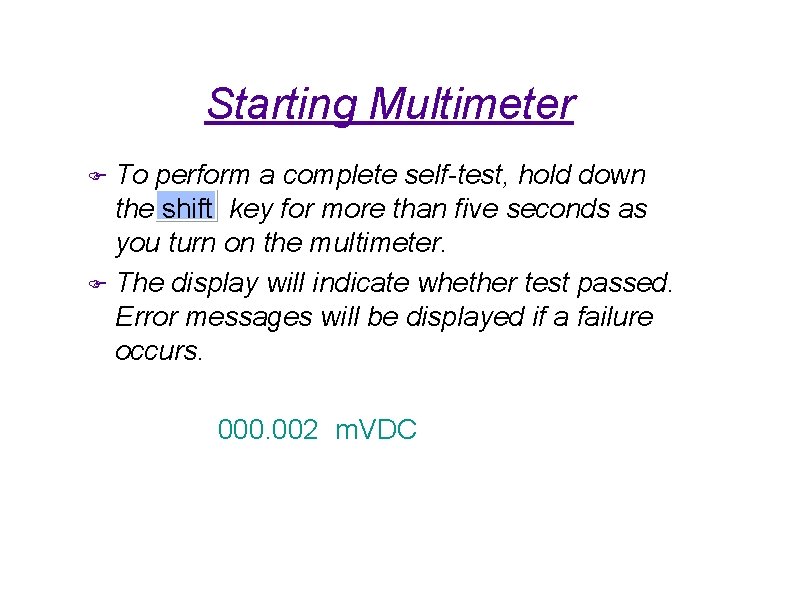
Starting Multimeter To perform a complete self-test, hold down the shift key for more than five seconds as you turn on the multimeter. F The display will indicate whether test passed. Error messages will be displayed if a failure occurs. F 000. 002 m. VDC
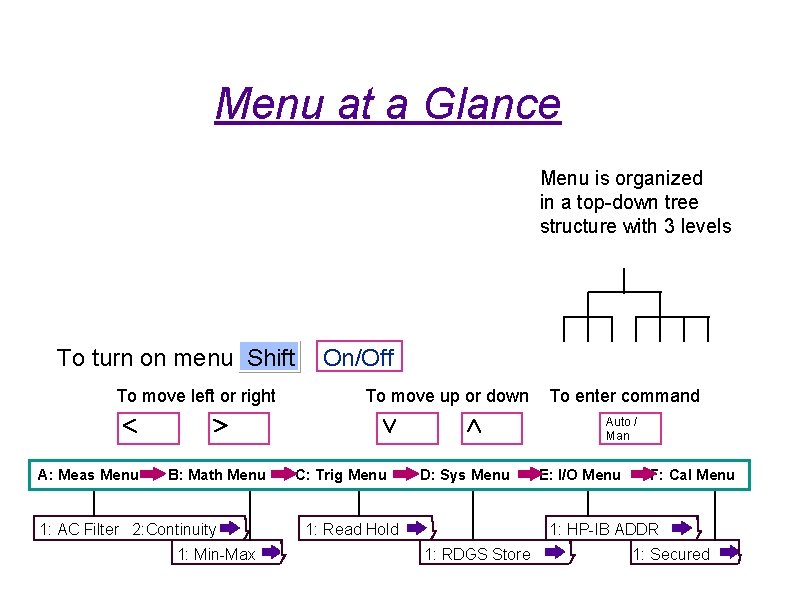
Menu at a Glance Menu is organized in a top-down tree structure with 3 levels To turn on menu Shift To move left or right On/Off To move up or down To enter command Auto / Man A: Meas Menu B: Math Menu 1: AC Filter 2: Continuity 1: Min-Max C: Trig Menu D: Sys Menu 1: Read Hold E: I/O Menu F: Cal Menu 1: HP-IB ADDR 1: RDGS Store 1: Secured
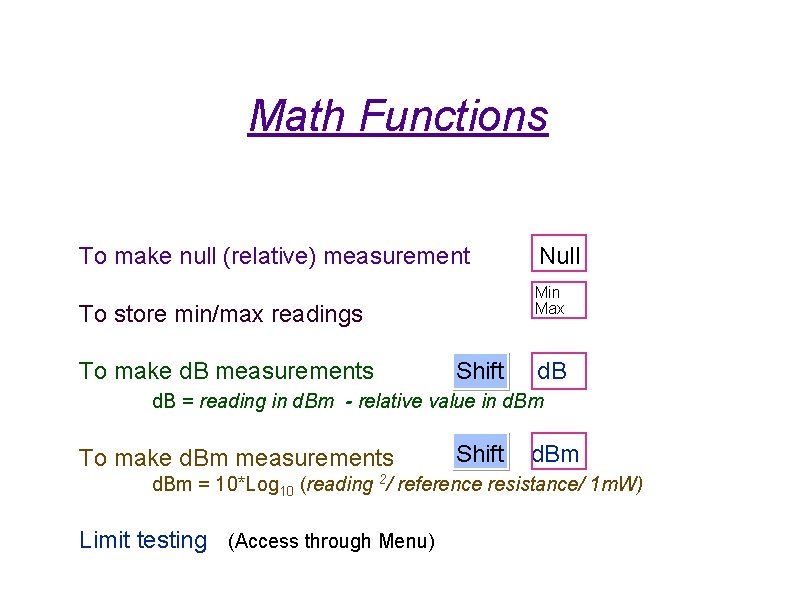
Math Functions To make null (relative) measurement Min Max To store min/max readings To make d. B measurements Null Shift d. B = reading in d. Bm - relative value in d. Bm To make d. Bm measurements Shift d. Bm = 10*Log 10 (reading 2/ reference resistance/ 1 m. W) Limit testing (Access through Menu)
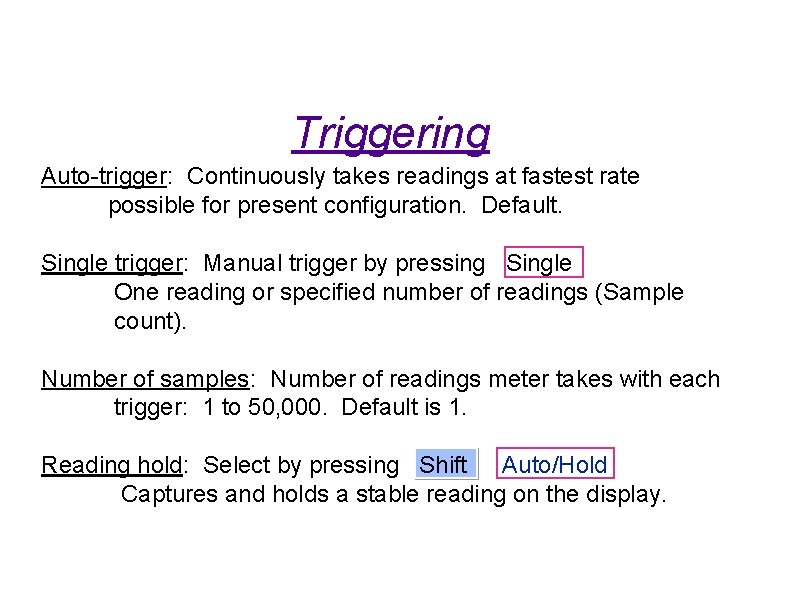
Triggering Auto-trigger: Continuously takes readings at fastest rate possible for present configuration. Default. Single trigger: Manual trigger by pressing Single One reading or specified number of readings (Sample count). Number of samples: Number of readings meter takes with each trigger: 1 to 50, 000. Default is 1. Reading hold: Select by pressing Shift Auto/Hold Captures and holds a stable reading on the display.
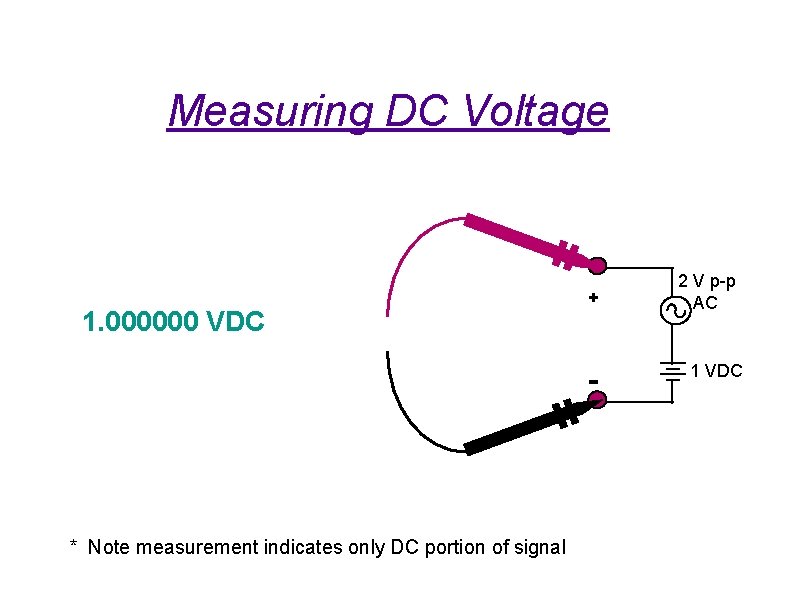
Measuring DC Voltage 1. 000000 VDC + - * Note measurement indicates only DC portion of signal 2 V p-p AC 1 VDC
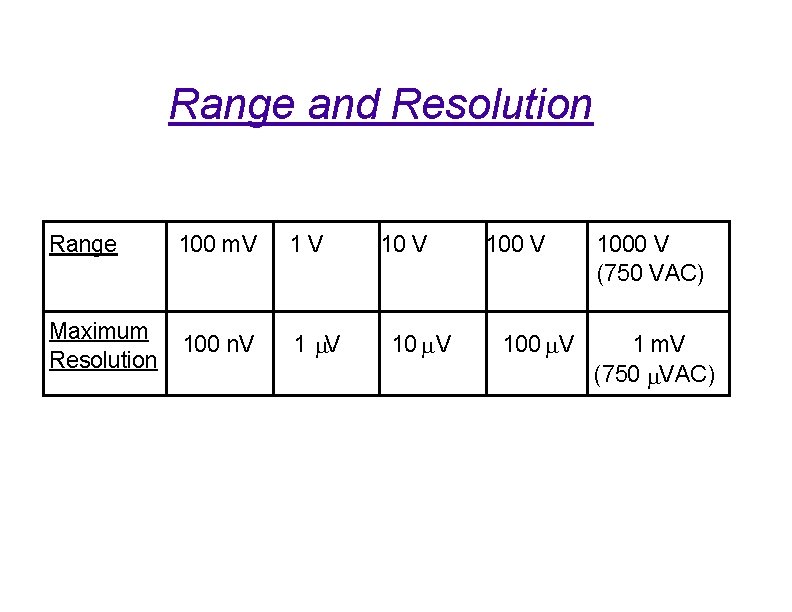
Range and Resolution Range 100 m. V 1 V Maximum Resolution 100 n. V 1 m. V 10 m V 1000 V (750 VAC) 1 m. V (750 m. VAC)
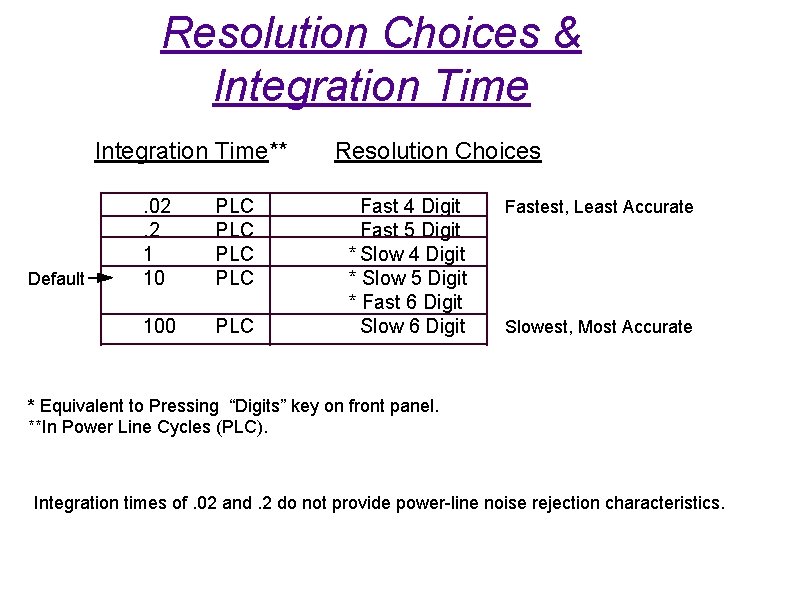
Resolution Choices & Integration Time** Default . 02. 2 1 10 PLC PLC 100 PLC Resolution Choices Fast 4 Digit Fast 5 Digit * Slow 4 Digit * Slow 5 Digit * Fast 6 Digit Slow 6 Digit Fastest, Least Accurate Slowest, Most Accurate * Equivalent to Pressing “Digits” key on front panel. **In Power Line Cycles (PLC). Integration times of. 02 and. 2 do not provide power-line noise rejection characteristics.
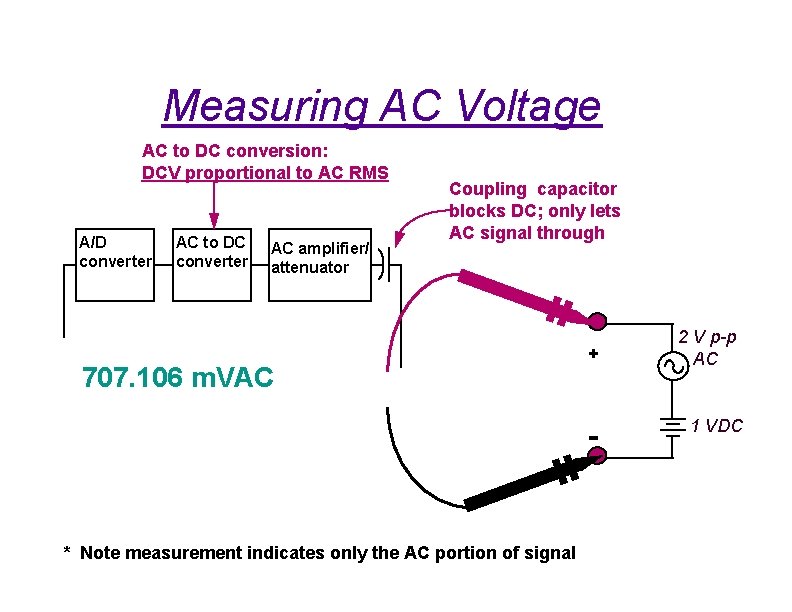
Measuring AC Voltage AC to DC conversion: DCV proportional to AC RMS A/D converter AC to DC converter AC amplifier/ attenuator Coupling capacitor blocks DC; only lets AC signal through 707. 106 m. VAC + - * Note measurement indicates only the AC portion of signal 2 V p-p AC 1 VDC
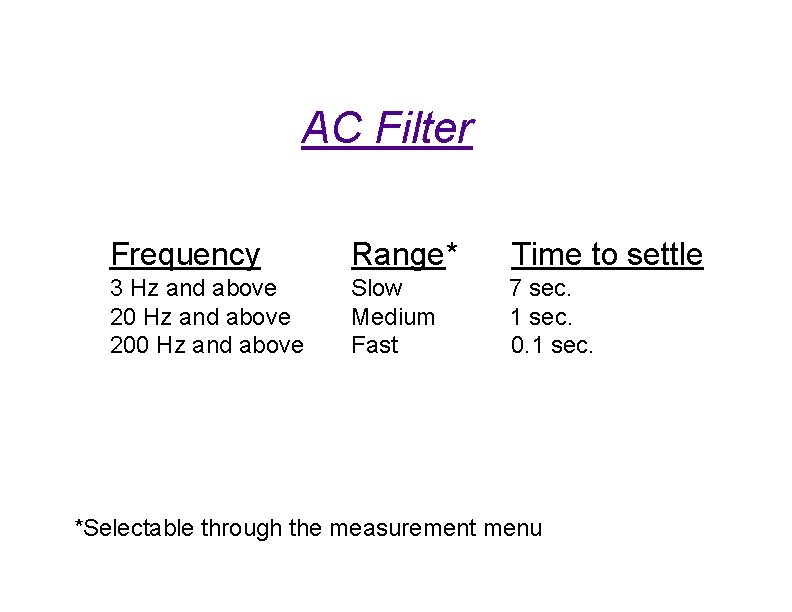
AC Filter Frequency Range* Time to settle 3 Hz and above 200 Hz and above Slow Medium Fast 7 sec. 1 sec. 0. 1 sec. *Selectable through the measurement menu
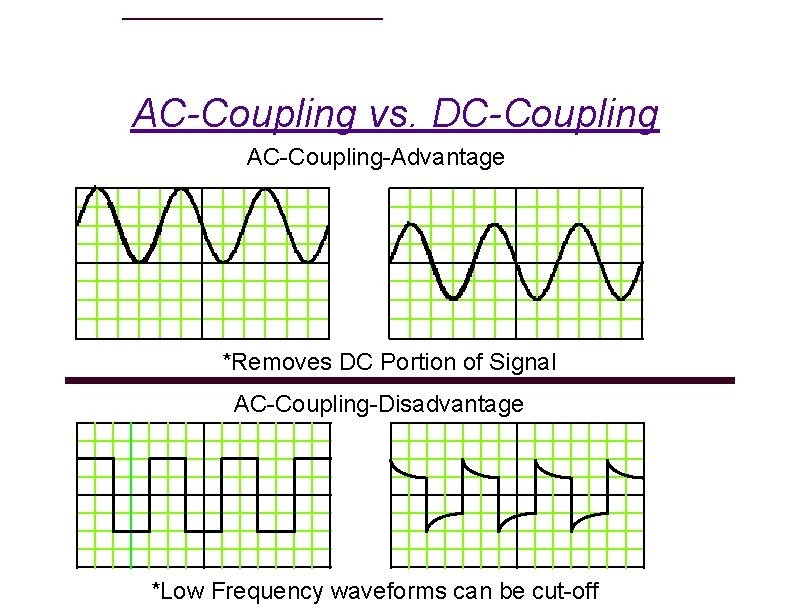
AC-Coupling vs. DC-Coupling AC-Coupling-Advantage *Removes DC Portion of Signal AC-Coupling-Disadvantage *Low Frequency waveforms can be cut-off
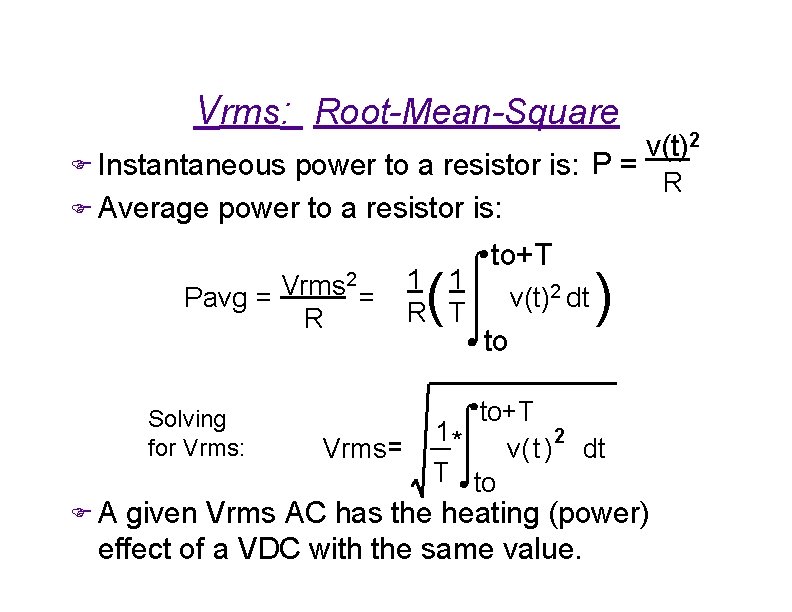
Vrms: Root-Mean-Square v(t)2 power to a resistor is: P = R F Average power to a resistor is: F Instantaneous 2 Vrms Pavg = = R Solving for Vrms: FA Vrms ( 1 1 R T to+T v(t)2 dt to ) to+T 1* 2 v( t ) dt T to given Vrms AC has the heating (power) effect of a VDC with the same value.
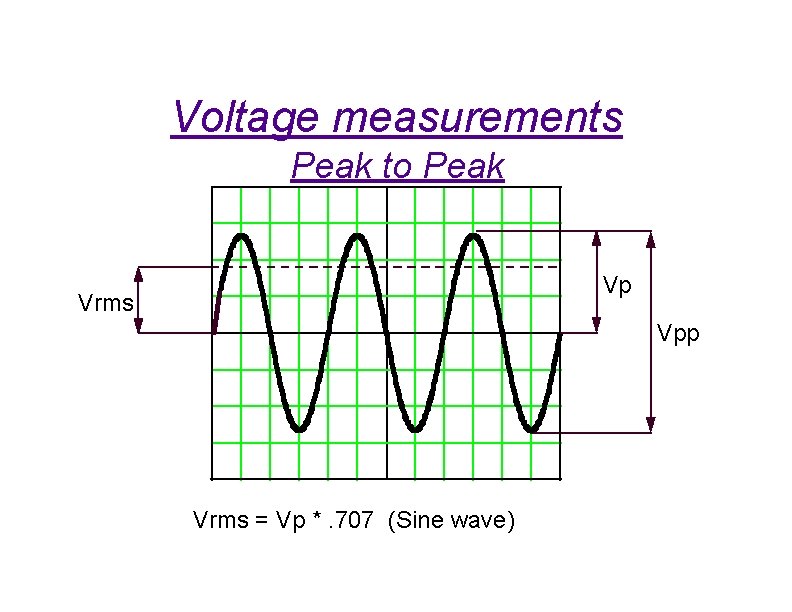
Voltage measurements Peak to Peak Vp Vrms Vpp Vrms = Vp *. 707 (Sine wave)
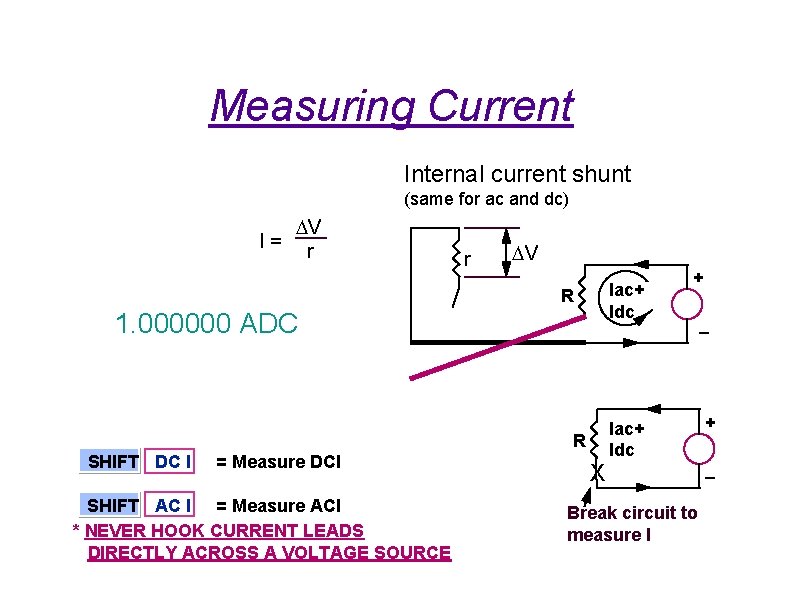
Measuring Current Internal current shunt (same for ac and dc) I= DV r r DV Iac+ Idc R 1. 000000 ADC – R SHIFT DC I = Measure DCI SHIFT AC I = Measure ACI * NEVER HOOK CURRENT LEADS DIRECTLY ACROSS A VOLTAGE SOURCE + X Iac+ Idc Break circuit to measure I + –
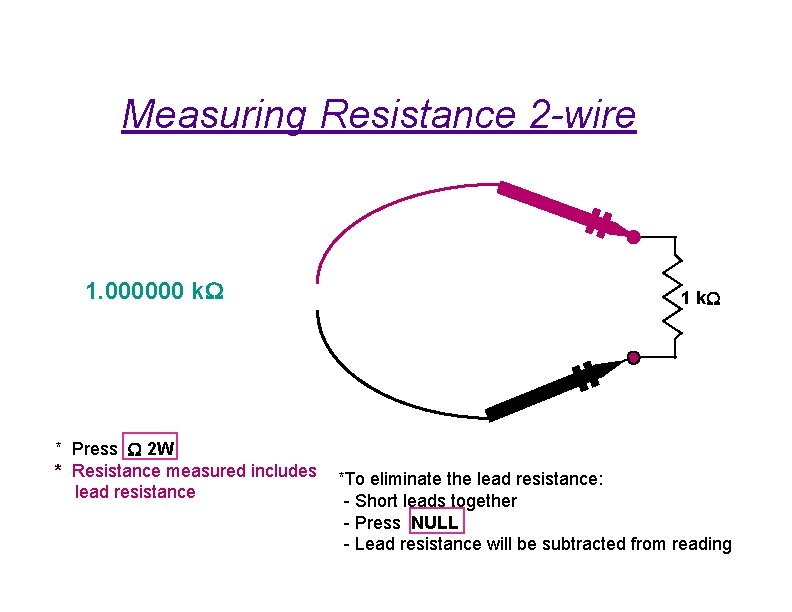
Measuring Resistance 2 -wire 1. 000000 k. W * Press W 2 W * Resistance measured includes lead resistance 1 k. W *To eliminate the lead resistance: - Short leads together - Press NULL - Lead resistance will be subtracted from reading
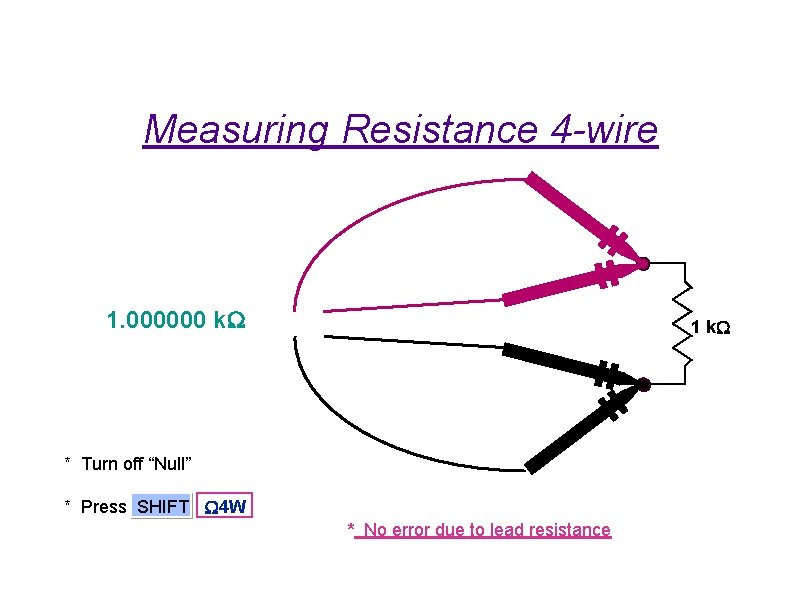
Measuring Resistance 4 -wire 1. 000000 k. W 1 k. W * Turn off “Null” * Press SHIFT W 4 W * No error due to lead resistance
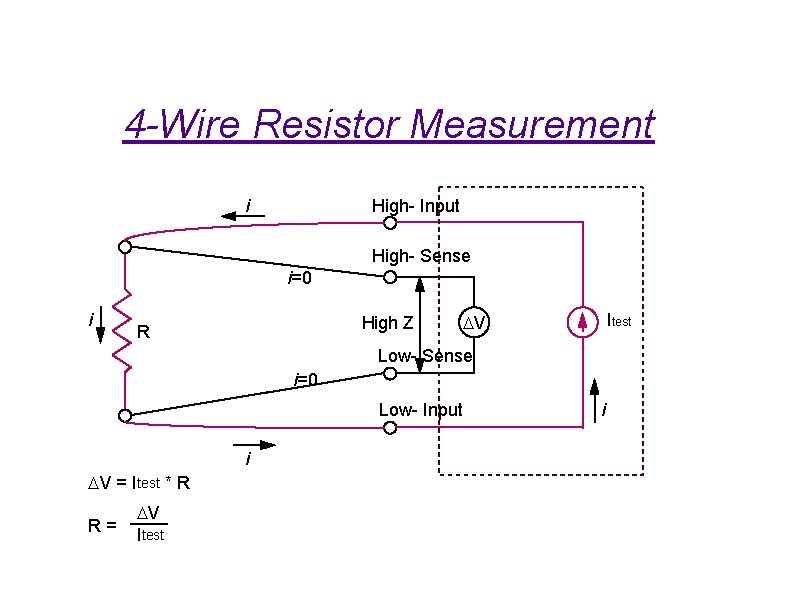
4 -Wire Resistor Measurement i High- Input High- Sense i=0 i High Z R Itest DV Low- Sense i=0 Low- Input i DV = Itest * R R= DV Itest i
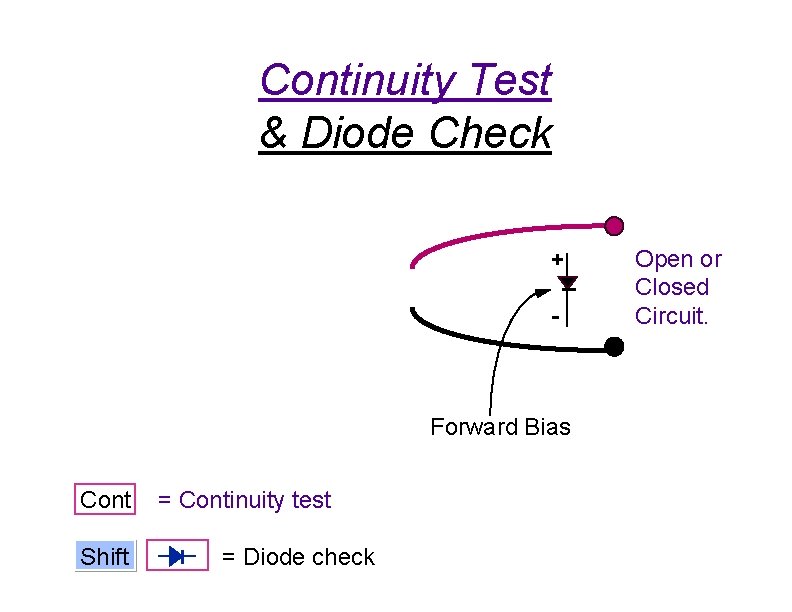
Continuity Test & Diode Check + - Forward Bias Cont Shift = Continuity test = Diode check Open or Closed Circuit.
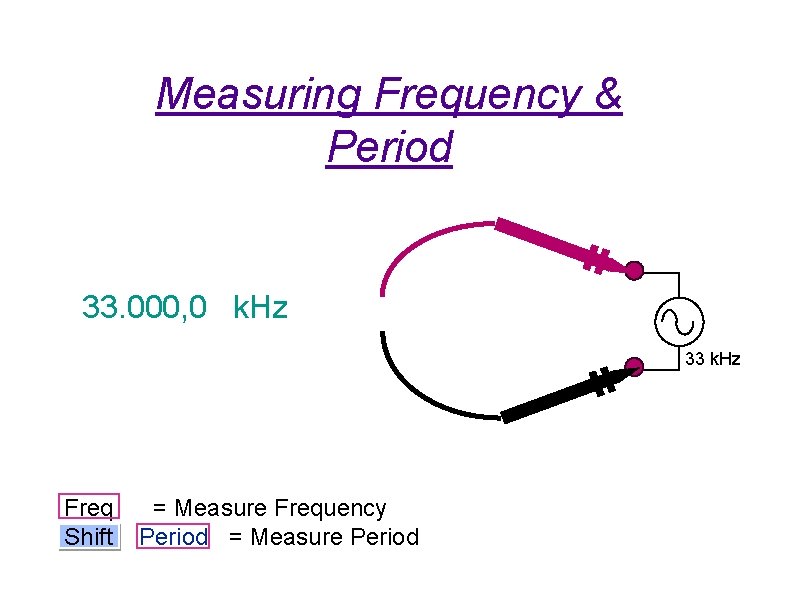
Measuring Frequency & Period 33. 000, 0 k. Hz 33 k. Hz Freq Shift = Measure Frequency Period = Measure Period
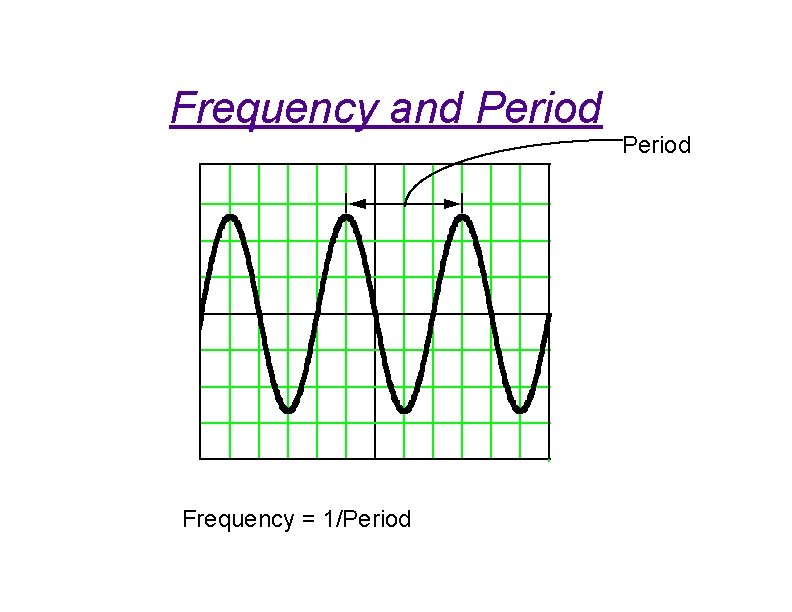
Frequency and Period f 1( t ) Frequency = 1/Period
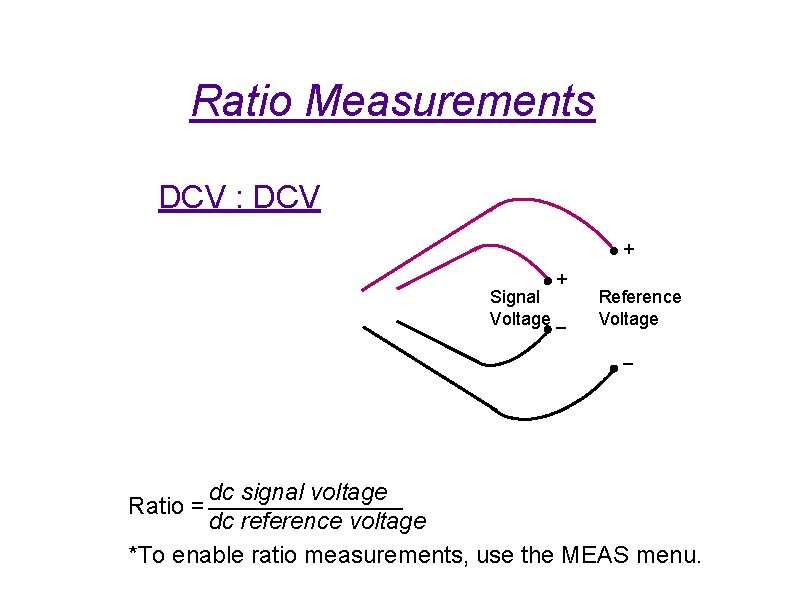
Ratio Measurements DCV : DCV + + Signal Voltage – Reference Voltage – dc signal voltage Ratio = dc reference voltage *To enable ratio measurements, use the MEAS menu.
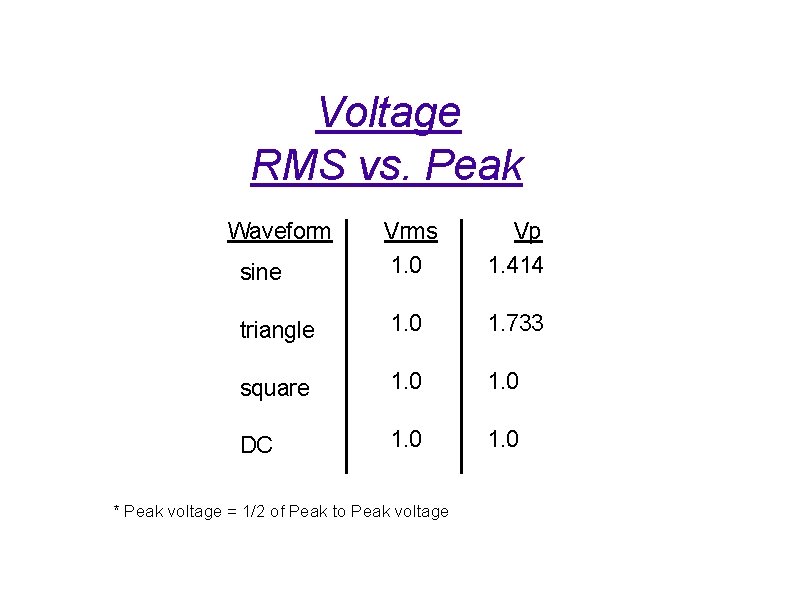
Voltage RMS vs. Peak Waveform sine Vrms 1. 0 Vp 1. 414 triangle 1. 0 1. 733 square 1. 0 DC 1. 0 * Peak voltage = 1/2 of Peak to Peak voltage

High Z Termination SIGNAL SOURCE MEASURING DEVICE i Ro=50 W Vs Zc 1 j 2 p f C Vs = 1 + Ro * Vm Zin Ri Ci i Zin Ri*Zc High Resistance Ri + Zc . . for very large Zin, Vs @ Vm As frequency increases, Zin decreases For less than 1% error Zin > 100 Ro Vm
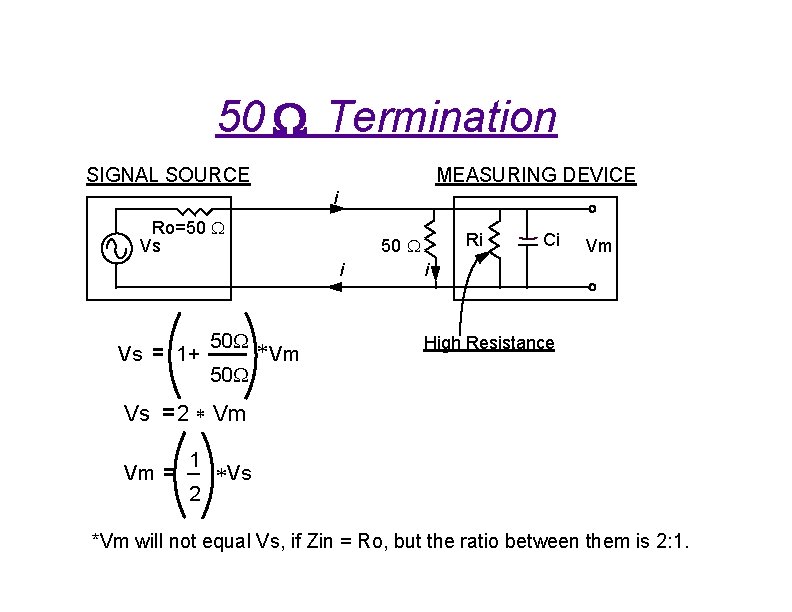
50 W Termination SIGNAL SOURCE MEASURING DEVICE i Ro=50 W Vs i 50 W * Vm 50 W Vs 1+ Vs 2 * Vm Vm 1 2 Ri 50 W Ci Vm i High Resistance *Vs *Vm will not equal Vs, if Zin = Ro, but the ratio between them is 2: 1.
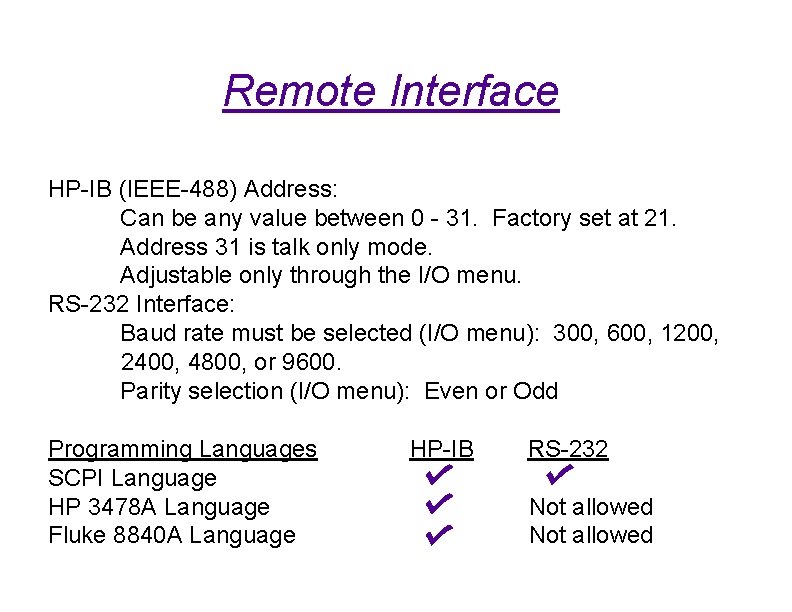
Remote Interface HP-IB (IEEE-488) Address: Can be any value between 0 - 31. Factory set at 21. Address 31 is talk only mode. Adjustable only through the I/O menu. RS-232 Interface: Baud rate must be selected (I/O menu): 300, 600, 1200, 2400, 4800, or 9600. Parity selection (I/O menu): Even or Odd Programming Languages SCPI Language HP 3478 A Language Fluke 8840 A Language HP-IB RS-232 Not allowed
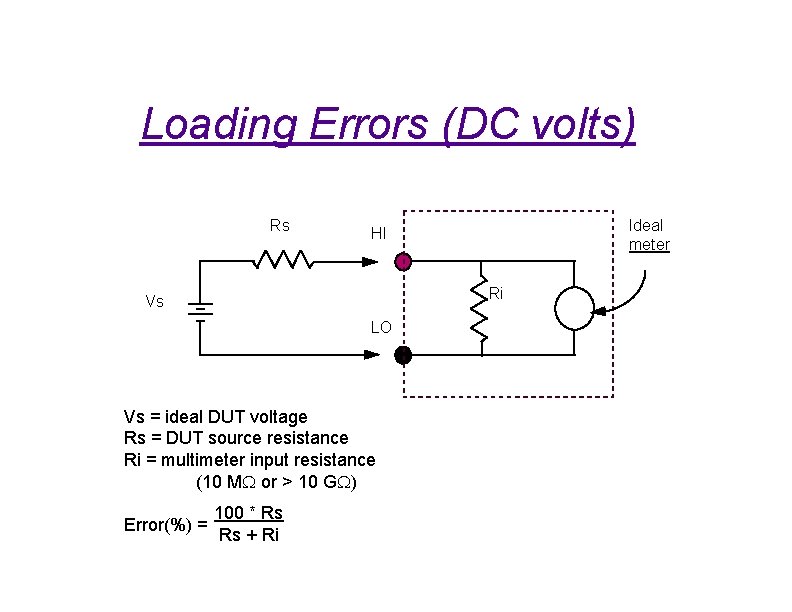
Loading Errors (DC volts) Rs Ri Vs LO Vs = ideal DUT voltage Rs = DUT source resistance Ri = multimeter input resistance (10 MW or > 10 GW) Error(%) = Ideal meter HI 100 * Rs Rs + Ri

Leakage Current Errors Rs Vs LO Ib = multimeter bias current Rs = DUT source resistance Ci = multimeter input capacitace Error(v) @ Ib * Rs Ideal meter HI Ib Ri Ci
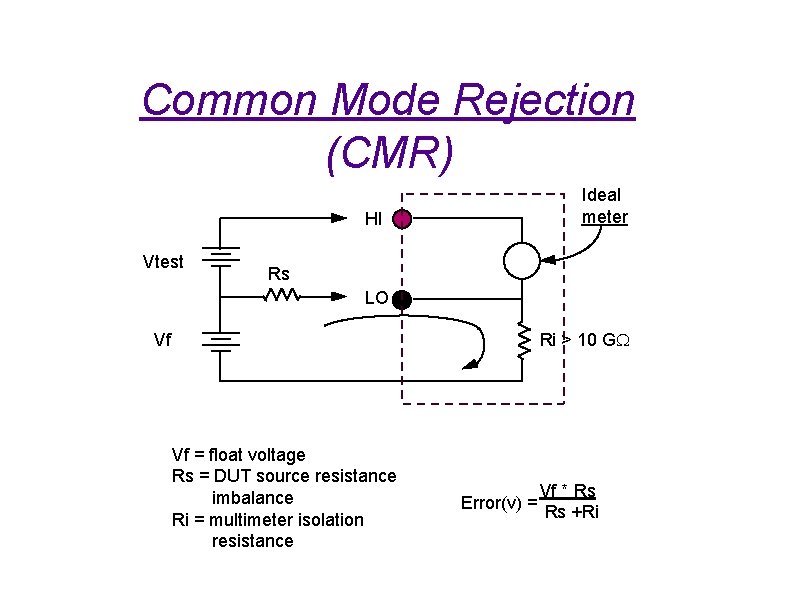
Common Mode Rejection (CMR) Ideal meter HI Vtest Rs LO Vf Ri > 10 GW Vf = float voltage Rs = DUT source resistance imbalance Ri = multimeter isolation resistance Error(v) = Vf * Rs Rs +Ri
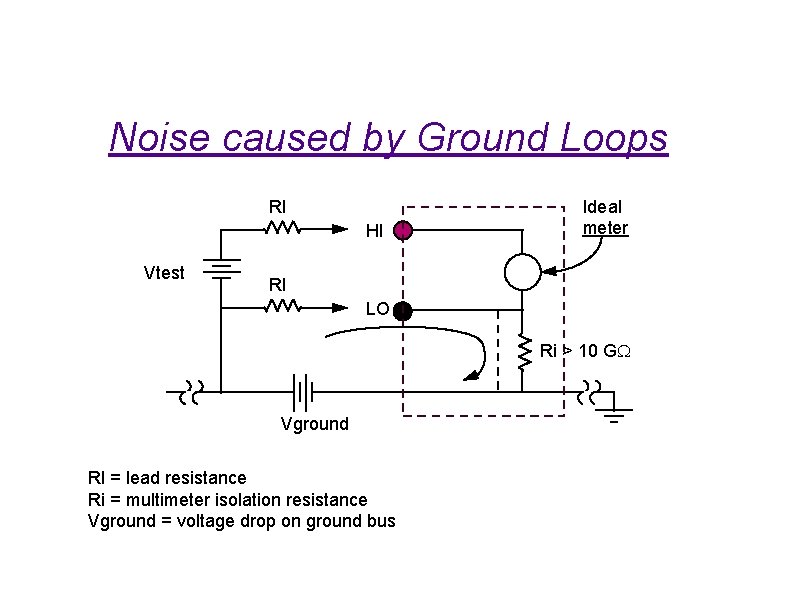
Noise caused by Ground Loops Rl HI Vtest Ideal meter Rl LO Ri > 10 GW Vground Rl = lead resistance Ri = multimeter isolation resistance Vground = voltage drop on ground bus
The DIGITAL MULTIMETER Hints for Accurate Measurements: F Measure as near full scale as possible F Use a Ratio measurement whenever possible. F Before measuring, short the test leads together to check for offsets. (Exception: RMS AC measurements)
Where to get more information F Agilent 34401 A User’s Guide F Agilent 34401 A Service Guide F For on-line technical information call HP Direct at 1 -800 -829 -4444
- Slides: 34