
Advanced Sensing Lecture is based on material from
Advanced Sensing Lecture is based on material from Robotic Explorations: A Hands-on Introduction to Engineering, Fred Martin, Prentice Hall, 2001. Copyright Prentice Hall, 2001
Outline • • • Quadrature Shaft Encoding Infrared Sensing Infrared Communications Ultrasonic Distance Sensing Optical Distance Sensing Sensor Data Processing Copyright Prentice Hall, 2001 2
Homework #5 • Advanced Sensing: Read Chapter 6 of Robotic Explorations (textbook) Copyright Prentice Hall, 2001 3
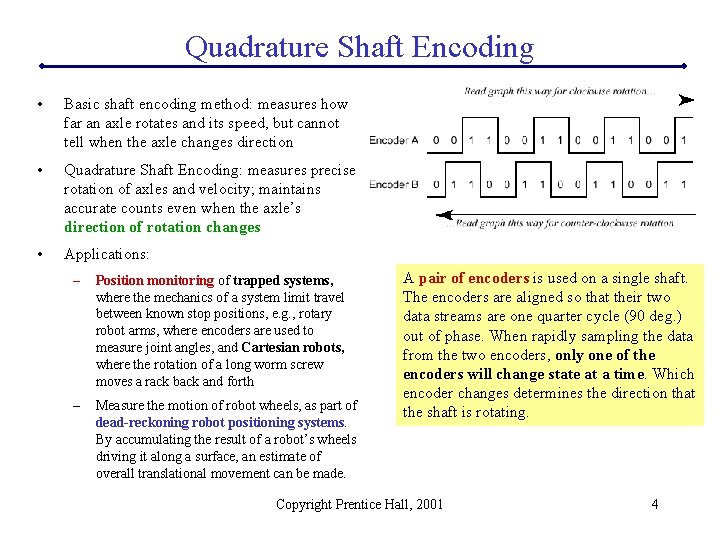
Quadrature Shaft Encoding • Basic shaft encoding method: measures how far an axle rotates and its speed, but cannot tell when the axle changes direction • Quadrature Shaft Encoding: measures precise rotation of axles and velocity; maintains accurate counts even when the axle’s direction of rotation changes • Applications: – Position monitoring of trapped systems, where the mechanics of a system limit travel between known stop positions, e. g. , rotary robot arms, where encoders are used to measure joint angles, and Cartesian robots, where the rotation of a long worm screw moves a rack back and forth – Measure the motion of robot wheels, as part of dead-reckoning robot positioning systems. By accumulating the result of a robot’s wheels driving it along a surface, an estimate of overall translational movement can be made. A pair of encoders is used on a single shaft. The encoders are aligned so that their two data streams are one quarter cycle (90 deg. ) out of phase. When rapidly sampling the data from the two encoders, only one of the encoders will change state at a time. Which encoder changes determines the direction that the shaft is rotating. Copyright Prentice Hall, 2001 4
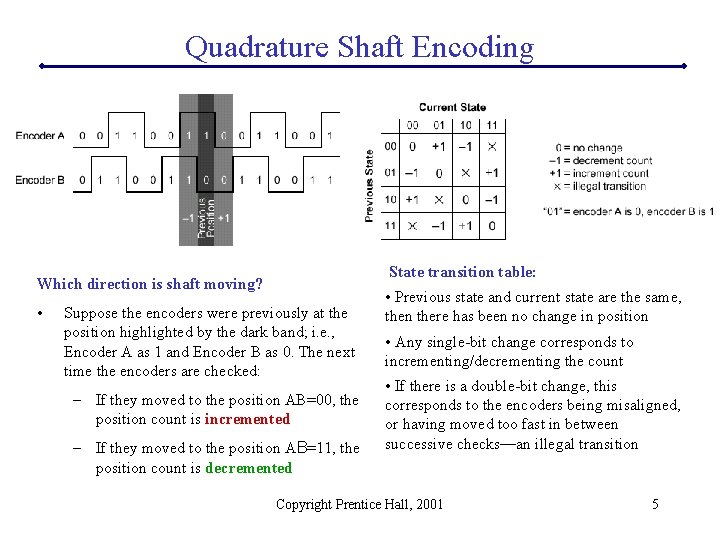
Quadrature Shaft Encoding State transition table: Which direction is shaft moving? • Suppose the encoders were previously at the position highlighted by the dark band; i. e. , Encoder A as 1 and Encoder B as 0. The next time the encoders are checked: – If they moved to the position AB=00, the position count is incremented – If they moved to the position AB=11, the position count is decremented • Previous state and current state are the same, then there has been no change in position • Any single-bit change corresponds to incrementing/decrementing the count • If there is a double-bit change, this corresponds to the encoders being misaligned, or having moved too fast in between successive checks—an illegal transition Copyright Prentice Hall, 2001 5
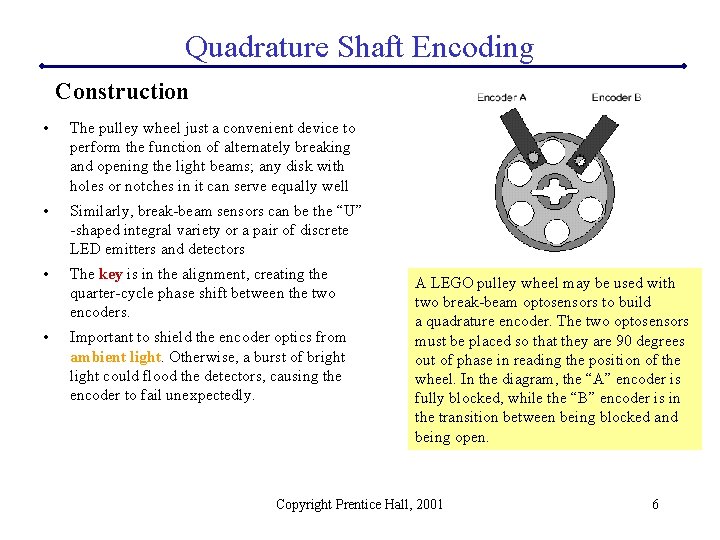
Quadrature Shaft Encoding Construction • The pulley wheel just a convenient device to perform the function of alternately breaking and opening the light beams; any disk with holes or notches in it can serve equally well • Similarly, break-beam sensors can be the “U” -shaped integral variety or a pair of discrete LED emitters and detectors • The key is in the alignment, creating the quarter-cycle phase shift between the two encoders. • Important to shield the encoder optics from ambient light. Otherwise, a burst of bright light could flood the detectors, causing the encoder to fail unexpectedly. A LEGO pulley wheel may be used with two break-beam optosensors to build a quadrature encoder. The two optosensors must be placed so that they are 90 degrees out of phase in reading the position of the wheel. In the diagram, the “A” encoder is fully blocked, while the “B” encoder is in the transition between being blocked and being open. Copyright Prentice Hall, 2001 6

Quadrature Shaft Encoding Construction Clarostat Series 600 Optical Rotary Encoder A commercial enclosed quadrature encoder typically operates off of a +5 v supply, and has two digital outputs providing the encoder stream. Easy to work with, optically shielded, ready to mount, high resolution. ($40. 00) • 256 counts per revolution vs. LEGO pulley wheel’s 24 counts per revolution A standard computer mouse employs a pair of quadrature encoders to keep track of the mouse ball’s movement. On either side of each slotted wheel encoder is a clear-colored LED emitter, and a black-colored photodetector housing. Inside each photodetector housing are two detector elements, precisely aligned to provide the quarter-cycle phase angle. Copyright Prentice Hall, 2001 7
Quadrature Shaft Encoding Driver Software • Requires break-beam encoders to be plugged into digital input ports – Allows encoder values to be sampled more frequently without A/D conversion overhead – Light/dark states of encoder must produce voltages to match digital inputs: 1 v low and 4 v high • Technique for interpreting quadrature encoder signals: repeatedly check the encoder state, looking for transitions and incrementing/decrementing saved encoder count • In order to perform its periodic function of checking the encoder values, the driver “patches itself” into the Timer 4 interrupt, which is already set up by the Interactive C runtime software to operate at 1000 Hz • This interrupt runs the “System. Int” routine, which controls various system services during Handy Board operation, such as motor pulse-width modulation and LCD screen printing • If interested, sample code is available (Fred Martin) Copyright Prentice Hall, 2001 8
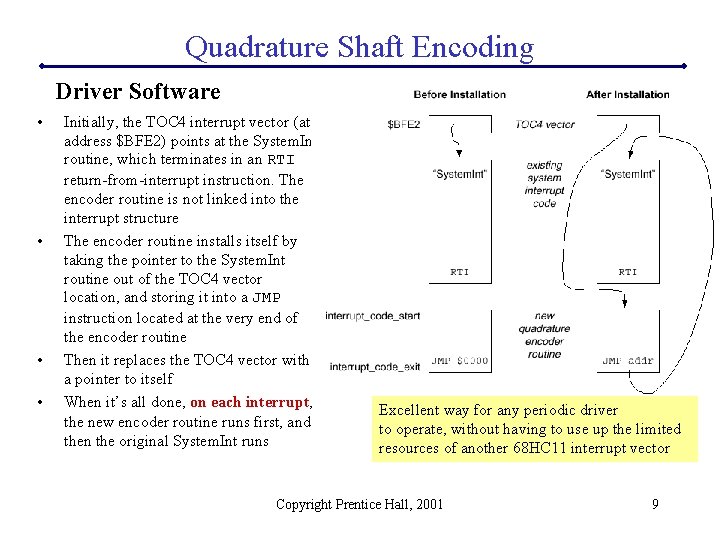
Quadrature Shaft Encoding Driver Software • • Initially, the TOC 4 interrupt vector (at address $BFE 2) points at the System. Int routine, which terminates in an RTI return-from-interrupt instruction. The encoder routine is not linked into the interrupt structure The encoder routine installs itself by taking the pointer to the System. Int routine out of the TOC 4 vector location, and storing it into a JMP instruction located at the very end of the encoder routine Then it replaces the TOC 4 vector with a pointer to itself When it’s all done, on each interrupt, the new encoder routine runs first, and then the original System. Int runs Excellent way for any periodic driver to operate, without having to use up the limited resources of another 68 HC 11 interrupt vector Copyright Prentice Hall, 2001 9
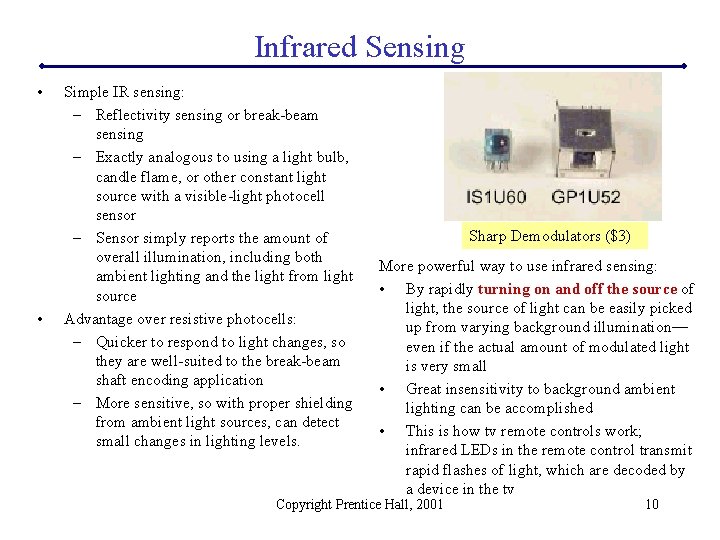
Infrared Sensing • • Simple IR sensing: – Reflectivity sensing or break-beam sensing – Exactly analogous to using a light bulb, candle flame, or other constant light source with a visible-light photocell sensor – Sensor simply reports the amount of overall illumination, including both ambient lighting and the light from light source Advantage over resistive photocells: – Quicker to respond to light changes, so they are well-suited to the break-beam shaft encoding application – More sensitive, so with proper shielding from ambient light sources, can detect small changes in lighting levels. Sharp Demodulators ($3) More powerful way to use infrared sensing: • By rapidly turning on and off the source of light, the source of light can be easily picked up from varying background illumination— even if the actual amount of modulated light is very small • Great insensitivity to background ambient lighting can be accomplished • This is how tv remote controls work; infrared LEDs in the remote control transmit rapid flashes of light, which are decoded by a device in the tv Copyright Prentice Hall, 2001 10
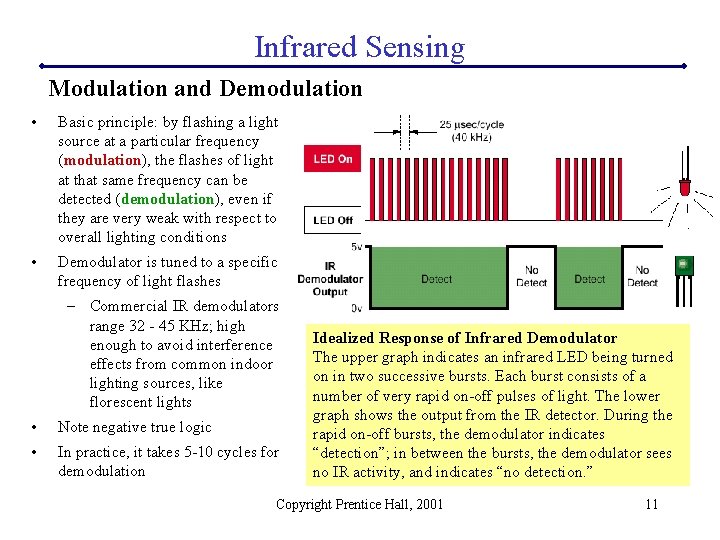
Infrared Sensing Modulation and Demodulation • Basic principle: by flashing a light source at a particular frequency (modulation), the flashes of light at that same frequency can be detected (demodulation), even if they are very weak with respect to overall lighting conditions • Demodulator is tuned to a specific frequency of light flashes – Commercial IR demodulators range 32 - 45 KHz; high enough to avoid interference effects from common indoor lighting sources, like florescent lights • Note negative true logic • In practice, it takes 5 -10 cycles for demodulation Idealized Response of Infrared Demodulator The upper graph indicates an infrared LED being turned on in two successive bursts. Each burst consists of a number of very rapid on-off pulses of light. The lower graph shows the output from the IR detector. During the rapid on-off bursts, the demodulator indicates “detection”; in between the bursts, the demodulator sees no IR activity, and indicates “no detection. ” Copyright Prentice Hall, 2001 11
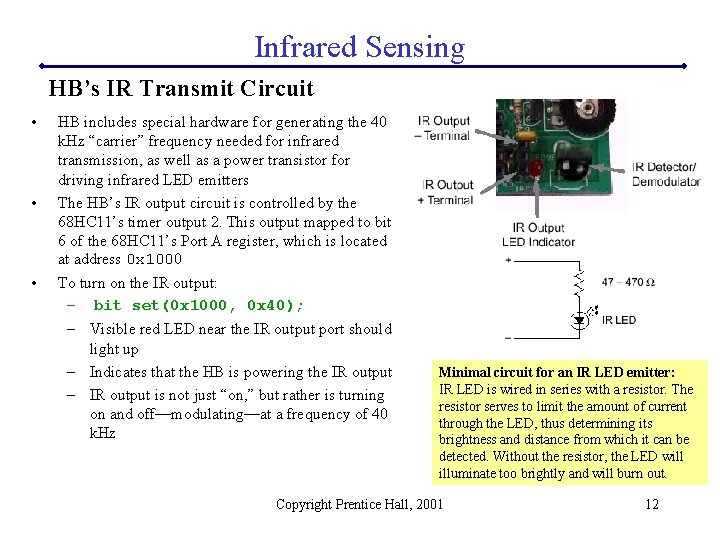
Infrared Sensing HB’s IR Transmit Circuit • • • HB includes special hardware for generating the 40 k. Hz “carrier” frequency needed for infrared transmission, as well as a power transistor for driving infrared LED emitters The HB’s IR output circuit is controlled by the 68 HC 11’s timer output 2. This output mapped to bit 6 of the 68 HC 11’s Port A register, which is located at address 0 x 1000 To turn on the IR output: – bit set(0 x 1000, 0 x 40); – Visible red LED near the IR output port should light up – Indicates that the HB is powering the IR output – IR output is not just “on, ” but rather is turning on and off—modulating—at a frequency of 40 k. Hz Minimal circuit for an IR LED emitter: IR LED is wired in series with a resistor. The resistor serves to limit the amount of current through the LED, thus determining its brightness and distance from which it can be detected. Without the resistor, the LED will illuminate too brightly and will burn out. Copyright Prentice Hall, 2001 12
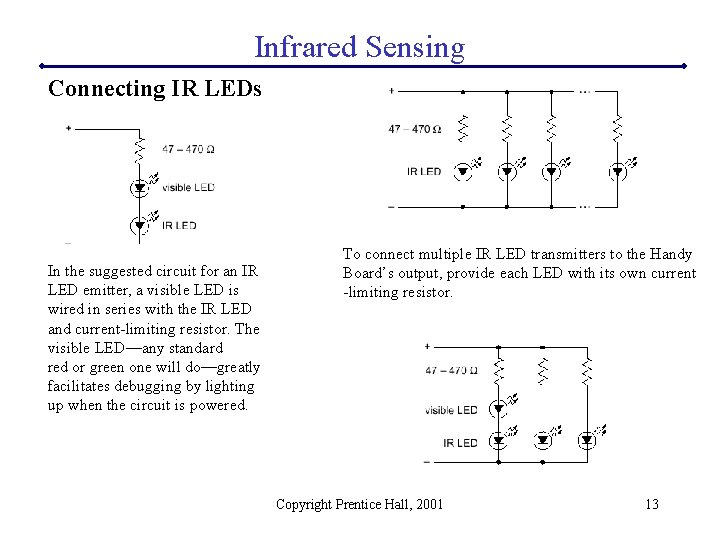
Infrared Sensing Connecting IR LEDs In the suggested circuit for an IR LED emitter, a visible LED is wired in series with the IR LED and current-limiting resistor. The visible LED—any standard red or green one will do—greatly facilitates debugging by lighting up when the circuit is powered. To connect multiple IR LED transmitters to the Handy Board’s output, provide each LED with its own current -limiting resistor. Copyright Prentice Hall, 2001 13
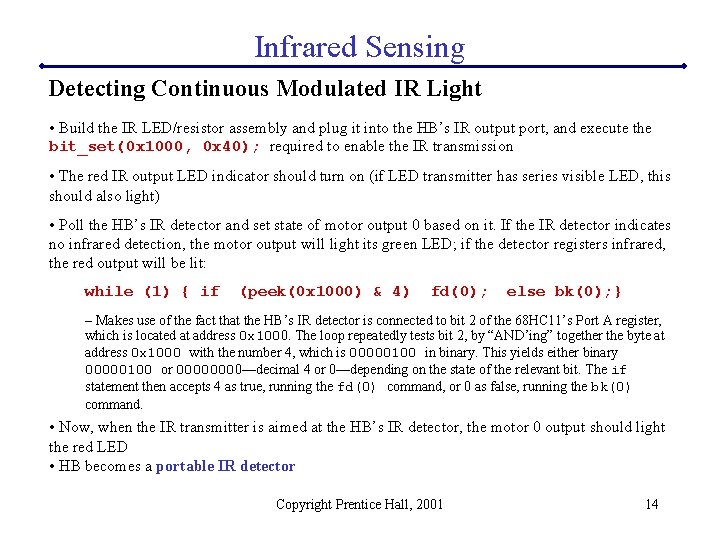
Infrared Sensing Detecting Continuous Modulated IR Light • Build the IR LED/resistor assembly and plug it into the HB’s IR output port, and execute the bit_set(0 x 1000, 0 x 40); required to enable the IR transmission • The red IR output LED indicator should turn on (if LED transmitter has series visible LED, this should also light) • Poll the HB’s IR detector and set state of motor output 0 based on it. If the IR detector indicates no infrared detection, the motor output will light its green LED; if the detector registers infrared, the red output will be lit: while (1) { if (peek(0 x 1000) & 4) fd(0); else bk(0); } – Makes use of the fact that the HB’s IR detector is connected to bit 2 of the 68 HC 11’s Port A register, which is located at address 0 x 1000. The loop repeatedly tests bit 2, by “AND’ing” together the byte at address 0 x 1000 with the number 4, which is 00000100 in binary. This yields either binary 00000100 or 0000—decimal 4 or 0—depending on the state of the relevant bit. The if statement then accepts 4 as true, running the fd(0) command, or 0 as false, running the bk(0) command. • Now, when the IR transmitter is aimed at the HB’s IR detector, the motor 0 output should light the red LED • HB becomes a portable IR detector Copyright Prentice Hall, 2001 14
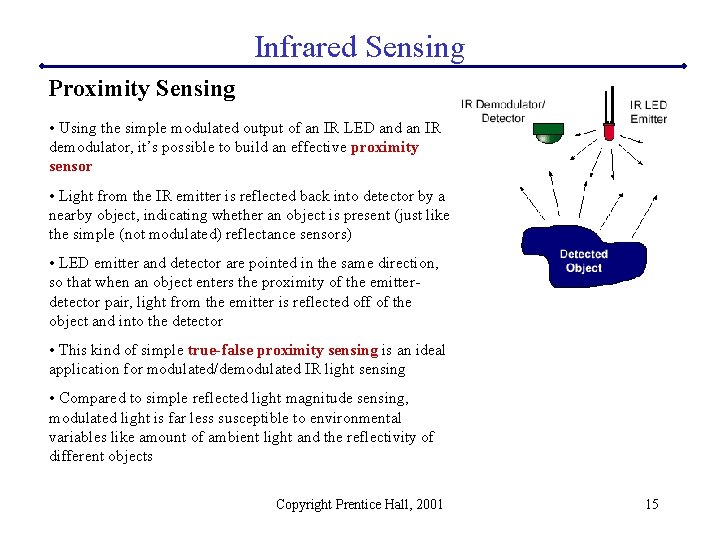
Infrared Sensing Proximity Sensing • Using the simple modulated output of an IR LED and an IR demodulator, it’s possible to build an effective proximity sensor • Light from the IR emitter is reflected back into detector by a nearby object, indicating whether an object is present (just like the simple (not modulated) reflectance sensors) • LED emitter and detector are pointed in the same direction, so that when an object enters the proximity of the emitterdetector pair, light from the emitter is reflected off of the object and into the detector • This kind of simple true-false proximity sensing is an ideal application for modulated/demodulated IR light sensing • Compared to simple reflected light magnitude sensing, modulated light is far less susceptible to environmental variables like amount of ambient light and the reflectivity of different objects Copyright Prentice Hall, 2001 15
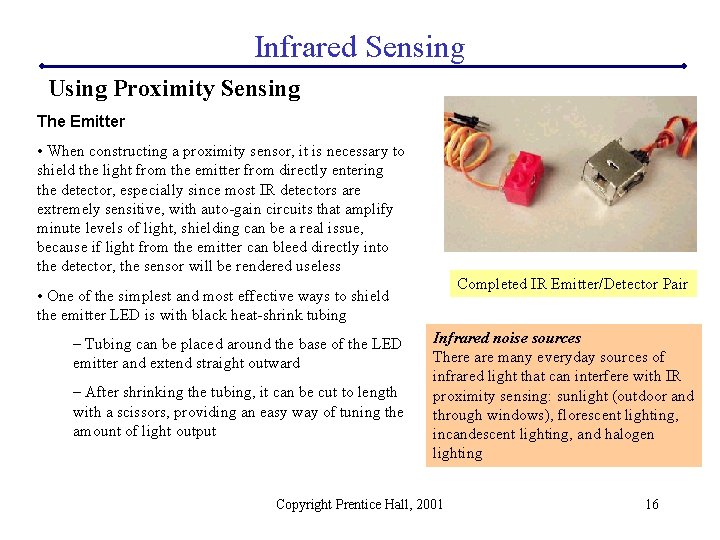
Infrared Sensing Using Proximity Sensing The Emitter • When constructing a proximity sensor, it is necessary to shield the light from the emitter from directly entering the detector, especially since most IR detectors are extremely sensitive, with auto-gain circuits that amplify minute levels of light, shielding can be a real issue, because if light from the emitter can bleed directly into the detector, the sensor will be rendered useless Completed IR Emitter/Detector Pair • One of the simplest and most effective ways to shield the emitter LED is with black heat-shrink tubing – Tubing can be placed around the base of the LED emitter and extend straight outward – After shrinking the tubing, it can be cut to length with a scissors, providing an easy way of tuning the amount of light output Infrared noise sources There are many everyday sources of infrared light that can interfere with IR proximity sensing: sunlight (outdoor and through windows), florescent lighting, incandescent lighting, and halogen lighting Copyright Prentice Hall, 2001 16
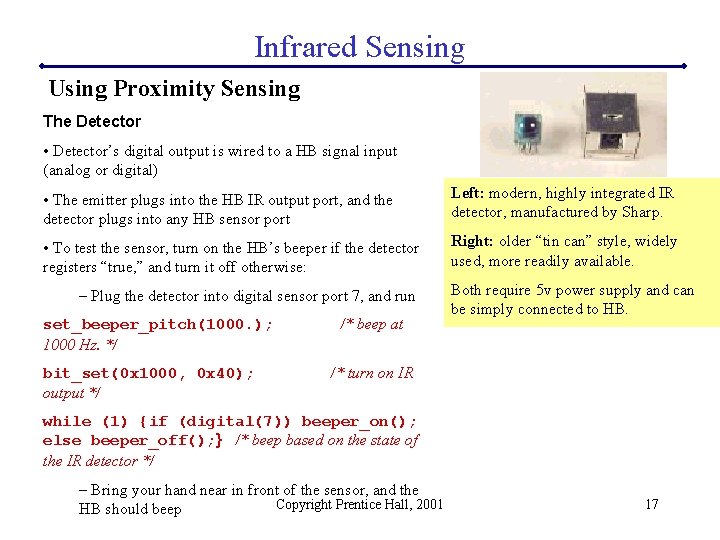
Infrared Sensing Using Proximity Sensing The Detector • Detector’s digital output is wired to a HB signal input (analog or digital) • The emitter plugs into the HB IR output port, and the detector plugs into any HB sensor port Left: modern, highly integrated IR detector, manufactured by Sharp. • To test the sensor, turn on the HB’s beeper if the detector registers “true, ” and turn it off otherwise: Right: older “tin can” style, widely used, more readily available. – Plug the detector into digital sensor port 7, and run set_beeper_pitch(1000. ); 1000 Hz. */ bit_set(0 x 1000, 0 x 40); output */ /* beep at Both require 5 v power supply and can be simply connected to HB. /* turn on IR while (1) {if (digital(7)) beeper_on(); else beeper_off(); } /* beep based on the state of the IR detector */ – Bring your hand near in front of the sensor, and the Copyright Prentice Hall, 2001 HB should beep 17
Infrared Communications • Communications is one of the most prevalent applications of infrared light; practically all television and consumer electronics come with an infrared remote control • This section: – learn how these infrared communications schemes work – how they can be put to use for robotic applications – study the signals from a Sony-brand remote control – reverse-engineer the Sony protocol – create programs for the Handy Board to receive and transmit Sony-format infrared signals Copyright Prentice Hall, 2001 18
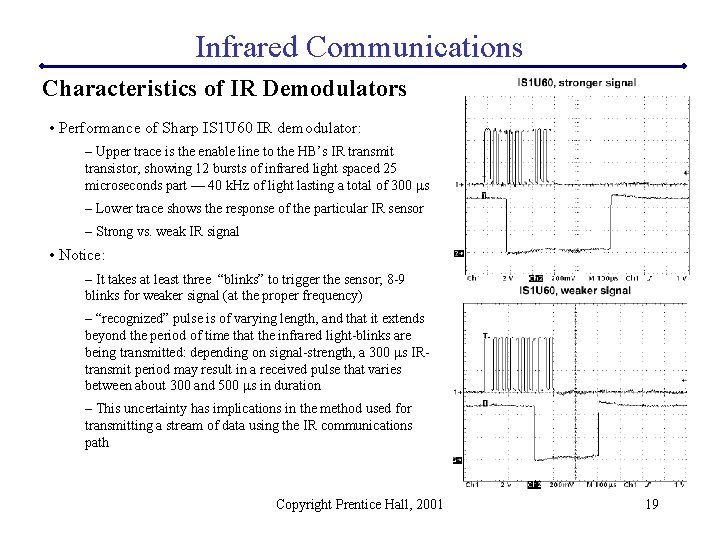
Infrared Communications Characteristics of IR Demodulators • Performance of Sharp IS 1 U 60 IR demodulator: – Upper trace is the enable line to the HB’s IR transmit transistor, showing 12 bursts of infrared light spaced 25 microseconds part — 40 k. Hz of light lasting a total of 300 ms – Lower trace shows the response of the particular IR sensor – Strong vs. weak IR signal • Notice: – It takes at least three “blinks” to trigger the sensor; 8 -9 blinks for weaker signal (at the proper frequency) – “recognized” pulse is of varying length, and that it extends beyond the period of time that the infrared light-blinks are being transmitted: depending on signal-strength, a 300 ms IRtransmit period may result in a received pulse that varies between about 300 and 500 ms in duration – This uncertainty has implications in the method used for transmitting a stream of data using the IR communications path Copyright Prentice Hall, 2001 19
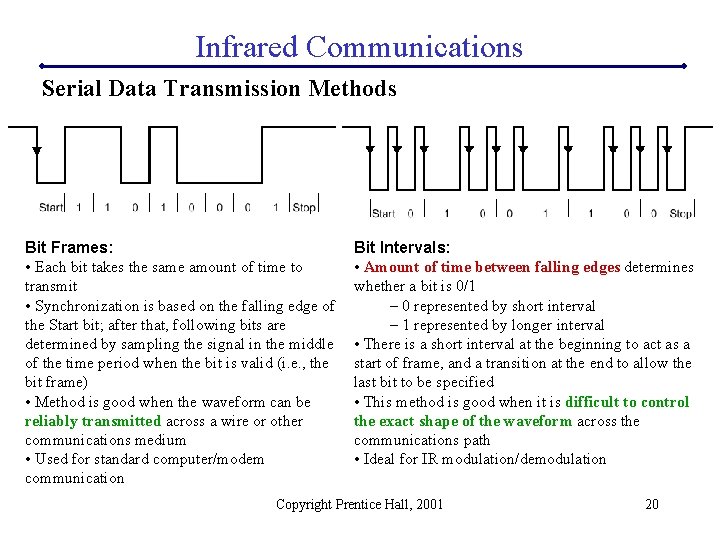
Infrared Communications Serial Data Transmission Methods Bit Frames: • Each bit takes the same amount of time to transmit • Synchronization is based on the falling edge of the Start bit; after that, following bits are determined by sampling the signal in the middle of the time period when the bit is valid (i. e. , the bit frame) • Method is good when the waveform can be reliably transmitted across a wire or other communications medium • Used for standard computer/modem communication Bit Intervals: • Amount of time between falling edges determines whether a bit is 0/1 – 0 represented by short interval – 1 represented by longer interval • There is a short interval at the beginning to act as a start of frame, and a transition at the end to allow the last bit to be specified • This method is good when it is difficult to control the exact shape of the waveform across the communications path • Ideal for IR modulation/demodulation Copyright Prentice Hall, 2001 20
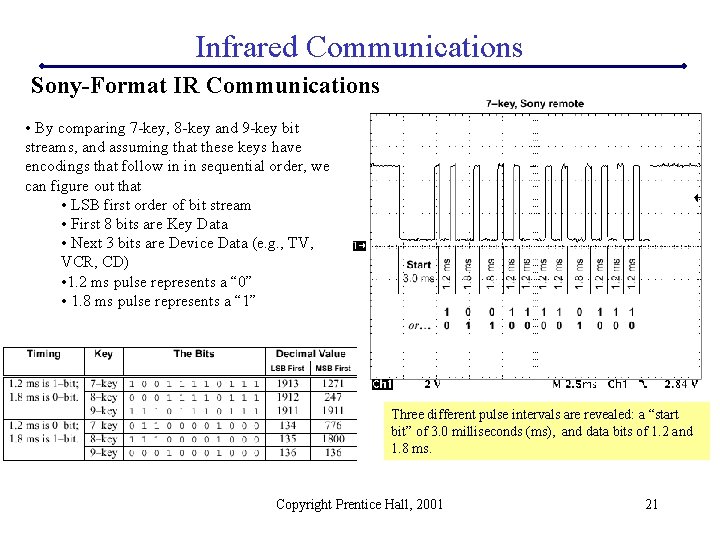
Infrared Communications Sony-Format IR Communications • By comparing 7 -key, 8 -key and 9 -key bit streams, and assuming that these keys have encodings that follow in in sequential order, we can figure out that • LSB first order of bit stream • First 8 bits are Key Data • Next 3 bits are Device Data (e. g. , TV, VCR, CD) • 1. 2 ms pulse represents a “ 0” • 1. 8 ms pulse represents a “ 1” Three different pulse intervals are revealed: a “start bit” of 3. 0 milliseconds (ms), and data bits of 1. 2 and 1. 8 ms. Copyright Prentice Hall, 2001 21
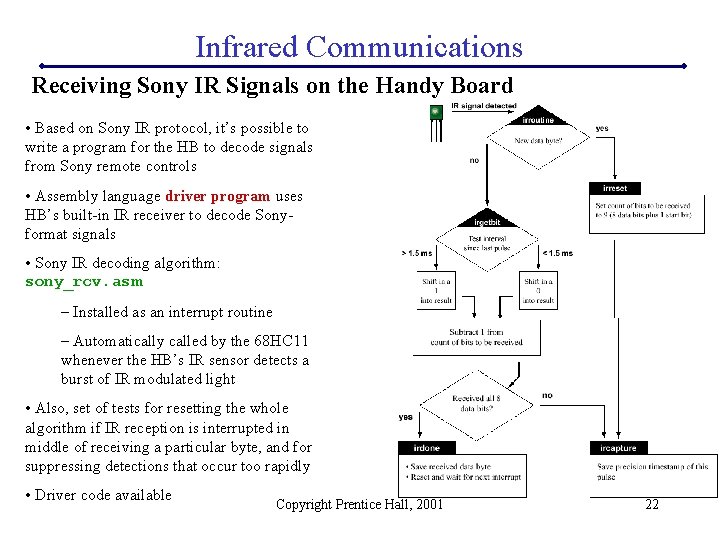
Infrared Communications Receiving Sony IR Signals on the Handy Board • Based on Sony IR protocol, it’s possible to write a program for the HB to decode signals from Sony remote controls • Assembly language driver program uses HB’s built-in IR receiver to decode Sonyformat signals • Sony IR decoding algorithm: sony_rcv. asm – Installed as an interrupt routine – Automatically called by the 68 HC 11 whenever the HB’s IR sensor detects a burst of IR modulated light • Also, set of tests for resetting the whole algorithm if IR reception is interrupted in middle of receiving a particular byte, and for suppressing detections that occur too rapidly • Driver code available Copyright Prentice Hall, 2001 22
Infrared Communications Timing and Interrupts • Extra hardware on 68 HC 11 chip for performing powerful timing functions in the background • 16–bit timing register, TCNT register, continually increments, keeping track of elapsed time at a rate of 2, 000 counts/s (8 MHz oscillator). Used to “timestamp” events on special timer input lines. • HB’s IR receiver is connected to timer input 1. By configuring the control registers associated with this timer input, 68 HC 11 will perform two functions automatically, and in the background: (1) Record value of TCNT register at exact moment of a transition on the timer input line (2) Schedule interrupt routine to be executed right after the transition on the input line has occurred • IR reception routine is set up to activate when a “falling edge” occurs; in other words, when the Sharp IR receiver latches on to an infrared burst. The 68 HC 11 takes the timestamp reading, and schedules the IR reception routine to execute soon after. • Timestamp function is critical because there can be variable delays between the event itself (i. e. , the IR reception) and the interrupt routine being called – e. g. , if 68 HC 11 is presently in middle of executing a different interrupt routine, the IR reception routine will have to wait until the other routine is done before the IR routine gains control. Because of the timestamping function, however, the IR routine can still know the precise point in time when the IR receiver triggered detection. Copyright Prentice Hall, 2001 23
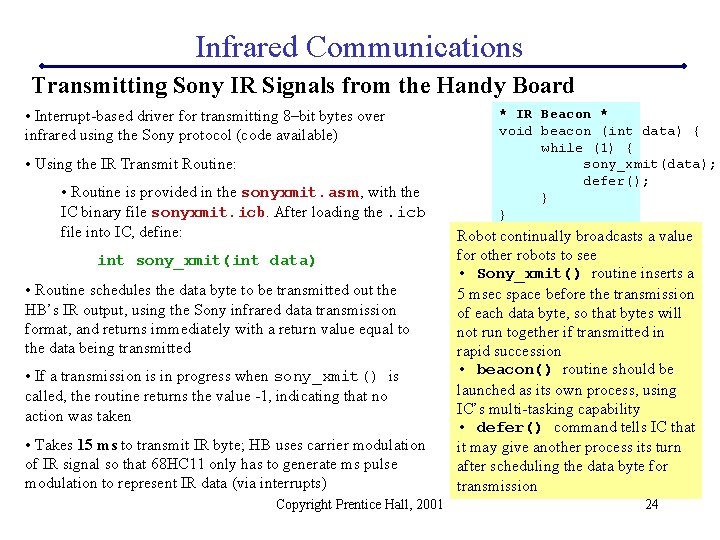
Infrared Communications Transmitting Sony IR Signals from the Handy Board • Interrupt-based driver for transmitting 8–bit bytes over infrared using the Sony protocol (code available) • Using the IR Transmit Routine: • Routine is provided in the sonyxmit. asm, with the IC binary file sonyxmit. icb. After loading the. icb file into IC, define: int sony_xmit(int data) • Routine schedules the data byte to be transmitted out the HB’s IR output, using the Sony infrared data transmission format, and returns immediately with a return value equal to the data being transmitted • If a transmission is in progress when sony_xmit() is called, the routine returns the value -1, indicating that no action was taken • Takes 15 ms to transmit IR byte; HB uses carrier modulation of IR signal so that 68 HC 11 only has to generate ms pulse modulation to represent IR data (via interrupts) Copyright Prentice Hall, 2001 * IR Beacon * void beacon (int data) { while (1) { sony_xmit(data); defer(); } } Robot continually broadcasts a value for other robots to see • Sony_xmit() routine inserts a 5 msec space before the transmission of each data byte, so that bytes will not run together if transmitted in rapid succession • beacon() routine should be launched as its own process, using IC’s multi-tasking capability • defer() command tells IC that it may give another process its turn after scheduling the data byte for transmission 24
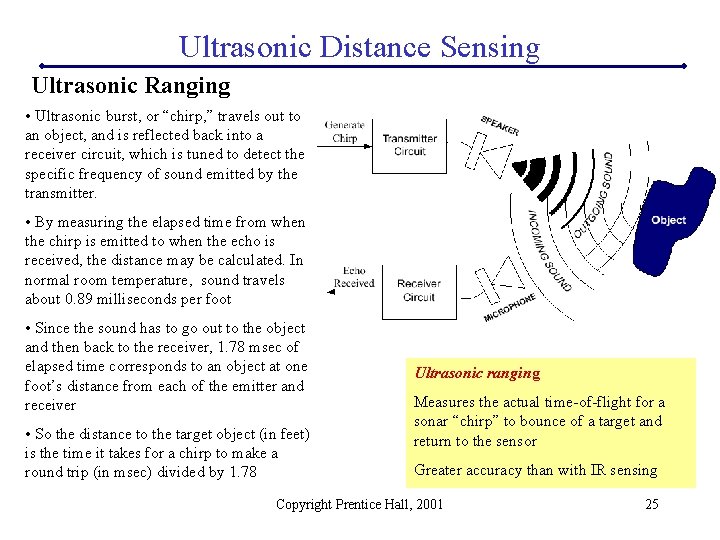
Ultrasonic Distance Sensing Ultrasonic Ranging • Ultrasonic burst, or “chirp, ” travels out to an object, and is reflected back into a receiver circuit, which is tuned to detect the specific frequency of sound emitted by the transmitter. • By measuring the elapsed time from when the chirp is emitted to when the echo is received, the distance may be calculated. In normal room temperature, sound travels about 0. 89 milliseconds per foot • Since the sound has to go out to the object and then back to the receiver, 1. 78 msec of elapsed time corresponds to an object at one foot’s distance from each of the emitter and receiver • So the distance to the target object (in feet) is the time it takes for a chirp to make a round trip (in msec) divided by 1. 78 Ultrasonic ranging Measures the actual time-of-flight for a sonar “chirp” to bounce of a target and return to the sensor Greater accuracy than with IR sensing Copyright Prentice Hall, 2001 25
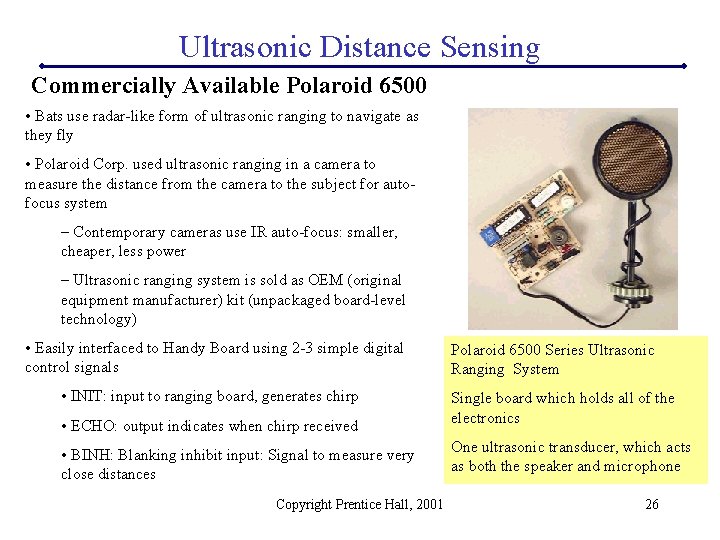
Ultrasonic Distance Sensing Commercially Available Polaroid 6500 • Bats use radar-like form of ultrasonic ranging to navigate as they fly • Polaroid Corp. used ultrasonic ranging in a camera to measure the distance from the camera to the subject for autofocus system – Contemporary cameras use IR auto-focus: smaller, cheaper, less power – Ultrasonic ranging system is sold as OEM (original equipment manufacturer) kit (unpackaged board-level technology) • Easily interfaced to Handy Board using 2 -3 simple digital control signals • INIT: input to ranging board, generates chirp • ECHO: output indicates when chirp received • BINH: Blanking inhibit input: Signal to measure very close distances Copyright Prentice Hall, 2001 Polaroid 6500 Series Ultrasonic Ranging System Single board which holds all of the electronics One ultrasonic transducer, which acts as both the speaker and microphone 26
Ultrasonic Distance Sensing Details About Operation Signal Gain. Problem: Echo from a far away object may be one-millionth strength of echo from a nearby object. Solution: 6500 board includes a variable gain amplifier that is automatically controlled through 12 gain steps, increasing the circuit’s gain as time elapses while waiting for a echo to return. Transducer Ringing. One transducer is used as transmitter/receiver (50 k. Hz). Problem: ringing problem: after transmitting outgoing chirp, transducer can have residual vibrations or ringing that may be interpreted as echo signal. Solution: By keeping initial circuit gain low, likelihood of false triggering is lessened. Additionally, however, the controller board applies a blanking signal to completely block any return signals for the first 2. 38 ms after ultrasonic chirp is emitted. This limits the default range to objects 1. 33 feet and greater. [close-up range: “blanking inhibit” input is used to disable this] Operating Frequency and Voltage. Polaroid ultrasonic system operates at 49. 4 k. Hz. Each sonar “chirp” consists of sixteen cycles of sound at this frequency. Polaroid board generates a chirp signal of 400 volts on the transducer. Problem: High voltage is necessary to produce an adequate volume of chirp, so that the weak reflected signals are of enough strength to be detected. Polaroid ultrasonic transducer can deliver an electrical shock. Solution: do not touch! Electrical Noise. Problem: High amplification causes sensitivity to electrical noise in the power circuit, especially the type that is caused by DC motors. Solution: all high current electronic and electro -mechanical activity be suspended while sonar readings are in progress, or provide the sonar module with its own power supply, isolated from the power supply of the robot’s motors. Copyright Prentice Hall, 2001 27
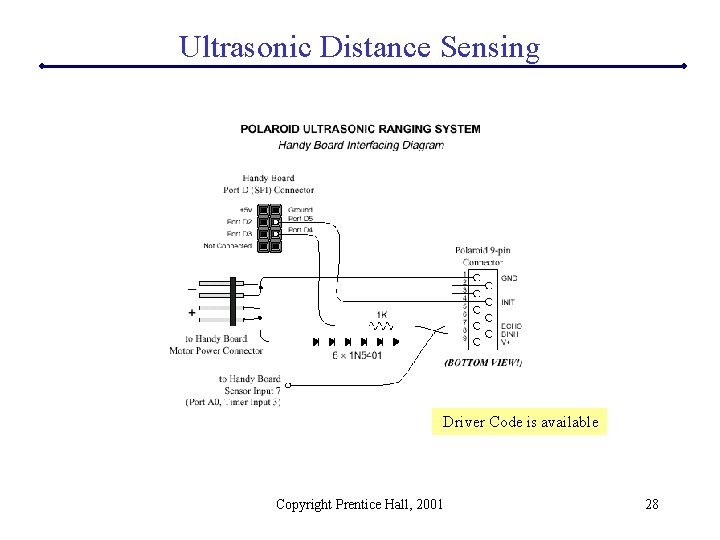
Ultrasonic Distance Sensing Driver Code is available Copyright Prentice Hall, 2001 28
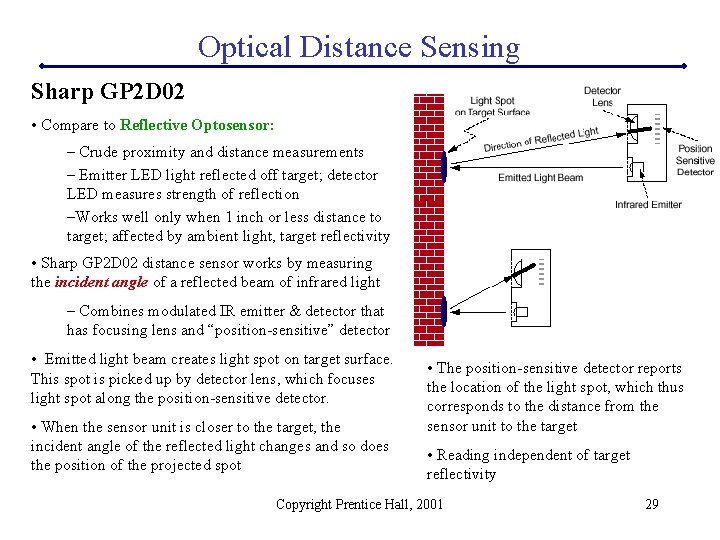
Optical Distance Sensing Sharp GP 2 D 02 • Compare to Reflective Optosensor: – Crude proximity and distance measurements – Emitter LED light reflected off target; detector LED measures strength of reflection –Works well only when 1 inch or less distance to target; affected by ambient light, target reflectivity • Sharp GP 2 D 02 distance sensor works by measuring the incident angle of a reflected beam of infrared light – Combines modulated IR emitter & detector that has focusing lens and “position-sensitive” detector • Emitted light beam creates light spot on target surface. This spot is picked up by detector lens, which focuses light spot along the position-sensitive detector. • When the sensor unit is closer to the target, the incident angle of the reflected light changes and so does the position of the projected spot • The position-sensitive detector reports the location of the light spot, which thus corresponds to the distance from the sensor unit to the target • Reading independent of target reflectivity Copyright Prentice Hall, 2001 29
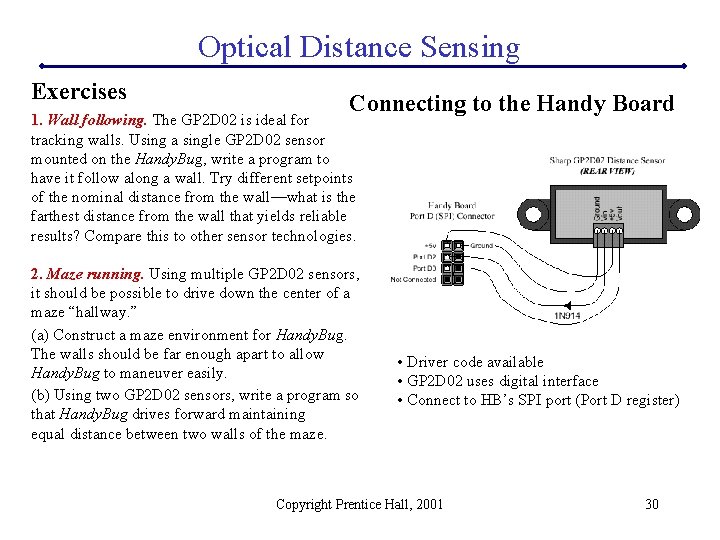
Optical Distance Sensing Exercises Connecting to the Handy Board 1. Wall following. The GP 2 D 02 is ideal for tracking walls. Using a single GP 2 D 02 sensor mounted on the Handy. Bug, write a program to have it follow along a wall. Try different setpoints of the nominal distance from the wall—what is the farthest distance from the wall that yields reliable results? Compare this to other sensor technologies. 2. Maze running. Using multiple GP 2 D 02 sensors, it should be possible to drive down the center of a maze “hallway. ” (a) Construct a maze environment for Handy. Bug. The walls should be far enough apart to allow Handy. Bug to maneuver easily. (b) Using two GP 2 D 02 sensors, write a program so that Handy. Bug drives forward maintaining equal distance between two walls of the maze. • Driver code available • GP 2 D 02 uses digital interface • Connect to HB’s SPI port (Port D register) Copyright Prentice Hall, 2001 30
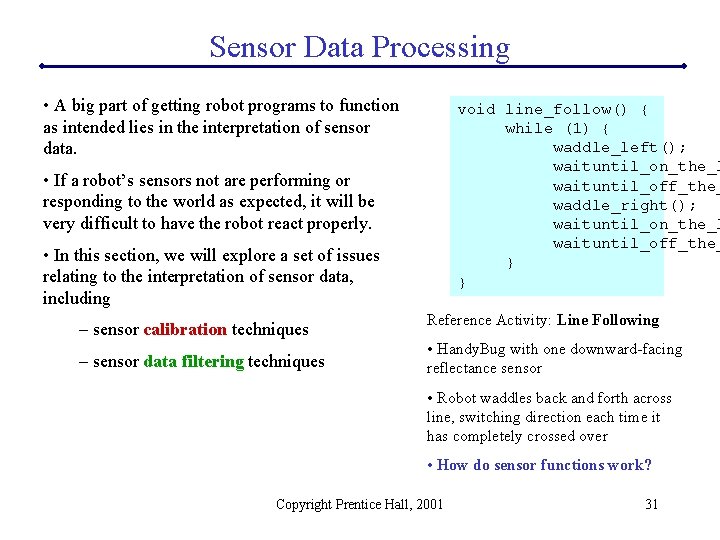
Sensor Data Processing • A big part of getting robot programs to function as intended lies in the interpretation of sensor data. void line_follow() { while (1) { waddle_left(); waituntil_on_the_l waituntil_off_the_ waddle_right(); waituntil_on_the_l waituntil_off_the_ } } • If a robot’s sensors not are performing or responding to the world as expected, it will be very difficult to have the robot react properly. • In this section, we will explore a set of issues relating to the interpretation of sensor data, including – sensor calibration techniques – sensor data filtering techniques Reference Activity: Line Following • Handy. Bug with one downward-facing reflectance sensor • Robot waddles back and forth across line, switching direction each time it has completely crossed over • How do sensor functions work? Copyright Prentice Hall, 2001 31
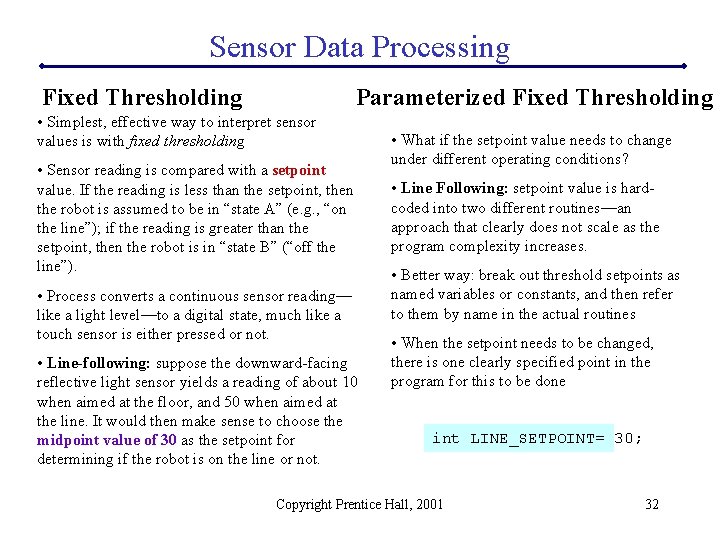
Sensor Data Processing Fixed Thresholding Parameterized Fixed Thresholding • Simplest, effective way to interpret sensor values is with fixed thresholding • Sensor reading is compared with a setpoint value. If the reading is less than the setpoint, then the robot is assumed to be in “state A” (e. g. , “on the line”); if the reading is greater than the setpoint, then the robot is in “state B” (“off the line”). • Process converts a continuous sensor reading— like a light level—to a digital state, much like a touch sensor is either pressed or not. • Line-following: suppose the downward-facing reflective light sensor yields a reading of about 10 when aimed at the floor, and 50 when aimed at the line. It would then make sense to choose the midpoint value of 30 as the setpoint for determining if the robot is on the line or not. • What if the setpoint value needs to change under different operating conditions? • Line Following: setpoint value is hardcoded into two different routines—an approach that clearly does not scale as the program complexity increases. • Better way: break out threshold setpoints as named variables or constants, and then refer to them by name in the actual routines • When the setpoint needs to be changed, there is one clearly specified point in the program for this to be done int LINE_SETPOINT= 30; Copyright Prentice Hall, 2001 32
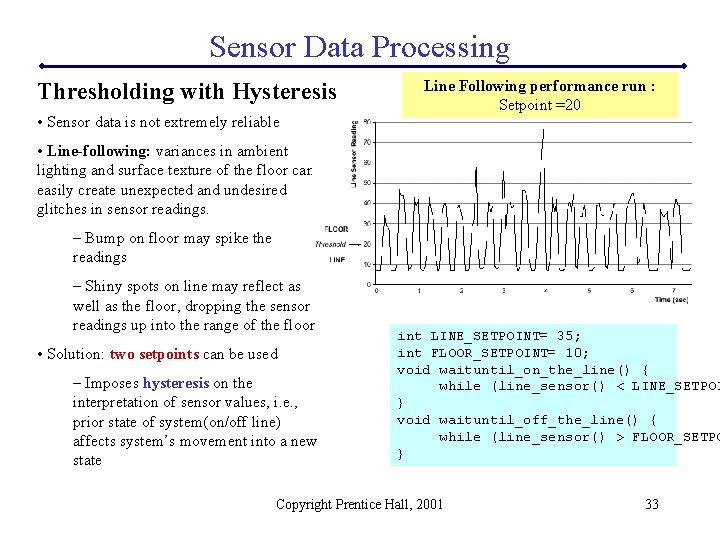
Sensor Data Processing Thresholding with Hysteresis • Sensor data is not extremely reliable Line Following performance run : Setpoint =20 • Line-following: variances in ambient lighting and surface texture of the floor can easily create unexpected and undesired glitches in sensor readings. – Bump on floor may spike the readings – Shiny spots on line may reflect as well as the floor, dropping the sensor readings up into the range of the floor • Solution: two setpoints can be used – Imposes hysteresis on the interpretation of sensor values, i. e. , prior state of system(on/off line) affects system’s movement into a new state int LINE_SETPOINT= 35; int FLOOR_SETPOINT= 10; void waituntil_on_the_line() { while (line_sensor() < LINE_SETPOI } void waituntil_off_the_line() { while (line_sensor() > FLOOR_SETPO } Copyright Prentice Hall, 2001 33
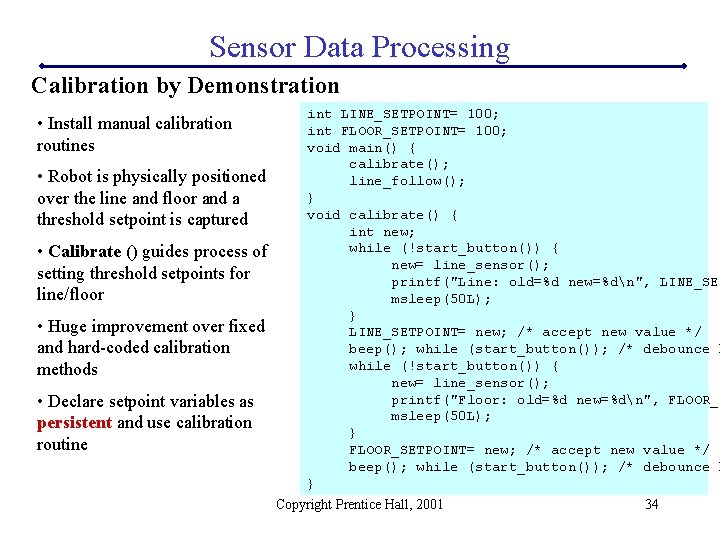
Sensor Data Processing Calibration by Demonstration • Install manual calibration routines • Robot is physically positioned over the line and floor and a threshold setpoint is captured • Calibrate () guides process of setting threshold setpoints for line/floor • Huge improvement over fixed and hard-coded calibration methods • Declare setpoint variables as persistent and use calibration routine int LINE_SETPOINT= 100; int FLOOR_SETPOINT= 100; void main() { calibrate(); line_follow(); } void calibrate() { int new; while (!start_button()) { new= line_sensor(); printf("Line: old=%d new=%dn", LINE_SET msleep(50 L); } LINE_SETPOINT= new; /* accept new value */ beep(); while (start_button()); /* debounce b while (!start_button()) { new= line_sensor(); printf("Floor: old=%d new=%dn", FLOOR_S msleep(50 L); } FLOOR_SETPOINT= new; /* accept new value */ beep(); while (start_button()); /* debounce b } Copyright Prentice Hall, 2001 34
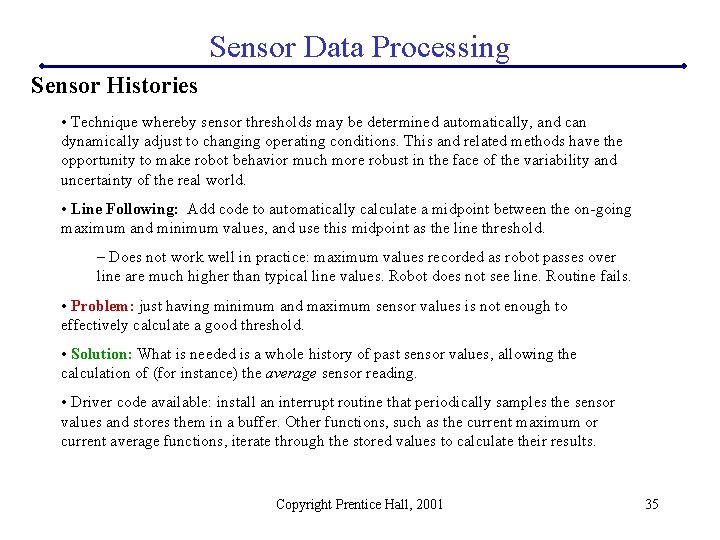
Sensor Data Processing Sensor Histories • Technique whereby sensor thresholds may be determined automatically, and can dynamically adjust to changing operating conditions. This and related methods have the opportunity to make robot behavior much more robust in the face of the variability and uncertainty of the real world. • Line Following: Add code to automatically calculate a midpoint between the on-going maximum and minimum values, and use this midpoint as the line threshold. – Does not work well in practice: maximum values recorded as robot passes over line are much higher than typical line values. Robot does not see line. Routine fails. • Problem: just having minimum and maximum sensor values is not enough to effectively calculate a good threshold. • Solution: What is needed is a whole history of past sensor values, allowing the calculation of (for instance) the average sensor reading. • Driver code available: install an interrupt routine that periodically samples the sensor values and stores them in a buffer. Other functions, such as the current maximum or current average functions, iterate through the stored values to calculate their results. Copyright Prentice Hall, 2001 35
- Slides: 35