
Advanced Language Concepts in C Extra Session Last
- Slides: 45
Advanced Language Concepts in C# Extra Session Last Update: 3/09 David Figge dfigge@u. washington. edu Page 1 Copyright (C) 2009 by David Figge. All Rights Reserved.
WPF, Delegates and Events, and Design Patterns Advanced Language Concepts in C# Last Update: 3/09 Page 2 Copyright (C) 2009 by David Figge. All Rights Reserved.
Introduction q q When Windows Vista was introduced, it included a new graphical subsystem, code named Avalon It’s purpose was to q Provide a new state-ofthe-art graphics API q q q Supported through the Direct. X module, which provides low-level graphics APIs for games, etc Designed to use hardware acceleration at a low level (when present) Windows 7 inherited this subsystem, too. Last Update: 2/11 Page 3 Copyright (C) 2011 by David Figge. All Rights Reserved.
What Is Windows Presentation Foundation? q q Windows Presentation Foundation (WPF) is the. Net component designed to leverage these new graphical capabilities. WPF is a graphical subsystem within. Net q q Introduced in. Net 3. 0 WPF was designed to provide a single interface to support the flexibility and needs of today’s modern applications. q It works on Vista/Win 7 and XP q q Last Update: 2/11 Vista/Win 7 has it automatically XP requires an update to have. Net 3. 0 (minimum) Page 4 Copyright (C) 2011 by David Figge. All Rights Reserved.
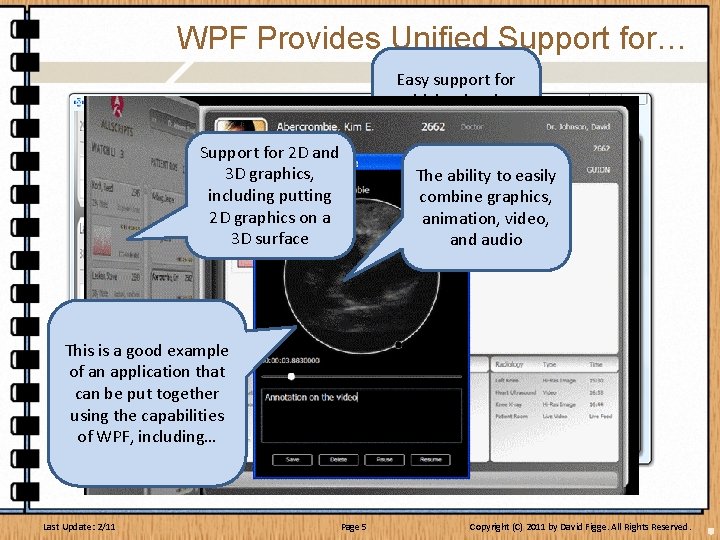
WPF Provides Unified Support for… Standard Windows Support for 2 D and elements (dialog 3 D graphics, boxes, putting controls) including 2 D graphics on a 3 D surface This is a good example of an application that can be put together using the capabilities of WPF, including… Last Update: 2/11 Easy support for higher level graphics (gradient fills, etc) The ability to easily combine graphics, animation, video, and audio The ability to defining complex data representation at the presentation level Page 5 Copyright (C) 2011 by David Figge. All Rights Reserved.
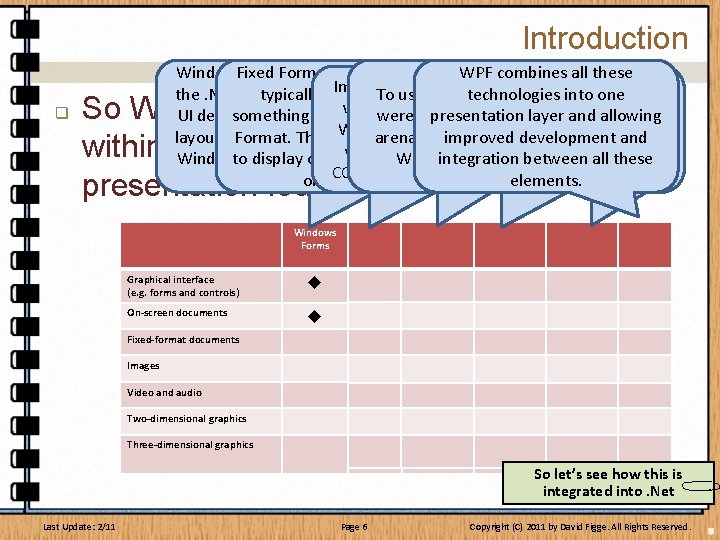
Introduction q Windows. Fixed Forms Format (Win. Forms) Documents is were. WPF combines all these Images and graphics the. Net 1. xtypically and 2. x solution displayed To to using use 2 D Video technologies and into oneto get And. Audio, if youyou wanted were displayed UI design. something It basically likeprovided Adobe’s PDF delving presentation Fileusing into layer Media and allowing fancythe 3 D graphics, you had Win. Forms, sometimes layout capabilities Format. This forallows standard arena, documents which improved is supported by. Direct. X and todevelopment use the with assistance Windows to controls display on and screen Active. X as. Windows they integration willfrom Media Player between all these technology COM object technology. controls. on a printer. elements. So WPF takes several, disjointed APIs within the OS and put them under one presentation foundation Windows Forms PDF Windows Forms/ GDI+ Windows Media Player Direct 3 D (Direct. X) WPF Graphical interface (e. g. forms and controls) On-screen documents Fixed-format documents Images Video and audio Two-dimensional graphics Three-dimensional graphics So let’s see how this is Questions so far? integrated into. Net Last Update: 2/11 Page 6 Copyright (C) 2011 by David Figge. All Rights Reserved.
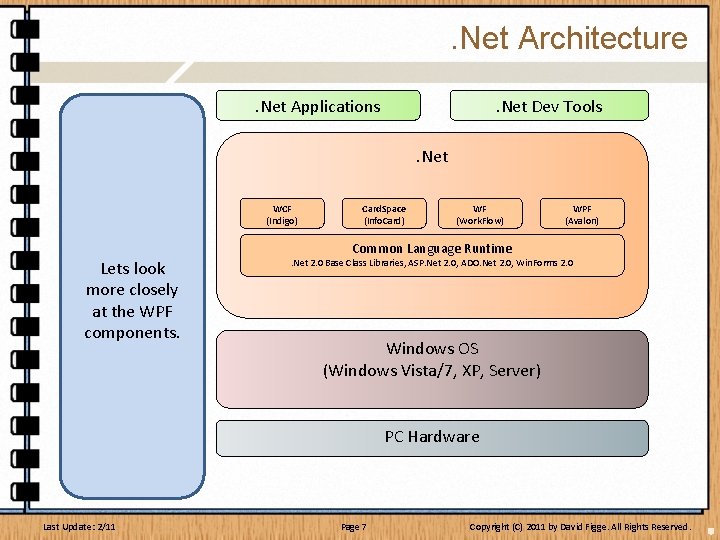
. Net Architecture. Net Applications At the very One For of. Sits the WPF base, of course, key developers, elements beside. Net these 3. 0 Card. Space we have the within the. Net the. PC technologies introduced Windows provides. Net sits on Hardware. The. Net Development structure providing the Windows Work. Flow identity top of the The OSOS, significant Tools is the are a UIFoundation support for Communiverification and consists provides the factor here is key Common element. Net cations supports technologies of. Language ain. Net series of ultimate that – this for Lets lookthe applications Foundation, taking to. Net, tying run-time interface applications first time –and the Runtime structure, (CLR) more closely and information providing together compile-time run between on top the of Windows providing justat the WPF integrating support through a everything application elements. . Net. for presentation support in-time for components. these into series server of level steps from Web programs We’ll come and layer will make creation compiling, and. Net, the and (the peer-to. Logins back the hardware towork this in use oftoof debugging security, Operating peer flow) network to its ahardware minute… Active memory. Net System, and completion. communi. Directory. accelereration applications management, in ultimately the cations. provided and many a hostby of hardware. graphics cards other languages. services. Last Update: 2/11 . Net Dev Tools. Net WCF (Indigo) Card. Space (Info. Card) WF (Work. Flow) WPF (Avalon) Common Language Runtime . Net 2. 0 Base Class Libraries, ASP. Net 2. 0, ADO. Net 2. 0, Win. Forms 2. 0 Windows OS (Windows Vista/7, XP, Server) PC Hardware Page 7 Copyright (C) 2011 by David Figge. All Rights Reserved.
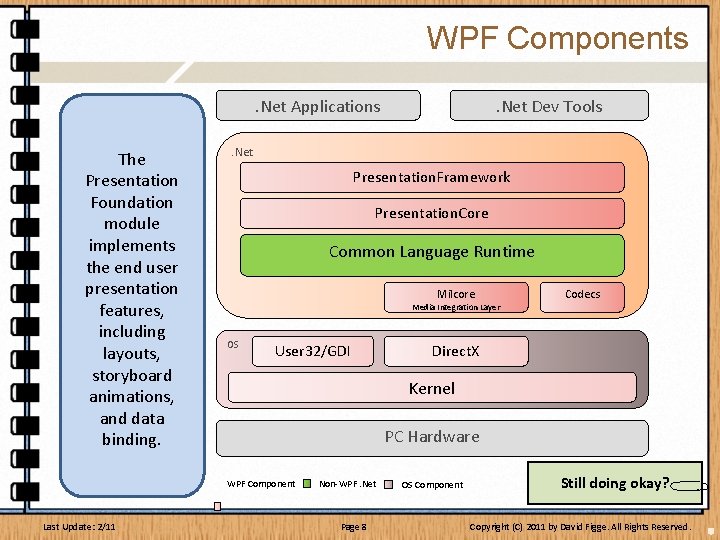
WPF Components. Net Applications Milcore is the As. From the need the one. The major for more beginning of component of Presentation All The WPF direct graphic Windows, the WPF that is Foundation output Presentation to the programming presentation of written in module system Core layer occurs Video and about acame window and unmanaged provides implements through the audio Codecs (mostly its components code. Thisfrom was the end user Direct. X. managed The are used by game resided infor the needed code presentation Media interface Milcore, and developers), OS, through performance into Integration features, aremilcore, also Direct. X was functions in the reasons, including Layer, and written developed as User 32 andin. GDI especially Milcore, layouts, is the unmanaged aimplements fast, direct around timing modules, component storyboard the code. of animations link tocore working in that animations, services ties WPF for audio, video, level graphics conjunction into and WPF. Direct. X data and production capabilities of with the core binding. of 2 Dkernel. and 3 D the OS and OS thegraphics. hardware. Last Update: 2/11 . Net Dev Tools . Net Presentation. Framework Presentation. Core Common Language Runtime Milcore Media Integration Layer OS User 32/GDI Codecs Direct. X Kernel PC Hardware WPF Component Non-WPF. Net Page 8 OS Component Still doing okay? Copyright (C) 2011 by David Figge. All Rights Reserved.
Under the Covers q Let’s take a quick look “under the covers” at WPF q q This will help us understand coding aspects as well UI Elements are maintained as a group of Visual objects q q Visual objects are maintained in a Composition Tree, managed by the MIL Each element of WPF creates and adds one or more Composition Nodes to the tree q q These nodes contain rendering instructions So the entire application’s visuals are represented as a collection of Composition Nodes. Last Update: 2/11 Page 9 Copyright (C) 2011 by David Figge. All Rights Reserved.
UI Rendering q So the MIL maintains the visual tree for each application q q Remember these don’t contain visuals, they contain instructions used to render the visuals This allows the MIL to retain the visual tree for each application, so it becomes responsible for updating the graphics rather than continually calling into the application via a ‘Paint’ method q q Last Update: 2/11 This also allows the application to update the visuals incrementally, as individual pieces change, rather than all at once like traditional Windows apps Animations become simple incremental changes applied based on a timer interval. Page 10 Copyright (C) 2011 by David Figge. All Rights Reserved.
UI Rendering q So the MIL maintains the visual tree for each application q q q The MIL has a dedicated thread that periodically updates the visuals as changes occur The MIL uses a “painters algorithm” that renders elements from back to front, allowing you to skip areas that are covered and handle complex aspects like transparency easily. The rendering of the UI is also assisted via the Graphics Processing Unit on the video adapter (if present) Last Update: 2/11 Page 11 Copyright (C) 2011 by David Figge. All Rights Reserved.
Managing the UI: Properties q q WPF employs a data-driven system for displaying user content After the initial rendering, visual objects are updated via Properties q q These properties may represent data changes (like a new record to display), or any other visual aspect (like Is. Visible) These properties can be set manually via code, or bound to an element and updated automatically Last Update: 2/11 Page 12 Copyright (C) 2011 by David Figge. All Rights Reserved.
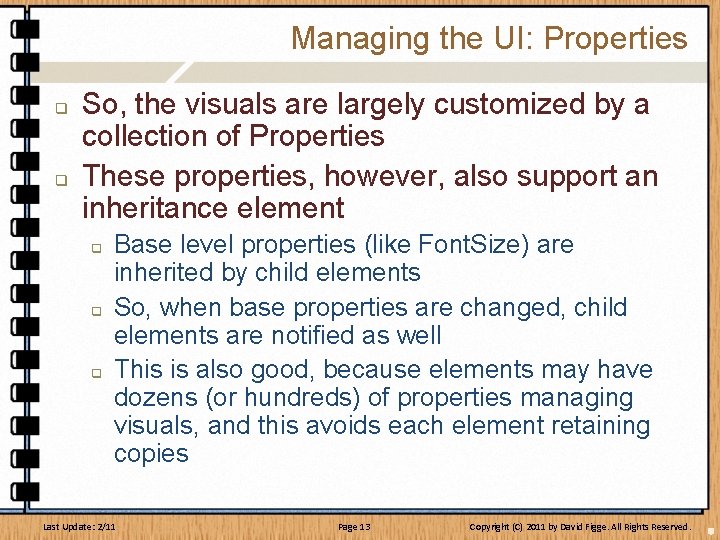
Managing the UI: Properties q q So, the visuals are largely customized by a collection of Properties These properties, however, also support an inheritance element q q q Base level properties (like Font. Size) are inherited by child elements So, when base properties are changed, child elements are notified as well This is also good, because elements may have dozens (or hundreds) of properties managing visuals, and this avoids each element retaining copies Last Update: 2/11 Page 13 Copyright (C) 2011 by David Figge. All Rights Reserved.
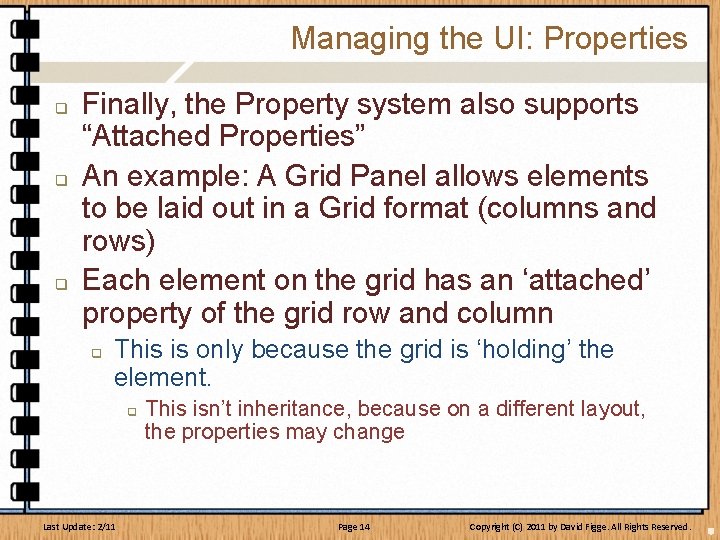
Managing the UI: Properties q q q Finally, the Property system also supports “Attached Properties” An example: A Grid Panel allows elements to be laid out in a Grid format (columns and rows) Each element on the grid has an ‘attached’ property of the grid row and column q This is only because the grid is ‘holding’ the element. q Last Update: 2/11 This isn’t inheritance, because on a different layout, the properties may change Page 14 Copyright (C) 2011 by David Figge. All Rights Reserved.
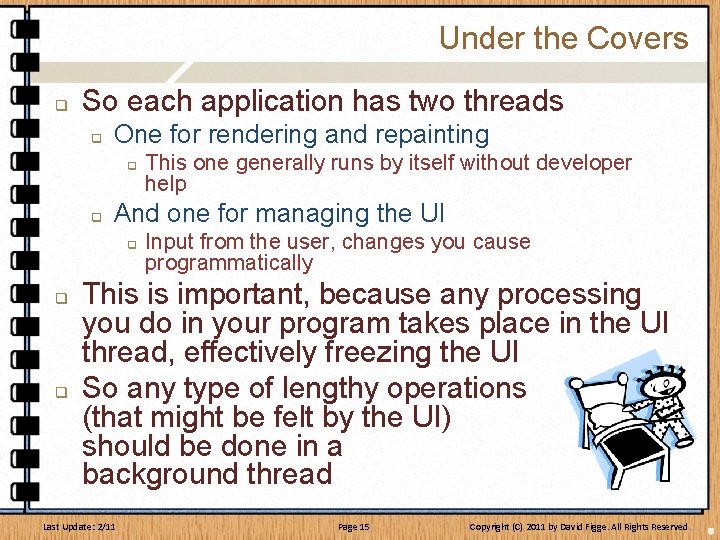
Under the Covers q So each application has two threads q One for rendering and repainting q q And one for managing the UI q q q This one generally runs by itself without developer help Input from the user, changes you cause programmatically This is important, because any processing you do in your program takes place in the UI thread, effectively freezing the UI So any type of lengthy operations (that might be felt by the UI) should be done in a background thread Last Update: 2/11 Page 15 Copyright (C) 2011 by David Figge. All Rights Reserved.
But Wait, There’s More! q Some additional aspects worth discussing (and we will over the next several slides): q q q q Graphical Services Interoperability Media Services Animations Data Binding Annotations Imaging Documents Last Update: 2/11 Page 16 Copyright (C) 2011 by David Figge. All Rights Reserved.
Graphical Services q All graphics (including windows) are through Direct 3 D, providing q q A unified way to displaying from simple (Win 32 level) graphics to complex 3 D graphics The ability to offload graphics tasks to the Graphics card GPU q q This can reduce the workload on the computer's CPU. Use of vector-based graphics, which allow lossless scaling. Supports 3 D model rendering and interaction in 2 D applications. Allows interactive 2 D content to be overlaid on 3 D surfaces natively (cool stuff!). Last Update: 2/11 Page 17 Copyright (C) 2011 by David Figge. All Rights Reserved.
Interoperability q WPF provides interoperability with the Windows API q q q Via hosting, one can use Windows Presentation Foundation inside existing Win 32 code Or one can use existing Win 32 code inside Windows Presentation Foundation. Interoperability with Windows Forms is also possible through the use of the Element. Host and Windows. Forms. Host classes. Last Update: 2/11 Page 18 Copyright (C) 2011 by David Figge. All Rights Reserved.
Media Services q WPF provides shape primitives for 2 D graphics q q Also provides a built-in set of brushes, pens, geometries, and transforms. It also supports 3 D UI, 3 D documents, and 3 D media. Supports most common image formats. Supports video formats WMV, MPEG and some AVI files by default q Because Windows Media Player is running underneath, WPF can use all the codecs installed for it. Last Update: 2/11 Page 19 Copyright (C) 2011 by David Figge. All Rights Reserved.
Animations q Time-based animation. Scene redraws are time triggered. q q q Presentation timers are initialized and managed by WPF. Scene changes coordinated via storyboards. q q q Isn’t affected by CPU speed and load This makes them easy to code Animations can be triggered by other external events, including user action. Ships with a set of predefined effects, such as fade out for all controls. Last Update: 2/11 Page 20 Copyright (C) 2011 by David Figge. All Rights Reserved.
Data binding q WPF supports three types of data binding: q q q LINQ queries can act as data sources for data binding. Binding of data has no bearing on its presentation. q q One time: where the element ignores updates One way: where the element has read-only access to data. Two way: where the element can read from and write data WPF provides data templates to control presentation of data. Base controls provided by WPF: buttons, menus, grids, list boxes, etc. Last Update: 2/11 Page 21 Copyright (C) 2011 by David Figge. All Rights Reserved.
Annotations q Annotations can be applied on a perobject basis via WPFs Document or Flow. Document element. q q WPF only provides the capability for creating, storing and managing annotations Each application must expose the UI on their own. Last Update: 2/11 Page 22 Copyright (C) 2011 by David Figge. All Rights Reserved.
Imaging q WPF uses the native Windows Imaging Component (WIC) code and APIs q This means developers can write image codecs for their specific image file formats. Last Update: 2/11 Page 23 Copyright (C) 2011 by David Figge. All Rights Reserved.
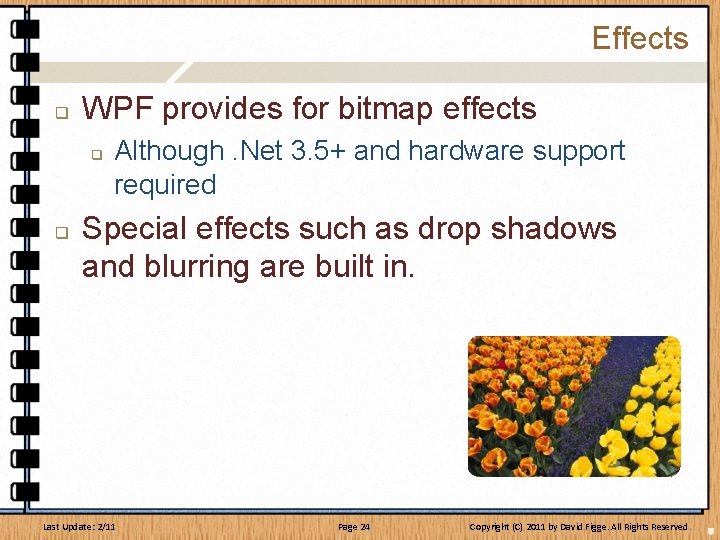
Effects q WPF provides for bitmap effects q q Although. Net 3. 5+ and hardware support required Special effects such as drop shadows and blurring are built in. Last Update: 2/11 Page 24 Copyright (C) 2011 by David Figge. All Rights Reserved.
Documents q WPF natively supports paginated documents. q q It provides the Document. Reader class, which is for reading fixed layout documents. The Flow. Document. Reader class offers different view modes such as per-page or scrollable q Last Update: 2/11 It also reflows text if the viewing area is re sized. Page 25 Copyright (C) 2011 by David Figge. All Rights Reserved.
UI Separation q q So, clearly, WPF is bringing a lot of power to the UI and code development ‘table’. Another direction that WPF used was to separate the design of the UI from the code to support that UI q This is a method that was introduced with ASP q q q UI Design elements are stored in one file Code to support the UI is stored in a “Code Behind” page with the same name Visual Studio handles all the naming and management details Last Update: 2/11 Page 26 Copyright (C) 2011 by David Figge. All Rights Reserved.
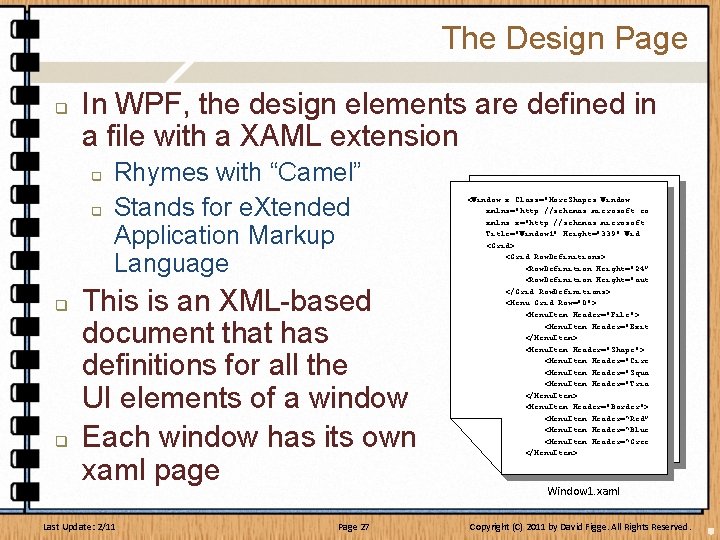
The Design Page q In WPF, the design elements are defined in a file with a XAML extension q q Rhymes with “Camel” Stands for e. Xtended Application Markup Language This is an XML-based document that has definitions for all the UI elements of a window Each window has its own xaml page Last Update: 2/11 Page 27 <Window x: Class="More. Shapes. Window xmlns="http: //schemas. microsoft. co xmlns: x="http: //schemas. microsoft. Title="Window 1" Height="339" Wid <Grid> <Grid. Row. Definitions> <Row. Definition Height="24” <Row. Definition Height="aut </Grid. Row. Definitions> <Menu Grid. Row="0"> <Menu. Item Header="File"> <Menu. Item Header="Exit </Menu. Item> <Menu. Item Header="Shape"> <Menu. Item Header="Circ <Menu. Item Header="Squa <Menu. Item Header="Tria </Menu. Item> <Menu. Item Header="Border"> <Menu. Item Header=“Red” <Menu. Item Header=“Blue <Menu. Item Header=“Gree </Menu. Item> Window 1. xaml Copyright (C) 2011 by David Figge. All Rights Reserved.
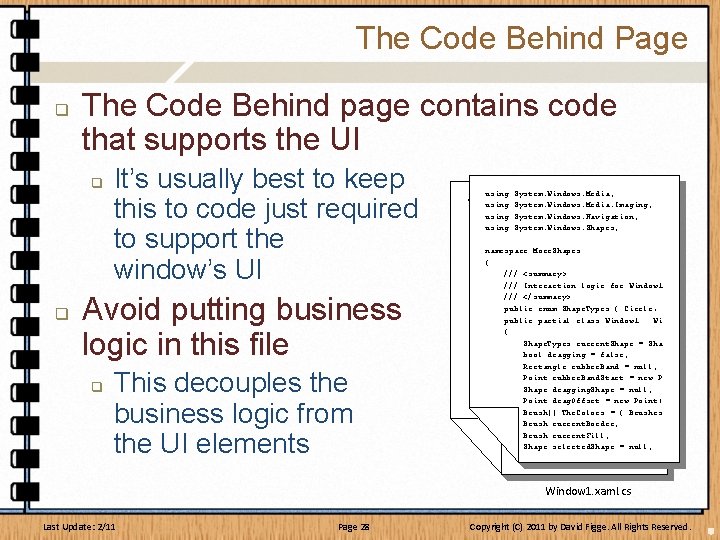
The Code Behind Page q The Code Behind page contains code that supports the UI q q It’s usually best to keep this to code just required to support the window’s UI Avoid putting business logic in this file q This decouples the business logic from the UI elements using System. Windows. Media; <Window x: Class="More. Shapes. Window using System. Windows. Media. Imaging; xmlns="http: //schemas. microsoft. co using System. Windows. Navigation; xmlns: x="http: //schemas. microsoft. using System. Windows. Shapes; Title="Window 1" Height="339" Wid <Grid> namespace More. Shapes <Grid. Row. Definitions> { <Row. Definition Height="24” /// <summary> <Row. Definition Height="aut /// Interaction logic for Window 1 </Grid. Row. Definitions> /// </summary> <Menu Grid. Row="0"> public enum Shape. Types { Circle, <Menu. Item Header="File"> public partial class Window 1 : Wi <Menu. Item Header="Exit { </Menu. Item> Shape. Types current. Shape = Sha <Menu. Item Header="Shape"> bool dragging = false; <Menu. Item Header="Circ Rectangle rubber. Band = null; <Menu. Item Header="Squa Point rubber. Band. Start = new P <Menu. Item Header="Tria Shape dragging. Shape = null; </Menu. Item> Point drag. Offset = new Point( <Menu. Item Header="Border"> Brush[] The. Colors = { Brushes <Menu. Item Header=“Red” Brush current. Border; <Menu. Item Header=“Blue Brush current. Fill; <Menu. Item Header=“Gree Shape selected. Shape = null; </Menu. Item> Window 1. xaml. cs Last Update: 2/11 Page 28 Copyright (C) 2011 by David Figge. All Rights Reserved.
Why This Separation? q The purpose behind this separation is to allow the UI design and the support code to be done as separate processes q q q UI design is a specific skill from programming And, typically, programmers are not good UI designers So this separation really allows UI designers and programmers to have the ability to work together, but not work in the same files Last Update: 2/11 Page 29 Copyright (C) 2011 by David Figge. All Rights Reserved.
Let’s Give it a Try! q q At its simplest level, WPF can be very easy to work with Visual Studio provides an easy form design mode that allows for simple dragand-drop functionality q q You don’t need to work with the Xaml code until you want something more advanced In this example, we’ll have a label, a text box, a button, and a message box q We’ll do this together as a class… Last Update: 2/11 Page 30 Copyright (C) 2011 by David Figge. All Rights Reserved.
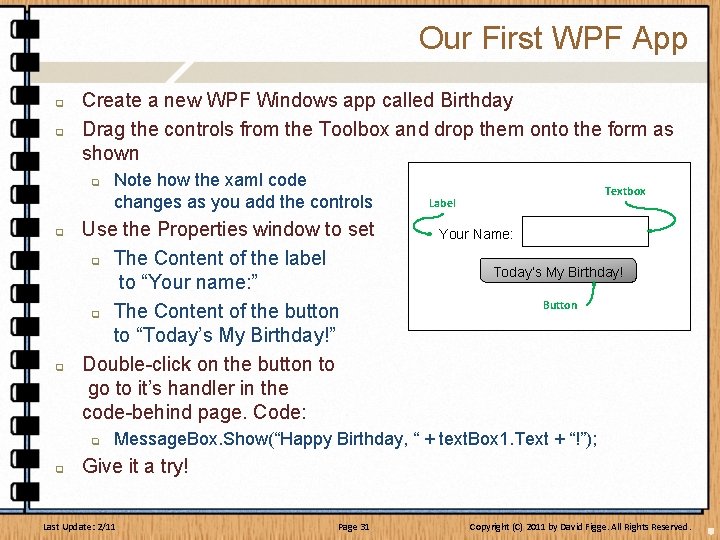
Our First WPF App q q Create a new WPF Windows app called Birthday Drag the controls from the Toolbox and drop them onto the form as shown q q q Use the Properties window to set q The Content of the label to “Your name: ” q The Content of the button to “Today’s My Birthday!” Double-click on the button to go to it’s handler in the code-behind page. Code: q q Note how the xaml code changes as you add the controls Textbox Label Your Name: Today’s My Birthday! Button Message. Box. Show(“Happy Birthday, “ + text. Box 1. Text + “!”); Give it a try! Last Update: 2/11 Page 31 Copyright (C) 2011 by David Figge. All Rights Reserved.
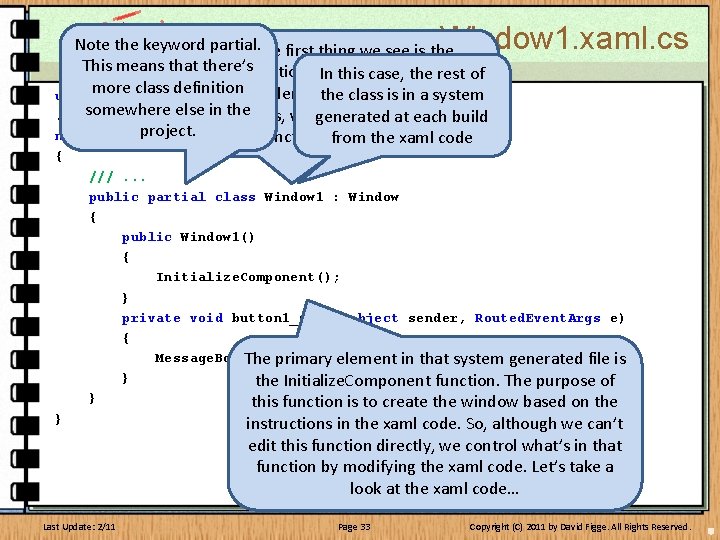
Let’s See What We’ve Got… q q Let’s take a look at some of the elements that make up this program First, looking at the code page (Window 1. xaml. cs)… Last Update: 2/11 Page 32 Copyright (C) 2011 by David Figge. All Rights Reserved.
Window 1. xaml. cs ode C Note the partial. The first thing we see is the e plkeyword m a x This. E means that there’s definition of. Inthe this. Window 1 case, theclass. rest of class definition This is derivedthe from the usingmore System; class is C# in a. Window system somewhere else in the. . . class, which encapsulates the generated at each build project. namespace Birthday functionality ofthe a Window from xaml code { } ///. . . public partial class Window 1 : Window { public Window 1() { Initialize. Component(); } private void button 1_Click(object sender, Routed. Event. Args e) { Message. Box. Show("Happy Birthday " + system text. Box 1. Text "!"); The primary element in that generated+ file is } the Initialize. Component function. The purpose of } this function is to create the window based on the Last Update: 2/11 instructions in the xaml code. So, although we can’t edit this function directly, we control what’s in that function by modifying the xaml code. Let’s take a look at the xaml code… Page 33 Copyright (C) 2011 by David Figge. All Rights Reserved.
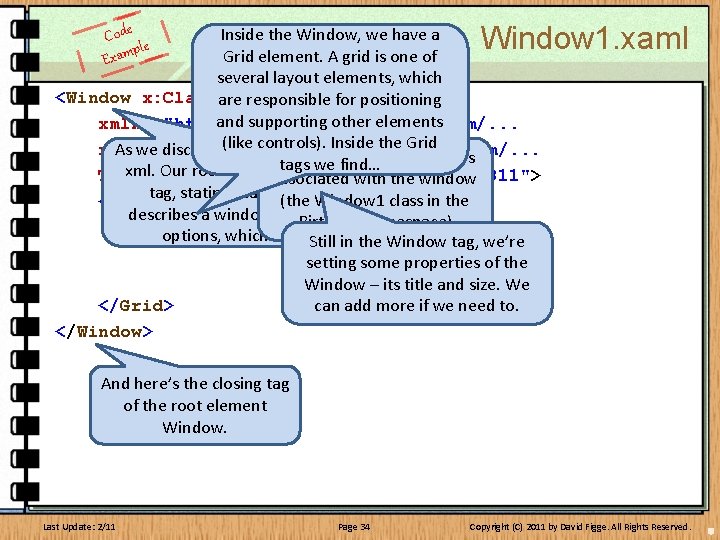
Window 1. xaml Code ple m a x E Inside the Window, we have a Grid element. A grid is one of several layout elements, which <Window x: Class="Birthday. Window 1" are responsible for positioning and supporting other elements xmlns="http: //schemas. microsoft. com/. . . (like controls). Inside the Grid As we discussed, xaml is specific style of xmlns: x="http: //schemas. microsoft. com/. . . This defines the class that’s tags we find… xml. Our root element is the Window Title="Window 1" Height="247" associated with the. Width="311"> window tag, stating that this xaml code (the Window 1 class in the <Grid> describes a window (there are other Birthday. . . options, which we’ll get to) namespace) Still in the Window tag, we’re setting some properties of the Window – its title and size. We </Grid> can add more if we need to. </Window> And here’s the closing tag of the root element Window. Last Update: 2/11 Page 34 Copyright (C) 2011 by David Figge. All Rights Reserved.
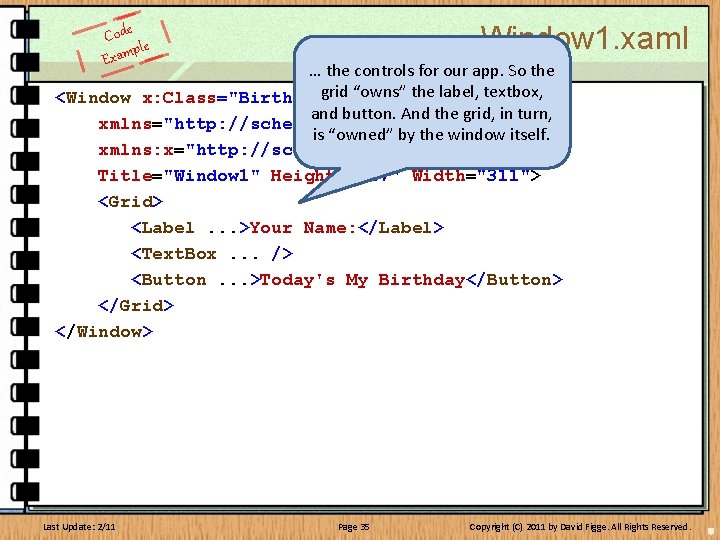
Window 1. xaml Code ple m a x E … the controls for our app. So the grid “owns” the label, textbox, <Window x: Class="Birthday. Window 1" and button. And the grid, in turn, xmlns="http: //schemas. microsoft. com/. . . is “owned” by the window itself. xmlns: x="http: //schemas. microsoft. com/. . . Title="Window 1" Height="247" Width="311"> <Grid> <Label. . . >Your Name: </Label> <Text. Box. . . /> <Button. . . >Today's My Birthday</Button> </Grid> </Window> Last Update: 2/11 Page 35 Copyright (C) 2011 by David Figge. All Rights Reserved.
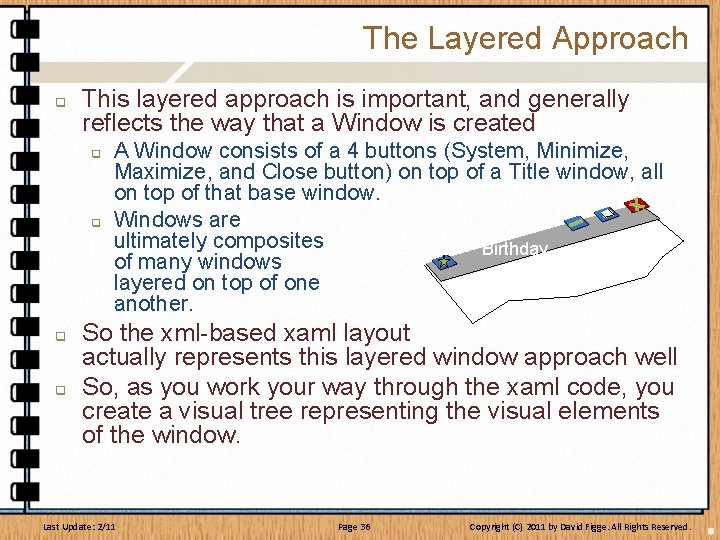
The Layered Approach q This layered approach is important, and generally reflects the way that a Window is created q q A Window consists of a 4 buttons (System, Minimize, Maximize, and Close button) on top of a Title window, all on top of that base window. Windows are ultimately composites Birthday of many windows layered on top of one another. So the xml-based xaml layout actually represents this layered window approach well So, as you work your way through the xaml code, you create a visual tree representing the visual elements of the window. Last Update: 2/11 Page 36 Copyright (C) 2011 by David Figge. All Rights Reserved.
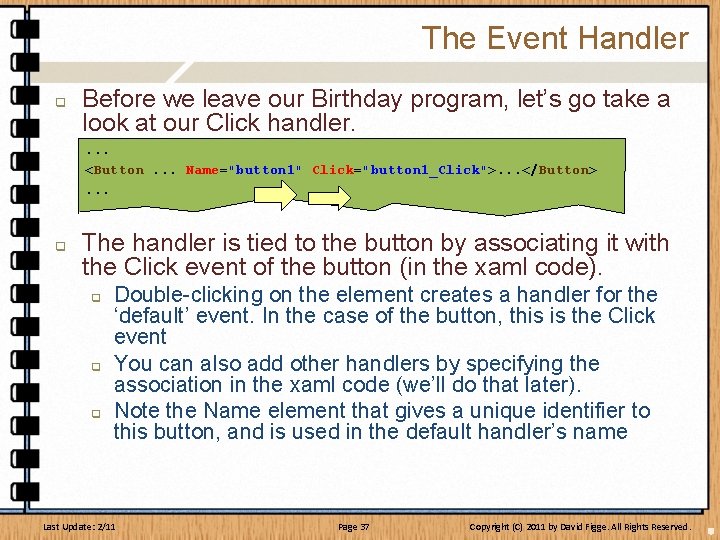
The Event Handler q Before we leave our Birthday program, let’s go take a look at our Click handler. . <Button. . . Name="button 1" Click="button 1_Click">. . . </Button>. . . q The handler is tied to the button by associating it with the Click event of the button (in the xaml code). q q q Double-clicking on the element creates a handler for the ‘default’ event. In the case of the button, this is the Click event You can also add other handlers by specifying the association in the xaml code (we’ll do that later). Note the Name element that gives a unique identifier to this button, and is used in the default handler’s name Last Update: 2/11 Page 37 Copyright (C) 2011 by David Figge. All Rights Reserved.
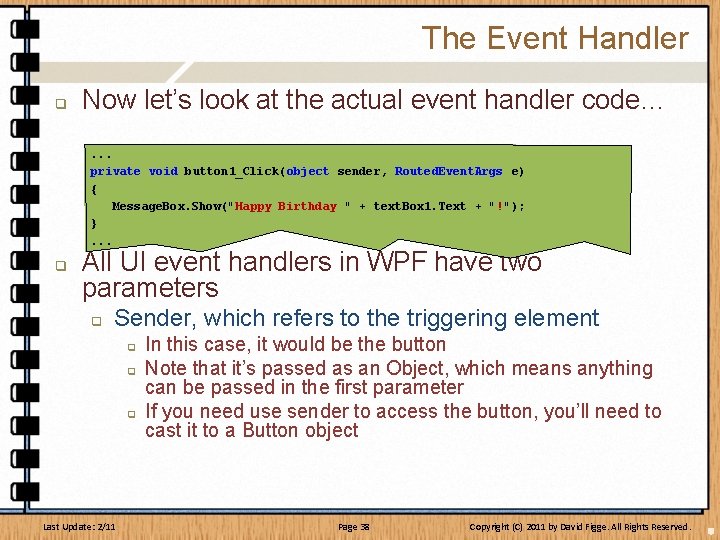
The Event Handler q Now let’s look at the actual event handler code…. . . private void button 1_Click(object sender, Routed. Event. Args e) { Message. Box. Show("Happy Birthday " + text. Box 1. Text + "!"); }. . . q All UI event handlers in WPF have two parameters q Sender, which refers to the triggering element q q q Last Update: 2/11 In this case, it would be the button Note that it’s passed as an Object, which means anything can be passed in the first parameter If you need use sender to access the button, you’ll need to cast it to a Button object Page 38 Copyright (C) 2011 by David Figge. All Rights Reserved.
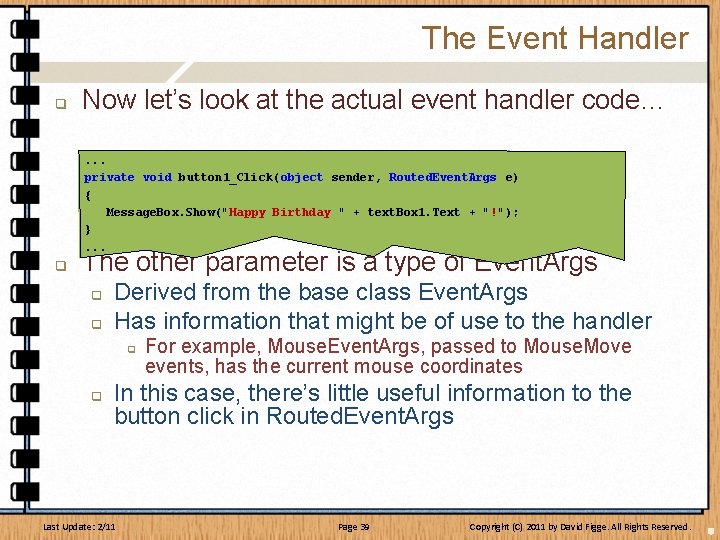
The Event Handler q Now let’s look at the actual event handler code…. . . private void button 1_Click(object sender, Routed. Event. Args e) { Message. Box. Show("Happy Birthday " + text. Box 1. Text + "!"); }. . . q The other parameter is a type of Event. Args q q Derived from the base class Event. Args Has information that might be of use to the handler q q For example, Mouse. Event. Args, passed to Mouse. Move events, has the current mouse coordinates In this case, there’s little useful information to the button click in Routed. Event. Args Last Update: 2/11 Page 39 Copyright (C) 2011 by David Figge. All Rights Reserved.
More WPF Basics q As you can see as we just scratch the surface, there are many aspects to WPF q There are too many to jump into immediately, but let’s hit some of the basics before we move on… Last Update: 2/11 Page 40 Copyright (C) 2011 by David Figge. All Rights Reserved.
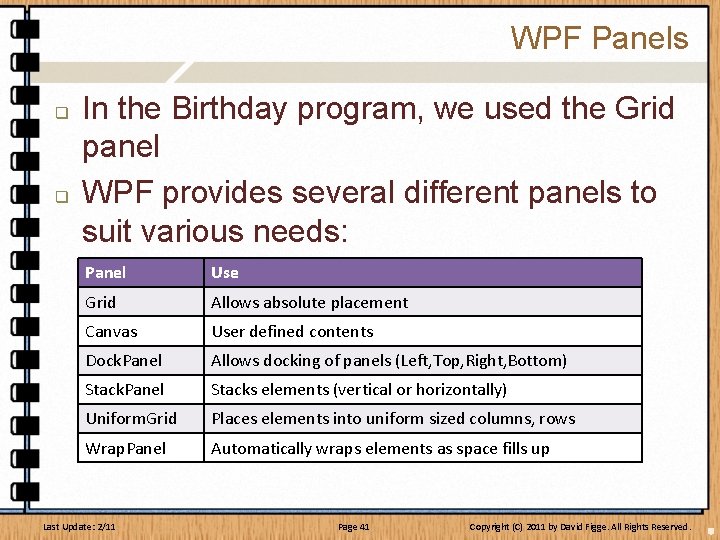
WPF Panels q q In the Birthday program, we used the Grid panel WPF provides several different panels to suit various needs: Panel Use Grid Allows absolute placement Canvas User defined contents Dock. Panel Allows docking of panels (Left, Top, Right, Bottom) Stack. Panel Stacks elements (vertical or horizontally) Uniform. Grid Places elements into uniform sized columns, rows Wrap. Panel Automatically wraps elements as space fills up Last Update: 2/11 Page 41 Copyright (C) 2011 by David Figge. All Rights Reserved.
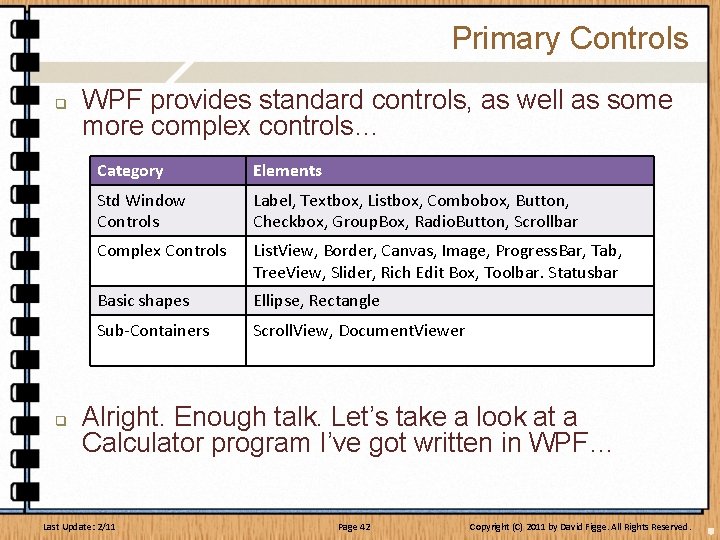
Primary Controls q q WPF provides standard controls, as well as some more complex controls… Category Elements Std Window Controls Label, Textbox, Listbox, Combobox, Button, Checkbox, Group. Box, Radio. Button, Scrollbar Complex Controls List. View, Border, Canvas, Image, Progress. Bar, Tab, Tree. View, Slider, Rich Edit Box, Toolbar. Statusbar Basic shapes Ellipse, Rectangle Sub-Containers Scroll. View, Document. Viewer Alright. Enough talk. Let’s take a look at a Calculator program I’ve got written in WPF… Last Update: 2/11 Page 42 Copyright (C) 2011 by David Figge. All Rights Reserved.
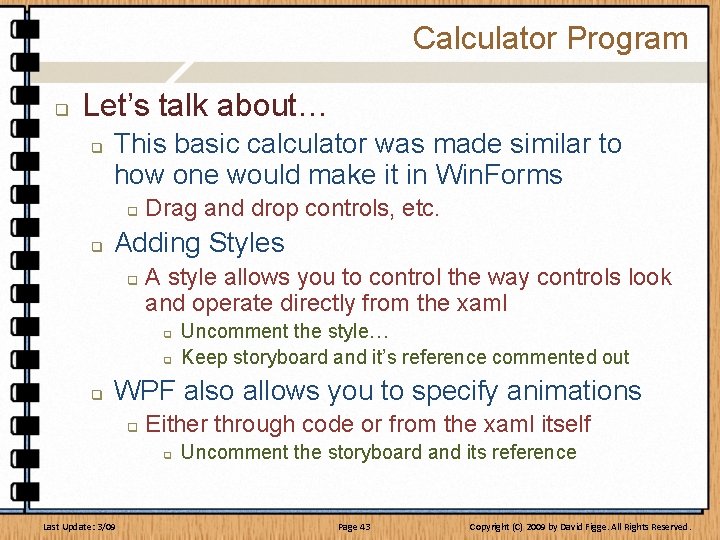
Calculator Program q Let’s talk about… q This basic calculator was made similar to how one would make it in Win. Forms q q Drag and drop controls, etc. Adding Styles q A style allows you to control the way controls look and operate directly from the xaml q q q Uncomment the style… Keep storyboard and it’s reference commented out WPF also allows you to specify animations q Either through code or from the xaml itself q Last Update: 3/09 Uncomment the storyboard and its reference Page 43 Copyright (C) 2009 by David Figge. All Rights Reserved.
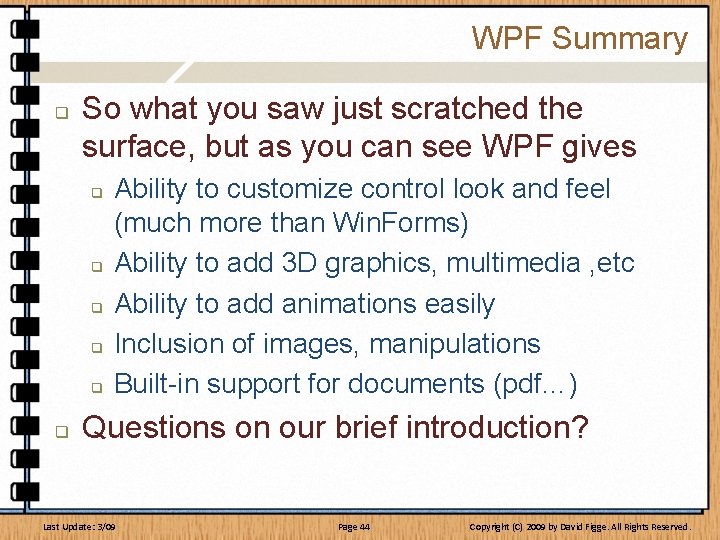
WPF Summary q So what you saw just scratched the surface, but as you can see WPF gives q q q Ability to customize control look and feel (much more than Win. Forms) Ability to add 3 D graphics, multimedia , etc Ability to add animations easily Inclusion of images, manipulations Built-in support for documents (pdf…) Questions on our brief introduction? Last Update: 3/09 Page 44 Copyright (C) 2009 by David Figge. All Rights Reserved.
End of Session Advanced Language Concepts in C# Last Update: 3/09 Page 45 Copyright (C) 2009 by David Figge. All Rights Reserved.