
Advanced Chemdraw Created by S Chantal E Stieber
Advanced Chemdraw Created by S. Chantal E. Stieber, California State Polytechnic University Pomona (sestieber@cpp. edu) and posted on VIPEr (www. ionicviper. org) on February 11, 2019. Copyright S. Chantal E. Stieber, 2019. This work is licensed under the Creative Commons Attribution-Non. Commercial-Share. Alike 3. 0 Unported License. To view a copy of this license visit http: //creativecommons. org/about/license/.
Advanced Chem. Draw Insert image of Chemdraw user interface from page 4 of the Chemdraw 16. 0 user manual. Chemdraw 16 user manual
Advanced Chem. Drawing Complex 3 -D Structures: • Target complex: Insert image of dirhodium complex from upper right in Scheme 1 in Sanford paper DOI: 10. 1021/acs. organomet. 8 b 0 0400 Mantell, M. A. ; Kampf, J. W. ; Sanford, M. Improved Synthesis of [Cp. RRh. Cl 2]2 Complexes, Organometallics, 2018, DOI: 10. 1021/acs. organomet. 8 b 00400
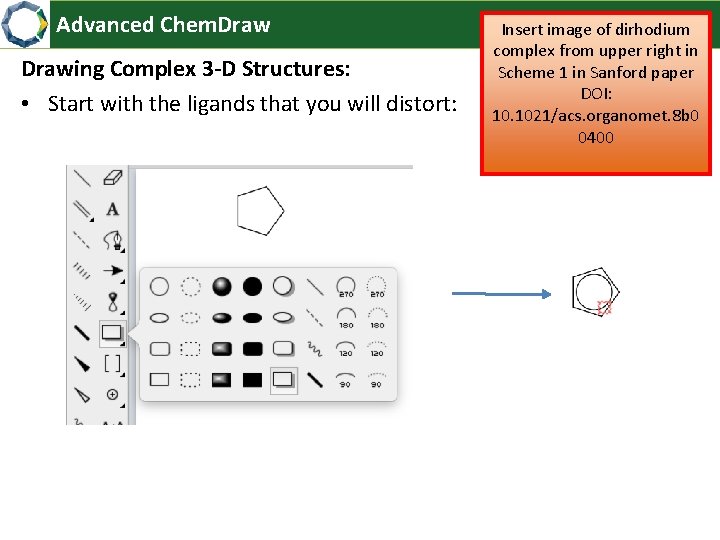
Advanced Chem. Drawing Complex 3 -D Structures: • Start with the ligands that you will distort: Insert image of dirhodium complex from upper right in Scheme 1 in Sanford paper DOI: 10. 1021/acs. organomet. 8 b 0 0400

Advanced Chem. Drawing Complex 3 -D Structures: • Select the whole ligand: • Distort it in 3 -D Insert image of dirhodium complex from upper right in Scheme 1 in Sanford paper DOI: 10. 1021/acs. organomet. 8 b 0 0400

Advanced Chem. Drawing Complex 3 -D Structures: • Add shading: • Adjust the circle as needed: Insert image of dirhodium complex from upper right in Scheme 1 in Sanford paper DOI: 10. 1021/acs. organomet. 8 b 0 0400
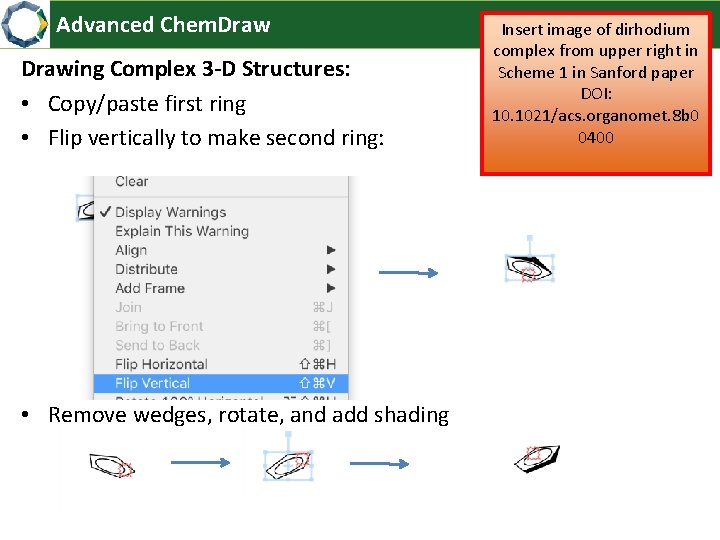
Advanced Chem. Drawing Complex 3 -D Structures: • Copy/paste first ring • Flip vertically to make second ring: • Remove wedges, rotate, and add shading Insert image of dirhodium complex from upper right in Scheme 1 in Sanford paper DOI: 10. 1021/acs. organomet. 8 b 0 0400
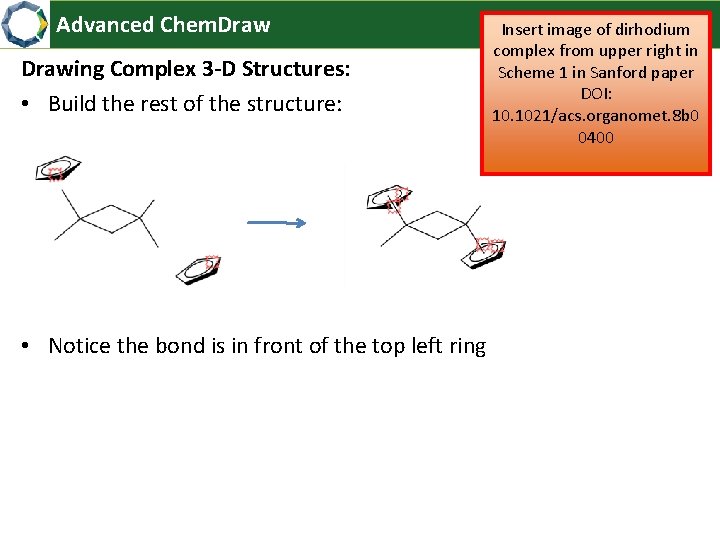
Advanced Chem. Drawing Complex 3 -D Structures: • Build the rest of the structure: • Notice the bond is in front of the top left ring Insert image of dirhodium complex from upper right in Scheme 1 in Sanford paper DOI: 10. 1021/acs. organomet. 8 b 0 0400

Advanced Chem. Drawing Complex 3 -D Structures: • Highlight the bond that’s in front • Send to back: Insert image of dirhodium complex from upper right in Scheme 1 in Sanford paper DOI: 10. 1021/acs. organomet. 8 b 0 0400
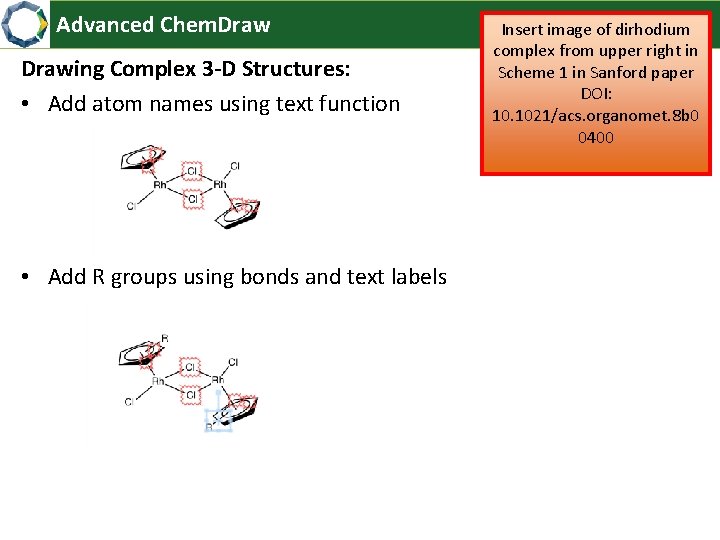
Advanced Chem. Drawing Complex 3 -D Structures: • Add atom names using text function • Add R groups using bonds and text labels Insert image of dirhodium complex from upper right in Scheme 1 in Sanford paper DOI: 10. 1021/acs. organomet. 8 b 0 0400
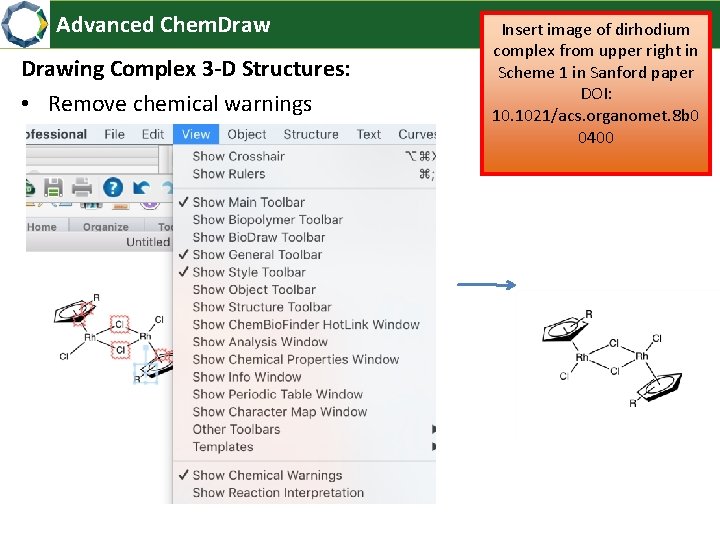
Advanced Chem. Drawing Complex 3 -D Structures: • Remove chemical warnings Insert image of dirhodium complex from upper right in Scheme 1 in Sanford paper DOI: 10. 1021/acs. organomet. 8 b 0 0400
Advanced Chem. Drawing Reaction Schemes: • Make sure everything is lined up • Target: Insert image of reaction scheme above table 1 in Schmidt paper DOI: 10. 1021/jacs. 8 b 06881 Lardy, S. W. ; Schmidt, V. A. “Intermolecular Radical Mediated Anti‐Markovnikov Alkene Hydroamination Using N‐Hydroxyphthalimide, ” J. Am. Chem. Soc. 2018, 10. 1021/jacs. 8 b 06881
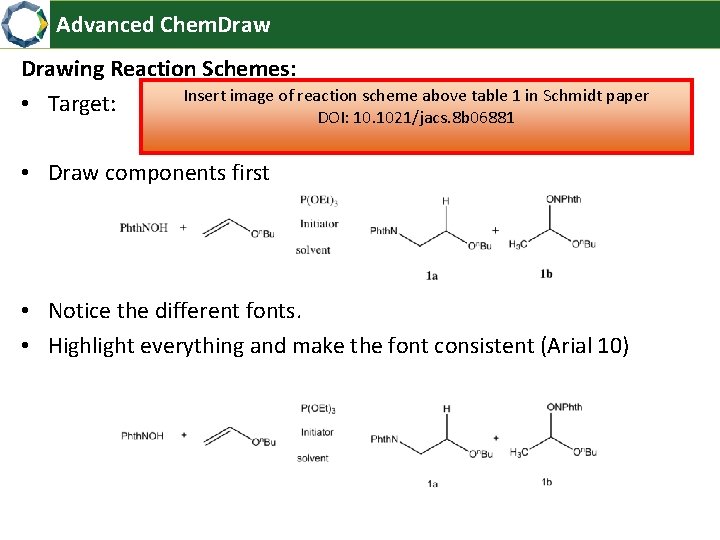
Advanced Chem. Drawing Reaction Schemes: Insert image of reaction scheme above table 1 in Schmidt paper • Target: DOI: 10. 1021/jacs. 8 b 06881 • Draw components first • Notice the different fonts. • Highlight everything and make the font consistent (Arial 10)
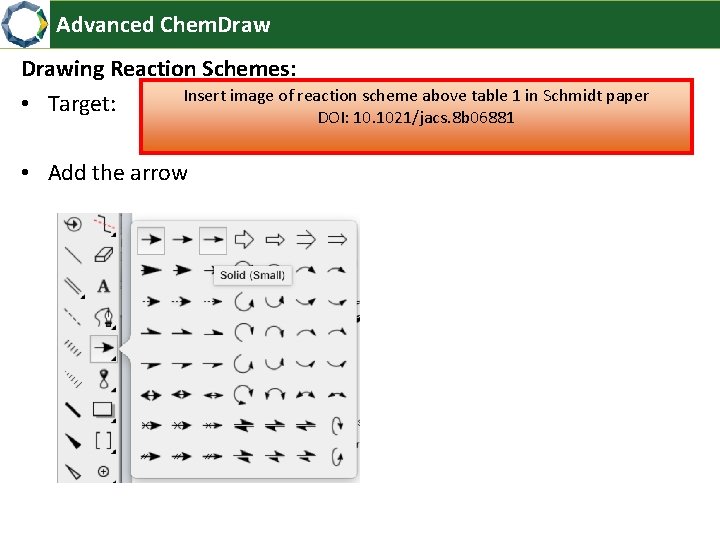
Advanced Chem. Drawing Reaction Schemes: Insert image of reaction scheme above table 1 in Schmidt paper • Target: DOI: 10. 1021/jacs. 8 b 06881 • Add the arrow
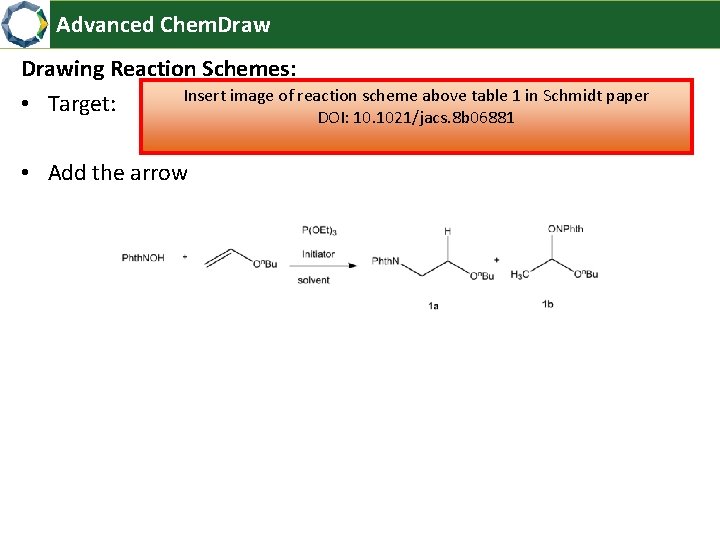
Advanced Chem. Drawing Reaction Schemes: Insert image of reaction scheme above table 1 in Schmidt paper • Target: DOI: 10. 1021/jacs. 8 b 06881 • Add the arrow
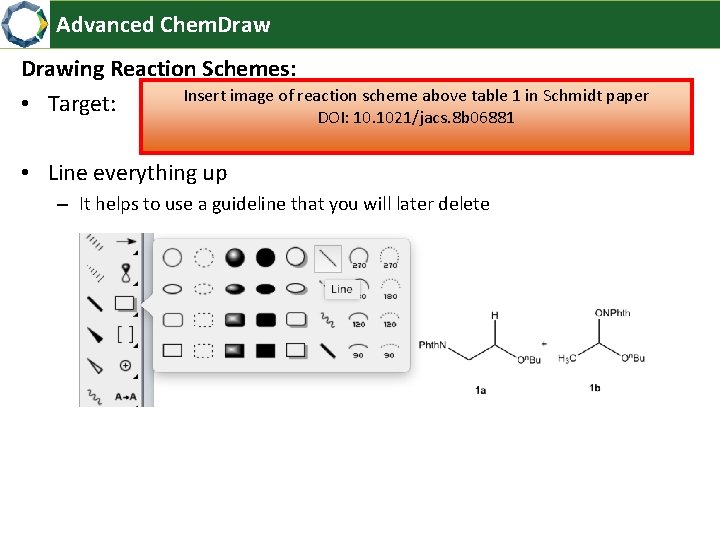
Advanced Chem. Drawing Reaction Schemes: Insert image of reaction scheme above table 1 in Schmidt paper • Target: DOI: 10. 1021/jacs. 8 b 06881 • Line everything up – It helps to use a guideline that you will later delete
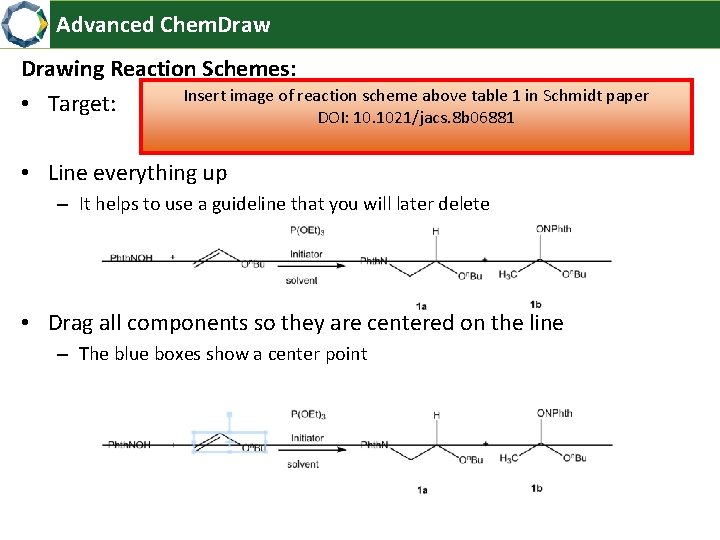
Advanced Chem. Drawing Reaction Schemes: Insert image of reaction scheme above table 1 in Schmidt paper • Target: DOI: 10. 1021/jacs. 8 b 06881 • Line everything up – It helps to use a guideline that you will later delete • Drag all components so they are centered on the line – The blue boxes show a center point
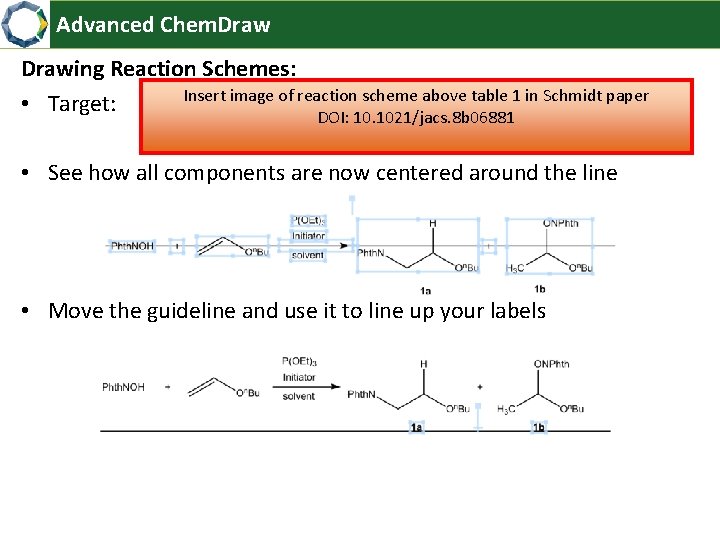
Advanced Chem. Drawing Reaction Schemes: Insert image of reaction scheme above table 1 in Schmidt paper • Target: DOI: 10. 1021/jacs. 8 b 06881 • See how all components are now centered around the line • Move the guideline and use it to line up your labels
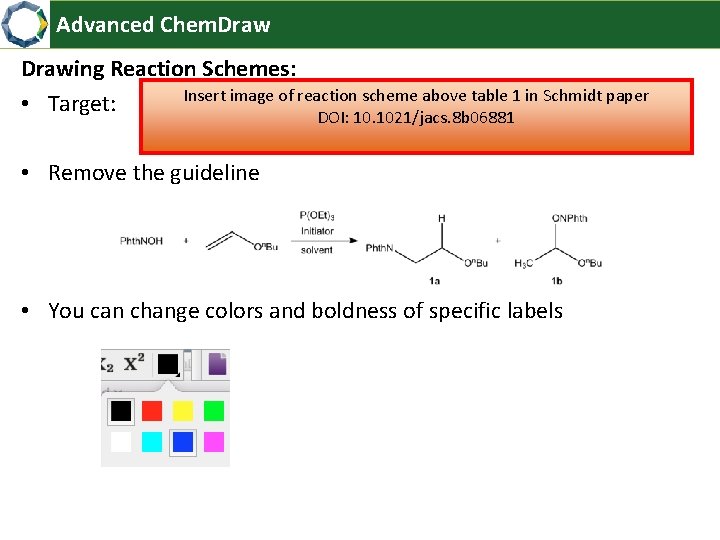
Advanced Chem. Drawing Reaction Schemes: Insert image of reaction scheme above table 1 in Schmidt paper • Target: DOI: 10. 1021/jacs. 8 b 06881 • Remove the guideline • You can change colors and boldness of specific labels
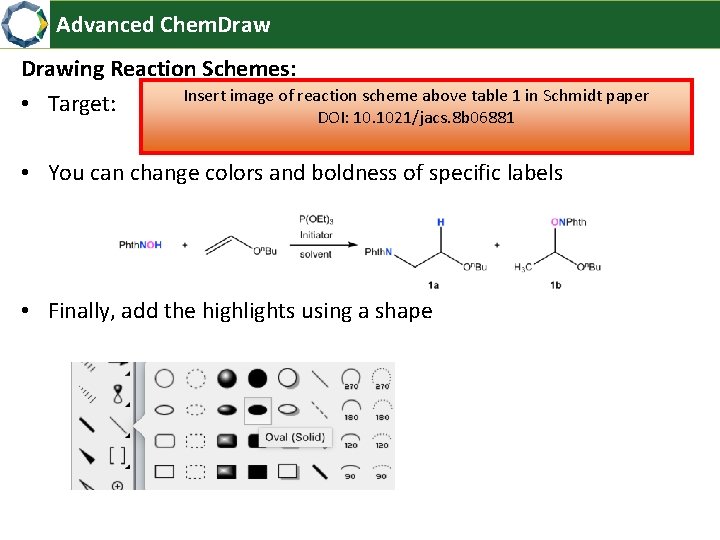
Advanced Chem. Drawing Reaction Schemes: Insert image of reaction scheme above table 1 in Schmidt paper • Target: DOI: 10. 1021/jacs. 8 b 06881 • You can change colors and boldness of specific labels • Finally, add the highlights using a shape
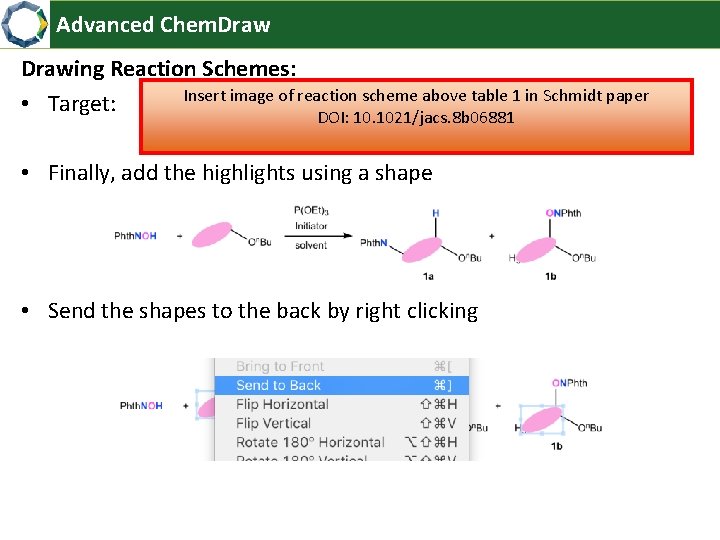
Advanced Chem. Drawing Reaction Schemes: Insert image of reaction scheme above table 1 in Schmidt paper • Target: DOI: 10. 1021/jacs. 8 b 06881 • Finally, add the highlights using a shape • Send the shapes to the back by right clicking
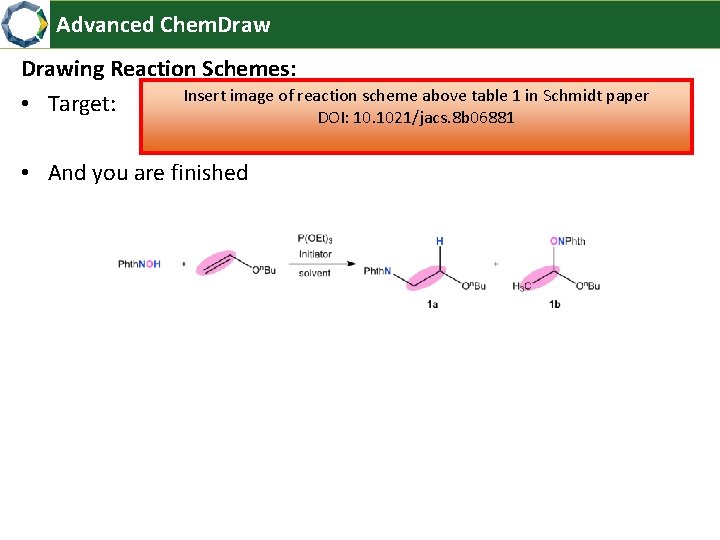
Advanced Chem. Drawing Reaction Schemes: Insert image of reaction scheme above table 1 in Schmidt paper • Target: DOI: 10. 1021/jacs. 8 b 06881 • And you are finished
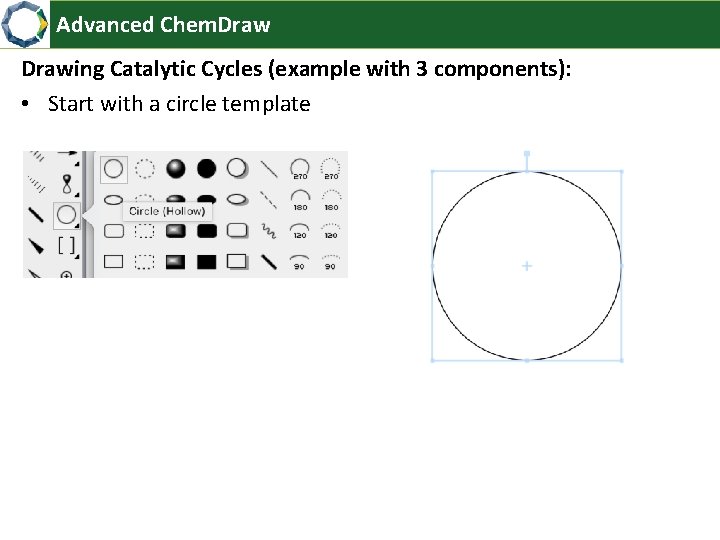
Advanced Chem. Drawing Catalytic Cycles (example with 3 components): • Start with a circle template
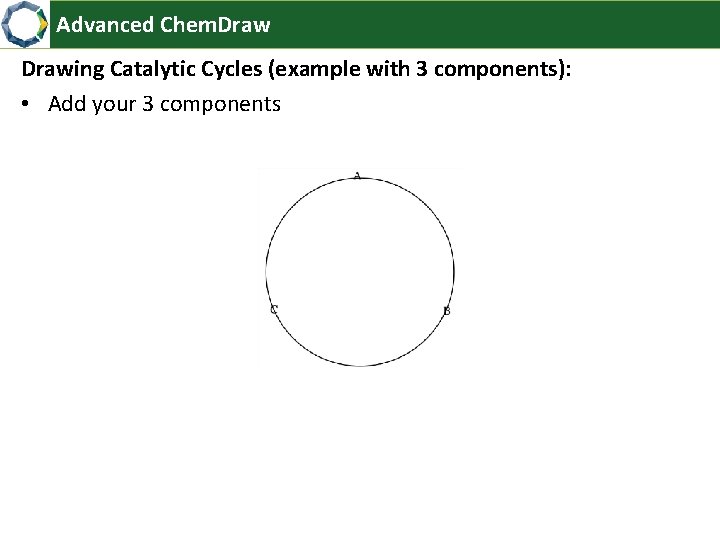
Advanced Chem. Drawing Catalytic Cycles (example with 3 components): • Add your 3 components
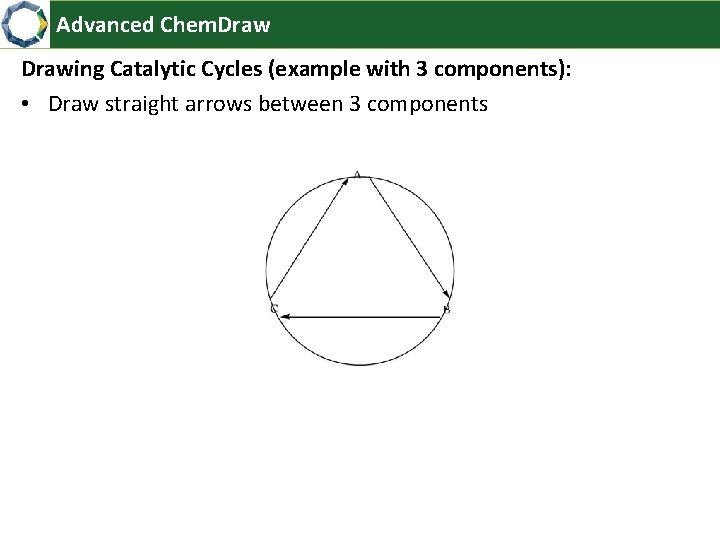
Advanced Chem. Drawing Catalytic Cycles (example with 3 components): • Draw straight arrows between 3 components
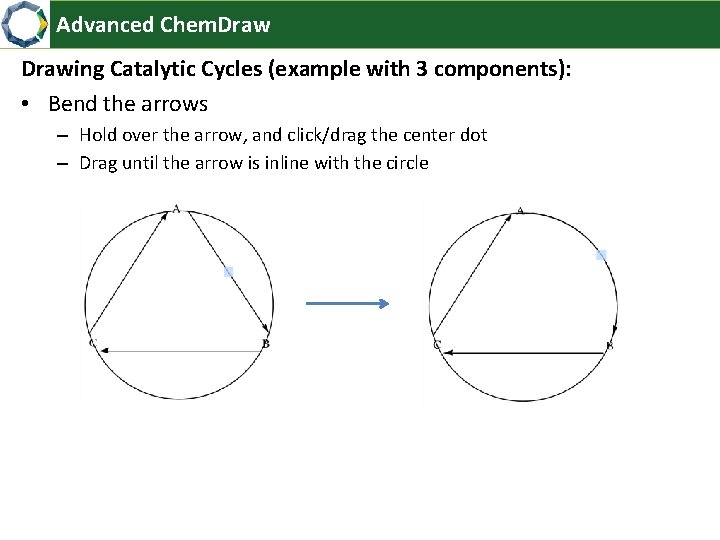
Advanced Chem. Drawing Catalytic Cycles (example with 3 components): • Bend the arrows – Hold over the arrow, and click/drag the center dot – Drag until the arrow is inline with the circle
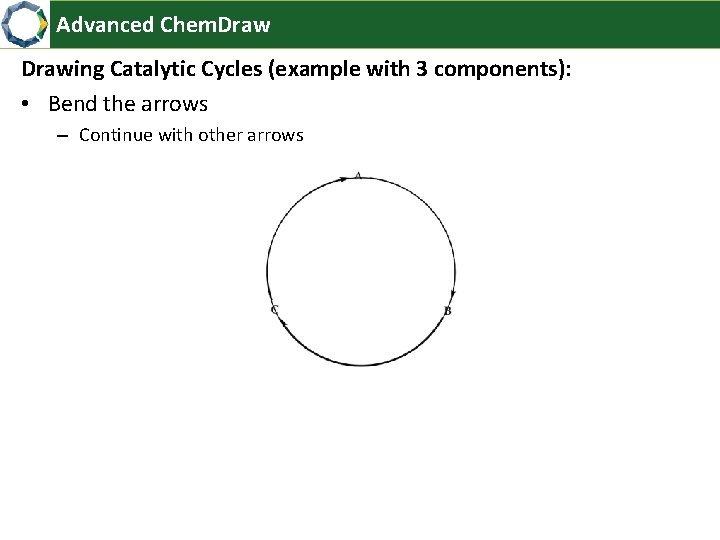
Advanced Chem. Drawing Catalytic Cycles (example with 3 components): • Bend the arrows – Continue with other arrows
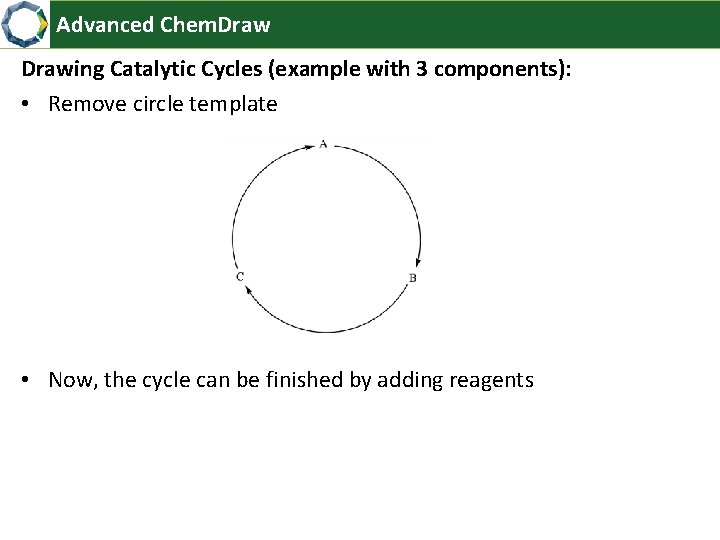
Advanced Chem. Drawing Catalytic Cycles (example with 3 components): • Remove circle template • Now, the cycle can be finished by adding reagents
- Slides: 28