
Achieving High Availability with DB 2 HADR and
Achieving High Availability with DB 2 HADR and TSAMP Philip K. Gunning Technology Solutions, LLC
What is HADR? • High Availability Disaster Recovery (HADR) • • • Introduced in DB 2 V 8. 2 Log based replication using existing network infrastructure Ported from Informix after acquired by IBM Provides for high availability in same data center or remote data center Many improvements over the years based on customer feedback and technology improvements
HADR • Bundled with all versions of DB 2 except DB 2 Express-C • Easy to setup and monitor • Provides additional flexibility for report only databases while providing a degree of high availability • Multiple synchronous modes to choose some • Synchronization mode should be chosen based on BUSINESS REQUIREMENTS • Many times the business doesn’t know there requirements • That’s where you provide recommendation based on analysis of application requirements
HADR • READ-ON-STANDBY (ROS) provided via registry variable in DB 2 9. 7 • Many customers use ROS to establish both an HA database and report only database • Eliminates need to do daily resotres, snapshots, etc to establish report only databases • Very convenient, flexible and efficient • HADR Spooling added in DB 2 10. 1 • Multiple standby databases in DB 2 10. 1 • Primary standby still known as standby • Additional “standby’s” known as auxilliaries
HADR • Delayed Replay introduced in DB 2 10. 1 provides protection against application errors • Can have an auxiliary be delayed for a user-specified time behind the primary databases • Enables auxiliary to be used to recover from application errors by bringing the auxilliary online before the roque application error
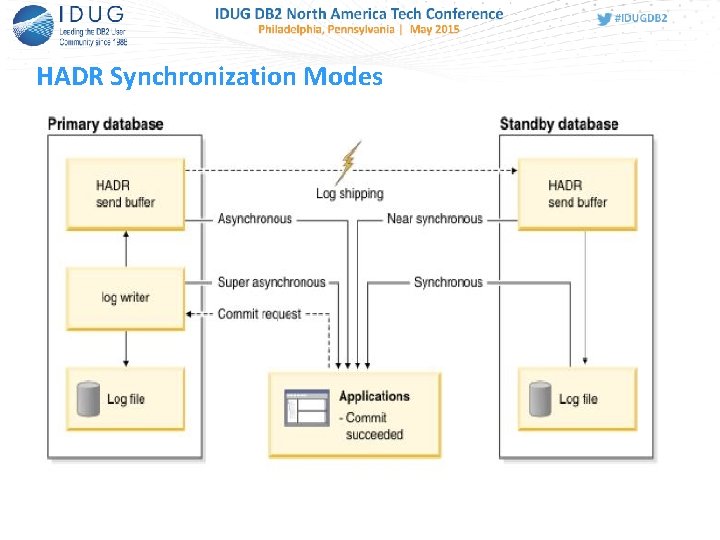
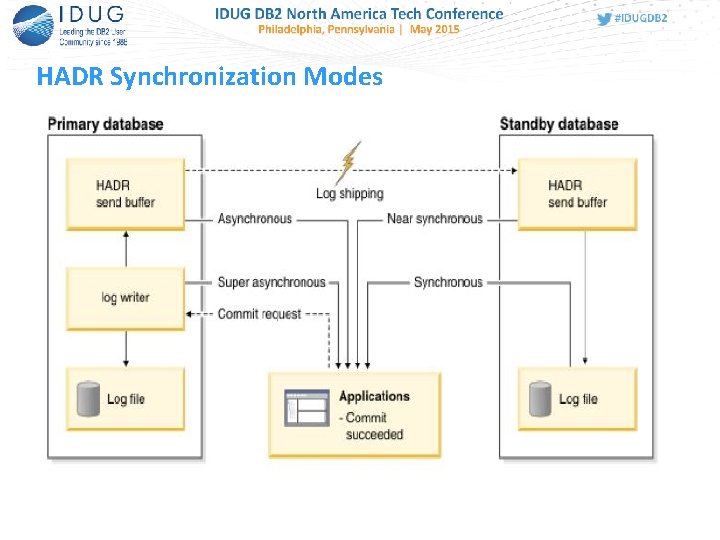
HADR Synchronization Modes
Synchronization Modes • hadr_syncmode – Database Configuration Parameter that controls the HADR synchronization mode • Four possible values: • • SYNC NEARSYNC ASYNC SUPERASYNC
Hadr_syncmode • SYNC Mode • SYNC mode offers the best protection of data. Two on-disk copies of data are required for transaction commit. The cost is the extra time for writing on the standby and sending an acknowledgment message back to the primary. In SYNC mode, logs are sent to the standby only after they are written to the primary disk. Log write and replication events happen sequentially. The total time for a log write event is the sum of (primary_log_write + log_send + standby_log_write + ack_message). The communication overhead of replication in this mode is significantly higher than that of the other three modes.
Hadr_syncmode • NEARSYNC Mode • NEARSYNC mode is nearly as good as SYNC, with significantly less communication overhead. In NEARSYNC mode, sending logs to the standby and writing logs to the primary disk are done in parallel, and the standby sends an acknowledgement message as soon as it receives the logs in memory. On a fast network, log replication causes no or little overhead to primary log writing. In NEARSYNC mode, you will lose data if the primary fails and the standby fails before it has a chance to write the received logs to disk. This is a relatively rare "double failure" scenario. Thus NEARSYNC is a good choice for many applications, providing near synchronization protection at far less performance cost.
Hadr_syncmode • ASYNC Mode • In ASYNC mode, sending logs to the standby and writing logs to the primary disk are done in parallel, just like in NEARSYNC mode. Because ASYNC mode does not wait for acknowledgment messages from the standby, the primary system throughput is min(log write rate, log send rate). ASYNC mode is well suited for WAN applications. Network transmission delay does not impact performance in this mode, but if the primary database fails, there is a higher chance that logs in transit will be lost (not replicated to standby).
Hadr_syncmode • SUPERASYNC Mode • This mode has the shortest transaction response time of all synchronization modes but has also the highest probability of transaction losses if the primary system fails. The primary system throughput is only affected by the time needed to write the transaction to the local disk. This mode is useful when you do not want transactions to be blocked or experience elongated response times due to network interruptions or congestion. SUPERASYNC mode is well suited for WAN applications. Since the transaction commit operations on the primary database are not affected by the relative slowness of the HADR network or the standby HADR server, the log gap between the primary database and the standby database might continue to increase. It is important to monitor the log gap in this mode as it is an indirect measure of the potential number of transactions that might be lost should a true disaster occur on the primary system.
HADR Synchronization Modes
Configuring Databases for HADR • Before you can use HADR you have to determine the SYNC mode you will use and then create a template of ports, service names, and IP addresses you will use • You normally need to coordinate this with network support personnel or server ADMINS • Properly size the STANDBY server or servers • The primary STANDBY should have same amount of RAM and CPU as the primary in the event of a failover or takeover
Configuring Databases for HADR • Before you can use HADR you have to determine the SYNC mode you will use and then create a template of ports, service names, and IP addresses you will use • You normally need to coordinate this with network support personnel or server ADMINS • Properly size the STANDBY server or servers • The primary STANDBY should have same amount of RAM and CPU as the primary in the event of a failover or takeover

Configuring Databases for HADR • Setup separate dedicated NETWORK for HADR PRIMARY to SECONDARY connection • Open HADR ports in Firewalls else HADR will fail and can be difficult to diagnose
HADR Design RECAP • Before you can use HADR you have to determine the SYNC mode you will use and then create a template of ports, service names, and IP addresses you will use • Create a diagram of the proposed architecture, so all involved have a common picture of the setup • Helps to avoid confusion and misconceptions!
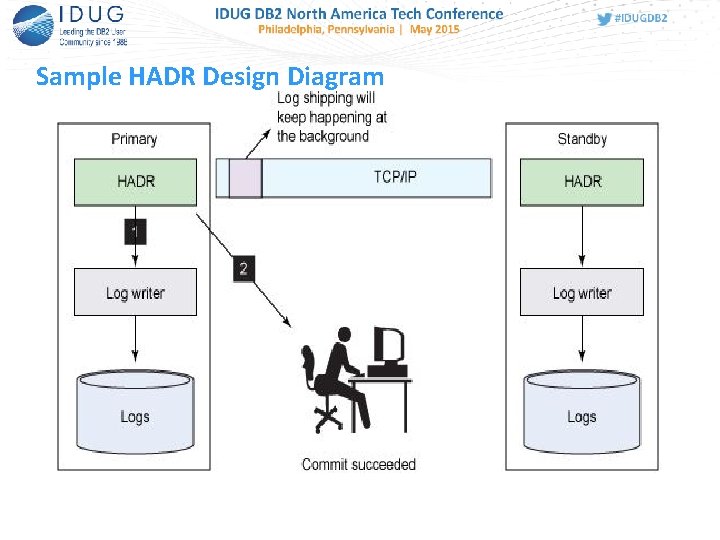
Sample HADR Design Diagram
DB CFG HADR Parameters • Before you can use HADR you have to determine the SYNC mode you will use and then create a template of ports, service names, and IP addresses you will use
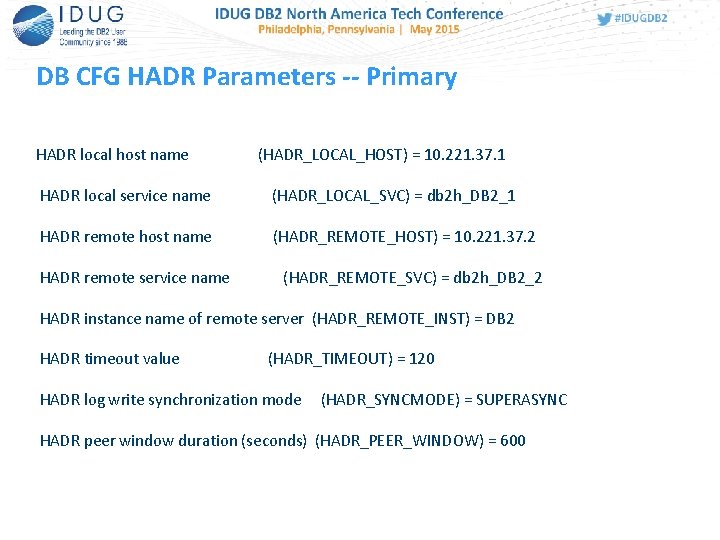
DB CFG HADR Parameters -- Primary HADR local host name (HADR_LOCAL_HOST) = 10. 221. 37. 1 HADR local service name (HADR_LOCAL_SVC) = db 2 h_DB 2_1 HADR remote host name (HADR_REMOTE_HOST) = 10. 221. 37. 2 HADR remote service name (HADR_REMOTE_SVC) = db 2 h_DB 2_2 HADR instance name of remote server (HADR_REMOTE_INST) = DB 2 HADR timeout value (HADR_TIMEOUT) = 120 HADR log write synchronization mode (HADR_SYNCMODE) = SUPERASYNC HADR peer window duration (seconds) (HADR_PEER_WINDOW) = 600
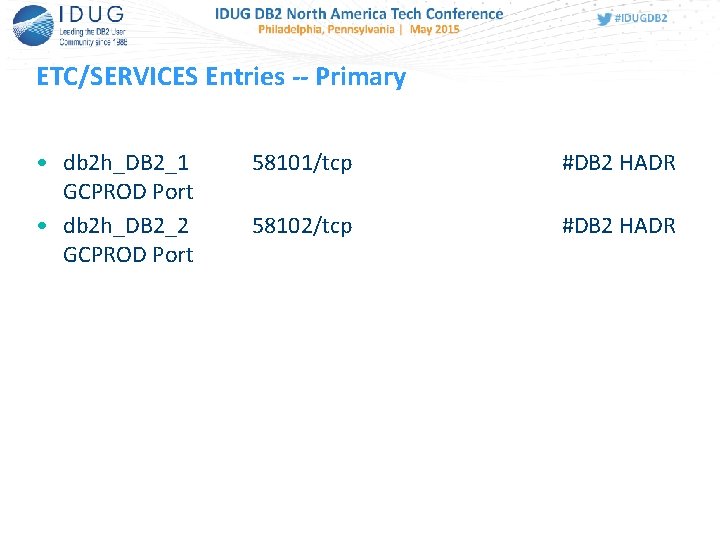
ETC/SERVICES Entries -- Primary • db 2 h_DB 2_1 GCPROD Port • db 2 h_DB 2_2 GCPROD Port 58101/tcp #DB 2 HADR 58102/tcp #DB 2 HADR

DB CFG HADR Parameters -- Standby HADR local host name (HADR_LOCAL_HOST) = 10. 221. 37. 2 HADR local service name (HADR_LOCAL_SVC) = db 2 h_DB 2_2 HADR remote host name (HADR_REMOTE_HOST) = 10. 221. 37. 1 HADR remote service name (HADR_REMOTE_SVC) = db 2 h_DB 2_1 HADR instance name of remote server (HADR_REMOTE_INST) = DB 2 HADR timeout value (HADR_TIMEOUT) = 120 HADR log write synchronization mode (HADR_SYNCMODE) = SUPERASYNC HADR peer window duration (seconds) (HADR_PEER_WINDOW) = 600
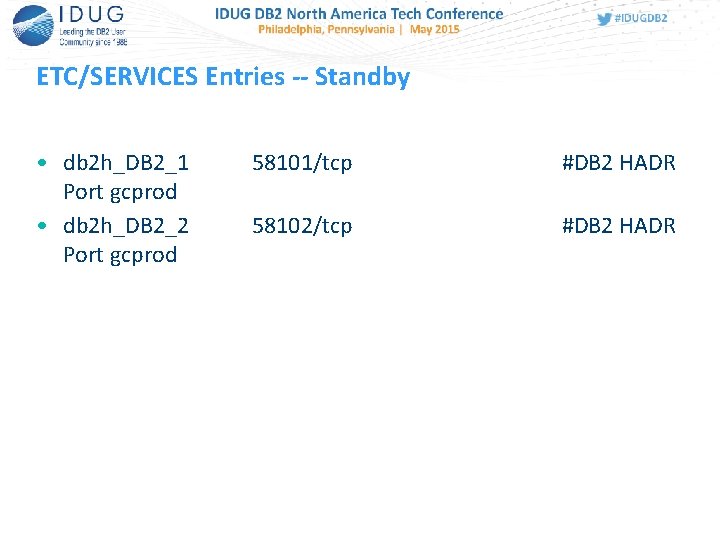
ETC/SERVICES Entries -- Standby • db 2 h_DB 2_1 Port gcprod • db 2 h_DB 2_2 Port gcprod 58101/tcp #DB 2 HADR 58102/tcp #DB 2 HADR
![DB 2 Registry Settings -- Primary [e] DB 2 PATH=C: Program FilesIBMSQLLIB [i] DB](http://slidetodoc.com/presentation_image_h2/241d97236fa3dd6efe80a7381e337cfc/image-23.jpg "DB 2 Registry Settings -- Primary [e] DB 2 PATH=C: Program FilesIBMSQLLIB [i] DB")
DB 2 Registry Settings -- Primary [e] DB 2 PATH=C: Program FilesIBMSQLLIB [i] DB 2_STANDBY_ISO=UR [i] DB 2_HADR_ROS=ON [i] DB 2_CAPTURE_LOCKTIMEOUT=ON [i] DB 2_CREATE_DB_ON_PATH=YES [i] DB 2_SKIPINSERTED=yes [i] DB 2_USE_ALTERNATE_PAGE_CLEANING=on [i] DB 2_EVALUNCOMMITTED=yes [i] DB 2_SKIPDELETED=yes [i] DB 2 INSTPROF=C: Program. DataIBMDB 2 COPY 1 [i] DB 2 COMM=TCPIP [i] DB 2_PARALLEL_IO=* [g] DB 2_EXTSECURITY=YES [g] DB 2_COMMON_APP_DATA_PATH=C: Program. Data [g] DB 2 SYSTEM=CW-DB 01 [g] DB 2 PATH=C: Program FilesIBMSQLLIB [g] DB 2 INSTDEF=DB 2 [g] DB 2 ADMINSERVER=DB 2 DAS 00
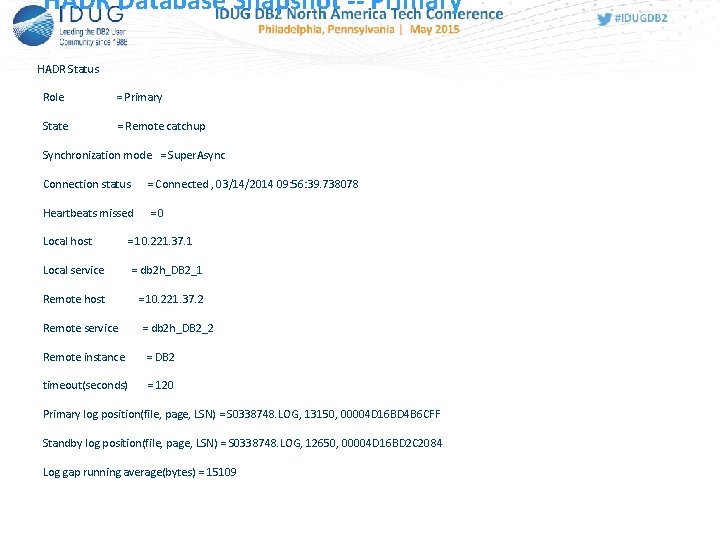
HADR Database Snapshot -- Primary HADR Status Role = Primary State = Remote catchup Synchronization mode = Super. Async Connection status = Connected , 03/14/2014 09: 56: 39. 738078 Heartbeats missed =0 Local host = 10. 221. 37. 1 Local service = db 2 h_DB 2_1 Remote host = 10. 221. 37. 2 Remote service = db 2 h_DB 2_2 Remote instance = DB 2 timeout(seconds) = 120 Primary log position(file, page, LSN) = S 0338748. LOG, 13150, 00004 D 16 BD 4 B 6 CFF Standby log position(file, page, LSN) = S 0338748. LOG, 12650, 00004 D 16 BD 2 C 2084 Log gap running average(bytes) = 15109
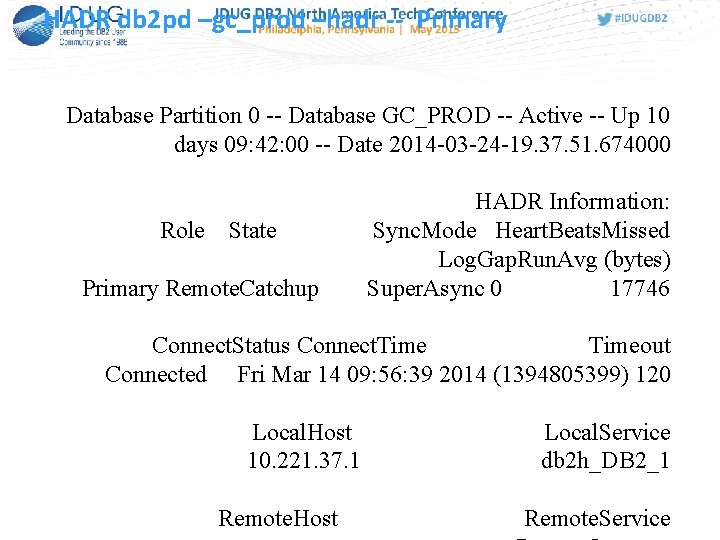
HADR db 2 pd –gc_prod –hadr -- Primary Database Partition 0 -- Database GC_PROD -- Active -- Up 10 days 09: 42: 00 -- Date 2014 -03 -24 -19. 37. 51. 674000 Role State Primary Remote. Catchup HADR Information: Sync. Mode Heart. Beats. Missed Log. Gap. Run. Avg (bytes) Super. Async 0 17746 Connect. Status Connect. Timeout Connected Fri Mar 14 09: 56: 39 2014 (1394805399) 120 Local. Host 10. 221. 37. 1 Remote. Host Local. Service db 2 h_DB 2_1 Remote. Service
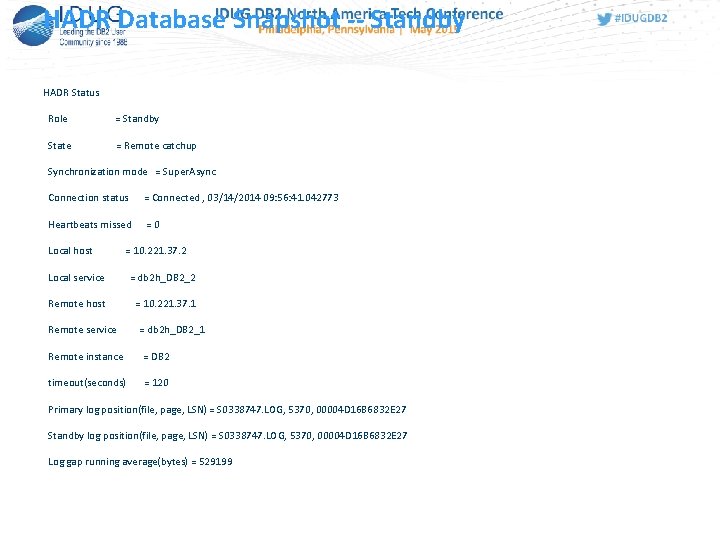
HADR Database Snapshot -- Standby HADR Status Role = Standby State = Remote catchup Synchronization mode = Super. Async Connection status = Connected , 03/14/2014 09: 56: 41. 042773 Heartbeats missed =0 Local host = 10. 221. 37. 2 Local service = db 2 h_DB 2_2 Remote host = 10. 221. 37. 1 Remote service = db 2 h_DB 2_1 Remote instance = DB 2 timeout(seconds) = 120 Primary log position(file, page, LSN) = S 0338747. LOG, 5370, 00004 D 16 B 6832 E 27 Standby log position(file, page, LSN) = S 0338747. LOG, 5370, 00004 D 16 B 6832 E 27 Log gap running average(bytes) = 529199
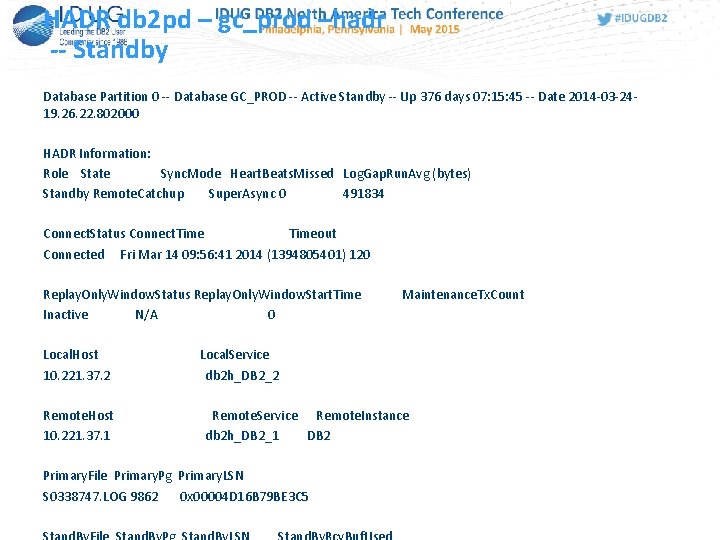
HADR db 2 pd – gc_prod –hadr -- Standby Database Partition 0 -- Database GC_PROD -- Active Standby -- Up 376 days 07: 15: 45 -- Date 2014 -03 -2419. 26. 22. 802000 HADR Information: Role State Sync. Mode Heart. Beats. Missed Log. Gap. Run. Avg (bytes) Standby Remote. Catchup Super. Async 0 491834 Connect. Status Connect. Timeout Connected Fri Mar 14 09: 56: 41 2014 (1394805401) 120 Replay. Only. Window. Status Replay. Only. Window. Start. Time Inactive N/A 0 Local. Host 10. 221. 37. 2 Remote. Host 10. 221. 37. 1 Maintenance. Tx. Count Local. Service db 2 h_DB 2_2 Remote. Service Remote. Instance db 2 h_DB 2_1 DB 2 Primary. File Primary. Pg Primary. LSN S 0338747. LOG 9862 0 x 00004 D 16 B 79 BE 3 C 5
![DB 2 Registry Settings -- Standby [e] DB 2 PATH=C: Program FilesIBMSQLLIB [i] DB](http://slidetodoc.com/presentation_image_h2/241d97236fa3dd6efe80a7381e337cfc/image-28.jpg "DB 2 Registry Settings -- Standby [e] DB 2 PATH=C: Program FilesIBMSQLLIB [i] DB")
DB 2 Registry Settings -- Standby [e] DB 2 PATH=C: Program FilesIBMSQLLIB [i] DB 2_STANDBY_ISO=UR [i] DB 2_HADR_ROS=ON [i] DB 2_CREATE_DB_ON_PATH=YES [i] DB 2_SKIPINSERTED=YES [i] DB 2_USE_ALTERNATE_PAGE_CLEANING=YES [i] DB 2_EVALUNCOMMITTED=YES [i] DB 2_SKIPDELETED=YES [i] DB 2 INSTPROF=C: Program. DataIBMDB 2 COPY 1 [i] DB 2 COMM=TCPIP [i] DB 2_PARALLEL_IO=* [g] DB 2_EXTSECURITY=YES [g] DB 2_COMMON_APP_DATA_PATH=C: Program. Data [g] DB 2 SYSTEM=CW-DB 02 [g] DB 2 PATH=C: Program FilesIBMSQLLIB [g] DB 2 INSTDEF=DB 2 [g] DB 2 ADMINSERVER=DB 2 DAS 00
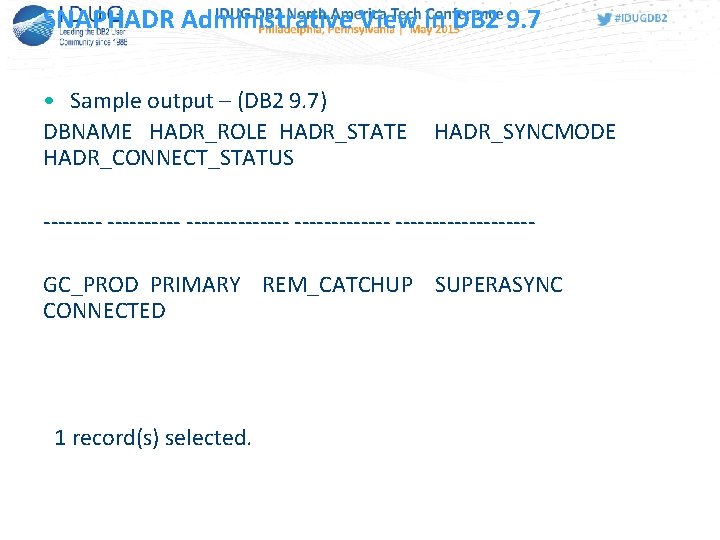
SNAPHADR Administrative View in DB 2 9. 7 • Sample output – (DB 2 9. 7) DBNAME HADR_ROLE HADR_STATE HADR_CONNECT_STATUS HADR_SYNCMODE ------------- ---------GC_PROD PRIMARY REM_CATCHUP SUPERASYNC CONNECTED 1 record(s) selected.
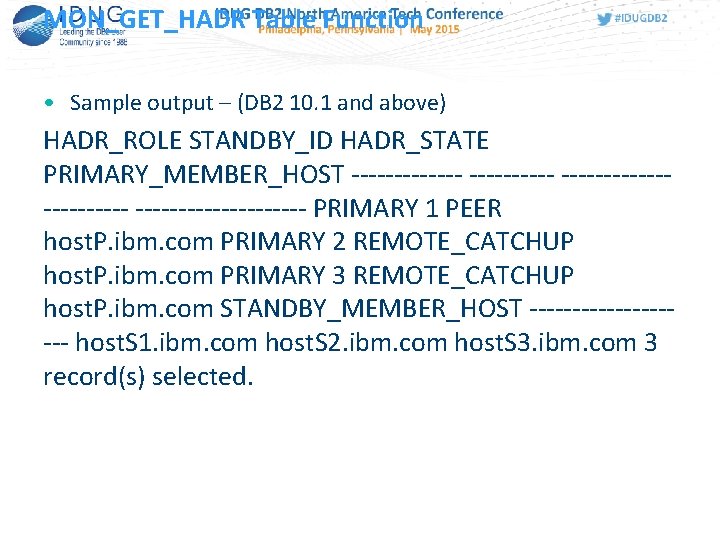
MON_GET_HADR Table Function • Sample output – (DB 2 10. 1 and above) HADR_ROLE STANDBY_ID HADR_STATE PRIMARY_MEMBER_HOST ----------------- PRIMARY 1 PEER host. P. ibm. com PRIMARY 2 REMOTE_CATCHUP host. P. ibm. com PRIMARY 3 REMOTE_CATCHUP host. P. ibm. com STANDBY_MEMBER_HOST ---------- host. S 1. ibm. com host. S 2. ibm. com host. S 3. ibm. com 3 record(s) selected.
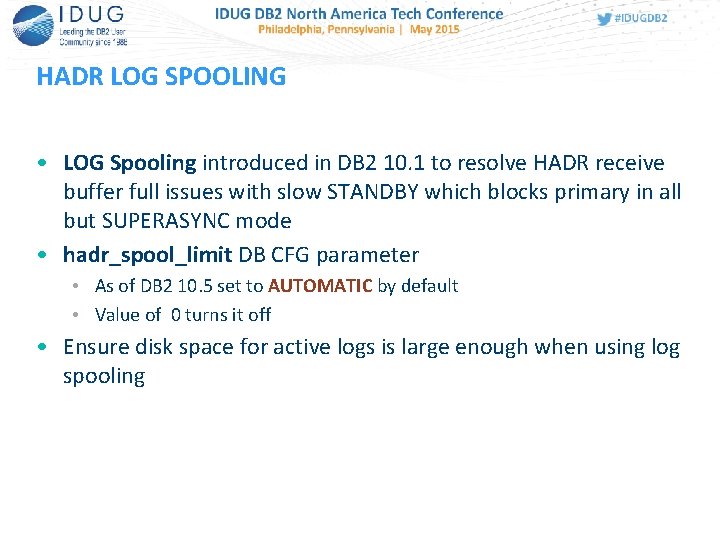
HADR LOG SPOOLING • LOG Spooling introduced in DB 2 10. 1 to resolve HADR receive buffer full issues with slow STANDBY which blocks primary in all but SUPERASYNC mode • hadr_spool_limit DB CFG parameter • As of DB 2 10. 5 set to AUTOMATIC by default • Value of 0 turns it off • Ensure disk space for active logs is large enough when using log spooling
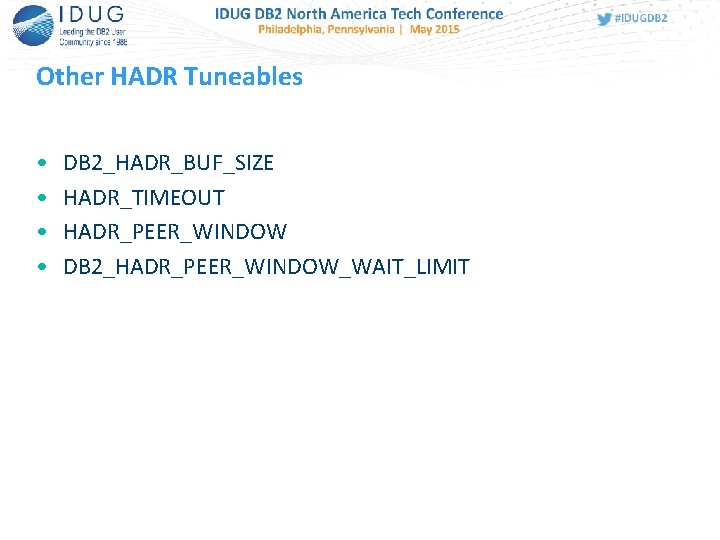
Other HADR Tuneables • • DB 2_HADR_BUF_SIZE HADR_TIMEOUT HADR_PEER_WINDOW DB 2_HADR_PEER_WINDOW_WAIT_LIMIT
DB 2_HADR_BUF_SIZE • Log receive on standby writes logs into this receive buffer as a producer. Log replay reads the logs as a consumer. If the consumer is too slow, the buffer fills up, and the standby cannot receive any more logs. For SYNC and NEARSYNC modes, chances are that the primary can still send out one log flush when the standby buffer is full. This flush will be buffered along the network pipeline from the primary to the standby, in various OS or network buffers. But the standby database is not able to receive it into its receive buffer. The primary will then be blocked, waiting for an acknowledgment message. For ASYNC mode, the primary will keep sending logs until the network pipeline fills up, then it will get network congestion error when trying to send more logs. For SYNC and NEARSYNC, if the network pipeline can not absorb a flush, the primary will also see congestion. • Setting the DB 2_HADR_BUF_SIZE registry variable to the size of expected workload spikes configures your HADR standby log receive buffer to absorb spikes in the primary workload.
DB 2_HADR_BUF_SIZE • Monitor with db 2 pd command • Reports percentage of buffer used • IF 0 means nothing to replay, if 100% means buffer full and CONGESTION state likely • As of DB 2 10. 1 and above spooling should be used to prevent this from occurring versus tuning buffer size
HADR_TIMEOUT • Default is 120 seconds • If a database does not receive a heartbeat message from its partner database within the number of seconds set by the value of the hadr_timeout value, the database considers the connection down and closes the TCP connection. • Recommendation – Use the default and adjust as necessary
HADR_PEER_WINDOW • The hadr_peer_window database configuration parameter enables failover operations with no data loss if the primary failed within a specified time—the peer window. When the HADR primary database is in peer state, logs are sent directly from the in-memory log buffer when the logs are written to the local disk. If the connection is broken, the primary database blocks logging for hadr_peer_window seconds and no transaction is committed. If the primary database then fails within this window, we know that there are no committedbut-not-replicated transactions and therefore there is no data loss during the failover to the standby database. • Recommendations – USE WITH CAUTION since PRIMARY will be blocked for hadr_peer_window seconds if connection lost
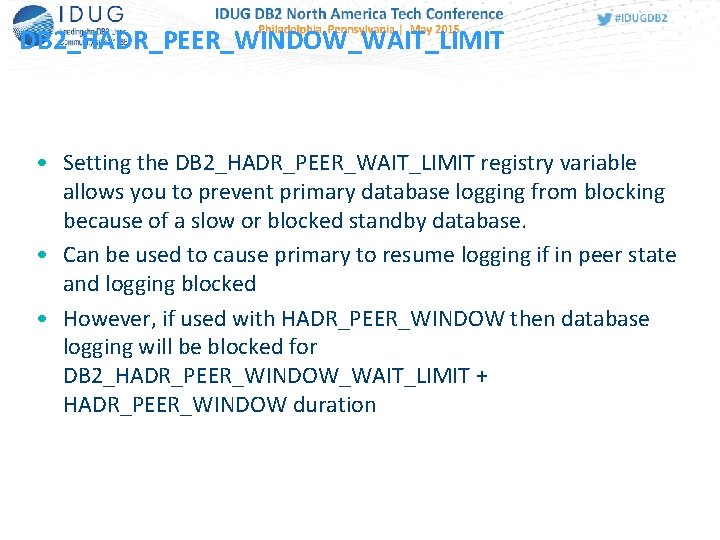
DB 2_HADR_PEER_WINDOW_WAIT_LIMIT • Setting the DB 2_HADR_PEER_WAIT_LIMIT registry variable allows you to prevent primary database logging from blocking because of a slow or blocked standby database. • Can be used to cause primary to resume logging if in peer state and logging blocked • However, if used with HADR_PEER_WINDOW then database logging will be blocked for DB 2_HADR_PEER_WINDOW_WAIT_LIMIT + HADR_PEER_WINDOW duration
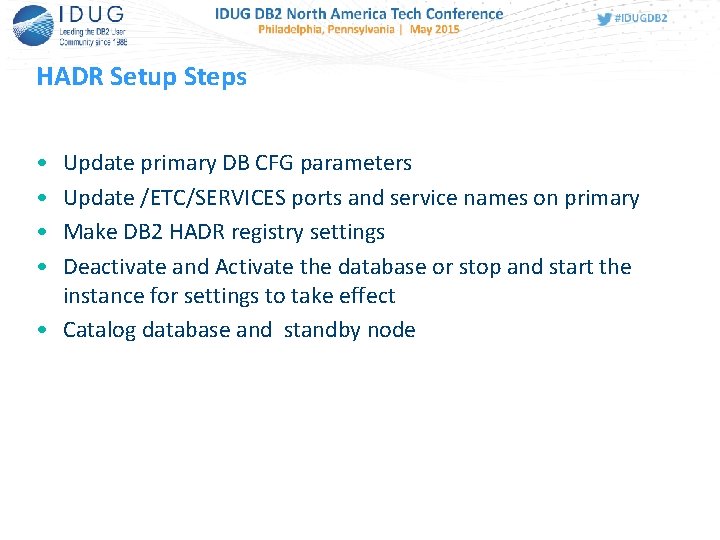
HADR Setup Steps • • Update primary DB CFG parameters Update /ETC/SERVICES ports and service names on primary Make DB 2 HADR registry settings Deactivate and Activate the database or stop and start the instance for settings to take effect • Catalog database and standby node
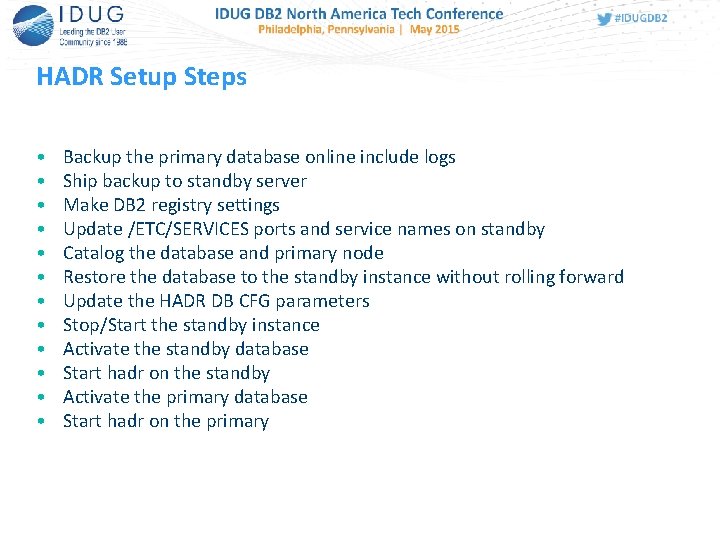
HADR Setup Steps • • • Backup the primary database online include logs Ship backup to standby server Make DB 2 registry settings Update /ETC/SERVICES ports and service names on standby Catalog the database and primary node Restore the database to the standby instance without rolling forward Update the HADR DB CFG parameters Stop/Start the standby instance Activate the standby database Start hadr on the standby Activate the primary database Start hadr on the primary
HADR Setup Steps • Alternatively, use the DB 2 Control Center (9. 7 and below) or IBM Data Studio to setup the primary and standby to include starting HADR • Sit back, relax, and monitor!
HADR • A look at DB 2 HADR in practice
Clustering • Everyone wants it but few want to take the time to understand it and support it properly • Achieve High Availability and Reliability if properly implemented • Disaster waiting to happen if not properly implemented and understood
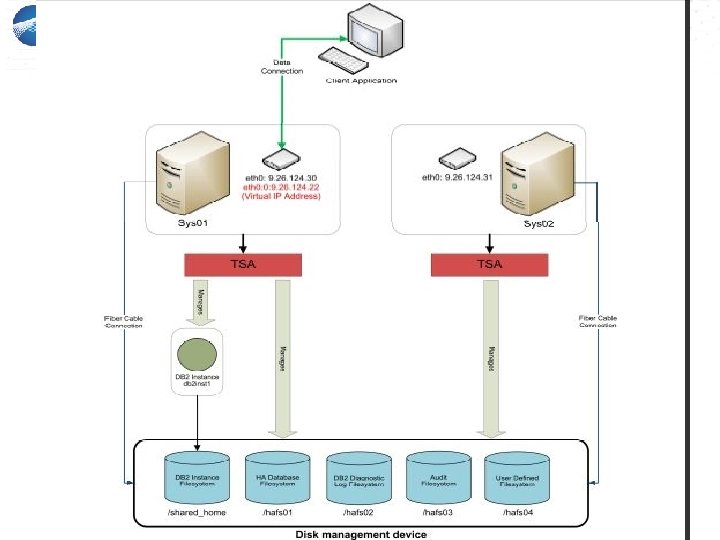
TSAMP • • Tivoli System Automation for Multiplatforms (TSAMP) Bundled with DB 2 since DB 2 9. 5 Comes with all editions of DB 2 except DB 2 Express-C Seeing widespread implementation in 9. 7 and above • Uses IBM Reliable Scalable Cluster Technology (RSCT) under the covers
TSAMP

TSAMP Prerequisites • TSAMP Prerequisites should be met by successfully running db 2 prereqchk • Run preprpnode once on each node in the cluster • TSAMP installed (automatically on UNIX when DB 2 installed, manual on Windows) • Shared storage • Shared filesystems / mount points • Primary node and secondary node • DB 2 installed at same level on both primary and secondary node • Same DB 2 instance owner id, group and group id on both system • Same major number for volume groups • /ETC/SERVICES updated to contain DB 2 service names and ports • These are the main requirements, follow the whitepaper or DB 2 HA Redbook, SG 247363
TSAMP • DB 2 TSAMP clustering program bundled with as db 2 haicu • Use in conjunction with the DB 2 TSAMP setup whitepaper • Diagram and template what you will need for the cluster in advance • You need inputs to db 2 haicu in advance • Unlike HADR, TSAMP is at the instance level
TSAMP • • db 2 haicu is a menu-driven script that you use to setup a cluster Defines the cluster domain and defines cluster resources db 2 haicu can also use an XML file as input Typical cluster setup is active – passive with one active node and a passive node ready for failover
TSAMP • • • db 2 haicu inputs: Shared storage paths and filesystems Mount points not set to auto mount IP address of primary and secondary node (server) Virtual IP address to use for the cluster Quorum IP address DB 2 TSAMP clustering program bundled with as db 2 haicu Use in conjunction with the DB 2 TSAMP setup whitepaper Diagram and template what you will need for the cluster in advance You need inputs to db 2 haicu in advance
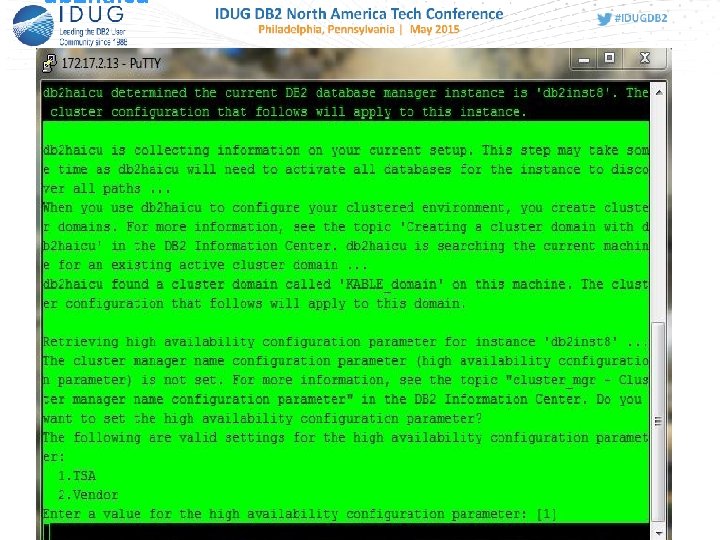
db 2 haicu
TSAMP Quorum Definition • A quorum definition is required to enable TSAMP to decide which node to use as a tiebreaker during a node failure. TSAMP supports a ‘network quorum’. • A network quorum (or network tiebreaker) is a pingable IP address that is used to decide which node in the cluster will serve as the active node during a site failure, and which nodes will be offline. Note that the machine hosting this IP address does not need any particular software or operating system level installed; its primary requirement is that it can be pinged from all nodes in the cluster, and must remain pingable in the case of cluster node failures • db 2 haicu will prompt you for the IP address
db 2 haicu • Upon successful completion of defining all the resources to db 2 haicu, the cluster will be started and active • Use db 2 pd –ha or lssam command to monitor status of HA for the instance
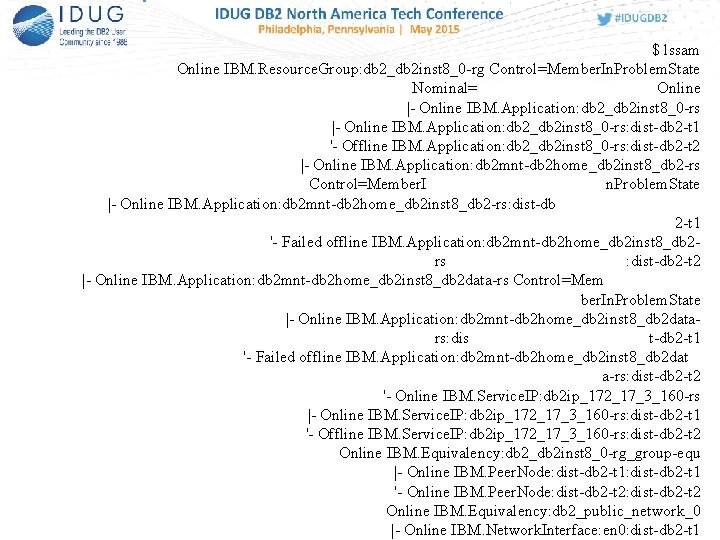
$ lssam Online IBM. Resource. Group: db 2_db 2 inst 8_0 -rg Control=Member. In. Problem. State Nominal= Online |- Online IBM. Application: db 2_db 2 inst 8_0 -rs: dist-db 2 -t 1 '- Offline IBM. Application: db 2_db 2 inst 8_0 -rs: dist-db 2 -t 2 |- Online IBM. Application: db 2 mnt-db 2 home_db 2 inst 8_db 2 -rs Control=Member. I n. Problem. State |- Online IBM. Application: db 2 mnt-db 2 home_db 2 inst 8_db 2 -rs: dist-db 2 -t 1 '- Failed offline IBM. Application: db 2 mnt-db 2 home_db 2 inst 8_db 2 rs : dist-db 2 -t 2 |- Online IBM. Application: db 2 mnt-db 2 home_db 2 inst 8_db 2 data-rs Control=Mem ber. In. Problem. State |- Online IBM. Application: db 2 mnt-db 2 home_db 2 inst 8_db 2 datars: dis t-db 2 -t 1 '- Failed offline IBM. Application: db 2 mnt-db 2 home_db 2 inst 8_db 2 dat a-rs: dist-db 2 -t 2 '- Online IBM. Service. IP: db 2 ip_172_17_3_160 -rs |- Online IBM. Service. IP: db 2 ip_172_17_3_160 -rs: dist-db 2 -t 1 '- Offline IBM. Service. IP: db 2 ip_172_17_3_160 -rs: dist-db 2 -t 2 Online IBM. Equivalency: db 2_db 2 inst 8_0 -rg_group-equ |- Online IBM. Peer. Node: dist-db 2 -t 1 '- Online IBM. Peer. Node: dist-db 2 -t 2 Online IBM. Equivalency: db 2_public_network_0 |- Online IBM. Network. Interface: en 0: dist-db 2 -t 1

db 2 pdhaout. txt $ db 2 pd -ha DB 2 HA Status Instance Information: Instance Name = db 2 inst 8 Number Of Domains =1 Number Of RGs for instance = 1 Domain Information: Domain Name = KABLE_domain Cluster Version = 3. 1. 4. 4 Cluster State = Online Number of nodes =2 Node Information: Node Name State -------------------dist-db 2 -t 2 Online dist-db 2 -t 1 Online
TSAMP • Conduct failure testing • Network • Storage • Server • Learn TSAMP and RSCT commands to use to monitor status of cluster, stop cluster, and move cluster to secondary node for maintenance or other reasons • Learn how to know if the cluster has failed over and what to do to get it back to the primary • Test all of the above and document
Summary • DB 2 HADR what it is, how it works and how to implement and monitor it • DB 2 HADR Best practices • New features in DB 2 10. 5 • Described how to define, setup and integrate TSAMP clustering • Provided DB 2 HADR and TSAMP references and best
HADR and TSAMP References • Whitepaper - DB 2 HADR Multiple Standbys http: //public. dhe. ibm. com/software/dw/data/dm 1206 hadrmultiplestandby/HADR_Multiple_Standbys_jn 20. pdf • DBA HA Redbook: http: //www. redbooks. ibm. com/redbooks/pdfs/sg 247363. pdf
HADR and TSAMP References • DB 2 HADR Best Practices https: //www. ibm. com/developerworks/community/wikis/hom e? lang=en_US#!/wiki/Wc 9 a 068 d 7 f 6 a 6_4434_aece_0 d 297 ea 80 ab 1/page/High%20 Availability%20 Disaster%20 • Setup HADR with Data Studio http: //www. ibm. com/developerworks/data/tutorials/dm 1003 optimhadr/index. html? ca=dat
HADR and TSAMP References • DB 2 HADR Simulator – whitepaper http: //www. ibm. com/developerworks/data/library/techarticle /dm-1310 db 2 luwhadr-pdf. pdf • DB 2 and TSAMP Setup Whitepaper https: //www. ibm. com/developerworks/data/library/long/dm 0909 hasharedstorage/ • (Note there is a 10. 1 version of the above)
Achieving High Availability with DB 2 HADR and TSAMP Philip K. Gunning Technology Solutions, LLC pgunning@gts 1 consulting. com www. gts 1 consulting. com

DB 2 Books by Phil
- Slides: 60