
Access Control Lists ACL Topics Understand the functions
![Standard IP Access List Configuration Router(config)# access-list-number {permit|deny} source [mask] • Sets parameters for](https://slidetodoc.com/presentation_image/d61b718b1852fa4d26c0f042e231971e/image-21.jpg "Standard IP Access List Configuration Router(config)# access-list-number {permit|deny} source [mask] • Sets parameters for")
![Standard IP Access List Configuration Router(config)# access-list-number {permit|deny} source [mask] • Sets parameters for](https://slidetodoc.com/presentation_image/d61b718b1852fa4d26c0f042e231971e/image-22.jpg "Standard IP Access List Configuration Router(config)# access-list-number {permit|deny} source [mask] • Sets parameters for")
![Extended IP Access List Configuration Router(config)# { permit | deny [operator port] [ operator](https://slidetodoc.com/presentation_image/d61b718b1852fa4d26c0f042e231971e/image-36.jpg "Extended IP Access List Configuration Router(config)# { permit | deny [operator port] [ operator")
- Slides: 51
Access Control Lists
ACL Topics • Understand the functions and processing of IP access lists • Configure standard IP access lists • Configure extended IP access lists • Control virtual terminal access with access class • Verify and monitor IP access lists
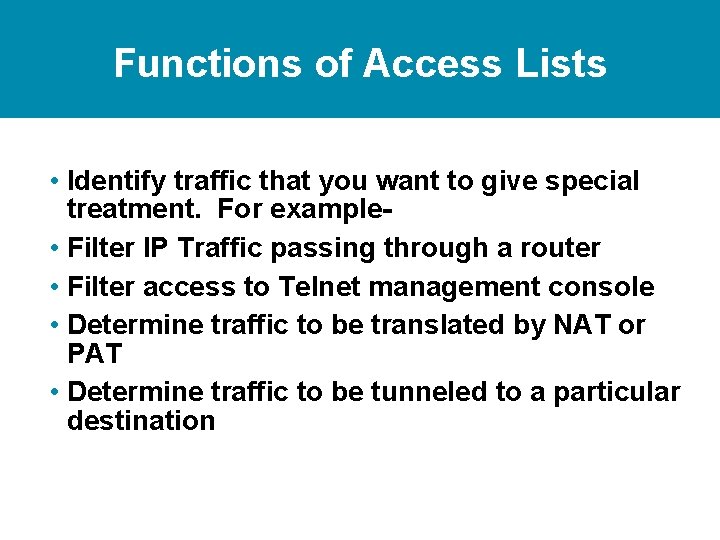
Functions of Access Lists • Identify traffic that you want to give special treatment. For example • Filter IP Traffic passing through a router • Filter access to Telnet management console • Determine traffic to be translated by NAT or PAT • Determine traffic to be tunneled to a particular destination
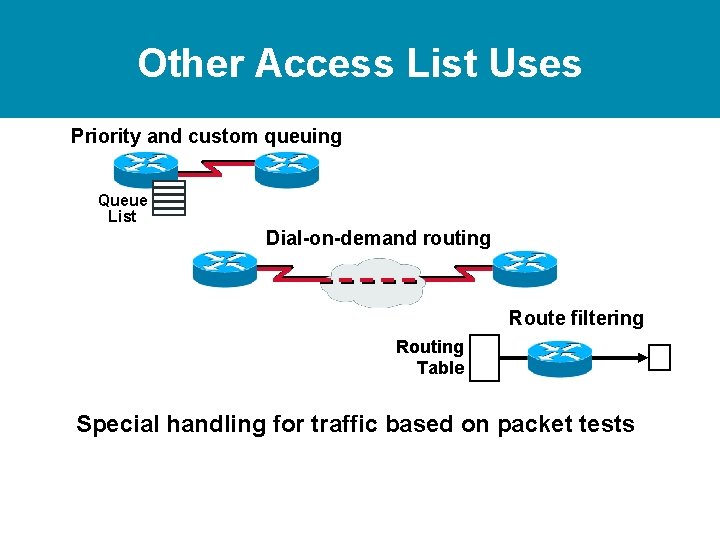
Other Access List Uses Priority and custom queuing Queue List Dial-on-demand routing Route filtering Routing Table Special handling for traffic based on packet tests
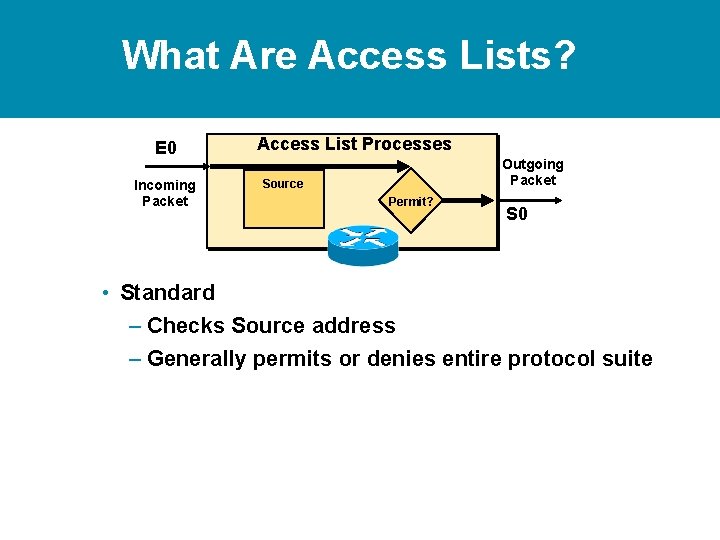
What Are Access Lists? E 0 Incoming Packet Access List Processes Outgoing Packet Source Permit? S 0 • Standard – Checks Source address – Generally permits or denies entire protocol suite
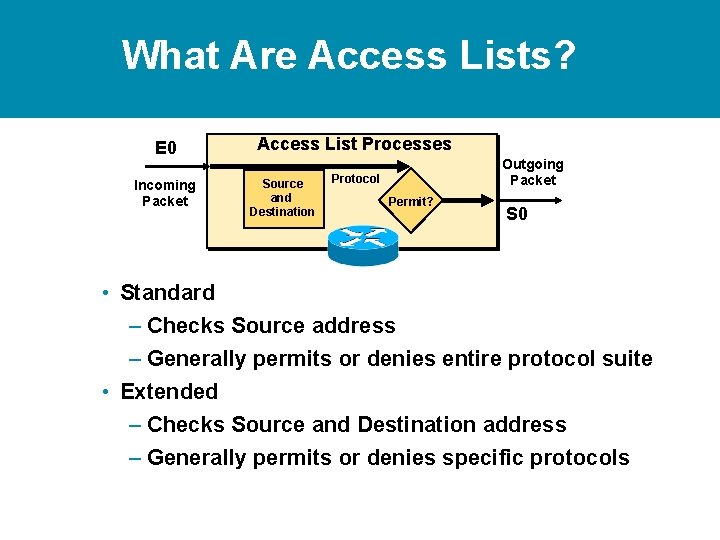
What Are Access Lists? E 0 Access List Processes Incoming Packet Protocol Source and Destination Outgoing Packet Permit? S 0 • Standard – Checks Source address – Generally permits or denies entire protocol suite • Extended – Checks Source and Destination address – Generally permits or denies specific protocols
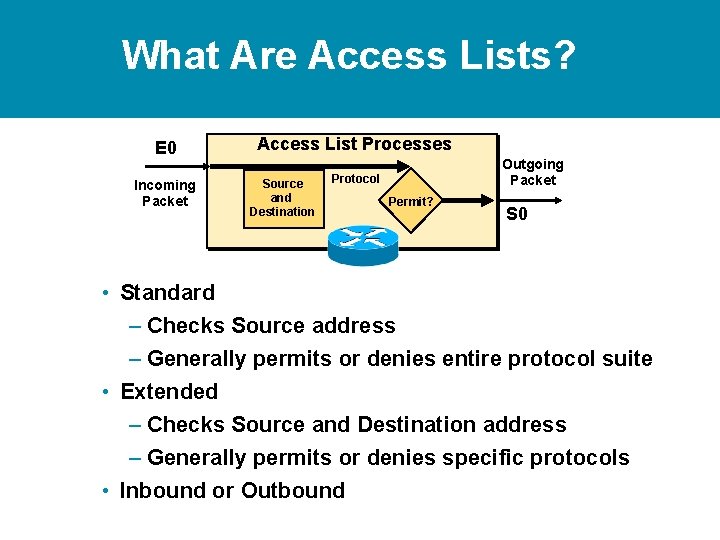
What Are Access Lists? E 0 Access List Processes Incoming Packet Protocol Source and Destination Outgoing Packet Permit? S 0 • Standard – Checks Source address – Generally permits or denies entire protocol suite • Extended – Checks Source and Destination address – Generally permits or denies specific protocols • Inbound or Outbound
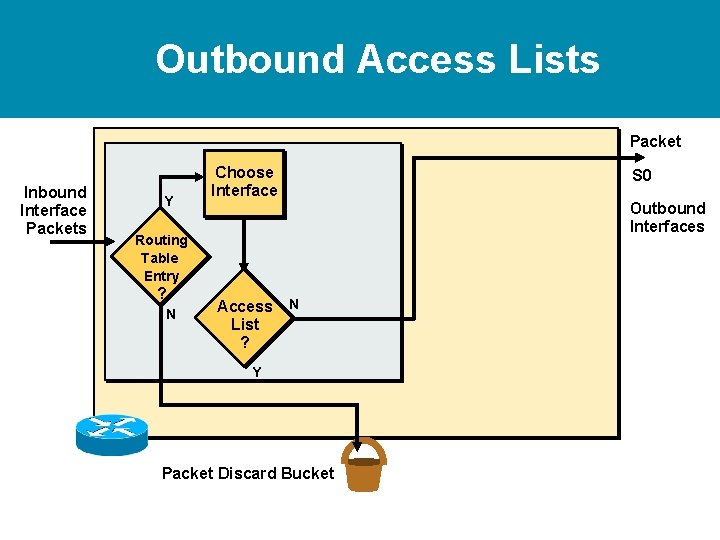
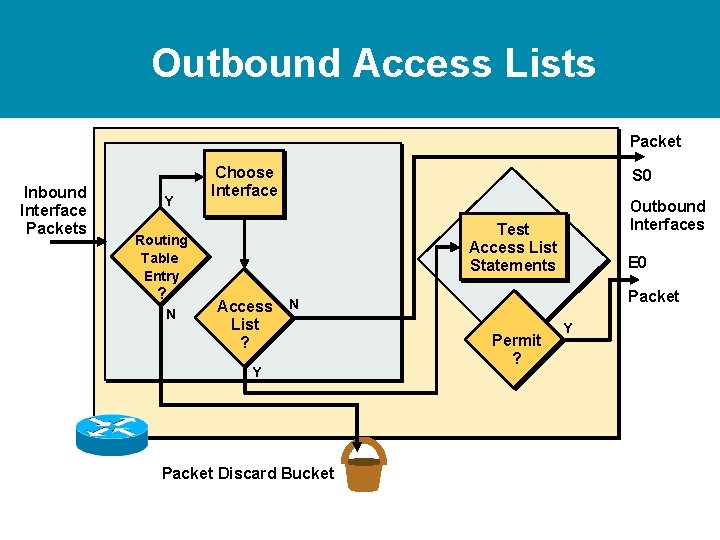
Outbound Access Lists Packet Inbound Interface Packets Y Choose Interface Outbound Interfaces Routing Table Entry ? N S 0 Access N List ? Y Packet Discard Bucket
Outbound Access Lists Packet Inbound Interface Packets Y Choose Interface N Outbound Interfaces Test Access List Statements Routing Table Entry ? S 0 Access N List ? Y Packet Discard Bucket E 0 Packet Permit ? Y
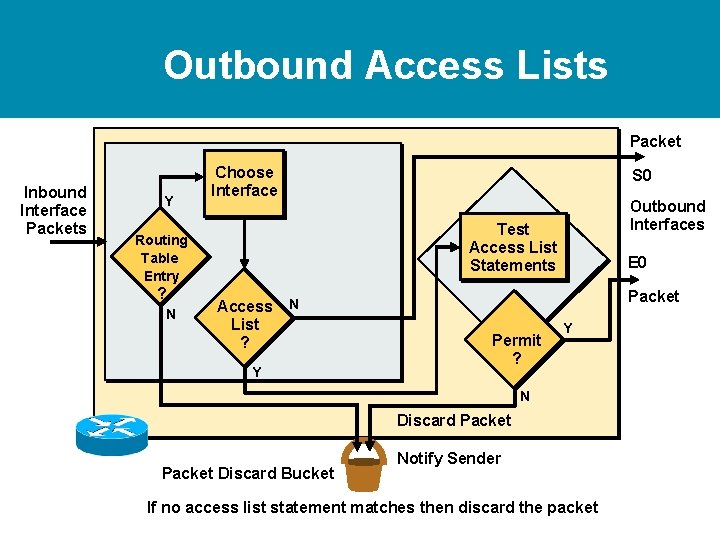
Outbound Access Lists Packet Inbound Interface Packets Y Choose Interface N Outbound Interfaces Test Access List Statements Routing Table Entry ? S 0 Access N List ? Y E 0 Packet Permit ? Y N Discard Packet Discard Bucket Notify Sender If no access list statement matches then discard the packet
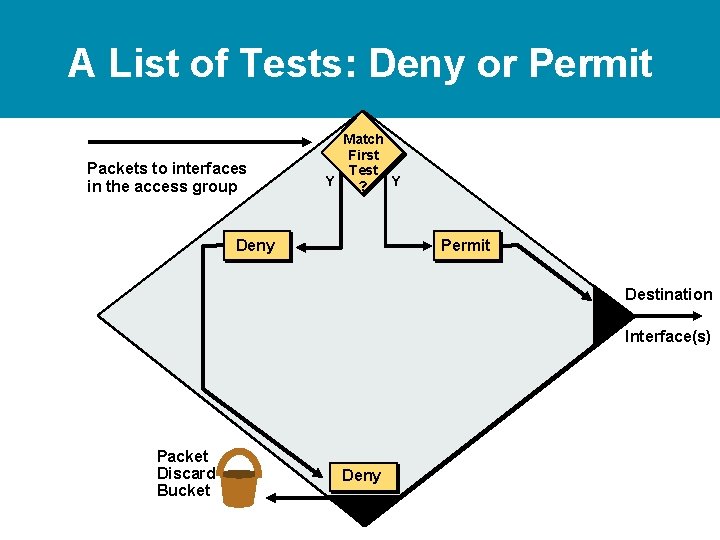
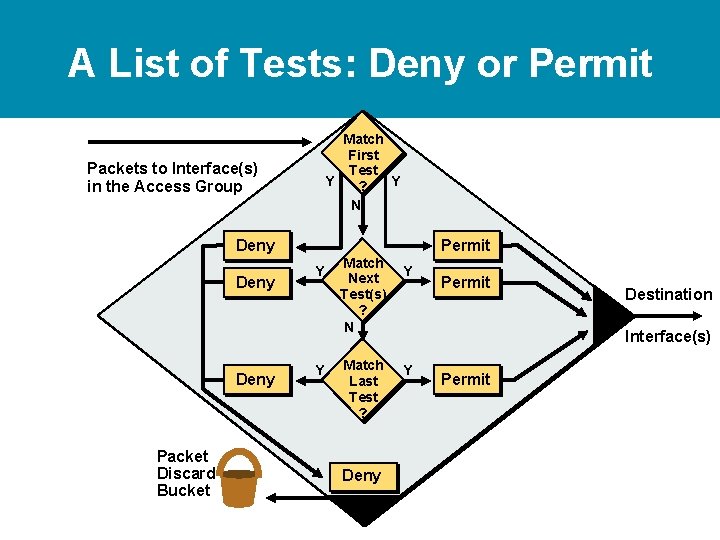
A List of Tests: Deny or Permit Packets to interfaces in the access group Match First Test Y Y ? Deny Permit Destination Interface(s) Packet Discard Bucket Deny
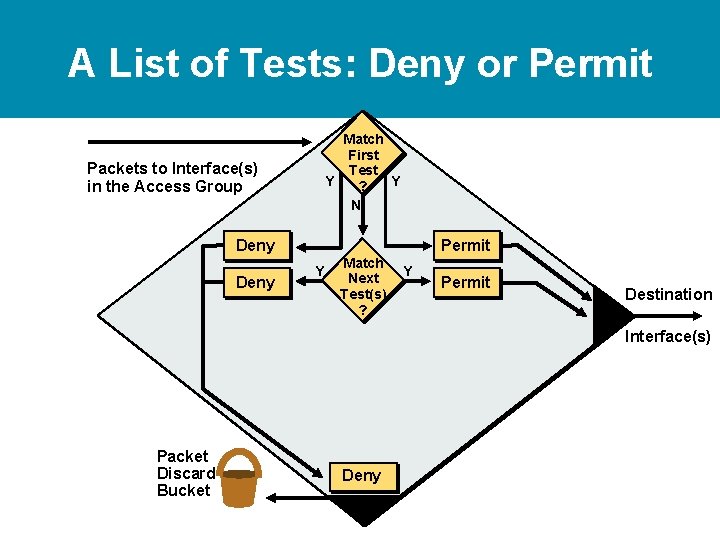
A List of Tests: Deny or Permit Match First Test Y Y ? N Packets to Interface(s) in the Access Group Deny Permit Y Match Next Test(s) ? Y Permit Destination Interface(s) Packet Discard Bucket Deny
A List of Tests: Deny or Permit Match First Test Y Y ? N Packets to Interface(s) in the Access Group Deny Packet Discard Bucket Permit Y Y Match Next Test(s) ? N Match Last Test ? Deny Y Permit Destination Interface(s) Y Permit
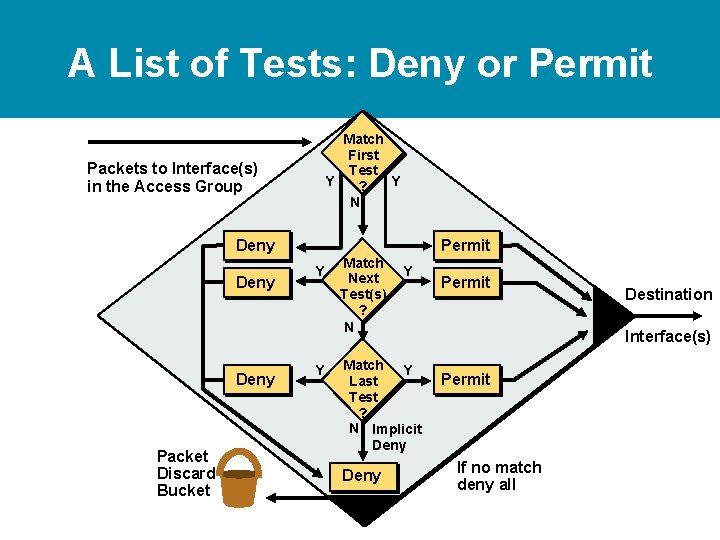
A List of Tests: Deny or Permit Match First Test Y Y ? N Packets to Interface(s) in the Access Group Deny Packet Discard Bucket Permit Y Y Match Next Test(s) ? N Y Match Y Last Test ? N Implicit Deny Permit Destination Interface(s) Permit If no match deny all
Access List Configuration Guidelines • • • Access list numbers indicate which protocol is filtered One access list per interface, per protocol, per direction The order of access list statements controls testing Most restrictive statements should be at the top of list There is an implicit deny as the last access list test— every list should have at least one permit statement • Create access lists before applying them to interfaces • Access list, filter traffic going through the router; they do not apply to traffic originated from the router
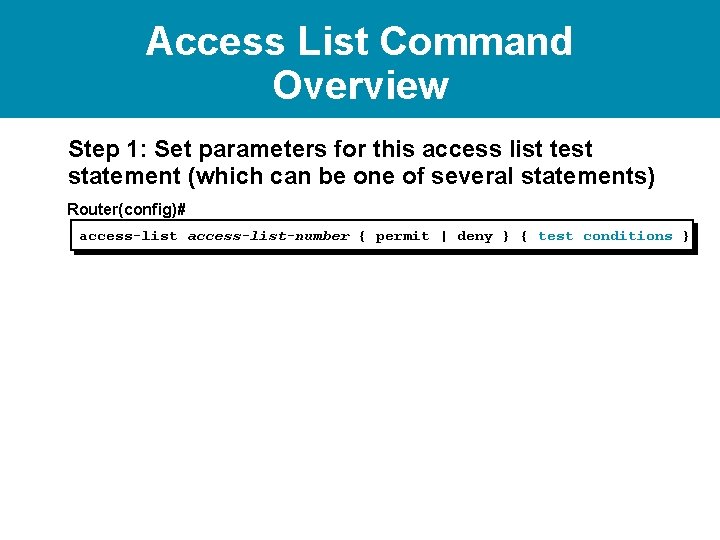
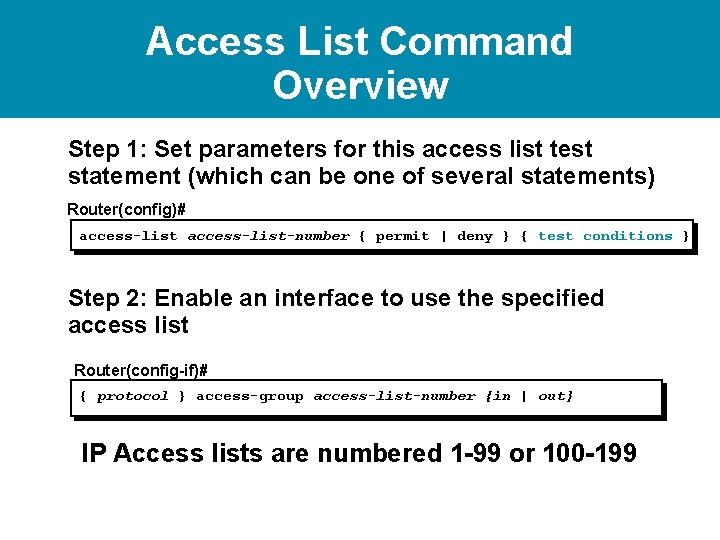
Access List Command Overview Step 1: Set parameters for this access list test statement (which can be one of several statements) Router(config)# access-list-number { permit | deny } { test conditions }
Access List Command Overview Step 1: Set parameters for this access list test statement (which can be one of several statements) Router(config)# access-list-number { permit | deny } { test conditions } Step 2: Enable an interface to use the specified access list Router(config-if)# { protocol } access-group access-list-number {in | out} IP Access lists are numbered 1 -99 or 100 -199
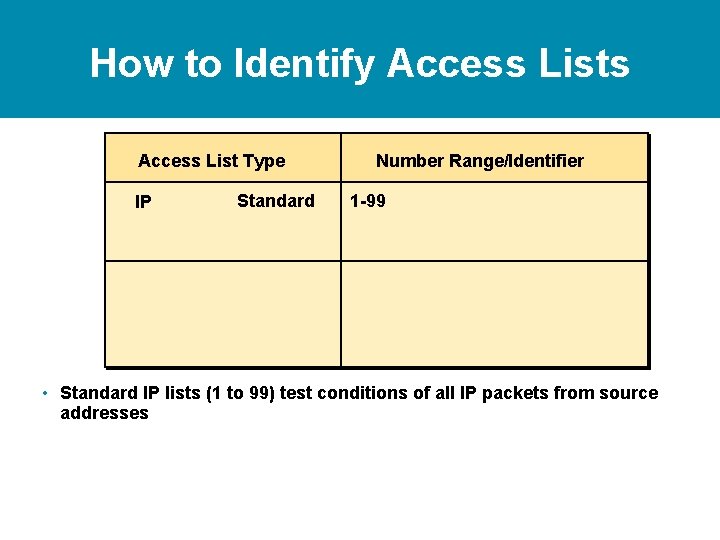
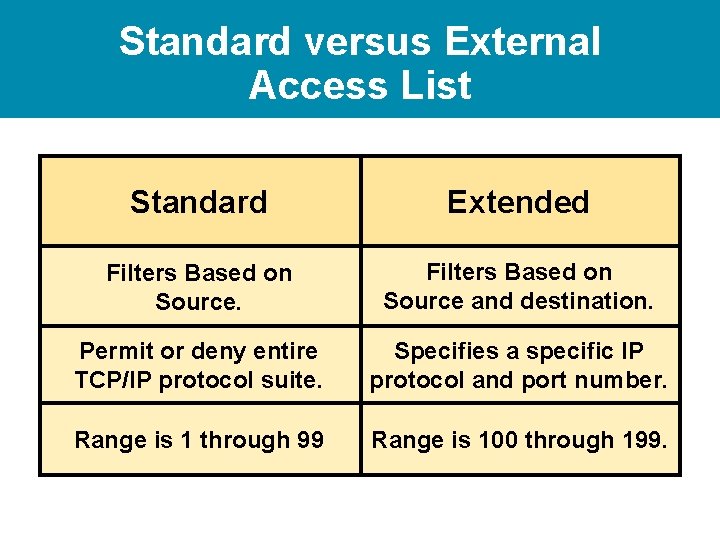
How to Identify Access Lists Access List Type IP Standard Number Range/Identifier 1 -99 • Standard IP lists (1 to 99) test conditions of all IP packets from source addresses
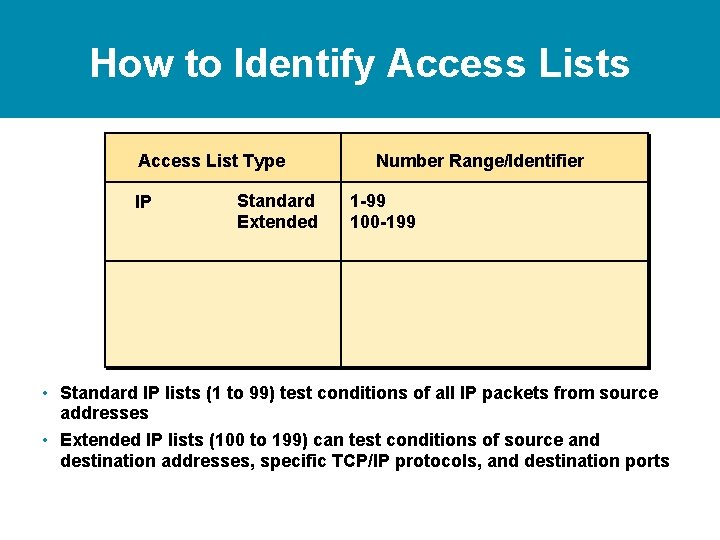
How to Identify Access Lists Access List Type IP Standard Extended Number Range/Identifier 1 -99 100 -199 • Standard IP lists (1 to 99) test conditions of all IP packets from source addresses • Extended IP lists (100 to 199) can test conditions of source and destination addresses, specific TCP/IP protocols, and destination ports
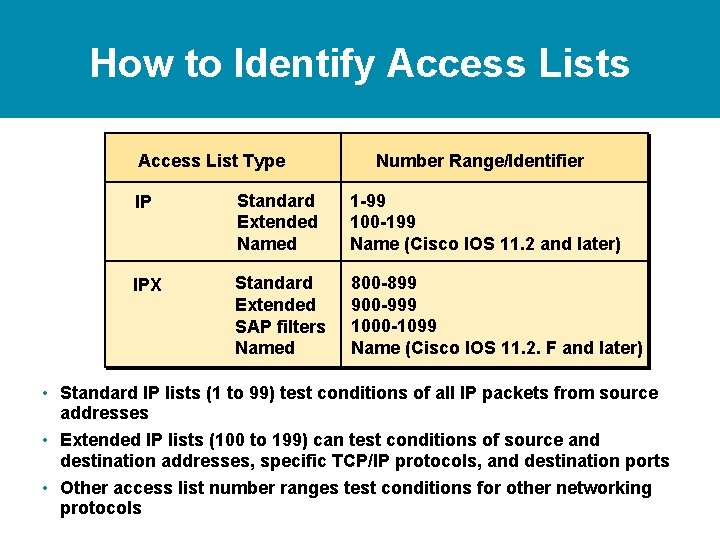
How to Identify Access Lists Access List Type Number Range/Identifier IP Standard Extended Named 1 -99 100 -199 Name (Cisco IOS 11. 2 and later) IPX Standard Extended SAP filters Named 800 -899 900 -999 1000 -1099 Name (Cisco IOS 11. 2. F and later) • Standard IP lists (1 to 99) test conditions of all IP packets from source addresses • Extended IP lists (100 to 199) can test conditions of source and destination addresses, specific TCP/IP protocols, and destination ports • Other access list number ranges test conditions for other networking protocols
Standard IP Access List Configuration Router(config)# access-list-number {permit|deny} source [mask] • Sets parameters for this list entry • IP standard access lists use 1 to 99 • Default wildcard mask = 0. 0 • “no access-list-number” removes entire access-list
Standard IP Access List Configuration Router(config)# access-list-number {permit|deny} source [mask] • Sets parameters for this list entry • IP standard access lists use 1 to 99 • Default wildcard mask = 0. 0 • “no access-list-number” removes entire access-list Router(config-if)# ip access-group access-list-number { in | out } • Activates the list on an interface • Sets inbound or outbound testing • “no ip access-group access-list-number” removes access-list from the interface
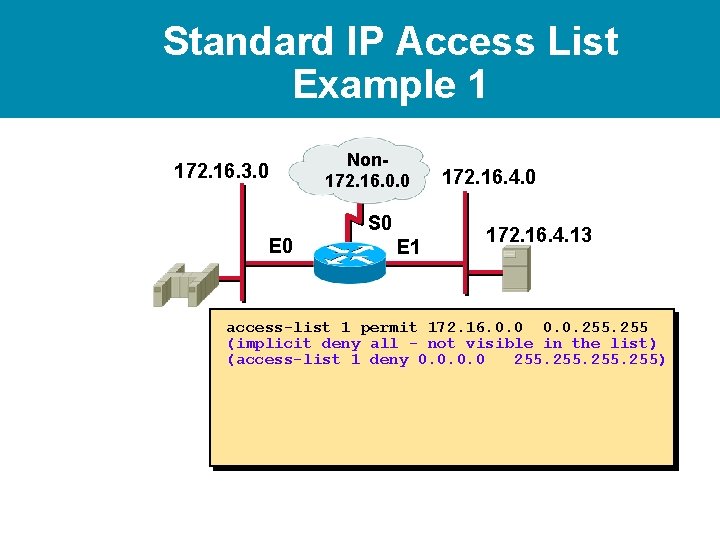
Standard IP Access List Example 1 172. 16. 3. 0 Non 172. 16. 0. 0 S 0 E 1 172. 16. 4. 0 172. 16. 4. 13 access-list 1 permit 172. 16. 0. 0. 255 (implicit deny all - not visible in the list) (access-list 1 deny 0. 0 255)
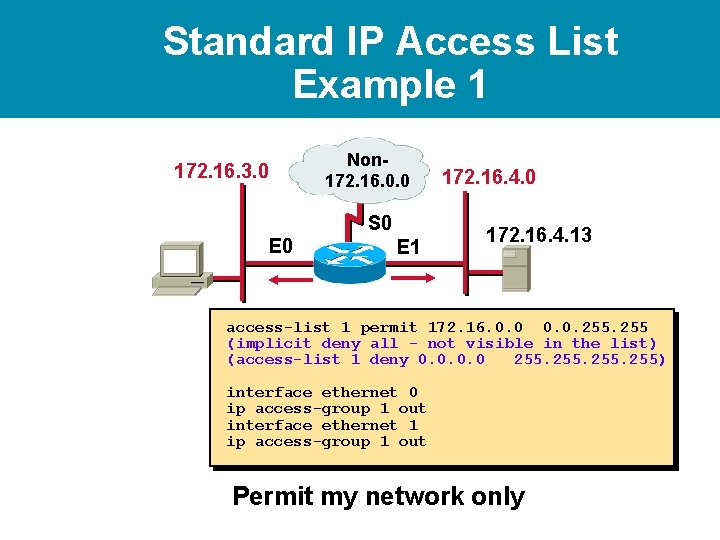
Standard IP Access List Example 1 172. 16. 3. 0 Non 172. 16. 0. 0 S 0 E 1 172. 16. 4. 0 172. 16. 4. 13 access-list 1 permit 172. 16. 0. 0. 255 (implicit deny all - not visible in the list) (access-list 1 deny 0. 0 255) interface ethernet 0 ip access-group 1 out interface ethernet 1 ip access-group 1 out Permit my network only
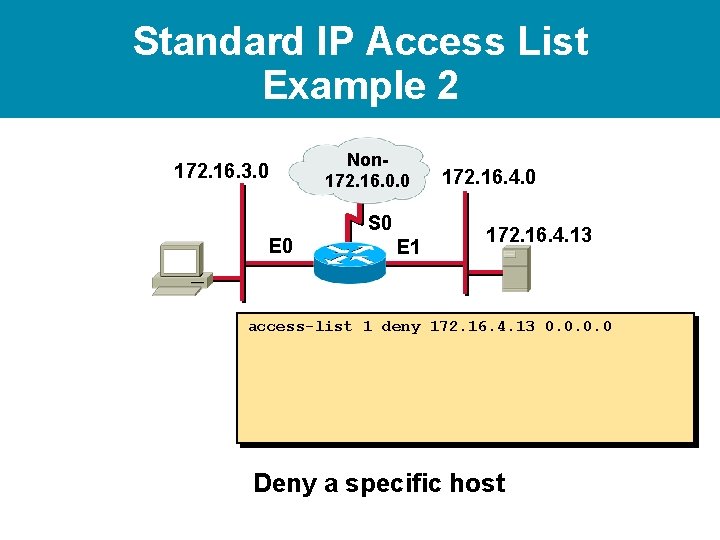
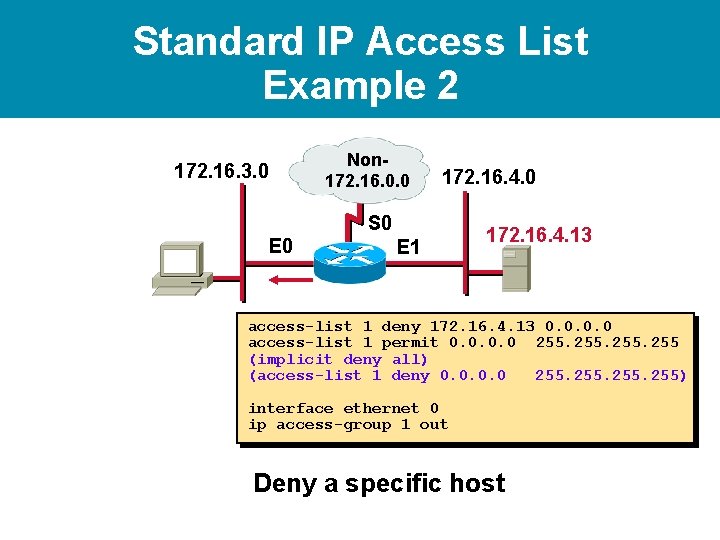
Standard IP Access List Example 2 172. 16. 3. 0 Non 172. 16. 0. 0 S 0 E 1 172. 16. 4. 0 172. 16. 4. 13 access-list 1 deny 172. 16. 4. 13 0. 0 Deny a specific host
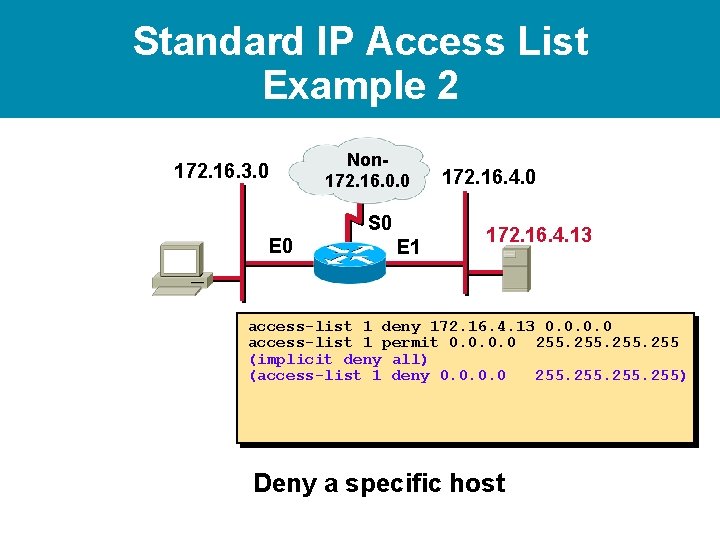
Standard IP Access List Example 2 172. 16. 3. 0 Non 172. 16. 0. 0 S 0 E 1 172. 16. 4. 0 172. 16. 4. 13 access-list 1 deny 172. 16. 4. 13 0. 0 access-list 1 permit 0. 0 255 (implicit deny all) (access-list 1 deny 0. 0 255) Deny a specific host
Standard IP Access List Example 2 172. 16. 3. 0 Non 172. 16. 0. 0 172. 16. 4. 0 S 0 E 1 172. 16. 4. 13 access-list 1 deny 172. 16. 4. 13 0. 0 access-list 1 permit 0. 0 255 (implicit deny all) (access-list 1 deny 0. 0 255) interface ethernet 0 ip access-group 1 out Deny a specific host
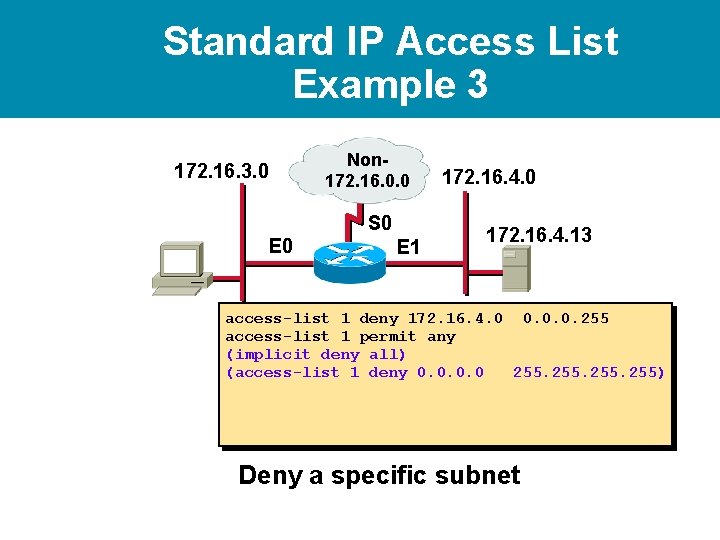
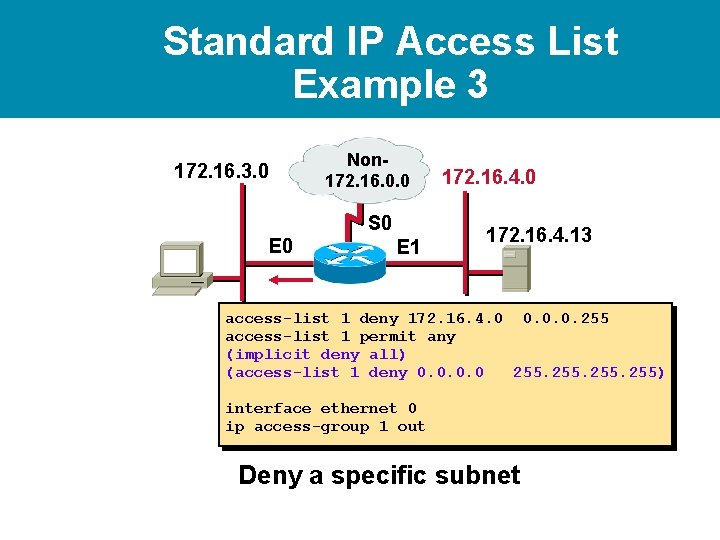
Standard IP Access List Example 3 172. 16. 3. 0 Non 172. 16. 0. 0 S 0 E 1 172. 16. 4. 0 172. 16. 4. 13 access-list 1 deny 172. 16. 4. 0 0. 0. 0. 255 access-list 1 permit any (implicit deny all) (access-list 1 deny 0. 0 255) Deny a specific subnet
Standard IP Access List Example 3 172. 16. 3. 0 Non 172. 16. 0. 0 S 0 E 1 172. 16. 4. 0 172. 16. 4. 13 access-list 1 deny 172. 16. 4. 0 0. 0. 0. 255 access-list 1 permit any (implicit deny all) (access-list 1 deny 0. 0 255) interface ethernet 0 ip access-group 1 out Deny a specific subnet
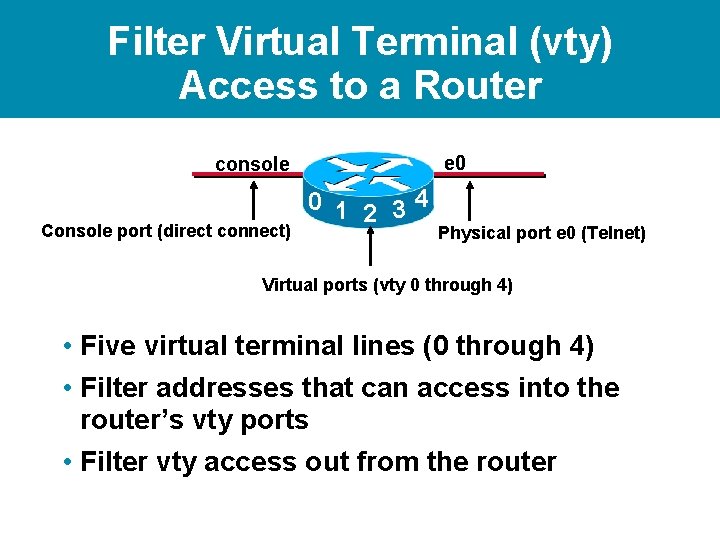
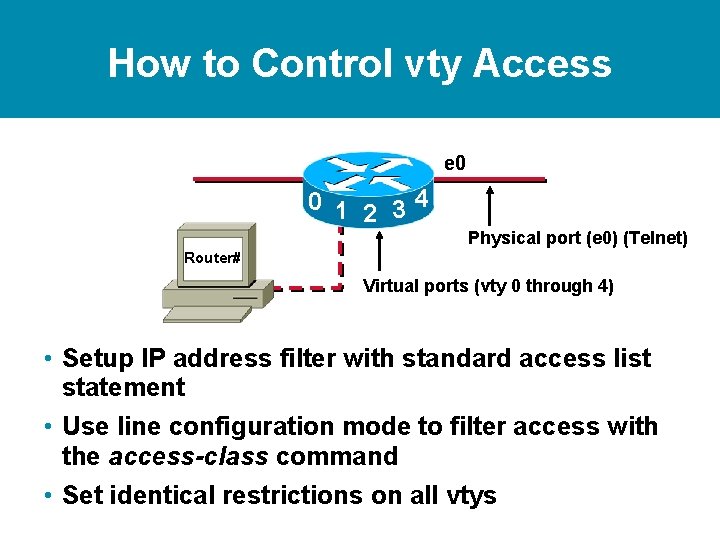
Filter Virtual Terminal (vty) Access to a Router e 0 console Console port (direct connect) 0 1 2 34 Physical port e 0 (Telnet) Virtual ports (vty 0 through 4) • Five virtual terminal lines (0 through 4) • Filter addresses that can access into the router’s vty ports • Filter vty access out from the router
How to Control vty Access e 0 0 1 2 34 Physical port (e 0) (Telnet) Router# Virtual ports (vty 0 through 4) • Setup IP address filter with standard access list statement • Use line configuration mode to filter access with the access-class command • Set identical restrictions on all vtys
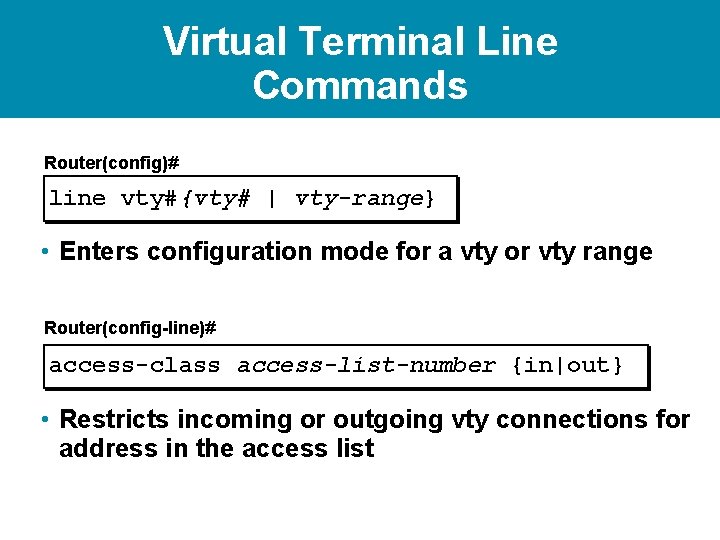
Virtual Terminal Line Commands Router(config)# line vty#{vty# | vty-range} • Enters configuration mode for a vty or vty range Router(config-line)# access-class access-list-number {in|out} • Restricts incoming or outgoing vty connections for address in the access list
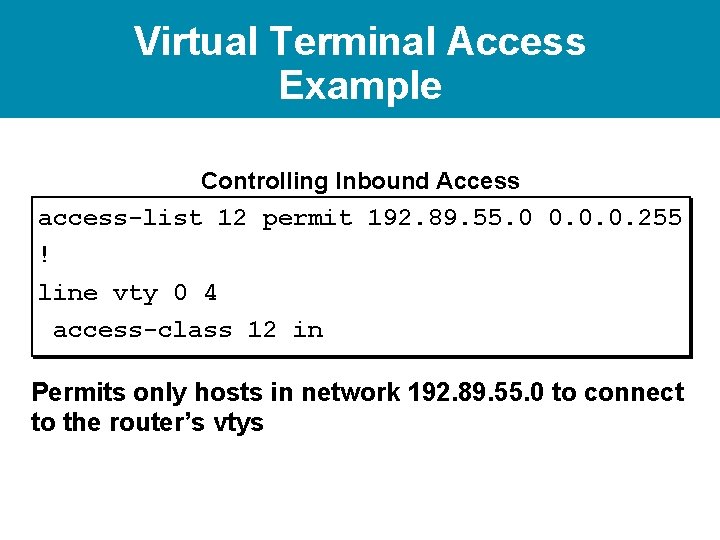
Virtual Terminal Access Example Controlling Inbound Access access-list 12 permit 192. 89. 55. 0 0. 0. 0. 255 ! line vty 0 4 access-class 12 in Permits only hosts in network 192. 89. 55. 0 to connect to the router’s vtys
Standard versus External Access List Standard Extended Filters Based on Source and destination. Permit or deny entire TCP/IP protocol suite. Specifies a specific IP protocol and port number. Range is 1 through 99 Range is 100 through 199.
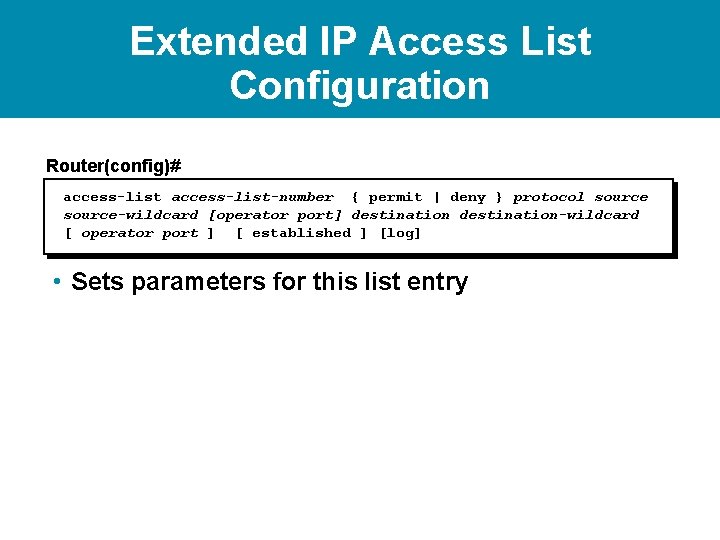
Extended IP Access List Configuration Router(config)# access-list-number { permit | deny } protocol source-wildcard [operator port] destination-wildcard [ operator port ] [ established ] [log] • Sets parameters for this list entry
Extended IP Access List Configuration Router(config)# { permit | deny [operator port] [ operator port access-list-number } protocol source-wildcard destination-wildcard ] [ established ] [log] • Sets parameters for this list entry Router(config-if)# ip access-group access-listnumber { in | out } • Activates the extended list on an interface
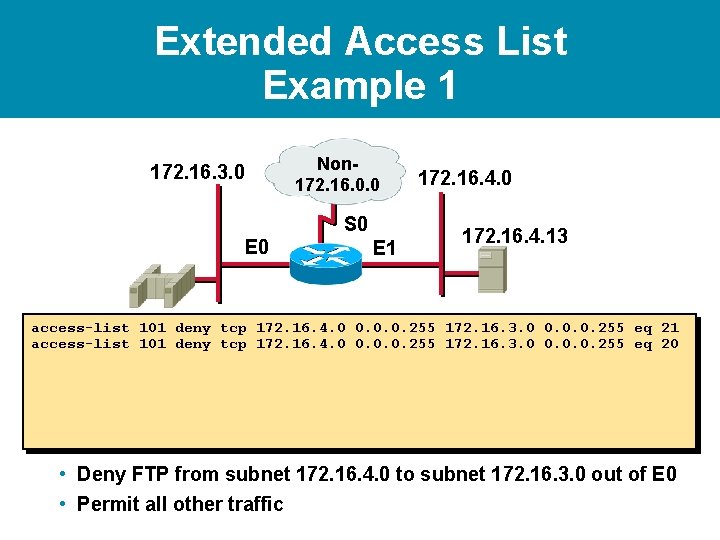
Extended Access List Example 1 172. 16. 3. 0 Non 172. 16. 0. 0 S 0 E 1 172. 16. 4. 0 172. 16. 4. 13 access-list 101 deny tcp 172. 16. 4. 0 0. 0. 0. 255 172. 16. 3. 0 0. 0. 0. 255 eq 21 access-list 101 deny tcp 172. 16. 4. 0 0. 0. 0. 255 172. 16. 3. 0 0. 0. 0. 255 eq 20 • Deny FTP from subnet 172. 16. 4. 0 to subnet 172. 16. 3. 0 out of E 0 • Permit all other traffic
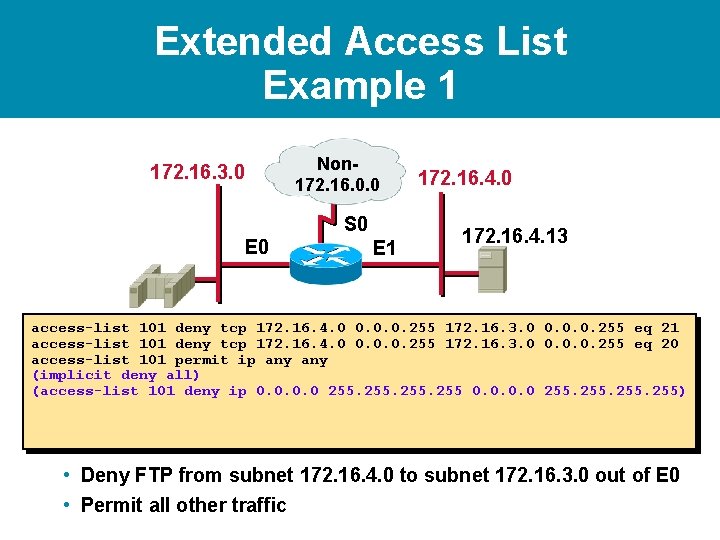
Extended Access List Example 1 172. 16. 3. 0 Non 172. 16. 0. 0 S 0 E 1 172. 16. 4. 0 172. 16. 4. 13 access-list 101 deny tcp 172. 16. 4. 0 0. 0. 0. 255 172. 16. 3. 0 0. 0. 0. 255 eq 21 access-list 101 deny tcp 172. 16. 4. 0 0. 0. 0. 255 172. 16. 3. 0 0. 0. 0. 255 eq 20 access-list 101 permit ip any (implicit deny all) (access-list 101 deny ip 0. 0 255) • Deny FTP from subnet 172. 16. 4. 0 to subnet 172. 16. 3. 0 out of E 0 • Permit all other traffic
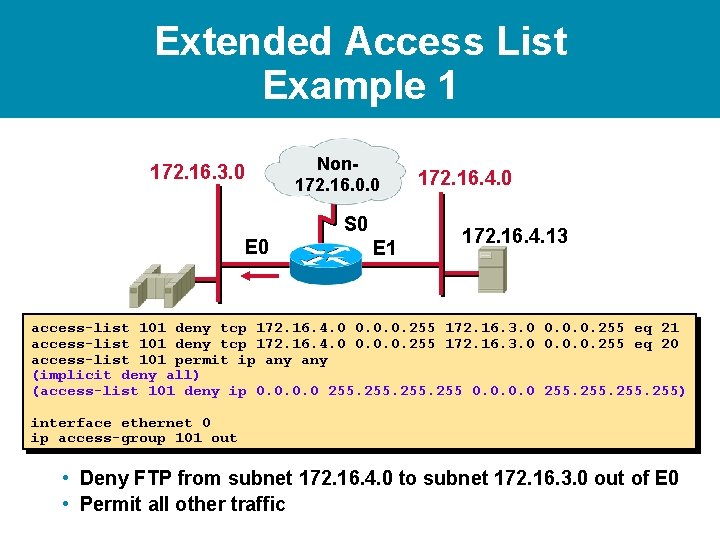
Extended Access List Example 1 172. 16. 3. 0 Non 172. 16. 0. 0 S 0 E 1 172. 16. 4. 0 172. 16. 4. 13 access-list 101 deny tcp 172. 16. 4. 0 0. 0. 0. 255 172. 16. 3. 0 0. 0. 0. 255 eq 21 access-list 101 deny tcp 172. 16. 4. 0 0. 0. 0. 255 172. 16. 3. 0 0. 0. 0. 255 eq 20 access-list 101 permit ip any (implicit deny all) (access-list 101 deny ip 0. 0 255) interface ethernet 0 ip access-group 101 out • Deny FTP from subnet 172. 16. 4. 0 to subnet 172. 16. 3. 0 out of E 0 • Permit all other traffic
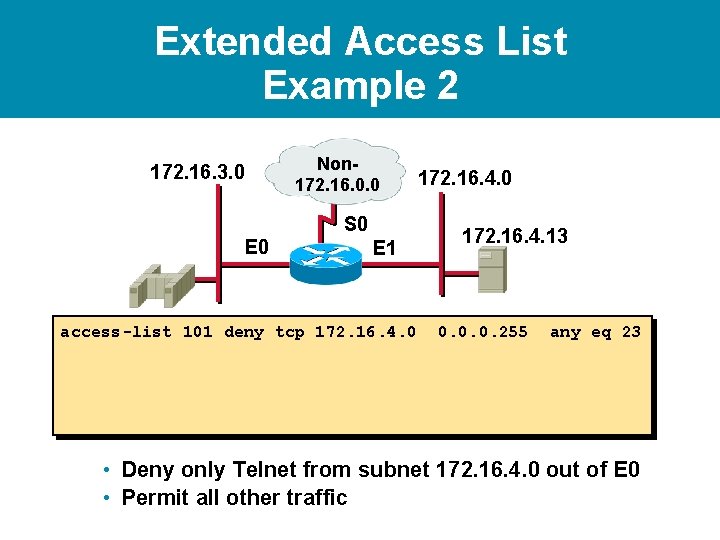
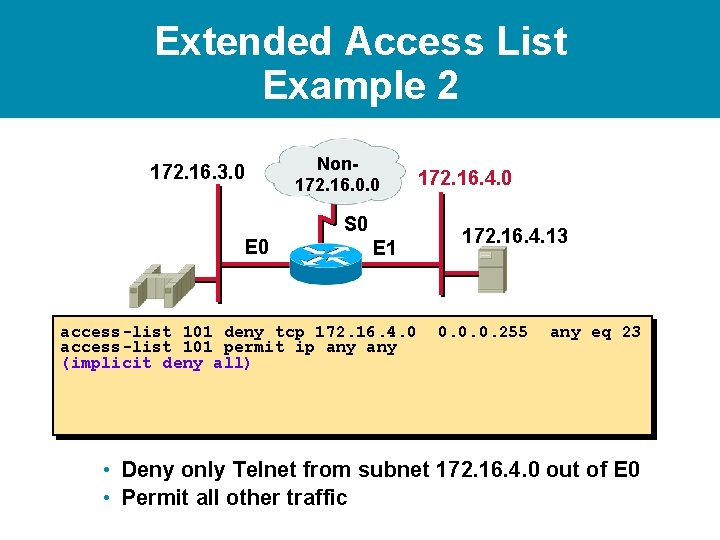
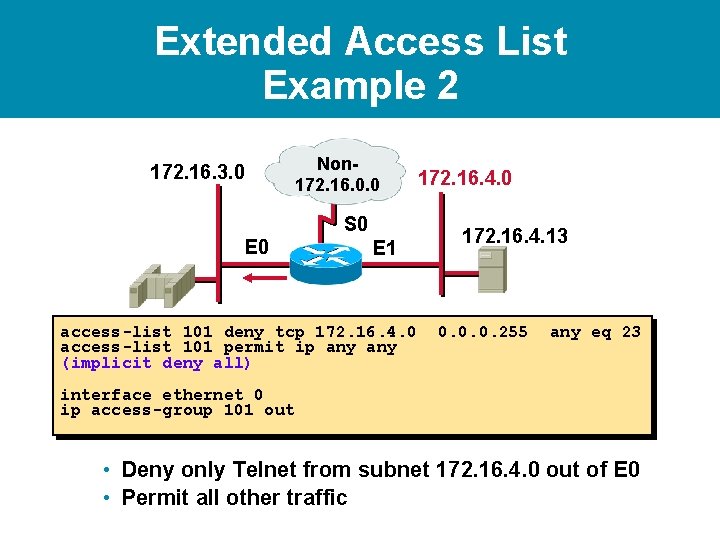
Extended Access List Example 2 172. 16. 3. 0 Non 172. 16. 0. 0 S 0 E 1 access-list 101 deny tcp 172. 16. 4. 0 172. 16. 4. 13 0. 0. 0. 255 any eq 23 • Deny only Telnet from subnet 172. 16. 4. 0 out of E 0 • Permit all other traffic
Extended Access List Example 2 172. 16. 3. 0 Non 172. 16. 0. 0 S 0 E 1 access-list 101 deny tcp 172. 16. 4. 0 access-list 101 permit ip any (implicit deny all) 172. 16. 4. 0 172. 16. 4. 13 0. 0. 0. 255 any eq 23 • Deny only Telnet from subnet 172. 16. 4. 0 out of E 0 • Permit all other traffic
Extended Access List Example 2 172. 16. 3. 0 Non 172. 16. 0. 0 S 0 E 1 access-list 101 deny tcp 172. 16. 4. 0 access-list 101 permit ip any (implicit deny all) 172. 16. 4. 0 172. 16. 4. 13 0. 0. 0. 255 any eq 23 interface ethernet 0 ip access-group 101 out • Deny only Telnet from subnet 172. 16. 4. 0 out of E 0 • Permit all other traffic
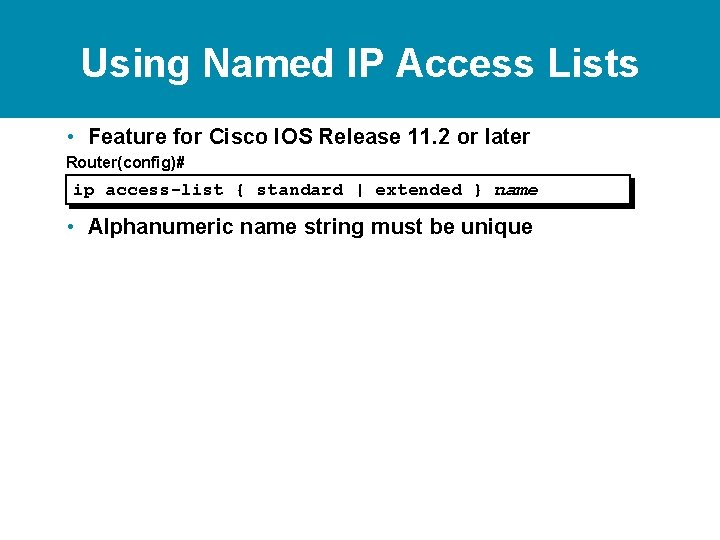
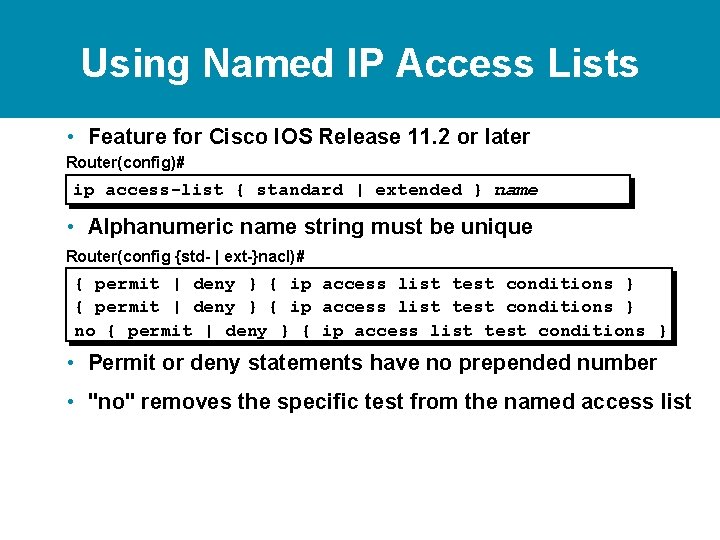
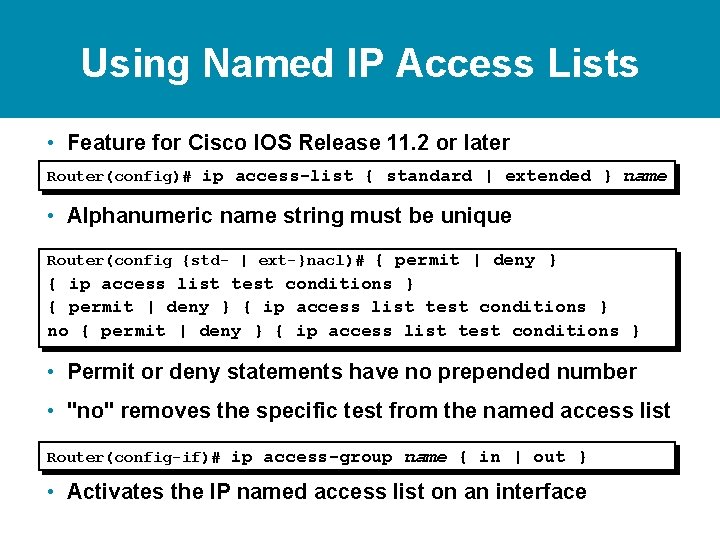
Using Named IP Access Lists • Feature for Cisco IOS Release 11. 2 or later Router(config)# ip access-list { standard | extended } name • Alphanumeric name string must be unique
Using Named IP Access Lists • Feature for Cisco IOS Release 11. 2 or later Router(config)# ip access-list { standard | extended } name • Alphanumeric name string must be unique Router(config {std- | ext-}nacl)# { permit | deny } { ip access list test conditions } no { permit | deny } { ip access list test conditions } • Permit or deny statements have no prepended number • "no" removes the specific test from the named access list
Using Named IP Access Lists • Feature for Cisco IOS Release 11. 2 or later Router(config)# ip access-list { standard | extended } name • Alphanumeric name string must be unique Router(config {std- | ext-}nacl)# { permit | deny } { ip access list test conditions } no { permit | deny } { ip access list test conditions } • Permit or deny statements have no prepended number • "no" removes the specific test from the named access list Router(config-if)# ip access-group name { in | out } • Activates the IP named access list on an interface
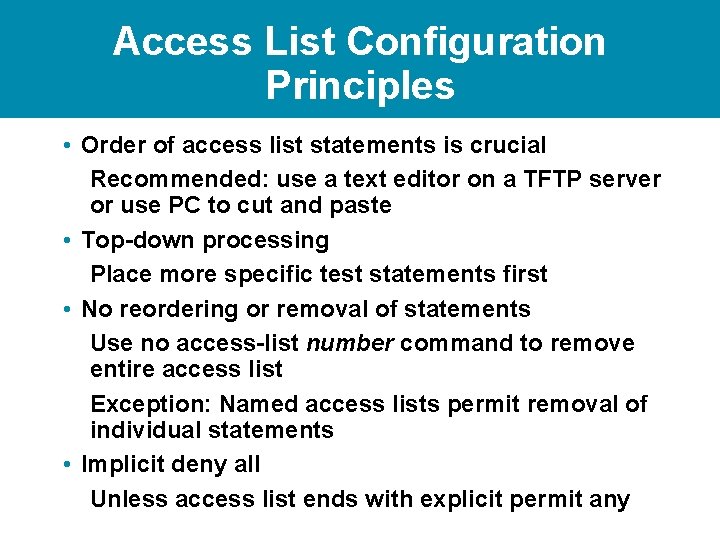
Access List Configuration Principles • Order of access list statements is crucial Recommended: use a text editor on a TFTP server or use PC to cut and paste • Top-down processing Place more specific test statements first • No reordering or removal of statements Use no access-list number command to remove entire access list Exception: Named access lists permit removal of individual statements • Implicit deny all Unless access list ends with explicit permit any
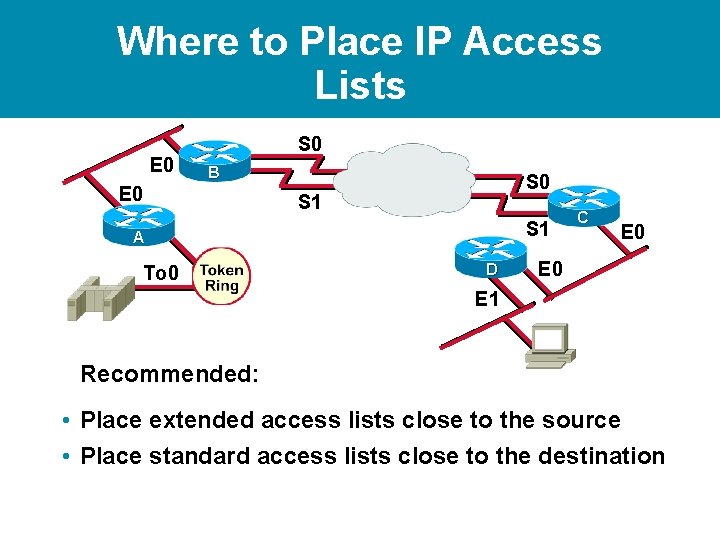
Where to Place IP Access Lists E 0 S 0 B E 0 S 1 S 1 A To 0 D C E 0 E 1 Recommended: • Place extended access lists close to the source • Place standard access lists close to the destination
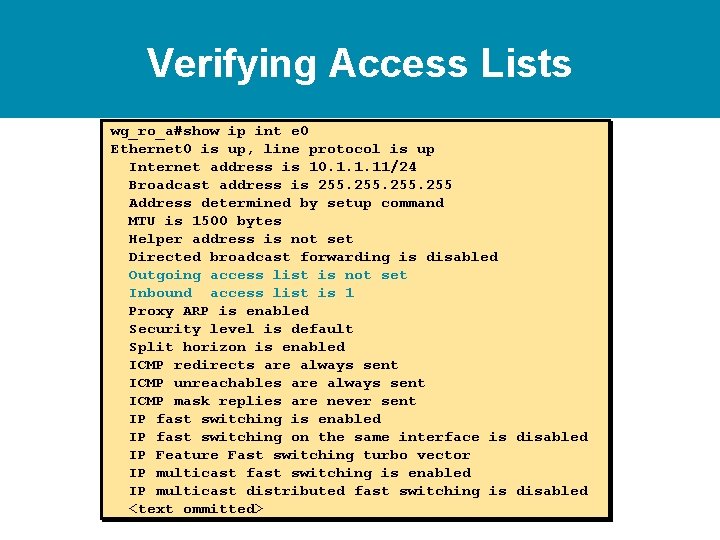
Verifying Access Lists wg_ro_a#show ip int e 0 Ethernet 0 is up, line protocol is up Internet address is 10. 1. 1. 11/24 Broadcast address is 255 Address determined by setup command MTU is 1500 bytes Helper address is not set Directed broadcast forwarding is disabled Outgoing access list is not set Inbound access list is 1 Proxy ARP is enabled Security level is default Split horizon is enabled ICMP redirects are always sent ICMP unreachables are always sent ICMP mask replies are never sent IP fast switching is enabled IP fast switching on the same interface is disabled IP Feature Fast switching turbo vector IP multicast fast switching is enabled IP multicast distributed fast switching is disabled <text ommitted>
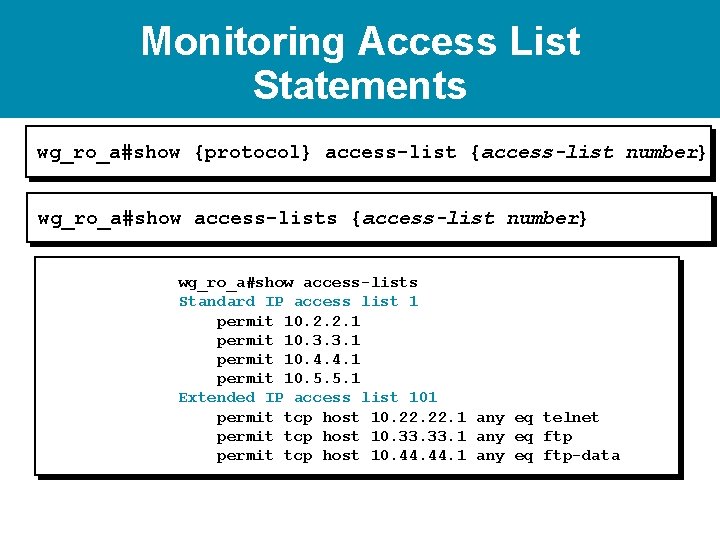
Monitoring Access List Statements wg_ro_a#show {protocol} access-list {access-list number} wg_ro_a#show access-lists Standard IP access list 1 permit 10. 2. 2. 1 permit 10. 3. 3. 1 permit 10. 4. 4. 1 permit 10. 5. 5. 1 Extended IP access list 101 permit tcp host 10. 22. 1 any eq telnet permit tcp host 10. 33. 1 any eq ftp permit tcp host 10. 44. 1 any eq ftp-data
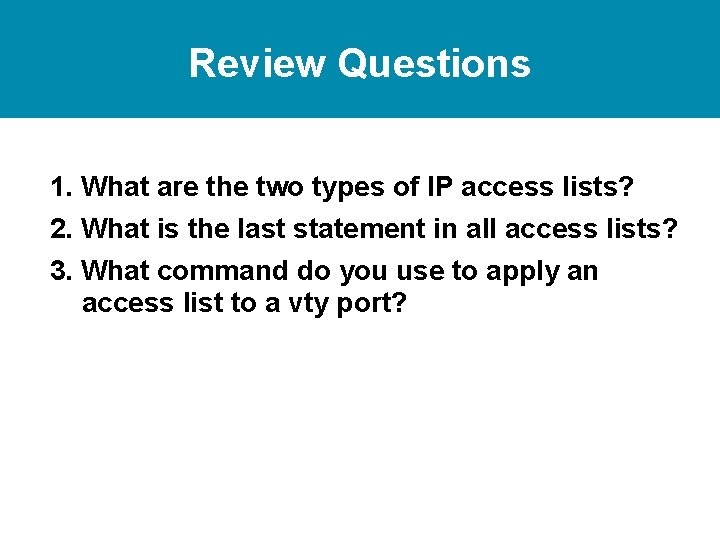
Review Questions 1. What are the two types of IP access lists? 2. What is the last statement in all access lists? 3. What command do you use to apply an access list to a vty port?
Lab https: //drive. google. com/drive/folders/1 Ii 0 m. KYa 4 Z 4 NI 8 e. Qwrn. JU 3 Cgg. VTQo 0 Skt? u sp=sharing