
ACADEMIC DIVISION LEAVE OF ABSENCE LOA Doc No
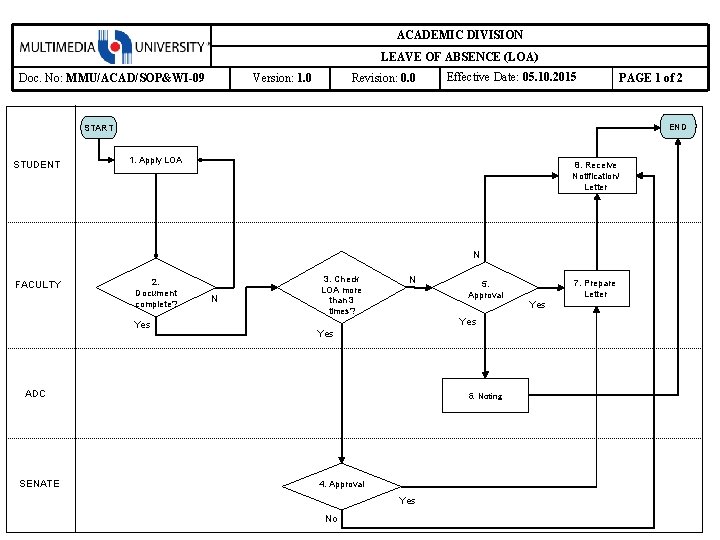
ACADEMIC DIVISION LEAVE OF ABSENCE (LOA) Doc. No: MMU/ACAD/SOP&WI-09 Version: 1. 0 Revision: 0. 0 Effective Date: 05. 10. 2015 PAGE 1 of 2 END START STUDENT 1. Apply LOA 8. Receive Notification/ Letter N FACULTY 2. Document complete? Yes N 3. Check LOA more than 3 times? N Yes ADC SENATE 5. Approval 6. Noting 4. Approval Yes No 7. Prepare Letter Yes
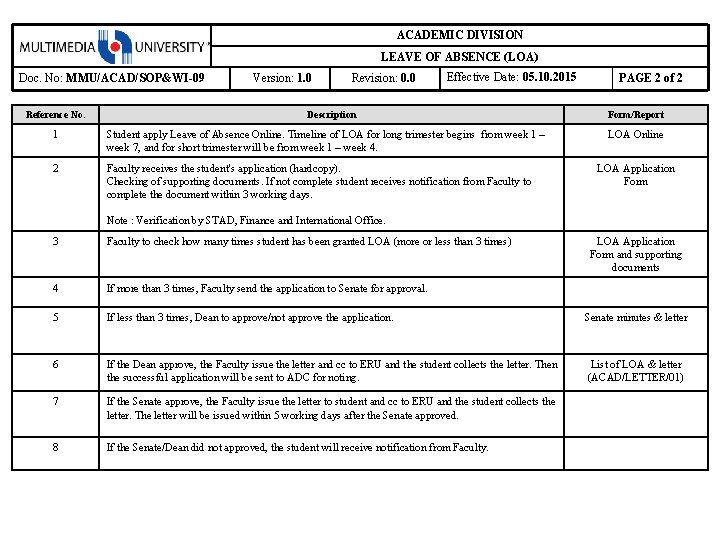
ACADEMIC DIVISION LEAVE OF ABSENCE (LOA) Doc. No: MMU/ACAD/SOP&WI-09 Reference No. Version: 1. 0 Revision: 0. 0 Effective Date: 05. 10. 2015 Description 1 Student apply Leave of Absence Online. Timeline of LOA for long trimester begins from week 1 – week 7, and for short trimester will be from week 1 – week 4. 2 Faculty receives the student’s application (hardcopy). Checking of supporting documents. If not complete student receives notification from Faculty to complete the document within 3 working days. PAGE 2 of 2 Form/Report LOA Online LOA Application Form Note : Verification by STAD, Finance and International Office. 3 Faculty to check how many times student has been granted LOA (more or less than 3 times) LOA Application Form and supporting documents 4 If more than 3 times, Faculty send the application to Senate for approval. 5 If less than 3 times, Dean to approve/not approve the application. Senate minutes & letter 6 If the Dean approve, the Faculty issue the letter and cc to ERU and the student collects the letter. Then the successful application will be sent to ADC for noting. List of LOA & letter (ACAD/LETTER/01) 7 If the Senate approve, the Faculty issue the letter to student and cc to ERU and the student collects the letter. The letter will be issued within 5 working days after the Senate approved. 8 If the Senate/Dean did not approved, the student will receive notification from Faculty.
- Slides: 2