
A Simple Approach to Modernize Web Speed with

A Simple Approach to Modernize Web. Speed with Kendo UI Jordi Sastre, June 2016
About the Presenter § Discovered Progress in 1991 § Joined Progress Technical Support in 1995 in The Netherlands § Moved to IT and Bedford in 2001 § Currently IT Software Architect in Progress IT § Always trying to find the simplest way to provide the most value 2
Objective § Describe an approach to combine Web. Speed and Kendo UI where both technologies are used to their best abilities: Open. Edge ABL in the backend for business logic and Kendo UI in the frontend for rich web presentation § Based on real experience from business applications developed and used internally at Progress § The main idea is to communicate concepts, not code § Provide some hints (yes, with code) 3
Agenda § Java. Script Frameworks & Kendo UI § Development Approach § Architecture § Demo of simple Kendo UI application § Hints and code snippets § Summary 4
Java. Script Frameworks § Most common technology for developing Web rich applications (RIA) § Wikipedia lists 54 RIA frameworks, 29 of them based on Java. Script § How to choose a Java. Script framework? • 1) Do your research, try them, and pick the one you like the most • 2) Trust Progress and use Kendo UI § You want to spend your effort on solving business needs, not technology challenges 5
Kendo UI § It’s not easy – Ramp up may take a while depending on your background § Requires HTML, Java. Script and j. Query knowledge, the more the better § Normally used along with other frameworks such as Angular. JS and Bootstrap § There isn’t a single way to implement a functionality, often times there isn’t “the correct way” § The outcome is good § Kendo online help: • Google • http: //docs. telerik. com • http: //www. telerik. com/support/demos • http: //www. telerik. com/forums 6
Development Approach § Approach Design Development • Choose an approach for all developments – Think first, code later – There around 1, 000, 001 different ways to do something (i. e. “there is my way and around a million more”) – Just choose your way and stick to it – The approach should result in a list of principles • Make sure all applications and components are designed following the principles • If the above is successful, development is easy 7
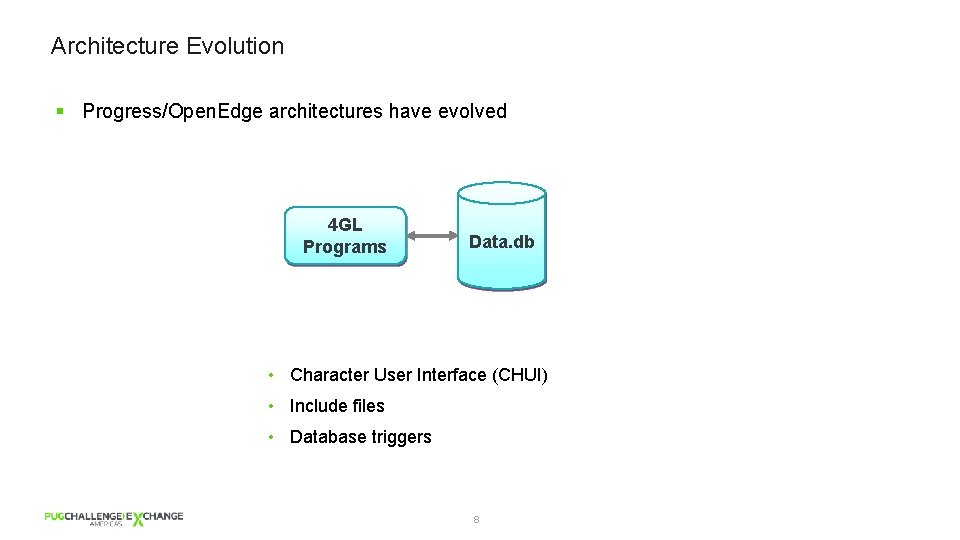
Architecture Evolution § Progress/Open. Edge architectures have evolved 4 GL Programs Data. db • Character User Interface (CHUI) • Include files • Database triggers 8
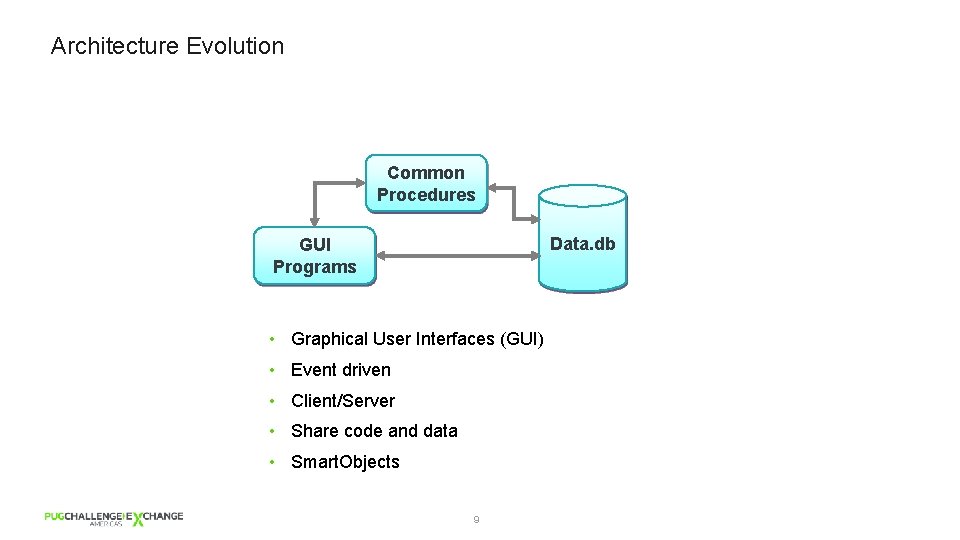
Architecture Evolution Common Procedures Data. db GUI Programs • Graphical User Interfaces (GUI) • Event driven • Client/Server • Share code and data • Smart. Objects 9
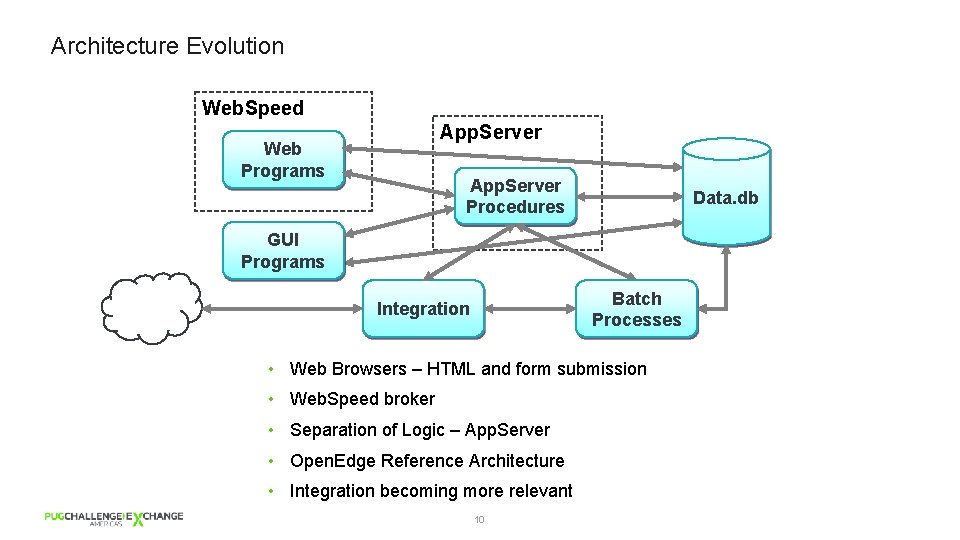
Architecture Evolution Web. Speed App. Server Web Programs App. Server Procedures Data. db GUI Programs Batch Processes Integration • Web Browsers – HTML and form submission • Web. Speed broker • Separation of Logic – App. Server • Open. Edge Reference Architecture • Integration becoming more relevant 10
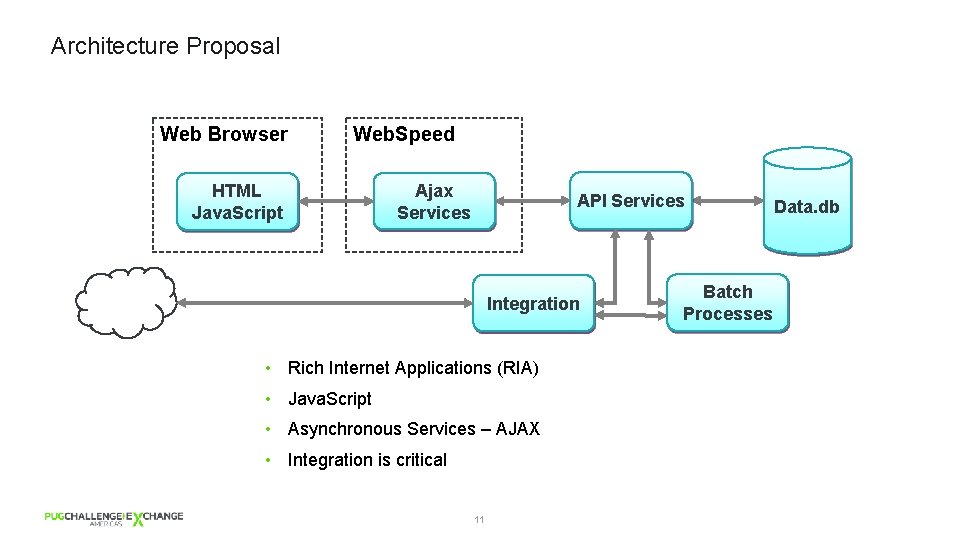
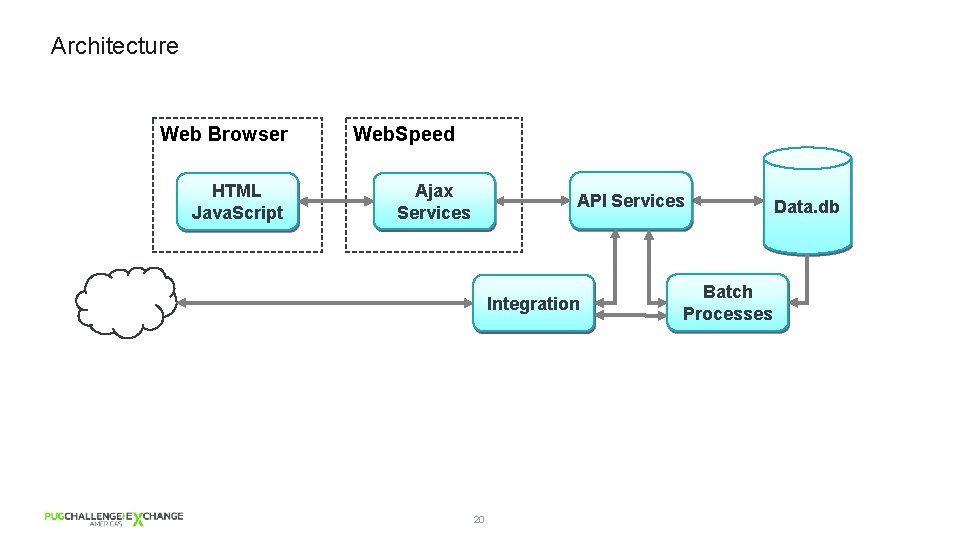
Architecture Proposal Web Browser Web. Speed HTML Java. Script Ajax Services API Services Integration • Rich Internet Applications (RIA) • Java. Script • Asynchronous Services – AJAX • Integration is critical 11 Batch Processes Data. db
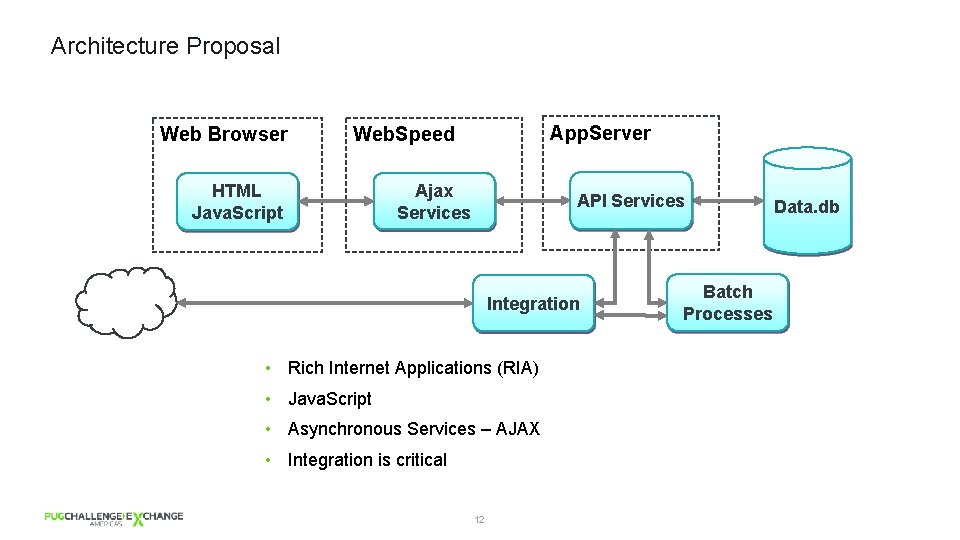
Architecture Proposal Web Browser App. Server Web. Speed HTML Java. Script Ajax Services API Services Integration • Rich Internet Applications (RIA) • Java. Script • Asynchronous Services – AJAX • Integration is critical 12 Batch Processes Data. db
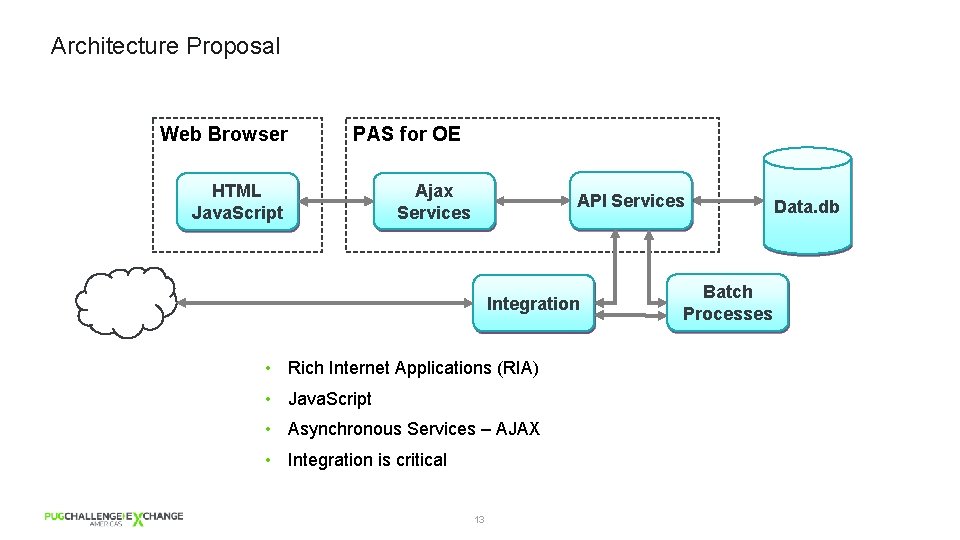
Architecture Proposal Web Browser PAS for OE HTML Java. Script Ajax Services API Services Integration • Rich Internet Applications (RIA) • Java. Script • Asynchronous Services – AJAX • Integration is critical 13 Batch Processes Data. db
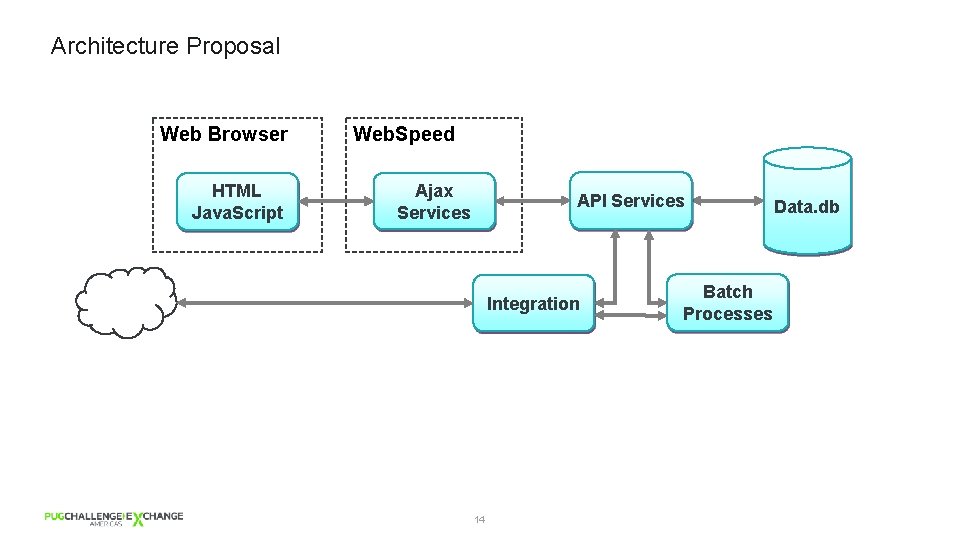
Architecture Proposal Web Browser HTML Java. Script Web. Speed Ajax Services API Services Integration 14 Batch Processes Data. db
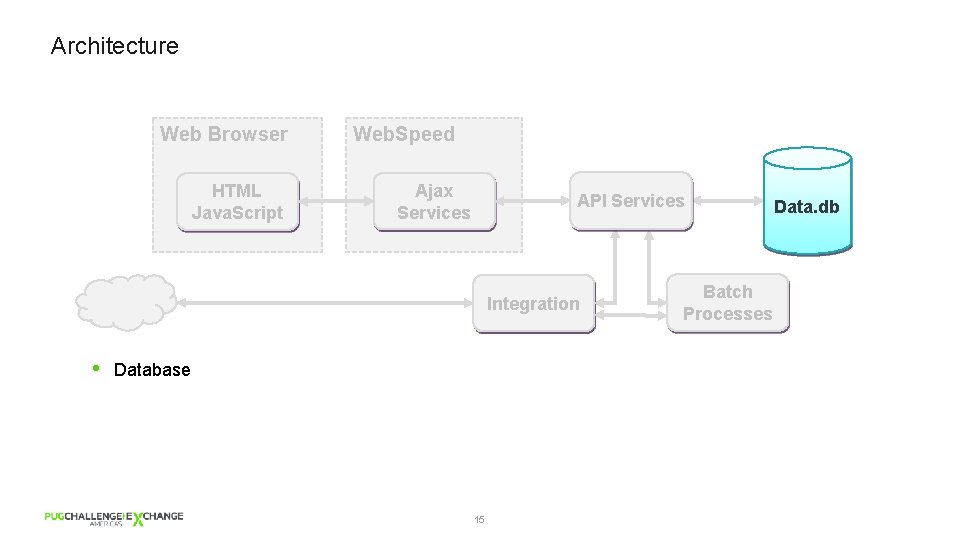
Architecture Web Browser HTML Java. Script Web. Speed Ajax Services API Services Integration • Database 15 Batch Processes Data. db
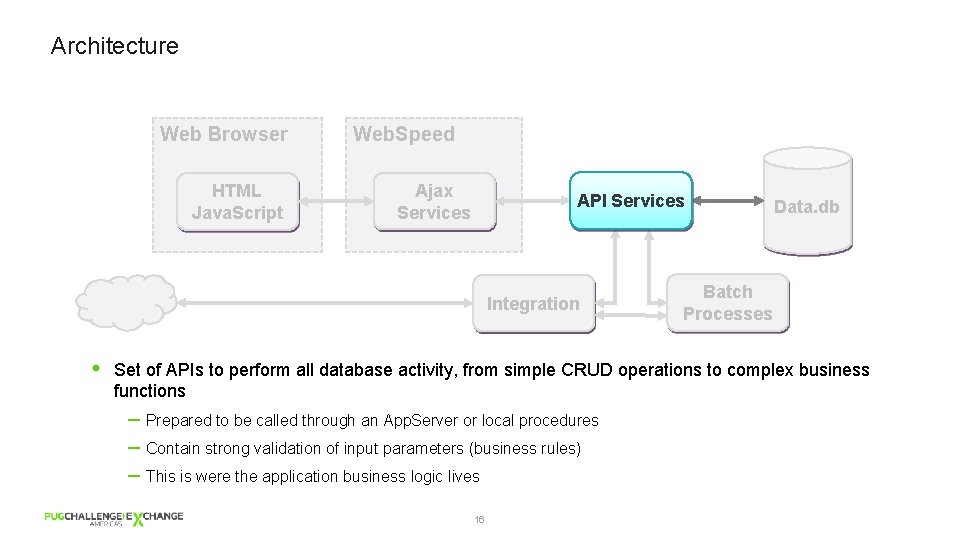
Architecture Web Browser HTML Java. Script Web. Speed Ajax Services API Services Integration • Data. db Batch Processes Set of APIs to perform all database activity, from simple CRUD operations to complex business functions – Prepared to be called through an App. Server or local procedures – Contain strong validation of input parameters (business rules) – This is were the application business logic lives 16
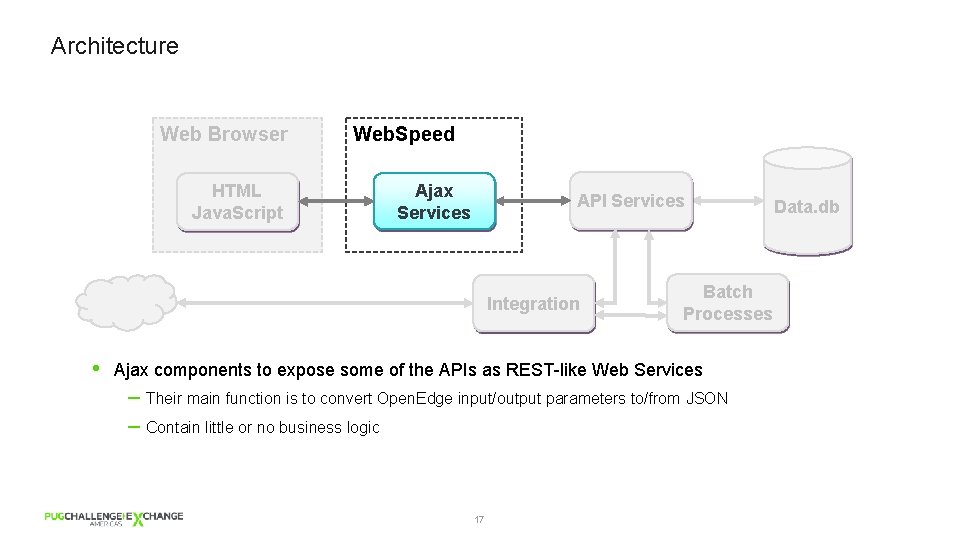
Architecture Web Browser HTML Java. Script Web. Speed Ajax Services API Services Integration • Batch Processes Ajax components to expose some of the APIs as REST-like Web Services – Their main function is to convert Open. Edge input/output parameters to/from JSON – Contain little or no business logic 17 Data. db
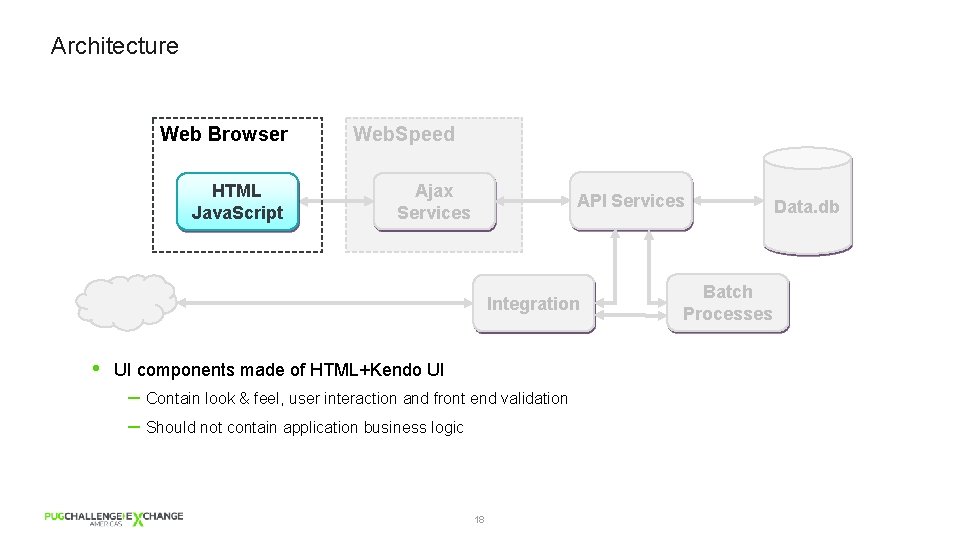
Architecture Web Browser HTML Java. Script Web. Speed Ajax Services API Services Integration • UI components made of HTML+Kendo UI – Contain look & feel, user interaction and front end validation – Should not contain application business logic 18 Batch Processes Data. db
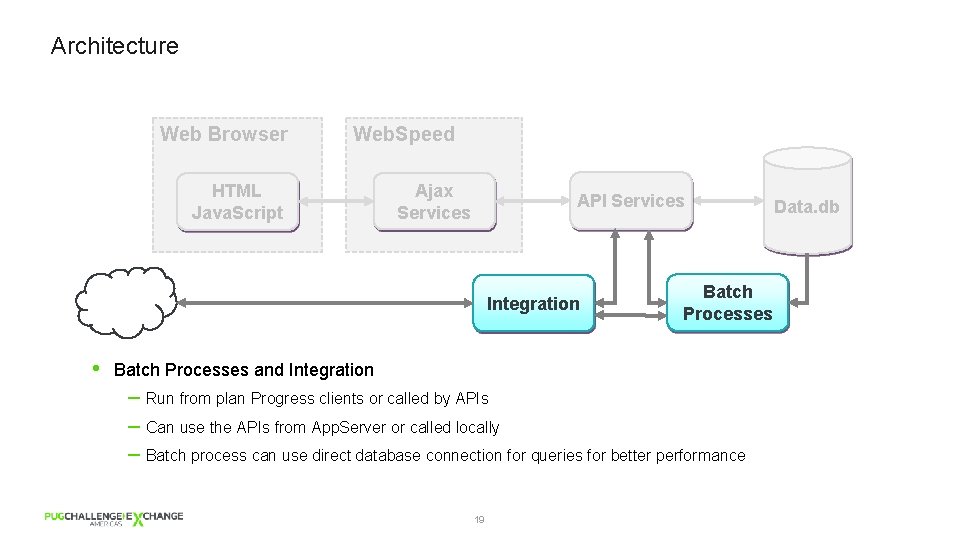
Architecture Web Browser Web. Speed HTML Java. Script Ajax Services API Services Integration • Batch Processes and Integration – Run from plan Progress clients or called by APIs – Can use the APIs from App. Server or called locally – Batch process can use direct database connection for queries for better performance 19 Data. db
Architecture Web Browser HTML Java. Script Web. Speed Ajax Services API Services Integration 20 Batch Processes Data. db
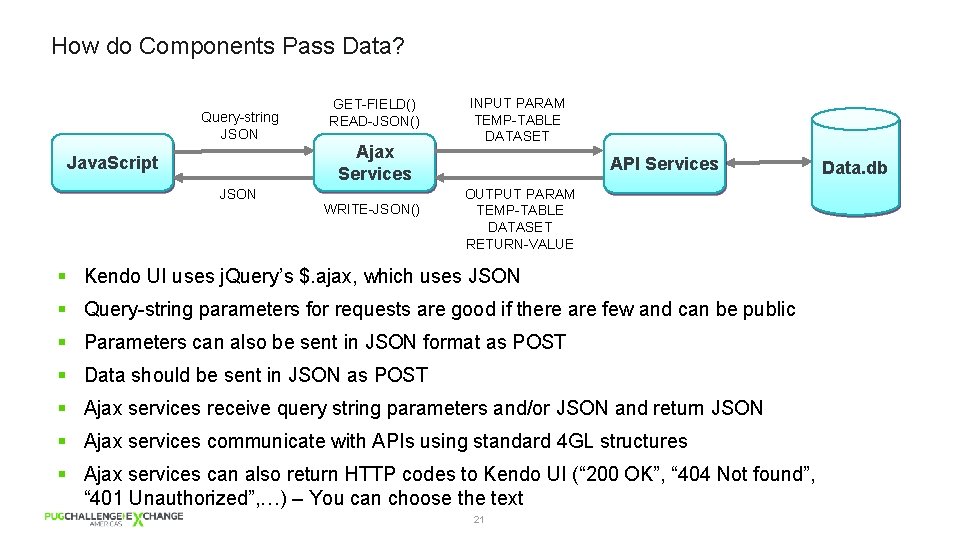
How do Components Pass Data? Query-string JSON Java. Script GET-FIELD() READ-JSON() Ajax Services JSON WRITE-JSON() INPUT PARAM TEMP-TABLE DATASET API Services OUTPUT PARAM TEMP-TABLE DATASET RETURN-VALUE § Kendo UI uses j. Query’s $. ajax, which uses JSON § Query-string parameters for requests are good if there are few and can be public § Parameters can also be sent in JSON format as POST § Data should be sent in JSON as POST § Ajax services receive query string parameters and/or JSON and return JSON § Ajax services communicate with APIs using standard 4 GL structures § Ajax services can also return HTTP codes to Kendo UI (“ 200 OK”, “ 404 Not found”, “ 401 Unauthorized”, …) – You can choose the text 21 Data. db
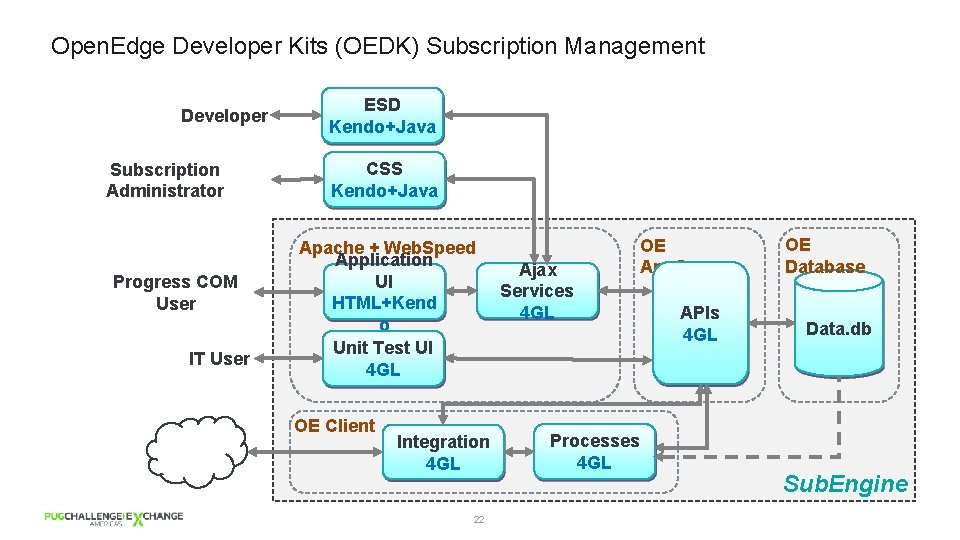
Open. Edge Developer Kits (OEDK) Subscription Management Developer Subscription Administrator Progress COM User IT User ESD Kendo+Java CSS Kendo+Java Apache + Web. Speed Application UI HTML+Kend o Unit Test UI 4 GL OE Client Integration 4 GL 22 Ajax Services 4 GL Processes 4 GL OE App. Server APIs 4 GL OE Database Data. db Sub. Engine
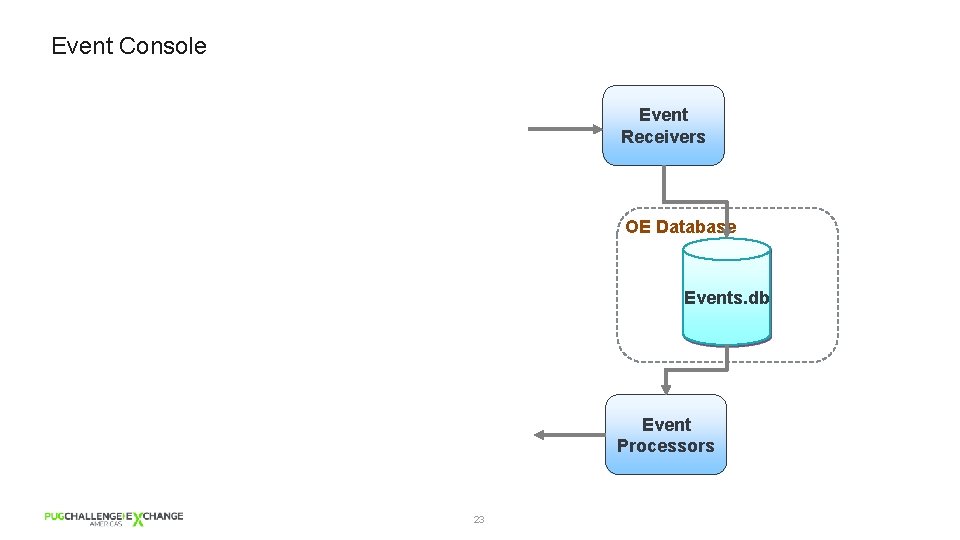
Event Console Event Receivers OE Database Events. db Event Processors 23
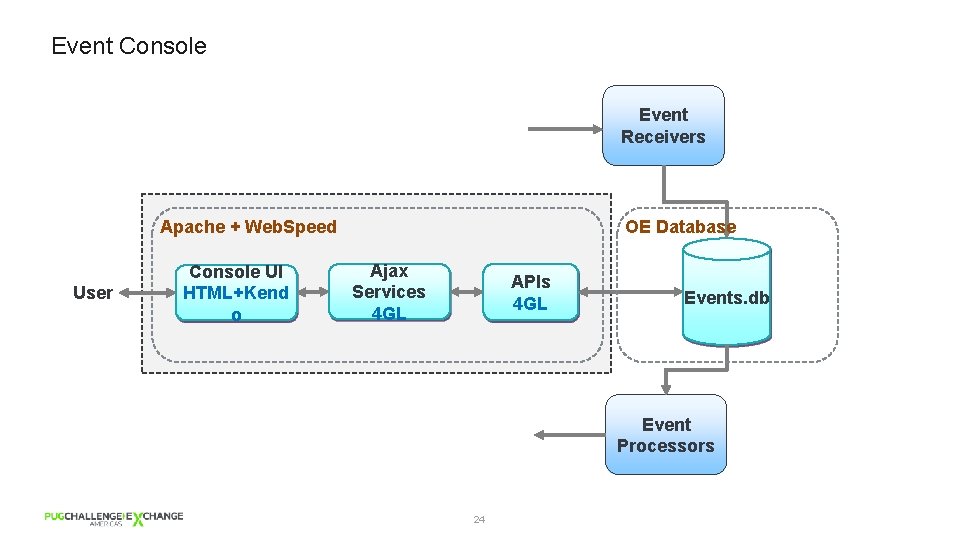
Event Console Event Receivers Apache + Web. Speed User Console UI HTML+Kend o OE Database Ajax Services 4 GL APIs 4 GL Events. db Event Processors 24
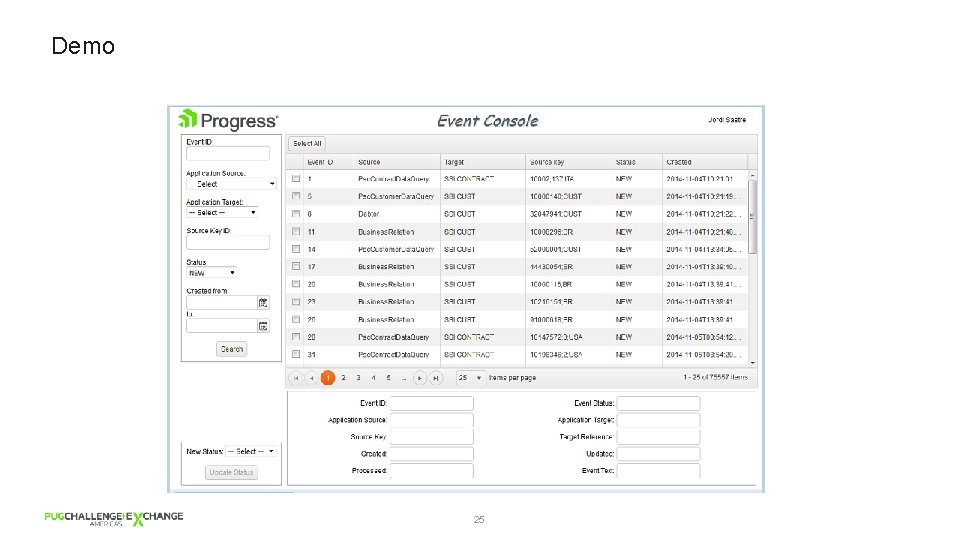
Demo 25
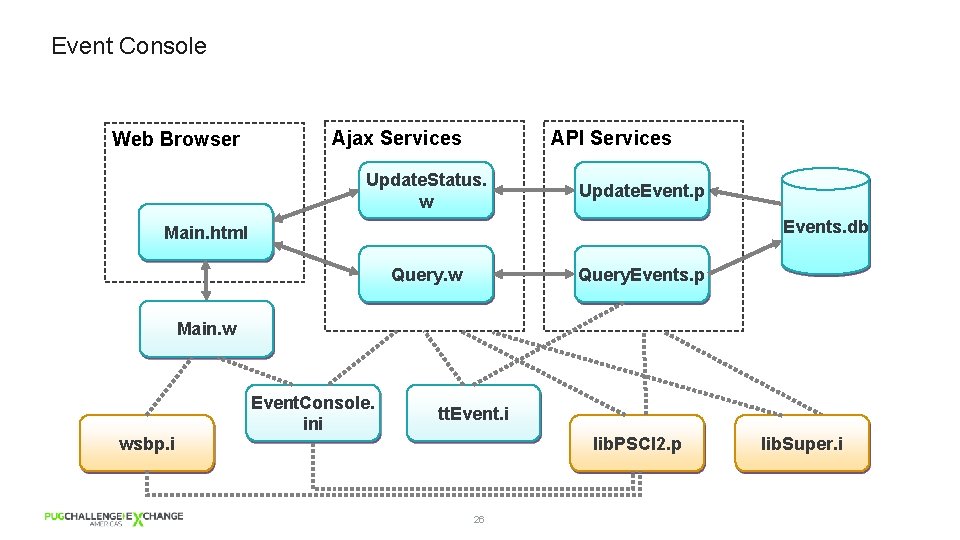
Event Console Web Browser Ajax Services API Services Update. Status. w Update. Event. p Events. db Main. html Query. w Query. Events. p Main. w wsbp. i Event. Console. ini tt. Event. i lib. PSCI 2. p 26 lib. Super. i
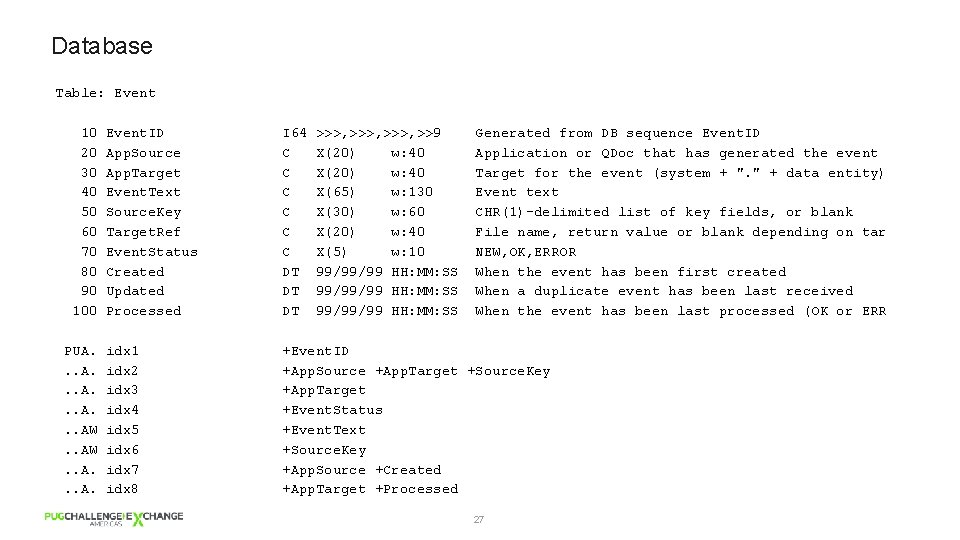
Database Table: Event 10 20 30 40 50 60 70 80 90 100 PUA. . . AW. . A. Event. ID App. Source App. Target Event. Text Source. Key Target. Ref Event. Status Created Updated Processed I 64 C C C DT DT DT >>>, >>9 X(20) w: 40 X(65) w: 130 X(30) w: 60 X(20) w: 40 X(5) w: 10 99/99/99 HH: MM: SS Generated from DB sequence Event. ID Application or QDoc that has generated the event Target for the event (system + ". " + data entity) Event text CHR(1)-delimited list of key fields, or blank File name, return value or blank depending on tar NEW, OK, ERROR When the event has been first created When a duplicate event has been last received When the event has been last processed (OK or ERR idx 1 idx 2 idx 3 idx 4 idx 5 idx 6 idx 7 idx 8 +Event. ID +App. Source +App. Target +Source. Key +App. Target +Event. Status +Event. Text +Source. Key +App. Source +Created +App. Target +Processed 27
API Services – Query. Events. p § Receives a query (WHERE clause) as parameter § Receives paging parameters § Executes dynamic query § Returns TEMP-TABLE with records that match the query § Decisions • Parameters versus query • Client paging versus server paging 28
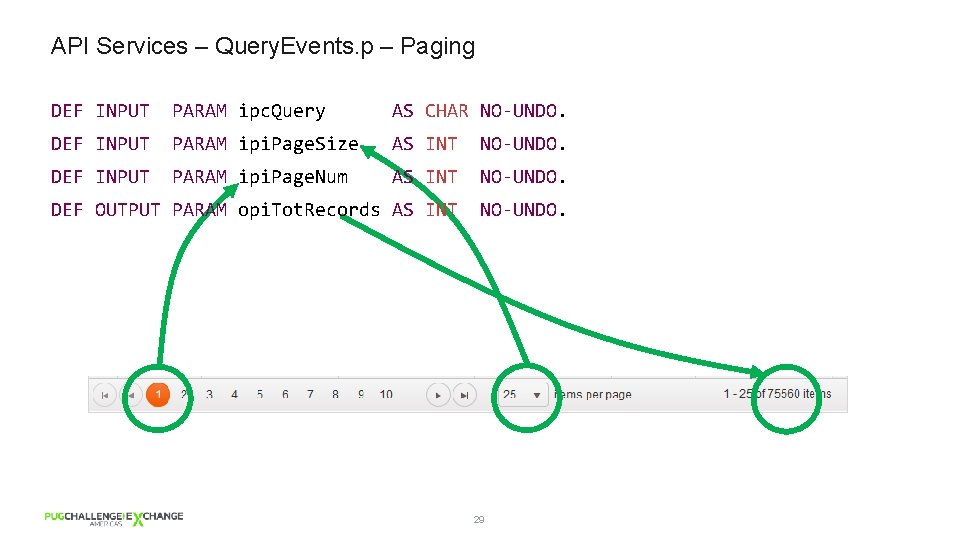
API Services – Query. Events. p – Paging DEF INPUT PARAM ipc. Query AS CHAR NO-UNDO. DEF INPUT PARAM ipi. Page. Size AS INT NO-UNDO. DEF INPUT PARAM ipi. Page. Num AS INT NO-UNDO. DEF OUTPUT PARAM opi. Tot. Records AS INT NO-UNDO. 29
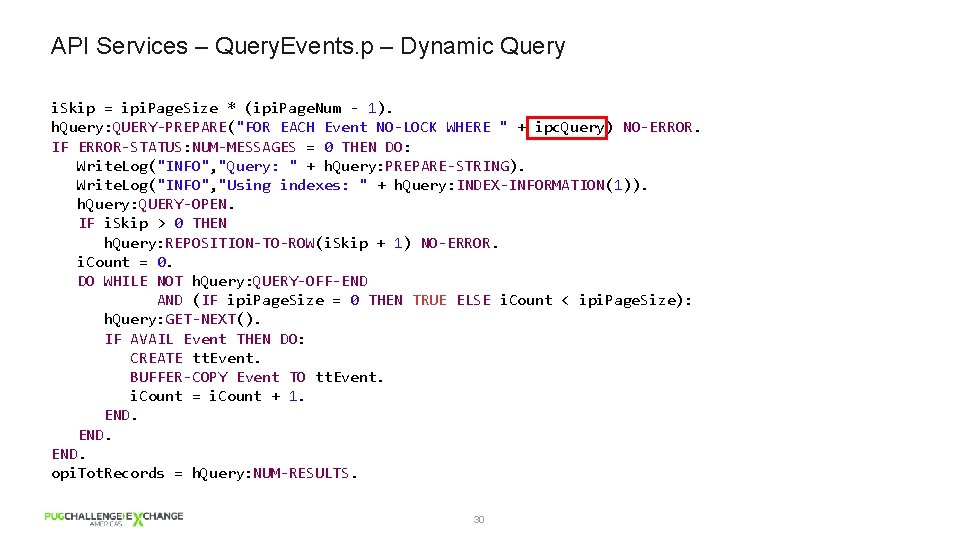
API Services – Query. Events. p – Dynamic Query i. Skip = ipi. Page. Size * (ipi. Page. Num - 1). h. Query: QUERY-PREPARE("FOR EACH Event NO-LOCK WHERE " + ipc. Query) NO-ERROR. IF ERROR-STATUS: NUM-MESSAGES = 0 THEN DO: Write. Log("INFO", "Query: " + h. Query: PREPARE-STRING). Write. Log("INFO", "Using indexes: " + h. Query: INDEX-INFORMATION(1)). h. Query: QUERY-OPEN. IF i. Skip > 0 THEN h. Query: REPOSITION-TO-ROW(i. Skip + 1) NO-ERROR. i. Count = 0. DO WHILE NOT h. Query: QUERY-OFF-END AND (IF ipi. Page. Size = 0 THEN TRUE ELSE i. Count < ipi. Page. Size): h. Query: GET-NEXT(). IF AVAIL Event THEN DO: CREATE tt. Event. BUFFER-COPY Event TO tt. Event. i. Count = i. Count + 1. END. opi. Tot. Records = h. Query: NUM-RESULTS. 30
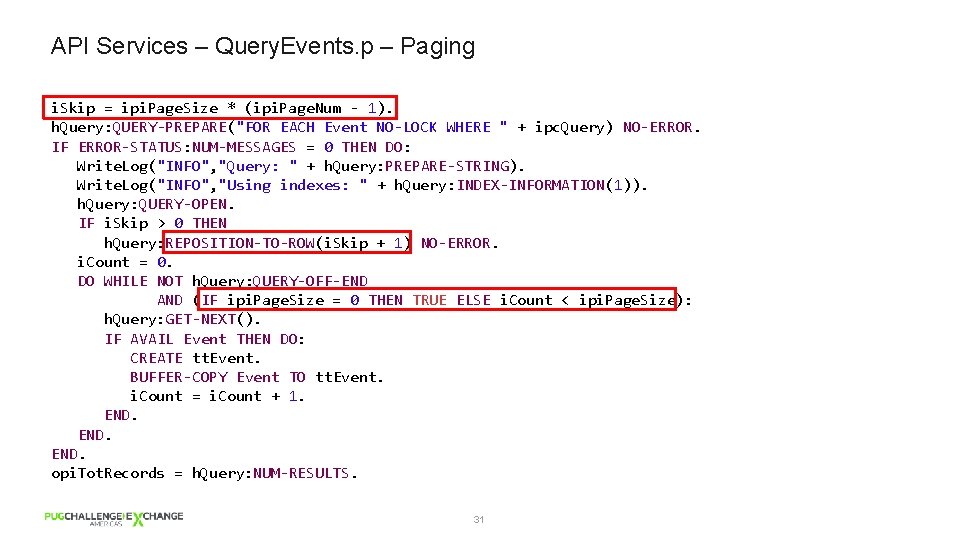
API Services – Query. Events. p – Paging i. Skip = ipi. Page. Size * (ipi. Page. Num - 1). h. Query: QUERY-PREPARE("FOR EACH Event NO-LOCK WHERE " + ipc. Query) NO-ERROR. IF ERROR-STATUS: NUM-MESSAGES = 0 THEN DO: Write. Log("INFO", "Query: " + h. Query: PREPARE-STRING). Write. Log("INFO", "Using indexes: " + h. Query: INDEX-INFORMATION(1)). h. Query: QUERY-OPEN. IF i. Skip > 0 THEN h. Query: REPOSITION-TO-ROW(i. Skip + 1) NO-ERROR. i. Count = 0. DO WHILE NOT h. Query: QUERY-OFF-END AND (IF ipi. Page. Size = 0 THEN TRUE ELSE i. Count < ipi. Page. Size): h. Query: GET-NEXT(). IF AVAIL Event THEN DO: CREATE tt. Event. BUFFER-COPY Event TO tt. Event. i. Count = i. Count + 1. END. opi. Tot. Records = h. Query: NUM-RESULTS. 31
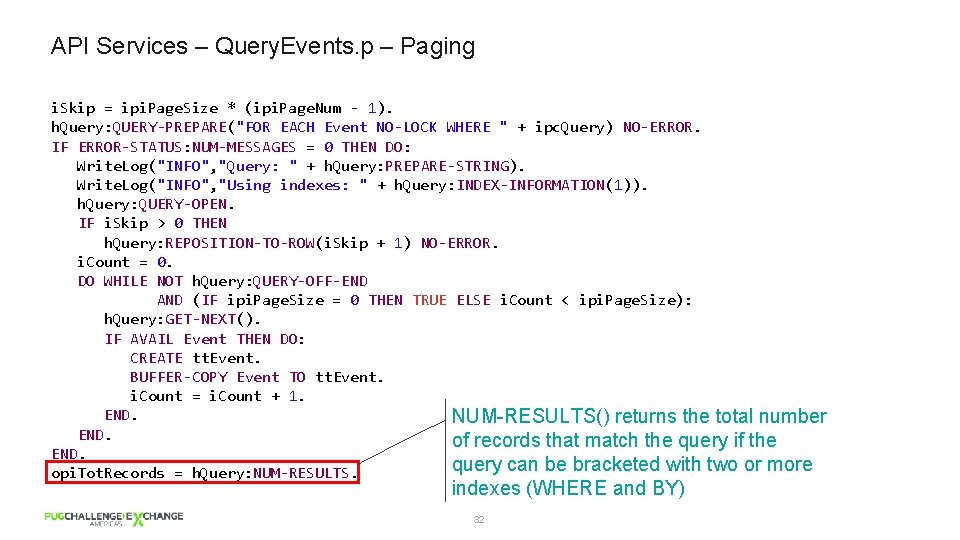
API Services – Query. Events. p – Paging i. Skip = ipi. Page. Size * (ipi. Page. Num - 1). h. Query: QUERY-PREPARE("FOR EACH Event NO-LOCK WHERE " + ipc. Query) NO-ERROR. IF ERROR-STATUS: NUM-MESSAGES = 0 THEN DO: Write. Log("INFO", "Query: " + h. Query: PREPARE-STRING). Write. Log("INFO", "Using indexes: " + h. Query: INDEX-INFORMATION(1)). h. Query: QUERY-OPEN. IF i. Skip > 0 THEN h. Query: REPOSITION-TO-ROW(i. Skip + 1) NO-ERROR. i. Count = 0. DO WHILE NOT h. Query: QUERY-OFF-END AND (IF ipi. Page. Size = 0 THEN TRUE ELSE i. Count < ipi. Page. Size): h. Query: GET-NEXT(). IF AVAIL Event THEN DO: CREATE tt. Event. BUFFER-COPY Event TO tt. Event. i. Count = i. Count + 1. END. NUM-RESULTS() returns the total number END. of records that match the query if the END. query can be bracketed with two or more opi. Tot. Records = h. Query: NUM-RESULTS. indexes (WHERE and BY) 32
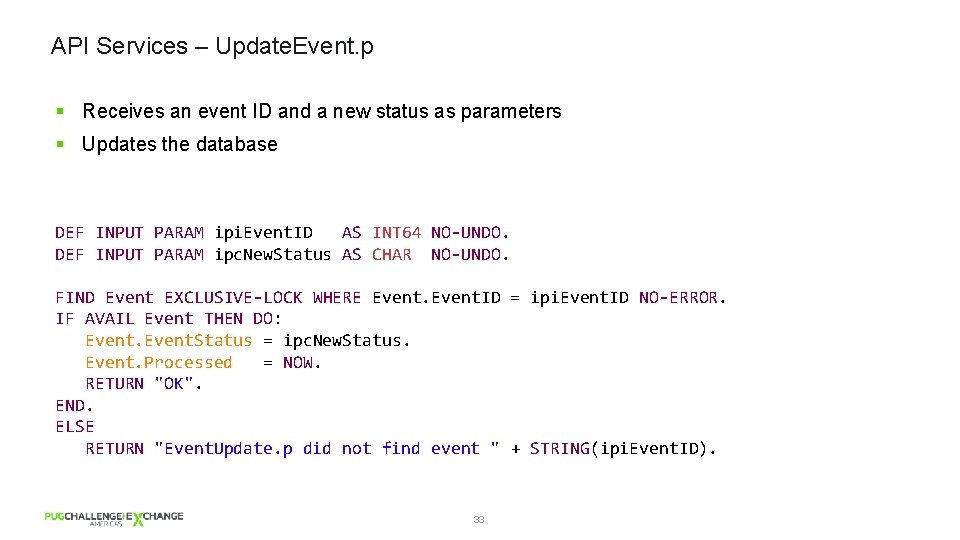
API Services – Update. Event. p § Receives an event ID and a new status as parameters § Updates the database DEF INPUT PARAM ipi. Event. ID AS INT 64 NO-UNDO. DEF INPUT PARAM ipc. New. Status AS CHAR NO-UNDO. FIND Event EXCLUSIVE-LOCK WHERE Event. ID = ipi. Event. ID NO-ERROR. IF AVAIL Event THEN DO: Event. Status = ipc. New. Status. Event. Processed = NOW. RETURN "OK". END. ELSE RETURN "Event. Update. p did not find event " + STRING(ipi. Event. ID). 33
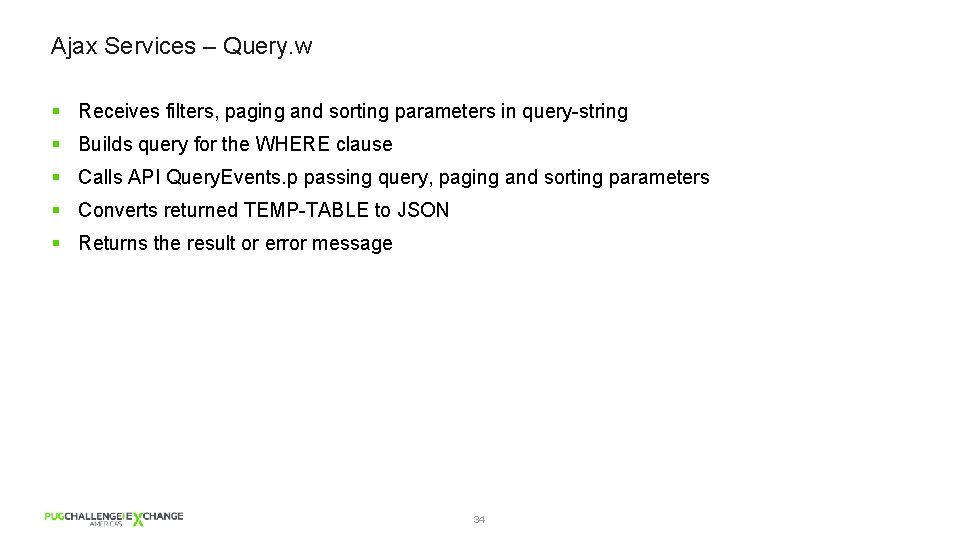
Ajax Services – Query. w § Receives filters, paging and sorting parameters in query-string § Builds query for the WHERE clause § Calls API Query. Events. p passing query, paging and sorting parameters § Converts returned TEMP-TABLE to JSON § Returns the result or error message 34
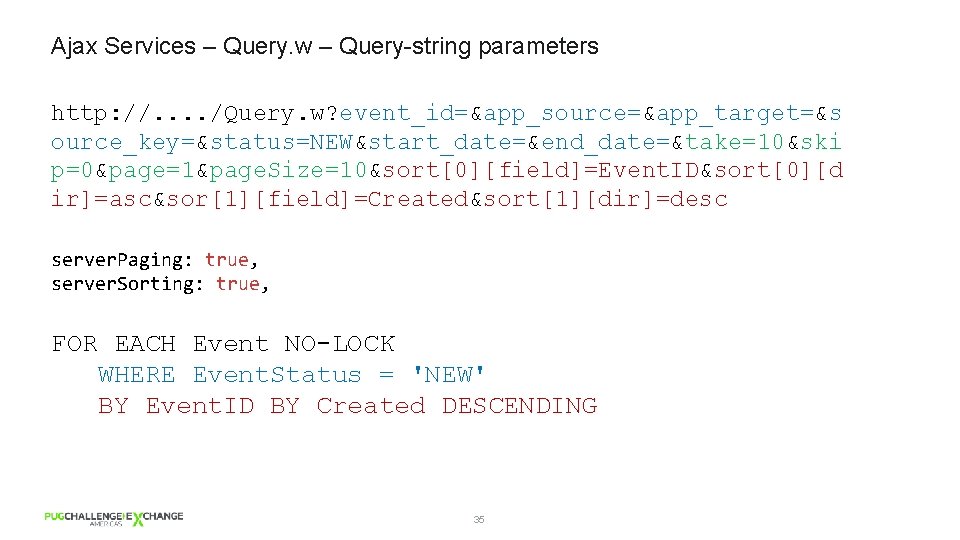
Ajax Services – Query. w – Query-string parameters http: //. . /Query. w? event_id=&app_source=&app_target=&s ource_key=&status=NEW&start_date=&end_date=&take=10&ski p=0&page=1&page. Size=10&sort[0][field]=Event. ID&sort[0][d ir]=asc&sor[1][field]=Created&sort[1][dir]=desc server. Paging: true, server. Sorting: true, FOR EACH Event NO-LOCK WHERE Event. Status = 'NEW' BY Event. ID BY Created DESCENDING 35
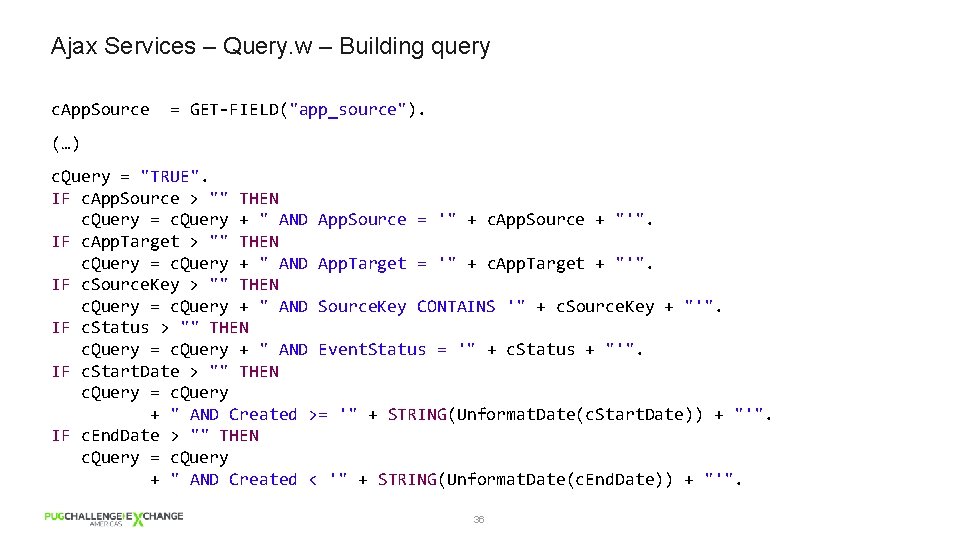
Ajax Services – Query. w – Building query c. App. Source = GET-FIELD("app_source"). (…) c. Query = "TRUE". IF c. App. Source > "" THEN c. Query = c. Query + " AND App. Source = '" + c. App. Source + "'". IF c. App. Target > "" THEN c. Query = c. Query + " AND App. Target = '" + c. App. Target + "'". IF c. Source. Key > "" THEN c. Query = c. Query + " AND Source. Key CONTAINS '" + c. Source. Key + "'". IF c. Status > "" THEN c. Query = c. Query + " AND Event. Status = '" + c. Status + "'". IF c. Start. Date > "" THEN c. Query = c. Query + " AND Created >= '" + STRING(Unformat. Date(c. Start. Date)) + "'". IF c. End. Date > "" THEN c. Query = c. Query + " AND Created < '" + STRING(Unformat. Date(c. End. Date)) + "'". 36
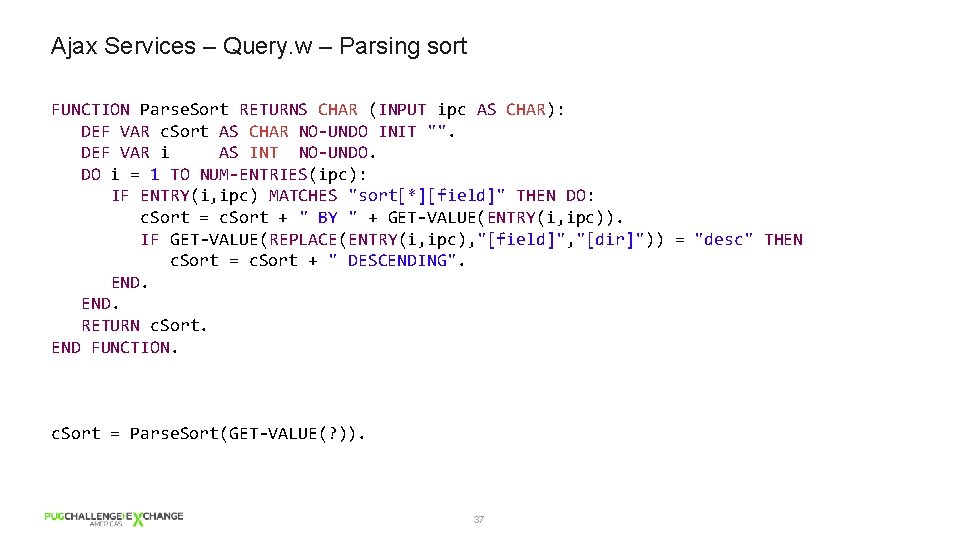
Ajax Services – Query. w – Parsing sort FUNCTION Parse. Sort RETURNS CHAR (INPUT ipc AS CHAR): DEF VAR c. Sort AS CHAR NO-UNDO INIT "". DEF VAR i AS INT NO-UNDO. DO i = 1 TO NUM-ENTRIES(ipc): IF ENTRY(i, ipc) MATCHES "sort[*][field]" THEN DO: c. Sort = c. Sort + " BY " + GET-VALUE(ENTRY(i, ipc)). IF GET-VALUE(REPLACE(ENTRY(i, ipc), "[field]", "[dir]")) = "desc" THEN c. Sort = c. Sort + " DESCENDING". END. RETURN c. Sort. END FUNCTION. c. Sort = Parse. Sort(GET-VALUE(? )). 37
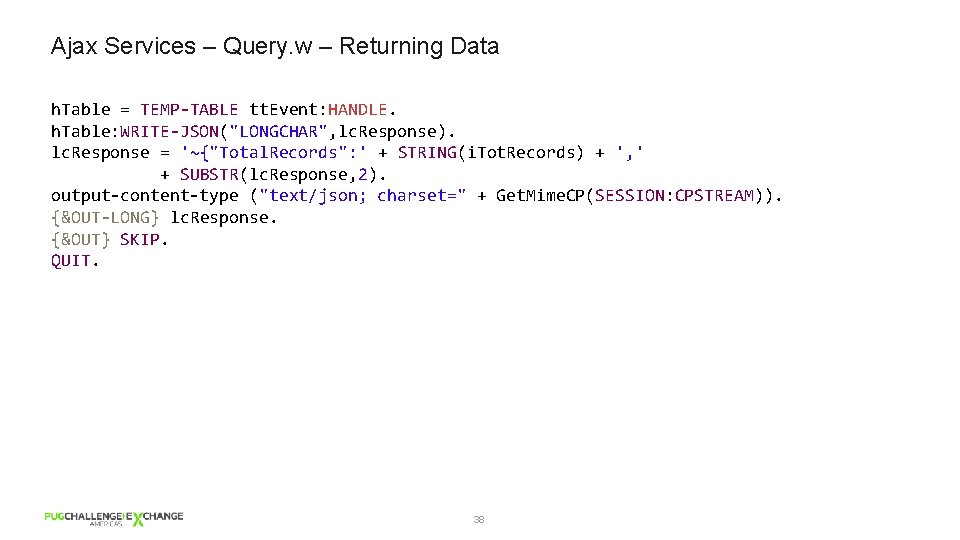
Ajax Services – Query. w – Returning Data h. Table = TEMP-TABLE tt. Event: HANDLE. h. Table: WRITE-JSON("LONGCHAR", lc. Response). lc. Response = '~{"Total. Records": ' + STRING(i. Tot. Records) + ', ' + SUBSTR(lc. Response, 2). output-content-type ("text/json; charset=" + Get. Mime. CP(SESSION: CPSTREAM)). {&OUT-LONG} lc. Response. {&OUT} SKIP. QUIT. 38
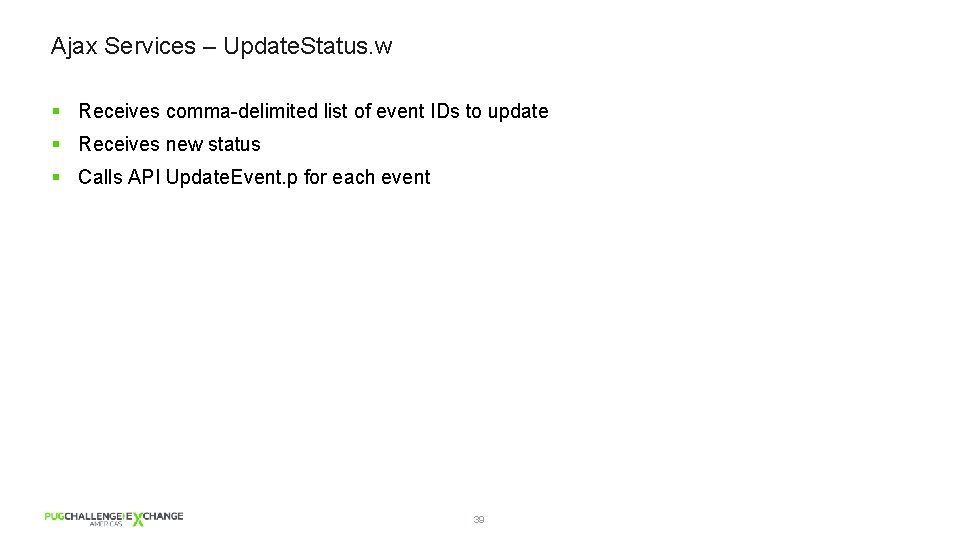
Ajax Services – Update. Status. w § Receives comma-delimited list of event IDs to update § Receives new status § Calls API Update. Event. p for each event 39
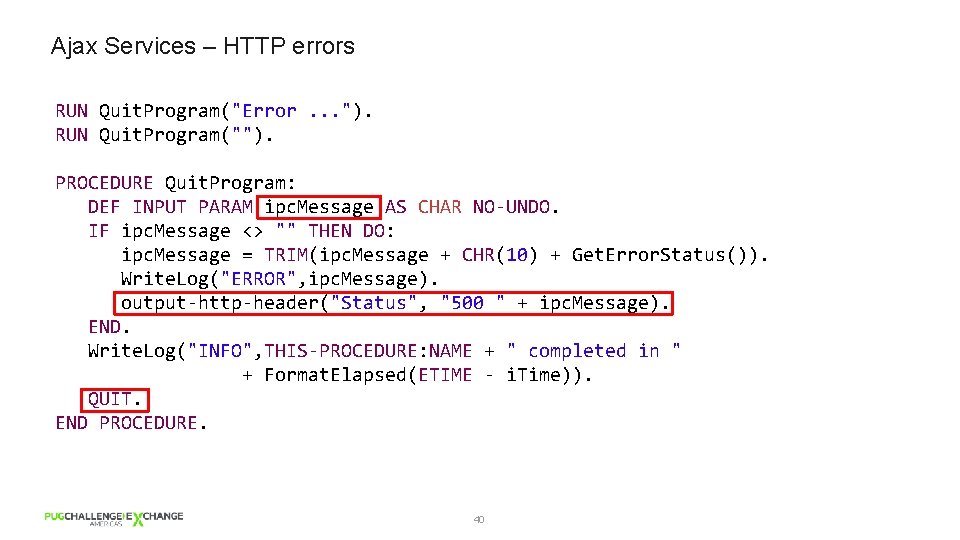
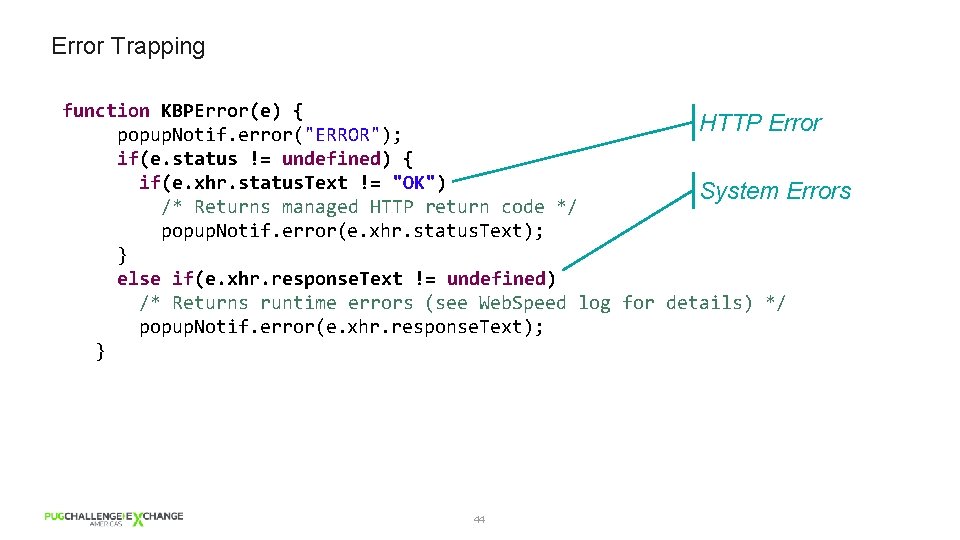
Ajax Services – HTTP errors RUN Quit. Program("Error. . . "). RUN Quit. Program(""). PROCEDURE Quit. Program: DEF INPUT PARAM ipc. Message AS CHAR NO-UNDO. IF ipc. Message <> "" THEN DO: ipc. Message = TRIM(ipc. Message + CHR(10) + Get. Error. Status()). Write. Log("ERROR", ipc. Message). output-http-header("Status", "500 " + ipc. Message). END. Write. Log("INFO", THIS-PROCEDURE: NAME + " completed in " + Format. Elapsed(ETIME - i. Time)). QUIT. END PROCEDURE. 40
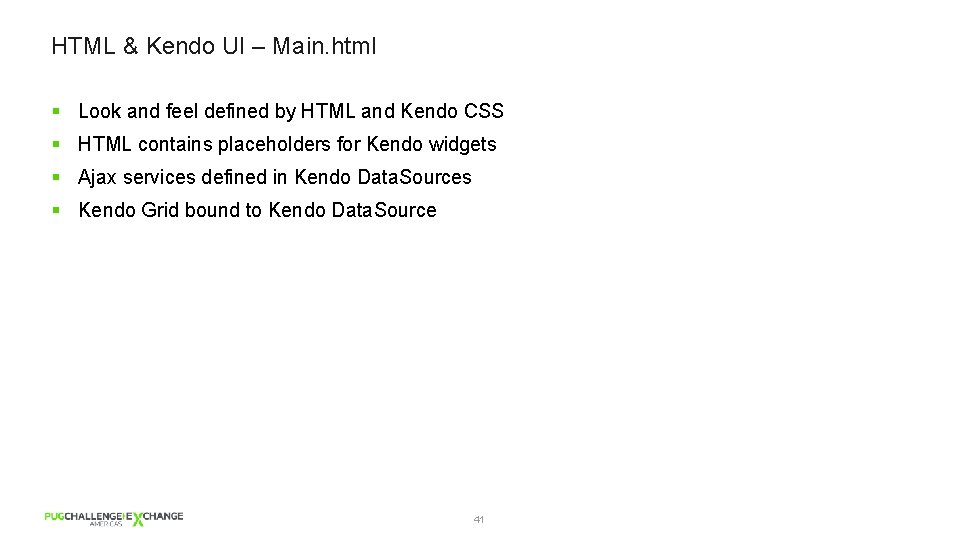
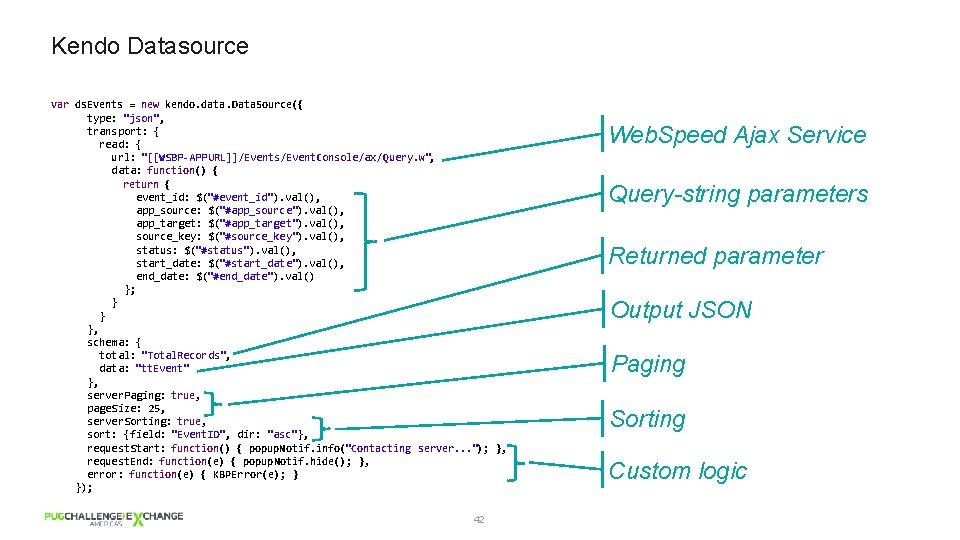
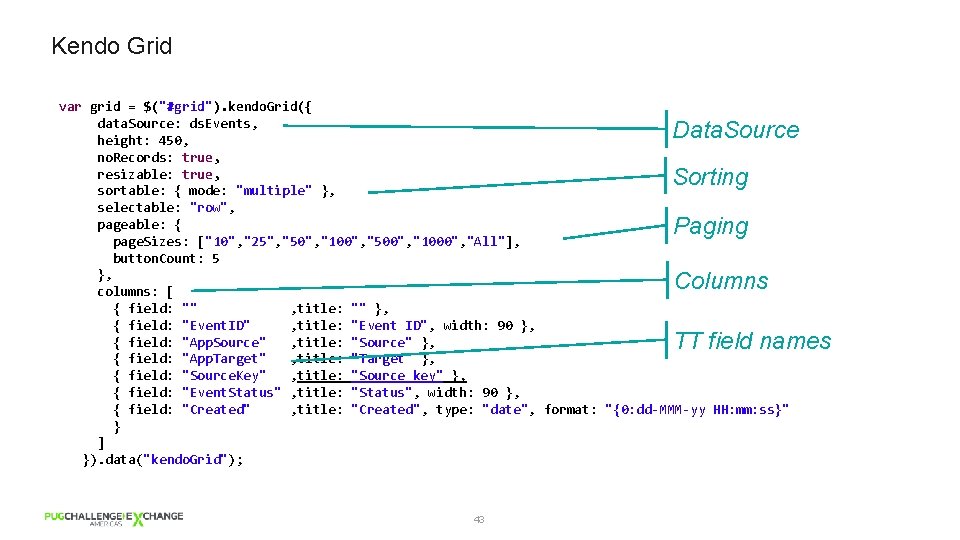
HTML & Kendo UI – Main. html § Look and feel defined by HTML and Kendo CSS § HTML contains placeholders for Kendo widgets § Ajax services defined in Kendo Data. Sources § Kendo Grid bound to Kendo Data. Source 41
Kendo Datasource var ds. Events = new kendo. data. Data. Source({ type: "json", transport: { read: { url: "[[WSBP-APPURL]]/Events/Event. Console/ax/Query. w", data: function() { return { event_id: $("#event_id"). val(), app_source: $("#app_source"). val(), app_target: $("#app_target"). val(), source_key: $("#source_key"). val(), status: $("#status"). val(), start_date: $("#start_date"). val(), end_date: $("#end_date"). val() }; } } }, schema: { total: "Total. Records", data: "tt. Event" }, server. Paging: true, page. Size: 25, server. Sorting: true, sort: {field: "Event. ID", dir: "asc"}, request. Start: function() { popup. Notif. info("Contacting server. . . "); }, request. End: function(e) { popup. Notif. hide(); }, error: function(e) { KBPError(e); } }); 42 Web. Speed Ajax Service Query-string parameters Returned parameter Output JSON Paging Sorting Custom logic
Kendo Grid var grid = $("#grid"). kendo. Grid({ data. Source: ds. Events, height: 450, no. Records: true, resizable: true, sortable: { mode: "multiple" }, selectable: "row", pageable: { page. Sizes: ["10", "25", "50", "100", "500", "1000", "All"], button. Count: 5 }, columns: [ { field: "" , title: "" }, { field: "Event. ID" , title: "Event ID", width: 90 }, { field: "App. Source" , title: "Source" }, { field: "App. Target" , title: "Target" }, { field: "Source. Key" , title: "Source key" }, { field: "Event. Status" , title: "Status", width: 90 }, { field: "Created" , title: "Created", type: "date", format: "{0: dd-MMM-yy HH: mm: ss}" } ] }). data("kendo. Grid"); Data. Source Sorting Paging Columns TT field names 43
Error Trapping function KBPError(e) { HTTP Error popup. Notif. error("ERROR"); if(e. status != undefined) { if(e. xhr. status. Text != "OK") System Errors /* Returns managed HTTP return code */ popup. Notif. error(e. xhr. status. Text); } else if(e. xhr. response. Text != undefined) /* Returns runtime errors (see Web. Speed log for details) */ popup. Notif. error(e. xhr. response. Text); } 44
Summary § Java. Script frameworks is a recommended option for application modernization § Kendo UI is a good Java. Script framework • It plays nice with the top two players: j. Query and Angular § Take your time to design the architecture § Separate the code • Front-end / Back-end • User Interface / Application logic 45

- Slides: 46