
A Quick Primer on CDN Multimedia Networking Web
A Quick Primer on CDN & Multimedia Networking • Web Caching and CDN • Multimedia vs. (conventional) Data Applications – analog “continuous” media: encoding, decoding & playback – service requirements • Classifying multimedia applications – Streaming (stored) multimedia – Live multimedia broadcasting – Interactive multimedia applications • Making the best of best effort service: streaming Stored Multimedia over “Best-Effort “Internet (optional) – client buffering, rate adaption, etc. • Large-scale video delivery over the Internet: You. Tube and Netflix case studies (optional) Required Readings: csci 4221 Textbook, sections 2. 2. 5, 2. 6, 9. 1 -9. 2; optional 9. 4 -9. 6 1
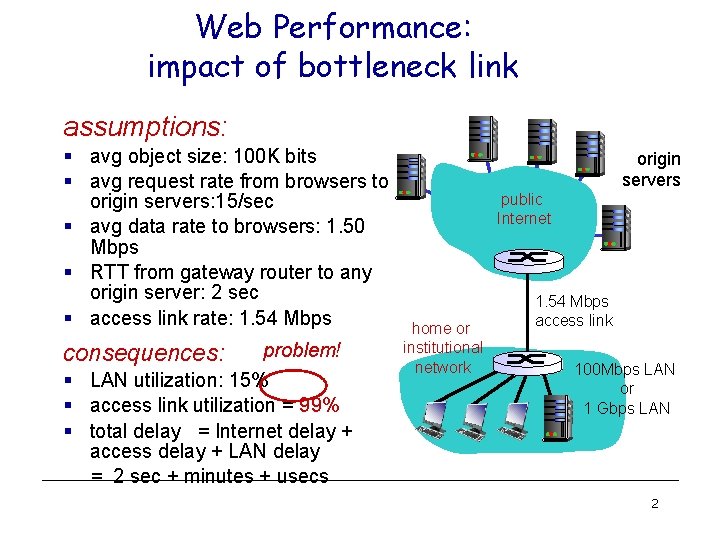
Web Performance: impact of bottleneck link assumptions: § avg object size: 100 K bits § avg request rate from browsers to origin servers: 15/sec § avg data rate to browsers: 1. 50 Mbps § RTT from gateway router to any origin server: 2 sec § access link rate: 1. 54 Mbps consequences: problem! § LAN utilization: 15% § access link utilization = 99% § total delay = Internet delay + access delay + LAN delay = 2 sec + minutes + usecs origin servers public Internet home or institutional network 1. 54 Mbps access link 100 Mbps LAN or 1 Gbps LAN 2
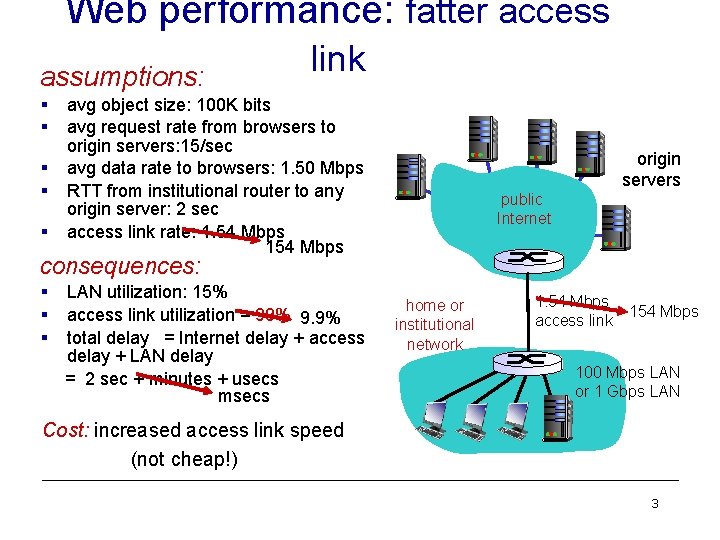
Web performance: fatter access assumptions: § § § link avg object size: 100 K bits avg request rate from browsers to origin servers: 15/sec avg data rate to browsers: 1. 50 Mbps RTT from institutional router to any origin server: 2 sec access link rate: 1. 54 Mbps 154 Mbps public Internet origin servers consequences: § § § LAN utilization: 15% access link utilization = 99% 9. 9% total delay = Internet delay + access delay + LAN delay = 2 sec + minutes + usecs msecs home or institutional network 1. 54 Mbps 154 Mbps access link 100 Mbps LAN or 1 Gbps LAN Cost: increased access link speed (not cheap!) 3
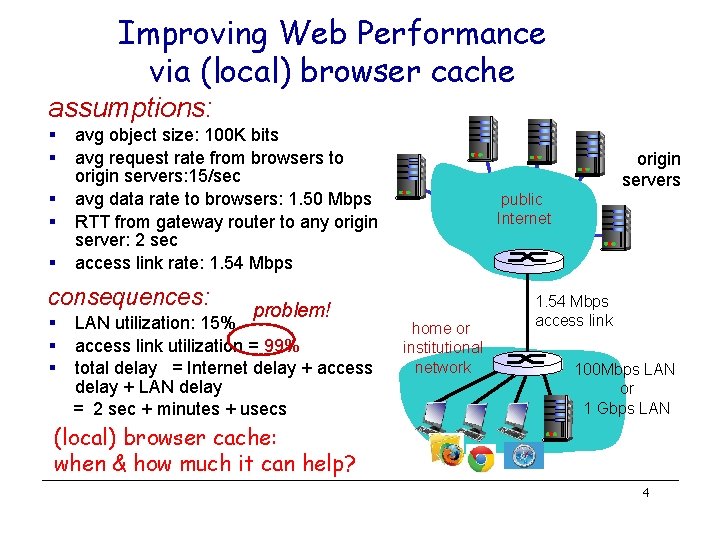
Improving Web Performance via (local) browser cache assumptions: § § § avg object size: 100 K bits avg request rate from browsers to origin servers: 15/sec avg data rate to browsers: 1. 50 Mbps RTT from gateway router to any origin server: 2 sec access link rate: 1. 54 Mbps consequences: § § § problem! LAN utilization: 15% access link utilization = 99% total delay = Internet delay + access delay + LAN delay = 2 sec + minutes + usecs origin servers public Internet home or institutional network 1. 54 Mbps access link 100 Mbps LAN or 1 Gbps LAN (local) browser cache: when & how much it can help? 4
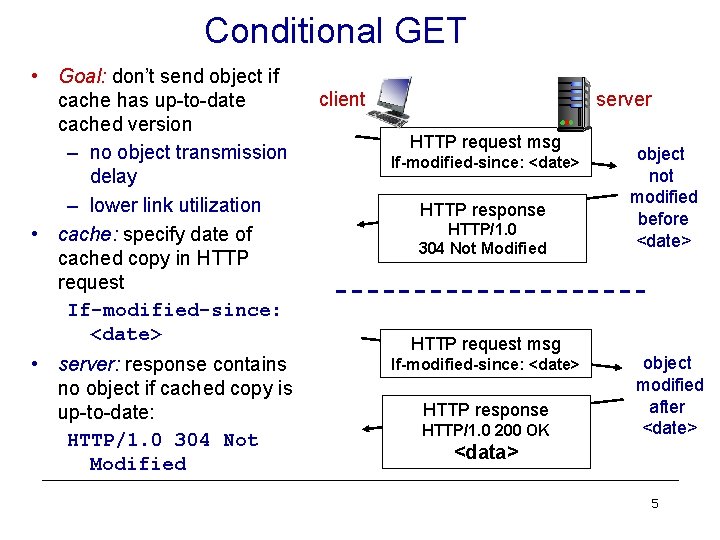
Conditional GET • Goal: don’t send object if cache has up-to-date cached version – no object transmission delay – lower link utilization • cache: specify date of cached copy in HTTP request If-modified-since: <date> • server: response contains no object if cached copy is up-to-date: HTTP/1. 0 304 Not Modified client server HTTP request msg If-modified-since: <date> HTTP response HTTP/1. 0 304 Not Modified HTTP request msg If-modified-since: <date> HTTP response HTTP/1. 0 200 OK object not modified before <date> object modified after <date> <data> 5
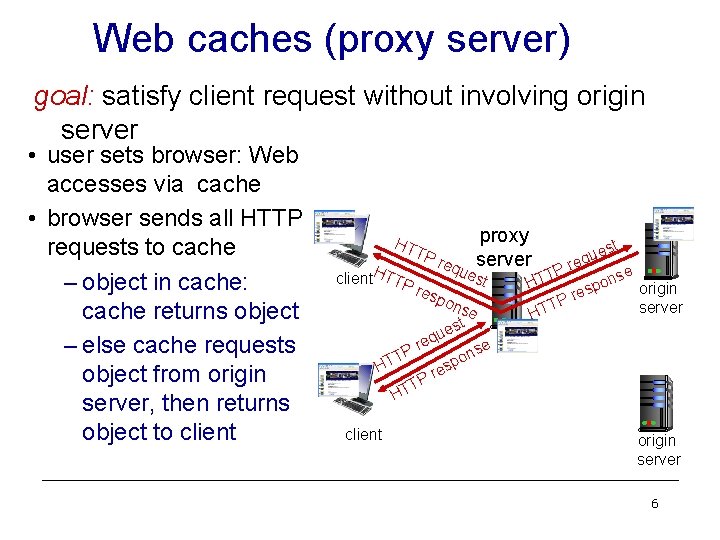
Web caches (proxy server) goal: satisfy client request without involving origin server • user sets browser: Web accesses via cache • browser sends all HTTP requests to cache – object in cache: cache returns object – else cache requests object from origin server, then returns object to client HT TP H client TTP res proxy st e u req server req ues P e T t ons HT pon eq Pr T HT se est u p res P T HT origin server e ns o p es r TP HT client origin server 6
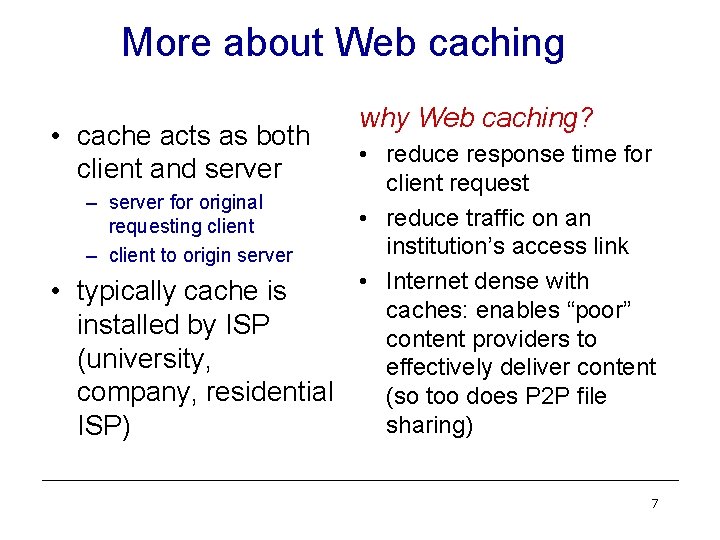
More about Web caching • cache acts as both client and server – server for original requesting client – client to origin server • typically cache is installed by ISP (university, company, residential ISP) why Web caching? • reduce response time for client request • reduce traffic on an institution’s access link • Internet dense with caches: enables “poor” content providers to effectively deliver content (so too does P 2 P file sharing) 7
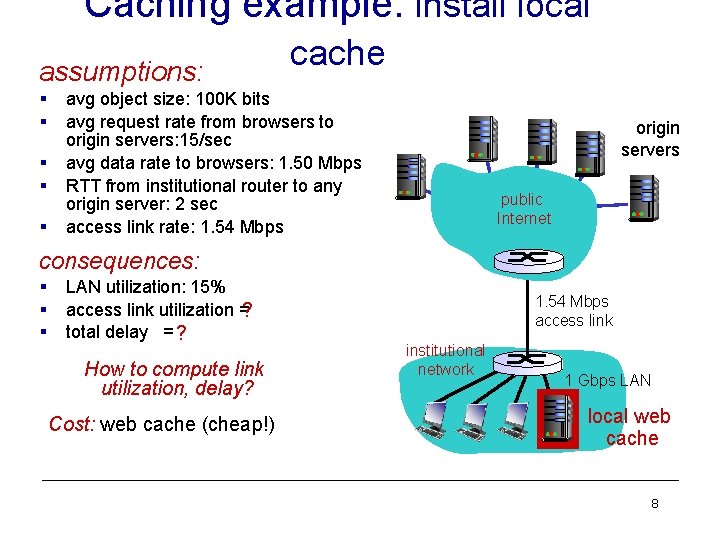
Caching example: install local assumptions: § § § cache avg object size: 100 K bits avg request rate from browsers to origin servers: 15/sec avg data rate to browsers: 1. 50 Mbps RTT from institutional router to any origin server: 2 sec access link rate: 1. 54 Mbps origin servers public Internet consequences: § § § LAN utilization: 15% access link utilization =? total delay = ? How to compute link utilization, delay? Cost: web cache (cheap!) 1. 54 Mbps access link institutional network 1 Gbps LAN local web cache 8
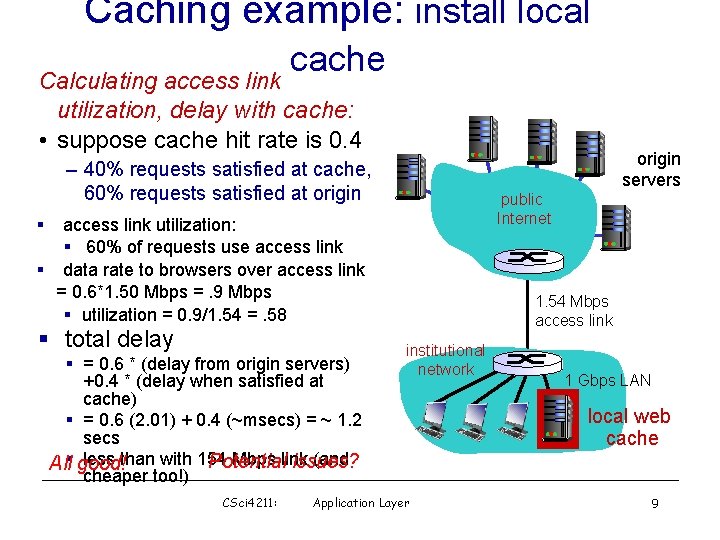
Caching example: install local cache Calculating access link utilization, delay with cache: • suppose cache hit rate is 0. 4 – 40% requests satisfied at cache, 60% requests satisfied at origin public Internet § access link utilization: § 60% of requests use access link § data rate to browsers over access link = 0. 6*1. 50 Mbps =. 9 Mbps § utilization = 0. 9/1. 54 =. 58 § total delay § = 0. 6 * (delay from origin servers) +0. 4 * (delay when satisfied at cache) § = 0. 6 (2. 01) + 0. 4 (~msecs) = ~ 1. 2 secs less than with 154 Mbps link (and Potential issues? All§ good! cheaper too!) CSci 4211: origin servers 1. 54 Mbps access link institutional network Application Layer 1 Gbps LAN local web cache 9
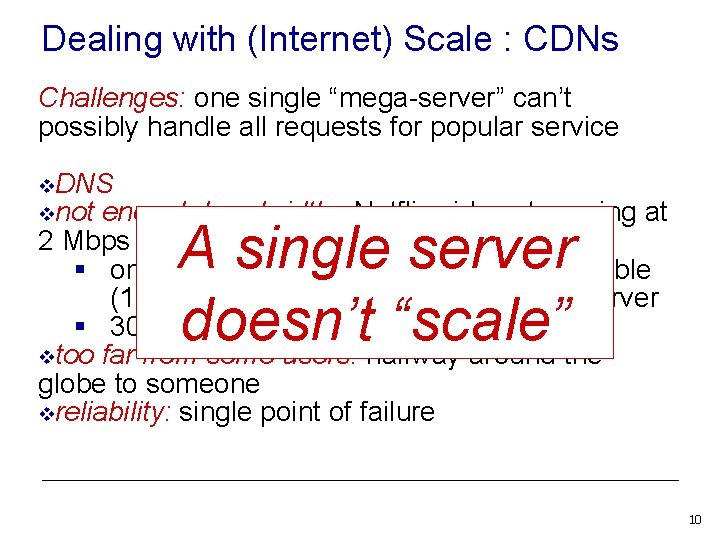
Dealing with (Internet) Scale : CDNs Challenges: one single “mega-server” can’t possibly handle all requests for popular service v. DNS vnot enough bandwidth: Netflix video streaming at 2 Mbps per connection § only 5000 connections over fastest possible (10 Gbs) connection to Internet at one server § 30 Million Netflix customers vtoo far from some users: halfway around the globe to someone vreliability: single point of failure A single server doesn’t “scale” 10
Content distribution networks • challenge: how to stream content (selected from millions of videos) to hundreds of thousands of simultaneous users? • option 1: single, large “mega-server” – – single point of failure point of network congestion long path to distant clients multiple copies of video sent over outgoing link …. quite simply: this solution doesn’t scale 11
Content distribution networks • challenge: how to stream content (selected from millions of videos) to hundreds of thousands of simultaneous users? • option 2: store/serve multiple copies of videos at multiple geographically distributed sites (CDN) – enter deep: push CDN servers deep into many access networks • close to users • used by Akamai, 1700 locations – bring home: smaller number (10’s) of larger clusters in POPs near (but not within) access networks • used by Limelight 12
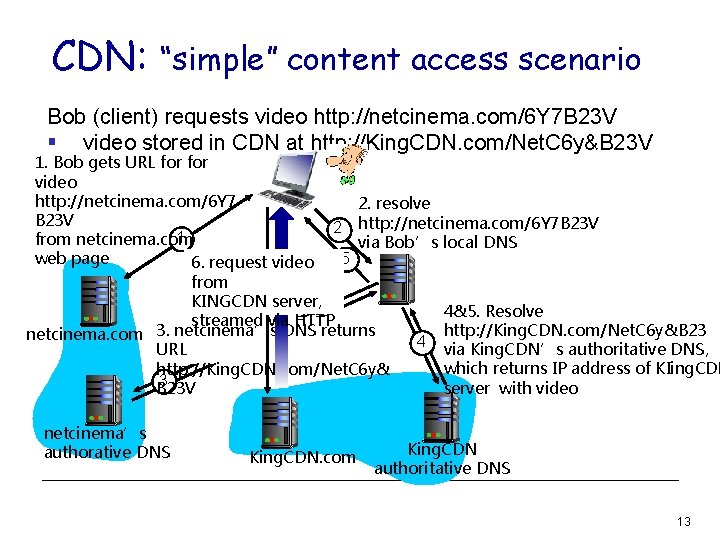
CDN: “simple” content access scenario Bob (client) requests video http: //netcinema. com/6 Y 7 B 23 V § video stored in CDN at http: //King. CDN. com/Net. C 6 y&B 23 V 1. Bob gets URL for video http: //netcinema. com/6 Y 7 2. resolve B 23 V 2 http: //netcinema. com/6 Y 7 B 23 V 1 from netcinema. com via Bob’s local DNS 5 web page 6. request video from KINGCDN server, 4&5. Resolve streamed via HTTP http: //King. CDN. com/Net. C 6 y&B 23 netcinema. com 3. netcinema’s DNS returns 4 via King. CDN’s authoritative DNS, URL which returns IP address of KIing. CDN http: //King. CDN. com/Net. C 6 y& 3 server with video B 23 V netcinema’s authorative DNS King. CDN. com King. CDN authoritative DNS 13
CDN cluster selection strategy • challenge: how does CDN DNS select “good” CDN node to stream to client – pick CDN node geographically closest to client – pick CDN node with shortest delay (or min # hops) to client (CDN nodes periodically ping access ISPs, reporting results to CDN DNS) • alternative: let client decide - give client a list of several CDN servers – client pings servers, picks “best” 3 -14
Akamai CDN: quickie • pioneered creation of CDNs circa 2000 • now: 61, 000 servers in 1, 000 networks in 70 countries • delivers est 15 -20% of all Internet traffic • runs its own DNS service (alternative to public root, TLD, hierarchy) • hundreds of billions of Internet interactions daily • more shortly…. 3 -15
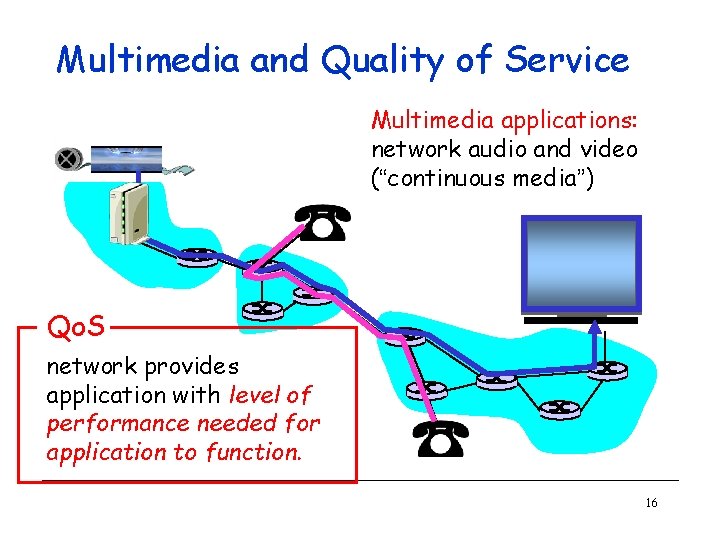
Multimedia and Quality of Service Multimedia applications: network audio and video (“continuous media”) Qo. S network provides application with level of performance needed for application to function. 16
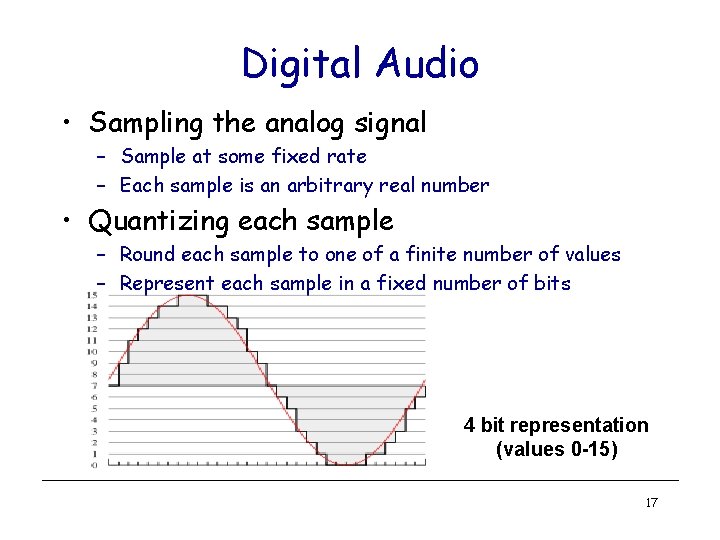
Digital Audio • Sampling the analog signal – Sample at some fixed rate – Each sample is an arbitrary real number • Quantizing each sample – Round each sample to one of a finite number of values – Represent each sample in a fixed number of bits 4 bit representation (values 0 -15) 17
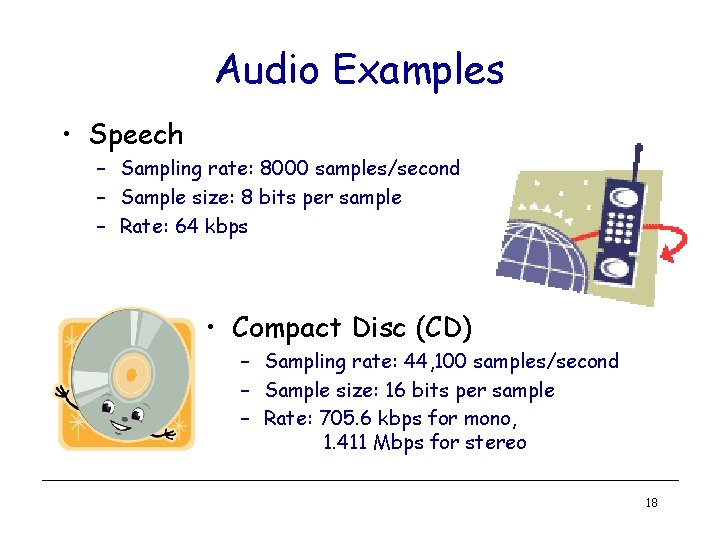
Audio Examples • Speech – Sampling rate: 8000 samples/second – Sample size: 8 bits per sample – Rate: 64 kbps • Compact Disc (CD) – Sampling rate: 44, 100 samples/second – Sample size: 16 bits per sample – Rate: 705. 6 kbps for mono, 1. 411 Mbps for stereo 18
Why Audio Compression • Audio data requires too much bandwidth – Speech: 64 kbps is too high for a dial-up modem user – Stereo music: 1. 411 Mbps exceeds most access rates • Compression to reduce the size – Remove redundancy – Remove details that human tend not to perceive • Example audio formats – Speech: GSM (13 kbps), G. 729 (8 kbps), and G. 723. 3 (6. 4 and 5. 3 kbps) – Stereo music: MPEG 1 layer 3 (MP 3) at 96 kbps, 128 kbps, and 160 kbps 19
A few words about audio compression • Analog signal sampled at constant rate – telephone: 8, 000 samples/sec – CD music: 44, 100 samples/sec • Each sample quantized, i. e. , rounded – e. g. , 28=256 possible quantized values • Each quantized value represented by bits – 8 bits for 256 values • Example: 8, 000 samples/sec, 256 quantized values --> 64, 000 bps • Receiver converts it back to analog signal: – some quality reduction Example rates • CD: 1. 411 Mbps • MP 3: 96, 128, 160 kbps • Internet telephony: 5. 3 13 kbps 20
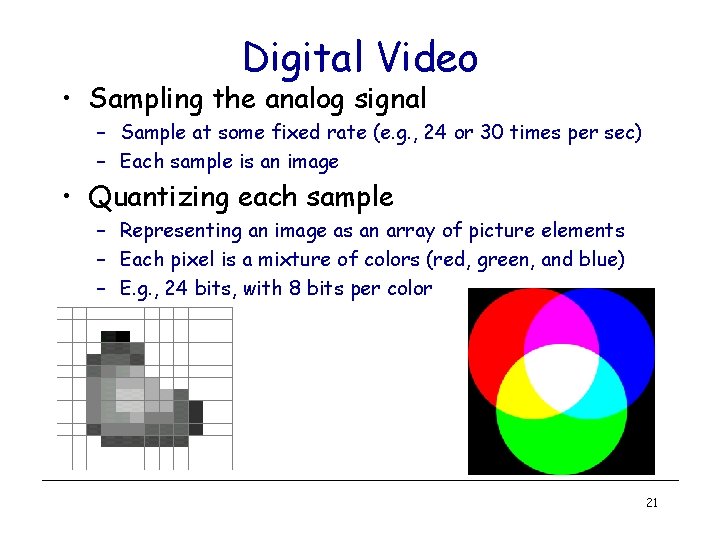
Digital Video • Sampling the analog signal – Sample at some fixed rate (e. g. , 24 or 30 times per sec) – Each sample is an image • Quantizing each sample – Representing an image as an array of picture elements – Each pixel is a mixture of colors (red, green, and blue) – E. g. , 24 bits, with 8 bits per color 21
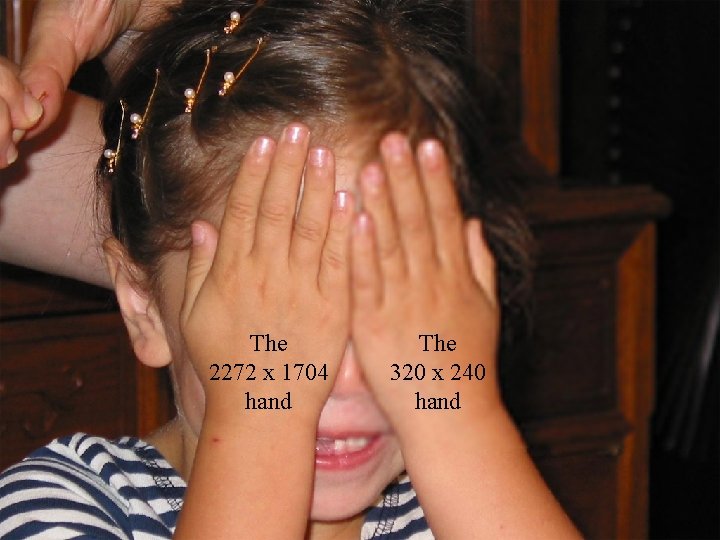
The 2272 x 1704 hand CSci 5221: The 320 x 240 hand Multimedia 22
A few words about video compression • Video is sequence of images displayed at constant rate Examples: • MPEG 1 (CD-ROM) 1. 5 Mbps – e. g. 24 images/sec • MPEG 2 (DVD) 3 -6 Mbps • Digital image is array of • MPEG 4 (often used in pixels Internet, < 1 Mbps) • Each pixel represented Research: by bits • Layered (scalable) video • Redundancy – spatial – temporal – adapt layers to available bandwidth 23
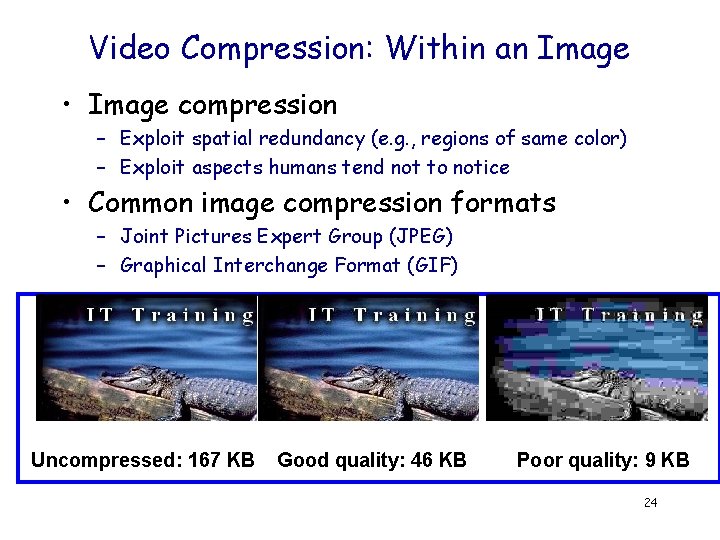
Video Compression: Within an Image • Image compression – Exploit spatial redundancy (e. g. , regions of same color) – Exploit aspects humans tend not to notice • Common image compression formats – Joint Pictures Expert Group (JPEG) – Graphical Interchange Format (GIF) Uncompressed: 167 KB Good quality: 46 KB Poor quality: 9 KB 24
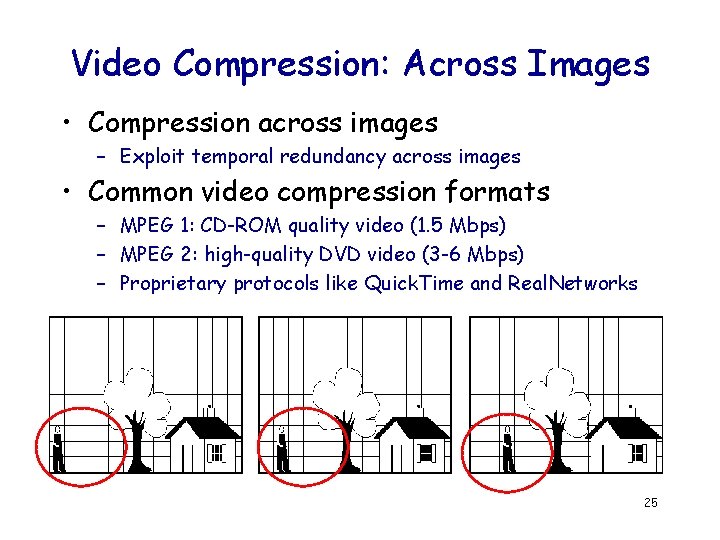
Video Compression: Across Images • Compression across images – Exploit temporal redundancy across images • Common video compression formats – MPEG 1: CD-ROM quality video (1. 5 Mbps) – MPEG 2: high-quality DVD video (3 -6 Mbps) – Proprietary protocols like Quick. Time and Real. Networks 25
MM Networking Applications Classes of MM applications: 1) Streaming stored audio and video 2) Streaming live audio and video 3) Real-time interactive audio and video Jitter is the variability of packet delays within the same packet stream CSci 4211: Fundamental characteristics: • Typically delay sensitive – end-to-end delay – delay jitter • But loss tolerant: infrequent losses cause minor glitches • Antithesis of data, which are loss intolerant but delay tolerant. Multimedia Networking 26
Application Classes • Streaming – Clients request audio/video files from servers and pipeline reception over the network and display – Interactive: user can control operation (similar to VCR: pause, resume, fast forward, rewind, etc. ) – Delay: from client request until display start can be 1 to 10 seconds 27
Application Classes (more) • Unidirectional Real-Time: – E. g. , real-time video broadcasting of a sport event – similar to existing TV and radio stations, but delivery on the network – Non-interactive, just listen/view • Interactive Real-Time : – Phone conversation or video conference – E. g. , skype, Google handout, Vo. IP & SIP, … – More stringent delay requirement than Streaming and Unidirectional because of real-time nature – Video: < 150 msec acceptable – Audio: < 150 msec good, <400 msec acceptable 28
Multimedia Over Today’s Internet TCP/UDP/IP: “best-effort service” • no guarantees on delay, loss ? ? ? ? But you said multimedia apps requires ? Qo. S and level of performance to be ? ? effective! ? ? Today’s Internet multimedia applications use application-level techniques to mitigate (as best possible) effects of delay, loss 29
Challenges • TCP/UDP/IP suite provides best-effort, no guarantees on expectation or variance of packet delay • Streaming applications delay of 5 to 10 seconds is typical and has been acceptable, but performance deteriorate if links are congested (transoceanic) • Real-Time Interactive requirements on delay and its jitter have been satisfied by over-provisioning (providing plenty of bandwidth), what will happen when the load increases? . . . 30
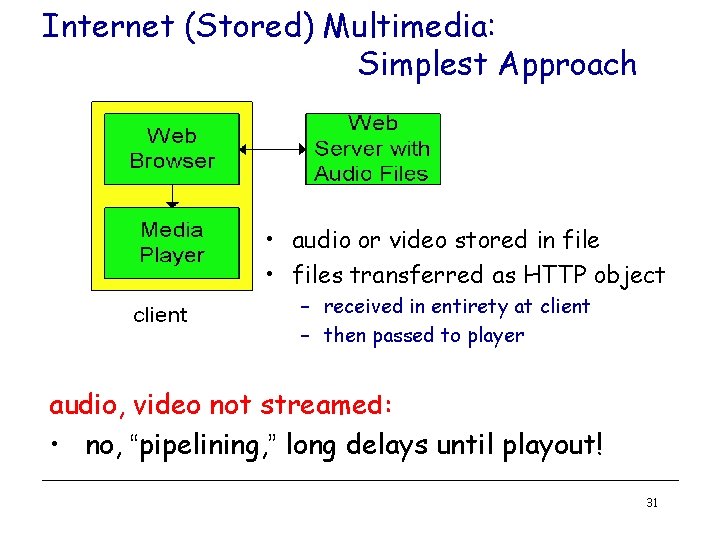
Internet (Stored) Multimedia: Simplest Approach • audio or video stored in file • files transferred as HTTP object – received in entirety at client – then passed to player audio, video not streamed: • no, “pipelining, ” long delays until playout! 31
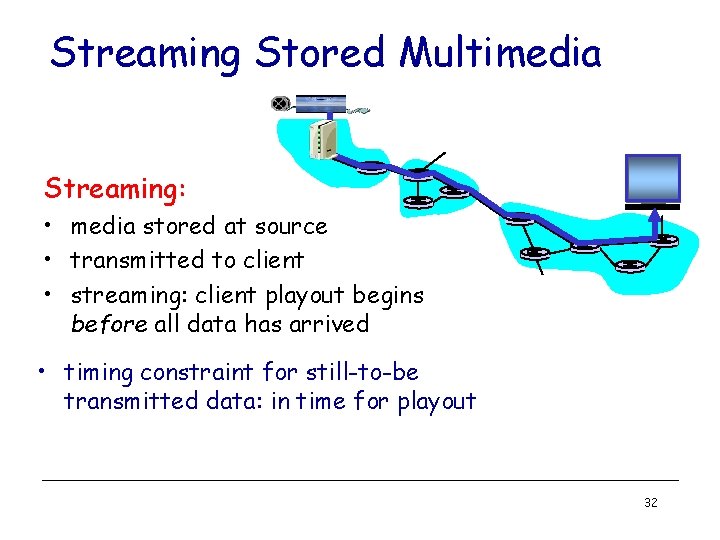
Streaming Stored Multimedia Streaming: • media stored at source • transmitted to client • streaming: client playout begins before all data has arrived • timing constraint for still-to-be transmitted data: in time for playout 32
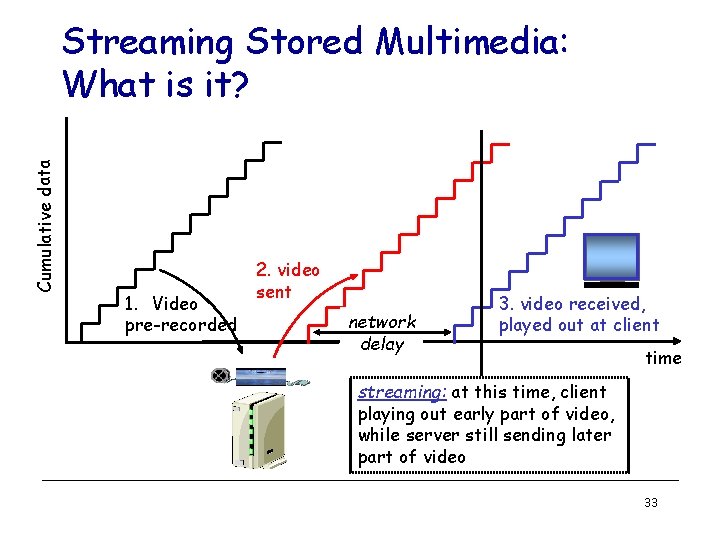
Cumulative data Streaming Stored Multimedia: What is it? 1. Video pre-recorded 2. video sent network delay 3. video received, played out at client time streaming: at this time, client playing out early part of video, while server still sending later part of video 33
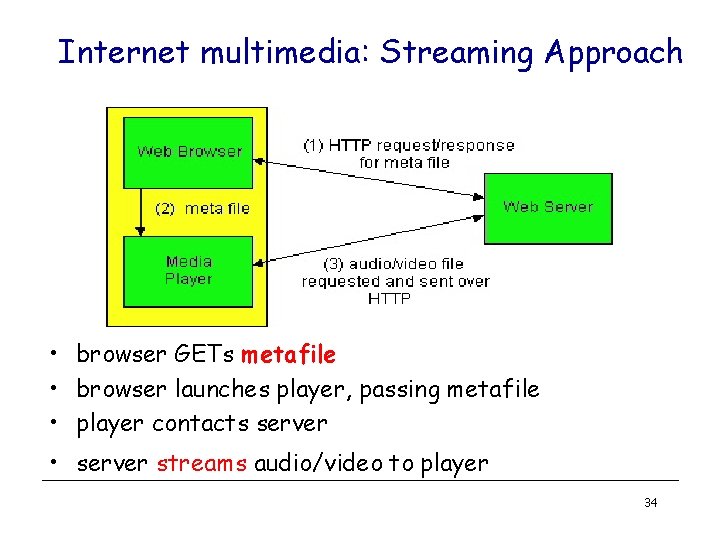
Internet multimedia: Streaming Approach • browser GETs metafile • browser launches player, passing metafile • player contacts server • server streams audio/video to player 34
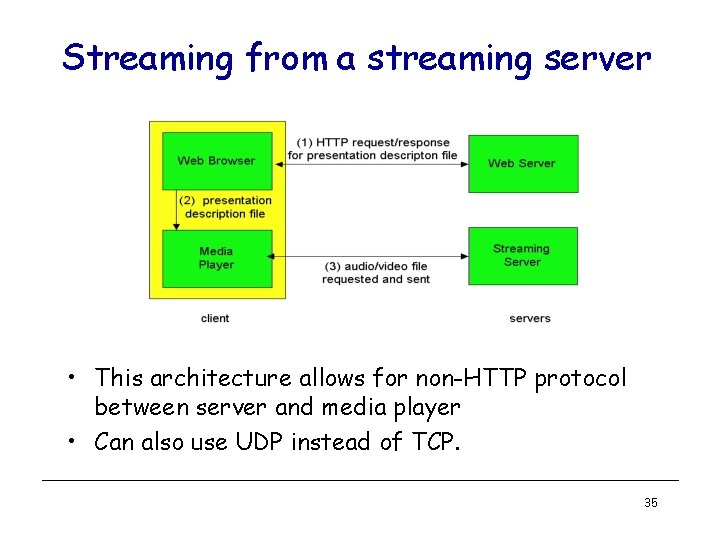
Streaming from a streaming server • This architecture allows for non-HTTP protocol between server and media player • Can also use UDP instead of TCP. 35
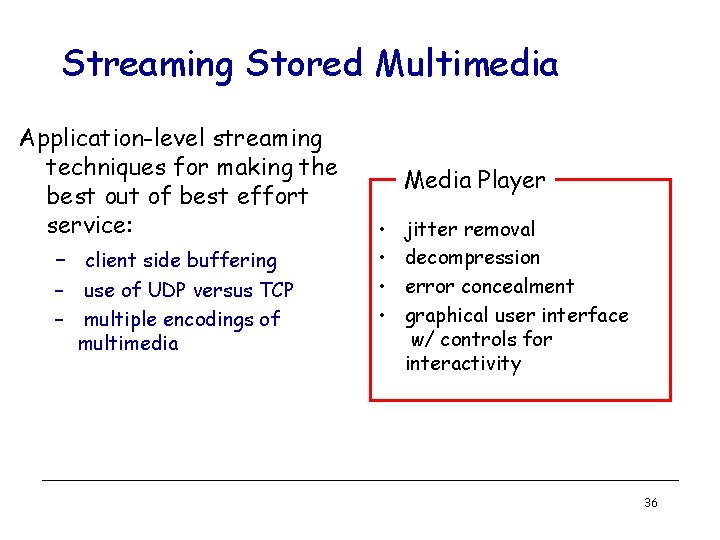
Streaming Stored Multimedia Application-level streaming techniques for making the best out of best effort service: – client side buffering – use of UDP versus TCP – multiple encodings of multimedia Media Player • • jitter removal decompression error concealment graphical user interface w/ controls for interactivity 36
Streaming Multimedia: UDP or TCP? UDP • server sends at rate appropriate for client (oblivious to network congestion !) – often send rate = encoding rate = constant rate – then, fill rate = constant rate - packet loss • short playout delay (2 -5 seconds) to compensate for network delay jitter • error recover: time permitting TCP • • send at maximum possible rate under TCP fill rate fluctuates due to TCP congestion control larger playout delay: smooth TCP delivery rate HTTP/TCP passes more easily through firewalls 37
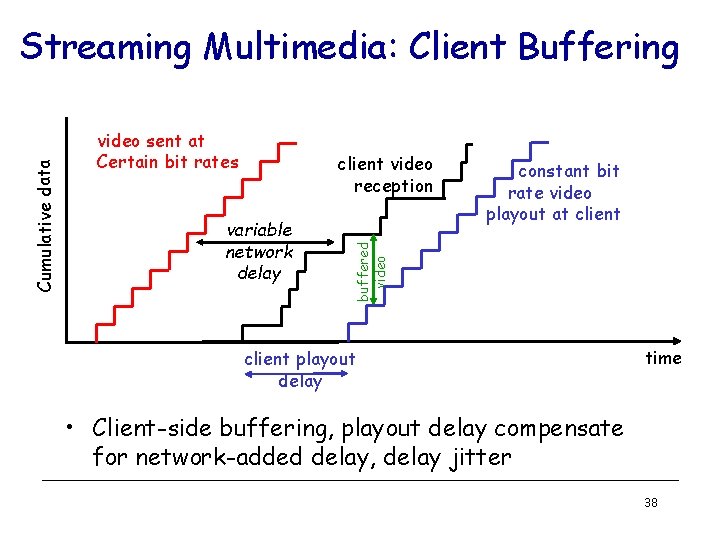
video sent at Certain bit rates client video reception variable network delay constant bit rate video playout at client buffered video Cumulative data Streaming Multimedia: Client Buffering client playout delay time • Client-side buffering, playout delay compensate for network-added delay, delay jitter 38
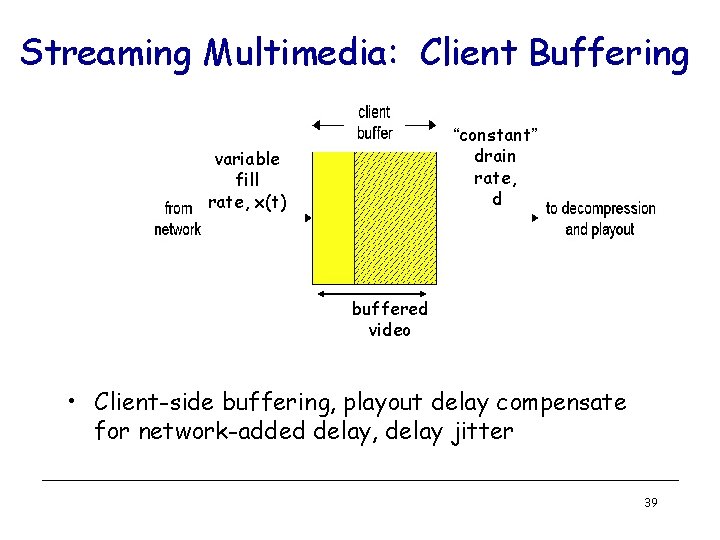
Streaming Multimedia: Client Buffering “constant” drain rate, d variable fill rate, x(t) buffered video • Client-side buffering, playout delay compensate for network-added delay, delay jitter 39
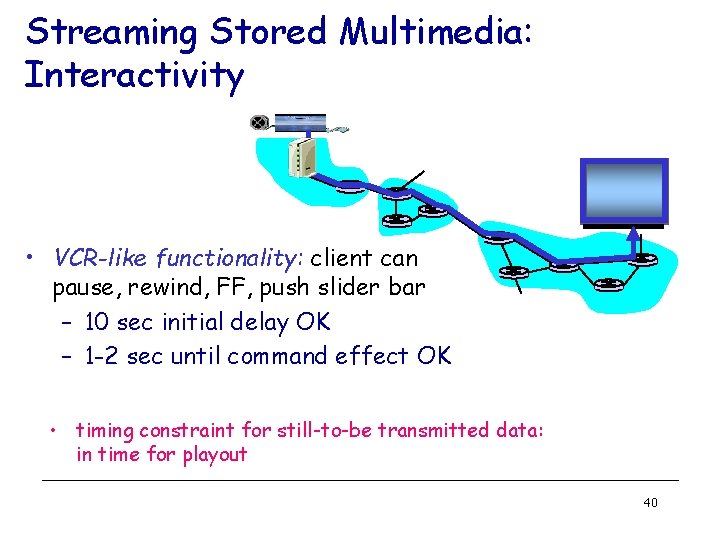
Streaming Stored Multimedia: Interactivity • VCR-like functionality: client can pause, rewind, FF, push slider bar – 10 sec initial delay OK – 1 -2 sec until command effect OK • timing constraint for still-to-be transmitted data: in time for playout 40
Streaming Live Multimedia Examples: • Internet radio talk show • Live sporting event Streaming • playback buffer • playback can lag tens of seconds after transmission • still have timing constraint Interactivity • fast forward impossible • rewind, pause possible! 41
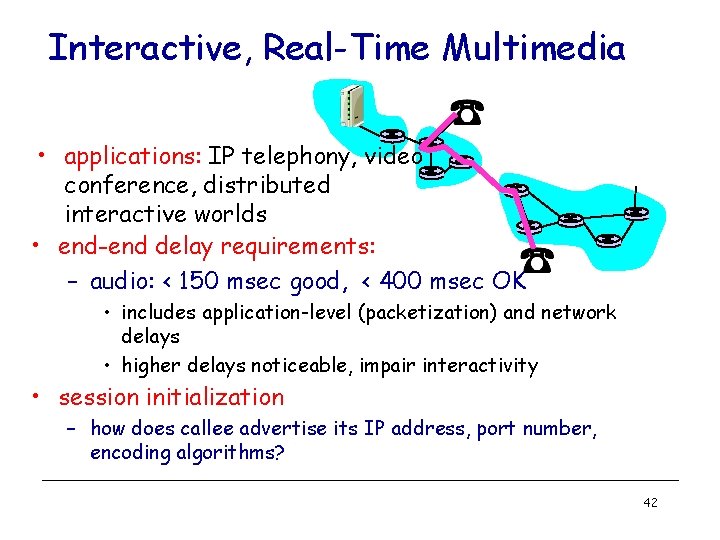
Interactive, Real-Time Multimedia • applications: IP telephony, video conference, distributed interactive worlds • end-end delay requirements: – audio: < 150 msec good, < 400 msec OK • includes application-level (packetization) and network delays • higher delays noticeable, impair interactivity • session initialization – how does callee advertise its IP address, port number, encoding algorithms? 42
Large-scale Internet Video Delivery: You. Tube & Netflix Case Studies Based on two active measurement studies we have conducted • Reverse-engineering You. Tube Delivery Cloud – Google’s New You. Tube Architectural Design • Unreeling Netflix Video Streaming Service – Cloud-sourcing: Amazon Cloud Services & CDNs 43
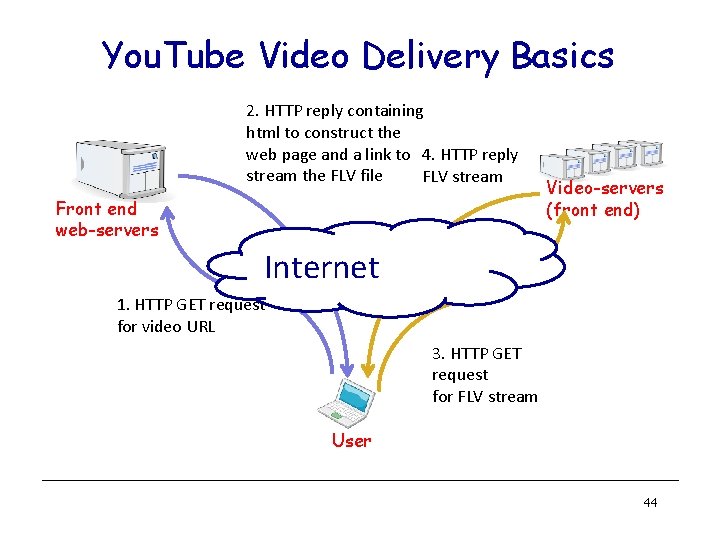
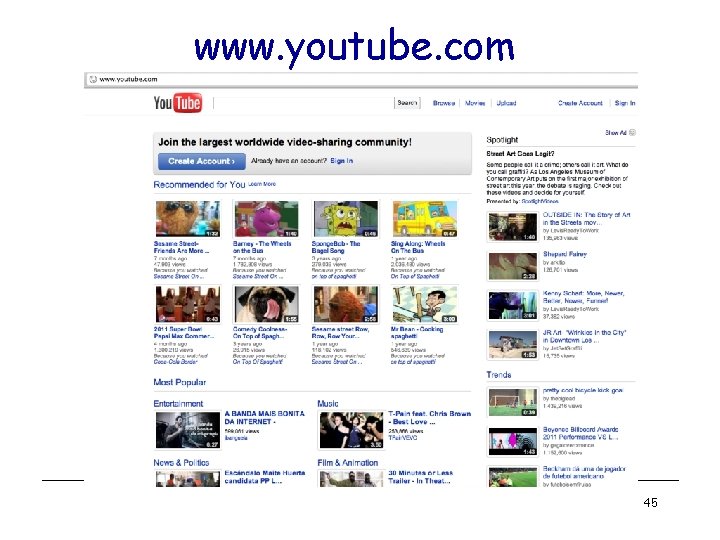
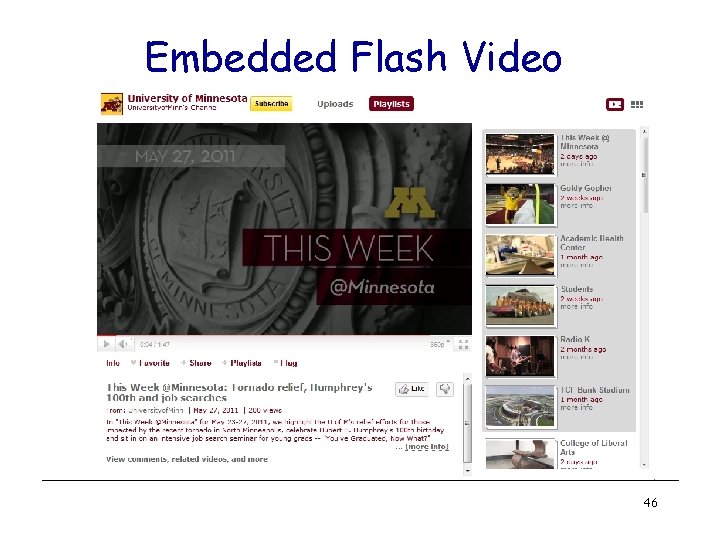
You. Tube Video Delivery Basics 2. HTTP reply containing html to construct the web page and a link to 4. HTTP reply stream the FLV file FLV stream Front end web-servers Video-servers (front end) Internet 1. HTTP GET request for video URL 3. HTTP GET request for FLV stream User 44
www. youtube. com 45
Embedded Flash Video 46
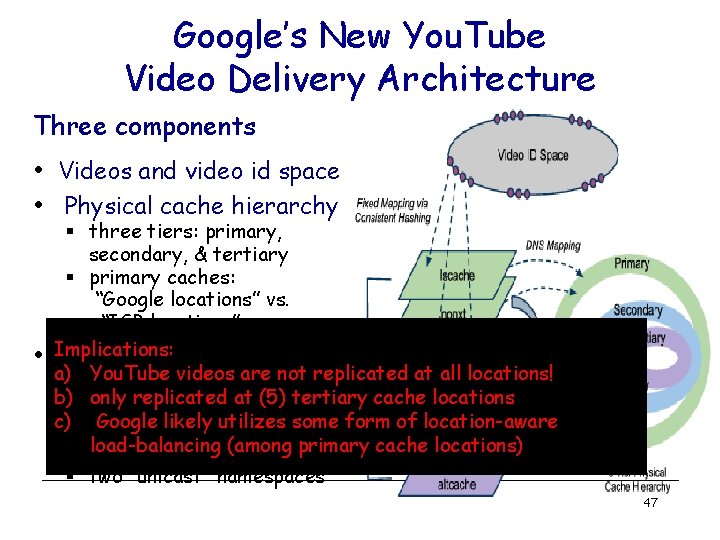
Google’s New You. Tube Video Delivery Architecture Three components • Videos and video id space • Physical cache hierarchy • § three tiers: primary, secondary, & tertiary § primary caches: “Google locations” vs. “ISP locations” Implications: Layered organization of a) You. Tube videos are not replicated at all locations! namespaces b) only replicated at (5) tertiary cache locations § representing “logical” c) Google likely utilizes some form of location-aware video servers load-balancing (among primary cache locations) § five “anycast” namespaces § two “unicast” namespaces 47
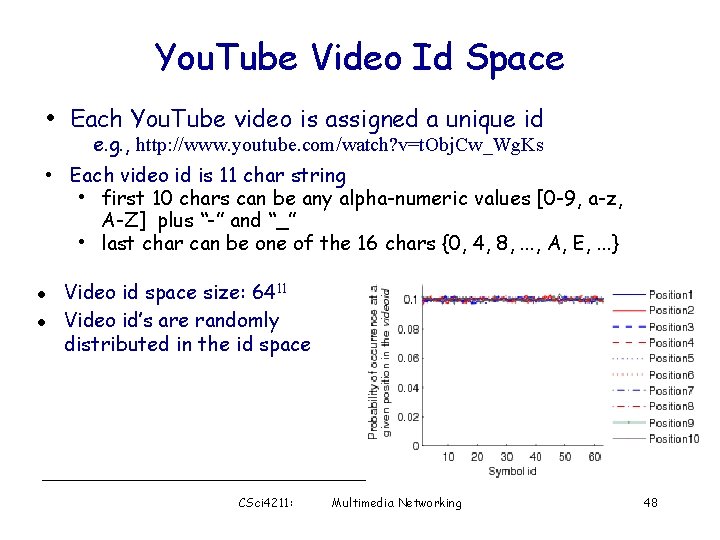
You. Tube Video Id Space • Each You. Tube video is assigned a unique id e. g. , http: //www. youtube. com/watch? v=t. Obj. Cw_Wg. Ks • Each video id is 11 char string • first 10 chars can be any alpha-numeric values [0 -9, a-z, A-Z] plus “-” and “_” • last char can be one of the 16 chars {0, 4, 8, . . . , A, E, . . . } l l Video id space size: 6411 Video id’s are randomly distributed in the id space CSci 4211: Multimedia Networking 48
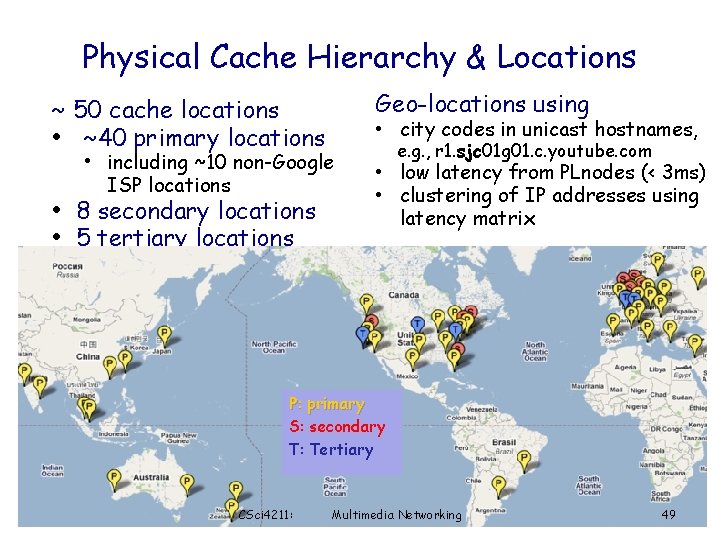
Physical Cache Hierarchy & Locations ~ 50 cache locations • ~40 primary locations Geo-locations using • city codes in unicast hostnames, • including ~10 non-Google ISP locations • 8 secondary locations • 5 tertiary locations e. g. , r 1. sjc 01 g 01. c. youtube. com • low latency from PLnodes (< 3 ms) • clustering of IP addresses using latency matrix P: primary S: secondary T: Tertiary CSci 4211: Multimedia Networking 49
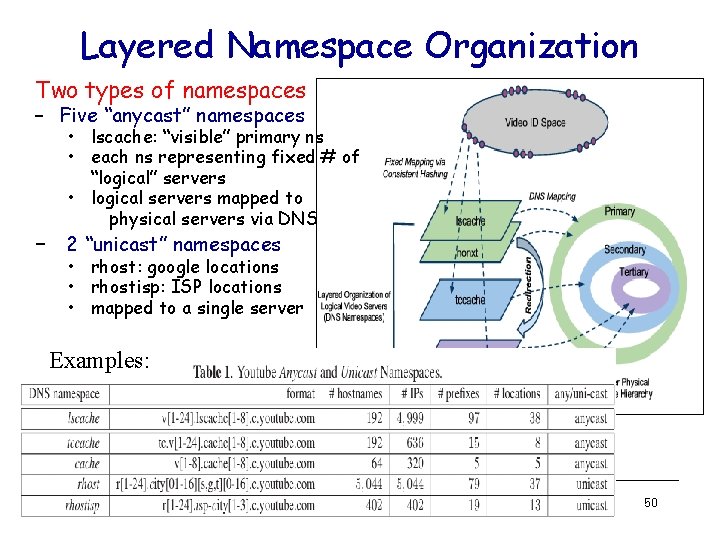
Layered Namespace Organization Two types of namespaces – Five “anycast” namespaces • lscache: “visible” primary ns • each ns representing fixed # of “logical” servers • logical servers mapped to physical servers via DNS – 2 “unicast” namespaces • rhost: google locations • rhostisp: ISP locations • mapped to a single server Examples: 50
You. Tube Video Delivery Dynamics: Summary • Locality-aware DNS resolution • Handling load balancing & hotspots – DNS change – Dynamic HTTP redirection – local vs. higher cache tier • Handling cache misses – Background fetch – Dynamic HTTP redirection 51
What Makes Netflix Interesting? • Commercial, feature-length movies and TV shows § and not free; subscription-based • Nonetheless, Netflix is huge! § § 25 million subscribers and ~20, 000 titles (and growing) consumes 30% of peak-time downstream bandwidth in North America • A prime example of cloud-sourced architecture § § Maintains only a small “in-house” facility for key functions § e. g. , subscriber management (account creation, payment, …) § user authentication, video search, video storage, … § Akamai, Level 3 and Limelight Majority of functions are sourced to Amazon cloud (EC 2/S 3) DNS service is sourced to Ultra. DNS Leverage multiple CDNs (content-distribution networks) for video delivery
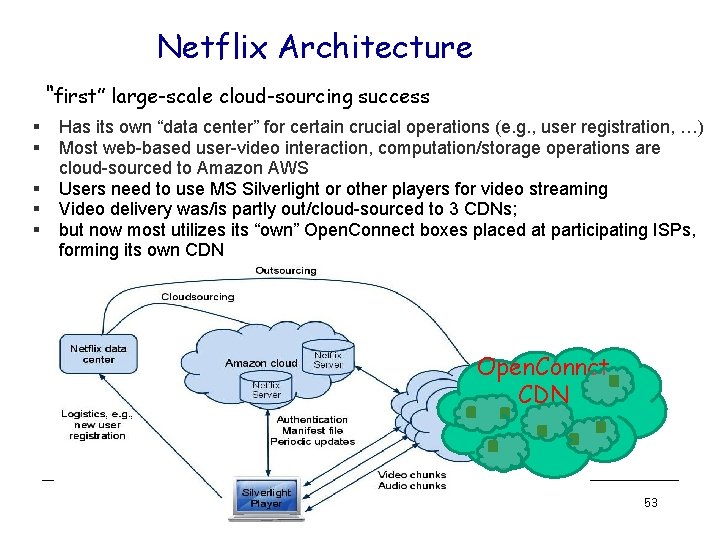
Netflix Architecture “first” large-scale cloud-sourcing success § § § Has its own “data center” for certain crucial operations (e. g. , user registration, …) Most web-based user-video interaction, computation/storage operations are cloud-sourced to Amazon AWS Users need to use MS Silverlight or other players for video streaming Video delivery was/is partly out/cloud-sourced to 3 CDNs; but now most utilizes its “own” Open. Connect boxes placed at participating ISPs, forming its own CDN Open. Connct CDN 53
Netflix Videos and Video Chunks • Netflix uses a numeric ID to identify each movie – IDs are variable length (6 -8 digits): 213530, 1001192, 70221086 – video IDs do not seem to be evenly distributed in the ID space – these video IDs are not used in playback operations • Each movie is encoded in multiple quality levels, each is identified by a numeric ID (9 digits) – various numeric IDs associated with the same movie appear to have no obvious relations 54
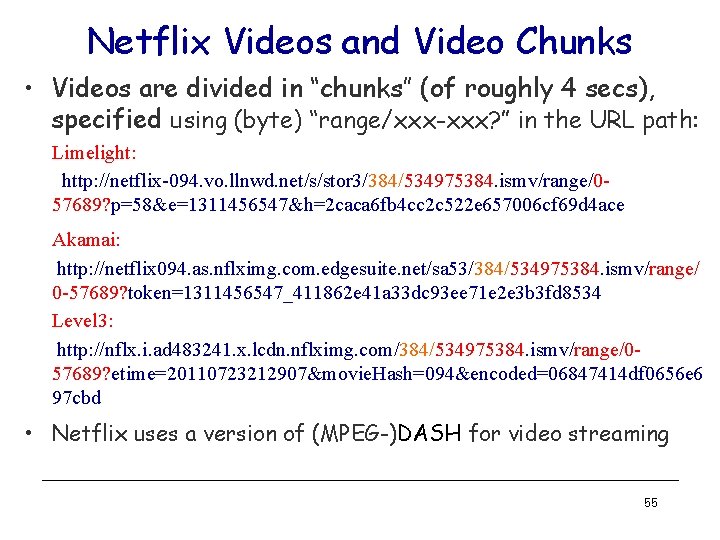
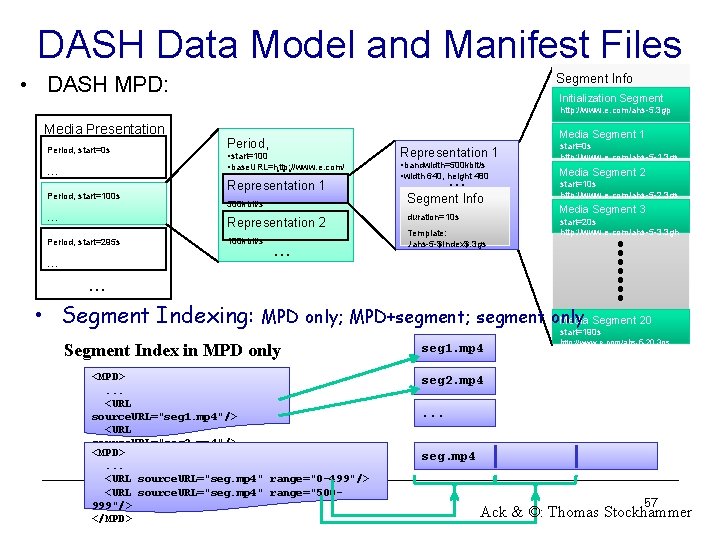
Netflix Videos and Video Chunks • Videos are divided in “chunks” (of roughly 4 secs), specified using (byte) “range/xxx-xxx? ” in the URL path: Limelight: http: //netflix-094. vo. llnwd. net/s/stor 3/384/534975384. ismv/range/057689? p=58&e=1311456547&h=2 caca 6 fb 4 cc 2 c 522 e 657006 cf 69 d 4 ace Akamai: http: //netflix 094. as. nflximg. com. edgesuite. net/sa 53/384/534975384. ismv/range/ 0 -57689? token=1311456547_411862 e 41 a 33 dc 93 ee 71 e 2 e 3 b 3 fd 8534 Level 3: http: //nflx. i. ad 483241. x. lcdn. nflximg. com/384/534975384. ismv/range/057689? etime=20110723212907&movie. Hash=094&encoded=06847414 df 0656 e 6 97 cbd • Netflix uses a version of (MPEG-)DASH for video streaming 55
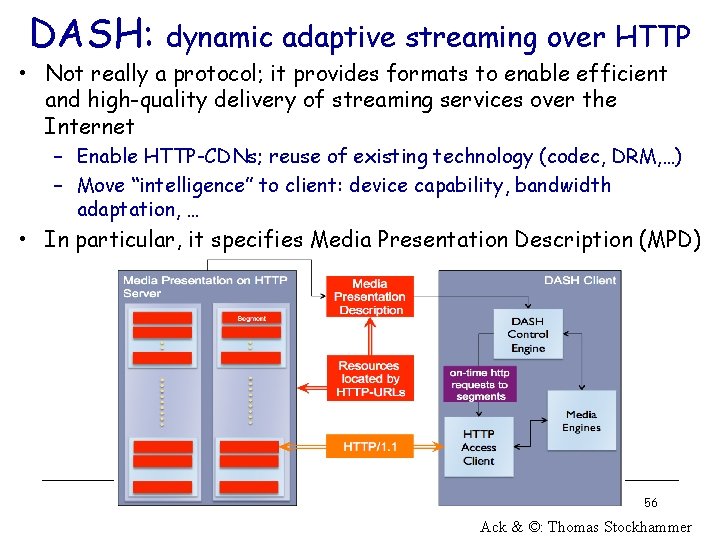
DASH: dynamic adaptive streaming over HTTP • Not really a protocol; it provides formats to enable efficient and high-quality delivery of streaming services over the Internet – Enable HTTP-CDNs; reuse of existing technology (codec, DRM, …) – Move “intelligence” to client: device capability, bandwidth adaptation, … • In particular, it specifies Media Presentation Description (MPD) 56 Ack & ©: Thomas Stockhammer
DASH Data Model and Manifest Files • DASH MPD: Segment Info Initialization Segment http: //www. e. com/ahs-5. 3 gp Media Presentation Period, start=0 s Media Segment 1 Period, • start=100 • base. URL=http: //www. e. com/ … … Period, start=100 s … Representation 1 500 kbit/s Representation 2 Period, start=295 s 100 kbit/s … … Representation 1 • bandwidth=500 kbit/s • width 640, height 480 … Segment Info duration=10 s Template: . /ahs-5 -$Index$. 3 gs start=0 s http: //www. e. com/ahs-5 -1. 3 gs Media Segment 2 start=10 s http: //www. e. com/ahs-5 -2. 3 gs Media Segment 3 start=20 s http: //www. e. com/ahs-5 -3. 3 gh … • Segment Indexing: MPD only; MPD+segment; segment only Media Segment 20 Segment Index in MPD only <MPD>. . . <URL source. URL="seg 1. mp 4"/> <URL source. URL="seg 2. mp 4"/> <MPD> </MPD>. . . <URL source. URL="seg. mp 4" range="0 -499"/> <URL source. URL="seg. mp 4" range="500999"/> </MPD> start=190 s seg 1. mp 4 http: //www. e. com/ahs-5 -20. 3 gs seg 2. mp 4. . . seg. mp 4 57 Ack & ©: Thomas Stockhammer
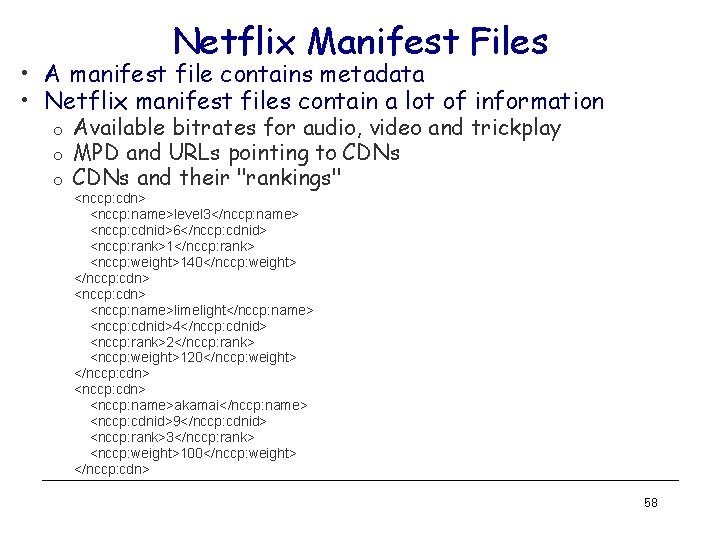
Netflix Manifest Files • A manifest file contains metadata • Netflix manifest files contain a lot of information o o o Available bitrates for audio, video and trickplay MPD and URLs pointing to CDNs and their "rankings" <nccp: cdn> <nccp: name>level 3</nccp: name> <nccp: cdnid>6</nccp: cdnid> <nccp: rank>1</nccp: rank> <nccp: weight>140</nccp: weight> </nccp: cdn> <nccp: name>limelight</nccp: name> <nccp: cdnid>4</nccp: cdnid> <nccp: rank>2</nccp: rank> <nccp: weight>120</nccp: weight> </nccp: cdn> <nccp: name>akamai</nccp: name> <nccp: cdnid>9</nccp: cdnid> <nccp: rank>3</nccp: rank> <nccp: weight>100</nccp: weight> </nccp: cdn> 58
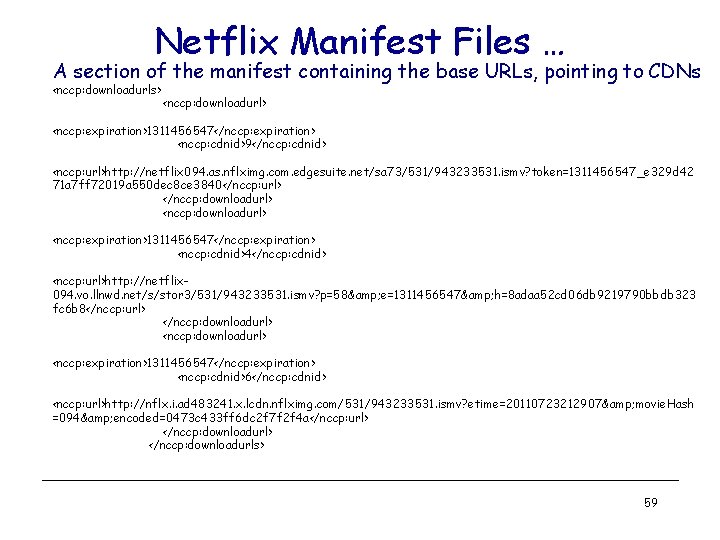
Netflix Manifest Files … A section of the manifest containing the base URLs, pointing to CDNs <nccp: downloadurls> <nccp: downloadurl> <nccp: expiration>1311456547</nccp: expiration> <nccp: cdnid>9</nccp: cdnid> <nccp: url>http: //netflix 094. as. nflximg. com. edgesuite. net/sa 73/531/943233531. ismv? token=1311456547_e 329 d 42 71 a 7 ff 72019 a 550 dec 8 ce 3840</nccp: url> </nccp: downloadurl> <nccp: expiration>1311456547</nccp: expiration> <nccp: cdnid>4</nccp: cdnid> <nccp: url>http: //netflix 094. vo. llnwd. net/s/stor 3/531/943233531. ismv? p=58& e=1311456547& h=8 adaa 52 cd 06 db 9219790 bbdb 323 fc 6 b 8</nccp: url> </nccp: downloadurl> <nccp: expiration>1311456547</nccp: expiration> <nccp: cdnid>6</nccp: cdnid> <nccp: url>http: //nflx. i. ad 483241. x. lcdn. nflximg. com/531/943233531. ismv? etime=20110723212907& movie. Hash =094& encoded=0473 c 433 ff 6 dc 2 f 7 f 2 f 4 a</nccp: url> </nccp: downloadurls> 59
Netflix: Adapting to Bandwidth Changes • Two possible approaches § § Increase/decrease quality level using DASH Switch CDNs • Experiments § § Play a movie and systematically throttle available bandwidth Observer addresses and video quality • Bandwidth throttling using the “dummynet” tool § Throttling done on the client side by limiting how fast it can download from any given CDN server § First throttle the most preferred CDN server, keep throttling other servers as they get selected 60
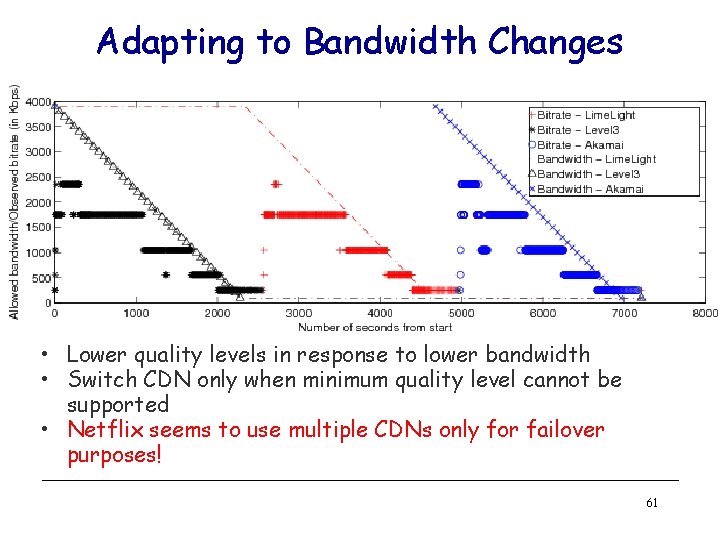
Adapting to Bandwidth Changes • Lower quality levels in response to lower bandwidth • Switch CDN only when minimum quality level cannot be supported • Netflix seems to use multiple CDNs only for failover purposes! 61
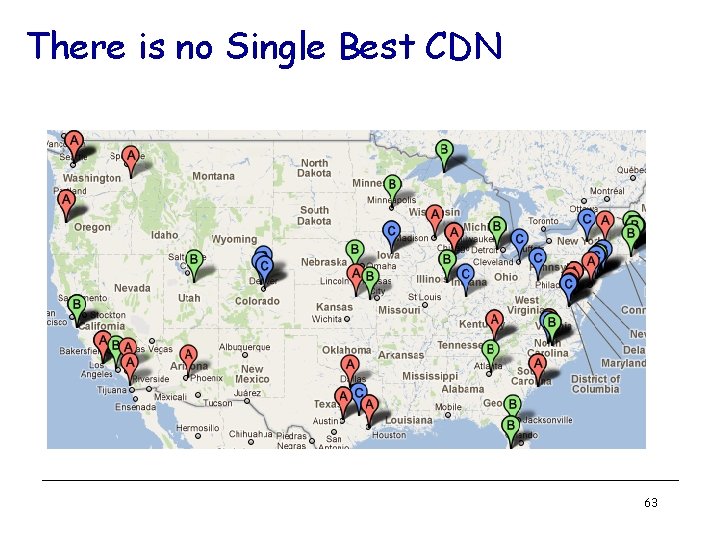
CDN Bandwidth Measurement • Use both local residential hosts and Planet. Lab nodes § 13 residential hosts and 100 s Planet. Lab nodes are used § Each host downloads small chunks of Netflix videos from all three CDN servers by replaying URLs from the manifest files • Experiments are done for several hours every day for about 3 weeks § total experiment duration was divided into 16 second intervals § the clients downloaded chunks from CDN 1, 2 and 3 at the beginning of seconds 0, 4 and 8. § at the beginning of the 12 th second, the clients tried to download the chunks from all three CDNs simultaneously • Measure bandwidth to 3 CDNs separately as well as the combined bandwidth • Perform analysis at three time-scales § § § average over the entire period daily averages instantaneous bandwidth CSci 4211: Multimedia Networking 62
There is no Single Best CDN 63
Video on Demand: OTT Over-the-top: Vo. D provider uses public Internet to deliver content (augmented by CDNs) § use Internet best effort service (no guarantees) § ISPs (AT&T, Comcast, Version) relegated to role of “bit pipes” - carrying traffic but not offering “services” § unicast HTTP (e. g. , DASH) § minimal infrastructure costs § user subscription fee or advertising revenue 64
Video on Demand: in-network: access network owner (Comcast, Verizon) provides Vo. D service to its customers § high-quality user experience (Qo. E) because ISP manages network § servers in same edge network as viewers § efficient network use: multicast possible (one packet to many receivers) § ISP pays infrastructure cost OTT versus in-network: who will win, and why? 65
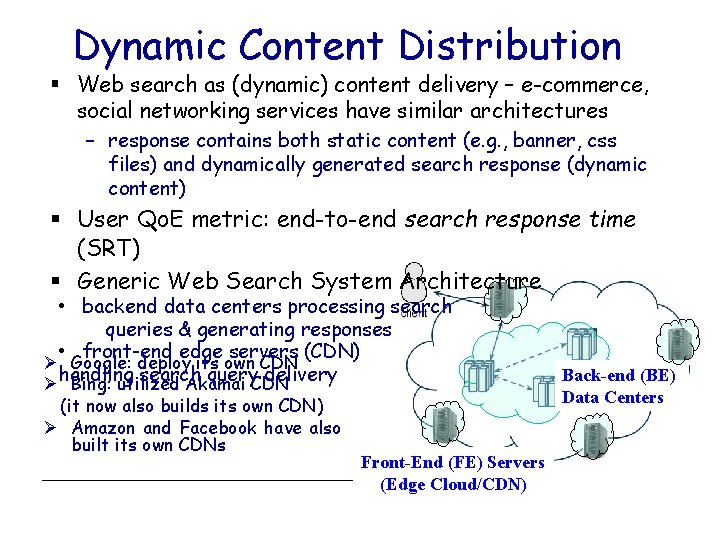
Dynamic Content Distribution § Web search as (dynamic) content delivery – e-commerce, social networking services have similar architectures – response contains both static content (e. g. , banner, css files) and dynamically generated search response (dynamic content) § User Qo. E metric: end-to-end search response time (SRT) § Generic Web Search System Architecture • backend data centers processing search queries & generating responses • front-end edge servers (CDN) Ø Google: deploy its own CDN handling search query delivery Ø Bing: utilized Akamai CDN (it now also builds its own CDN) Ø Amazon and Facebook have also built its own CDNs Front-End (FE) Servers (Edge Cloud/CDN) Back-end (BE) Data Centers
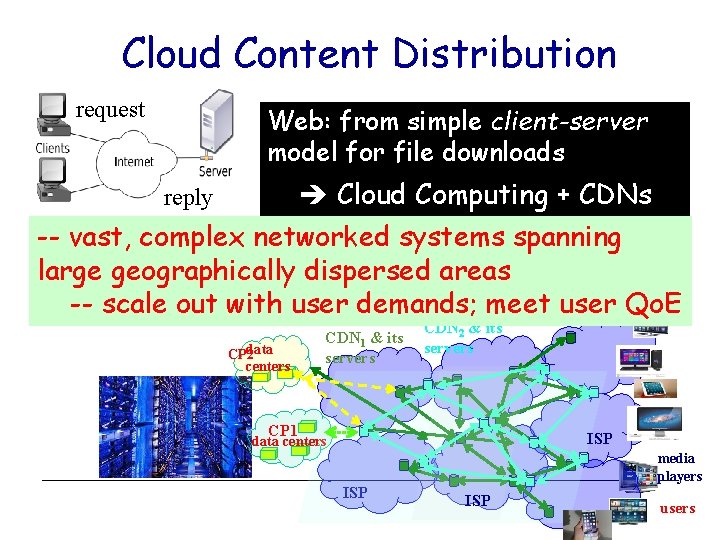
Cloud Content Distribution request Web: from simple client-server model for file downloads Cloud Computing + CDNs reply -- vast, complex networked systems spanning large geographically dispersed areas -- scale out with user demands; meet user Qo. E data CP 2 centers CDN 1 & its servers CDN 2 & its servers CP 1 ISP data centers ISP media players ISP users
- Slides: 67