
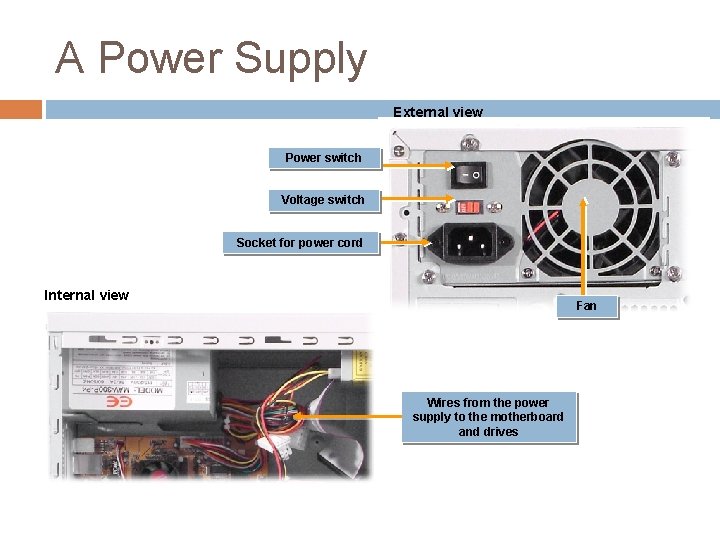
A Power Supply External view Power switch Voltage
- Slides: 48
A Power Supply External view Power switch Voltage switch Socket for power cord Internal view Fan Wires from the power supply to the motherboard and drives
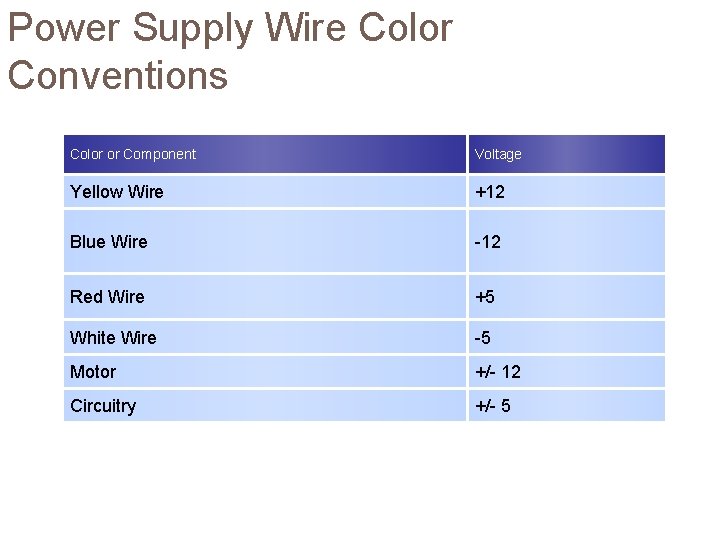
Power Supply Wire Color Conventions Color or Component Voltage Yellow Wire +12 Blue Wire -12 Red Wire +5 White Wire -5 Motor +/- 12 Circuitry +/- 5
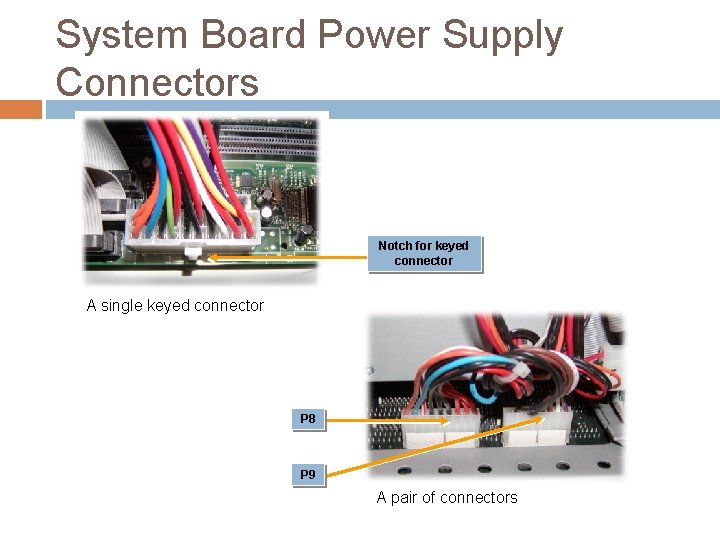
System Board Power Supply Connectors Notch for keyed connector A single keyed connector P 8 P 9 A pair of connectors
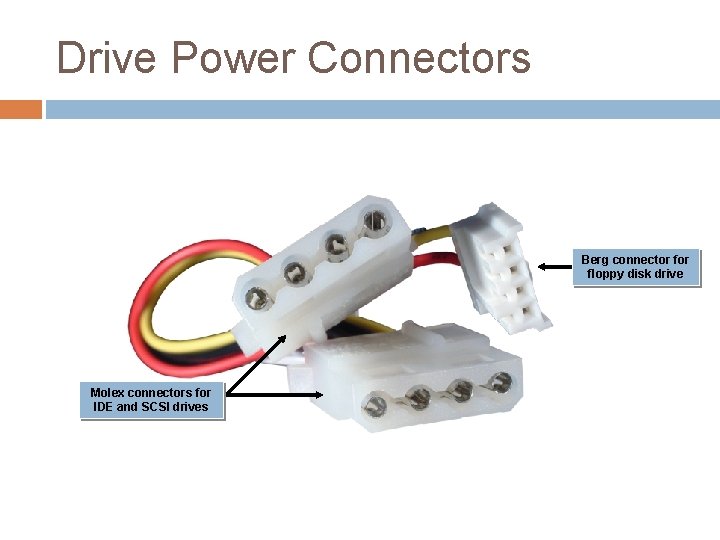
Drive Power Connectors Berg connector floppy disk drive Molex connectors for IDE and SCSI drives
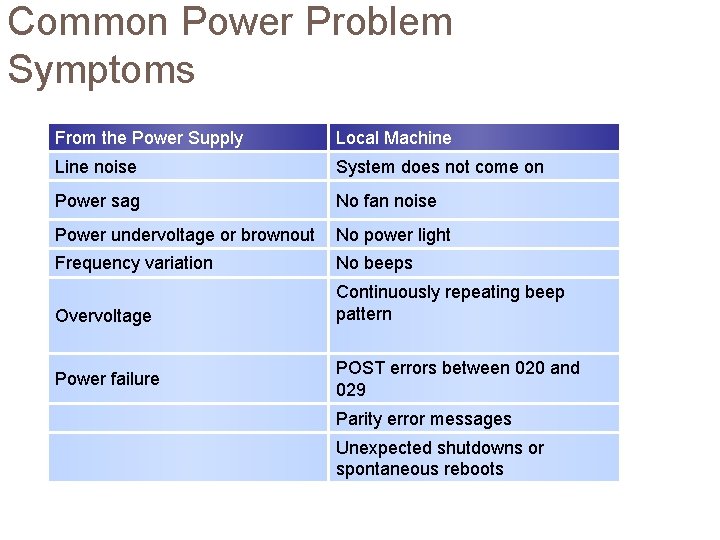
Common Power Problem Symptoms From the Power Supply Local Machine Line noise System does not come on Power sag No fan noise Power undervoltage or brownout No power light Frequency variation No beeps Overvoltage Continuously repeating beep pattern Power failure POST errors between 020 and 029 Parity error messages Unexpected shutdowns or spontaneous reboots
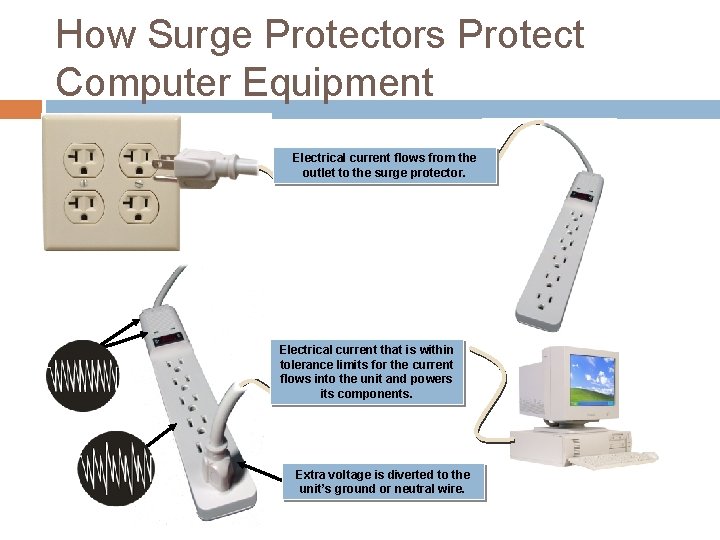
How Surge Protectors Protect Computer Equipment Electrical current flows from the outlet to the surge protector. Electrical current that is within tolerance limits for the current flows into the unit and powers its components. Extra voltage is diverted to the unit’s ground or neutral wire.
BIOS The Basic Input Output System (BIOS) is the set of instruction commands stored on a ROM chip that is used to start the most basic services of a system.
CMOS is an area of memory with battery backup that is used to store the system configuration settings that the ROM BIOS accesses during the startup sequence.
BIOS Settings BIOS settings are the low-level hardware configuration settings that are stored in the CMOS on every computer.
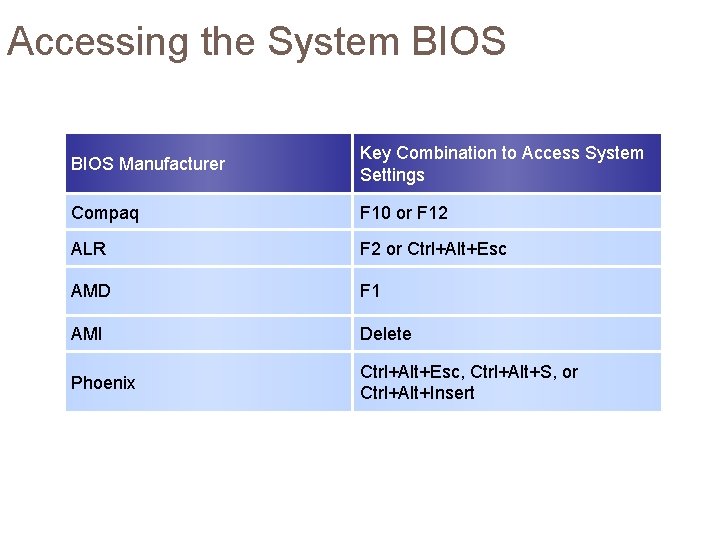
Accessing the System BIOS Manufacturer Key Combination to Access System Settings Compaq F 10 or F 12 ALR F 2 or Ctrl+Alt+Esc AMD F 1 AMI Delete Phoenix Ctrl+Alt+Esc, Ctrl+Alt+S, or Ctrl+Alt+Insert
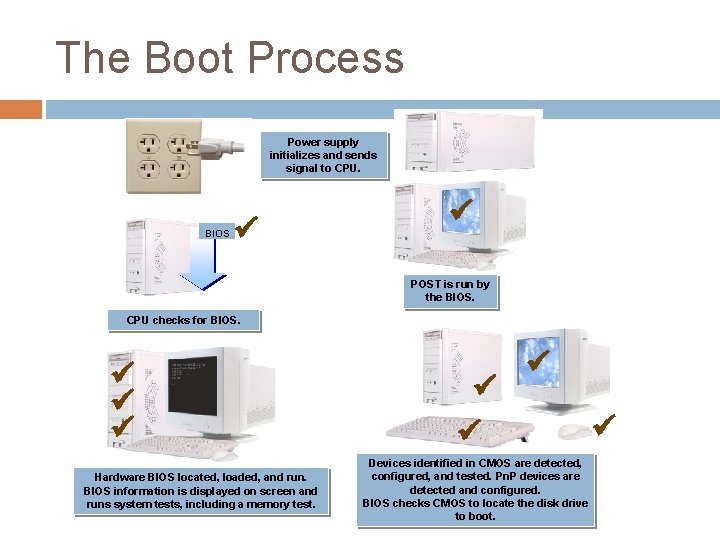
The Boot Process Power supply initializes and sends signal to CPU. BIOS POST is run by the BIOS. CPU checks for BIOS. Hardware BIOS located, loaded, and run. BIOS information is displayed on screen and runs system tests, including a memory test. Devices identified in CMOS are detected, configured, and tested. Pn. P devices are detected and configured. BIOS checks CMOS to locate the disk drive to boot.
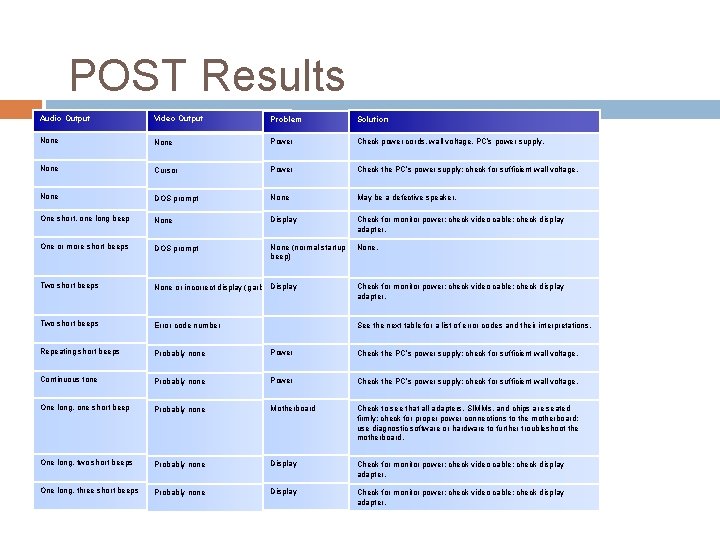
POST Results Audio Output Video Output Problem Solution None Power Check power cords, wall voltage, PC’s power supply. None Cursor Power Check the PC’s power supply; check for sufficient wall voltage. None DOS prompt None May be a defective speaker. One short, one long beep None Display Check for monitor power; check video cable; check display adapter. One or more short beeps DOS prompt None (normal startup beep) None. Two short beeps Display None or incorrect display (garbage) Check for monitor power; check video cable; check display adapter. Two short beeps Error code number See the next table for a list of error codes and their interpretations. Repeating short beeps Probably none Power Check the PC’s power supply; check for sufficient wall voltage. Continuous tone Probably none Power Check the PC’s power supply; check for sufficient wall voltage. One long, one short beep Probably none Motherboard Check to see that all adapters, SIMMs, and chips are seated firmly; check for proper power connections to the motherboard; use diagnostic software or hardware to further troubleshoot the motherboard. One long, two short beeps Probably none Display Check for monitor power; check video cable; check display adapter. One long, three short beeps Probably none Display Check for monitor power; check video cable; check display adapter.
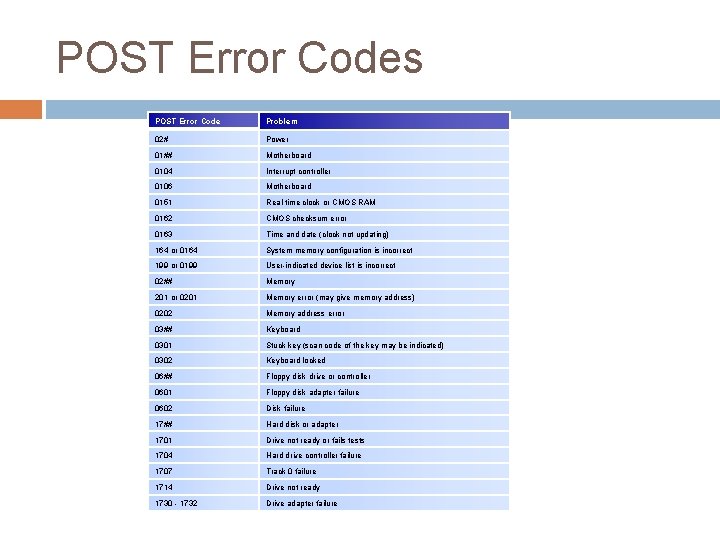
POST Error Codes POST Error Code Problem 02# Power 01## Motherboard 0104 Interrupt controller 0106 Motherboard 0151 Real-time clock or CMOS RAM 0162 CMOS checksum error 0163 Time and date (clock not updating) 164 or 0164 System memory configuration is incorrect 199 or 0199 User-indicated device list is incorrect 02## Memory 201 or 0201 Memory error (may give memory address) 0202 Memory address error 03## Keyboard 0301 Stuck key (scan code of the key may be indicated) 0302 Keyboard locked 06## Floppy disk drive or controller 0601 Floppy disk adapter failure 0602 Disk failure 17## Hard disk or adapter 1701 Drive not ready or fails tests 1704 Hard drive controller failure 1707 Track 0 failure 1714 Drive not ready 1730 - 1732 Drive adapter failure
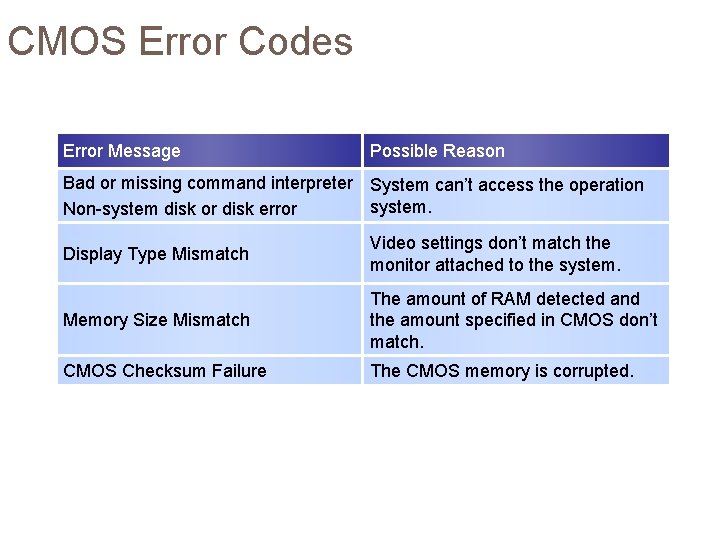
CMOS Error Codes Error Message Possible Reason Bad or missing command interpreter System can’t access the operation system. Non-system disk or disk error Display Type Mismatch Video settings don’t match the monitor attached to the system. Memory Size Mismatch The amount of RAM detected and the amount specified in CMOS don’t match. CMOS Checksum Failure The CMOS memory is corrupted.
CPU The Central Processing Unit (CPU) is the integrated circuit that controls all of the system components.
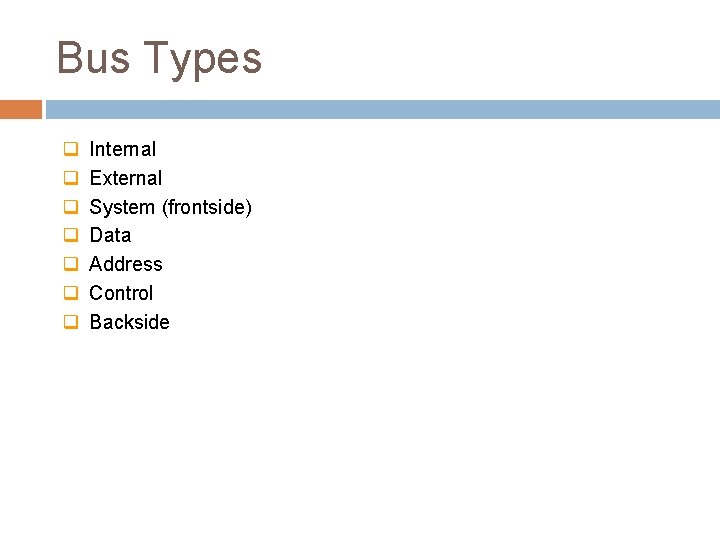
Bus Types q q q q Internal External System (frontside) Data Address Control Backside
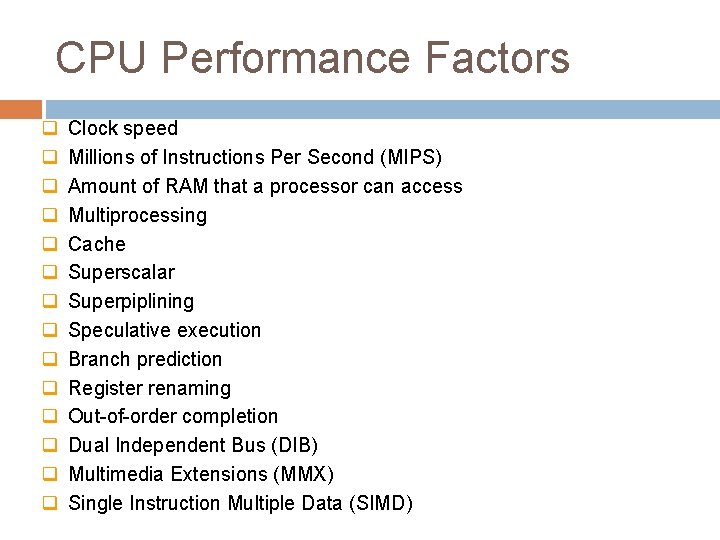
CPU Performance Factors q q q q Clock speed Millions of Instructions Per Second (MIPS) Amount of RAM that a processor can access Multiprocessing Cache Superscalar Superpiplining Speculative execution Branch prediction Register renaming Out-of-order completion Dual Independent Bus (DIB) Multimedia Extensions (MMX) Single Instruction Multiple Data (SIMD)
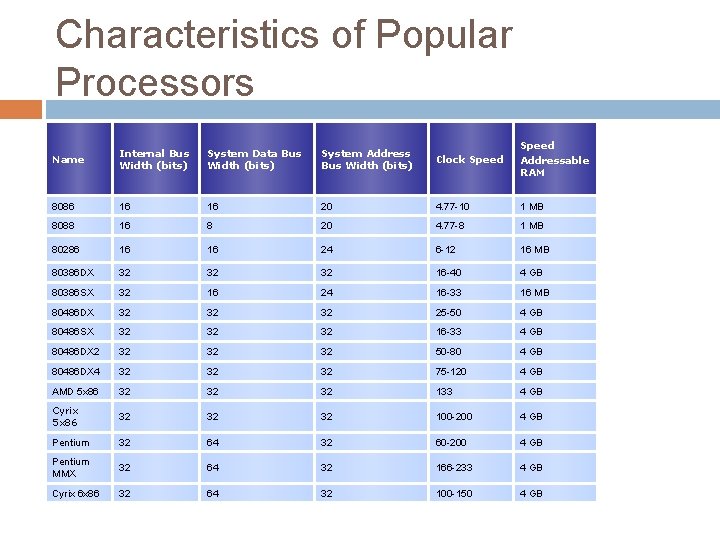
Characteristics of Popular Processors Name Internal Bus Width (bits) System Data Bus Width (bits) System Address Bus Width (bits) Clock Speed Addressable RAM 8086 16 16 20 4. 77 -10 1 MB 8088 16 8 20 4. 77 -8 1 MB 80286 16 16 24 6 -12 16 MB 80386 DX 32 32 32 16 -40 4 GB 80386 SX 32 16 24 16 -33 16 MB 80486 DX 32 32 32 25 -50 4 GB 80486 SX 32 32 32 16 -33 4 GB 80486 DX 2 32 32 32 50 -80 4 GB 80486 DX 4 32 32 32 75 -120 4 GB AMD 5 x 86 32 32 32 133 4 GB Cyrix 5 x 86 32 32 32 100 -200 4 GB Pentium 32 64 32 60 -200 4 GB Pentium MMX 32 64 32 166 -233 4 GB Cyrix 6 x 86 32 64 32 100 -150 4 GB
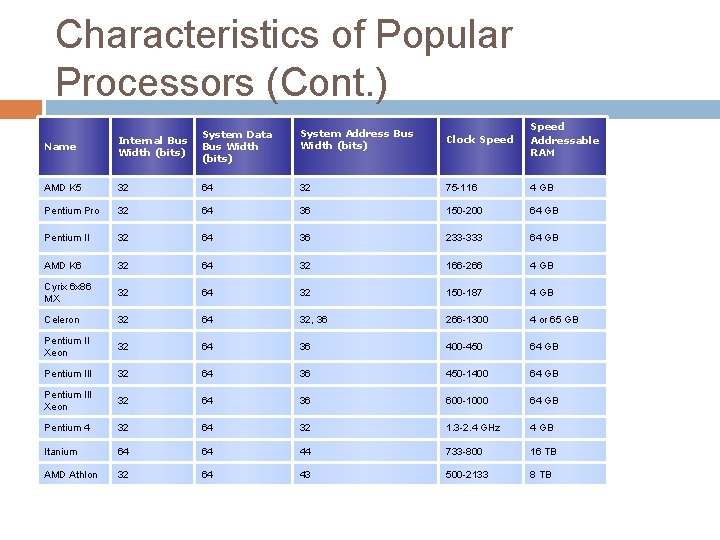
Characteristics of Popular Processors (Cont. ) Name Internal Bus Width (bits) System Data Bus Width (bits) System Address Bus Width (bits) Clock Speed Addressable RAM AMD K 5 32 64 32 75 -116 4 GB Pentium Pro 32 64 36 150 -200 64 GB Pentium II 32 64 36 233 -333 64 GB AMD K 6 32 64 32 166 -266 4 GB Cyrix 6 x 86 MX 32 64 32 150 -187 4 GB Celeron 32 64 32, 36 266 -1300 4 or 65 GB Pentium II Xeon 32 64 36 400 -450 64 GB Pentium III 32 64 36 450 -1400 64 GB Pentium III Xeon 32 64 36 600 -1000 64 GB Pentium 4 32 64 32 1. 3 -2. 4 GHz 4 GB Itanium 64 64 44 733 -800 16 TB AMD Athlon 32 64 43 500 -2133 8 TB
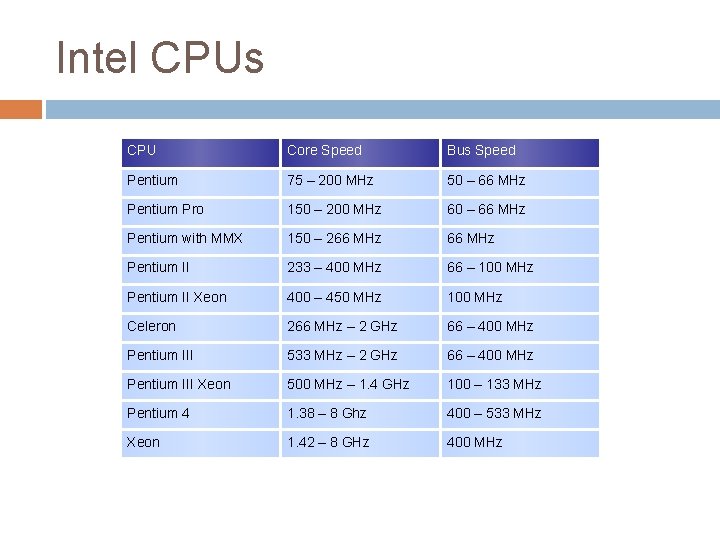
Intel CPUs CPU Core Speed Bus Speed Pentium 75 – 200 MHz 50 – 66 MHz Pentium Pro 150 – 200 MHz 60 – 66 MHz Pentium with MMX 150 – 266 MHz Pentium II 233 – 400 MHz 66 – 100 MHz Pentium II Xeon 400 – 450 MHz 100 MHz Celeron 266 MHz – 2 GHz 66 – 400 MHz Pentium III 533 MHz – 2 GHz 66 – 400 MHz Pentium III Xeon 500 MHz – 1. 4 GHz 100 – 133 MHz Pentium 4 1. 38 – 8 Ghz 400 – 533 MHz Xeon 1. 42 – 8 GHz 400 MHz
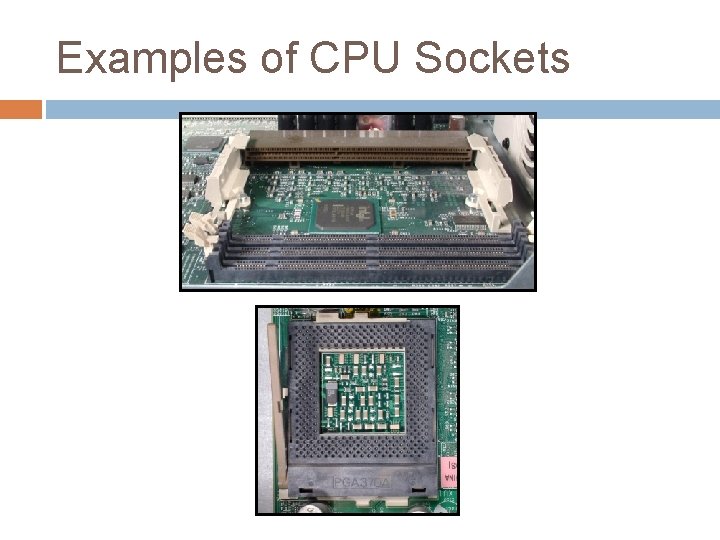
Examples of CPU Sockets
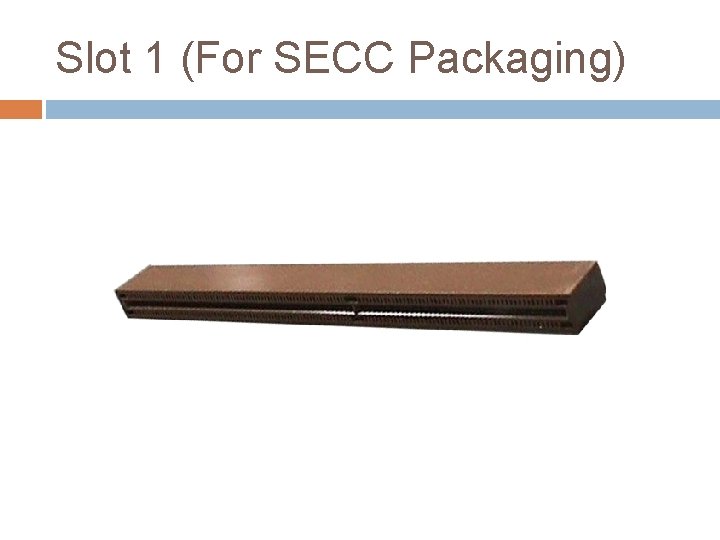
Slot 1 (For SECC Packaging)
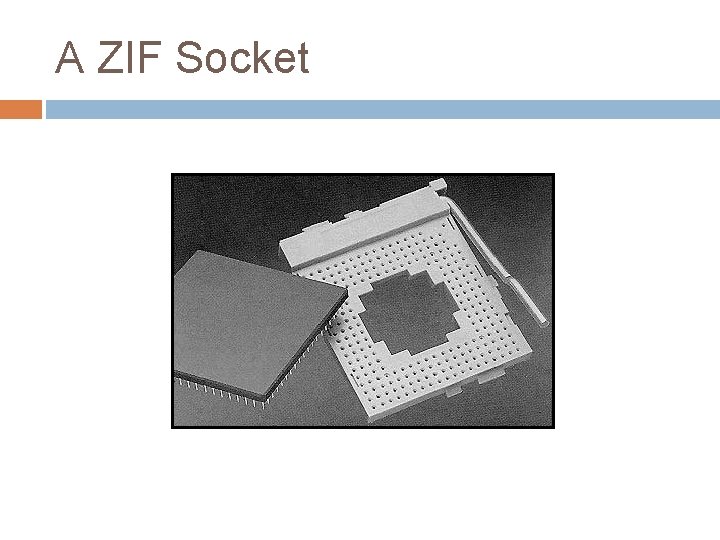
A ZIF Socket
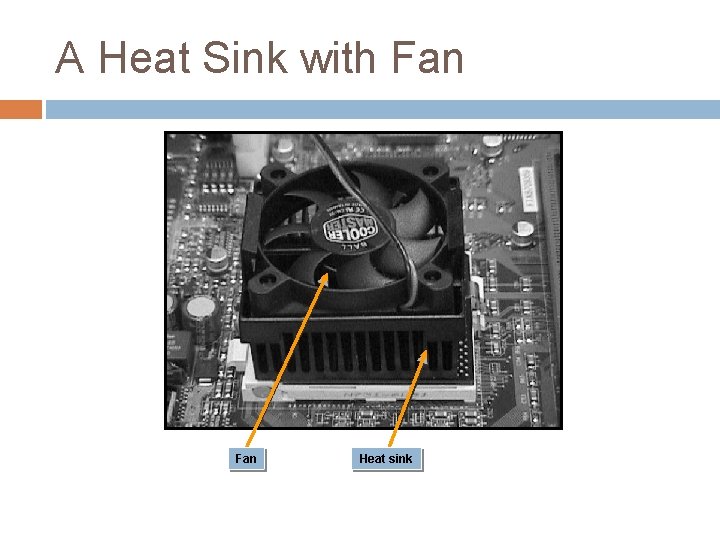
A Heat Sink with Fan Heat sink
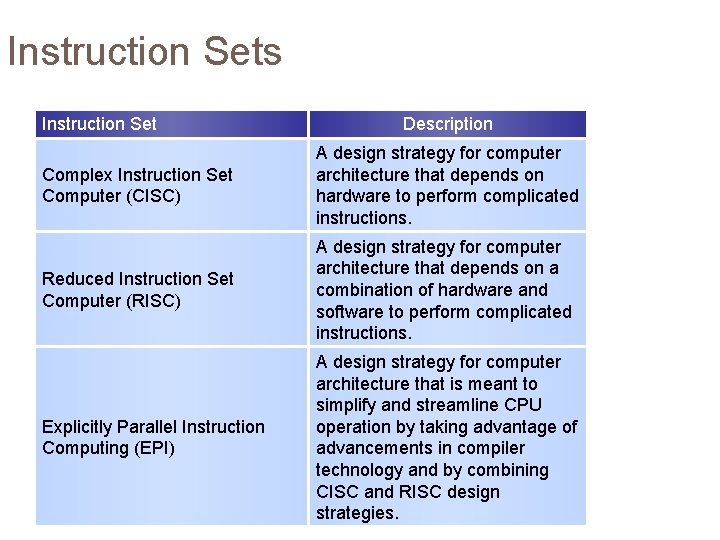
Instruction Sets Instruction Set Description Complex Instruction Set Computer (CISC) A design strategy for computer architecture that depends on hardware to perform complicated instructions. Reduced Instruction Set Computer (RISC) A design strategy for computer architecture that depends on a combination of hardware and software to perform complicated instructions. Explicitly Parallel Instruction Computing (EPI) A design strategy for computer architecture that is meant to simplify and streamline CPU operation by taking advantage of advancements in compiler technology and by combining CISC and RISC design strategies.
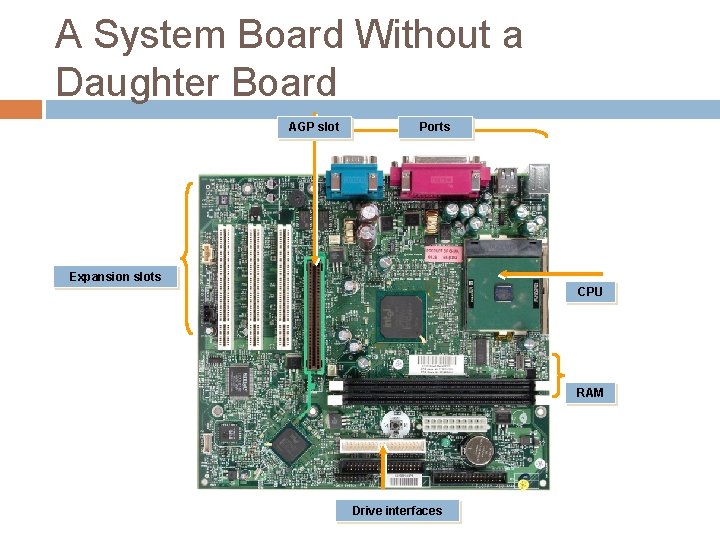
A System Board Without a Daughter Board AGP slot Ports Expansion slots CPU RAM Drive interfaces
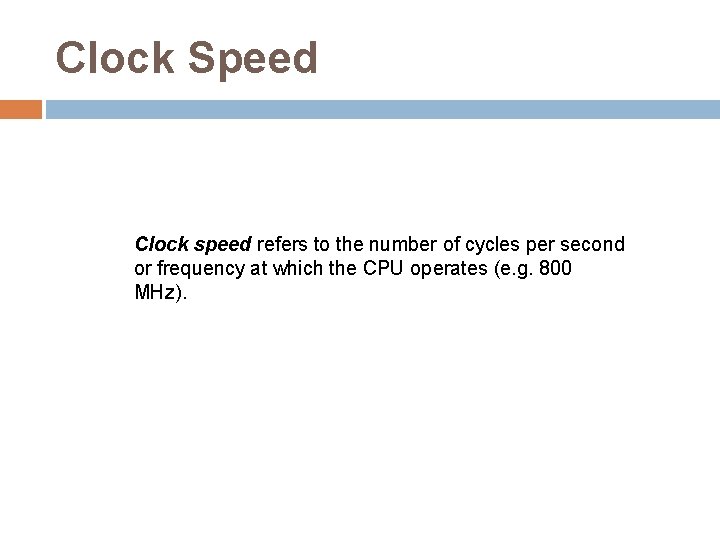
Clock Speed Clock speed refers to the number of cycles per second or frequency at which the CPU operates (e. g. 800 MHz).
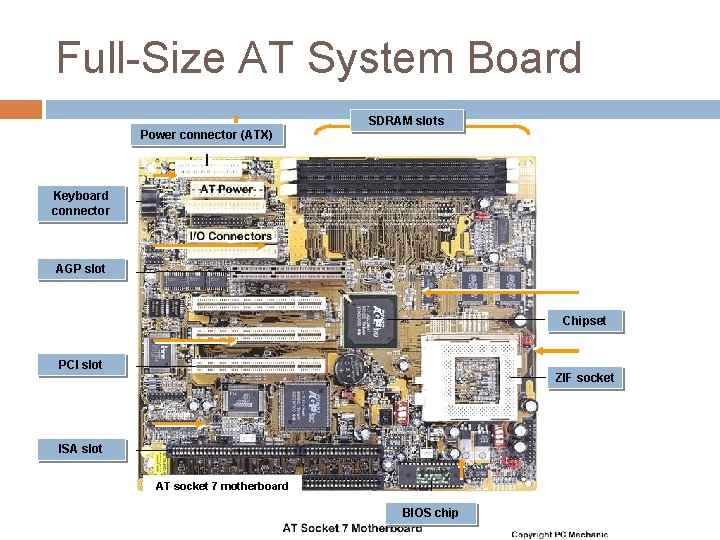
Full-Size AT System Board SDRAM slots Power connector (ATX) Keyboard connector AGP slot Chipset PCI slot ZIF socket ISA slot AT socket 7 motherboard BIOS chip
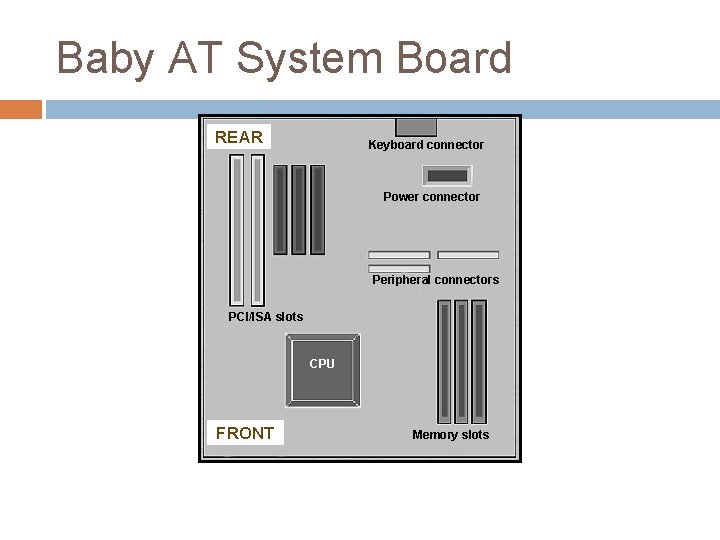
Baby AT System Board REAR Keyboard connector Power connector Peripheral connectors PCI/ISA slots CPU FRONT Memory slots
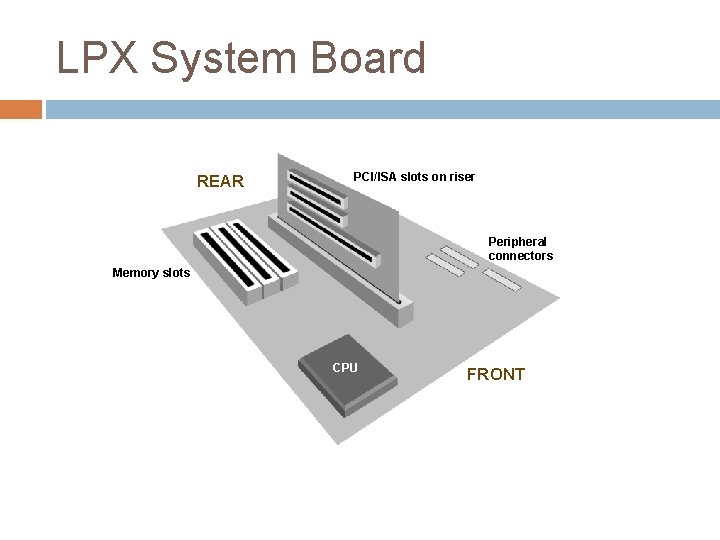
LPX System Board REAR PCI/ISA slots on riser Peripheral connectors Memory slots CPU FRONT
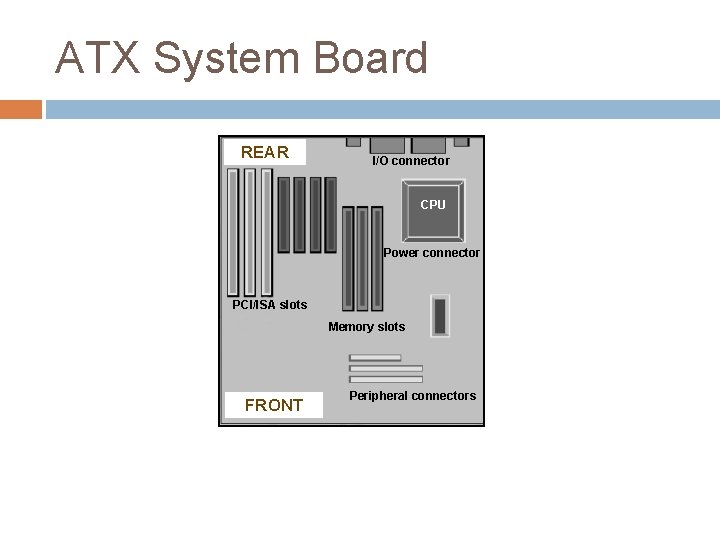
ATX System Board REAR I/O connector CPU Power connector PCI/ISA slots Memory slots FRONT Peripheral connectors
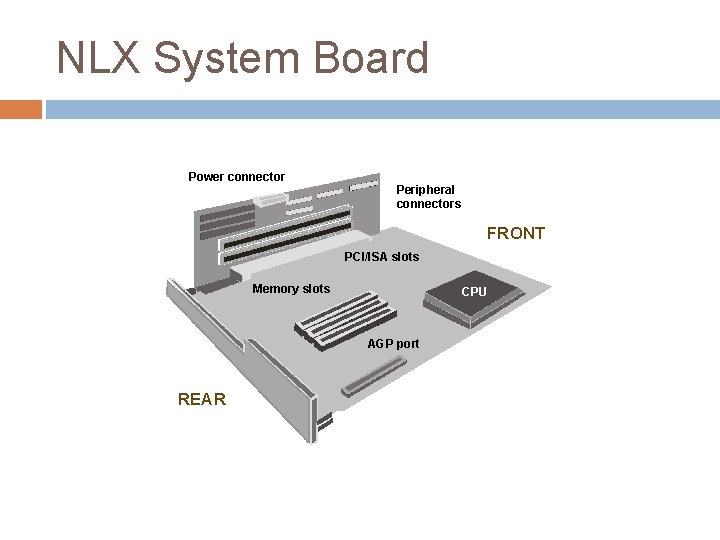
NLX System Board Power connector Peripheral connectors FRONT PCI/ISA slots Memory slots CPU AGP port REAR
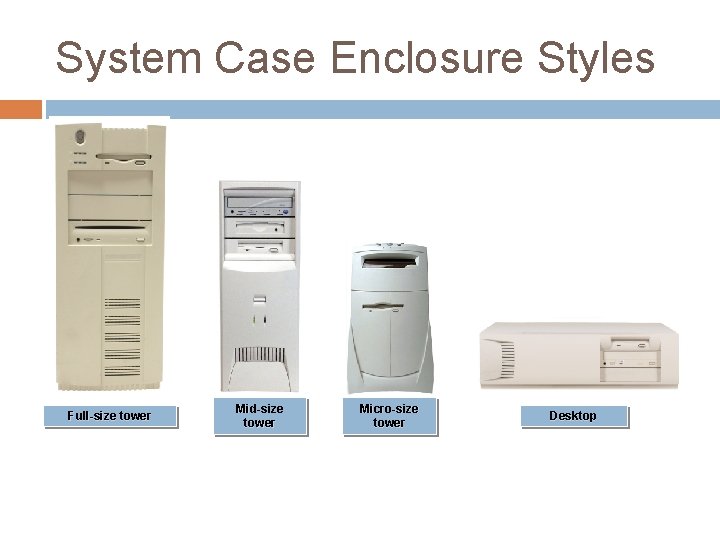
System Case Enclosure Styles Full-size tower Mid-size tower Micro-size tower Desktop
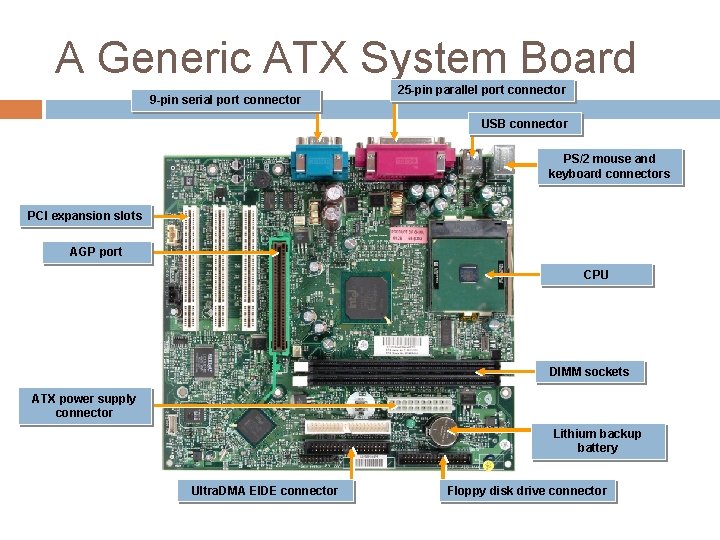
A Generic ATX System Board 9 -pin serial port connector 25 -pin parallel port connector USB connector PS/2 mouse and keyboard connectors PCI expansion slots AGP port CPU DIMM sockets ATX power supply connector Lithium backup battery Ultra. DMA EIDE connector Floppy disk drive connector
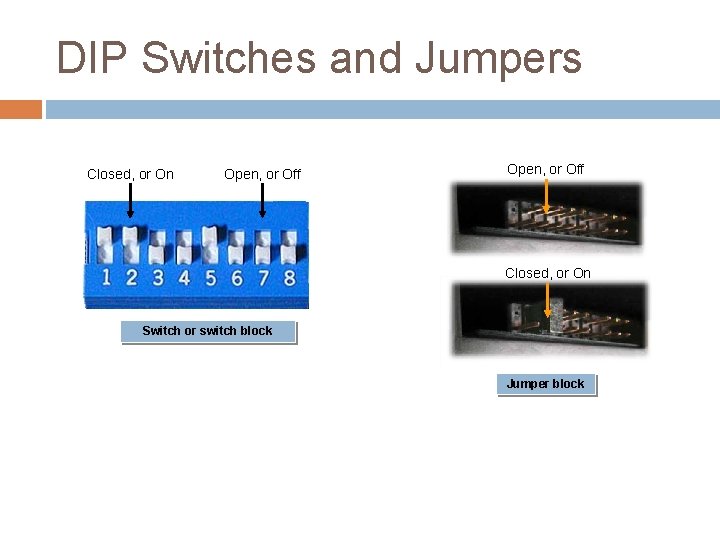
DIP Switches and Jumpers Closed, or On Open, or Off Closed, or On Switch or switch block Jumper block
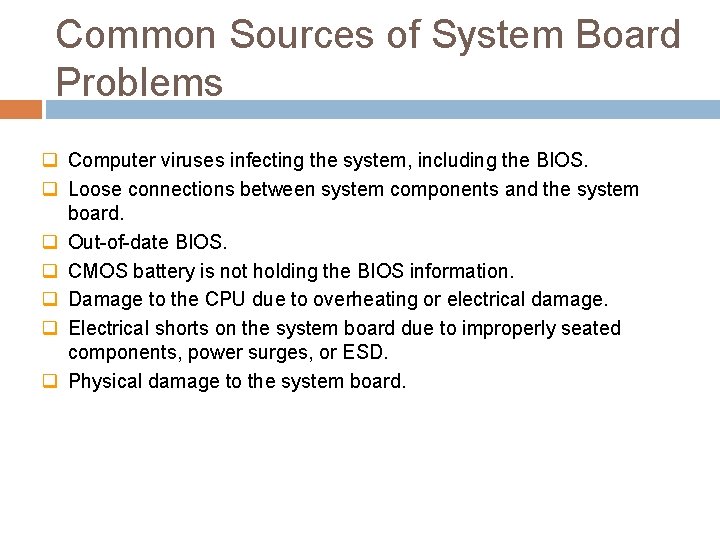
Common Sources of System Board Problems q Computer viruses infecting the system, including the BIOS. q Loose connections between system components and the system board. q Out-of-date BIOS. q CMOS battery is not holding the BIOS information. q Damage to the CPU due to overheating or electrical damage. q Electrical shorts on the system board due to improperly seated components, power surges, or ESD. q Physical damage to the system board.
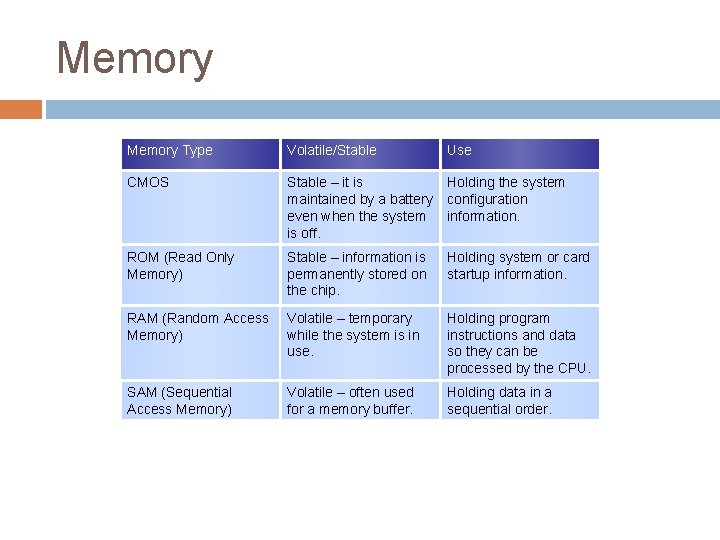
Memory Type Volatile/Stable Use CMOS Stable – it is maintained by a battery even when the system is off. Holding the system configuration information. ROM (Read Only Memory) Stable – information is permanently stored on the chip. Holding system or card startup information. RAM (Random Access Memory) Volatile – temporary while the system is in use. Holding program instructions and data so they can be processed by the CPU. SAM (Sequential Access Memory) Volatile – often used for a memory buffer. Holding data in a sequential order.
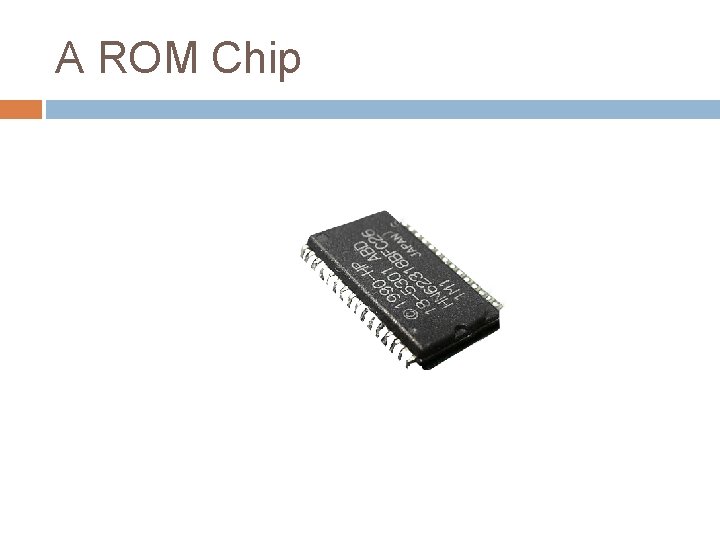
A ROM Chip
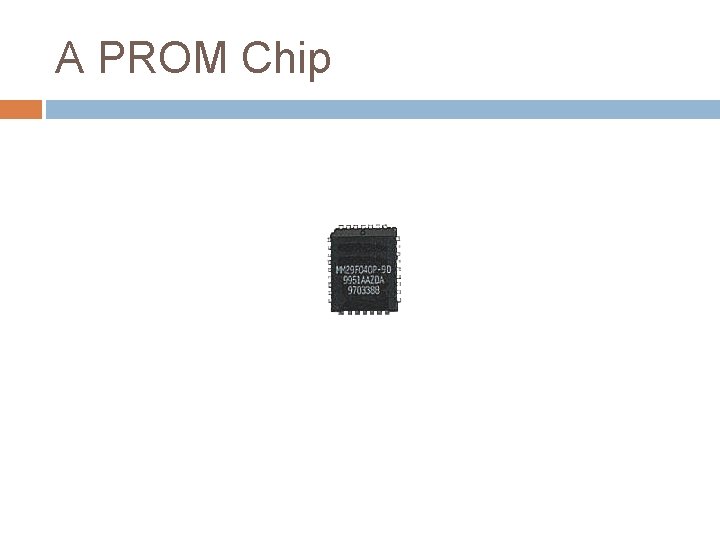
A PROM Chip
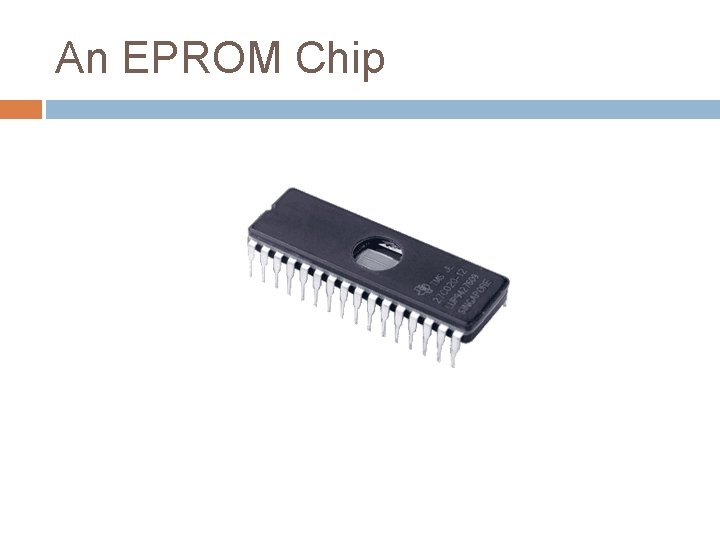
An EPROM Chip
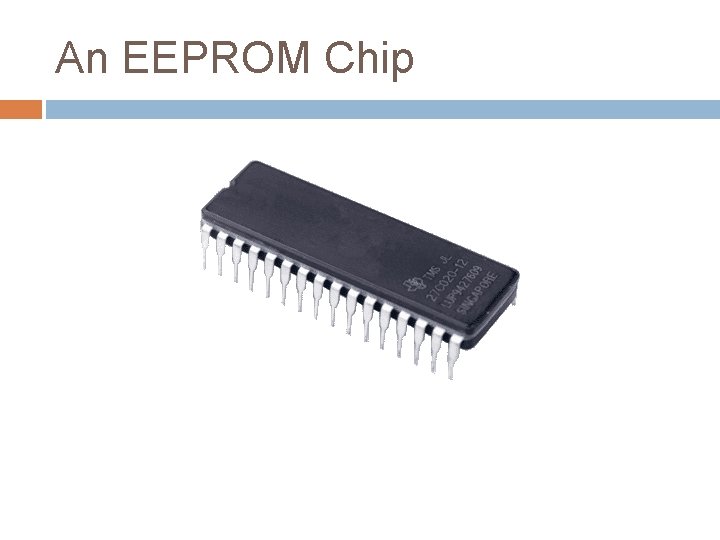
An EEPROM Chip
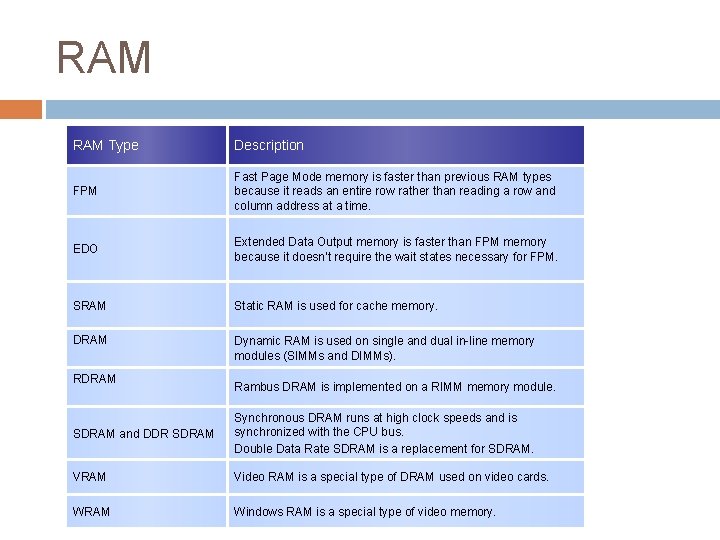
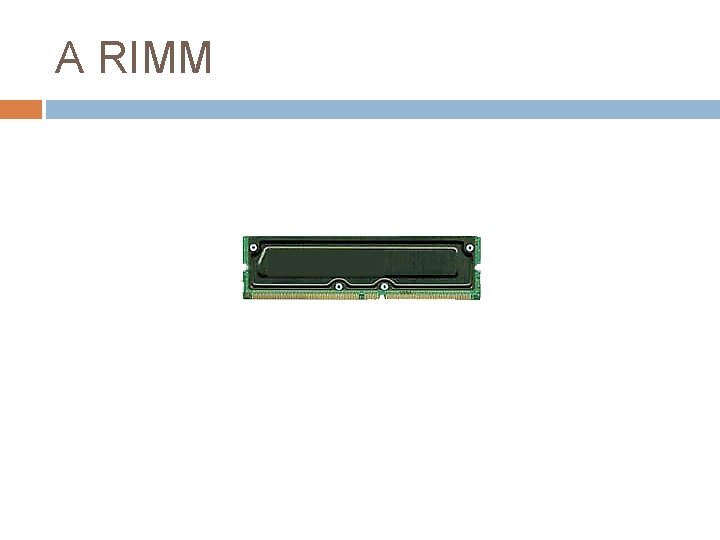
RAM Type Description FPM Fast Page Mode memory is faster than previous RAM types because it reads an entire row rather than reading a row and column address at a time. EDO Extended Data Output memory is faster than FPM memory because it doesn’t require the wait states necessary for FPM. SRAM Static RAM is used for cache memory. DRAM Dynamic RAM is used on single and dual in-line memory modules (SIMMs and DIMMs). RDRAM Rambus DRAM is implemented on a RIMM memory module. SDRAM and DDR SDRAM Synchronous DRAM runs at high clock speeds and is synchronized with the CPU bus. Double Data Rate SDRAM is a replacement for SDRAM. VRAM Video RAM is a special type of DRAM used on video cards. WRAM Windows RAM is a special type of video memory.
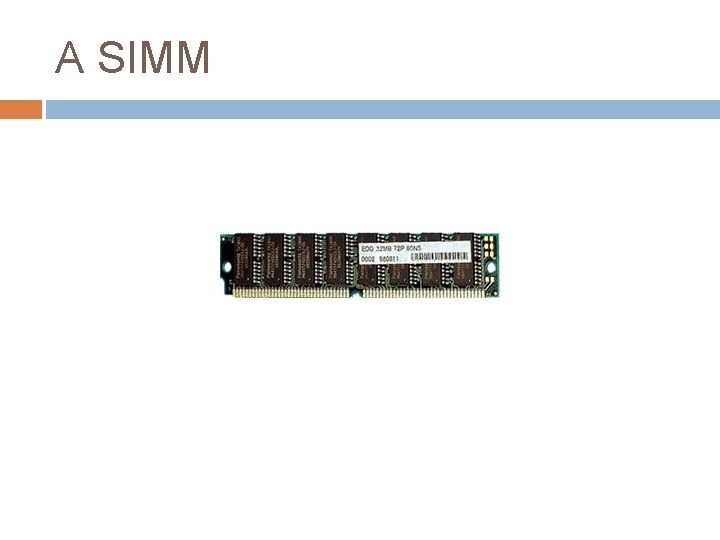
A SIMM
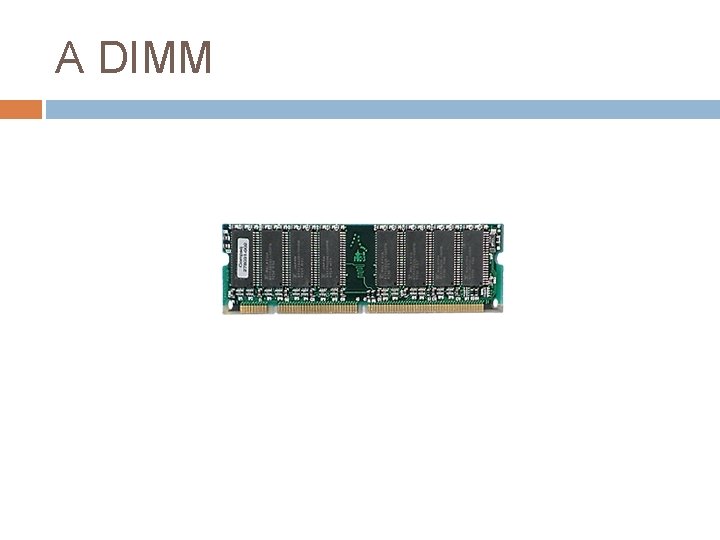
A DIMM
A RIMM
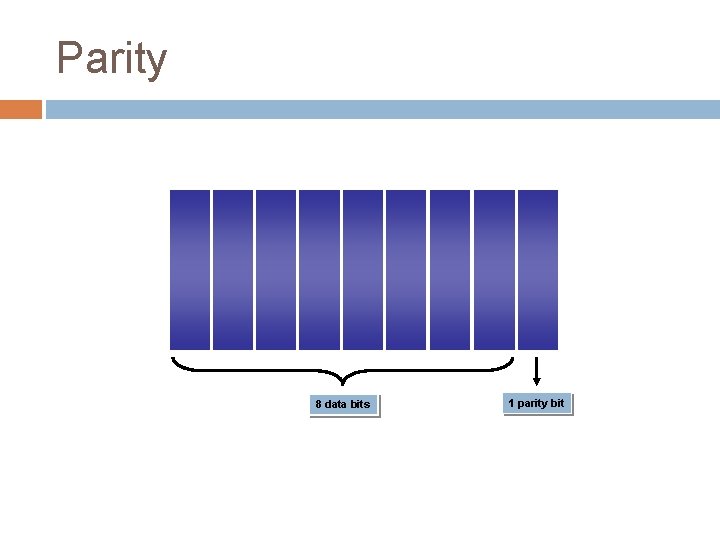
Parity 8 data bits 1 parity bit
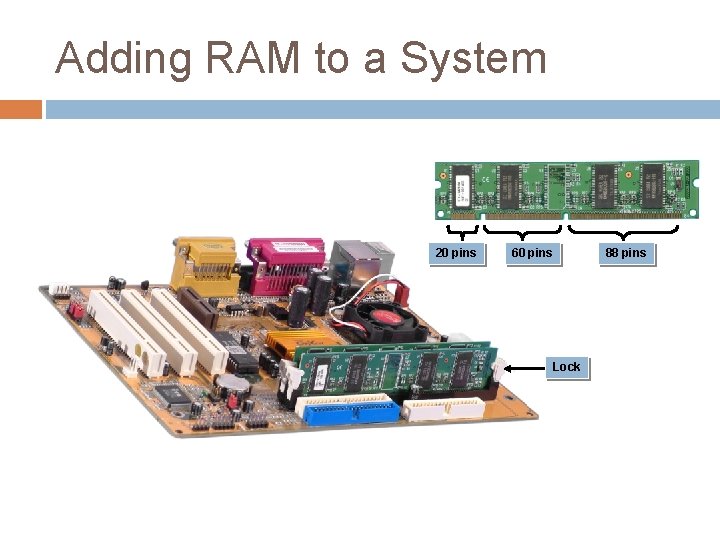
Adding RAM to a System 20 pins 60 pins Lock 88 pins
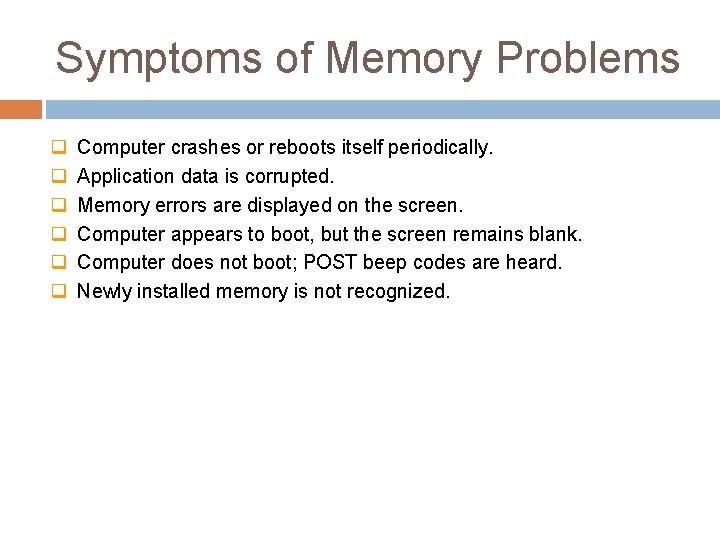
Symptoms of Memory Problems q q q Computer crashes or reboots itself periodically. Application data is corrupted. Memory errors are displayed on the screen. Computer appears to boot, but the screen remains blank. Computer does not boot; POST beep codes are heard. Newly installed memory is not recognized.