
802 11 b Frame Details Last Update 2008
802. 11 b Frame Details Last Update 2008. 02. 18 1. 2. 1 Copyright 2005 -2008 Kenneth M. Chipps Ph. D. www. chipps. com 1
Introduction • After acquiring an understanding of how an 802. 11 b wireless network does its work from the discussion on 802. 11 Basic Operation, the next level is presented here • That is to look at the details of how this type of network functions • In this section we will look at the frames used at the data link layer in an 802. 11 b wireless network Copyright 2005 -2008 Kenneth M. Chipps Ph. D. www. chipps. com 2

Introduction • This is the Airo. Peek version Copyright 2005 -2008 Kenneth M. Chipps Ph. D. www. chipps. com 3
Frames • A local area network, no matter if it is wired or wireless, operates at layers 1 and 2 of the OSI model • At layer 1 the details of how the bits are put on the media, in this case wireless, are of concern • At layer 2 these bits are formed into a structure that can be used to carry useful information across that media Copyright 2005 -2008 Kenneth M. Chipps Ph. D. www. chipps. com 4
Frame Types • This structure is supplied by a frame • There are several types of frames used in an 802. 11 b network including – Management Frame • Used to exchange management information – Control Frame • Used to control access to the media – Data Frame • Used to send the important stuff Copyright 2005 -2008 Kenneth M. Chipps Ph. D. www. chipps. com 5

Management Frame Types • The management frames are – Association request – Association response – Reassociation request – Reassociation response – Probe request – Probe response – Beacon Copyright 2005 -2008 Kenneth M. Chipps Ph. D. www. chipps. com 6
Management Frame Types – ATIM – Disassociation – Authentication – Deauthentication Copyright 2005 -2008 Kenneth M. Chipps Ph. D. www. chipps. com 7
Management Frame Types • Association request – This frame carries information about the NIC – Network Interface Card, such as the supported data rates and the SSID of the network it wishes to associate with – After receiving the association request, the access point considers associating with the NIC, and if accepted reserves memory space and establishes an association ID for the NIC Copyright 2005 -2008 Kenneth M. Chipps Ph. D. www. chipps. com 8
Management Frame Types • Association response – An access point sends an association response frame containing an acceptance or rejection notice to the wireless NIC requesting association – If the access point accepts the wireless station, the frame includes information regarding the association, such as the association ID and the supported data rates Copyright 2005 -2008 Kenneth M. Chipps Ph. D. www. chipps. com 9
Management Frame Types • Reassociation request – If the wireless station moves away from the access point to which it is currently associated and finds another access point with a stronger beacon signal, the wireless NIC will send a reassociation frame to the new access point – The new access point then coordinates the forwarding of data frames that may still be in the buffer of the previous access point waiting for transmission to the station Copyright 2005 -2008 Kenneth M. Chipps Ph. D. www. chipps. com 10
Management Frame Types • Reassociation response – An access point sends a reassociation response frame containing an acceptance or rejection notice to the station requesting reassociation – Similar to the association process, the frame includes information regarding the association, such as the association ID and the supported data rates Copyright 2005 -2008 Kenneth M. Chipps Ph. D. www. chipps. com 11
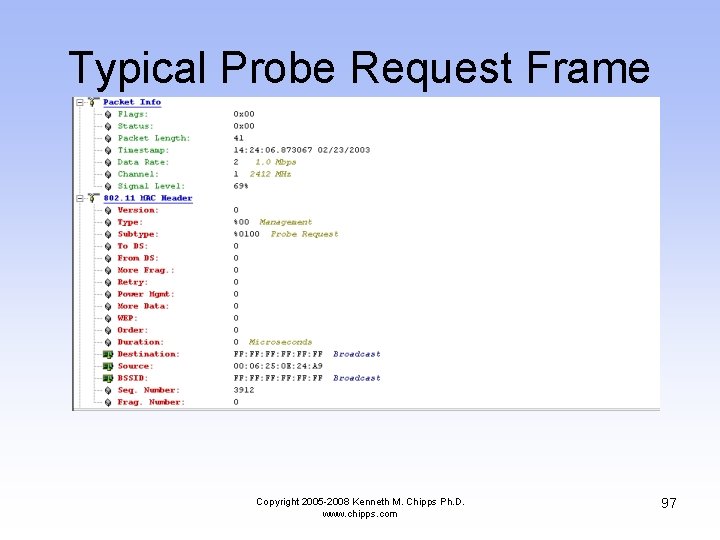
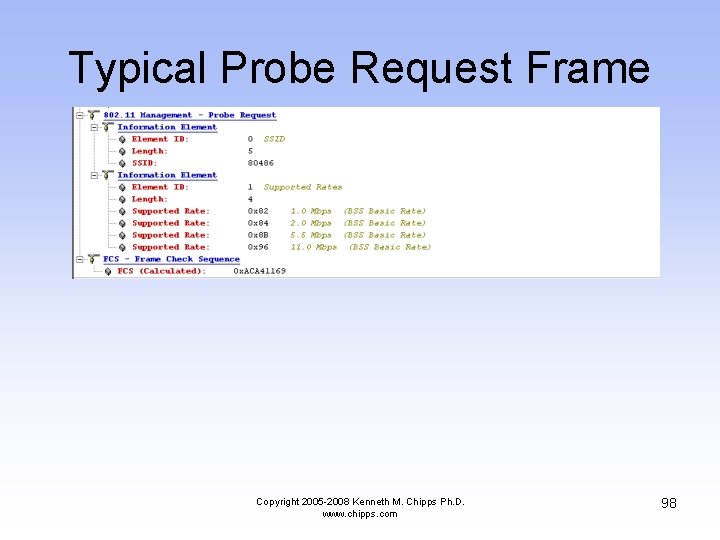
Management Frame Types • Probe request – A station sends a probe request frame when it needs to obtain information from another device – For example, a wireless NIC would send a probe request to determine which access points are within range Copyright 2005 -2008 Kenneth M. Chipps Ph. D. www. chipps. com 12
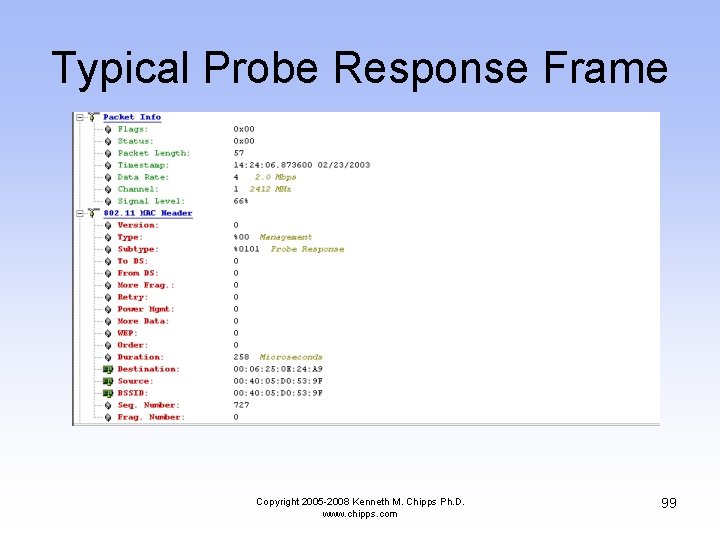
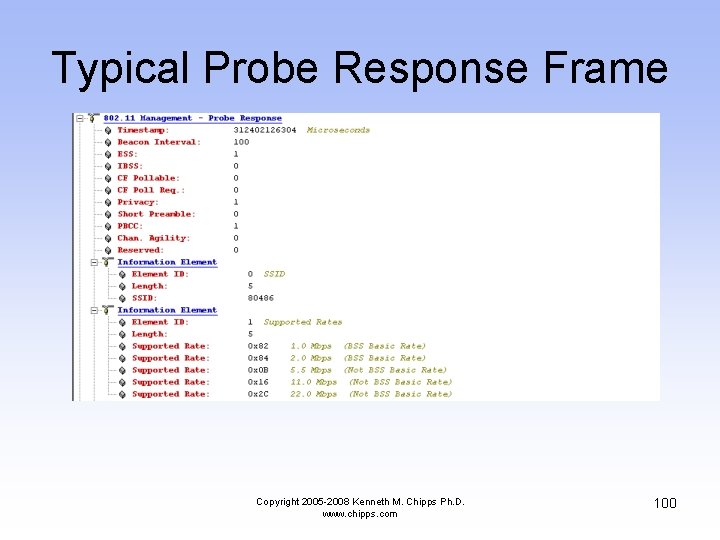
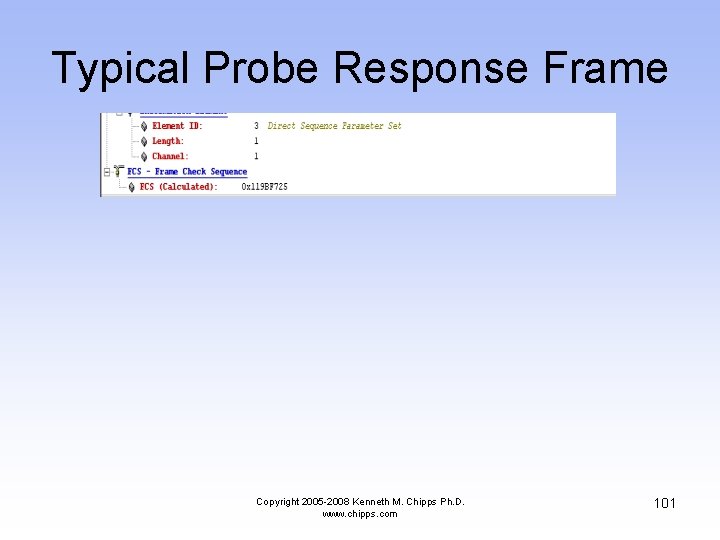
Management Frame Types • Probe response – A station will respond to a probe request frame with a probe response frame – This frame contains capability information, such as supported data rates Copyright 2005 -2008 Kenneth M. Chipps Ph. D. www. chipps. com 13
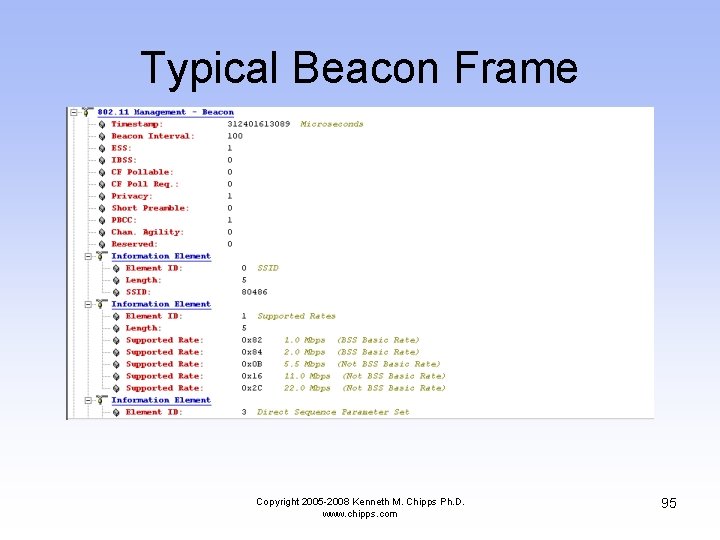
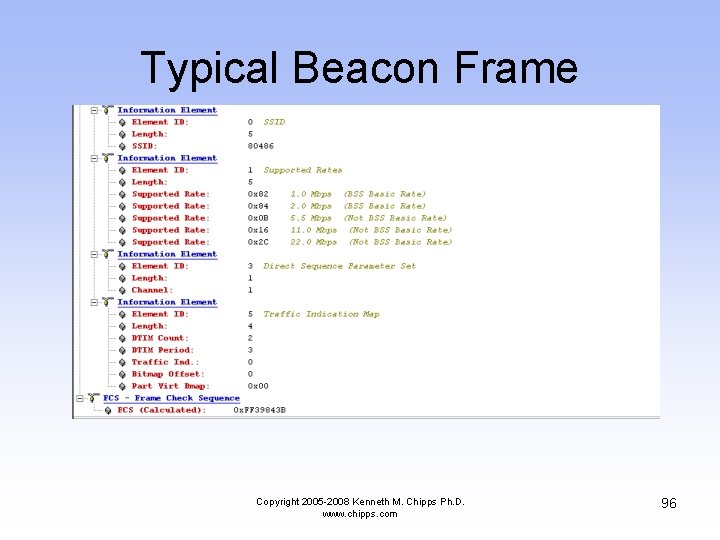
Management Frame Types • Beacon – The access point periodically sends a beacon frame to announce its presence and send network related information, such as the timestamp and SSID – Stations continually scan all 802. 11 b radio channels and listen to beacons, which they use as the basis for choosing which access point is best to associate with Copyright 2005 -2008 Kenneth M. Chipps Ph. D. www. chipps. com 14
Management Frame Types • ATIM – Battery powered stations will turn off their transceivers periodically to save battery power – This is called Power Saving Mode or sleep mode – All sleeping stations wake up at the same time which is during the ATIM - Announcement Traffic Indication Map window, which corresponds with each beacon transmission Copyright 2005 -2008 Kenneth M. Chipps Ph. D. www. chipps. com 15
Management Frame Types • ATIM – If an access point is holding packets for a sleeping station, the access point will send an ATIM frame to the sleeping station indicating that packets are awaiting transmission to it – The station that had been asleep then knows to stay awake through the next beacon interval in order to receive those frames Copyright 2005 -2008 Kenneth M. Chipps Ph. D. www. chipps. com 16
Management Frame Types • Disassociation – A station sends a disassociation frame to an access point if it wishes to terminate the association – For example, a station that is shutting down gracefully can send a disassociation frame to alert the access point that it is powering off – The access point can then relinquish memory allocations and remove the station from the association table Copyright 2005 -2008 Kenneth M. Chipps Ph. D. www. chipps. com 17
Management Frame Types • Authentication – An access point must accept or reject any stations that ask to authenticate with it – The station begins the authentication process by sending an authentication frame containing its identity to the access point Copyright 2005 -2008 Kenneth M. Chipps Ph. D. www. chipps. com 18
Management Frame Types – With open system authentication, the wireless NIC sends only one authentication frame, and the access point responds with an authentication frame as a response indicating acceptance Copyright 2005 -2008 Kenneth M. Chipps Ph. D. www. chipps. com 19
Management Frame Types – With shared key authentication, the wireless NIC sends an authentication frame, and the access point responds with an authentication frame containing challenge text – The wireless station must send an encrypted version of the challenge text, using its WEP key, in an authentication frame back to the access point Copyright 2005 -2008 Kenneth M. Chipps Ph. D. www. chipps. com 20
Management Frame Types – The access point ensures that the station has the correct WEP key by seeing whether the challenge text recovered after decryption is the same as was sent – Based on the results of this comparison, the access point replies to the wireless NIC with an authentication frame signifying the result of authentication Copyright 2005 -2008 Kenneth M. Chipps Ph. D. www. chipps. com 21
Management Frame Types • Deauthentication – A station or access point sends a deauthentication frame to a station if it wishes to terminate secure communications Copyright 2005 -2008 Kenneth M. Chipps Ph. D. www. chipps. com 22
Control Frame Types • The basic control frame types are – RTS – CTS – ACK – PS Pool – CF End + CF ACK Copyright 2005 -2008 Kenneth M. Chipps Ph. D. www. chipps. com 23
Control Frame Types • RTS - Request to Send – A station sends a RTS frame to another station as the first phase of a two-way handshake necessary before sending a data frame on a network that is heavily loaded – This is not required in normal operation Copyright 2005 -2008 Kenneth M. Chipps Ph. D. www. chipps. com 24
Control Frame Types • CTS - Clear to Send – The station sends back the CTS telling the requesting station to go ahead – The CTS includes a time value that causes all other stations to hold off transmission of frames for the time period necessary for the requesting station to send its frame Copyright 2005 -2008 Kenneth M. Chipps Ph. D. www. chipps. com 25
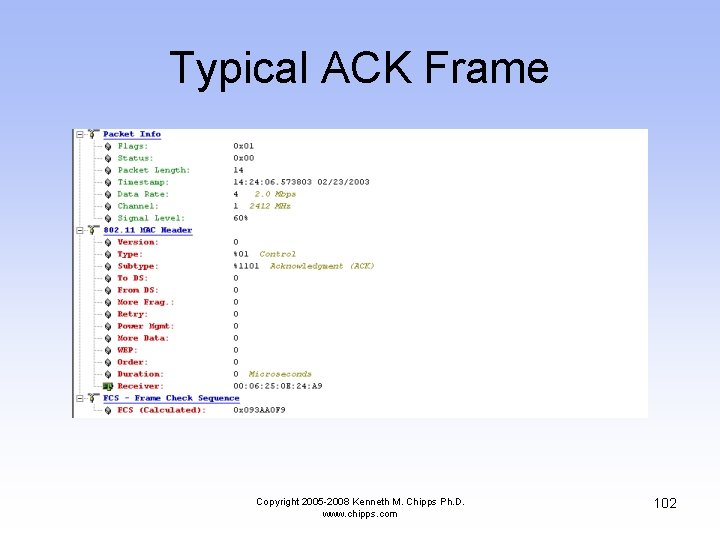
Control Frame Types • ACK - Acknowledgement – After receiving a data frame, the receiving station checks for errors in the frame – Then the receiving station will send an ACK frame to the sending station if no errors are found – If the sending station doesn't receive an ACK after a period of time, the sending station will retransmit the frame Copyright 2005 -2008 Kenneth M. Chipps Ph. D. www. chipps. com 26
Control Frame Types • PS Poll - Power Save Poll – A station awakening from Power Saving Mode transmits this frame to retrieve any frames that have been buffered by the access point for the station Copyright 2005 -2008 Kenneth M. Chipps Ph. D. www. chipps. com 27
Control Frame Types • CF End – This frame marks the end of the contention free period, which is part of the PCF mode of operation Copyright 2005 -2008 Kenneth M. Chipps Ph. D. www. chipps. com 28
Control Frame Types • CF End + CF ACK – This is the same as the CF End alone, but it adds an ACK for the last frame received during the contention free period, which is part of the PCF mode of operation Copyright 2005 -2008 Kenneth M. Chipps Ph. D. www. chipps. com 29
Data Frame Types • There is only one type of data frame • This frame has a maximum size of 2348 bytes • Of these 2348 bytes – 30 bytes are used by the header – 6 bytes are used by the CRC trailer – This leaves up to 2312 bytes of data Copyright 2005 -2008 Kenneth M. Chipps Ph. D. www. chipps. com 30
Physical Layer • Before we get into the details of the data link layer’s frames, let’s briefly discuss some aspects of the transition from the physical layer to the data link layer • At the beginning of the frame a preamble is present • This is a series of 1’s and 0’s that is used for synchronization Copyright 2005 -2008 Kenneth M. Chipps Ph. D. www. chipps. com 31
Physical Layer • It is always sent at 1 Mbps so that any device can read the preamble • The preamble allows the data link layer to see where to begin picking up the frame as it reads in the data from the physical layer Copyright 2005 -2008 Kenneth M. Chipps Ph. D. www. chipps. com 32
Physical Layer • The preamble can take one of two forms, with the long form being the default – Long – 128 bits – Short – 56 bits • The short version is available to improve network performance, such as for applications that require minimum overhead and maximum performance Copyright 2005 -2008 Kenneth M. Chipps Ph. D. www. chipps. com 33
Data Link Layer • After the preamble is sent, the data link layer header appears • This is called the PLCP Header • When using a long preamble the preamble and header are both sent at 1 Mbps • When using the short preamble, it is sent at 1 Mbps and the header at 2 Mbps Copyright 2005 -2008 Kenneth M. Chipps Ph. D. www. chipps. com 34
Frame Fields • Every frame used in a LAN consists of a series of fields • Some of the fields are used and some are not • Some of those used are more important than others • Next each of these fields will be detailed Copyright 2005 -2008 Kenneth M. Chipps Ph. D. www. chipps. com 35
Data Frame Fields • The data frame, being the most important frame, is the first one we will look at • This frame contains the following major fields Copyright 2005 -2008 Kenneth M. Chipps Ph. D. www. chipps. com 36
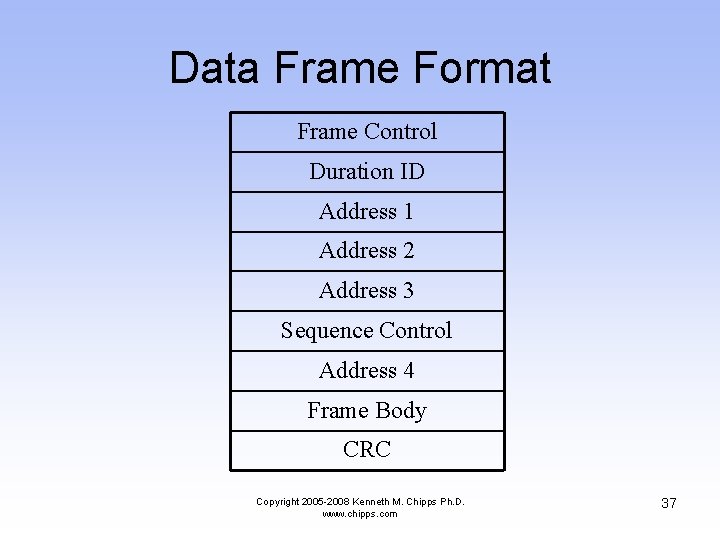
Data Frame Format Frame Control Duration ID Address 1 Address 2 Address 3 Sequence Control Address 4 Frame Body CRC Copyright 2005 -2008 Kenneth M. Chipps Ph. D. www. chipps. com 37
Frame Control Subfields • The first field, the frame control field, actually consists of eleven subfields • These are Copyright 2005 -2008 Kenneth M. Chipps Ph. D. www. chipps. com 38
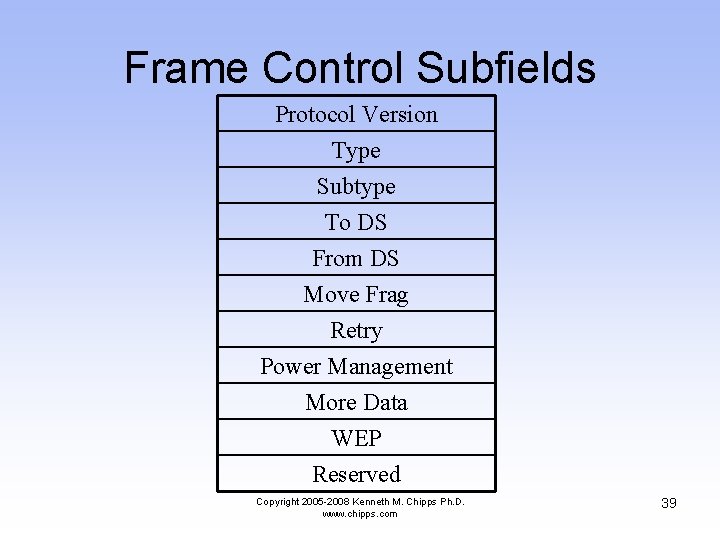
Frame Control Subfields Protocol Version Type Subtype To DS From DS Move Frag Retry Power Management More Data WEP Reserved Copyright 2005 -2008 Kenneth M. Chipps Ph. D. www. chipps. com 39
Sequence Control Subfields • Further down in the list of data frame fields the sequence control field is seen to contain two subfields • These are Copyright 2005 -2008 Kenneth M. Chipps Ph. D. www. chipps. com 40
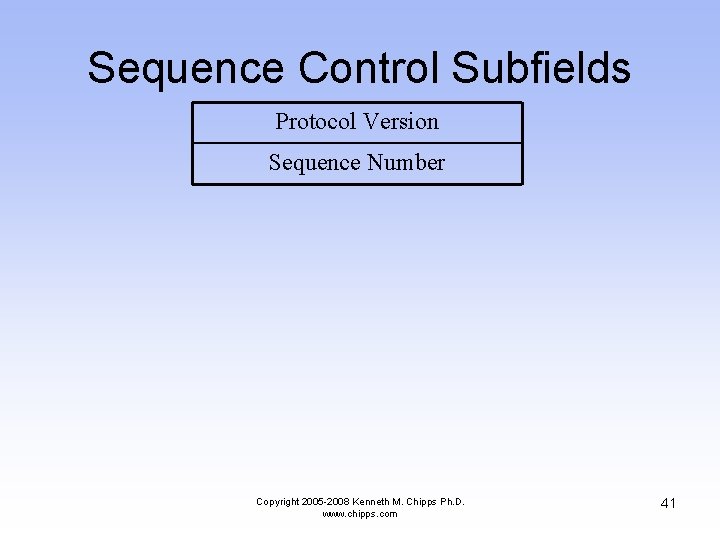
Sequence Control Subfields Protocol Version Sequence Number Copyright 2005 -2008 Kenneth M. Chipps Ph. D. www. chipps. com 41
Data Frame Fields • Let’s look at each of these fields in more detail • As we encounter a field with subfields, these subfields will be detailed as well Copyright 2005 -2008 Kenneth M. Chipps Ph. D. www. chipps. com 42
Frame Control Field • • 16 bits 11 subfields This field does just what its name implies It contains in its subfields the control information for the frame Copyright 2005 -2008 Kenneth M. Chipps Ph. D. www. chipps. com 43
Protocol Version Subfield • • 2 bits This is the version of 802. 11 b being used Right now there is only one version This first and only version is indicated by a protocol number of 0 Copyright 2005 -2008 Kenneth M. Chipps Ph. D. www. chipps. com 44
Type Subfield • 2 bits • Along with the subtype field this field identifies the type of frame this is such as management, control, or data • There are 30 possibilities Copyright 2005 -2008 Kenneth M. Chipps Ph. D. www. chipps. com 45
Subtype Subfield • 4 bits • This field works in combination with the type subfield to identify the type of frame as discussed just above Copyright 2005 -2008 Kenneth M. Chipps Ph. D. www. chipps. com 46
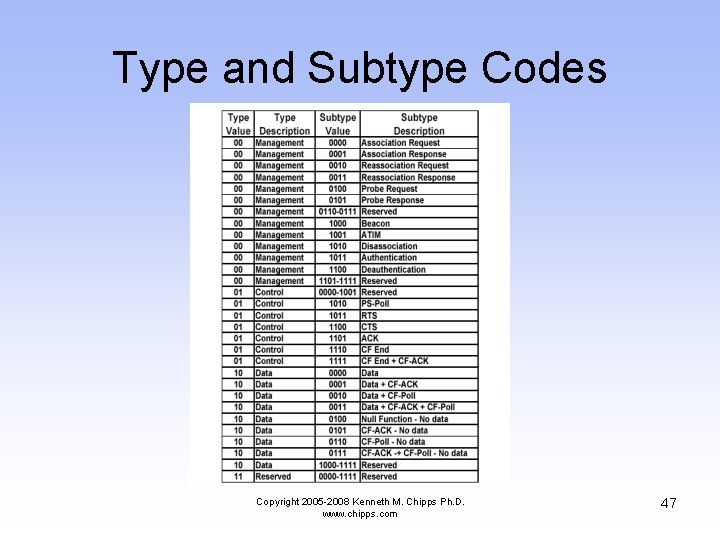
Type and Subtype Codes Copyright 2005 -2008 Kenneth M. Chipps Ph. D. www. chipps. com 47
To DS Subfield • 1 bit • This is set to 1 when the frame is going to a distribution system • Recall that a distribution system is a wired connection among access points • This is set also whenever the frame is being sent to or as indicated by the next field being sent from a device that is connected to the network using a wire Copyright 2005 -2008 Kenneth M. Chipps Ph. D. www. chipps. com 48
From DS Subfield • 1 bit • This is set to 1 when the frame is from a distribution system or wired device Copyright 2005 -2008 Kenneth M. Chipps Ph. D. www. chipps. com 49
More Fragments Subfield • 1 bit • This is set to 1 when there are more fragments to come Copyright 2005 -2008 Kenneth M. Chipps Ph. D. www. chipps. com 50
Retry Subfield • 1 bit • This says that the frame is a retransmission of a fragmented frame so that a frame is not duplicated Copyright 2005 -2008 Kenneth M. Chipps Ph. D. www. chipps. com 51
Power Management Subfield • 1 bit • This field indicates whether the station is in – Power Save Mode – or – Active Mode • The access point uses this field so that it will know which stations are in sleep mode Copyright 2005 -2008 Kenneth M. Chipps Ph. D. www. chipps. com 52
Power Management Subfield • Such a station requires the access point to hold transmissions for that station until it awakens Copyright 2005 -2008 Kenneth M. Chipps Ph. D. www. chipps. com 53
More Data Subfield • 1 bit • This is to let the receiver know that more frames will follow this frame for a station that has been in sleep mode Copyright 2005 -2008 Kenneth M. Chipps Ph. D. www. chipps. com 54
WEP Subfield • 1 bit • This is set when WEP – Wireless Equivalent Privacy is used Copyright 2005 -2008 Kenneth M. Chipps Ph. D. www. chipps. com 55
Order Subfield • 1 bit • This field indicates that the DEC LAT protocol is in use • This is a protocol designed to allow LAN devices to connect to a DEC VAX minicomputer • For the most part, no one uses this protocol anymore Copyright 2005 -2008 Kenneth M. Chipps Ph. D. www. chipps. com 56
Duration or ID Field • 16 bits • The meaning of this field depends on the type of frame this is • It can be used to – Set the NAV value, which is the number of microseconds the medium is expected to be busy for a transmission Copyright 2005 -2008 Kenneth M. Chipps Ph. D. www. chipps. com 57
Duration or ID Field – Set the NAV for stations that missed the beacon that announced the NAV value as just described – Transmit a PS - Poll frame by stations awakening from power saving mode Copyright 2005 -2008 Kenneth M. Chipps Ph. D. www. chipps. com 58
Address Field 1 • 48 bits • A frame can have up to four addresses in it • This is the first of the four • This is the recipient address • The actual value of this field depends on the values in the To DS and From DS fields Copyright 2005 -2008 Kenneth M. Chipps Ph. D. www. chipps. com 59
Address Field 1 • This recipient can be – Broadcast address – Access point address – Station address Copyright 2005 -2008 Kenneth M. Chipps Ph. D. www. chipps. com 60
Address Field 2 • 48 bits • This is the second of the four address fields • This address is the unit transmitting the frame, either the access point or whichever station it might be • If the original transmitter of this frame is a wired device, then the address here is the access point that is retransmitting the data Copyright 2005 -2008 Kenneth M. Chipps Ph. D. www. chipps. com 61
Address Field 3 • 48 bits • This is the third of the four addresses • Depending again on the To DS and From DS this can be either the original source address or the destination address Copyright 2005 -2008 Kenneth M. Chipps Ph. D. www. chipps. com 62
Sequence Control Field • 16 bits • This field is used to reorder the fragments back into a complete and correct frame and to discard duplicate frames Copyright 2005 -2008 Kenneth M. Chipps Ph. D. www. chipps. com 63
Address Field 4 • 48 bits • This is the fourth of the four addresses • This field is used when a frame is going from one AP – Access Point to another AP Copyright 2005 -2008 Kenneth M. Chipps Ph. D. www. chipps. com 64
Initialization Vector Header • • This is an extension to the normal header It exists only if WEP is being used It is 4 bytes long This header along with the Integrity Value Check shown below constitute the WEP information that is added Copyright 2005 -2008 Kenneth M. Chipps Ph. D. www. chipps. com 65
Initialization Vector Subfields • If the initialization vector header is used, there are three subfields in this header – Initialization Vector • This subfield carries the 24 bit initialization vector – Pad • This is to adjust the size, if required – Key ID • This identifies the default key that was used to encrypt the frame Copyright 2005 -2008 Kenneth M. Chipps Ph. D. www. chipps. com 66
Frame Body Field • Finally the important stuff, the data • This is the point to all of this discussed here • To get data from one place to another • Up to 2304 bytes of data is provided for – Out of this 2304 bytes 8 bytes are used for the 802. 2 LLC headers – So the actual maximum real data that can be passed up to the next layer is 2296 bytes Copyright 2005 -2008 Kenneth M. Chipps Ph. D. www. chipps. com 67
Frame Body Field – However a maximum payload of up to 2312 bytes must be supported to accommodate WEP overhead if WEP is used Copyright 2005 -2008 Kenneth M. Chipps Ph. D. www. chipps. com 68
Integrity Value Check • This addition to the trailer exists only if WEP is being used • It is 4 bytes long • This trailer along with the IV header shown above constitutes the information that is added if WEP is used Copyright 2005 -2008 Kenneth M. Chipps Ph. D. www. chipps. com 69
CRC Field • 32 bits • The checksum • This is used as always to be sure the frame got to its destination intact Copyright 2005 -2008 Kenneth M. Chipps Ph. D. www. chipps. com 70
Management Frame Format • Let’s switch from the data frame to the format of a management frame • This frame has fewer fields • For example Copyright 2005 -2008 Kenneth M. Chipps Ph. D. www. chipps. com 71
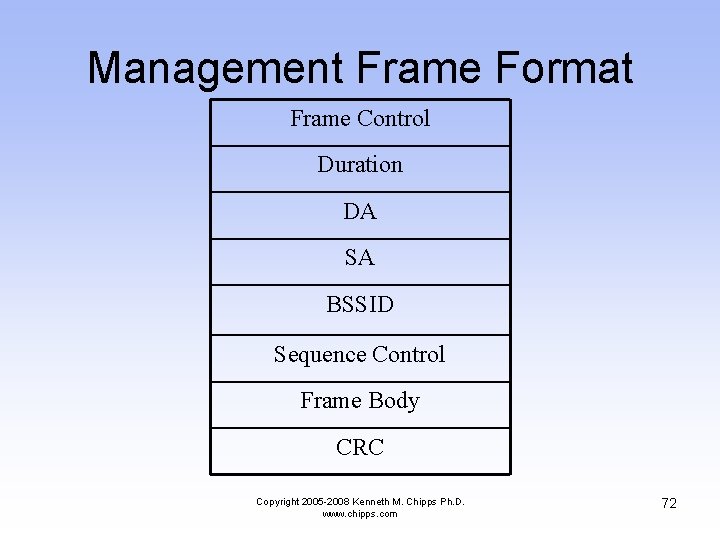
Management Frame Format Frame Control Duration DA SA BSSID Sequence Control Frame Body CRC Copyright 2005 -2008 Kenneth M. Chipps Ph. D. www. chipps. com 72
Management Frame Format • Frame Control – This is the same as the data frame • Duration – The time period required for the frame – The exact time specified depends on the type of management frame being sent – For example if this is an ACK the duration is set to 0, for others it is set to several microseconds Copyright 2005 -2008 Kenneth M. Chipps Ph. D. www. chipps. com 73
Management Frame Format • DA – The destination address • SA – The source address • BSSID – The MAC address of the access point • Sequence Control – Used to place the frames in the correct order Copyright 2005 -2008 Kenneth M. Chipps Ph. D. www. chipps. com 74
Management Frame Format • Frame Body – This field carries whatever management information is being sent by the management frame – This will vary depending on the function of the management frame • CRC – Error checking Copyright 2005 -2008 Kenneth M. Chipps Ph. D. www. chipps. com 75
Control Frame Format • The format of control frames differ slightly depending on what type of control frame it is • We will look at the common ones Copyright 2005 -2008 Kenneth M. Chipps Ph. D. www. chipps. com 76
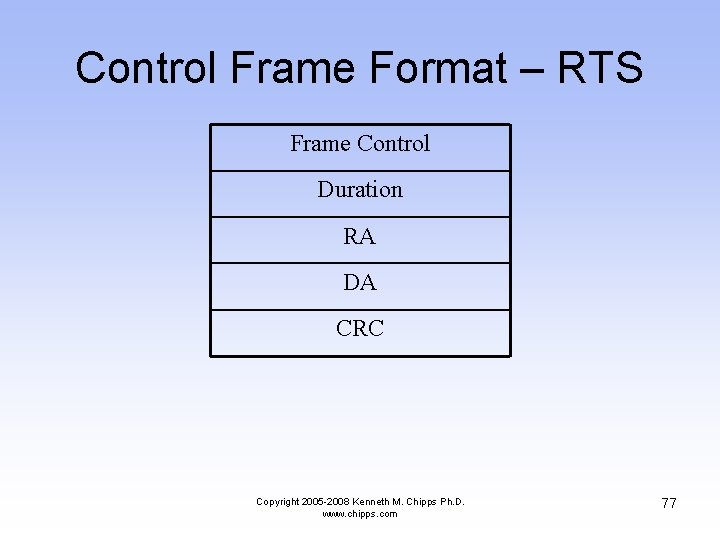
Control Frame Format – RTS Frame Control Duration RA DA CRC Copyright 2005 -2008 Kenneth M. Chipps Ph. D. www. chipps. com 77
Control Frame Format – RTS • Frame Control – This is the same as the data frame • Duration – This is the time in microseconds to transmit the frame, plus one CTS frame, one ACK frame, and three SIFS intervals • RA – The destination station address Copyright 2005 -2008 Kenneth M. Chipps Ph. D. www. chipps. com 78
Control Frame Format – RTS • DA – The address of the station transmitting the frame • CRC – Error checking Copyright 2005 -2008 Kenneth M. Chipps Ph. D. www. chipps. com 79
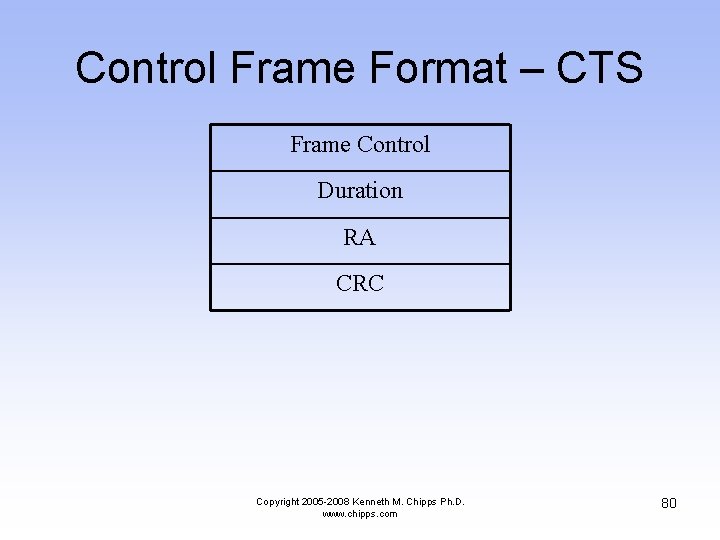
Control Frame Format – CTS Frame Control Duration RA CRC Copyright 2005 -2008 Kenneth M. Chipps Ph. D. www. chipps. com 80
Control Frame Format – CTS • Frame Control – This is the same as the data frame • Duration – This is the time in microseconds required to transmit the frame – This value is copied from the previous RTS frame, minus the time in microseconds required to transmit the CTS frame and its SIFS interval Copyright 2005 -2008 Kenneth M. Chipps Ph. D. www. chipps. com 81
Control Frame Format – CTS • RA – This is the destination station address, which is copied from the previous RTS frame to which this frame is a response • CRC – Error checking Copyright 2005 -2008 Kenneth M. Chipps Ph. D. www. chipps. com 82
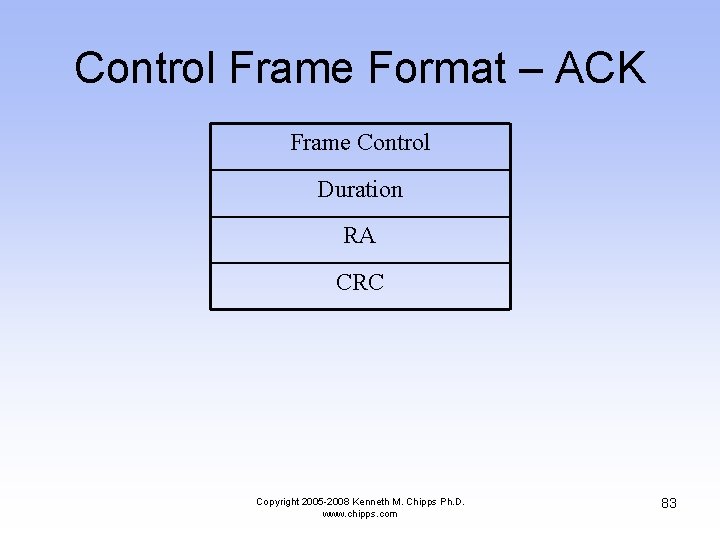
Control Frame Format – ACK Frame Control Duration RA CRC Copyright 2005 -2008 Kenneth M. Chipps Ph. D. www. chipps. com 83
Control Frame Format – ACK • Frame Control – This is the same as the data frame • Duration – If the fragment field of the data frame to which this is a response is set to 0, this field is 0 – Otherwise the value is obtained from the duration field of the previous frame, minus the time in microseconds required to transmit the ACK and the SIFS interval Copyright 2005 -2008 Kenneth M. Chipps Ph. D. www. chipps. com 84
Control Frame Format – ACK • RA – This is the destination station address, which is copied from the previous data frame this CTS frame is a response to • CRC – Error checking Copyright 2005 -2008 Kenneth M. Chipps Ph. D. www. chipps. com 85
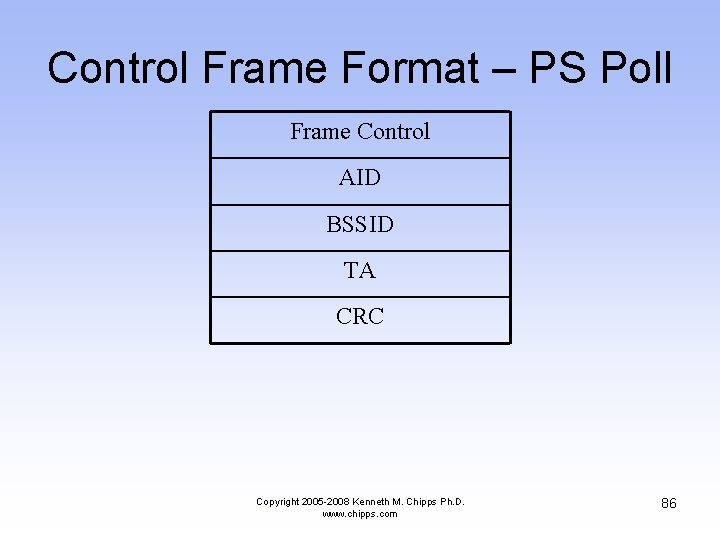
Control Frame Format – PS Poll Frame Control AID BSSID TA CRC Copyright 2005 -2008 Kenneth M. Chipps Ph. D. www. chipps. com 86
Control Frame Format – PS Poll • Frame Control – This is the same as the data frame • AID – This is the Association ID – This is how the AP knows which station it is talking to • BSSID – The name of the access point Copyright 2005 -2008 Kenneth M. Chipps Ph. D. www. chipps. com 87
Control Frame Format – PS Poll – The MAC address of the station sending the frame • CRC – Error checking Copyright 2005 -2008 Kenneth M. Chipps Ph. D. www. chipps. com 88
Typical Frames • Now let’s look at some typical frames as seen on an 802. 11 b network • In this view the entire frame is shown • Later the use of the individual fields will be illustrated • We will look at – Management Frames • Beacon Frame • Probe Request Frame • Probe Reply Frame Copyright 2005 -2008 Kenneth M. Chipps Ph. D. www. chipps. com 89
Typical Frames – Control Frames • Acknowledgement – Data Frames • Ping • Windows Browser Search Copyright 2005 -2008 Kenneth M. Chipps Ph. D. www. chipps. com 90
Beacon Frame • Beacons, beacon management frames, are frames sent by an access point when in infrastructure mode to synchronize a wireless network • How often these are sent can usually be adjusted • These are also sent out by stations when they are operating in ad hoc mode Copyright 2005 -2008 Kenneth M. Chipps Ph. D. www. chipps. com 91
Beacon Frame Functions • The beacon performs several functions such as – Time synchronization • This synchronizes the clock in all devices – FH or DS Parameter Sets • This is the type of spread spectrum technology being used • FH for FHSS where it specifies a hop and dwell time Copyright 2005 -2008 Kenneth M. Chipps Ph. D. www. chipps. com 92
Beacon Frame Functions • DS for DSSS where it specifies the channel information – SSID Information • The SSID of the device – TIM - Traffic Indication Map • To let sleeping stations know that they have traffic waiting – Supported Rates • To indicate the speeds at which the access point can talk Copyright 2005 -2008 Kenneth M. Chipps Ph. D. www. chipps. com 93
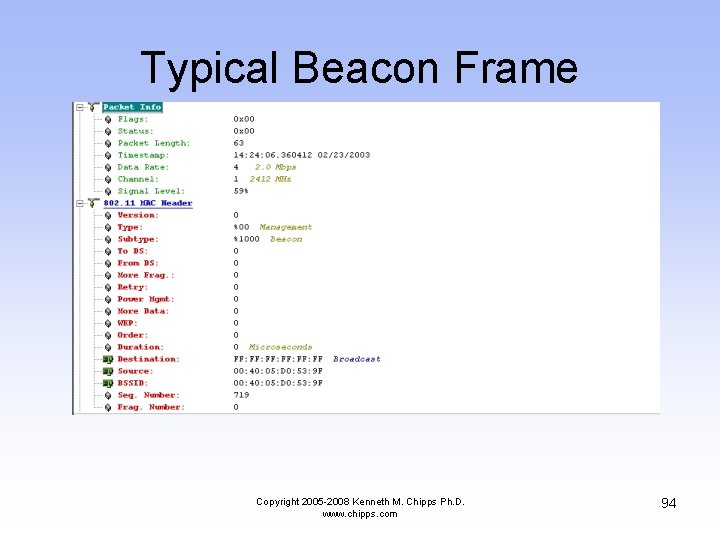
Typical Beacon Frame Copyright 2005 -2008 Kenneth M. Chipps Ph. D. www. chipps. com 94
Typical Beacon Frame Copyright 2005 -2008 Kenneth M. Chipps Ph. D. www. chipps. com 95
Typical Beacon Frame Copyright 2005 -2008 Kenneth M. Chipps Ph. D. www. chipps. com 96
Typical Probe Request Frame Copyright 2005 -2008 Kenneth M. Chipps Ph. D. www. chipps. com 97
Typical Probe Request Frame Copyright 2005 -2008 Kenneth M. Chipps Ph. D. www. chipps. com 98
Typical Probe Response Frame Copyright 2005 -2008 Kenneth M. Chipps Ph. D. www. chipps. com 99
Typical Probe Response Frame Copyright 2005 -2008 Kenneth M. Chipps Ph. D. www. chipps. com 100
Typical Probe Response Frame Copyright 2005 -2008 Kenneth M. Chipps Ph. D. www. chipps. com 101
Typical ACK Frame Copyright 2005 -2008 Kenneth M. Chipps Ph. D. www. chipps. com 102
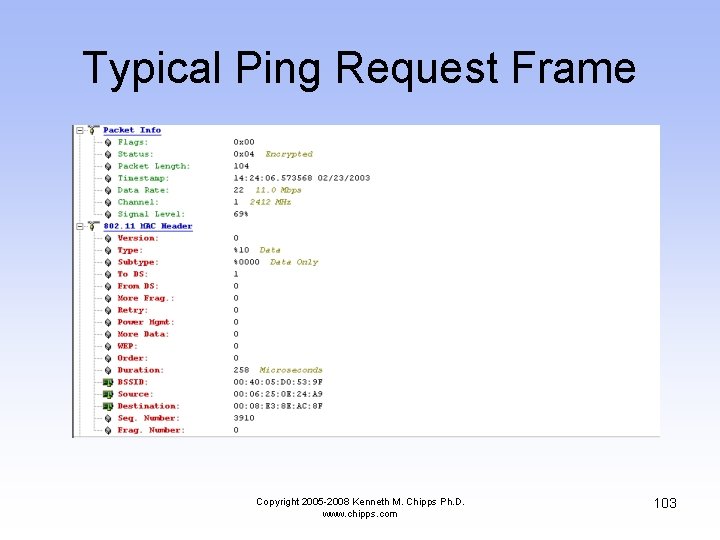
Typical Ping Request Frame Copyright 2005 -2008 Kenneth M. Chipps Ph. D. www. chipps. com 103
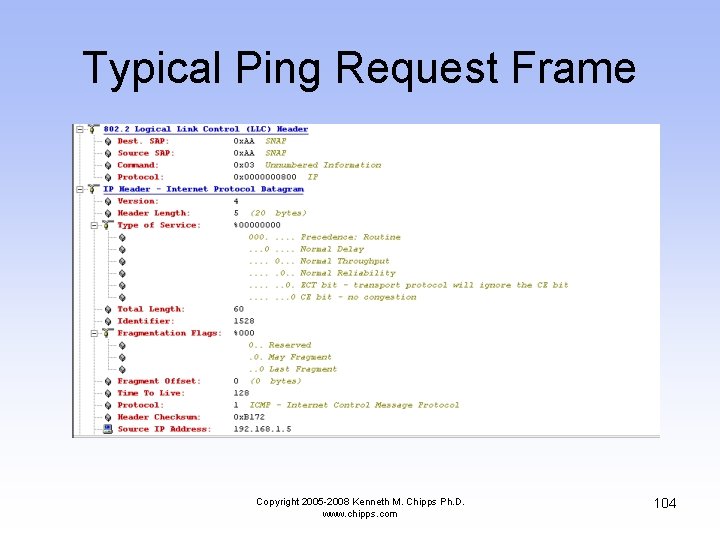
Typical Ping Request Frame Copyright 2005 -2008 Kenneth M. Chipps Ph. D. www. chipps. com 104
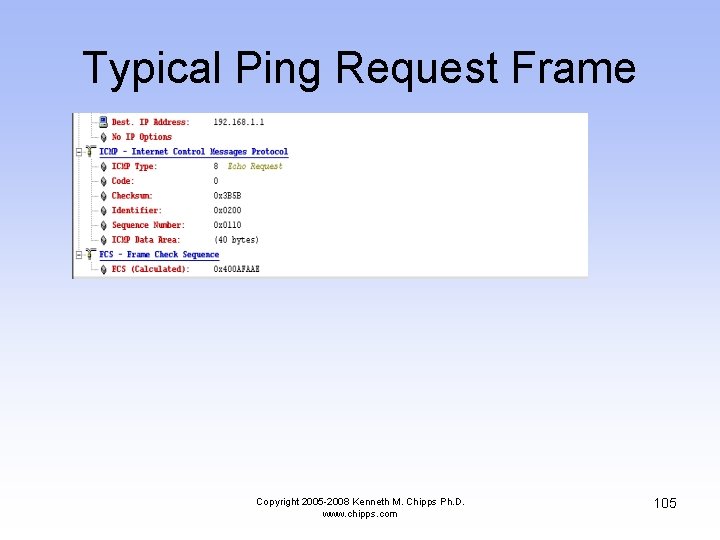
Typical Ping Request Frame Copyright 2005 -2008 Kenneth M. Chipps Ph. D. www. chipps. com 105
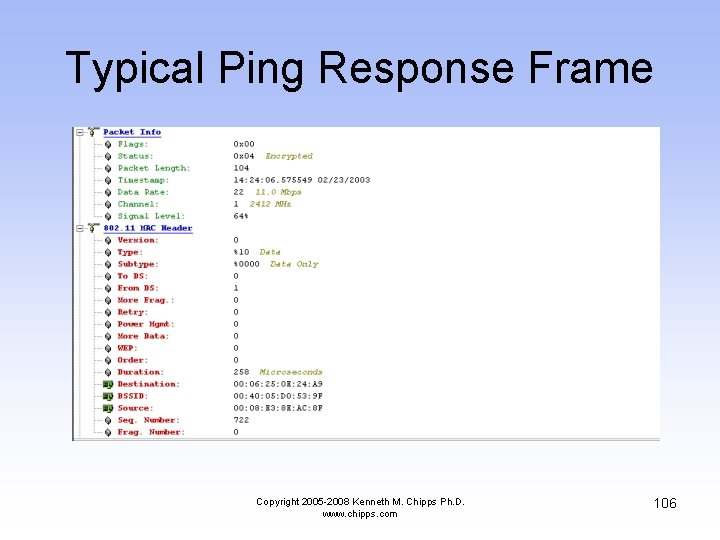
Typical Ping Response Frame Copyright 2005 -2008 Kenneth M. Chipps Ph. D. www. chipps. com 106
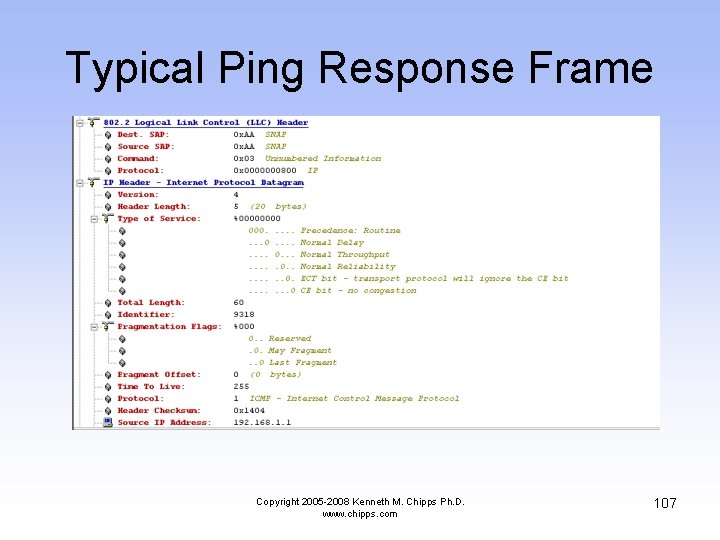
Typical Ping Response Frame Copyright 2005 -2008 Kenneth M. Chipps Ph. D. www. chipps. com 107
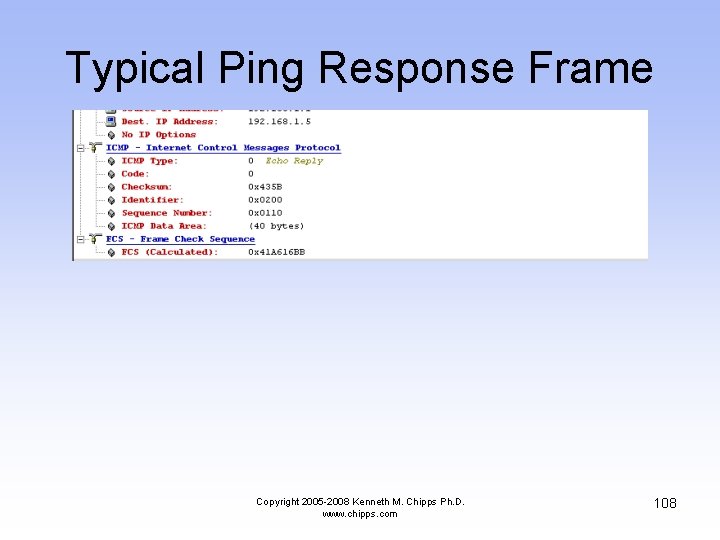
Typical Ping Response Frame Copyright 2005 -2008 Kenneth M. Chipps Ph. D. www. chipps. com 108
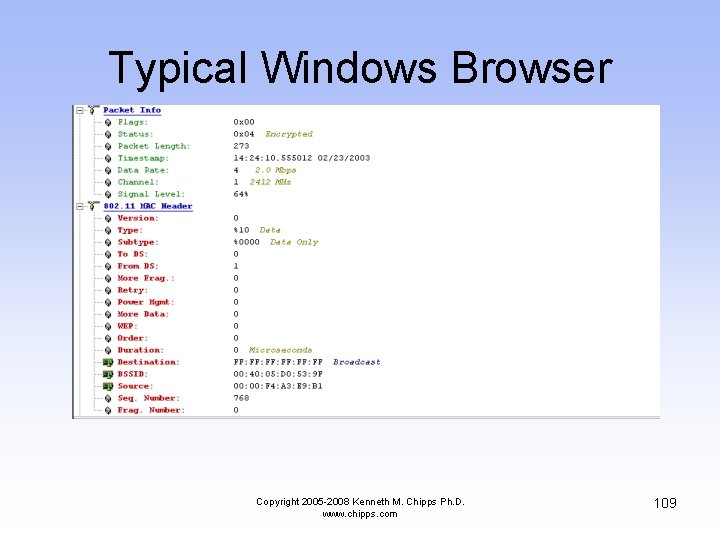
Typical Windows Browser Copyright 2005 -2008 Kenneth M. Chipps Ph. D. www. chipps. com 109
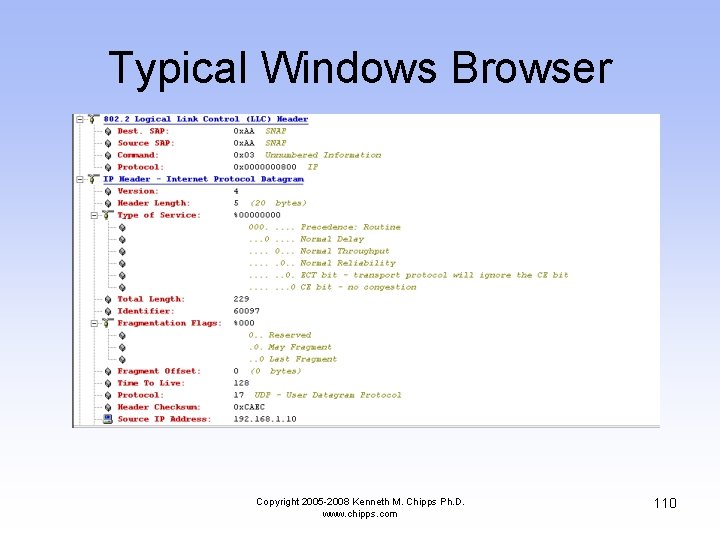
Typical Windows Browser Copyright 2005 -2008 Kenneth M. Chipps Ph. D. www. chipps. com 110
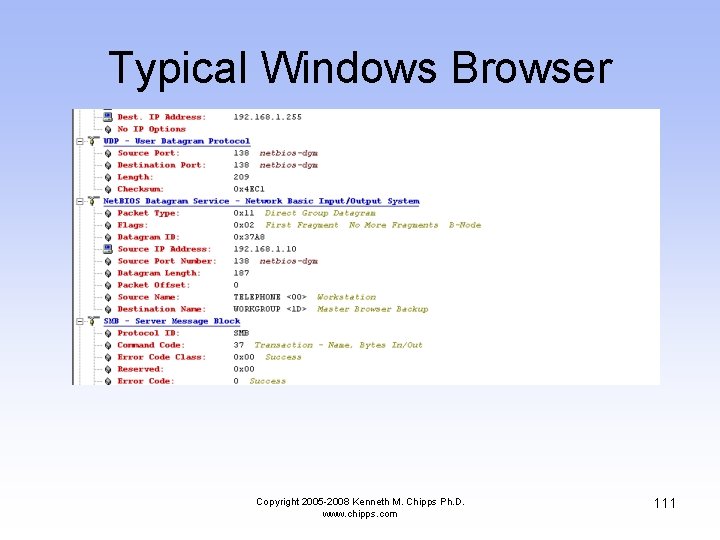
Typical Windows Browser Copyright 2005 -2008 Kenneth M. Chipps Ph. D. www. chipps. com 111
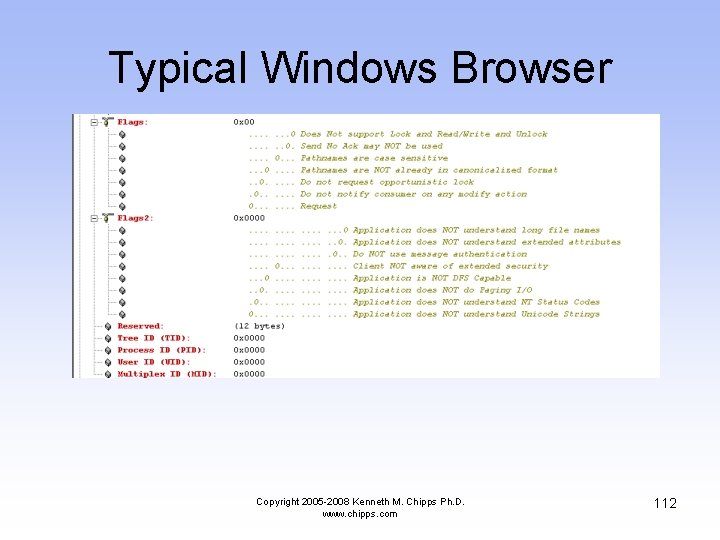
Typical Windows Browser Copyright 2005 -2008 Kenneth M. Chipps Ph. D. www. chipps. com 112
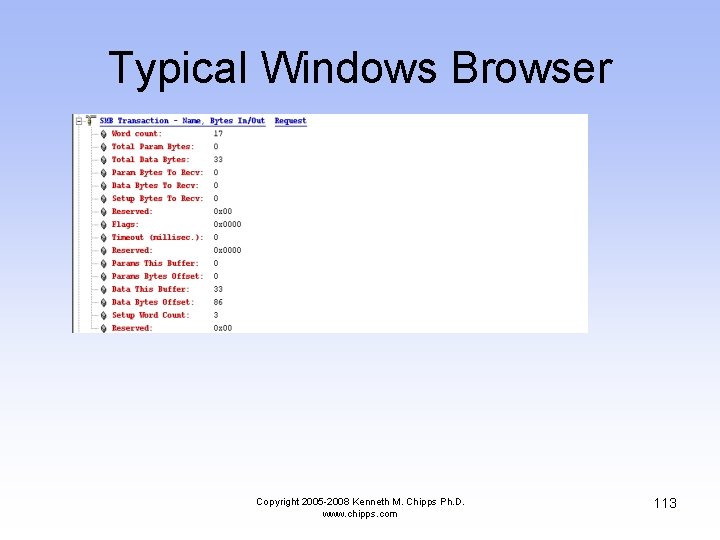
Typical Windows Browser Copyright 2005 -2008 Kenneth M. Chipps Ph. D. www. chipps. com 113
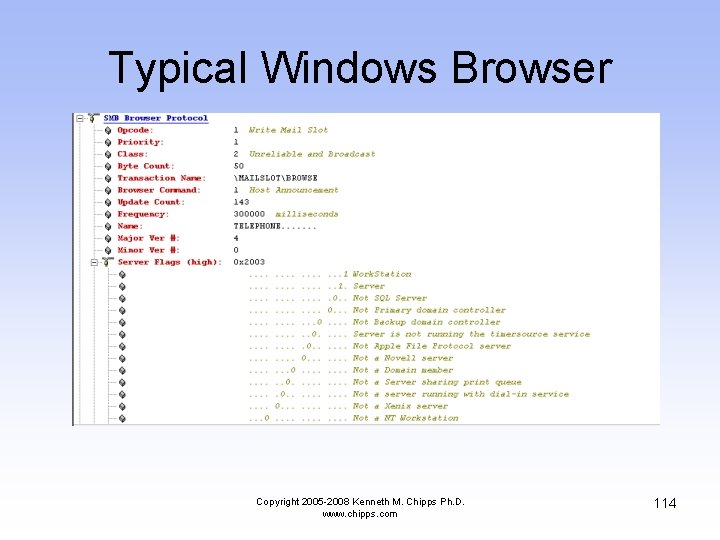
Typical Windows Browser Copyright 2005 -2008 Kenneth M. Chipps Ph. D. www. chipps. com 114
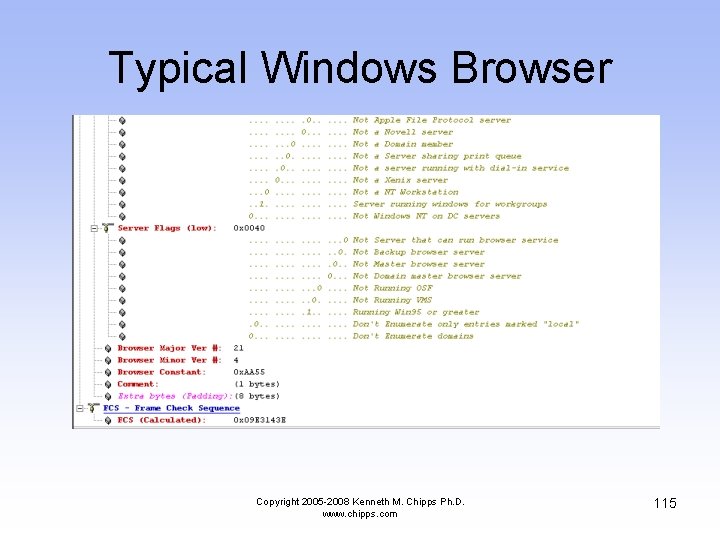
Typical Windows Browser Copyright 2005 -2008 Kenneth M. Chipps Ph. D. www. chipps. com 115
Access Point and Station • The general station authentication sequence is – Client broadcasts a probe request frame on every channel – Access points within range respond with a probe response frame – The client decides which access point to connect to based on signal strength and data rate Copyright 2005 -2008 Kenneth M. Chipps Ph. D. www. chipps. com 116
Access Point and Station – The client sends an authentication request – The access points answers with an authentication reply – Once authenticated, the client must associate by sending an association request frame to the access point – The access point will reply with an association request – The client can now send and receive traffic Copyright 2005 -2008 Kenneth M. Chipps Ph. D. www. chipps. com 117
Typical Startup Sequence • In this section we will look at a running system where the access point is sending out beacons • This is the normal function of an AP • It is basically saying – I am here, can I help you Copyright 2005 -2008 Kenneth M. Chipps Ph. D. www. chipps. com 118
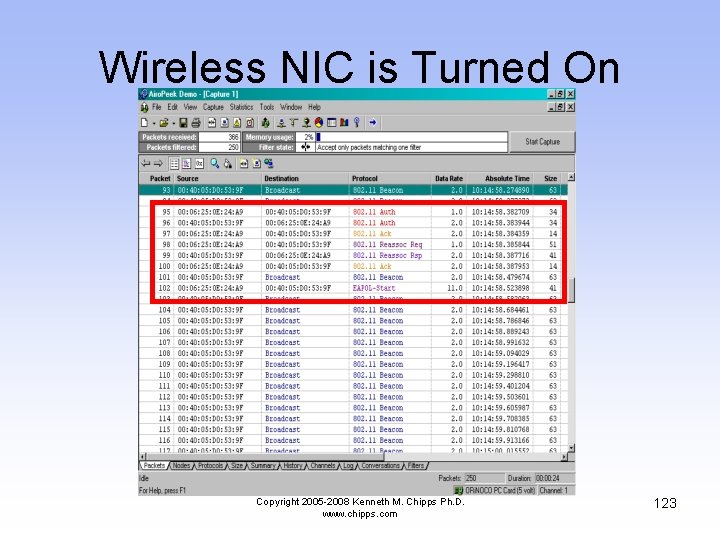
Typical Startup Sequence • While the AP is sending out beacons, a computer with a wireless NIC is turned on • In this example of passive scanning the computer sees the beacon frames and starts a conversation with the AP in order to associate and authenticate • Let’s look at a summary and then frame by frame Copyright 2005 -2008 Kenneth M. Chipps Ph. D. www. chipps. com 119
Beacons Being Sent • Look at the Absolute Time timestamp • Notice how often the beacon frame is sent • This is a lot of traffic, although each of these frames is quite small • These are also sent out at a low data rate, 2 Mbps, so that any device can connect Copyright 2005 -2008 Kenneth M. Chipps Ph. D. www. chipps. com 120
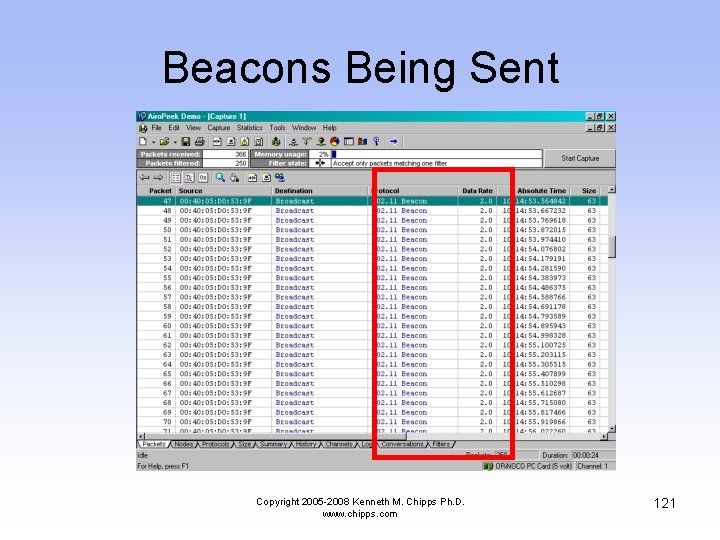
Beacons Being Sent Copyright 2005 -2008 Kenneth M. Chipps Ph. D. www. chipps. com 121
Wireless NIC is Turned On • In this section the computer with the wireless NIC is booted • First it authenticates with the access point • Then it associates with the access point • The last frame in the sequence, the EAPOL-Start frame, is due to the computer with the wireless NIC running Windows XP Copyright 2005 -2008 Kenneth M. Chipps Ph. D. www. chipps. com 122
Wireless NIC is Turned On Copyright 2005 -2008 Kenneth M. Chipps Ph. D. www. chipps. com 123

Startup Sequence • Now we will look at the interesting fields in each of these frames Copyright 2005 -2008 Kenneth M. Chipps Ph. D. www. chipps. com 124
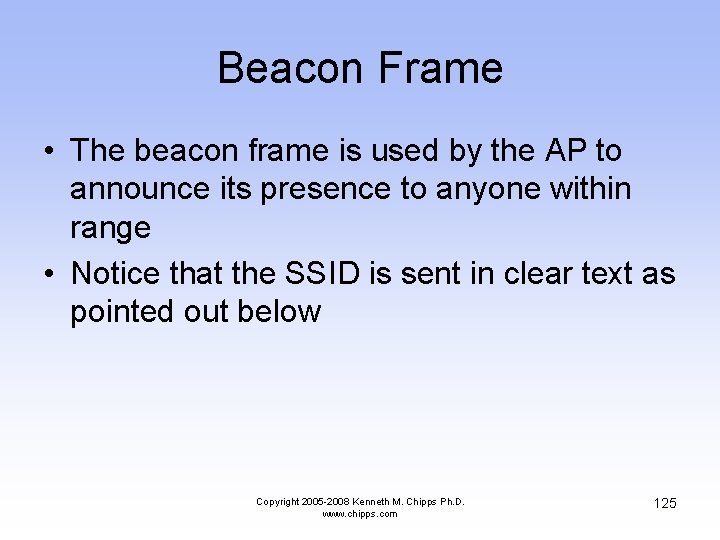
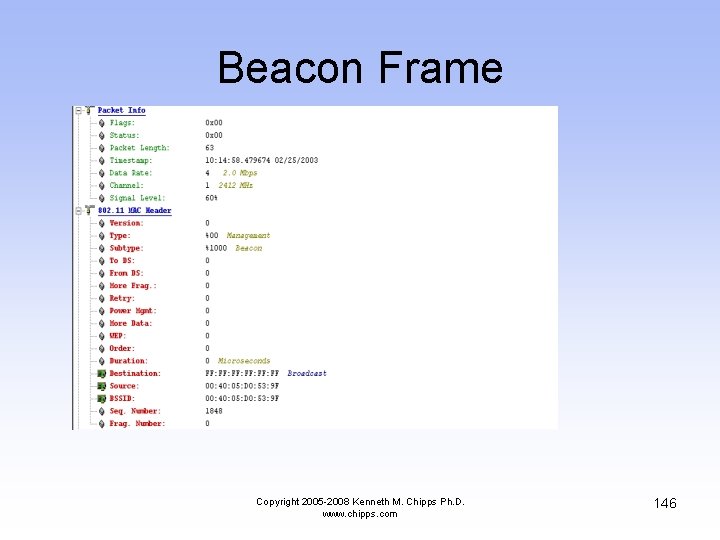
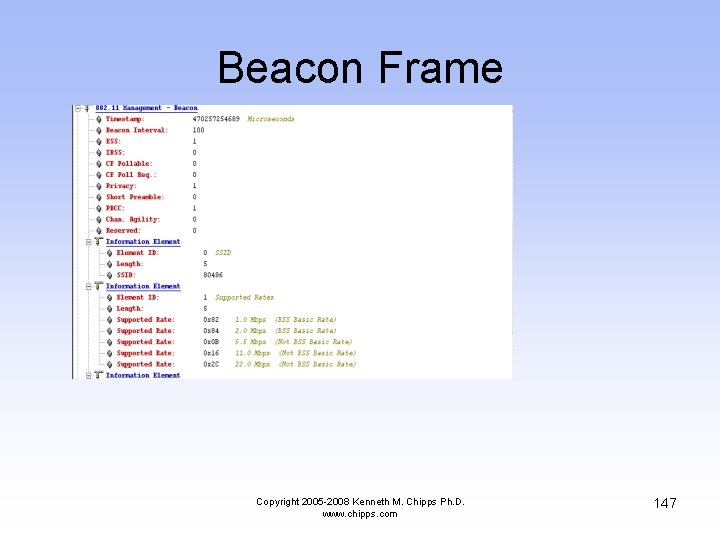
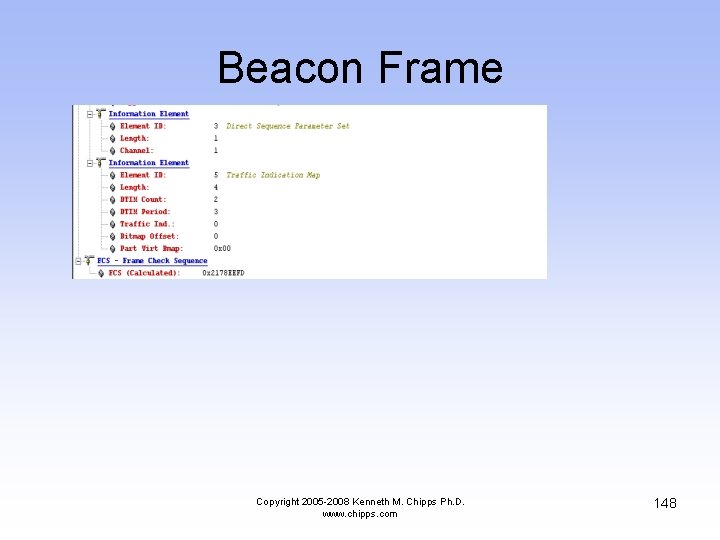
Beacon Frame • The beacon frame is used by the AP to announce its presence to anyone within range • Notice that the SSID is sent in clear text as pointed out below Copyright 2005 -2008 Kenneth M. Chipps Ph. D. www. chipps. com 125
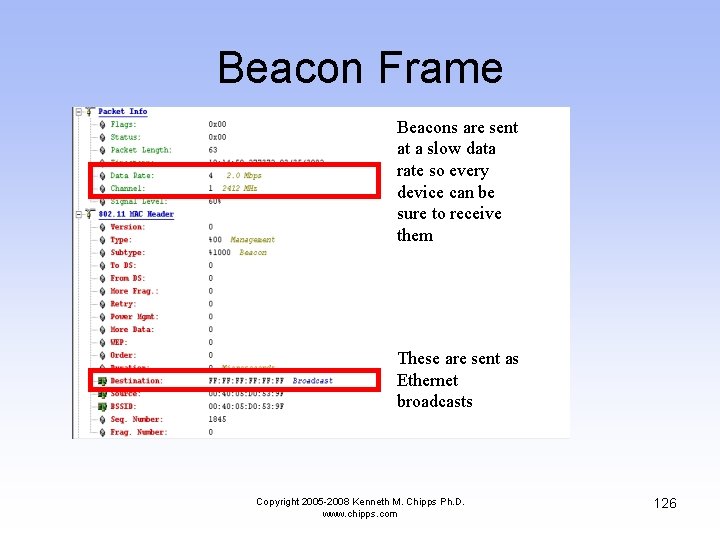
Beacon Frame Beacons are sent at a slow data rate so every device can be sure to receive them These are sent as Ethernet broadcasts Copyright 2005 -2008 Kenneth M. Chipps Ph. D. www. chipps. com 126
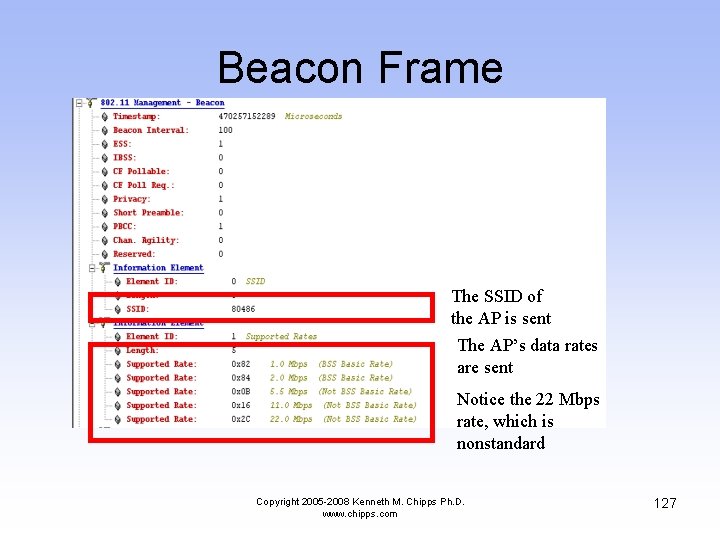
Beacon Frame The SSID of the AP is sent The AP’s data rates are sent Notice the 22 Mbps rate, which is nonstandard Copyright 2005 -2008 Kenneth M. Chipps Ph. D. www. chipps. com 127
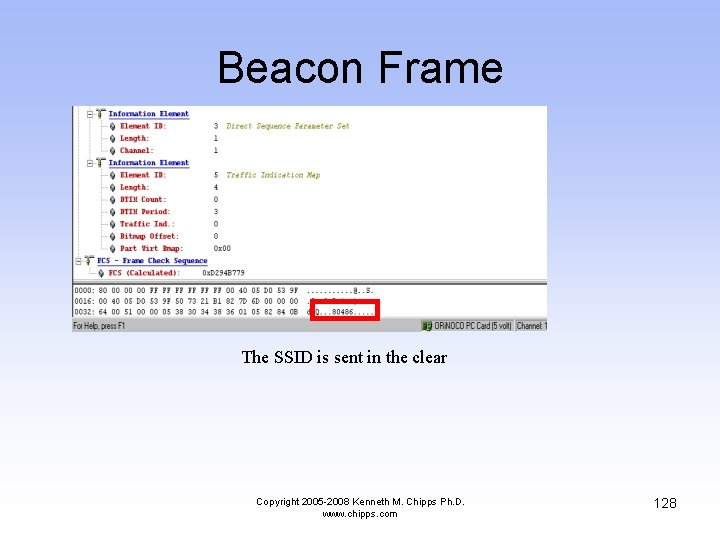
Beacon Frame The SSID is sent in the clear Copyright 2005 -2008 Kenneth M. Chipps Ph. D. www. chipps. com 128
Authentication Frame • In this frame the wireless NIC tells the AP it wants to talk to it using Open System authentication Copyright 2005 -2008 Kenneth M. Chipps Ph. D. www. chipps. com 129
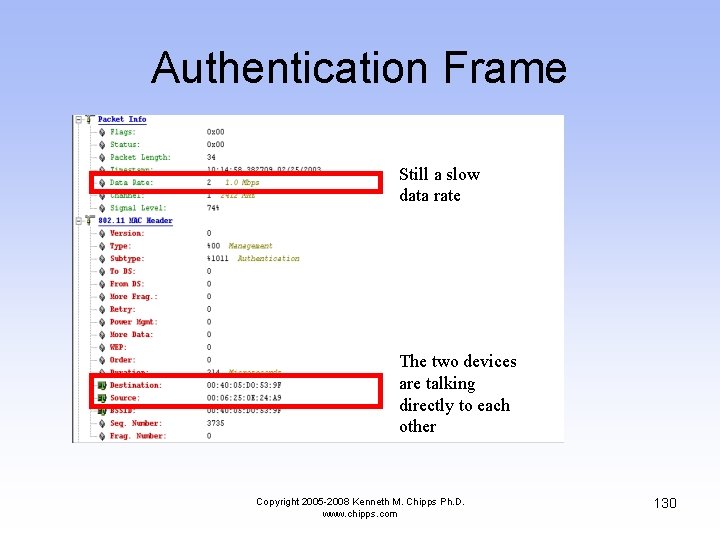
Authentication Frame Still a slow data rate The two devices are talking directly to each other Copyright 2005 -2008 Kenneth M. Chipps Ph. D. www. chipps. com 130
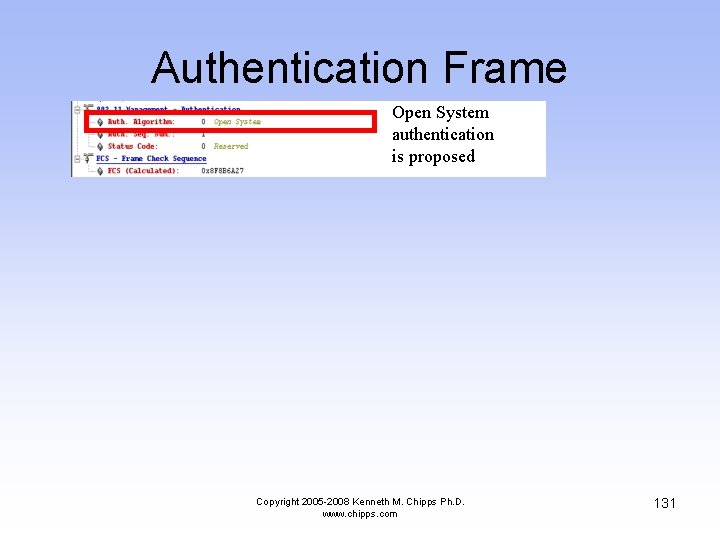
Authentication Frame Open System authentication is proposed Copyright 2005 -2008 Kenneth M. Chipps Ph. D. www. chipps. com 131
Authentication Frame • Here the AP answers the wireless NIC telling it what part of the authentication proposal it agrees to Copyright 2005 -2008 Kenneth M. Chipps Ph. D. www. chipps. com 132
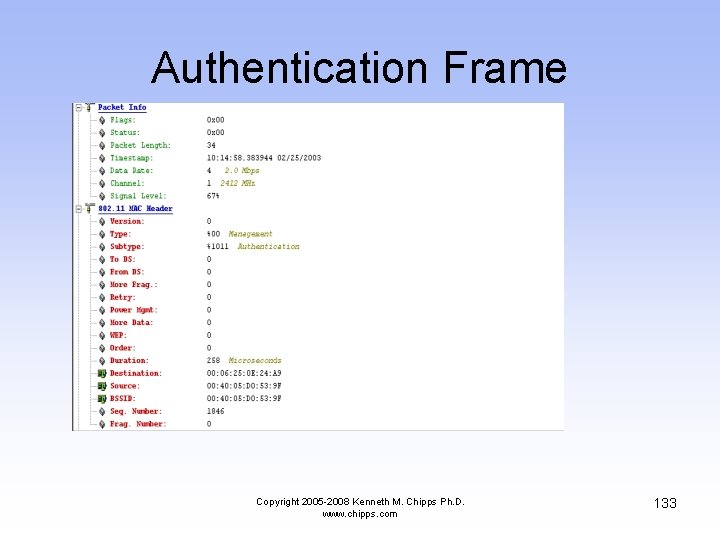
Authentication Frame Copyright 2005 -2008 Kenneth M. Chipps Ph. D. www. chipps. com 133
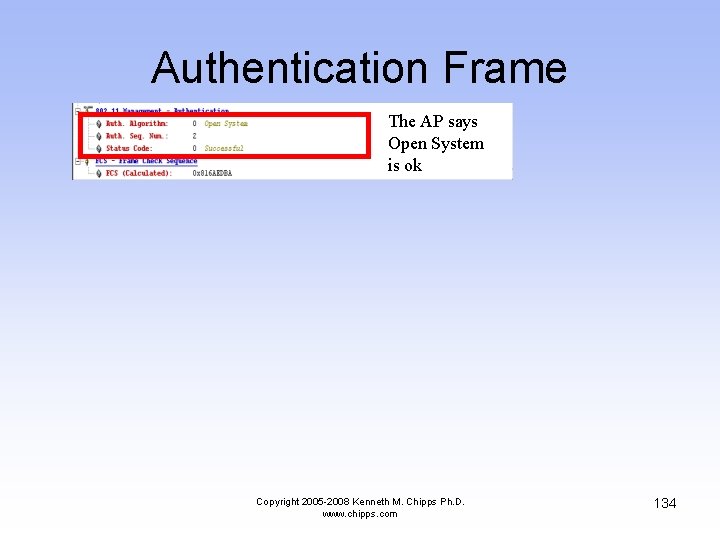
Authentication Frame The AP says Open System is ok Copyright 2005 -2008 Kenneth M. Chipps Ph. D. www. chipps. com 134
Acknowledgement Frame • The wireless NIC tells the AP that it received the response to its authentication proposal Copyright 2005 -2008 Kenneth M. Chipps Ph. D. www. chipps. com 135
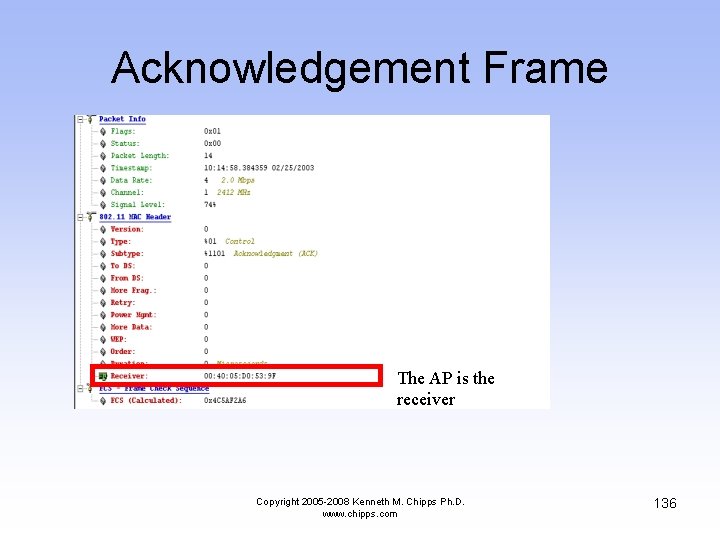
Acknowledgement Frame The AP is the receiver Copyright 2005 -2008 Kenneth M. Chipps Ph. D. www. chipps. com 136
Association Frame • Once authentication is complete, the next step is association • In this frame the wireless NIC asks the AP if it can associate with it Copyright 2005 -2008 Kenneth M. Chipps Ph. D. www. chipps. com 137
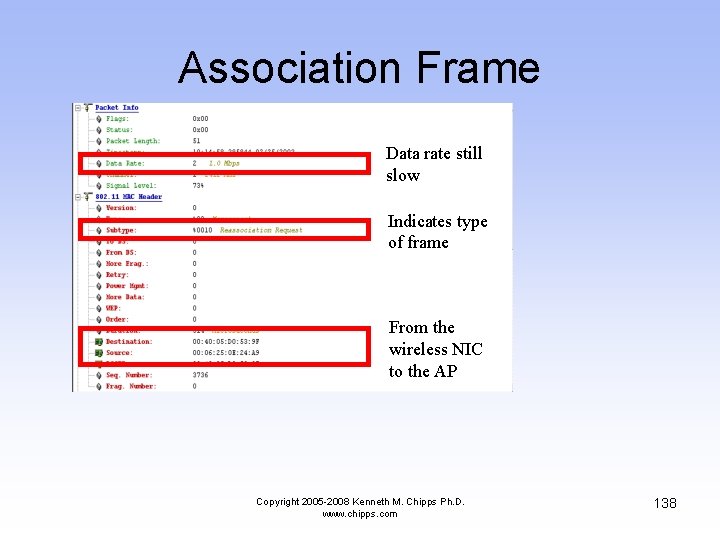
Association Frame Data rate still slow Indicates type of frame From the wireless NIC to the AP Copyright 2005 -2008 Kenneth M. Chipps Ph. D. www. chipps. com 138
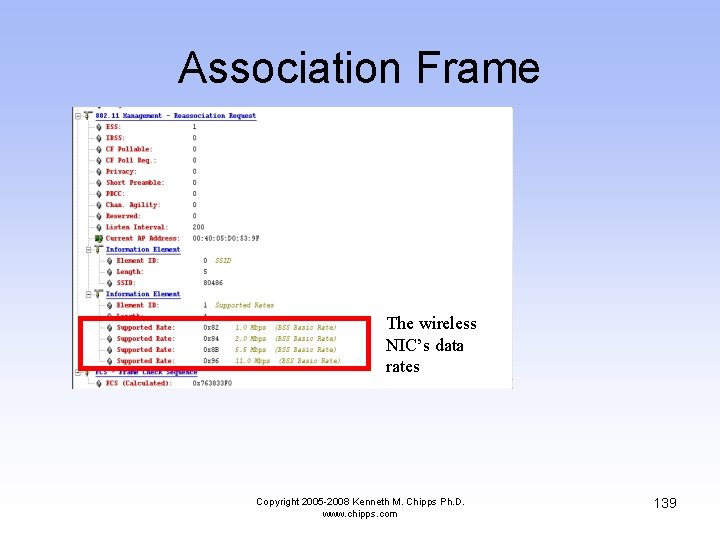
Association Frame The wireless NIC’s data rates Copyright 2005 -2008 Kenneth M. Chipps Ph. D. www. chipps. com 139

Association Frame • The AP answers back saying ok Copyright 2005 -2008 Kenneth M. Chipps Ph. D. www. chipps. com 140
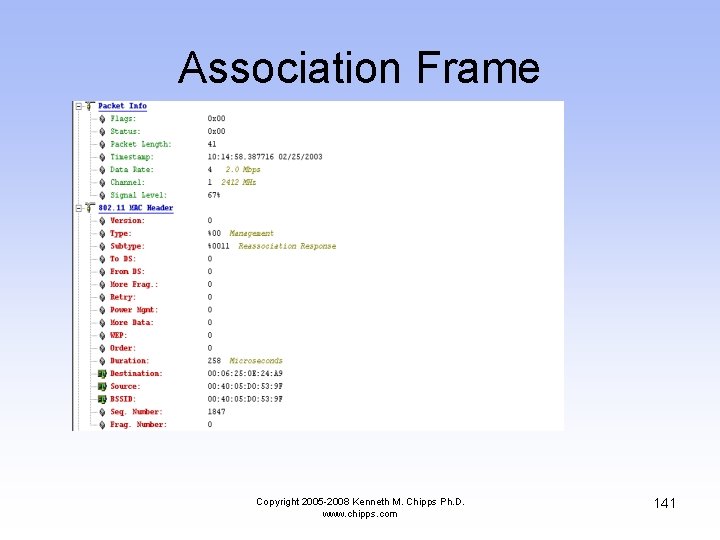
Association Frame Copyright 2005 -2008 Kenneth M. Chipps Ph. D. www. chipps. com 141
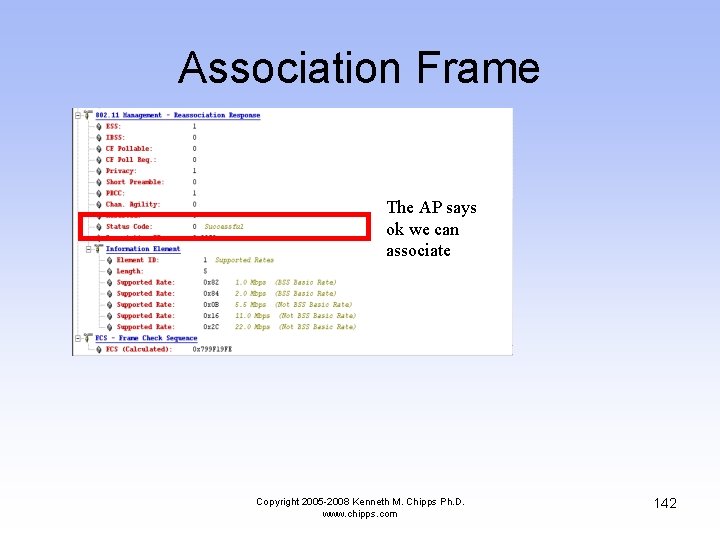
Association Frame The AP says ok we can associate Copyright 2005 -2008 Kenneth M. Chipps Ph. D. www. chipps. com 142
Acknowledgement Frame • The wireless NIC tells the AP it received the AP’s answer to the association request Copyright 2005 -2008 Kenneth M. Chipps Ph. D. www. chipps. com 143
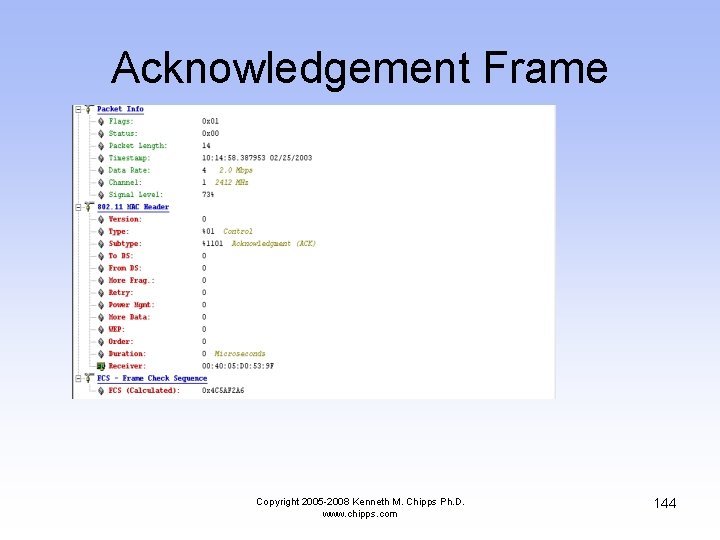
Acknowledgement Frame Copyright 2005 -2008 Kenneth M. Chipps Ph. D. www. chipps. com 144
Beacon Frame • A beacon frame sneaks in here Copyright 2005 -2008 Kenneth M. Chipps Ph. D. www. chipps. com 145
Beacon Frame Copyright 2005 -2008 Kenneth M. Chipps Ph. D. www. chipps. com 146
Beacon Frame Copyright 2005 -2008 Kenneth M. Chipps Ph. D. www. chipps. com 147
Beacon Frame Copyright 2005 -2008 Kenneth M. Chipps Ph. D. www. chipps. com 148
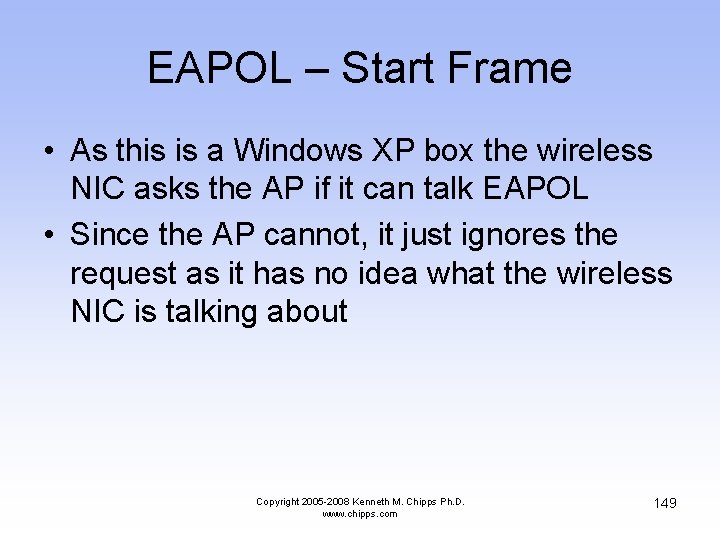
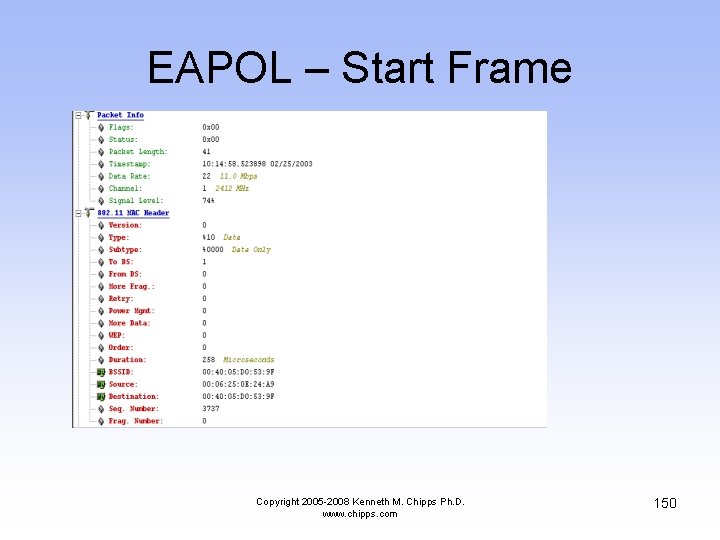
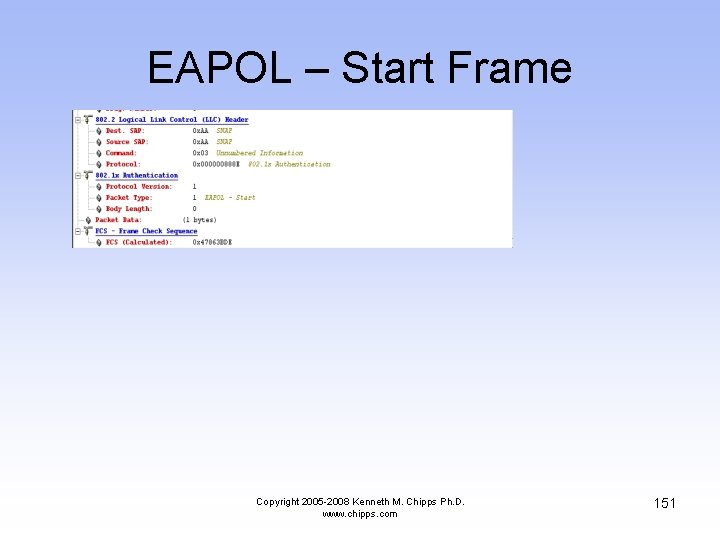
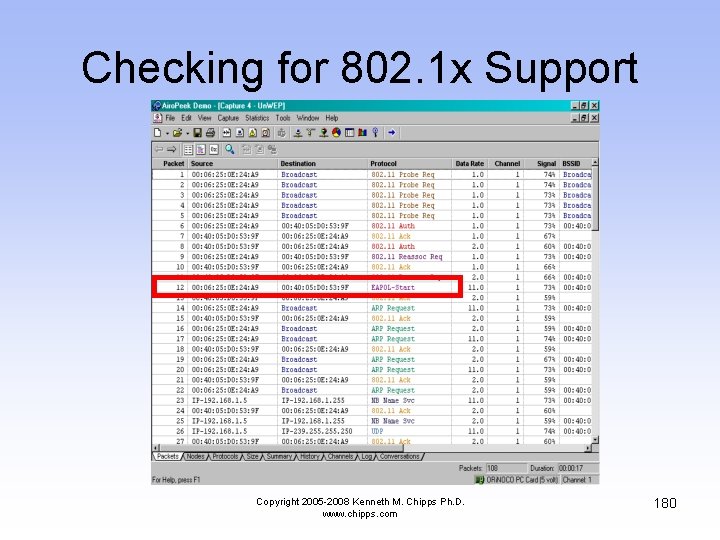
EAPOL – Start Frame • As this is a Windows XP box the wireless NIC asks the AP if it can talk EAPOL • Since the AP cannot, it just ignores the request as it has no idea what the wireless NIC is talking about Copyright 2005 -2008 Kenneth M. Chipps Ph. D. www. chipps. com 149
EAPOL – Start Frame Copyright 2005 -2008 Kenneth M. Chipps Ph. D. www. chipps. com 150
EAPOL – Start Frame Copyright 2005 -2008 Kenneth M. Chipps Ph. D. www. chipps. com 151
The End of the Sequence • This is the end of the sequence of frames used when a wireless NIC starts up and finds an AP already turned on Copyright 2005 -2008 Kenneth M. Chipps Ph. D. www. chipps. com 152
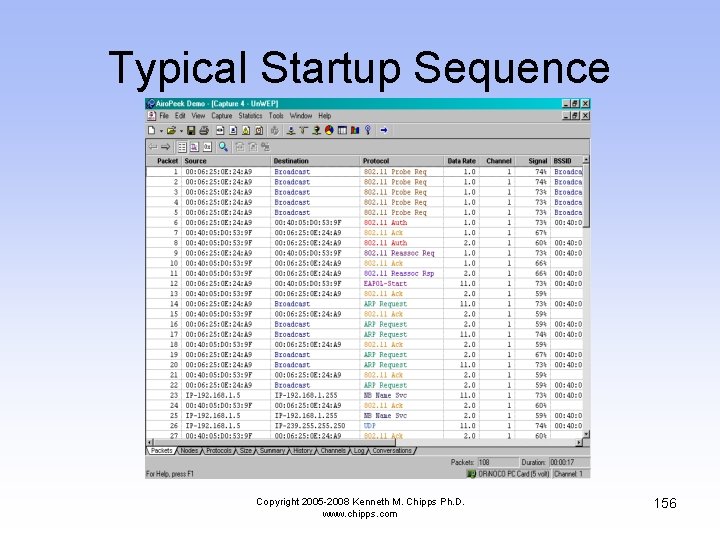
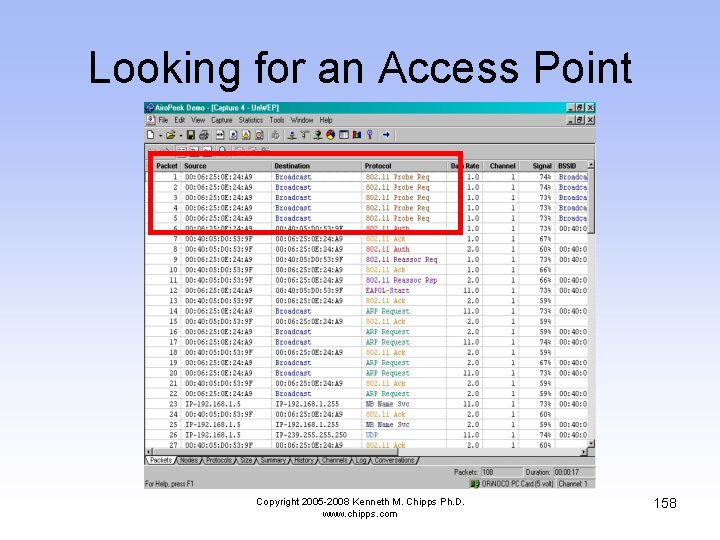
Typical Startup Sequence • Next we will look at a set of frames that shows another typical startup sequence • Again a computer with a wireless NIC was booted, but here the NIC is seen using Active Scanning by sending out a series of Probe Requests in order to find an AP • After that the sequence is the same as the one above Copyright 2005 -2008 Kenneth M. Chipps Ph. D. www. chipps. com 153
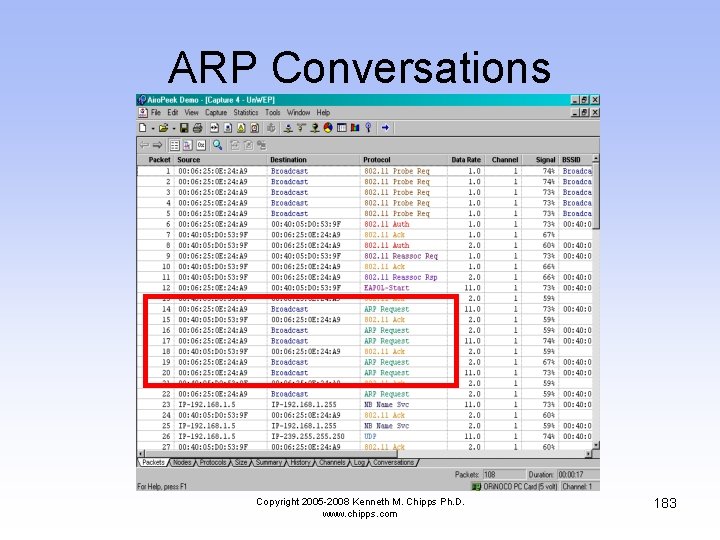
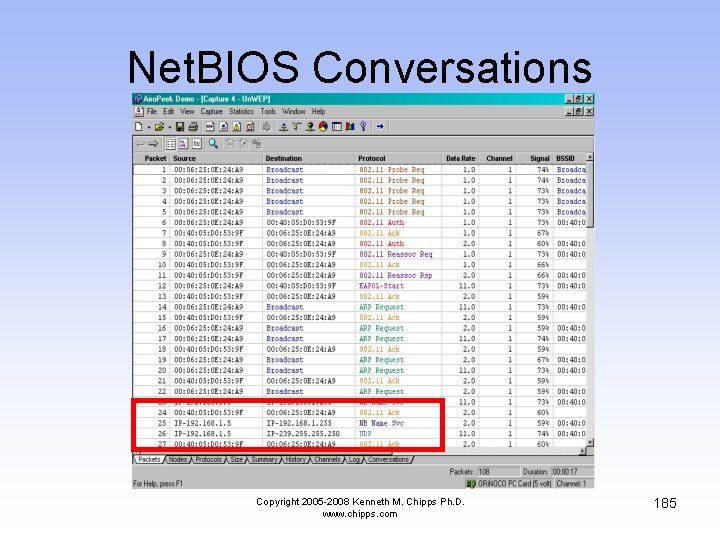
Typical Startup Sequence • This sequence also shows a couple of non wireless activities just to illustrate the complete startup process • The first non wireless related activity is a series of ARP conversations that resolve MAC to IP addresses • Finally, being a Windows box, the computer activates the Net. BIOS name service Copyright 2005 -2008 Kenneth M. Chipps Ph. D. www. chipps. com 154

Typical Startup Sequence • As this goes on for a while, just the first few frames are shown • The next slide shows a listing of all of the frames involved • Then each set of related frames is discussed Copyright 2005 -2008 Kenneth M. Chipps Ph. D. www. chipps. com 155
Typical Startup Sequence Copyright 2005 -2008 Kenneth M. Chipps Ph. D. www. chipps. com 156
Looking for an Access Point • In the first set of frames the computer is sending out a series of Probe Requests • In other words, it is saying is hello, is anyone there, is anyone there Copyright 2005 -2008 Kenneth M. Chipps Ph. D. www. chipps. com 157
Looking for an Access Point Copyright 2005 -2008 Kenneth M. Chipps Ph. D. www. chipps. com 158
Looking for an Access Point • There are several interesting fields in the Probe Request frame that is used by the wireless NIC to find someone to talk to Copyright 2005 -2008 Kenneth M. Chipps Ph. D. www. chipps. com 159
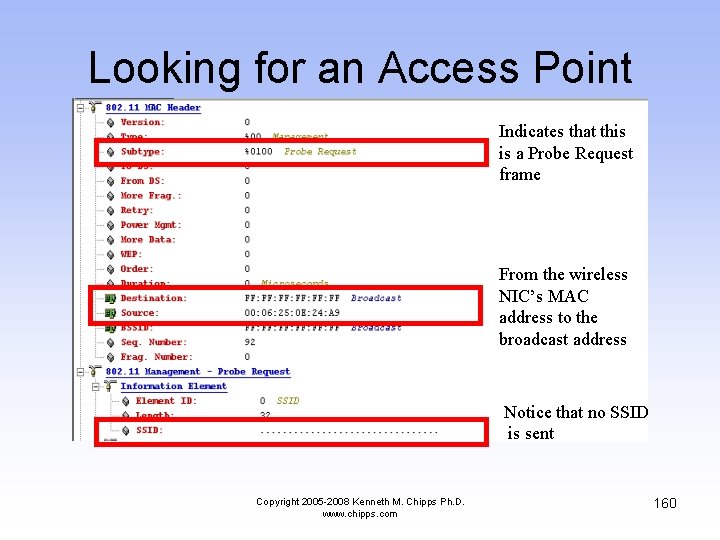
Looking for an Access Point Indicates that this is a Probe Request frame From the wireless NIC’s MAC address to the broadcast address Notice that no SSID is sent Copyright 2005 -2008 Kenneth M. Chipps Ph. D. www. chipps. com 160
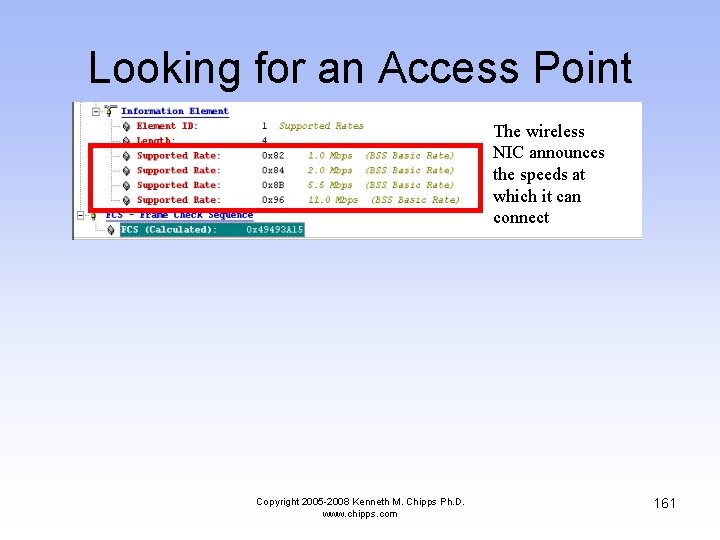
Looking for an Access Point The wireless NIC announces the speeds at which it can connect Copyright 2005 -2008 Kenneth M. Chipps Ph. D. www. chipps. com 161
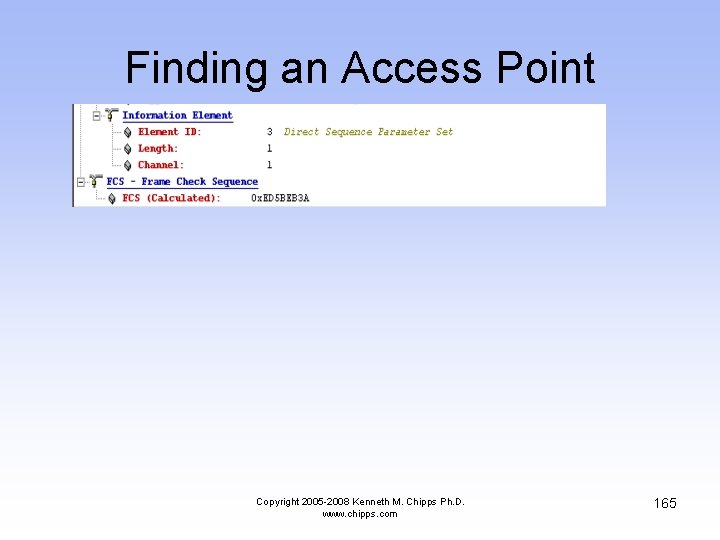
The Access Point Answers • After a while an access point answers by using a Probe Response • The Probe Response has some interesting fields Copyright 2005 -2008 Kenneth M. Chipps Ph. D. www. chipps. com 162
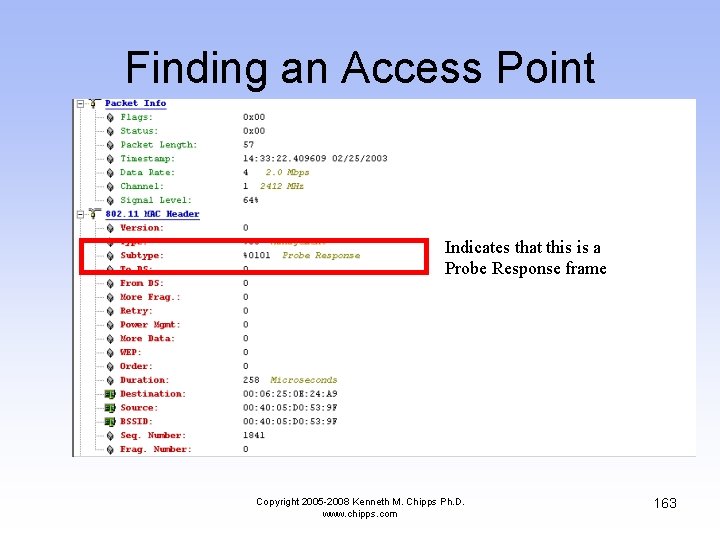
Finding an Access Point Indicates that this is a Probe Response frame Copyright 2005 -2008 Kenneth M. Chipps Ph. D. www. chipps. com 163
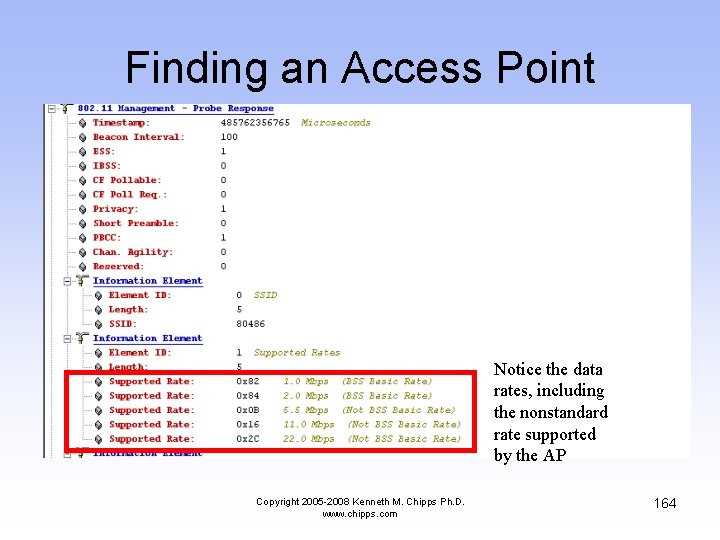
Finding an Access Point Notice the data rates, including the nonstandard rate supported by the AP Copyright 2005 -2008 Kenneth M. Chipps Ph. D. www. chipps. com 164
Finding an Access Point Copyright 2005 -2008 Kenneth M. Chipps Ph. D. www. chipps. com 165
Authentication • The computer then authenticates and associates with the access point as described in detail above • Recall that the first step in making a connection to an access point is to authenticate to it • In the next example the wireless NIC answers the AP’s probe response with a request to authenticate Copyright 2005 -2008 Kenneth M. Chipps Ph. D. www. chipps. com 166
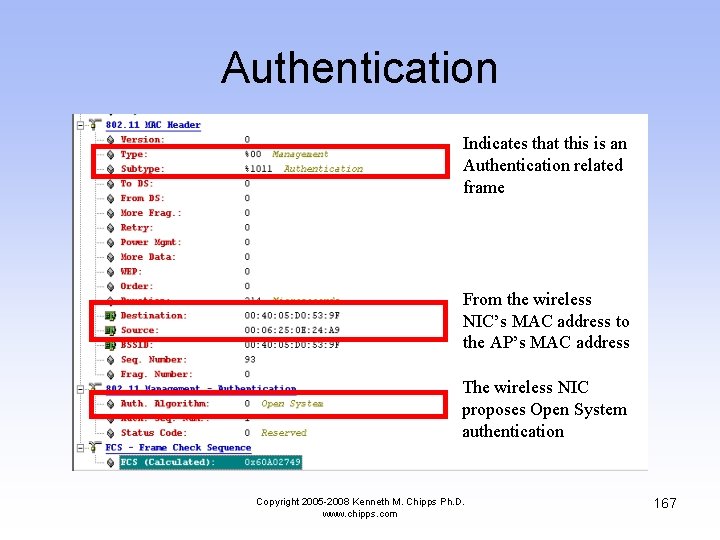
Authentication Indicates that this is an Authentication related frame From the wireless NIC’s MAC address to the AP’s MAC address The wireless NIC proposes Open System authentication Copyright 2005 -2008 Kenneth M. Chipps Ph. D. www. chipps. com 167
Typical Acknowledgement • Shown next is a typical Acknowledgment frame as sent by the receiver back to the sender Copyright 2005 -2008 Kenneth M. Chipps Ph. D. www. chipps. com 168
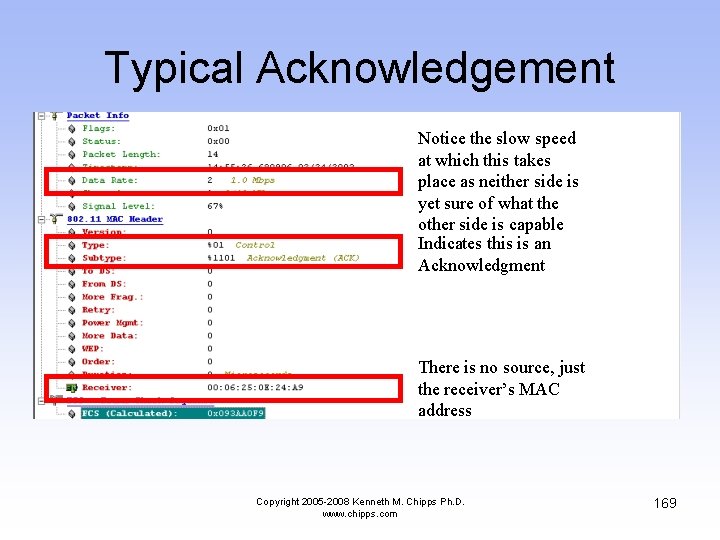
Typical Acknowledgement Notice the slow speed at which this takes place as neither side is yet sure of what the other side is capable Indicates this is an Acknowledgment There is no source, just the receiver’s MAC address Copyright 2005 -2008 Kenneth M. Chipps Ph. D. www. chipps. com 169
Authentication • Now the AP answers the wireless NIC by saying it agrees to talk to the wireless NIC Copyright 2005 -2008 Kenneth M. Chipps Ph. D. www. chipps. com 170
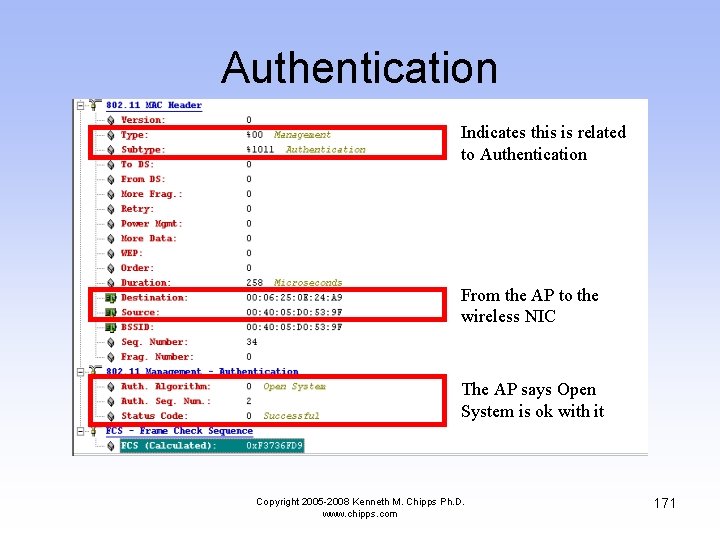
Authentication Indicates this is related to Authentication From the AP to the wireless NIC The AP says Open System is ok with it Copyright 2005 -2008 Kenneth M. Chipps Ph. D. www. chipps. com 171
Association • Next the wireless NIC asks the AP if it can associate with it Copyright 2005 -2008 Kenneth M. Chipps Ph. D. www. chipps. com 172
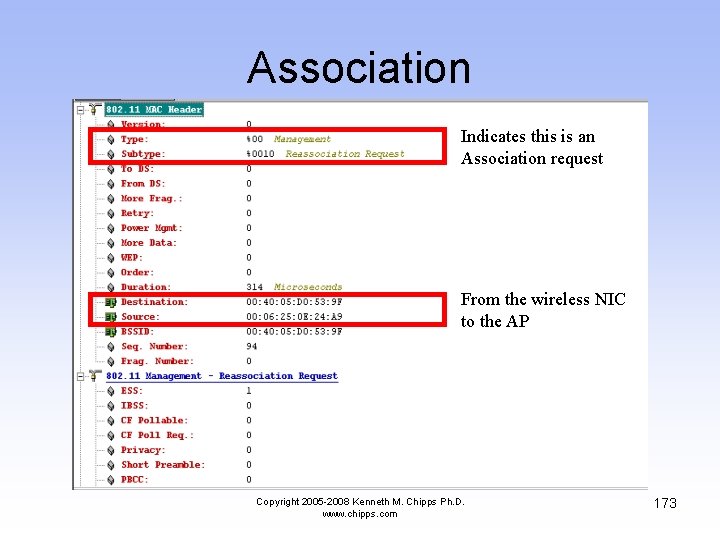
Association Indicates this is an Association request From the wireless NIC to the AP Copyright 2005 -2008 Kenneth M. Chipps Ph. D. www. chipps. com 173
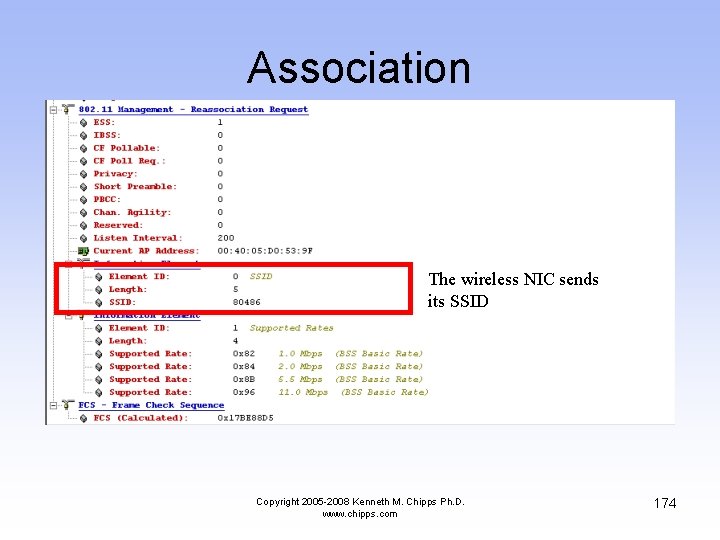
Association The wireless NIC sends its SSID Copyright 2005 -2008 Kenneth M. Chipps Ph. D. www. chipps. com 174
Association • Next the AP answers the wireless NIC • In this case the AP says ok, let’s associate Copyright 2005 -2008 Kenneth M. Chipps Ph. D. www. chipps. com 175
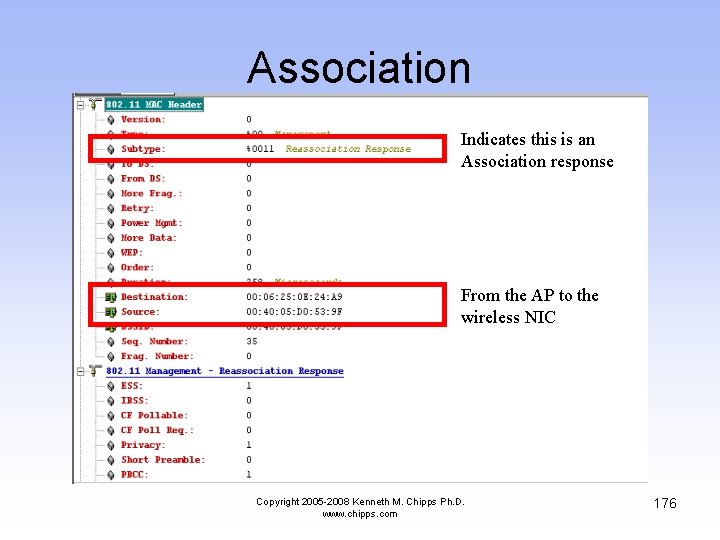
Association Indicates this is an Association response From the AP to the wireless NIC Copyright 2005 -2008 Kenneth M. Chipps Ph. D. www. chipps. com 176
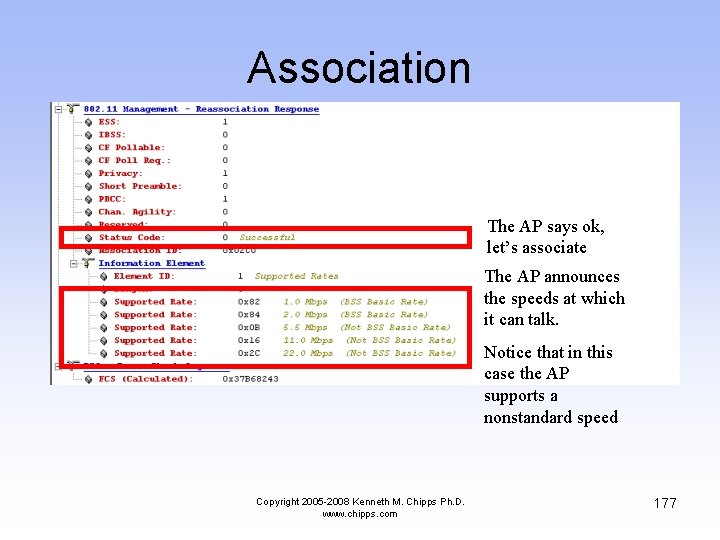
Association The AP says ok, let’s associate The AP announces the speeds at which it can talk. Notice that in this case the AP supports a nonstandard speed Copyright 2005 -2008 Kenneth M. Chipps Ph. D. www. chipps. com 177

Summary of the Details • That’s all the details for this section • Now back to the discussion of the general listing of the frames Copyright 2005 -2008 Kenneth M. Chipps Ph. D. www. chipps. com 178
Checking for 802. 1 x Support • As the computer in this case is running Windows XP, it asks the AP if it supports the IEEE 802. 1 x authentication method • This is the EAPOL-Start message • EAPOL is the Extensible Authentication Protocol over LAN • As the AP in this case does not support this, it ignores the query by the wireless computer Copyright 2005 -2008 Kenneth M. Chipps Ph. D. www. chipps. com 179
Checking for 802. 1 x Support Copyright 2005 -2008 Kenneth M. Chipps Ph. D. www. chipps. com 180
Wireless is Finished Now • At this stage the purely wireless part of the startup procedure is over • As can be seen this is fairly short and straight forward • The remainder of the packets relate to resolving MAC addresses to IP addresses using ARP • Then resolving the Net. BIOS name and other Windows browser related issues Copyright 2005 -2008 Kenneth M. Chipps Ph. D. www. chipps. com 181
ARP Conversations • In this section the computer is resolving physical layer MAC addresses and network layer IP addresses Copyright 2005 -2008 Kenneth M. Chipps Ph. D. www. chipps. com 182
ARP Conversations Copyright 2005 -2008 Kenneth M. Chipps Ph. D. www. chipps. com 183
Net. BIOS Conversations • Shown next is part of the Net. BIOS and Windows browser related conversations Copyright 2005 -2008 Kenneth M. Chipps Ph. D. www. chipps. com 184
Net. BIOS Conversations Copyright 2005 -2008 Kenneth M. Chipps Ph. D. www. chipps. com 185
Conclusion • This sequence of 802. 11 frames should have shown you what the fields in these frame headers actually do • It is vital to understand how something works in order to properly use it in a data network Copyright 2005 -2008 Kenneth M. Chipps Ph. D. www. chipps. com 186
- Slides: 186