
7 Graphics Programming IV Based on EA Chapter
![计算机图形学讲义-7 Graphics Programming (IV) 姜明 北京大学数学科学学院 Based on [EA], Chapter 2. 更新时间 2021/6/13 22:](https://slidetodoc.com/presentation_image_h2/6dceba45d5f05c12558629590952914c/image-1.jpg "计算机图形学讲义-7 Graphics Programming (IV) 姜明 北京大学数学科学学院 Based on [EA], Chapter 2. 更新时间 2021/6/13 22:")
计算机图形学讲义-7 Graphics Programming (IV) 姜明 北京大学数学科学学院 Based on [EA], Chapter 2. 更新时间 2021/6/13 22: 08: 35
计算机图形学讲义-7 Outline - Picking A Simple Paint Program Animating Interactive Programs Design of Interactive Programs Logic Operations
计算机图形学讲义-7 Picking • The logical input operation that allows a user to identity an object rendered on the output display. Pointing device returns a position to the program. Picking needs more information than a position. • • • Hence picking device is more difficult to implement on a modern system than a locator, because of the forward nature of the rendering pipelines. – – Although many of the transformations are reversible in mathematics, the hardware is not. There also potential uniqueness issues as 3 D objects are rendered into 2 D images.
计算机图形学讲义-7 Three Approaches for Picking • Selection mode – Involves adjusting the clipping region and viewport such that we can keep track of which primitives in a small region are rendered into a region near the cursor. – These primitives go into a hit list, that can be examined later by the user program. – Open. GL supports this approach. • (Axis-aligned) bounding rectangles (or extents) – The smallest rectangle containing the object and aligned with the coordinate axes. – Approximate picking can be done by determining which rectangles in world coordinates correspond to a particular point in screen coordinates. – Example: newpaint. c
计算机图形学讲义-7 • Using back buffer and an extra rendering – – In double buffering, the back buffer is not displayed. We render objects into the back buffer, each in a distinct color. The programmer is free to determine an object’s contents by simply changing colors wherever a new object definition appears in the program. 4 steps in picking 1. Draw objects into the back buffer with the pick color. 2. Get the position of the mouse using the mouse callback. 3. Use the function gl. Read. Pixels() to find the color at the position in the frame buffer corresponding to the mouse position. 4. Search a table of colors to find which object correspond to the color read. • Details in Chapter 8.
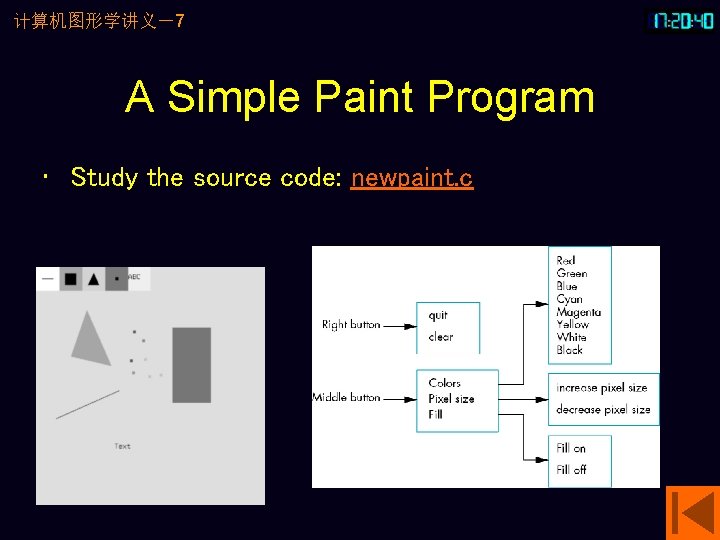
计算机图形学讲义-7 A Simple Paint Program • Study the source code: newpaint. c
计算机图形学讲义-7 Animating Interactive Programs • • CRT display must be refreshed at a rate between 50 and 85 times per second to avoid display flickering. Single buffering – The Rotating Square: single_double. c – Another example: sb 2 db. c
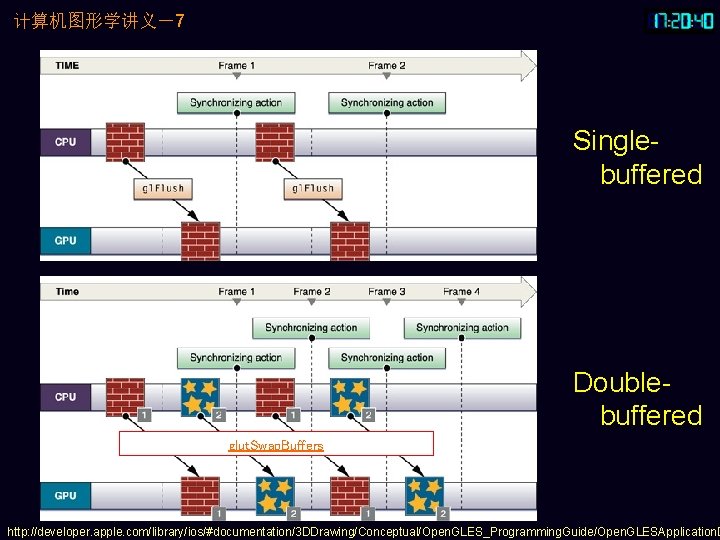
计算机图形学讲义-7 Double Buffering • Two color buffers: front and back buffer. • Front buffer is always the one displayed. • Back buffer is the one into which we draw. • We can swap the buffers in our program, which will invoke the display callback. • Hence, if we put our rendering (into the back buffer) in the display callback, the effect will be to update the display with the back buffer automatically when the buffer-swap function is executed. – glut. Swap. Buffers (); • If we have a complex scene to draw, we can render it into the back buffer and swap buffers when done (using multiple refresh cycles needed). • Double buffering is standard in animation, where the scene being drawn is complex and cannot be finished in a single refresh cycle. Otherwise, we may see undesirable artifacts. • single_double. c
计算机图形学讲义-7 • When drawing to a single buffered context (GLUT_SINGLE), there is only one framebuffer that is used to draw and display the content. • You draw more or less directly to the screen. • Things draw last in a frame are shown for a shorter time period then objects at the beginning. • In a double buffered scenario (GLUT_DOUBLE), there exist two framebuffer. • One is used for drawing, the other one for display. • At the end of each frame, these buffers are swapped. • Doing so, the view is only changed at once when a frame is finished and all objects are visible for the same time.
计算机图形学讲义-7 Singlebuffered Doublebuffered glut. Swap. Buffers http: //developer. apple. com/library/ios/#documentation/3 DDrawing/Conceptual/Open. GLES_Programming. Guide/Open. GLESApplication. D
计算机图形学讲义-7 Other Buffering Problems • Double buffering does not solve all flickering problems. • If the scene is complex, we still may need multiple frames to render the image into the frame buffer. • Double buffering does not speed up this process; it only avoids a partial display. • However, we are often able to have visibly acceptable displays at rates as low as 10 to 20 FPS with double buffering. • Ex. 3. 6: add an elapsed-time clock in one corner
计算机图形学讲义-7 Design of Interactive Programs • Defining what characterizes a good interactive program is difficult. • Recognizing and appreciating a good one is easy. – – A smooth display: no flicker and artifacts; A variety of interactive devices on the display; A variety of methods for entering and displaying information; An easy-to-use interface that does not require substantial effort to learn; – Feedback to the user; – Tolerance for user errors; – A design that incorporates consideration of both the visual and motor properties of the human. • The importance of these features and difficulty of designing a good interactive program should never be underestimated. • HCI: human-computer interaction.
计算机图形学讲义-7 Toolkits, Widgets, and the Frame Buffer • Interactive widgets: menu, slidebar, dial, hot area, sound, icon, …. • The simple model of rendering geometric objects into a color buffer is not sufficient to support many of these callbacks. – Example: pop-up menu behavior in newpaint program. – Example: rubber band line. • One way is to store the part of the display and copy it back. • It involves only the scan-converted image. • Open. GL supports bit-block-transfer (bitblt) operations. • Another approach in Open. GL is to use XOR mode rendering.
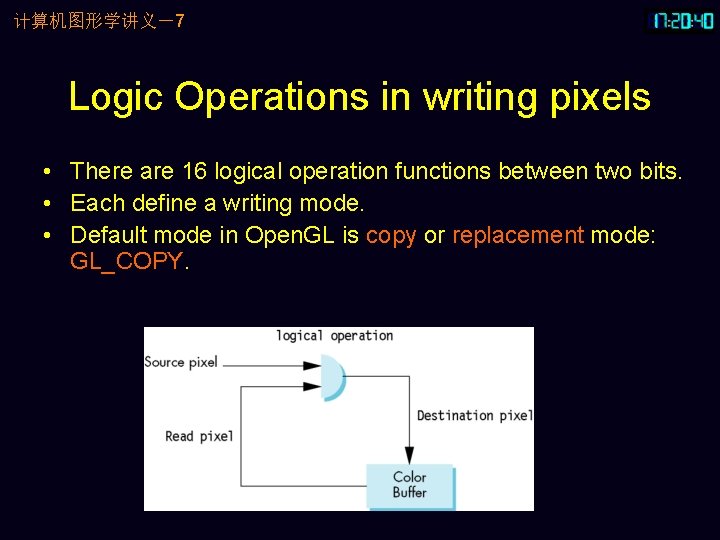
计算机图形学讲义-7 Logic Operations in writing pixels • There are 16 logical operation functions between two bits. • Each define a writing mode. • Default mode in Open. GL is copy or replacement mode: GL_COPY.
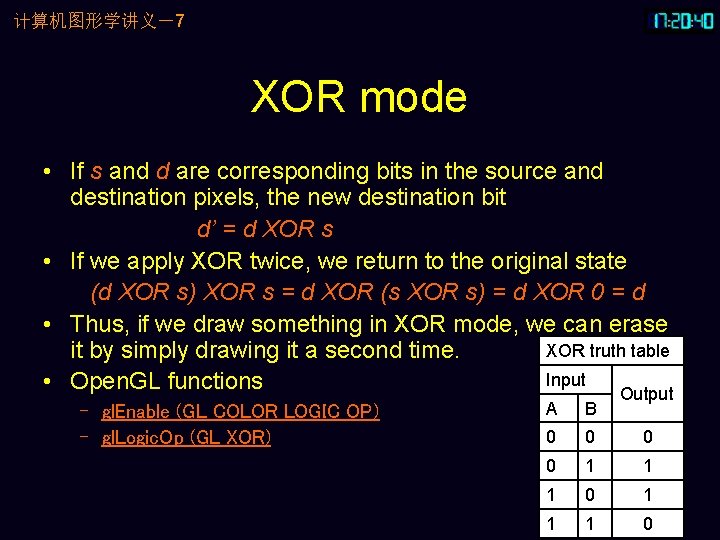
计算机图形学讲义-7 XOR mode • If s and d are corresponding bits in the source and destination pixels, the new destination bit d’ = d XOR s • If we apply XOR twice, we return to the original state (d XOR s) XOR s = d XOR (s XOR s) = d XOR 0 = d • Thus, if we draw something in XOR mode, we can erase XOR truth table it by simply drawing it a second time. Input • Open. GL functions Output – gl. Enable (GL_COLOR_LOGIC_OP) – gl. Logic. Op (GL_XOR) A B 0 0 1 1 1 0
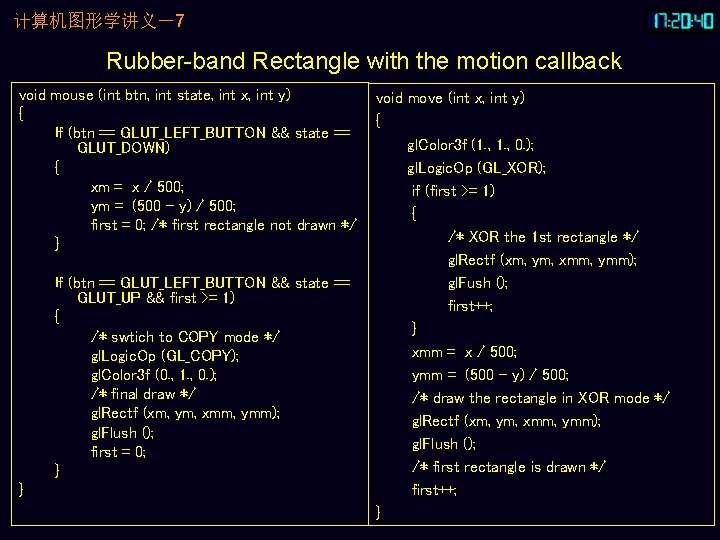
计算机图形学讲义-7 Rubber-band Rectangle with the motion callback void mouse (int btn, int state, int x, int y) { If (btn == GLUT_LEFT_BUTTON && state == GLUT_DOWN) { xm = x / 500; ym = (500 – y) / 500; first = 0; /* first rectangle not drawn */ } If (btn == GLUT_LEFT_BUTTON && state == GLUT_UP && first >= 1) { /* swtich to COPY mode */ gl. Logic. Op (GL_COPY); gl. Color 3 f (0. , 1. , 0. ); /* final draw */ gl. Rectf (xm, ym, xmm, ymm); gl. Flush (); first = 0; } } void move (int x, int y) { gl. Color 3 f (1. , 0. ); gl. Logic. Op (GL_XOR); if (first >= 1) { /* XOR the 1 st rectangle */ gl. Rectf (xm, ym, xmm, ymm); gl. Fush (); first++; } xmm = x / 500; ymm = (500 – y) / 500; /* draw the rectangle in XOR mode */ gl. Rectf (xm, ym, xmm, ymm); gl. Flush (); /* first rectangle is drawn */ first++; }
计算机图形学讲义-7 XOR and Color • Some odd color combination may appear in XOR writing mode. • A final drawing using copy mode is necessary. • Although the use of XOR mode appears to simplify the development, XOR requires the system to read the present destination pixels before computing the new pixel color. • It can place a significant burden on graphics systems.
- Slides: 17