
6 April 06 by Nathan Chien PCI System
6 -April ’ 06 by Nathan Chien
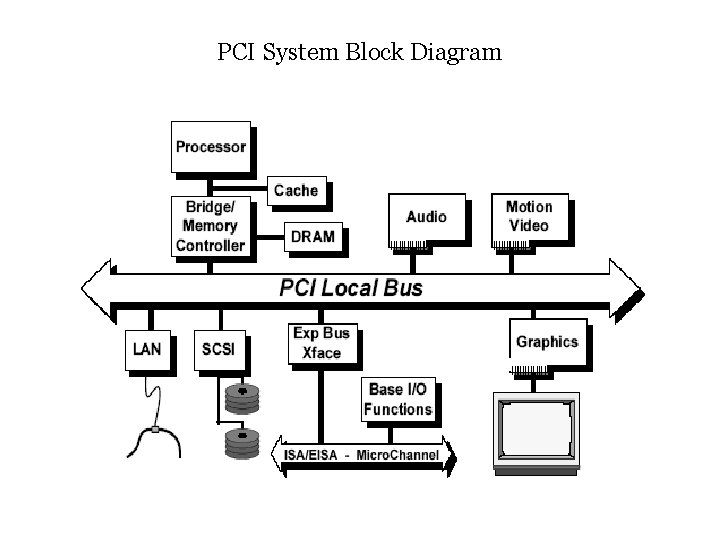
PCI System Block Diagram
PCI Local Bus Overview The block diagram shows a typical PCI Local Bus system architecture. In this example, the processor/cache/memory subsystem is connected to PCI through a PCI bridge. This bridge provides a low latency path through which the processor may directly access PCI devices mapped anywhere in the memory or I/O address spaces. Typical PCI Local Bus implementations will support up to four add-in board connectors, although expansion capability is not required. To provide a quick and easy transition from 5 V to 3. 3 V component technology, PCI defines two add-in board connectors: one for the 5 V signaling environment and one for the 3. 3 V signaling environment. A “ 5 volt” board which plugs into only the 5 V connector, a “universal”board which plugs into both 5 V and 3. 3 V connectors, and a “ 3. 3 V volt” board which plugs into only the 3. 3 V connector.
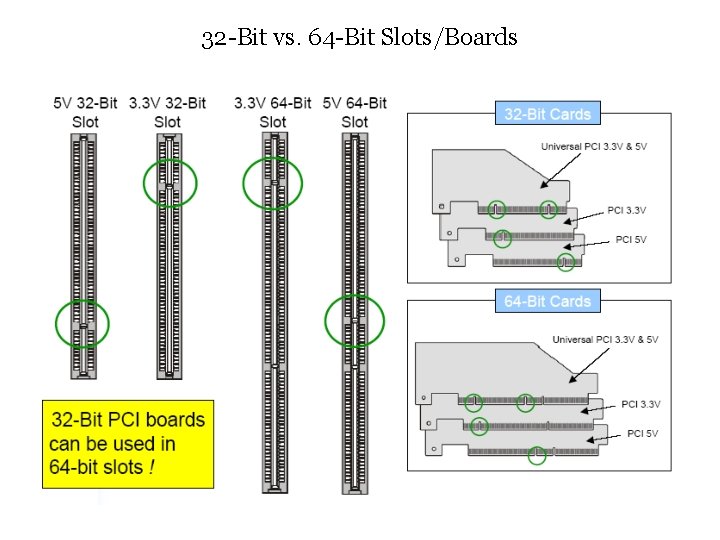
32 -Bit vs. 64 -Bit Slots/Boards
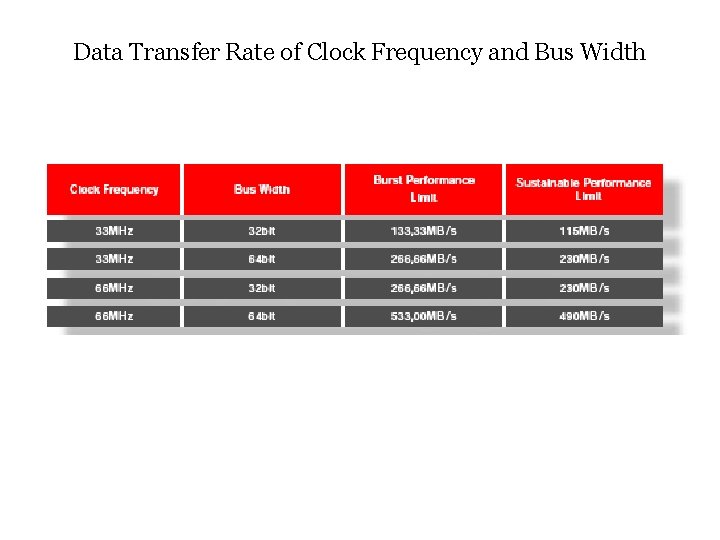
Data Transfer Rate of Clock Frequency and Bus Width

PCI-X Features The PCI-X bus is a higher frequency, higher performance, higher efficiency bus compared to the PCI bus. PCI-X supports 8 -10 loads or 4 connectors at 66 MHz and 3 -4 loads or 1 -2 connectors at 133 MHz. The peak bandwidth achievable with 64 -bit 133 MHz PCI-X is 1064 MBytes/sec. Following the first data phase, the PCI-X bus does not allow wait status during subsequent data phases. Most PCI-X bus cycles are burst cycles and data generally transferred in blocks of no less than 128 Bytes. This results in higher bus unitization. Further, the transfer size is specified in the attribute phase of PCI-X transactions. This allows for more efficient device buffer management. The

PCI to PCI Bridge The PCI Specification theoretically supports 32 devices per PCI bus. This means that PCI enumeration software will detect and recognize up to 32 devices per bus. However, as a rule of thumb, a PCI bus can support a maximum of 10 -12 electrical loads (devices) at 33 MHz. Connectors on the PCI bus are counted as 2 loads because the connector is accounted for as one load and the peripheral card with a PCI device is the second load. To connect any more than 10 -12 loads in a system requires the implementation of a PCI to PCI bridge. The PCI specification theoretically supports up to 256 buses in a system. This means that PCI enumeration software will detect and recognize up to 256 PCI bridges per system.
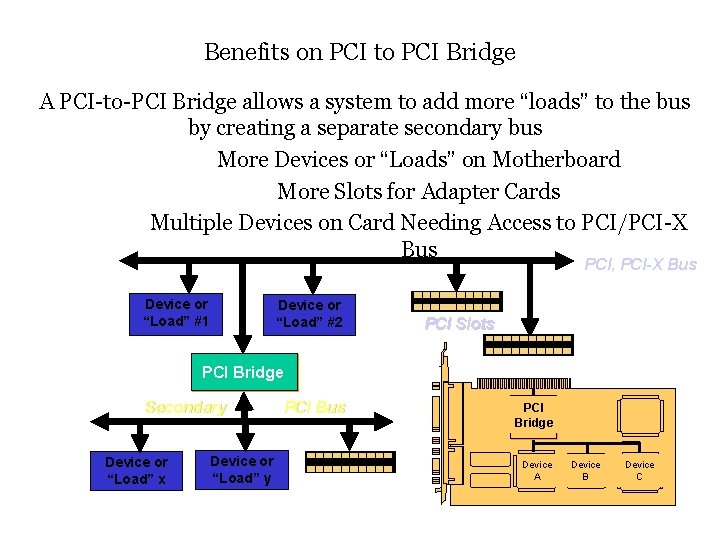
Benefits on PCI to PCI Bridge A PCI-to-PCI Bridge allows a system to add more “loads” to the bus by creating a separate secondary bus More Devices or “Loads” on Motherboard More Slots for Adapter Cards Multiple Devices on Card Needing Access to PCI/PCI-X Bus PCI, PCI-X Bus Device or “Load” #1 Device or “Load” #2 PCI Slots PCI Bridge Secondary Device or “Load” x Device or “Load” y PCI Bus PCI Bridge Device A Device B Device C
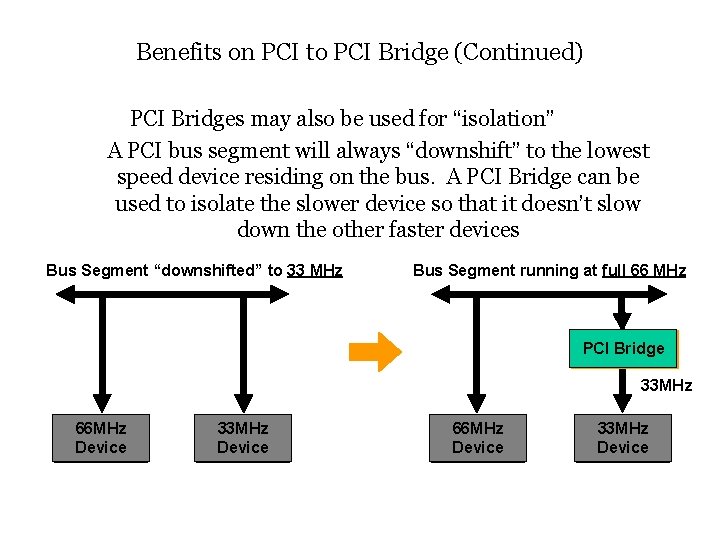
Benefits on PCI to PCI Bridge (Continued) PCI Bridges may also be used for “isolation” A PCI bus segment will always “downshift” to the lowest speed device residing on the bus. A PCI Bridge can be used to isolate the slower device so that it doesn’t slow down the other faster devices Bus Segment “downshifted” to 33 MHz Bus Segment running at full 66 MHz PCI Bridge 33 MHz 66 MHz Device 33 MHz Device
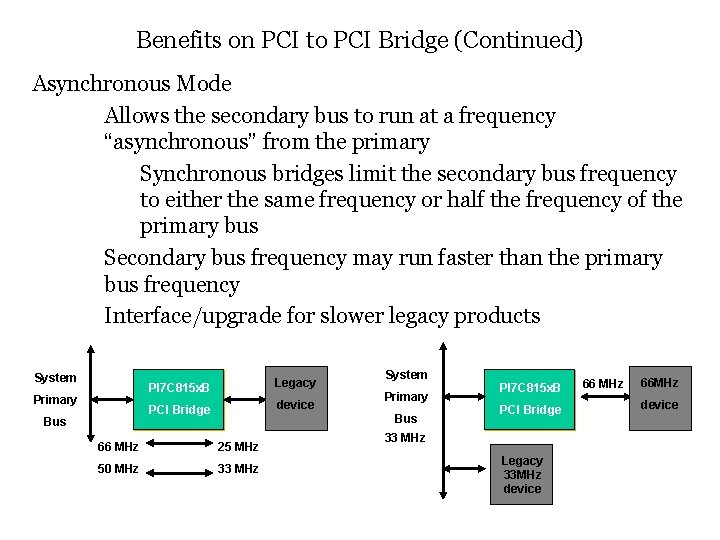
Benefits on PCI to PCI Bridge (Continued) Asynchronous Mode Allows the secondary bus to run at a frequency “asynchronous” from the primary Synchronous bridges limit the secondary bus frequency to either the same frequency or half the frequency of the primary bus Secondary bus frequency may run faster than the primary bus frequency Interface/upgrade for slower legacy products System Primary Bus PI 7 C 815 x. B Legacy PCI Bridge device System Primary Bus 66 MHz 25 MHz 50 MHz 33 MHz PI 7 C 815 x. B PCI Bridge 33 MHz Legacy 33 MHz device 66 MHz 66 MHz device
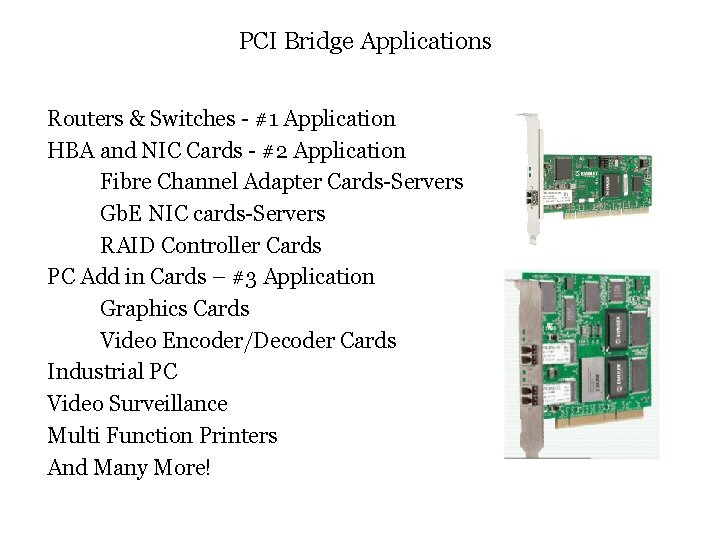
PCI Bridge Applications Routers & Switches - #1 Application HBA and NIC Cards - #2 Application Fibre Channel Adapter Cards-Servers Gb. E NIC cards-Servers RAID Controller Cards PC Add in Cards – #3 Application Graphics Cards Video Encoder/Decoder Cards Industrial PC Video Surveillance Multi Function Printers And Many More!
- Slides: 11