
6 1 Modular Programming Copyright 2015 2012 2009




- Slides: 70
6. 1 Modular Programming Copyright © 2015, 2012, 2009 Pearson Education, Inc. , Publishing as Addison-Wesley All rights reserved.
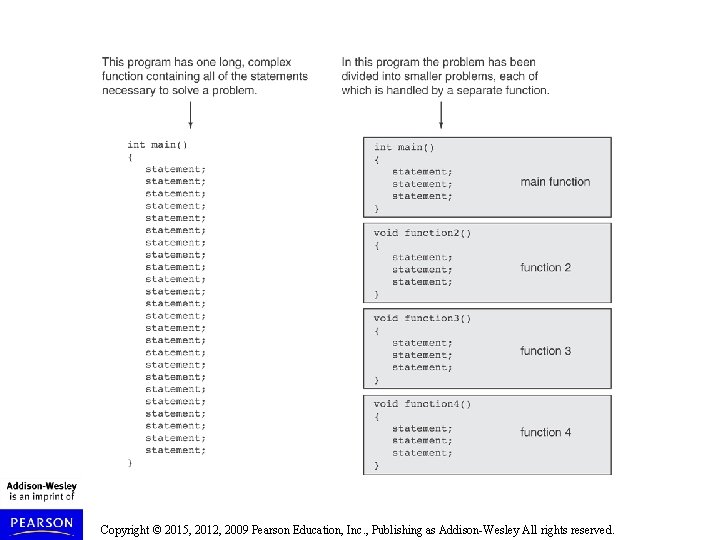
Modular Programming Modular programming: breaking a program up into smaller, manageable functions or modules Function: a collection of statements to perform a task Motivation for modular programming: Improves maintainability of programs Simplifies the process of writing programs Copyright © 2015, 2012, 2009 Pearson Education, Inc. , Publishing as Addison-Wesley All rights reserved.
Copyright © 2015, 2012, 2009 Pearson Education, Inc. , Publishing as Addison-Wesley All rights reserved.
6. 2 Defining and Calling Functions Copyright © 2015, 2012, 2009 Pearson Education, Inc. , Publishing as Addison-Wesley All rights reserved.
Defining and Calling Functions Function call: statement causes a function to execute Function definition: statements that make up a function Copyright © 2015, 2012, 2009 Pearson Education, Inc. , Publishing as Addison-Wesley All rights reserved.
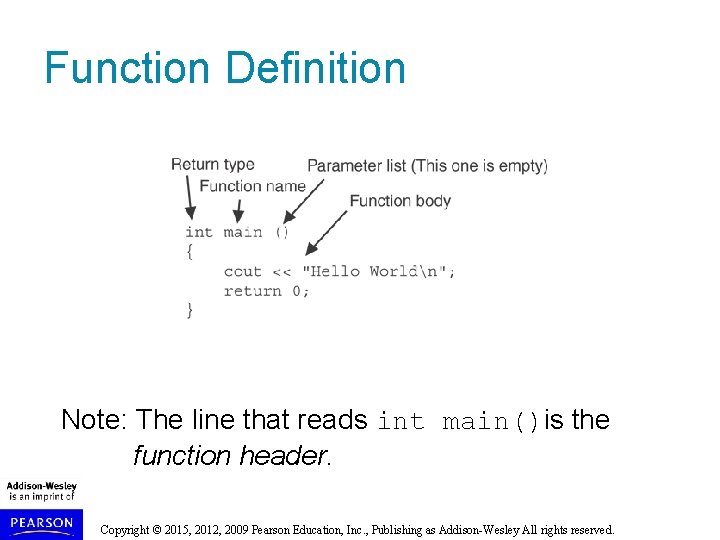
Function Definition includes: return type: data type of the value that function returns to the part of the program that called it name: name of the function. Function names follow same rules as variables parameter list: variables containing values passed to the function body: statements that perform the function’s task, enclosed in {} Copyright © 2015, 2012, 2009 Pearson Education, Inc. , Publishing as Addison-Wesley All rights reserved.
Function Definition Note: The line that reads int main()is the function header. Copyright © 2015, 2012, 2009 Pearson Education, Inc. , Publishing as Addison-Wesley All rights reserved.
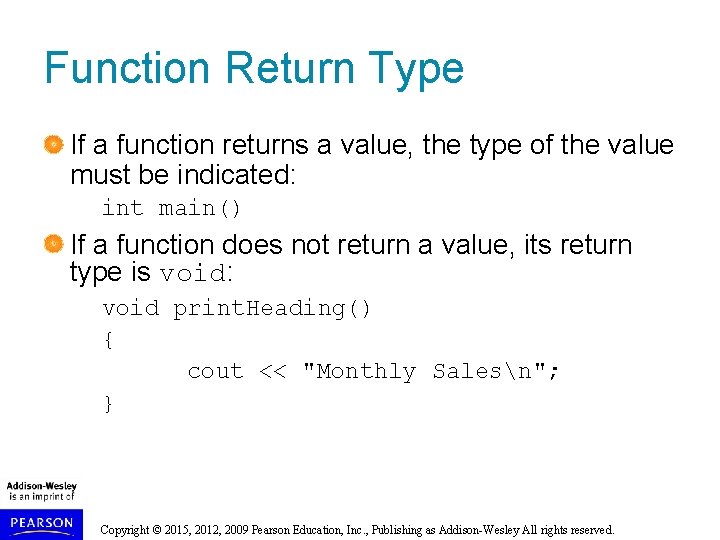
Function Return Type If a function returns a value, the type of the value must be indicated: int main() If a function does not return a value, its return type is void: void print. Heading() { cout << "Monthly Salesn"; } Copyright © 2015, 2012, 2009 Pearson Education, Inc. , Publishing as Addison-Wesley All rights reserved.
Calling a Function To call a function, use the function name followed by () and ; print. Heading(); When called, program executes the body of the called function After the function terminates, execution resumes in the calling function at point of call. Copyright © 2015, 2012, 2009 Pearson Education, Inc. , Publishing as Addison-Wesley All rights reserved.
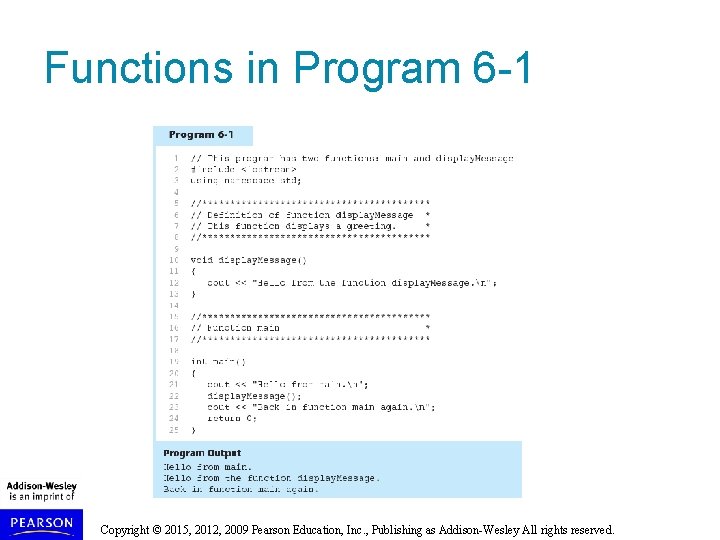
Functions in Program 6 -1 Copyright © 2015, 2012, 2009 Pearson Education, Inc. , Publishing as Addison-Wesley All rights reserved.
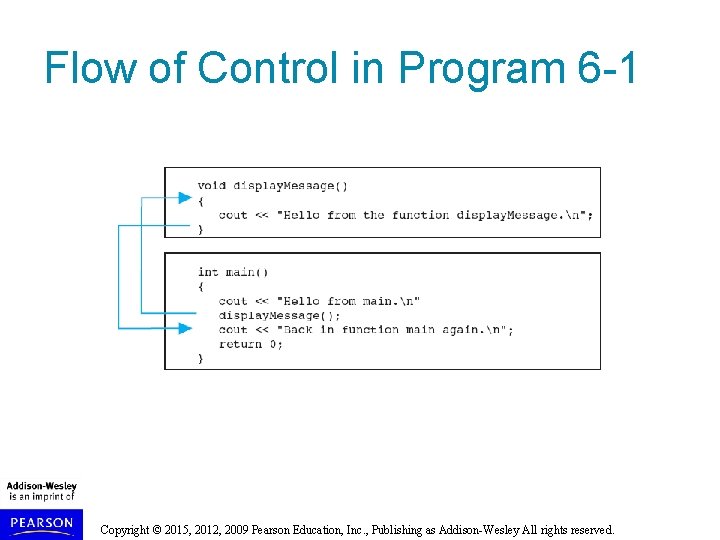
Flow of Control in Program 6 -1 Copyright © 2015, 2012, 2009 Pearson Education, Inc. , Publishing as Addison-Wesley All rights reserved.
Calling Functions main call any number of functions Functions can call other functions Compiler must know the following about a function before it is called: name return type number of parameters data type of each parameter Copyright © 2015, 2012, 2009 Pearson Education, Inc. , Publishing as Addison-Wesley All rights reserved.
6. 3 Function Prototypes Copyright © 2015, 2012, 2009 Pearson Education, Inc. , Publishing as Addison-Wesley All rights reserved.
Function Prototypes Ways to notify the compiler about a function before a call to the function: Place function definition before calling function’s definition Use a function prototype (function declaration) – like the function definition without the body Header: void print. Heading() Prototype: void print. Heading(); Copyright © 2015, 2012, 2009 Pearson Education, Inc. , Publishing as Addison-Wesley All rights reserved.
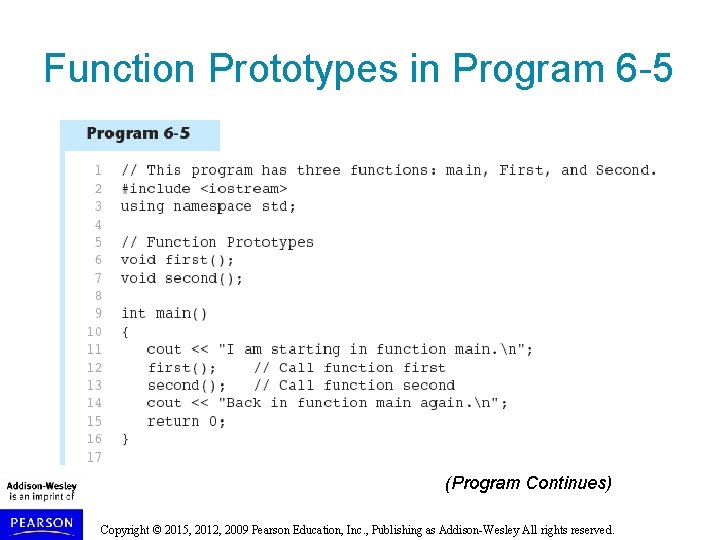
Function Prototypes in Program 6 -5 (Program Continues) Copyright © 2015, 2012, 2009 Pearson Education, Inc. , Publishing as Addison-Wesley All rights reserved.
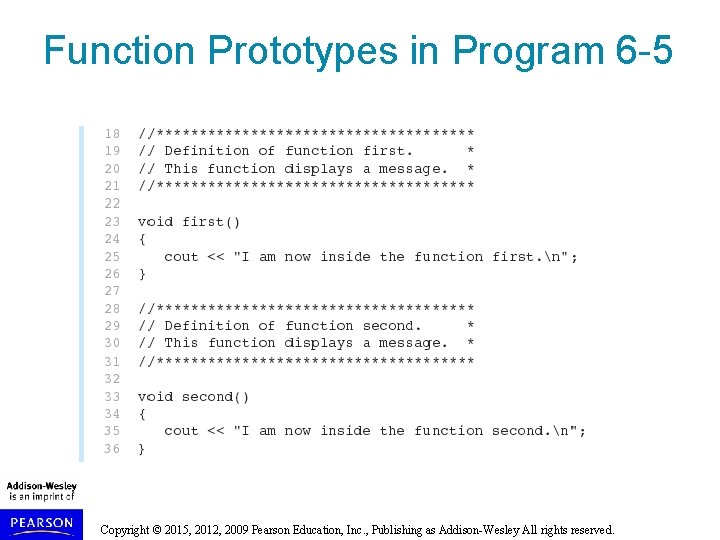
Function Prototypes in Program 6 -5 Copyright © 2015, 2012, 2009 Pearson Education, Inc. , Publishing as Addison-Wesley All rights reserved.
Prototype Notes Place prototypes near top of program Program must include either prototype or full function definition before any call to the function – compiler error otherwise When using prototypes, can place function definitions in any order in source file Copyright © 2015, 2012, 2009 Pearson Education, Inc. , Publishing as Addison-Wesley All rights reserved.
6. 4 Sending Data into a Function Copyright © 2015, 2012, 2009 Pearson Education, Inc. , Publishing as Addison-Wesley All rights reserved.
Sending Data into a Function Can pass values into a function at time of call: c = pow(a, b); Values passed to function are arguments Variables in a function that hold the values passed as arguments are parameters Copyright © 2015, 2012, 2009 Pearson Education, Inc. , Publishing as Addison-Wesley All rights reserved.
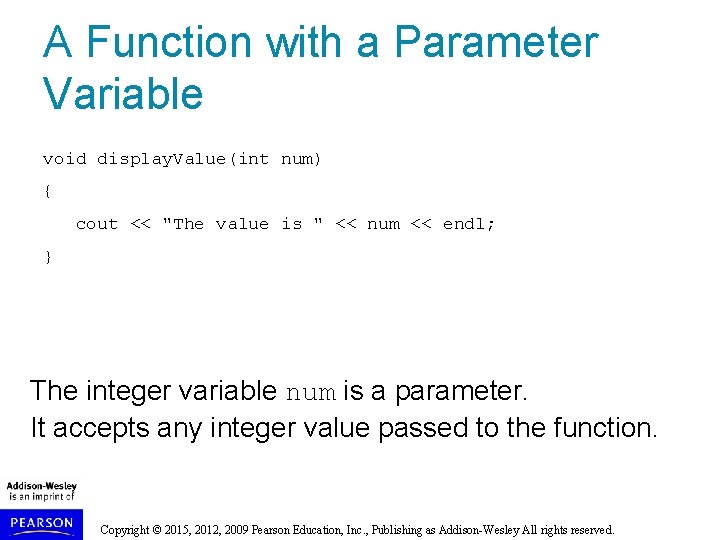
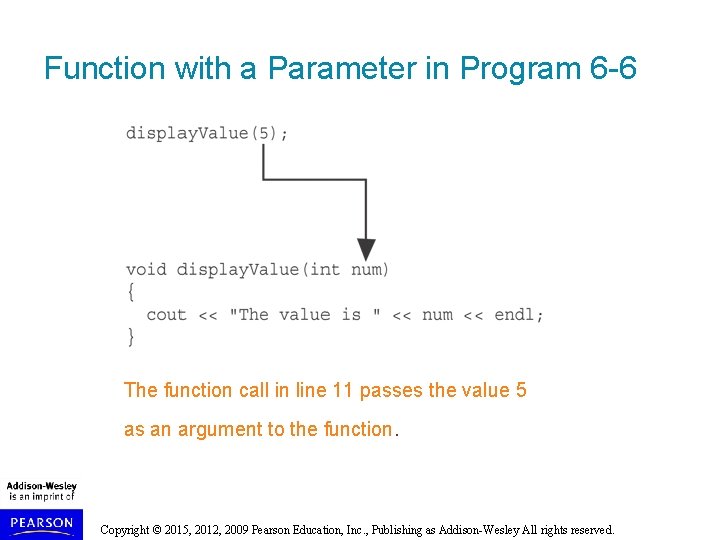
A Function with a Parameter Variable void display. Value(int num) { cout << "The value is " << num << endl; } The integer variable num is a parameter. It accepts any integer value passed to the function. Copyright © 2015, 2012, 2009 Pearson Education, Inc. , Publishing as Addison-Wesley All rights reserved.
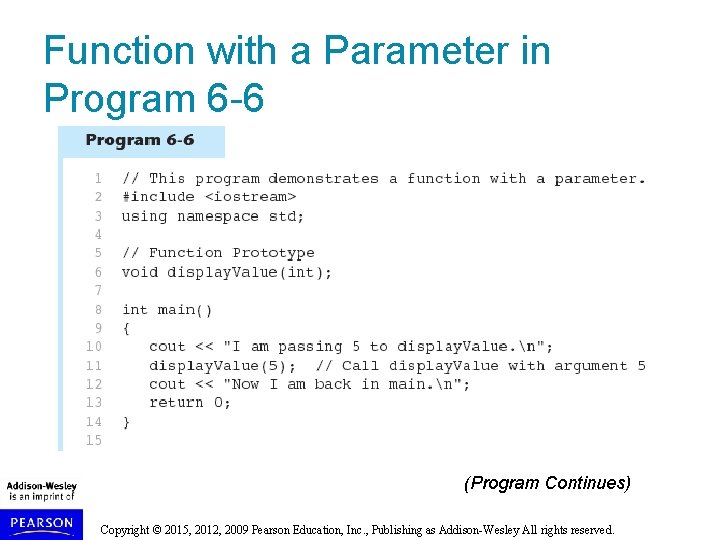
Function with a Parameter in Program 6 -6 (Program Continues) Copyright © 2015, 2012, 2009 Pearson Education, Inc. , Publishing as Addison-Wesley All rights reserved.
Function with a Parameter in Program 6 -6 Copyright © 2015, 2012, 2009 Pearson Education, Inc. , Publishing as Addison-Wesley All rights reserved.
Function with a Parameter in Program 6 -6 The function call in line 11 passes the value 5 as an argument to the function. Copyright © 2015, 2012, 2009 Pearson Education, Inc. , Publishing as Addison-Wesley All rights reserved.
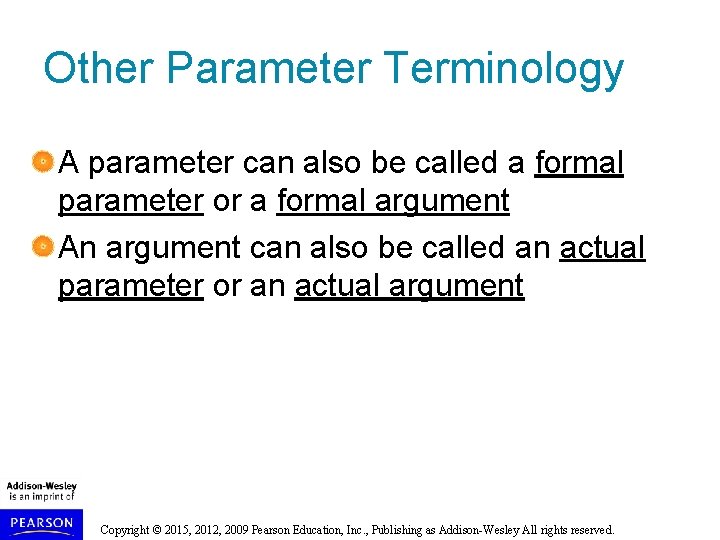
Other Parameter Terminology A parameter can also be called a formal parameter or a formal argument An argument can also be called an actual parameter or an actual argument Copyright © 2015, 2012, 2009 Pearson Education, Inc. , Publishing as Addison-Wesley All rights reserved.
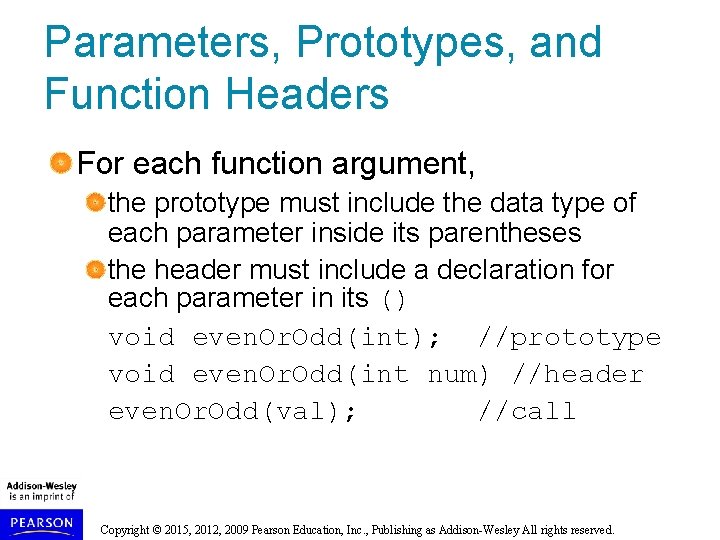
Parameters, Prototypes, and Function Headers For each function argument, the prototype must include the data type of each parameter inside its parentheses the header must include a declaration for each parameter in its () void even. Or. Odd(int); //prototype void even. Or. Odd(int num) //header even. Or. Odd(val); //call Copyright © 2015, 2012, 2009 Pearson Education, Inc. , Publishing as Addison-Wesley All rights reserved.
Function Call Notes Value of argument is copied into parameter when the function is called A parameter’s scope is the function which uses it Function can have multiple parameters There must be a data type listed in the prototype () and an argument declaration in the function header () for each parameter Arguments will be promoted/demoted as necessary to match parameters Copyright © 2015, 2012, 2009 Pearson Education, Inc. , Publishing as Addison-Wesley All rights reserved.
Passing Multiple Arguments When calling a function and passing multiple arguments: the number of arguments in the call must match the prototype and definition the first argument will be used to initialize the first parameter, the second argument to initialize the second parameter, etc. Copyright © 2015, 2012, 2009 Pearson Education, Inc. , Publishing as Addison-Wesley All rights reserved.
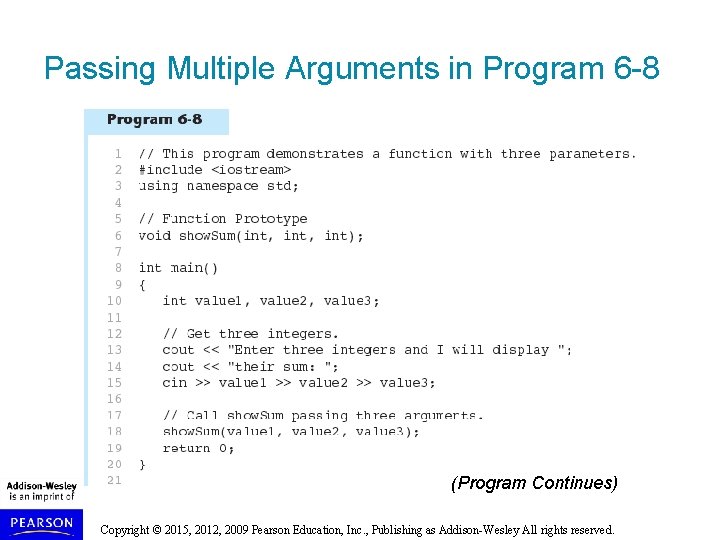
Passing Multiple Arguments in Program 6 -8 (Program Continues) Copyright © 2015, 2012, 2009 Pearson Education, Inc. , Publishing as Addison-Wesley All rights reserved.
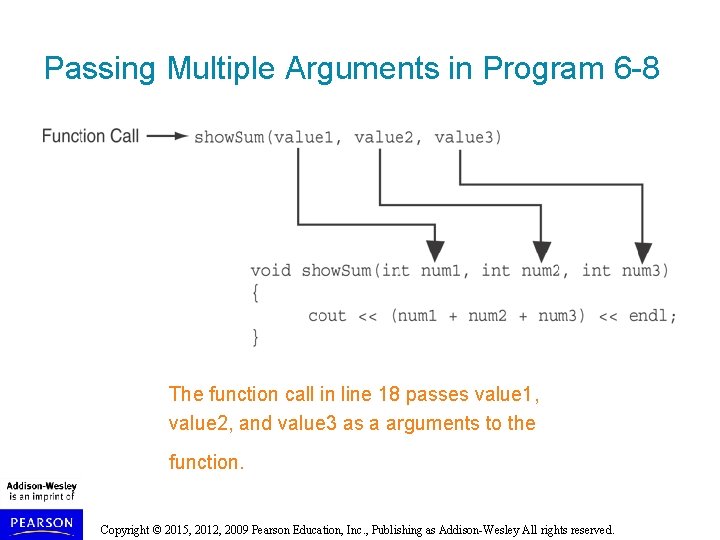
Passing Multiple Arguments in Program 6 -8 Copyright © 2015, 2012, 2009 Pearson Education, Inc. , Publishing as Addison-Wesley All rights reserved.
Passing Multiple Arguments in Program 6 -8 The function call in line 18 passes value 1, value 2, and value 3 as a arguments to the function. Copyright © 2015, 2012, 2009 Pearson Education, Inc. , Publishing as Addison-Wesley All rights reserved.
6. 5 Passing Data by Value Copyright © 2015, 2012, 2009 Pearson Education, Inc. , Publishing as Addison-Wesley All rights reserved.
Passing Data by Value Pass by value: when an argument is passed to a function, its value is copied into the parameter. Changes to the parameter in the function do not affect the value of the argument Copyright © 2015, 2012, 2009 Pearson Education, Inc. , Publishing as Addison-Wesley All rights reserved.
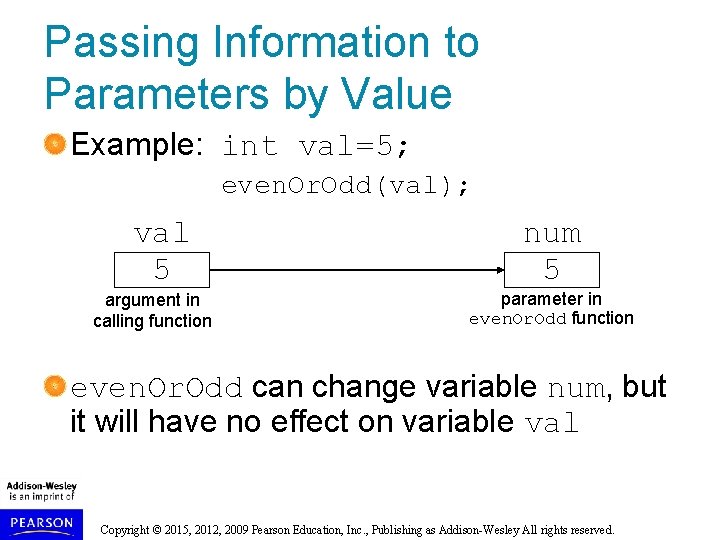
Passing Information to Parameters by Value Example: int val=5; even. Or. Odd(val); val 5 argument in calling function num 5 parameter in even. Or. Odd function even. Or. Odd can change variable num, but it will have no effect on variable val Copyright © 2015, 2012, 2009 Pearson Education, Inc. , Publishing as Addison-Wesley All rights reserved.
6. 6 Using Functions in Menu-Driven Programs Copyright © 2015, 2012, 2009 Pearson Education, Inc. , Publishing as Addison-Wesley All rights reserved.
Using Functions in Menu-Driven Programs Functions can be used to implement user choices from menu to implement general-purpose tasks: Higher-level functions can call generalpurpose functions, minimizing the total number of functions and speeding program development time See Program 6 -10 in the book Copyright © 2015, 2012, 2009 Pearson Education, Inc. , Publishing as Addison-Wesley All rights reserved.
6. 7 The return Statement Copyright © 2015, 2012, 2009 Pearson Education, Inc. , Publishing as Addison-Wesley All rights reserved.
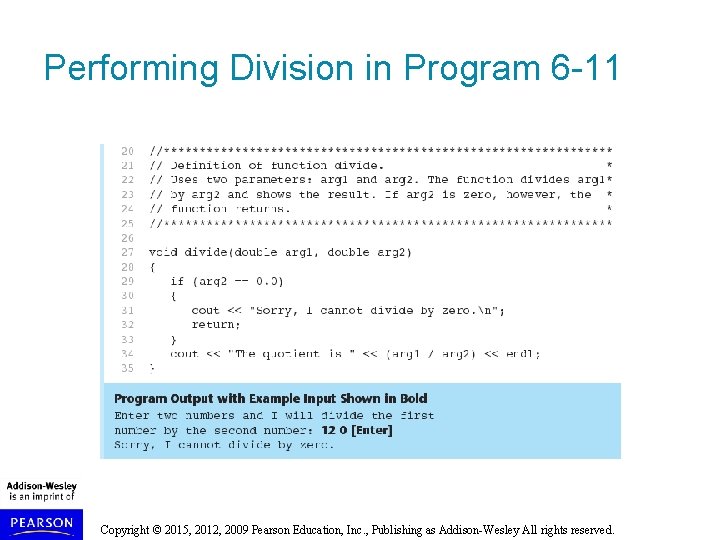
The return Statement Used to end execution of a function Can be placed anywhere in a function Statements that follow the return statement will not be executed Can be used to prevent abnormal termination of program In a void function without a return statement, the function ends at its last } Copyright © 2015, 2012, 2009 Pearson Education, Inc. , Publishing as Addison-Wesley All rights reserved.
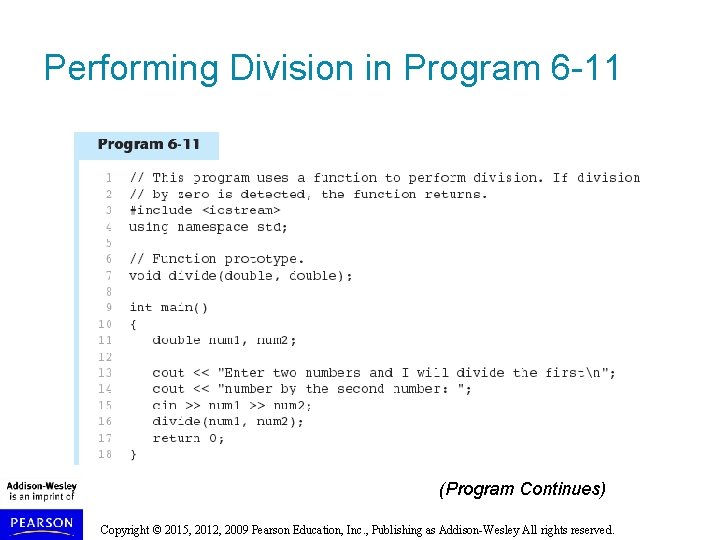
Performing Division in Program 6 -11 (Program Continues) Copyright © 2015, 2012, 2009 Pearson Education, Inc. , Publishing as Addison-Wesley All rights reserved.
Performing Division in Program 6 -11 Copyright © 2015, 2012, 2009 Pearson Education, Inc. , Publishing as Addison-Wesley All rights reserved.
6. 8 Returning a Value From a Function Copyright © 2015, 2012, 2009 Pearson Education, Inc. , Publishing as Addison-Wesley All rights reserved.
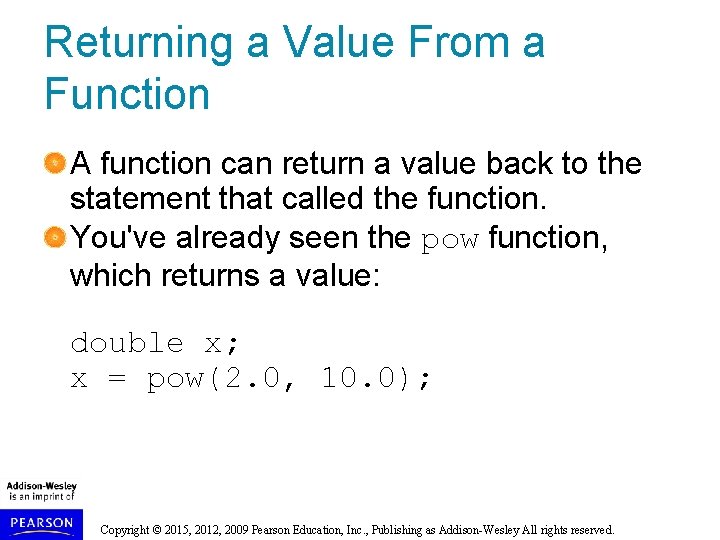
Returning a Value From a Function A function can return a value back to the statement that called the function. You've already seen the pow function, which returns a value: double x; x = pow(2. 0, 10. 0); Copyright © 2015, 2012, 2009 Pearson Education, Inc. , Publishing as Addison-Wesley All rights reserved.
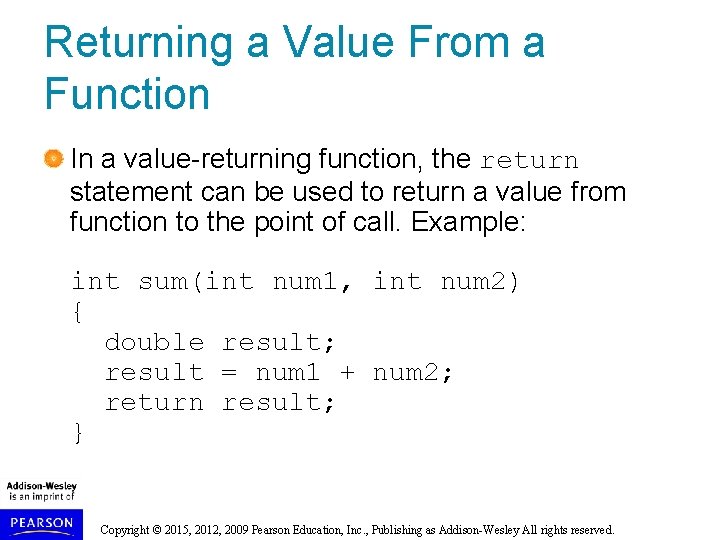
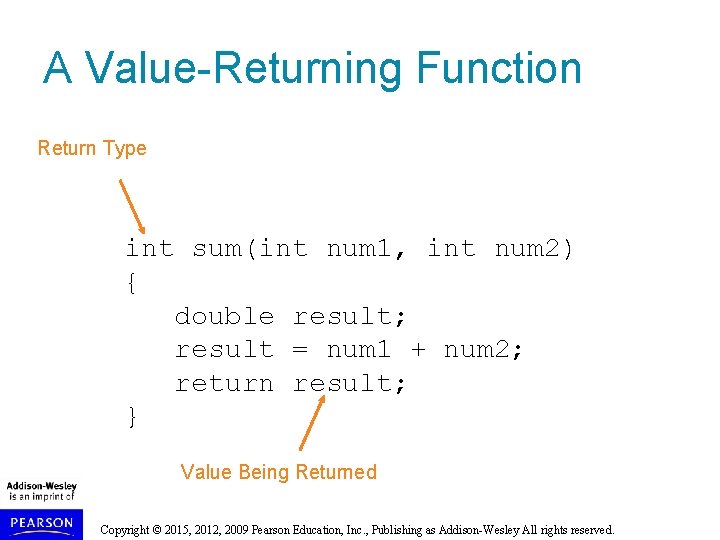
Returning a Value From a Function In a value-returning function, the return statement can be used to return a value from function to the point of call. Example: int sum(int num 1, int num 2) { double result; result = num 1 + num 2; return result; } Copyright © 2015, 2012, 2009 Pearson Education, Inc. , Publishing as Addison-Wesley All rights reserved.
A Value-Returning Function Return Type int sum(int num 1, int num 2) { double result; result = num 1 + num 2; return result; } Value Being Returned Copyright © 2015, 2012, 2009 Pearson Education, Inc. , Publishing as Addison-Wesley All rights reserved.
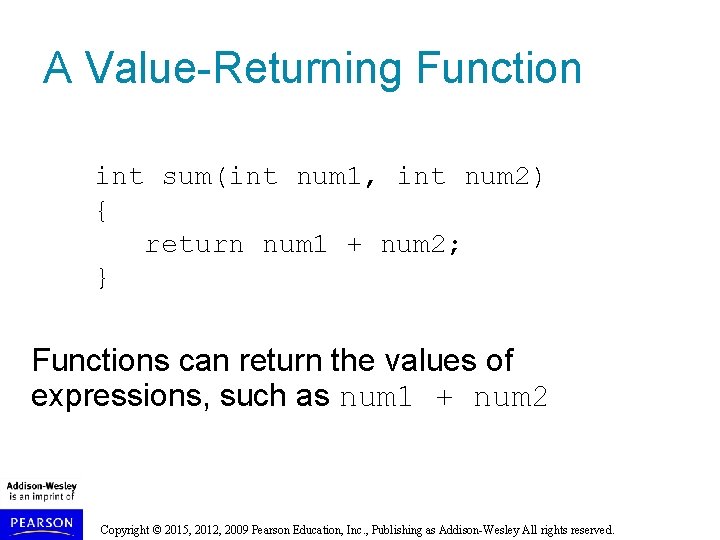
A Value-Returning Function int sum(int num 1, int num 2) { return num 1 + num 2; } Functions can return the values of expressions, such as num 1 + num 2 Copyright © 2015, 2012, 2009 Pearson Education, Inc. , Publishing as Addison-Wesley All rights reserved.
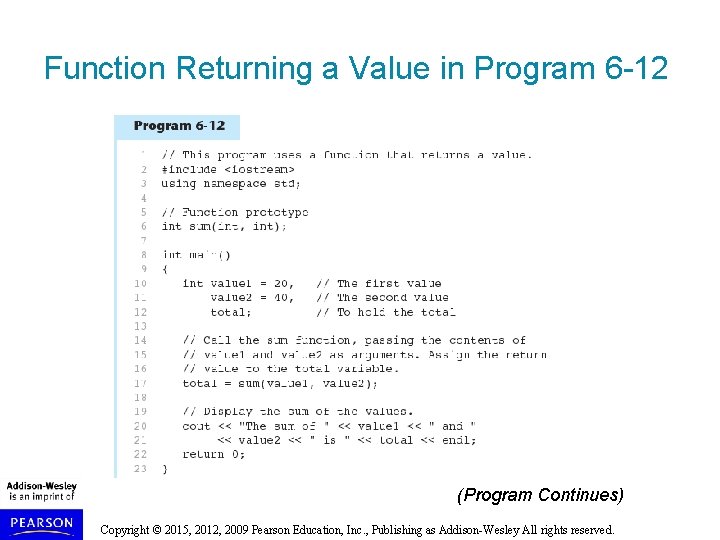
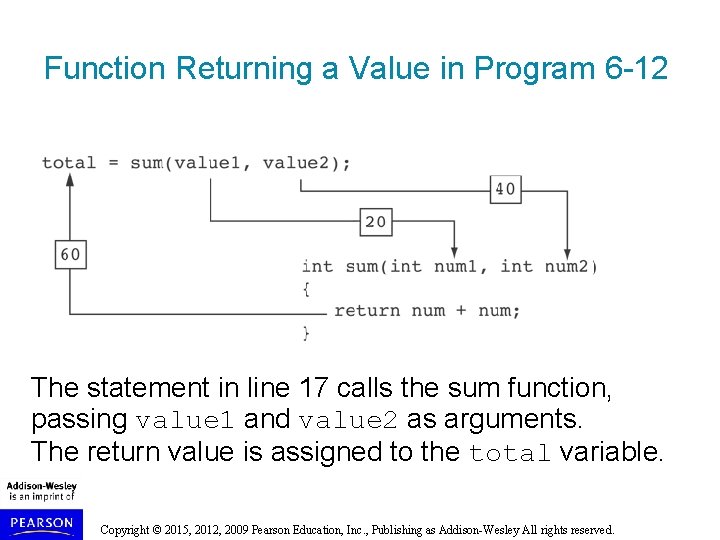
Function Returning a Value in Program 6 -12 (Program Continues) Copyright © 2015, 2012, 2009 Pearson Education, Inc. , Publishing as Addison-Wesley All rights reserved.
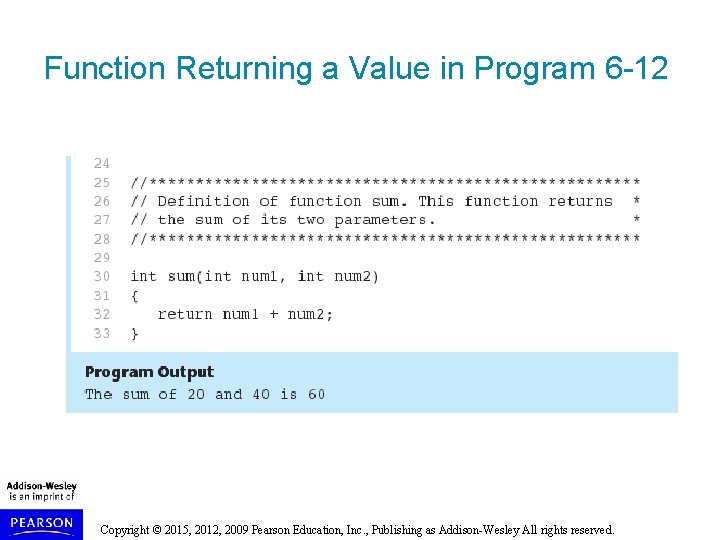
Function Returning a Value in Program 6 -12 Copyright © 2015, 2012, 2009 Pearson Education, Inc. , Publishing as Addison-Wesley All rights reserved.
Function Returning a Value in Program 6 -12 The statement in line 17 calls the sum function, passing value 1 and value 2 as arguments. The return value is assigned to the total variable. Copyright © 2015, 2012, 2009 Pearson Education, Inc. , Publishing as Addison-Wesley All rights reserved.
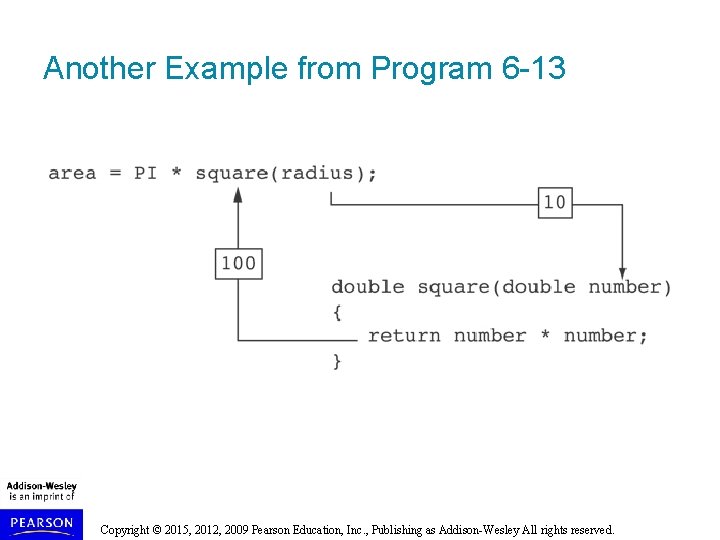
Another Example from Program 6 -13 Copyright © 2015, 2012, 2009 Pearson Education, Inc. , Publishing as Addison-Wesley All rights reserved.
Returning a Value From a Function The prototype and the definition must indicate the data type of return value (not void) Calling function should use return value: assign it to a variable send it to cout use it in an expression Copyright © 2015, 2012, 2009 Pearson Education, Inc. , Publishing as Addison-Wesley All rights reserved.
6. 9 Returning a Boolean Value Copyright © 2015, 2012, 2009 Pearson Education, Inc. , Publishing as Addison-Wesley All rights reserved.
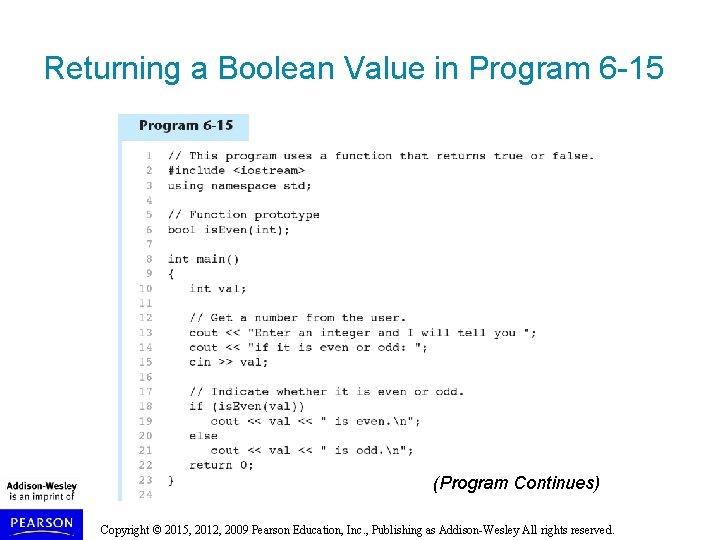
Returning a Boolean Value Function can return true or false Declare return type in function prototype and heading as bool Function body must contain return statement(s) that return true or false Calling function can use return value in a relational expression Copyright © 2015, 2012, 2009 Pearson Education, Inc. , Publishing as Addison-Wesley All rights reserved.
Returning a Boolean Value in Program 6 -15 (Program Continues) Copyright © 2015, 2012, 2009 Pearson Education, Inc. , Publishing as Addison-Wesley All rights reserved.
Returning a Boolean Value in Program 6 -15 Copyright © 2015, 2012, 2009 Pearson Education, Inc. , Publishing as Addison-Wesley All rights reserved.
6. 10 Local and Global Variables Copyright © 2015, 2012, 2009 Pearson Education, Inc. , Publishing as Addison-Wesley All rights reserved.
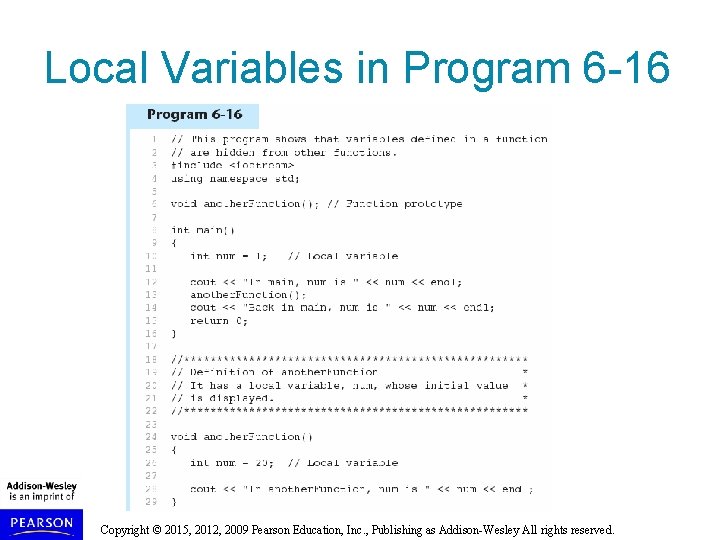
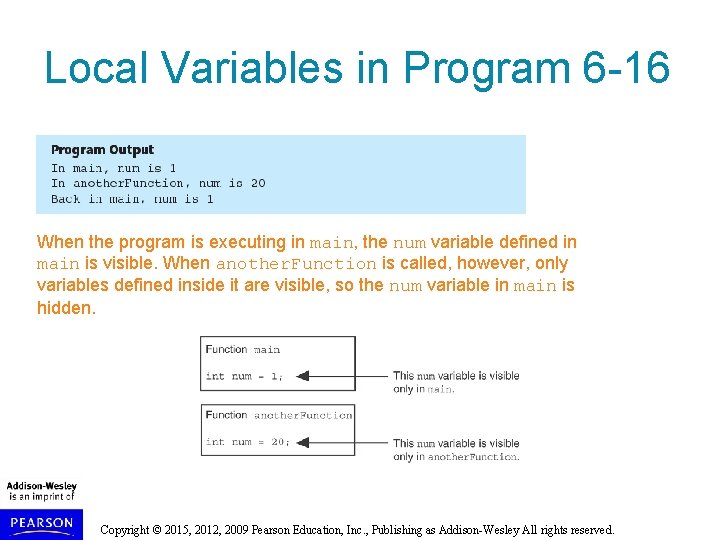
Local and Global Variables defined inside a function are local to that function. They are hidden from the statements in other functions, which normally cannot access them. Because the variables defined in a function are hidden, other functions may have separate, distinct variables with the same name. Copyright © 2015, 2012, 2009 Pearson Education, Inc. , Publishing as Addison-Wesley All rights reserved.
Local Variables in Program 6 -16 Copyright © 2015, 2012, 2009 Pearson Education, Inc. , Publishing as Addison-Wesley All rights reserved.
Local Variables in Program 6 -16 When the program is executing in main, the num variable defined in main is visible. When another. Function is called, however, only variables defined inside it are visible, so the num variable in main is hidden. Copyright © 2015, 2012, 2009 Pearson Education, Inc. , Publishing as Addison-Wesley All rights reserved.
Local Variable Lifetime A function’s local variables exist only while the function is executing. This is known as the lifetime of a local variable. When the function begins, its local variables and its parameter variables are created in memory, and when the function ends, the local variables and parameter variables are destroyed. This means that any value stored in a local variable is lost between calls to the function in which the variable is declared. Copyright © 2015, 2012, 2009 Pearson Education, Inc. , Publishing as Addison-Wesley All rights reserved.
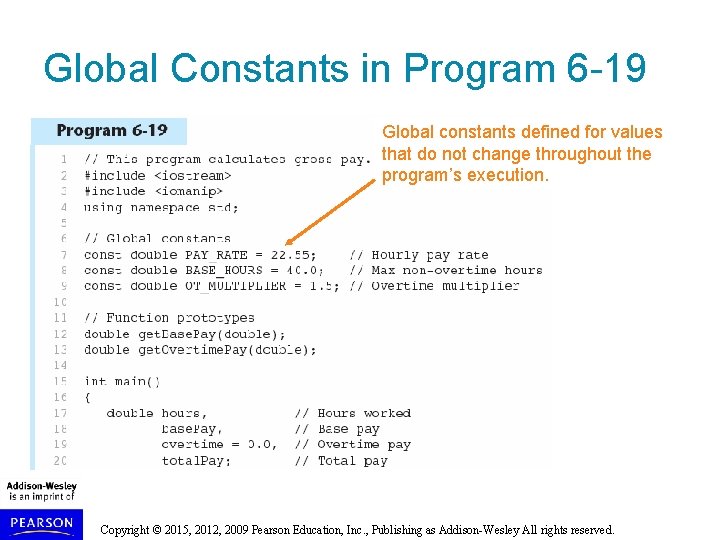
Global Variables and Global Constants A global variable is any variable defined outside all the functions in a program. The scope of a global variable is the portion of the program from the variable definition to the end. This means that a global variable can be accessed by all functions that are defined after the global variable is defined. Copyright © 2015, 2012, 2009 Pearson Education, Inc. , Publishing as Addison-Wesley All rights reserved.
Global Variables and Global Constants You should avoid using global variables because they make programs difficult to debug. Any global that you create should be global constants. Copyright © 2015, 2012, 2009 Pearson Education, Inc. , Publishing as Addison-Wesley All rights reserved.
Global Constants in Program 6 -19 Global constants defined for values that do not change throughout the program’s execution. Copyright © 2015, 2012, 2009 Pearson Education, Inc. , Publishing as Addison-Wesley All rights reserved.
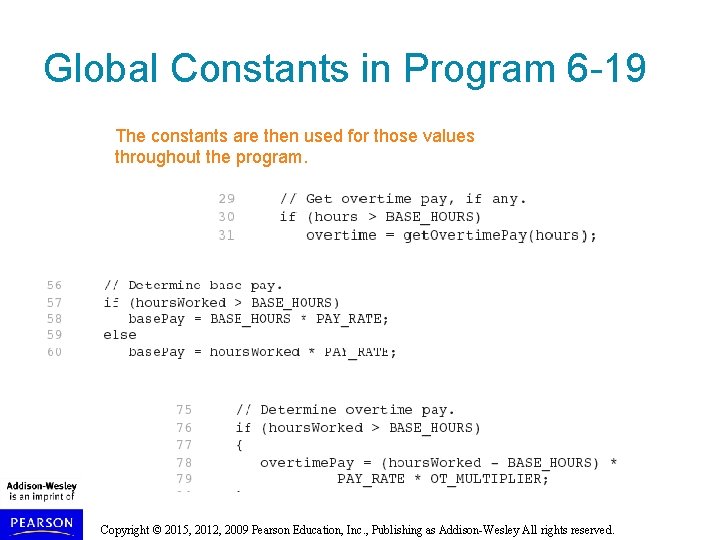
Global Constants in Program 6 -19 The constants are then used for those values throughout the program. Copyright © 2015, 2012, 2009 Pearson Education, Inc. , Publishing as Addison-Wesley All rights reserved.
Initializing Local and Global Variables Local variables are not automatically initialized. They must be initialized by programmer. Global variables (not constants) are automatically initialized to 0 (numeric) or NULL (character) when the variable is defined. Copyright © 2015, 2012, 2009 Pearson Education, Inc. , Publishing as Addison-Wesley All rights reserved.
6. 11 Static Local Variables Copyright © 2015, 2012, 2009 Pearson Education, Inc. , Publishing as Addison-Wesley All rights reserved.
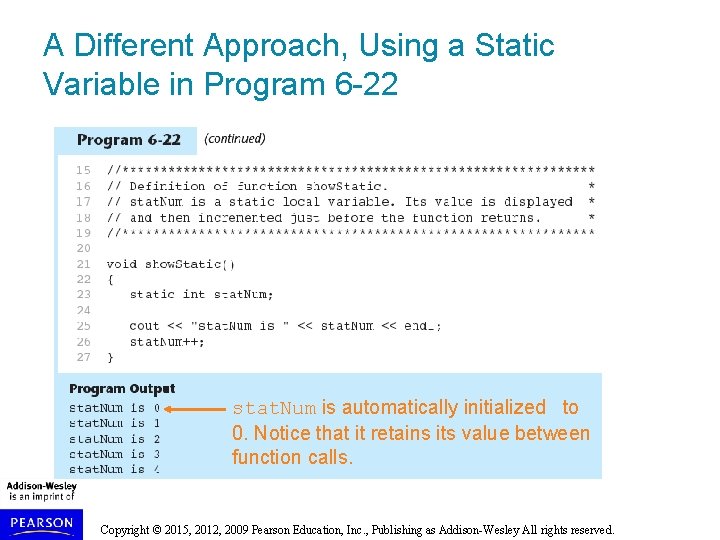
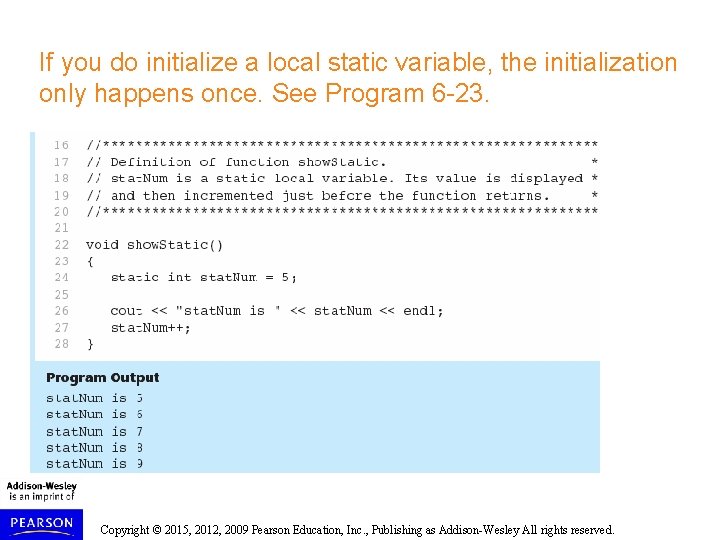
Static Local Variables Local variables only exist while the function is executing. When the function terminates, the contents of local variables are lost. static local variables retain their contents between function calls. static local variables are defined and initialized only the first time the function is executed. 0 is the default initialization value. Copyright © 2015, 2012, 2009 Pearson Education, Inc. , Publishing as Addison-Wesley All rights reserved.
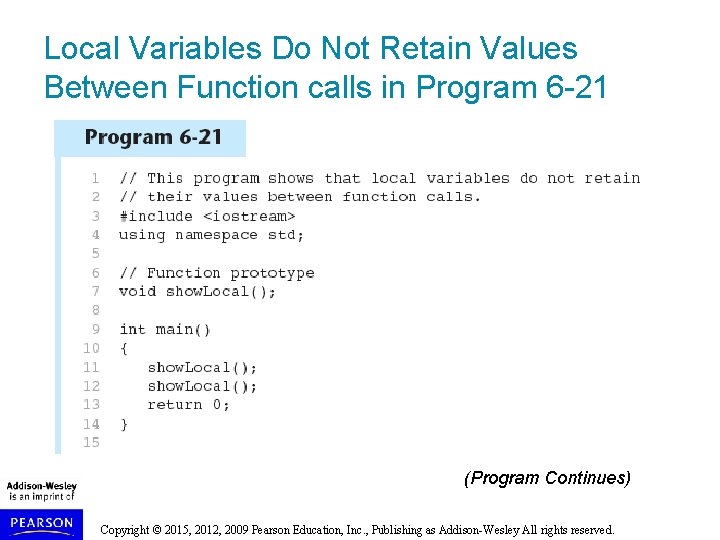
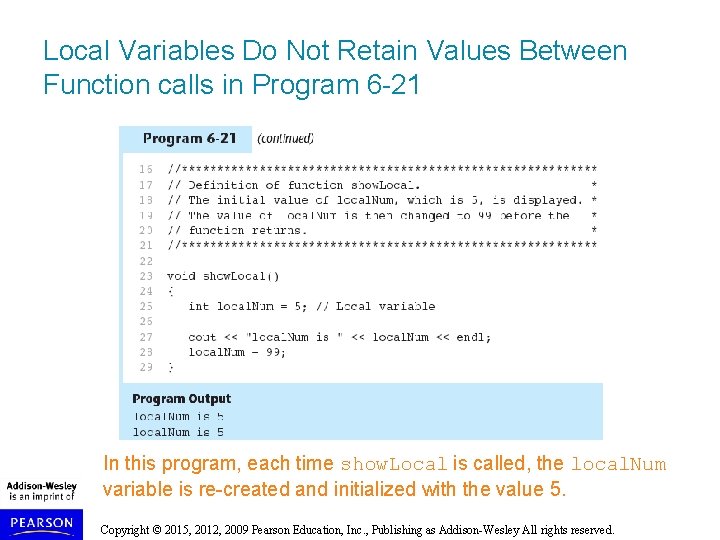
Local Variables Do Not Retain Values Between Function calls in Program 6 -21 (Program Continues) Copyright © 2015, 2012, 2009 Pearson Education, Inc. , Publishing as Addison-Wesley All rights reserved.
Local Variables Do Not Retain Values Between Function calls in Program 6 -21 In this program, each time show. Local is called, the local. Num variable is re-created and initialized with the value 5. Copyright © 2015, 2012, 2009 Pearson Education, Inc. , Publishing as Addison-Wesley All rights reserved.
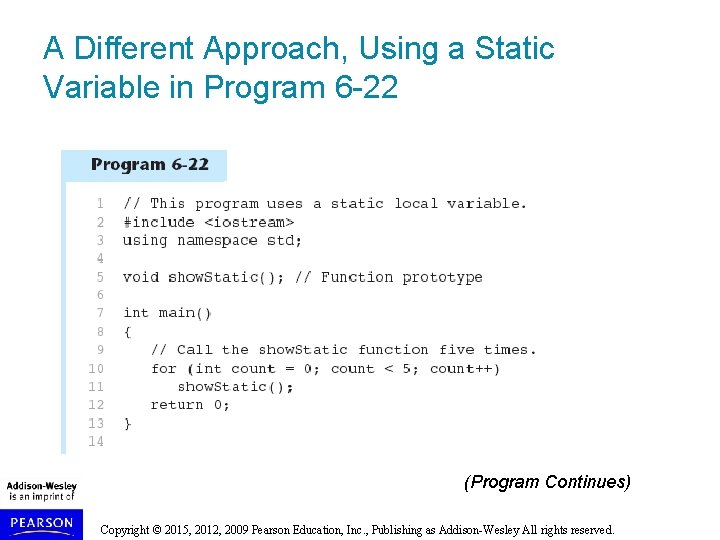
A Different Approach, Using a Static Variable in Program 6 -22 (Program Continues) Copyright © 2015, 2012, 2009 Pearson Education, Inc. , Publishing as Addison-Wesley All rights reserved.
A Different Approach, Using a Static Variable in Program 6 -22 stat. Num is automatically initialized to 0. Notice that it retains its value between function calls. Copyright © 2015, 2012, 2009 Pearson Education, Inc. , Publishing as Addison-Wesley All rights reserved.
If you do initialize a local static variable, the initialization only happens once. See Program 6 -23. Copyright © 2015, 2012, 2009 Pearson Education, Inc. , Publishing as Addison-Wesley All rights reserved.