
50 timesaving Outlook keyboard shortcuts General Create a
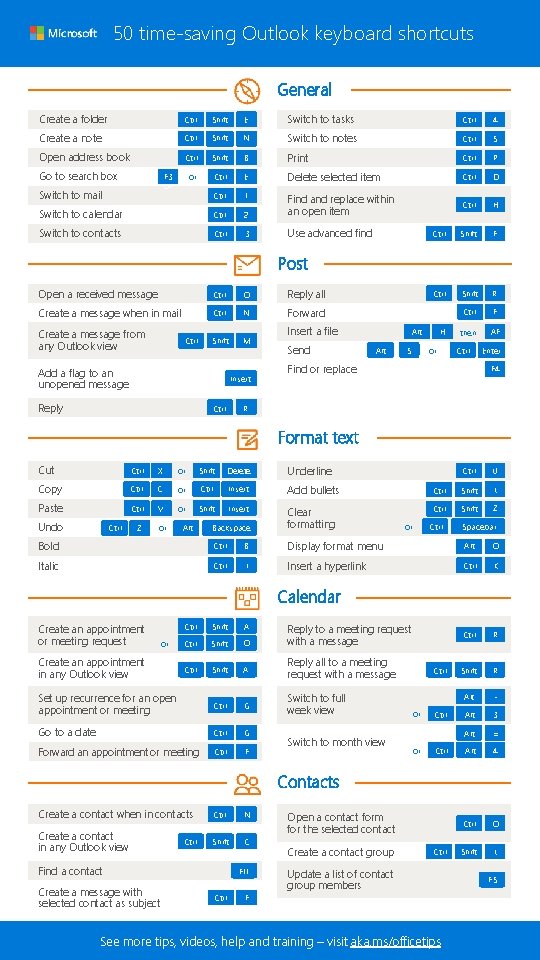
50 time-saving Outlook keyboard shortcuts General Create a folder Ctrl Shift E Switch to tasks Ctrl 4 Create a note Ctrl Shift N Switch to notes Ctrl 5 Open address book Ctrl Shift B Print Ctrl P or Ctrl E Delete selected item Ctrl D Ctrl 1 Switch to calendar Ctrl 2 Find and replace within an open item Ctrl H Switch to contacts Ctrl 3 Use advanced find Ctrl Shift F Ctrl Shift R Ctrl F then AF Go to search box F 3 or Switch to mail Post Open a received message Ctrl O Reply all Create a message when in mail Ctrl N Forward Shift M Create a message from any Outlook view Ctrl Add a flag to an unopened message Insert Reply Ctrl Insert a file Send Alt S H or Ctrl Find or replace Enter F 4 R Format text Cut Ctrl X or Shift Delete Underline Copy Ctrl C or Ctrl Insert Add bullets Paste Ctrl V or Shift Insert Backspace Clear formatting Bold Ctrl B Display format menu Alt O Italic Ctrl I Insert a hyperlink Ctrl K Ctrl R Shift R Alt - Alt 3 Alt = Alt 4 Ctrl O Shift L Undo Ctrl Z or Alt Ctrl U Ctrl Shift L Ctrl Shift Z Ctrl or Spacebar Calendar Ctrl Shift A Ctrl Shift Q Reply to a meeting request with a message Ctrl Shift A Reply all to a meeting request with a message Set up recurrence for an open appointment or meeting Ctrl G Switch to full week view Go to a date Ctrl G Forward an appointment or meeting Ctrl F Create an appointment or meeting request or Create an appointment in any Outlook view Switch to month view Ctrl or or Ctrl Contacts Create a contact when in contacts Ctrl N Create a contact in any Outlook view Shift C Ctrl Find a contact Create a message with selected contact as subject F 11 Ctrl F Open a contact form for the selected contact Create a contact group Ctrl Update a list of contact group members See more tips, videos, help and training – visit aka. ms/officetips F 5
- Slides: 1