
5 Introduction to Memory CSCOE 0449 Introduction to
- Slides: 56
5 Introduction to Memory CS/COE 0449 Introduction to Systems Software wilkie (with content borrowed from Vinicius Petrucci and Jarrett Billingsley) Spring 2019/2020
The Memory Model If you forget how addressing works, I have a few pointers for you. CS/COE 0449 – Spring 2019/2020 2
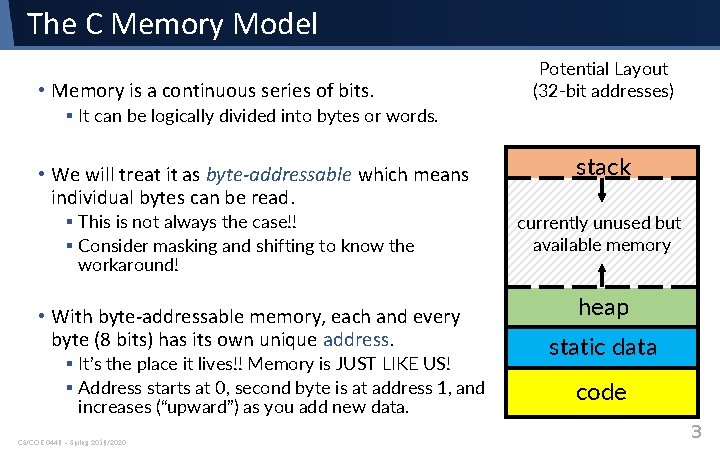
The C Memory Model • Memory is a continuous series of bits. Potential Layout (32 -bit addresses) § It can be logically divided into bytes or words. • We will treat it as byte-addressable which means individual bytes can be read. § This is not always the case!! § Consider masking and shifting to know the workaround! • With byte-addressable memory, each and every byte (8 bits) has its own unique address. § It’s the place it lives!! Memory is JUST LIKE US! § Address starts at 0, second byte is at address 1, and increases (“upward”) as you add new data. CS/COE 0449 – Spring 2019/2020 stack currently unused but available memory heap static data code 3
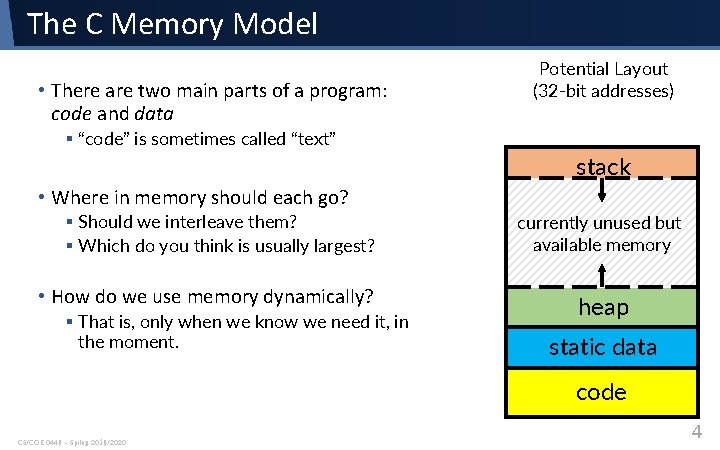
The C Memory Model • There are two main parts of a program: code and data Potential Layout (32 -bit addresses) § “code” is sometimes called “text” stack • Where in memory should each go? § Should we interleave them? § Which do you think is usually largest? • How do we use memory dynamically? § That is, only when we know we need it, in the moment. currently unused but available memory heap static data code CS/COE 0449 – Spring 2019/2020 4
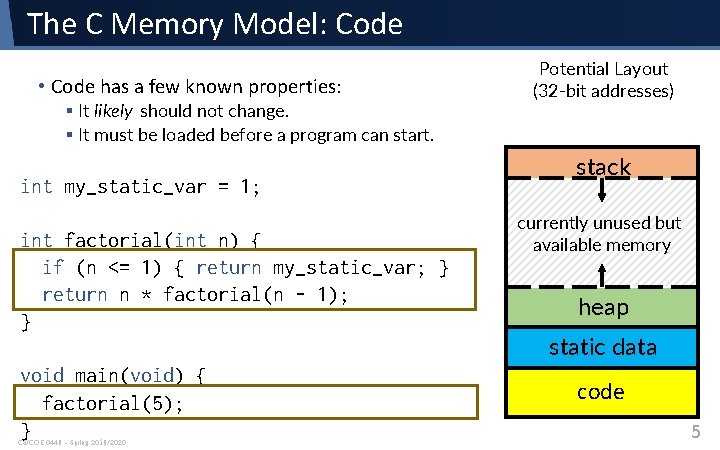
The C Memory Model: Code • Code has a few known properties: § It likely should not change. § It must be loaded before a program can start. int my_static_var = 1; int factorial(int n) { if (n <= 1) { return my_static_var; } return n * factorial(n - 1); } void main(void) { factorial(5); } CS/COE 0449 – Spring 2019/2020 Potential Layout (32 -bit addresses) stack currently unused but available memory heap static data code 5
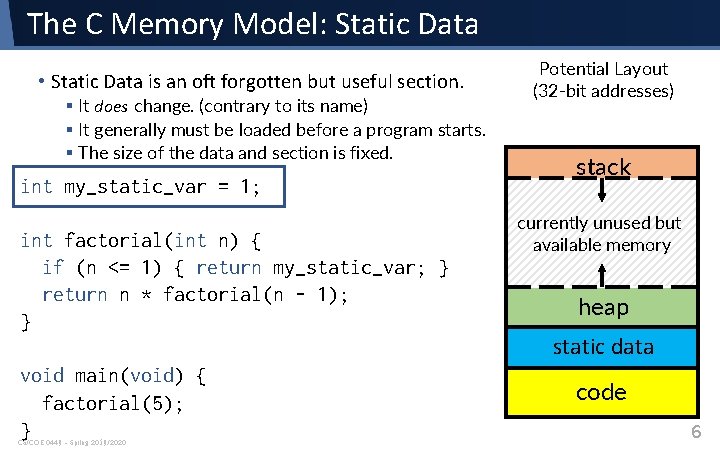
The C Memory Model: Static Data • Static Data is an oft forgotten but useful section. § It does change. (contrary to its name) § It generally must be loaded before a program starts. § The size of the data and section is fixed. int my_static_var = 1; int factorial(int n) { if (n <= 1) { return my_static_var; } return n * factorial(n - 1); } void main(void) { factorial(5); } CS/COE 0449 – Spring 2019/2020 Potential Layout (32 -bit addresses) stack currently unused but available memory heap static data code 6
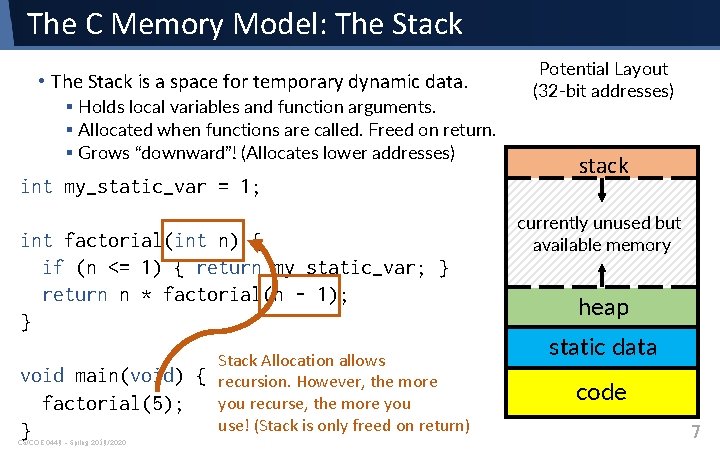
The C Memory Model: The Stack • The Stack is a space for temporary dynamic data. § Holds local variables and function arguments. § Allocated when functions are called. Freed on return. § Grows “downward”! (Allocates lower addresses) int my_static_var = 1; int factorial(int n) { if (n <= 1) { return my_static_var; } return n * factorial(n - 1); } void main(void) { factorial(5); } CS/COE 0449 – Spring 2019/2020 Stack Allocation allows recursion. However, the more you recurse, the more you use! (Stack is only freed on return) Potential Layout (32 -bit addresses) stack currently unused but available memory heap static data code 7
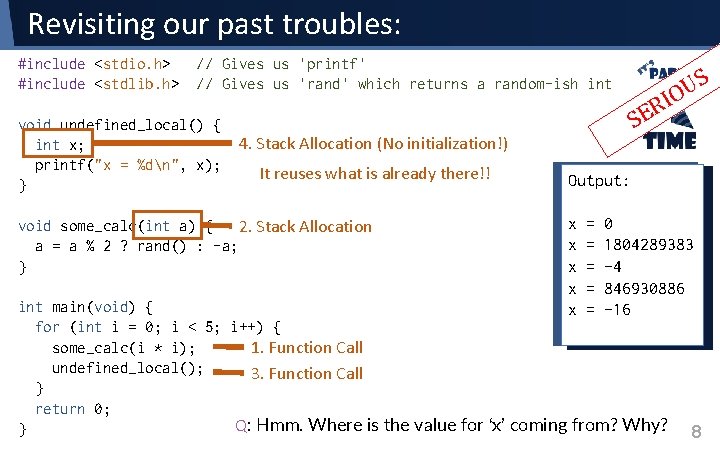
Revisiting our past troubles: #include <stdio. h> #include <stdlib. h> // Gives us 'printf' // Gives us 'rand' which returns a random-ish int void undefined_local() { 4. Stack Allocation (No initialization!) int x; printf("x = %dn", x); It reuses what is already there!! } void some_calc(int a) { 2. Stack Allocation a = a % 2 ? rand() : -a; } S U O I R E S Output: x x x = = = 0 1804289383 -4 846930886 -16 int main(void) { for (int i = 0; i < 5; i++) { some_calc(i * i); 1. Function Call undefined_local(); 3. Function Call } return 0; Q: Hmm. Where is the value for ‘x’ coming from? Why? } 8
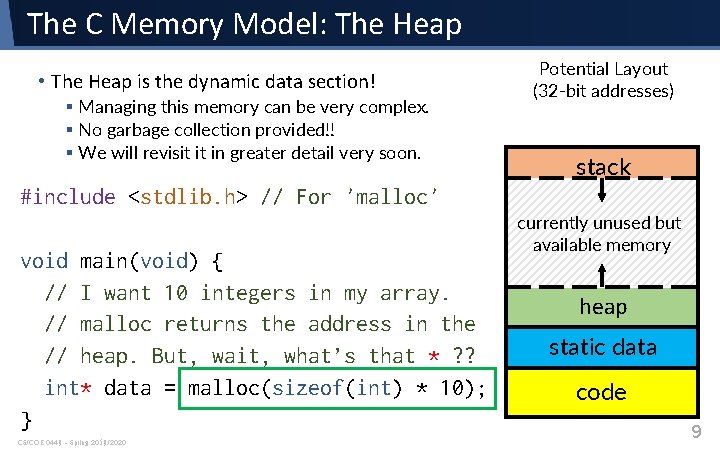
The C Memory Model: The Heap • The Heap is the dynamic data section! § Managing this memory can be very complex. § No garbage collection provided!! § We will revisit it in greater detail very soon. Potential Layout (32 -bit addresses) stack #include <stdlib. h> // For 'malloc' void main(void) { // I want 10 integers in my array. // malloc returns the address in the // heap. But, wait, what’s that * ? ? int* data = malloc(sizeof(int) * 10); } CS/COE 0449 – Spring 2019/2020 currently unused but available memory heap static data code 9
Pointers They point to things. They are not the things. CS/COE 0449 – Spring 2019/2020 10
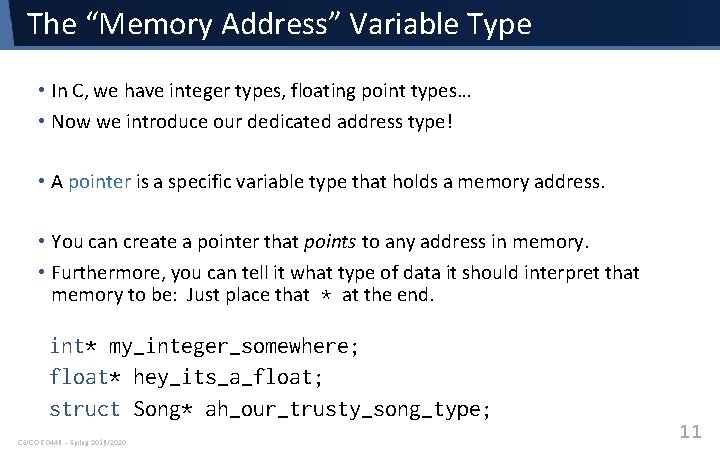
The “Memory Address” Variable Type • In C, we have integer types, floating point types… • Now we introduce our dedicated address type! • A pointer is a specific variable type that holds a memory address. • You can create a pointer that points to any address in memory. • Furthermore, you can tell it what type of data it should interpret that memory to be: Just place that * at the end. int* my_integer_somewhere; float* hey_its_a_float; struct Song* ah_our_trusty_song_type; CS/COE 0449 – Spring 2019/2020 11
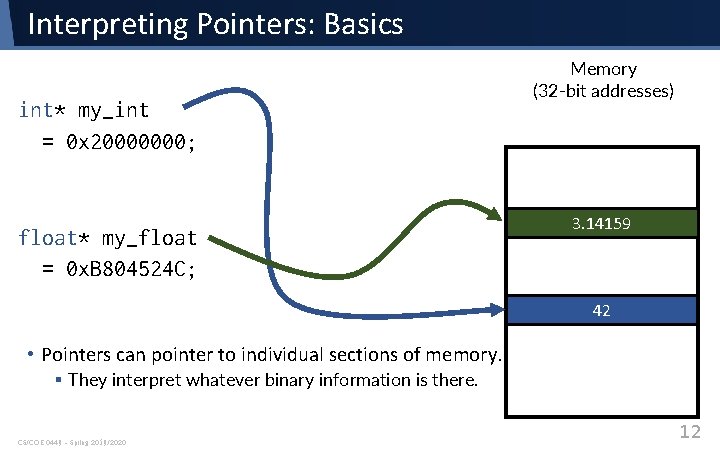
Interpreting Pointers: Basics int* my_int = 0 x 20000000; float* my_float = 0 x. B 804524 C; Memory (32 -bit addresses) 3. 14159 42 • Pointers can pointer to individual sections of memory. § They interpret whatever binary information is there. CS/COE 0449 – Spring 2019/2020 12
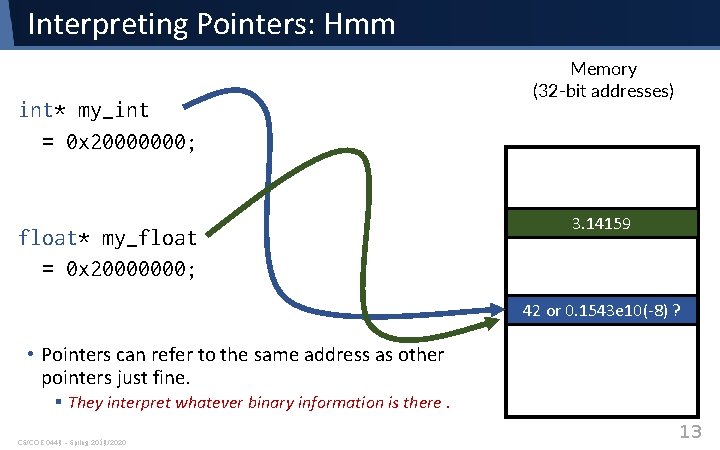
Interpreting Pointers: Hmm int* my_int = 0 x 20000000; float* my_float = 0 x 20000000; Memory (32 -bit addresses) 3. 14159 42 or 0. 1543 e 10(-8) ? • Pointers can refer to the same address as other pointers just fine. § They interpret whatever binary information is there. CS/COE 0449 – Spring 2019/2020 13
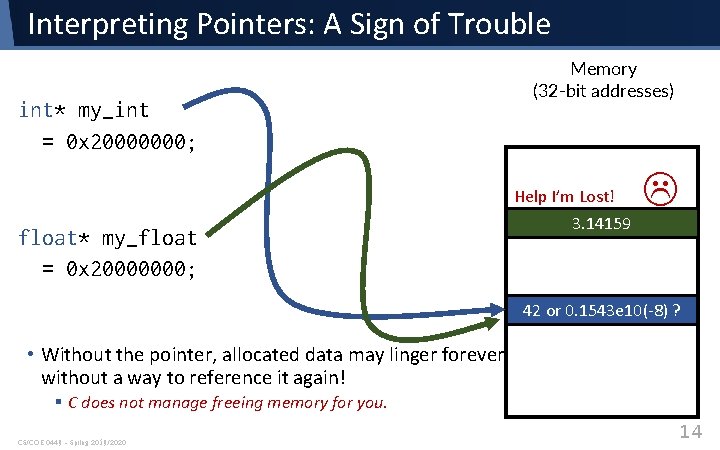
Interpreting Pointers: A Sign of Trouble int* my_int = 0 x 20000000; float* my_float = 0 x 20000000; Memory (32 -bit addresses) Help I’m Lost! 3. 14159 42 or 0. 1543 e 10(-8) ? • Without the pointer, allocated data may linger forever without a way to reference it again! § C does not manage freeing memory for you. CS/COE 0449 – Spring 2019/2020 14
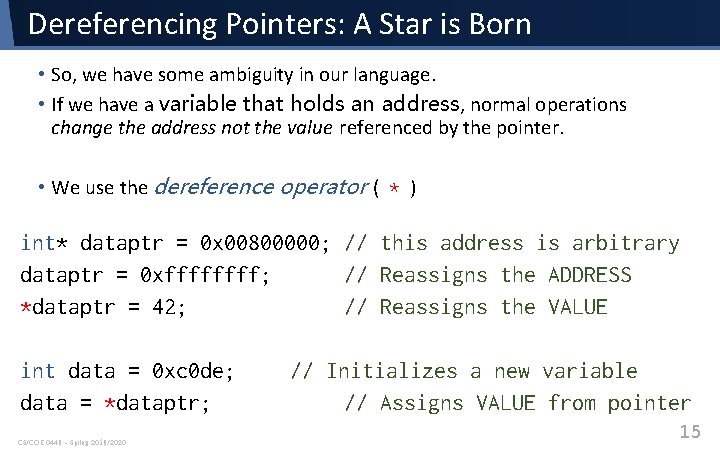
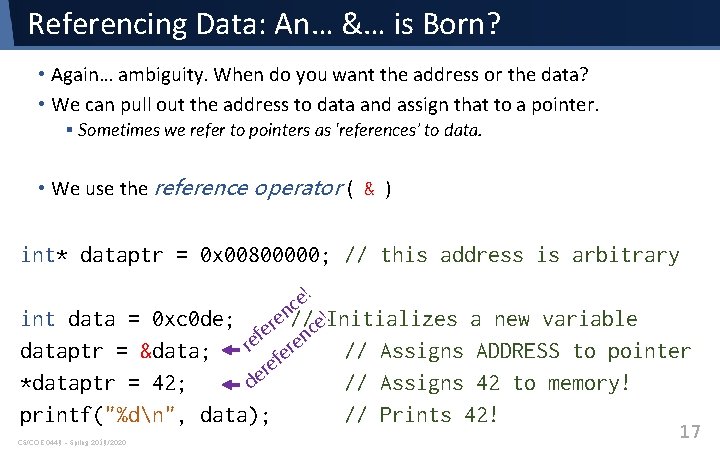
Dereferencing Pointers: A Star is Born • So, we have some ambiguity in our language. • If we have a variable that holds an address, normal operations change the address not the value referenced by the pointer. • We use the dereference operator ( * ) int* dataptr = 0 x 00800000; // this address is arbitrary dataptr = 0 xffff; // Reassigns the ADDRESS *dataptr = 42; // Reassigns the VALUE int data = 0 xc 0 de; data = *dataptr; CS/COE 0449 – Spring 2019/2020 // Initializes a new variable // Assigns VALUE from pointer 15
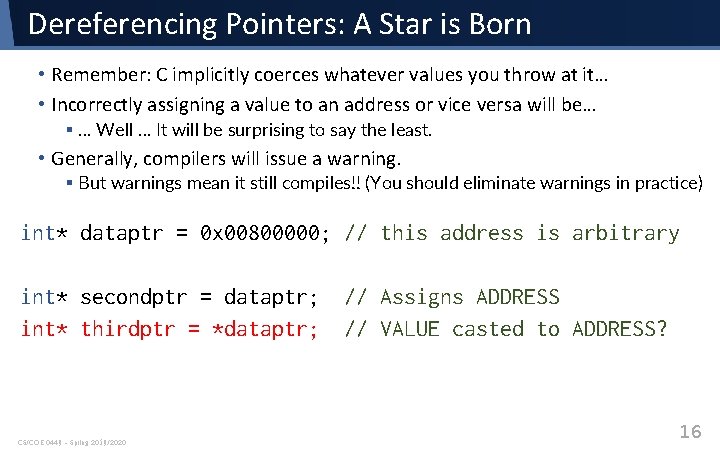
Dereferencing Pointers: A Star is Born • Remember: C implicitly coerces whatever values you throw at it… • Incorrectly assigning a value to an address or vice versa will be… § … Well … It will be surprising to say the least. • Generally, compilers will issue a warning. § But warnings mean it still compiles!! (You should eliminate warnings in practice) int* dataptr = 0 x 00800000; // this address is arbitrary int* secondptr = dataptr; // Assigns ADDRESS int* thirdptr = *dataptr; // VALUE casted to ADDRESS? CS/COE 0449 – Spring 2019/2020 16
Referencing Data: An… &… is Born? • Again… ambiguity. When do you want the address or the data? • We can pull out the address to data and assign that to a pointer. § Sometimes we refer to pointers as ‘references’ to data. • We use the reference operator ( & ) int* dataptr = 0 x 00800000; // this address is arbitrary e! c ! en// e. Initializes r c fe en e r // Assigns er f e r // Assigns de int data = 0 xc 0 de; dataptr = &data; *dataptr = 42; printf("%dn", data); CS/COE 0449 – Spring 2019/2020 a new variable ADDRESS to pointer 42 to memory! // Prints 42! 17
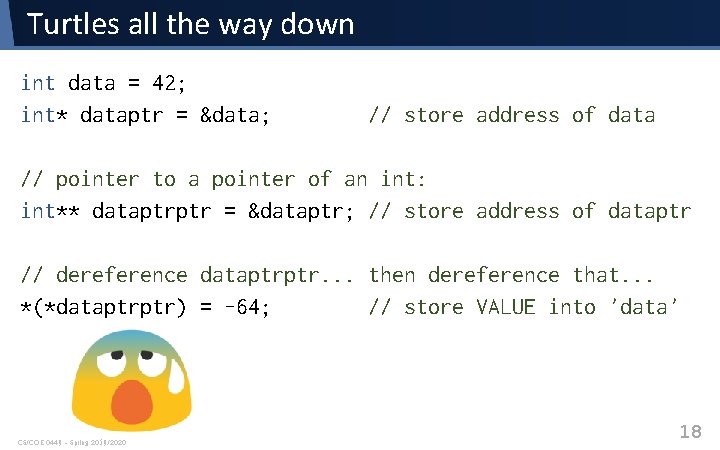
Turtles all the way down int data = 42; int* dataptr = &data; // store address of data // pointer to a pointer of an int: int** dataptrptr = &dataptr; // store address of dataptr // dereference dataptrptr. . . then dereference that. . . *(*dataptrptr) = -64; // store VALUE into 'data' CS/COE 0449 – Spring 2019/2020 18
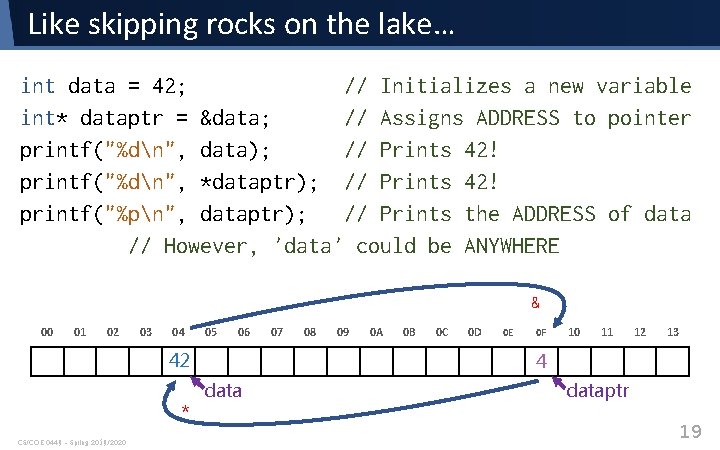
Like skipping rocks on the lake… int data = 42; // Initializes a new variable int* dataptr = &data; // Assigns ADDRESS to pointer printf("%dn", data); // Prints 42! printf("%dn", *dataptr); // Prints 42! printf("%pn", dataptr); // Prints the ADDRESS of data // However, 'data' could be ANYWHERE & 00 01 02 03 04 05 06 42 * CS/COE 0449 – Spring 2019/2020 07 08 09 0 A 0 B 0 C 0 D 0 E 0 F 10 11 12 13 4 dataptr 19
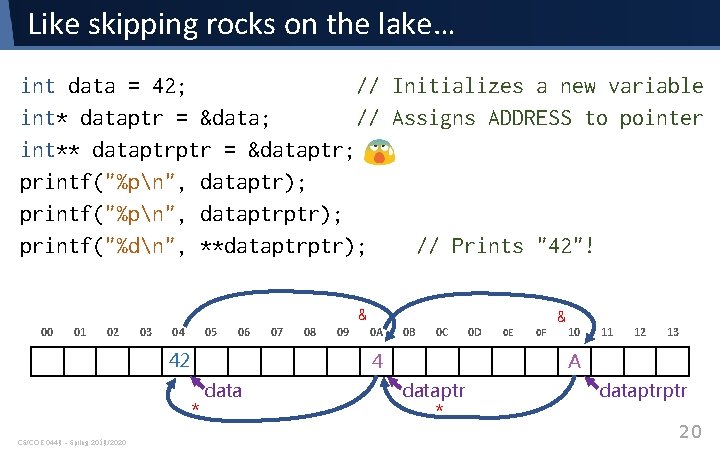
Like skipping rocks on the lake… int data = 42; // Initializes a new variable int* dataptr = &data; // Assigns ADDRESS to pointer int** dataptrptr = &dataptr; printf("%pn", dataptr); printf("%pn", dataptrptr); printf("%dn", **dataptrptr); // Prints "42"! & 00 01 02 03 04 05 06 42 08 09 0 A 0 B 0 C 4 * CS/COE 0449 – Spring 2019/2020 07 data 0 D & 0 E 0 F 10 11 12 13 A dataptr * dataptrptr 20
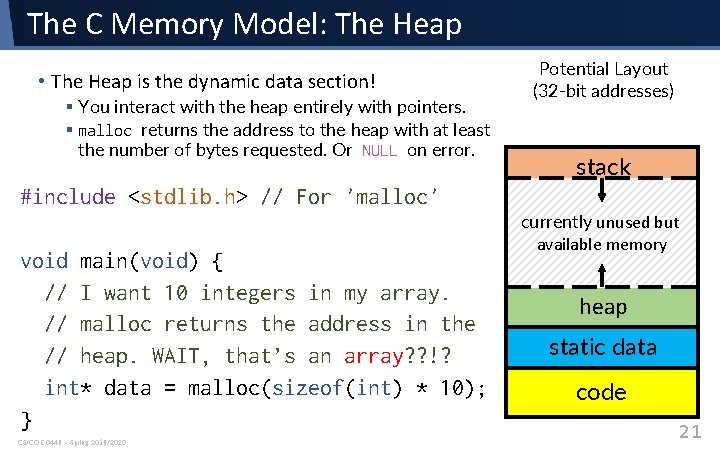
The C Memory Model: The Heap • The Heap is the dynamic data section! § You interact with the heap entirely with pointers. § malloc returns the address to the heap with at least the number of bytes requested. Or NULL on error. Potential Layout (32 -bit addresses) stack #include <stdlib. h> // For 'malloc' void main(void) { // I want 10 integers in my array. // malloc returns the address in the // heap. WAIT, that’s an array? ? !? int* data = malloc(sizeof(int) * 10); } CS/COE 0449 – Spring 2019/2020 currently unused but available memory heap static data code 21
Arrays It is what all my fellow teachers desperately need: Arrays. (Support your local teacher’s union) CS/COE 0449 – Spring 2019/2020 22
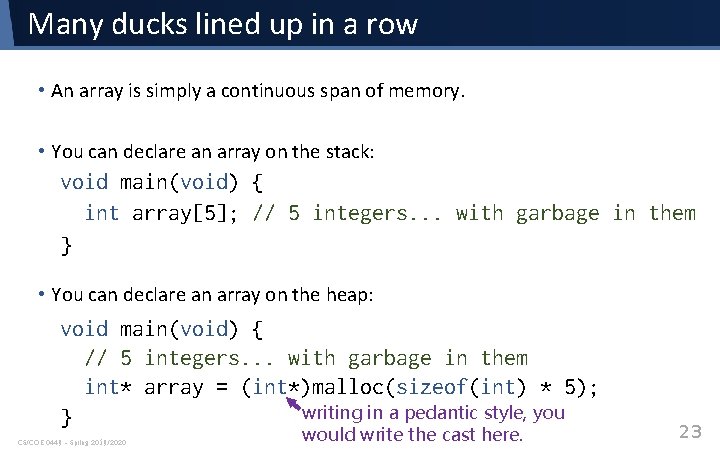
Many ducks lined up in a row • An array is simply a continuous span of memory. • You can declare an array on the stack: void main(void) { int array[5]; // 5 integers. . . with garbage in them } • You can declare an array on the heap: void main(void) { // 5 integers. . . with garbage in them int* array = (int*)malloc(sizeof(int) * 5); writing in a pedantic style, you } CS/COE 0449 – Spring 2019/2020 would write the cast here. 23
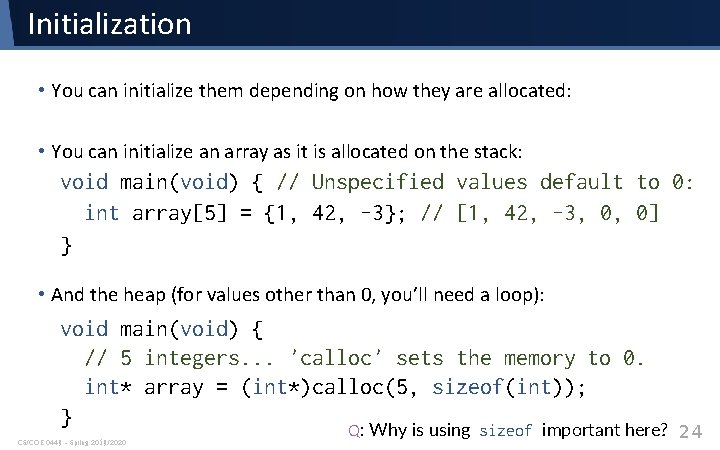
Initialization • You can initialize them depending on how they are allocated: • You can initialize an array as it is allocated on the stack: void main(void) { // Unspecified values default to 0: int array[5] = {1, 42, -3}; // [1, 42, -3, 0, 0] } • And the heap (for values other than 0, you’ll need a loop): void main(void) { // 5 integers. . . 'calloc' sets the memory to 0. int* array = (int*)calloc(5, sizeof(int)); } CS/COE 0449 – Spring 2019/2020 Q: Why is using sizeof important here? 24
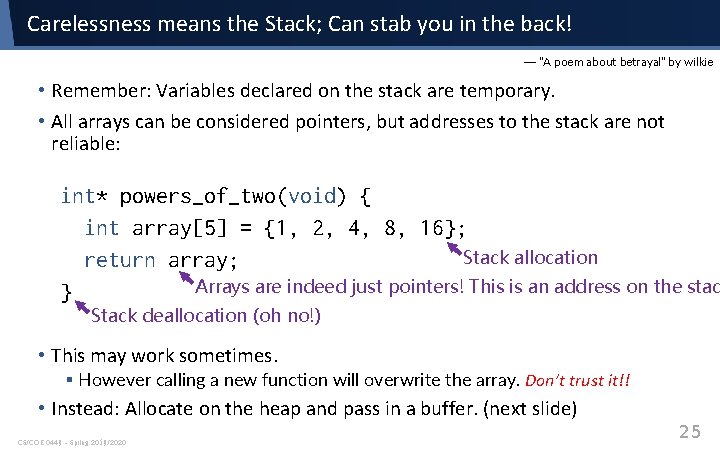
Carelessness means the Stack; Can stab you in the back! — “A poem about betrayal” by wilkie • Remember: Variables declared on the stack are temporary. • All arrays can be considered pointers, but addresses to the stack are not reliable: int* powers_of_two(void) { int array[5] = {1, 2, 4, 8, 16}; Stack allocation return array; Arrays are indeed just pointers! This is an address on the stac } Stack deallocation (oh no!) • This may work sometimes. § However calling a new function will overwrite the array. Don’t trust it!! • Instead: Allocate on the heap and pass in a buffer. (next slide) CS/COE 0449 – Spring 2019/2020 25
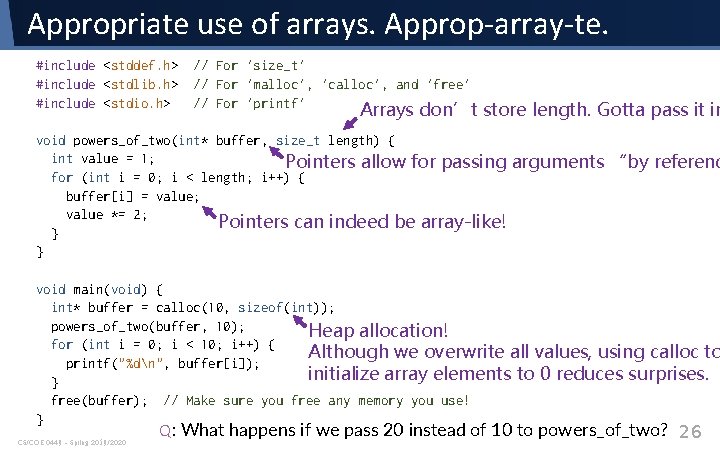
Appropriate use of arrays. Approp-array-te. #include <stddef. h> #include <stdlib. h> #include <stdio. h> // For 'size_t' // For 'malloc', 'calloc', and 'free' // For 'printf' Arrays don’t store length. Gotta pass it in void powers_of_two(int* buffer, size_t length) { int value = 1; Pointers allow for passing for (int i = 0; i < length; i++) { buffer[i] = value; value *= 2; Pointers can indeed be array-like! } } arguments “by referenc void main(void) { int* buffer = calloc(10, sizeof(int)); powers_of_two(buffer, 10); Heap allocation! for (int i = 0; i < 10; i++) { Although we overwrite all values, using calloc to printf("%dn", buffer[i]); initialize array elements to 0 reduces surprises. } free(buffer); // Make sure you free any memory you use! } CS/COE 0449 – Spring 2019/2020 Q: What happens if we pass 20 instead of 10 to powers_of_two? 26
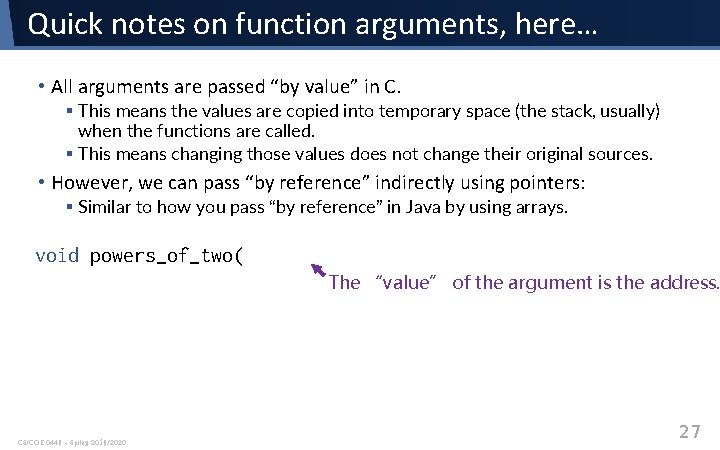
Quick notes on function arguments, here… • All arguments are passed “by value” in C. § This means the values are copied into temporary space (the stack, usually) when the functions are called. § This means changing those values does not change their original sources. • However, we can pass “by reference” indirectly using pointers: § Similar to how you pass “by reference” in Java by using arrays. void powers_of_two( The “value” of the argument is the address. CS/COE 0449 – Spring 2019/2020 27
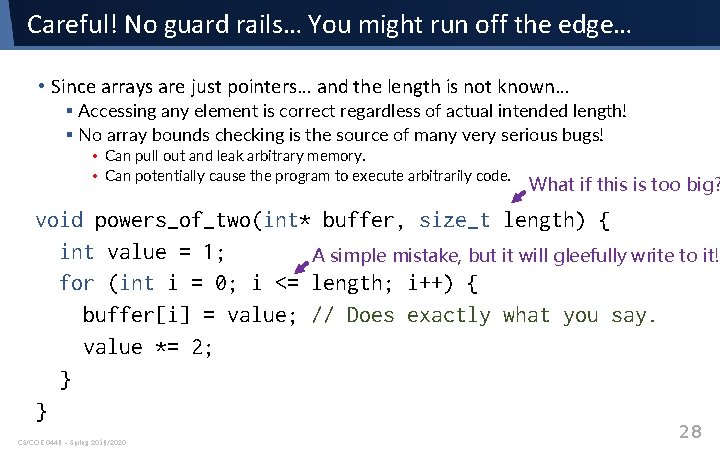
Careful! No guard rails… You might run off the edge… • Since arrays are just pointers… and the length is not known… § Accessing any element is correct regardless of actual intended length! § No array bounds checking is the source of many very serious bugs! • Can pull out and leak arbitrary memory. • Can potentially cause the program to execute arbitrarily code. What if this is too big? void powers_of_two(int* buffer, size_t length) { int value = 1; A simple mistake, but it will gleefully write to it! for (int i = 0; i <= length; i++) { buffer[i] = value; // Does exactly what you say. value *= 2; } } CS/COE 0449 – Spring 2019/2020 28
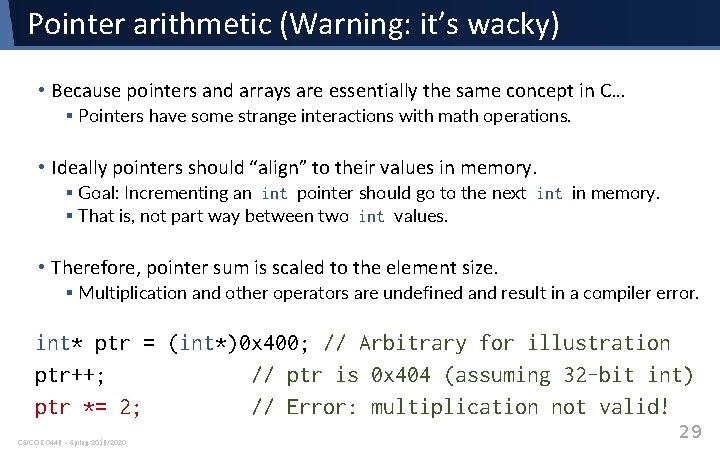
Pointer arithmetic (Warning: it’s wacky) • Because pointers and arrays are essentially the same concept in C… § Pointers have some strange interactions with math operations. • Ideally pointers should “align” to their values in memory. § Goal: Incrementing an int pointer should go to the next in memory. § That is, not part way between two int values. • Therefore, pointer sum is scaled to the element size. § Multiplication and other operators are undefined and result in a compiler error. int* ptr = (int*)0 x 400; // Arbitrary for illustration ptr++; // ptr is 0 x 404 (assuming 32 -bit int) ptr *= 2; // Error: multiplication not valid! CS/COE 0449 – Spring 2019/2020 29
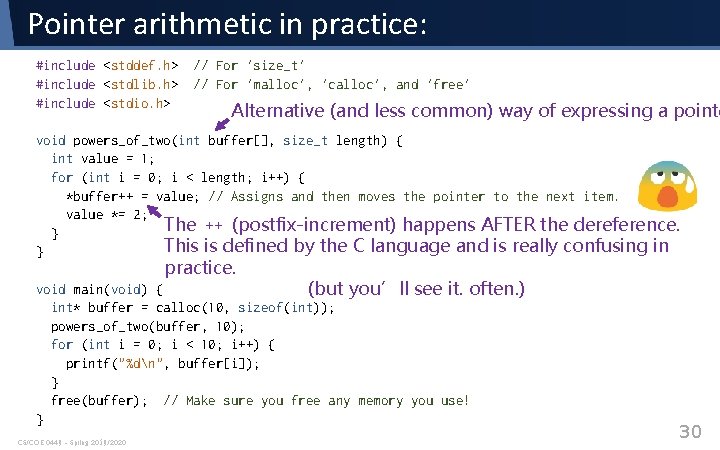
Pointer arithmetic in practice: #include <stddef. h> #include <stdlib. h> #include <stdio. h> // For 'size_t' // For 'malloc', 'calloc', and 'free' Alternative (and less common) way of expressing a pointe void powers_of_two(int buffer[], size_t length) { int value = 1; for (int i = 0; i < length; i++) { *buffer++ = value; // Assigns and then moves the pointer to the next item. value *= 2; The ++ (postfix-increment) happens AFTER the dereference. } This is defined by the C language and is really confusing in } practice. void main(void) { (but you’ll see it. often. ) int* buffer = calloc(10, sizeof(int)); powers_of_two(buffer, 10); for (int i = 0; i < 10; i++) { printf("%dn", buffer[i]); } free(buffer); // Make sure you free any memory you use! } CS/COE 0449 – Spring 2019/2020 30
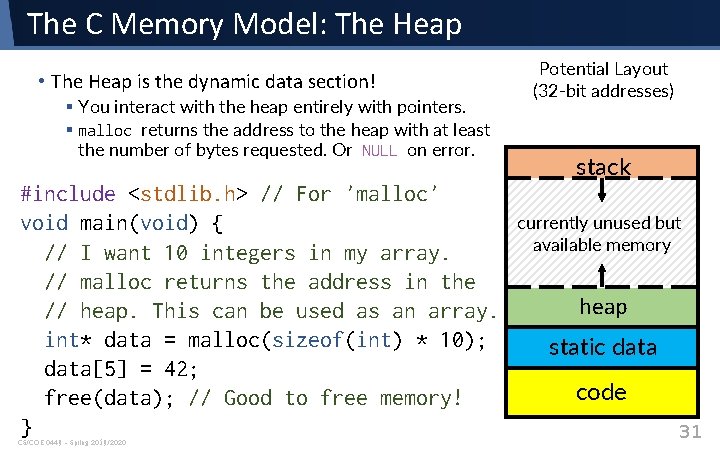
The C Memory Model: The Heap • The Heap is the dynamic data section! § You interact with the heap entirely with pointers. § malloc returns the address to the heap with at least the number of bytes requested. Or NULL on error. #include <stdlib. h> // For 'malloc' void main(void) { // I want 10 integers in my array. // malloc returns the address in the // heap. This can be used as an array. int* data = malloc(sizeof(int) * 10); data[5] = 42; free(data); // Good to free memory! } CS/COE 0449 – Spring 2019/2020 Potential Layout (32 -bit addresses) stack currently unused but available memory heap static data code 31
Strings No longer just for cats! CS/COE 0449 – Spring 2019/2020 32
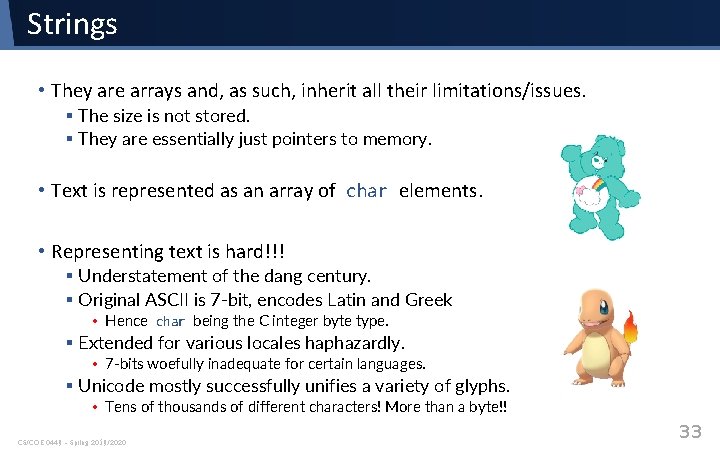
Strings • They are arrays and, as such, inherit all their limitations/issues. § The size is not stored. § They are essentially just pointers to memory. • Text is represented as an array of char elements. • Representing text is hard!!! § Understatement of the dang century. § Original ASCII is 7 -bit, encodes Latin and Greek • Hence char being the C integer byte type. § Extended for various locales haphazardly. • 7 -bits woefully inadequate for certain languages. § Unicode mostly successfully unifies a variety of glyphs. • Tens of thousands of different characters! More than a byte!! CS/COE 0449 – Spring 2019/2020 33
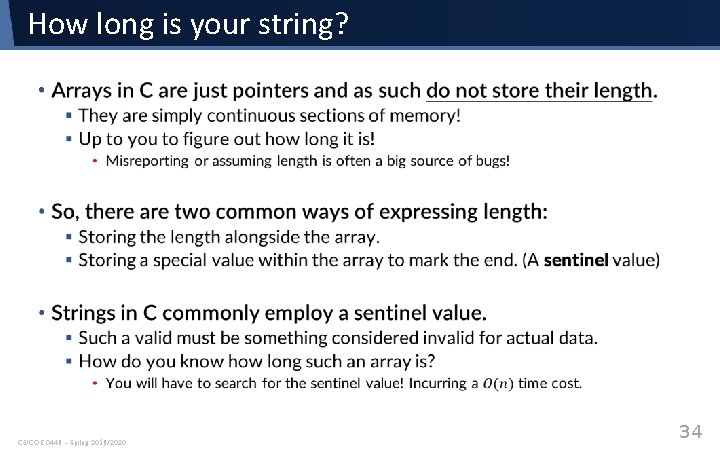
How long is your string? • CS/COE 0449 – Spring 2019/2020 34
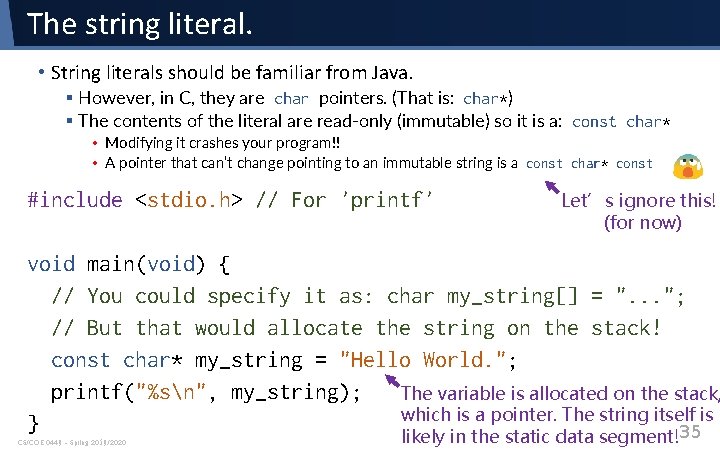
The string literal. • String literals should be familiar from Java. § However, in C, they are char pointers. (That is: char*) § The contents of the literal are read-only (immutable) so it is a: const char* • Modifying it crashes your program!! • A pointer that can’t change pointing to an immutable string is a const char* const #include <stdio. h> // For 'printf' Let’s ignore this! (for now) void main(void) { // You could specify it as: char my_string[] = ". . . "; // But that would allocate the string on the stack! const char* my_string = "Hello World. "; printf("%sn", my_string); The variable is allocated on the stack, which is a pointer. The string itself is } 35 CS/COE 0449 – Spring 2019/2020 likely in the static data segment!
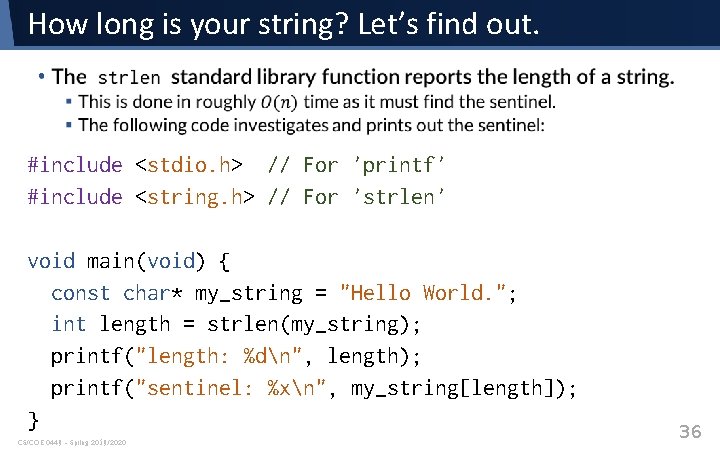
How long is your string? Let’s find out. • #include <stdio. h> // For 'printf' #include <string. h> // For 'strlen' void main(void) { const char* my_string = "Hello World. "; int length = strlen(my_string); printf("length: %dn", length); printf("sentinel: %xn", my_string[length]); } CS/COE 0449 – Spring 2019/2020 36
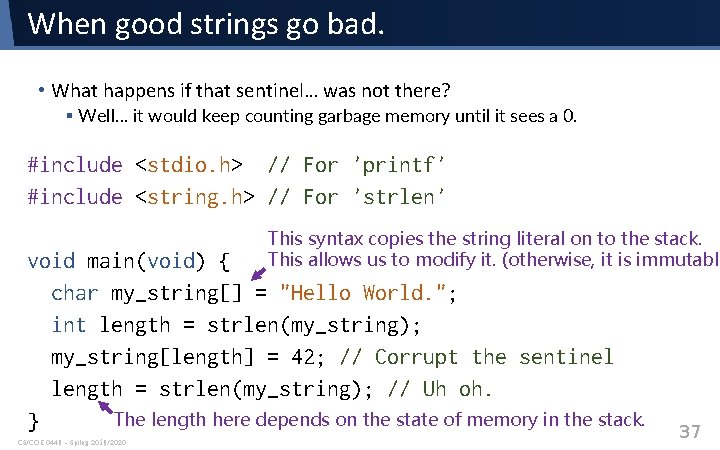
When good strings go bad. • What happens if that sentinel… was not there? § Well… it would keep counting garbage memory until it sees a 0. #include <stdio. h> // For 'printf' #include <string. h> // For 'strlen' This syntax copies the string literal on to the stack. This allows us to modify it. (otherwise, it is immutable void main(void) { char my_string[] = "Hello World. "; int length = strlen(my_string); my_string[length] = 42; // Corrupt the sentinel length = strlen(my_string); // Uh oh. The length here depends on the state of memory in the stack. } CS/COE 0449 – Spring 2019/2020 37
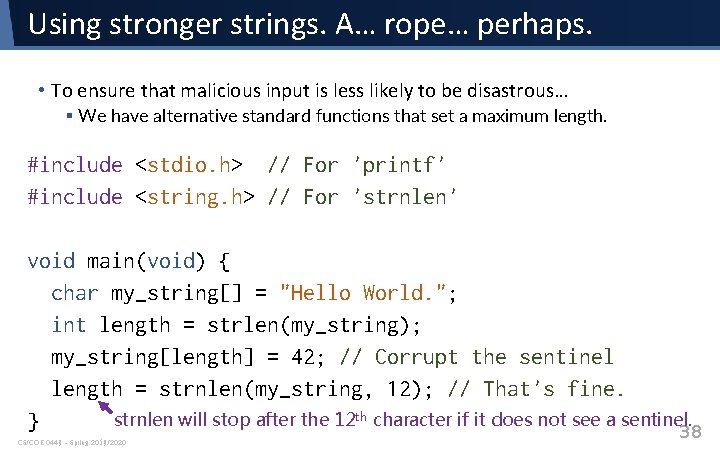
Using stronger strings. A… rope… perhaps. • To ensure that malicious input is less likely to be disastrous… § We have alternative standard functions that set a maximum length. #include <stdio. h> // For 'printf' #include <string. h> // For 'strnlen' void main(void) { char my_string[] = "Hello World. "; int length = strlen(my_string); my_string[length] = 42; // Corrupt the sentinel length = strnlen(my_string, 12); // That's fine. strnlen will stop after the 12 th character if it does not see a sentinel. } 38 CS/COE 0449 – Spring 2019/2020
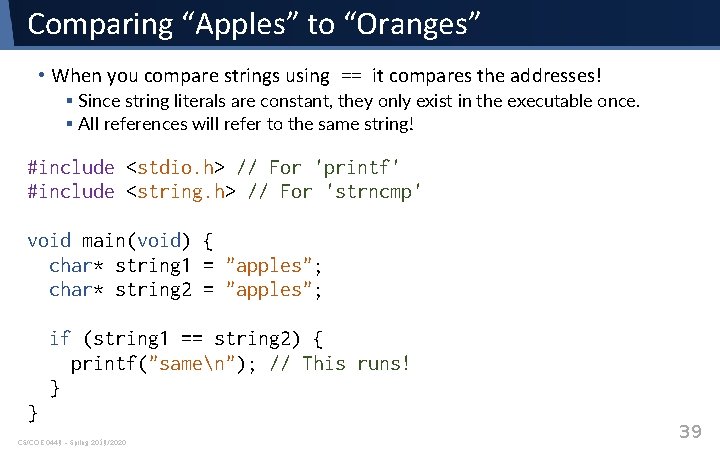
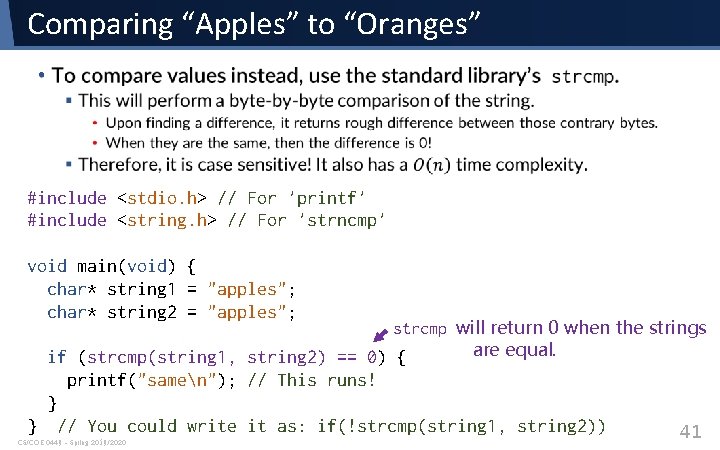
Comparing “Apples” to “Oranges” • When you compare strings using == it compares the addresses! § Since string literals are constant, they only exist in the executable once. § All references will refer to the same string! #include <stdio. h> // For 'printf' #include <string. h> // For 'strncmp' void main(void) { char* string 1 = "apples"; char* string 2 = "apples"; if (string 1 == string 2) { printf("samen"); // This runs! } } CS/COE 0449 – Spring 2019/2020 39
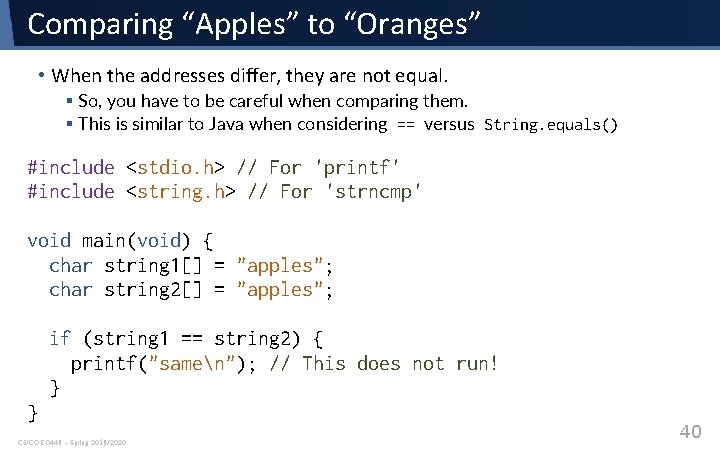
Comparing “Apples” to “Oranges” • When the addresses differ, they are not equal. § So, you have to be careful when comparing them. § This is similar to Java when considering == versus String. equals() #include <stdio. h> // For 'printf' #include <string. h> // For 'strncmp' void main(void) { char string 1[] = "apples"; char string 2[] = "apples"; if (string 1 == string 2) { printf("samen"); // This does not run! } } CS/COE 0449 – Spring 2019/2020 40
Comparing “Apples” to “Oranges” • #include <stdio. h> // For 'printf' #include <string. h> // For 'strncmp' void main(void) { char* string 1 = "apples"; char* string 2 = "apples"; strcmp will return 0 when the strings are equal. if (strcmp(string 1, string 2) == 0) { printf("samen"); // This runs! } } // You could write it as: if(!strcmp(string 1, string 2)) CS/COE 0449 – Spring 2019/2020 41
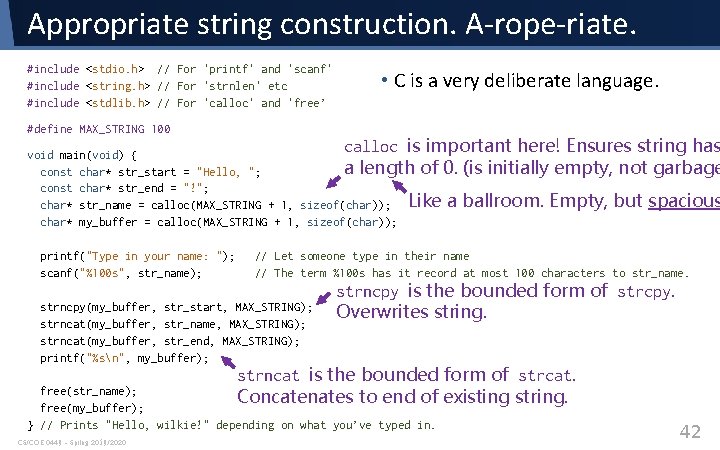
Appropriate string construction. A-rope-riate. #include <stdio. h> // For 'printf' and 'scanf' #include <string. h> // For 'strnlen' etc #include <stdlib. h> // For 'calloc' and 'free’ #define MAX_STRING 100 • C is a very deliberate language. calloc is important here! Ensures string has (is initially empty, not garbage void main(void) { a length of 0. const char* str_start = "Hello, "; const char* str_end = "!"; char* str_name = calloc(MAX_STRING + 1, sizeof(char)); Like a char* my_buffer = calloc(MAX_STRING + 1, sizeof(char)); printf("Type in your name: "); scanf("%100 s", str_name); ballroom. Empty, but spacious // Let someone type in their name // The term %100 s has it record at most 100 characters to str_name. strncpy(my_buffer, str_start, MAX_STRING); strncat(my_buffer, str_name, MAX_STRING); strncat(my_buffer, str_end, MAX_STRING); printf("%sn", my_buffer); strncpy is the bounded form of strcpy. Overwrites string. strncat is the bounded form of strcat. existing string. free(str_name); Concatenates to end of free(my_buffer); } // Prints "Hello, wilkie!" depending on what you’ve typed in. CS/COE 0449 – Spring 2019/2020 42
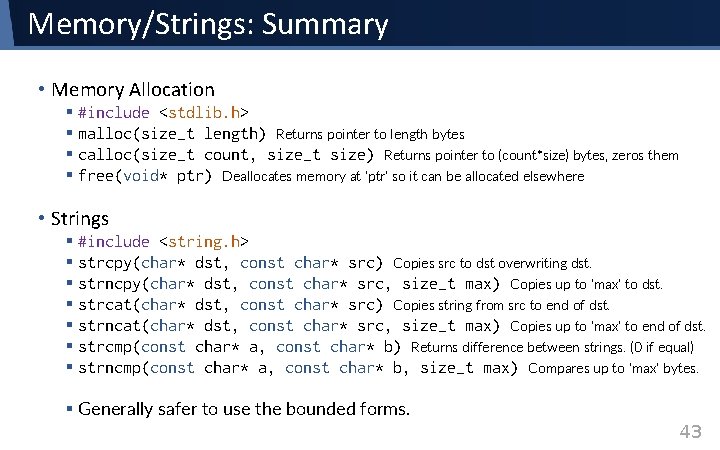
Memory/Strings: Summary • Memory Allocation § #include <stdlib. h> § malloc(size_t length) Returns pointer to length bytes § calloc(size_t count, size_t size) Returns pointer to (count*size) bytes, zeros them § free(void* ptr) Deallocates memory at ‘ptr’ so it can be allocated elsewhere • Strings § #include <string. h> § strcpy(char* dst, const char* src) Copies src to dst overwriting dst. § strncpy(char* dst, const char* src, size_t max) Copies up to ‘max’ to dst. § strcat(char* dst, const char* src) Copies string from src to end of dst. § strncat(char* dst, const char* src, size_t max) Copies up to ‘max’ to end of dst. § strcmp(const char* a, const char* b) Returns difference between strings. (0 if equal) § strncmp(const char* a, const char* b, size_t max) Compares up to ‘max’ bytes. § Generally safer to use the bounded forms. 43
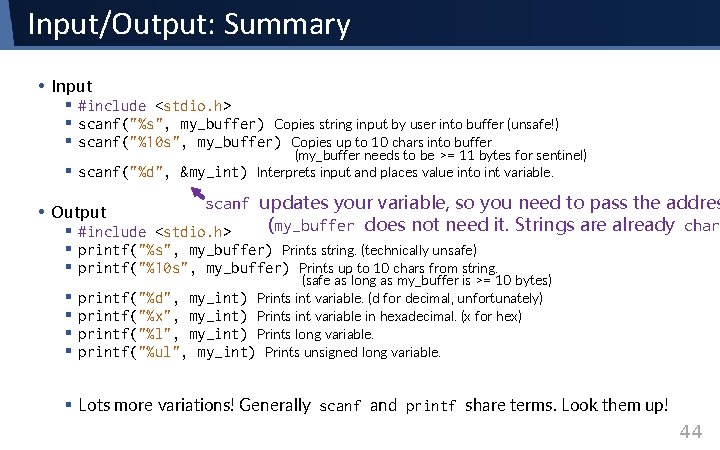
Input/Output: Summary • Input § #include <stdio. h> § scanf("%s", my_buffer) Copies string input by user into buffer (unsafe!) § scanf("%10 s", my_buffer) Copies up to 10 chars into buffer § scanf("%d", &my_int) (my_buffer needs to be >= 11 bytes for sentinel) Interprets input and places value into int variable. scanf updates your variable, so you need to pass the addres (my_buffer does not need it. Strings are already char § #include <stdio. h> § printf("%s", my_buffer) Prints string. (technically unsafe) § printf("%10 s", my_buffer) Prints up to 10 chars from string. • Output § § (safe as long as my_buffer is >= 10 bytes) printf("%d", my_int) Prints int variable. (d for decimal, unfortunately) printf("%x", my_int) Prints int variable in hexadecimal. (x for hex) printf("%l", my_int) Prints long variable. printf("%ul", my_int) Prints unsigned long variable. § Lots more variations! Generally scanf and printf share terms. Look them up! 44
Structures It may not have class, but it has style. CS/COE 0449 – Spring 2019/2020 45
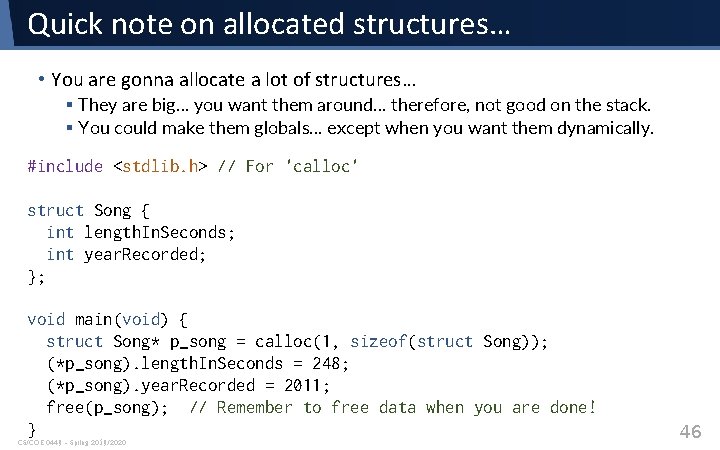
Quick note on allocated structures… • You are gonna allocate a lot of structures… § They are big… you want them around… therefore, not good on the stack. § You could make them globals… except when you want them dynamically. #include <stdlib. h> // For 'calloc' struct Song { int length. In. Seconds; int year. Recorded; }; void main(void) { struct Song* p_song = calloc(1, sizeof(struct Song)); (*p_song). length. In. Seconds = 248; (*p_song). year. Recorded = 2011; free(p_song); // Remember to free data when you are done! } CS/COE 0449 – Spring 2019/2020 46
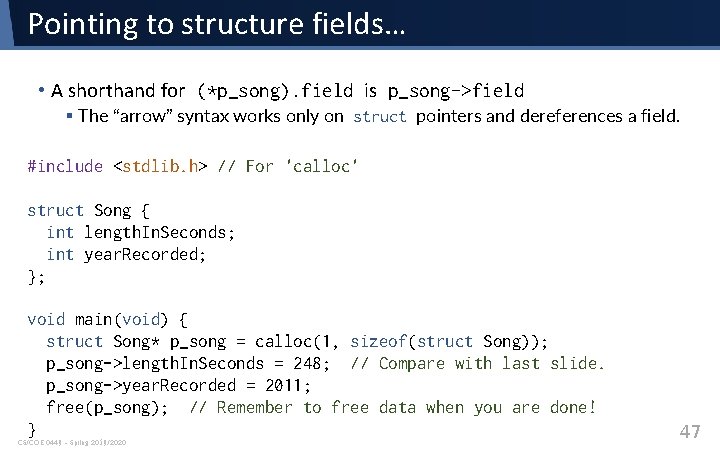
Pointing to structure fields… • A shorthand for (*p_song). field is p_song->field § The “arrow” syntax works only on struct pointers and dereferences a field. #include <stdlib. h> // For 'calloc' struct Song { int length. In. Seconds; int year. Recorded; }; void main(void) { struct Song* p_song = calloc(1, sizeof(struct Song)); p_song->length. In. Seconds = 248; // Compare with last slide. p_song->year. Recorded = 2011; free(p_song); // Remember to free data when you are done! } CS/COE 0449 – Spring 2019/2020 47
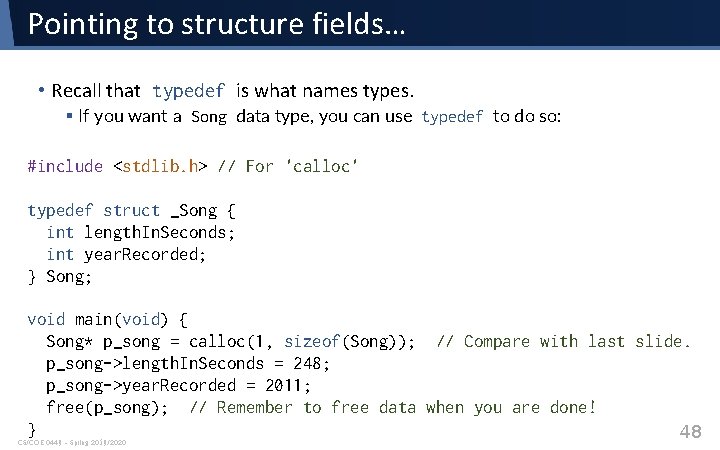
Pointing to structure fields… • Recall that typedef is what names types. § If you want a Song data type, you can use typedef to do so: #include <stdlib. h> // For 'calloc' typedef struct _Song { int length. In. Seconds; int year. Recorded; } Song; void main(void) { Song* p_song = calloc(1, sizeof(Song)); // Compare with last slide. p_song->length. In. Seconds = 248; p_song->year. Recorded = 2011; free(p_song); // Remember to free data when you are done! } 48 CS/COE 0449 – Spring 2019/2020
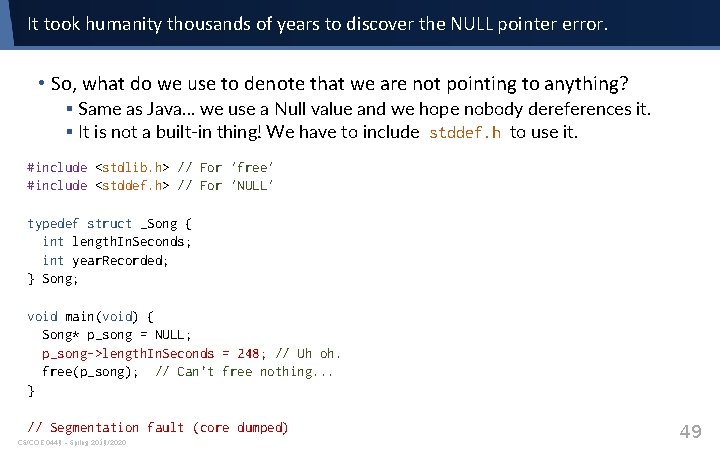
It took humanity thousands of years to discover the NULL pointer error. • So, what do we use to denote that we are not pointing to anything? § Same as Java… we use a Null value and we hope nobody dereferences it. § It is not a built-in thing! We have to include stddef. h to use it. #include <stdlib. h> // For 'free' #include <stddef. h> // For 'NULL' typedef struct _Song { int length. In. Seconds; int year. Recorded; } Song; void main(void) { Song* p_song = NULL; p_song->length. In. Seconds = 248; // Uh oh. free(p_song); // Can’t free nothing. . . } // Segmentation fault (core dumped) CS/COE 0449 – Spring 2019/2020 49
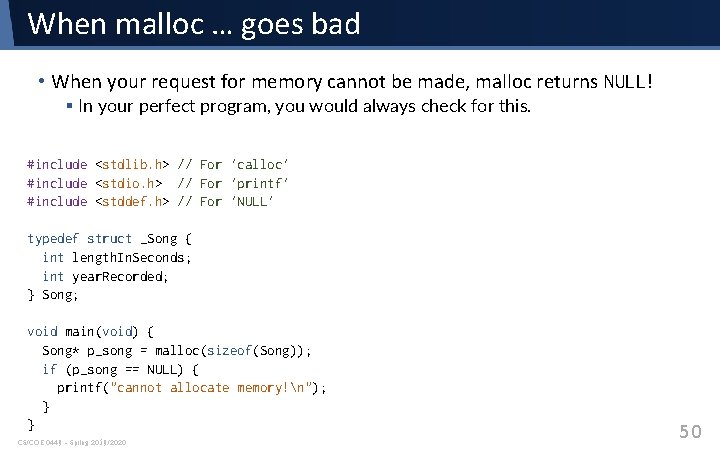
When malloc … goes bad • When your request for memory cannot be made, malloc returns NULL! § In your perfect program, you would always check for this. #include <stdlib. h> // For 'calloc' #include <stdio. h> // For 'printf' #include <stddef. h> // For 'NULL' typedef struct _Song { int length. In. Seconds; int year. Recorded; } Song; void main(void) { Song* p_song = malloc(sizeof(Song)); if (p_song == NULL) { printf("cannot allocate memory!n"); } } CS/COE 0449 – Spring 2019/2020 50
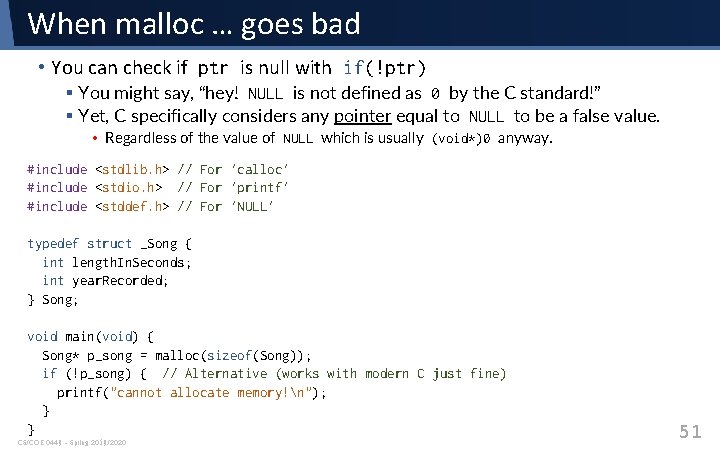
When malloc … goes bad • You can check if ptr is null with if(!ptr) § You might say, “hey! NULL is not defined as 0 by the C standard!” § Yet, C specifically considers any pointer equal to NULL to be a false value. • Regardless of the value of NULL which is usually (void*)0 anyway. #include <stdlib. h> // For 'calloc' #include <stdio. h> // For 'printf' #include <stddef. h> // For 'NULL' typedef struct _Song { int length. In. Seconds; int year. Recorded; } Song; void main(void) { Song* p_song = malloc(sizeof(Song)); if (!p_song) { // Alternative (works with modern C just fine) printf("cannot allocate memory!n"); } } CS/COE 0449 – Spring 2019/2020 51
Examples Some nice examples that addressing! CS/COE 0449 – Spring 2019/2020 52
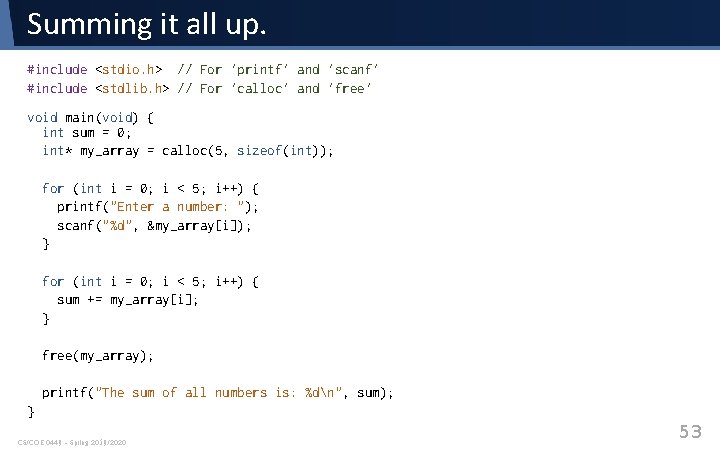
Summing it all up. #include <stdio. h> // For 'printf' and 'scanf' #include <stdlib. h> // For 'calloc' and 'free' void main(void) { int sum = 0; int* my_array = calloc(5, sizeof(int)); for (int i = 0; i < 5; i++) { printf("Enter a number: "); scanf("%d", &my_array[i]); } for (int i = 0; i < 5; i++) { sum += my_array[i]; } free(my_array); printf("The sum of all numbers is: %dn", sum); } CS/COE 0449 – Spring 2019/2020 53
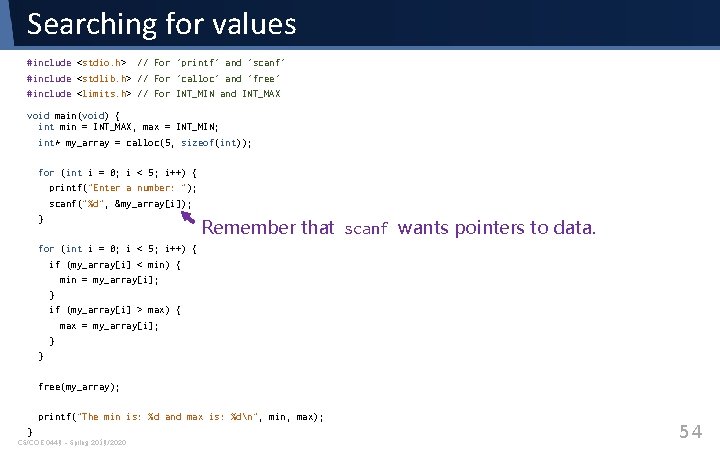
Searching for values #include <stdio. h> // For 'printf' and 'scanf' #include <stdlib. h> // For 'calloc' and 'free' #include <limits. h> // For INT_MIN and INT_MAX void main(void) { int min = INT_MAX, max = INT_MIN; int* my_array = calloc(5, sizeof(int)); for (int i = 0; i < 5; i++) { printf("Enter a number: "); scanf("%d", &my_array[i]); } Remember that scanf wants pointers to data. for (int i = 0; i < 5; i++) { if (my_array[i] < min) { min = my_array[i]; } if (my_array[i] > max) { max = my_array[i]; } } free(my_array); printf("The min is: %d and max is: %dn", min, max); } CS/COE 0449 – Spring 2019/2020 54
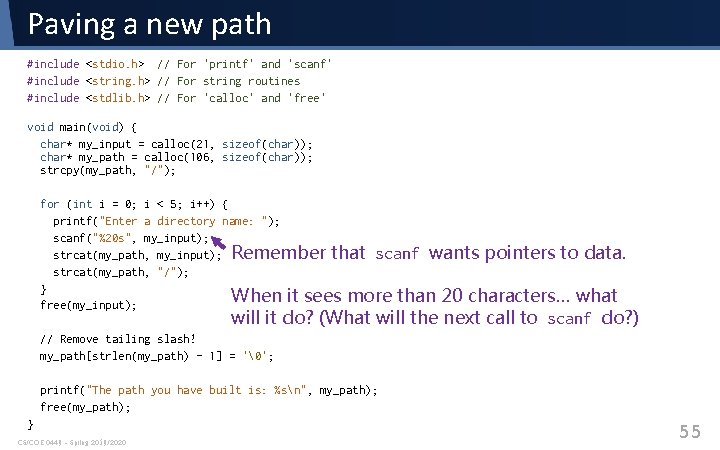
Paving a new path #include <stdio. h> // For 'printf' and 'scanf' #include <string. h> // For string routines #include <stdlib. h> // For 'calloc' and 'free' void main(void) { char* my_input = calloc(21, sizeof(char)); char* my_path = calloc(106, sizeof(char)); strcpy(my_path, "/"); for (int i = 0; i < 5; i++) { printf("Enter a directory name: "); scanf("%20 s", my_input); strcat(my_path, my_input); Remember that scanf wants pointers to data. strcat(my_path, "/"); } When it sees more than 20 characters… what free(my_input); will it do? (What will the next call to scanf do? ) // Remove tailing slash! my_path[strlen(my_path) - 1] = ''; printf("The path you have built is: %sn", my_path); free(my_path); } CS/COE 0449 – Spring 2019/2020 55
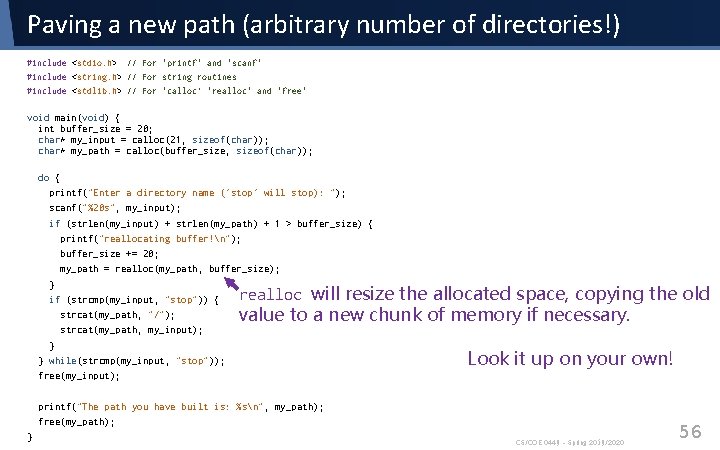
Paving a new path (arbitrary number of directories!) #include <stdio. h> // For 'printf' and 'scanf' #include <string. h> // For string routines #include <stdlib. h> // For 'calloc’ 'realloc' and 'free' void main(void) { int buffer_size = 20; char* my_input = calloc(21, sizeof(char)); char* my_path = calloc(buffer_size, sizeof(char)); do { printf("Enter a directory name ('stop' will stop): "); scanf("%20 s", my_input); if (strlen(my_input) + strlen(my_path) + 1 > buffer_size) { printf("reallocating buffer!n"); buffer_size += 20; my_path = realloc(my_path, buffer_size); } if (strcmp(my_input, "stop")) { strcat(my_path, "/"); strcat(my_path, my_input); } } while(strcmp(my_input, "stop")); free(my_input); realloc will resize the allocated space, copying the old value to a new chunk of memory if necessary. Look it up on your own! printf("The path you have built is: %sn", my_path); free(my_path); } CS/COE 0449 – Spring 2019/2020 56