
5 Database recovery techniques Closely related to concurrency
5. Database recovery techniques Closely related to concurrency control protocols Goals: • After failure (for example deadlock & abort), restore a consistent state • Minimize the loss of work Means: • Auxiliary data sets (log, backup) Adv. DB-5 J. Teuhola 2015 133
Recovery concepts: Log • Keeps information about operations made by transactions: – Before-image (undo entry) of updated items – After-image (redo entry) of updated items • Enables restoring a consistent state after noncatastrophic failure (forward/backward). • Alternatives: – – undo/no-redo no-undo/redo no-undo/no-redo. Adv. DB-5 J. Teuhola 2015 134
Write-Ahead Logging (WAL) (1) No overwrite of disk data before undo-type log records are forced to disk. (2) Both undo- and redo-type log records (= before- and after-images) must be forced to disk before end of commit. WAL is the most important principle in log-based recovery. Adv. DB-5 J. Teuhola 2015 135
Recovery concepts: Backup • Copy of database on archival storage (off-line, often on tape). • Enables partial recovery from catastrophic failures: – For committed transactions: Load backup and apply redo operations from the log (if the log survived). – Non-committed transactions must be restarted (= re-executed). Adv. DB-5 J. Teuhola 2015 136
Recovery concepts: Cache • In-memory buffer for database pages. • A directory (page table) keeps track of pages in cache. • Page-replacement strategy needed, e. g. FIFO (First-In-First-Out), or LRU (Least Recently Used) • Dirty bit tells for each page, if it has changed • Flushing means (force-)writing buffer pages to disk. • Pin/unpin bit tells if the page can be written Adv. DB-5 J. Teuhola 2015 137
Recovery concepts: Rollback • At failure, apply undo-type log records (beforeimages) to updated items. • A recoverable schedule may allow cascading rollback. • Most practical protocols avoid cascading rollbacks. Then no read-entries are required in the log (no dirty reads). Adv. DB-5 J. Teuhola 2015 138
Undo/redo procedures Undo: • Scan the log file backwards and apply the before-images in this order, or scan the log file forward and apply only the first before-image of each updated item. Redo: • Scan the file forward and apply the afterimages in this order, or scan the log file backwards and apply only the last after-image of each updated item. Adv. DB-5 J. Teuhola 2015 139
Update alternatives: Deferred update • NO-UNDO/REDO • Updates first to local copies in transaction workspace, at commit to the log and then to the database. • Buffer space may become restrictive (transactions should be small). • NO UNDO: Effects become visible at commit • REDO: Needed if the system fails after commit but before all cache pages are written to disk. But: Is the write phase during commit atomic? (Is rollback needed, anyway? ) Adv. DB-5 J. Teuhola 2015 140
Update alternatives: Immediate update • Updated values from the buffer first to the log, then to the database (even before commit); WAL-rule • The most common in practice. • Rollback (undo) may occur • Two alternatives: – All writes forced to disk before commit (UNDO/NO-REDO) – Some writes from buffer to disk after commit (UNDO/REDO) Adv. DB-5 J. Teuhola 2015 141
Update alternatives (cont. ) In-place updating: • Write the updated value in the same location as before; the log is needed for recovery; this approach is applied by most DBMSs. ‘Shadowing’: • Write the new (updated) entry in a different disk location; the log can possibly be avoided (NO-UNDO / NO-REDO), but different versions of data must be managed. Adv. DB-5 J. Teuhola 2015 142
Recovery concepts: Steal & force Steal approach: • Updated page can be written to disk before commit (opposite: no-steal approach). Advantage of steal: smaller buffer. Force approach (UNDO/NO-REDO): • All updated pages are written to disk at commit. Advantage: no redo No-force approach (UNDO/REDO): • Physical write possible after commit. Advantage: More hits from the buffer. Adv. DB-5 J. Teuhola 2015 143
Transaction lists & checkpoints Transaction lists maintained for recovery: • Active transactions • Committed transactions since the last checkpoint • Aborted transactions since the last checkpoint Fuzzy checkpoint: • Writing of the checkpoint is done parallel with transactions (no interrupt in processing). • The new checkpoint becomes valid when completed. Adv. DB-5 J. Teuhola 2015 144
Shadow paging • Assumes an indirect addressing scheme: References to database objects consist of <page-no, slot-no> pairs, where page-no is the index to a page table (’directory’), which contains the true physical addresses. • Updated pages are written to different locations • Two page tables are kept: – Shadow (pointing to original pages on disk) – Current (pointing to updated pages) Adv. DB-5 J. Teuhola 2015 145
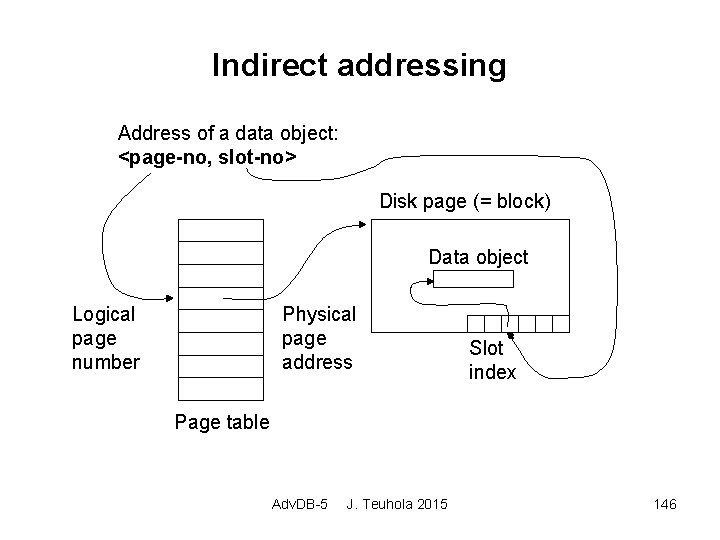
Indirect addressing Address of a data object: <page-no, slot-no> Disk page (= block) Data object Logical page number Physical page address Slot index Page table Adv. DB-5 J. Teuhola 2015 146
Shadow paging (cont. ) Functions: • Start of transaction: Copy the current page table to the shadow table. • Commit: Discard the shadow page table, free the referenced old pages. • Recovery: Discard the current page table, reinstate the shadow page table, free the new pages. Adv. DB-5 J. Teuhola 2015 147
Shadow paging (cont. ) Advantages: • Simple recovery, no log in single-user systems (in multi-user systems, logs and checkpoints needed for concurrency control). Disadvantages: • Fragmentation of storage (clustering lost). • Writing the shadow table to disk takes time. • Garbage collection of pages needed. Adv. DB-5 J. Teuhola 2015 148
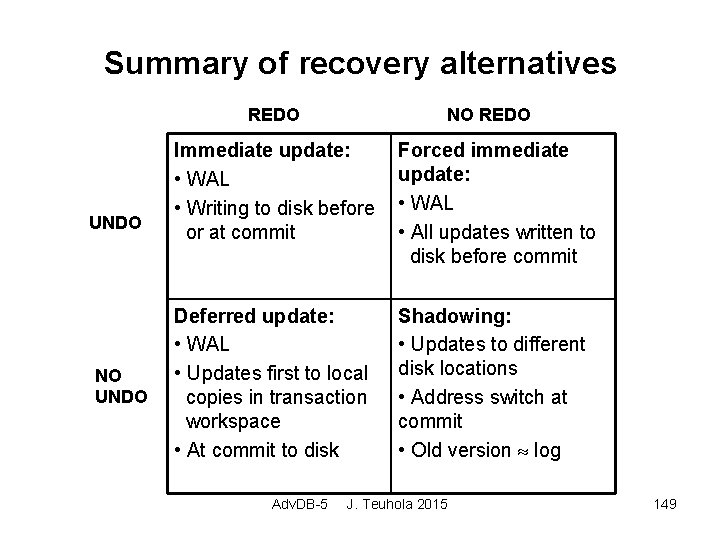
Summary of recovery alternatives REDO UNDO NO REDO Immediate update: • WAL • Writing to disk before or at commit Forced immediate update: • WAL • All updates written to disk before commit Deferred update: • WAL • Updates first to local copies in transaction workspace • At commit to disk Shadowing: • Updates to different disk locations • Address switch at commit • Old version log Adv. DB-5 J. Teuhola 2015 149
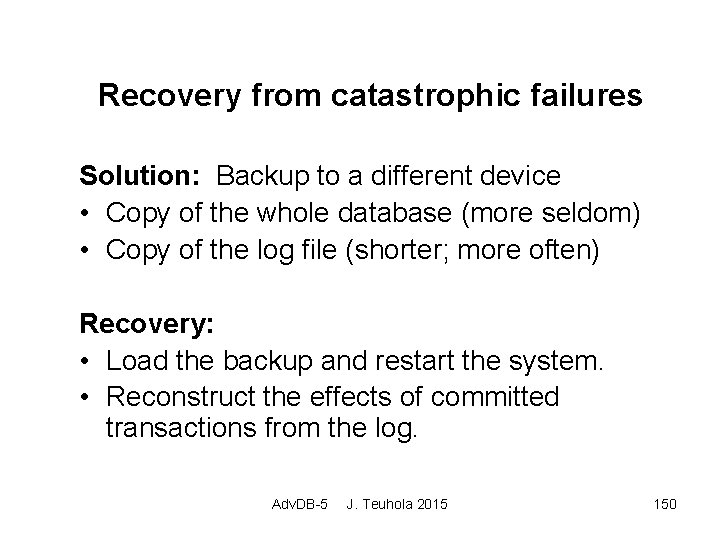
Recovery from catastrophic failures Solution: Backup to a different device • Copy of the whole database (more seldom) • Copy of the log file (shorter; more often) Recovery: • Load the backup and restart the system. • Reconstruct the effects of committed transactions from the log. Adv. DB-5 J. Teuhola 2015 150
- Slides: 18