
3 Windows Azure is Microsofts cloud platform that

- Slides: 41
3
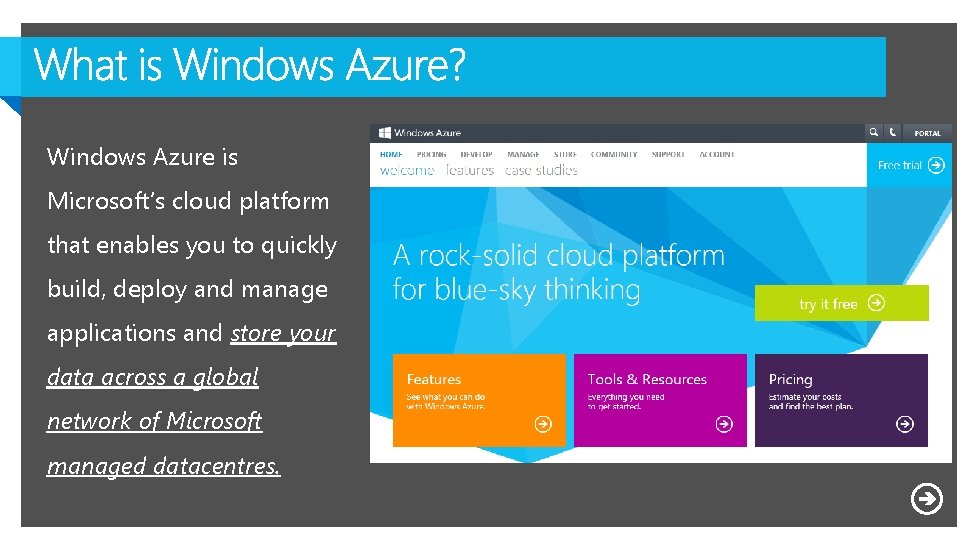
Windows Azure is Microsoft’s cloud platform that enables you to quickly build, deploy and manage applications and store your data across a global network of Microsoft managed datacentres.
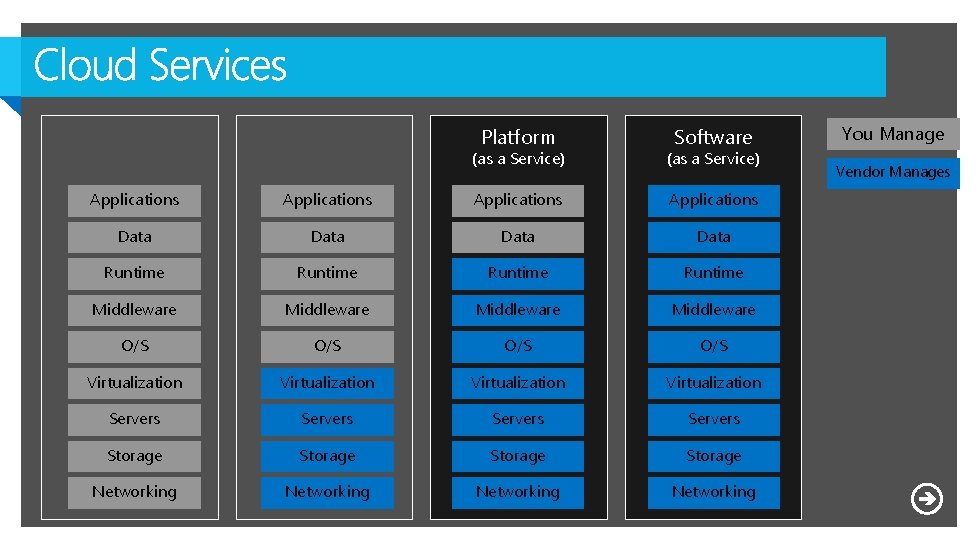
On Premises You Manage Infrastructure (as a Service) You Manage Platform You Manage Software You Manage Vendor Manages (as a Service) Applications Data Runtime Middleware O/S O/S Virtualization Servers Storage Networking
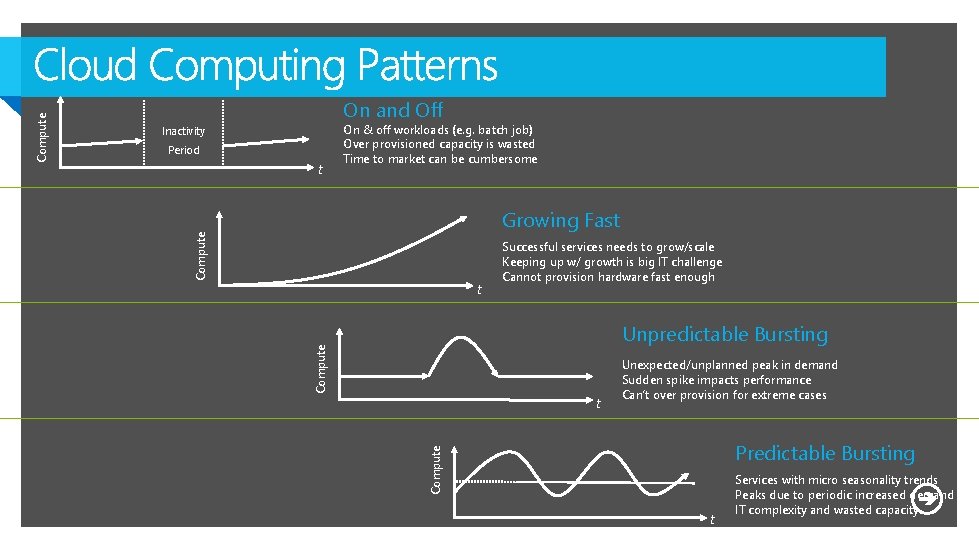
Inactivity Period t On & off workloads (e. g. batch job) Over provisioned capacity is wasted Time to market can be cumbersome Growing Fast Compute t Successful services needs to grow/scale Keeping up w/ growth is big IT challenge Cannot provision hardware fast enough Unpredictable Bursting Compute t Unexpected/unplanned peak in demand Sudden spike impacts performance Can’t over provision for extreme cases Predictable Bursting Compute On and Off t Services with micro seasonality trends Peaks due to periodic increased demand IT complexity and wasted capacity
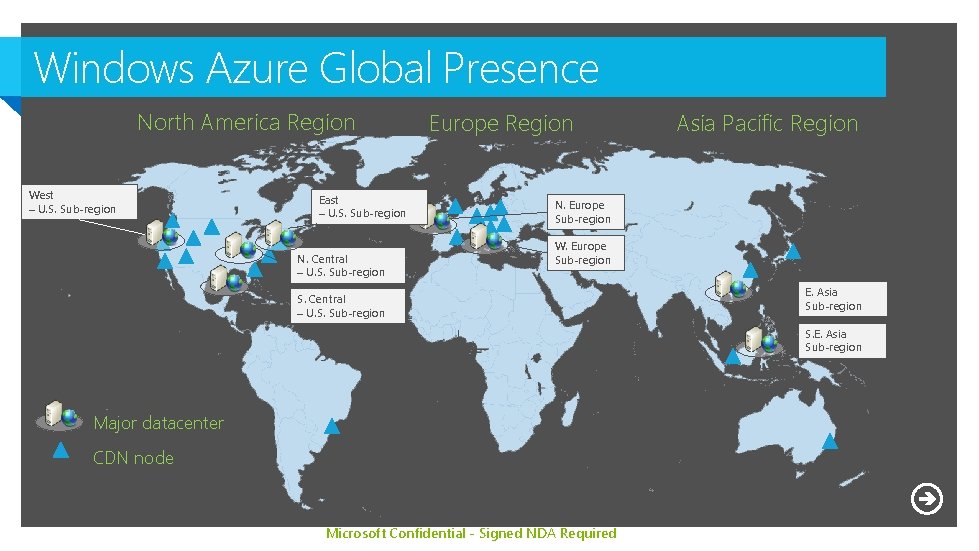
Windows Azure Global Presence North America Region West – U. S. Sub-region East – U. S. Sub-region N. Central – U. S. Sub-region Europe Region Asia Pacific Region N. Europe Sub-region W. Europe Sub-region S. Central – U. S. Sub-region E. Asia Sub-region S. E. Asia Sub-region Major datacenter CDN node Microsoft Confidential - Signed NDA Required
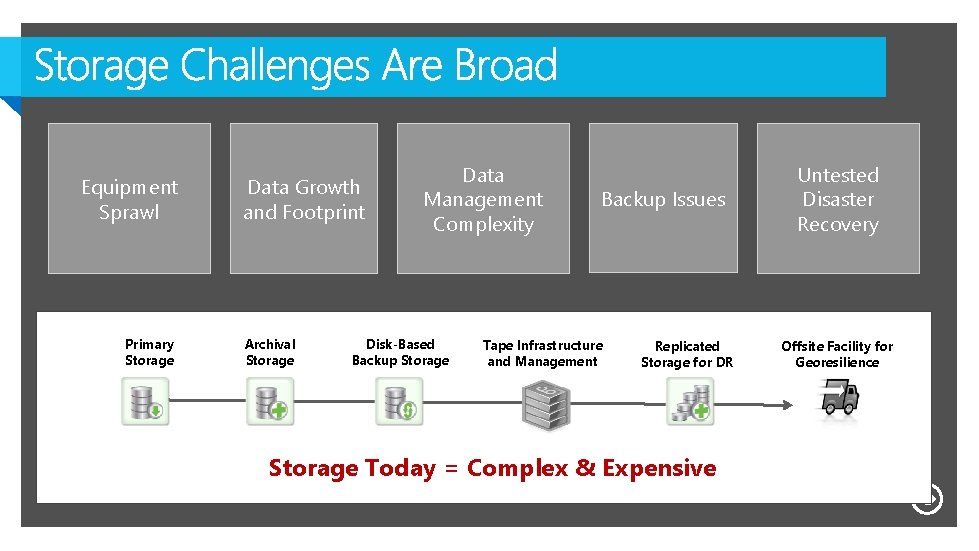
Equipment Sprawl Primary Storage Data Growth and Footprint Archival Storage Data Management Complexity Disk-Based Backup Storage Backup Issues Tape Infrastructure and Management Replicated Storage for DR Untested Disaster Recovery Offsite Facility for Georesilience Storage Today = Complex & Expensive 10
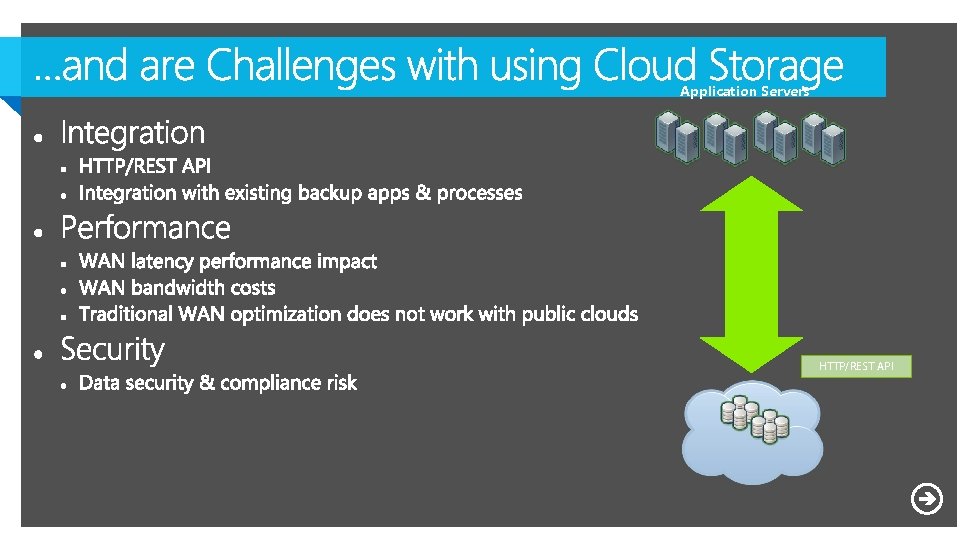
Application Servers HTTP/REST API 11
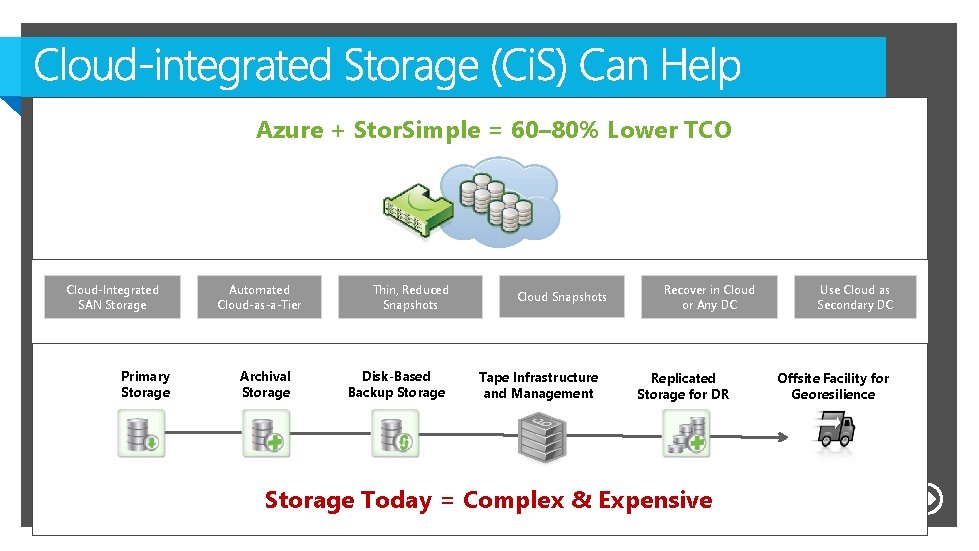
Azure + Stor. Simple = 60– 80% Lower TCO Cloud-Integrated SAN Storage Primary Storage Automated Cloud-as-a-Tier Archival Storage Thin, Reduced Snapshots Disk-Based Backup Storage Cloud Snapshots Tape Infrastructure and Management Recover in Cloud or Any DC Replicated Storage for DR Use Cloud as Secondary DC Offsite Facility for Georesilience Storage Today = Complex & Expensive 12
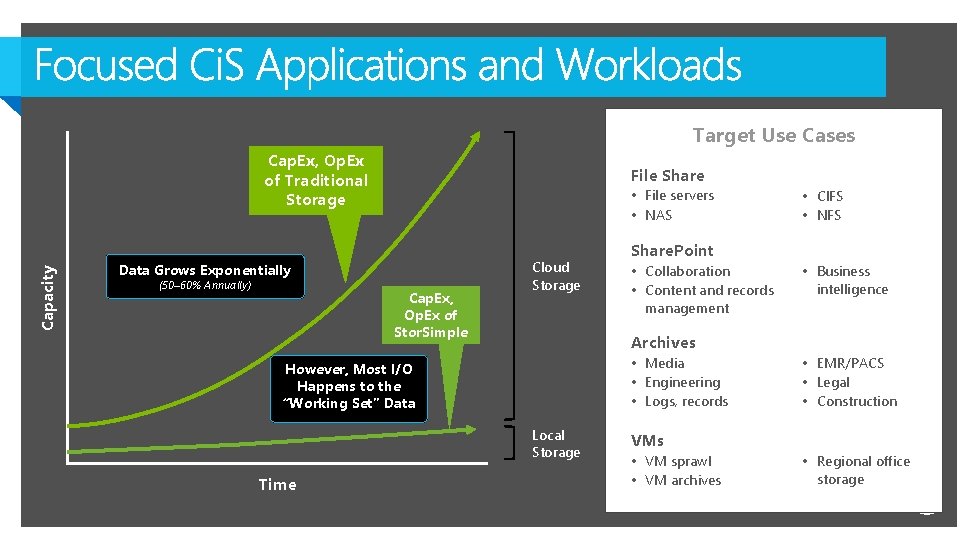
Target Use Cases Capacity Cap. Ex, Op. Ex of Traditional Storage File Share • File servers • NAS Data Grows Exponentially (50– 60% Annually) Cap. Ex, Op. Ex of Stor. Simple Cloud Storage Share. Point • Collaboration • Content and records management • Business intelligence Archives • Media • Engineering • Logs, records However, Most I/O Happens to the “Working Set” Data Local Storage Time • CIFS • NFS • EMR/PACS • Legal • Construction VMs • VM sprawl • VM archives • Regional office storage 13
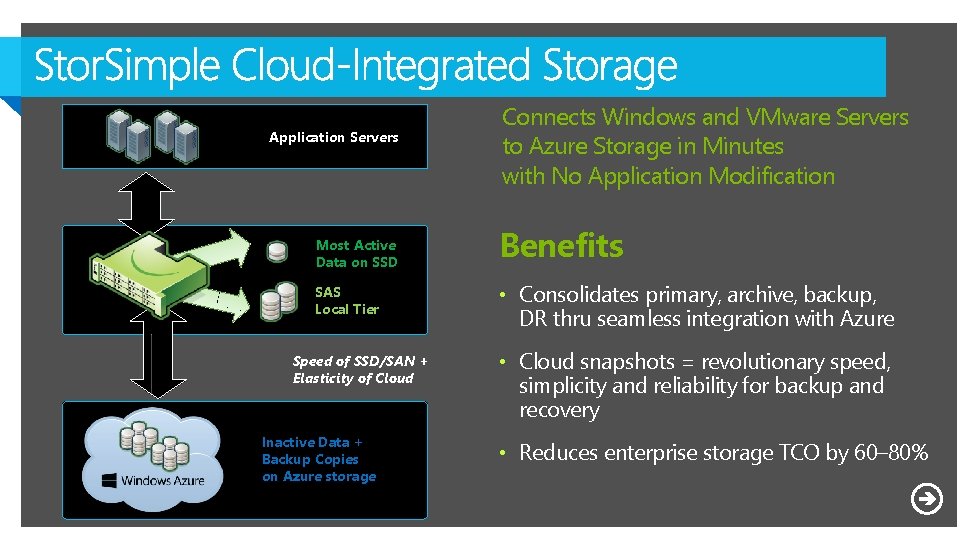
Application Servers Most Active Data on SSD SAS Local Tier Speed of SSD/SAN + Elasticity of Cloud Inactive Data + Backup Copies on Azure storage Connects Windows and VMware Servers to Azure Storage in Minutes with No Application Modification Benefits • Consolidates primary, archive, backup, DR thru seamless integration with Azure • Cloud snapshots = revolutionary speed, simplicity and reliability for backup and recovery • Reduces enterprise storage TCO by 60– 80% 14
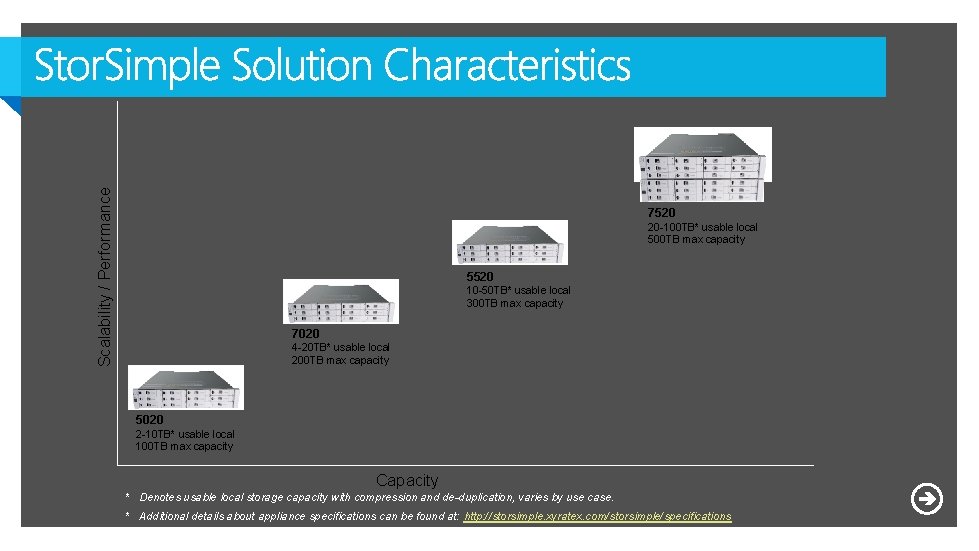
Scalability / Performance 7520 20 -100 TB* usable local 500 TB max capacity 5520 10 -50 TB* usable local 300 TB max capacity 7020 4 -20 TB* usable local 200 TB max capacity 5020 2 -10 TB* usable local 100 TB max capacity Capacity * Denotes usable local storage capacity with compression and de-duplication, varies by use case. * Additional details about appliance specifications can be found at: http: //storsimple. xyratex. com/storsimple/specifications 16
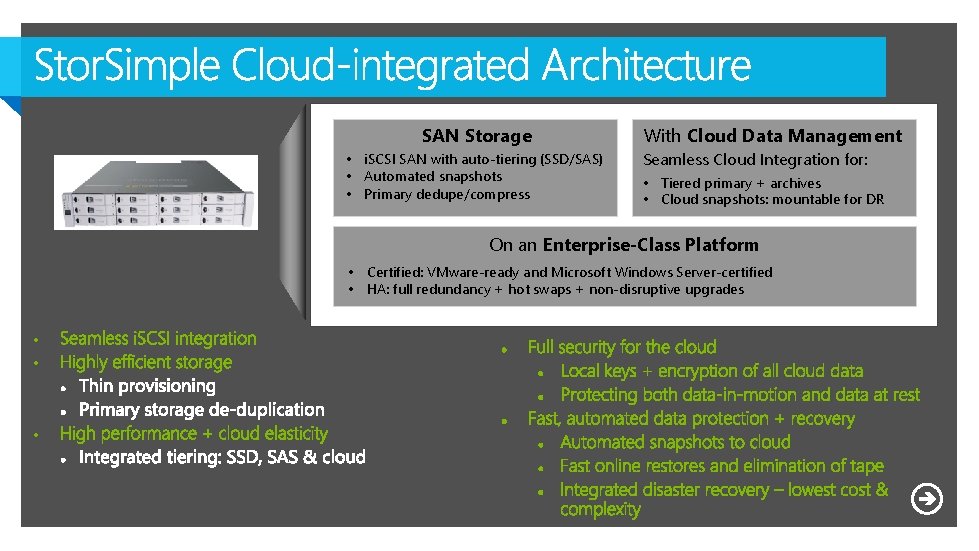
SAN Storage • i. SCSI SAN with auto-tiering (SSD/SAS) • Automated snapshots • Primary dedupe/compress With Cloud Data Management Seamless Cloud Integration for: • Tiered primary + archives • Cloud snapshots: mountable for DR On an Enterprise-Class Platform • Certified: VMware-ready and Microsoft Windows Server-certified • HA: full redundancy + hot swaps + non-disruptive upgrades • • • 17
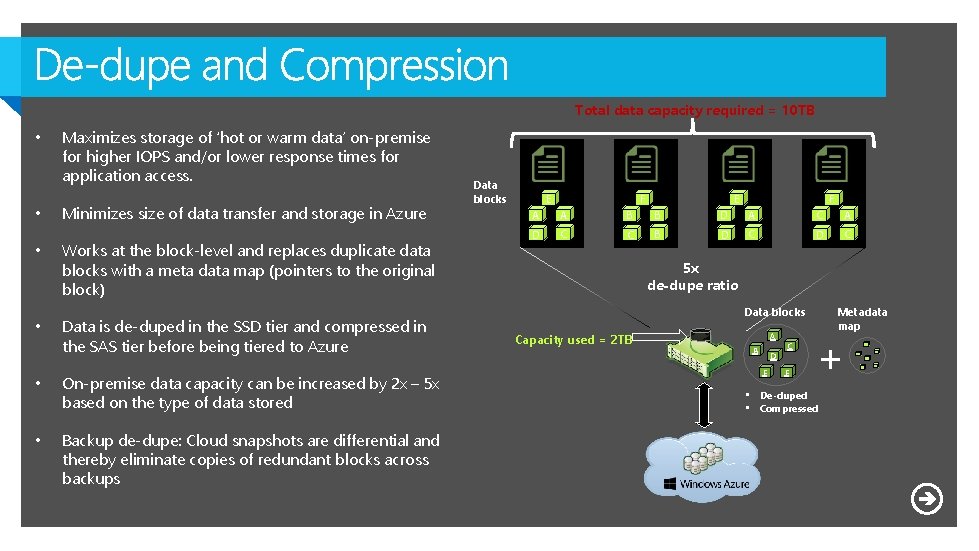
Total data capacity required = 10 TB • • Maximizes storage of ‘hot or warm data’ on-premise for higher IOPS and/or lower response times for application access. Minimizes size of data transfer and storage in Azure Works at the block-level and replaces duplicate data blocks with a meta data map (pointers to the original block) Data is de-duped in the SSD tier and compressed in the SAS tier before being tiered to Azure • On-premise data capacity can be increased by 2 x – 5 x based on the type of data stored • Backup de-dupe: Cloud snapshots are differential and thereby eliminate copies of redundant blocks across backups Data blocks E F A A B B D A C A D C C B D C 5 x de-dupe ratio Data blocks Capacity used = 2 TB A B D E C F Metadata map + • De-duped • Compressed
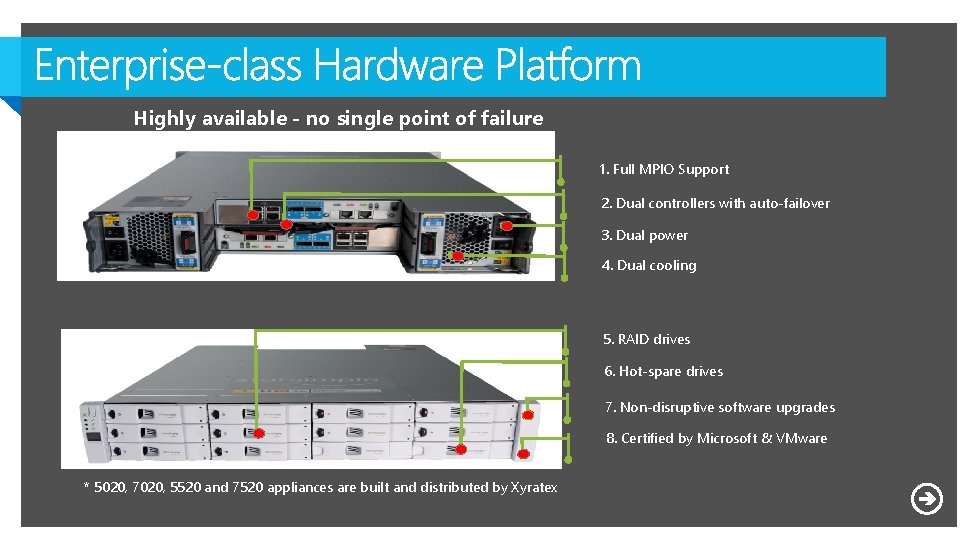
Highly available - no single point of failure 1. Full MPIO Support 2. Dual controllers with auto-failover 3. Dual power 4. Dual cooling 5. RAID drives 6. Hot-spare drives 7. Non-disruptive software upgrades 8. Certified by Microsoft & VMware * 5020, 7020, 5520 and 7520 appliances are built and distributed by Xyratex 19
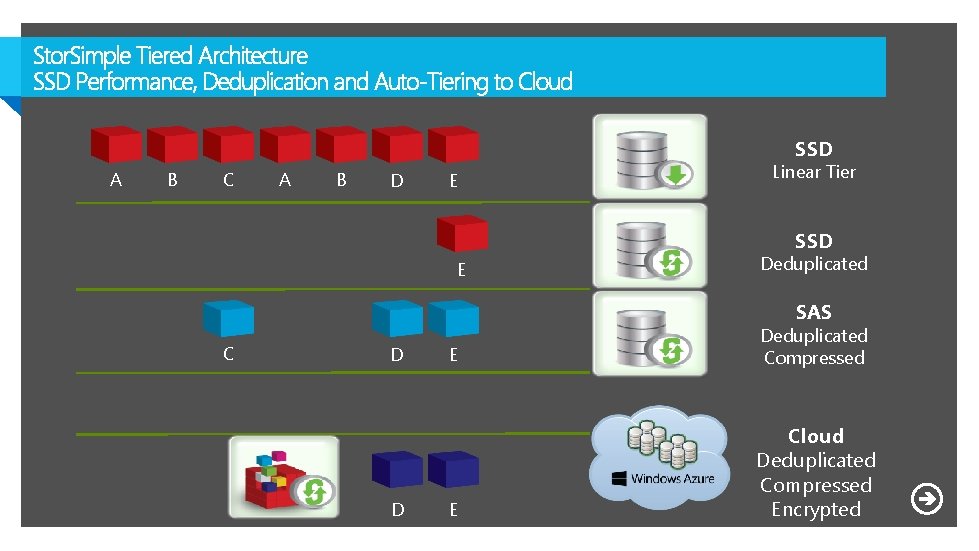
SSD A B C A B D E Linear Tier SSD E Deduplicated SAS C D D E Deduplicated Compressed E Cloud Deduplicated Compressed Encrypted 21
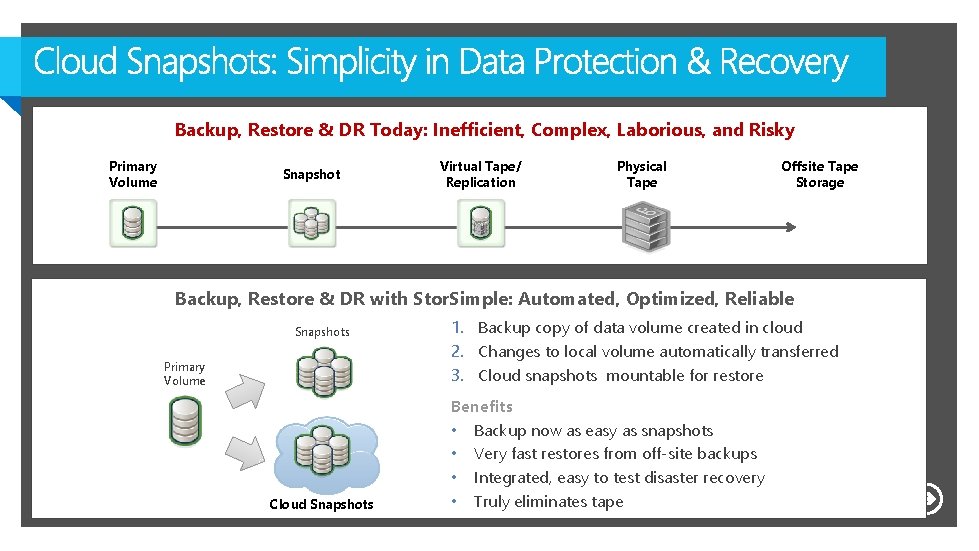
Backup, Restore & DR Today: Inefficient, Complex, Laborious, and Risky Primary Volume Snapshot Virtual Tape/ Replication Physical Tape Offsite Tape Storage Backup, Restore & DR with Stor. Simple: Automated, Optimized, Reliable Snapshots Primary Volume Cloud Snapshots 1. Backup copy of data volume created in cloud 2. Changes to local volume automatically transferred 3. Cloud snapshots mountable for restore Benefits • Backup now as easy as snapshots • Very fast restores from off-site backups • Integrated, easy to test disaster recovery • Truly eliminates tape 23
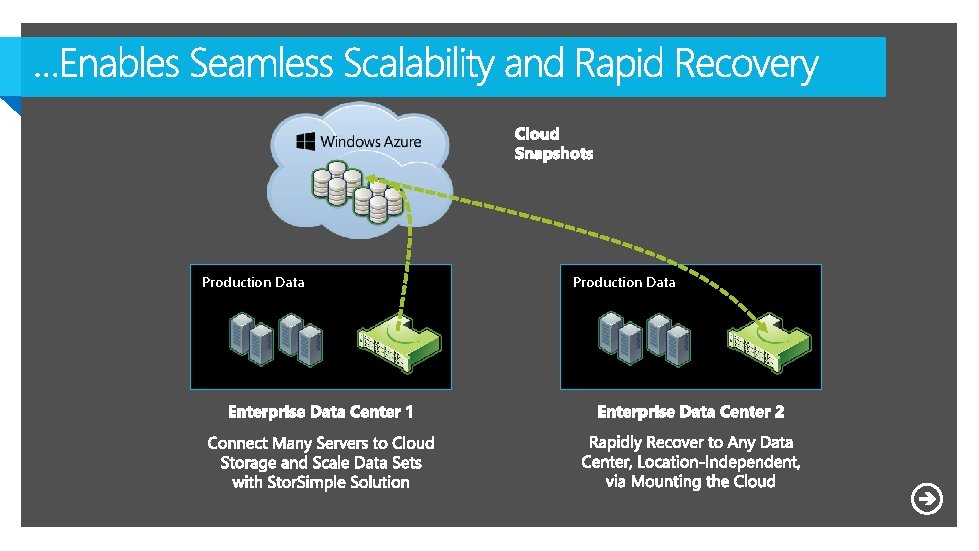
Production Data 24
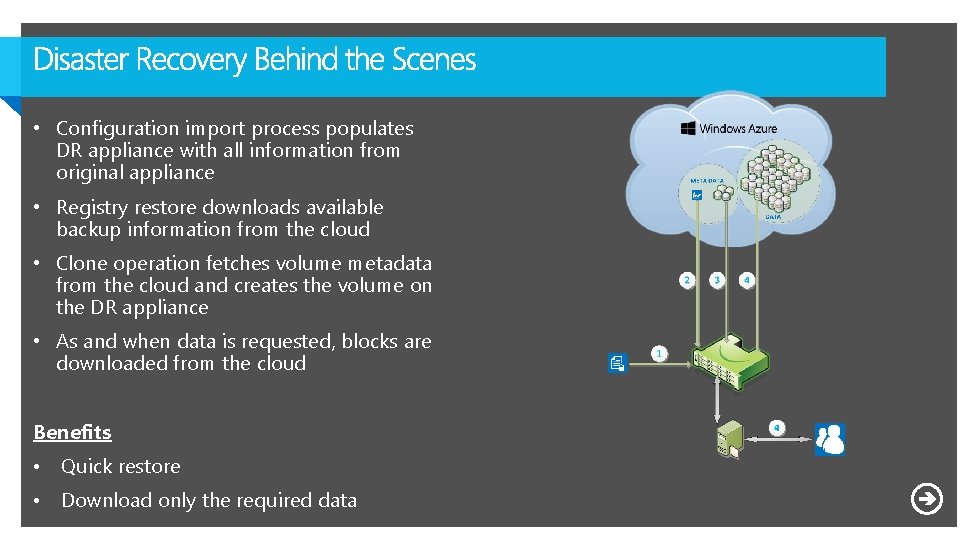
• Configuration import process populates DR appliance with all information from original appliance • Registry restore downloads available backup information from the cloud • Clone operation fetches volume metadata from the cloud and creates the volume on the DR appliance • As and when data is requested, blocks are downloaded from the cloud Benefits • Quick restore • Download only the required data 25
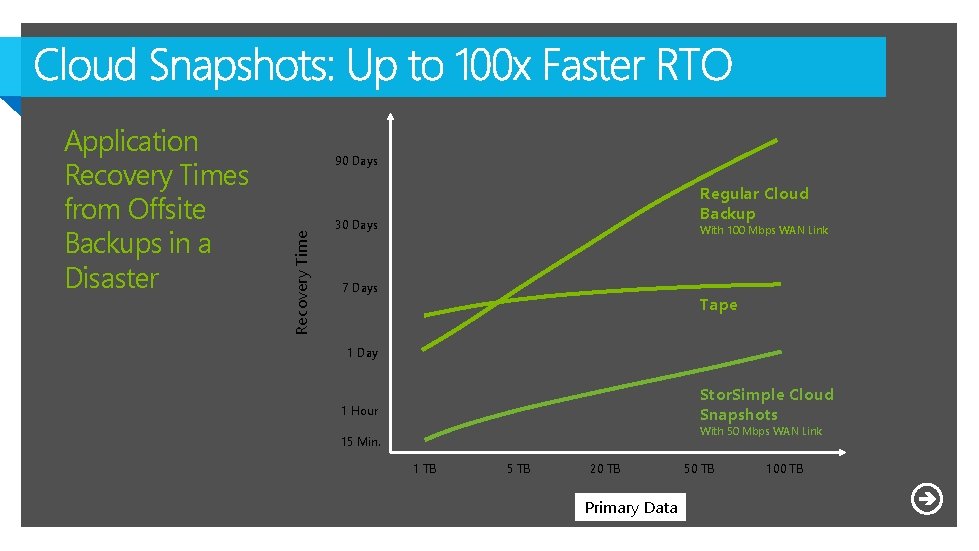
90 Days Recovery Time Application Recovery Times from Offsite Backups in a Disaster Regular Cloud Backup 30 Days With 100 Mbps WAN Link 7 Days Tape 1 Day Stor. Simple Cloud Snapshots 1 Hour With 50 Mbps WAN Link 15 Min. 1 TB 5 TB 20 TB Primary Data 50 TB 100 TB
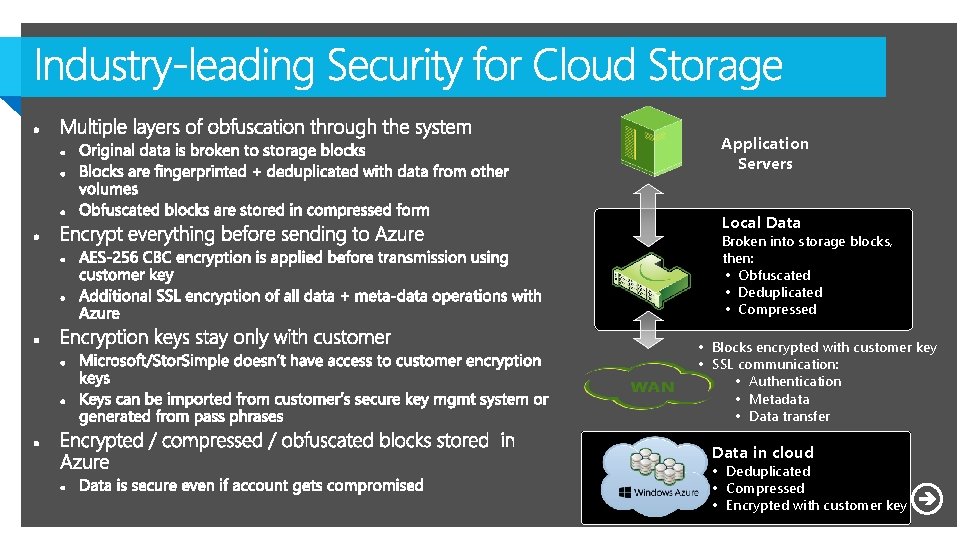
Application Servers Local Data Broken into storage blocks, then: • Obfuscated • Deduplicated • Compressed • Blocks encrypted with customer key • SSL communication: • Authentication • Metadata • Data transfer Data in cloud • Deduplicated • Compressed • Encrypted with customer key
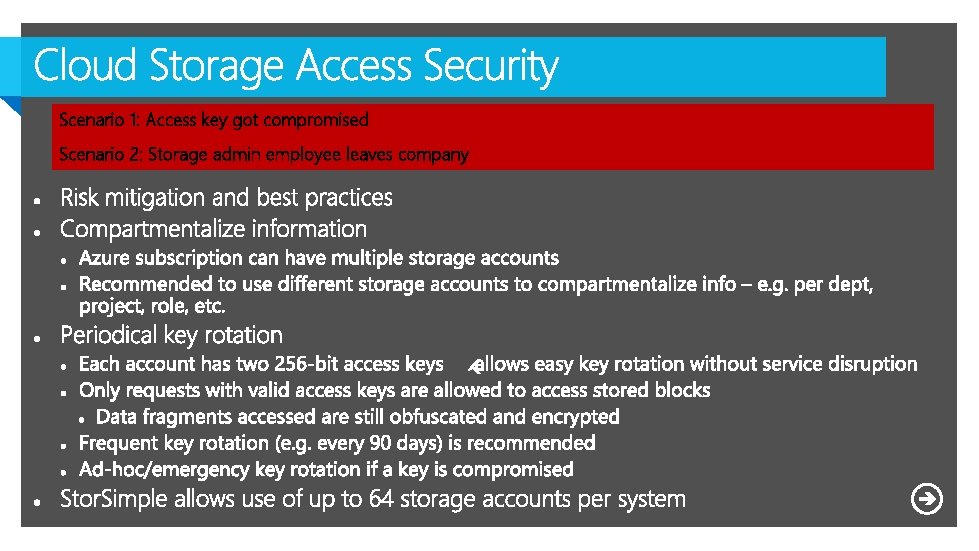
Scenario 1: Access key got compromised Scenario 2: Storage admin employee leaves company 29
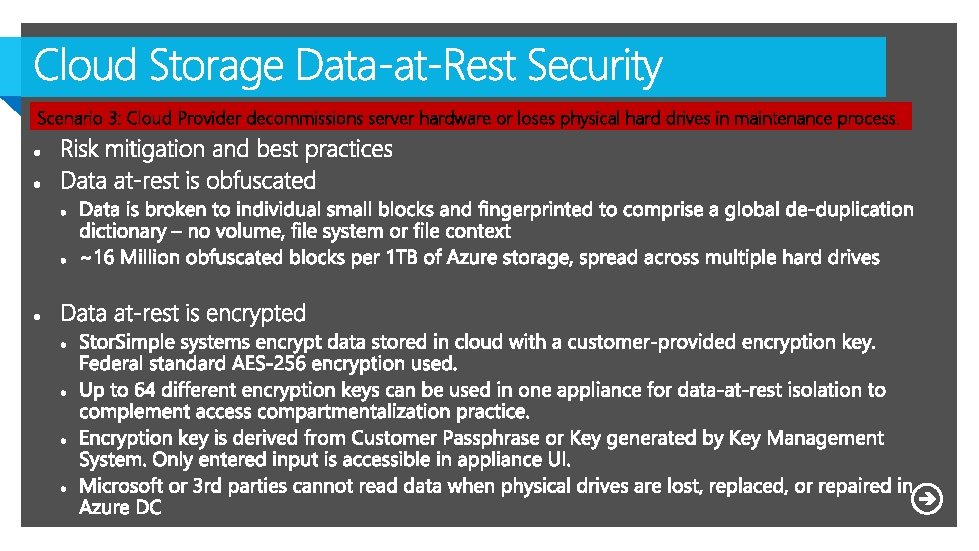
Scenario 3: Cloud Provider decommissions server hardware or loses physical hard drives in maintenance process. 30
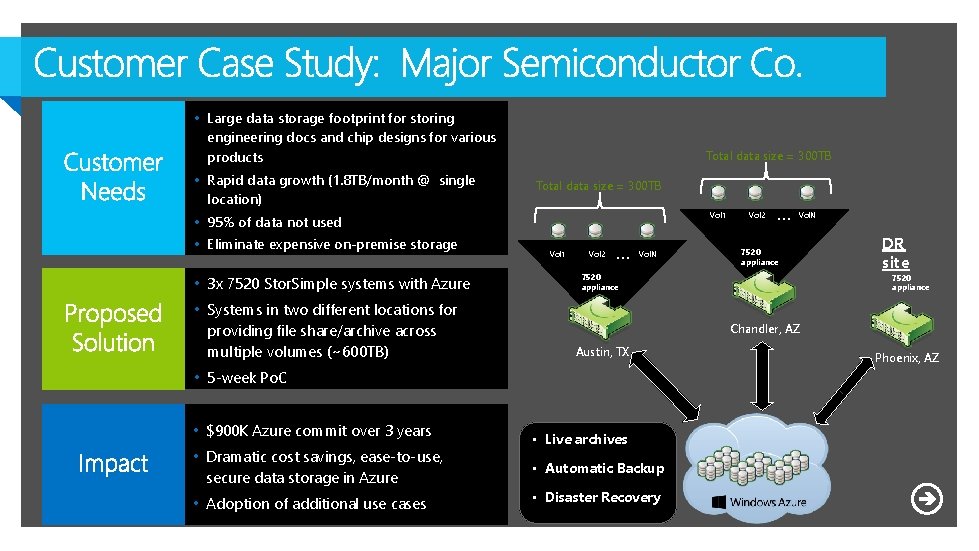
• Large data storage footprint for storing engineering docs and chip designs for various products • Rapid data growth (1. 8 TB/month @ single location) Total data size = 300 TB Vol 1 • 95% of data not used • Eliminate expensive on-premise storage • 3 x 7520 Stor. Simple systems with Azure • Systems in two different locations for providing file share/archive across multiple volumes (~600 TB) Vol 1 Vol 2 … Vol. N • Dramatic cost savings, ease-to-use, secure data storage in Azure • Adoption of additional use cases … Vol. N 7520 appliance DR site 7520 appliance Chandler, AZ Austin, TX • 5 -week Po. C • $900 K Azure commit over 3 years Vol 2 • Live archives • Automatic Backup • Disaster Recovery Phoenix, AZ
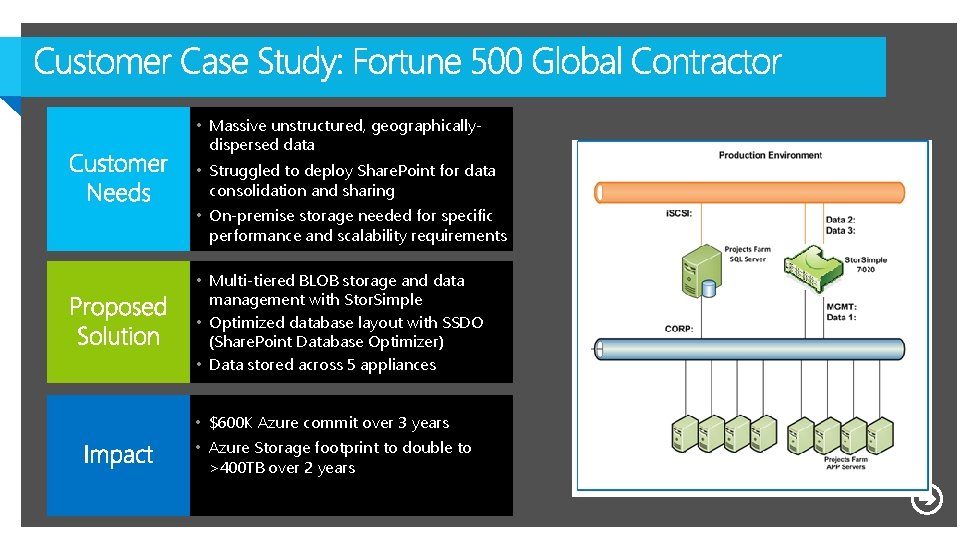
• Massive unstructured, geographicallydispersed data • Struggled to deploy Share. Point for data consolidation and sharing • On-premise storage needed for specific performance and scalability requirements • Multi-tiered BLOB storage and data management with Stor. Simple • Optimized database layout with SSDO (Share. Point Database Optimizer) • Data stored across 5 appliances • $600 K Azure commit over 3 years • Azure Storage footprint to double to >400 TB over 2 years
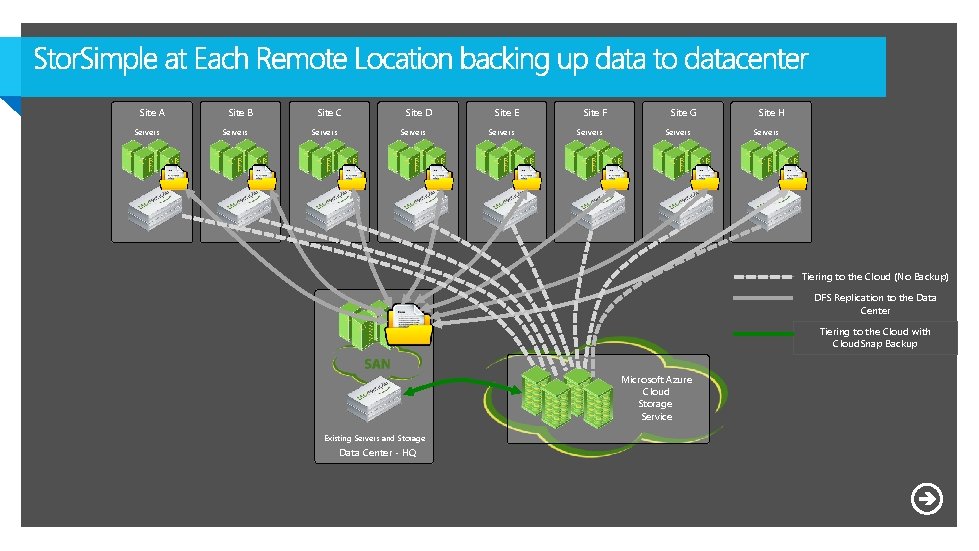
Site A Servers Site B Servers Site C Servers Site D Servers Site E Servers Site F Servers Site G Servers Site H Servers Tiering to the Cloud (No Backup) DFS Replication to the Data Center Tiering to the Cloud with Cloud. Snap Backup Microsoft Azure Cloud Storage Service Existing Servers and Storage Data Center - HQ 34
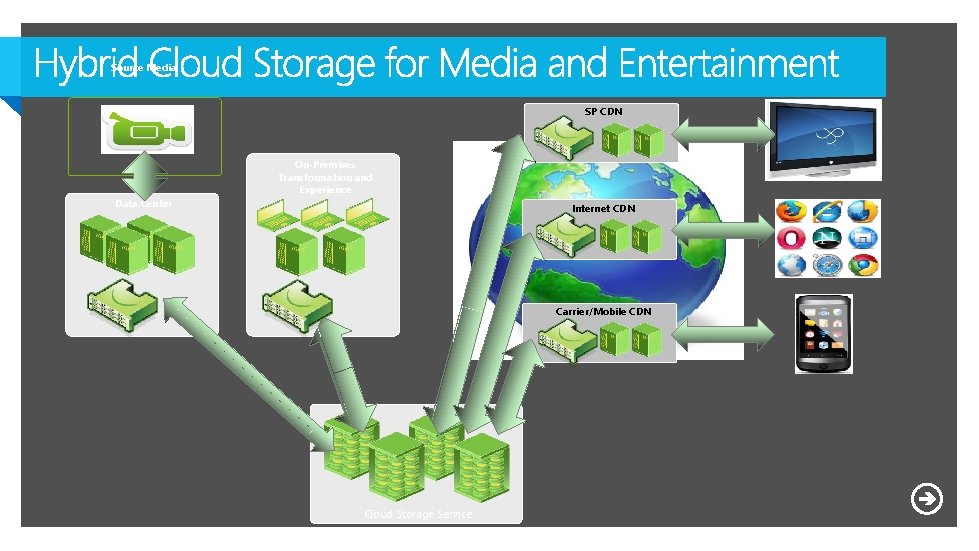
Source Media SP CDN On-Premises Transformation and Experience Data Center Internet CDN Carrier/Mobile CDN Cloud Storage Service
37
Complete your session evaluations today and enter to win prizes daily. Provide your feedback at a Comm. Net kiosk or log on at www. 2013 mms. com. Upon submission you will receive instant notification if you have won a prize. Prize pickup is at the Information Desk located in Attendee Services in the Mandalay Bay Foyer. Entry details can be found on the MMS website.