
21 Oracle Application Server 10 g Transaction Support
- Slides: 37
21 Oracle Application Server 10 g Transaction Support Copyright © 2004, Oracle. All rights reserved.
Objectives After completing this lesson, you should be able to do the following: • Identify the use of bean-managed transactions (BMT) • Identify the use of container-managed transactions (CMT) • Describe how Oracle Application Server 10 g Containers for J 2 EE (OC 4 J) supports one-phase and two-phase transaction protocols 21 -2 Copyright © 2004, Oracle. All rights reserved.
What Is a Transaction? A transaction: • Is a single logical unit of work or a set of tasks that are executed together • May access one or more shared resources, such as databases • Must be atomic, consistent, isolated, and durable (ACID) 21 -3 Copyright © 2004, Oracle. All rights reserved.
Enterprise Java. Beans (EJB) Support for Transactions • • 21 -4 The EJB architecture supports declarative and programmatic transactions. The bean provider is not exposed to the complexity of distributed transactions. The EJB container provides a transaction infrastructure. EJBs do not support a nested transaction model. Copyright © 2004, Oracle. All rights reserved.
EJB Transaction Model • Demarcating a transaction determines: – Who begins and ends a transaction – When each of these steps occur • A bean-managed (explicit) transaction: – Is demarcated by the bean – Is specified programmatically in the bean through JTA interface or Java Database Connectivity (JDBC) interface • A container-managed (declarative) transaction: – Is demarcated by the container – Is specified declaratively (implicit) through the XML deployment descriptor 21 -5 Copyright © 2004, Oracle. All rights reserved.
Demarcating Transactions • Container-managed transactional demarcation: – The <transaction-type> element set to container in the deployment descriptor – No transactional management code in the bean – Transaction management depends on value of the <trans-attribute> element – Available to entity, session, and message-driven beans (MDBs) • Bean-managed transactional demarcation: – The <transaction-type> element set to bean in the deployment descriptor – Bean implementation must demarcate the begin, commit, or rollback for the transaction – Available to session bean and MDBs, but not entity beans 21 -6 Copyright © 2004, Oracle. All rights reserved.
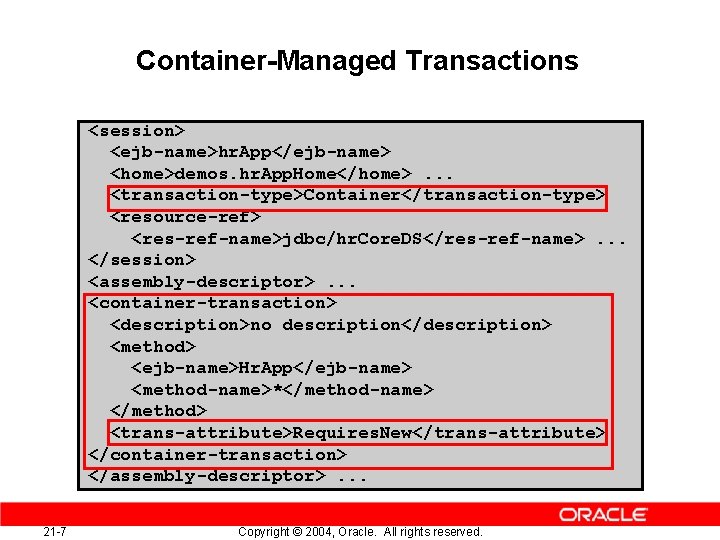
Container-Managed Transactions <session> <ejb-name>hr. App</ejb-name> <home>demos. hr. App. Home</home>. . . <transaction-type>Container</transaction-type> <resource-ref> <res-ref-name>jdbc/hr. Core. DS</res-ref-name>. . . </session> <assembly-descriptor>. . . <container-transaction> <description>no description</description> <method> <ejb-name>Hr. App</ejb-name> <method-name>*</method-name> </method> <trans-attribute>Requires. New</trans-attribute> </container-transaction> </assembly-descriptor>. . . 21 -7 Copyright © 2004, Oracle. All rights reserved.
CMT: Transaction Attributes • The following are the EJB-specified values of transaction attributes: – – – • 21 -8 Not. Supported Required Supports Requires. New Mandatory Never The transactional behavior of a bean can be changed with these attributes during deployment time. Copyright © 2004, Oracle. All rights reserved.
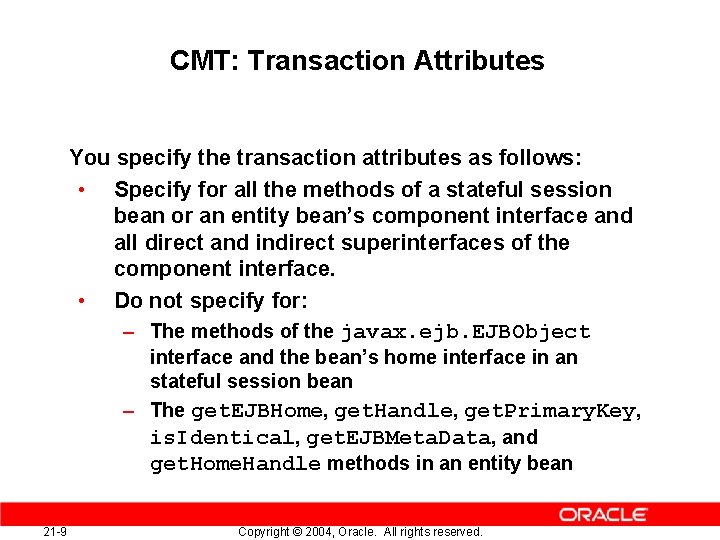
CMT: Transaction Attributes You specify the transaction attributes as follows: • Specify for all the methods of a stateful session bean or an entity bean’s component interface and all direct and indirect superinterfaces of the component interface. • Do not specify for: – The methods of the javax. ejb. EJBObject interface and the bean’s home interface in an stateful session bean – The get. EJBHome, get. Handle, get. Primary. Key, is. Identical, get. EJBMeta. Data, and get. Home. Handle methods in an entity bean 21 -9 Copyright © 2004, Oracle. All rights reserved.
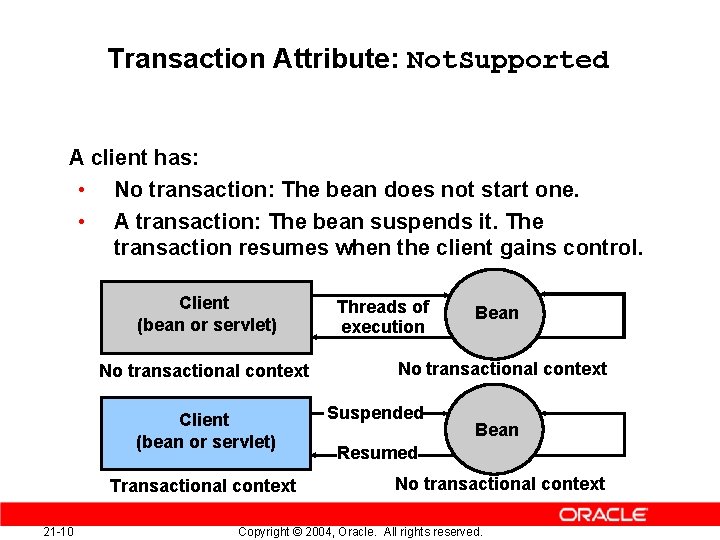
Transaction Attribute: Not. Supported A client has: • No transaction: The bean does not start one. • A transaction: The bean suspends it. The transaction resumes when the client gains control. Client (bean or servlet) No transactional context Client (bean or servlet) Transactional context 21 -10 Threads of execution Bean No transactional context Suspended Bean Resumed No transactional context Copyright © 2004, Oracle. All rights reserved.
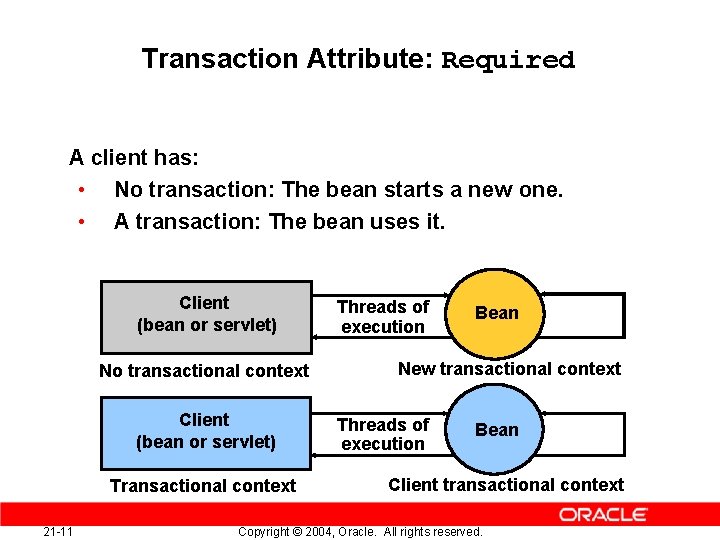
Transaction Attribute: Required A client has: • No transaction: The bean starts a new one. • A transaction: The bean uses it. Client (bean or servlet) No transactional context Client (bean or servlet) Transactional context 21 -11 Threads of execution Bean New transactional context Threads of execution Bean Client transactional context Copyright © 2004, Oracle. All rights reserved.
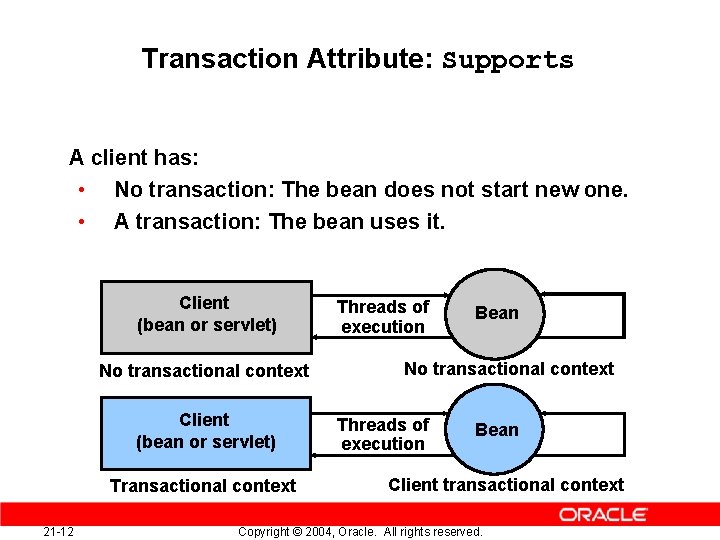
Transaction Attribute: Supports A client has: • No transaction: The bean does not start new one. • A transaction: The bean uses it. Client (bean or servlet) No transactional context Client (bean or servlet) Transactional context 21 -12 Threads of execution Bean No transactional context Threads of execution Bean Client transactional context Copyright © 2004, Oracle. All rights reserved.
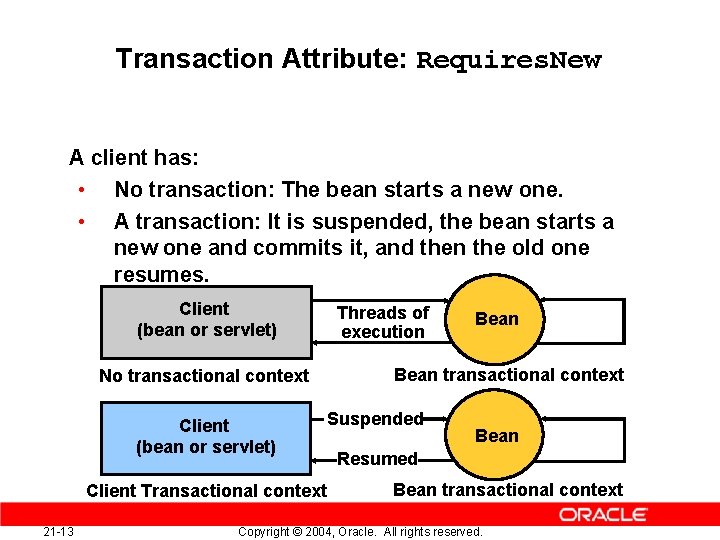
Transaction Attribute: Requires. New A client has: • No transaction: The bean starts a new one. • A transaction: It is suspended, the bean starts a new one and commits it, and then the old one resumes. Client (bean or servlet) No transactional context Client (bean or servlet) Client Transactional context 21 -13 Threads of execution Bean transactional context Suspended Bean Resumed Bean transactional context Copyright © 2004, Oracle. All rights reserved.
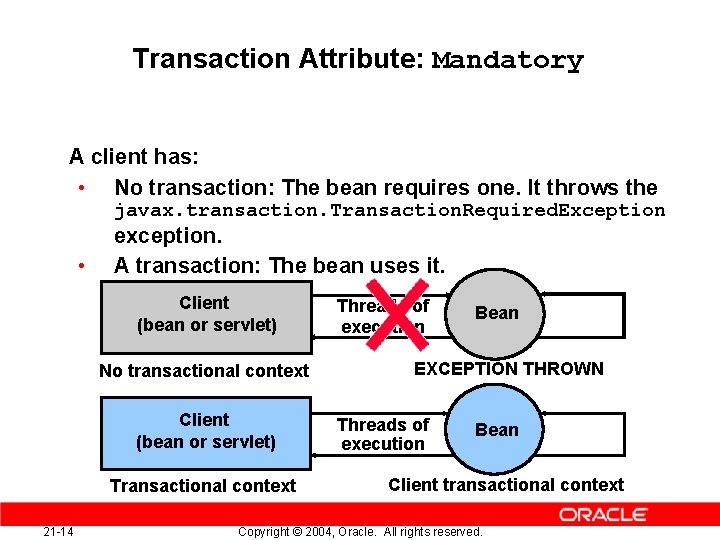
Transaction Attribute: Mandatory A client has: • No transaction: The bean requires one. It throws the javax. transaction. Transaction. Required. Exception • exception. A transaction: The bean uses it. Client (bean or servlet) No transactional context Client (bean or servlet) Transactional context 21 -14 Threads of execution Bean EXCEPTION THROWN Threads of execution Bean Client transactional context Copyright © 2004, Oracle. All rights reserved.
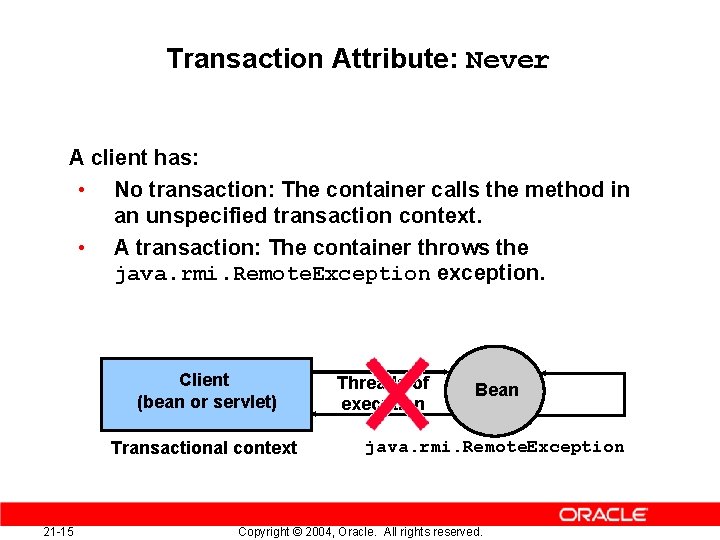
Transaction Attribute: Never A client has: • No transaction: The container calls the method in an unspecified transaction context. • A transaction: The container throws the java. rmi. Remote. Exception exception. Client (bean or servlet) Transactional context 21 -15 Threads of execution Bean java. rmi. Remote. Exception Copyright © 2004, Oracle. All rights reserved.
CMT: The set. Rollback. Only() Method • • • 21 -16 The set. Rollback. Only() method can control the transaction state in the bean for a CMT. The set. Rollback. Only() method marks the current transaction for rollback. If a transaction is marked for rollback, then the container rolls back the transaction before returning to the caller. Copyright © 2004, Oracle. All rights reserved.
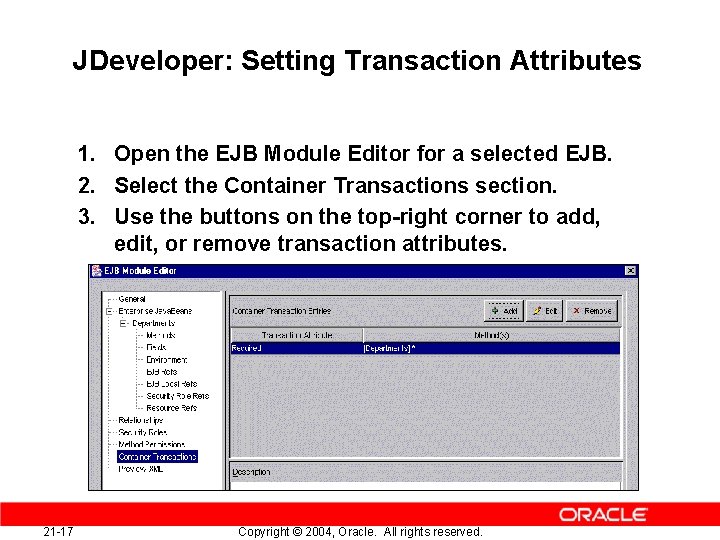
JDeveloper: Setting Transaction Attributes 1. Open the EJB Module Editor for a selected EJB. 2. Select the Container Transactions section. 3. Use the buttons on the top-right corner to add, edit, or remove transaction attributes. 21 -17 Copyright © 2004, Oracle. All rights reserved.
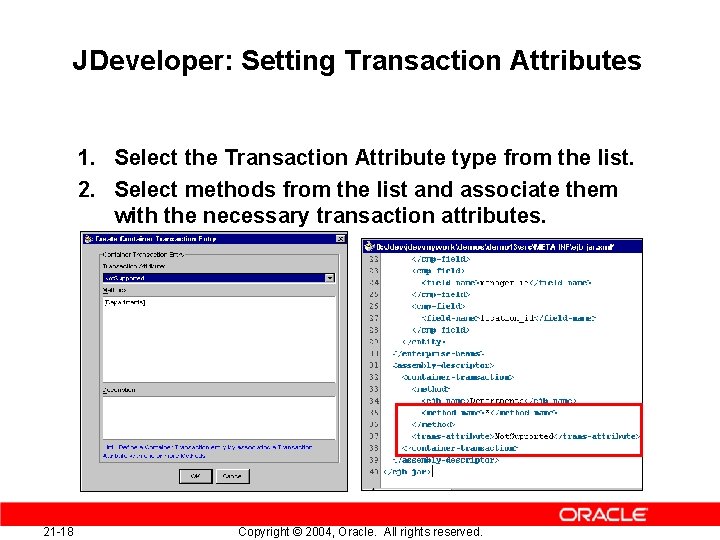
JDeveloper: Setting Transaction Attributes 1. Select the Transaction Attribute type from the list. 2. Select methods from the list and associate them with the necessary transaction attributes. 21 -18 Copyright © 2004, Oracle. All rights reserved.
Java Transaction API (JTA) • • JTA is used for managing transactions in J 2 EE. JTA transactions involve: – Enlisting resources: Single-phase commit or twophase commit – Demarcating transactions: BMT or CMT • 21 -19 The JTA package provides an application interface (User. Transaction). Copyright © 2004, Oracle. All rights reserved.
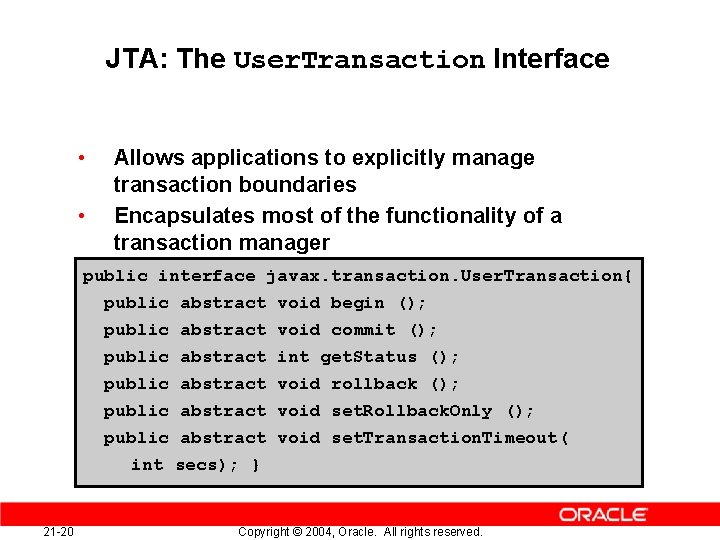
JTA: The User. Transaction Interface • • Allows applications to explicitly manage transaction boundaries Encapsulates most of the functionality of a transaction manager public interface javax. transaction. User. Transaction{ public abstract void begin (); public abstract public abstract int secs); } 21 -20 void commit (); int get. Status (); void rollback (); void set. Rollback. Only (); void set. Transaction. Timeout( Copyright © 2004, Oracle. All rights reserved.
Bean-Managed Transactions Demarcation • Is indicated by the value Bean for the <transaction-type> element in the deployment descriptor • Uses the User. Transaction interface of JTA to demarcate and manage the transactions programmatically By using a User. Transaction object, the bean: • • 21 -21 Initializes a transaction context on the client Invokes the begin(), commit(), or rollback() methods on the current transaction context to manage the transactions Copyright © 2004, Oracle. All rights reserved.
BMT Demarcation: Process 1. Retrieve the User. Transaction object from the bean code by using a JNDI name. 2. Start a transaction by invoking the begin() method on the User. Transaction object. 3. Execute the business logic to be included in the transaction. 4. End the transaction by invoking the commit() or rollback() methods of the User. Transaction object. 21 -22 Copyright © 2004, Oracle. All rights reserved.
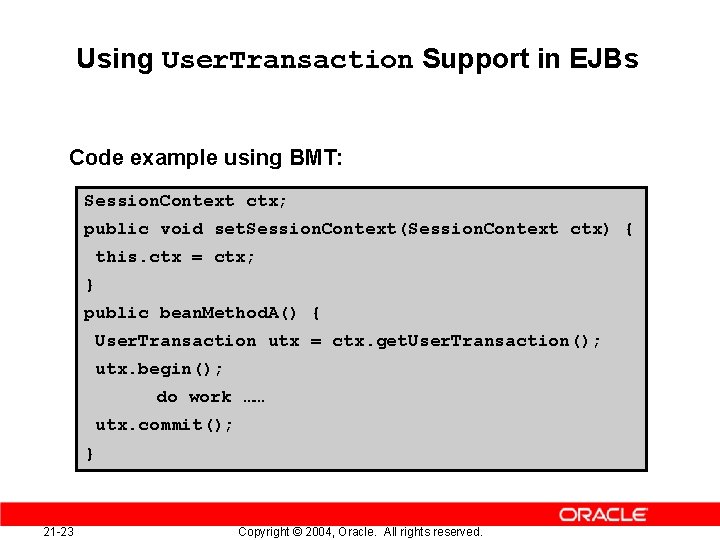
Using User. Transaction Support in EJBs Code example using BMT: Session. Context ctx; public void set. Session. Context(Session. Context ctx) { this. ctx = ctx; } public bean. Method. A() { User. Transaction utx = ctx. get. User. Transaction(); utx. begin(); do work …… utx. commit(); } 21 -23 Copyright © 2004, Oracle. All rights reserved.
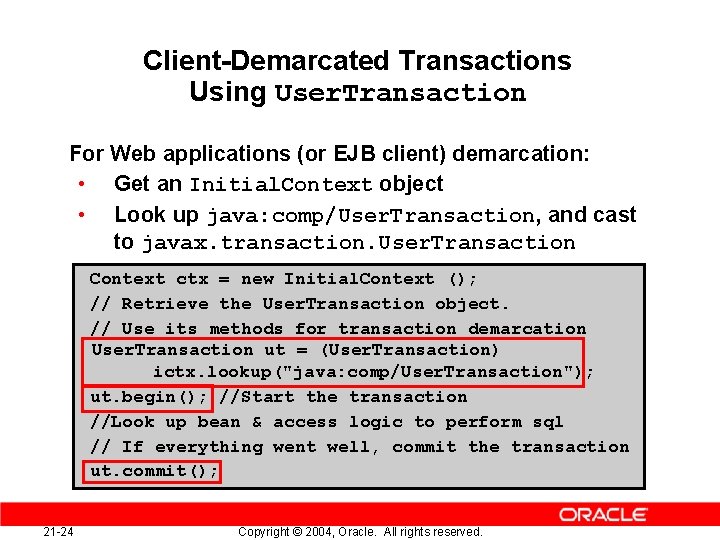
Client-Demarcated Transactions Using User. Transaction For Web applications (or EJB client) demarcation: • Get an Initial. Context object • Look up java: comp/User. Transaction, and cast to javax. transaction. User. Transaction Context ctx = new Initial. Context (); // Retrieve the User. Transaction object. // Use its methods for transaction demarcation User. Transaction ut = (User. Transaction) ictx. lookup("java: comp/User. Transaction"); ut. begin(); //Start the transaction //Look up bean & access logic to perform sql // If everything went well, commit the transaction ut. commit(); 21 -24 Copyright © 2004, Oracle. All rights reserved.
BMT Demarcation: Restrictions • Session and message-driven EJBs can have beanmanaged transactions if their <transactiontype> element is set to Bean. • An instance that starts a transaction must complete the transaction before it starts a new transaction. A stateful session bean commit a transaction before a business method ends. A stateless session bean must commit the transaction before the business method returns. • • 21 -25 Copyright © 2004, Oracle. All rights reserved.
Local and Global Transactions • A local transaction: – Is started and coordinated internally by the resource manager – Has a single-phase commit • A global transaction: – Is controlled by a transaction manager external to the resources involved – Has a two-phase commit 21 -26 Copyright © 2004, Oracle. All rights reserved.
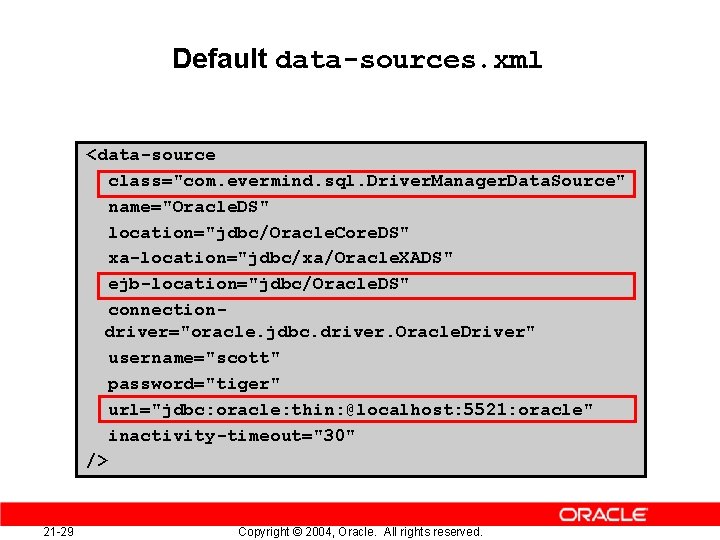
Single-Phase Commit • Configure a data source: – Use the default emulated data source configuration. – Modify the url attribute with the URL of your database. • Enlist a resource (database): Retrieve a connection to the data source in the bean after the transaction has begun. – Look up the data source in the JNDI namespace. – Retrieve the connection by using the JTA/JDBC interface. 21 -27 Copyright © 2004, Oracle. All rights reserved.
Data Source Revisited • A data source is an instantiation of an object that implements the javax. sql. Data. Source interface. • You can use a data source to retrieve a connection to a database server. A data source offers a portable, vendorindependent method for creating JDBC connections. J 2 EE applications use JNDI to look up Data. Source objects. Data sources are defined in data-sources. xml. • • 21 -28 Data sources can be emulated or nonemulated. Copyright © 2004, Oracle. All rights reserved.
Default data-sources. xml <data-source class="com. evermind. sql. Driver. Manager. Data. Source" name="Oracle. DS" location="jdbc/Oracle. Core. DS" xa-location="jdbc/xa/Oracle. XADS" ejb-location="jdbc/Oracle. DS" connectiondriver="oracle. jdbc. driver. Oracle. Driver" username="scott" password="tiger" url="jdbc: oracle: thin: @localhost: 5521: oracle" inactivity-timeout="30" /> 21 -29 Copyright © 2004, Oracle. All rights reserved.
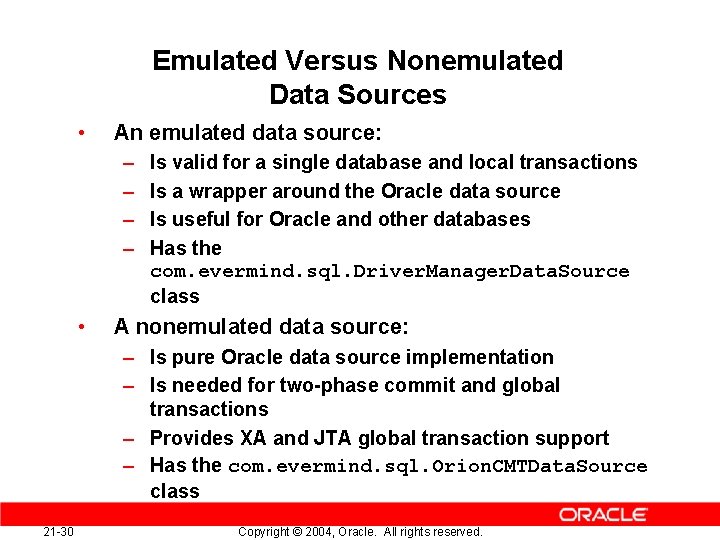
Emulated Versus Nonemulated Data Sources • An emulated data source: – – • Is valid for a single database and local transactions Is a wrapper around the Oracle data source Is useful for Oracle and other databases Has the com. evermind. sql. Driver. Manager. Data. Source class A nonemulated data source: – Is pure Oracle data source implementation – Is needed for two-phase commit and global transactions – Provides XA and JTA global transaction support – Has the com. evermind. sql. Orion. CMTData. Source class 21 -30 Copyright © 2004, Oracle. All rights reserved.
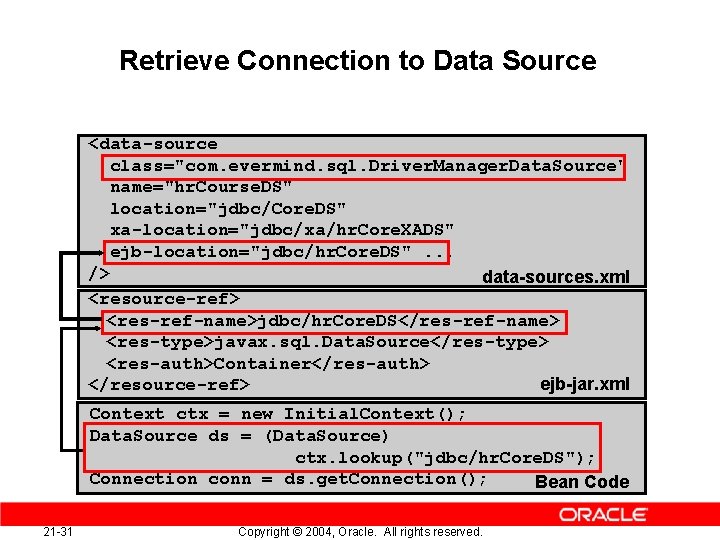
Retrieve Connection to Data Source <data-source class="com. evermind. sql. Driver. Manager. Data. Source" name="hr. Course. DS" location="jdbc/Core. DS" xa-location="jdbc/xa/hr. Core. XADS" ejb-location="jdbc/hr. Core. DS". . . /> data-sources. xml <resource-ref> <res-ref-name>jdbc/hr. Core. DS</res-ref-name> <res-type>javax. sql. Data. Source</res-type> <res-auth>Container</res-auth> ejb-jar. xml </resource-ref> Context ctx = new Initial. Context(); Data. Source ds = (Data. Source) ctx. lookup("jdbc/hr. Core. DS"); Connection conn = ds. get. Connection(); Bean Code 21 -31 Copyright © 2004, Oracle. All rights reserved.
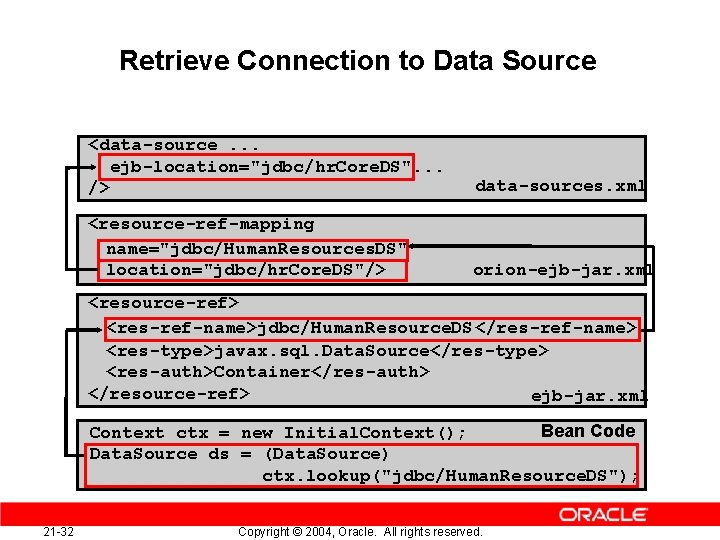
Retrieve Connection to Data Source <data-source. . . ejb-location="jdbc/hr. Core. DS". . . /> data-sources. xml <resource-ref-mapping name="jdbc/Human. Resources. DS" location="jdbc/hr. Core. DS"/> orion-ejb-jar. xml <resource-ref> <res-ref-name>jdbc/Human. Resource. DS</res-ref-name> <res-type>javax. sql. Data. Source</res-type> <res-auth>Container</res-auth> </resource-ref> ejb-jar. xml Bean Code Context ctx = new Initial. Context(); Data. Source ds = (Data. Source) ctx. lookup("jdbc/Human. Resource. DS"); 21 -32 Copyright © 2004, Oracle. All rights reserved.
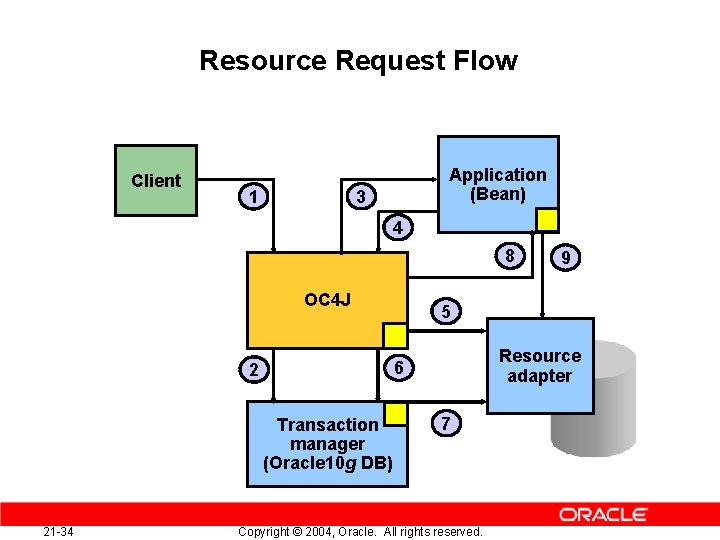
Global Transaction Resource Request Flow • • When an EJB requests a JDBC connection or some other transactional resource, it gets associated with the global transaction. Consider an EJB with a container-managed transactions (CMT). Assume that: – The client invokes a bean with the transaction attribute Required – The client is not associated with a global transaction 21 -33 Copyright © 2004, Oracle. All rights reserved.
Resource Request Flow Client Application (Bean) 3 1 4 8 OC 4 J Transaction manager (Oracle 10 g DB) 21 -34 5 Resource adapter 6 2 9 7 Copyright © 2004, Oracle. All rights reserved.
Enlisting Database Resources • • 21 -36 The process of including SQL updates in a transaction is called “enlisting. ” JTA automatically enlists databases opened with a Data. Source object in a global User. Transaction object. Since JDK 1. 2, a Data. Source published into a JNDI namespace is the recommended way to make connections. If your global transaction involves more than one database, then you must configure a two-phase commit engine. Copyright © 2004, Oracle. All rights reserved.
Summary In this lesson, you should have learned how to: • Describe bean-managed and container-managed transactions • Explain how OC 4 J supports one-phase and twophase transaction protocol logic 21 -38 Copyright © 2004, Oracle. All rights reserved.
Practice 21 -1: Overview This practice covers the following topics: • Deploying a Web application and entity bean with CMT • Altering the transaction attributes of the methods in the entity bean, and testing behavior • Optionally, creating a session bean to mediate a transaction between the Web application and the entity bean methods 21 -39 Copyright © 2004, Oracle. All rights reserved.