
2016 EDUCAUSE Core Data Service CDS Benchmarking Report
2016 EDUCAUSE Core Data Service (CDS) Benchmarking Report
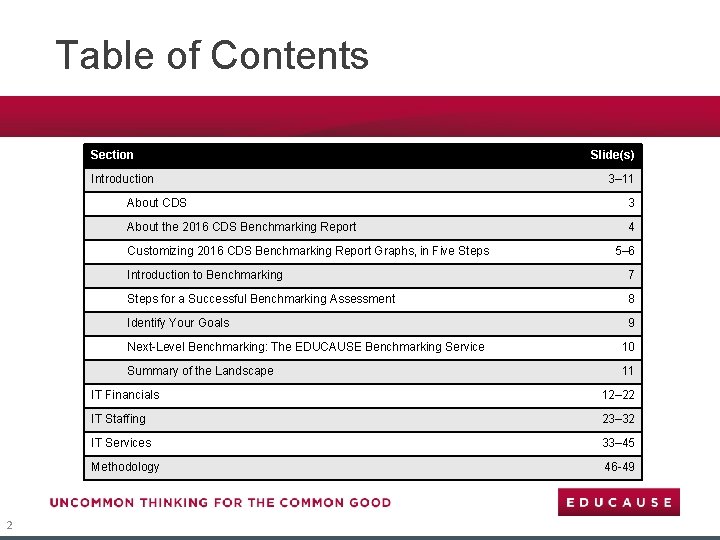
Table of Contents Section Introduction 3– 11 About CDS 3 About the 2016 CDS Benchmarking Report 4 Customizing 2016 CDS Benchmarking Report Graphs, in Five Steps 2 Slide(s) 5– 6 Introduction to Benchmarking 7 Steps for a Successful Benchmarking Assessment 8 Identify Your Goals 9 Next-Level Benchmarking: The EDUCAUSE Benchmarking Service 10 Summary of the Landscape 11 IT Financials 12– 22 IT Staffing 23– 32 IT Services 33– 45 Methodology 46 -49

About CDS Since 2002, the EDUCAUSE Core Data Service (CDS) has been providing higher education CIOs and senior IT leaders with the benchmarks they need to make strategic decisions about IT at their institutions. On average, more than 800 institutions (both within and outside the United States) participate in a survey about IT financials, staffing, and services. Survey participants are rewarded for their time and effort with access to CDS data through a selfservice portal that enables them to benchmark their IT organizations against those of their peers. In addition to gaining access to CDS data, institutions also participate in CDS for the following reasons: § § § 3 To study their IT organization To benchmark against past performance To look at trends over time To start gathering and using metrics To have data available “just in case”
About the 2016 CDS Benchmarking Report The 2016 CDS Benchmarking Report summarizes key findings from the CDS 2016 survey, provides a glimpse into the breadth of CDS data, and ultimately provides you with an opportunity to conduct your own benchmarking assessment. The customizable graphs contained within this report are meant to be used to assess your IT operation compared to that of peer institutions of similar size, control, or Carnegie Classification. As you consider the metrics and benchmarks in this report in relation to your institution, findings that differ from your experience should inspire questions, not answers. When questions do arise, CDS data can facilitate further investigation (if your institution participated in CDS 2016). If your institution did not participate, consider adding your data to the next CDS survey, launching in July 2017. The CDS 2016 survey concluded with 784 participants. The metrics discussed in this report focus primarily on FY 2015/16 central IT financials, staffing, and services from 680 nonspecialized U. S. institutions. Metrics are calculated for each of six Carnegie Classification groupings using the 2010 classification system (AA, BA, MA public, MA private, DR public, and DR private). These groupings provide the most granular breakdown by institutional type possible (given available sample sizes) and should provide suitable comparison groups for most institution types and sizes within the United States. Forty-seven specialized U. S. institutions and 57 non-U. S. institutions from 18 countries participated in the 2016 survey; however, small sample sizes from each of these groups preclude meaningful aggregate analysis. If your institution is a specialized U. S. institution or a non-U. S. institution, this report may be used to compare your institution to institutions in a similar Carnegie Classification or to the metric calculated for All (non-specialized) U. S. institutions. A list of CDS 2016 participants can be found on the CDS website. 4
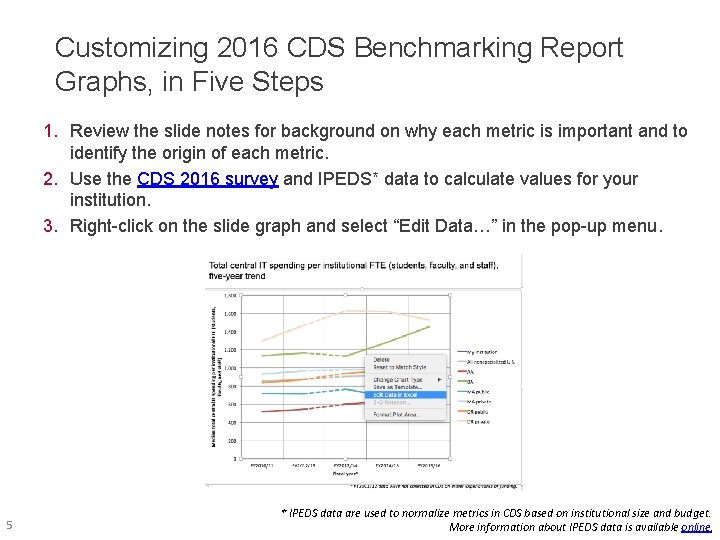
Customizing 2016 CDS Benchmarking Report Graphs, in Five Steps 1. Review the slide notes for background on why each metric is important and to identify the origin of each metric. 2. Use the CDS 2016 survey and IPEDS* data to calculate values for your institution. 3. Right-click on the slide graph and select “Edit Data…” in the pop-up menu. 5 * IPEDS data are used to normalize metrics in CDS based on institutional size and budget. More information about IPEDS data is available online.
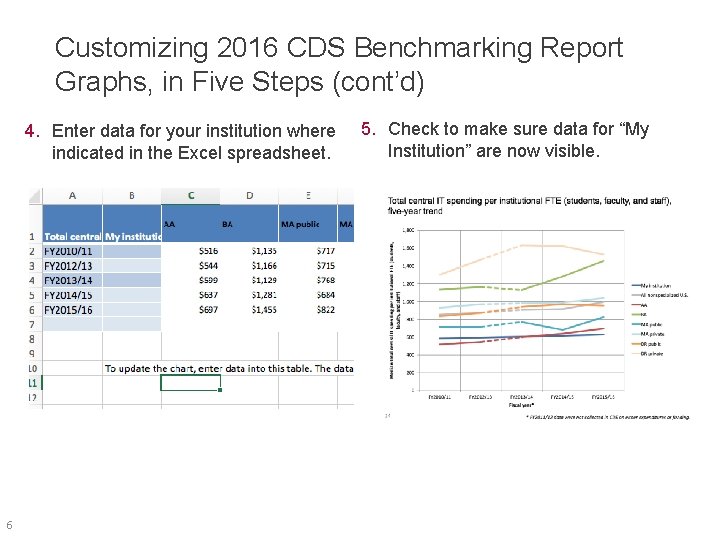
Customizing 2016 CDS Benchmarking Report Graphs, in Five Steps (cont’d) 4. Enter data for your institution where indicated in the Excel spreadsheet. 6 5. Check to make sure data for “My Institution” are now visible.
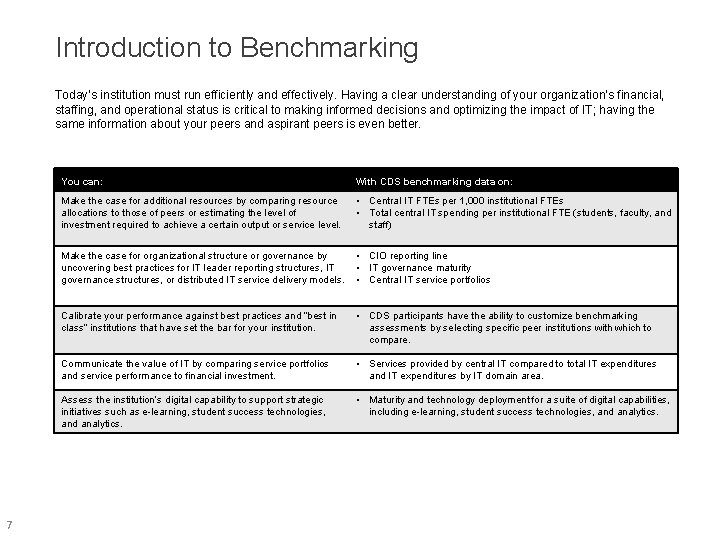
Introduction to Benchmarking Today’s institution must run efficiently and effectively. Having a clear understanding of your organization’s financial, staffing, and operational status is critical to making informed decisions and optimizing the impact of IT; having the same information about your peers and aspirant peers is even better. 7 You can: With CDS benchmarking data on: Make the case for additional resources by comparing resource allocations to those of peers or estimating the level of investment required to achieve a certain output or service level. • Central IT FTEs per 1, 000 institutional FTEs • Total central IT spending per institutional FTE (students, faculty, and staff) Make the case for organizational structure or governance by uncovering best practices for IT leader reporting structures, IT governance structures, or distributed IT service delivery models. • CIO reporting line • IT governance maturity • Central IT service portfolios Calibrate your performance against best practices and “best in class” institutions that have set the bar for your institution. • CDS participants have the ability to customize benchmarking assessments by selecting specific peer institutions with which to compare. Communicate the value of IT by comparing service portfolios and service performance to financial investment. • Services provided by central IT compared to total IT expenditures and IT expenditures by IT domain area. Assess the institution’s digital capability to support strategic initiatives such as e-learning, student success technologies, and analytics. • Maturity and technology deployment for a suite of digital capabilities, including e-learning, student success technologies, and analytics.
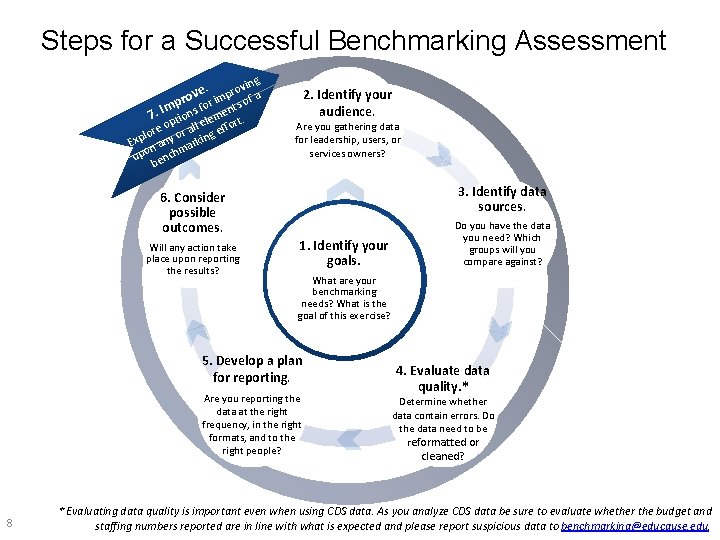
Steps for a Successful Benchmarking Assessment vin g ve. pro or im s of a t f m 7. I ptions lemen rt. e re o or all g effo o l Exp n any arkin m upo ench b 2. Identify your audience. Are you gathering data for leadership, users, or services owners? 3. Identify data sources. 6. Consider possible outcomes. Will any action take place upon reporting the results? 1. Identify your goals. What are your benchmarking needs? What is the goal of this exercise? 5. Develop a plan for reporting. Are you reporting the data at the right frequency, in the right formats, and to the right people? 8 Do you have the data you need? Which groups will you compare against? 4. Evaluate data quality. * Determine whether data contain errors. Do the data need to be reformatted or cleaned? * Evaluating data quality is important even when using CDS data. As you analyze CDS data be sure to evaluate whether the budget and staffing numbers reported are in line with what is expected and please report suspicious data to benchmarking@educause. edu.
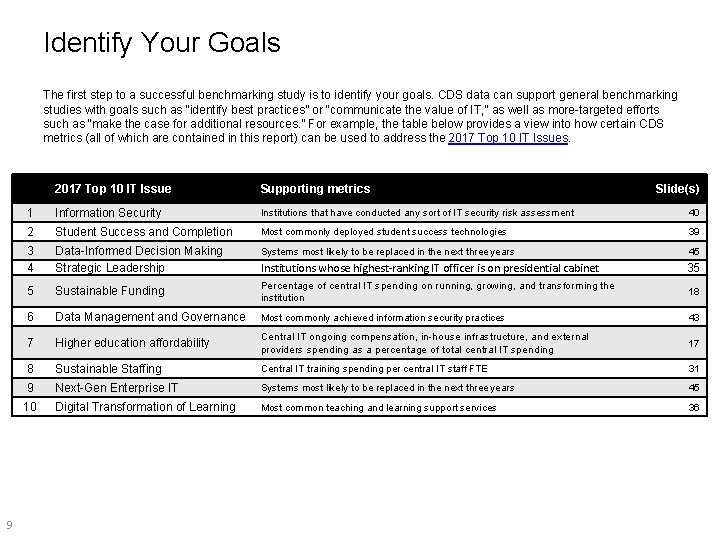
Identify Your Goals The first step to a successful benchmarking study is to identify your goals. CDS data can support general benchmarking studies with goals such as “identify best practices” or “communicate the value of IT, ” as well as more-targeted efforts such as “make the case for additional resources. ” For example, the table below provides a view into how certain CDS metrics (all of which are contained in this report) can be used to address the 2017 Top 10 IT Issues. 9 2017 Top 10 IT Issue Supporting metrics Slide(s) 1 Information Security Institutions that have conducted any sort of IT security risk assessment 40 2 Student Success and Completion Most commonly deployed student success technologies 39 3 4 Data-Informed Decision Making Strategic Leadership Systems most likely to be replaced in the next three years 45 Institutions whose highest-ranking IT officer is on presidential cabinet 35 5 Sustainable Funding Percentage of central IT spending on running, growing, and transforming the institution 18 6 Data Management and Governance Most commonly achieved information security practices 43 7 Higher education affordability Central IT ongoing compensation, in-house infrastructure, and external providers spending as a percentage of total central IT spending 17 8 Sustainable Staffing Central IT training spending per central IT staff FTE 31 9 Next-Gen Enterprise IT Systems most likely to be replaced in the next three years 45 10 Digital Transformation of Learning Most common teaching and learning support services 36
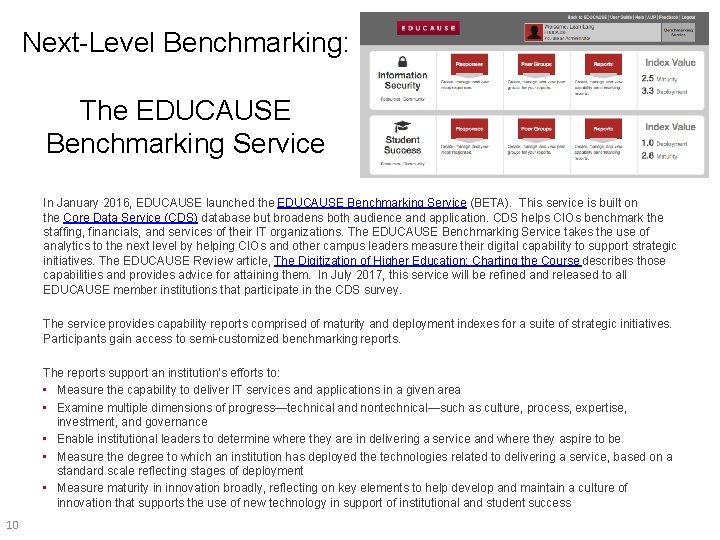
Next-Level Benchmarking: The EDUCAUSE Benchmarking Service In January 2016, EDUCAUSE launched the EDUCAUSE Benchmarking Service (BETA). This service is built on the Core Data Service (CDS) database but broadens both audience and application. CDS helps CIOs benchmark the staffing, financials, and services of their IT organizations. The EDUCAUSE Benchmarking Service takes the use of analytics to the next level by helping CIOs and other campus leaders measure their digital capability to support strategic initiatives. The EDUCAUSE Review article, The Digitization of Higher Education: Charting the Course describes those capabilities and provides advice for attaining them. In July 2017, this service will be refined and released to all EDUCAUSE member institutions that participate in the CDS survey. The service provides capability reports comprised of maturity and deployment indexes for a suite of strategic initiatives. Participants gain access to semi-customized benchmarking reports. The reports support an institution's efforts to: • Measure the capability to deliver IT services and applications in a given area • Examine multiple dimensions of progress—technical and nontechnical—such as culture, process, expertise, investment, and governance • Enable institutional leaders to determine where they are in delivering a service and where they aspire to be • Measure the degree to which an institution has deployed the technologies related to delivering a service, based on a standard scale reflecting stages of deployment • Measure maturity in innovation broadly, reflecting on key elements to help develop and maintain a culture of innovation that supports the use of new technology in support of institutional and student success 10
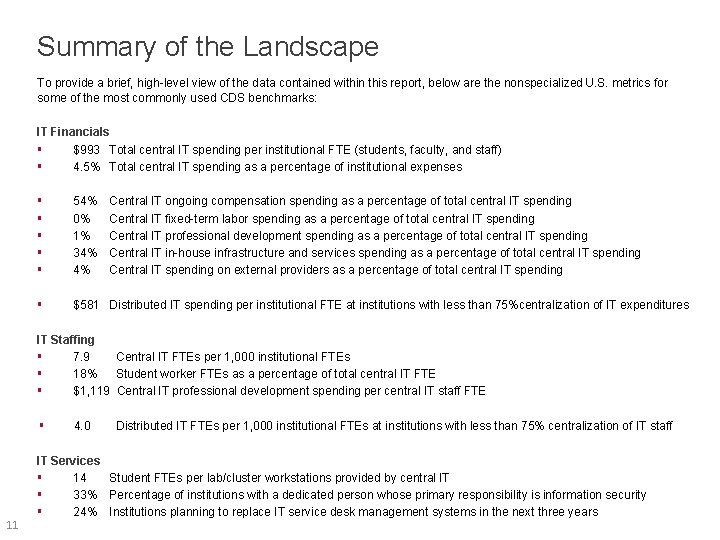
Summary of the Landscape To provide a brief, high-level view of the data contained within this report, below are the nonspecialized U. S. metrics for some of the most commonly used CDS benchmarks: IT Financials § $993 Total central IT spending per institutional FTE (students, faculty, and staff) § 4. 5% Total central IT spending as a percentage of institutional expenses § § § 54% 0% 1% 34% 4% § $581 Distributed IT spending per institutional FTE at institutions with less than 75%centralization of IT expenditures Central IT ongoing compensation spending as a percentage of total central IT spending Central IT fixed-term labor spending as a percentage of total central IT spending Central IT professional development spending as a percentage of total central IT spending Central IT in-house infrastructure and services spending as a percentage of total central IT spending Central IT spending on external providers as a percentage of total central IT spending IT Staffing § 7. 9 Central IT FTEs per 1, 000 institutional FTEs § 18% Student worker FTEs as a percentage of total central IT FTE § $1, 119 Central IT professional development spending per central IT staff FTE § 11 4. 0 Distributed IT FTEs per 1, 000 institutional FTEs at institutions with less than 75% centralization of IT staff IT Services § 14 Student FTEs per lab/cluster workstations provided by central IT § 33% Percentage of institutions with a dedicated person whose primary responsibility is information security § 24% Institutions planning to replace IT service desk management systems in the next three years
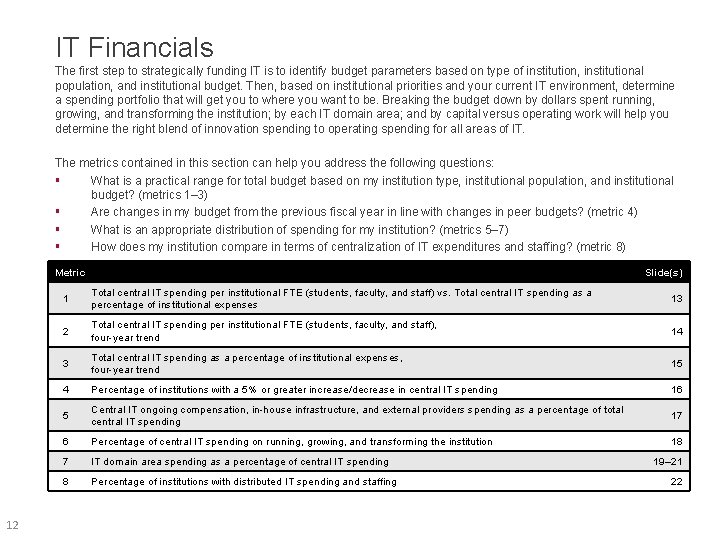
IT Financials The first step to strategically funding IT is to identify budget parameters based on type of institution, institutional population, and institutional budget. Then, based on institutional priorities and your current IT environment, determine a spending portfolio that will get you to where you want to be. Breaking the budget down by dollars spent running, growing, and transforming the institution; by each IT domain area; and by capital versus operating work will help you determine the right blend of innovation spending to operating spending for all areas of IT. The metrics contained in this section can help you address the following questions: § What is a practical range for total budget based on my institution type, institutional population, and institutional budget? (metrics 1– 3) § Are changes in my budget from the previous fiscal year in line with changes in peer budgets? (metric 4) § What is an appropriate distribution of spending for my institution? (metrics 5– 7) § How does my institution compare in terms of centralization of IT expenditures and staffing? (metric 8) Metric 12 Slide(s) 1 Total central IT spending per institutional FTE (students, faculty, and staff) vs. Total central IT spending as a percentage of institutional expenses 13 2 Total central IT spending per institutional FTE (students, faculty, and staff), four-year trend 14 3 Total central IT spending as a percentage of institutional expenses, four-year trend 15 4 Percentage of institutions with a 5% or greater increase/decrease in central IT spending 16 5 Central IT ongoing compensation, in-house infrastructure, and external providers spending as a percentage of total central IT spending 17 6 Percentage of central IT spending on running, growing, and transforming the institution 18 7 IT domain area spending as a percentage of central IT spending 8 Percentage of institutions with distributed IT spending and staffing 19– 21 22
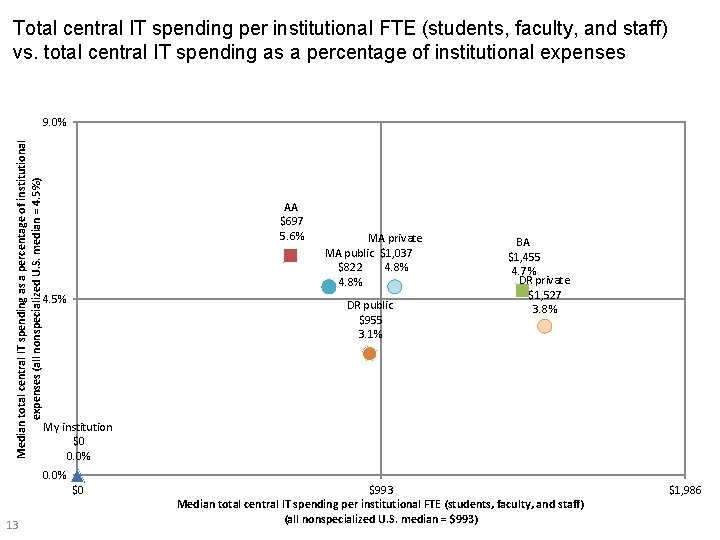
Total central IT spending per institutional FTE (students, faculty, and staff) vs. total central IT spending as a percentage of institutional expenses Median total central IT spending as a percentage of institutional expenses (all nonspecialized U. S. median = 4. 5%) 9. 0% AA $697 5. 6% 4. 5% MA private MA public $1, 037 4. 8% $822 4. 8% DR public $955 3. 1% BA $1, 455 4. 7% DR private $1, 527 3. 8% My institution $0 0. 0% $0 13 $993 Median total central IT spending per institutional FTE (students, faculty, and staff) (all nonspecialized U. S. median = $993) $1, 986
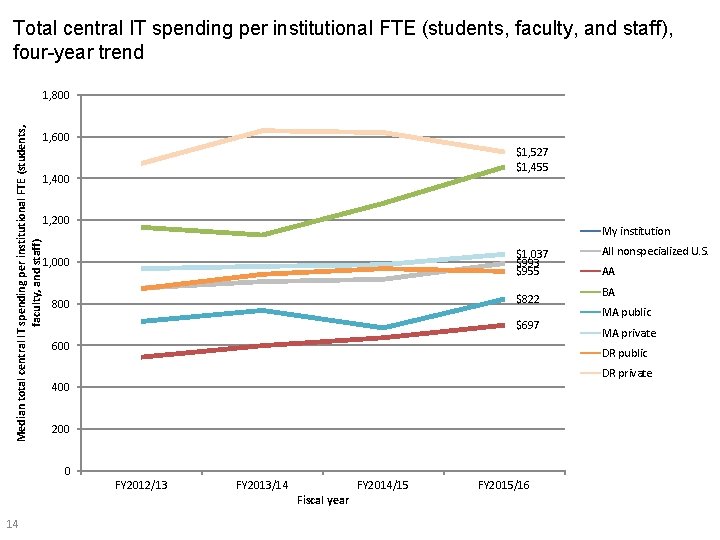
Total central IT spending per institutional FTE (students, faculty, and staff), four-year trend Median total central IT spending per institutional FTE (students, faculty, and staff) 1, 800 1, 600 $1, 527 $1, 455 1, 400 1, 200 My institution $1, 037 $993 $955 1, 000 $822 800 $697 600 AA BA MA public MA private DR public DR private 400 200 0 FY 2012/13 14 All nonspecialized U. S. FY 2013/14 Fiscal year FY 2014/15 FY 2015/16
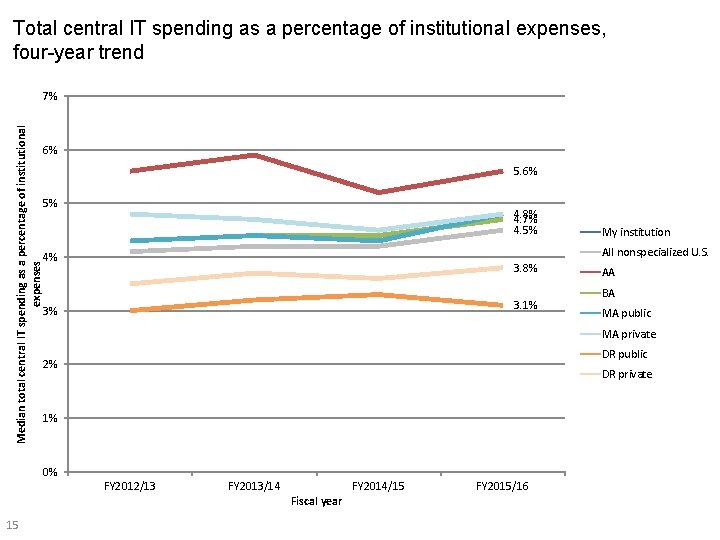
Total central IT spending as a percentage of institutional expenses, four-year trend Median total central IT spending as a percentage of institutional expenses 7% 6% 5% 4. 8% 4. 7% 4. 5% All nonspecialized U. S. 4% 3. 8% 3. 1% 3% AA BA MA public MA private DR public 2% DR private 1% 0% FY 2012/13 15 My institution FY 2013/14 Fiscal year FY 2014/15 FY 2015/16
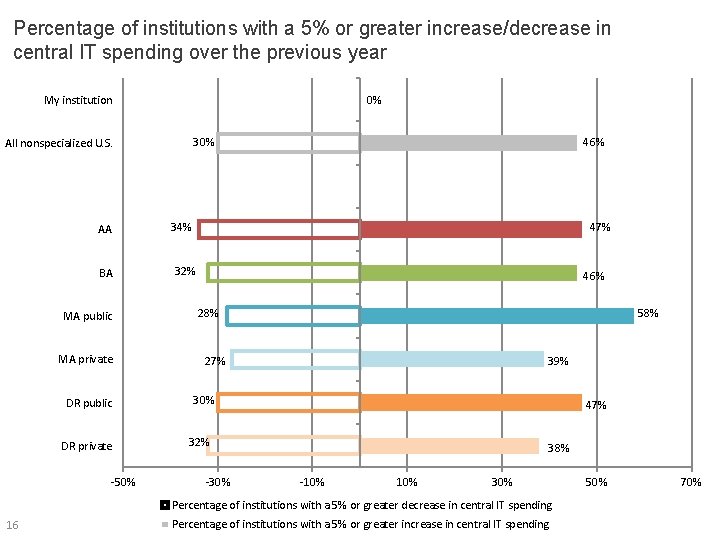
Percentage of institutions with a 5% or greater increase/decrease in central IT spending over the previous year 0% My institution 30% All nonspecialized U. S. AA BA MA public MA private DR public DR private -50% 46% 34% 47% 32% 46% 28% 58% 27% 39% 30% 47% 32% -30% 38% -10% 30% Percentage of institutions with a 5% or greater decrease in central IT spending 16 Percentage of institutions with a 5% or greater increase in central IT spending 50% 70%
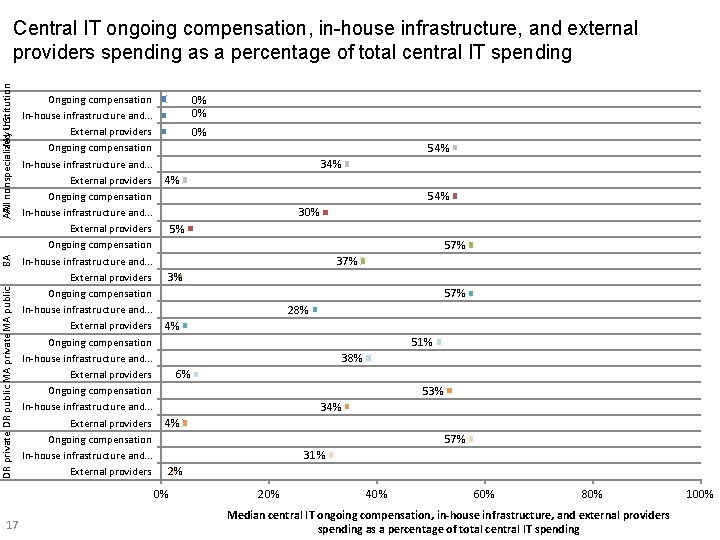
DR private DR public MA private MA public BA My U. S. institution AA All nonspecialized Central IT ongoing compensation, in-house infrastructure, and external providers spending as a percentage of total central IT spending Ongoing compensation In-house infrastructure and. . . External providers Ongoing compensation In-house infrastructure and. . . External providers 0% 0% 0% 54% 34% 4% 54% 30% 5% 57% 3% 57% 28% 4% 51% 38% 6% 53% 34% 4% 57% 31% 2% 0% 17 20% 40% 60% 80% Median central IT ongoing compensation, in-house infrastructure, and external providers spending as a percentage of total central IT spending 100%
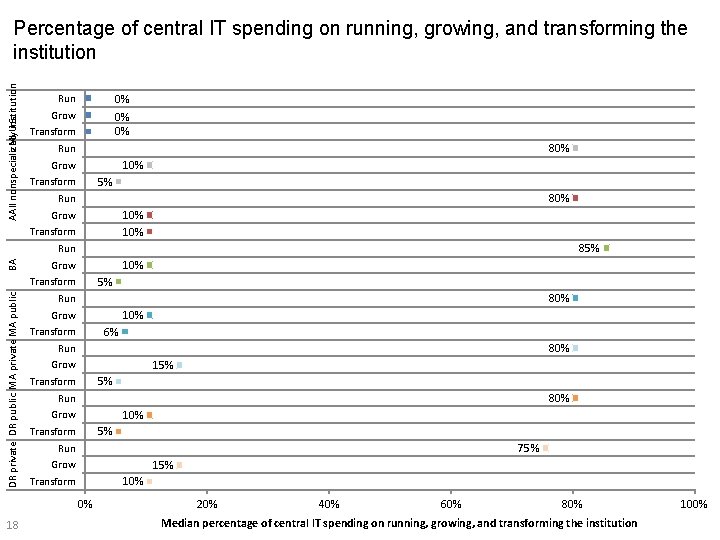
My. U. S. institution AA All nonspecialized Percentage of central IT spending on running, growing, and transforming the institution Run 0% 0% 0% Grow Transform 80% Run 10% Grow 5% Transform 80% Run 10% Grow Transform 85% BA Run 10% Grow 5% DR private DR public MA private MA public Transform 80% Run 10% Grow 6% Transform 80% Run 15% Grow 5% Transform 80% Run 10% Grow 5% Transform 75% Run 15% Grow 10% Transform 0% 18 20% 40% 60% 80% Median percentage of central IT spending on running, growing, and transforming the institution 100%
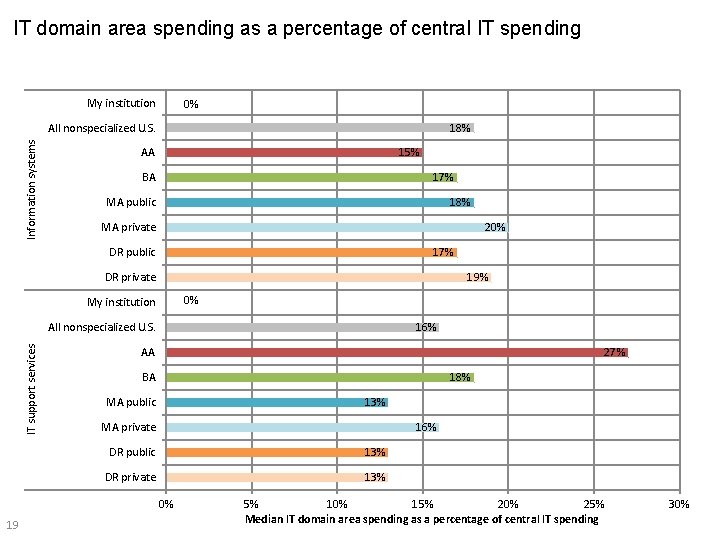
IT domain area spending as a percentage of central IT spending My institution 0% Information systems All nonspecialized U. S. 18% 15% AA BA 17% 18% MA public MA private 20% 17% DR public DR private 19% 0% My institution IT support services All nonspecialized U. S. 16% AA 27% BA 18% 13% MA public MA private 16% DR public 13% DR private 13% 0% 19 5% 10% 15% 20% 25% Median IT domain area spending as a percentage of central IT spending 30%
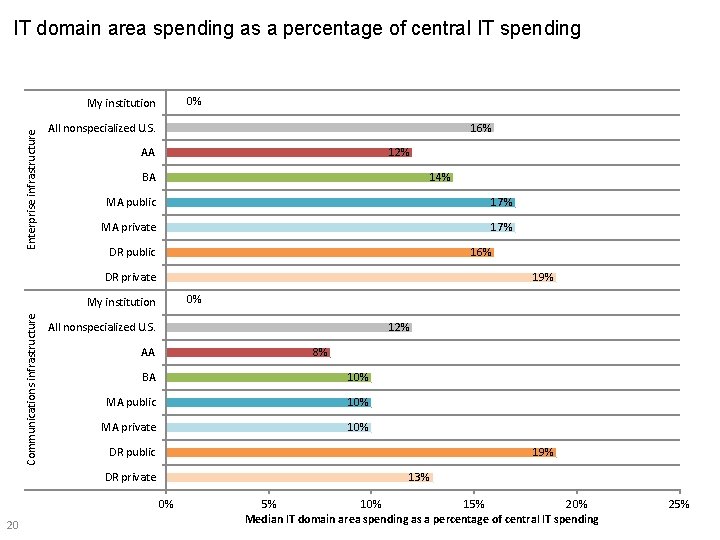
IT domain area spending as a percentage of central IT spending 0% Enterprise infrastructure My institution All nonspecialized U. S. 16% 12% AA BA 14% MA public 17% MA private 17% 16% DR public DR private 19% 0% Communications infrastructure My institution All nonspecialized U. S. 12% AA 8% BA 10% MA public 10% MA private 10% DR public 19% DR private 13% 0% 20 5% 10% 15% 20% Median IT domain area spending as a percentage of central IT spending 25%
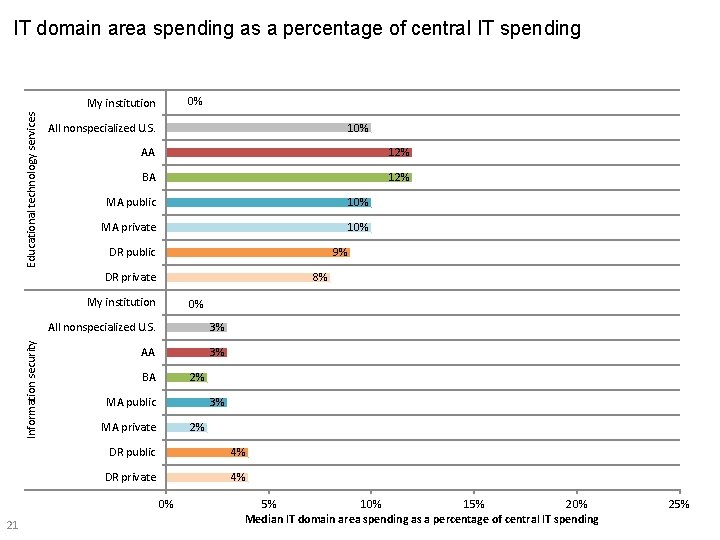
IT domain area spending as a percentage of central IT spending 0% Educational technology services My institution All nonspecialized U. S. 10% AA 12% BA 12% MA public 10% MA private 10% 9% DR public DR private 8% Information security My institution 0% All nonspecialized U. S. 3% AA 3% BA 2% 3% MA public MA private 2% DR public 4% DR private 4% 0% 21 5% 10% 15% 20% Median IT domain area spending as a percentage of central IT spending 25%
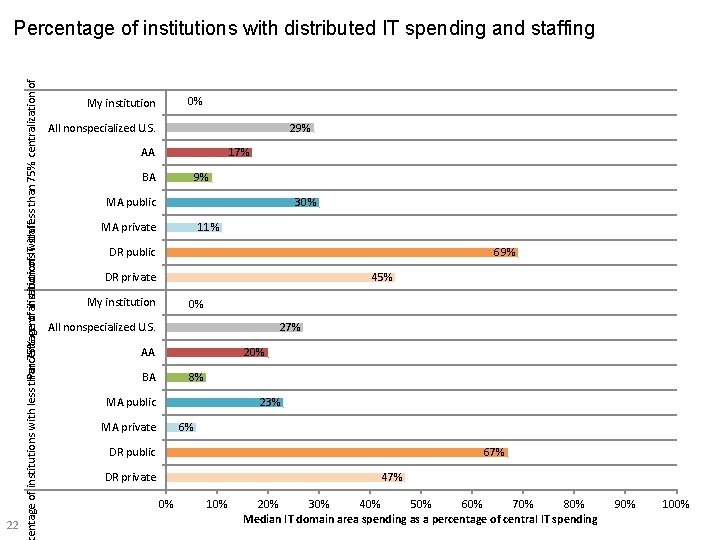
Percentage of institutions with less than 75% centralization of ITwith staffless than 75% centralization of IT expenditures Percentage of institutions with distributed IT spending and staffing 22 0% My institution All nonspecialized U. S. 29% 17% AA BA 9% 30% MA public MA private 11% 69% DR public DR private 45% My institution 0% All nonspecialized U. S. 27% AA 20% BA 8% 23% MA public MA private 6% DR public 67% DR private 47% 0% 10% 20% 30% 40% 50% 60% 70% 80% Median IT domain area spending as a percentage of central IT spending 90% 100%
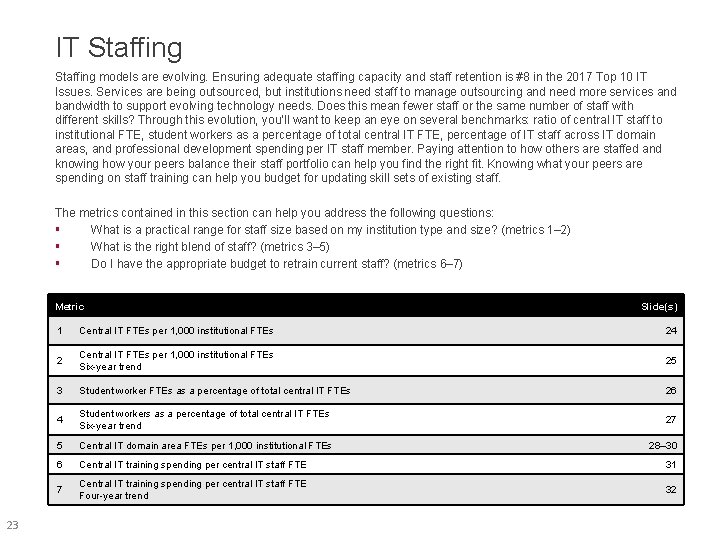
IT Staffing models are evolving. Ensuring adequate staffing capacity and staff retention is #8 in the 2017 Top 10 IT Issues. Services are being outsourced, but institutions need staff to manage outsourcing and need more services and bandwidth to support evolving technology needs. Does this mean fewer staff or the same number of staff with different skills? Through this evolution, you’ll want to keep an eye on several benchmarks: ratio of central IT staff to institutional FTE, student workers as a percentage of total central IT FTE, percentage of IT staff across IT domain areas, and professional development spending per IT staff member. Paying attention to how others are staffed and knowing how your peers balance their staff portfolio can help you find the right fit. Knowing what your peers are spending on staff training can help you budget for updating skill sets of existing staff. The metrics contained in this section can help you address the following questions: § What is a practical range for staff size based on my institution type and size? (metrics 1– 2) § What is the right blend of staff? (metrics 3– 5) § Do I have the appropriate budget to retrain current staff? (metrics 6– 7) Metric 23 Slide(s) 1 Central IT FTEs per 1, 000 institutional FTEs 24 2 Central IT FTEs per 1, 000 institutional FTEs Six-year trend 25 3 Student worker FTEs as a percentage of total central IT FTEs 26 4 Student workers as a percentage of total central IT FTEs Six-year trend 27 5 Central IT domain area FTEs per 1, 000 institutional FTEs 28– 30 6 Central IT training spending per central IT staff FTE 31 7 Central IT training spending per central IT staff FTE Four-year trend 32
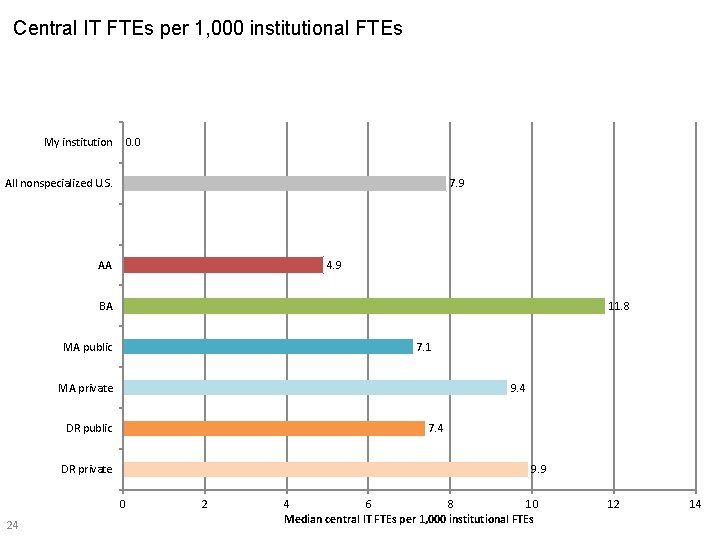
Central IT FTEs per 1, 000 institutional FTEs My institution 0. 0 7. 9 All nonspecialized U. S. AA 4. 9 BA 11. 8 MA public 7. 1 MA private 9. 4 DR public 7. 4 DR private 9. 9 0 24 2 4 6 8 10 Median central IT FTEs per 1, 000 institutional FTEs 12 14
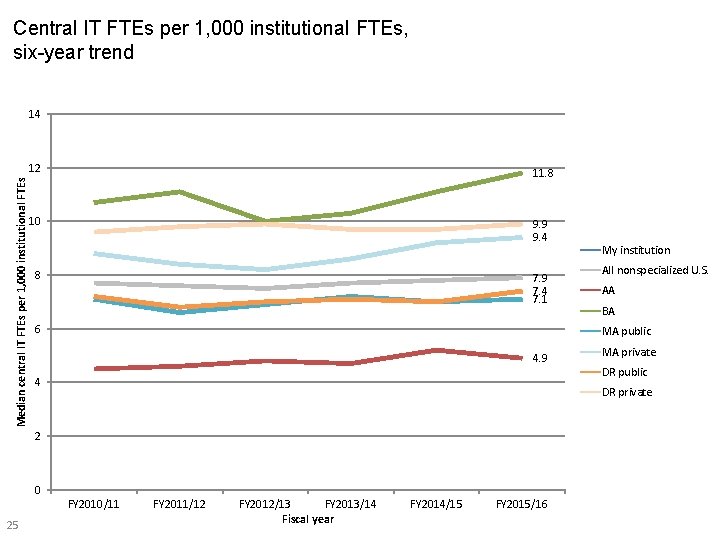
Central IT FTEs per 1, 000 institutional FTEs, six-year trend Median central IT FTEs per 1, 000 institutional FTEs 14 12 11. 8 10 9. 9 9. 4 8 7. 9 7. 4 7. 1 6 All nonspecialized U. S. AA BA MA public 4. 9 4 MA private DR public DR private 2 0 FY 2010/11 25 My institution FY 2011/12 FY 2012/13 FY 2013/14 Fiscal year FY 2014/15 FY 2015/16
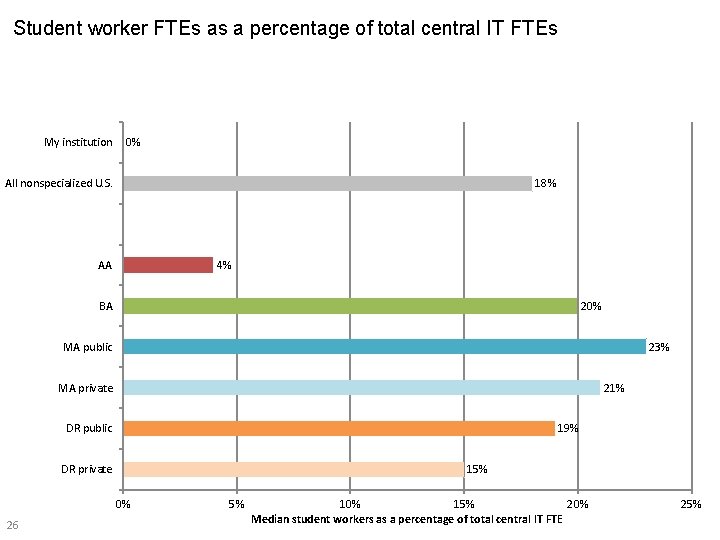
Student worker FTEs as a percentage of total central IT FTEs My institution 0% 18% All nonspecialized U. S. AA 4% BA 20% MA public 23% MA private 21% DR public 19% DR private 15% 0% 26 5% 10% 15% 20% Median student workers as a percentage of total central IT FTE 25%
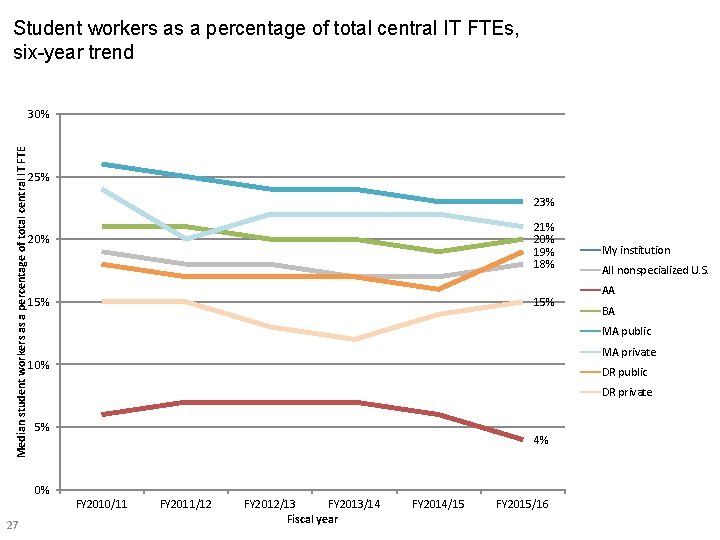
Student workers as a percentage of total central IT FTEs, six-year trend Median student workers as a percentage of total central IT FTE 30% 25% 23% 21% 20% 19% 18% 20% 15% All nonspecialized U. S. AA BA MA public MA private 10% DR public DR private 5% 4% 0% FY 2010/11 27 My institution FY 2011/12 FY 2012/13 FY 2013/14 Fiscal year FY 2014/15 FY 2015/16
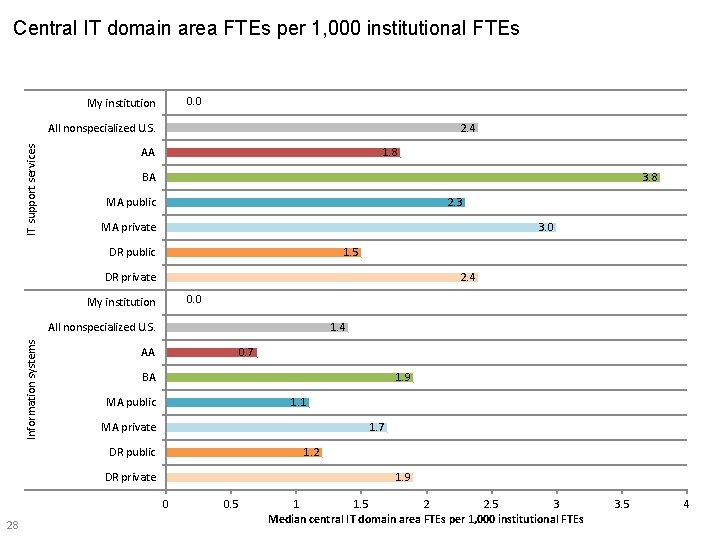
Central IT domain area FTEs per 1, 000 institutional FTEs 0. 0 My institution IT support services All nonspecialized U. S. 2. 4 1. 8 AA BA 3. 8 2. 3 MA public MA private 3. 0 1. 5 DR public DR private 2. 4 0. 0 My institution Information systems All nonspecialized U. S. 1. 4 AA 0. 7 BA 1. 9 1. 1 MA public MA private 1. 7 DR public 1. 2 DR private 1. 9 0 28 0. 5 1 1. 5 2 2. 5 3 Median central IT domain area FTEs per 1, 000 institutional FTEs 3. 5 4
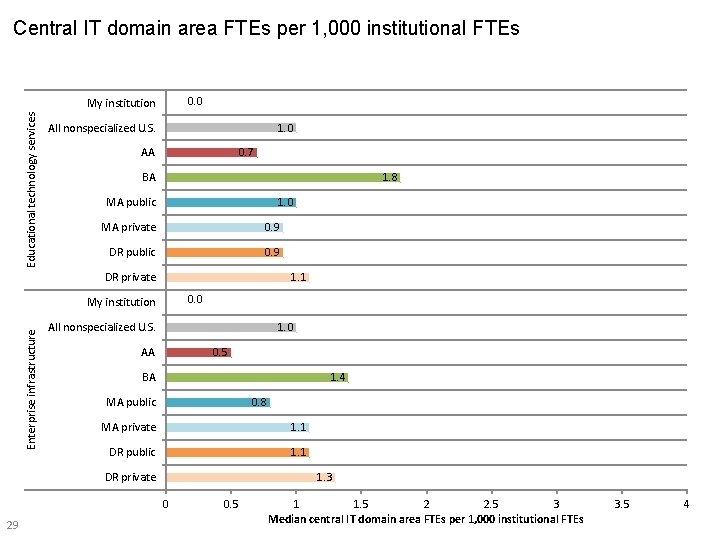
Central IT domain area FTEs per 1, 000 institutional FTEs 0. 0 Educational technology services My institution All nonspecialized U. S. 1. 0 0. 7 AA BA 1. 8 1. 0 MA public MA private 0. 9 DR public 0. 9 DR private 1. 1 0. 0 Enterprise infrastructure My institution All nonspecialized U. S. 1. 0 AA 0. 5 BA 1. 4 0. 8 MA public MA private 1. 1 DR public 1. 1 DR private 1. 3 0 29 0. 5 1 1. 5 2 2. 5 3 Median central IT domain area FTEs per 1, 000 institutional FTEs 3. 5 4
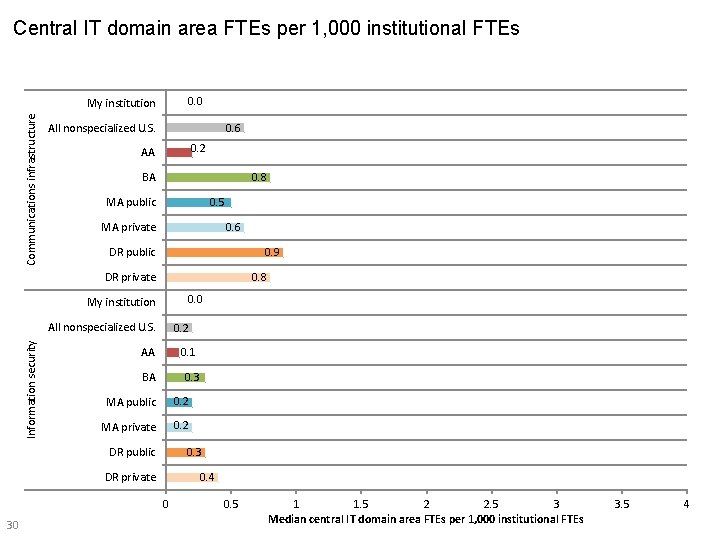
Central IT domain area FTEs per 1, 000 institutional FTEs 0. 0 Communications infrastructure My institution All nonspecialized U. S. 0. 6 0. 2 AA BA 0. 8 0. 5 MA public MA private 0. 6 0. 9 DR public DR private 0. 8 0. 0 My institution Information security All nonspecialized U. S. 0. 2 AA 0. 1 BA 0. 3 MA public 0. 2 MA private 0. 2 DR public 0. 3 DR private 0. 4 0 30 0. 5 1 1. 5 2 2. 5 3 Median central IT domain area FTEs per 1, 000 institutional FTEs 3. 5 4
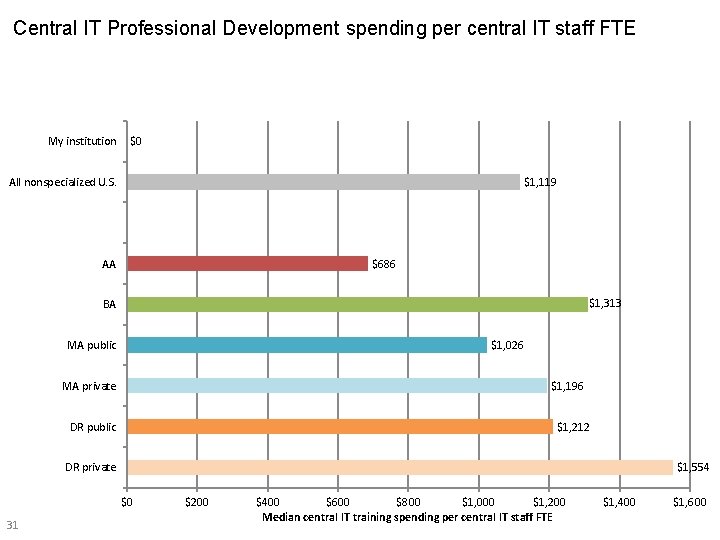
Central IT Professional Development spending per central IT staff FTE My institution $0 All nonspecialized U. S. $1, 119 AA $686 $1, 313 BA MA public $1, 026 MA private $1, 196 DR public $1, 212 DR private $1, 554 $0 31 $200 $400 $600 $800 $1, 000 $1, 200 Median central IT training spending per central IT staff FTE $1, 400 $1, 600
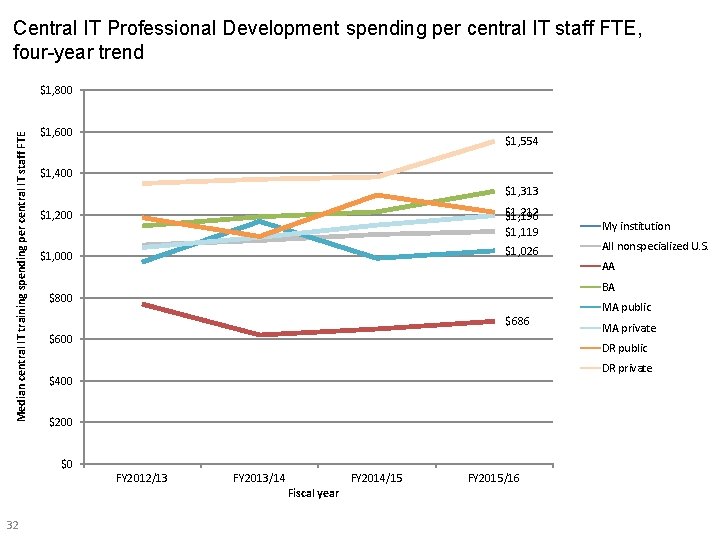
Central IT Professional Development spending per central IT staff FTE, four-year trend Median central IT training spending per central IT staff FTE $1, 800 $1, 600 $1, 554 $1, 400 $1, 313 $1, 200 $1, 212 $1, 196 $1, 119 $1, 000 $1, 026 All nonspecialized U. S. AA BA $800 $686 $600 MA public MA private DR public DR private $400 $200 $0 FY 2012/13 FY 2013/14 FY 2014/15 Fiscal year 32 My institution FY 2015/16
IT Services In a changing environment, it is important to know which services are in demand which are fading in importance; which should stay local and which can be outsourced; and which must have mobile deployment or be accessible via the cloud. It’s important to provide the right services in the most efficient manner. CDS has data that can help you understand how your peers are supporting users in mobile computing, online education, and cloud environments. CDS data on faculty support services can help you determine how to help your faculty optimize the use of technology in teaching and learning, and data (including vendor/product, deployment, and management strategy) on 50 different information systems can help you strategize for an enterprise architecture that is right for you. The metrics contained in this section can help you address the following questions: § What services should I provide? § How should I provide those services? § How can I evaluate service efficiency or effectiveness? 33
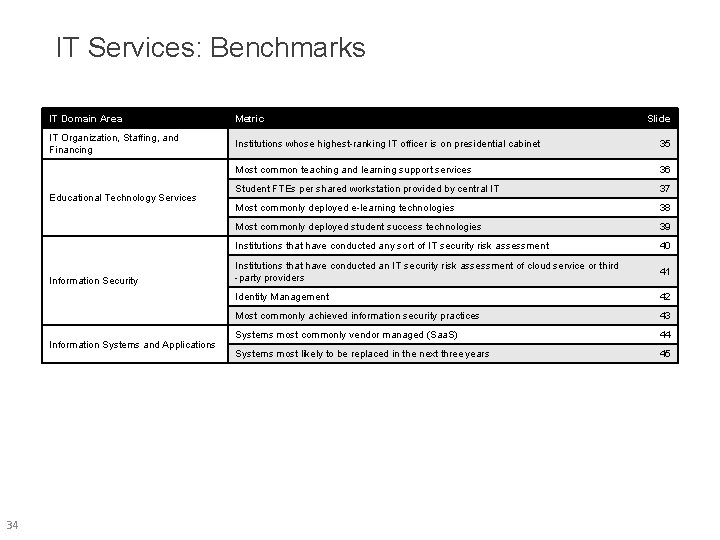
IT Services: Benchmarks IT Domain Area Metric IT Organization, Staffing, and Financing Institutions whose highest-ranking IT officer is on presidential cabinet 35 Most common teaching and learning support services 36 Student FTEs per shared workstation provided by central IT 37 Most commonly deployed e-learning technologies 38 Most commonly deployed student success technologies 39 Institutions that have conducted any sort of IT security risk assessment 40 Institutions that have conducted an IT security risk assessment of cloud service or third -party providers 41 Identity Management 42 Most commonly achieved information security practices 43 Systems most commonly vendor managed (Saa. S) 44 Systems most likely to be replaced in the next three years 45 Educational Technology Services Information Security Information Systems and Applications 34 Slide
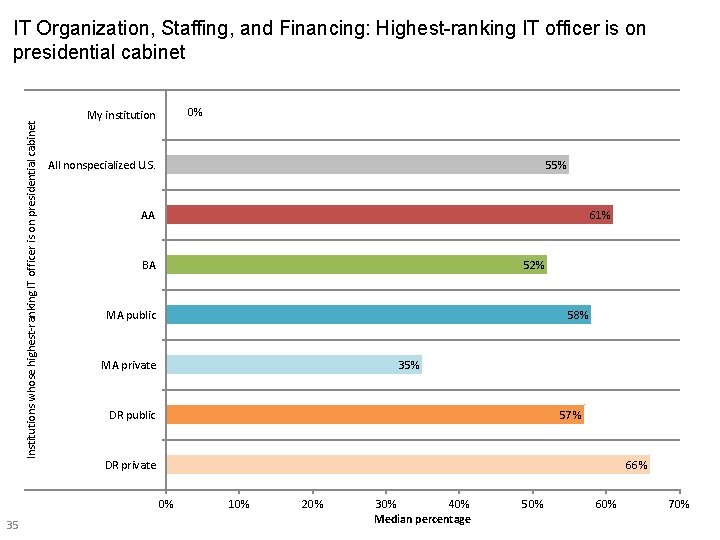
Institutions whose highest-ranking IT officer is on presidential cabinet IT Organization, Staffing, and Financing: Highest-ranking IT officer is on presidential cabinet 0% My institution All nonspecialized U. S. 55% 61% AA BA 52% MA public 58% MA private 35% DR public 57% DR private 66% 0% 35 10% 20% 30% 40% Median percentage 50% 60% 70%
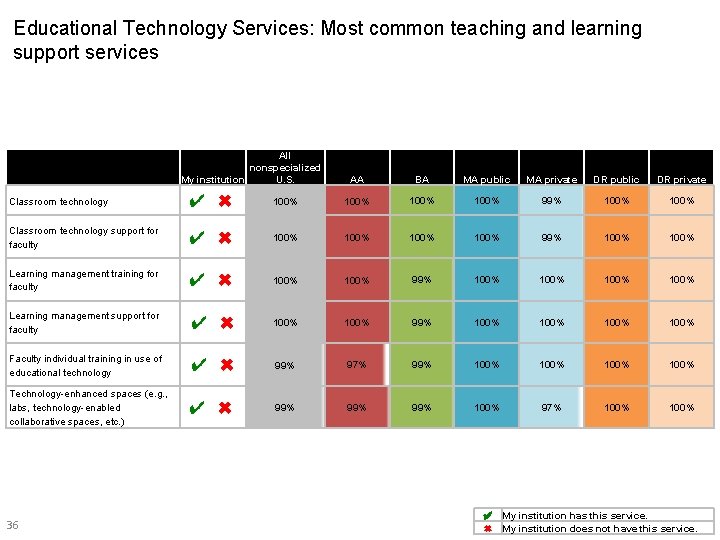
Educational Technology Services: Most common teaching and learning support services All nonspecialized My institution U. S. AA BA MA public MA private DR public DR private Classroom technology ✔ ✖ 100% 99% 100% Classroom technology support for faculty ✔ ✖ 100% 99% 100% Learning management training for faculty ✔ ✖ 100% 99% 100% Learning management support for faculty ✔ ✖ 100% 99% 100% Faculty individual training in use of educational technology ✔ ✖ 99% 97% 99% 100% Technology-enhanced spaces (e. g. , labs, technology-enabled collaborative spaces, etc. ) ✔ ✖ 99% 99% 100% 97% 100% 36 ✔ My institution has this service. ✖ My institution does not have this service.
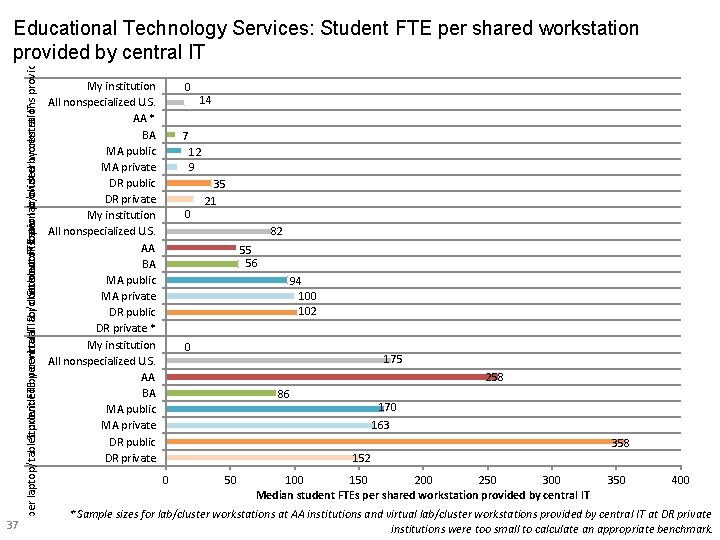
FTE per laptop/tablet provided central for checkout or loan Student FTEby per virtual. ITlab/cluster Student workstation FTE per lab/cluster provided by workstations central IT provided by central Educational Technology Services: Student FTE per shared workstation provided by central IT 37 My institution All nonspecialized U. S. AA * BA MA public MA private DR public DR private My institution All nonspecialized U. S. AA BA MA public MA private DR public DR private * My institution All nonspecialized U. S. AA BA MA public MA private DR public DR private 0 14 7 12 9 0 35 21 82 55 56 94 100 102 0 175 258 86 170 163 358 152 0 50 100 150 200 250 300 Median student FTEs per shared workstation provided by central IT 350 400 * Sample sizes for lab/cluster workstations at AA institutions and virtual lab/cluster workstations provided by central IT at DR private institutions were too small to calculate an appropriate benchmark.
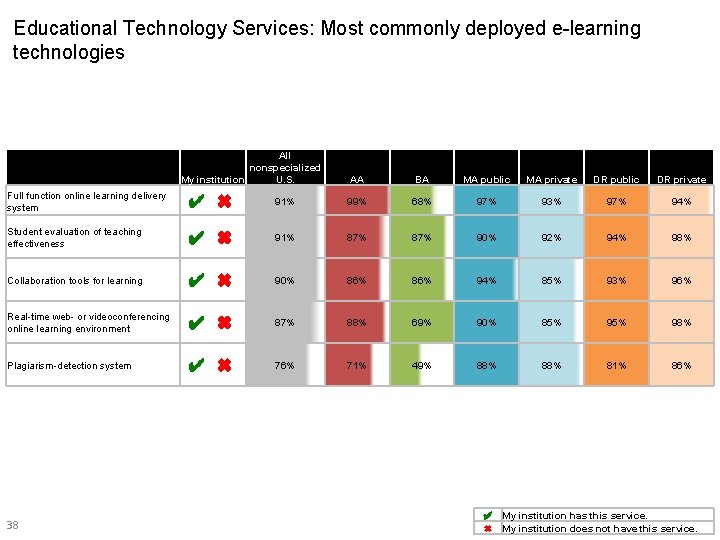
Educational Technology Services: Most commonly deployed e-learning technologies All nonspecialized My institution U. S. AA BA MA public MA private DR public DR private Full function online learning delivery system ✔ ✖ 91% 99% 68% 97% 93% 97% 94% Student evaluation of teaching effectiveness ✔ ✖ 91% 87% 90% 92% 94% 98% Collaboration tools for learning ✔ ✖ 90% 86% 94% 85% 93% 96% Real-time web- or videoconferencing online learning environment ✔ ✖ 87% 88% 69% 90% 85% 98% Plagiarism-detection system ✔ ✖ 76% 71% 49% 88% 81% 86% 38 ✔ My institution has this service. ✖ My institution does not have this service.
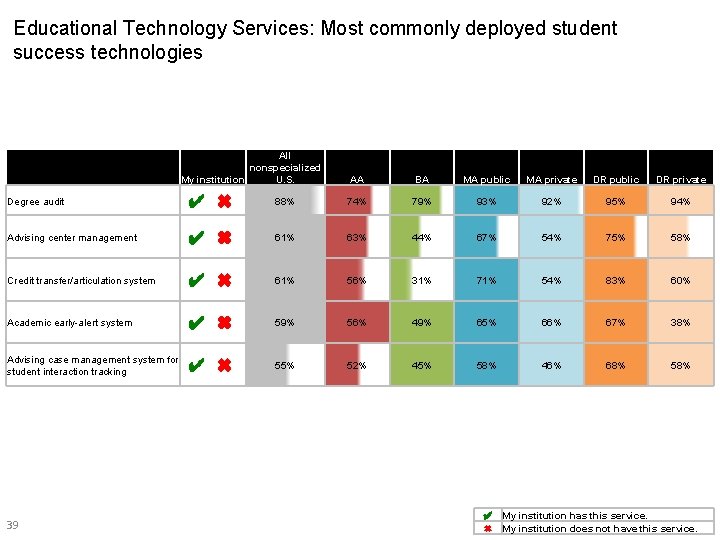
Educational Technology Services: Most commonly deployed student success technologies All nonspecialized My institution U. S. AA BA MA public MA private DR public DR private Degree audit ✔ ✖ 88% 74% 79% 93% 92% 95% 94% Advising center management ✔ ✖ 61% 63% 44% 67% 54% 75% 58% Credit transfer/articulation system ✔ ✖ 61% 56% 31% 71% 54% 83% 60% Academic early-alert system ✔ ✖ 59% 56% 49% 65% 66% 67% 38% Advising case management system for student interaction tracking ✔ ✖ 55% 52% 45% 58% 46% 68% 58% 39 ✔ My institution has this service. ✖ My institution does not have this service.
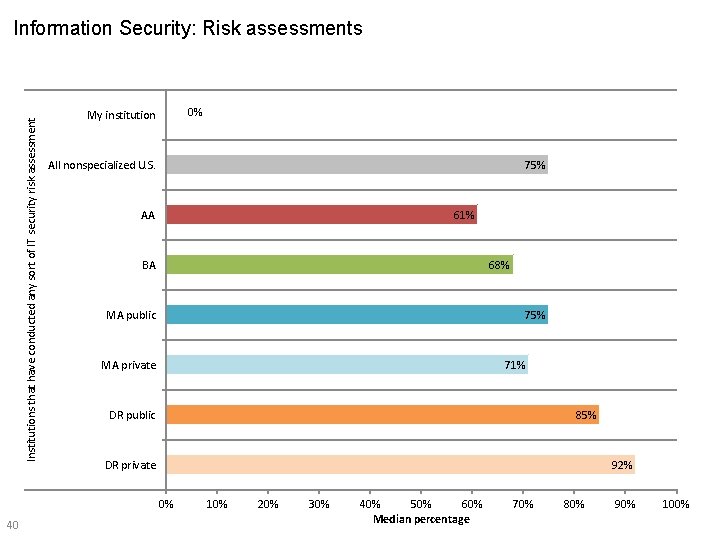
Institutions that have conducted any sort of IT security risk assessment Information Security: Risk assessments 0% My institution All nonspecialized U. S. 75% 61% AA BA 68% MA public 75% MA private 71% DR public 85% DR private 92% 0% 40 10% 20% 30% 40% 50% 60% Median percentage 70% 80% 90% 100%
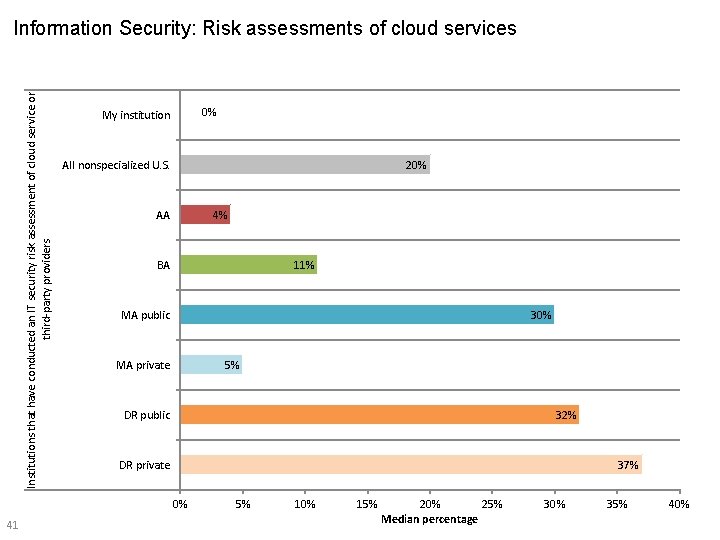
Institutions that have conducted an IT security risk assessment of cloud service or third-party providers Information Security: Risk assessments of cloud services 0% My institution All nonspecialized U. S. 20% 4% AA BA 11% MA public 30% MA private 5% DR public 32% DR private 37% 0% 41 5% 10% 15% 20% 25% Median percentage 30% 35% 40%
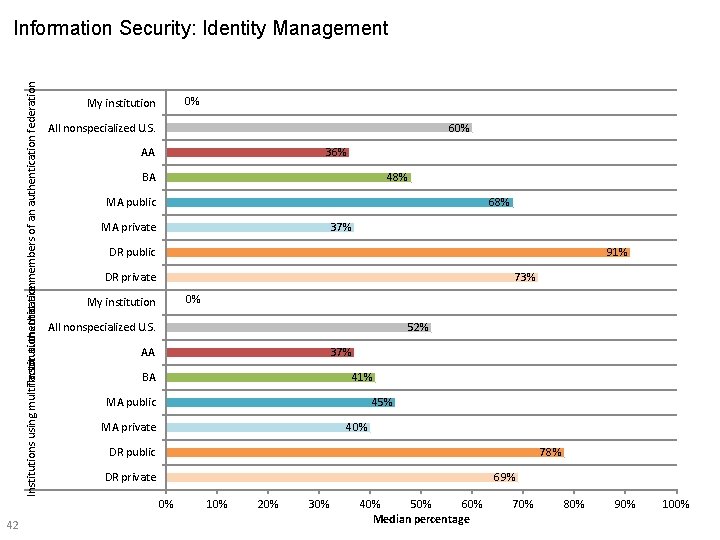
Institutions that are members of an authentication federation (e. g. In. Common Institutions using multifactor authentication Information Security: Identity Management 42 0% My institution All nonspecialized U. S. 60% 36% AA BA 48% 68% MA public MA private 37% 91% DR public DR private 73% 0% My institution All nonspecialized U. S. 52% AA 37% BA 41% 45% MA public MA private 40% DR public 78% DR private 69% 0% 10% 20% 30% 40% 50% 60% Median percentage 70% 80% 90% 100%
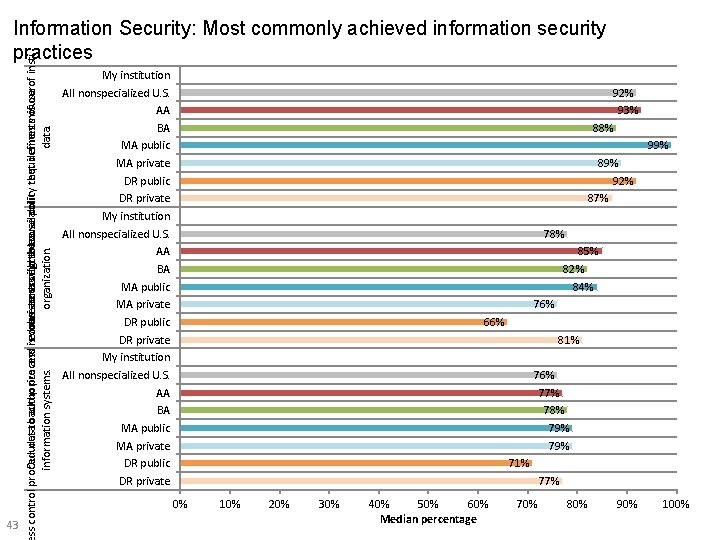
ss control procedures Our datatobackup authorize process and is revoke econsistent haveaccess an acceptable with rights thetoavailability use policy requirements that defines misuse of ourof institutional IT information systems. organization. data. Information Security: Most commonly achieved information security practices 43 My institution All nonspecialized U. S. AA BA MA public MA private DR public DR private 92% 93% 88% 99% 89% 92% 87% 78% 85% 82% 84% 76% 66% 81% 76% 77% 78% 79% 71% 77% 0% 10% 20% 30% 40% 50% 60% Median percentage 70% 80% 90% 100%
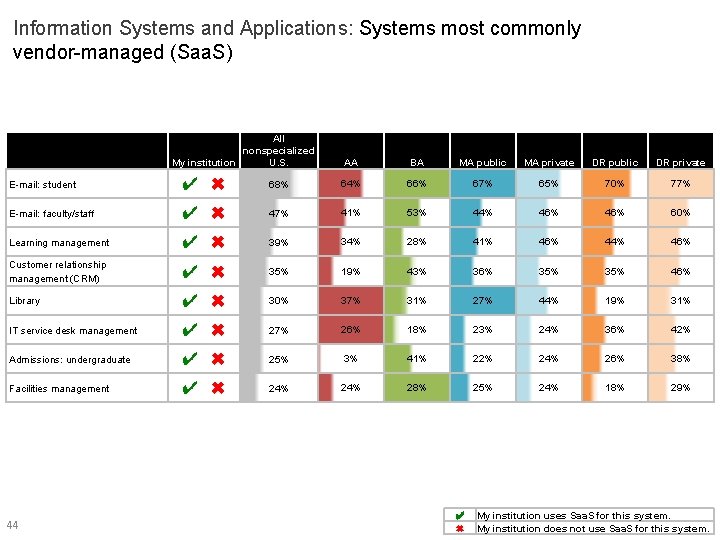
Information Systems and Applications: Systems most commonly vendor-managed (Saa. S) All nonspecialized My institution U. S. AA BA MA public MA private DR public DR private E-mail: student ✔ ✖ 68% 64% 66% 67% 65% 70% 77% E-mail: faculty/staff ✔ ✖ 47% 41% 53% 44% 46% 60% Learning management ✔ ✖ 39% 34% 28% 41% 46% 44% 46% Customer relationship management (CRM) ✔ ✖ 35% 19% 43% 36% 35% 46% Library ✔ ✖ 30% 37% 31% 27% 44% 19% 31% IT service desk management ✔ ✖ 27% 26% 18% 23% 24% 36% 42% Admissions: undergraduate ✔ ✖ 25% 3% 41% 22% 24% 26% 38% Facilities management ✔ ✖ 24% 28% 25% 24% 18% 29% 44 ✔ ✖ My institution uses Saa. S for this system. My institution does not use Saa. S for this system.
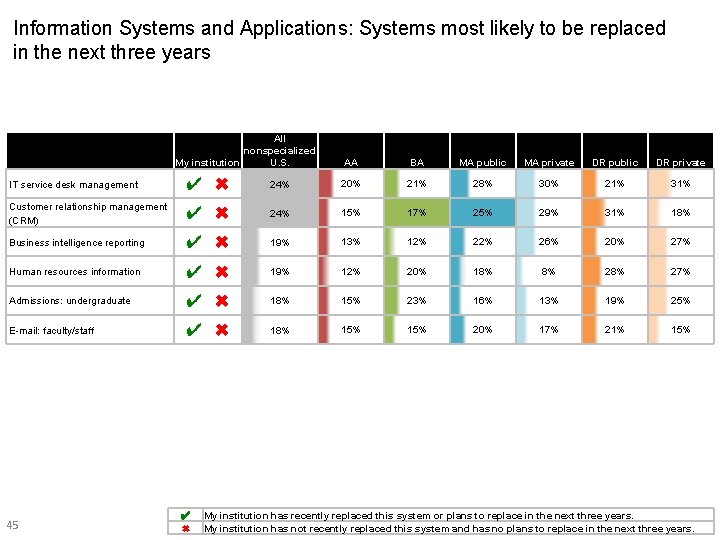
Information Systems and Applications: Systems most likely to be replaced in the next three years All nonspecialized My institution U. S. AA BA MA public MA private DR public DR private IT service desk management ✔ ✖ 24% 20% 21% 28% 30% 21% 31% Customer relationship management (CRM) ✔ ✖ 24% 15% 17% 25% 29% 31% 18% Business intelligence reporting ✔ ✖ 19% 13% 12% 26% 20% 27% Human resources information ✔ ✖ 19% 12% 20% 18% 8% 27% Admissions: undergraduate ✔ ✖ 18% 15% 23% 16% 13% 19% 25% E-mail: faculty/staff ✔ ✖ 18% 15% 20% 17% 21% 15% 45 ✔ ✖ My institution has recently replaced this system or plans to replace in the next three years. My institution has not recently replaced this system and has no plans to replace in the next three years.
Methodology 46
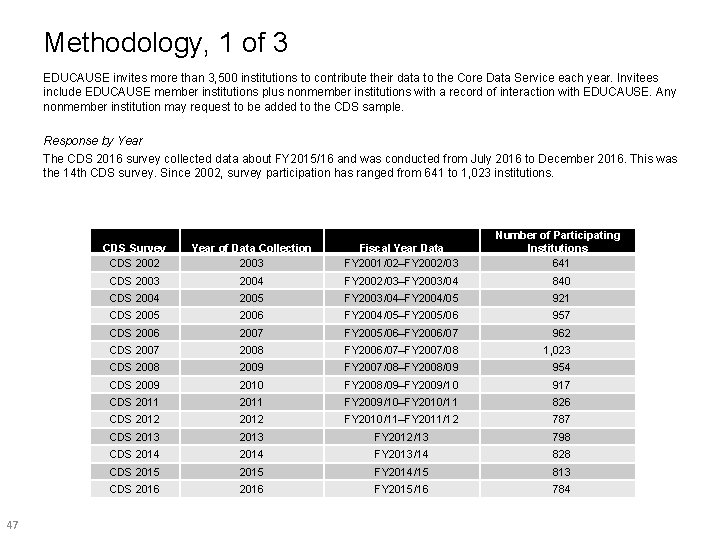
Methodology, 1 of 3 EDUCAUSE invites more than 3, 500 institutions to contribute their data to the Core Data Service each year. Invitees include EDUCAUSE member institutions plus nonmember institutions with a record of interaction with EDUCAUSE. Any nonmember institution may request to be added to the CDS sample. Response by Year The CDS 2016 survey collected data about FY 2015/16 and was conducted from July 2016 to December 2016. This was the 14 th CDS survey. Since 2002, survey participation has ranged from 641 to 1, 023 institutions. 47 CDS Survey CDS 2002 Year of Data Collection 2003 Fiscal Year Data FY 2001/02–FY 2002/03 Number of Participating Institutions 641 CDS 2003 2004 FY 2002/03–FY 2003/04 840 CDS 2004 2005 FY 2003/04–FY 2004/05 921 CDS 2005 2006 FY 2004/05–FY 2005/06 957 CDS 2006 2007 FY 2005/06–FY 2006/07 962 CDS 2007 2008 FY 2006/07–FY 2007/08 1, 023 CDS 2008 2009 FY 2007/08–FY 2008/09 954 CDS 2009 2010 FY 2008/09–FY 2009/10 917 CDS 2011 FY 2009/10–FY 2010/11 826 CDS 2012 FY 2010/11–FY 2011/12 787 CDS 2013 FY 2012/13 798 CDS 2014 FY 2013/14 828 CDS 2015 FY 2014/15 813 CDS 2016 FY 2015/16 784
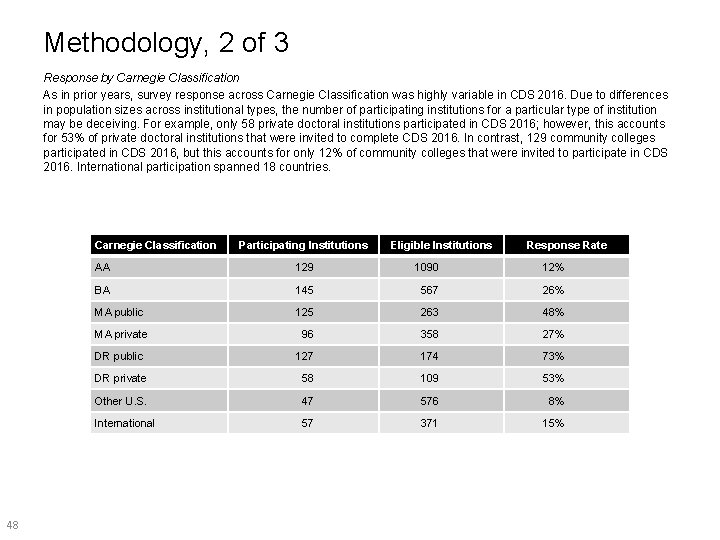
Methodology, 2 of 3 Response by Carnegie Classification As in prior years, survey response across Carnegie Classification was highly variable in CDS 2016. Due to differences in population sizes across institutional types, the number of participating institutions for a particular type of institution may be deceiving. For example, only 58 private doctoral institutions participated in CDS 2016; however, this accounts for 53% of private doctoral institutions that were invited to complete CDS 2016. In contrast, 129 community colleges participated in CDS 2016, but this accounts for only 12% of community colleges that were invited to participate in CDS 2016. International participation spanned 18 countries. Carnegie Classification 48 Participating Institutions Eligible Institutions Response Rate AA 129 1090 12% BA 145 567 26% MA public 125 263 48% MA private 96 358 27% DR public 127 174 73% DR private 58 109 53% Other U. S. 47 576 8% International 57 371 15%
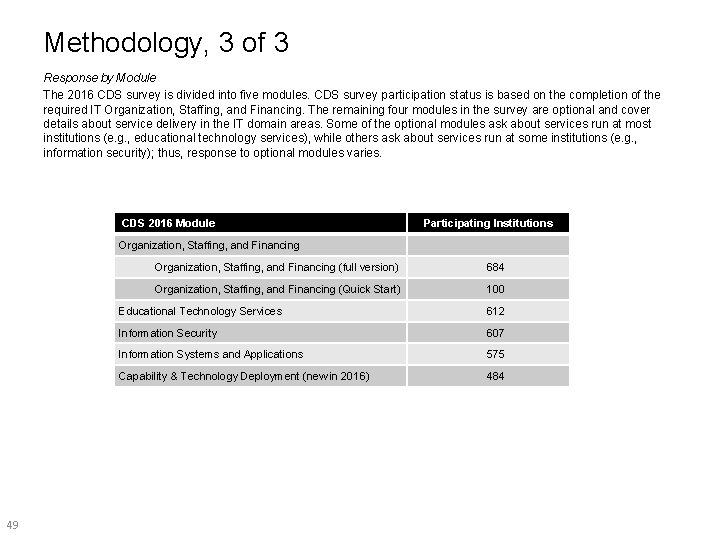
Methodology, 3 of 3 Response by Module The 2016 CDS survey is divided into five modules. CDS survey participation status is based on the completion of the required IT Organization, Staffing, and Financing. The remaining four modules in the survey are optional and cover details about service delivery in the IT domain areas. Some of the optional modules ask about services run at most institutions (e. g. , educational technology services), while others ask about services run at some institutions (e. g. , information security); thus, response to optional modules varies. CDS 2016 Module Participating Institutions Organization, Staffing, and Financing 49 Organization, Staffing, and Financing (full version) 684 Organization, Staffing, and Financing (Quick Start) 100 Educational Technology Services 612 Information Security 607 Information Systems and Applications 575 Capability & Technology Deployment (new in 2016) 484
- Slides: 49